

10 migliori strumenti per creare flussi di lavoro con trascinamento della selezione per il 2026

10 Elenco dei migliori strumenti per creare flussi di lavoro con trascinamento


Perché fidarsi dei nostri consigli sui software
Il nostro team testa e recensisce software dal 2012. In quanto project manager noi stessi, sappiamo quanto sia difficile — e importante — scegliere il software giusto.
Per questa guida, abbiamo valutato gli strumenti attraverso test pratici e ricerche indipendenti, assegnando un punteggio agli strumenti in base ai nostri criteri di selezione. Ci basiamo inoltre sulle competenze di leader di pensiero del settore e di professionisti attivi nella gestione dei progetti.
Le nostre recensioni riflettono il nostro giudizio editoriale umano, non un discorso di vendita.
Riepilogo dei migliori strumenti per creare flussi di lavoro con trascinamento
Questa tabella comparativa riassume i dettagli sui prezzi delle mie migliori selezioni di strumenti per creare flussi di lavoro con trascinamento, per aiutarti a trovare quello più adatto al tuo budget e alle esigenze della tua azienda.
| Tool | Best For | Trial Info | Price | ||
|---|---|---|---|---|---|
| 1 | Ideale per flussi di onboarding clienti sicuri | Piano gratuito + demo gratuita disponibili | Da $99/mese | Website | |
| 2 | Ideale per collegare app con automazioni avanzate | Piano gratuito + demo gratuita disponibile | Da $9/mese (fatturazione annuale) | Website | |
| 3 | Ideale per la personalizzazione di workflow open-source | Prova gratuita disponibile | A partire da $20/mese (fatturazione annuale) | Website | |
| 4 | Ideale per la collaborazione visiva sui diagrammi di flusso | Piano gratuito disponibile | Da $5/utente/mese (fatturato annualmente) | Website | |
| 5 | Ideale per progettare flussi conversazionali | Prova gratuita disponibile | Prezzo su richiesta | Website | |
| 6 | Ideale per integrare moduli con automazione di workflow | Prova gratuita di 14 giorni + demo gratuita disponibile | Da $83/mese (fatturato annualmente) | Website | |
| 7 | Ideale per automatizzare processi aziendali multi-fase | Piano gratuito + prova gratuita di 7 giorni + demo gratuita disponibile | Da $22/utente/mese (fatturato annualmente) | Website | |
| 8 | Ideale per sviluppatori che creano app guidate dai flussi di lavoro | Piano gratuito disponibile (uso non commerciale) | Da $20/utente/mese (fatturato annualmente) | Website | |
| 9 | Ideale per la prototipazione rapida di idee di workflow | Disponibile piano gratuito | Da $30/mese (fatturati annualmente) | Website | |
| 10 | Ideale per la flessibilità di implementazione on-premise | Not available | Prezzo su richiesta | Website |

Recensioni dei migliori strumenti per creare flussi di lavoro con trascinamento
Di seguito trovi i miei riepiloghi dettagliati degli strumenti per creare flussi di lavoro con trascinamento inclusi nel mio elenco. Le mie recensioni offrono una panoramica approfondita delle funzionalità, dei casi d’uso più indicati e delle integrazioni di ogni piattaforma, per aiutarti a trovare quella più adatta al tuo team.

Moxo
Ideale per flussi di onboarding clienti sicuri
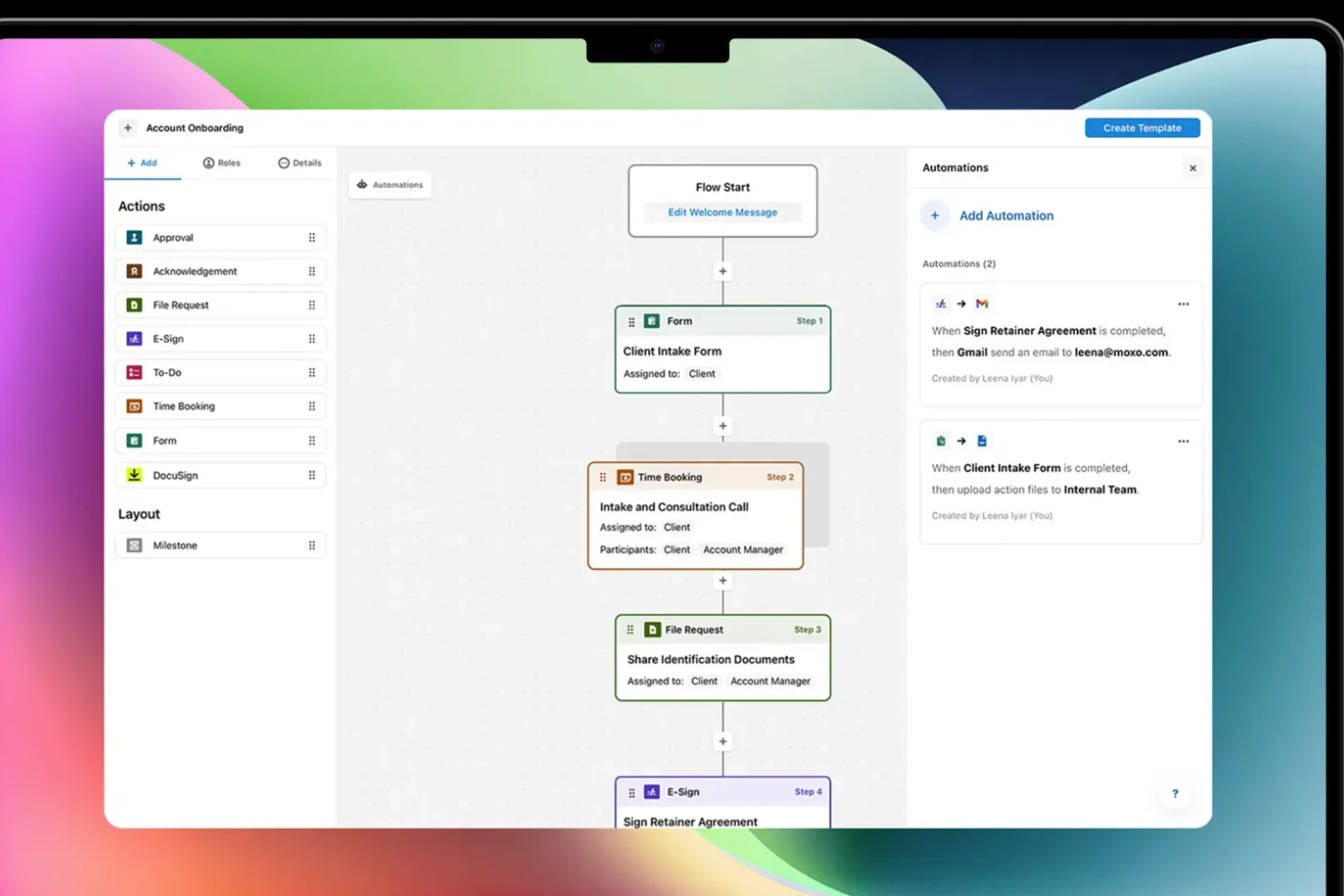
Moxo è un generatore di workflow drag-and-drop che ti permette di progettare e automatizzare processi rivolti ai clienti—combinando approvazioni, richieste di file, firme elettroniche, moduli e logica condizionale in flussi strutturati e tracciabili.
Per chi è più indicato Moxo?
Moxo è particolarmente adatto a team di servizi professionali—come servizi finanziari, legali e consulenze—che gestiscono flussi di lavoro ricorrenti e a più fasi per i clienti.
Perché ho scelto Moxo
Ho incluso Moxo tra le mie migliori scelte perché il suo generatore di flussi drag-and-drop è pensato appositamente per l'onboarding rivolto ai clienti, non solo per l'instradamento delle attività interne. Quando costruisco un flusso di onboarding clienti in Moxo, posso inserire passaggi di verifica KYC, richieste di documenti sicure e azioni di presa visione direttamente nel canvas, con diramazioni condizionali che indirizzano i clienti su percorsi diversi in base alle loro risposte. Trovo particolarmente utile il controllo degli accessi basato sui ruoli, che limita ogni partecipante solo alle fasi di sua competenza, così un nuovo cliente non vede mai le fasi di revisione interna né i dati di altri clienti. Inoltre, Moxo è certificato SOC 2 Type II, conforme al GDPR e cifra tutti i dati sia in transito che a riposo, un aspetto fondamentale quando i tuoi flussi di onboarding implicano documenti finanziari o legali sensibili.
Funzionalità principali di Moxo
- Libreria di template dei workflow: Accedi e distribuisci template di flussi di onboarding preimpostati, oppure salva i tuoi flussi personalizzati come modelli riutilizzabili per tipologie di clienti ricorrenti.
- Timer SLA e escalation: Imposta limiti di tempo su singoli passaggi del workflow e attiva escalation automatiche quando un cliente o un revisore interno manca una scadenza.
- Dashboard di monitoraggio avanzamento: Monitora i tassi di completamento, i ritardi a livello di step e i colli di bottiglia di tutti i flussi di onboarding attivi da una singola vista di report.
- Portale clienti con brand: Offri i flussi di onboarding tramite un portale marchiato con il tuo logo e dominio, mantenendo l'esperienza coerente con il tuo marchio.
Integrazioni di Moxo
Moxo offre integrazioni di sincronizzazione dati dirette con Salesforce, HubSpot, Microsoft Dynamics, Zoho, Wealthbox, Redtail, Filevine, Global Relay, Smarsh, Xero e Follow Up Boss, e supporta ulteriori integrazioni con strumenti come DocuSign, Jira, Slack, Stripe, Zendesk, Google Drive, Dropbox, Box, OneDrive, monday.com, QuickBooks e Notion. Si collega anche con Zapier e mette a disposizione una REST API e webhook per integrazioni personalizzate.
Pros and Cons
Pros:
- Firme elettroniche integrate nei passaggi del workflow
- Branding white-label per i portali clienti
- Chat, video e file in un unico flusso
Cons:
- Nessun timer attività integrato per il monitoraggio del tempo
- Flessibilità limitata per flussi di lavoro ciclici

Make
Ideale per collegare app con automazioni avanzate

Se hai bisogno di automatizzare flussi di lavoro complessi tra più applicazioni, Make offre un builder visuale che connette centinaia di strumenti con logiche avanzate. Team IT, responsabili operativi e product manager possono progettare automazioni multi-step utilizzando una tela drag-and-drop, ramificazioni e trigger personalizzati. Make si distingue per gli utenti che vogliono creare flussi di lavoro intricati e condizionali che vanno ben oltre la semplice automazione di task.
Perché ho scelto Make
A differenza dei tool di automazione basilari, Make ti mette a disposizione un builder visuale drag-and-drop, progettato per automazioni avanzate tra più app. Ho scelto Make perché permette di mappare visivamente flussi di lavoro complessi con logica ramificata, trigger personalizzati e percorsi condizionali. La piattaforma consente di creare automazioni in grado di gestire trasformazioni di dati e gestione degli errori all'interno della stessa interfaccia visuale. Questo lo rende una scelta solida per i team che hanno bisogno di connettere diversi sistemi e automatizzare processi sofisticati senza scrivere codice.
Funzionalità principali di Make
Altre funzionalità che rendono Make utile per l'automazione dei flussi di lavoro includono:
- Versioni degli scenari: Salva e ripristina versioni precedenti dei tuoi scenari di automazione.
- Pianificazione integrata: Imposta i flussi di lavoro affinché vengano eseguiti in momenti o intervalli specifici.
- Strumenti di gestione degli errori: Configura risposte personalizzate per passi falliti o problemi di dati.
- Moduli Data Store: Archivia e recupera dati all'interno dei flussi di lavoro senza affidarti a database esterni.
Integrazioni di Make
Le integrazioni includono Google Sheets, Slack, Gmail, Airtable, Trello, Dropbox, HubSpot, Shopify, Facebook Pages e altre ancora.
Pros and Cons
Pros:
- Il builder visuale permette flussi di lavoro multi-step e ramificati
- Supporta la pianificazione delle automazioni al minuto o all'ora
- La versione degli scenari consente di ripristinare stati precedenti
Cons:
- Nessun modulo AI o machine learning integrato
- I messaggi di errore possono essere difficili da interpretare

n8n
Ideale per la personalizzazione di workflow open-source
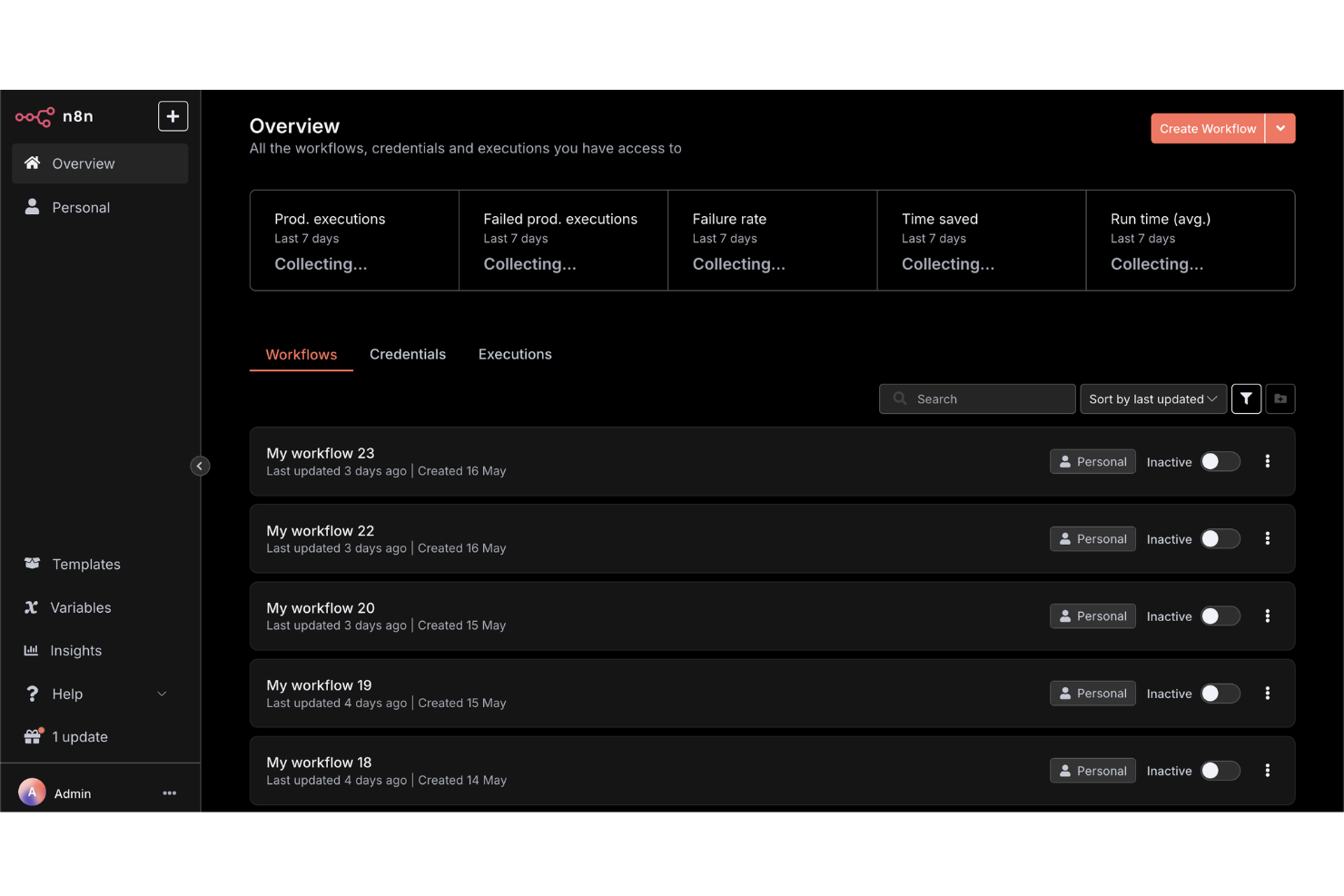
Per i team che desiderano il pieno controllo sulle proprie automazioni di workflow, n8n offre una piattaforma open-source con opzioni di personalizzazione avanzate. Sviluppatori, team IT e responsabili delle operazioni tecniche possono creare, autogestire ed estendere workflow utilizzando un editor visuale e nodi di codice personalizzato. n8n è la scelta ideale se hai bisogno di adattare integrazioni o logiche oltre ciò che consentono la maggior parte dei builder di workflow drag-and-drop.
Perché ho scelto n8n
Ciò che distingue n8n è il suo approccio open-source all’automazione dei workflow, che offre piena flessibilità per personalizzare e autogestire le tue automazioni. Ho scelto n8n perché ti permette di usare un builder drag-and-drop insieme a nodi di codice personalizzati, così puoi estendere i workflow ben oltre i modelli standard. La piattaforma supporta la creazione di integrazioni e logiche personalizzate, rendendola ideale per team con esigenze particolari o necessità di un controllo rigoroso sui dati. Se desideri personalizzare ogni aspetto del tuo builder di workflow, n8n offre profondità e controllo che molti altri strumenti non hanno.
Caratteristiche principali di n8n
Altre funzionalità che rendono n8n interessante per l’automazione dei workflow includono:
- Gestione delle credenziali integrata: Conserva e gestisci in modo sicuro i dettagli di autenticazione per i servizi connessi.
- Supporto per Webhook: Attiva i workflow da app esterne o eventi utilizzando webhook personalizzati.
- Log di esecuzione: Accedi a log dettagliati per ogni esecuzione di workflow per facilitare la risoluzione dei problemi.
- Variabili d’ambiente: Configura i workflow per utilizzare impostazioni diverse su sviluppo, test e produzione.
Integrazioni di n8n
Le integrazioni includono Google Sheets, Gmail, Slack, OpenAI, Airtable, Notion, Trello, HubSpot, Discord e molte altre.
Pros and Cons
Pros:
- Opzione self-hosting che garantisce la privacy rigorosa dei dati
- Creazione di nodi personalizzati con JavaScript o TypeScript
- Esecuzioni illimitate di workflow nei piani self-hosted
Cons:
- Manca di template integrati per workflow comuni
- Aggiornamenti manuali richiesti per installazioni self-hosted

Creately
Ideale per la collaborazione visiva sui diagrammi di flusso
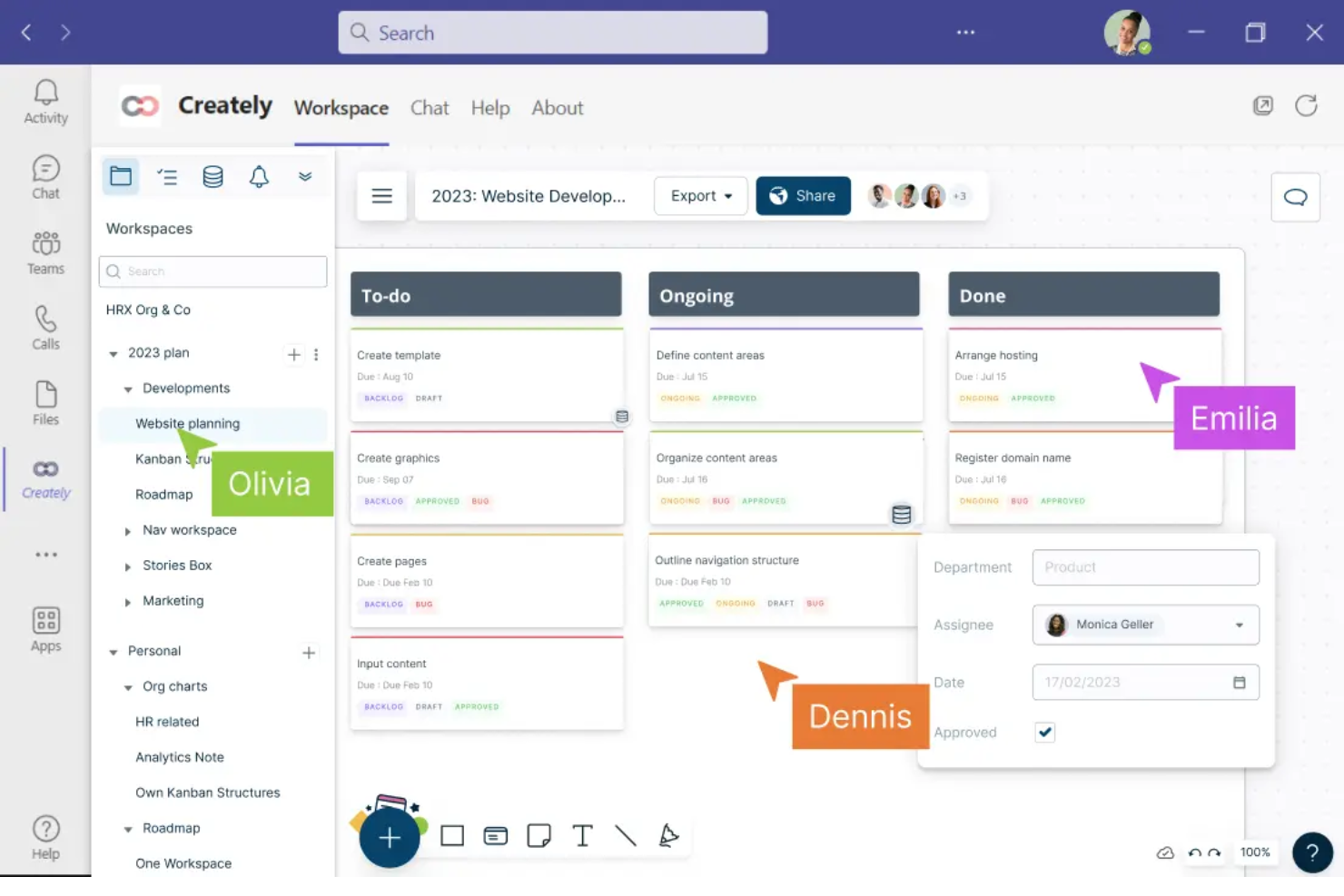
Creately offre uno spazio di lavoro visivo progettato per i team che devono collaborare in tempo reale su diagrammi di flusso. È una soluzione ideale per project manager, analisti aziendali e team trasversali che desiderano mappare, discutere e perfezionare i processi insieme. Con funzionalità come la modifica multi-utente e i commenti contestuali, Creately aiuta i team a trasformare flussi di lavoro complessi in diagrammi chiari e azionabili.
Perché ho scelto Creately
Per i team che devono collaborare visivamente sui diagrammi di flusso, Creately porta la co-modifica e la discussione in tempo reale in uno spazio di lavoro unico. Ho scelto Creately perché permette a più utenti di costruire, modificare e commentare insieme i diagrammi, una caratteristica essenziale per la mappatura di processi trasversali. I commenti contestuali e la chat integrata nei diagrammi aiutano i team a risolvere domande e iterare sui flussi di lavoro senza cambiare piattaforma. Questo approccio collaborativo fa di Creately una scelta eccellente per chi mette il lavoro di squadra al centro del proprio strumento di workflow.
Funzionalità principali di Creately
Oltre agli strumenti collaborativi per i diagrammi, Creately offre anche diverse altre funzionalità degne di nota:
- Ampia libreria di forme e icone: Scegli tra migliaia di forme e icone per rappresentare diversi elementi del flusso di lavoro.
- Collegamento dati: Associa set di dati o tabelle direttamente agli oggetti del flusso di lavoro per un contesto più ricco.
- Modalità presentazione: Presenta i diagrammi di flusso direttamente dalla piattaforma senza necessità di esportarli.
- Cronologia delle revisioni: Tieni traccia delle modifiche e ripristina versioni precedenti dei diagrammi secondo necessità.
Integrazioni di Creately
Le integrazioni includono Google Drive, Slack, Confluence e Microsoft Teams.
Pros and Cons
Pros:
- La modifica multi-utente in tempo reale supporta il lavoro di squadra
- Il collegamento dati integra i diagrammi con tabelle in tempo reale
- La modalità presentazione consente walkthrough dei flussi direttamente nell'app
Cons:
- Le opzioni di esportazione sono limitate nei piani inferiori
- I diagrammi di grandi dimensioni possono subire occasionalmente rallentamenti
Ideale per progettare flussi conversazionali
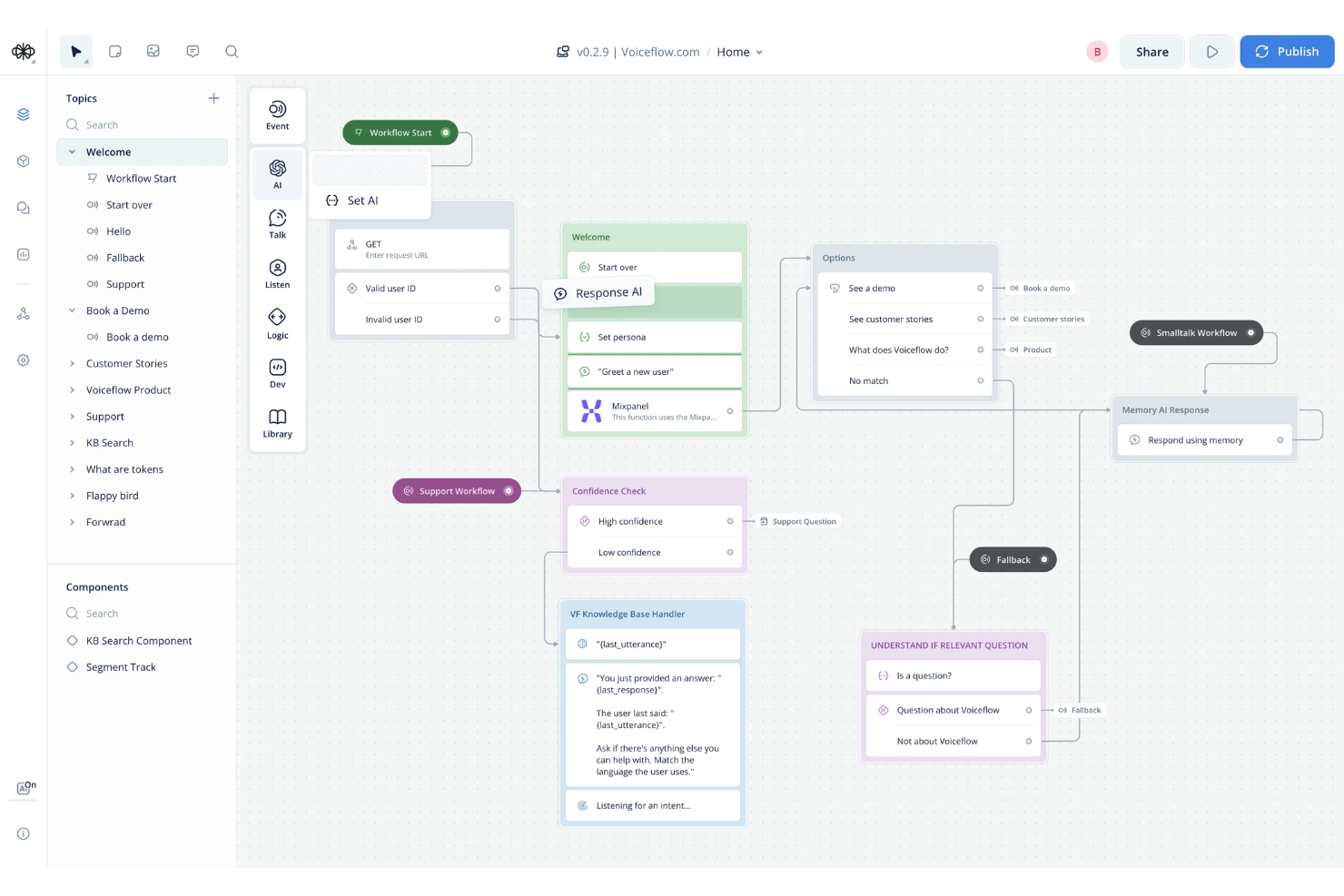
Voiceflow si distingue per i team che progettano flussi conversazionali per chatbot, assistenti vocali e agenti AI. È pensato per product manager, conversation designer e sviluppatori che devono mappare visivamente dialoghi complessi e multi-turno. Con Voiceflow, puoi prototipare, testare e iterare i flussi conversazionali senza scrivere codice, facilitando l'allineamento tra stakeholder tecnici e non tecnici.
Perché ho scelto Voiceflow
Per i team focalizzati sulla creazione di esperienze conversazionali, Voiceflow offre un builder di workflow specializzato con funzionalità drag-and-drop, pensato appositamente per la progettazione di dialoghi. L'ho scelto perché consente di mappare visivamente la logica conversazionale, i percorsi ramificati e le variabili di contesto in modo perfetto per chatbot e assistenti vocali. La piattaforma supporta componenti riutilizzabili e flussi modulari, così puoi gestire conversazioni complesse e multi-turno senza perdersi nel codice. Questo rende Voiceflow una scelta solida per chiunque progetti, prototipi o migliori flussi conversazionali.
Funzionalità principali di Voiceflow
Altre funzionalità che rendono Voiceflow utile per la progettazione di workflow includono:
- Blocchi AI Step: Aggiungi risposte AI generative e logica direttamente nei tuoi flussi conversazionali.
- Cronologia delle versioni: Tieni traccia delle modifiche e ripristina versioni precedenti dei tuoi progetti di workflow.
- Modalità di test utente: Simula conversazioni e raccogli feedback prima della messa in produzione.
- Strumenti di collaborazione per il team: Invita i membri del team a co-progettare, commentare e revisionare i flussi in tempo reale.
Integrazioni di Voiceflow
Le integrazioni includono Airtable, Discord, HubSpot, Linear, Manychat, Notion, SendGrid, Shopify, WhatsApp, Zendesk e altre.
Pros and Cons
Pros:
- Blocco AI integrato per risposte generative
- Modalità di test utente per la validazione pre-lancio
- La cronologia delle versioni tiene traccia di tutte le modifiche dei workflow
Cons:
- Opzioni di esportazione limitate per utenti non tecnici
- Rallentamenti occasionali con progetti grandi e complessi

Ideale per integrare moduli con automazione di workflow
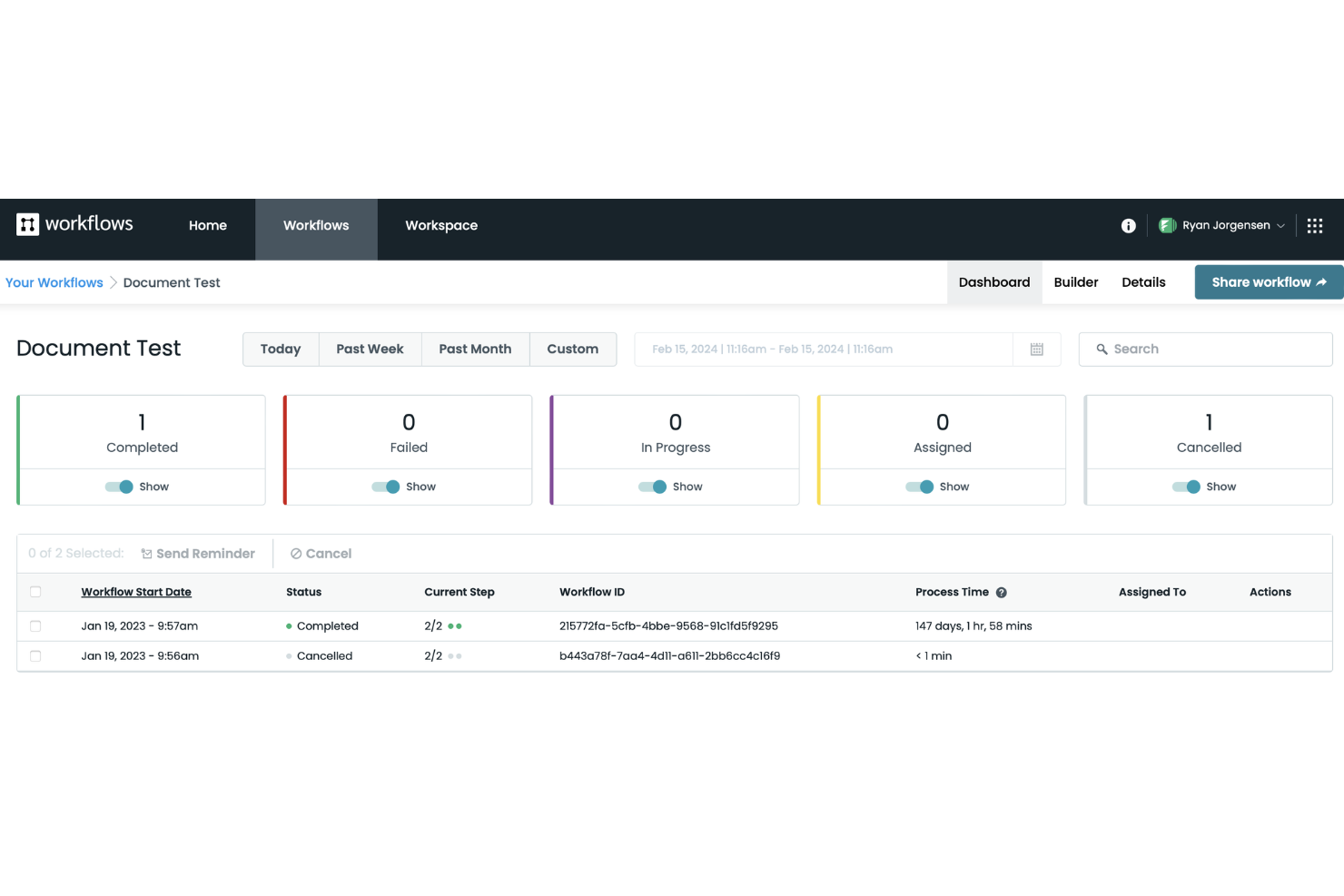
Formstack si distingue tra i team che hanno bisogno di collegare i moduli direttamente a flussi di lavoro automatizzati senza necessità di codice. È particolarmente utile per i team operativi, HR e IT che vogliono raccogliere dati e avviare processi multi-step da una singola compilazione di modulo. Se desideri automatizzare approvazioni, onboarding o richieste di servizio con un builder drag-and-drop, Formstack è progettato proprio per questo tipo di integrazione.
Perché ho scelto Formstack
Formstack ha attirato la mia attenzione perché connette le compilazioni dei moduli direttamente all'automazione dei flussi di lavoro, una caratteristica rara tra i builder drag-and-drop. La piattaforma permette di costruire moduli personalizzati e di mappare ogni campo del modulo ai passaggi del flusso di lavoro, così puoi attivare automaticamente approvazioni, notifiche o la generazione di documenti. Mi piace poter progettare visivamente sia il modulo che il workflow in un unico posto, facilitando la gestione di processi complessi senza cambiare strumento. Questo approccio è particolarmente utile per i team che devono automatizzare compiti multi-step partendo da un singolo inserimento dati.
Funzionalità principali di Formstack
Altre funzionalità che rendono Formstack utile per l’automazione dei flussi di lavoro includono:
- Logica condizionale: Crea flussi di lavoro che si ramificano in base alle risposte degli utenti o agli input dei dati.
- Generazione dei documenti: Crea automaticamente PDF o altri documenti dai dati del modulo all'interno di un workflow.
- Raccolta firme elettroniche: Raccogli firme legalmente vincolanti come parte dei processi automatizzati.
- Permessi basati sui ruoli: Controlla l’accesso ai passaggi del workflow e ai dati in base ai ruoli degli utenti.
Integrazioni Formstack
Le integrazioni includono Salesforce, Amazon S3, PayPal, Stripe, HubSpot, Airtable, Microsoft e altro.
Pros and Cons
Pros:
- Raccolta nativa di firme elettroniche nei workflow
- Generazione automatica di documenti dai dati del modulo
- Modelli predefiniti per i processi aziendali più comuni
Cons:
- Versionamento dei workflow non disponibile
- Nessun chatbot integrato o moduli conversazionali

Yoroflow
Ideale per automatizzare processi aziendali multi-fase
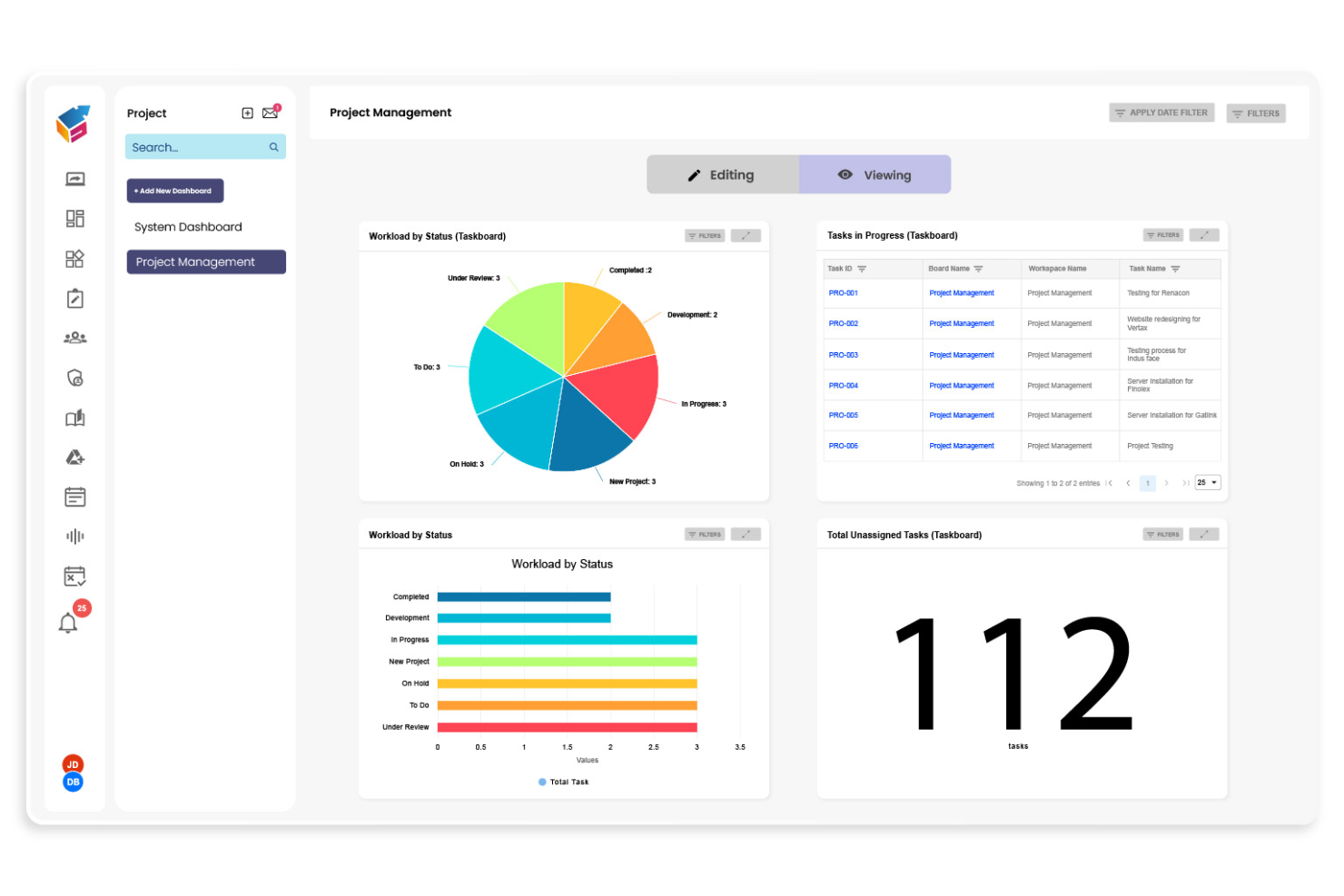
Yoroflow offre ai team un modo per automatizzare processi aziendali complessi e a più fasi senza scrivere codice. È particolarmente indicato per responsabili operativi, project manager e team IT che devono coordinare attività tra reparti o sistemi diversi. Se stai cercando di costruire flussi di lavoro che gestiscono approvazioni, notifiche e integrazioni tutto in un unico posto, Yoroflow è progettato per garantire questo livello di controllo.
Perché ho scelto Yoroflow
Ho scelto Yoroflow perché è pensato per gestire processi aziendali a più fasi che richiedono più della semplice automazione di attività basilari. Il generatore di flussi drag and drop della piattaforma consente di mappare sequenze complesse, inclusa la logica condizionale e i rami di attività paralleli, tutto tramite un'interfaccia visuale. Apprezzo il fatto che sia possibile configurare approvazioni e notifiche automatiche all'interno dello stesso flusso di lavoro, accessorio essenziale per i team che gestiscono processi stratificati. L'attenzione di Yoroflow nell'orchestrare più passaggi in un unico flusso lo rende una scelta solida per le organizzazioni con esigenze operative articolate.
Funzionalità principali di Yoroflow
Altre funzionalità di Yoroflow che si distinguono per la creazione di flussi di lavoro includono:
- Progettazione moduli: Crea moduli personalizzati per raccogliere dati e attivare flussi di lavoro direttamente con l'invio degli utenti.
- Gestione documentale: Archivia, organizza e allega documenti alle fasi del flusso per un facile riferimento e per la conformità.
- Controllo accessi basato sui ruoli: Assegna permessi a utenti o gruppi per decidere chi può visualizzare o modificare specifici flussi di lavoro.
- Dashboard di analisi: Monitora le prestazioni dei flussi e traccia metriche chiave con strumenti di reportistica integrati.
Integrazioni Yoroflow
Le integrazioni native non sono attualmente elencate.
Pros and Cons
Pros:
- Flussi di lavoro multi-fase con logica condizionale
- Gestione e archiviazione documentale integrata
- Template predefiniti per i processi aziendali comuni
Cons:
- L'esperienza utente della bacheca progetti può rallentare la navigazione su larga scala
- Le opzioni di branding personalizzato sono limitate

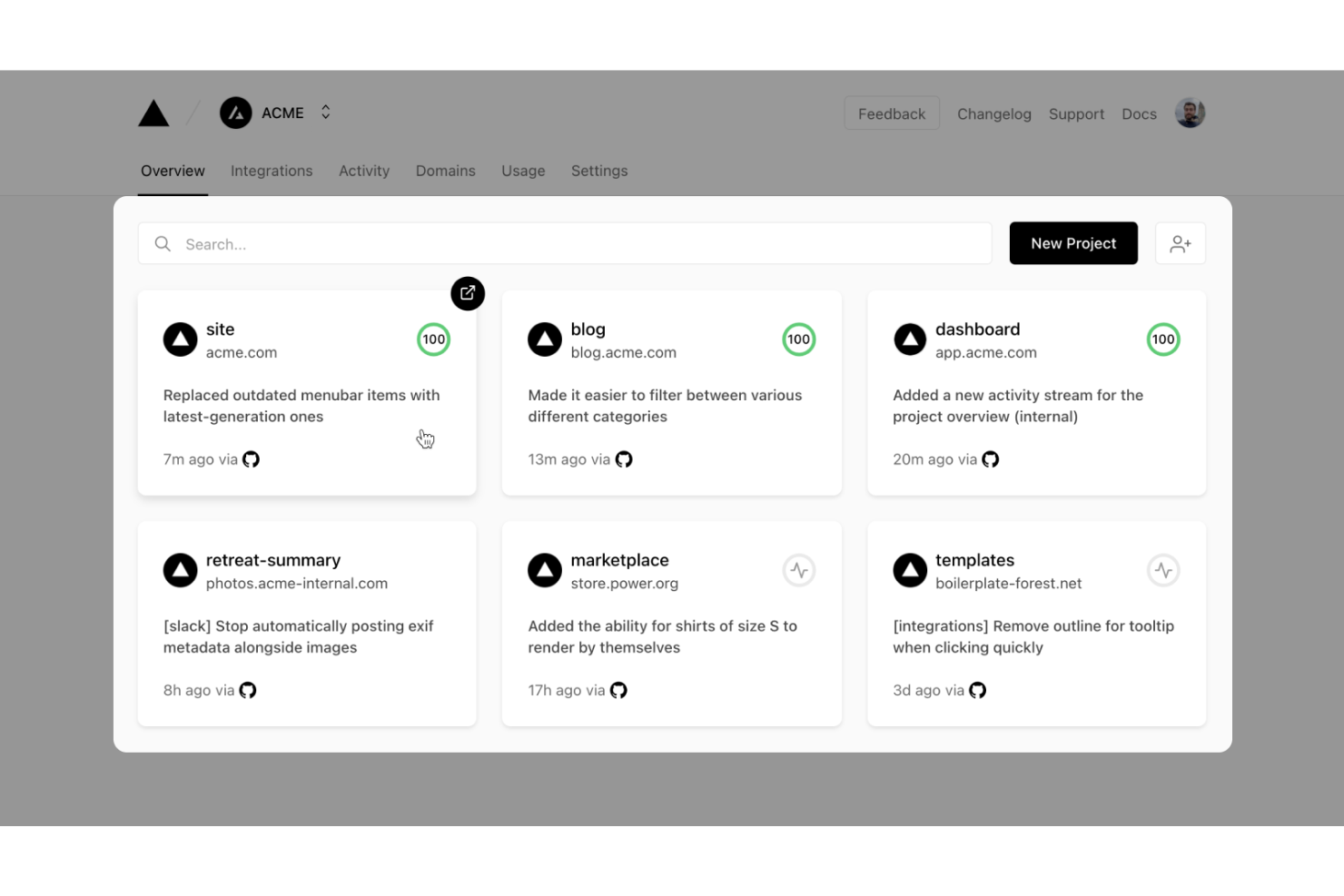
Vercel offre agli sviluppatori una piattaforma per creare, distribuire e scalare applicazioni web guidate dai flussi di lavoro con framework moderni. È particolarmente utile per i team di ingegneri che desiderano automatizzare le pipeline di distribuzione e gestire flussi di lavoro dinamici in tempo reale. Con funzioni serverless integrate e ambienti di anteprima istantanei, Vercel aiuta i team a iterare rapidamente sulla logica del flusso di lavoro e sull'esperienza utente.
Perché ho scelto Vercel
Ciò che distingue Vercel per lo sviluppo di app guidate dai flussi di lavoro è il suo focus sull'automazione e distribuzione incentrate sullo sviluppatore. Ho scelto Vercel perché consente ai team di costruire logiche personalizzate dei flussi di lavoro utilizzando funzioni serverless e di distribuire le modifiche istantaneamente con ambienti di anteprima. Il flusso di lavoro basato su Git della piattaforma significa che ogni push di codice attiva build e distribuzioni automatiche, l'ideale per i team che iterano su builder di workflow. Questo approccio offre agli sviluppatori il pieno controllo sulla personalizzazione dei flussi di lavoro mantenendo la distribuzione veloce e affidabile.
Caratteristiche principali di Vercel
Altre caratteristiche che rendono Vercel interessante per lo sviluppo di applicazioni guidate dai flussi di lavoro includono:
- Edge Middleware: Esegui logiche personalizzate all’edge per personalizzare i flussi di lavoro e gestire le richieste prima che raggiungano la tua applicazione.
- Gestione delle variabili d'ambiente: Conserva e gestisci in modo sicuro le variabili d’ambiente per diversi stadi di distribuzione.
- Domini personalizzati: Assegna e gestisci domini personalizzati direttamente dalla dashboard di Vercel.
- Dashboard di analisi: Accedi ad analisi in tempo reale su prestazioni e traffico delle app di workflow distribuite.
Integrazioni di Vercel
Le integrazioni includono GitHub, GitLab, Bitbucket, Slack, Datadog, Sentry, Contentful, Shopify, AWS, Sanity e molte altre.
Pros and Cons
Pros:
- Distribuzioni di anteprima istantanee per modifiche al workflow
- Il middleware supporta la personalizzazione in tempo reale dei flussi di lavoro
- Gestione delle variabili d'ambiente per la configurazione del flusso di lavoro
Cons:
- Strumenti limitati per il debug visivo dei workflow
- La configurazione dei domini personalizzati può essere complessa per i team


Gumloop è pensato per team e singoli che hanno bisogno di prototipare e testare rapidamente idee di flusso di lavoro prima di impegnarsi nello sviluppo completo. È particolarmente utile per product manager, designer UX e team di innovazione che desiderano convalidare concetti tramite flussi interattivi drag-and-drop. Con Gumloop puoi creare e condividere prototipi di workflow in pochi minuti, rendendo più semplice raccogliere feedback e iterare nelle prime fasi del processo.
Perché ho scelto Gumloop
Quando hai bisogno di passare dall’idea al prototipo interattivo rapidamente, Gumloop si distingue per la prototipazione rapida dei flussi di lavoro. L’ho scelto perché puoi trascinare e rilasciare passaggi, decisioni e azioni per visualizzare e testare velocemente la logica dei workflow senza scrivere codice. Lo strumento supporta condivisione istantanea e anteprime dal vivo, così puoi ottenere subito feedback da stakeholder o colleghi. Questo rende Gumloop perfetto per i team che vogliono validare concetti di workflow prima di investire nello sviluppo su larga scala.
Funzionalità principali di Gumloop
Altre funzionalità che rendono Gumloop utile per la prototipazione dei workflow includono:
- Libreria di template: Accedi a una collezione di modelli di workflow predefiniti per avviare rapidamente nuovi progetti.
- Blocchi logici condizionali: Aggiungi logica if/then per simulare punti decisionali reali nei tuoi workflow.
- Strumenti di commento e feedback: Raccogli input direttamente sui tuoi prototipi da collaboratori o stakeholder.
- Esporta in PDF o immagine: Scarica i diagrammi di workflow per documentazione o presentazioni.
Integrazioni Gumloop
Le integrazioni includono Slack, Gmail, Google Sheets, Salesforce, Notion, HubSpot, Outlook, Google Drive, Apollo e altri ancora.
Pros and Cons
Pros:
- I template velocizzano la prototipazione iniziale del workflow
- I blocchi logici condizionali supportano flussi complessi
- Interfaccia no-code per i membri del team non tecnici
Cons:
- Automazione limitata oltre la fase di prototipazione visiva
- Nessun controllo di versione integrato per i prototipi

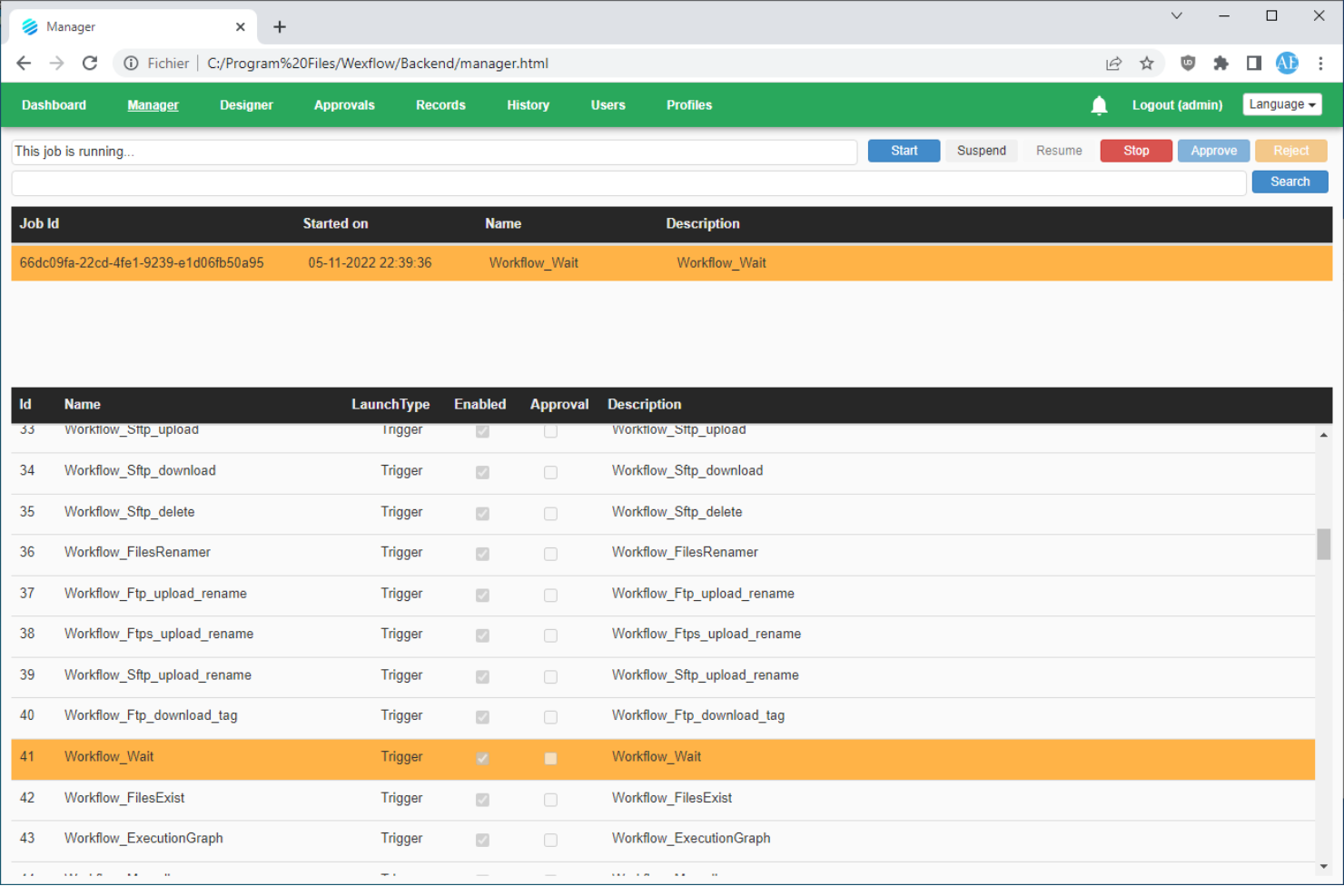
Wexflow è progettato per team IT e organizzazioni che necessitano di un controllo totale sull’automazione dei flussi di lavoro in ambienti on-premise. È adatto ad aziende con rigorosi requisiti di sicurezza dei dati o conformità che non possono utilizzare strumenti di workflow basati sul cloud. Se desideri creare, pianificare e monitorare processi automatizzati sulla tua infrastruttura, Wexflow offre questa flessibilità di implementazione.
Perché ho scelto Wexflow
Ciò che distingue Wexflow è la sua attenzione all’implementazione on-premise, una caratteristica rara tra i creatori di workflow drag-and-drop. L’ho scelto perché consente di installare e utilizzare la piattaforma interamente all’interno della propria infrastruttura, offrendo pieno controllo sulla sicurezza dei dati e dei processi. Il designer visuale di Wexflow ti permette di creare, pianificare e monitorare i flussi di lavoro senza dover ricorrere a servizi cloud. Questo lo rende una scelta solida per le organizzazioni con elevate esigenze di conformità o che operano in settori regolamentati.
Funzionalità principali di Wexflow
Altre funzionalità che rendono Wexflow ideale per l’automazione dei workflow includono:
- Libreria estesa di task: Scegli tra oltre 100 attività integrate per automatizzare operazioni su file, email, azioni su database e altro ancora.
- Definizioni dei workflow basate su XML: Modifica e gestisci i flussi di lavoro usando file XML per un controllo preciso e versioning.
- Dashboard di monitoraggio in tempo reale: Monitora lo stato di esecuzione dei workflow e i log tramite una dashboard accessibile dal web.
- Integrazione di script personalizzati: Aggiungi script C# o PowerShell direttamente nei workflow per esigenze di automazione avanzata.
Integrazioni di Wexflow
Le integrazioni native al momento non sono elencate.
Pros and Cons
Pros:
- Deployment on-premise per controllo rigoroso dei dati
- Modifica dei workflow tramite XML per personalizzazioni avanzate
- Supporto integrato per scripting in C# e PowerShell
Cons:
- Nessuna opzione cloud o SaaS integrata
- Manca il confronto visivo tra versioni del workflow
Altri strumenti per creare flussi di lavoro con trascinamento
Ecco alcune opzioni aggiuntive di strumenti per creare flussi di lavoro con trascinamento che non sono entrate nel mio elenco, ma che vale comunque la pena valutare:
- Kolleno
Ideale per team finanziari e di contabilità clienti
- React Flow
Ideale per lo sviluppo di interfacce workflow personalizzate
- MyShyft
Ideale per la programmazione dei turni e la gestione della forza lavoro
- Retool
Ideale per creare flussi di lavoro per strumenti interni


Come valuto i costruttori di workflow drag and drop
Divido la mia valutazione in due livelli: se uno strumento può costruire visivamente workflow ramificati con approvazioni e automazione e cosa lo differenzia in termini di integrazioni e governance.
Funzionalità di base (requisiti minimi per questa lista)
Quando seleziono gli strumenti per la mia lista, attribuisco a ciascuno un punteggio da 0 (non offre la funzionalità) a 5 (eccelle in quest’area) per ciascuna funzionalità di base elencata di seguito. Poi, calcolo il punteggio totale dello strumento come percentuale. Ogni strumento deve raggiungere un punteggio totale minimo del 65% per essere preso in considerazione per l’inclusione.
- Canvas visuale drag-and-drop: Valuto quanto sia facile posizionare, riordinare e collegare i passaggi del workflow su un canvas, come mappare un processo di revisione sprint trascinando le fasi nella sequenza giusta.
- Logica condizionale e ramificazioni: Ogni strumento dovrebbe permetterti di impostare regole se/allora che instradano il lavoro su percorsi differenti, ad esempio segnalando una task quando viene superata una soglia di budget.
- Automazione di task e fasi: Cerco trigger automatici che si attivano quando il lavoro si sposta tra fasi: assegnazione automatica di un revisore QA, aggiornamento degli status o invio di avvisi Slack al completamento.
- Integrazione con la gestione progetti: Il costruttore dovrebbe collegarsi al tuo attuale stack di gestione progetti. Verifico la presenza di collegamenti nativi con strumenti come Jira, Asana o monday.com, così i workflow restano sincronizzati con i dati di progetto aggiornati.
- Approvazioni e passaggi di consegna: I checkpoint di approvazione strutturati sono importanti. Valuto se sia possibile inserire passaggi di revisione dove, ad esempio, un responsabile design approva prima che lo sviluppo passi alla fase successiva.
- Modelli e riutilizzabilità: Salvare un workflow come modello riutilizzabile—come una sequenza di onboarding clienti che il tuo PMO esegue ogni trimestre—dovrebbe essere facile e condivisibile tra i team.
Una volta che ho un elenco di strumenti che soddisfano i criteri, considero cosa distingue ciascuna piattaforma.
Fattori differenzianti (cosa distingue i fornitori)
Ecco come confronto e analizzo i diversi fornitori:
Funzionalità distintive
La cronologia delle versioni è una delle prime cose che controllo. Quando un responsabile PMO aggiorna un workflow di rilascio a metà sprint, la possibilità di confrontare le revisioni e ripristinare una versione precedente è fondamentale. Valuto anche se il costruttore offre analytics come la durata delle fasi e la rilevazione dei colli di bottiglia—capire dove le task si bloccano tra la revisione design e il passaggio allo sviluppo è molto più utile del semplice conteggio delle attività. Anche la generazione di workflow tramite AI sta diventando sempre più rilevante, soprattutto per i team che hanno bisogno di avviare nuovi processi partendo da un prompt in linguaggio naturale.
Oltre le funzionalità
La profondità dell’ecosistema di integrazione è sempre qualcosa che valuto. Un costruttore di workflow che si collega nativamente ai tuoi tool di project management, Slack e archiviazione file comporta meno passaggi manuali tra i sistemi. La governance e il controllo degli accessi sono anch’essi fondamentali—quando più team condividono uno spazio di lavoro, permessi basati sui ruoli e ambienti sandbox impediscono che un coordinatore junior pubblichi modifiche su un workflow in produzione per errore. Considero anche quanto il fornitore supporti l’onboarding, in particolare se offre modelli predefiniti e una configurazione guidata per accelerare l’avvio per i nuovi utenti.
Come scegliere uno strumento per creare flussi di lavoro con trascinamento
È facile perdersi in lunghi elenchi di funzionalità e strutture tariffarie complesse. Per aiutarti a rimanere concentrato mentre affronti il tuo specifico processo di selezione del software, ecco una lista di fattori da tenere presenti:
| Fattore | Cosa considerare |
| Scalabilità | Lo strumento sarà in grado di gestire il volume dei tuoi flussi di lavoro man mano che il team o l'azienda crescono? Verifica i limiti relativi a utenti, flussi di lavoro o esecuzioni. |
| Integrazioni | Si connette nativamente alle app e ai servizi su cui fa affidamento il tuo team? Esamina l'elenco delle integrazioni per individuare eventuali lacune o soluzioni alternative. |
| Personalizzazione | Puoi adattare i flussi di lavoro a processi o requisiti specifici? Cerca il supporto per logiche personalizzate, scripting o creazione di nodi. |
| Facilità d'uso | Gli utenti non tecnici potranno creare e gestire flussi di lavoro senza ricorrere costantemente all'aiuto del reparto IT? Prova l'interfaccia con utenti reali. |
| Implementazione e configurazione iniziale | Quanto tempo sarà necessario per diventare operativi? Considera le esigenze di migrazione, le risorse per la formazione e la disponibilità di modelli o configurazioni guidate. |
| Costo | I livelli tariffari sono chiari e prevedibili con l'aumentare dell'utilizzo? Fai attenzione a costi nascosti, addebiti per eccedenze o componenti aggiuntivi obbligatori. |
| Misure di sicurezza | La piattaforma soddisfa gli standard di privacy e sicurezza dei dati della tua organizzazione? Informati su crittografia, controlli degli accessi e registri di controllo. |
| Disponibilità dell'assistenza | Avrai accesso a un'assistenza tempestiva in caso di problemi? Verifica gli orari e i canali di assistenza, nonché gli impegni sui tempi di risposta. |
Che cos'è uno strumento per creare flussi di lavoro con trascinamento?
Un generatore di flussi di lavoro con funzionalità di trascinamento della selezione è uno strumento visivo che consente agli utenti di progettare, automatizzare e gestire processi articolati in più fasi disponendo i componenti su una tela digitale. Queste piattaforme fungono da piattaforma di automazione e motore dei flussi di lavoro, consentendo ai team di creare flussi di lavoro senza codice con la flessibilità dello sviluppo a basso codice. Permettono di collegare attività, attivatori e azioni tra applicazioni come un CRM e altre origini dati, aiutando i team a orchestrare i processi in modo più orientato ai dati. Spesso descritte come generatori visivi di flussi di lavoro, molte di queste soluzioni includono anche funzionalità basate sull'intelligenza artificiale e sono ampiamente utilizzate da nuove imprese e team in crescita. Rendendo l'automazione accessibile sia agli utenti tecnici sia a quelli non tecnici, queste piattaforme aiutano i team a semplificare le attività ripetitive, migliorare la visibilità e convalidare i risultati attraverso esempi come i casi di studio.
Funzionalità
Quando selezioni il generatore di flussi di lavoro con funzionalità di trascinamento della selezione, presta attenzione alle seguenti caratteristiche principali:
- Editor visivo dei flussi di lavoro: consente di progettare e organizzare i flussi di lavoro trascinando e collegando i passaggi su una tela digitale, rendendo la mappatura dei processi intuitiva e accessibile.
- Integrazioni con più applicazioni: si connette a un'ampia gamma di strumenti e servizi di terze parti, permettendo di automatizzare le attività nell'intero insieme tecnologico esistente.
- Logica condizionale: consente di impostare regole e percorsi ramificati all'interno dei flussi di lavoro, permettendo di eseguire azioni diverse in base a attivatori specifici o valori dei dati.
- Modelli di flussi di lavoro riutilizzabili: fornisce esempi di flussi di lavoro predefiniti che è possibile personalizzare, aiutando a iniziare rapidamente e a standardizzare i processi comuni.
- Monitoraggio in tempo reale: offre il monitoraggio in tempo reale delle esecuzioni dei flussi di lavoro, consentendo di visualizzare i progressi, identificare i colli di bottiglia e risolvere i problemi non appena si verificano.
- Controlli per la gestione degli errori: consente di definire cosa accade quando un passaggio del flusso di lavoro non riesce, ad esempio nuovi tentativi, notifiche o percorsi alternativi, per garantire l'affidabilità.
- Controlli degli accessi basati sui ruoli: permettono di gestire chi può visualizzare, modificare o eseguire i flussi di lavoro, favorendo una collaborazione sicura tra i team.
- Pianificazione e attivatori: supporta l'esecuzione automatica dei flussi di lavoro in base a orari, eventi o segnali esterni, riducendo la necessità di interventi manuali.
- Cronologia delle versioni: tiene traccia delle modifiche apportate ai flussi di lavoro nel tempo, consentendo di ripristinare versioni precedenti o verificare le modifiche ai fini della conformità.
- Documentazione integrata nell'applicazione: fornisce assistenza, descrizioni comandi o note integrate nel generatore di flussi di lavoro, facilitando la comprensione e la manutenzione dei processi complessi.
Vantaggi
L'implementazione del generatore di flussi di lavoro con funzionalità di trascinamento della selezione offre diversi vantaggi al team e all'azienda. Ecco alcuni dei vantaggi che puoi aspettarti:
- Automazione più rapida dei processi: gli editor visivi e i modelli consentono di creare e implementare rapidamente flussi di lavoro automatizzati senza scrivere codice.
- Maggiore collaborazione tra i team: i controlli degli accessi basati sui ruoli e le tele condivise dei flussi di lavoro facilitano la partecipazione e la revisione dei processi da parte di più parti interessate.
- Riduzione degli errori manuali: gli attivatori automatizzati, la gestione degli errori e la logica condizionale aiutano a eliminare gli errori che si verificano spesso nella gestione manuale delle attività.
- Migliore visibilità e monitoraggio: le funzionalità di monitoraggio in tempo reale e la cronologia delle versioni offrono una visione chiara dello stato dei flussi di lavoro e delle modifiche nel tempo.
- Inserimento più semplice dei nuovi utenti: la documentazione integrata nell'applicazione e le interfacce intuitive con trascinamento della selezione riducono le difficoltà per i membri non tecnici del team che partecipano all'automazione.
- Scalabilità in base alla crescita delle esigenze: il supporto per le integrazioni con più applicazioni e i flussi di lavoro personalizzabili garantiscono che l'automazione possa espandersi insieme ai requisiti aziendali.
- Maggiore sicurezza e conformità: le autorizzazioni basate sui ruoli e i registri di controllo aiutano a mantenere il controllo sui processi sensibili e a rispettare gli standard organizzativi.
Costi e prezzi
La scelta del generatore di flussi di lavoro con funzionalità di trascinamento della selezione richiede la comprensione dei diversi modelli di prezzo e dei piani disponibili. I costi variano in base alle funzionalità, alle dimensioni del team, ai componenti aggiuntivi e ad altri fattori. La tabella seguente riassume i piani più comuni, i relativi prezzi medi e le funzionalità tipicamente incluse nelle soluzioni di generatori di flussi di lavoro con funzionalità di trascinamento della selezione:
Tabella comparativa dei piani per il generatore di flussi di lavoro con funzionalità di trascinamento della selezione
| Tipo di piano | Prezzo medio | Caratteristiche comuni |
| Piano gratuito | $0 | Editor di flussi di lavoro di base, integrazioni limitate, accesso per un singolo utente, assistenza della community e numero di esecuzioni dei flussi di lavoro limitato. |
| Piano personale | $10-$25/user/month | Flussi di lavoro illimitati, più integrazioni, limiti di utilizzo più elevati, assistenza via e-mail e modelli di base. |
| Piano aziendale | $25-$50/ user/month | Collaborazione tra più utenti, integrazioni avanzate, autorizzazioni basate sui ruoli, registri di controllo e assistenza prioritaria. |
| Piano per grandi aziende | $50-$100+/ user/month | Integrazioni personalizzate, inserimento dedicato, controlli di sicurezza avanzati, assistenza garantita da SLA e funzionalità di conformità. |
Domande frequenti sullo strumento per la creazione di flussi di lavoro con trascinamento
Ecco alcune risposte alle domande più comuni sullo strumento per la creazione di flussi di lavoro con trascinamento:
Gli utenti senza competenze tecniche possono creare flussi di lavoro con gli strumenti per la creazione di flussi di lavoro con trascinamento?
Sì, la maggior parte degli strumenti per la creazione di flussi di lavoro con trascinamento è progettata in modo che gli utenti senza competenze tecniche possano creare e gestire visivamente i flussi di lavoro. L’interfaccia utilizza generalmente un’area di lavoro e componenti predefiniti, quindi non è necessario scrivere codice per automatizzare le attività o connettere le app.
In che modo gli strumenti per la creazione di flussi di lavoro con trascinamento gestiscono gli errori o i passaggi non riusciti?
La maggior parte delle piattaforme include controlli per la gestione degli errori che consentono di definire cosa accade se un passaggio non riesce. È possibile configurare nuovi tentativi, notifiche o percorsi alternativi per garantire la continuazione dei flussi di lavoro o avvisare le persone appropriate quando qualcosa va storto.
Quali tipi di processi possono essere automatizzati con gli strumenti per la creazione di flussi di lavoro con trascinamento?
È possibile automatizzare un’ampia gamma di processi, tra cui approvazioni, notifiche, sincronizzazione dei dati, inserimento e attività composte da più passaggi che coinvolgono diverse app. Questi strumenti sono abbastanza flessibili da supportare flussi di lavoro semplici e complessi tra team diversi.
Esistono limiti al numero di flussi di lavoro o di esecuzioni?
Sì, la maggior parte dei piani impone limiti al numero di flussi di lavoro che è possibile creare o al numero di volte in cui i flussi di lavoro possono essere eseguiti ogni mese. I piani di livello superiore offrono generalmente un utilizzo maggiore o illimitato; è quindi opportuno esaminare i dettagli del piano per scegliere quello più adatto alle proprie esigenze.
Quanto sono sicure le piattaforme per la creazione di flussi di lavoro con trascinamento?
Il livello di sicurezza varia in base al fornitore, ma la maggior parte delle piattaforme orientate alle aziende offre funzionalità come crittografia, controlli degli accessi, registri di controllo e certificazioni di conformità. Prima di adottarla, verifica sempre che la piattaforma soddisfi i requisiti di sicurezza e privacy della tua organizzazione.