

I 10 migliori strumenti di IA per la consegna ai clienti recensiti nel 2026

10 Elenco dei migliori strumenti di distribuzione ai clienti basati sull'IA


La gestione della distribuzione ai clienti raramente riguarda solo le tempistiche. Comprende anche l'accoglienza dei clienti senza intoppi, il coordinamento del lavoro tra i team, il mantenimento di una comunicazione chiara e la garanzia che nulla venga trascurato una volta avviata la distribuzione.
Gli strumenti di distribuzione ai clienti basati sull'IA aiutano i team a gestire questi flussi di lavoro in modo più efficace. Supportano la distribuzione rivolta ai clienti con funzionalità come l'automazione, la comunicazione centralizzata, la visibilità condivisa e gli approfondimenti assistiti dall'IA, che riducono il lavoro manuale e migliorano la coerenza.
In questo articolo condividerò le mie migliori scelte tra gli strumenti di distribuzione ai clienti basati sull'IA. Ho esaminato ogni opzione in modo indipendente, concentrandomi sulla capacità di supportare i flussi di lavoro di distribuzione, la collaborazione con i clienti e l'esecuzione quotidiana. Che tu voglia migliorare l'efficienza o rendere più efficace la comunicazione con i clienti, troverai opzioni adatte a diversi modelli di distribuzione e dimensioni dei team.
Perché fidarsi dei nostri consigli sui software
Il nostro team testa e recensisce software dal 2012. In quanto project manager noi stessi, sappiamo quanto sia difficile — e importante — scegliere il software giusto.
Per questa guida, abbiamo valutato gli strumenti attraverso test pratici e ricerche indipendenti, assegnando un punteggio agli strumenti in base ai nostri criteri di selezione. Ci basiamo inoltre sulle competenze di leader di pensiero del settore e di professionisti attivi nella gestione dei progetti.
Le nostre recensioni riflettono il nostro giudizio editoriale umano, non un discorso di vendita.
Revisori esperti:
Tabella comparativa degli strumenti di distribuzione ai clienti basati sull'IA
Questa tabella comparativa riepiloga i dettagli sui prezzi delle mie migliori selezioni di strumenti di distribuzione ai clienti basati sull’IA.
| Tool | Best For | Trial Info | Price | ||
|---|---|---|---|---|---|
| 1 | Ideale per i team responsabili dell'avvio dei clienti che mettono l'IA al primo posto | Prova gratuita di 14 giorni + dimostrazione gratuita disponibile | A partire da 59 €/utente/mese (con fatturazione annuale) | Website | |
| 2 | Ideale per l'assistenza clienti guidata dall'IA | Prova gratuita disponibile | A partire da $25/utente/mese (fatturazione annuale) | Website | |
| 3 | Ideale per l'automazione delle attività basata su AI | Prova gratuita di 14 giorni + piano gratuito disponibile | Da $10/utente/mese (fatturazione annuale) | Website | |
| 4 | Ideale per l'onboarding dei clienti | Piano gratuito + demo gratuita disponibile | Da $350/mese (fatturato annualmente) | Website | |
| 5 | Ideale per la gestione dei progetti | Prova gratuita di 14 giorni + demo gratuita disponibile | Da $45/mese (fatturato annualmente) | Website | |
| 6 | Ideale per la conformità dei dati | Demo gratuita disponibile | Da $59/postazione/mese (fatturazione annuale) | Website | |
| 7 | Ideale per team remoti | Prova gratuita di 30 giorni + demo gratuita disponibile | A partire da $9.99/utente/mese (fatturazione annuale) | Website | |
| 8 | Ideale per la pianificazione dei progetti | Prova gratuita di 14 giorni | Da $26/utente/mese (fatturati annualmente) | Website | |
| 9 | Ideale per agenzie creative | Piano gratuito + demo gratuita + prova gratuita di 14 giorni disponibile | Da $29/utente/mese (fatturato annualmente) | Website | |
| 10 | Ideale per la collaborazione di squadra | Prova gratuita di 14 giorni + demo gratuita disponibile | Da $39/mese (fatturato annualmente) | Website |

Recensioni dei migliori strumenti di distribuzione ai clienti basati sull'IA
Di seguito trovi i miei riepiloghi dettagliati dei migliori strumenti di distribuzione ai clienti basati sull’IA presenti nel mio elenco. Le mie recensioni offrono un’analisi approfondita delle funzionalità principali, dei pro e dei contro, delle integrazioni e dei casi d’uso ideali di ogni strumento, aiutandoti a trovare quello più adatto a te.

Ideale per i team responsabili dell'avvio dei clienti che mettono l'IA al primo posto
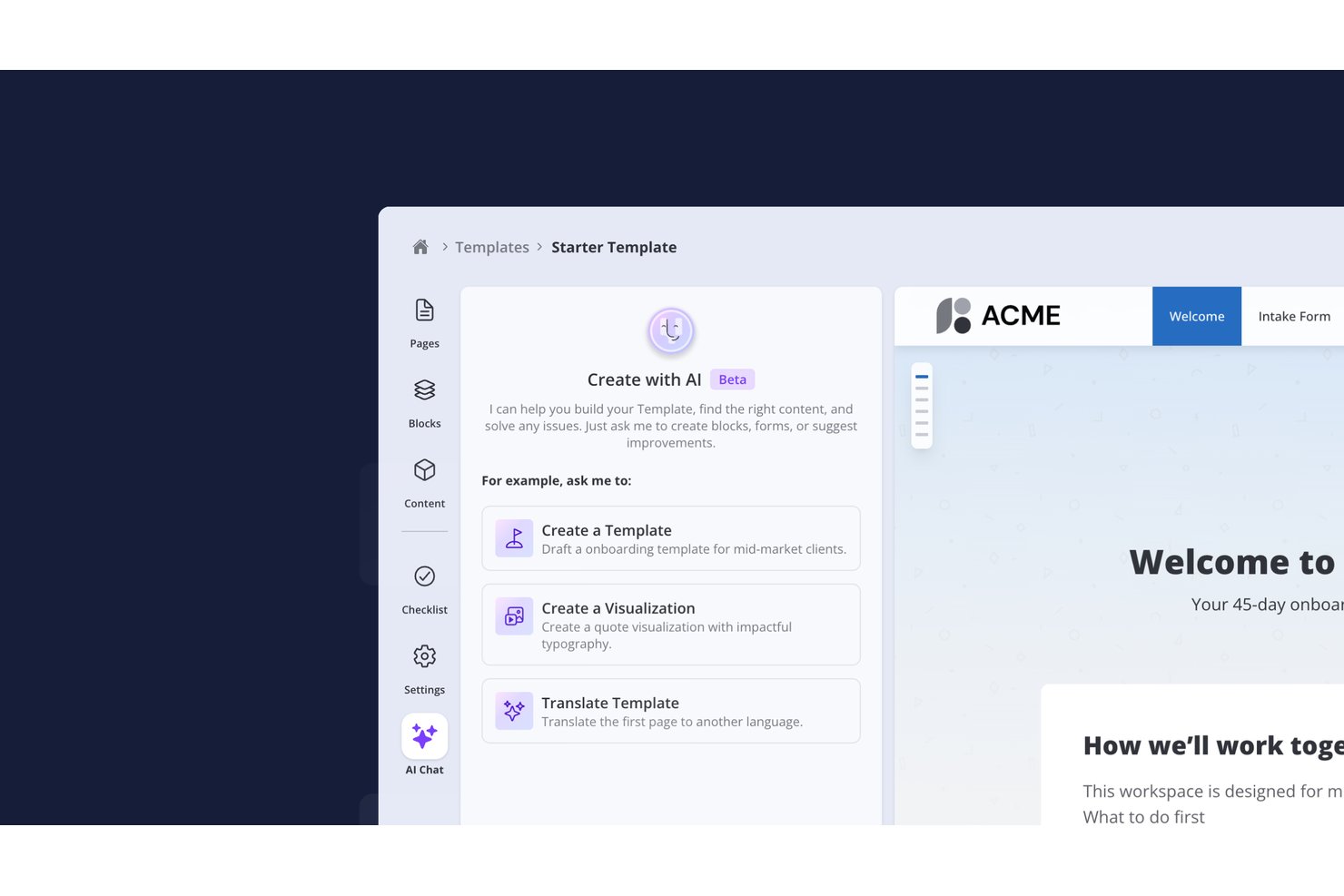
- Valuecase è una piattaforma per l'avvio dei clienti che combina spazi rivolti ai clienti senza necessità di accesso con piani, attività, moduli e monitoraggio dei progressi per ogni account, e utilizza l'IA per creare modelli, eseguire automazioni e mantenere i clienti sulla buona strada. Un server MCP consente a Claude, ChatGPT o agli agenti personalizzati di lavorare direttamente con i dati dell'avvio.
Per chi è più adatto Valuecase?
Valuecase è particolarmente adatto ai team responsabili del successo dei clienti e dell'avvio, che devono offrire un'esperienza cliente curata e senza ostacoli, senza chiedere ai clienti di creare un altro account.
Perché ho scelto Valuecase
Valuecase si distingue perché combina l'accesso dei clienti senza ostacoli con un'esecuzione intelligente basata sull'IA. I clienti accedono immediatamente agli spazi di avvio tramite un link condiviso, senza bisogno di effettuare il login. Nel frattempo, le automazioni basate sull'IA eliminano la necessità di sollecitazioni manuali: Valuecase AI modifica automaticamente le tempistiche sulla base delle trascrizioni delle riunioni, invia promemoria intelligenti e sfrutta un server MCP per consentire a Claude o ChatGPT di leggere e agire sui dati degli account in tempo reale.
Funzionalità principali di Valuecase
- Piani d'azione condivisi: Elenchi di attività condivisi in cui sia il tuo team sia il cliente hanno responsabilità assegnate, scadenze e dipendenze monitorate in un unico luogo.
- Punteggio del rischio dell'avvio: Un pannello che segnala i progetti dei clienti bloccati o a rischio combinando i tassi di completamento delle attività, i dati del CRM e i segnali di coinvolgimento.
- Integrazione con il server MCP: Collega Valuecase direttamente a strumenti di IA come Claude e ChatGPT, consentendoti di creare modelli, gestire flussi di lavoro e inviare messaggi di sollecito tramite prompt in linguaggio naturale.
- Generazione di riepiloghi per le riunioni: Recupera il contesto da Google Calendar, HubSpot e Google Drive per preparare un riepilogo pre-riunione prima di ogni chiamata con il cliente.
- Agente IA rivolto ai clienti: Un agente IA configurabile risponde alle domande dei clienti sulle attività, sulle tempistiche e su altre questioni chiave relative alla fornitura.
Integrazioni di Valuecase
Valuecase offre integrazioni native con HubSpot, Salesforce, Slack, Microsoft Teams, Gmail, Loom e Zoom, oltre a connessioni basate su MCP con Claude, ChatGPT, Cursor, Jira, Linear e ClickUp. Si collega a Zapier, Make e Albato e fornisce un'API per integrazioni personalizzate.
Pros and Cons
Pros:
- Il portale clienti senza accesso aumenta l'adozione da parte dei clienti
- L'IA genera automaticamente report sullo stato personalizzati con il marchio
- MCP si connette agli strumenti di IA per l'automazione
Cons:
- La trascrizione nativa delle riunioni non è inclusa
- Nessun monitoraggio integrato del tempo o della fatturazione

Ideale per l'assistenza clienti guidata dall'IA

Help Scout è una piattaforma di assistenza potenziata dall'IA pensata per team che supportano i clienti su larga scala. Centralizza le richieste di supporto, consentendo agli agenti di fornire risposte coerenti e personalizzate senza dover gestire più strumenti. Questo la rende una scelta ideale per le organizzazioni che desiderano migliorare la comunicazione con i clienti senza compromettere qualità o efficienza.
Perché ho scelto Help Scout
Ho scelto Help Scout per la sua capacità di integrare l'automazione guidata dall'IA con un servizio clienti personalizzato. La funzione AI Answers di Help Scout si distingue automatizzando le risposte alle domande più comuni e permettendo al team di concentrarsi su esigenze dei clienti più complesse. Inoltre, Inbox Assistant fornisce supporto contestuale e suggerisce bozze di risposte, migliorando l'efficienza della squadra senza sacrificare il tocco personale che i clienti apprezzano. Il risultato è un flusso di lavoro più rapido con meno risposte standardizzate.
Funzionalità principali di Help Scout
Oltre agli strumenti di IA, ho trovato utili anche queste funzionalità:
- Beacon: Un widget di supporto integrabile che offre assistenza immediata ai clienti tramite chat dal vivo, moduli di contatto e articoli della knowledge base.
- Workflows: Automatizza attività ripetitive come l'assegnazione delle conversazioni e l'invio di email di follow-up, consentendo al team di concentrarsi su attività più importanti.
- Docs: Crea un centro di assistenza pubblico per fornire ai clienti accesso facile al supporto self-service, integrandosi perfettamente con Beacon.
- Profili cliente: Visualizza profili completi e la cronologia delle interazioni per fornire agli agenti il contesto necessario, migliorando così la qualità delle interazioni con i clienti.
Integrazioni di Help Scout
Le integrazioni includono Salesforce, HubSpot, Jira, Slack, Shopify, Mailchimp, WooCommerce, Stripe, Trello e Google Apps. Gli utenti possono anche creare app personalizzate e integrazioni tramite l'API di Help Scout.
Pros and Cons
Pros:
- La casella di posta condivisa supporta la collaborazione tra team
- Il rilevamento delle collisioni evita risposte duplicate
- Implementazione rapida e onboarding semplice per i nuovi agenti
Cons:
- La personalizzazione della knowledge base varia in base al piano
- Strumenti nativi limitati per gerarchie di ticket complesse
New Product Updates from Help Scout

Help Scout Adds Automatic Conversation Reassignment
Help Scout can now automatically unassign conversations when the assigned teammate has been away long enough, keeping replies moving so others can pick them up. For more information, visit Help Scout's official site.
 .
.
Wrike
Ideale per l'automazione delle attività basata su AI

Per i team che cercano uno strumento di consegna al cliente con intelligenza artificiale in grado di ridurre il lavoro ripetitivo e aumentare la produttività, Wrike rappresenta una soluzione allettante. Grazie alle sue robuste funzionalità di automazione e AI, Wrike permette al tuo team di concentrarsi sulle attività essenziali, minimizzando le azioni di routine e ottimizzando i flussi di lavoro. Questo strumento è particolarmente interessante per aziende di settori come produzione creativa, marketing e pianificazione agile, dove una gestione efficiente dei progetti e la collaborazione sono fondamentali.
Perché ho scelto Wrike
Ho scelto Wrike per le sue esclusive capacità di automazione e gestione delle attività basate su intelligenza artificiale, ideali per chi cerca strumenti di consegna al cliente con AI. Wrike AI offre intelligenza generativa per la pianificazione dei progetti, la modifica dei testi e la traduzione, potenziando notevolmente l’efficienza del team. Le automazioni senza codice semplificano ulteriormente la gestione delle attività riducendo l’input manuale, rendendolo un’ottima scelta per i team che vogliono ottimizzare i processi di lavoro dei progetti.
Caratteristiche principali di Wrike
Oltre alle capacità di AI e automazione, Wrike offre numerose funzionalità che aumentano il suo valore come strumento per la consegna ai clienti:
- Mappatura mentale: Facilita l’ideazione e la collaborazione visiva all’interno del team, aiutando a organizzare efficacemente pensieri e strategie.
- Viste di lavoro: Offre molteplici opzioni di visualizzazione, tra cui diagrammi di Gantt e bacheche Kanban, per monitorare l’avanzamento e lo stato del progetto.
- Dashboard e analisi: Fornisce approfondimenti in tempo reale sulle metriche di progetto, consentendo decisioni rapide e informate.
- Moduli di richiesta: Moduli personalizzabili che semplificano la raccolta dei requisiti di progetto, assicurando che il team disponga di tutte le informazioni necessarie fin dall’inizio.
Integrazioni di Wrike
Wrike si integra con una vasta gamma di applicazioni, tra cui Salesforce, HubSpot, NetSuite, QuickBooks, Jira, GitHub e Microsoft Teams. Queste integrazioni permettono una connettività agevole con gli strumenti già in uso, ampliando le funzionalità di Wrike come piattaforma intelligente per la consegna ai clienti.
Pros and Cons
Pros:
- AI generativa a supporto di pianificazione e contenuti
- Flussi di lavoro altamente personalizzabili e moduli di richiesta
- Sicurezza di livello enterprise e supporto globale
Cons:
- L'interfaccia può risultare complessa su larga scala
- La configurazione dell'automazione non è sempre intuitiva
New Product Updates from Wrike
Wrike Adds Klaxoon MCP Integration
Wrike’s Klaxoon MCP integration is now generally available, enabling AI agents to navigate between Wrike tasks and attached whiteboards, read task context, and manage whiteboard attachments via API. For more information, visit Wrike's official site.

Dock
Ideale per l'onboarding dei clienti

Dock è una piattaforma di onboarding e collaborazione clienti progettata per aiutare i team a strutturare l'avvio di nuovi lavori con i clienti. Fornisce uno spazio centralizzato per condividere documenti, monitorare le attività di onboarding e mantenere la comunicazione mentre i progetti passano dal kick-off alla consegna.
Perché ho scelto Dock: Ho scelto Dock per l'onboarding dei clienti perché aiuta i team a creare un punto di partenza chiaro e organizzato per il lavoro con i clienti. I portali clienti personalizzabili offrono ai clienti visibilità sulle attività e sui materiali dell'onboarding, mentre gli spazi di lavoro condivisi riducono la confusione su ciò che serve e quando.
Le funzionalità di monitoraggio delle attività e di feedback sui documenti di Dock aiutano i team a gestire i primi passaggi della consegna senza doversi affidare a email disperse o strumenti scollegati. Questa struttura supporta transizioni più fluide dall'onboarding alla consegna attiva.
Caratteristiche e integrazioni principali:
Caratteristiche includono portali clienti personalizzabili per i flussi di lavoro di onboarding, strumenti di feedback sui documenti che consentono ai clienti di commentare direttamente sui file condivisi e tracciamento delle attività che fornisce visibilità sull'avanzamento dell'onboarding.
Integrazioni includono Salesforce, HubSpot, Zoom, Gong, Chorus, Fathom, Loom, Slack, Google Drive, Microsoft SharePoint, Notion, Confluence, Asana, ClickUp, Jira e Linear.
Pros and Cons
Pros:
- Portali personalizzabili per l'onboarding del cliente
- Organizzazione chiara delle attività nelle fasi iniziali della consegna
- Visibilità sull'avanzamento dell'onboarding e passaggio di consegne
Cons:
- La configurazione iniziale può richiedere tempo per flussi di onboarding complessi
- Funzionalità limitate senza una connessione internet

ProofHub
Ideale per la gestione dei progetti

ProofHub è un software tutto-in-uno per la gestione dei progetti e la collaborazione di squadra, pensato per team di diversi settori. Aiuta nella gestione delle attività, nella collaborazione e nel monitoraggio dei progetti, offrendo una piattaforma centralizzata per una gestione dei progetti efficiente.
Perché ho scelto ProofHub: Ho scelto ProofHub per la gestione dei progetti perché offre uno spazio di lavoro centralizzato per coordinare le attività di consegna e la comunicazione del team. I suoi strumenti di gestione delle attività e collaborazione aiutano le squadre a rimanere allineate su priorità e tempistiche, soprattutto nella gestione di più progetti per diversi clienti.
Le dashboard e le funzionalità di monitoraggio del tempo di ProofHub offrono ai manager visibilità su progresso e impegno, consentendo una consegna più prevedibile senza dover usare molteplici strumenti scollegati.
Caratteristiche principali & integrazioni:
Le funzionalità includono uno strumento di revisione online che semplifica feedback e approvazioni, modelli di progetto per impostare flussi di lavoro replicabili e note che permettono ai team di raccogliere e organizzare idee in un unico luogo.
Le integrazioni includono Google Drive, Dropbox, Box, OneDrive, FreshBooks, QuickBooks, Zapier, Slack, Microsoft Outlook e iCal.
Pros and Cons
Pros:
- Dashboard centralizzate per il monitoraggio dell'avanzamento della consegna
- Il monitoraggio del tempo supporta la visibilità di carico di lavoro e fatturazione
- La revisione online semplifica feedback e approvazioni
Cons:
- Le opzioni di reportistica avanzate sono limitate
- Il design dell'interfaccia può risultare basilare per alcuni team

Pylon
Ideale per la conformità dei dati

Pylon è una piattaforma di assistenza B2B con supporto AI progettata per i team che gestiscono la comunicazione e il supporto ai clienti tramite canali condivisi come Slack e Microsoft Teams. Centralizza le conversazioni, le richieste di supporto e il contesto degli account, aiutando i team a mantenere il controllo sui dati sensibili dei clienti durante le fasi di consegna e assistenza.
Perché ho scelto Pylon: Ho scelto Pylon per la conformità dei dati perché aiuta i team a gestire la comunicazione con i clienti in ambienti in cui l'accesso e la visibilità dei dati devono essere rigorosamente controllati. Centralizzare le conversazioni di supporto e il contesto dell'account riduce il rischio che le informazioni siano disperse su canali non gestiti.
La gestione della conoscenza assistita dall'AI di Pylon aiuta i team a rispondere in modo coerente, mentre la sua intelligence sugli account offre il contesto necessario per un trattamento più accurato e conforme delle richieste dei clienti. Per le organizzazioni che forniscono servizi tramite strumenti di collaborazione condivisi, questa struttura supporta sia l'efficienza che la governance.
Funzionalità e integrazioni principali:
Funzionalità includono gestione della conoscenza supportata dall'AI che suggerisce informazioni rilevanti durante le interazioni di supporto, intelligence sugli account che offre visibilità sulle attività dei clienti e automazione dei flussi di lavoro che riduce la gestione manuale delle richieste di routine.
Integrazioni includono Salesforce, Jira, Slack, Microsoft Teams, Zendesk, HubSpot, Google Workspace, Twilio, Discord e Asana.
Pros and Cons
Pros:
- Centralizza la comunicazione con i clienti in ambienti controllati
- Favorisce una gestione coerente delle richieste di supporto
- Riduce la frammentazione tra canali di collaborazione condivisi
Cons:
- Funzionalità limitate senza una connessione a Internet
- Richiede una configurazione e manutenzione continua

Ideale per team remoti
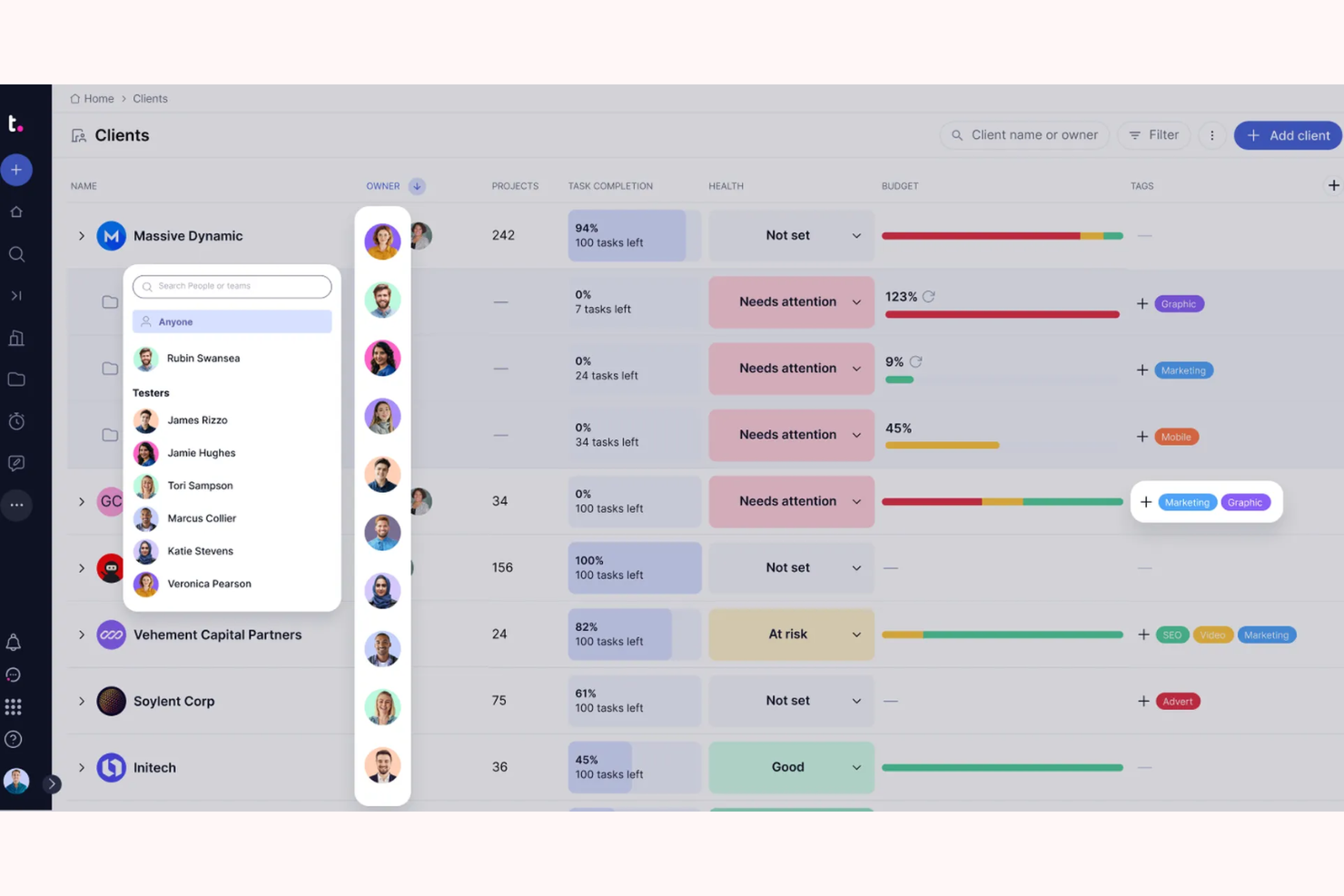
Teamwork.com è una piattaforma di project management progettata per team remoti. Supporta il coordinamento interno attraverso la gestione delle attività, la rilevazione dei tempi e la pianificazione dei progetti, elementi che possono essere fondamentali per mantenere la consegna ai clienti nei tempi previsti nei team distribuiti.
Perché ho scelto Teamwork.com: Ho scelto Teamwork.com per i team remoti perché aiuta i gruppi distribuiti a coordinare il lavoro che sta alla base della consegna ai clienti. La rilevazione dei tempi e la gestione delle attività forniscono una struttura per l'esecuzione quotidiana, mentre i modelli di progetto facilitano la standardizzazione dei processi di consegna tra incarichi simili per i clienti.
Gli strumenti di gestione del carico di lavoro di Teamwork forniscono visibilità sulla capacità del team, aiutando i manager a bilanciare le risorse ed evitare colli di bottiglia nella consegna. Per le organizzazioni con team remoti o ibridi, questa chiarezza interna favorisce risultati più prevedibili per i clienti.
Funzionalità e integrazioni principali:
Funzionalità includono la rilevazione dettagliata dei tempi per una registrazione accurata del lavoro svolto, diagrammi di Gantt per una visualizzazione grafica dei tempi di progetto e strumenti di condivisione file per mantenere i documenti relativi alle consegne sempre accessibili al team.
Integrazioni includono Slack, Trello, HubSpot, QuickBooks, Zapier, Google Drive, Dropbox, Xero, Microsoft Teams e Salesforce.
Pros and Cons
Pros:
- Supporta il coordinamento tra team remoti e ibridi
- La gestione del carico di lavoro aiuta a bilanciare la capacità di consegna
- I modelli di progetto supportano flussi di lavoro ripetibili per la consegna
Cons:
- L'interfaccia può risultare complessa per i nuovi utenti
- Le opzioni di personalizzazione sono più limitate rispetto ad alcuni concorrenti

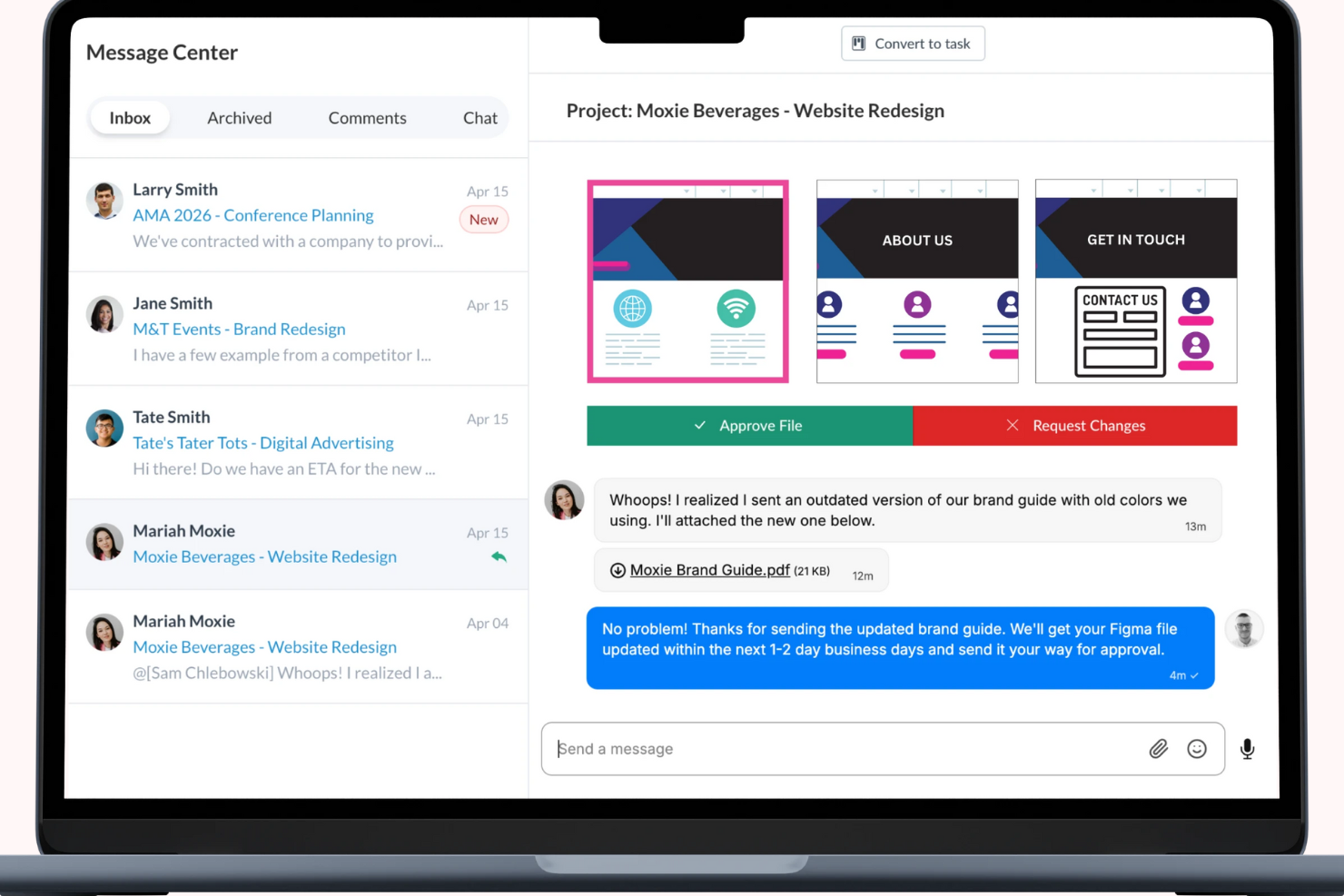
Motion.io è una piattaforma per l'onboarding dei clienti utilizzata da agenzie, consulenti e team di servizi B2B per strutturare l'inizio della consegna dei progetti. Si concentra sulla configurazione dei progetti, sulla raccolta delle informazioni e sull'allineamento delle aspettative sin dall'inizio tramite portali per i clienti, gestione delle attività e richieste automatiche di file.
Perché ho scelto Motion.io: Ho scelto Motion.io per la pianificazione dei progetti perché aiuta i team a standardizzare la configurazione del lavoro per i clienti prima che inizi la consegna. I portali con marchio personalizzato offrono ai clienti visibilità su attività e requisiti, mentre la raccolta automatizzata di file e i promemoria riducono i ritardi durante l'onboarding.
Motion.io favorisce inoltre la coerenza tramite la generazione di SOP assistita dall'IA, che aiuta i team a documentare e riutilizzare i processi di consegna. La centralizzazione della coordinazione nelle fasi iniziali riduce le frizioni e definisce aspettative più chiare sia per i team che per i clienti.
Funzionalità principali & integrazioni:
Funzionalità includono la raccolta automatizzata di documenti per ottenere i file necessari fin dall'inizio, la gestione centralizzata delle attività per monitorare i progressi dell'onboarding e la creazione di SOP assistita dall'IA per sostenere processi di consegna ripetibili.
Integrazioni includono Salesforce, Slack, Microsoft Teams, Google Workspace, Dropbox, Trello, HubSpot, QuickBooks, Zendesk e Asana.
Pros and Cons
Pros:
- Snellisce l'onboarding dei clienti e la configurazione della consegna
- Automatizza i promemoria per le attività e le richieste di file
- Centralizza la visibilità delle fasi iniziali di consegna
Cons:
- Richiede una configurazione iniziale e aggiornamenti continuativi
- Alcuni team potrebbero aver bisogno di supporto tecnico durante l'implementazione


Kitchen.co è una piattaforma di portale clienti progettata per agenzie creative e team di servizi che consegnano lavori ai clienti. Riunisce il monitoraggio dei progetti, le richieste dei clienti, la gestione delle attività e la comunicazione, aiutando i team a gestire la consegna creativa senza dipendere da strumenti frammentati.
Perché ho scelto Kitchen.co: Ho scelto Kitchen.co per le agenzie creative perché supporta il modo in cui i lavori creativi vengono consegnati ai clienti. Cartelle organizzate e bacheche Kanban aiutano i team a gestire le priorità in cambiamento, mentre le richieste clienti integrate evitano che nuovi incarichi vadano persi tra email o chat.
Gli strumenti di feedback visivo e approvazione di Kitchen.co permettono ai clienti di commentare direttamente sugli asset, accelerando le revisioni e riducendo le incomprensioni. Le opzioni di branding e white-labeling facilitano inoltre la presentazione di un'esperienza cliente raffinata da parte delle agenzie.
Funzionalità e integrazioni principali:
Funzionalità includono gestione flessibile di attività e richieste che si adatta alle esigenze dei progetti, strumenti di feedback visivo e approvazione per asset creativi, e funzionalità di fatturazione che supportano flussi di lavoro di fatturazione personalizzabili.
Integrazioni includono Google Drive, Dropbox, OneDrive, Stripe, PayPal, QuickBooks e Xero.
Pros and Cons
Pros:
- Supporta flussi di lavoro di fatturazione e invoicing flessibili
- Rende più semplice riorganizzare le priorità del lavoro creativo
- Consente feedback visivi e approvazioni dirette
Cons:
- Richiede impostazioni e aggiornamenti continui
- Alcuni team potrebbero necessitare di supporto tecnico durante la configurazione

Assembly
Ideale per la collaborazione di squadra

Assembly è una piattaforma progettata per società di servizi professionali tecnologicamente avanzate, come team di consulenza, contabilità e marketing. Offre un portale clienti centralizzato che riunisce comunicazione, condivisione di documenti e fatturazione, aiutando i team a coordinare il lavoro di delivery con i clienti in modo più efficace.
Perché ho scelto Assembly: Ho scelto Assembly per la collaborazione di squadra perché offre uno spazio condiviso dove i team interni e i clienti possono lavorare insieme durante la delivery. Il suo portale clienti personalizzato consolida comunicazioni, file e informazioni di fatturazione in un unico luogo, riducendo la frammentazione e i passaggi mancati.
Le funzionalità di automazione di Assembly supportano l'onboarding dei clienti e i flussi di lavoro contrattuali, mentre la condivisione sicura dei file e gli strumenti di fatturazione aiutano i team a gestire le attività di delivery senza affidarsi a thread di email dispersi o a sistemi disconnessi.
Funzionalità e integrazioni principali:
Funzionalità includono flussi di lavoro automatizzati per l'onboarding dei clienti, strumenti di fatturazione per tracciare e gestire i pagamenti e la condivisione sicura dei file per supportare la collaborazione su documenti legati alla delivery.
Integrazioni includono Salesforce, Slack, Microsoft Teams, Google Workspace, Dropbox, QuickBooks, Trello, HubSpot, Xero e Mailchimp.
Pros and Cons
Pros:
- Portale clienti centralizzato per la collaborazione sulla delivery
- Automatizza i flussi di lavoro di onboarding e amministrativi
- Condivisione sicura dei file per documenti rivolti ai clienti
Cons:
- Richiede configurazione e manutenzione continua
- Il prezzo potrebbe rappresentare un limite per i team più piccoli
Altri strumenti di distribuzione ai clienti basati sull'IA
Ecco alcune opzioni aggiuntive di strumenti di distribuzione ai clienti basati sull’IA che non sono entrate nel mio elenco, ma che vale comunque la pena valutare:
- Bynder
Ideale per la gestione delle risorse digitali
- Accelo
Ideale per le aziende di servizi
- Freshdesk
Ideale per i team di assistenza clienti
- monday AI Workspace
Ideale per l'ottimizzazione delle risorse basata sull'intelligenza artificiale


Come valuto gli strumenti di delivery clienti con IA
Ogni strumento presente in questa lista deve offrire una IA che porti valore reale—pensa a report per il cliente generati automaticamente dai dati di progetto in tempo reale, non solo una chatbot aggiunta a una bacheca di attività. La mia valutazione si divide tra funzionalità di base che ogni strumento deve avere per qualificarsi e fattori differenzianti che distinguono le opzioni buone da quelle eccellenti.
Funzionalità fondamentali (requisiti minimi per questa lista)
Quando seleziono gli strumenti per la mia lista, valuto ciascuno su una scala da 0 (non offre la funzionalità) a 5 (eccelle in quest'area) per ogni funzionalità fondamentale elencata di seguito. Quindi, calcolo il punteggio totale dello strumento come percentuale. Ogni strumento deve raggiungere un punteggio minimo totale del 65% per essere preso in considerazione.
- Report di stato generati dall’IA: Cerco strumenti che estraggano dati di progetto in tempo reale e li trasformino in aggiornamenti già pronti per il cliente, non quelli che semplicemente templateizzano un riepilogo manuale.
- Insight predittivi sui rischi e sulla delivery: L’IA dovrebbe segnalare anticipatamente ritardi nelle tempistiche, rischi di budget o ampliamenti non controllati del perimetro progettuale, così che i PM possano intervenire prima che il cliente se ne accorga.
- Portale di collaborazione rivolto al cliente: Verifico che i clienti dispongano di uno spazio dedicato per approvazioni, visibilità sulle milestone e revisione dei deliverable, invece di un semplice link condiviso.
- Automazione IA per meeting e comunicazioni: Strumenti che trascrivono chiamate, estraggono elementi d’azione e redigono email di follow-up fanno risparmiare ore di attività amministrative nei sync settimanali con i clienti.
- Gestione dei deliverable e dei flussi di lavoro: Valuto quanto bene lo strumento struttura flussi di consegna a fasi multiple con dipendenze, approvazioni e template ripetibili.
- Integrazioni e sincronizzazione dati: La piattaforma dovrebbe collegarsi agli strumenti di PM, comunicazione e file sharing già usati dai team in modo che l’IA abbia dati reali su cui lavorare.
Una volta stilata la lista degli strumenti che soddisfano questi criteri, considero ciò che differenzia ogni piattaforma.
Fattori differenzianti (ciò che distingue i vendor)
Ecco come confronto e metto a confronto i diversi vendor:
Funzionalità di spicco
L’analisi del sentiment per me è decisiva: strumenti che analizzano email e trascrizioni delle chiamate dei clienti per rilevare cali di soddisfazione danno ai responsabili della delivery un vero vantaggio sul fronte della retention. Cerco anche intelligenza sulla redditività che colleghi dati su tempo, scope e budget per prevedere i margini su ogni incarico. L’IA per la previsione delle risorse completa il quadro prevedendo carenze di capacità su vari account, preziosa quando si gestiscono più progetti clienti contemporaneamente.
Oltre le funzionalità
La sicurezza dei dati e la riservatezza dei clienti sono molto importanti in quest’area—verifico se le policy sui dati IA dei vendor specificano chiaramente che i dati dei progetti clienti non formeranno modelli condivisi. Per team di delivery che gestiscono più account, questo è un requisito minimo. Anche il time-to-value è un fattore che considero molto. Strumenti che offrono modelli predefiniti di delivery e configurazione rapida del portale consentono ai PM di avviare i nuovi clienti in pochi giorni, non settimane. Anche la struttura di prezzo conta: valuto se le funzionalità IA sono incluse nei pacchetti oppure tariffate a consumo, visto che i costi basati sull’utilizzo possono crescere rapidamente con tanti incarichi attivi.
Come scegliere gli strumenti di distribuzione ai clienti basati sull'IA
È facile lasciarsi distrarre da lunghi elenchi di funzionalità e piani tariffari complessi. Per rimanere concentrati, è utile valutare gli strumenti in base al modo in cui supportano i tuoi effettivi flussi di lavoro di distribuzione, anziché in base al numero di funzionalità pubblicizzate. Usa i fattori riportati di seguito come lista di controllo pratica mentre confronti le opzioni.
| Fattore | Cosa considerare |
|---|---|
| Scalabilità | Lo strumento crescerà insieme alla tua azienda? Cerca il supporto per utenti aggiuntivi, volumi di distribuzione maggiori e flussi di lavoro più complessi, senza compromessi significativi in termini di prezzo o prestazioni. |
| Integrazioni | Si collega agli strumenti che già utilizzi? Dai priorità alle integrazioni con il tuo CRM, le piattaforme di comunicazione, l'archiviazione dei file e i sistemi di fatturazione, per evitare il lavoro manuale. |
| Personalizzazione | Puoi adattarlo al tuo processo di distribuzione? Verifica se dashboard, flussi di lavoro, campi e portali rivolti ai clienti possono essere configurati in base al modo in cui lavora il tuo team. |
| Semplicità d'uso | L'interfaccia è intuitiva per il tuo team e per i tuoi clienti? Una curva di apprendimento più breve può influire direttamente sull'adozione e sulla coerenza della distribuzione. |
| Implementazione e onboarding | Quanto velocemente puoi iniziare? Cerca indicazioni chiare per la configurazione, modelli e un'assistenza facilmente accessibile, soprattutto se il tuo team ha poco tempo da dedicare all'avvio. |
| Costo | Il prezzo è commisurato al valore offerto? Considera il costo totale di proprietà, inclusi i componenti aggiuntivi, i limiti di utenti e l'eventuale presenza delle funzionalità chiave di distribuzione solo nei piani superiori. |
| Misure di sicurezza | I dati dei clienti e i materiali di distribuzione sono protetti? Verifica la presenza di crittografia, controlli degli accessi e conformità agli standard pertinenti in materia di protezione dei dati, come il GDPR. |
Cosa sono gli strumenti di distribuzione ai clienti basati sull'IA?
Gli strumenti di distribuzione ai clienti basati sull'IA sono piattaforme software che aiutano i team a gestire il modo in cui il lavoro viene distribuito ai clienti, dall'onboarding e dal coordinamento fino alla comunicazione, alla collaborazione e al supporto continuo. A differenza degli strumenti che si concentrano esclusivamente sul monitoraggio delle attività interne, queste piattaforme supportano flussi di lavoro rivolti ai clienti, mantenendo la distribuzione organizzata e trasparente.
Le funzionalità di IA vengono generalmente utilizzate per supportare le attività di distribuzione di routine o migliorare la visibilità sulle attività di distribuzione. Ad esempio, automatizzando passaggi ripetitivi, indirizzando le richieste in modo più efficiente o mettendo in evidenza informazioni contestuali che aiutano i team a rispondere in modo coerente.
Poiché la distribuzione ai clienti comprende più fasi, gli strumenti di distribuzione ai clienti basati sull'IA spesso si collocano in diverse categorie di software. Alcuni si concentrano sull'onboarding e sulla configurazione, altri sull'esecuzione o sul supporto e altri ancora sull'agevolazione della distribuzione attraverso risorse, approvazioni o collaborazione. Ciò che li accomuna è il loro ruolo nel ridurre gli attriti quando il lavoro passa dai team ai clienti.
Funzionalità
Quando selezioni strumenti di distribuzione ai clienti basati sull'IA, presta attenzione alle seguenti funzionalità chiave:
- Gestione automatizzata delle attività: aiuta a organizzare e assegnare automaticamente le attività, riducendo il lavoro manuale e mantenendo la distribuzione nei tempi previsti.
- Analisi in tempo reale: offre visibilità sull'avanzamento della distribuzione e sull'attività del team, aiutando i team a identificare tempestivamente i problemi e a rimanere allineati.
- Funzionalità di comunicazione con i clienti: centralizza la comunicazione con i clienti tramite portali, ticket o discussioni condivise per migliorare la chiarezza e ridurre la perdita di contesto.
- Pannelli di controllo personalizzabili: consentono ai team di configurare visualizzazioni, campi e flussi di lavoro in base al modo in cui il lavoro viene distribuito e monitorato.
- Condivisione di documenti e feedback: supporta la condivisione di file e la raccolta di feedback o approvazioni direttamente all'interno dei flussi di lavoro di distribuzione.
- Integrazione con altri strumenti: si collega ai sistemi esistenti, come CRM, piattaforme di comunicazione, archivi di file e strumenti di fatturazione, per mantenere la continuità tra i processi di distribuzione.
- Misure di sicurezza: protegge i dati dei clienti attraverso controlli degli accessi, autorizzazioni, crittografia e conformità agli standard pertinenti in materia di protezione dei dati.
- Strumenti di monitoraggio dei progetti: offre sequenze temporali visive o indicatori di avanzamento che aiutano i team a monitorare lo stato della distribuzione e le scadenze.
- Monitoraggio del tempo: tiene traccia del tempo dedicato alle attività o ai progetti per supportare la pianificazione della capacità, l'accuratezza della fatturazione o la reportistica interna.
- Portali dei clienti personalizzabili: fornisce uno spazio condiviso e personalizzato con il marchio in cui i clienti possono visualizzare i progressi, inviare richieste e accedere ai materiali relativi alla distribuzione.
Vantaggi
L'implementazione di strumenti di distribuzione ai clienti basati sull'IA può aiutare i team a gestire i flussi di lavoro di distribuzione in modo più coerente e con meno attività manuali. I vantaggi più comuni includono:
- Maggiore efficienza: l'automazione delle attività e dei flussi di lavoro di routine riduce il coordinamento manuale, aiutando i team a dedicare meno tempo all'amministrazione e più tempo alla realizzazione del lavoro.
- Comunicazione più trasparente con i clienti: la comunicazione centralizzata e gli spazi rivolti ai clienti migliorano la trasparenza e riducono le incomprensioni durante l'intero processo di distribuzione.
- Maggiore visibilità sulla distribuzione: i pannelli di controllo, gli strumenti di monitoraggio e gli aggiornamenti in tempo reale aiutano i team a controllare i progressi, identificare i colli di bottiglia e mantenere il lavoro nei tempi previsti.
- Processi di distribuzione più coerenti: modelli, flussi di lavoro e automazione supportano approcci di distribuzione ripetibili, riducendo la variabilità tra progetti o clienti.
- Collaborazione migliorata: gli spazi di lavoro condivisi e gli strumenti per il feedback facilitano la collaborazione tra team interni e clienti senza dover fare affidamento su strumenti frammentati o conversazioni via e-mail.
- Processo decisionale basato sui dati: analisi e reportistica forniscono informazioni sulle prestazioni della distribuzione, sui carichi di lavoro e sui modelli di risposta, aiutando i team ad apportare modifiche consapevoli.
- Pratiche di gestione dei dati più solide: autorizzazioni integrate, controlli degli accessi e funzionalità di sicurezza aiutano a proteggere le informazioni dei clienti e a supportare i requisiti di conformità.
- Fatturazione e assegnazione delle risorse più prevedibili: il monitoraggio del tempo e gli indicatori di avanzamento supportano una fatturazione più accurata, la pianificazione della capacità e la previsione della distribuzione.
Costi e prezzi
I costi degli strumenti di distribuzione ai clienti basati sull'IA variano in base a fattori quali le dimensioni del team, l'insieme di funzionalità, la complessità della distribuzione e l'inclusione di portali rivolti ai clienti o flussi di lavoro avanzati. I prezzi sono generalmente strutturati in base a piani di abbonamento, con livelli superiori che offrono maggiore personalizzazione, più integrazioni o un supporto più completo.
La tabella seguente illustra i livelli di prezzo più comuni e ciò che generalmente includono.
Tabella comparativa dei piani per gli strumenti di distribuzione ai clienti basati sull'IA
| Tipo di piano | Prezzo medio | Funzionalità comuni |
|---|---|---|
| Piano gratuito | $0 | Gestione di base di attività o richieste, spazio di archiviazione limitato e supporto di base. |
| Piano personale | $5–$25/utente/mese | Gestione delle attività principali, reportistica di base, integrazioni limitate e supporto per piccoli team. |
| Piano aziendale | $30–$60/utente/mese | Flussi di lavoro avanzati, strumenti di comunicazione con i clienti, dashboard personalizzabili e funzionalità di sicurezza avanzate. |
| Piano per grandi aziende | $70–$150/utente/mese | Personalizzazione completa, analisi avanzate, supporto dedicato e ampie integrazioni tra i sistemi di erogazione. |
Domande frequenti sugli strumenti di erogazione ai clienti basati sull'IA
Ecco alcune risposte alle domande comuni sugli strumenti di erogazione ai clienti basati sull’IA:
Quali settori traggono maggiori vantaggi dall'uso degli strumenti di erogazione ai clienti basati sull'IA?
Gli strumenti di erogazione ai clienti basati sull’IA sono particolarmente utili per le organizzazioni che gestiscono attività o progetti continuativi per i clienti. Tra queste rientrano le agenzie di marketing e creative, le società di consulenza, le aziende di servizi professionali, le società di servizi IT e le aziende di software B2B.
Questi strumenti aiutano i team a coordinare l’erogazione, gestire la comunicazione con i clienti e mantenere la visibilità sui rapporti di collaborazione, nei quali tempistiche, passaggi di consegne e aspettative sono importanti.
Gli strumenti di erogazione ai clienti basati sull'IA possono integrarsi con i software esistenti?
Sì. La maggior parte degli strumenti di erogazione ai clienti basati sull’IA si integra con i sistemi aziendali comunemente utilizzati, come i sistemi CRM, le piattaforme di comunicazione, gli strumenti di archiviazione dei file e i software di fatturazione.
Prima di scegliere una piattaforma, verifica che supporti le integrazioni su cui il tuo team fa affidamento, così da ridurre il lavoro manuale e mantenere connessi i flussi di erogazione.
Gli strumenti di erogazione ai clienti basati sull'IA richiedono una formazione approfondita?
Nella maggior parte dei casi, no. Molte piattaforme sono progettate per essere adottate rapidamente e forniscono risorse per l’avvio, come guide alla configurazione, modelli e assistenza integrata nell’applicazione.
Tuttavia, gli strumenti che supportano flussi di erogazione complessi o portali per i clienti possono richiedere una configurazione aggiuntiva durante l’impostazione. L’utilizzo di demo o del supporto del fornitore può aiutare i team a ottenere risultati più rapidamente.
In che modo gli strumenti di erogazione ai clienti basati sull'IA gestiscono la sicurezza dei dati?
La sicurezza dei dati varia a seconda della piattaforma, ma la maggior parte degli strumenti include misure di protezione come controlli degli accessi, autorizzazioni, crittografia e aggiornamenti regolari. Alcuni supportano anche la conformità agli standard di protezione dei dati, come il GDPR.
Poiché l’erogazione ai clienti spesso implica informazioni sensibili, i team dovrebbero esaminare la documentazione sulla sicurezza di ciascun fornitore per assicurarsi che sia in linea con i propri requisiti.