

I 10 migliori strumenti software Scrum e bacheche Scrum per il 2026

10 Elenco dei migliori software Scrum


Il software Scrum aiuta i team a pianificare gli sprint, gestire i backlog e rimanere allineati attraverso cicli di sviluppo rapidi e iterativi. Che tu stia monitorando la velocità, facilitando le riunioni giornaliere o organizzando le revisioni degli sprint, lo strumento giusto può dare struttura ai flussi di lavoro Agile e aiutare il tuo team a distribuire prodotti migliori e più velocemente.
Ho testato e recensito le principali piattaforme Scrum su decine di progetti per mettere in evidenza quelle che supportano davvero i team Agile. Dalla pianificazione degli sprint e dalle bacheche delle attività ai grafici burndown e alle funzionalità di collaborazione, ogni strumento di questa guida offre funzioni progettate per mantenere il tuo team operativo con chiarezza e rapidità.
Perché fidarsi dei nostri consigli sui software
Il nostro team testa e recensisce software dal 2012. In quanto project manager noi stessi, sappiamo quanto sia difficile — e importante — scegliere il software giusto.
Per questa guida, abbiamo valutato gli strumenti attraverso test pratici e ricerche indipendenti, assegnando un punteggio agli strumenti in base ai nostri criteri di selezione. Ci basiamo inoltre sulle competenze di leader di pensiero del settore e di professionisti attivi nella gestione dei progetti.
Le nostre recensioni riflettono il nostro giudizio editoriale umano, non un discorso di vendita.
Revisori esperti:
Tabella comparativa dei migliori software Scrum
| Tool | Best For | Trial Info | Price | ||
|---|---|---|---|---|---|
| 1 | Ideale per Scrum e modelli Agile | Prova gratuita di 14 giorni | Da $9,80/utente/mese | Website | |
| 2 | Ideale per l'automazione di workflow personalizzati | Prova gratuita di 30 giorni | Da $35/utente/mese (fatturato annualmente) | Website | |
| 3 | Ideale per team business e software | Prova gratuita di 7 giorni | Da $10/mese | Website | |
| 4 | Miglior strumento scrum con videoconferenze integrate | Piano gratuito disponibile | A partire da $8/utente/mese | Website | |
| 5 | Ideale per liberi professionisti & imprenditori | Versione gratuita con attività illimitate e membri illimitati | Da $5/utente/mese | Website | |
| 6 | Ideale per la documentazione API | 30 giorni di prova gratuita su tutti i piani a pagamento | A partire da $10/utente/mese | Website | |
| 7 | Il miglior software scrum per le aziende | Licenze gratuite per gruppi fino a 10 utenti | A partire da $7/mese per un massimo di 10 utenti | Website | |
| 8 | Il miglior software Scrum per le retrospettive di sprint | Versione di prova gratuita disponibile | Prezzi personalizzati su richiesta | Website | |
| 9 | Ideale per agenzie e studi di consulenza | Prova gratuita di 7 giorni disponibile | A partire da $9/utente/mese (fatturazione annuale) | Website | |
| 10 | Il miglior software Scrum per integrazioni applicative | Piano gratuito disponibile (richiesta via email) | Da $6/utente/mese con il piano “Pro” che richiede almeno 5 utenti | Website |


Recensioni dei migliori software Scrum
Ecco una breve descrizione di ciascuno degli strumenti Scrum presenti nel mio elenco, con indicazione dei loro punti di forza e schermate che mostrano alcune delle funzionalità disponibili.

Wrike
Ideale per Scrum e modelli Agile

Wrike è un software di gestione progetti adatto a team di cinque o più persone. Include strumenti e funzionalità Scrum ed è altamente configurabile, consentendo agli utenti di personalizzare flussi di lavoro, dashboard, report e moduli di richiesta.
Wrike permette agli utenti di passare da bacheche Kanban Agile, Gantt chart con un solo clic e visualizzazioni tradizionali dei carichi di lavoro. Lo strumento offre anche numerosi modelli Agile predefiniti e include liste di attività, sottoattività, pianificazioni, flussi di lavoro condivisi, condivisione di file e collaborazione in tempo reale. Prioritizza automaticamente il tuo backlog, pianifica sprint con Gantt chart e bacheche Kanban e monitora il successo dei tuoi sprint tramite report.
Wrike offre un’interfaccia semplice e intuitiva con spazi, cartelle e attività ben distinti. Gli utenti possono passare dalla schermata principale a fogli ore, dashboard, calendari, report e uno stream di attività. Wrike ha un centro assistenza dedicato con formazione interattiva, video, una guida per iniziare e una community vivace.
Wrike offre più di 400 integrazioni native predefinite, incluse le integrazioni con i principali software di gestione file di Microsoft, Google e Dropbox, oltre a software di vendita e marketing come Salesforce e Marketo.
Pros and Cons
Pros:
- Eccellente integrazione con email
- Visualizza progetti e attività in diverse modalità (elenco, tabella, Kanban, Gantt)
- Facile da usare e intuitivo per qualsiasi livello di esperienza
- Gli utenti hanno accesso a una varietà di dashboard completamente personalizzabili
Cons:
- Nessun avviso per attività non assegnate o senza tag
- Nessun livello di priorità delle attività, solo flag alta priorità
- Il monitoraggio del tempo è incluso solo nei piani Business/Enterprise
New Product Updates from Wrike

Wrike Adds Quick Search to Table View
Wrike adds Quick Search to Table View with full-table search across titles, descriptions, and fields, plus highlighted matches. This helps users find tasks faster in large tables. For more information, visit Wrike’s official site.

Ideale per l'automazione di workflow personalizzati
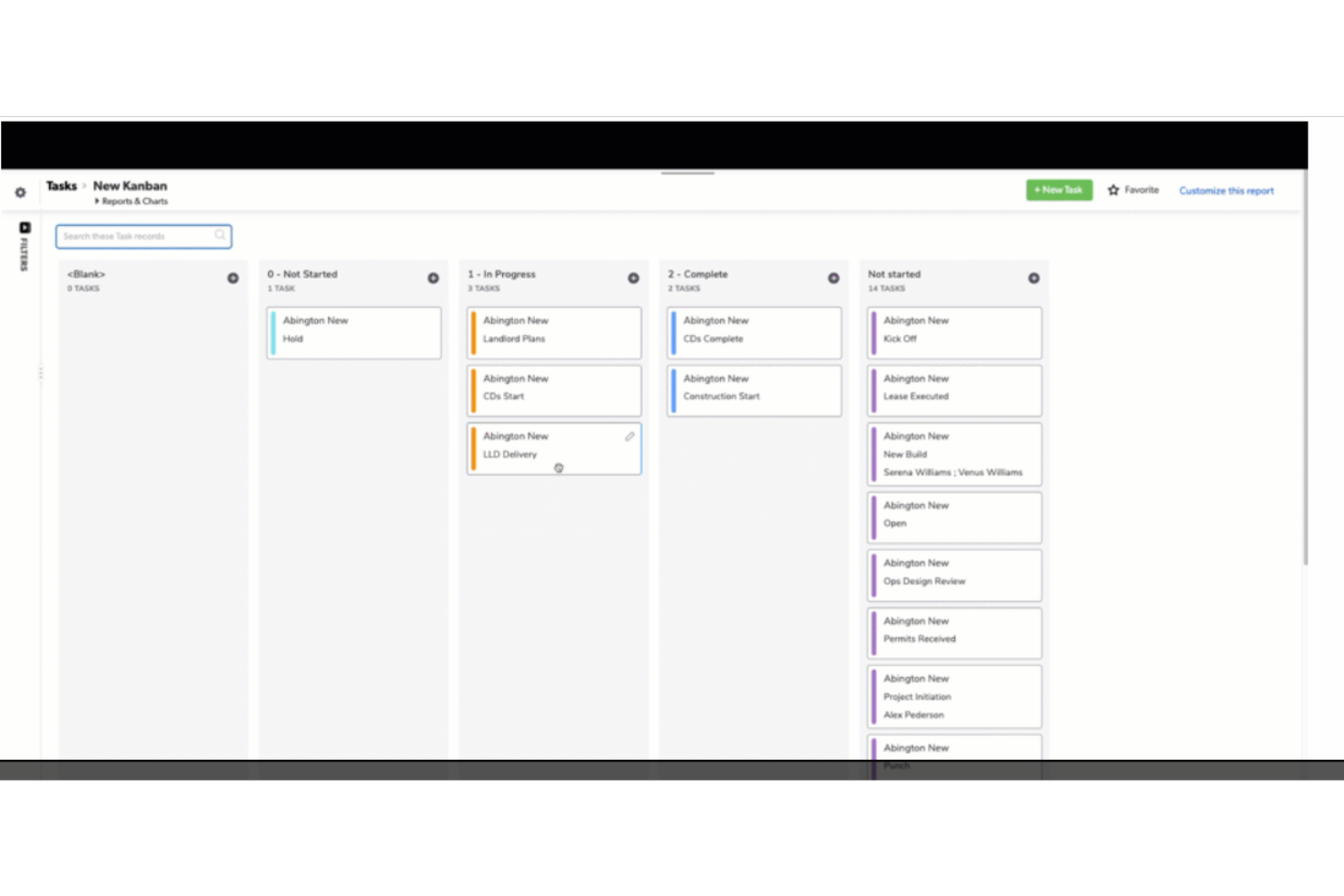
QuickBase è una piattaforma di sviluppo applicazioni basata su cloud che consente agli utenti di creare applicazioni aziendali personalizzate senza la necessità di competenze di programmazione. La sua piattaforma può anche essere adattata come software scrum, supportando metodologie di gestione agile dei progetti. Ciò consente ai team di gestire sprint, backlog e user story all'interno di un framework personalizzabile.
La flessibilità di QuickBase nella progettazione delle applicazioni e nella gestione dei dati permette inoltre ai team scrum di configurare il sistema in base alle loro specifiche esigenze di workflow, facilitando lo sviluppo iterativo e il miglioramento continuo centrali nelle pratiche scrum.
QuickBase si integra con Microsoft Teams, Tableau, Slack, Salesforce, NetSuite, QuickBooks, Dropbox, Google Drive, Marketo e Zendesk.
QuickBase ha un costo a partire da $35/utente/mese (fatturato annualmente) e offre una prova gratuita di 30 giorni.
Pros and Cons
Pros:
- Interfaccia intuitiva
- Fornisce un supporto clienti eccellente agli utenti
- Può scalare con la crescita aziendale
Cons:
- Mancanza di report facilmente formattabili
- Alcuni problemi di lentezza nei tempi di caricamento

Ideale per team business e software

Jira è una piattaforma di gestione progetti agile sviluppata da Atlassian che supporta i flussi di lavoro scrum tramite la gestione del backlog, la pianificazione degli sprint, bacheche personalizzabili e strumenti di reportistica integrati come grafici burndown e monitoraggio della velocità.
Per chi è più indicato Jira?
Jira è ideale per team di sviluppo software e di prodotto che necessitano di una gestione strutturata degli sprint insieme a un approfondito tracciamento dei problemi e flussi di lavoro ingegneristici.
Perché ho scelto Jira
Ho scelto Jira perché gestisce lo scrum sia a livello di team che di organizzazione senza imporre un approccio unico per tutti. I team business e software possono gestire configurazioni di progetto separate: gestiti dal team per una consegna sprint leggera, gestiti dall’azienda per ambienti dove la governance è centrale. Mi piace particolarmente come la pianificazione degli sprint sia direttamente connessa al backlog, dove puoi stimare i punti storia, impostare obiettivi di sprint e monitorare l’avanzamento tramite grafici burndown in un unico flusso di lavoro integrato.
Caratteristiche principali di Jira
- Bacheca Scrum: Una bacheca visiva che ti permette di spostare i ticket attraverso colonne personalizzate del flusso di lavoro durante uno sprint attivo.
- Grafico della velocità: Traccia i punti storia completati nei precedenti sprint così puoi impostare obiettivi di sprint più accurati.
- Vista timeline: Mappa ticket, epic e dipendenze tra gli sprint per offrirti una visuale dell’avanzamento a livello di rilascio.
- Regole di automazione: Avviano azioni come aggiornamenti di stato, assegnazioni o notifiche in base alle modifiche ai ticket, senza input manuale.
New Product Updates from Zoho Sprints
Zoho Sprints Adds Dashboard View for Custom Modules
Zoho Sprints adds a Dashboard view for custom modules with charts and tables for visualizing module records. This gives teams a clearer way to review custom data. For more information, visit Zoho Sprints’ official site.
 .
.
Miro
Miglior strumento scrum con videoconferenze integrate
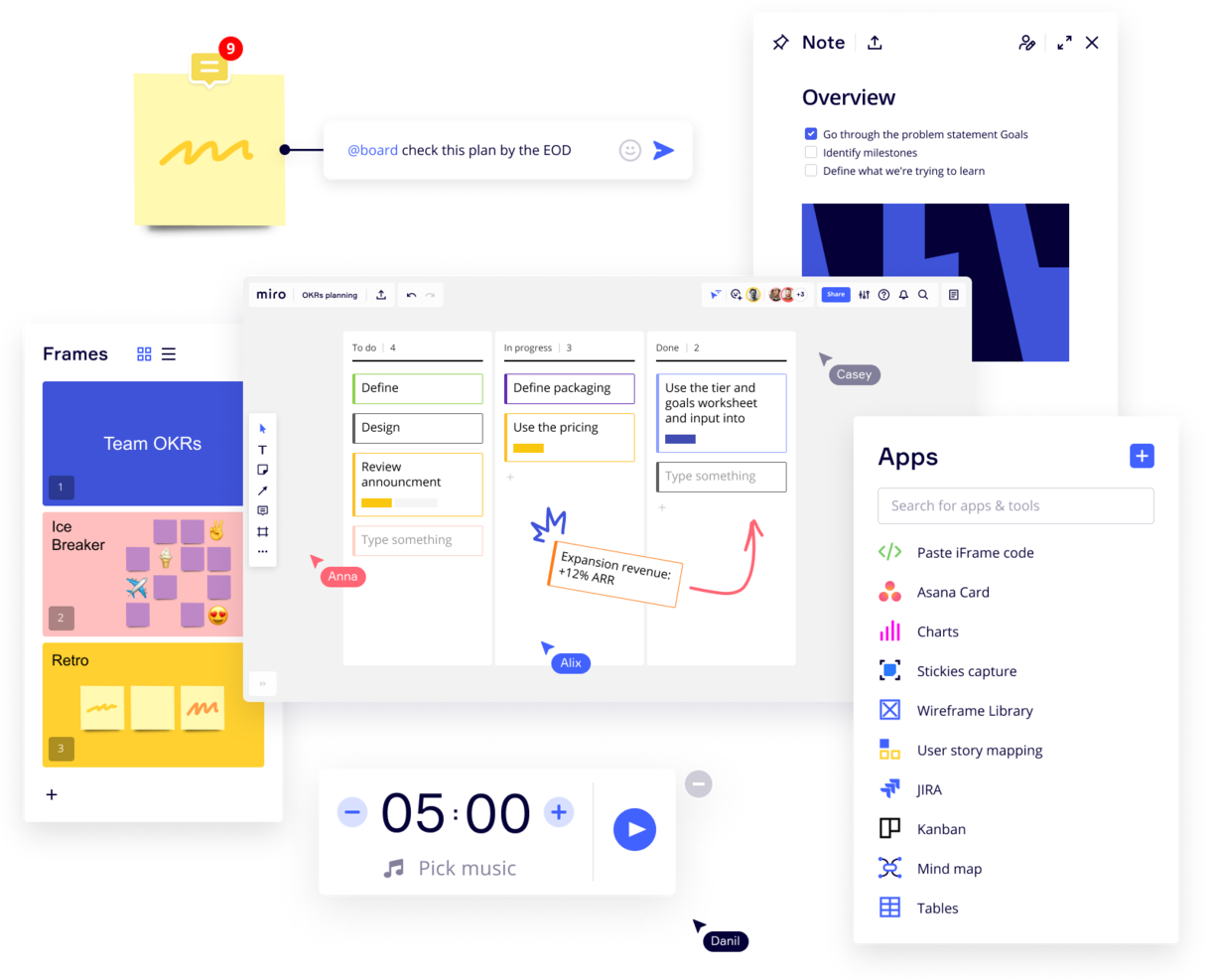
Miro è una lavagna online collaborativa con videoconferenze integrate, ampiamente utilizzata in vari settori, inclusi importanti aziende Fortune 100. Offre un'ampia gamma di template e formati, dai Kanban board ai diagrammi di flusso.
Come strumento software per scrum, Miro include funzioni di collaborazione interattiva come sticky notes e commenti, che permettono discussioni dinamiche durante le sessioni scrum. La sua integrazione con strumenti di project management come Jira e Asana consente di centralizzare il monitoraggio delle attività all'interno del framework scrum. Inoltre, lo strumento planner di Miro aiuta a visualizzare e organizzare le attività, offrendo ai team una visione chiara dei loro progetti e sprint.
Miro dispone di integrazioni con un'intera suite di strumenti, tra cui Zoom, Figma, Confluence, Asana, monday.com, Microsoft Teams, Jira, Slack, Google Drive, Box, Airtable, Notion, Azure e Webex. Alcune integrazioni sono disponibili solo per i piani a pagamento.
Pros and Cons
Pros:
- Funzionalità di comunicazione integrate per una collaborazione fluida
- Configurazione intuitiva e semplice
- Piano gratuito disponibile per sempre
Cons:
- La versione gratuita non permette l'esportazione in PDF di alta qualità
- Lo zoom può essere instabile su progetti di grandi dimensioni
- Account visitatore/ospite disponibili solo con piani a pagamento
New Product Updates from Miro
Miro Adds Japan Data Residency for Enterprise Customers
Miro has introduced Japan data residency for enterprise customers, offering in-region storage for production data, backups, and metadata, plus in-region compute infrastructure. For more information, visit Miro's official site.

ClickUp
Ideale per liberi professionisti & imprenditori
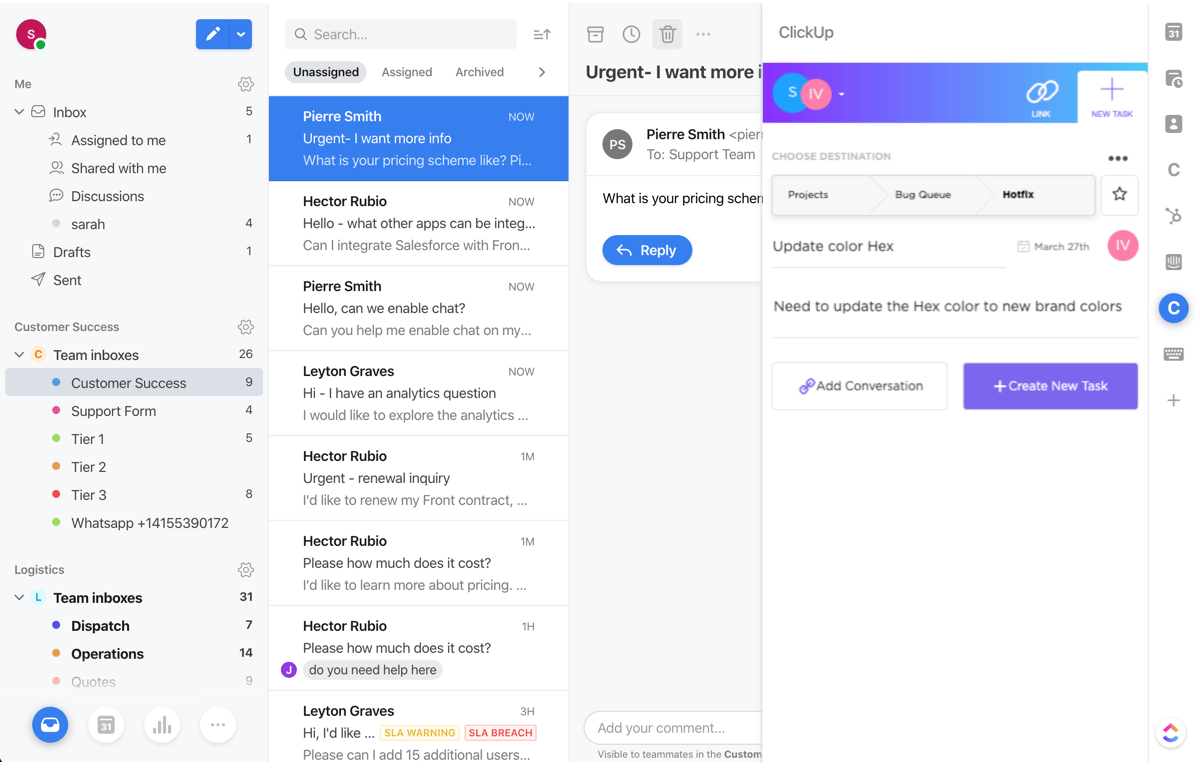
ClickUp si presenta come 'un'app per sostituirle tutte' e sono incline ad essere d'accordo. È un'ottima soluzione tuttofare che gestisce attività di base, documenti, chat di squadra e obiettivi all'interno di un'interfaccia elegante e accogliente. I team scrum da remoto apprezzeranno le funzionalità di screenshot e registrazione facili da usare per le riunioni stand-up a distanza. In più, il loro piano gratuito è piuttosto generoso, con attività illimitate e membri illimitati oltre a 100MB di spazio di archiviazione.
ClickUp costa $5/utente/mese. Offrono anche una versione gratuita con attività illimitate e membri illimitati.
Pros and Cons
Pros:
- Possibilità di creare (dopo configurazione) un'attività direttamente da Outlook via email
- Archiviazione file illimitata in tutti i livelli di account a pagamento
- Il piano gratuito per sempre consente membri illimitati
Cons:
- Le opzioni di personalizzazione approfondite comportano una configurazione laboriosa
- Il pacchetto reportistica è limitato solo ai piani a pagamento
- I permessi per ospiti solo lettura sono disponibili solo nei piani a pagamento
New Product Updates from ClickUp
ClickUp Adds Meetings Hub, Super Agent Templates, and ZoomInfo Integration
ClickUp adds a searchable Meetings Hub, new ways to clone and template Super Agents, and a ZoomInfo integration through the App Center. These updates improve meeting retrieval, agent reuse, and access to sales intelligence. For more information, visit ClickUp’s official site.

Ideale per la documentazione API
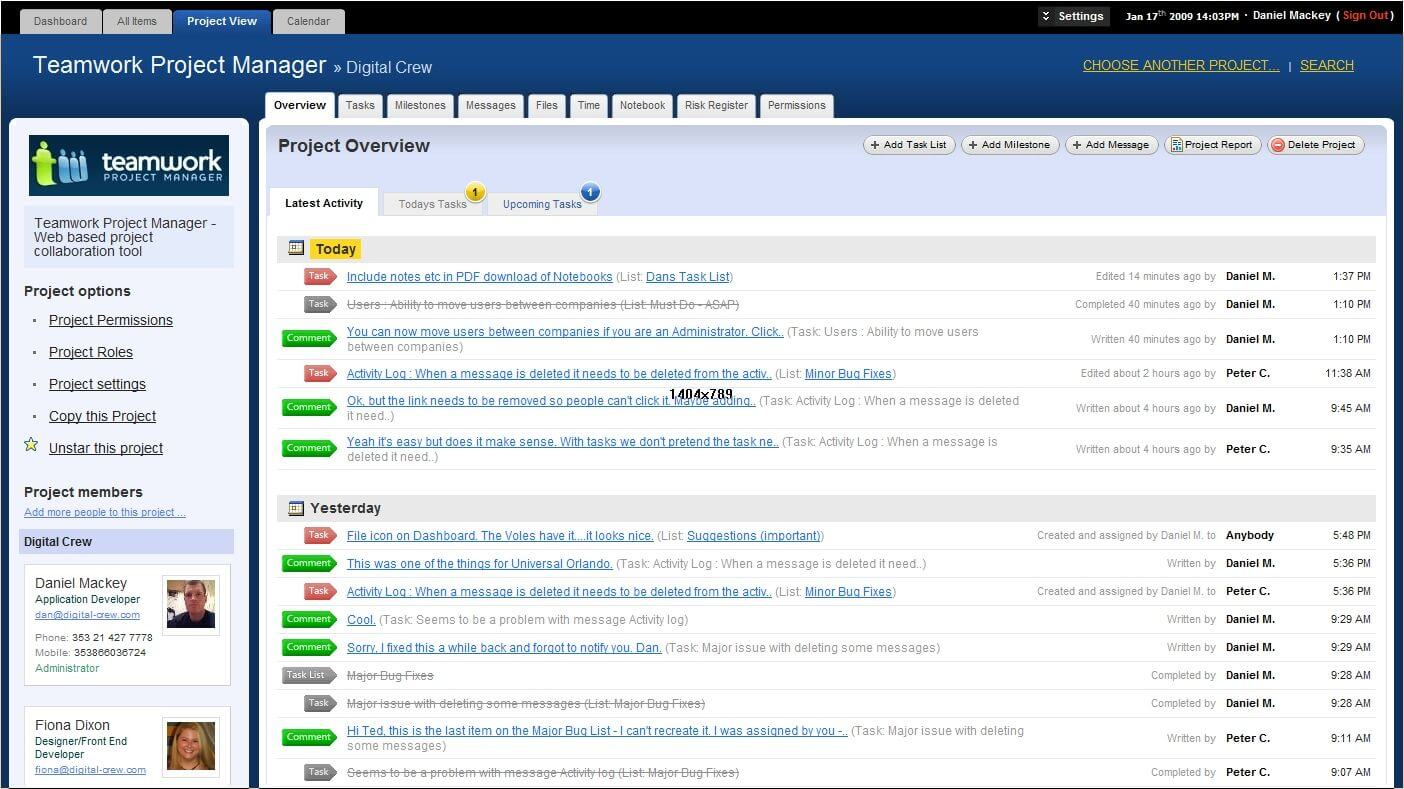
Utilizzato da oltre 20.000 aziende, Teamwork è uno strumento di gestione dei progetti che pone l'accento su responsabilità e collaborazione con il monitoraggio del tempo, la gestione del carico di lavoro, modelli e automazioni. L’API di Teamwork è flessibile e accessibile grazie a diversi moduli self-service per manipolare i dati, creare integrazioni, personalizzare i flussi di lavoro di sviluppo prodotto e visualizzare i tuoi contenuti. I team cross-funzionali orientati allo Scrum apprezzeranno questa adattabilità.
Teamwork ha un costo a partire da $10/utente/mese e offre anche una versione freemium dello strumento fino a 5 utenti. Tutti i piani a pagamento prevedono inoltre una prova gratuita di 30 giorni.
Pros and Cons
Pros:
- Facile comunicare lo stato delle attività a clienti o team
- Facile ingrandire/rimpicciolire i piani di progetto
- Le funzionalità possono essere attivate/disattivate (attività, messaggi, tempi, rischi, fatturazione)
Cons:
- Nessun modo semplice per misurare la capacità del team
- Nessun modello o formato di progetto specifico per settore
- Nessuna opzione di template CSS per personalizzazioni avanzate

Jira
Il miglior software scrum per le aziende
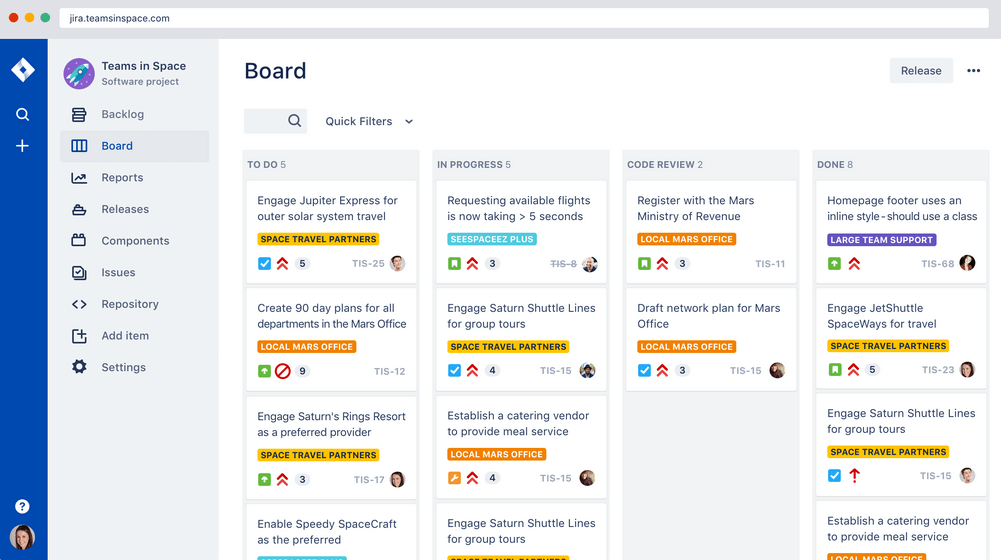
La bacheca Scrum di Jira trasforma questo potente software di gestione dei flussi di lavoro adattandolo alla collaborazione di squadra e alle consegne incrementali. Alcune funzionalità che gli scrum master troveranno utili sono le card user story agili stampabili, oltre 25 estensioni e filtri agili, e un robusto gestore di modelli di progetto. Atlassian possiede Jira, Confluence, Trello, BitBucket, SourceTree, Bamboo—il che lo rende ideale per le aziende che vogliono tutto in un unico ecosistema.
Jira ha un costo a partire da $7/mese per un massimo di 10 utenti. Offrono inoltre licenze gratuite per gruppi fino a 10 utenti.
Pros and Cons
Pros:
- Amministrazione centralizzata su tutti i prodotti Atlassian Cloud
- Raccoglie tutto lo storico dei lavori per riferimento futuro
- Si possono creare task, sub-task, spike ed epic
- Vista unica per tutte le user story
Cons:
- Nessuna modifica o script di massa (rinominare un intero set di etichette, ecc.)
- Necessita di un migliore collegamento tra storie e task
- Funzionalità di collaborazione limitate
Il miglior software Scrum per le retrospettive di sprint

Targetprocess è un'applicazione di gestione dei team Scrum con soluzioni pensate per product owner, release train engineer, portfolio manager e coach agili. Rende le retrospettive di sprint semplici grazie a strumenti integrati per verificare il grado di soddisfazione del team, organizzare i feedback o semplicemente registrare un riepilogo di alto livello di un progetto. Targetprocess dispone di tag per le board come 'ha funzionato bene', 'non ha funzionato bene' e 'idee di miglioramento', rendendo ancora più semplici le retrospettive collaborative.
Targetprocess offre prezzi personalizzati su richiesta.
Pros and Cons
Pros:
- Report grafici e personalizzati robusti per individuare tendenze
- Team di assistenza clienti reattivo
- Puoi scegliere tra visualizzazioni uniche o standard per ogni utente
Cons:
- Può essere difficile spostare le entità tra i diversi livelli della gerarchia
- Non include il tracciamento delle iterazioni
- Impossibile riutilizzare i passaggi

Ideale per agenzie e studi di consulenza

Bonsai è una piattaforma di gestione aziendale versatile pensata per agenzie, studi di consulenza e servizi professionali. Combina strumenti per la gestione di clienti e progetti con il monitoraggio finanziario, offrendo una soluzione tutto-in-uno per le operazioni aziendali. Con funzionalità come CRM, gestione di proposte e contratti, pianificazione e monitoraggio delle spese, Bonsai aiuta i team a organizzare i flussi di lavoro, gestire sprint e portare a termine i progetti.
Il solido sistema di gestione delle attività di Bonsai lo rende uno strumento prezioso per i team Scrum. Include assegnazione dei compiti, definizione delle priorità, scadenze e visualizzazioni Kanban per il monitoraggio dell'avanzamento, elementi essenziali per la gestione degli sprint Scrum. I timer integrati e gli strumenti di collaborazione garantiscono che il team possa mantenere una comunicazione chiara e rispettare le scadenze durante tutto il progetto.
Inoltre, Bonsai offre funzionalità come modelli personalizzabili, fatturazione automatizzata, cronologie di progetto, portali per i clienti e reportistica e analisi complete. Bonsai si integra anche con strumenti popolari come Google Calendar, Calendly, QuickBooks Online, ClickUp, Google Drive, Google Sheets, Zapier, Slack, HubSpot, Gmail, Xero e altri ancora.
Pros and Cons
Pros:
- Automazione delle attività ripetitive
- Gestione flessibile delle attività con viste Kanban
- Portale clienti per la comunicazione diretta
Cons:
- Potrebbe non essere ideale per le aziende di grandi dimensioni
- Mancano funzionalità Scrum avanzate come la gestione del backlog
Nutcache
Il miglior software Scrum per integrazioni applicative

Nutcache è uno strumento di gestione progetti Scrum che consente di misurare l'avanzamento delle attività, assegnare un valore di business alle card (ROI), attribuire punti di complessità alle card, visualizzare statistiche in tempo reale sugli sprint e utilizzare test di accettazione per contrassegnare le card come completate. Nutcache offre una solida lista di integrazioni con terze parti e funziona anche con un piano Zapier a pagamento per sbloccare migliaia di ulteriori automazioni. Inoltre, mette a disposizione un'API flessibile per collegare Nutcache ai tuoi strumenti e flussi di lavoro esistenti.
Nutcache parte da $6/utente/mese con il piano “Pro” che richiede almeno 5 utenti.
Pros and Cons
Pros:
- Facile integrazione di nuovi dipendenti (scalabile)
- Ottima gestione di tempi e spese
- Intuitivo da imparare e da usare
- Dashboard di progetto robuste
Cons:
- Servono più integrazioni di terze parti
- Livelli di sicurezza complicati per i dipendenti
Altri software Scrum
Ecco alcuni altri strumenti che non sono entrati nell’elenco principale.
- VivifyScrum
Ideale per piccoli team e startup
- SwiftKanban
Miglior strumento Scrum per ingegneri
- Height
Sviluppo Agile efficiente reso semplice.
- Axosoft
Migliore dashboard per gli Sprint
- Orangescrum
Miglior software Scrum con gestione delle risorse
- monday AI Workspace
La soluzione migliore per il rilevamento e la reportistica dei rischi basati sull'IA
- Celoxis
Ideale per la gestione delle risorse
- Hubstaff
Miglior software Scrum gratuito
- Lucidspark
La migliore board Scrum per integrazioni e collaborazione
- GoodDay
Ideale per la prioritizzazione del backlog


Come valuto il software Scrum
Divido la mia valutazione in due livelli: se uno strumento copre i fondamenti di pianificazione degli sprint, grooming del backlog e reportistica burndown, e in seguito cosa lo distingue per team che si stanno espandendo su più squadre.
Funzionalità di base (Requisiti essenziali per questa lista)
Quando seleziono gli strumenti per la mia lista, attribuisco un punteggio a ciascuno su una scala da 0 (non offre la funzionalità) a 5 (eccelle in questa area) per ogni funzionalità di base elencata di seguito. Calcolo poi il punteggio totale dello strumento in percentuale. Ogni strumento deve raggiungere un punteggio minimo totale del 65% per essere preso in considerazione.
- Gestione del Product Backlog: Valuto come ogni strumento gestisce la creazione, la priorità e la manutenzione di user story ed epic — ad esempio spostare gli elementi per riprioritizzare dopo una revisione degli stakeholder.
- Pianificazione ed esecuzione dello Sprint: Ogni strumento dovrebbe consentire di definire sprint con obiettivi, estrarre elementi dal backlog e monitorare la capacità affinché il team si impegni su carichi di lavoro realistici.
- Visualizzazione Scrum Board: Cerco bacheche drag-and-drop con colonne e swimlane personalizzabili che rispecchino come il tuo team effettivamente sposta il lavoro da "Da fare" a "Fatto".
- Reportistica Agile & Metriche: I grafici burndown, il monitoraggio della velocità e i diagrammi di flusso cumulativo sono fondamentali qui — controllo se i report si aggiornano in tempo reale con il progresso dello sprint.
- Stima dei punti storia: Gli strumenti dovrebbero supportare i punti storia a livello di elemento e aggregarli su più sprint, come fanno Jira e Azure DevOps nella visualizzazione della velocità nel tempo.
- Collaborazione del team sugli elementi di lavoro: Valuto se i membri del team possono commentare, @menzionare, allegare file e ricevere notifiche direttamente su user story e task all’interno di uno sprint.
Una volta che ho un elenco di strumenti che soddisfano questi criteri, considero ciò che contraddistingue ogni piattaforma.
Fattori differenzianti (Cosa distingue i fornitori)
Ecco come metto a confronto i vari fornitori:
Funzionalità distintive
Strumenti di retrospettiva integrati sono una forte discriminante — cerco template come Inizia/Sospendi/Continua con votazione e azioni che si trasferiscono nello sprint successivo. Anche l'integrazione con strumenti di sviluppo è importante: collegare commit di GitHub o GitLab direttamente alle user story dà visibilità a tutto il team su ciò che viene rilasciato. Controllo inoltre la presenza di regole di automazione no-code che gestiscano attività ricorrenti come lo spostamento automatico degli elementi non completati allo sprint successivo o la notifica automatica allo Scrum Master quando una storia è bloccata.
Oltre le funzionalità
L’integrazione nell’ecosistema è uno dei primi aspetti che valuto — il fatto che uno strumento si colleghi già ai tuoi Slack, Confluence o Figma incide sulle routine quotidiane più di molte funzionalità specifiche. Considero anche come una piattaforma supporta la scalabilità; uno strumento che funziona per un solo team Scrum può andare in crisi quando si devono coordinare dieci squadre su un intero portfolio. Anche l’onboarding è importante. Template Scrum predefiniti e facilità di migrazione da strumenti come fogli di calcolo o vecchi software PM possono ridurre notevolmente i tempi di avvio del tuo team.
Come scegliere un software Scrum
È facile perdersi in lunghi elenchi di funzionalità e strutture tariffarie complesse. Per aiutarti a rimanere concentrato mentre affronti il tuo processo di selezione del software, ecco una lista di fattori da tenere in considerazione:
| Fattore | Cosa considerare |
| Scalabilità | Questo strumento crescerà insieme al tuo team con l'espandersi delle tue esigenze? Devi esaminare i piani tariffari e le funzionalità per verificare se lo strumento può crescere con te. |
| Integrazioni | Il software si integra con gli strumenti già utilizzati dal tuo team? Ad esempio, alcune aziende cercano specificamente software per la gestione dei progetti che si integri con Jira. |
| Personalizzazione | Puoi adattare il software ai tuoi flussi di lavoro? |
| Facilità d'uso | L'interfaccia dello strumento è abbastanza intuitiva da consentire al tuo team di imparare a utilizzarlo rapidamente? |
| Budget | Il prezzo rientra nei limiti finanziari del tuo team? |
| Misure di sicurezza | Il software offre solide funzionalità di sicurezza per proteggere i tuoi dati? |
| Collaborazione | Il software migliorerà il modo in cui il tuo team collabora ai progetti? |
| Strumenti di report | Il software offre report che soddisfano le esigenze del tuo team? Questo aspetto viene spesso trascurato e molti strumenti non dispongono di moduli di reportistica avanzati. |
Tendenze del software Scrum nel 2025
Durante la mia ricerca, ho consultato innumerevoli aggiornamenti di prodotto, comunicati stampa e registri delle versioni di diversi fornitori di software Scrum. Ecco alcune delle tendenze emergenti che sto tenendo d'occhio:
- Pianificazione degli sprint basata sull'IA: i fornitori stanno iniziando a integrare l'IA nei software di pianificazione degli sprint per prevedere la durata delle attività e assegnare automaticamente i membri del team sulla base dei dati sulle prestazioni passate. Questo rende la pianificazione più efficiente e riduce gli errori umani, aiutando i team a procedere più rapidamente nel complesso.
- Gamification per il coinvolgimento: gli strumenti per Scrum Master stanno incorporando elementi di gamification per mantenere motivati i membri del team. Ricompensando i progressi con distintivi o punti, queste funzionalità rendono più coinvolgente l'uso delle bacheche delle attività Scrum e contribuiscono ad aumentare la produttività durante gli sprint.
- Concentrarsi sulla collaborazione da remoto: le piattaforme online per le bacheche Scrum stanno migliorando le funzionalità di collaborazione virtuale, offrendo aggiornamenti in tempo reale e strumenti di comunicazione integrati per connettere meglio i team remoti. Alcune app Scrum ora includono videoconferenze o chat integrate, rendendo più fluida la collaborazione da remoto.
- Report e analisi avanzati: sempre più strumenti di gestione Scrum forniscono informazioni dettagliate sulla velocità degli sprint, sui tassi di completamento delle attività e sui colli di bottiglia. I team che utilizzano queste bacheche agili possono ora prendere decisioni più basate sui dati e monitorare con maggiore precisione l'andamento delle prestazioni nel tempo.
- Monitoraggio visivo degli sprint: le lavagne Scrum e la progettazione Scrum si stanno evolvendo in piattaforme più visive e interattive. I fornitori stanno integrando nei propri sistemi Scrum interfacce con trascinamento, definizione delle priorità delle attività mediante codici colore e grafici dinamici, facilitando il monitoraggio a colpo d'occhio dell'avanzamento degli sprint.
Che cos'è il software Scrum?
Il software Scrum è uno strumento di gestione dei progetti che aiuta i team a implementare il framework Scrum organizzando il lavoro in sprint brevi e iterativi.
Utilizzato comunemente nello sviluppo software Agile, include funzionalità per la pianificazione degli sprint, la gestione del backlog, il monitoraggio delle attività e le riunioni giornaliere. Gli strumenti Scrum migliorano la collaborazione del team, aumentano la trasparenza e supportano la distribuzione continua aiutando i team a reagire rapidamente ai cambiamenti.
Funzionalità del software Scrum
Quando scegli un software Scrum, presta attenzione alle seguenti funzionalità chiave:
- Pianificazione degli sprint: aiuta i team a pianificare e suddividere il lavoro in sprint gestibili utilizzando uno strumento di pianificazione degli sprint, garantendo una consegna puntuale.
- Gestione del backlog: consente di stabilire facilmente le priorità e organizzare le attività all'interno del backlog del prodotto, elemento essenziale per la gestione agile di Scrum.
- Grafici burndown: fornisce una rappresentazione visiva dell'avanzamento del lavoro su una bacheca Scrum agile, aiutando i team a monitorare la propria velocità e a prevedere il completamento.
- Mappatura delle storie utente: consente ai team di strutturare in modo efficiente le storie utente nell'ambito dello sviluppo software Scrum agile, allineando il lavoro alle esigenze dei clienti.
- Flussi di lavoro personalizzabili: si adatta ai processi specifici dei team nei sistemi di strumenti Scrum agili, consentendo flessibilità nel modo in cui il lavoro viene monitorato e completato, ideale per i flussi di lavoro Scrum.
- Strumenti di collaborazione: facilitano la comunicazione del team con funzionalità come chat, commenti e condivisione di file.
- Strumenti per le retrospettive: incoraggiano il miglioramento continuo offrendo modalità strutturate per esaminare e discutere gli sprint completati.
- Report e analisi: forniscono informazioni sulle prestazioni del team, contribuendo all'ottimizzazione dei processi per i progetti Scrum.
- Autorizzazioni basate sui ruoli: garantiscono che i membri del team abbiano accesso agli strumenti e alle informazioni appropriati, proteggendo i dati sensibili, aspetto fondamentale per la gestione dei team e dei flussi di lavoro Scrum.
- Funzionalità di integrazione: si collegano ad altri strumenti dell'ecosistema di gestione dei progetti, ottimizzando i flussi di lavoro tra le piattaforme.
Vantaggi del software Scrum
L'implementazione del software Scrum offre diversi vantaggi al tuo team e alla tua azienda. Eccone alcuni:
- Maggiore collaborazione: gli strumenti Scrum facilitano la comunicazione e la collaborazione tra i team tramite bacheche e liste di attività condivise.
- Consegna più rapida: i team possono consegnare i progetti più velocemente utilizzando app per la pianificazione degli sprint, che suddividono le attività di grandi dimensioni in sprint più piccoli e gestibili.
- Maggiore trasparenza: il software per bacheche Scrum consente a tutti di vedere in tempo reale l'avanzamento delle attività, eliminando la confusione su chi stia svolgendo ciascun compito.
- Flessibilità migliorata: gli strumenti software agili consentono ai team di adattarsi rapidamente ai cambiamenti senza perdere di vista gli obiettivi del progetto.
- Definizione più semplice delle priorità: gli strumenti per Scrum Master, come i software per gli sprint, aiutano i team a riorganizzare le attività in base all'importanza, garantendo che l'attenzione sia rivolta innanzitutto a ciò che deve essere completato.
- Maggiore responsabilizzazione: il software per Scrum Master fornisce assegnazioni e scadenze chiare, facilitando il monitoraggio dei responsabili di ciascuna attività.
- Riduzione dei colli di bottiglia: utilizzando strumenti come una bacheca agile degli sprint per visualizzare il flusso di lavoro, i team possono individuare e risolvere i problemi che rallentano l'avanzamento.
Costi e prezzi del software Scrum
La scelta del software Scrum richiede la comprensione dei vari modelli e piani tariffari disponibili. I costi variano in base alle funzionalità, alle dimensioni del team, ai componenti aggiuntivi e ad altri fattori. La tabella seguente riassume i piani più comuni, i relativi prezzi medi e le funzionalità tipicamente incluse nelle soluzioni software Scrum:
Tabella comparativa dei piani per il software Scrum
| Tipo di piano | Prezzo medio | Funzionalità comuni |
| Piano gratuito | $0-$10/utente/mese | Gestione di base delle attività, progetti limitati, reportistica di base e integrazioni limitate. |
| Piano personale | $0-$10/utente/mese | Monitoraggio avanzato delle attività, flussi di lavoro personalizzati, strumenti di reportistica e accesso alle integrazioni standard. |
| Piano aziendale | $15-$50/utente/mese | Modelli di progetto, reportistica dettagliata, dashboard personalizzate e funzionalità per la collaborazione del team. |
| Piano per grandi aziende | $30-$100/utente/mese | Progetti illimitati, assistenza prioritaria, funzionalità di sicurezza avanzate e integrazioni a livello aziendale. |
Domande frequenti
Che cos'è la metodologia Scrum?
Quali sono i valori associati a Scrum?
Quali sono i componenti del framework Scrum?
Qual è la differenza tra Scrum e Kanban?
Che cos'è una revisione dello sprint Scrum?
Che cos'è la tecnica Scrum of Scrums?
Quali sono le difficoltà associate alla metodologia Scrum?
Recensioni di strumenti simili
Ho scritto anche di strumenti simili, come alternative simili a Trello e strumenti per la gestione agile dei progetti in senso più generale.