

I 10 migliori software per la gestione delle risorse nell’edilizia recensiti nel 2026

Elenco dei migliori software per la gestione delle risorse nell'edilizia


Tenere le squadre sulla buona strada, le attrezzature dove servono e i programmi sotto controllo non è facile. Quando gestisci manodopera, materiali e subappaltatori in più cantieri, ritardi e problemi di comunicazione possono accumularsi rapidamente.
Il software per la gestione delle risorse nell'edilizia ti aiuta ad assegnare il lavoro, monitorare la disponibilità e anticipare i problemi prima che ti costino tempo o denaro.
In questo elenco ti illustrerò le migliori opzioni sul mercato. Provo e recensisco in modo indipendente i software per la gestione dei progetti e ho scelto questi strumenti in base a ciò che funziona davvero per chi si occupa di gestione dei progetti edilizi.
Perché fidarsi dei nostri consigli sui software
Il nostro team testa e recensisce software dal 2012. In quanto project manager noi stessi, sappiamo quanto sia difficile — e importante — scegliere il software giusto.
Per questa guida, abbiamo valutato gli strumenti attraverso test pratici e ricerche indipendenti, assegnando un punteggio agli strumenti in base ai nostri criteri di selezione. Ci basiamo inoltre sulle competenze di leader di pensiero del settore e di professionisti attivi nella gestione dei progetti.
Le nostre recensioni riflettono il nostro giudizio editoriale umano, non un discorso di vendita.
Revisori esperti:
Tabella comparativa dei software per la gestione delle risorse nell'edilizia
Questa tabella comparativa riassume i dettagli sui prezzi delle mie migliori selezioni di software per la gestione delle risorse nell’edilizia:
| Tool | Best For | Trial Info | Price | ||
|---|---|---|---|---|---|
| 1 | Ideale per visualizzare il carico di lavoro del team | Prova gratuita di 14 giorni + piano gratuito disponibile | Da $10/utente/mese (fatturato annualmente) | Website | |
| 2 | Ideale per l'allocazione delle risorse basata sulla capacità | Prova gratuita di 14 giorni + demo gratuita disponibile | Da $19.90/utente/mese (fatturato annualmente) | Website | |
| 3 | Ideale con una piattaforma a database unico | Demo gratuita disponibile | Prezzo su richiesta | Website | |
| 4 | Ideale per la manutenzione delle risorse | Piano gratuito disponibile | A partire da $28/utente/mese | Website | |
| 5 | Ideale per l'allocazione delle risorse | Prova gratuita di 15 giorni | A partire da $35/mese (fatturato annualmente) | Website | |
| 6 | Ideale per la massima efficienza in cantiere | Prova gratuita di 30 giorni + demo gratuita disponibile | A partire da $39/mese (fatturati annualmente) | Website | |
| 7 | Ideale per la gestione dei clienti | Demo gratuita disponibile | Prezzo su richiesta | Website | |
| 8 | Ideale per il coordinamento in cantiere | Piano gratuito disponibile | Da $39/utente/mese (fatturazione annuale) | Website | |
| 9 | Ideale per un’accurata pianificazione | Consulenza gratuita disponibile | Prezzo su richiesta | Website | |
| 10 | Ideale per la collaborazione tra team | Prova gratuita di 14 giorni + demo gratuita disponibile | Da $29/mese (fatturazione annuale) | Website |


Recensioni dei migliori software per la gestione delle risorse nell'edilizia
Di seguito trovi le mie sintesi dettagliate dei migliori software per la gestione delle risorse nell’edilizia inclusi nella mia selezione. Le mie recensioni offrono un’analisi dettagliata delle funzionalità principali, dei pro e dei contro, delle integrazioni e dei casi d’uso ideali di ogni strumento, per aiutarti a trovare quello più adatto a te.

Wrike
Ideale per visualizzare il carico di lavoro del team
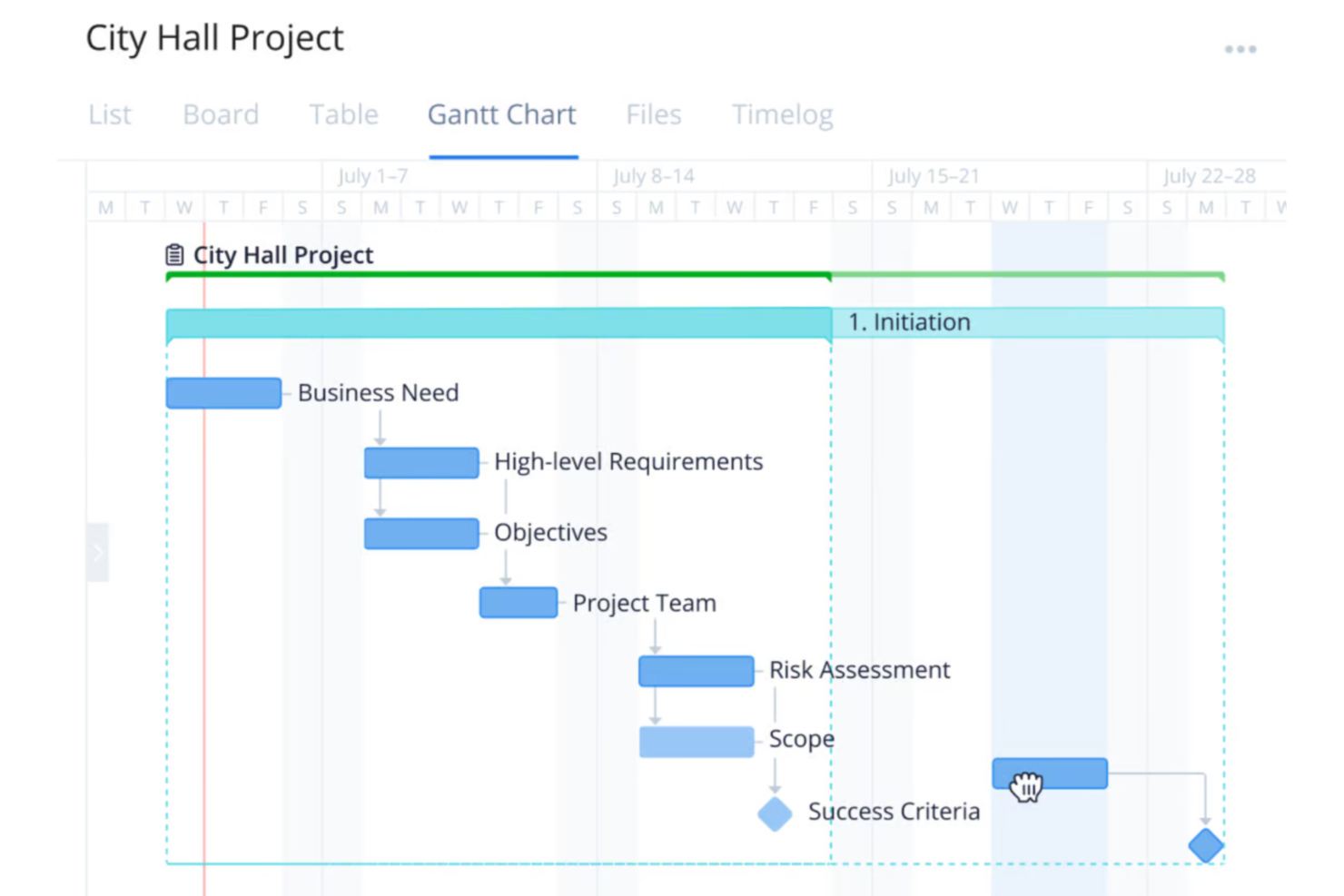
Wrike è una piattaforma di gestione dei progetti versatile progettata per organizzazioni di diversi settori, inclusi i team di costruzione che desiderano migliorare la pianificazione, l'esecuzione e la consegna dei progetti.
Perché ho scelto Wrike:
Una delle principali funzionalità di Wrike sono i grafici del carico di lavoro. Questi grafici offrono una chiara visuale degli incarichi e delle capacità di ciascun membro del team, aiutandoti a distribuire efficacemente i compiti ed evitare sovraccarichi. Visualizzando i carichi di lavoro, puoi allocare le risorse in base alla disponibilità e alle esigenze del progetto, garantendo compiti bilanciati e il completamento puntuale. Apprezzo anche gli strumenti di monitoraggio del tempo di Wrike, che permettono al team di registrare le ore dedicate alle attività, fornendo informazioni su produttività e progresso del progetto.
Caratteristiche principali & integrazioni:
Le funzionalità includono dashboard personalizzabili che ti consentono di adattare lo spazio di lavoro alle esigenze specifiche del tuo team, offrendo un accesso rapido alle informazioni essenziali del progetto. Inoltre, i moduli di richiesta dinamici di Wrike semplificano il processo di acquisizione delle richieste raccogliendo tutti i dettagli necessari fin dall'inizio, riducendo le comunicazioni avanti e indietro. La piattaforma offre anche strumenti di reportistica in tempo reale, che ti permettono di generare report aggiornati sullo stato dei progetti e sull'utilizzo delle risorse.
Le integrazioni includono QuickBooks, Skyvia, Power BI, Google Sheets, Miro, Salesforce, Tableau, Microsoft Teams, MediaValet, Zoom, Adobe Creative Cloud e Google Drive.
Pros and Cons
Pros:
- Offre una vasta gamma di strumenti per la gestione dei progetti
- Workflow, dashboard e report personalizzabili
- Scalabile per team in crescita
Cons:
- Curva di apprendimento dovuta all’ampia gamma di funzionalità
- Nessuna funzione chat integrata
New Product Updates from Wrike

Wrike Adds Quick Search to Table View
Wrike adds Quick Search to Table View with full-table search across titles, descriptions, and fields, plus highlighted matches. This helps users find tasks faster in large tables. For more information, visit Wrike’s official site.

Scoro
Ideale per l'allocazione delle risorse basata sulla capacità
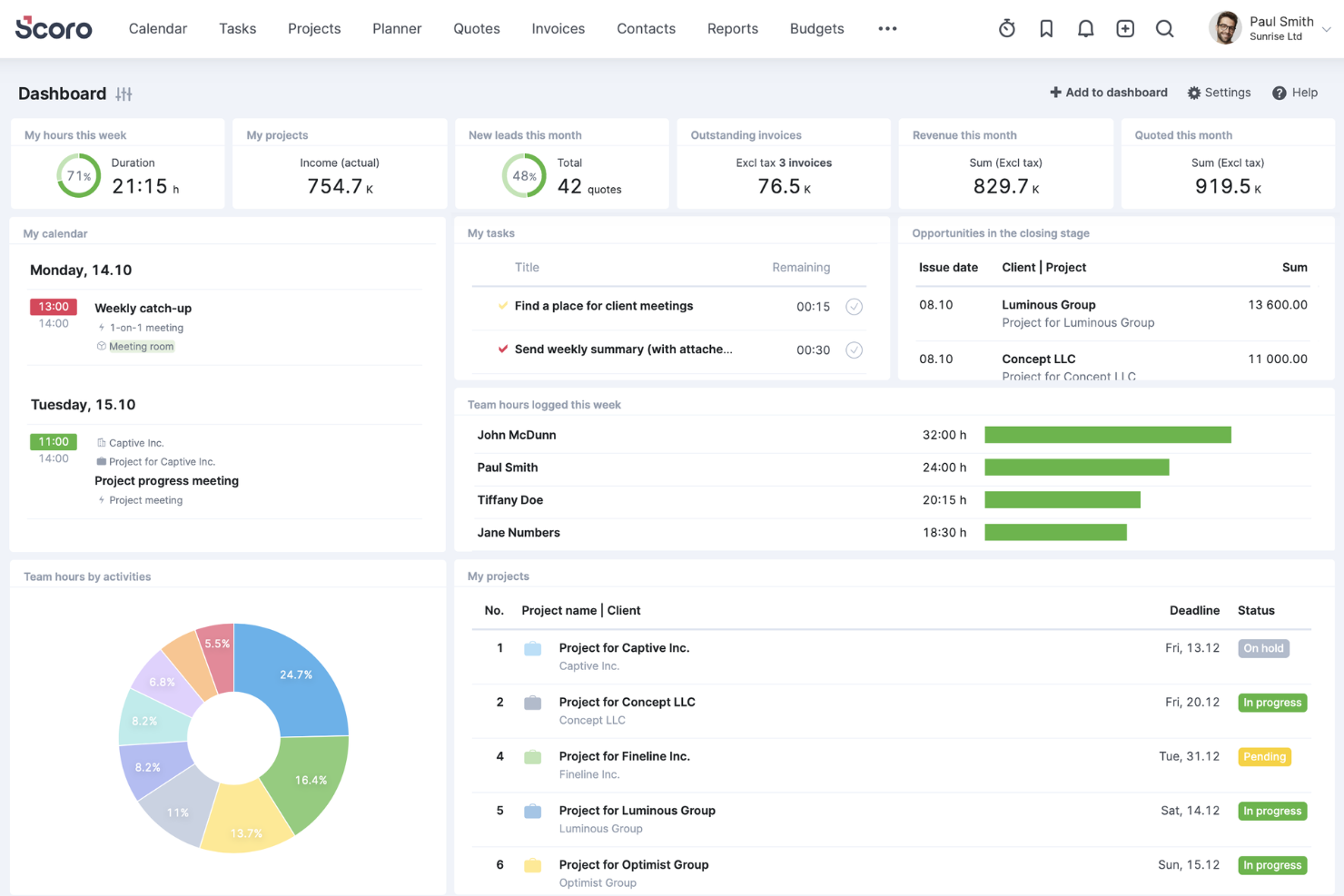
Scoro è un software di gestione aziendale tutto-in-uno progettato per aiutare le aziende di servizi professionali a migliorare le proprie operazioni. Integra gestione progetti, pianificazione delle risorse, vendite, fatturazione e reportistica in un'unica piattaforma.
Perché ho scelto Scoro:
Scoro offre una funzione dinamica di diagramma di Gantt che consente di monitorare l'avanzamento in tempo reale, gestire compiti e dipendenze e modificare i piani secondo necessità. Ciò garantisce che i tuoi progetti di costruzione rimangano nei tempi previsti e che ogni cambiamento sia immediatamente visibile a tutto il team, minimizzando gli aggiornamenti manuali e riducendo il rischio di doppie assegnazioni. Un'altra funzionalità preziosa sono le capacità di pianificazione delle risorse di Scoro. Puoi definire la capacità di ciascun membro del team e allocare le risorse secondo la reale disponibilità, evitando di sovraccaricare il personale e assicurando un utilizzo ottimale.
Funzionalità e integrazioni principali:
Le funzionalità includono strumenti di rilevazione del tempo che permettono al tuo team di registrare sia le ore fatturabili che quelle non fatturabili, offrendo responsabilità e una fatturazione accurata ai clienti. I calendari condivisi e i fogli presenze migliorano il coordinamento del team offrendo una vista unificata di orari e scadenze. Inoltre, gli strumenti di preventivazione e budgeting di Scoro ti consentono di creare proposte dettagliate e monitorare i costi dei progetti rispetto ai budget.
Le integrazioni includono Gmail, Google Calendar, Microsoft Exchange, QuickBooks, Xero, Stripe, PayPal, Jira, Asana, HubSpot, Salesforce, Dropbox e Zapier.
Pros and Cons
Pros:
- Funzionalità di gestione progetti complete
- Ottima pianificazione delle risorse e gestione dell'utilizzo
- Reportistica e analisi avanzate
Cons:
- L'app mobile potrebbe essere migliorata
- Alcune funzionalità di rilevazione del tempo sono disponibili solo nei piani superiori
New Product Updates from Scoro

Scoro Adds Time Mobile App and ELI Improvements
Scoro adds the Scoro Time mobile app for iOS/Android to track time anywhere and expands ELI with attachments, smarter filtering, and trigger-based actions. For more information, visit Scoro's official site.
CMiC
Ideale con una piattaforma a database unico
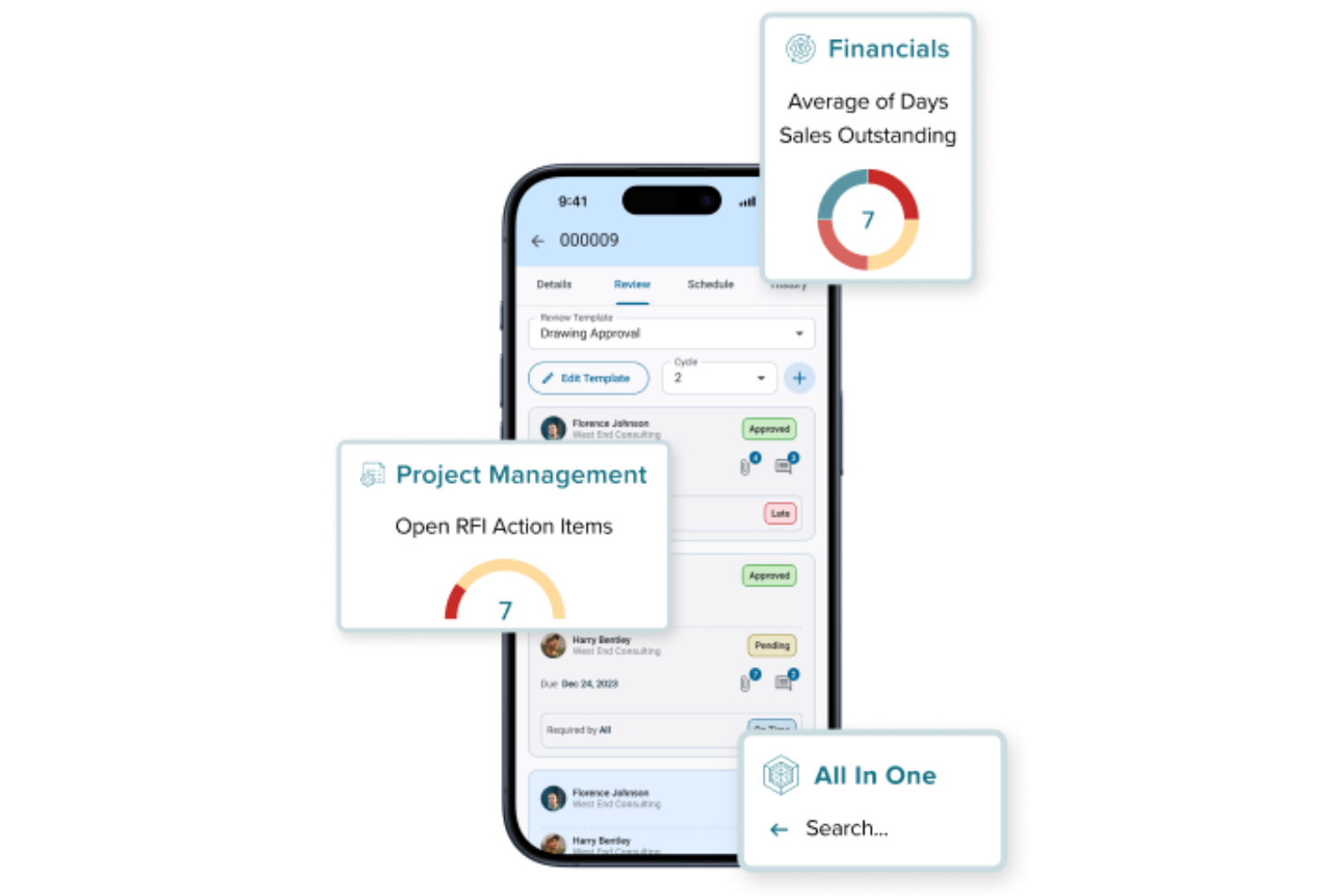
CMiC è una piattaforma di gestione delle costruzioni pensata per le aziende che hanno bisogno di collegare team di progetto, risorse e dati finanziari in un unico luogo. È progettata per appaltatori generali, subappaltatori specializzati e project manager che desiderano unificare i flussi di lavoro e i dati. CMiC aiuta a risolvere problemi come informazioni frammentate, processi manuali e mancanza di visibilità in tempo reale nei progetti edili.
Per chi è ideale CMiC?
CMiC è adatto per imprese di costruzione di medie e grandi dimensioni e appaltatori che necessitano di gestire progetti complessi, risorse e dati finanziari su una piattaforma unificata.
Perché ho scelto CMiC
Ho scelto CMiC perché la sua piattaforma a database unico affronta una delle sfide più grandi nella gestione delle risorse in edilizia: la frammentazione dei dati su più sistemi. Con tutte le informazioni di progetto, risorse e dati finanziari archiviati in un database centralizzato, i team possono accedere ad aggiornamenti in tempo reale e mantenere la coerenza dei dati per tutta la durata del progetto. Questo approccio unificato riduce gli errori ed elimina la necessità di riconciliazione manuale dei dati. Apprezzo anche come questa configurazione favorisca una migliore collaborazione tra i team d'ufficio e di cantiere, assicurando che tutti lavorino sulla stessa fonte di verità.
Funzionalità principali di CMiC
Altre funzionalità di CMiC che si distinguono nella gestione delle risorse in edilizia includono:
- Strumenti di pianificazione delle risorse: Assegna e gestisci manodopera, attrezzature e materiali su più progetti da una dashboard centralizzata.
- Sistema di gestione documentale: Archivia, organizza e condividi documenti di progetto, disegni e contratti con controllo delle versioni.
- Applicazioni mobili per i cantieri: Consenti ai team in campo di accedere ai dati di progetto, inviare rapporti e aggiornare lo stato di avanzamento direttamente dai cantieri.
- Gestione delle varianti: Traccia, approva e documenta le varianti per mantenere il controllo e la trasparenza del progetto.
Integrazioni di CMiC
Le integrazioni includono Arcoro, Prophix, Workday, Cosential, HammerTech, SmartBarrel, Nutrient, Salesforce, Clearstory e Oracle Cloud.
Pros and Cons
Pros:
- Rilevamento dei costi in tempo reale per previsioni accurate
- Strumenti integrati per la gestione di attrezzature e subappaltatori
- Potenti funzionalità per paghe e monitoraggio della conformità
Cons:
- La funzionalità dell'app mobile è limitata rispetto ai concorrenti
- La creazione di report personalizzati può essere complessa

Limble
Ideale per la manutenzione delle risorse

Limble è un sistema di gestione della manutenzione informatizzato (CMMS) basato su cloud progettato per le operazioni di manutenzione e gestione delle risorse. Offre un'interfaccia intuitiva e strumenti potenti che si adattano a vari settori, compreso quello delle costruzioni.
Perché ho scelto Limble:
Permette ai team delle costruzioni di gestire e dare priorità alle attrezzature e alle risorse fondamentali, riducendo al minimo i tempi di inattività e i costi di manutenzione. I programmi di manutenzione preventiva di Limble automatizzano la pianificazione e l'assegnazione dei compiti, garantendo una manutenzione proattiva delle attrezzature, fondamentale per evitare guasti e ritardi nei progetti edili.
Caratteristiche principali e integrazioni:
Le funzionalità includono l'accesso mobile, che consente ai team sul campo di gestire le attività di manutenzione ovunque si trovino, e una gestione completa delle risorse che centralizza tutte le informazioni relative agli asset in un unico luogo. Inoltre, Limble offre un sistema di gestione dell'inventario dei pezzi di ricambio, che assicura la disponibilità costante delle parti essenziali. Altre caratteristiche degne di nota sono i report e le dashboard in tempo reale, la manutenzione predittiva e l'automazione dei flussi di lavoro.
Le integrazioni includono QuickBooks, Salesforce, Microsoft Teams, Slack, Jira, ServiceNow e Google Workspace.
Pros and Cons
Pros:
- Manutenzione preventiva automatizzata
- Dashboard personalizzate e ordini di lavoro
- Accesso mobile facile da usare
Cons:
- La configurazione iniziale può essere complessa
- Le funzionalità di reportistica automatizzata potrebbero essere più avanzate

Ezo
Ideale per l'allocazione delle risorse
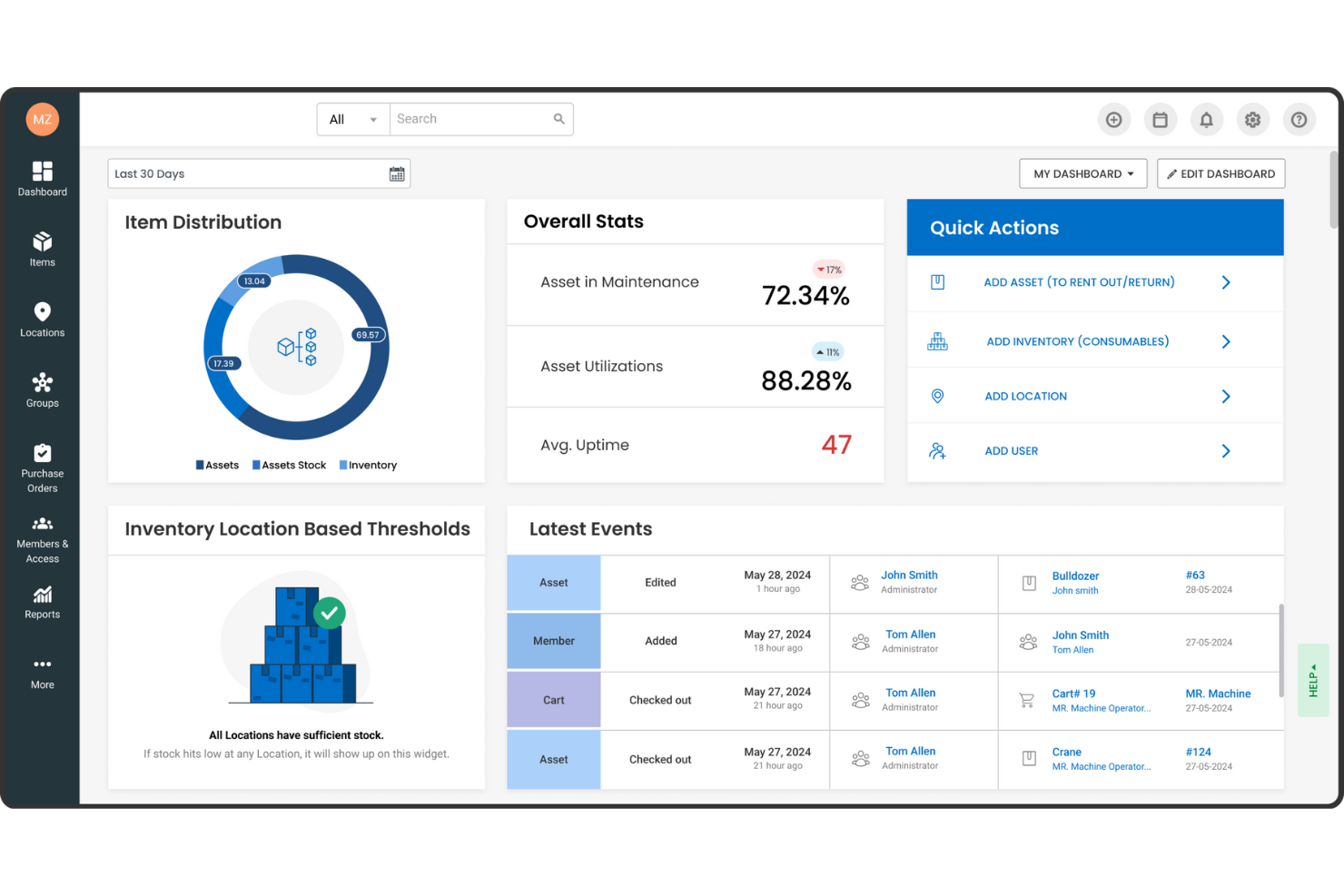
EZOfficeInventory, ora conosciuto come EZO, è un software di gestione delle risorse progettato per migliorare l'efficienza e l'utilizzo degli asset fisici. È particolarmente indicato per settori come l'edilizia, dove una gestione accurata delle risorse è fondamentale.
Perché ho scelto EZOfficeInventory:
Ho scelto EZOfficeInventory per la gestione delle risorse in edilizia grazie al suo focus sul monitoraggio delle immobilizzazioni, sulla gestione dell'inventario e sulla gestione della manutenzione. Queste funzionalità aiutano le imprese edili a tenere sotto controllo le attrezzature e i materiali, garantendo che tutto sia al posto giusto e in buone condizioni. Utilizzando questi strumenti, il tuo team può concentrarsi maggiormente sul progetto e meno sulle complicazioni logistiche. Un altro motivo è rappresentato dalle funzionalità avanzate di reportistica e analisi offerte dal software, che forniscono preziose informazioni sulle prestazioni degli asset. Questo significa che puoi prendere decisioni più informate sull'allocazione delle risorse e la pianificazione della manutenzione. Sapere esattamente come stanno performando i tuoi asset ti permette di anticipare i problemi prima che diventino criticità, mantenendo i progetti in carreggiata.
Caratteristiche principali e integrazioni:
Le funzionalità includono un software di tracciamento degli strumenti che consente di monitorare in modo efficace attrezzature e utensili, riducendo al minimo perdite o smarrimenti. Il software supporta diversi metodi di tracciamento, come barcode, QR code e RFID, migliorando la precisione dell'inventario. Inoltre, EZO offre opzioni di reportistica personalizzabile pensate appositamente per le esigenze del settore delle costruzioni, fornendo dati utili per una migliore gestione delle risorse.
Le integrazioni includono Google Sheets, monday.com, Google Forms, Slack, QuickBooks Online, Microsoft Office 365, Smartsheet, Knack, Zendesk, Jira, Dropbox e OneDrive.
Pros and Cons
Pros:
- Report e analisi personalizzabili
- Supporta molteplici tecnologie di tracciamento come barcode, QR code e RFID
- Offre gestione del backup in cloud
Cons:
- Assenza di un ambiente sandbox per testare nuove funzionalità
- Richiede una formazione per un uso efficace

Ideale per la massima efficienza in cantiere

Contractor Foreman è ideale per gli appaltatori che necessitano di strumenti di gestione progetto direttamente in cantiere. Offre efficienza operativa sul posto e dispone di strumenti progettati appositamente per le esigenze di gestione dei progetti degli appaltatori.
Perché ho scelto Contractor Foreman:
Ho scelto Contractor Foreman perché risponde in modo specifico alle esigenze della gestione dei cantieri. Le sue funzionalità specializzate aiutano nel controllo e nel coordinamento dei progetti direttamente sul campo. Ritengo sia il migliore per l'efficienza in loco, poiché aiuta gli appaltatori a gestire i progetti con strumenti creati per i cantieri edili.
Funzionalità e integrazioni principali:
Le funzionalità includono programmazione delle attività, segnalazione degli incidenti e rilevazione delle presenze e delle ore di lavoro. Sono accessibili da dispositivi mobili, assicurando che responsabili di progetto e lavoratori rimangano sempre connessi.
Le integrazioni includono QuickBooks, Xero, PlanSwift, Google Calendar, Outlook e Dropbox.
Pros and Cons
Pros:
- App mobile per la gestione in mobilità
- Set di funzionalità completo per la gestione del progetto end-to-end
- Integrazioni dirette con i più diffusi strumenti di contabilità e produttività
Cons:
- Possono essere previsti costi aggiuntivi per funzionalità extra o integrazioni ulteriori
- L'interfaccia potrebbe richiedere un periodo di apprendimento per i nuovi utenti

Ideale per la gestione dei clienti
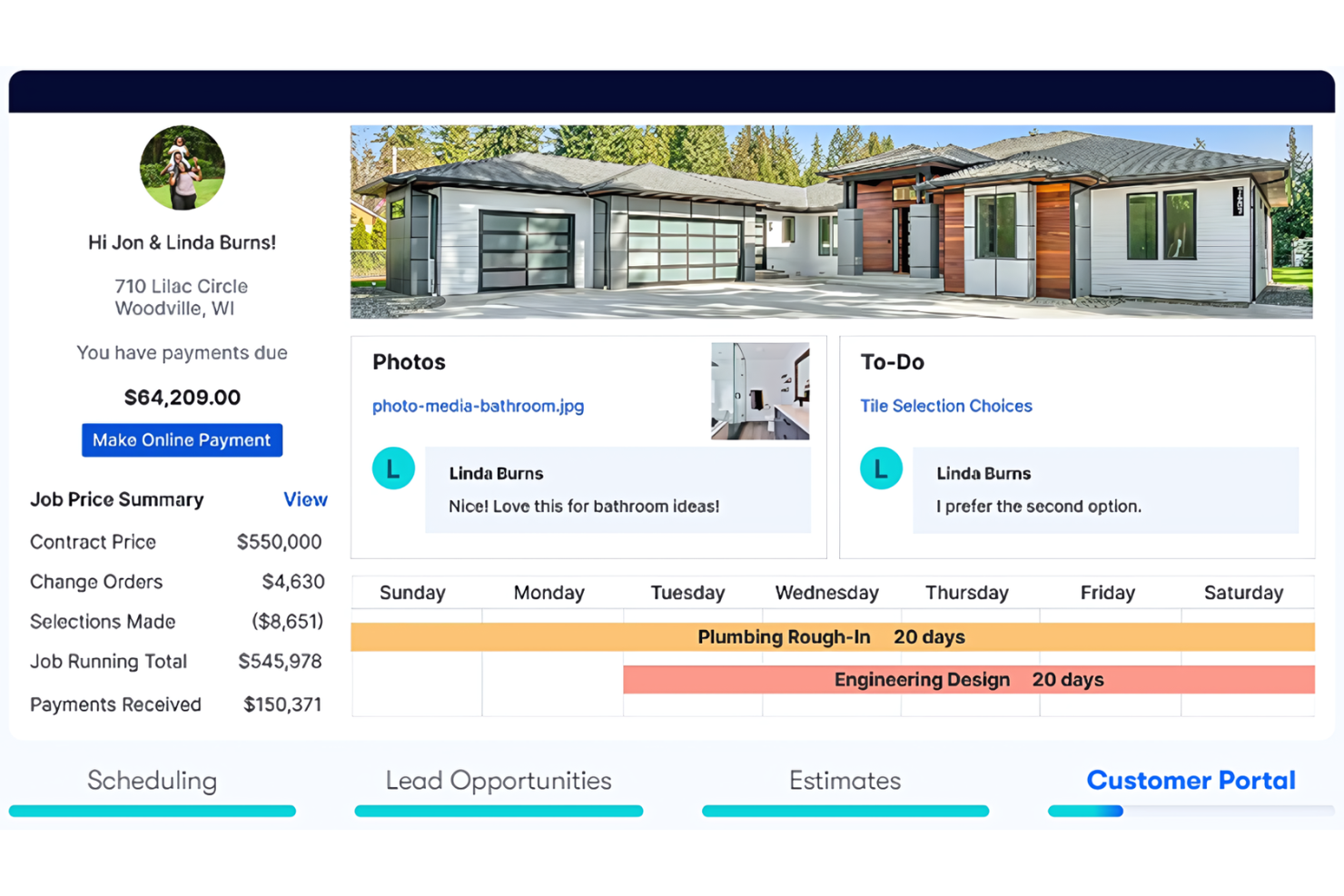
Buildertrend è un software di gestione delle risorse per l'edilizia che semplifica la gestione dei progetti, la programmazione e il monitoraggio finanziario. Aiuta le imprese di costruzione a migliorare l'accuratezza nella pianificazione e nella gestione dei propri progetti.
Perché ho scelto Buildertrend:
Ho scelto Buildertrend per il suo esclusivo focus sulla gestione del cliente nel settore edilizio. I suoi strumenti dedicati per il coinvolgimento del cliente, incluso un portale dedicato, migliorano la trasparenza e la collaborazione. Queste funzionalità lo distinguono dagli altri software di gestione delle costruzioni.
Funzionalità e integrazioni principali:
Funzionalità come la programmazione dei progetti, la gestione del budget e la gestione dei clienti, tutto centralizzato in un'interfaccia intuitiva. Il portale cliente permette inoltre comunicazioni dirette e aggiornamenti costanti.
Le integrazioni includono QuickBooks, Xero, Procore, Dropbox, DocuSign, Google Calendar, Microsoft Project, Google Drive, Slack e Trello.
Pros and Cons
Pros:
- Portale clienti dedicato per un'interazione migliorata
- Capacità complete di gestione del progetto
- Integrazione con piattaforme di contabilità e approvvigionamento più diffuse
Cons:
- Potenziale complessità nell'utilizzo delle numerose funzionalità
- Le funzionalità avanzate richiedono piani di livello superiore

Ideale per il coordinamento in cantiere

Fieldwire è una piattaforma di gestione delle attività per team di costruzione. È ideale per il coordinamento in cantiere e la semplificazione della comunicazione diretta.
Perché ho scelto Fieldwire:
Ho selezionato Fieldwire per le sue capacità di gestione delle attività e l'attenzione al miglioramento del coordinamento in cantiere. Le sue funzionalità di comunicazione e collaborazione in tempo reale lo distinguono dagli altri strumenti di gestione delle costruzioni. Penso che Fieldwire sia il migliore per il coordinamento in cantiere perché può gestire le attività, monitorare l'avanzamento dei lavori e garantire che i team sul campo siano sempre allineati con gli obiettivi del progetto.
Funzionalità e integrazioni principali:
Le funzionalità includono visualizzazione dei piani, gestione delle attività e tracciamento delle problematiche. La piattaforma offre anche potenti strumenti di reportistica e un'app mobile per mantenere i team sempre connessi.
Le integrazioni includono PlanGrid, Autodesk BIM 360, Box, Dropbox, Google Drive, OneDrive, Egnyte, Bluebeam e Zapier.
Pros and Cons
Pros:
- Aggiornamenti e comunicazione in tempo reale
- Gestione e tracciamento delle attività completo
- App mobile per l'accesso sul campo
Cons:
- Il prezzo iniziale prevede la fatturazione annuale
- Le funzionalità avanzate richiedono un investimento aggiuntivo

Basis
Ideale per un’accurata pianificazione
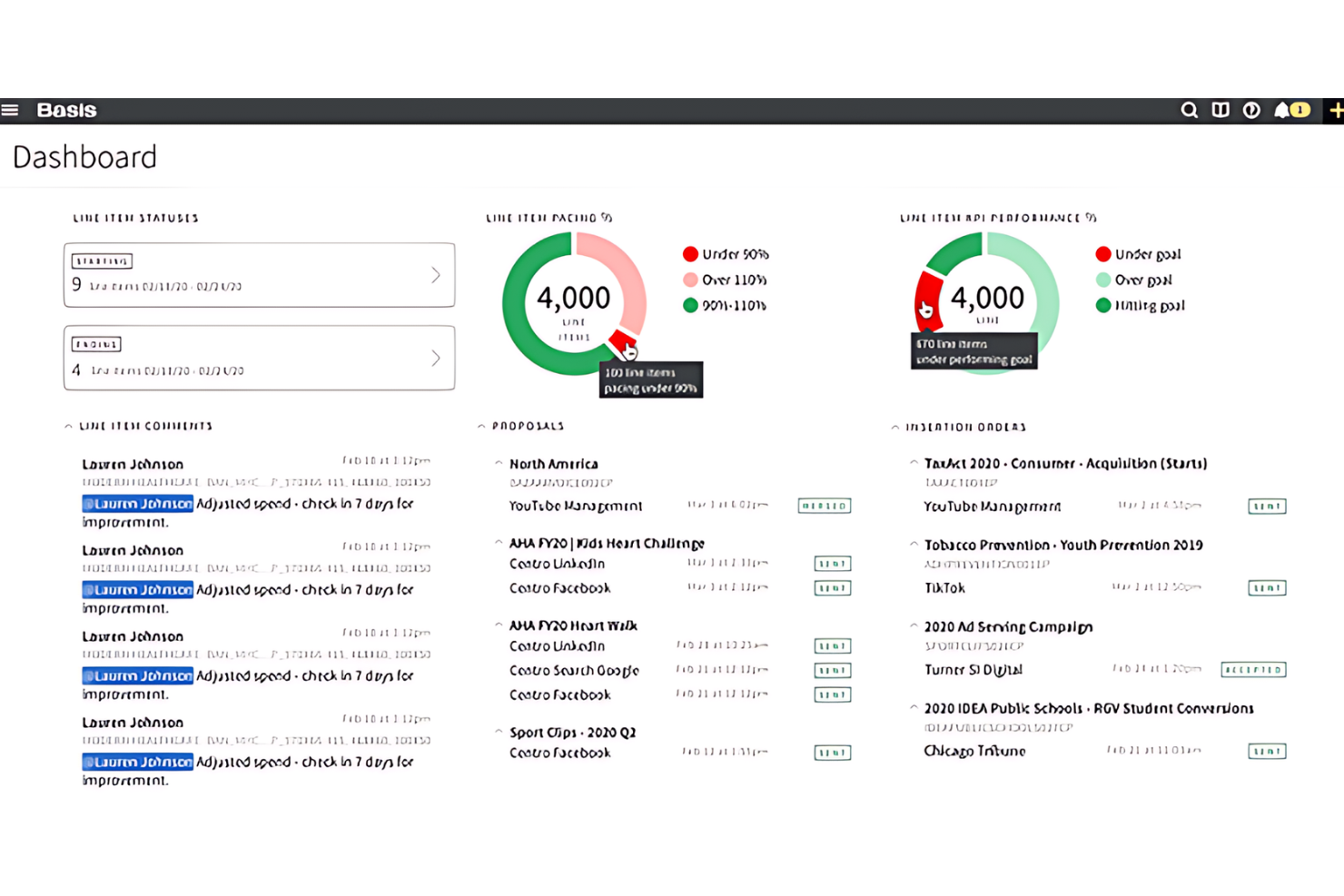
Basis è un software che migliora la precisione nella pianificazione e nella programmazione dei progetti. È ideale per i team che necessitano di una pianificazione dettagliata, poiché offre monitoraggio automatico delle offerte e un'organizzazione efficiente degli inviti alle offerte.
Perché ho scelto Basis:
Ho scelto Basis per la sua efficiente automazione nella gestione delle offerte, rendendolo la scelta ideale per subappaltatori e fornitori di materiali. La sua dashboard centralizzata garantisce accuratezza nelle pianificazioni aggiornando automaticamente gli inviti alle offerte e le programmazioni dei progetti.
Funzionalità e integrazioni di rilievo:
Le funzionalità includono un database dei costi, gestione di progetto e delle offerte, gestione di RFP e compiti, condivisione file, preventivi, controllo delle versioni, gestione fornitori, strumenti di collaborazione e monitoraggio dei progetti. Queste funzionalità sono essenziali per snellire il processo di offerta e fornire analisi sui dati delle offerte.
Le integrazioni includono Procore, PlanGrid, Bluebeam, Microsoft Office Suite, QuickBooks, Autodesk BIM 360, Smartsheet, Box, DocuSign, Xero e altro ancora, aiutando le aziende a ottimizzare le loro operazioni.
Pros and Cons
Pros:
- Il monitoraggio automatico delle offerte elimina l'inserimento manuale dei dati
- Una dashboard centralizzata ottimizza la pianificazione dei progetti
- Interfaccia intuitiva con un forte supporto clienti
Cons:
- Manca trasparenza sulle informazioni sui prezzi
- Curva di apprendimento ripida per alcuni utenti

Orangescrum
Ideale per la collaborazione tra team
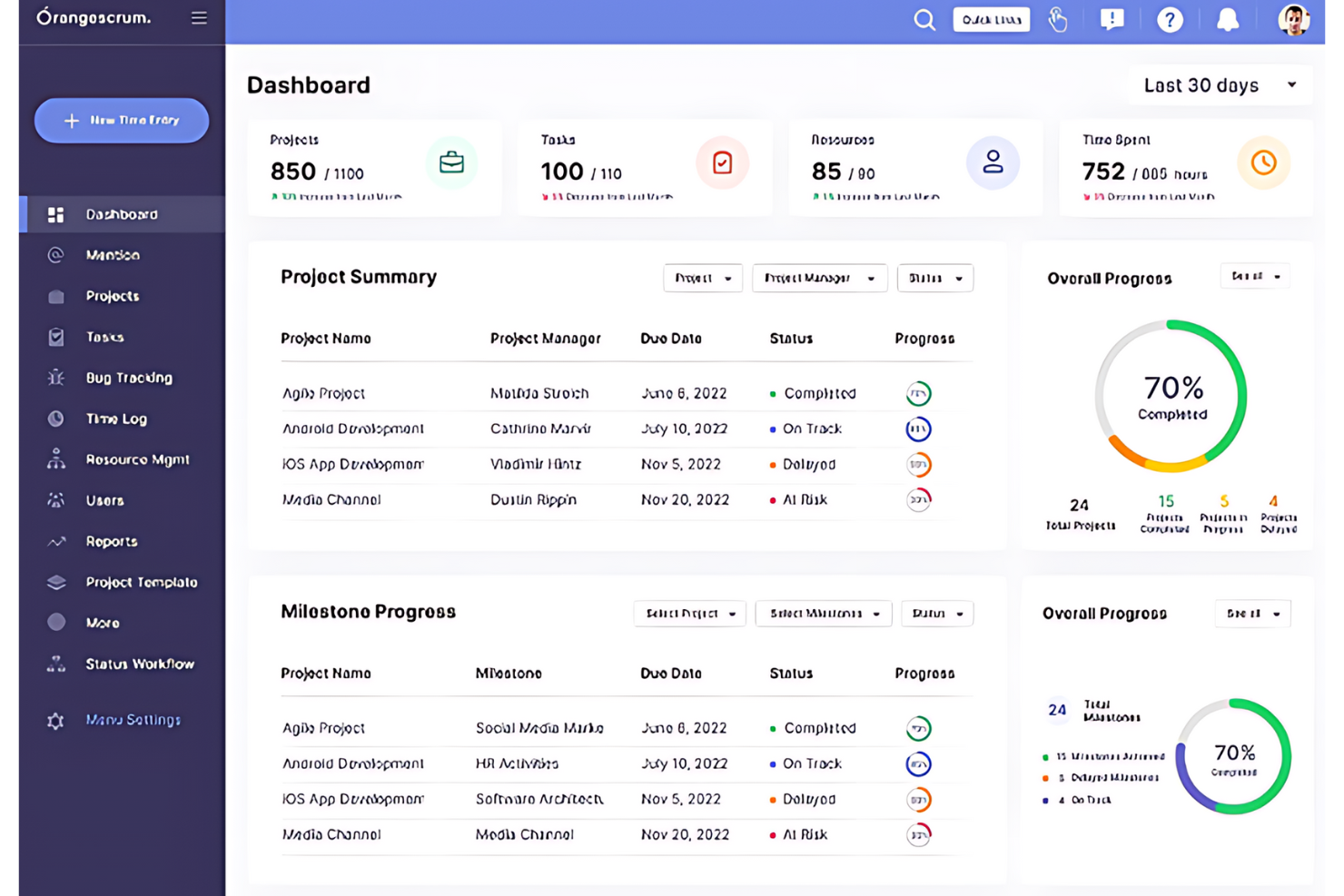
OrangeScrum è uno strumento di gestione progetti e collaborazione che semplifica i flussi di lavoro e la comunicazione di squadra. Offre varie funzionalità per aiutare i team a gestire in modo efficace attività, progetti e risorse.
Perché ho scelto OrangeScrum:
Ho scelto OrangeScrum per le sue funzionalità di collaborazione fondamentali, che semplificano la gestione dei progetti e il monitoraggio del tempo su un'unica piattaforma. È ideale per i team che necessitano di una stretta collaborazione e di una gestione efficiente del tempo.
Funzionalità principali e integrazioni:
Le funzionalità includono gestione dei progetti agile, gestione delle attività, monitoraggio del tempo e gestione delle risorse. Queste funzioni mantengono la chiarezza dei progetti e aumentano la produttività del team. Lo strumento offre anche un Diagramma di Gantt per la pianificazione, una Bacheca Kanban per l'organizzazione delle attività e uno stato attività personalizzato per la personalizzazione dei progetti.
Le integrazioni includono vari strumenti essenziali, tra cui Zapier, Slack, Dropbox, Google Drive, Google Calendar, GitHub, Single Sign-On (SSO), Zoom e OneDrive. Queste integrazioni permettono flussi di lavoro semplificati e una migliore gestione dei dati.
Pros and Cons
Pros:
- Gestione agile dei progetti e monitoraggio del tempo per un migliore controllo dei progetti
- Ampia gamma di integrazioni con strumenti di produttività chiave
- Flussi di lavoro personalizzabili con stato attività su misura
Cons:
- Le app iOS/Android hanno un costo aggiuntivo come extra
- Progetti e attività sono divisi in due spazi/pagine differenti
Altri software per la gestione delle risorse nell'edilizia
Ecco alcune opzioni aggiuntive di software per la gestione delle risorse nell’edilizia che non sono entrate nella mia selezione, ma che vale comunque la pena prendere in considerazione:
- PlanGrid
Ideale per la centralizzazione dei documenti
- CMiC
Ideale per l'integrazione aziendale
- ConstructionOnline
Ideale per dati in tempo reale
- Jonas Construction
Ideale per il controllo finanziario
- Builterra
Ideale per progetti di ingegneria civile
- Hub Planner by Milient
Ideale per la gestione di progetti sovrapposti


Come Valuto i Software di Gestione delle Risorse in Edilizia
Divido la mia valutazione in due livelli: le funzionalità di base che ogni strumento deve avere—come la pianificazione delle squadre su più cantieri e il monitoraggio delle attrezzature—e i fattori distintivi che separano i migliori dagli altri.
Funzionalità di Base (Requisiti Fondamentali per Questa Lista)
Quando seleziono gli strumenti per la mia lista, valuto ciascuno su una scala da 0 (non offre la funzionalità) a 5 (eccelle in quest’area) per ognuna delle funzionalità fondamentali elencate di seguito. Successivamente, calcolo il punteggio totale dello strumento in percentuale. Ogni strumento deve raggiungere un punteggio minimo totale del 65% per essere preso in considerazione nell’inclusione.
- Pianificazione e Allocazione delle Risorse: Cerco panoramiche di pianificazione su più progetti dove sia possibile assegnare squadre e attrezzature su vari cantieri, individuare conflitti e spostare risorse tra le fasi.
- Monitoraggio della Capacità e dell’Utilizzo: Dashboard in tempo reale che mostrano chi è sovraccarico e quali risorse sono inutilizzate sono fondamentali qui, specialmente quando si gestiscono fluttuazioni stagionali di manodopera.
- Gestione delle Attrezzature e dei Beni: Ogni strumento dovrebbe tracciare la posizione delle attrezzature, lo stato di assegnazione e la disponibilità, così che una gru o un escavatore non vengano prenotati su due cantieri contemporaneamente.
- Gestione della Manodopera e delle Squadre: Valuto se la piattaforma gestisce le qualifiche professionali, le certificazioni e i raggruppamenti di squadra invece di trattare i lavoratori come risorse generiche.
- Integrazione con Costificazione di Progetto e Lavori: Ore e assegnazioni delle risorse dovrebbero essere collegate direttamente a codici lavoro e budget, così che i project manager possano controllare i margini senza dover utilizzare un sistema separato.
- Accessibilità dal Campo e da Mobile: I capisquadra e responsabili in cantiere necessitano dell'accesso mobile per consultare i calendari, registrare le ore e aggiornare lo stato delle risorse direttamente sul luogo di lavoro senza dover dipendere dal personale in ufficio.
Dopo aver stilato una lista di strumenti che soddisfano i criteri, considero cosa distingue ogni piattaforma.
Fattori Differenzianti (Ciò che Distingue i Fornitori)
Ecco come confronto e metto a confronto i diversi fornitori:
Funzionalità Distintive
Il coordinamento dei subappaltatori è un fattore di differenziazione importante. Verifico se una piattaforma consente di gestire i calendari, la disponibilità e i contratti dei sub insieme alle squadre interne, soprattutto nei progetti commerciali con una dozzina di lavorazioni in cantiere. Anche la previsione della domanda è rilevante: gli strumenti che permettono di modellare i fabbisogni di risorse lungo tutto il pipeline aiutano a pianificare assunzioni o noleggi di attrezzature con mesi di anticipo. Analizzo anche l’integrazione con i dati meteo, perché un singolo temporale può bloccare un’intera squadra e le piattaforme più solide segnalano questi rischi prima che impattino la pianificazione.
Oltre le Funzionalità
Il livello di integrazione è una delle prime cose che valuto. Uno strumento di gestione risorse che si sincronizza con piattaforme come Procore, Sage o Autodesk Construction Cloud risparmia al team inserimenti doppi tra preventivazione, contabilità e pianificazione. Anche il monitoraggio della conformità ha una reale importanza: controllo se la piattaforma gestisce avvisi di scadenza certificazioni e mantiene audit trail per la documentazione sulla sicurezza. Infine, considero la scalabilità: uno strumento che funziona per una impresa da 10 persone dovrebbe essere in grado di gestire anche una società multi-regionale con decine di progetti simultanei senza problemi di prestazioni.
Come scegliere il software per la gestione delle risorse nell'edilizia
È facile perdersi in lunghi elenchi di funzionalità e strutture di prezzo complesse. Per aiutarti a rimanere concentrato mentre affronti il tuo esclusivo processo di selezione del software, ecco una lista di controllo dei fattori da tenere presenti:
| Fattore | Cosa considerare |
| Scalabilità | Assicurati che il software possa crescere insieme alla tua azienda, supportando più progetti, utenti e cantieri secondo necessità. |
| Integrazioni | Cerca strumenti che si colleghino ai tuoi sistemi di pianificazione, gestione paghe, contabilità o ERP per ridurre il doppio inserimento dei dati. |
| Personalizzazione | Dovresti poter adattare campi, visualizzazioni e flussi di lavoro dello strumento al modo in cui il tuo team tiene traccia delle persone e delle attrezzature. |
| Facilità d'uso | Il tuo team deve poter imparare a usare rapidamente il software, soprattutto capisquadra e supervisori sul campo che non lavorano alla scrivania. |
| Budget | Controlla quali funzionalità sono incluse in ogni piano tariffario. Alcuni strumenti fanno pagare un supplemento per elementi essenziali come i report o l'accesso mobile. |
| Misure di sicurezza | Assicurati che la piattaforma offra accesso basato sui ruoli, crittografia dei dati e backup regolari per proteggere i dati del tuo progetto. |
| Accesso mobile | Le squadre sul campo dovrebbero poter controllare le assegnazioni, aggiornare i progressi e registrare i problemi da qualsiasi dispositivo presente in cantiere. |
| Opzioni di assistenza | Un'assistenza affidabile è importante quando la buona riuscita dei progetti è in gioco. Cerca chat dal vivo, supporto per l'avvio e risorse pratiche. |
Tendenze nei software per la gestione delle risorse nel settore delle costruzioni
Nella mia ricerca, ho raccolto innumerevoli aggiornamenti di prodotto, comunicati stampa e registri delle versioni da diversi fornitori di software per la gestione delle risorse nel settore delle costruzioni. Ecco alcune delle tendenze emergenti che sto tenendo d’occhio:
- Personalizzazione per i mestieri specializzati: Sempre più strumenti offrono impostazioni e modelli adattati a diversi mestieri, come idraulica, calcestruzzo o impianti elettrici. Questo consente di gestire i tipi di squadre e le attrezzature giusti per ogni lavoro senza dover personalizzare tutto da zero.
- Previsioni basate sull’intelligenza artificiale: Sempre più strumenti utilizzano l’intelligenza artificiale per prevedere il fabbisogno di manodopera e attrezzature in base allo storico della pianificazione e al tipo di progetto. Questo aiuta il team a evitare di prenotare troppe risorse o di disporre di risorse insufficienti nelle fasi chiave dei lavori.
- Pianificazione visiva delle risorse: I calendari con funzionalità di trascinamento e rilascio e le visualizzazioni su mappa stanno diventando standard. Queste funzionalità semplificano l’assegnazione di squadre e attrezzature in base a posizione, data o tipo di lavoro, senza dover consultare lunghi elenchi.
- Monitoraggio integrato della conformità: I software stanno iniziando a monitorare le certificazioni dei lavoratori, la formazione sulla sicurezza e le ispezioni delle attrezzature direttamente nel sistema di pianificazione. Questo riduce la necessità di utilizzare strumenti o fogli di calcolo separati.
- Aggiornamenti in tempo reale dal cantiere: I team sul campo possono ora inviare aggiornamenti sullo stato, segnalare ritardi e confermare il completamento delle attività dai loro telefoni. Queste informazioni vengono registrate immediatamente affinché il personale dell’ufficio possa esaminarle.
Che cos’è un software per la gestione delle risorse nel settore delle costruzioni?
Il software per la gestione delle risorse nel settore delle costruzioni è uno strumento specializzato per pianificare, coordinare e controllare le risorse nei progetti di costruzione. Viene utilizzato da responsabili di cantiere, appaltatori e imprese edili per semplificare l’assegnazione e l’utilizzo di materiali, manodopera, attrezzature e risorse finanziarie.
Il software garantisce che le risorse siano disponibili quando necessario. A sua volta, ottimizza il flusso di lavoro e contribuisce a completare i progetti nei tempi previsti e rispettando il budget.
Funzionalità
Ecco le funzionalità principali che ogni ottimo software per la gestione delle risorse nel settore delle costruzioni dovrebbe avere:
- Pianificazione delle risorse: Consente di assegnare lavoratori, attrezzature e materiali a progetti e periodi di tempo specifici.
- Monitoraggio della disponibilità: Mostra in tempo reale chi e cosa è disponibile, per evitare conflitti e prenotazioni eccessive.
- Gestione delle attrezzature: Tiene traccia dell’utilizzo, dei programmi di manutenzione e della posizione di tutte le attrezzature e gli strumenti.
- Monitoraggio delle ore: Registra le ore dei lavoratori e le presenze delle squadre per facilitare l’elaborazione delle buste paga e la reportistica dei progetti.
- Previsioni di progetto: Prevede il futuro fabbisogno di risorse in base all’utilizzo attuale e alle prossime fasi del progetto.
- Monitoraggio del budget: Aiuta a controllare i costi della manodopera e delle attrezzature rispetto ai budget di progetto.
- Accesso da dispositivi mobili: Consente ai team sul campo di aggiornare i programmi, verificare le assegnazioni e registrare i problemi da qualsiasi dispositivo.
- Monitoraggio delle certificazioni: Conserva i dati relativi a licenze, formazione e documentazione sulla sicurezza dei lavoratori.
- Report personalizzati: Consente di creare report sull’utilizzo delle risorse, sulla produttività e sui costi per più lavori.
- Accesso basato sui ruoli: Controlla chi può visualizzare o modificare programmi, costi e dettagli dei progetti in base al ruolo lavorativo.
Vantaggi
L’implementazione di un software per la gestione delle risorse nel settore delle costruzioni offre diversi vantaggi al team e all’azienda. Ecco alcuni dei benefici che puoi aspettarti:
- Meno conflitti nella pianificazione: Monitorando la disponibilità in tempo reale, puoi evitare di assegnare contemporaneamente le stesse squadre o attrezzature.
- Controllo migliore dei costi: Puoi tenere sotto controllo le spese di manodopera e attrezzature mentre si verificano, invece di farlo a posteriori.
- Processo decisionale più rapido: Grazie a dashboard e previsioni, puoi reagire rapidamente ai ritardi o ai cambiamenti sul posto.
- Comunicazione migliorata sul campo: L’accesso da dispositivi mobili consente ai team sul campo di controllare i programmi e inviare aggiornamenti senza dover telefonare in ufficio.
- Verifiche di conformità più semplici: Il monitoraggio integrato delle certificazioni aiuta a rispettare i requisiti di formazione, sicurezza e ispezione.
- Report più accurati: I report personalizzati offrono informazioni chiare su come vengono utilizzate le risorse nei diversi lavori.
- Maggiore produttività del team: Quando le persone e gli strumenti giusti sono disponibili, le squadre possono iniziare più rapidamente e rimanere nei tempi previsti.
Costi e prezzi
La scelta di un software per la gestione delle risorse nel settore edile richiede la comprensione dei vari modelli e piani tariffari disponibili. I costi variano in base alle funzionalità, alle dimensioni del team, ai componenti aggiuntivi e ad altri fattori. La tabella seguente riassume i piani più comuni, i relativi prezzi medi e le funzionalità tipicamente incluse nelle soluzioni software per la gestione delle risorse nel settore edile:
Tabella comparativa dei piani per i software di gestione delle risorse nel settore edile
| Tipo di piano | Prezzo medio | Funzionalità comuni |
| Gratuito | $0 | Monitoraggio di base dei progetti, utenti limitati, accesso al supporto della community |
| Standard | $50/utente/mese | Pianificazione dei progetti, monitoraggio del budget, collaborazione in tempo reale, reportistica di base |
| Professionale | $100/utente/mese | Reportistica avanzata, accesso all'API, progetti illimitati, supporto premium |
| Enterprise | Prezzo personalizzato | Integrazioni personalizzate, funzionalità di sicurezza avanzate, account manager dedicato, sessioni di formazione complete |