

I 10 migliori software di gestione delle risorse digitali per il marketing 2026

Migliori software di gestione delle risorse digitali per il marketing: selezione


Il software di gestione delle risorse digitali (DAM) offre il vantaggio di mantenere i contenuti organizzati e accessibili, un aspetto importante per mantenere la coerenza del brand e velocizzare i processi di marketing.
Tuttavia, trovare la soluzione DAM giusta per il proprio team può essere difficile, soprattutto considerando le numerose opzioni disponibili sul mercato. Per aiutarti a trovare la soluzione migliore, ho utilizzato la mia esperienza nel software di gestione dei progetti per individuare e valutare diverse opzioni.
Che tu gestisca una piccola azienda o una grande impresa, la mia recensione completa ti aiuterà a trovare lo strumento DAM ideale per ottimizzare le tue attività di marketing.
Perché fidarsi dei nostri consigli sui software
Il nostro team testa e recensisce software dal 2012. In quanto project manager noi stessi, sappiamo quanto sia difficile — e importante — scegliere il software giusto.
Per questa guida, abbiamo valutato gli strumenti attraverso test pratici e ricerche indipendenti, assegnando un punteggio agli strumenti in base ai nostri criteri di selezione. Ci basiamo inoltre sulle competenze di leader di pensiero del settore e di professionisti attivi nella gestione dei progetti.
Le nostre recensioni riflettono il nostro giudizio editoriale umano, non un discorso di vendita.
Revisori esperti:
Tabella comparativa: software di gestione delle risorse digitali per il marketing
Questa tabella comparativa riassume i dettagli dei prezzi delle mie migliori selezioni di software di gestione delle risorse digitali per il marketing.
| Tool | Best For | Trial Info | Price | ||
|---|---|---|---|---|---|
| 1 | Ideale per classificazione dei metadati guidata da IA | Demo gratuita disponibile | Prezzo su richiesta | Website | |
| 2 | Ideale per la ricerca di risorse tramite intelligenza artificiale | Demo gratuita disponibile | Prezzi su richiesta | Website | |
| 3 | Ideale per la condivisione di risorse digitali | Prova gratuita di 7 giorni | Da $100/mese/utente | Website | |
| 4 | Ideale per accesso illimitato agli utenti | Piano gratuito disponibile | Da $99/mese (fatturazione annuale) | Website | |
| 5 | Ideale per ricerca visiva e tagging potenziato dall'IA | Prova gratuita di 30 giorni disponibile | A partire da $250/mese (fatturato annualmente) | Website | |
| 6 | Ideale per i flussi di lavoro sui contenuti | Demo gratuita disponibile | Prezzo su richiesta | Website | |
| 7 | Ideale per un DAM economico | Prova gratuita di 30 giorni | Da $29/utente/mese | Website | |
| 8 | Ideale per l'ottimizzazione delle risorse tramite AI | Prova gratuita di 14 giorni | A partire da $213/mese | Website | |
| 9 | Ideale per DAM scalabile | Prova gratuita + demo disponibile | Da $300/utente/mese | Website | |
| 10 | Ideale per l’ottimizzazione delle risorse del brand | Demo gratuita disponibile | Prezzo su richiesta | Website |
Recensioni dei migliori software di gestione delle risorse digitali per il marketing
Nel settore del marketing è importante disporre di un software di gestione delle risorse digitali scalabile, che aiuti a ottimizzare i flussi di lavoro e migliorare la collaborazione. Di seguito trovi le mie recensioni dei migliori software DAM per il marketing, comprensive di vantaggi e svantaggi, prezzi, funzionalità e integrazioni di ciascuna soluzione.

Papirfly
Ideale per classificazione dei metadati guidata da IA

Papirfly è una soluzione di gestione delle risorse digitali (DAM) creata per i team di marketing che devono organizzare e scalare i loro contenuti in modo efficiente. La sua attribuzione di metadati guidata dall'intelligenza artificiale aiuta a ordinare, archiviare e recuperare rapidamente le risorse, riducendo il tempo speso alla ricerca dei file. Se il tuo team ha difficoltà con risorse disperse o un branding incoerente, la piattaforma centralizzata di Papirfly semplifica i flussi di lavoro e supporta la conformità del marchio su tutti i canali, rivelandosi particolarmente preziosa per organizzazioni di grandi dimensioni o multinazionali.
Perché ho scelto Papirfly
Ho scelto Papirfly per la sua capacità unica di migliorare la coerenza del marchio grazie ai suoi portali brand personalizzabili e alla classificazione dei metadati basata su intelligenza artificiale. Queste funzionalità assicurano che il tuo team possa accedere e utilizzare rapidamente le risorse giuste, mantenendo la conformità al brand. Inoltre, le capacità di automazione del flusso di lavoro di Papirfly possono accelerare significativamente i processi di marketing, permettendo al tuo team di concentrarsi maggiormente sulle attività creative piuttosto che su quelle amministrative.
Caratteristiche chiave di Papirfly
Oltre alla classificazione dei metadati con IA, Papirfly offre:
- Creazione di contenuti tramite template: Offre template predefiniti che aiutano il tuo team a creare contenuti in linea con il brand in modo rapido e semplice.
- Strumenti di gestione campagne: Questi strumenti consentono di pianificare, eseguire e gestire campagne di marketing all'interno della stessa piattaforma.
- Gestione della conformità: Garantisce che tutte le risorse digitali rispettino le linee guida legali e di brand, riducendo il rischio di utilizzo non autorizzato.
- Analisi e reportistica: Offre approfondimenti sulle prestazioni e l'utilizzo delle risorse, abilitando decisioni di marketing basate sui dati.
Integrazioni di Papirfly
Le integrazioni includono Adobe Creative Cloud, Microsoft Office 365, Salesforce, HubSpot, WordPress, Shopify, Google Analytics, Mailchimp, Slack e Canva. Papirfly al momento non elenca integrazioni native, ma questi strumenti facilitano l'accesso e la gestione senza interruzioni delle risorse digitali.
Pros and Cons
Pros:
- La classificazione dei metadati guidata da IA migliora la reperibilità delle risorse
- Creazione di contenuti tramite template velocizza la produzione di materiali marketing
- Libreria centralizzata per mantenere la coerenza del brand
Cons:
- Alcuni utenti segnalano performance occasionalmente lente
- Opzioni di personalizzazione limitate per esigenze settoriali specifiche
New Product Updates from Papirfly

Papirfly Introduces Fund Management in Plan Campaigns
Papirfly introduces Fund Management in Plan Campaigns with budget distribution, fund requests, utilization tracking, approvals, and dashboards. These tools give teams better control and visibility over campaign budgets. For more information, visit Papirfly’s official site.
 .
.
Ideale per la ricerca di risorse tramite intelligenza artificiale
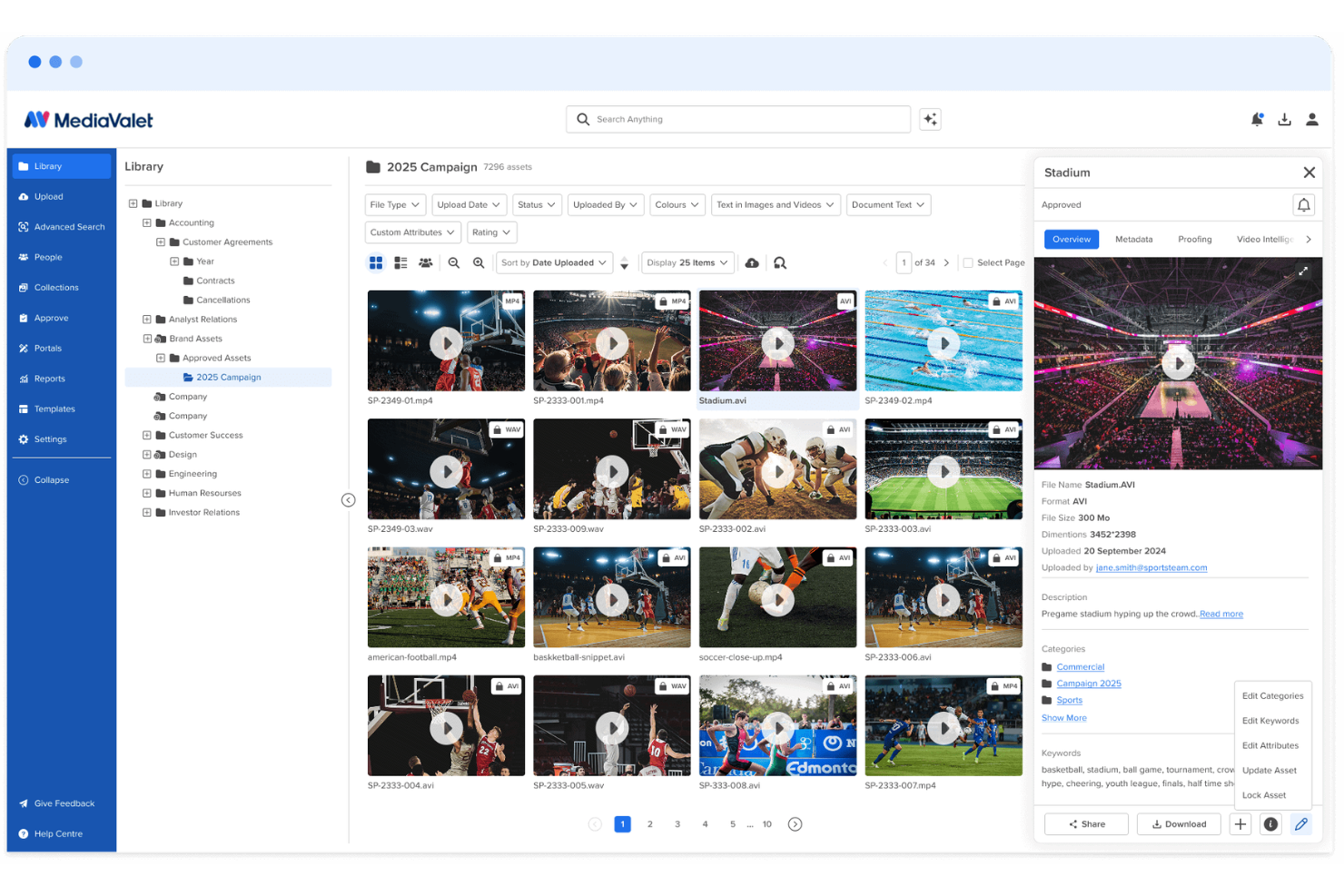
MediaValet è una piattaforma di gestione delle risorse digitali pensata per team di marketing e creativi che devono organizzare vaste librerie di immagini, video, documenti e asset di brand. Il suo motore di ricerca potenziato dall’intelligenza artificiale, il tagging automatico, i portali personalizzati e la reportistica delle risorse aiutano i team a trovare rapidamente i contenuti approvati, ridurre il lavoro duplicato e mantenere coerenza dei materiali del brand attraverso tutte le campagne.
Per chi è ideale MediaValet?
MediaValet è adatto a team di marketing e creativi aziendali che gestiscono grandi volumi di contenuti digitali distribuiti su più brand, regioni o canali.
Perché ho scelto MediaValet
Ho scelto MediaValet perché aiuta i team di marketing a trovare più rapidamente le risorse approvate grazie alla scoperta delle risorse tramite intelligenza artificiale. Il tagging automatico, la ricerca in linguaggio naturale, il riconoscimento di oggetti e di volti rendono più facile per il team individuare immagini, video e file di brand senza dover esplorare manualmente le cartelle. Mi piace anche il fatto che MediaValet supporta la ricerca nei video, così i team possono trovare clip specifiche, fotogrammi e parole pronunciate all’interno dei file multimediali. Questo lo rende particolarmente adatto ai team di marketing e creativi che gestiscono ampie librerie di asset tra campagne, canali e reparti.
Funzionalità principali di MediaValet
Oltre alla scoperta delle risorse, MediaValet include funzionalità che aiutano i team di marketing a condividere, gestire e monitorare i contenuti del brand:
- Experience Portals: Crea portali personalizzati per gestire e condividere raccolte di risorse approvate con team interni, partner o stakeholder esterni.
- Collegamento CDN: Distribuisci le risorse tramite link CDN, così i team possono pubblicare e aggiornare i media su più canali senza dover sostituire manualmente i file.
- Reportistica sull’utilizzo: Tieni traccia delle visualizzazioni delle risorse, dei download, dell’attività degli utenti e delle prestazioni dei contenuti per capire come viene utilizzata la tua libreria.
- Revisione creativa: Revisiona, commenta e approva i file creativi tramite flussi di lavoro di proofing integrati prima che le risorse finali vengano aggiunte alla libreria.
Integrazioni MediaValet
Le integrazioni includono Adobe Creative Cloud, Canva, Marq, Asana, monday.com, Microsoft 365, Contentful, Drupal, WordPress e Salesforce Sales Cloud.
Pros and Cons
Pros:
- Il tagging AI migliora la ricerca delle risorse in ampie librerie
- I portali personalizzati semplificano la condivisione delle risorse approvate
- I report sull’utilizzo mostrano visualizzazioni, download e coinvolgimento delle risorse
Cons:
- La precisione della ricerca potrebbe dover essere migliorata per alcuni utenti
- Piccoli bug possono ritardare il salvataggio delle modifiche o influenzare i pulsanti

Pics.io
Ideale per la condivisione di risorse digitali

Pics.io è un software di gestione delle risorse digitali che offre un'ampia gamma di funzionalità per facilitare la gestione degli asset di marketing.
Perché ho scelto Pics.io: Ho scelto Pics.io per le sue capacità nella condivisione delle risorse digitali. Per i team di marketing, Pics.io offre un sistema di condivisione file robusto che permette agli utenti di pubblicare e condividere singoli asset o gruppi, mostrare il proprio lavoro con modelli predefiniti e utilizzare un modello di revisione interattivo per la collaborazione esterna. Le avanzate funzionalità di tagging dei metadati e ricerca consentono inoltre ai marketer di individuare e utilizzare rapidamente i file di cui hanno bisogno.
Funzionalità principali & integrazioni:
Funzionalità includono spazio di archiviazione illimitato per asset digitali che permette agli utenti di salvare risorse senza restrizioni su tipo o dimensioni dei file. Offre inoltre caselle di posta per la comunicazione diretta con stakeholder esterni, controllo di versione per tracciare le modifiche sugli asset e capacità AI come riconoscimento facciale e trascrizione automatica da voce a testo.
Integrazioni con Google Drive, Amazon S3, Slack, Zapier, Adobe Photoshop, Adobe Premiere Pro, Shopify, Salesforce, Trello, Figma, Wrike, WordPress, monday.com e altro.
Pros and Cons
Pros:
- Funzione di ricerca per trovare rapidamente gli asset
- Robuste funzionalità di collaborazione
- Tag dinamico basato su intelligenza artificiale
Cons:
- La visualizzazione web e la casella asset potrebbero essere più personalizzabili
- I file di grandi dimensioni potrebbero caricarsi più lentamente
New Product Updates from Pics.io
Pics.io Adds AVIF File Support
Pics.io now supports AVIF files, expanding the image formats you can upload and manage in the platform. This gives teams more flexibility when working with modern image assets. For more information, visit Pics.io’s official site.
 .
.
Ideale per accesso illimitato agli utenti

Stockpress è una piattaforma di gestione delle risorse digitali (DAM) progettata per aiutare i team a organizzare, trovare, collaborare e condividere file digitali all'interno di un unico workspace condiviso.
Perché ho scelto Stockpress: Una cosa che apprezzo di Stockpress è il suo sistema di tag automatici basato sull’intelligenza artificiale. Questo strumento assegna automaticamente tag rilevanti ai file, migliorando la ricercabilità e risparmiando al team la noiosa attività di taggatura manuale. Stockpress si distingue anche per il modello di accesso illimitato agli utenti e i ruoli personalizzabili. Ciò significa che il tuo team può lavorare con collaboratori interni ed esterni senza preoccuparsi di costi aggiuntivi.
Funzionalità e integrazioni principali:
Funzionalità includono il controllo delle versioni, che permette al team di gestire più iterazioni di un file. Inoltre, la piattaforma offre link di condivisione personalizzabili che ti consentono di controllare chi ha accesso ai tuoi file e impostare date di scadenza per maggiore sicurezza. C’è anche il rilevamento dei duplicati per mantenere una libreria ordinata identificando e rimuovendo i file ridondanti.
Integrazioni incluse Google Drive, Dropbox, Box, Adobe Photoshop, Slack, Mailchimp, Okta, Webflow, Klaviyo, Adobe Illustrator, Adobe InDesign e Canva.
Pros and Cons
Pros:
- Utenti illimitati senza costi aggiuntivi
- Ricerca efficiente grazie al sistema di tag AI
- Robuste funzionalità di sicurezza per una condivisione sicura dei file
Cons:
- Accesso offline limitato
- La configurazione iniziale può richiedere tempo per organizzare le risorse esistenti
Ideale per ricerca visiva e tagging potenziato dall'IA

Tagbox.io è una piattaforma di gestione delle risorse digitali pensata per i team di marketing che necessitano di tagging tramite intelligenza artificiale, ricerca visiva e permessi strutturati per gestire in modo efficiente vaste librerie di immagini e video.
Per chi è più indicato Tagbox.io?
Tagbox.io è ideale per team di marketing e creativi che gestiscono grandi volumi di contenuti visivi e che necessitano di una scoperta rapida delle risorse, controllo dei duplicati e accesso chiaro basato su permessi.
Perché ho scelto Tagbox.io
Ho scelto Tagbox.io perché il tagging tramite intelligenza artificiale e la ricerca visiva riducono significativamente il tempo trascorso a localizzare le risorse. Il sistema rileva automaticamente oggetti, scenari, colori e volti, e permette di applicare tag personalizzati strutturati che rispecchiano la tassonomia del marchio. In pratica, significa che il mio team può combinare la ricerca in linguaggio naturale con filtri come collezioni, persone o stato di approvazione in un'unica query. Per i team di marketing che gestiscono migliaia di asset, questo livello di precisione nella ricerca rappresenta un vantaggio operativo reale.
Funzionalità chiave di Tagbox.io
- Riconoscimento facciale: Individua e raggruppa automaticamente le immagini per persona, facilitando il recupero di foto di eventi e campagne.
- Analisi video tramite AI: Analizza i contenuti video fotogramma per fotogramma per rilevare persone ed elementi visivi, rendendo ricercabili i file video.
- Rilevamento duplicati: Identifica immagini identiche o quasi identiche per ridurre l'ingombro e mantenere una libreria ordinata.
- Upload degli ospiti: Consente a collaboratori esterni di caricare asset in collezioni controllate senza accesso completo alla piattaforma.
Integrazioni di Tagbox.io
Collega Tagbox.io tramite Tagbox Desktop (drag-and-drop in qualsiasi app), Zapier, Make e una REST API. Sono disponibili workflow personalizzati per Enterprise.
Pros and Cons
Pros:
- Ricerca visiva avanzata e filtraggio tramite IA
- Il rilevamento duplicati aiuta a ridurre la dispersione degli asset
- Permessi granulari per la condivisione controllata delle risorse marketing
Cons:
- Il tagging IA avanzato può richiedere una configurazione iniziale della tassonomia per risultati ottimali
- Nessun strumento integrato di editing immagini o design creativo

Bynder
Ideale per i flussi di lavoro sui contenuti

Bynder è una piattaforma di gestione delle risorse digitali (DAM) basata su cloud, progettata per aiutare i team di marketing a organizzare, gestire e distribuire in modo efficiente i loro contenuti digitali. Funziona come un hub centralizzato dove puoi archiviare vari asset multimediali, garantendo un facile accesso e una comunicazione coerente del brand su tutti i canali.
Perché ho scelto Bynder: Apprezzo la sua gestione degli asset potenziata dall'IA. Questa funzionalità permette al tuo team di organizzare e trovare i file grazie alla catalogazione intelligente e alle capacità di ricerca avanzate. Sfruttando l'IA, Bynder assicura che i materiali di marketing siano non solo ben organizzati ma anche facilmente reperibili. Bynder include anche un solido modulo di workflow degli asset che migliora il processo di briefing, revisione e approvazione dei contenuti digitali all'interno del tuo team.
Funzionalità principali & integrazioni:
Le funzionalità includono uno studio per scalare e automatizzare la creazione di contenuti digitali e analytics che forniscono approfondimenti basati sui dati sull'utilizzo dei contenuti e del portale. Dispone inoltre di controlli di sicurezza integrati come l'autenticazione a due fattori e impostazioni dei diritti utente e degli accessi per proteggere i tuoi contenuti.
Le integrazioni includono Salesforce, Salsify, Sanity, SAP Commerce Cloud, Sprout Social, SharePoint, Asana, Adobe Creative Cloud, Contentful e Contentstack.
Pros and Cons
Pros:
- Possibilità di approvare gli asset
- Analytics e reportistica avanzati
- La ricerca efficiente consente un accesso rapido agli asset
Cons:
- Opzioni di personalizzazione limitate per alcune funzionalità
- Configurazione iniziale dispendiosa in termini di tempo

Filecamp
Ideale per un DAM economico
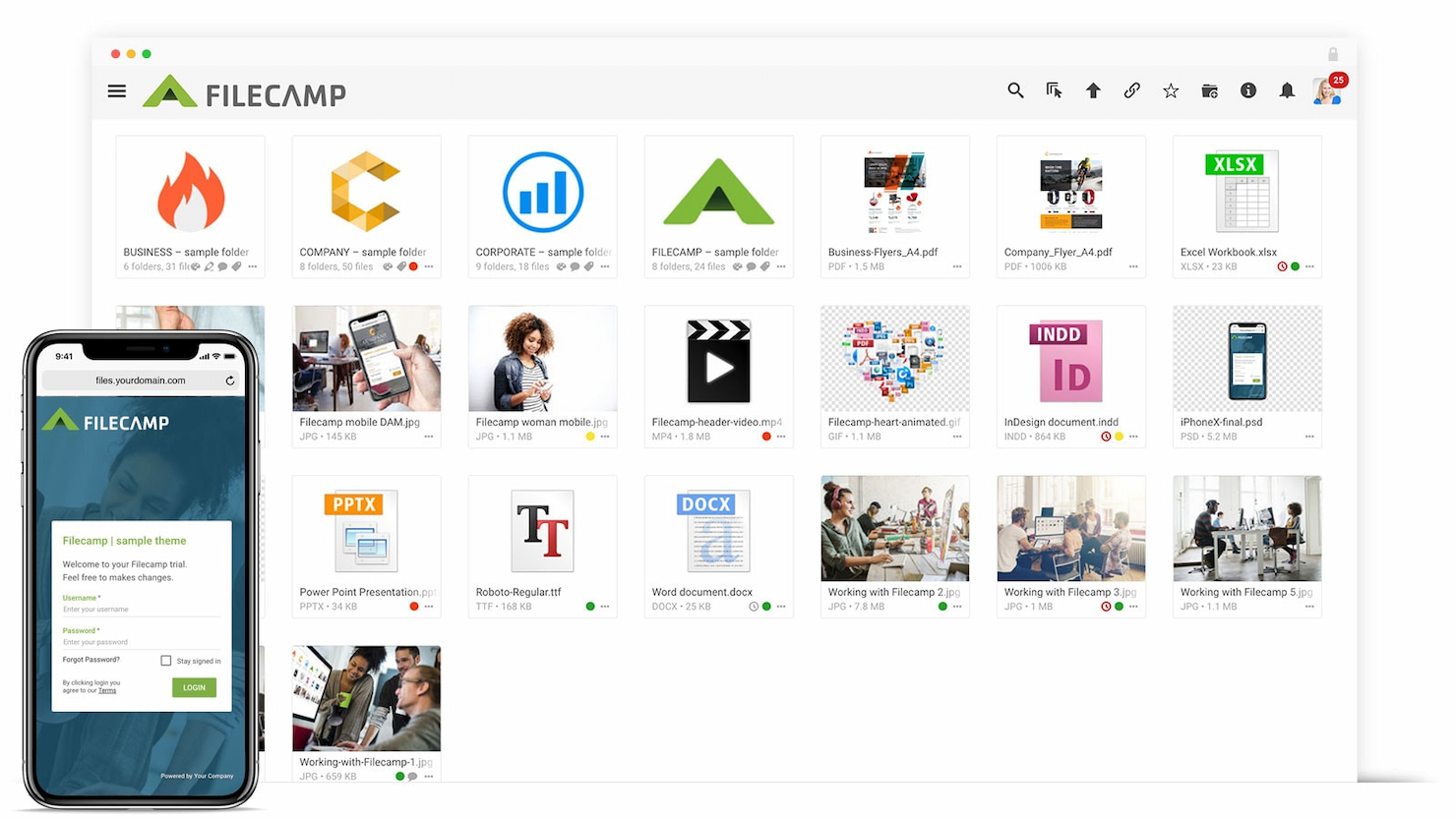
Filecamp è una soluzione di gestione delle risorse digitali che si distingue per l'accessibilità economica. Si afferma come la migliore scelta per un DAM conveniente, offrendo un set completo di funzionalità a un prezzo competitivo.
Perché ho scelto Filecamp: Filecamp offre agli utenti un'interfaccia intuitiva e funzionalità robuste pensate per il branding e la collaborazione. Consente ai team marketing di organizzare facilmente, condividere e collaborare sulle risorse digitali, garantendo la coerenza del marchio grazie alle opzioni di personalizzazione del branding. Ho ritenuto Filecamp la soluzione migliore per un DAM economico perché fornisce le funzionalità essenziali di DAM senza gravare finanziariamente i suoi utenti.
Funzionalità di spicco e integrazioni:
Le funzionalità includono un'interfaccia user-friendly, opzioni di branding personalizzabili e impostazioni granulari dei permessi. Offre inoltre potenti capacità di ricerca e supporta una varietà di formati di file.
Le integrazioni includono Slack, WordPress, Salesforce.
Pros and Cons
Pros:
- Utenti illimitati in tutti i piani
- Opzioni di branding personalizzabili
- Capacità di ricerca avanzate
Cons:
- Storage limitato con il piano base
- Alcune funzionalità richiedono piani superiori
- Costi aggiuntivi per storage extra
New Product Updates from Filecamp
Filecamp Adds More Flexible Link Files
Filecamp adds editable Link file targets, new opening options, and support for internal Filecamp destinations. These updates make Link files more flexible for navigation and shortcuts. For more information, visit Filecamp’s official site.
 .
.
Ideale per l'ottimizzazione delle risorse tramite AI

Scaleflex è una soluzione di gestione delle risorse digitali progettata per aiutare i team di diversi settori, incluso il marketing, a organizzare, ottimizzare e condividere in modo efficiente file multimediali come immagini e video.
Perché ho scelto Scaleflex: Quando si valuta una soluzione di gestione delle risorse digitali per il marketing, Scaleflex si distingue per la sua funzione di ottimizzazione dinamica dei media. Questa funzionalità utilizza la compressione di immagini e video basata sull'AI per garantire che i tuoi media si carichino rapidamente ed efficientemente, il che può migliorare sensibilmente il SEO del tuo sito web. Con oltre 150 trasformazioni al volo disponibili, il tuo team può adattare i contenuti visivi per soddisfare diverse esigenze di canale senza compromettere la qualità.
Caratteristiche e integrazioni di rilievo:
Caratteristiche includono AI generativa, un'interfaccia utente personalizzabile, la syndication dei contenuti, workflow automatizzati, classificazione intelligente dei contenuti, distribuzione globale dei contenuti e accesso sicuro con autorizzazioni utente avanzate.
Integrazioni includono WordPress, Filerobot, Cloudimage, Shopify, Magento, Prestashop, Drupal, Prismic, Amazon S3, Azure, Angular e React.js.
Pros and Cons
Pros:
- Automazione basata su AI
- La piattaforma si integra bene con diversi strumenti
- Ottimizzazione efficiente dei media
Cons:
- I piani di livello inferiore sono limitati a un solo progetto
- Alcuni utenti trovano inizialmente l’interfaccia complessa

Ideale per DAM scalabile

Image Relay è una piattaforma di gestione delle risorse digitali progettata per organizzare, gestire e distribuire gli asset del marchio.
Perché ho scelto Image Relay: L’approccio unico di Image Relay alla gestione delle risorse digitali si adatta a diversi settori e cresce insieme al business. La sua enfasi sulla semplicità ed efficienza nella gestione e condivisione degli asset digitali lo rende una scelta di rilievo. Ritengo che Image Relay sia il migliore per DAM scalabile perché offre campi di metadati personalizzabili, una struttura di cartelle intuitiva e azioni massive, elementi fondamentali per gestire grandi volumi di risorse digitali in modo efficace.
Caratteristiche distintive & integrazioni:
Caratteristiche includono potenti capacità di ricerca con campi di metadati personalizzabili, una struttura di cartelle chiara per l’organizzazione delle risorse e opzioni di caricamento, download e aggiornamento in blocco per risparmiare tempo. La piattaforma offre anche permessi utente personalizzabili e funzionalità self-service per utenti esterni, ottimizzando il processo di gestione degli asset.
Le integrazioni includono Slack, Adobe Creative Cloud, Salesforce, WordPress, Hootsuite, Canva, Shopify, Asana, Zapier e Jira.
Pros and Cons
Pros:
- Metadati e strutture di cartelle personalizzabili per un'organizzazione efficiente delle risorse
- Azioni in blocco per caricare, scaricare e aggiornare risparmiano tempo
- Permessi utente personalizzabili per accesso controllato agli asset
Cons:
- Prezzo di partenza più elevato rispetto ad alcuni concorrenti
- Richiede un minimo di cinque utenti, rendendolo meno accessibile per team più piccoli
Canto
Ideale per l’ottimizzazione delle risorse del brand
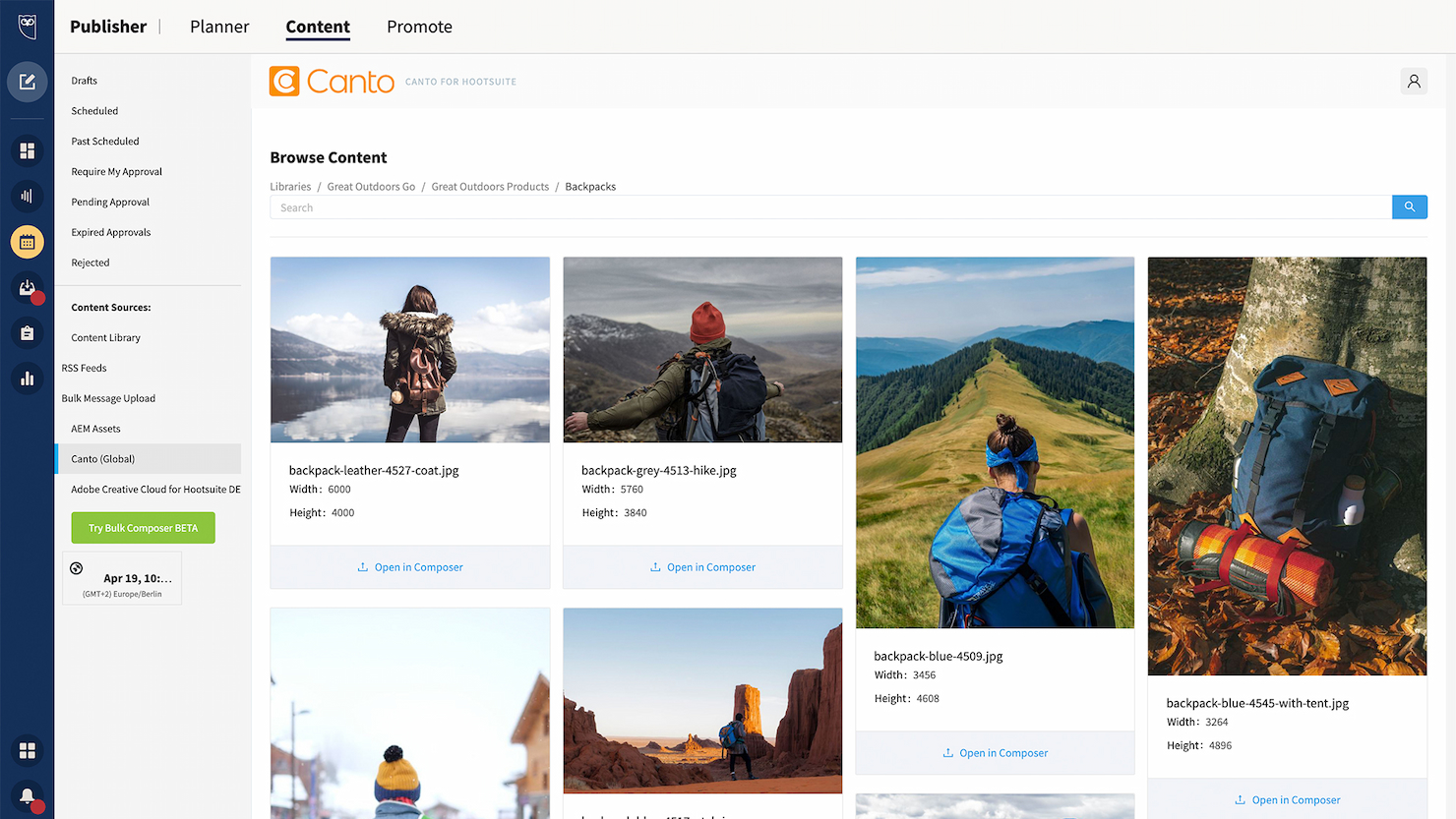
Canto è una piattaforma di gestione delle risorse digitali progettata per organizzare, trovare e condividere risorse digitali.
Perché ho scelto Canto: Canto offre un set di funzionalità completo che risponde all’intero spettro delle esigenze di gestione delle risorse digitali. La sua capacità di ottimizzare i flussi di lavoro dei contenuti e migliorare la collaborazione lo rende una scelta eccellente tra le soluzioni DAM. Ritengo che Canto sia il migliore per l’ottimizzazione delle risorse di brand perché offre strumenti che garantiscono la coerenza del marchio su tutte le risorse digitali, fondamentale per mantenere l’identità del brand.
Caratteristiche e integrazioni di spicco:
Le funzionalità includono ricerca visiva tramite AI, Media Delivery Cloud e miglioramenti video. Offre inoltre misure di sicurezza, opzioni di archiviazione e strumenti di analisi per monitorare le prestazioni dei contenuti.
Le integrazioni includono Adobe Creative Cloud, Slack, Dropbox, Google Drive, Microsoft Office, WordPress, Hootsuite, Salesforce, Mailchimp e Zapier.
Pros and Cons
Pros:
- Potente capacità di ricerca con tag intelligenti e riconoscimento facciale
- Portali illimitati e guide di stile per la coerenza del brand
- Integrazione API per connettersi ad altre piattaforme
Cons:
- Opzioni di personalizzazione limitate disponibili
- Potrebbero verificarsi problemi di prestazioni con grandi volumi di risorse
Altri software di gestione delle risorse digitali per il marketing
Di seguito trovi un elenco di ulteriori software di gestione delle risorse digitali per il marketing che ho inserito nella mia selezione. Sebbene non siano rientrati nella top 10, sono comunque validi e meritano ulteriori approfondimenti.
- Adobe Experience Manager
Ideale per contenuti adattabili
- Lingo
Ideale per la gestione centralizzata delle risorse di marca
- MarcomCentral
Ideale per il channel marketing
- Mailchimp
Ideale per email e SMS marketing
- Aprimo
Ideale per le operazioni di gestione dei contenuti
- Adobe Experience Manager Assets
Ideale per DAM cloud-native
- Cloudinary Assets
Ideale per l'ottimizzazione delle risorse multimediali
- PhotoShelter
Ideale per la gestione dei contenuti visivi
- ResourceSpace
Ideale per l'archiviazione centralizzata degli asset
- Extensis Portfolio
Ideale per team creativi
- Dash
Ideale per un efficace posizionamento del marchio
- Orange Logic
Ideale per la gestione dei diritti digitali
- Daminion
Ideale per il tagging delle risorse
- Acquia DAM (Widen)
Ideale per la catalogazione dettagliata dei metadati
- Plytix
Ideale per le risorse di marketing di prodotto


Come valuto i software di gestione delle risorse digitali per il marketing
Divido la mia valutazione in due livelli: requisiti di base che ogni strumento deve soddisfare—come le librerie di risorse e i flussi di approvazione—e fattori differenzianti che distinguono le piattaforme per i team di marketing.
Funzionalità di base (Requisiti minimi per questa lista)
Quando seleziono gli strumenti per la mia lista, valuto ciascuno su una scala da 0 (non offre la funzionalità) a 5 (eccelle in quest'area) per ogni funzionalità di base elencata di seguito. Quindi, calcolo il punteggio totale dello strumento in percentuale. Ogni strumento deve ottenere un punteggio totale minimo del 65% per essere preso in considerazione.
- Libreria centralizzata di risorse: Verifico se una piattaforma permette ai team marketing di archiviare, visualizzare in anteprima e cercare tra diversi tipi di file—dalle modifiche video ai PDF delle campagne—in un unico posto.
- Metadata e tag: Tassonomie personalizzate e auto-tagging sono fondamentali, specialmente per i team che gestiscono migliaia di risorse in campagne stagionali o linee di prodotto.
- Controllo delle versioni: Cerco storici delle versioni chiari con possibilità di rollback, così i responsabili di progetto possono confermare che il loro team lavori sempre sull’ultima creatività approvata.
- Flussi di approvazione: È fondamentale un sistema di revisione a più livelli con annotazioni, ad esempio quando una risorsa social deve essere approvata da design, legale e dal brand manager prima del lancio.
- Gestione di permessi e diritti: Valuto la granularità dei controlli di accesso e se lo strumento traccia le licenze d’uso—utile quando le risorse hanno restrizioni regionali o temporali.
- Integrazioni con la gestione progetti: Le connessioni native a strumenti come Asana, Wrike o Jira mi mostrano se il DAM si integra nei flussi di lavoro marketing esistenti o crea silos.
Dopo aver stilato una lista di strumenti che soddisfano questi criteri, considero cosa distingue ciascuna piattaforma.
Fattori differenzianti (Cosa distingue i fornitori)
Ecco come confronto e metto a contrasto i diversi fornitori:
Funzionalità distintive
I portali brand sono un grande fattore di differenziazione—cerco piattaforme che permettono di creare un hub condivisibile dove agenzie e partner possano accedere a risorse approvate senza dover fare richieste. Il template creativo è altrettanto prezioso, soprattutto quando i team locali devono localizzare materiali di campagna senza coinvolgere un designer. Valuto anche le analytics di utilizzo, perché sapere quali risorse vengono scaricate e riutilizzate aiuta i responsabili di progetto a giustificare gli investimenti in contenuti presso la leadership.
Oltre le funzionalità
L’accesso collaborativo è importante—verifico se una piattaforma supporta utenti ospiti per agenzie e freelancer senza aumentare i costi per utente, dato che la maggior parte dei progetti marketing coinvolge contributori esterni. L’integrazione nell’ecosistema è altrettanto fondamentale. Un DAM che si collega a CMS, piattaforme di automazione marketing e strumenti creativi evita che i responsabili di progetto diventino intermediari che trasferiscono file tra sistemi. Valuto anche la sicurezza, cercando conformità SOC 2, supporto SSO e log di audit che soddisfino i requisiti di governance aziendale.
Come scegliere un software di gestione delle risorse digitali per il marketing
È facile perdersi in lunghi elenchi di funzionalità e strutture tariffarie complesse. Per aiutarti a rimanere concentrato mentre affronti il tuo processo di selezione del software, unico per le tue esigenze, ecco una lista di controllo dei fattori da tenere presenti:
| Fattore | Cosa considerare |
|---|---|
| Scalabilità | Il software può crescere insieme al tuo team? Considera le future esigenze di archiviazione e l'espansione degli utenti. Cerca piani flessibili che ti consentano di aumentare o ridurre facilmente la capacità. |
| Integrazioni | Si connette agli strumenti che già utilizzi? Verifica la compatibilità con il tuo stack tecnologico attuale per evitare interruzioni del flusso di lavoro. |
| Personalizzazione | Puoi adattare il software ai tuoi processi? Valuta la possibilità di personalizzare i flussi di lavoro, l'identità del marchio e le autorizzazioni degli utenti in base alle tue esigenze specifiche. |
| Semplicità d'uso | L'interfaccia è intuitiva per tutti gli utenti? Assicurati che i membri del team possano imparare rapidamente a utilizzare il software senza una formazione approfondita. |
| Implementazione e inserimento | Quanto è fluida la transizione al nuovo sistema? Cerca strumenti con un solido supporto per l'inserimento, come tutorial e assistenza clienti, per facilitare il passaggio. |
| Costo | Il prezzo rientra nel tuo budget? Confronta i costi con i vantaggi e considera eventuali costi nascosti o contratti a lungo termine che potrebbero incidere sul tuo budget. |
| Misure di sicurezza | Le tue risorse sono protette? Esamina la crittografia dei dati, i controlli degli accessi e la conformità a normative come il GDPR per garantire la sicurezza dei dati. |
| Disponibilità del supporto | L'assistenza è accessibile quando serve? Verifica se il fornitore offre supporto 24 ore su 24, 7 giorni su 7 e diverse opzioni di contatto per risolvere rapidamente i problemi. |
Tendenze dei software di gestione delle risorse digitali per il marketing
Con la continua evoluzione del panorama digitale, le tendenze dei software DAM per il marketing sono destinate a rivoluzionare il modo in cui le aziende gestiscono le proprie risorse multimediali. Dall'automazione basata sull'intelligenza artificiale e dagli strumenti di collaborazione avanzati alle migliori capacità di integrazione, ecco le tendenze che ho notato prendere forma per le soluzioni DAM nel marketing:
- Integrazione con l'intelligenza artificiale e l'apprendimento automatico: L'intelligenza artificiale e l'apprendimento automatico vengono integrati sempre più nei software di gestione delle risorse digitali. Questa tendenza consente di organizzare e recuperare le risorse in modo più intelligente, riducendo significativamente il tempo dedicato alla loro gestione.
- Enfasi sull'esperienza utente: Migliorare l'esperienza utente è una tendenza fondamentale nei software di gestione delle risorse digitali. Gli sviluppatori si concentrano su interfacce intuitive e flussi di lavoro semplificati, poiché incidono direttamente sulla produttività e sui tassi di adozione da parte degli utenti.
- Misure di sicurezza avanzate: La sicurezza sta diventando una priorità assoluta per i software di gestione delle risorse digitali e vengono implementati sistemi di crittografia e controlli degli accessi avanzati per proteggere le risorse di marketing sensibili. Questa tendenza è importante a causa delle crescenti preoccupazioni relative alle violazioni dei dati e al furto della proprietà intellettuale.
- Adozione di soluzioni basate sul cloud: Le soluzioni di gestione delle risorse digitali basate sul cloud sono in crescita, poiché offrono scalabilità e accesso da remoto. Si tratta di un'evoluzione positiva, perché supportano la collaborazione in tempo reale e l'accesso da qualsiasi luogo.
- Concentrarsi su analisi e reportistica: Le funzionalità di analisi e reportistica vengono valorizzate nei software di gestione delle risorse digitali, offrendo informazioni sull'utilizzo e sulle prestazioni delle risorse. Questa tendenza è particolare perché aiuta i professionisti del marketing a prendere decisioni basate sui dati riguardo alle proprie strategie di contenuto.
Funzionalità
Quando scegli un software di gestione delle risorse digitali per il marketing, presta attenzione alle seguenti funzionalità chiave:
- Assegnazione di tag ai metadati: Organizza e categorizza automaticamente le risorse per facilitarne il recupero e la gestione.
- Controllo delle versioni: Assicurati che tutti lavorino con le versioni più aggiornate dei file, riducendo errori e confusione.
- Autorizzazioni degli utenti: Controlla chi può accedere e modificare le risorse, migliorando la sicurezza e preservando l'integrità del marchio.
- Ricerca avanzata: Trova rapidamente risorse specifiche utilizzando potenti funzionalità di ricerca, risparmiando tempo e fatica.
- Identità del marchio personalizzabile: Adatta l'interfaccia per riflettere l'identità del tuo marchio, garantendo coerenza.
- Automazione dei flussi di lavoro: Automatizza le attività ripetitive per aumentare l'efficienza e liberare tempo da dedicare ad altre attività.
- Strumenti di analisi: Ottieni informazioni sull'utilizzo e sulle prestazioni delle risorse per aiutarti a prendere decisioni consapevoli.
- Capacità di integrazione: Connettiti agli strumenti e alle piattaforme esistenti per ottimizzare i flussi di lavoro e mantenere la produttività.
- Archiviazione scalabile: Gestisci librerie di risorse in crescita con opzioni di archiviazione flessibili, scalabili in base alle tue esigenze.
- Funzionalità di collaborazione: Facilita la comunicazione del team e il coordinamento dei progetti con strumenti di collaborazione integrati.
Vantaggi
L'implementazione di un software di gestione delle risorse digitali per il marketing offre diversi vantaggi al tuo team e alla tua azienda. Eccone alcuni di cui potrai beneficiare:
- Organizzazione migliorata: L'etichettatura dei metadati e il controllo delle versioni aiutano a mantenere le risorse digitali organizzate e facili da trovare.
- Collaborazione migliorata: Le autorizzazioni degli utenti e le funzionalità di collaborazione permettono al team di lavorare insieme in modo efficiente sui progetti.
- Risparmio di tempo: La ricerca avanzata e l'automazione dei flussi di lavoro riducono il tempo dedicato alla ricerca delle risorse e all'esecuzione di attività ripetitive.
- Maggiore sicurezza: Le autorizzazioni degli utenti e lo spazio di archiviazione scalabile garantiscono che le risorse digitali siano sicure e accessibili solo agli utenti autorizzati.
- Migliore processo decisionale: Gli strumenti di analisi forniscono informazioni sull'utilizzo delle risorse, aiutandoti a prendere decisioni di marketing consapevoli.
- Coerenza dell'identità del marchio: L'identità del marchio personalizzabile garantisce che tutte le risorse digitali siano in linea con l'identità del tuo marchio.
- Scalabilità: Con la crescita della tua azienda, lo spazio di archiviazione scalabile e le funzionalità di integrazione permettono al tuo sistema di gestione delle risorse di crescere insieme a te.
Costi e prezzi
La scelta di un software di gestione delle risorse digitali per il marketing richiede la comprensione dei vari modelli e piani tariffari disponibili. I costi variano in base alle funzionalità, alle dimensioni del team, ai componenti aggiuntivi e ad altri fattori. La tabella seguente riassume i piani più comuni, i relativi prezzi medi e le funzionalità generalmente incluse nelle soluzioni software di gestione delle risorse digitali per il marketing:
Tabella di confronto dei piani per il software di gestione delle risorse digitali per il marketing
| Tipo di piano | Prezzo medio | Funzionalità comuni |
|---|---|---|
| Piano gratuito | $0 | Spazio di archiviazione di base, accesso limitato degli utenti e strumenti essenziali per la gestione delle risorse. |
| Piano personale | $5-$25/utente/mese | Maggiore spazio di archiviazione, autorizzazioni degli utenti e funzionalità di collaborazione di base. |
| Piano aziendale | $30-$75/utente/mese | Ricerca avanzata, identità del marchio personalizzabile e automazione dei flussi di lavoro. |
| Piano per grandi aziende | $100+/utente/mese | Spazio di archiviazione illimitato, analisi complete e misure di sicurezza avanzate. |
Che cos'è il software di gestione delle risorse digitali per il marketing?
Il software di gestione delle risorse digitali per il marketing è uno strumento specializzato progettato per gestire, organizzare e distribuire le risorse digitali. I professionisti del marketing lo utilizzano per gestire un'ampia gamma di contenuti digitali, come immagini, video e documenti. Generalmente funge da archivio centralizzato che supporta le attività di marketing, garantendo che le risorse multimediali siano facilmente accessibili e possano essere condivise in modo efficiente
Software di gestione delle risorse digitali per le domande frequenti sul marketing
Ecco alcune delle domande più frequenti che ricevo sul software di gestione delle risorse digitali per il marketing:
Quanto tempo occorre per implementare un software di gestione delle risorse digitali?
I tempi per l’implementazione di un sistema DAM non sono fissi e dipendono da fattori come la disponibilità del team, l’esperienza nell’uso dei sistemi DAM e la complessità dei flussi di lavoro e dei requisiti. Mentre alcune organizzazioni possono completare rapidamente l’adozione, per altre potrebbero essere necessari diversi mesi. È essenziale adottare un processo di avvio flessibile e in linea con gli obiettivi del team.
Il software di gestione delle risorse digitali è adatto ai team numerosi?
Sì, il software DAM è scalabile e può supportare team numerosi dislocati in sedi diverse. Ad esempio, molti team utilizzano il software DAM per le università e impiegano un unico software ottimizzato in più campus. Offre funzionalità come il controllo degli accessi basato sui ruoli, che garantisce ai membri del team un accesso alle risorse adeguato alle loro mansioni. La piattaforma può gestire grandi volumi di dati e più utenti contemporaneamente, rendendola adatta alle organizzazioni di grandi dimensioni con esigenze complesse di gestione delle risorse.
Quanto è sicuro il software di gestione delle risorse digitali?
Il software di gestione delle risorse digitali offre generalmente livelli elevati di sicurezza per proteggere le risorse dagli accessi non autorizzati e dalle minacce informatiche. Sono comuni funzionalità come l’archiviazione dei dati crittografata, i protocolli sicuri per il trasferimento dei file e gli audit di sicurezza periodici. Inoltre, i sistemi DAM forniscono registri dettagliati degli accessi e la possibilità di impostare autorizzazioni granulari per utenti e gruppi diversi.
Quali tipi di file possono essere gestiti con il software di gestione delle risorse digitali?
Il software DAM può gestire un’ampia varietà di tipi di file, tra cui immagini, video, file audio, PDF e documenti. La maggior parte delle piattaforme è progettata per gestire file di grandi dimensioni e diversi formati, garantendo ai team di marketing la possibilità di archiviare e consultare una vasta gamma di contenuti digitali secondo necessità.
In che modo il software di gestione delle risorse digitali migliora l'efficienza del marketing?
Il software DAM centralizza tutte le risorse di marketing in un’unica posizione, rendendo più rapido e semplice per i team trovare e utilizzare i materiali giusti. Riduce il tempo dedicato alla ricerca delle risorse e aiuta a evitare la ricreazione di materiali già esistenti. Semplificando la gestione delle risorse, i team possono lanciare campagne di marketing più rapidamente e in modo più coerente. Inoltre, favorisce una migliore collaborazione tra i membri del team e i diversi reparti.