

I 10 migliori software DAM aziendali per il 2026

10 Elenco dei migliori software aziendali per la gestione delle risorse digitali


Gestire file digitali su più piattaforme, team e campagne può diventare rapidamente ingestibile. È difficile mantenere le risorse sicure, controllate nelle versioni e facili da trovare quando sono completamente disperse.
Il software aziendale per la gestione delle risorse digitali offre un modo migliore per organizzare, archiviare e condividere i tuoi contenuti digitali. È progettato per gestire librerie in crescita e flussi di lavoro complessi senza rallentare il tuo team.
In questo elenco ti presenterò le migliori opzioni disponibili sul mercato. Ho recensito indipendentemente ciascuna di esse tenendo presenti le esigenze di un project manager, concentrandomi su usabilità, funzionalità principali e valore nel mondo reale.
Perché puoi fidarti di noi
Testiamo e recensiamo software di project management dal 2012. Come project manager, sappiamo quanto sia fondamentale (e difficile) fare la scelta giusta quando si seleziona un software. Investiamo molte risorse nella ricerca per aiutare la nostra audience a scegliere meglio. Abbiamo testato più di 2.000 strumenti per diversi casi d’uso e scritto oltre 1.000 recensioni dettagliate. Scopri come restiamo trasparenti & la nostra metodologia di recensione del software.
Confronto dei 10 migliori software aziendali per la gestione delle risorse digitali
Questa tabella di confronto riassume i dettagli dei prezzi delle mie migliori selezioni di software aziendale DAM, per aiutarti a trovare quello più adatto al tuo budget e alle esigenze della tua azienda.
| Tool | Best For | Trial Info | Price | ||
|---|---|---|---|---|---|
| 1 | Ideale con agenti basati sull'IA per l'automazione delle risorse | Piano gratuito disponibile | A partire da $89/mese (con fatturazione annuale per 3 utenti) | Website | |
| 2 | Ideale per team creativi e marketing | Demo gratuita disponibile | Prezzi su richiesta | Website | |
| 3 | Ideale per la collaborazione creativa visiva | Piano gratuito disponibile | Da $10/mese (fatturazione annuale) | Website | |
| 4 | Ideale per la coerenza del marchio aziendale e le esperienze di contenuto | Prova gratuita | Prezzo su richiesta | Website | |
| 5 | Ideale per integrazione con Google Drive e Amazon S3 | Prova gratuita di 7 giorni | Da $100/mese/utente | Website | |
| 6 | Ideale per l'ottimizzazione dei media basata su AI | Prova gratuita di 14 giorni | Da $213/mese | Website | |
| 7 | Ideale per l'organizzazione avanzata delle risorse basata sull'intelligenza artificiale | Piano gratuito per sempre | A partire da $9/mese | Website | |
| 8 | Migliore per la ricerca di foto tramite visi | Prova gratuita di 30 giorni disponibile | Da $250/mese (fatturazione annuale) | Website | |
| 9 | Ideale per configurazione e personalizzazione | Demo gratuita disponibile | Prezzi su richiesta | Website | |
| 10 | Il miglior software modulare di gestione delle risorse digitali aziendali che cresce insieme all’azienda | Prova gratuita di 14 giorni | Prezzo su richiesta | Website |

Recensioni dei migliori software aziendali per la gestione delle risorse digitali
Di seguito trovi i miei riepiloghi dettagliati dei migliori software aziendali per la gestione delle risorse digitali inclusi nel mio elenco. Le mie recensioni offrono uno sguardo approfondito alle funzionalità principali, ai pro e contro, alle integrazioni e ai casi d’uso ideali di ogni strumento, per aiutarti a trovare quello più adatto a te.

Ideale con agenti basati sull'IA per l'automazione delle risorse
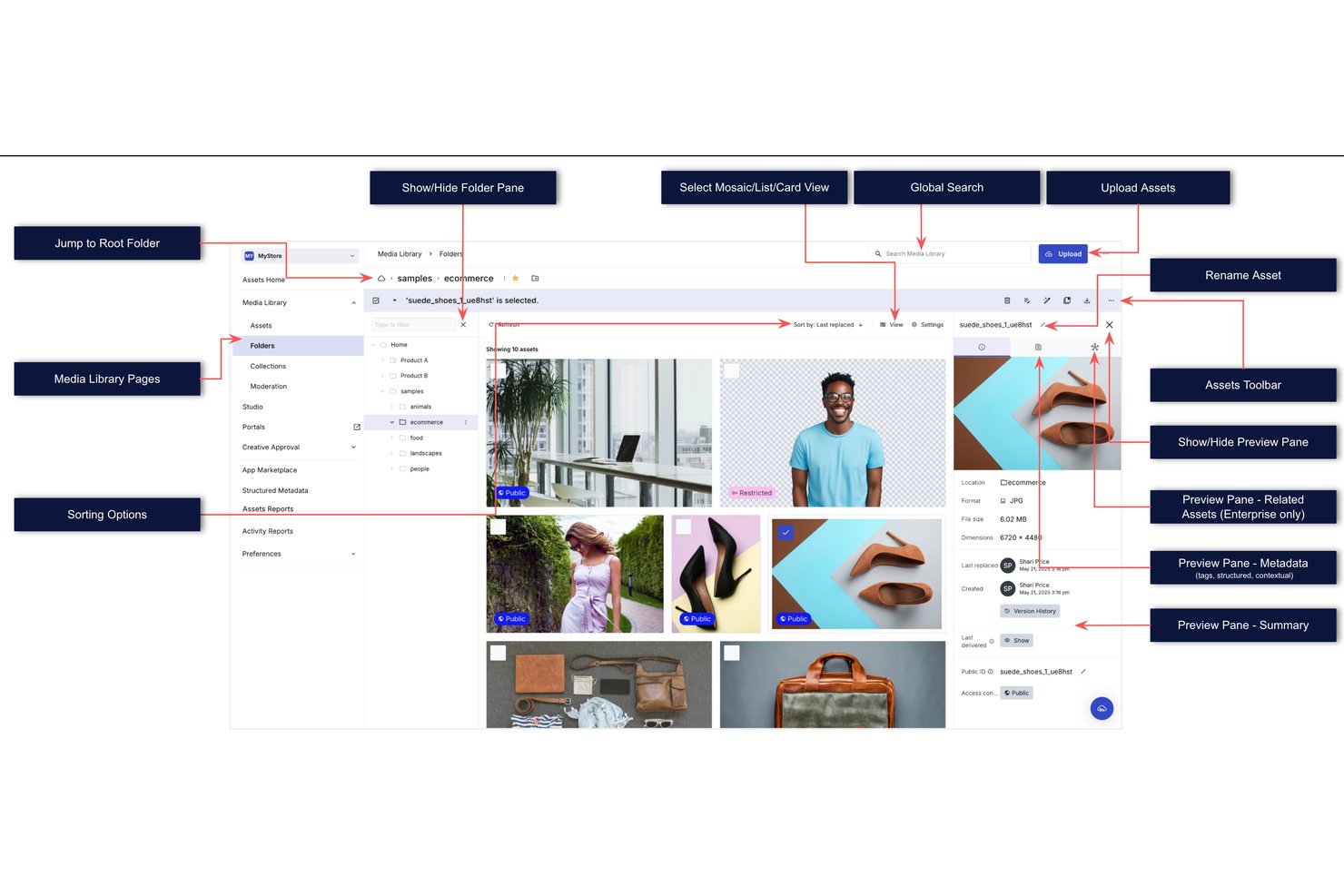
Cloudinary è una piattaforma di gestione delle risorse digitali basata sulle API che combina l'archiviazione delle risorse nel cloud, la trasformazione dei contenuti multimediali basata sull'IA e flussi di lavoro automatizzati per la distribuzione di immagini, video e file non elaborati.
Per chi è più adatto Cloudinary?
Cloudinary è adatto ai team creativi e di marketing aziendali dei settori ad alta intensità di contenuti multimediali che devono gestire, trasformare e distribuire grandi volumi di risorse immagine e video su larga scala.
Perché ho scelto Cloudinary
Ho scelto Cloudinary come una delle soluzioni migliori perché la sua suite di agenti IA svolge attività che nessun'altra piattaforma DAM offre immediatamente. L'agente di tassonomia struttura automaticamente la libreria delle risorse utilizzando intenti espressi in linguaggio naturale, mentre l'agente di moderazione convalida i contenuti in termini di qualità, autenticità e conformità prima della pubblicazione. Apprezzo particolarmente la ricerca di persone basata sull'IA, che consente al mio team di individuare in pochi secondi i contenuti relativi a persone specifiche all'interno di librerie enormi, riducendo drasticamente quello che prima era un processo manuale di assegnazione dei tag.
Funzionalità principali di Cloudinary
- Trasformazione dinamica delle risorse: Ridimensiona, ritaglia, comprimi o converti istantaneamente immagini e video in qualsiasi formato su richiesta.
- Controlli degli accessi basati sui ruoli: Assegna autorizzazioni granulari e gestisci l'accesso alle risorse per utenti o team diversi all'interno della tua organizzazione.
- Registri di controllo e report: Acquisisci ed esporta informazioni dettagliate sull'attività degli utenti, sulle modifiche alle risorse e sugli eventi di sistema ai fini della conformità e della sicurezza.
- Distribuzione tramite CDN globale: Distribuisci le risorse in tutto il mondo attraverso un'infrastruttura multi-CDN per garantire un accesso rapido e affidabile da qualsiasi località.
Integrazioni di Cloudinary
Cloudinary offre integrazioni native con Adobe Creative Cloud, Figma, Contentful, Salesforce, HubSpot, Marketo, WordPress, Shopify e Magento, oltre a connettersi con Zapier. È disponibile un'API per le integrazioni personalizzate.
Pros and Cons
Pros:
- Gli agenti IA automatizzano l'assegnazione dei tag e l'organizzazione delle risorse
- La CDN globale garantisce una distribuzione rapida delle risorse in tutto il mondo
- La trasformazione al volo gestisce varianti illimitate dei formati
Cons:
- I flussi di lavoro di approvazione sono meno avanzati rispetto agli strumenti DAM dedicati
- La configurazione dei metadati richiede un'ampia impostazione manuale
New Product Updates from Cloudinary

Cloudinary Integrates with Klaviyo for Personalized Email Visuals
Cloudinary integrates with Klaviyo to generate personalized images and GIFs from customer and event data. This reduces manual design work for email campaigns. For more information, visit Cloudinary’s official site.
 .
.
Ideale per team creativi e marketing
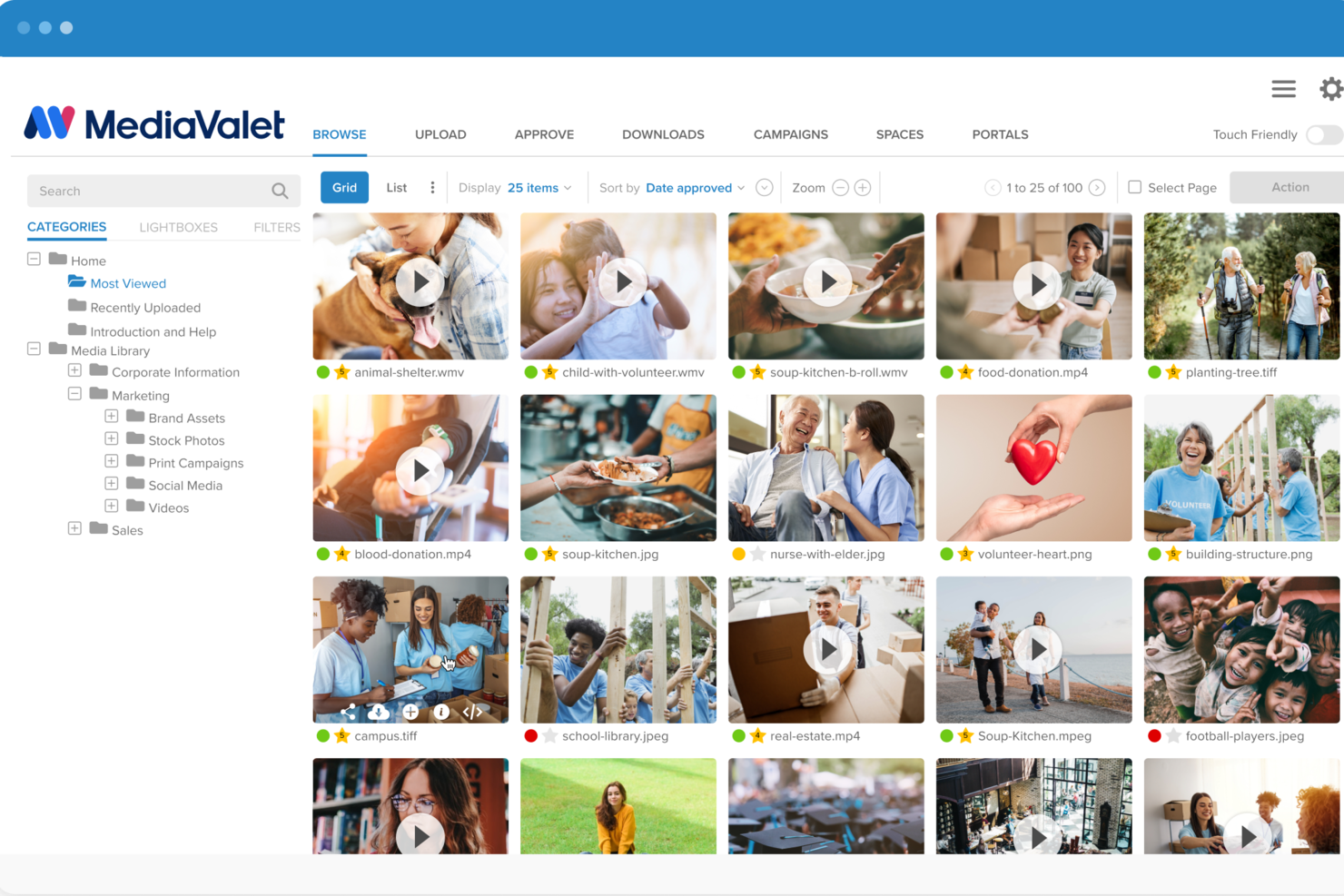
MediaValet mira a potenziare i team di vendita permettendo di trovare contenuti di marketing e materiale aggiornato e pertinente su qualsiasi dispositivo, ovunque. Consente agli utenti di creare, collaborare e visualizzare in anteprima documenti Office, materiali visivi, PDF, video, persino file 3D all'interno della libreria di MediaValet. Ottimizza il processo di ricerca e ordinamento grazie al riconoscimento di oggetti, testo, colore e volti basato su intelligenza artificiale.
La ricercabilità degli asset è eccellente grazie alle funzionalità di auto-tagging di MediaValet. I file sono organizzati per un facile recupero raggruppandoli in categorie e sottocategorie, migliorando così l'esperienza utente. È per questo che ho ritenuto opportuno attribuire loro un punteggio elevato nelle categorie di UX e Usabilità secondo le linee guida dei nostri criteri di valutazione.
MediaValet offre un'app per iOS, Android e Windows. Le integrazioni software includono Wrike, Workfront, Slack, OKTA, Active Directory, WordPress, Drupal 8, Adobe Creative Cloud, Sharepoint, Office 365, Hootsuite e altri ancora.
MediaValet offre preventivi personalizzati su richiesta e una demo gratuita.

Air
Ideale per la collaborazione creativa visiva
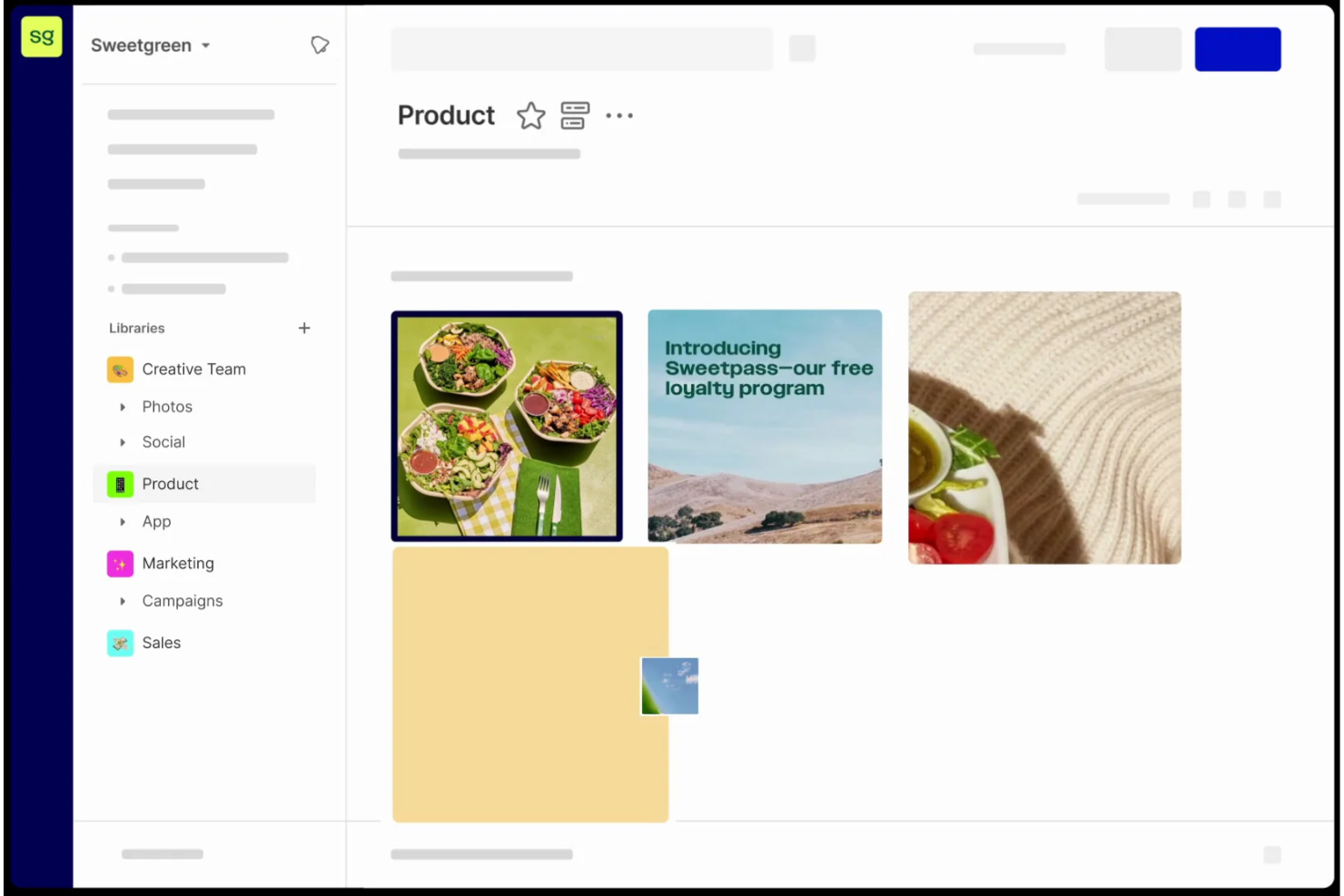
Air è una piattaforma di gestione delle operazioni creative progettata per gestire la raccolta, l'approvazione e la condivisione dei contenuti visivi. Offre un sistema centralizzato per il feedback e le approvazioni, semplificando il processo creativo e automatizzando le operazioni, rendendolo uno strumento unico che riunisce tutto ciò di cui hai bisogno in un unico spazio di lavoro.
Come software di gestione delle risorse digitali, Air offre uno spazio di lavoro visivo per consentire ai team creativi di collaborare su diversi materiali. La piattaforma centralizza commenti, feedback e approvazioni direttamente intorno ai file, facilitando la comunicazione e la visibilità per tutti i membri del team, ovunque si trovino. Fornisce inoltre funzionalità avanzate di condivisione cross-funzionale e si integra con molte suite di strumenti aziendali.
Air offre anche funzionalità come ricerca intelligente per individuare file specifici all'interno della piattaforma, feedback dinamico per la collaborazione in tempo reale, Kanban per la visualizzazione del flusso di lavoro e la gestione delle attività, e versioni per tracciare e gestire le diverse iterazioni delle risorse.
Le integrazioni includono Zapier, Canva, Adobe Premier Pro, Slack, Dropbox, WordPress, Airtable e molto altro.
New Product Updates from Air

Air Showcases Introduces Custom Branding, Content Blocks, and Sub-Pages
Air Showcases now support custom branding, content blocks, sub-pages, and saved default layout settings, plus more control over removing items and branding options for Enterprise. For more information, visit Air's official site.

Bynder
Ideale per la coerenza del marchio aziendale e le esperienze di contenuto
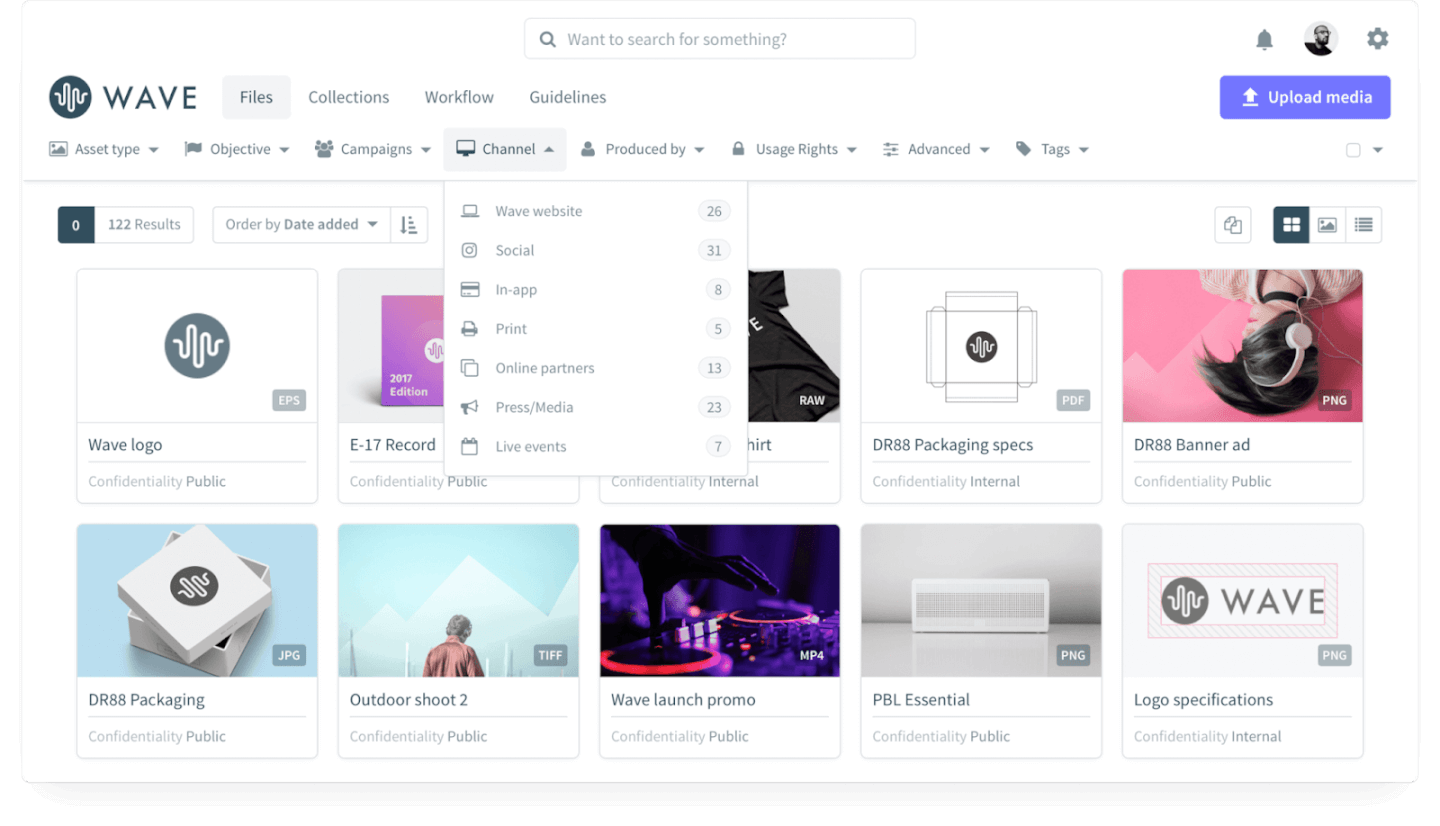
Un Leader nel report The Forrester Wave™ Digital Asset Management for Customer Experience, Q1 2022.
Bynder è un DAM SaaS che ti consente di organizzare tutte le tue risorse digitali in un'unica posizione per una gestione più semplice e un accesso rapido per tutti gli utenti. Dispone di una funzione di analisi basata sui dati per ottenere informazioni utili sulle tue risorse e su come gli utenti ne traggono vantaggio. Puoi usare Bynder per proteggere la reputazione del tuo marchio limitando i permessi di accesso alle risorse digitali sensibili.
Bynder è la soluzione DAM migliore per te se possiedi un'attività di commercio elettronico, perché ti permette di gestire le risorse digitali vitali, inclusi immagini di prodotto e annunci di campagne. Comprende integrazioni per l’aggiornamento e la pubblicazione automatica delle risorse, garantendo che i prodotti sui tuoi siti e-commerce siano sempre aggiornati. Il Creative Workflow di Bynder ti permette di snellire richieste, revisioni e approvazioni, così il tuo team creativo può produrre rapidamente materiali di marketing.
Bynder si integra con Wrike, eGo CMS, Vimeo e altre comuni app per il digital workplace.
I dettagli sui prezzi di Bynder sono disponibili su richiesta.
New Product Updates from Bynder
Bynder Expands Integrations for Content and Asset Workflows
Bynder introduces integrations with Salesforce Data 360, echo3D, FirstSpirit, monday service, Pixelz, and Frame.io. These updates enhance asset management, content workflows, and cross-platform collaboration. For more information, visit Bynder’s official site.
 .
.
Pics.io
Ideale per integrazione con Google Drive e Amazon S3
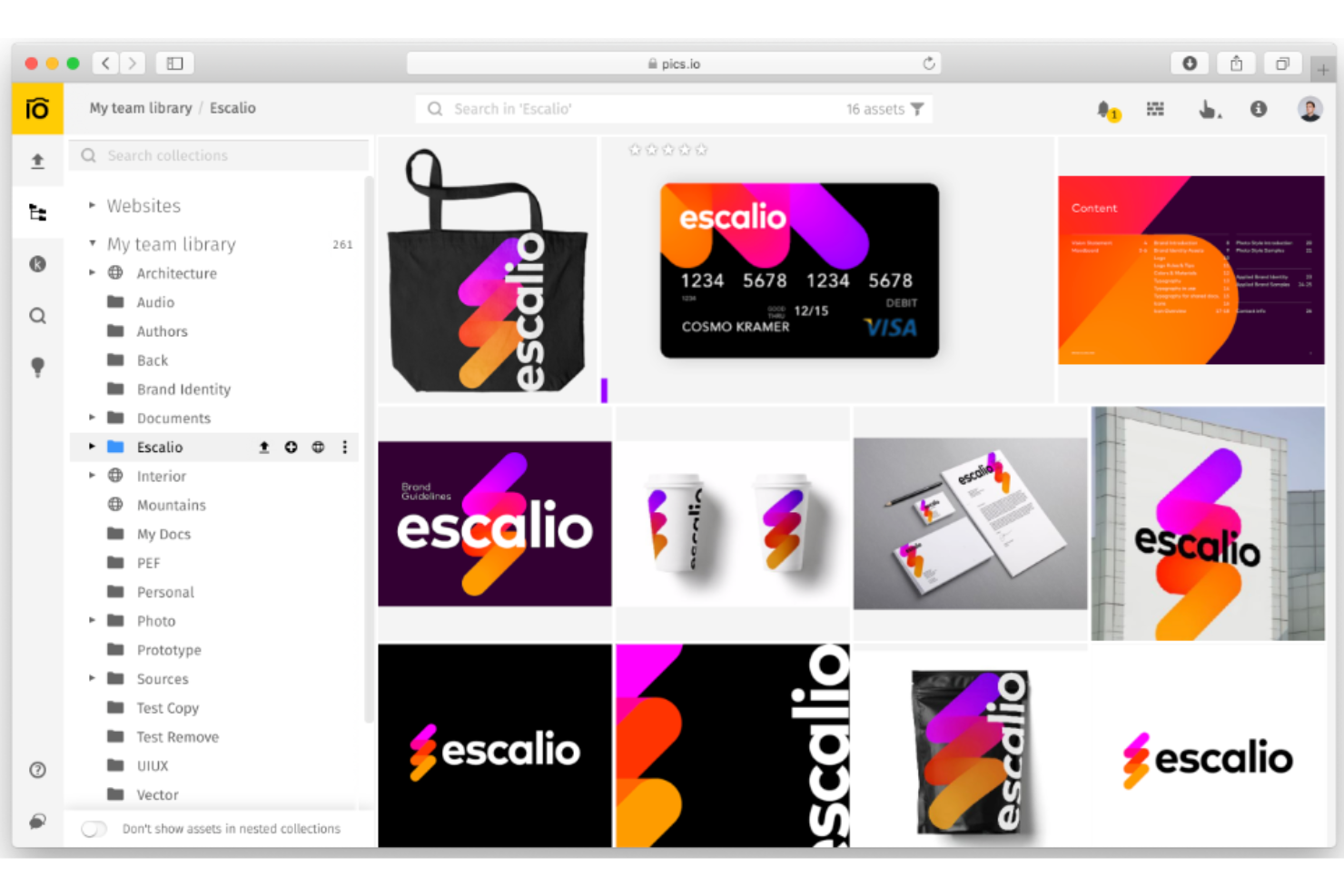
Pics.io è un software di gestione delle risorse digitali (DAM) che aiuta la tua azienda a mantenere organizzati e gestire in modo efficiente gli asset digitali. È in grado di gestire diversi formati di file e archivia le risorse in un deposito centralizzato nel cloud, rendendole accessibili allo staff in luoghi e su dispositivi diversi.
Il software offre uno spazio di archiviazione proprio, ma gli utenti possono anche integrarlo con Google Drive e Amazon S3 per evitare la necessità di migrare i file esistenti. I formati di file specifici supportati includono immagini, video, file audio e documenti. I metadati facilitano la ricerca e l'organizzazione delle risorse. Per quanto riguarda le funzionalità basate sull'IA, Pics.io permette agli utenti di scegliere tra tre diversi modelli di intelligenza artificiale per generare parole chiave per le risorse digitali. Gli utenti possono anche creare automaticamente descrizioni per i propri file e persino personalizzare i prompt con l'aiuto dell'assistenza clienti.
Una caratteristica degna di nota è il controllo delle versioni, che consente agli utenti di tenere traccia delle modifiche e ripristinare i file alle versioni precedenti secondo necessità. I team possono inoltre collaborare sulle risorse tramite la piattaforma con commenti, tag e approvazioni. I file possono essere condivisi esternamente e l'interfaccia può essere personalizzata secondo il marchio della tua azienda.
Le integrazioni includono Google Drive, Amazon S3, Shopify, Slack, Adobe Photoshop, Figma, Hootsuite, HubSpot, Salesforce, Trello e ZohoCRM.
I prezzi partono da $50 al mese e sono disponibili 7 giorni di prova gratuita.
New Product Updates from Pics.io
Pics.io Removes Inbox File Size Limits
Pics.io removes the file size limit for Inbox uploads and improves transfer performance for large files and videos. These updates make it easier to upload heavier media without size restrictions. For more information, visit Pics.io’s official site.
 .
.
Ideale per l'ottimizzazione dei media basata su AI
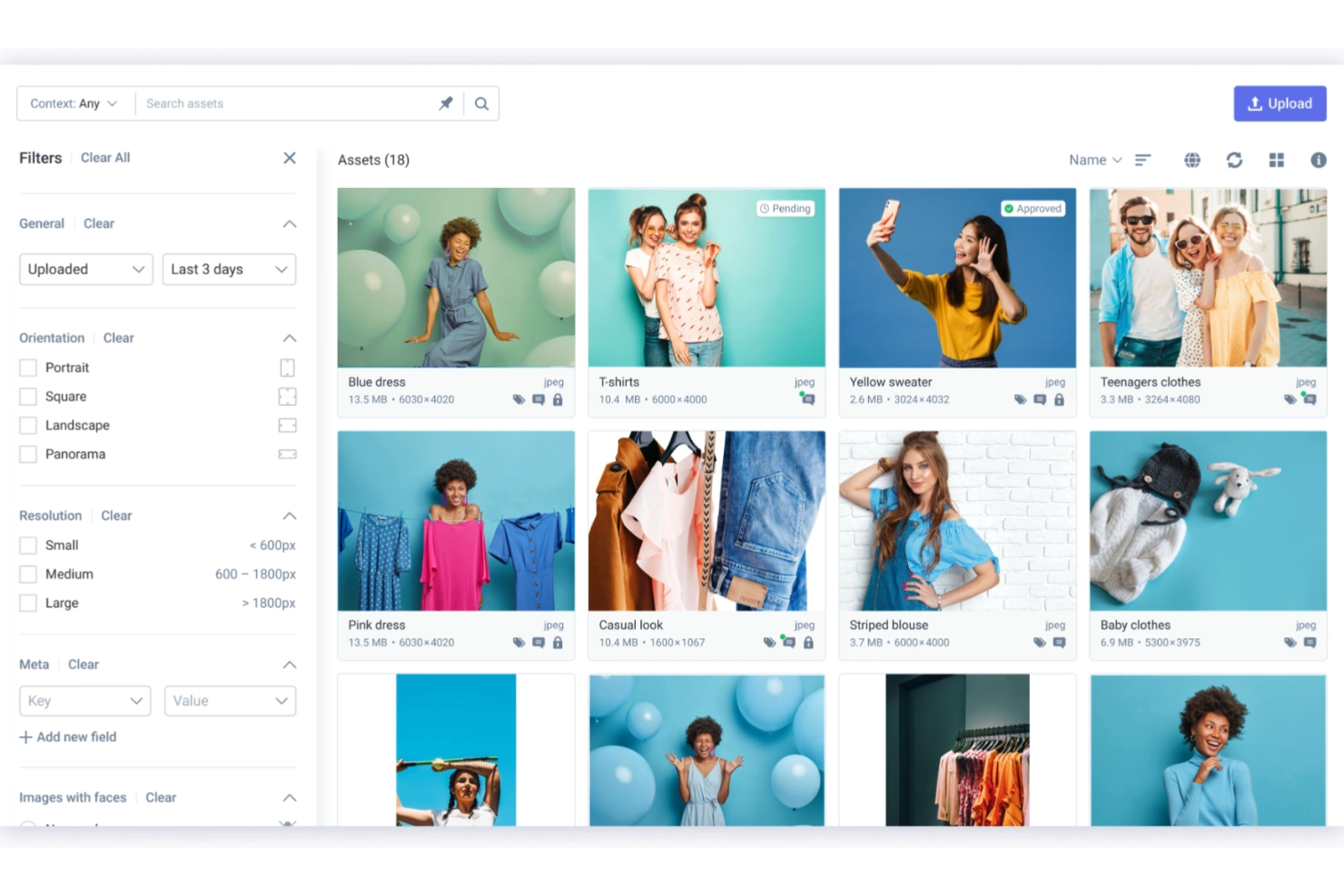
Scaleflex è una soluzione cloud di gestione delle risorse visive pensata per aziende, PMI e startup nei settori del turismo, e-commerce e immobiliare. Include una piattaforma di esperienza visiva con moduli per la gestione degli asset digitali, intelligenza artificiale visiva, portali e ottimizzazione dinamica dei media, permettendo agli utenti di archiviare, organizzare e migliorare i contenuti visivi in modo efficiente.
Scaleflex si distingue nella gestione aziendale degli asset digitali grazie alla sua funzione di ottimizzazione dinamica dei media. Questa tecnologia basata su AI comprime automaticamente immagini e video, migliorando i tempi di caricamento e incrementando il posizionamento SEO. Per te e il tuo team, significa una consegna più rapida ed efficiente di contenuti visivi di alta qualità su piattaforme web e mobile. Non dovrai più preoccuparti delle complessità tecniche dei formati media, perché Scaleflex gestisce in tempo reale le trasformazioni per garantire sempre la presentazione ottimale dei tuoi contenuti.
Un'altra caratteristica interessante di Scaleflex è la sua capacità di organizzazione automatica, che utilizza modelli di intelligenza artificiale per il rilevamento e la classificazione dei contenuti. Il tuo team può gestire grandi volumi di media senza doverli ordinare manualmente. Il sistema segnala e organizza automaticamente immagini e video, semplificando il recupero degli asset.
Le integrazioni includono WordPress, Filerobot, Cloudimage, Shopify, Magento, Prestashop, Drupal, Prismic, Amazon S3, Azure, Angular e React.js.

ImageKit
Ideale per l'organizzazione avanzata delle risorse basata sull'intelligenza artificiale
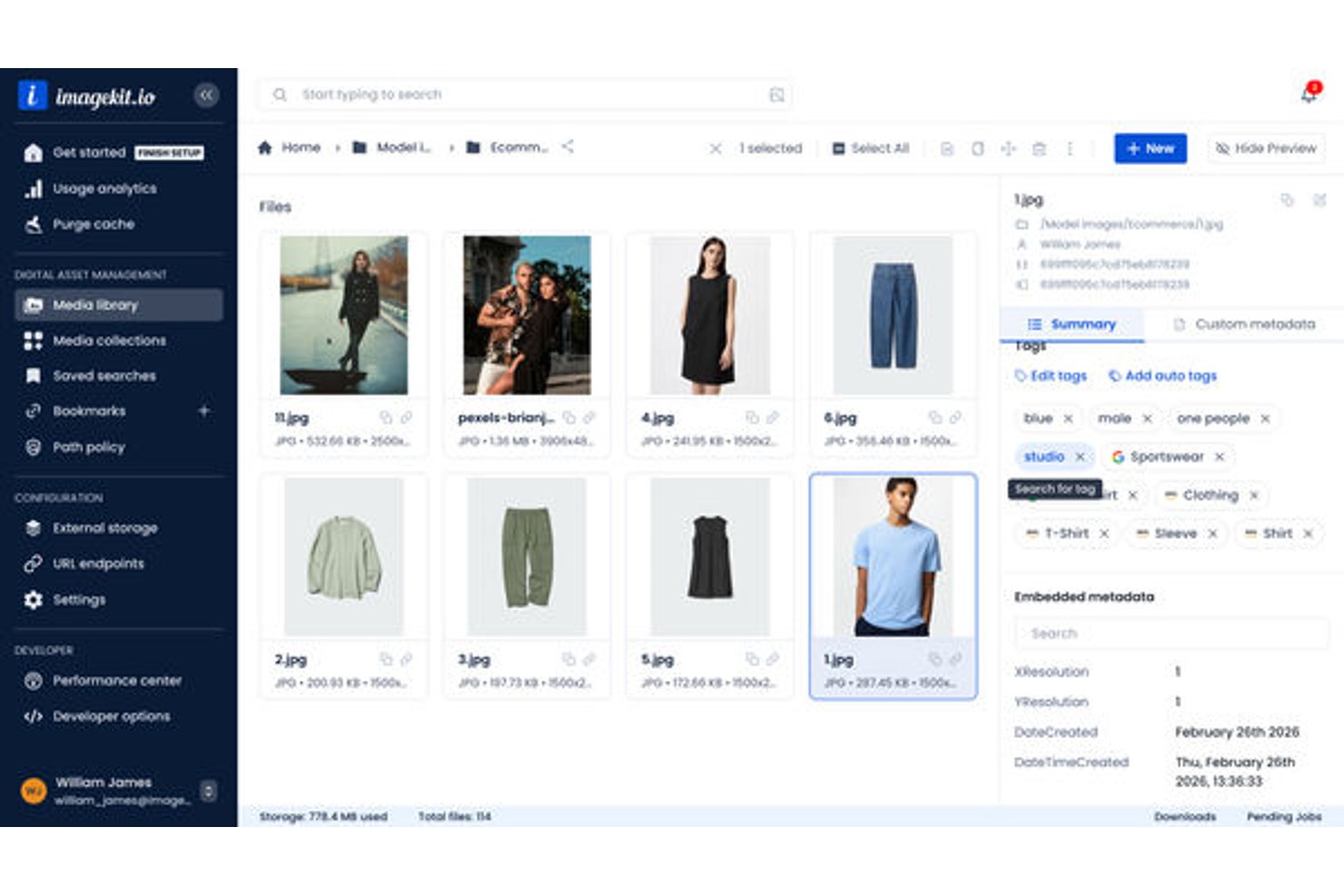
ImageKit è una piattaforma di gestione delle risorse digitali basata sul cloud che combina l'organizzazione delle risorse basata sull'intelligenza artificiale con l'elaborazione multimediale integrata in tempo reale e la distribuzione tramite CDN globale per immagini, video e contenuti multimediali avanzati.
Per chi è più adatto ImageKit?
ImageKit è adatto ai team di marketing e alle operazioni creative orientati alla tecnologia, che gestiscono grandi volumi di risorse multimediali insieme a flussi di lavoro di distribuzione guidati dagli sviluppatori.
Perché ho scelto ImageKit
ImageKit si è guadagnato un posto nella mia selezione ristretta grazie al modo in cui la sua intelligenza artificiale gestisce l'organizzazione delle risorse a livello strutturale. Apprezzo in particolare la funzionalità AI Tasks, che consente di configurare richieste in linguaggio naturale per estrarre automaticamente metadati strutturati (ad esempio: 'Qual è il tipo di colletto di questa camicia?' applicato a migliaia di immagini di prodotti). Il DAM Agent si spinge oltre, permettendomi di eseguire operazioni collettive in più passaggi e creare policy di governance tramite comandi conversazionali.
Funzionalità principali di ImageKit
- Modelli per l'automazione creativa: Crea e gestisci le versioni di varianti di immagini e video in blocco utilizzando modelli basati su CSV direttamente nel DAM.
- Raccolte virtuali: Organizza le risorse in raccolte dinamiche senza duplicare i file tra le cartelle.
- Controllo degli accessi basato sui ruoli: Assegna autorizzazioni utente granulari per visualizzare, aggiornare o gestire risorse e cartelle.
- Storico degli audit e monitoraggio della cronologia: Monitora ogni azione sulle risorse con registri dettagliati e cronologia delle versioni ai fini della conformità.
Integrazioni di ImageKit
ImageKit offre oltre 30 integrazioni native, tra cui Asana, Jira, Slack, Notion, Confluence, HubSpot, Mailchimp e Hootsuite, e fornisce un'API per le integrazioni personalizzate.
Pros and Cons
Pros:
- AI Tasks automatizza l'estrazione collettiva dei metadati
- Trasformazione multimediale in tempo reale integrata nel DAM
- Distribuzione tramite CDN globale inclusa nativamente
Cons:
- Le funzionalità DAM sono più recenti rispetto a quelle dei concorrenti affermati
- La struttura basata sulle cartelle limita le esigenze di tassonomie complesse
Migliore per la ricerca di foto tramite visi

Tagbox.io è una piattaforma di gestione delle risorse digitali per aziende, ideale per i team che devono organizzare, cercare e condividere ampie librerie di foto, video e file creativi. Le sue funzionalità di tagging personalizzato basate su AI, ricerca visiva, rilevamento dei duplicati, gestione delle autorizzazioni e controllo delle versioni aiutano i team creativi, di marketing e retail/ecommerce a trovare risorse più velocemente, mantenendo i contenuti organizzati e facilmente accessibili. Apprezzo particolarmente le sue capacità di tagging AI personalizzato, che aiutano i brand retail e ecommerce a etichettare automaticamente prodotti, colori, stili, categorie e altre caratteristiche visive su ampie librerie di media.
Per chi è Tagbox.io?
Tagbox.io è particolarmente indicato per team di marketing e creativi di aziende di medie e grandi dimensioni che gestiscono elevati volumi di asset visivi su diversi progetti o marchi, soprattutto per i team retail ed eCommerce che gestiscono grandi librerie di risorse di prodotto e campagne.
Perché ho scelto Tagbox.io
Ho scelto Tagbox.io perché aiuta i team a gestire ampie librerie di foto e video con strumenti di ricerca, tagging e organizzazione delle risorse basati su intelligenza artificiale. La funzione di riconoscimento facciale è particolarmente utile per trovare rapidamente foto di persone specifiche, risparmiando tempo a team di eventi, agenzie e brand che gestiscono collezioni di media con molte persone. Mi piace anche che sia possibile cercare asset attraverso dettagli visivi come oggetti, ambienti, colori e testo invece di affidarsi esclusivamente ai nomi dei file o a tag inseriti manualmente. Per i team retail ed ecommerce si distingue la funzionalità di tagging AI personalizzato, che può individuare e organizzare automaticamente prodotti, stili di abbigliamento, colori, confezioni e altri attributi visivi specifici del brand su ampie librerie di media, aiutando i team merchandising, marketing e creativi a trovare velocemente asset approvati per campagne, lanci di prodotto e promozioni stagionali. Per i team aziendali, Tagbox.io supporta anche autorizzazioni, raccolte, rilevamento duplicati e controllo delle versioni per mantenere le librerie di asset condivise organizzate e più facili da gestire.
Caratteristiche principali di Tagbox.io
Altre funzionalità di Tagbox.io supportano i team aziendali che necessitano di un migliore controllo sulle librerie di media condivise:
- Caricamento per ospiti: consente a clienti, fotografi, fornitori di eventi e altri collaboratori esterni di caricare asset direttamente nello spazio di lavoro senza bisogno di un account completo.
- Analisi video AI: rileva persone, prodotti, discorsi e momenti di brand nei file video per rendere più facile la ricerca di clip specifiche.
- Raccolte di asset: raggruppa file correlati in raccolte in modo che i team possano organizzare asset di campagne, eventi o clienti in un unico posto.
- Rilevamento duplicati: identifica i file duplicati per ridurre il disordine e rendere più gestibili ampie librerie di asset.
Integrazioni Tagbox.io
Collega Tagbox.io tramite Tagbox Desktop (trascinamento in qualsiasi app), Zapier, Make e API REST. Sono disponibili flussi di lavoro personalizzati per Enterprise.
Pros and Cons
Pros:
- La ricerca AI trova asset tramite visi, oggetti e scene
- Il riconoscimento facciale aiuta a localizzare persone in foto e video
- Il caricamento per ospiti semplifica la raccolta di media dai collaboratori esterni
Cons:
- Il flusso di approvazione non è chiaramente documentato
- Le funzioni di tracciamento dei diritti digitali non sono chiaramente elencate
Ideale per configurazione e personalizzazione
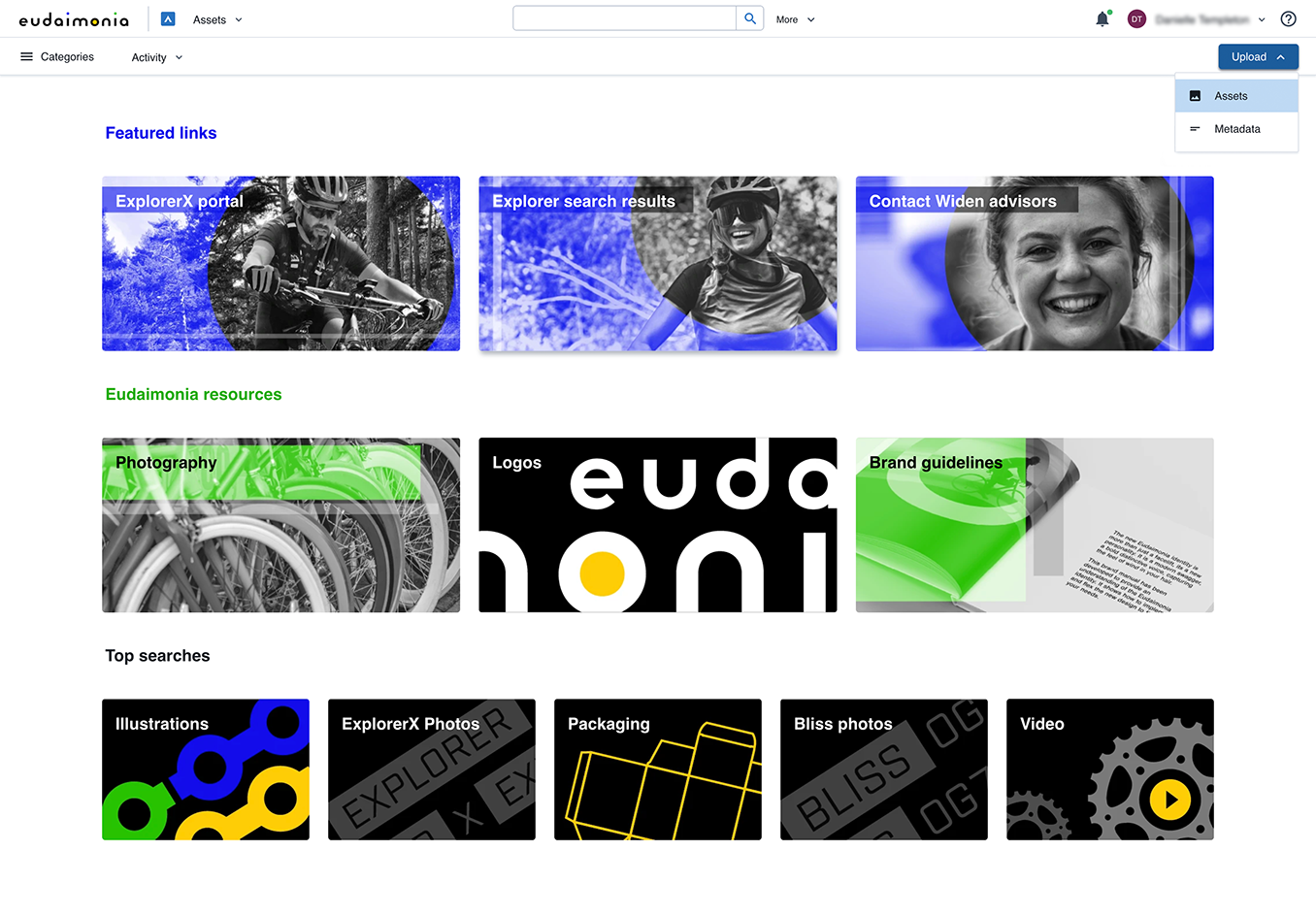
Acquia DAM (Widen) è uno strumento davvero utile per organizzare, condividere e distribuire i tuoi asset di marca e i contenuti di prodotto sul web. In definitiva, aiuta a dare maggiore autonomia ai tuoi responsabili marketing, venditori e partner, permettendo loro di ottenere il contenuto di cui hanno bisogno quando ne hanno bisogno.
Un aspetto notevole di questo strumento è la sua potente funzionalità di ricerca e i modelli di metadati flessibili. In questo senso, Acquia DAM si distingue nella nostra valutazione di caratteristiche e funzionalità, dove la reperibilità e la flessibilità sono elementi principali. Oltre a utilizzare i metadati per classificare i tuoi asset, puoi anche assegnare ruoli e permessi diversi a differenti gruppi di utenti per controllare i livelli di accesso.
Non tutti i digital asset manager offrono questa funzione, ma in Acquia DAM troverai una funzionalità di analisi. Questo significa che puoi capire chi utilizza i tuoi contenuti, informazioni che possono guidare la produzione di creatività più efficaci.
Vale la pena menzionare che puoi usare questo strumento come soluzione DAM indipendente oppure integrarlo in un sistema di gestione più ampio. Oltre all’offerta DAM principale, sono disponibili diverse applicazioni aggiuntive che ti permettono di costruire il tuo sistema di gestione del brand, gestione delle risorse marketing o gestione delle informazioni di prodotto adattato alle tue esigenze. Ad esempio, puoi usare Entries per assemblare contenuti di prodotto destinati alla distribuzione e-commerce, oppure Portals per condividere collezioni curate all’interno di pagine web brandizzate. Puoi anche sfruttare Templates per creare annunci e brochure localizzati, oppure utilizzare l’add-on Workflow per gestire la revisione e l’approvazione dei lavori in corso.
Acquia DAM si integra con dozzine di piattaforme che spaziano dalla gestione dei contenuti, alla gestione di progetti, automazione marketing, gestione delle relazioni con i clienti, social media, abilitazione delle vendite e molto altro.
Acquia DAM offre prezzi su richiesta.

4ALLPORTAL
Il miglior software modulare di gestione delle risorse digitali aziendali che cresce insieme all’azienda
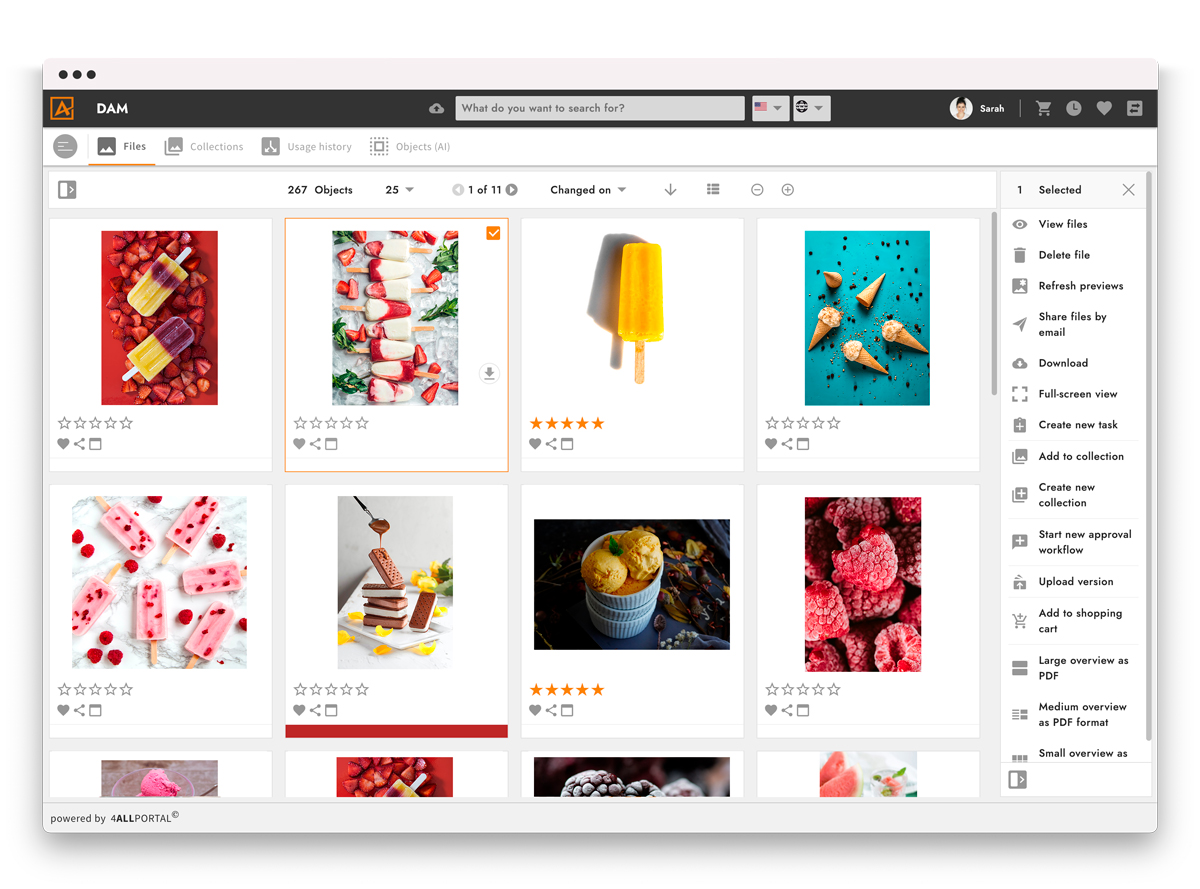
4ALLPORTAL offre due prodotti principali: il software per la gestione delle informazioni sui prodotti (PIM) e il software per la gestione delle risorse digitali (DAM) per le aziende che desiderano una soluzione personalizzabile e scalabile, in grado di facilitare i flussi di lavoro relativi alla gestione dei file e dei dati aziendali in modo efficiente e automatizzato.
Grazie alla natura modulare del software, ogni istanza può essere scalata individualmente per soddisfare le crescenti esigenze o la crescita dell’azienda. Il software offre un modello di licenza flessibile, che consente alle aziende di utilizzare il sistema DAM aziendale in base al numero di utenti oppure di essere completamente indipendenti dagli utenti. Il data center è situato in modo sicuro in Germania e viene controllato dall’Agenzia di Ispezione Tecnica per garantire che i server rispettino tutti i requisiti legali e gli standard normativi, compreso lo standard ISO per la sicurezza delle informazioni e dell’ambiente IT per il backup dei dati.
Il software di gestione delle risorse digitali dispone inoltre di potenti funzioni di ricerca che aiutano gli utenti a trovare facilmente file e altre risorse digitali. Grazie ai tag, gli utenti possono facilmente memorizzare parole chiave e descrizioni significative per le singole risorse, che possono poi utilizzare per ricerche mirate. Oltre ai nomi dei file, gli utenti possono sfruttare criteri di ricerca avanzata come il tipo di file e lo stato di pubblicazione per individuare risorse specifiche.
Il prezzo del software DAM di 4ALLPORTAL è disponibile solo su richiesta.
Altri software aziendali per la gestione delle risorse digitali
Ecco alcune opzioni aggiuntive di software aziendale DAM che non sono entrate nel mio elenco, ma che vale comunque la pena esaminare:
- Filecamp
La migliore esperienza white label/personalizzazione del branding
- Frontify
Ideale per il lavoro collaborativo
- IntelligenceBank
I migliori modelli per le risorse di marketing
- Image Relay
Miglior DAM + gestione delle informazioni di prodotto (PIM)
- Adobe Experience Manager
Ideale per la gestione delle risorse su più canali
- Brightspot
Ideale per flussi di lavoro agili sui contenuti
- Wedia
Ideale per mantenere la conformità e i processi di approvazione
- Artwork Flow by Bizongo
Miglior DAM per marchi CPG enterprise
- Asset Bank
Ideale per aziende multi-brand
- DemoUp Cliplister
Ideale per la distribuzione dinamica delle risorse
- Orange Logic
Ideale con project management integrato
- hyperCMS DAM Server
Miglior DAM open source per aziende
- MediaBeacon
Migliore gestione della tassonomia
- Swivle DAM
Miglior DAM on-premise
- Brandfolder
Miglior DAM per usabilità ed adozione aziendale
- Papirfly
Ideale per la coerenza del brand su larga scala
- Connecter Suite
Ideale per grandi librerie visive


Puoi trovare qui le versioni non aziendali dei software per la gestione delle risorse digitali.
Come Valuto i Software di Gestione delle Risorse Digitali per le Aziende
Valuto le piattaforme DAM enterprise su due livelli: se soddisfano i requisiti fondamentali—come versioning, metadati e accesso basato sui ruoli—e cosa distingue ciascuna di esse per i team di progetto su larga scala.
Funzionalità Principali (Requisiti Minimi per Questa Lista)
Quando seleziono gli strumenti per la mia lista, valuto ognuno di essi su una scala da 0 (non offre la funzionalità) a 5 (eccelle in questo ambito) per ogni funzionalità principale elencata di seguito. Poi trasformo il punteggio totale dello strumento in percentuale. Ogni strumento deve raggiungere un punteggio totale minimo del 65% per essere considerato per l'inserimento.
- Archivio Centralizzato delle Risorse: Verifico se la piattaforma è in grado di gestire uno storage a livello aziendale su diversi tipi di file—come migliaia di PSD, video e PDF organizzati in un unico posto.
- Metadati e Tagging AI: Una ricerca efficace dipende dal tagging, quindi valuto la profondità delle opzioni di tassonomia personalizzata e se l’IA può etichettare automaticamente le risorse al momento del caricamento.
- Controllo delle Versioni e Flussi di Lavoro: Cerco una chiara cronologia delle versioni e flussi di approvazione configurabili, come l’instradamento di una risorsa di campagna attraverso revisione di design, legale e brand.
- Gestione Permessi e Diritti: Controlli di accesso granulari sono essenziali qui—soprattutto la possibilità di limitare l’uso delle risorse per ruolo, team o data di scadenza della licenza.
- Integrazioni con Strumenti di Progetto: Valuto le connessioni native con piattaforme come Workfront, Asana e Adobe Creative Cloud su cui i team di progetto fanno già affidamento ogni giorno.
- Portali Brandizzati & Distribuzione: I team hanno bisogno di condividere risorse approvate esternamente, quindi cerco portali personalizzati con accesso controllato per agenzie e partner.
Una volta che ho un elenco di strumenti che soddisfano questi criteri, considero ciò che distingue ciascuna piattaforma.
Fattori di Differenziazione (Cosa Distingue i Fornitori)
Ecco come confronto e distinguo i diversi fornitori:
Funzionalità Distintive
La ricerca alimentata dall’IA è un grande elemento di differenziazione—quando la tua libreria contiene centinaia di migliaia di risorse, le query in linguaggio naturale e il riconoscimento visivo fanno davvero risparmiare tempo ai team di progetto nella ricerca di ciò di cui hanno bisogno. Valuto anche l’automazione dei flussi di lavoro creativi, come i percorsi di approvazione automatizzati e l’assegnazione di compiti che collegano direttamente le revisioni delle risorse alle tempistiche del progetto. I dashboard analitici sull’utilizzo completano il quadro mostrando quali risorse vengono effettivamente scaricate e riutilizzate nelle campagne, aiutando i team a giustificare la spesa creativa.
Oltre le Funzionalità
Le certificazioni di sicurezza e conformità come SOC 2 Type II e ISO 27001 sono da verificare subito—soprattutto se la tua organizzazione opera in settori regolamentati. Valuto anche il supporto all’implementazione, poiché migrare una libreria di risorse legacy con anni di metadati su una nuova piattaforma è un lavoro importante. Anche la trasparenza dei modelli di prezzo conta; esamino come i fornitori strutturano i costi relativi a storage, utenti e banda per evitare sorprese man mano che il team cresce.
Come scegliere un software aziendale per la gestione delle risorse digitali
È facile perdersi in lunghi elenchi di funzionalità e strutture di prezzo complesse. Per aiutarti a rimanere concentrato mentre affronti il tuo specifico processo di selezione del software, ecco una lista di fattori da tenere presenti:
| Fattore | Cosa considerare |
| Scalabilità | Assicurati che il sistema possa gestire librerie di risorse in crescita, un numero maggiore di utenti e ulteriori casi d'uso senza rallentamenti o senza richiedere una revisione radicale. |
| Integrazioni | Cerca strumenti che si colleghino al tuo stack esistente, come piattaforme di gestione dei progetti, software creativi come Adobe e sistemi di archiviazione cloud. |
| Personalizzazione | Scegli una piattaforma che ti permetta di adattare i campi dei metadati, la struttura delle cartelle, i livelli di autorizzazione e i flussi di lavoro alle esigenze specifiche del tuo team. |
| Semplicità d'uso | Il tuo team non dovrebbe aver bisogno di una formazione solo per caricare o trovare un file. Cerca un software con un layout chiaro, una ricerca intuitiva e descrizioni comandi utili. |
| Budget | Considera non solo i costi mensili, ma anche i costi di configurazione, i limiti sul numero di utenti e gli eventuali componenti aggiuntivi. Assicurati di ottenere le funzionalità di cui hai bisogno a un prezzo adeguato. |
| Misure di sicurezza | Verifica la presenza di autorizzazioni granulari, registri di controllo, SSO e crittografia. Devi proteggere i file sensibili e limitare chi può vedere cosa. |
| Funzionalità di ricerca | Hai bisogno di una ricerca rapida e accurata, con filtri come tag, data di caricamento, tipo di file o utente. Un ulteriore vantaggio è dato dai software che includono l'assegnazione automatica dei tag tramite l'IA o la ricerca visiva. |
| Strumenti di collaborazione | Cerca funzionalità come link condivisibili, flussi di lavoro di approvazione, tracciamento delle versioni e commenti, così i team possono lavorare insieme senza dover passare da uno strumento all'altro. |
Tendenze nei software di gestione delle risorse digitali aziendali
Nella mia ricerca ho raccolto innumerevoli aggiornamenti di prodotto, comunicati stampa e registri delle versioni di diversi fornitori di software aziendale per la gestione delle risorse digitali. Ecco alcune delle tendenze emergenti che sto tenendo sotto controllo:
- Metadati e tag generati dall'IA: un numero crescente di strumenti utilizza l'IA per assegnare automaticamente tag a immagini, video, animazioni e documenti, utilizzando parole chiave basate sul contenuto. Questo riduce l'inserimento manuale e facilita l'individuazione rapida delle risorse corrette. È particolarmente utile per i team che gestiscono grandi volumi di file creativi.
- Ricerca visiva: alcuni sistemi ora consentono agli utenti di effettuare ricerche caricando un'immagine di riferimento invece di digitare del testo. Questo è utile quando le parole chiave sono assenti o incoerenti e migliora l'individuazione di contenuti visivi simili.
- Gestione dei diritti integrata: le funzionalità di monitoraggio dei diritti stanno diventando sempre più comuni e aiutano i team a gestire direttamente nel sistema i termini di utilizzo, le date di scadenza e i limiti di distribuzione. Questo riduce il rischio di utilizzare contenuti scaduti o soggetti a restrizioni.
- Strumenti di confronto delle versioni: ora i team possono confrontare affiancate diverse versioni delle risorse, con indicatori visivi delle modifiche apportate. Questo favorisce cicli di revisione migliori ed evita la confusione causata dall'utilizzo di file obsoleti.
- Spazi di collaborazione integrati: commenti, annotazioni e monitoraggio delle attività vengono integrati nel visualizzatore delle risorse. In questo modo il lavoro di revisione e approvazione rimane in un unico luogo, invece di dipendere da strumenti di comunicazione esterni.
Cos'è il software di gestione delle risorse digitali per le aziende?
Il software aziendale per la gestione delle risorse digitali (DAM) è uno strumento utilizzato dalle organizzazioni per archiviare, organizzare, gestire e distribuire risorse digitali come immagini, video, documenti e altri file multimediali. Fornisce una piattaforma centralizzata per gestire grandi volumi di contenuti digitali, consentendo un facile accesso, la categorizzazione e il controllo di queste risorse.
Gli strumenti di gestione delle risorse digitali sono particolarmente utili per le grandi aziende con ampie librerie multimediali o per gli eventi in cui le risorse digitali vengono acquisite e gestite, aiutandole a gestire in modo efficiente le proprie risorse digitali, garantire la coerenza del marchio e migliorare la collaborazione tra i team.
Funzionalità del software aziendale per la gestione delle risorse digitali
Quando scegli un software aziendale per la gestione delle risorse digitali, presta attenzione alle seguenti funzionalità principali:
- Campi di metadati personalizzati: consentono di adattare le informazioni sulle risorse alle esigenze del team, semplificando la gestione e la ricerca dei file.
- Strumenti per l'organizzazione delle risorse: consentono di categorizzare e contrassegnare i file con metadati, facilitandone l'archiviazione, il filtraggio e il recupero.
- Funzionalità di ricerca avanzata: aiutano a trovare rapidamente le risorse utilizzando filtri come parole chiave, tipi di file, date di caricamento e attività degli utenti.
- Controlli delle autorizzazioni: consentono di controllare chi può visualizzare, modificare o scaricare determinate risorse, proteggendo i contenuti sensibili.
- Controllo delle versioni: conserva un registro delle modifiche alle risorse, consentendo di monitorare le modifiche, confrontare le versioni e ripristinare i file precedenti quando necessario.
- Gestione dei diritti digitali: monitora l'utilizzo delle licenze e le date di scadenza per impedire l'uso non autorizzato di immagini, video o altri contenuti multimediali.
- Strumenti di anteprima e riproduzione: consentono di visualizzare immagini, video e documenti direttamente sulla piattaforma senza scaricarli.
- Flussi di lavoro per le approvazioni: consentono di assegnare attività di revisione e raccogliere feedback all'interno del sistema per gestire le approvazioni finali delle risorse.
- Registri di audit: monitorano le azioni degli utenti e le modifiche al sistema per aiutare a controllare l'attività e favorire la conformità.
- Archiviazione e backup nel cloud: garantiscono che le risorse digitali siano archiviate in modo sicuro con backup regolari in caso di perdita dei dati.
Vantaggi del software aziendale per la gestione delle risorse digitali
L'implementazione di un software aziendale per la gestione delle risorse digitali offre diversi vantaggi al team e all'azienda. Eccone alcuni:
- Fa risparmiare tempo al team: l'automazione e l'organizzazione riducono le attività ripetitive come l'aggiunta di tag, l'archiviazione e la ricerca dei file.
- Recupero più rapido dei file: la ricerca avanzata e i tag facilitano l'individuazione della risorsa corretta senza dover cercare tra le cartelle. Questo è particolarmente utile per i team che lavorano in compartimenti isolati, come quelli che utilizzano software DAM per le università.
- Meno confusioni tra le versioni: il controllo delle versioni aiuta il team a lavorare con il file corretto ed evitare contenuti obsoleti.
- Maggiore coerenza del marchio: l'accesso organizzato e i flussi di lavoro per le approvazioni aiutano i team a utilizzare ogni volta risorse coerenti con il marchio. Questo è particolarmente utile per i team che utilizzano software DAM per l'e-commerce e gestiscono centinaia di immagini del sito web con il marchio.
- Collaborazione migliorata: gli strumenti di feedback integrati e l'accesso condiviso consentono ai team di esaminare e approvare i file senza passare da uno strumento all'altro.
- Archiviazione più sicura: le impostazioni delle autorizzazioni e i registri di audit proteggono i contenuti sensibili e monitorano l'attività degli utenti.
- Monitoraggio delle licenze più semplice: le funzionalità di gestione dei diritti aiutano a evitare l'utilizzo di contenuti scaduti o soggetti a restrizioni.
Costi e prezzi del software aziendale per la gestione delle risorse digitali
La scelta di un software aziendale per la gestione delle risorse digitali richiede la comprensione dei diversi modelli e piani tariffari disponibili. I costi variano in base alle funzionalità, alle dimensioni del team, ai componenti aggiuntivi e ad altri fattori. La tabella seguente riassume i piani più comuni, i relativi prezzi medi e le funzionalità generalmente incluse nelle soluzioni software aziendali per la gestione delle risorse digitali:
Tabella di confronto dei piani per il software aziendale per la gestione delle risorse digitali
| Tipo di piano | Prezzo medio | Funzionalità comuni |
|---|---|---|
| Gratuito | $0 | Archiviazione di base delle risorse, account utente limitati, ricerca e filtraggio di base, assistenza della comunità |
| Base | $500 - $1,000/mese | Maggiore capacità di archiviazione, funzionalità di ricerca avanzata, autorizzazioni degli utenti, assistenza via e-mail |
| Professionale | $1,500 - $5,000/mese | Personalizzazione del marchio, accesso API, funzionalità di integrazione, assistenza professionale, analisi e reportistica |
| Aziendale | $7,000 - $25,000/mese | Archiviazione illimitata, responsabile account dedicato, garanzie SLA, sviluppo personalizzato, assistenza premium 24 ore su 24, 7 giorni su 7 |
Domande frequenti sul software DAM aziendale
Ecco alcune risposte alle domande comuni sulla gestione delle risorse digitali e sul software DAM.
Che cos'è il software per le risorse digitali?
Quali altri strumenti per la gestione dei progetti creativi posso utilizzare?
Cosa succede ora:
Se stai cercando un software aziendale per la gestione delle risorse digitali, contatta gratuitamente un consulente SoftwareSelect per ricevere consigli personalizzati.
Compili un modulo e fai una breve conversazione durante la quale verranno analizzate nel dettaglio le tue esigenze. In seguito riceverai una selezione ristretta di software da valutare. Ti supporteranno anche durante l'intero processo di acquisto, comprese le trattative sui prezzi.