

10 app gratuite per la produttività per il 2026

Elenco di app di produttività gratuite


Le app di produttività gratuite sono strumenti software che ti aiutano a organizzare le attività, gestire i progetti, ridurre la procrastinazione e aumentare la concentrazione, senza richiedere un pagamento anticipato. Se stai cercando le migliori app di produttività gratuite, probabilmente vuoi migliorare il modo in cui tu e il tuo team lavorate senza incidere sul budget, che tu sia un singolo utente o una piccola azienda. Molti strumenti moderni includono anche funzionalità di intelligenza artificiale, integrazioni con strumenti come ChatGPT e una versione gratuita che ti consente di testare le funzionalità principali prima di passare a un piano superiore. Con così tante opzioni che offrono piani o prove gratuite, è difficile sapere quali strumenti offrano davvero le funzionalità di cui hai bisogno. Questo elenco ti aiuterà a confrontare rapidamente le migliori app di produttività gratuite per il 2026, così potrai trovare quella più adatta al tuo flusso di lavoro e iniziare a lavorare in modo più efficiente già oggi.
Perché fidarsi dei nostri consigli sui software
Il nostro team testa e recensisce software dal 2012. In quanto project manager noi stessi, sappiamo quanto sia difficile — e importante — scegliere il software giusto.
Per questa guida, abbiamo valutato gli strumenti attraverso test pratici e ricerche indipendenti, assegnando un punteggio agli strumenti in base ai nostri criteri di selezione. Ci basiamo inoltre sulle competenze di leader di pensiero del settore e di professionisti attivi nella gestione dei progetti.
Le nostre recensioni riflettono il nostro giudizio editoriale umano, non un discorso di vendita.
Revisori esperti:
Tabella comparativa delle app di produttività gratuite
Questa tabella comparativa riassume i dettagli dei prezzi delle migliori app di produttività gratuite che ho selezionato:
| Tool | Best For | Trial Info | Price | ||
|---|---|---|---|---|---|
| 1 | Ideale per audio di sottofondo che migliorano la concentrazione | Prova gratuita disponibile | Da $14.99/mese | Website | |
| 2 | Ideale per gestire gerarchie di attività complesse | Piano gratuito disponibile | Da $5/utente/mese (fatturazione annuale) | Website | |
| 3 | Ideale per la personalizzazione visiva delle bacheche di progetto | Piano gratuito + demo gratuita disponibile | Da $3.99/postazione/mese (fatturazione annuale) | Website | |
| 4 | Ideale per combinare note e database | Piano gratuito + demo gratuita disponibile | Da $10/membro/mese (fatturazione annuale) | Website | |
| 5 | Ideale per gli utenti dell'ecosistema Microsoft 365 | Piano gratuito disponibile | Gratuito | Website | |
| 6 | Ideale per il monitoraggio integrato delle abitudini | Piano gratuito disponibile | Da $35.99/anno | Website | |
| 7 | Ideale per strumenti di gestione di rischi e problemi | Piano gratuito disponibile + prova gratuita di 7 giorni | Da $3/utente/mese (fatturato annualmente) | Website | |
| 8 | Ideale per l'automazione dei flussi di lavoro con integrazioni | Piano gratuito disponibile | Da $10.99/utente/mese (fatturato annualmente) | Website | |
| 9 | Ideale per la pianificazione giornaliera integrata con il calendario | Prova gratuita di 14 giorni disponibile | Da $20/mese (fatturazione annuale) | Website | |
| 10 | Ideale per gamificare il completamento delle attività quotidiane | Piano gratuito disponibile | Da $9/mese (+$3 per ogni membro aggiuntivo) | Website |
Recensioni delle app di produttività gratuite
Di seguito trovi le mie sintesi dettagliate delle app di produttività gratuite che sono entrate nel mio elenco ristretto. Le mie recensioni offrono una panoramica dettagliata delle funzionalità, dei casi d’uso migliori e delle integrazioni di ogni strumento, per aiutarti a trovare quello più adatto a te.

Brain.fm
Ideale per audio di sottofondo che migliorano la concentrazione
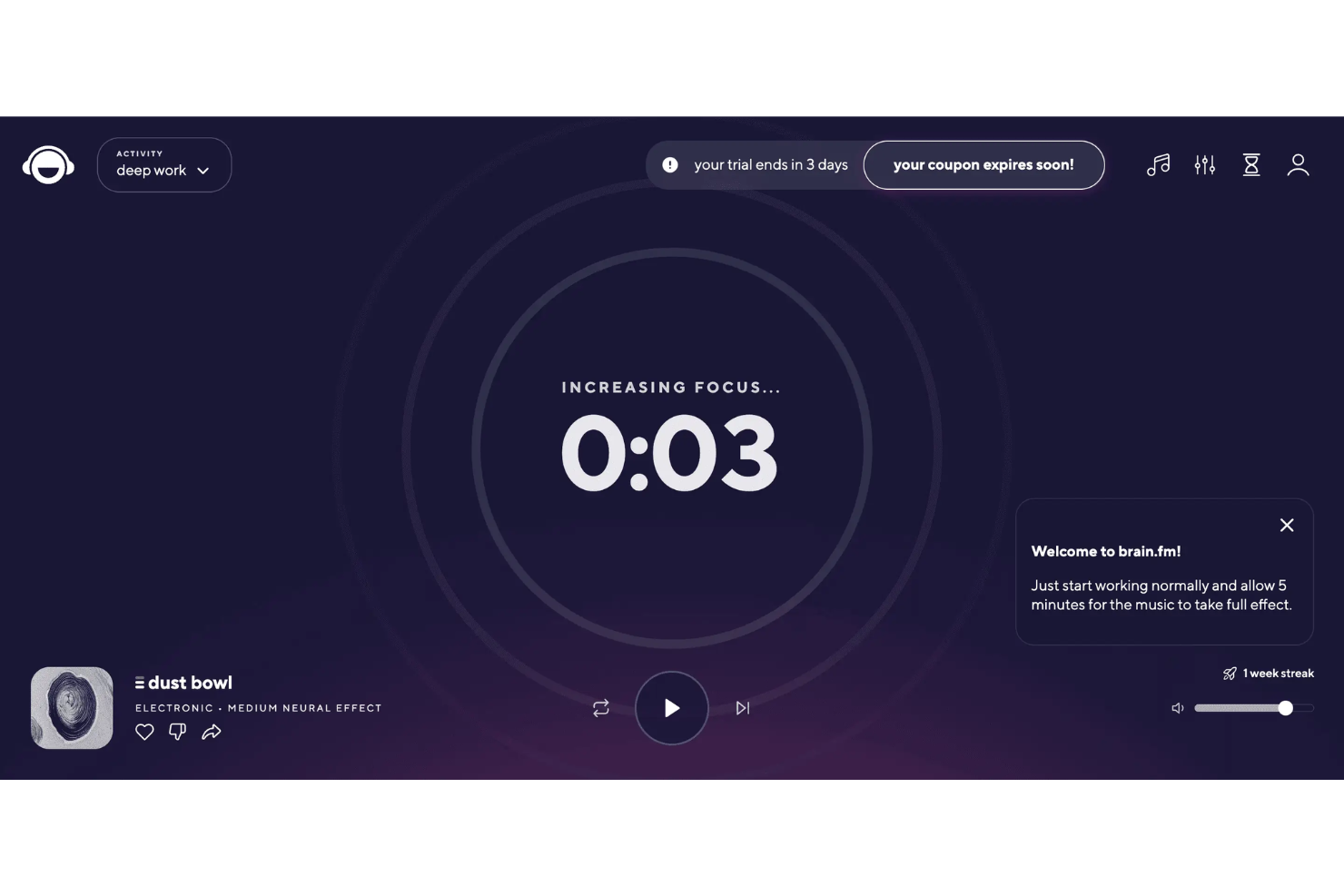
Se stai cercando un modo per aumentare la concentrazione durante il lavoro, Brain.fm offre audio di sottofondo supportato dalla scienza, progettato per aiutarti a restare focalizzato. Questo strumento è ideale per professionisti, studenti o chiunque abbia bisogno di ridurre al minimo le distrazioni e rimanere concentrato sui propri compiti. Brain.fm si distingue utilizzando musica appositamente ingegnerizzata che mira a supportare la produttività, il rilassamento o il sonno, a seconda delle tue necessità.
Perché ho scelto Brain.fm
Ciò che rende Brain.fm una scelta valida tra le app di produttività gratuite è il suo approccio unico all'audio di sottofondo che migliora la concentrazione. La piattaforma utilizza musica generata dall’IA progettata specificamente per supportare il lavoro profondo, caratteristica che non ho riscontrato nella maggior parte degli altri strumenti di produttività. Puoi scegliere tra diverse modalità di concentrazione, come 'Deep Work' o 'Light Work', per adattare l’intensità al tuo compito. Per chi ha difficoltà a evitare le distrazioni o ha bisogno di aiuto a mantenere la concentrazione, le funzionalità audio supportate dalla scienza di Brain.fm offrono un modo pratico per creare un ambiente di lavoro più produttivo.
Caratteristiche principali di Brain.fm
Altre funzionalità di Brain.fm che aiutano gli utenti a ottenere di più dalla loro giornata lavorativa includono:
- Ascolto offline: Scarica le sessioni per utilizzare l’audio di Brain.fm anche senza connessione a Internet.
- Personalizzazione della durata delle sessioni: Imposta la durata della tua sessione audio per adattarla al periodo di lavoro programmato.
- App per dispositivi mobili e desktop: Accedi a Brain.fm sia da dispositivi mobili che da computer desktop per maggiore flessibilità.
- Timer e modalità Pomodoro: Usa i timer integrati e le impostazioni Pomodoro per strutturare le tue sessioni di concentrazione.
Integrazioni di Brain.fm
Le integrazioni native non sono attualmente elencate.
Cosa è gratuito?
Brain.fm offre una prova gratuita limitata che ti dà accesso all’intero set di funzionalità per un breve periodo. Dopo la fine della prova, l’utilizzo continuo richiede un abbonamento a pagamento e non è previsto un piano gratuito per sempre.
Pros and Cons
Pros:
- Sessioni audio progettate per la concentrazione
- Timer Pomodoro per strutturare le sessioni di lavoro
- Musica supportata dalla scienza per la produttività
Cons:
- Nessuna integrazione con strumenti di produttività
- Non è possibile caricare audio personalizzati
Todoist
Ideale per gestire gerarchie di attività complesse

Se hai bisogno di un modo per organizzare progetti complessi con molte parti in movimento, vale la pena dare un'occhiata a Todoist. Questo strumento è pensato per chi gestisce liste di attività articolate, dai project manager ai liberi professionisti che seguono più clienti. Il suo sistema gerarchico flessibile ti aiuta a suddividere grandi obiettivi in passi concreti e tenere tutto visibile in un unico posto.
Perché ho scelto Todoist
Todoist si distingue per la sua capacità di gestire gerarchie di attività complesse, cosa che molti strumenti di produttività gratuiti faticano a fare. L'ho scelto perché consente di annidare attività all'interno dei progetti, creare più sotto-attività e utilizzare etichette per organizzare il lavoro su più livelli. La struttura a sezioni e sotto-sezioni permette di suddividere anche i progetti più complicati in parti gestibili. Questo rende Todoist una scelta solida se hai bisogno di tenere traccia delle dipendenze o vuoi una panoramica chiara di flussi di lavoro a più fasi.
Funzionalità principali di Todoist
Altre funzionalità di Todoist utili per la produttività e l'organizzazione includono:
- Scadenze ricorrenti: imposta le attività perché si ripetano con una pianificazione personalizzata, così non dimentichi mai gli impegni regolari.
- Livelli di priorità: assegna priorità alle attività per concentrarti ogni giorno su ciò che conta di più.
- Visualizzazioni della produttività: visualizza l'andamento dei progressi e le attività completate tramite grafici integrati e registri attività.
- Strumenti di collaborazione: condividi progetti, assegna compiti e commenta con i membri del team direttamente nell'app.
Integrazioni di Todoist
Le integrazioni includono Google Calendar, Slack, Gmail, Outlook, Zapier, Dropbox, Google Drive, Trello e altro ancora.
Cosa è gratuito?
Todoist offre un piano gratuito per sempre. Gli utenti della versione gratuita possono creare fino a cinque progetti attivi, collaborare con un massimo di cinque persone per progetto e accedere alle funzioni base di gestione delle attività, ma le funzionalità avanzate come promemoria, etichette e filtri sono riservate ai piani a pagamento.
Pros and Cons
Pros:
- Le sotto-attività annidate organizzano i progetti
- Scadenze ricorrenti anche con il piano gratuito
- I registri attività tracciano la produttività
Cons:
- I promemoria richiedono l'aggiornamento a pagamento
- Caricamento file limitato nel piano gratuito

Plaky
Ideale per la personalizzazione visiva delle bacheche di progetto

Se cerchi un'app di produttività gratuita che ti permetta di personalizzare visivamente le bacheche di progetto, Plaky è una soluzione da prendere in considerazione. Questo strumento è pensato per i team che necessitano di layout delle bacheche flessibili e di una personalizzazione dettagliata dei campi per adattarsi ai loro flussi di lavoro. Plaky aiuta i project manager e i responsabili di team a organizzare, monitorare e adattare i progetti con un approccio visivo facilmente personalizzabile per diversi settori.
Perché ho scelto Plaky
Ciò che distingue Plaky secondo me tra le app di produttività gratuite è il livello di controllo che offre nella personalizzazione delle bacheche. Puoi creare bacheche con campi unici, etichette colorate e viste personalizzate che riflettono il flusso di lavoro del tuo team, particolarmente utile se gestisci progetti che non si adattano a un modello standard. Mi piace anche poter modificare il layout delle bacheche e aggiungere tutte le colonne o tipi di dati di cui hai bisogno, così non sei vincolato da strutture rigide. Per i project manager che desiderano un modo visivo e flessibile per organizzare e monitorare il lavoro, le funzionalità di personalizzazione delle bacheche di Plaky rappresentano una scelta solida.
Funzionalità principali di Plaky
Altre funzionalità di Plaky che aiutano i team a gestire la produttività includono:
- Assegnazione delle attività: Assegna compiti ai membri specifici del team e imposta le scadenze per ciascun elemento.
- Commenti e menzioni: Aggiungi commenti e tagga i colleghi direttamente sulle attività per mantenere organizzata la comunicazione.
- Allegati ai file: Carica e allega file alle attività così tutti i documenti correlati restano in un unico posto.
- Registro attività: Monitora tutte le modifiche e gli aggiornamenti sulle bacheche con uno storico dettagliato delle attività.
Integrazioni di Plaky
Le integrazioni includono Clockify, Pumble e altro.
Cosa è gratuito?
Plaky offre un piano gratuito per sempre con utenti, bacheche e attività illimitati. Il piano gratuito non include integrazioni native né funzionalità di reportistica avanzata.
Pros and Cons
Pros:
- I campi personalizzati adattano i flussi di lavoro della bacheca
- L’assegnazione dei compiti gestisce la responsabilità del team
- I registri delle attività tengono traccia delle modifiche ai progetti
Cons:
- Nessun tracciamento del tempo o strumenti di gestione del carico di lavoro
- Solo visualizzazione a bacheca Kanban

Notion
Ideale per combinare note e database
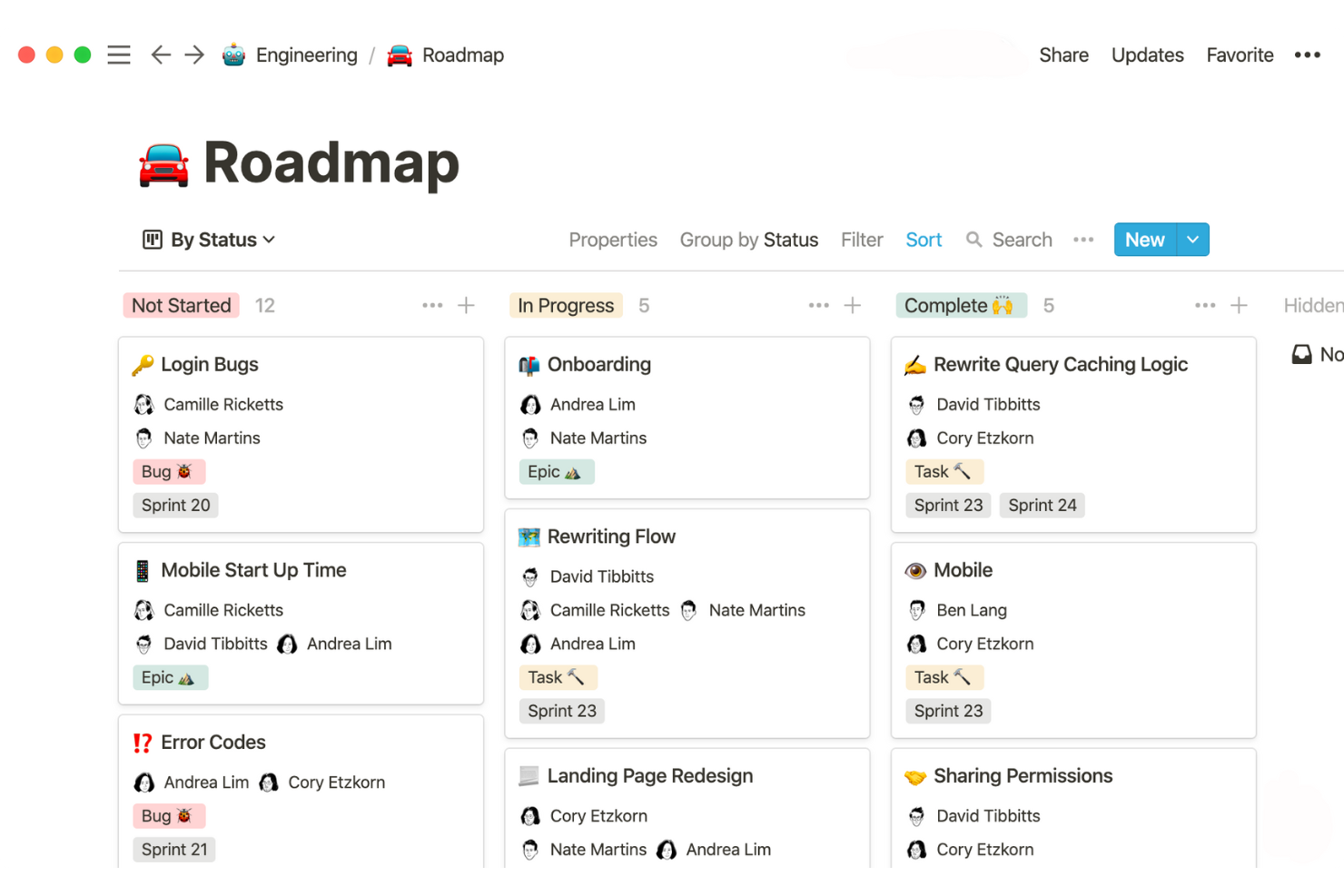
Se hai bisogno di uno spazio di lavoro che unisca la presa di appunti con dati strutturati, Notion merita considerazione. Questo strumento è apprezzato da project manager, team di prodotto e da chiunque desideri collegare note riunioni, attività e database in un unico posto. Notion ti aiuta a organizzare informazioni disperse e a costruire flussi di lavoro personalizzati che vanno oltre semplici elenchi o documenti.
Perché ho scelto Notion
Notion si distingue perché consente di combinare note libere con database strutturati in un unico workspace. L'ho inserito in questa lista perché puoi creare tabelle collegate, board kanban e wiki accanto alle note delle riunioni o alla documentazione di progetto. Questa flessibilità ti permette di costruire dashboard personalizzate o monitorare le consegne di progetto senza dover passare tra strumenti separati. Se cerchi un'app di produttività gratuita che si adatti sia al brainstorming non strutturato che alla gestione organizzata dei dati, Notion è un'ottima scelta.
Funzionalità principali di Notion
Altre funzionalità di Notion che aiutano i team a restare organizzati e produttivi includono:
- Galleria di template: Accedi a una libreria di template predefiniti per la gestione progetti, note riunioni e produttività personale.
- Condivisione pagine e permessi: Controlla chi può visualizzare, commentare o modificare ogni pagina o database all'interno dello spazio di lavoro.
- Cronologia versioni: Rivedi e ripristina versioni precedenti di qualsiasi pagina per tenere traccia delle modifiche o recuperare contenuti persi.
- Web Clipper: Salva articoli, pagine web e ricerche direttamente in Notion dal tuo browser.
Integrazioni di Notion
Tra le integrazioni trovi Slack, Google Drive, GitHub, Figma, Jira, Asana, Zoom, Typeform, Miro e un'API per integrazioni personalizzate.
Cosa è gratuito?
Notion offre un piano gratuito per sempre per utenti singoli con pagine illimitate, blocchi e fino a 10 ospiti. Il piano gratuito limita i caricamenti di file a 5MB per file e restringe alcune funzionalità avanzate come la cronologia delle versioni e i controlli amministratore.
Pros and Cons
Pros:
- Il piano gratuito consente pagine illimitate
- Collaborazione in tempo reale con più utenti
- Ampia scelta di template per i flussi di lavoro
Cons:
- Nessuna sincronizzazione calendario nativa
- Nessun sistema integrato di monitoraggio tempo o promemoria

Ideale per gli utenti dell'ecosistema Microsoft 365

Se il tuo team utilizza già Microsoft 365, Microsoft To Do si integra perfettamente nel tuo flusso di lavoro. Questa applicazione per la gestione delle attività è pensata per chi desidera organizzare attività personali e professionali all'interno dell'ecosistema Microsoft. Ti aiuta a tenere traccia delle priorità quotidiane, condividere elenchi e sincronizzare le attività tra Outlook e altre app Microsoft.
Perché ho scelto Microsoft To Do
Ciò che rende Microsoft To Do una scelta solida tra le app di produttività gratuite è la sua perfetta integrazione con l'ecosistema Microsoft 365. Se il tuo team utilizza già Outlook, Teams o altri strumenti Microsoft, puoi sincronizzare attività ed elenchi direttamente su queste piattaforme senza configurazioni aggiuntive. Mi piace il fatto che sia possibile contrassegnare le email in Outlook e vederle apparire come attività eseguibili in To Do, mantenendo tutto collegato. Per chi vuole gestire le attività in un ambiente Microsoft familiare, questa integrazione è un chiaro vantaggio.
Funzionalità principali di Microsoft To Do
Altre funzionalità di Microsoft To Do che aiutano i team a gestire la produttività includono:
- Strumento di pianificazione My Day: Inizia ogni giorno con una lista pulita e aggiungi le attività su cui vuoi concentrarti.
- Promemoria per le attività: Imposta promemoria singoli o ricorrenti per rispettare le scadenze.
- Sottoattività e note: Suddividi attività più grandi in passaggi più piccoli e aggiungi note per un contesto aggiuntivo.
- Condivisione degli elenchi: Condividi elenchi di attività con colleghi o familiari per una pianificazione collaborativa.
Integrazioni di Microsoft To Do
Le integrazioni native non sono attualmente elencate.
Cosa è gratuito?
Microsoft To Do offre un piano gratuito per sempre con attività, elenchi e utenti illimitati. Tutte le funzionalità principali sono disponibili gratuitamente, ma le integrazioni avanzate sono limitate all'ecosistema Microsoft 365.
Pros and Cons
Pros:
- Promemoria e attività ricorrenti inclusi
- La condivisione degli elenchi facilita la collaborazione
- App per dispositivi mobili, web e desktop
Cons:
- Nessun diagramma di Gantt o progetti avanzati
- Sottoattività limitate a semplici liste di controllo

TickTick
Ideale per il monitoraggio integrato delle abitudini

Se cerchi un'app di produttività gratuita che vada oltre le semplici liste di cose da fare, TickTick integra il monitoraggio delle abitudini direttamente nel tuo flusso di lavoro quotidiano. Questo strumento è adatto sia a singoli che a team che vogliono gestire i task e allo stesso tempo costruire routine positive. Grazie al suo focus sia sulla produttività sia sullo sviluppo personale, TickTick ti permette di avere progetti e abitudini in un unico posto.
Perché ho scelto TickTick
Ciò che distingue TickTick nel panorama delle app gratuite di produttività è il suo sistema integrato di monitoraggio delle abitudini, raramente presente insieme alle classiche funzionalità di gestione dei task. Ho scelto TickTick perché ti permette di creare abitudini ricorrenti accanto alle tue attività, così puoi tenere traccia di routine quotidiane e delle attività di progetto in un solo posto. Il tracker delle abitudini include indicatori visuali e grafici di progresso che rendono semplice vedere la tua costanza nel tempo. Per chiunque voglia costruire abitudini migliori e rimanere organizzato nel lavoro, TickTick offre tutto in un'unica app unificata.
Caratteristiche principali di TickTick
Altre funzionalità di TickTick che aiutano team e singoli a gestire la produttività includono:
- Vista calendario: Visualizza tutte le tue attività e scadenze in un layout calendario.
- Livelli di priorità: Assegna livelli di priorità ai task per organizzare meglio il carico di lavoro.
- Timer Pomodoro: Utilizza un timer integrato per suddividere il lavoro in intervalli focalizzati.
- Supporto allegati: Aggiungi file e immagini direttamente ai task per un contesto aggiuntivo.
Integrazioni di TickTick
Le integrazioni includono Amazon Alexa, Slack, Outlook, Gmail, Zapier e altri.
Cosa è gratuito?
TickTick offre un piano gratuito per sempre che include gestione base dei task, monitoraggio delle abitudini e funzionalità di calendario. Il piano gratuito è limitato a 9 liste, 99 attività per lista e 19 sotto-attività per attività; alcune funzionalità avanzate richiedono l'upgrade a pagamento.
Pros and Cons
Pros:
- Il tracker delle abitudini monitora routine e attività
- La vista calendario mostra le scadenze in arrivo
- Gli allegati alle attività permettono di aggiungere file e immagini
Cons:
- Le sotto-attività richiedono un upgrade a pagamento
- Nessuna chat o collaborazione di team
nTask
Ideale per strumenti di gestione di rischi e problemi

Se hai bisogno di un'app di produttività gratuita con gestione integrata di rischi e problemi, nTask merita sicuramente attenzione. Questo strumento è pensato per project manager e team che desiderano monitorare rischi, problemi e attività in un unico spazio di lavoro. nTask ti aiuta a identificare, documentare e monitorare i rischi di progetto insieme al lavoro quotidiano, rendendo più semplice mantenere i progetti in carreggiata.
Perché ho scelto nTask
Ciò che distingue nTask tra le app di produttività gratuite è la presenza di strumenti dedicati per la gestione di rischi e problemi, una caratteristica rara in questa categoria. Ho scelto nTask perché consente di registrare, classificare e tracciare rischi e problemi di progetto direttamente nello spazio di lavoro, senza bisogno di uno strumento separato per questa parte fondamentale della consegna dei progetti. Il registro dei rischi e il log dei problemi aiutano a documentare i dettagli, assegnare responsabili e monitorare i cambiamenti di stato man mano che il progetto avanza. Per i project manager che necessitano di qualcosa in più rispetto alle semplici liste di attività, nTask integra la gestione di rischi e problemi nel flusso di lavoro quotidiano.
Funzionalità principali di nTask
Altre funzionalità di nTask che aiutano i team a gestire la produttività includono:
- Dipendenze tra attività: Imposta relazioni tra le attività per controllare ordine e tempistica del flusso di lavoro.
- Monitoraggio del tempo: Tieni traccia del tempo impiegato nelle attività con timer integrati e inserimento manuale.
- Gestione delle riunioni: Pianifica, organizza e documenta le riunioni direttamente all'interno della piattaforma.
- Diagrammi di Gantt: Visualizza le tempistiche dei progetti e l'avanzamento delle attività con diagrammi di Gantt interattivi.
Integrazioni nTask
Le integrazioni includono Google Calendar, Google Meet, Outlook, Microsoft Teams e altro.
Cosa è gratuito?
nTask offre un piano gratuito per sempre fino a 5 utenti con funzionalità di base per la gestione delle attività, il monitoraggio dei problemi e la gestione delle riunioni. Il piano gratuito limita gli allegati a 100MB per spazio di lavoro e non include funzionalità avanzate come diagrammi di Gantt, bacheche Kanban o integrazioni native.
Pros and Cons
Pros:
- I diagrammi di Gantt visualizzano le tempistiche
- Gli strumenti per le riunioni gestiscono le agende e i follow-up
- Il monitoraggio del tempo tiene traccia delle ore di progetto
Cons:
- Le bacheche Kanban richiedono il piano a pagamento
- Le attività ricorrenti richiedono l'upgrade a pagamento
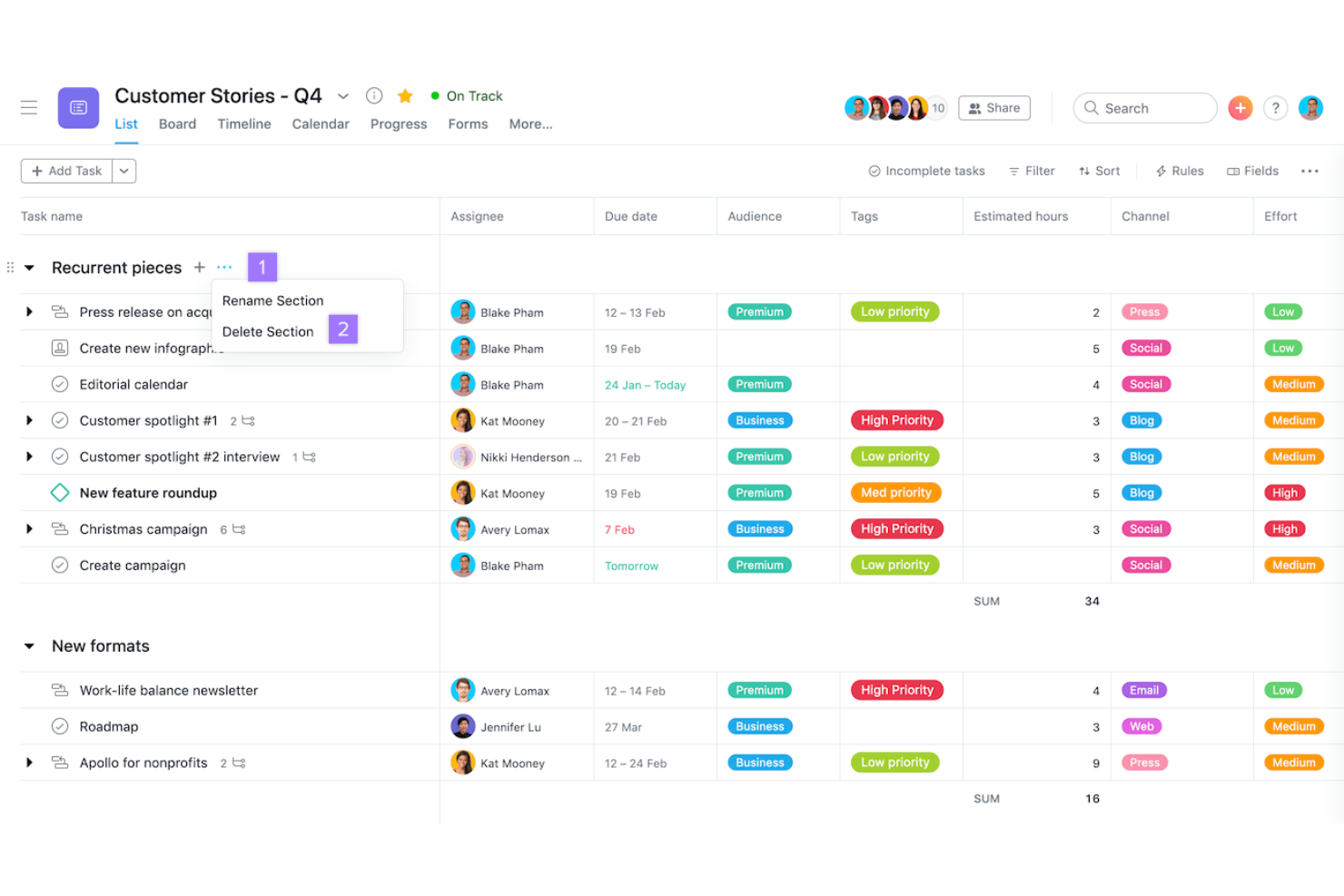
Se cerchi un'app di produttività gratuita che eccelle nell'automatizzare i flussi di lavoro, Asana merita sicuramente attenzione. Questo strumento è particolarmente utile per i team che necessitano di collegare attività tra più applicazioni e automatizzare i passaggi ripetitivi dei progetti. Asana aiuta project manager e team trasversali a coordinare il lavoro, ridurre gli aggiornamenti manuali e mantenere i progetti in movimento grazie alle funzionalità di automazione integrate.
Perché ho scelto Asana
Quello che rende Asana una scelta vincente tra le app di produttività gratuite è il modo in cui consente di automatizzare i flussi di lavoro di routine e collegare le bacheche di progetto con altri strumenti che già utilizzi. Ho scelto Asana perché il suo generatore di automazioni permette di impostare regole personalizzate che attivano azioni—come spostare attività, assegnare lavori o inviare notifiche—senza intervento manuale. Apprezzo anche la possibilità di integrare Asana con una vasta gamma di applicazioni, così che aggiornamenti e informazioni fluiscano automaticamente tra le piattaforme. Per i project manager che vogliono ridurre il lavoro ripetitivo e mantenere i progetti sincronizzati tra più strumenti, le funzionalità di automazione e integrazione di Asana sono particolarmente preziose.
Funzionalità Chiave di Asana
Altre funzionalità di Asana che aiutano i team a gestire la produttività includono:
- Vista Cronologia: Visualizza le pianificazioni e le dipendenze dei progetti con un diagramma di Gantt drag-and-drop.
- Dipendenze delle Attività: Segna le attività come dipendenti da altre per chiarire la sequenza ed evitare blocchi.
- Campi Personalizzati: Aggiungi campi dati personalizzati alle attività per tracciare informazioni specifiche del progetto.
- Modelli di Progetto: Usa modelli preimpostati per avviare rapidamente nuovi progetti con flussi di lavoro ottimizzati.
Integrazioni di Asana
Le integrazioni includono Slack, Google Drive, Microsoft Teams, Zoom, Dropbox, Salesforce, Jira Cloud, Adobe Creative Cloud, Gmail e Outlook.
Cosa è gratis?
Asana offre un piano gratuito per sempre fino a 15 utenti. Il piano gratuito include attività, progetti e messaggi illimitati, ma limita l'accesso a funzionalità avanzate come la vista cronologia, la creazione di report e alcune integrazioni.
Pros and Cons
Pros:
- Le regole di automazione supportano i flussi di lavoro di base
- Più viste disponibili, incluse lista e calendario
- L'assegnazione delle attività facilita la responsabilizzazione
Cons:
- La vista cronologia non è inclusa nel piano gratuito
- Accesso per ospiti limitato


Se desideri un planner giornaliero che unisca le tue attività con il calendario, Sunsama merita attenzione. Questo strumento è apprezzato dai professionisti che hanno bisogno di organizzare la propria giornata, importando attività da varie fonti e allineandole con il proprio programma. Sunsama ti aiuta a pianificare carichi di lavoro realistici e a mantenere la concentrazione integrando direttamente i tuoi impegni con il calendario.
Perché ho scelto Sunsama
Ciò che mi ha colpito di Sunsama è come collega la pianificazione giornaliera direttamente con il calendario, semplificando la visualizzazione di compiti e riunioni in un'unica schermata. Puoi trascinare e rilasciare le attività nell'agenda, il che aiuta a pianificare la giornata in modo realistico ed evitare di sovraccaricarti. Inoltre, Sunsama importa attività da altri strumenti, così puoi organizzare tutto, dai follow-up alle email al lavoro sui progetti, accanto agli eventi in calendario. Per chi desidera uno strumento di pianificazione giornaliera che si sincronizzi realmente con il proprio metodo di lavoro, l'integrazione del calendario di Sunsama è un punto di forza.
Funzionalità principali di Sunsama
Altre funzionalità offerte da Sunsama che aiutano team e singoli a gestire efficacemente la giornata includono:
- Modalità Focus: Questa funzione ti consente di affrontare le attività quotidiane una alla volta, riducendo al minimo le distrazioni.
- Organizzazione per canali: Puoi raggruppare i compiti per canale o categoria, mantenendo organizzati i vari flussi di lavoro.
- Revisione e promemoria giornalieri: Sunsama ti accompagna in un processo quotidiano di revisione e pianificazione per aiutarti a riflettere e dare priorità.
- Importazione attività via email: Puoi trasformare direttamente le email da Gmail o Outlook in attività da inserire nel piano giornaliero.
Integrazioni Sunsama
Le integrazioni includono Asana, ClickUp, GitHub, Notion, Google Calendar, Jira, Google Tasks, monday.com, Slack, Microsoft Teams e altro ancora.
Cosa è gratuito?
Sunsama offre una prova gratuita di 14 giorni con accesso completo a tutte le funzionalità. Al termine, per continuare a utilizzare il servizio è richiesto un abbonamento a pagamento e non è disponibile un piano gratuito permanente.
Pros and Cons
Pros:
- Importa attività dai principali strumenti
- Promemoria guidati per la pianificazione giornaliera
- Converte le email in attività
Cons:
- Le analisi delle attività richiedono il piano a pagamento
- Nessuna collaborazione in team durante la prova


Se vuoi trasformare la gestione delle attività quotidiane in un gioco, Habitica offre un approccio unico. Questa app è pensata per singoli e team che trovano motivazione in premi, sfide e avanzamento di livello. Habitica ti aiuta a costruire abitudini migliori e a restare produttivo rendendo il completamento delle attività simile a un gioco di ruolo.
Perché ho scelto Habitica
Ciò che distingue Habitica dalle altre app di produttività gratuite è il modo in cui trasforma il completamento delle attività quotidiane in un'esperienza ludica. Ho scelto Habitica perché utilizza funzionalità come avatar, punti esperienza e ricompense in-app per motivare gli utenti a completare le attività e instaurare abitudini positive. L'app ti permette anche di unirti a gruppi e partecipare a sfide di gruppo, aggiungendo un elemento sociale e collaborativo al mantenimento della produttività. Per chi vuole rendere il monitoraggio delle abitudini e la gestione delle attività più coinvolgenti, l'approccio gamificato di Habitica è davvero adatto.
Funzionalità principali di Habitica
Altre funzionalità di Habitica che aiutano gli utenti a gestire la produttività includono:
- Elenco Giornalieri, Abitudini e Da Fare: Organizza le attività in categorie separate per abitudini ricorrenti, routine quotidiane e compiti una tantum.
- Difficoltà personalizzabile delle attività: Imposta il livello di difficoltà per ogni attività per regolare la sfida e le ricompense.
- Accesso da mobile e web: Usa Habitica sia su dispositivi mobili che su browser web per una gestione flessibile delle attività.
- Plugin open source della community: Estendi le funzionalità con plugin e componenti aggiuntivi creati dalla community.
Integrazioni di Habitica
Le integrazioni native attualmente non sono elencate.
Cosa è gratuito?
Habitica offre un piano gratuito per sempre con accesso illimitato a attività, abitudini e da fare. Alcune funzionalità avanzate, oggetti cosmetici e opzioni di gestione di gruppo richiedono un abbonamento a pagamento, ma non ci sono restrizioni per utenti o per durata sulla versione gratuita.
Pros and Cons
Pros:
- Il sistema gamificato motiva nelle attività quotidiane
- Le sfide della community favoriscono la responsabilità
- Avatar personalizzabili e ricompense personalizzano la produttività
Cons:
- L'organizzazione delle attività è limitata rispetto alle app dedicate
- Il monitoraggio dei progressi si concentra sulla gamification
Altre app di produttività gratuite
Ecco alcune ulteriori opzioni di app di produttività gratuite che non sono entrate nel mio elenco ristretto, ma che vale comunque la pena prendere in considerazione:


Come Valuto le App di Produttività Gratuite
Suddivido la mia valutazione in due livelli: i requisiti fondamentali, come un piano multiutente realmente gratuito, e i fattori di differenziazione che separano gli strumenti che vale la pena usare da quelli che si rivelano subito limitanti.
Funzionalità di Base (Presupposti per Questa Lista)
Quando seleziono gli strumenti per la mia lista, valuto ciascuno su una scala da 0 (non offre la funzionalità) a 5 (eccelle in questo ambito) per ognuna delle funzionalità di base elencate di seguito. Poi, calcolo il punteggio totale dello strumento convertendolo in percentuale. Ogni strumento deve ottenere un punteggio minimo complessivo del 65% per essere preso in considerazione.
- Disponibilità di un Piano Gratuito: Controllo che lo strumento offra davvero un livello gratuito con accesso continuativo, non solo una prova di 14 giorni che blocca l’utilizzo a metà progetto.
- Gestione di Attività e Progetti: Assegnare attività con scadenze e stati è il requisito minimo, ma cerco anche sotto-attività e dipendenze per la gestione di flussi di lavoro reali.
- Monitoraggio del Tempo: Valuto le capacità di monitoraggio del tempo, inclusi timer, per garantire che i team possano registrare il lavoro, monitorare la produttività e seguire l’avanzamento dei progetti in un unico spazio centralizzato.
- Viste Multiple per Progetto: Flussi di lavoro diversi richiedono prospettive diverse. Cerco almeno due visualizzazioni come bacheche Kanban, calendari o linee temporali per supportare stili di pianificazione differenti.
- Notifiche e Promemoria: Le scadenze mancate spesso derivano da notifiche scarse. Verifico la presenza di notifiche in-app e via email affinché i responsabili restino informati sulle scadenze imminenti.
- Integrazioni di Terze Parti: La maggior parte dei PM lavora su più strumenti, perciò valuto le integrazioni native con piattaforme come Google Workspace, Slack e gli strumenti comuni per sviluppatori.
Dopo aver ottenuto una lista di strumenti che soddisfano questi criteri, considero cosa distingue ogni piattaforma.
Fattori Differenzianti (Cosa Distingue i Fornitori)
Ecco come confronto e metto a fuoco i diversi fornitori:
Funzionalità Distintive
Un’automazione integrata è un fattore di forte differenziazione. Cerco strumenti che permettano di impostare regole come l’assegnazione automatica delle attività al cambiamento di stato o promemoria automatici prima della scadenza degli sprint. Anche il monitoraggio del tempo è importante, specialmente per i PM freelance che devono poter registrare le ore dei singoli progetti senza ricorrere a un’app separata. Valuto inoltre le librerie di modelli: una raccolta ricca di template preimpostati per sprint, lanci o onboarding semplifica davvero l’avvio di nuovi progetti ogni settimana.
Oltre le Funzionalità
La generosità del piano gratuito varia molto. Valuto quanti utenti, progetti e spazio di archiviazione consenta ogni strumento prima che le funzionalità vengano limitate da un paywall—perché un limite di tre utenti può frenare subito un team in crescita. Anche la possibilità di upgrade conta molto. Controllo se passare da un piano gratuito a uno a pagamento sia fluido o imponga una migrazione dei dati complessa. La rapidità di onboarding è un altro fattore che considero. Gli strumenti con tutorial integrati e template di partenza rendono produttivi i nuovi membri in poche ore, non giorni.
Come scegliere le app di produttività gratuite
È facile perdersi in lunghi elenchi di funzionalità e strutture tariffarie complesse. Per aiutarti a rimanere concentrato mentre affronti il tuo specifico processo di selezione del software, ecco un elenco di fattori da tenere presenti:
| Fattore | Cosa considerare |
|---|---|
| Scalabilità | L'app supporterà il tuo team man mano che cresce o esistono limiti al numero di utenti o attività che potrebbero ostacolare l'espansione futura? |
| Integrazioni | L'app si collega nativamente agli strumenti che già utilizzi, come Slack, Google Calendar o Trello, oppure dovrai ricorrere a soluzioni alternative? |
| Personalizzazione | Puoi adattare categorie delle attività, flussi di lavoro e notifiche ai processi del tuo team oppure sei vincolato a modelli rigidi? |
| Facilità d'uso | Quanto velocemente possono iniziare a utilizzare l'app i nuovi utenti e l'interfaccia riduce gli ostacoli nella gestione quotidiana delle attività? Se possibile, esegui una prova con un piccolo gruppo. |
| Implementazione e inserimento | Quali risorse sono disponibili per aiutare il tuo team a diventare operativo, come tutorial, modelli o assistenza in tempo reale? Considera il tempo e l'impegno necessari per l'adozione. |
| Costo | Esistono costi nascosti, richieste di passaggio a un piano superiore o limiti di utilizzo che potrebbero costringerti a pagare prima del previsto? Esamina attentamente le clausole del piano gratuito. |
| Misure di sicurezza | L'app offre protezioni di base come la crittografia dei dati, le autorizzazioni degli utenti e aggiornamenti regolari? Verifica la conformità agli standard di sicurezza della tua organizzazione. |
| Disponibilità dell'assistenza | Se riscontri problemi, puoi ricevere aiuto tempestivo tramite chat, e-mail o forum oppure dovrai aspettare a lungo per ricevere una risposta? Controlla gli orari dell'assistenza e i tempi di risposta. |
Cosa sono le app di produttività gratuite?
Le app di produttività gratuite sono strumenti software che aiutano singoli utenti o team a organizzare le attività, gestire i progetti e monitorare i progressi senza richiedere alcun pagamento. Queste app offrono in genere funzionalità di base come elenchi di attività, promemoria e strumenti di collaborazione a costo zero. Sono progettate per favorire una migliore gestione del tempo, migliorare la visibilità del flusso di lavoro e consentire agli utenti di tenere sotto controllo le proprie responsabilità, rappresentando opzioni accessibili per chi dispone di budget limitati.
Funzionalità delle app di produttività gratuite
Vediamo le funzionalità comunemente presenti nelle app di produttività e quali sono generalmente incluse nei piani gratuiti rispetto a quelli a pagamento.
Funzionalità generalmente gratuite delle app di produttività
- Gestione delle attività: Creare, modificare e organizzare attività o cose da fare, aiutando gli utenti a tenere traccia di ciò che deve essere completato ogni giorno.
- Scadenze e promemoria: Impostare scadenze e ricevere notifiche per assicurarsi che le attività importanti vengano completate in tempo.
- Collaborazione di base: Condividere attività o elenchi con altre persone, consentendo un semplice lavoro di squadra e una responsabilità condivisa.
- Elenchi di controllo: Suddividere le attività più complesse in passaggi più piccoli e concreti, che possono essere spuntati una volta completati.
- Organizzazione di base dei progetti: Raggruppare le attività per progetto, categoria o etichetta per mantenere il lavoro organizzato e facile da trovare.
- Accesso da dispositivi mobili e web: Utilizzare l’app su diversi dispositivi, così che le attività e gli aggiornamenti siano sempre disponibili, sia alla scrivania sia in mobilità.
- Monitoraggio semplice dei progressi: Visualizzare le attività completate e quelle ancora da svolgere per monitorare la produttività giornaliera o settimanale.
- Allegati di file limitati: Aggiungere documenti o immagini alle attività, generalmente con restrizioni sulle dimensioni dei file o sullo spazio di archiviazione.
Funzionalità generalmente a pagamento delle app di produttività
- Integrazioni avanzate: Collegarsi ad altri software, come calendari, strumenti di comunicazione o servizi di archiviazione cloud, per un flusso di lavoro più integrato.
- Automazione personalizzata: Configurare regole o attivatori che automatizzano le azioni ripetitive, come spostare le attività o inviare promemoria.
- Monitoraggio del tempo: Monitorare quanto tempo viene dedicato alle attività o ai progetti, favorendo una migliore pianificazione e rendicontazione.
- Report e analisi avanzati: Accedere a informazioni dettagliate sulle tendenze della produttività, sulle prestazioni del team e sull’avanzamento dei progetti.
- Autorizzazioni basate sui ruoli: Controllare chi può visualizzare, modificare o gestire specifiche attività e progetti per una maggiore sicurezza e supervisione.
- Assistenza prioritaria: Ricevere tempi di risposta più rapidi e assistenza dedicata dai team del supporto clienti.
- Spazio di archiviazione ampliato: Caricare file più grandi o archiviare più documenti nell’app, supportando progetti più complessi.
- Marchio personalizzato: Aggiungere il logo e i colori della propria organizzazione all’interfaccia dell’app per un aspetto più professionale.
- Modelli di flusso di lavoro: Accedere a modelli riutilizzabili o crearne di nuovi per i processi comuni, risparmiando tempo nella configurazione dei progetti ricorrenti.
- Strumenti di collaborazione avanzati: Utilizzare funzionalità come chat in tempo reale, commenti o videochiamate direttamente nell’app per migliorare il lavoro di squadra.
Vantaggi delle app di produttività gratuite
L’implementazione di app di produttività gratuite offre diversi vantaggi al team e all’azienda. Eccone alcuni di cui potrete beneficiare:
- Risparmio sui costi: Accedere alle funzionalità essenziali di gestione delle attività e collaborazione senza aumentare il budget destinato al software.
- Organizzazione migliorata: Utilizzare elenchi di attività, promemoria e raggruppamenti dei progetti per mantenere il lavoro strutturato e facile da gestire.
- Maggiore responsabilità: Assegnare attività e condividere i progressi con i membri del team, rendendo più semplice monitorare le responsabilità.
- Inserimento più rapido: Iniziare rapidamente grazie a interfacce intuitive, modelli e strumenti di collaborazione di base che richiedono poca formazione.
- Flessibilità e accessibilità: Gestire le attività da qualsiasi luogo grazie all’accesso da dispositivi mobili e web, supportando team distribuiti o da remoto.
- Sperimentazione a basso rischio: Provare diversi flussi di lavoro e funzionalità senza impegno finanziario, contribuendo a trovare la soluzione più adatta prima di passare a un piano superiore.
- Maggiore coinvolgimento del team: Utilizzare elementi di ludicizzazione o funzionalità sociali per motivare la partecipazione e mantenere lo slancio nelle attività quotidiane.
Costi & prezzi delle app di produttività
Mi rendo conto che sei arrivato a questo articolo cercando le migliori opzioni di app per la produttività disponibili gratuitamente. Tuttavia, poiché i piani gratuiti offrono solo funzionalità limitate, è molto probabile che in futuro dovrai passare a un piano superiore.
La tabella seguente riassume i piani più comuni, i relativi prezzi medi e le funzionalità generalmente incluse nelle app per la produttività:
Tabella comparativa dei piani per le app di produttività
| Tipo di piano | Prezzo medio | Funzionalità comuni |
|---|---|---|
| Piano gratuito | $0 | Gestione di base delle attività, collaborazione semplice, allegati di file limitati, accesso da dispositivi mobili e web e promemoria di base. |
| Piano personale | $5–$10/utente/mese | Tutte le funzionalità gratuite, integrazioni con il calendario, attività ricorrenti, maggiore spazio di archiviazione e opzioni di personalizzazione di base. |
| Piano aziendale | $10–$25/utente/mese | Tutte le funzionalità del piano personale, integrazioni avanzate, automazione dei flussi di lavoro, strumenti di gestione del team e funzionalità di reporting. |
| Piano per grandi aziende | $25–$40/utente/mese | Tutte le funzionalità del piano aziendale, sicurezza avanzata, ruoli e autorizzazioni personalizzati, supporto prioritario e opzioni per la conformità. |
Domande frequenti sulle app gratuite per la produttività
Ecco alcune risposte alle domande comuni sulle app gratuite per la produttività:
Le app gratuite per la produttività sono abbastanza sicure per l'uso aziendale?
Sì, la maggior parte delle app gratuite per la produttività offre funzionalità di sicurezza di base, come la crittografia dei dati e l’autenticazione degli utenti. Tuttavia, i controlli di sicurezza avanzati e le opzioni per la conformità sono generalmente riservati ai piani a pagamento; per questo, esamina l’informativa sulla privacy e la documentazione sulla sicurezza di ogni app prima di utilizzarla per dati aziendali sensibili.
Posso passare da un piano gratuito a uno a pagamento in un secondo momento?
Sì, quasi tutte le app per la produttività consentono di iniziare con un piano gratuito e passare a un piano a pagamento con l’aumentare delle proprie esigenze. Il passaggio a un piano superiore sblocca in genere funzionalità più avanzate, limiti di archiviazione maggiori e opzioni di supporto potenziate, senza richiedere la migrazione dei dati.
Quali sono i principali limiti delle app gratuite per la produttività?
Le app gratuite per la produttività spesso limitano il numero di utenti, progetti o lo spazio di archiviazione che è possibile utilizzare. Potresti inoltre trovare restrizioni relative alle integrazioni, all’automazione e ai report avanzati. Queste limitazioni possono influire sui team più numerosi o sui flussi di lavoro più complessi, quindi valuta le tue esigenze prima di scegliere un’app.
Le app gratuite per la produttività funzionano sia su computer desktop sia su dispositivi mobili?
Sì, la maggior parte delle app gratuite per la produttività offre sia versioni web sia versioni mobili, consentendo di gestire le attività e collaborare ovunque. Tuttavia, alcune funzionalità o integrazioni potrebbero essere limitate sui dispositivi mobili; consulta quindi la documentazione dell’app per maggiori dettagli.
Come scelgo l'app gratuita per la produttività più adatta al mio team?
Inizia individuando le esigenze principali del tuo team, come la gestione delle attività, la collaborazione o l’integrazione con altri strumenti. Confronta facilità d’uso, scalabilità e opzioni di supporto, quindi prova alcune app con il tuo team per capire quale si adatta meglio al tuo flusso di lavoro.