

10 migliori strumenti alternativi a GanttPRO per la pianificazione nel 2026

10 Le migliori alternative a GanttPRO


GanttPRO è uno strumento di gestione dei progetti che offre diagrammi di Gantt interattivi per facilitare la pianificazione dei progetti, la collaborazione del team e il monitoraggio dei progressi. Sebbene GanttPRO possa essere utile per molti utenti, alcuni potrebbero cercare alternative a causa dei costi, delle preferenze relative alle funzionalità o della necessità di un'esperienza utente diversa. Ecco i miei suggerimenti per le migliori alternative a GanttPRO.
Che cos'è GanttPRO?
GanttPRO è uno strumento di gestione dei progetti che utilizza i diagrammi di Gantt per pianificare e monitorare le tempistiche dei progetti. È progettato per responsabili di progetto, responsabili di team e collaboratori individuali che devono mantenere una visione chiara delle tempistiche dei progetti e dell'allocazione delle risorse. Il software consente di stabilire le scadenze, assegnare attività ai membri del team e monitorare i progressi dei progetti, assicurandosi che vengano completati nei tempi previsti e rispettando l'ambito stabilito.
Perché fidarsi dei nostri consigli sui software
Il nostro team testa e recensisce software dal 2012. In quanto project manager noi stessi, sappiamo quanto sia difficile — e importante — scegliere il software giusto.
Per questa guida, abbiamo valutato gli strumenti attraverso test pratici e ricerche indipendenti, assegnando un punteggio agli strumenti in base ai nostri criteri di selezione. Ci basiamo inoltre sulle competenze di leader di pensiero del settore e di professionisti attivi nella gestione dei progetti.
Le nostre recensioni riflettono il nostro giudizio editoriale umano, non un discorso di vendita.
Revisori esperti:
Tabella di confronto delle alternative a GanttPRO
Questa tabella di confronto riassume i dettagli sui prezzi delle mie migliori alternative a GanttPRO:
| Tool | Best For | Trial Info | Price | ||
|---|---|---|---|---|---|
| 1 | Ideale per suddividere progetti complessi | Prova gratuita di 30 giorni + piano gratuito disponibile | Da $7.65/membro/mese (fatturazione annuale) | Website | |
| 2 | Ideale per la gestione di progetti aziendali di livello enterprise | Prova gratuita di 30 giorni | Da $10/utente/mese (fatturazione annuale) | Website | |
| 3 | Ideale per la collaborazione visiva su progetti | Piano gratuito disponibile | Da $5/utente/mese (fatturazione annuale) | Website | |
| 4 | Le soluzioni più economiche per piccoli team | Prova gratuita di 14 giorni + demo gratuita disponibile | Da $45/mese (fatturato annualmente) | Website | |
| 5 | Ideale per visualizzazioni flessibili dei progetti | Prova gratuita di 14 giorni | Da $9/utente/mese (fatturato annualmente) | Website | |
| 6 | Ideale per la gestione strategica del marketing | Demo gratuita disponibile | Prezzo su richiesta | Website | |
| 7 | Ideale per la pianificazione e l'esecuzione dettagliata | Prova gratuita di 30 giorni + demo gratuita disponibile | A partire da $15/utente/mese (fatturazione annuale) | Website | |
| 8 | Ideale per visualizzare le tempistiche di progetto | Piano gratuito disponibile + prova gratuita di 7 giorni | A partire da $3/utente/mese (fatturazione annuale) | Website | |
| 9 | Ideale per la programmazione predittiva dei progetti | Prova gratuita disponibile | Prezzo su richiesta | Website | |
| 10 | Ideale per la gestione del lavoro a livello aziendale | Not available | Da $45/utente/mese | Website |
Panoramiche delle migliori alternative a GanttPRO
Ecco le mie opinioni dettagliate su ogni software presente in questo elenco, comprese le funzionalità che svolgono meglio e i casi d’uso più adatti per ciascuno.

Quire
Ideale per suddividere progetti complessi

Quire è uno strumento di gestione dei progetti che permette al tuo team di suddividere grandi idee in attività gestibili tramite viste di pianificazione interattive. Combina strumenti visivi come una timeline e una bacheca Kanban con elenchi di attività strutturate per aiutare i team a organizzare e pianificare il lavoro.
Perché è una buona alternativa a Ganttpro: Ho scelto Quire perché offre una vista della timeline che consente di programmare visivamente le attività e di gestire le dipendenze. Puoi vedere come le attività si sovrappongono, spostare le pianificazioni trascinando gli elementi e regolare automaticamente le timeline correlate quando avvengono cambiamenti. Questa configurazione è utile se devi gestire scadenze e carichi di risorse e vuoi la chiarezza che offrono i grafici in stile Gantt.
Funzionalità e integrazioni distintive:
Altre funzionalità di Quire includono cartelle intelligenti che permettono di visualizzare le attività di più progetti insieme, il che è utile quando serve una timeline generale per diversi team. La vista calendario offre inoltre un altro modo per visualizzare il lavoro basato sul tempo per la pianificazione quotidiana.
Le integrazioni includono Google Calendar, Gmail, Slack, Outlook, Zoho Flow, GitHub, Apple Calendar Sync, Box, Dropbox, Google Drive e Microsoft Teams.
Pros and Cons
Pros:
- Facile collaborazione con i membri del team
- Più viste dei progetti, inclusi elenchi, bacheche e timeline
- Possibilità di creare attività e sottoattività nidificate, consentendo una scomposizione dettagliata del progetto
Cons:
- La versione mobile manca di alcune funzionalità presenti su desktop
- Possibile sovraccarico di notifiche, soprattutto lavorando con team numerosi
New Product Updates from Quire

Quire Adds Task and Standalone Reminders
Quire adds task reminders and standalone reminders with shared notifications, recurring schedules, and automatic date tracking. These updates help teams stay ahead of deadlines and manage reminders that do not need a task. For more information, visit Quire’s official site.
 .
.
Ideale per la gestione di progetti aziendali di livello enterprise

Microsoft Project è una soluzione robusta per la gestione dei progetti. È ideale per la pianificazione e l'esecuzione di progetti su larga scala, offrendo strumenti completi per le aziende.
Perché è una buona alternativa a Ganttpro: Ho scelto Microsoft Project per questa lista perché offre un elevato livello di controllo e personalizzazione ai project manager nelle grandi organizzazioni. Le sue capacità a livello aziendale lo rendono una valida alternativa a Ganttpro, specialmente per gli utenti che necessitano di funzionalità avanzate di project management.
Funzionalità e integrazioni principali:
Le funzionalità di Microsoft Project includono Microsoft Teams, che migliora la collaborazione e la comunicazione all'interno dei team. La piattaforma supporta la programmazione dinamica e offre potenti strumenti di business intelligence per migliorare la visibilità sui progetti e agevolare il processo decisionale.
Microsoft Project si integra con Microsoft Teams, Power BI, Azure, Microsoft 365, SharePoint, OneDrive, Outlook, Windows, Dynamics 365 e Microsoft Power Platform
Pros and Cons
Pros:
- Funzionalità complete per la gestione dei progetti
- Solida integrazione con l'ecosistema Microsoft
- Capacità avanzate di reportistica e business intelligence
Cons:
- Può risultare complesso per progetti o team di piccole dimensioni
- Curva di apprendimento elevata a causa delle numerose funzionalità
- Il prezzo può essere proibitivo per le piccole imprese

Trello
Ideale per la collaborazione visiva su progetti
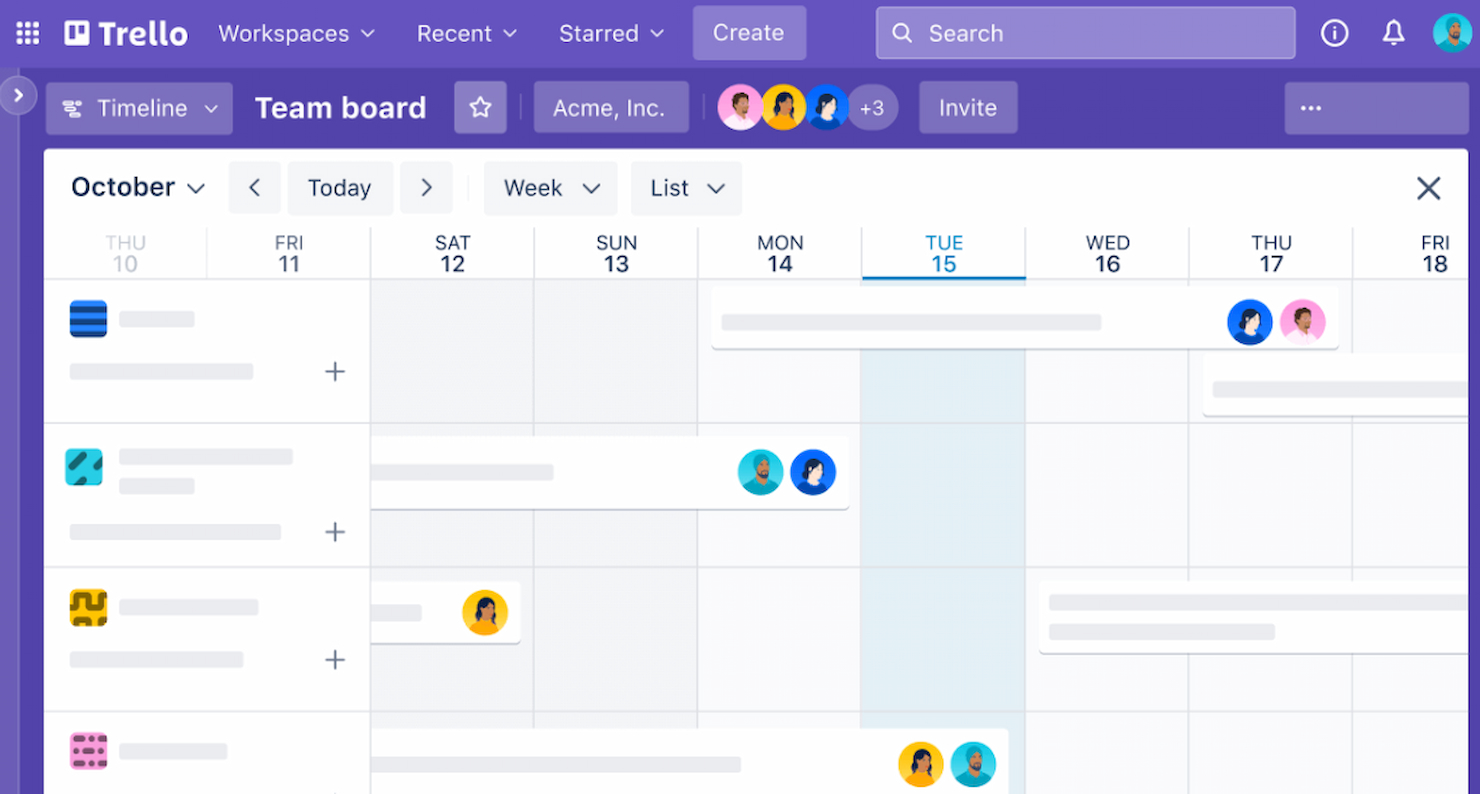
Trello semplifica l'organizzazione delle attività e la collaborazione tra team. È ideale per la collaborazione visiva su progetti grazie al suo sistema intuitivo di bacheche e schede, che consente ai team di visualizzare facilmente il proprio flusso di lavoro e l'avanzamento.
Perché è una valida alternativa a Ganttpro: Ho scelto Trello per questa lista perché offre un sistema visivo unico per monitorare l'avanzamento dei progetti, diverso dall'approccio a diagramma di Gantt di GanttPro. La sua semplicità e facilità d'uso lo rendono un'alternativa eccellente per chi preferisce uno strumento di gestione progetti più visivo e meno complesso.
Caratteristiche e integrazioni distintive:
Le funzionalità di Trello includono il sistema di bacheche e schede, che offre una rappresentazione visiva chiara dei compiti e del loro stato. La piattaforma mette inoltre a disposizione Butler, uno strumento di automazione che consente di automatizzare attività e flussi di lavoro, aumentando l'efficienza.
Trello si integra con Slack, Google Drive, Salesforce, Dropbox, Box, Evernote, GitHub, Mailchimp e altri ancora.
Pros and Cons
Pros:
- Interfaccia visiva intuitiva
- Flussi di lavoro flessibili e personalizzabili
- Ampia gamma di integrazioni con altri strumenti
Cons:
- Funzionalità limitate per la gestione di progetti complessi
- Potrebbe richiedere Power-Up aggiuntivi per funzionalità avanzate
- Il piano gratuito ha limitazioni su numero di bacheche e spazio di archiviazione

ProofHub
Le soluzioni più economiche per piccoli team
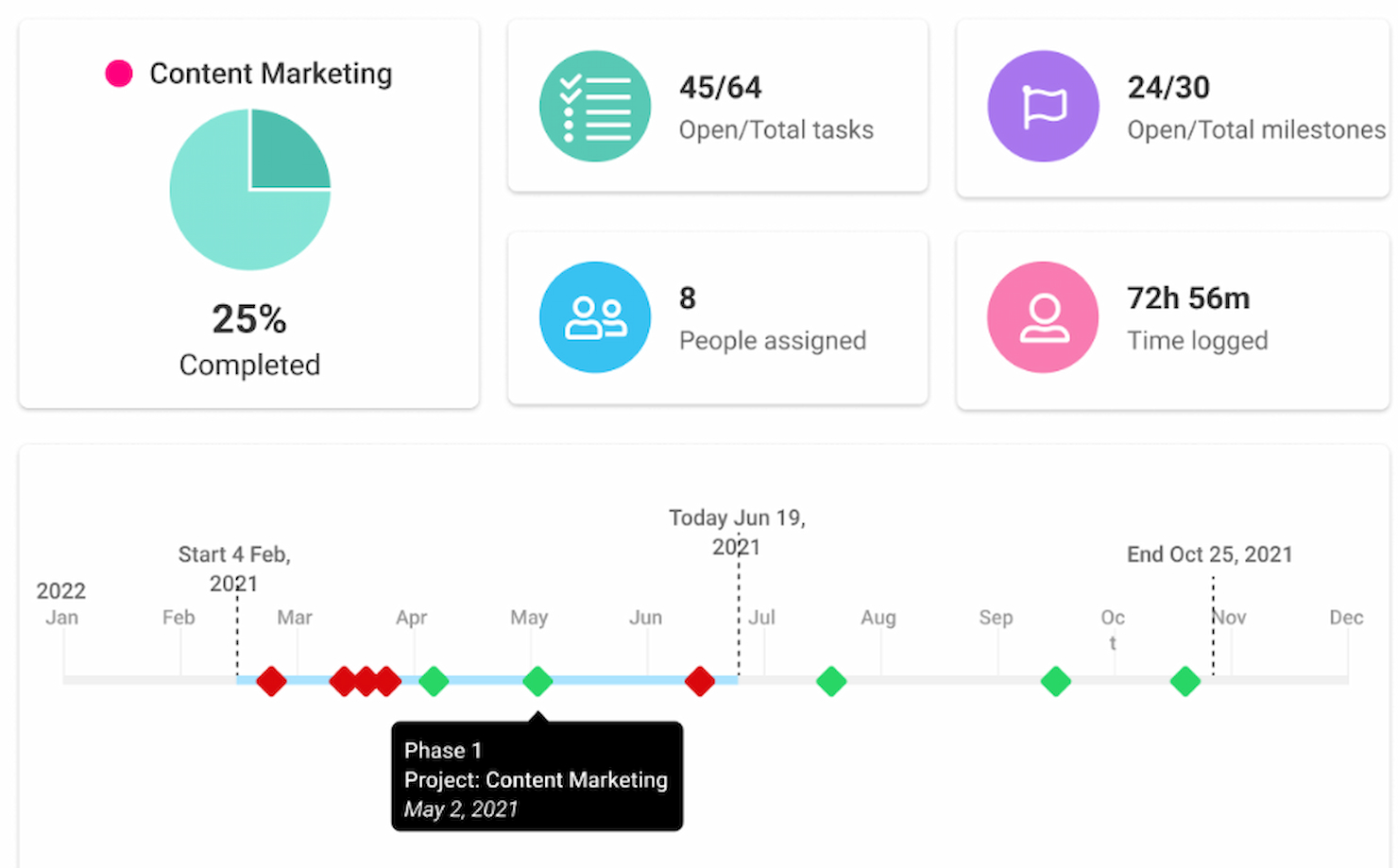
ProofHub offre una gamma di funzionalità che coprono vari aspetti della gestione dei progetti, inclusi gestione delle attività, collaborazione e reportistica, senza la necessità di software aggiuntivo.
Perché è una buona alternativa a Ganttpro: Ho scelto ProofHub per questa lista perché fornisce una soluzione completa per la gestione dei progetti con un modello tariffario fisso che include utenti illimitati. Questo lo rende un'alternativa economica a GanttPro, soprattutto per i piccoli team alla ricerca di una piattaforma tutto-in-uno in grado di gestire molteplici aspetti della gestione dei progetti senza costi per utente.
Funzionalità e integrazioni principali:
Le funzionalità di ProofHub includono gestione delle attività con visualizzazioni a bacheca e tabella, diagrammi di Gantt per pianificare e visualizzare le tempistiche dei progetti, e monitoraggio del tempo per seguire la produttività del team. Lo strumento facilita inoltre la collaborazione con funzionalità come discussioni, chat, revisione, e condivisione dei file.
ProofHub si integra con Slack, Box, Dropbox, Google Calendar e iCal, Google Drive, One Drive, Freshbooks/Freshbooks Classic e Quickbooks.
Pros and Cons
Pros:
- Modello tariffario fisso senza costi per utente
- Utenti e progetti illimitati nel piano Ultimate Control
- Suite completa di funzionalità per la gestione dei progetti
Cons:
- Numero limitato di progetti nel piano Essential (40 progetti)
- Lo spazio di archiviazione è limitato a 100 GB nel piano Ultimate Control
Redbooth
Ideale per visualizzazioni flessibili dei progetti
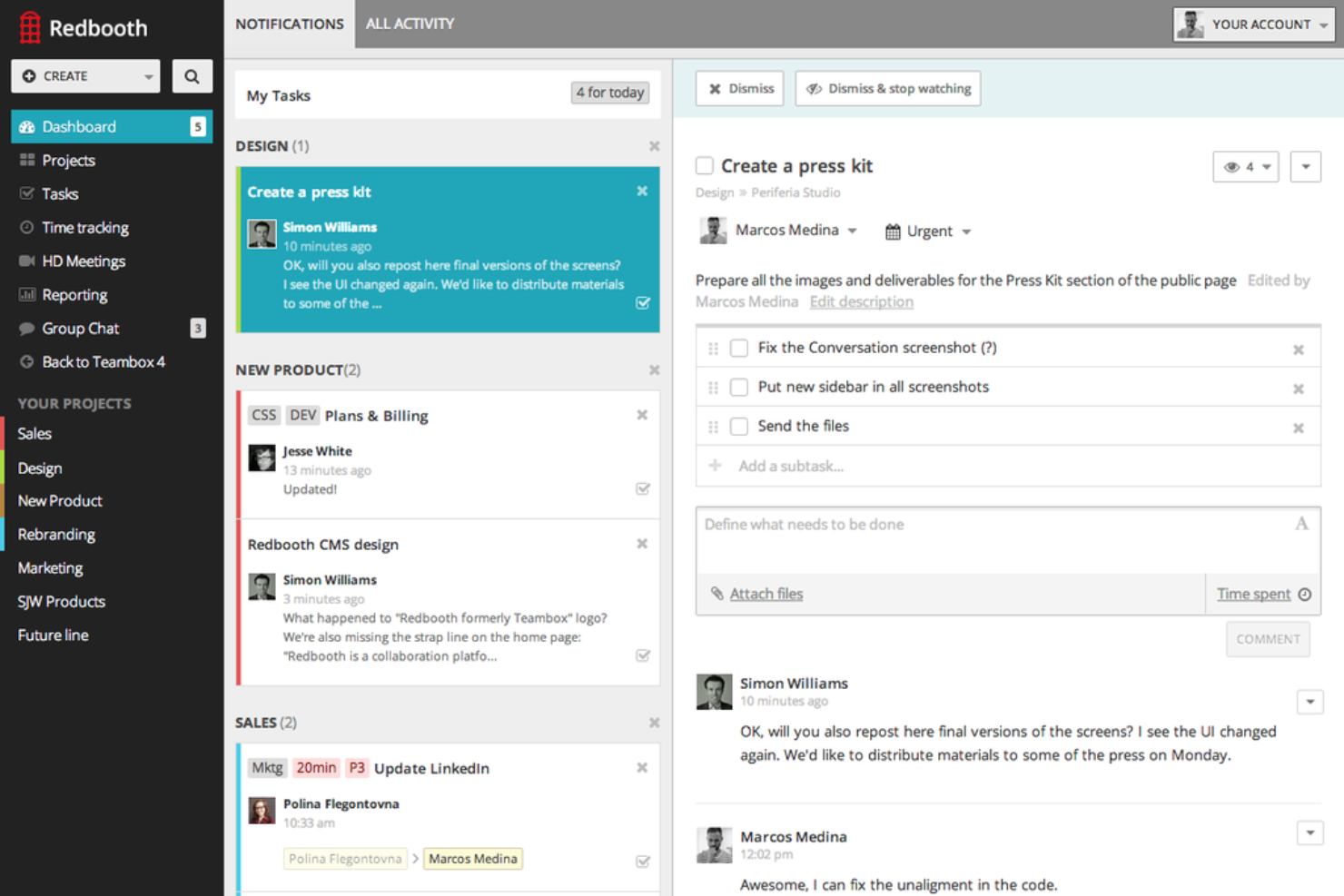
Redbooth è uno strumento di gestione progetti che aiuta il tuo team a organizzare le attività e comunicare in modo efficace per completare i progetti più rapidamente ed efficientemente. Offre funzionalità come assegnazione delle attività, monitoraggio delle scadenze e strumenti di collaborazione per mantenere tutti allineati.
Perché è una buona alternativa a Ganttpro: Ho scelto Redbooth perché offre strumenti di pianificazione progetti flessibili che si adattano a vari stili di gestione. Puoi visualizzare i tuoi progetti in formato bacheca, elenco e cronologia, permettendoti di scegliere il layout che meglio si adatta al flusso di lavoro del team. Apprezzo anche le sue funzionalità di collaborazione. Puoi creare spazi di lavoro per diversi progetti, dove i membri del team possono discutere le attività, condividere file e fornire aggiornamenti. Offre anche meeting video integrati e conversazioni a thread.
Funzionalità distintive & integrazioni:
Le funzionalità includono la priorità delle attività, che aiuta a concentrarsi prima su quelle più importanti, e la possibilità di assegnare i compiti ai singoli membri del team, assicurando una responsabilità chiara. Redbooth offre anche report di produttività che forniscono informazioni sulle performance del team.
Le integrazioni includono Box, Google Drive, Dropbox, Okta, Zapier, Redbooth per Gmail, Outlook, Chrome, Slack, WebEx Teams, TestLodge e HubStaff.
Pros and Cons
Pros:
- Strumenti di comunicazione integrati
- Spazi di lavoro personalizzabili
- Molteplici opzioni di visualizzazione delle attività
Cons:
- Spazio di archiviazione limitato nei piani di livello base
- Potrebbe offrire analisi più avanzate

Ideale per la gestione strategica del marketing

Workfront è una piattaforma che supporta i processi di gestione del lavoro. Si distingue per la gestione strategica del marketing, offrendo strumenti specializzati per i team marketing.
Perché è una valida alternativa a Ganttpro: Ho scelto Workfront per questa lista perché si rivolge specificamente alle esigenze dei team marketing, fornendo un insieme di funzionalità mirate che la posizionano come una valida alternativa a GanttPro. Il suo allineamento con la gestione strategica del marketing e la capacità di integrarsi con i prodotti Adobe offrono un vantaggio distintivo nella gestione delle iniziative di marketing.
Funzionalità principali e integrazioni:
Le funzionalità chiave di Workfront includono solide capacità di gestione del lavoro, come gestione delle risorse, monitoraggio dei progetti e reportistica avanzata, aspetti essenziali per consentire ai team marketing di mantenere il controllo sui loro progetti.
Workfront si integra con Adobe Creative Cloud, Adobe Experience Manager, Adobe Experience Cloud, Jira, Salesforce, Slack, Microsoft Teams, Box, Google Drive e Microsoft Office 365.
Pros and Cons
Pros:
- Funzionalità specializzate per i team marketing
- Integrazione completa con i prodotti Adobe
- Enfasi sulla collaborazione e la condivisione dei documenti
Cons:
- Mancanza di informazioni trasparenti sui prezzi
- Potenziale complessità per i nuovi utenti
- Il focus sul marketing potrebbe non essere adatto ad altri tipi di progetti

Ideale per la pianificazione e l'esecuzione dettagliata

ProjectManager.com è uno strumento completo per la gestione dei progetti. È ideale per la pianificazione e l'esecuzione dettagliata grazie al suo ricco set di funzionalità progettato per una gestione rigorosa dei progetti.
Perché è una valida alternativa a Ganttpro: Ho scelto ProjectManager.com per questa lista perché offre una vasta gamma di funzionalità pensate per la pianificazione e l'esecuzione dettagliata dei progetti, rendendolo una forte alternativa a GanttPro. Le sue capacità nella gestione di progetti complessi con precisione e le soluzioni specifiche per settore lo distinguono.
Funzionalità principali e integrazioni:
Le funzionalità di ProjectManager.com includono diagrammi di Gantt, dashboard, portafogli di progetti e automazione dei flussi di lavoro. È progettato per servire vari settori come manifatturiero, costruzioni, IT e servizi professionali, offrendo soluzioni su misura per ciascuno.
ProjectManager.com si integra con Google (Gmail, Drive, Calendar), Microsoft (Project, Excel, file CSV), Zapier, Slack, Jira e API personalizzata.
Pros and Cons
Pros:
- Offre una prova gratuita di 30 giorni
- Nessun limite di utenti con il piano Business
- Gestione avanzata delle risorse e panoramica in tempo reale sulla disponibilità
Cons:
- Il prezzo più basso prevede la fatturazione annuale
- Il piano gratuito è disponibile solo dopo la fine della prova
- Il piano Enterprise richiede il contatto diretto per la definizione del prezzo
nTask
Ideale per visualizzare le tempistiche di progetto
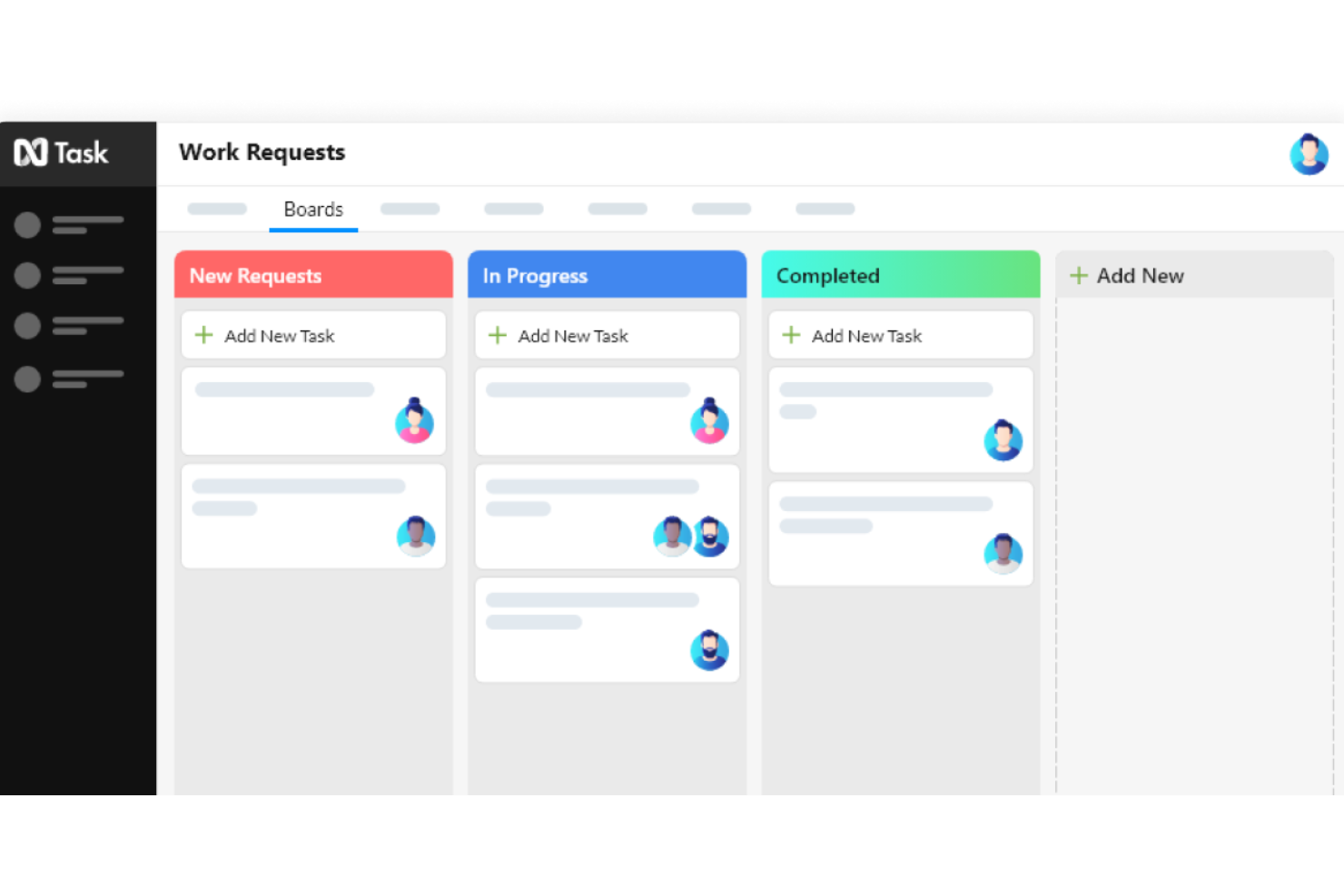
nTask è un software di project management tutto-in-uno pensato per migliorare la collaborazione del team e ottimizzare i flussi di lavoro per aziende di ogni dimensione.
Perché è una buona alternativa a Ganttpro: Mi piace che la funzionalità di diagramma di Gantt permetta al tuo team di avere una chiara visualizzazione delle tempistiche di progetto e delle dipendenze. Non solo aiuta nella pianificazione, ma anche nell'esecuzione delle attività mostrando la visione d'insieme e il modo in cui ogni attività si inserisce nel piano complessivo. Inoltre, c'è una funzionalità di gestione delle attività che consente al tuo team di organizzare e dare priorità al lavoro in modo efficiente.
Caratteristiche principali e integrazioni:
Le funzionalità includono board Kanban, monitoraggio del tempo e fogli presenze, tracciamento dei problemi, reportistica, pianificazione di progetto approfondita, flussi di lavoro personalizzati, gestione del team, sicurezza, gestione delle riunioni e gestione dei progetti.
nTask si integra con Google Calendar, Google Meet, Outlook Calendar, Apple Calendar, Microsoft Teams, GitHub, Trello, Google Tasks, Microsoft Office 365, Gmail, Evernote e Asana.
Pros and Cons
Pros:
- Buone capacità di tracciamento dei problemi
- Aiuta a visualizzare tempistiche e dipendenze
- Include funzionalità per la gestione delle riunioni
Cons:
- Potrebbe offrire più integrazioni
- Lo strumento potrebbe non essere adatto a team molto numerosi
Ideale per la programmazione predittiva dei progetti
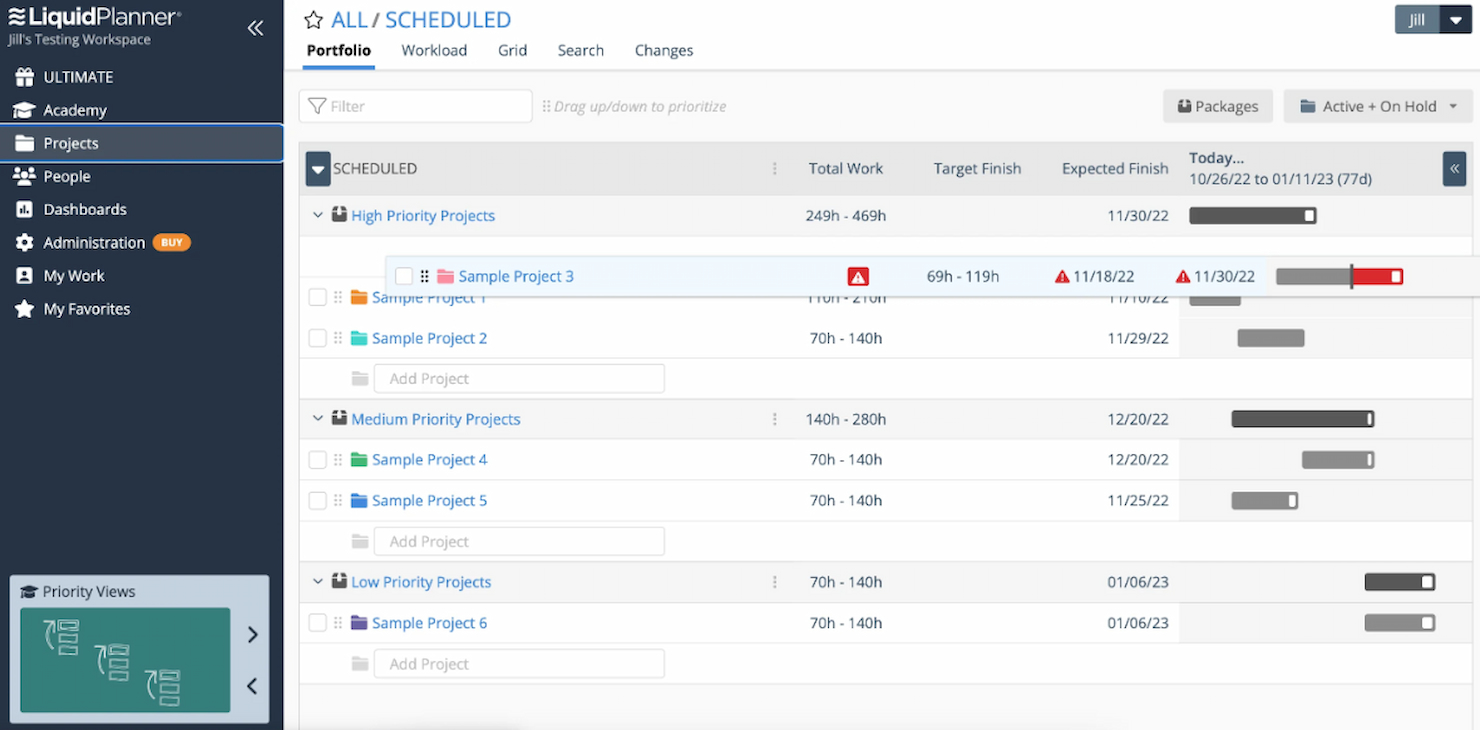
LiquidPlanner, ora noto come Portfolio Manager, è uno strumento di gestione progetti che si adatta dinamicamente ai cambiamenti. È ideale per la programmazione predittiva dei progetti grazie al suo motore intelligente che esegue molteplici simulazioni su tutti i progetti per creare previsioni realistiche e accurate.
Perché è una valida alternativa a Ganttpro: Ho scelto LiquidPlanner per questa lista per la sua esclusiva funzione di pianificazione predittiva, che lo distingue da GanttPro e da altre alternative. Questo strumento si distingue perché aiuta i team a gestire l'incertezza e ad adattarsi ai cambiamenti in tempo reale, garantendo che le pianificazioni di progetto siano sempre aggiornate e precise.
Funzionalità principali & integrazioni:
Le funzionalità di LiquidPlanner includono la pianificazione predittiva, che prevede quando il lavoro sarà terminato, e il bilanciamento automatico delle risorse per eliminare i sovraccarichi e migliorare l'utilizzo. Offre inoltre la pianificazione basata sulle priorità per allineare tutti su ciò che conta di più e la stima a intervallo per cogliere l'incertezza nella pianificazione.
LiquidPlanner si integra con Slack per la comunicazione e con Jira per la gestione di problematiche e progetti, e supporta configurazioni Single Sign-On (SSO).
Pros and Cons
Pros:
- Pianificazione predittiva per previsioni accurate
- Bilanciamento automatico delle risorse per ottimizzare il carico di lavoro del team
- Pianificazione basata sulle priorità per un'esecuzione mirata
Cons:
- La fatturazione annuale potrebbe non essere flessibile per tutti i budget
- Il piano gratuito è limitato a 3 utenti e 10 progetti
- Il prezzo a volume per il piano Ultimate non è trasparente e richiede un contatto per i dettagli


Clarizen è una soluzione solida per la gestione di un'ampia gamma di attività all'interno delle imprese. È particolarmente efficace per gli uffici di gestione progetti (PMO) e i team di servizi professionali.
Perché è una valida alternativa a GanttPro: ho selezionato Clarizen come alternativa degna di nota a GanttPro grazie al suo approccio completo alla gestione del lavoro. Si distingue per la capacità di fornire informazioni in tempo reale, automatizzare i processi e gestire i rischi, aspetti fondamentali per migliorare i risultati dei progetti e l'impatto organizzativo.
Funzionalità principali & integrazioni:
Le principali caratteristiche di Clarizen includono la gestione del portafoglio progetti, la gestione intelligente delle risorse e la pianificazione finanziaria. Offre inoltre strumenti di collaborazione sociale e accesso mobile, essenziali per mantenere la connettività del team e un flusso di informazioni sempre aggiornato.
Clarizen si integra con ServiceNow, Sage Intacct, OneLogin, QuickBooks Online, Box, Microsoft Excel, Slack, Microsoft SharePoint, NetSuite, Salesforce Sales Cloud, Zendesk Suite, Tableau, Google Drive e Jira.
Pros and Cons
Pros:
- Applicazione chat per comunicazioni immediate
- Interfaccia intuitiva e moderna
- Processo di configurazione e onboarding efficiente
Cons:
- Potrebbe non essere rapido come alcune alternative
- Potenzialmente costoso per le piccole imprese
- I tempi di risposta dell'assistenza clienti possono essere lenti
Come valuto le alternative a GanttPro
Valuto le alternative a GanttPro su due livelli: i requisiti di base come il tracciamento delle dipendenze e le viste delle risorse, e poi i fattori differenzianti che distinguono gli strumenti progettati per i PMO dai semplici gestori di attività.
Funzionalità di base (requisiti fondamentali per questa lista)
Quando seleziono gli strumenti per la mia lista, valuto ciascuno di essi su una scala da 0 (la funzionalità non è presente) a 5 (eccelle in quell'area) per ognuna delle funzionalità di base elencate di seguito. Poi calcolo il punteggio totale dello strumento come percentuale. Ogni strumento deve raggiungere un punteggio minimo totale del 65% per essere preso in considerazione.
- Vista Gantt interattiva: Cerco la pianificazione tramite drag-and-drop su una timeline visiva, non solo un diagramma statico a barre—gli strumenti devono permettere di modificare direttamente le durate e le date delle attività sulla Gantt stessa.
- Dipendenze e milestone: Ogni strumento dovrebbe supportare diversi tipi di dipendenze (fine-inizio, inizio-inizio, ecc.) e indicatori di milestone, così da poter mappare un vero percorso critico.
- Gestione delle risorse e del carico di lavoro: Verifico la possibilità di assegnare membri del team alle attività e individuare eventuali sovrallocazioni—come vedere uno sviluppatore impegnato al 150% su due sprint differenti.
- Baseline e monitoraggio dei progressi: È importante poter salvare uno snapshot della baseline e confrontarlo con i progressi reali, specialmente per controllare eventuali slittamenti di calendario nei rollout su più fasi.
- Funzionalità di collaborazione per il team: Valuto se i colleghi possono commentare le attività, allegare file e ricevere notifiche senza dover uscire dalla piattaforma per inseguire aggiornamenti su Slack o via email.
- Monitoraggio di budget e costi: Gli strumenti dovrebbero permettere di associare stime di costo a attività o risorse e confrontare il budget pianificato con la spesa reale, particolarmente utile per i team di agenzie che fatturano a progetto.
Una volta individuati gli strumenti che soddisfano questi criteri, considero ciò che differenzia ogni piattaforma.
Fattori differenzianti (cosa distingue i fornitori)
Ecco come confronto i vari fornitori:
Funzionalità distintive
L'auto-programmazione è un elemento di grande distinzione—quando un'attività subisce dei ritardi, voglio che le date a valle si aggiornino automaticamente invece di dover modificare manualmente decine di righe. La gestione del portafoglio è fondamentale per i responsabili PMO che gestiscono più progetti e hanno bisogno di una visione aggregata di timeline e risorse in un unico cruscotto. Guardo anche se uno strumento offre viste personalizzate come Kanban o calendario accanto alla sua Gantt, caratteristica utile per i team ibridi che uniscono pianificazione a cascata ed esecuzione Agile.
Oltre le funzionalità
Il supporto alle integrazioni è una delle prime cose che controllo—specialmente l'import/export di file MPP per i team che migrano da MS Project o GanttPro. Uno strumento che si collega a Jira, Slack o Google Workspace evita di duplicare aggiornamenti su più piattaforme. Anche la struttura dei prezzi è importante. Valuto se i costi per utente crescono in modo proporzionato all'espansione del team e se esiste un piano gratuito o una prova per testarlo direttamente. Infine, considero l'adattabilità al team: uno strumento pensato per la programmazione edile ha punti di forza diversi rispetto a uno creato per team software Agile.
Perché cercare un'alternativa a GanttPRO?
Potresti cercare un'alternativa a GanttPRO per diversi motivi, tra cui:
- Problemi di costo: Ritieni che il modello tariffario di GanttPRO superi il tuo budget.
- Insieme di funzionalità: Le funzionalità offerte da GanttPRO non soddisfano le esigenze specifiche dei tuoi progetti.
- Esperienza utente: Tu o il tuo team ritenete che l'interfaccia di GanttPRO non sia intuitiva o sia difficile da utilizzare.
- Funzionalità di integrazione: Hai bisogno di integrazioni con altri strumenti che GanttPRO non supporta.
- Assistenza clienti: Il livello del servizio clienti e dell'assistenza forniti da GanttPRO non è soddisfacente.
Le alternative a GanttPRO possono offrire strutture tariffarie diverse, funzionalità aggiuntive o un'esperienza più intuitiva, in linea con le tue esigenze di gestione dei progetti. Potrebbero inoltre offrire opzioni di integrazione e assistenza clienti superiori, risolvendo alcune delle limitazioni che potresti incontrare con GanttPRO.
Funzionalità principali da cercare nelle alternative a GanttPRO
Ecco alcune funzionalità chiave di GanttPRO che il software alternativo dovrebbe essere in grado di replicare o migliorare per risultare adatto:
- Diagramma di Gantt: questa funzionalità è uno strumento visivo per la pianificazione dei progetti, con attività, date, scadenze e assegnatari.
- Vista bacheca: questa funzionalità offre una visualizzazione della gestione delle attività in stile Kanban, con funzionalità di trascinamento & rilascio.
- Visualizzazione elenco: questa funzionalità consente agli utenti di organizzare le attività in formato elenco, con aggiunta e filtraggio rapidi delle attività.
- Visualizzazione portfolio: questa funzionalità può offrire agli utenti un controllo di alto livello su più progetti, con accesso ad aggiornamenti dettagliati.
- Dipendenze: questa funzionalità consente di collegare le attività con dipendenze e di pianificare automaticamente le modifiche.
- Campi personalizzati: questa funzionalità consente agli utenti di aggiungere campi personalizzati per monitorare vari aspetti del progetto.
- Collaborazione: queste funzionalità possono includere la sincronizzazione dei dati in tempo reale, allegati, commenti e menzioni.
- Gestione delle risorse: queste funzionalità possono includere la gestione del carico di lavoro, risorse virtuali e la possibilità di assegnare il lavoro a più assegnatari.
- Monitoraggio del budget: questa funzionalità consente agli utenti di gestire il budget del progetto calcolando i costi in base alle attività e alle risorse.
- App mobile: questa funzionalità consente di gestire i progetti e collaborare con il team in mobilità su iOS e Android.
Esistono alternative gratuite a GanttPRO?
Quando si cercano alternative gratuite a GanttPRO, sono disponibili diverse opzioni. Questi strumenti offrono varie funzionalità in grado di soddisfare diverse esigenze di gestione dei progetti. Ecco alcune alternative gratuite a GanttPRO:
- OpenProject: un software open source per la gestione dei progetti con un'ampia gamma di funzionalità e plugin. Supporta sequenze temporali dei progetti/diagrammi di Gantt, monitoraggio dei problemi, wiki, gestione dei documenti, reportistica di tempi e costi, gestione del codice, Scrum e altro.
- Wrike: una piattaforma per la gestione del lavoro che semplifica i flussi di lavoro, automatizza i processi e coordina la strategia all'interno di un'organizzazione. Offre gestione delle attività, diagrammi di Gantt, collaborazione in tempo reale e personalizzazione dell'area di lavoro.
- GanttProject: uno strumento desktop multipiattaforma per la pianificazione e la gestione dei progetti. Funziona su Windows, Linux e macOS, è gratuito e il suo codice è open source.
- ProjectLibre: una soluzione per la gestione dei progetti basata su Java che offre un'interfaccia utente simile a Microsoft Project. Include funzionalità come diagrammi di Gantt, monitoraggio delle risorse e gestione delle attività.
- Bitrix24: un software di collaborazione con strumenti completi per la gestione, la collaborazione, la comunicazione e le vendite. Fornisce una piattaforma unificata per file, progetti, messaggi, attività e contatti.
- Smartsheet: un software basato sul web per la gestione dei progetti, la gestione delle attività e la collaborazione sul lavoro. Offre diagrammi di Gantt, collaborazione in tempo reale e condivisione integrata dei file.
- GoodDay: una piattaforma per la gestione di progetti, prodotti e attività che offre strumenti per la pianificazione, il lavoro quotidiano e il miglioramento continuo dei processi basato su trasparenza, responsabilità, agilità e riconoscimento.
- TeamGantt: un software online per i diagrammi di Gantt che rende semplici la pianificazione dei progetti e la collaborazione. Combina efficaci diagrammi di Gantt con la comunicazione a livello di attività e la condivisione dei file.
Scopri altre opzioni in questo elenco di alternative a Office Timeline.