

10 alternative ad Accelo per i servizi professionali nel 2026

Elenco delle migliori alternative ad Accelo


Se ti senti sopraffatto dalla gestione dei progetti, non sei il solo. Molti responsabili di progetto fanno fatica a mantenere organizzate le attività e allineati i team. Accelo potrebbe non adattarsi perfettamente alle tue esigenze, e va bene così.
Il software di automazione dei servizi professionali può alleviare queste difficoltà offrendo funzionalità adatte alle tue sfide specifiche. In base alla mia esperienza, trovare lo strumento giusto può fare una grande differenza per la produttività e il morale del tuo team.
In questo articolo condividerò le mie migliori scelte tra le alternative ad Accelo. Le ho testate accuratamente per assicurarmi che soddisfino esigenze diverse. Troverai recensioni chiare e imparziali che ti aiuteranno a scegliere la soluzione più adatta alla tua attività.
Che cos'è Accelo?
Accelo è un software di automazione dei servizi professionali (PSA) progettato per aiutare le aziende a gestire il lavoro con i clienti in modo efficiente. Viene utilizzato comunemente da consulenti, commercialisti e agenzie digitali che devono mantenere organizzati progetti, clienti e finanze. Le funzionalità di monitoraggio dei progetti, gestione dei clienti e fatturazione aiutano a mantenere la produttività e a migliorare i rapporti con i clienti. Accelo offre valore centralizzando tutti gli aspetti del lavoro con i clienti in un'unica piattaforma, rendendo più semplice per te e il tuo team gestire i progetti dall'inizio alla fine.
Tabella comparativa delle alternative ad Accelo
Questa tabella comparativa riassume i dettagli dei prezzi delle mie migliori alternative ad Accelo:
| Tool | Best For | Trial Info | Price | ||
|---|---|---|---|---|---|
| 1 | La migliore soluzione tutto-in-uno per le piccole imprese | Prova gratuita di 7 giorni e piano gratuito disponibili | A partire da $39/mese | Website | |
| 2 | Ideale per la consegna dei progetti basata sull'intelligenza artificiale | Prova gratuita di 14 giorni + demo gratuita disponibile | A partire da $19/utente/mese (con fatturazione annuale) | Website | |
| 3 | Ideale per portali clienti tutto-in-uno | Disponibile una prova gratuita di 14 giorni | A partire da $19/mese | Website | |
| 4 | Ideale per flussi di lavoro personalizzabili | Prova gratuita di 30 giorni + dimostrazione gratuita disponibile | Da $24/utente/mese | Website | |
| 5 | Ideale per la collaborazione tra team e il monitoraggio degli obiettivi | Piano gratuito disponibile | A partire da $10.99/utente/mese (fatturato annualmente) | Website | |
| 6 | Ideale per i flussi di lavoro degli MSP | Demo gratuita disponibile | Prezzi su richiesta | Website | |
| 7 | Ideale per la gestione completa dei progetti | Piano gratuito + dimostrazione gratuita disponibile | Da $11.95/mese | Website | |
| 8 | Ideale per prenotazioni e fatturazione dei clienti | Demo gratuita + prova gratuita di 14 giorni disponibile | A partire da $29/mese (con fatturazione annuale) | Website | |
| 9 | Ideale per studi di architettura e ingegneria | Demo gratuita disponibile. | Prezzi su richiesta | Website | |
| 10 | Ideale per i professionisti creativi che necessitano di un CRM | Prova gratuita di 7 giorni | A partire da $7/mese (con fatturazione annuale) | Website |
Perché fidarsi dei nostri consigli sui software
Il nostro team testa e recensisce software dal 2012. In quanto project manager noi stessi, sappiamo quanto sia difficile — e importante — scegliere il software giusto.
Per questa guida, abbiamo valutato gli strumenti attraverso test pratici e ricerche indipendenti, assegnando un punteggio agli strumenti in base ai nostri criteri di selezione. Ci basiamo inoltre sulle competenze di leader di pensiero del settore e di professionisti attivi nella gestione dei progetti.
Le nostre recensioni riflettono il nostro giudizio editoriale umano, non un discorso di vendita.
Revisori esperti:
Recensioni delle migliori alternative ad Accelo
Di seguito sono riportati i miei riepiloghi dettagliati delle migliori alternative ad Accelo incluse nel mio elenco. Le mie recensioni offrono un’analisi approfondita delle funzionalità principali, dei pro e dei contro, delle integrazioni e dei casi d’uso ideali di ogni strumento, per aiutarti a trovare quello più adatto a te.

Flowlu
La migliore soluzione tutto-in-uno per le piccole imprese
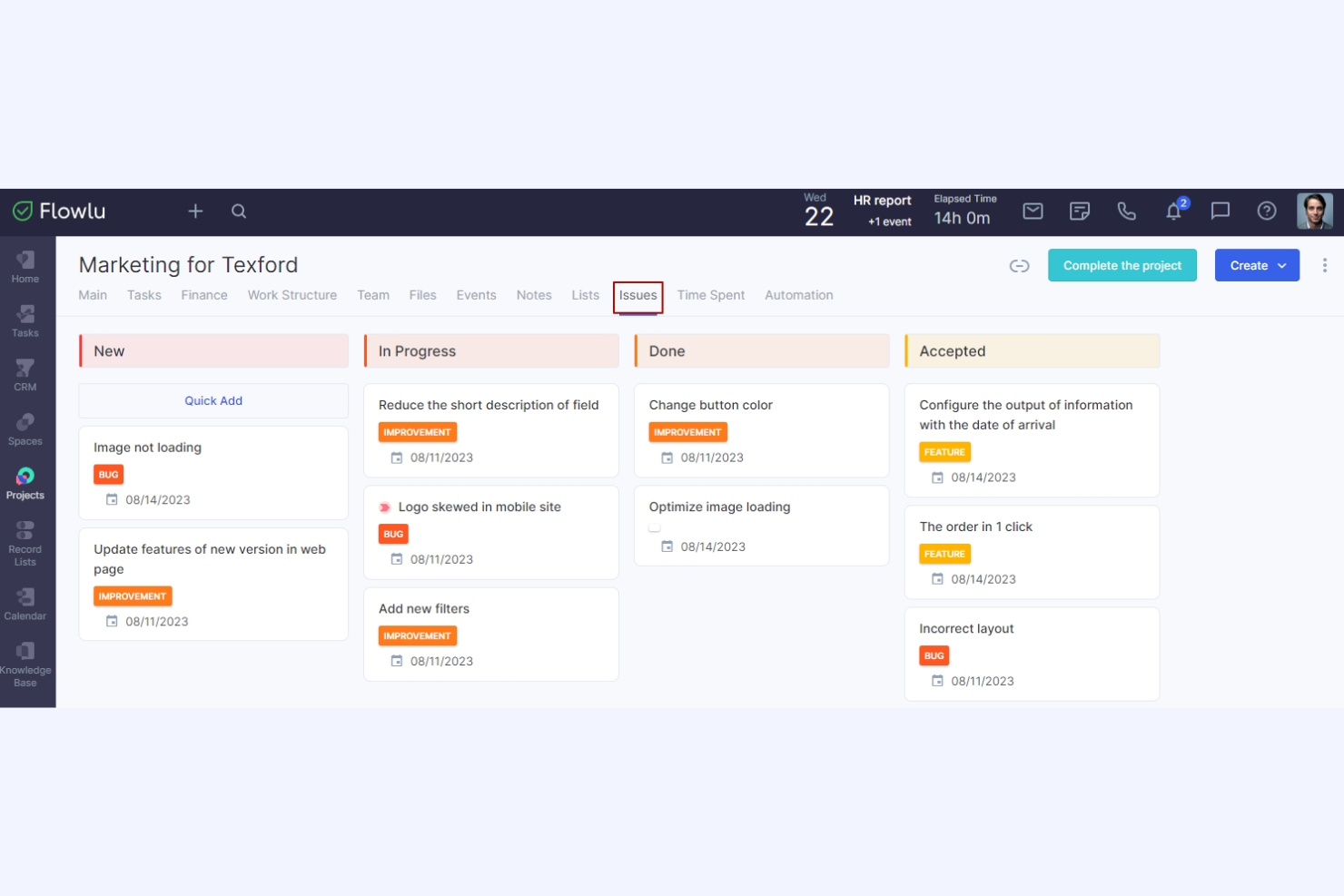
Flowlu è una piattaforma online completa per la gestione del lavoro, progettata per le piccole e medie imprese. I suoi principali utenti includono agenzie di marketing, reparti IT, professionisti del settore legale, istituti scolastici e organizzatori di eventi. Offre strumenti per la gestione dei progetti, CRM, fatturazione, gestione finanziaria e collaborazione.
Perché è una buona alternativa ad Accelo: Flowlu offre una suite completa di strumenti, ideale per le piccole imprese alla ricerca di una soluzione tutto-in-uno. Include funzionalità per la gestione di progetti e attività, tra cui diagrammi di Gantt e bacheche Kanban, che aiutano a mantenere tutto organizzato. L'automazione dei flussi di lavoro e il controllo finanziario garantiscono efficienza e controllo sulle operazioni, mentre gli strumenti di comunicazione del team favoriscono la collaborazione e permettono a tutti di essere sempre aggiornati.
Funzionalità e integrazioni principali:
Le funzionalità includono strumenti di gestione finanziaria che aiutano a monitorare efficacemente spese e ricavi, mentre le funzionalità CRM consentono al team di gestire efficacemente le relazioni con i clienti. I flussi di lavoro automatizzati aiutano ad assegnare attività, inviare notifiche ai membri del team, fornire aggiornamenti sui progetti e creare nuovi progetti.
Le integrazioni includono Slack, Google Calendar, Microsoft Outlook, QuickBooks, Xero, Dropbox, Mailchimp, Trello e altro ancora.
Pros and Cons
Pros:
- Piattaforma tutto-in-uno
- Supporta l'automazione dei flussi di lavoro
- Facilita la comunicazione del team
Cons:
- Problemi occasionali con l'integrazione delle email
- Il modulo di reportistica offre opzioni di personalizzazione limitate

Ideale per la consegna dei progetti basata sull'intelligenza artificiale
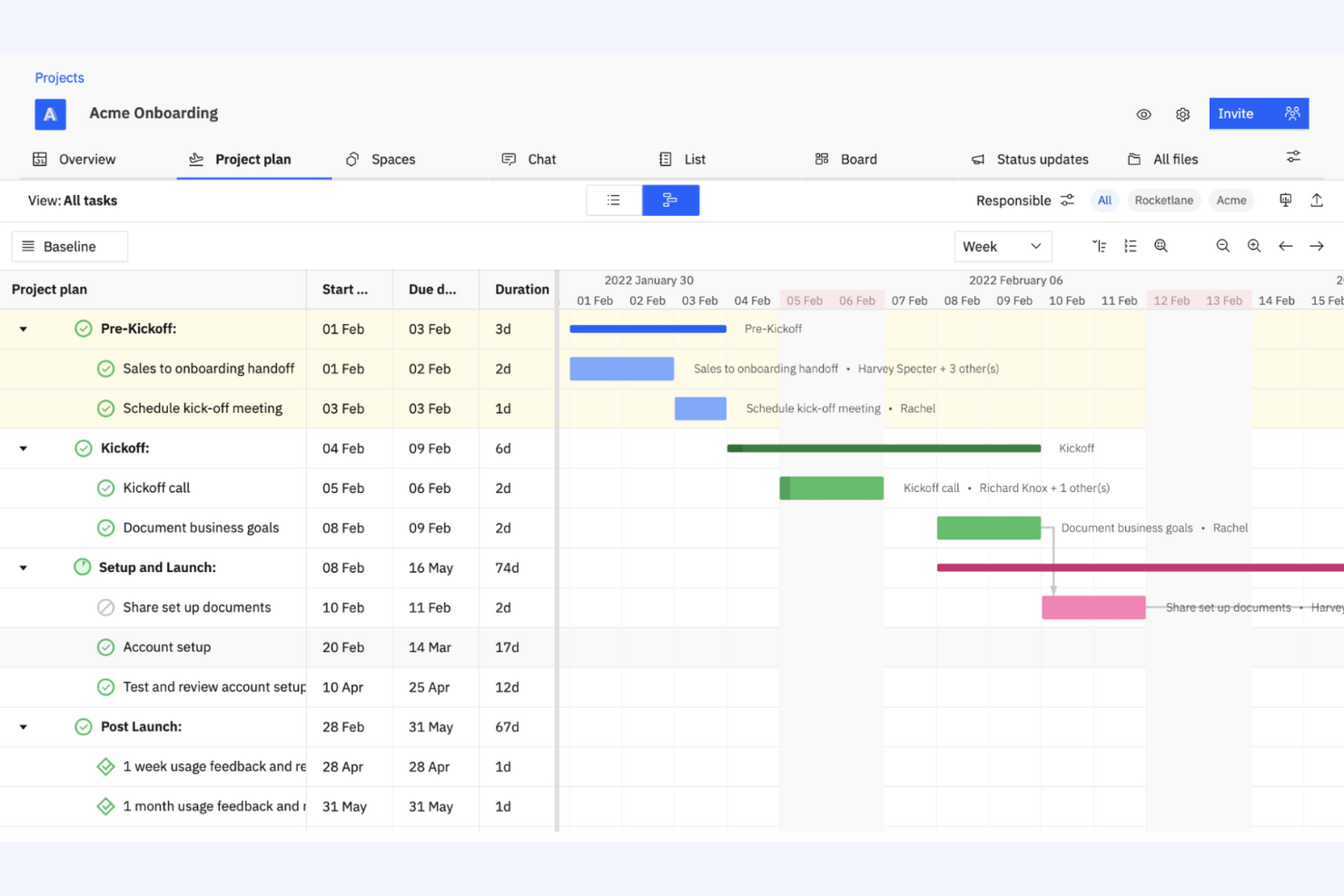
Rocketlane è una piattaforma di gestione dei progetti agentica e all-in-one, progettata per i team che devono migliorare i processi di consegna dei progetti. È utilizzata dalle aziende che puntano a migliorare la collaborazione, la trasparenza e l'efficienza nell'esecuzione dei progetti.
Perché è una buona alternativa ad Accelo: Rocketlane offre strumenti basati sull'intelligenza artificiale per la consegna dei progetti, adatti alle aziende che si concentrano sull'ottimizzazione dell'esecuzione dei progetti, con agenti IA che condividono il carico operativo. I modelli di progetto aiutano il team a standardizzare i flussi di lavoro e a risparmiare tempo, mentre gli strumenti di collaborazione in tempo reale della piattaforma garantiscono che tutti rimangano allineati e informati durante l'intero progetto. L'enfasi di Rocketlane sugli insight basati sull'intelligenza artificiale offre al team dati preziosi per perfezionare le strategie e i risultati dei progetti.
Funzionalità e integrazioni principali:
Funzionalità includono la gestione delle tempistiche, che aiuta il team a mantenere i progetti nei tempi previsti, e gli strumenti di gestione delle risorse della piattaforma garantiscono un'allocazione ottimale degli sforzi del team. I dashboard personalizzabili forniscono insight sull'avanzamento e sulle prestazioni dei progetti.
Integrazioni includono Slack, Salesforce, Microsoft Teams, Google Calendar, Jira, GitLab, HubSpot, Asana, Zapier, monday.com e altro.
Pros and Cons
Pros:
- Insight e automazione basati sull'intelligenza artificiale
- Supporta la standardizzazione dei progetti
- Offre dati in tempo reale
New Product Updates from Rocketlane

Rocketlane Introduces Governance and Workforce Agents
Rocketlane introduces Governance Agents and Workforce Agents to automate delivery processes and recurring tasks. These updates help teams enforce rules and streamline project execution. For more information, visit Rocketlane’s official site.
 .
.
Ideale per portali clienti tutto-in-uno
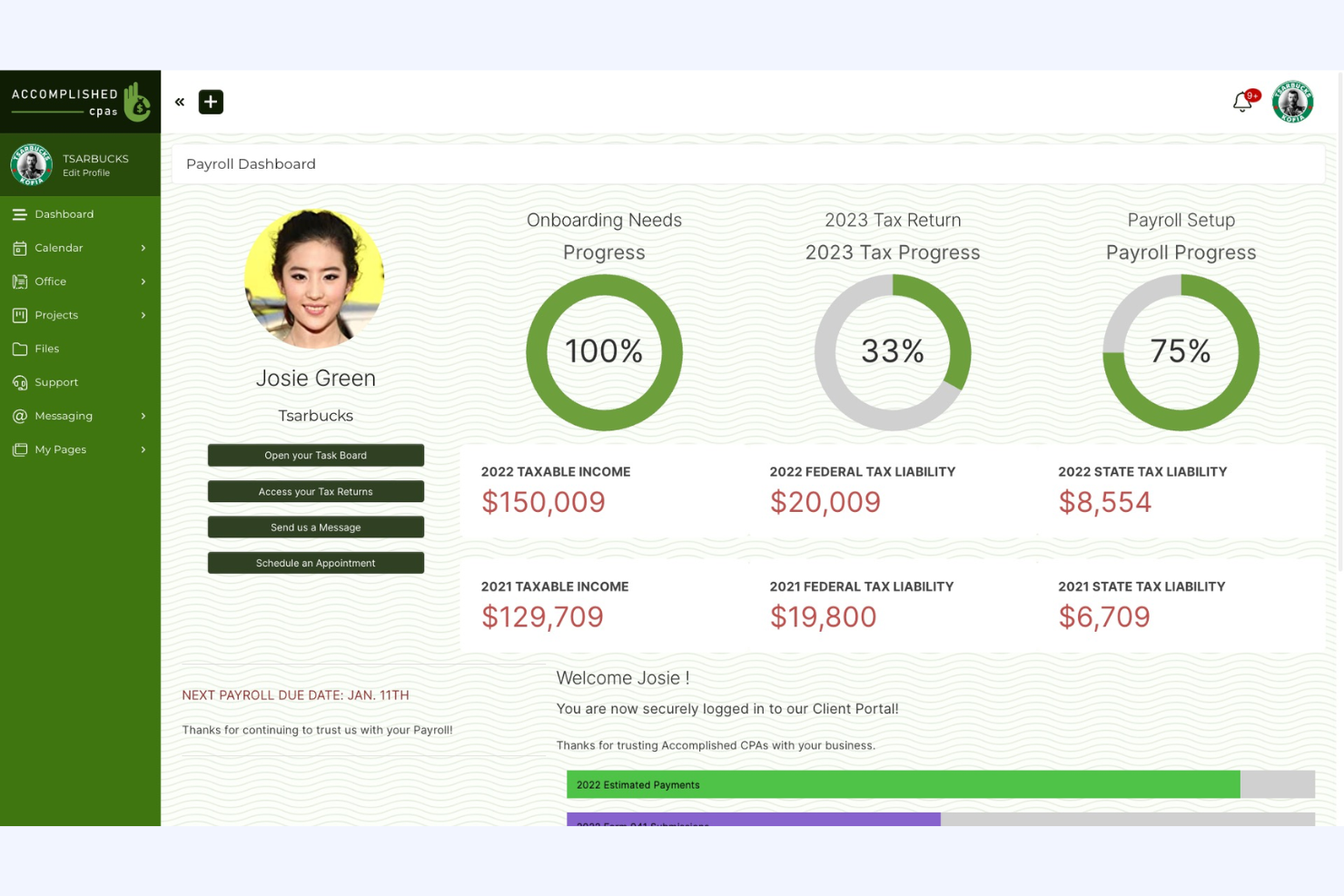
SuiteDash è una piattaforma completa per la gestione aziendale, progettata per le piccole e medie imprese, che offre strumenti per la gestione dei progetti, il CRM e i portali clienti. È ideale per le aziende che desiderano integrare più funzioni in un'unica piattaforma.
Perché è una buona alternativa ad Accelo: SuiteDash offre una soluzione tutto-in-uno che combina la gestione dei progetti con il CRM e i portali clienti, rendendola ideale per una piattaforma aziendale centralizzata. Le sue funzionalità di gestione dei clienti aiutano il team a mantenere solide relazioni con la clientela. Gli strumenti di monitoraggio dei progetti della piattaforma consentono al team di gestire efficacemente attività e scadenze. L'attenzione di SuiteDash all'integrazione delle funzioni aziendali fondamentali in un'unica piattaforma la rende una scelta adatta per chi desidera semplificare le proprie operazioni.
Funzionalità e integrazioni principali:
Le funzionalità includono dashboard personalizzabili e la condivisione sicura dei file, che garantisce lo scambio sicuro dei documenti sensibili. La fatturazione automatizzata e l'emissione delle fatture aiutano a ottimizzare i processi finanziari e a ridurre il lavoro manuale.
Le integrazioni includono QuickBooks, Stripe, PayPal, Zapier, Google Calendar, Microsoft Office 365, Plaid, Slack, Zoom, WordPress e altro ancora.
Pros and Cons
Pros:
- Utenti illimitati a tutti i livelli di prezzo
- Supporta la gestione dei clienti
- Semplifica i processi finanziari
Cons:
- La configurazione iniziale può essere complessa
- Personalizzazione limitata per esigenze avanzate
Kintone
Ideale per flussi di lavoro personalizzabili
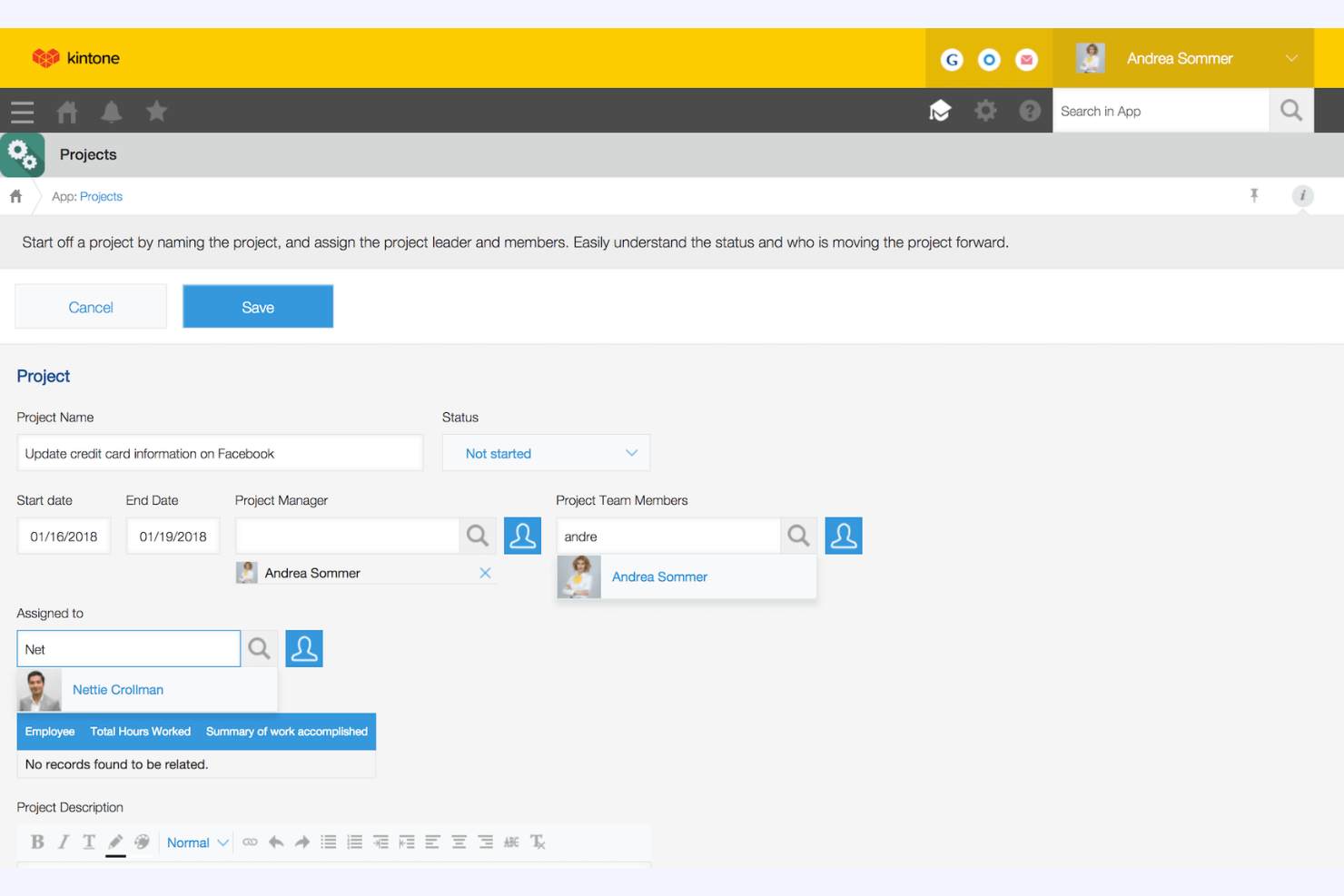
Kintone è una piattaforma personalizzabile per la gestione dei flussi di lavoro e la collaborazione, utilizzata dai team per gestire i dati e automatizzare i processi. È apprezzata dalle aziende che necessitano di soluzioni personalizzate per la gestione dei progetti, dei dati e della collaborazione.
Perché è una buona alternativa ad Accelo: Kintone offre flussi di lavoro personalizzabili, rendendola ideale per i team che necessitano di soluzioni personalizzate per la gestione dei progetti. È possibile creare app personalizzate adatte ai processi aziendali e gestire i dati in modo efficiente; inoltre, la piattaforma facilita la collaborazione consentendo al team di condividere informazioni e monitorare le attività in tempo reale. La sua flessibilità nell'adattarsi a diverse esigenze aziendali la rende una scelta adatta per chi cerca un approccio personalizzato.
Caratteristiche principali e integrazioni:
Le caratteristiche includono la creazione di app tramite trascinamento, che consente al team di creare applicazioni personalizzate senza scrivere codice. Gli strumenti di reportistica della piattaforma forniscono informazioni dettagliate sulle prestazioni e aiutano a prendere decisioni basate sui dati, mentre le funzionalità di gestione delle attività aiutano il team a rimanere organizzato e concentrato sugli obiettivi.
Le integrazioni includono Slack, Zapier, Google Calendar, Dropbox, Salesforce, QuickBooks, Microsoft Office 365, HubSpot, Mailchimp, Box e altro.
Pros and Cons
Pros:
- Flussi di lavoro altamente personalizzabili
- Facilita la collaborazione del team
- Offre il monitoraggio delle attività in tempo reale
Cons:
- Minimo di cinque utenti
- Curva di apprendimento per la personalizzazione

Asana
Ideale per la collaborazione tra team e il monitoraggio degli obiettivi

Asana è una piattaforma di gestione dei progetti progettata per aiutare i team a organizzare e monitorare il proprio lavoro in modo efficiente. Viene utilizzata principalmente in vari settori per gestire i progetti, automatizzare i flussi di lavoro e monitorare gli obiettivi.
Perché è una buona alternativa ad Accelo: Asana si concentra sul supporto al lavoro di squadra e sul monitoraggio efficace degli obiettivi. Offre funzionalità di gestione dei progetti, automazione dei flussi di lavoro e monitoraggio degli obiettivi, rendendola ideale per i team che devono rimanere allineati sugli obiettivi. La gestione delle risorse e le funzionalità di intelligenza artificiale contribuiscono ulteriormente ad aumentare la produttività e la chiarezza. L'interfaccia intuitiva e gli strumenti di collaborazione di Asana la rendono un'ottima scelta per migliorare la comunicazione del team.
Funzionalità e integrazioni principali:
Le funzionalità includono strumenti di gestione dei progetti che consentono di creare, organizzare e assegnare priorità alle attività con facilità. L'automazione dei flussi di lavoro aiuta il team a ridurre il lavoro manuale e a concentrarsi su ciò che è importante, mentre il monitoraggio degli obiettivi garantisce che tutti siano allineati e lavorino verso gli stessi obiettivi.
Le integrazioni includono Slack, Microsoft Teams, Google Drive, Dropbox, Salesforce, Zoom, Jira, Adobe Creative Cloud, Trello, Microsoft Outlook e altro ancora.
Pros and Cons
Pros:
- Ampie funzionalità di collaborazione tra team
- Facilità nel monitorare gli obiettivi
- Interfaccia intuitiva
Cons:
- Richiede un breve periodo di apprendimento
- Può essere costoso per i team più grandi

Ideale per i flussi di lavoro degli MSP

Autotask è un software di automazione dei servizi professionali progettato per i fornitori di servizi gestiti e le aziende di servizi IT. Aiuta nella gestione dei progetti, nell'erogazione dei servizi e nella fatturazione per migliorare l'efficienza operativa.
Perché è una buona alternativa ad Accelo: Autotask offre una gestione IT integrata, rendendolo ideale per gli MSP che necessitano di una soluzione completa. Include il monitoraggio dei progetti e la gestione dei ticket, aiutandoti a erogare i servizi in modo efficiente, mentre le funzionalità di fatturazione e gestione delle fatture del software contribuiscono a garantire una gestione finanziaria accurata.
Caratteristiche e integrazioni principali:
Le funzionalità includono la gestione dei ticket, che aiuta il tuo team a gestire in modo efficiente le richieste di servizio. Gli strumenti di reportistica forniscono informazioni sulle prestazioni della tua azienda, agevolando il processo decisionale, mentre la gestione delle risorse garantisce un'allocazione ottimale del tempo e delle competenze del tuo team.
Le integrazioni includono QuickBooks, Xero, ConnectWise, Salesforce, Slack, Zapier, Microsoft Teams, Google Workspace e altro ancora.
Pros and Cons
Pros:
- Pensato per gli MSP
- Gestione IT integrata
- Funzionalità di monitoraggio dei progetti
Cons:
- Richiede configurazione e impostazione
- Potrebbe non essere adatto ai settori non informatici
Avaza
Ideale per la gestione completa dei progetti
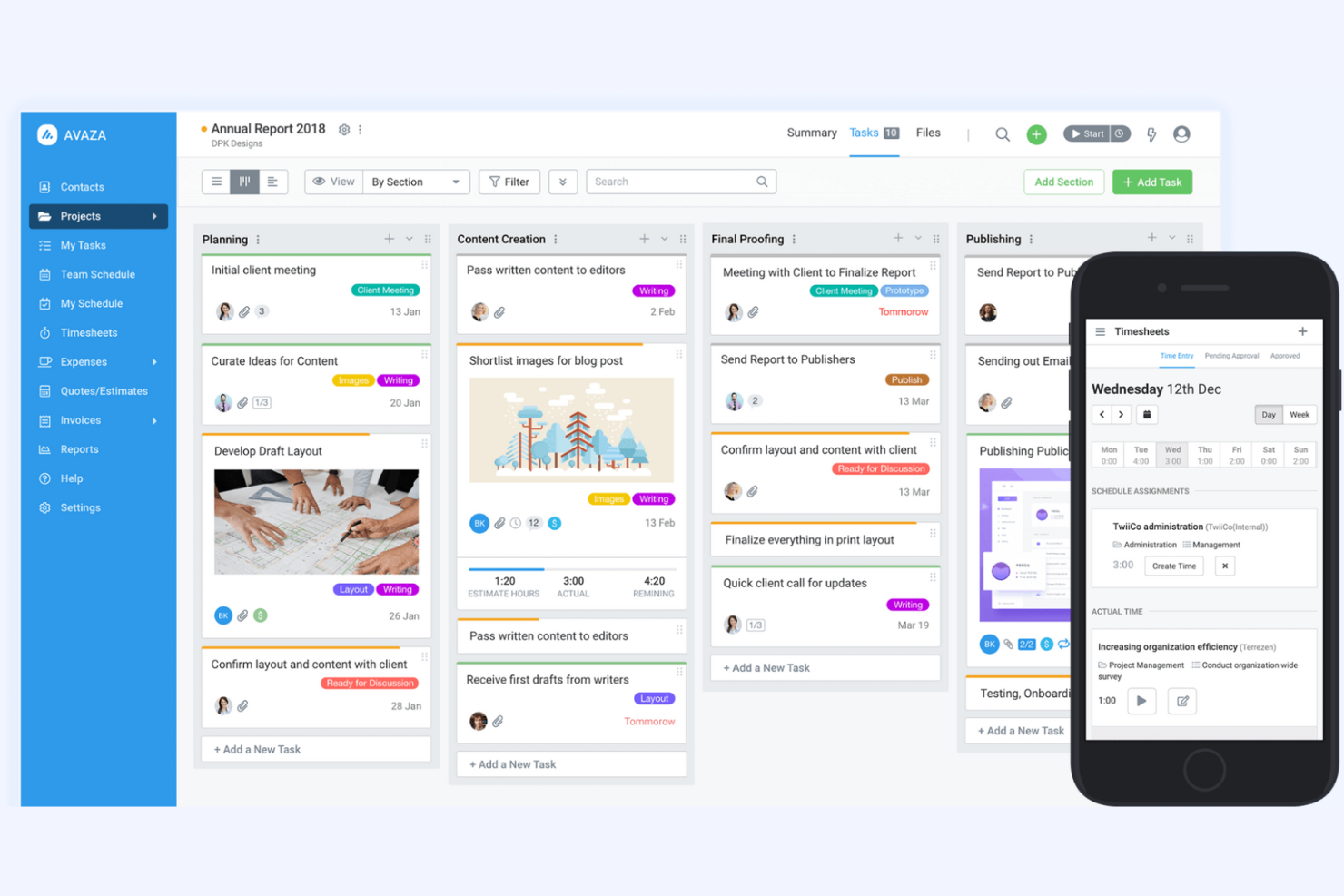
Avaza è uno strumento completo per la gestione dei progetti e la collaborazione, progettato per aziende di tutte le dimensioni. Supporta la gestione dei progetti, il monitoraggio del tempo, la gestione delle spese e la fatturazione, rendendolo una soluzione versatile per diversi team.
Perché è una buona alternativa ad Accelo: Avaza offre funzionalità dettagliate per la gestione dei progetti, rendendolo ideale per le aziende che necessitano di una soluzione completa. Include funzioni come la gestione delle attività e il monitoraggio del tempo, che aiutano il tuo team a rimanere organizzato ed efficiente. Gli strumenti di gestione delle spese e fatturazione del software forniscono una supervisione finanziaria, mentre la sua interfaccia intuitiva e le funzionalità di collaborazione sui progetti lo rendono adatto ai team che desiderano migliorare la produttività.
Funzionalità e integrazioni principali:
Le funzionalità includono la pianificazione delle risorse, che aiuta il tuo team ad allocare efficacemente le risorse tra i progetti. Gli strumenti di reportistica del software consentono di ottenere informazioni sulle prestazioni dei progetti e prendere decisioni basate sui dati, mentre la condivisione dei file permette al tuo team di archiviare e accedere facilmente ai documenti dei progetti.
Le integrazioni includono Xero, QuickBooks, Slack, Google Drive, Dropbox, Zapier, Salesforce, Trello, Mailchimp e altro.
Pros and Cons
Pros:
- Fatturazione e monitoraggio delle spese integrati
- Adatto ad aziende di diverse dimensioni
- Include funzionalità per il monitoraggio del tempo
Cons:
- Potrebbe non includere funzionalità avanzate
- Le opzioni di automazione sono limitate

vCita
Ideale per prenotazioni e fatturazione dei clienti
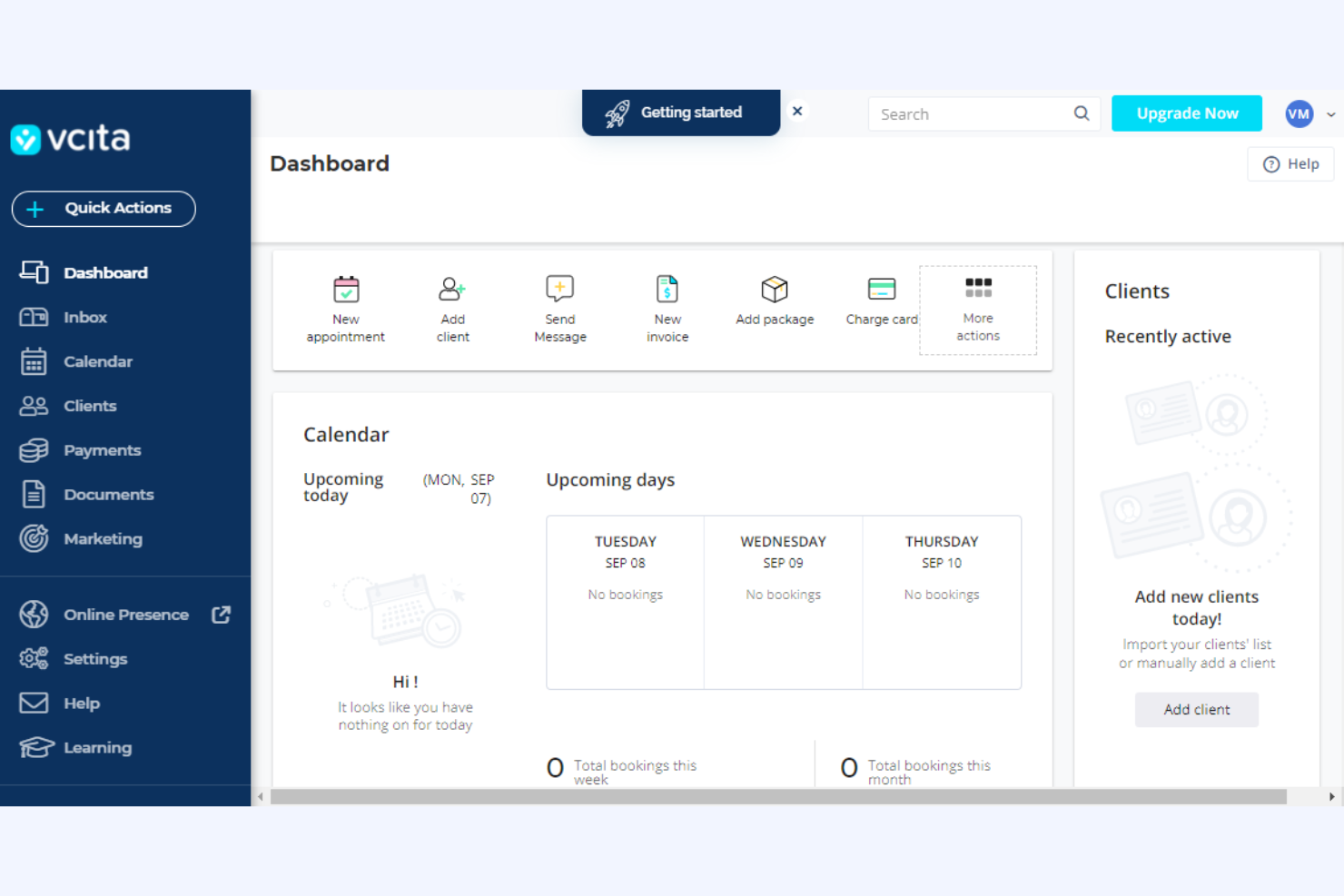
vcita è una piattaforma di gestione aziendale pensata per le piccole imprese e i fornitori di servizi, che offre strumenti per la gestione dei clienti, la fatturazione e la programmazione. È utilizzata da professionisti che hanno bisogno di ottimizzare le interazioni con i clienti e gestire in modo efficiente le attività aziendali.
Perché è una buona alternativa ad Accelo: vcita offre un portale clienti per agenzie con programmazione online, consentendo ai clienti di prenotare appuntamenti quando preferiscono. Gli strumenti di fatturazione e fatturazione elettronica della piattaforma semplificano la gestione finanziaria automatizzando i processi di pagamento. L'attenzione di vcita alla comunicazione con i clienti e alla gestione aziendale la rende una scelta adatta alle agenzie che desiderano una soluzione integrata.
Funzionalità e integrazioni principali:
Le funzionalità includono strumenti di email marketing che aiutano il tuo team a interagire con i clienti e a promuovere i servizi. La funzionalità CRM consente di gestire le relazioni con i clienti e tenere traccia delle interazioni, mentre la condivisione dei documenti facilita lo scambio sicuro di file importanti con i clienti.
Le integrazioni includono QuickBooks, PayPal, Stripe, Zoom, Mailchimp, Google Calendar, WordPress, Facebook Messenger, Square, Zapier e altro ancora.
Pros and Cons
Pros:
- Offre un portale clienti personalizzato con pagamenti integrati delle fatture
- Adatto alle piccole imprese
- Supporta la programmazione e la fatturazione
Cons:
- Le automazioni sono limitate ai piani tariffari più costosi
- Potrebbe non essere adatto alle organizzazioni più grandi

Ideale per studi di architettura e ingegneria
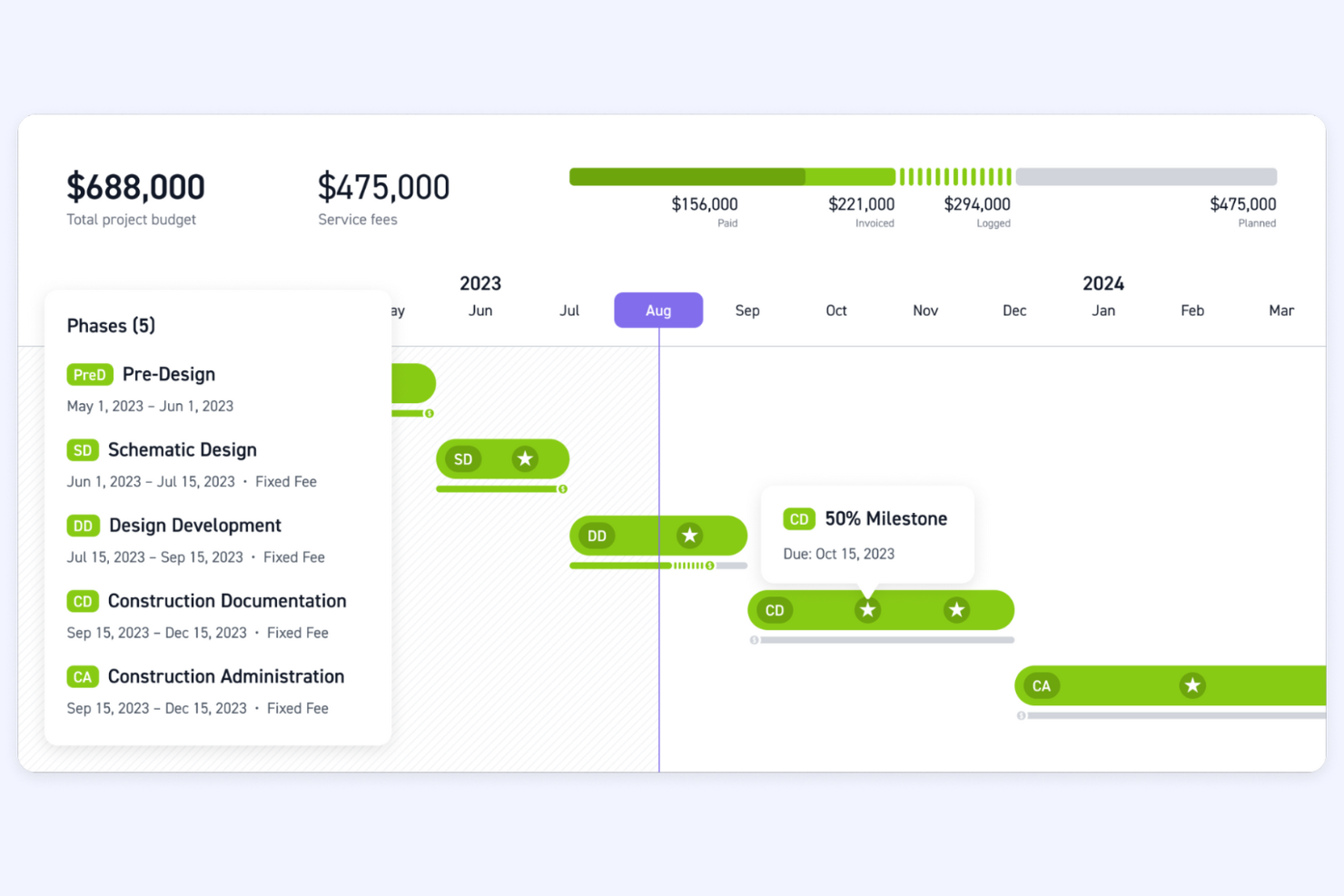
Monograph è uno strumento di gestione dei progetti progettato specificamente per studi di architettura e ingegneria. Aiuta a monitorare i progetti, gestire le risorse e pianificare le finanze, rappresentando una risorsa preziosa per questi settori.
Perché è una buona alternativa ad Accelo: Monograph offre strumenti specializzati per studi di architettura e ingegneria, con particolare attenzione alla gestione dei progetti e delle risorse. Le sue numerose funzionalità aiutano a gestire in modo efficiente progetti complessi e a garantire un utilizzo ottimale del team nei diversi progetti. L'attenzione di Monograph alla pianificazione finanziaria e ai flussi di lavoro specifici del settore lo rende ideale per gli studi che necessitano di una supervisione dettagliata e di solide capacità di pianificazione.
Funzionalità distintive e integrazioni:
Le funzionalità includono tempistiche dei progetti che consentono al team di visualizzare l'avanzamento dei progetti, monitoraggio del budget per mantenere i progetti entro i limiti finanziari e allocazione delle risorse per garantire un utilizzo efficiente del tempo e delle competenze del team.
Le integrazioni includono QuickBooks.
Pros and Cons
Pros:
- Personalizzato per architettura e ingegneria
- Supporta la pianificazione finanziaria
- Allocazione efficiente delle risorse
Cons:
- Potrebbe non essere adatto all'uso in settori diversi da quello dell'ingegneria e dell'architettura
- Non è una soluzione completa

Bloom
Ideale per i professionisti creativi che necessitano di un CRM
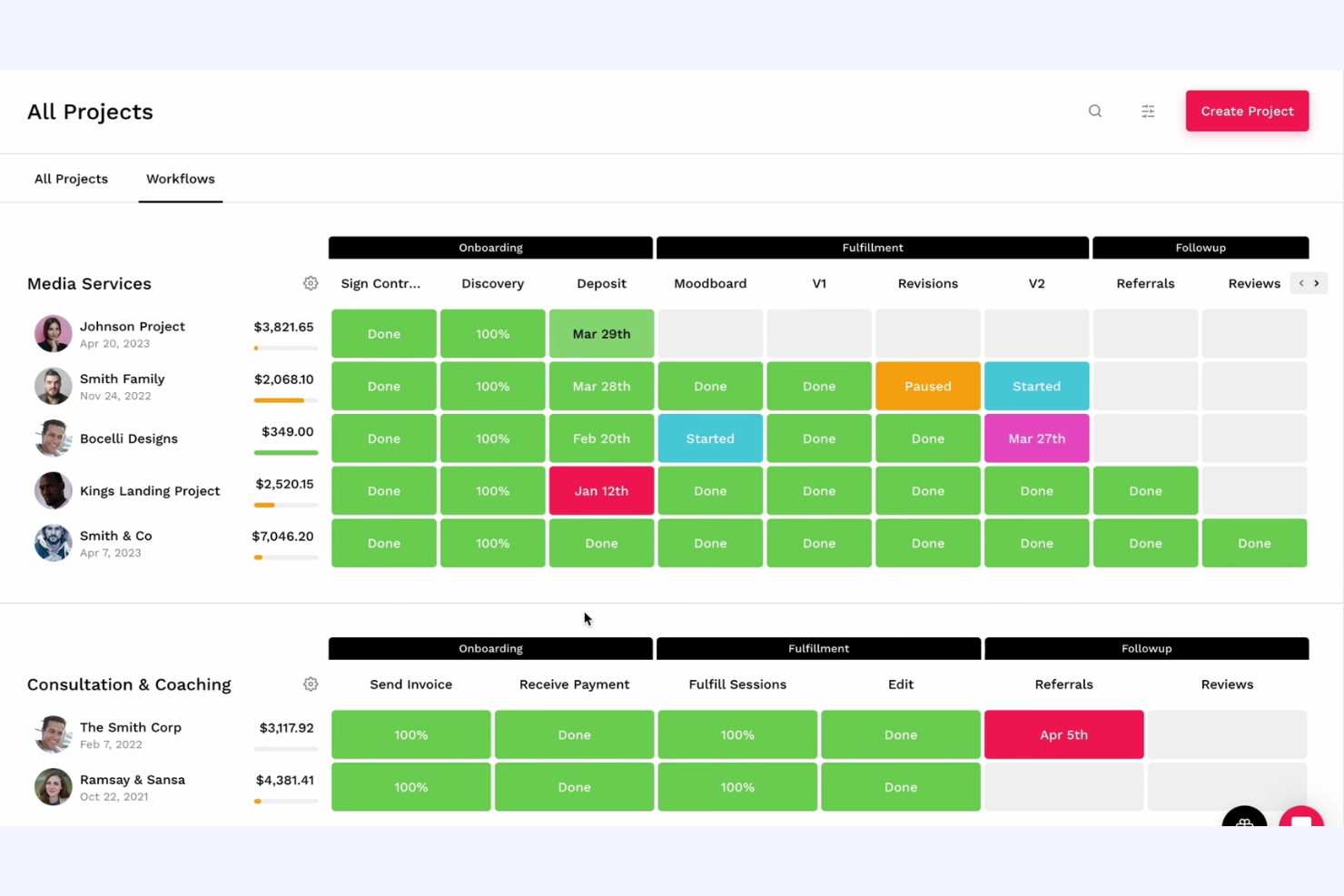
Bloom è una piattaforma di gestione aziendale progettata per i professionisti creativi, che offre strumenti per la gestione dei clienti, il monitoraggio dei progetti e la fatturazione. È utilizzata da fotografi, designer e liberi professionisti che hanno bisogno di gestire in modo efficiente le operazioni aziendali.
Perché è una buona alternativa ad Accelo: Bloom si rivolge ai professionisti creativi offrendo una suite di strumenti che semplifica la gestione dei clienti e il monitoraggio dei progetti. Include flussi di lavoro automatizzati che aiutano a ottimizzare le attività ripetitive e a concentrarsi sulla creatività, mentre il portale clienti della piattaforma facilita la comunicazione e la collaborazione. L'integrazione tra CRM e gestione dei progetti rende Bloom una scelta adatta ai creativi alla ricerca di una soluzione completa.
Funzionalità e integrazioni distintive:
Le funzionalità includono contratti personalizzabili per redigere e inviare rapidamente accordi professionali, mentre la funzione di fatturazione consente di fatturare i clienti in modo efficiente e tenere traccia dei pagamenti. La gestione delle prenotazioni permette ai clienti di fissare appuntamenti, semplificando l'organizzazione del calendario.
Le integrazioni includono Google Calendar, QuickBooks, Stripe, PayPal, Square, Zapier, Mailchimp, Slack, Zoom, Xero e altro ancora.
Pros and Cons
Pros:
- Pensato per i professionisti creativi
- Supporta la gestione dei clienti
- Semplifica il monitoraggio dei progetti
Cons:
- Potrebbe non essere adatto ai settori non creativi
- Funzionalità avanzate limitate
Altre alternative ad Accelo
Ecco alcune ulteriori alternative ad Accelo che non sono entrate nel mio elenco, ma che vale comunque la pena prendere in considerazione:
- Basecamp
Ideale per una gestione dei progetti lineare
- ConnectWise
Ideale per le aziende di servizi IT
- Function Point
Ideale per la gestione delle agenzie creative
- Ravetree
Ideale per la gestione integrata dei progetti
- ManyRequests
Ideale per i portali clienti delle agenzie
- StartingPoint
Ideale per l'automazione dei flussi di lavoro
- BigTime
Ideale per la PSA con informazioni basate sull'IA
- Scoro
Ideal para espaços de trabalho tudo-em-um de equipas remotas


Come valuto le alternative ad Accelo
Valuto questi strumenti su due livelli: le funzionalità fondamentali—registrazione delle ore, fatturazione dei clienti, gestione dei contratti continuativi—che qualsiasi sostituto di Accelo deve offrire in modo eccellente, e gli elementi distintivi che separano le soluzioni valide da quelle eccellenti.
Funzionalità fondamentali (requisiti essenziali per questo elenco)
Quando seleziono gli strumenti per il mio elenco, assegno a ciascuno un punteggio su una scala da 0 (non offre la funzionalità) a 5 (eccelle in questo ambito) per ogni funzionalità fondamentale elencata di seguito. Poi calcolo il punteggio totale dello strumento in percentuale. Ogni strumento deve raggiungere un punteggio totale minimo del 65% per essere preso in considerazione.
- Gestione dei progetti: cerco l’assegnazione delle attività, le dipendenze, le tappe fondamentali e più visualizzazioni, come Gantt e Kanban, che consentano di gestire contemporaneamente progetti di diversi clienti.
- Monitoraggio delle ore e fatturazione: ogni strumento dovrebbe collegare le ore registrate alle tariffe fatturabili e alla fatturazione, così le squadre non devono esportare i fogli presenze in uno strumento di fatturazione separato.
- Gestione dei clienti e del CRM: verifico se la piattaforma archivia in un unico luogo i contatti dei clienti, la cronologia delle comunicazioni e le fasi delle trattative, invece di richiedere un CRM autonomo.
- Contratti continuativi e lavoro ricorrente: per le agenzie che gestiscono contratti continuativi, valuto come ogni strumento gestisce la fatturazione ricorrente, il monitoraggio del budget e le ore riportate.
- Pianificazione delle risorse e della capacità: le visualizzazioni del carico di lavoro e le funzionalità di pianificazione sono importanti in questo ambito, soprattutto per le aziende che gestiscono più clienti con una squadra condivisa.
- Rapporti finanziari e redditività: verifico se è possibile ottenere rapporti sui margini dei progetti, sull’utilizzo delle risorse e sul confronto tra budget e valori effettivi senza esportare i dati in un foglio di calcolo.
Una volta ottenuto un elenco di strumenti che soddisfano questi criteri, valuto ciò che distingue ciascuna piattaforma.
Elementi distintivi (ciò che differenzia i fornitori)
Ecco come confronto i diversi fornitori:
Funzionalità distintive
I portali per i clienti sono un importante elemento di differenziazione. Cerco strumenti che consentano ai clienti di visualizzare lo stato dei progetti, approvare i prodotti finali e accedere alle fatture senza intasare la posta in arrivo. Anche l’automazione dal preventivo all’incasso è importante per le aziende che vogliono trasformare direttamente le proposte in progetti attivi e cicli di fatturazione. Vale la pena valutare anche la gestione integrata delle richieste di assistenza, poiché molte agenzie gestiscono contemporaneamente il lavoro strutturato sui progetti e le richieste di supporto estemporanee dei clienti, che devono comunque essere monitorate e fatturate.
Oltre le funzionalità
Le integrazioni sono molto importanti in questo caso. Verifico se uno strumento si collega nativamente a piattaforme contabili come QuickBooks o Xero, poiché inserire le fatture due volte vanifica lo scopo di un sistema tutto-in-uno. Anche la trasparenza dei prezzi è un altro fattore che considero. Alcuni fornitori riservano le funzionalità di fatturazione o di gestione dei contratti continuativi ai piani di livello superiore, quindi valuto se il piano di cui si ha effettivamente bisogno presenta un prezzo chiaro. Considero anche il supporto durante l’avviamento, in particolare i percorsi di migrazione per le squadre che abbandonano Accelo con dati esistenti relativi a clienti e progetti.
Perché cercare un'alternativa ad Accelo?
Sebbene Accelo sia una buona scelta tra i software di automazione dei servizi professionali, esistono diversi motivi per cui alcuni utenti cercano soluzioni alternative. Potresti cercare un'alternativa ad Accelo perché…
- Hai bisogno di più opzioni di personalizzazione.
- Il tuo team richiede migliori capacità di integrazione.
- Cerchi prezzi più competitivi.
- Hai bisogno del supporto per un team più numeroso.
- La tua azienda opera in regioni con un supporto limitato per Accelo.
- Vuoi funzionalità di reportistica più avanzate.
Se ti riconosci in una di queste situazioni, sei nel posto giusto. Il mio elenco include diverse opzioni di software di automazione dei servizi professionali più adatte ai team che affrontano queste difficoltà con Accelo e cercano soluzioni alternative.
Caratteristiche principali di Accelo
Ecco alcune delle caratteristiche principali di Accelo, per aiutarti a mettere a confronto le funzionalità offerte dalle soluzioni alternative:
- Flussi di lavoro automatizzati: Automatizza le attività ripetitive per liberare il tempo del tuo team e dedicarlo a lavori più importanti.
- Gestione centralizzata dei clienti: Gestisci tutte le interazioni e i dati dei clienti in un unico luogo, per accedervi e organizzarli facilmente.
- Monitoraggio del tempo: Tieni traccia del tempo dedicato alle attività e ai progetti per migliorare la precisione della fatturazione e la gestione dei progetti.
- Monitoraggio dei progetti: Imposta e monitora le tempistiche e le scadenze dei progetti per mantenere il tuo team in linea con il programma.
- Gestione dei contratti continuativi: Crea e gestisci contratti continuativi per garantire flussi di entrate costanti e prevedibili.
- Previsioni di vendita: Prevedi i ricavi delle vendite per aiutare il tuo team a pianificare e allocare le risorse in modo efficace.
- Fatturazione: Fattura i clienti in blocco per semplificare il processo di fatturazione e migliorare il flusso di cassa.
- Monitoraggio dei KPI: Genera e monitora gli indicatori chiave delle prestazioni per misurare il successo del tuo team e individuare le aree di miglioramento.
- Conversione da preventivo a progetto: Trasforma i potenziali clienti e i preventivi in progetti per organizzare i processi di vendita e di gestione dei progetti.
- Comunicazione con i clienti: Collabora e comunica direttamente con i clienti all'interno della piattaforma per migliorare la trasparenza e le relazioni con i clienti.