

10 meilleures alternatives à Timely pour le suivi automatique du temps en 2026

Meilleures alternatives à Timely : sélection


Gérer efficacement des projets n'est pas une tâche facile. Vous constaterez peut-être que Timely ne répond pas à tous vos besoins. Vous recherchez peut-être de meilleures fonctionnalités ou davantage de flexibilité, ou vous souhaitez simplement un outil adapté au flux de travail unique de votre équipe.
Je comprends les difficultés auxquelles vous êtes confronté. D'après mon expérience, trouver le bon logiciel de suivi du temps peut faire une grande différence. Il peut vous aider à maintenir vos projets sur la bonne voie, à mieux gérer le temps de votre équipe et, au final, à améliorer la productivité.
Dans cet article, je vais vous présenter mes meilleures alternatives à Timely. J'ai testé et évalué chaque option afin de vous fournir les informations les plus pertinentes. Que vous recherchiez des fonctionnalités spécifiques ou une solution mieux adaptée à votre équipe, vous trouverez ici ce qu'il vous faut. Examinons les options qui pourraient constituer une excellente solution pour répondre à vos besoins en matière de gestion de projet.
Qu'est-ce que Timely ?
Timely est un logiciel de suivi du temps conçu pour aider les entreprises et les particuliers à surveiller et à gérer efficacement leur temps. Il est couramment utilisé par les freelances, les chefs de projet et les équipes qui souhaitent améliorer leur productivité et leur responsabilité. Le suivi automatique du temps, les rapports et les fonctionnalités de gestion de projet permettent de comprendre comment le temps est utilisé et d'optimiser les flux de travail. Dans l'ensemble, Timely fournit des informations précieuses qui peuvent améliorer la gestion du temps de votre équipe et l'exécution de vos projets.
Tableau comparatif des alternatives à Timely
Ce tableau comparatif résume les informations tarifaires de ma sélection des meilleures alternatives à Timely.
| Tool | Best For | Trial Info | Price | ||
|---|---|---|---|---|---|
| 1 | Idéal pour le suivi avec une extension de navigateur | Formule gratuite + essai gratuit de 7 jours disponible | À partir de $3.99/utilisateur/mois (facturé annuellement) | Website | |
| 2 | Idéal pour le suivi automatisé | Essai gratuit de 14 jours + forfait gratuit + démonstration gratuite disponible | À partir de $3.99/utilisateur/mois (facturé annuellement) | Website | |
| 3 | Idéal pour l’intégration native d’outils | Forfait gratuit disponible + essai gratuit de 14 jours | À partir de $5.83/utilisateur/mois (facturé annuellement) | Website | |
| 4 | Idéal pour les analyses IA de la main-d'œuvre | Essai gratuit de 14 jours + démo gratuite disponible | À partir de $6.67/utilisateur/mois (facturé annuellement) | Website | |
| 5 | Idéal pour le suivi axé sur la confidentialité | Essai gratuit de 14 jours | À partir de $14/mois (facturé annuellement) | Website | |
| 6 | Idéal pour une gestion économique | Forfait gratuit + essai gratuit de 30 jours + démo gratuite disponible | À partir de $6/utilisateur/mois (facturé annuellement) | Website | |
| 7 | Idéal pour le suivi du temps par GPS | Essai gratuit de 14 jours + démo gratuite disponible | À partir de $4.99/user/month (facturé annuellement) | Website | |
| 8 | Idéal pour les équipes à distance et sur site | Essai gratuit de 14 jours + démonstration gratuite disponible | À partir de $6.42/utilisateur/mois (facturé annuellement) | Website | |
| 9 | Idéal pour la propriété des données | Essai gratuit de 15 jours + forfait gratuit + démo gratuite disponible | À partir de $4/utilisateur/mois (facturé annuellement) | Website | |
| 10 | Idéal pour l’auto-réservation par les clients | Essai gratuit de 7 jours | À partir de $20/mois | Website |


Pourquoi faire confiance à nos recommandations de logiciels
Notre équipe teste et évalue des logiciels depuis 2012. En tant que chefs de projet nous-mêmes, nous savons à quel point il est difficile — et important — de choisir le bon logiciel.
Pour ce guide, nous avons évalué les outils grâce à des tests pratiques et une recherche indépendante, en notant les outils selon nos critères de sélection. Nous nous appuyons également sur les enseignements de leaders d’opinion du secteur et de professionnels de la gestion de projet en activité.
Nos avis reflètent notre jugement éditorial humain, et non un argumentaire de vente.
Réviseurs experts:
Avis sur les meilleures alternatives à Timely
Vous trouverez ci-dessous mes résumés détaillés des meilleures alternatives à Timely qui ont retenu mon attention. Mes avis présentent en détail les principales fonctionnalités, les avantages et les inconvénients, les intégrations ainsi que les cas d’utilisation idéaux de chaque outil, afin de vous aider à trouver celui qui vous convient le mieux.

Clockify
Idéal pour le suivi avec une extension de navigateur
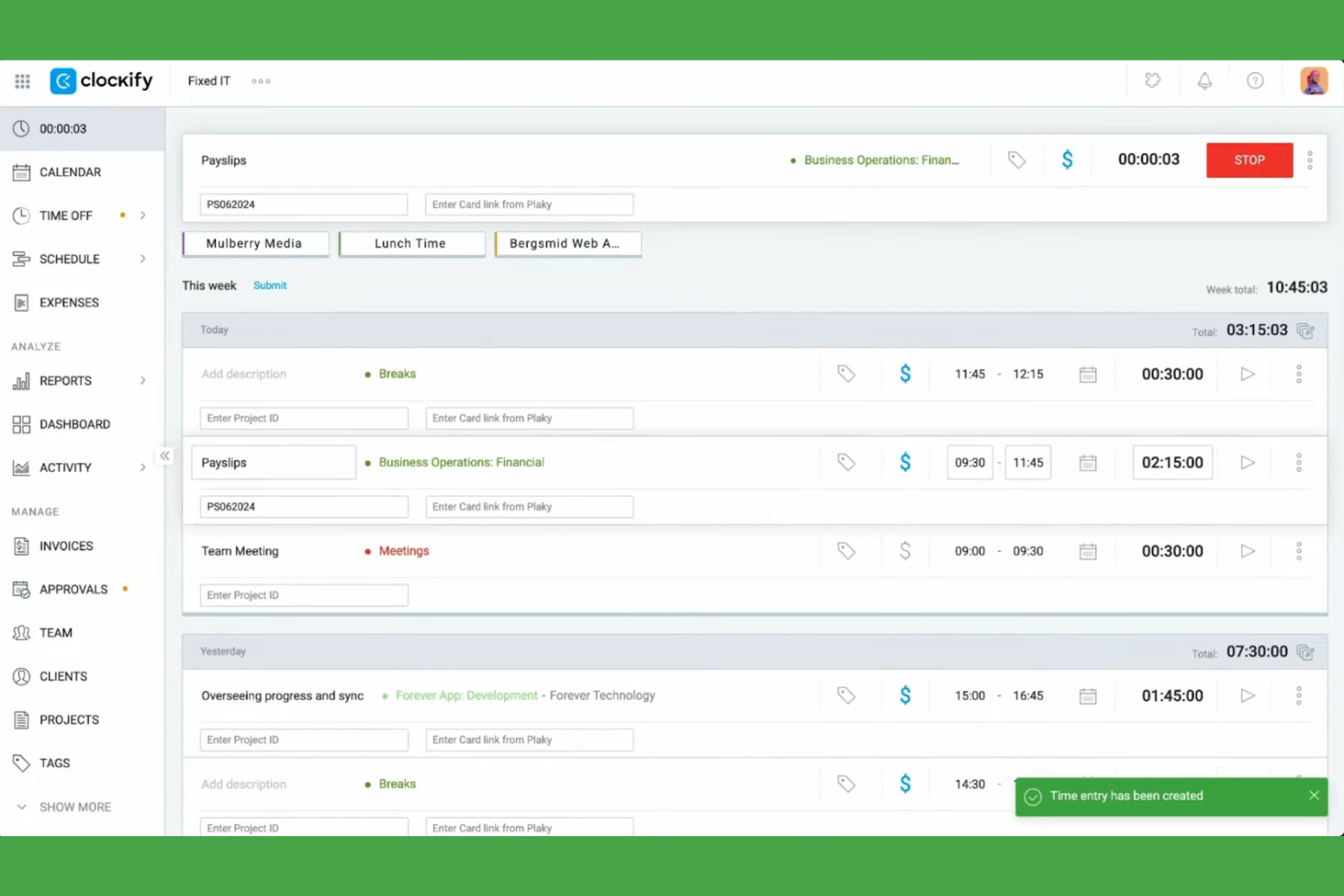
Clockify est un logiciel de suivi du temps conçu pour les travailleurs indépendants, les petites entreprises et les grandes entreprises afin de suivre efficacement les heures travaillées et de gérer les projets. Il aide les utilisateurs à suivre les heures facturables, l'avancement des projets et la productivité des équipes.
Pourquoi Clockify est une bonne alternative à Timely : J'ai sélectionné Clockify parce que son extension de navigateur permet aux membres de l'équipe de lancer des minuteurs de suivi directement dans les applications web existantes, sans perdre leur concentration. Le logiciel propose plusieurs vues de projets et des rapports détaillés, ce qui vous permet de voir les performances de votre équipe. Il est disponible sur Windows, Mac et Linux. Cela en fait une option flexible et accessible pour les équipes de toutes tailles.
Fonctionnalités et intégrations remarquables :
Les fonctionnalités comprennent le suivi du temps, la gestion de projets et des rapports détaillés. Vous pouvez définir des taux de facturation pour les projets et surveiller l'activité de l'équipe grâce à un tableau de bord convivial. Le logiciel fournit également des analyses pertinentes pour vous aider à optimiser la gestion du temps.
Les intégrations comprennent Asana, Trello, Jira, QuickBooks, monday.com, Notion, Google Calendar, GitHub, Salesforce et bien d'autres.
Pros and Cons
Pros:
- Prise en charge étendue des appareils et des extensions multiplateformes
- Fonctionnalités de création de rapports détaillés
- Vues de projets personnalisables
Cons:
- Fonctionnalités avancées limitées
- Outils de gestion de projets uniquement basiques

TimeCamp
Idéal pour le suivi automatisé
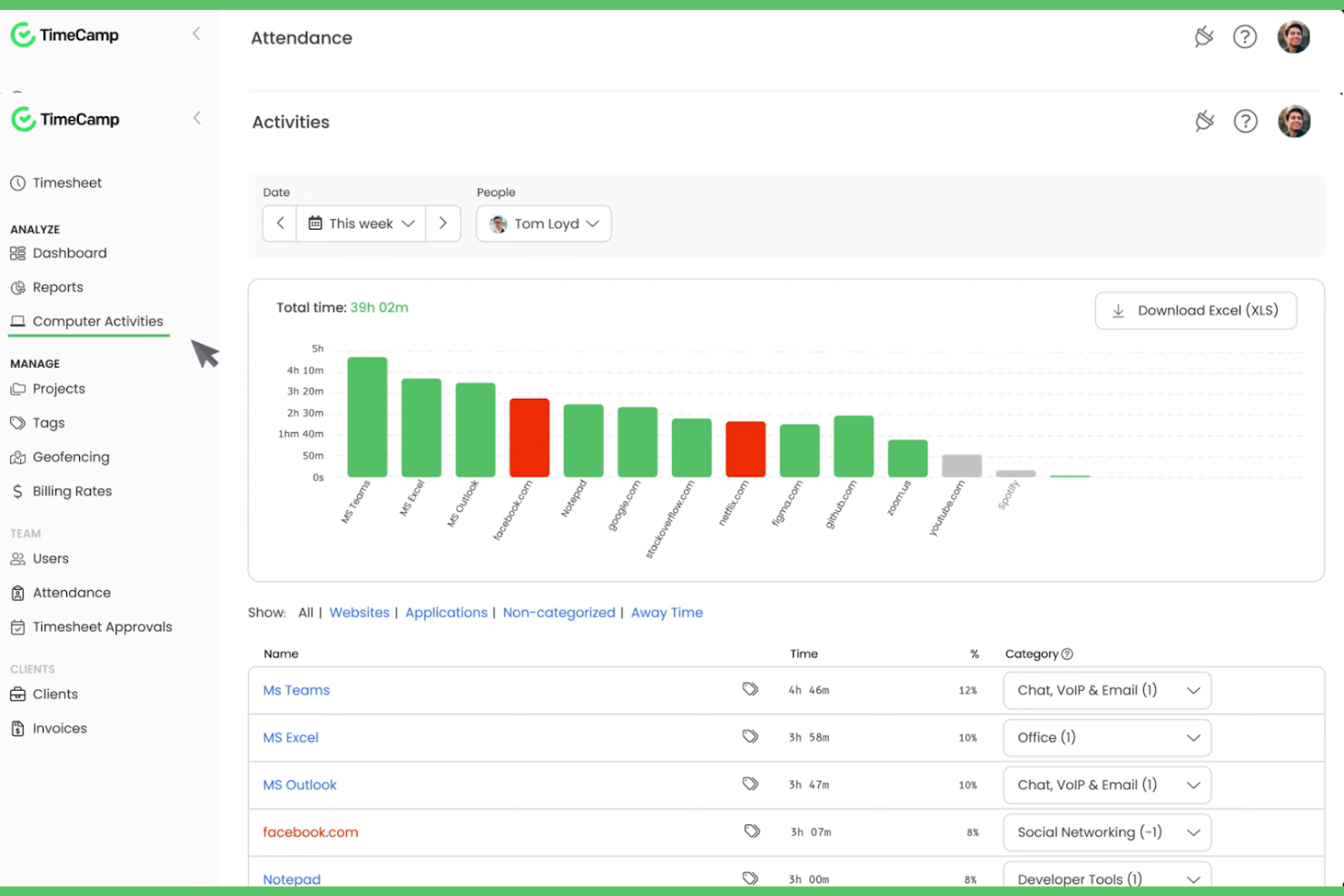
TimeCamp est un outil de suivi du temps et de gestion de projets conçu pour les travailleurs indépendants, les petites entreprises et les grandes sociétés. Il aide les utilisateurs à suivre les heures facturables, à gérer les projets et à améliorer leur productivité grâce à des rapports détaillés et à des analyses.
Pourquoi TimeCamp constitue une bonne alternative à Timely : TimeCamp offre un suivi automatisé du temps, ce qui signifie qu'il n'est pas nécessaire de saisir les données manuellement et permet à votre équipe de gagner un temps précieux. Grâce à sa capacité à suivre le temps passé sur les applications et les sites web, vous obtenez une vision plus précise de votre productivité. L'outil propose des fonctionnalités de création de rapports utiles pour analyser l'avancement des projets et faciliter la gestion des équipes. Ses tableaux de bord faciles à utiliser vous permettent de gérer plusieurs projets.
Fonctionnalités et intégrations remarquables :
Les fonctionnalités comprennent la possibilité de suivre le temps sur différents appareils, qu'il s'agisse d'Android ou d'iOS, afin d'offrir une grande flexibilité aux équipes distantes. Vous pouvez définir des taux de facturation personnalisés pour les projets, ce qui facilite la gestion des budgets. TimeCamp propose également un suivi de la productivité permettant d'identifier et de limiter les sources potentielles de perte de temps.
Les intégrations comprennent Trello, Asana, Slack, QuickBooks, Jira, monday.com, Google Calendar, Microsoft Teams, GitHub, Salesforce, et bien plus encore.
Pros and Cons
Pros:
- Suivi automatisé du temps
- Taux de facturation personnalisés
- Suit le temps sur plusieurs appareils
Cons:
- La configuration initiale peut être complexe
- Options de personnalisation limitées

TMetric
Idéal pour l’intégration native d’outils
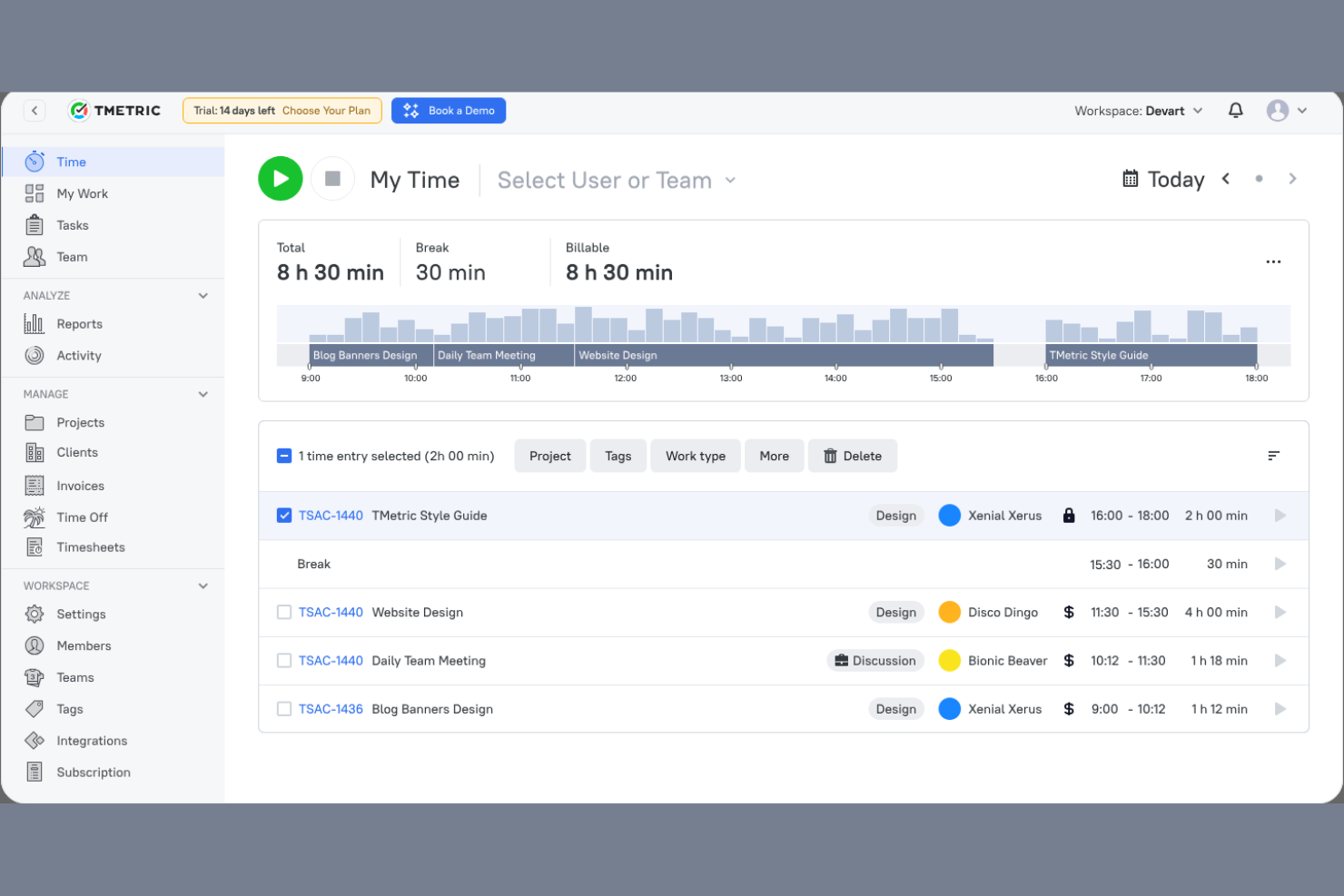
TMetric est un logiciel de suivi du temps conçu pour les freelances, les petites entreprises et les grandes entreprises. Il aide les équipes à suivre le temps, à gérer les projets et à optimiser la productivité grâce à des rapports et des analyses détaillés.
Pourquoi TMetric est une bonne alternative à Timely : TMetric propose une intégration native des outils, vous permettant de vous connecter à différentes plateformes pour disposer d’un flux de travail unifié. Ses fonctionnalités de suivi du temps vous permettent d’enregistrer facilement les heures consacrées à plusieurs projets. Le logiciel fournit des rapports détaillés qui vous aident à analyser la productivité et la facturation. Vous pouvez également suivre les heures facturables et gérer les budgets plus efficacement, ce qui en fait un choix polyvalent pour répondre à différents besoins professionnels.
Fonctionnalités et intégrations remarquables :
Les fonctionnalités incluent la possibilité de définir des taux horaires pour différents projets, afin de garantir une facturation flexible. Vous pouvez également surveiller l’activité de l’équipe en temps réel, ce qui vous donne un aperçu des habitudes de travail. TMetric dispose d’une interface conviviale qui simplifie la gestion du temps et le suivi des projets.
Les intégrations incluent Trello, Asana, Jira, GitHub, QuickBooks, Google Calendar, Todoist, Salesforce et bien plus encore.
Pros and Cons
Pros:
- Surveillance de l’activité de l’équipe en temps réel
- Facturation flexible grâce aux taux horaires
- Intégration native avec d’autres outils populaires
Cons:
- Temps de chargement lents lors du suivi de nombreuses tâches
- Pas de suivi intégré des heures supplémentaires ni de règles concernant les pauses

Idéal pour les analyses IA de la main-d'œuvre
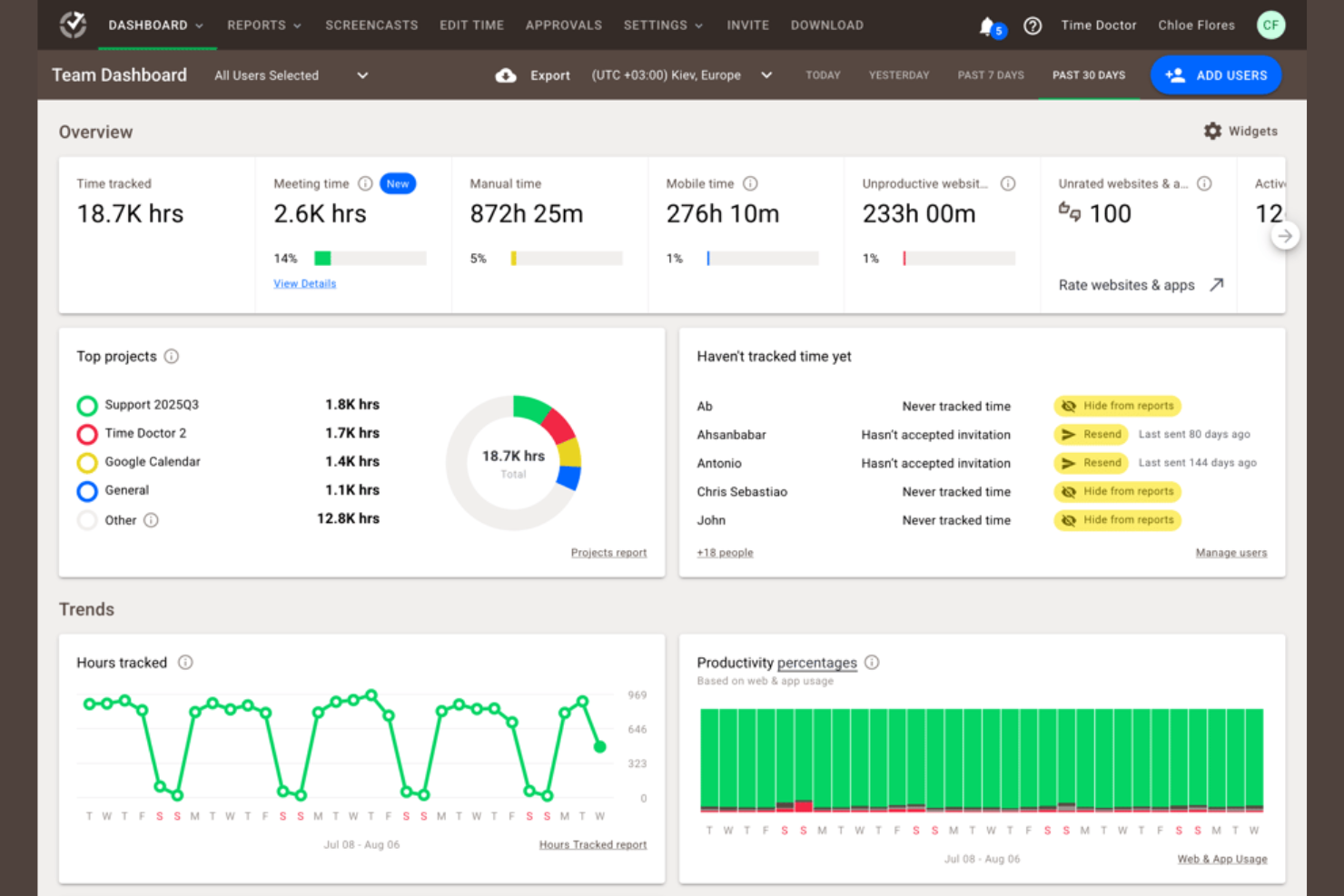
Time Doctor est un outil de suivi du temps et de gestion de la productivité conçu pour les entreprises de toutes tailles. Il aide les équipes à suivre le temps consacré aux tâches, à surveiller la productivité et à gérer efficacement le travail à distance.
Pourquoi Time Doctor est une bonne alternative à Timely : Time Doctor propose des analyses IA de la main-d'œuvre qui fournissent des informations sur la productivité et les performances de l'équipe. Grâce à la surveillance en temps réel, vous pouvez suivre la manière dont le temps est consacré aux tâches et identifier les points à améliorer. Les fonctionnalités de capture d'écran et de suivi de l'activité de l'outil contribuent à garantir la responsabilisation de l'équipe. Les rapports personnalisables vous permettent d'analyser les tendances de productivité et de prendre des décisions éclairées.
Fonctionnalités et intégrations remarquables :
Les fonctionnalités comprennent des alertes de distraction pour aider votre équipe à rester concentrée sur ses tâches. Vous pouvez définir des objectifs de productivité et suivre les progrès réalisés, ce qui aide les équipes à rester concentrées sur les résultats. Time Doctor propose également une gestion de la paie, ce qui facilite le traitement des paiements pour les heures facturables.
Les intégrations comprennent Trello, Asana, Jira, Basecamp, monday.com, GitHub, Sentry, Salesforce, et bien plus encore.
Pros and Cons
Pros:
- Informations sur la productivité basées sur l'IA
- Rapports de productivité personnalisables
- Gestion de la paie intégrée
Cons:
- La configuration initiale peut prendre beaucoup de temps
- Fonctionnalités de l'application mobile limitées aux fonctions de base

Memtime
Idéal pour le suivi axé sur la confidentialité
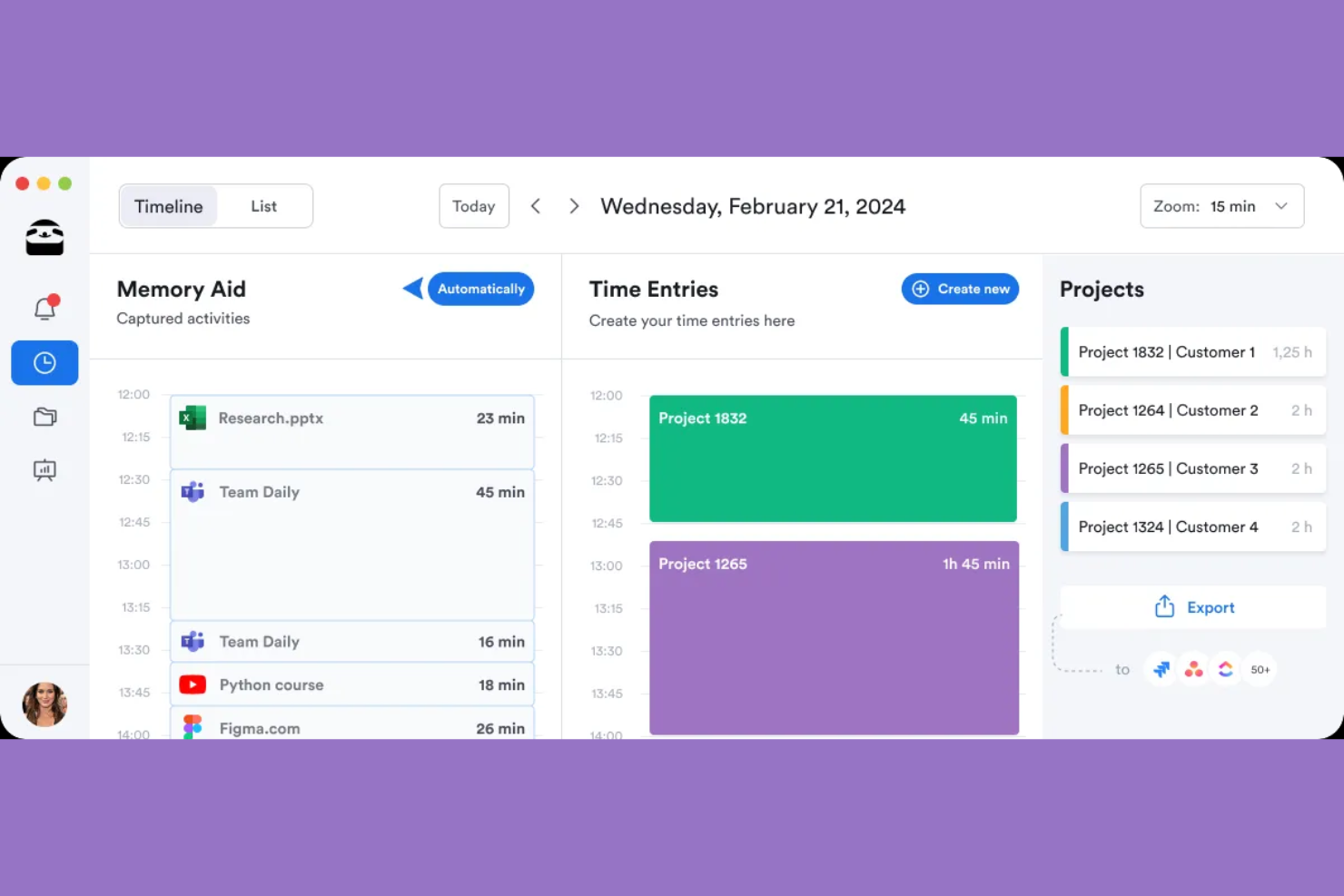
memtime est un outil de suivi du temps qui vous permet d’enregistrer instantanément le temps consacré à vos projets. Il est conçu pour les professionnels de secteurs variés tels que le droit, le marketing et le développement logiciel, en les aidant à suivre leurs heures de travail et à améliorer la précision de leur facturation.
Pourquoi memtime est une bonne alternative à Timely : memtime propose un suivi axé sur la confidentialité en stockant les données hors ligne, ce qui le distingue de Timely. Vous pouvez enregistrer le temps consacré à des projets spécifiques, ce qui facilite la gestion et le suivi des charges de travail. Les entrées de temps peuvent être exportées ou synchronisées avec votre logiciel de gestion de projets. Les analyses détaillées de l’activité fournissent des informations sur la productivité quotidienne et vous aident à optimiser la planification des projets.
Fonctionnalités et intégrations remarquables :
Les fonctionnalités comprennent un outil de suivi automatique qui enregistre le temps consacré aux tâches sans saisie manuelle. Vous pouvez facilement enregistrer le temps associé aux projets, ce qui contribue à une facturation précise. Les analyses détaillées de l’activité vous aident à étudier vos habitudes de travail quotidiennes pour améliorer la gestion des projets.
Les intégrations comprennent Asana, Zoho Books, Jira, QuickBooks, Microsoft Teams, Google Calendar et bien plus encore.
Pros and Cons
Pros:
- Stockage des données hors ligne axé sur la confidentialité
- Capture automatique du temps
- Analyses détaillées de l’activité quotidienne
Cons:
- Aucune application mobile de suivi du temps
- Options de personnalisation limitées

actiTIME
Idéal pour une gestion économique
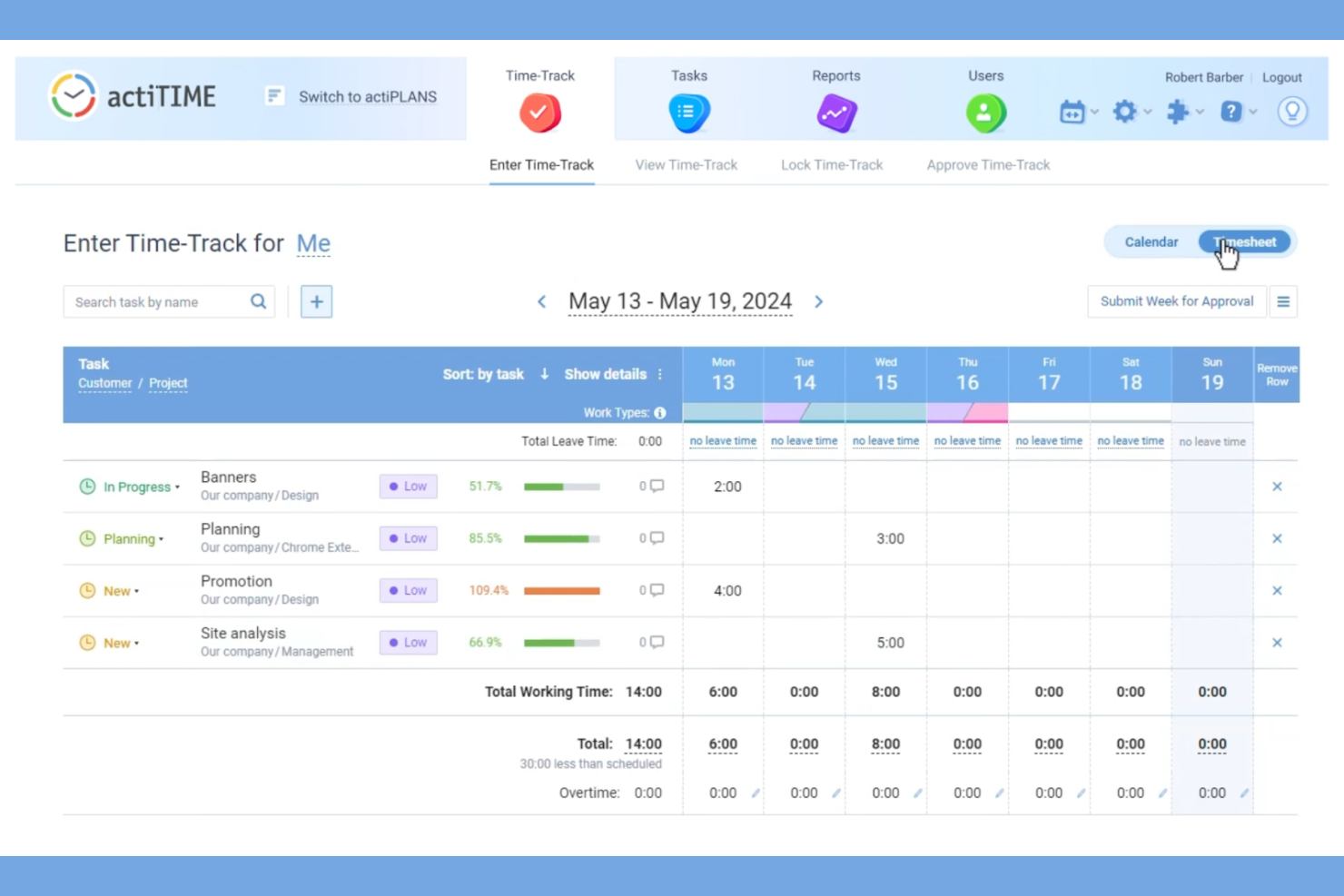
actiTIME est un outil de suivi du temps et de gestion de projets conçu pour les entreprises de toutes tailles. Il aide les équipes à gérer les tâches, à suivre les heures de travail et à optimiser les flux de travail des projets.
Pourquoi actiTIME est une bonne alternative à Timely : actiTIME propose des forfaits payants abordables, ce qui en fait une option intéressante pour les équipes soucieuses de leur budget. Ses fonctionnalités de suivi du temps vous permettent de surveiller les heures de travail et de vous assurer que les budgets des projets sont respectés. Grâce aux outils de gestion des tâches, vous pouvez facilement attribuer et suivre les tâches. Le logiciel fournit également des rapports utiles pour vous aider à analyser les performances des projets et à prendre des décisions éclairées.
Fonctionnalités et intégrations remarquables :
Les fonctionnalités comprennent la possibilité de configurer des flux de travail personnalisés, ce qui contribue à améliorer les processus de votre équipe. Vous pouvez suivre les coûts et les budgets des projets en temps réel afin d'éviter les dépenses excessives. actiTIME propose également une interface conviviale qui simplifie le suivi du temps et la gestion des tâches.
Les intégrations comprennent QuickBooks, Jira, Trello, Todoist, Microsoft Outlook, Salesforce, Zapier, et bien plus encore.
Pros and Cons
Pros:
- Économique pour les équipes soucieuses de leur budget
- Suivi des coûts en temps réel
- Interface conviviale
Cons:
- Fonctionnalités avancées limitées
- Fonctionnalités limitées de l'application mobile
New Product Updates from actiTIME

actiTIME Visual Hour Indicator and Time-Track Report Redesign
actiTIME adds a wave-style hour indicator to the Timesheet and Calendar views and refreshes the Time-Track report for smoother navigation and clearer visuals. For more information, visit actiTIME's official site.

Hubstaff
Idéal pour le suivi du temps par GPS
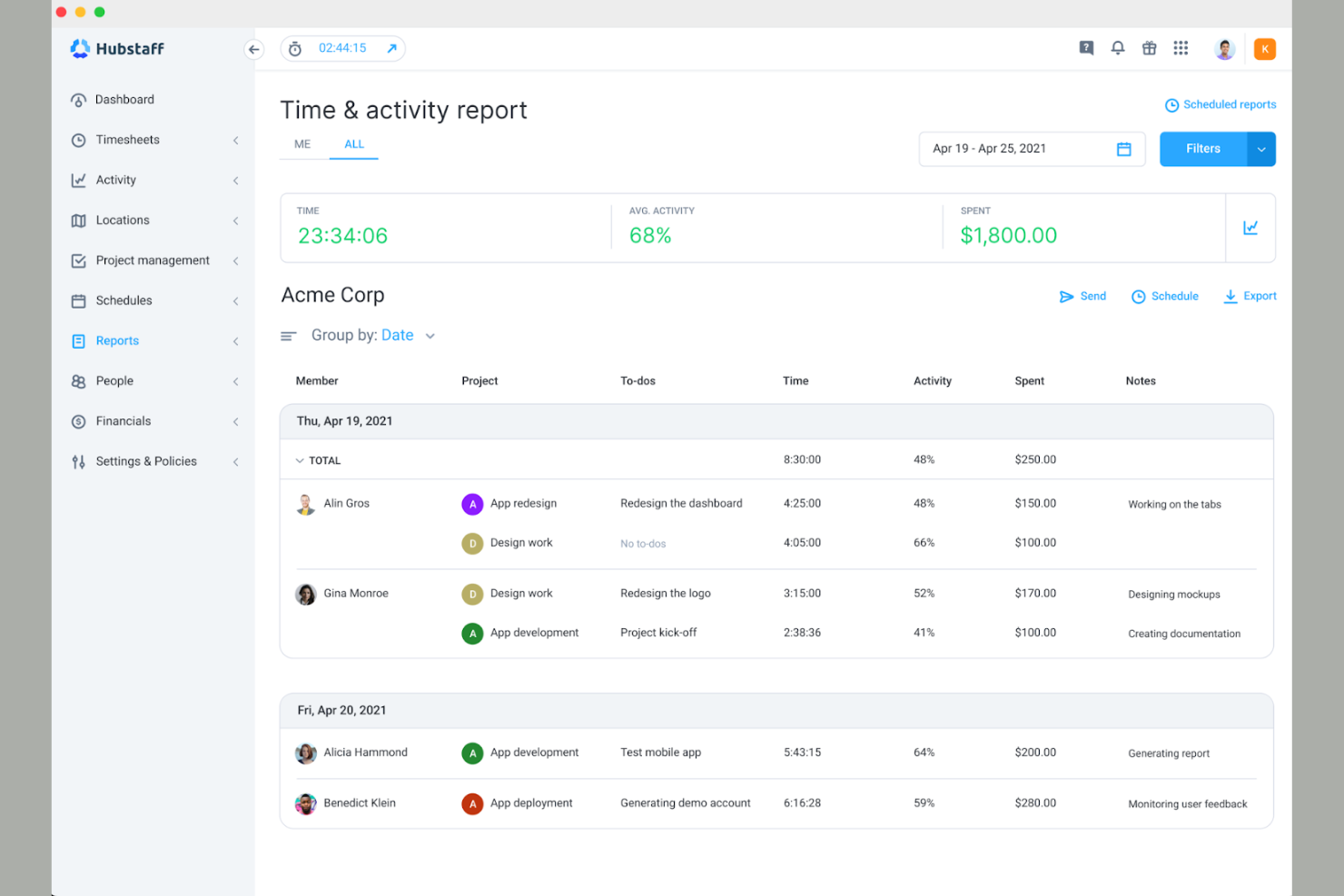
Hubstaff est un outil de suivi du temps et de surveillance des employés conçu pour les équipes à distance et les entreprises disposant d'une main-d'œuvre mobile. Il aide les utilisateurs à suivre le temps, à surveiller leur productivité et à gérer efficacement les activités des employés.
Pourquoi Hubstaff est une bonne alternative à Timely : Hubstaff propose le suivi du temps par GPS, ce qui en fait un outil idéal pour les équipes qui doivent suivre les interventions liées à un emplacement et qui n'ont ainsi plus besoin de pointer. Vous pouvez surveiller les lieux depuis lesquels les membres de votre équipe travaillent et garantir la responsabilisation des employés mobiles. L'outil affiche les niveaux d'activité et permet de prendre des captures d'écran pour vous aider à comprendre comment le temps est utilisé. Vous pouvez également générer des rapports détaillés afin d'analyser la productivité de votre équipe et de prendre des décisions éclairées.
Fonctionnalités et intégrations remarquables :
Les fonctionnalités comprennent la gestion automatique de la paie, qui simplifie les paiements en fonction des heures suivies. Vous pouvez définir des objectifs de productivité et suivre les progrès afin de garder votre équipe concentrée. Hubstaff propose également la génération automatisée de feuilles de temps, ce qui simplifie le processus de paiement.
Les intégrations comprennent QuickBooks, Asana, Trello, Salesforce, Jira, Slack, GitHub, Zendesk, PayPal, et bien d'autres.
Pros and Cons
Pros:
- Suivi GPS pour les travaux liés à un emplacement
- Gestion automatique de la paie
- Processus d'approbation des feuilles de temps
Cons:
- Nécessite un temps de configuration initial
- Coût total élevé pour les modules complémentaires et les fonctionnalités avancées

DeskTime
Idéal pour les équipes à distance et sur site
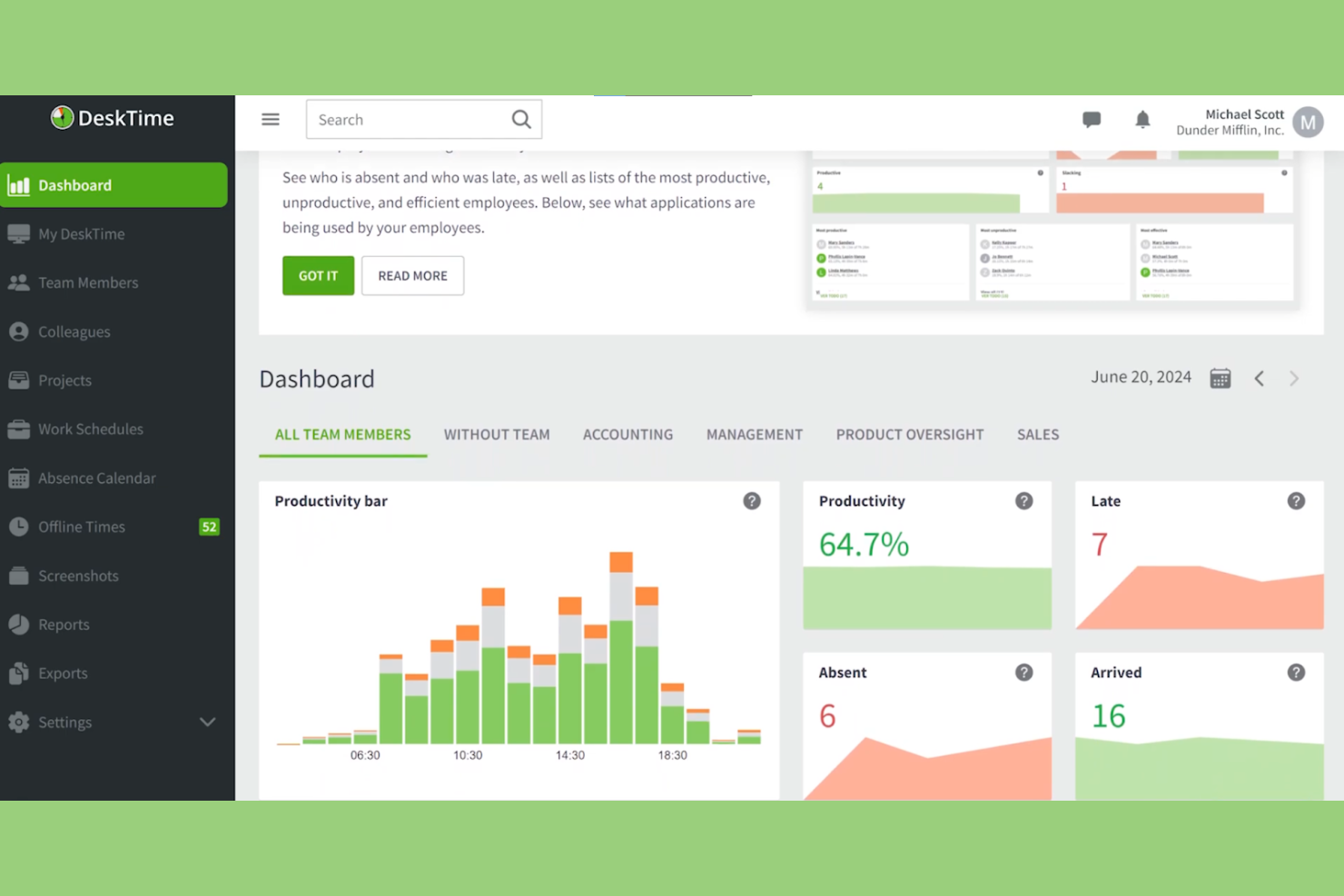
DeskTime est un logiciel de suivi du temps et d’analyse de la productivité conçu pour les équipes à distance comme sur site. Il aide les entreprises à surveiller la productivité des employés, à gérer les projets et à optimiser les processus de travail.
Pourquoi DeskTime est une bonne alternative à Timely : DeskTime propose des fonctionnalités utiles aux équipes à distance comme sur site, offrant flexibilité et adaptabilité. Il inclut un suivi automatique du temps, qui fonctionne en arrière-plan sans saisie manuelle, garantissant des relevés de temps précis. Grâce à ses outils d’analyse de la productivité, vous pouvez obtenir des informations sur les applications et les sites web utilisés. Le logiciel fournit également des scores de productivité quotidiens, vous aidant à identifier et à corriger les inefficacités de l’équipe.
Fonctionnalités et intégrations remarquables :
Les fonctionnalités incluent le suivi du temps hors ligne, qui vous permet d’enregistrer les heures de travail lorsque vous n’êtes pas connecté à Internet. Vous pouvez également définir des horaires de travail et surveiller le respect de ces horaires par votre équipe, afin de garantir la responsabilisation. DeskTime fournit des rapports détaillés qui vous aident à analyser les performances de l’équipe et à prendre des décisions éclairées.
Les intégrations incluent Trello, Asana, Jira, GitLab, Google Calendar, Zapier et Outlook.
Pros and Cons
Pros:
- Suivi automatique en arrière-plan
- Fournit des scores de productivité quotidiens
- Propose un suivi hors ligne
Cons:
- Intégrations limitées
- Un suivi étendu peut entraîner des problèmes de confidentialité

Idéal pour la propriété des données
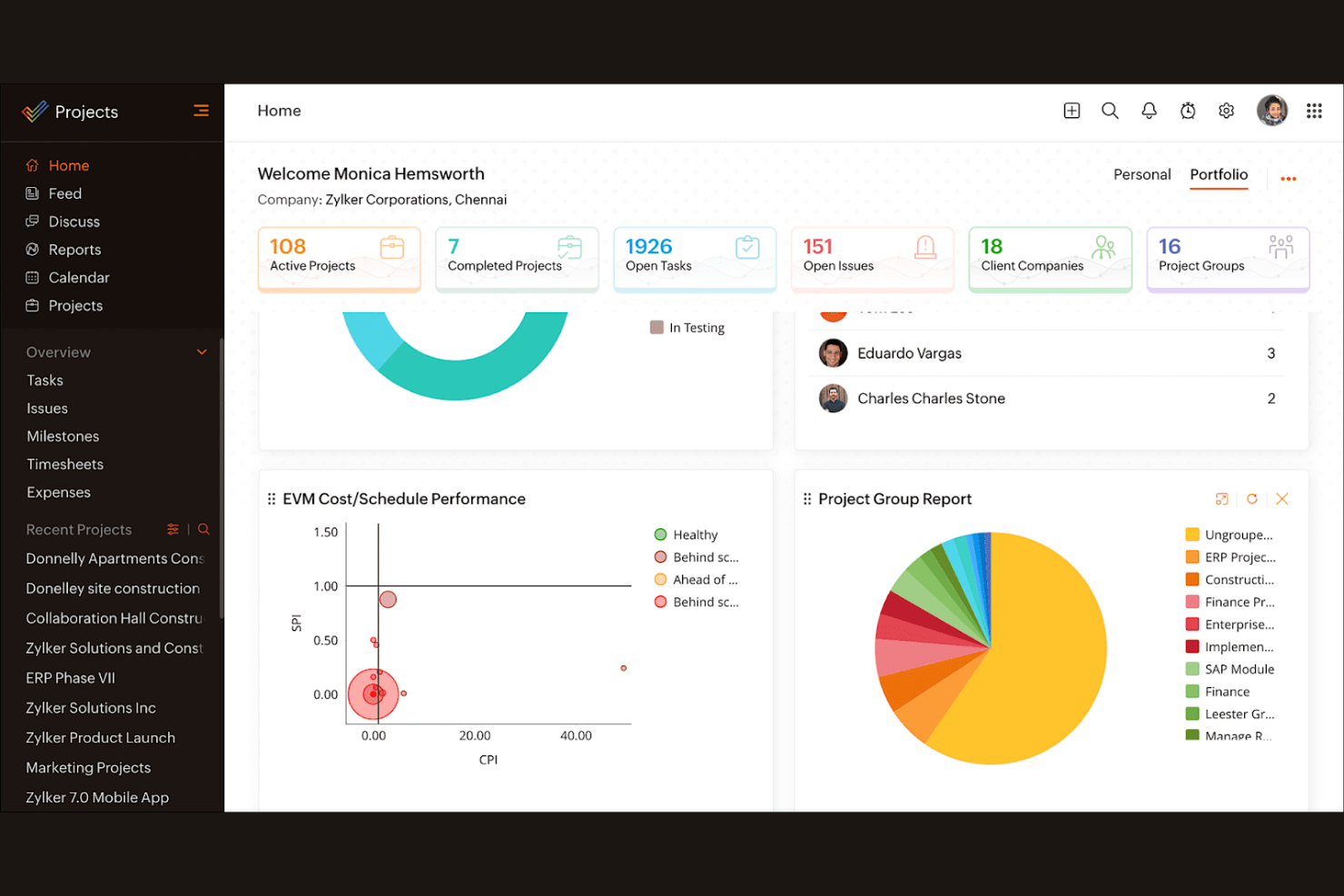
Zoho Projects est un logiciel de gestion de projets conçu pour les équipes de toutes tailles. Il aide les entreprises à planifier leurs projets, à suivre leur progression et à collaborer efficacement.
Pourquoi Zoho Projects est une bonne alternative à Timely : Zoho Projects propose des fonctionnalités qui mettent l’accent sur la propriété des données, afin de garantir que les informations de votre équipe sont sécurisées et accessibles. Ses outils de gestion des tâches vous permettent de diviser les projets en éléments gérables et d’attribuer facilement les tâches. Le logiciel fournit des diagrammes de Gantt pour visualiser les échéances et les dépendances des projets. Grâce à ses fonctionnalités de suivi du temps, vous pouvez surveiller les heures consacrées aux projets et vous assurer de respecter votre budget.
Fonctionnalités et intégrations remarquables :
Les fonctionnalités comprennent des modèles de projet qui simplifient la configuration des tâches récurrentes et vous font gagner du temps. Vous pouvez également utiliser le suivi des problèmes pour gérer et résoudre efficacement les difficultés liées aux projets. Zoho Projects propose une gestion des documents, permettant à votre équipe de stocker et de partager des fichiers au même endroit.
Les intégrations comprennent Dropbox, Microsoft Teams, Zapier, Slack, GitHub, Zoho CRM, Zoho Books, Zoho Invoice, et bien plus encore.
Pros and Cons
Pros:
- Met l’accent sur la propriété des données
- Suivi efficace des problèmes
- Gestion centralisée des documents
Cons:
- Courbe d’apprentissage abrupte pour les nouveaux utilisateurs
- Interface complexe
New Product Updates from Zoho Projects
Zoho Projects Adds CodeX Scripts for Custom Modules
Zoho Projects now supports CodeX Scripts for custom modules, enabling conditional logic and rules for creating, updating, and deleting records. For more information, visit Zoho Projects' official site.
 .
.
Idéal pour l’auto-réservation par les clients



Comment j’évalue les alternatives à Timely
J’évalue les outils sur deux niveaux : les exigences de base, comme la capture passive du temps et l’affectation des projets facturables, ainsi que les éléments différenciateurs qui révèlent quelle option correspond réellement au flux de travail de votre équipe.
Fonctionnalités essentielles (indispensables pour cette liste)
Lorsque je sélectionne les outils de ma liste, j’attribue à chacun une note sur une échelle de 0 (la fonctionnalité n’est pas proposée) à 5 (excellent dans ce domaine) pour chaque fonctionnalité essentielle indiquée ci-dessous. Je convertis ensuite le score total de l’outil en pourcentage. Chaque outil doit obtenir un score total minimum de 65 % pour être pris en compte.
- Suivi automatique du temps : Je vérifie si l’outil capture passivement l’activité des applications, des navigateurs et des documents afin que les utilisateurs ne soient pas obligés de démarrer et d’arrêter des minuteurs toute la journée.
- Affectation des projets et des clients : Les heures suivies doivent être associées clairement aux clients, aux projets et aux tâches, en particulier pour les agences qui gèrent simultanément plusieurs comptes avec abonnement récurrent.
- Feuilles de temps et approbations : Je recherche des feuilles de temps modifiables avec des flux d’approbation permettant aux responsables de vérifier et de verrouiller les entrées avant leur transmission à la facturation ou à la paie.
- Taux facturables et budgets : Les outils doivent prendre en charge des taux facturables par projet ou par utilisateur, ainsi que des plafonds budgétaires, afin que les consultants puissent surveiller leurs marges sans recourir à un tableur distinct.
- Rapports et analyses : J’évalue si les tableaux de bord présentent des données sur l’utilisation et la rentabilité, filtrables par membre de l’équipe, client ou période, et exportables pour les présentations aux parties prenantes.
- Écosystème d’intégrations : L’outil doit se connecter aux plateformes de gestion de projet, de calendrier et de comptabilité que votre équipe utilise déjà, comme Jira, Google Calendar, QuickBooks ou Xero.
Une fois que j’ai établi une liste d’outils répondant à ces critères, j’examine ce qui distingue chaque plateforme.
Facteurs différenciateurs (ce qui distingue les fournisseurs)
Voici comment je compare les différents fournisseurs :
Fonctionnalités remarquables
Les contrôles de confidentialité des employés sont particulièrement importants ici. Certains outils permettent aux utilisateurs d’examiner leurs données d’activité brutes avant qu’elles ne parviennent à un responsable, ce qui facilite considérablement l’adoption au sein des équipes. J’examine également si une plateforme inclut la planification de la capacité : pouvoir prévoir la charge de travail de l’équipe en fonction des heures à venir des projets aide à prévenir l’épuisement professionnel et la surcharge de travail. La facturation native constitue un autre élément différenciateur qui mérite d’être évalué. Les outils qui génèrent des factures prêtes à envoyer aux clients directement à partir des heures facturables suivies éliminent entièrement l’étape manuelle d’exportation vers la comptabilité.
Au-delà des fonctionnalités
La confidentialité des données et la conformité méritent une attention particulière lorsqu’un suivi de l’activité est impliqué. Je vérifie si les fournisseurs détiennent des certifications telles que SOC 2 ou s’ils sont conformes au RGPD, et s’ils proposent des politiques sans captures d’écran. La structure tarifaire joue également un rôle important : certains outils réservent le suivi automatique aux formules supérieures, de sorte que les besoins d’un travailleur indépendant sont très différents de ceux d’une agence de 50 personnes. La couverture des plateformes complète mon évaluation. Les équipes qui répartissent leur travail entre ordinateurs et appareils mobiles ont besoin d’applications natives sur les deux types d’appareils, idéalement avec un suivi hors ligne qui se synchronise lorsque la connexion est rétablie.
Pourquoi chercher une alternative à Timely ?
Bien que Timely soit un bon choix de logiciel de suivi du temps, plusieurs raisons peuvent pousser certains utilisateurs à rechercher d'autres solutions. Vous cherchez peut-être une alternative à Timely parce que…
- Vous avez besoin de fonctionnalités de création de rapports plus avancées
- Votre équipe a besoin de fonctionnalités de suivi hors ligne
- Vous avez besoin d'une meilleure intégration avec les outils existants
- Votre équipe a dépassé les limites d'utilisateurs de Timely
- Vous recherchez une option plus économique
- Vous avez besoin de la prise en charge de plusieurs langues
Si vous vous reconnaissez dans l'une de ces situations, vous êtes au bon endroit. Ma liste contient plusieurs options de logiciels de suivi du temps mieux adaptées aux équipes confrontées à ces difficultés avec Timely et à la recherche de solutions alternatives.
Fonctionnalités clés de Timely
Voici quelques-unes des principales fonctionnalités de Timely pour vous aider à comparer ce que proposent les solutions alternatives :
- Suivi automatique du temps : utilise l’IA pour enregistrer automatiquement le temps consacré aux tâches, réduisant ainsi la saisie manuelle pour votre équipe.
- Feuilles de temps avec IA : complète rapidement les feuilles de temps en utilisant l’IA pour suggérer des entrées de temps, ce qui vous fait gagner du temps.
- Tableaux de bord des projets : offrent une vue d’ensemble visuelle de tous les projets, vous aidant à suivre l’avancement et les échéances.
- Taux facturables : permettent de définir différents taux de facturation pour les tâches et les projets, garantissant une facturation précise des clients.
- Détection de l’inactivité : vous avertit lorsqu’aucune activité n’est détectée, garantissant que les relevés de temps restent précis et reflètent le travail réellement effectué.
- Suivi de l’activité : enregistre automatiquement l’activité de l’ordinateur, offrant une grande précision sans minuteurs manuels.
- Planification de la capacité : vous aide à comprendre le temps disponible pour le travail facturable, optimisant ainsi l’allocation des ressources.
- Gestion des tâches : permet d’attribuer et de suivre les tâches, afin de maintenir votre équipe alignée sur les objectifs du projet.
- Rapports détaillés : fournissent des informations sur l’utilisation du temps et la productivité, facilitant l’analyse des performances.