
Die beste Ressourcenplanungs-Software 2026

15 Eine Liste der besten Ressourcenplanungs-Softwares
Here's my pick of the 15 best software from the 26 tools reviewed.


Grundlagen der Ressourcenplanung
Was ist Ressourcenplanung?
Die Ressourcenplanung ist ein wichtiger Bestandteil des Projektmanagements. Es ist der Prozess und die Methodik für die Zuordnung der Ressourcen eines Unternehmens zu Projekten oder Aufgaben entsprechend der Ressourcenverfügbarkeit. Dazu gehören das Auflisten von Aufgaben, die Einschätzung der Dauer, das Identifizieren von Beschränkungen, das Festlegen von Fristen, das Identifizieren des Ressourcenbedarfs, das Prognostizieren der zukünftigen Verfügbarkeit von Ressourcen, das Identifizieren potenzieller Ressourcenengpässe. Dabei werden alle diese Informationen genutzt, um die geeigneten Ressourcen effizient mit Aufgaben oder Arbeitsplätzen abzugleichen.
Was beinhaltet die Ressourcenplanung?
Die Ressourcenplanung umfasst in der Regel eine Reihe von Tools, die bei der Zuweisung, Planung und Zusammenfassung von Ressourcen helfen. Normalerweise denkt man an ein Gantt-Diagramm, aber Ressourcenmanager und Projektmanager nutzen verschiedene Tools zur Ressourcenplanung, darunter Kalender, Timelines und Histogramme mit zusammengefassten Ressourcendaten.
Was ist eine Ressourcenplanungs-Software?
Die Ressourcen-Planungssoftware kann dir bei der Planung, Organisation und Verwaltung deiner Projekte und deiner Agenturressourcen helfen – egal ob es sich um Personen, Räume oder Telefonleitungen handelt. Diese können genutzt werden, um Ressourcenpläne zu entwickeln und Ressourcenbedarfsprognosen zu erstellen. Je nach Ausgereiftheit der Software sind auch Tools für Kalkulation und Planung, Terminplanung, Kostenkontrolle und Budgetverwaltung, Ressourcenzuweisung und Dokumentenablage verfügbar.
Ressourcen-Planungssoftware ist auch unter vielen anderen Namen bekannt – wenn du Leute über Ressourcen-Planungssoftware, Ressourcen-Zuweisungssoftware, Ressourcen-Zuweisungstools oder Workload-Management-Tools sprechen hörst, sprechen sie alle über dasselbe – es geht um effektive Ressourcenplanung und Tools, die dir helfen, den Prozess zu optimieren.
Die Herausforderung bei der Ressourcenplanungs-Software besteht darin, dass es oft viele Überschneidungen mit anderen Geschäftsfunktionen gibt. Ressourcenmanagement-Software, Zeiterfassung, Projektkommunikation, Ausgaben, Lagerung, Professional Services Automation (PSA) und Services Resource Planning Software (SRP) können sich alle gebündelt wiederfinden – das kann gut sein, aber wenn du mit bestehenden Systemen integrieren oder ersetzen musst, kann es kompliziert werden.
Was sind die Vorteile einer Ressourcenplanungs-Software?
Hier sind einige der Hauptvorteile einer Ressourcenplanungs-Software:
- Zeitersparnis durch manuelle Verschiebung von Ressourcen im Handumdrehen
- Reduzierung der Fehler durch Überbuchung des Teams
- Ein klares Verständnis für die Kapazität und Auslastung des Teams entwickeln
- Die begrenzten Ressourcen, die dir zur Verfügung stehen, effektiver und effizienter einsetzen
Während Agenturen und Studios expandieren, sind die Systeme zur Ressourcenplanung, die für eine kleine Agentur funktionieren könnten, oft nicht skalierbar. Excel und Google Docs sind effektiv kostenlose Tools zur Ressourcenplanung, aber Ressourcenplanungs-Software kann dir dabei helfen, schneller und intelligenter zu arbeiten, sowie Leute den Projekten zuzuordnen und Projekte effektiver zu planen. Wenn du immer noch nach einem kostenlosen Ressourcenplanungs-Tool suchst, dann würde ich empfehlen, Google Sheets oder Excel zu verwenden, aber die Investition in ein ordentliches Tool wird eine lohnende Anschaffung sein.
Was sind Ressourcen?
In einem Unternehmen können Ressourcen alles umfassen, was zum Endprodukt beiträgt: Menschen (Personal und Kompetenzen), finanzielle Ressourcen, Inventar, Geräte und Zubehör, Räume wie Büros und Besprechungsräume, IT-Ressourcen sowie Produktions- und natürliche Ressourcen, und vieles mehr.
Ist dir gerade aufgefallen, dass du nicht nach einer Ressourcen-Management-Software suchst? Schau dir andere nützliche Tools an:
- Projektplanungs-Software, die dir bei der Planung, Verfolgung und Analyse deiner Projekte hilft.
- Ressourcenmanagement-Software, die dir hilft, organisatorische Ressourcen zu verwalten.
Wenn du auf der Suche nach einer Ressourcenplanungs-Software bist, wirst du in diesem Beitrag einen schnellen, einfachen und übersichtlichen Vergleich der zehn besten Ressourcenplanungs-Tools des Jahres 2024 finden.
Die beste Ressourcenplanungs-Software schnell vergleichen und bewerten
In diesem Beitrag werden wir dir auch erklären, was Ressourcenplanungs-Software ist, wie sie dir hilft, dein Team und deine Ressourcen besser zu verwalten und zuzuordnen. Außerdem werden wir eine Zusammenfassung aller Funktionen zur Verfügung stellen, damit du leicht vergleichen und die richtigen Tools zur Planung von Team- und Projektressourcen für dich finden kannst.
Ressourcenmanagement-Software Vergleichskriterien
Ich habe Tools anhand der folgenden Kriterien bewertet, damit diese auf folgender Liste aufgeführt werden können:
- Benutzeroberfläche (UI): Wie gut ist dieses gestaltet? Bietet es übersichtliche Anzeigen und intuitive Navigation?
- Benutzerfreundlichkeit: Ist das Programm leicht zu erlernen und zu bedienen? Gibt es Tutorials und Schulungen? Bietet das Unternehmen einen guten technischen und Anwender-Support?
- Features & Funktionalitäten: Wie viele der wichtigsten Features und Funktionen einer Ressourcenmanagement-Software bietet es und wie leistungsfähig ist es? Konkret interessierte ich mich dafür:
- Automatik: Auto-Scheduling-Funktionen sind ein Hauptgrund für den Einsatz von Ressourcenplanungs-Software. Das bedeutet zumindest, dass sich deine Aufgaben automatisch anpassen, wenn sie umherbewegt werden, entsprechend den Abhängigkeiten, die du eingestellt hast. Es kann auch benutzerdefinierte Workflows mit Automatisierung beinhalten, um wiederholte Prozesse zu rationalisieren.
- Echtzeit-Planung: Die besten Ressourcen-Tools bieten dir Echtzeit-Einblick in die Workloads und ermöglichen es dir, den Fortschritt zu überwachen, die Ressourcenauslastung zu überwachen und Anpassungen in Echtzeit vorzunehmen.
- Warnhinweiße: Ein guter Ressourcenplaner ermöglicht es dir, die Art der Benachrichtigungen und Warnmeldungen, die jeder Benutzer erhält (E-Mail, Desktop usw.), anzupassen und sicherzustellen, dass Warnmeldungen über Ressourcenauslastung und Workload die richtigen Personen auf dem Laufenden halten.
- Integrationen: Ist es einfach, es mit anderen Tools zu verbinden? Irgendwelche vorkonfigurierten Integrationen?
- Wert für $: Wie angemessen ist der Preis für die Funktionen, Kapazitäten und den Einsatz? Ist die Preisgestaltung klar, transparent und flexibel?
The Digital Project Manager ist Reader-unterstützt. Wenn du durch Links auf unserer Website klickst, erhalten wir möglicherweise eine Provision. Mehr dazu erfahren.
-

Insightful
Visit WebsiteThis is an aggregated rating for this tool including ratings from Crozdesk users and ratings from other sites.4.8 -
Accelo
Visit WebsiteThis is an aggregated rating for this tool including ratings from Crozdesk users and ratings from other sites.4.4 -
Forecast
Visit WebsiteThis is an aggregated rating for this tool including ratings from Crozdesk users and ratings from other sites.4.6




Ein Überblick über die 15 besten Softwares zur Ressourcenplanung
Diese Bewertungen umfassen die oben genannten Tools zur Optimierung der Ressourcenplanung im Detail, gefolgt von einer Liste zusätzlicher Tools zur Ressourcenplanung und -terminierung.


Float.com offers a tailored approach to resource scheduling. By addressing challenges such as time tracking and capacity planning, it empowers your team to make informed decisions and improve project delivery. With features like real-time tracking of roles and skills, along with finance and estimation capabilities, Float provides a comprehensive solution for organizations looking to forecast revenue and enhance operational efficiency.
Who Is Float.com Best For?
For creative and professional services teams, agencies, and consultancies that need clear visibility into team capacity, billable utilization, and profitability across projects.
Why I Picked Float.com
I picked Float because it excels in profitable resource scheduling, making it a prime choice for organizations looking to optimize project margins and resource allocation. The software's visual scheduling interface provides a clear overview of team workloads, allowing you to efficiently allocate and adjust resources in real time. Its capacity planning tools help you forecast revenue and manage project costs, ensuring that your team is always working on the most profitable projects. Additionally, Float's integration capabilities with tools like Slack and Jira streamline workflows, keeping your team aligned and informed, which is crucial for maintaining profitability.
Float.com Key Features
In addition to its capacity planning and financial insights, Float offers several other features that enhance its appeal as a resource scheduling software.
- Visual Resource Schedule: This feature provides a clear, graphical overview of your team's workload, making it easy to allocate and adjust resources as needed.
- Built-in Time Tracking: Track the time spent on tasks directly within the platform, allowing for more accurate project timelines and resource allocation.
- Role-Based Access Control: Customize user permissions based on roles, ensuring that each team member has access to the necessary tools and information.
- Skill-Based Assignment: Assign tasks based on team members' skills, helping to optimize resource utilization and improve project outcomes.
Float.com Integrations
Integrations include Asana, Basecamp, ClickUp, Jira, Google Calendar, Aprimo, Hubspot, Karbon, monday.com, and Salesforce.
Pros and Cons
Pros:
- Built-in time tracking enhances project accuracy and timelines.
- Strong forecasting tools improve resource allocation decisions.
- Flexible dashboards help organize complex project management.
Cons:
- Interface complexity may overwhelm users with simple projects.
- Time tracking features require a higher plan.
New Product Updates from Float.com

Float Introduces Smart Assign for Faster Team Staffing
Float.com releases Smart Assign, powered by machine learning, to quickly suggest roles for team members. For more information, visit Float’s official site.
 .
.

Kantata is designed for organizations that need to match the right people to the right projects based on skills, availability, and preferences. Professional services teams and consultancies use Kantata to manage resource allocation with a focus on individual strengths and workload balance. Its people-centric approach helps you optimize project outcomes while supporting employee satisfaction and retention.
Who Is Kantata Best For?
People-focused professional services organizations that need to balance resource planning with skills, availability, and project demand.
Why I Picked Kantata
What sets Kantata apart is its focus on aligning people’s skills and interests with project needs. The resource management dashboard lets you see individual availability, skill sets, and utilization rates, making it easier to assign the right person to each task. I like how Kantata’s talent profiles and forecasting tools help you plan for future project demands while considering employee preferences. This people-centric approach supports both project delivery and team satisfaction, which is especially valuable for professional services organizations.
Kantata Key Features
Some other features in Kantata help teams manage resources and projects more effectively:
- Project Portfolio Management: Track multiple projects and their resource needs in one centralized view.
- Role-Based Permissions: Control access to sensitive resource and project data based on user roles.
- Time and Expense Tracking: Capture billable hours and expenses directly within the platform.
- Scenario Planning: Model different resource allocation scenarios to see potential impacts before making changes.
Kantata Integrations
Integrations include Salesforce, SAP, Jira, Xero, BambooHR, Slack, Worday, QuickBooks, HubSpot, and NetSuite.
Pros and Cons
Pros:
- Distinguishes between soft and firm allocation
- Resourcing fully integrated with master planning
- Good reporting functionality for resource data
- Easy capacity management
Cons:
- Custom reports can be difficult to create without training
- Proofing solution is an add-on
New Product Updates from Kantata
Kantata Integrates E-Invoicing With Avalara
Kantata introduces integrated e-invoicing through its partnership with Avalara, enabling compliant, automated invoicing across regions. For more information, visit Kantata's official site.
 .
.
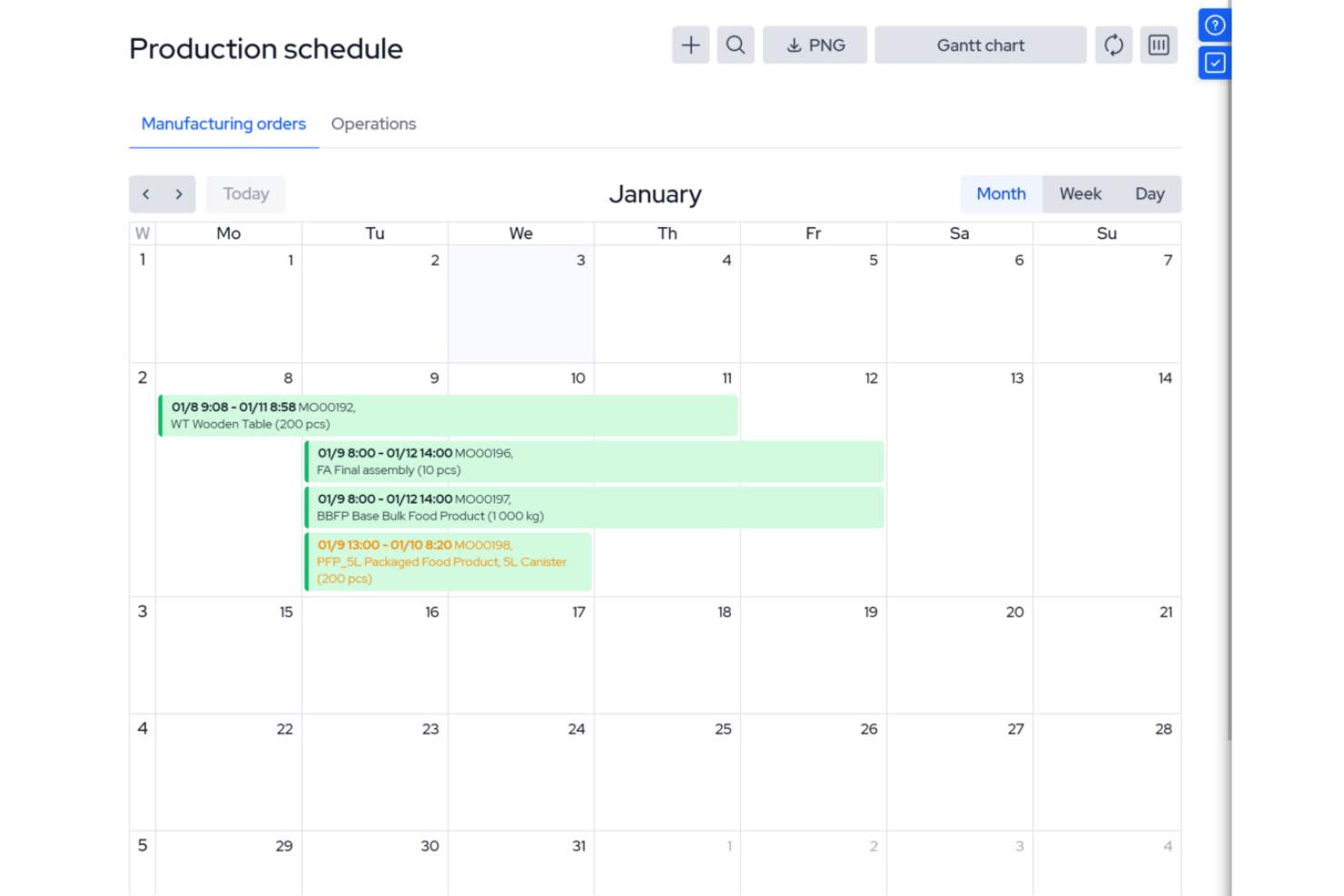
MRPeasy is a manufacturing resource planning (MRP) software, specifically tailored for the manufacturing sector. It integrates with industry processes, offering real-time visibility into production scheduling, inventory management, and operational efficiency. It’s especially useful for operations managers and production planners who want to automate job routing, track materials, and manage shop floor workloads. The platform’s focus on manufacturing resource planning sets it apart from general project scheduling tools.
Who Is MRPeasy For?
Small to mid-sized manufacturers that need integrated production scheduling and resource planning tied to inventory and operations.
Why I Picked MRPeasy
For manufacturers who need more than basic scheduling, MRPeasy offers resource planning tools built specifically for production environments. The platform’s visual production calendar and drag-and-drop job scheduling help you allocate machines, workstations, and labor with precision. I like that MRPeasy automatically factors in material availability and lead times when generating production schedules. This level of manufacturing-specific detail makes it a strong fit for teams managing complex shop floor operations.
MRPeasy Key Features
Some other features that stand out for manufacturers using MRPeasy include:
- BOM (Bill of Materials) Management: Lets you create, edit, and track multi-level BOMs for accurate production planning.
- Shop Floor Reporting: Provides real-time updates from the shop floor on job status and worker activity.
- Inventory Tracking: Monitors raw materials and finished goods across multiple locations.
- Purchase Order Management: Automates the creation and tracking of purchase orders for materials and components.
MRPeasy Integrations
Integrations include Amazon, Xero, WooCommerce, BigCommerce, Crossfire, Dropbox, Google Drive, OneDrive, HubSpot, QuickBooks, ShipStation, Salesforce, Shopify, Zapier, and more.
Pros and Cons
Pros:
- Comprehensive view of resource scheduling
- Automated production planning
- Simple, easy-to-use interface
Cons:
- Limited customizations
- Lack of advanced features due to a simple platform
New Product Updates from MRPeasy
MRPeasy Adds Estimated Weight Calculation for Items
MRPeasy introduces an estimated weight calculation feature, enhancing efficiency. For more information, visit MRPeasy's official site.
 .
.

Scoro gives project managers and operations leads a real-time view of team workloads and project timelines. Agencies and consultancies use Scoro to spot bottlenecks, balance assignments, and adjust plans as priorities shift. Its live dashboards and visual planners help you make fast, informed decisions about resource allocation.
Who Is Scoro Best For?
Services businesses that need real-time insight into workloads, utilization, and business performance across projects and teams.
Why I Picked Scoro
Scoro stands out for its ability to give you instant visibility into team workloads and project progress. The real-time dashboards and interactive Gantt charts let you see who’s overloaded, who’s available, and where deadlines might slip. I appreciate how Scoro’s workload planner updates automatically as tasks shift, so you always have an up-to-date picture of resource allocation. This level of transparency is especially useful for agencies and consultancies managing multiple projects at once.
Scoro Key Features
In addition to its real-time workload visibility, Scoro offers several other features that support resource scheduling:
- Calendar Sync: Connects with Google Calendar and Outlook for unified scheduling across platforms.
- Task Dependencies: Lets you set and manage dependencies between tasks to control project flow.
- Billable and Non-Billable Time Tracking: Tracks both billable and internal hours for accurate reporting.
- Customizable Dashboards: Allows you to tailor dashboard widgets to display the metrics and data most relevant to your team.
Scoro Integrations
Integrations include Google Calendar, Xero, QuickBooks, Sage Intacct, Exact Online, Expensify, Stripe, Jira, HubSpot, Salesforce, Google Drive, Dropbox, Okta, Azure AD, and Zapier.
Pros and Cons
Pros:
- Real-time project tracking
- Robust utilization reports
- Good invoicing and financial management features
Cons:
- Mobile app is less robust than web version
- Its many customization options can feel overwhelming
New Product Updates from Scoro

Scoro Introduces Subtasks for More Granular Work Planning
Scoro introduces subtasks and improved price list deletion warnings, enabling teams to break down work into smaller units for detailed planning while protecting pricing data from accidental changes. For more information, visit Scoro’s official site.
 .
.

Productive is purpose-built for agencies and professional services teams that need to manage people, projects, and profitability in one place. It’s especially useful for operations leads and resource managers who want to balance workloads, track billable hours, and forecast capacity across multiple clients. The platform’s focus on agency workflows and integrated financial tracking sets it apart from more generic resource scheduling tools.
Who Is Productive Best For?
Agencies and professional services firms that want integrated resource planning, budgeting, time tracking, and financial visibility.
Why I Picked Productive
Agencies and professional services teams have unique needs when it comes to resource scheduling, and Productive is built with those workflows in mind. The platform’s resource planning module lets you assign people to projects based on skills, availability, and billable rates, which is essential for managing client work. I appreciate how Productive connects scheduling with time tracking and project budgets, so you can see the impact of resource allocation on profitability in real time. This focus on agency-specific resource management makes it a strong fit for teams juggling multiple clients and shifting priorities.
Productive Key Features
Some other features that make Productive useful for agencies and professional services include:
- Customizable Project Templates: Let you create and reuse templates for common project types and workflows.
- Utilization Reporting: Tracks team member workload and utilization rates across projects.
- Integrated Document Management: Stores project files and documents directly within the platform.
- Client Portal: Provides clients with access to project updates, deliverables, and communication threads.
Productive Integrations
Integrations include Jira, Xero, Exact, Slack, QuickBooks, Microsoft Outlook, Fortnox, Personio, and Zapier. It also has an open API available for custom integrations.
Pros and Cons
Pros:
- Built-in time management can bill multiple business entities
- Plenty of custom tags to choose from
- Quite easy to set up collaborative tasks
Cons:
- Invoicing and quotation features are limited
- Roles/user rights are not as granular
New Product Updates from Productive

Productive Introduces Resource Request Feature
Productive introduces a resource request feature that helps teams request and allocate resources more efficiently. For more information, visit Productive's official site.
 .
.
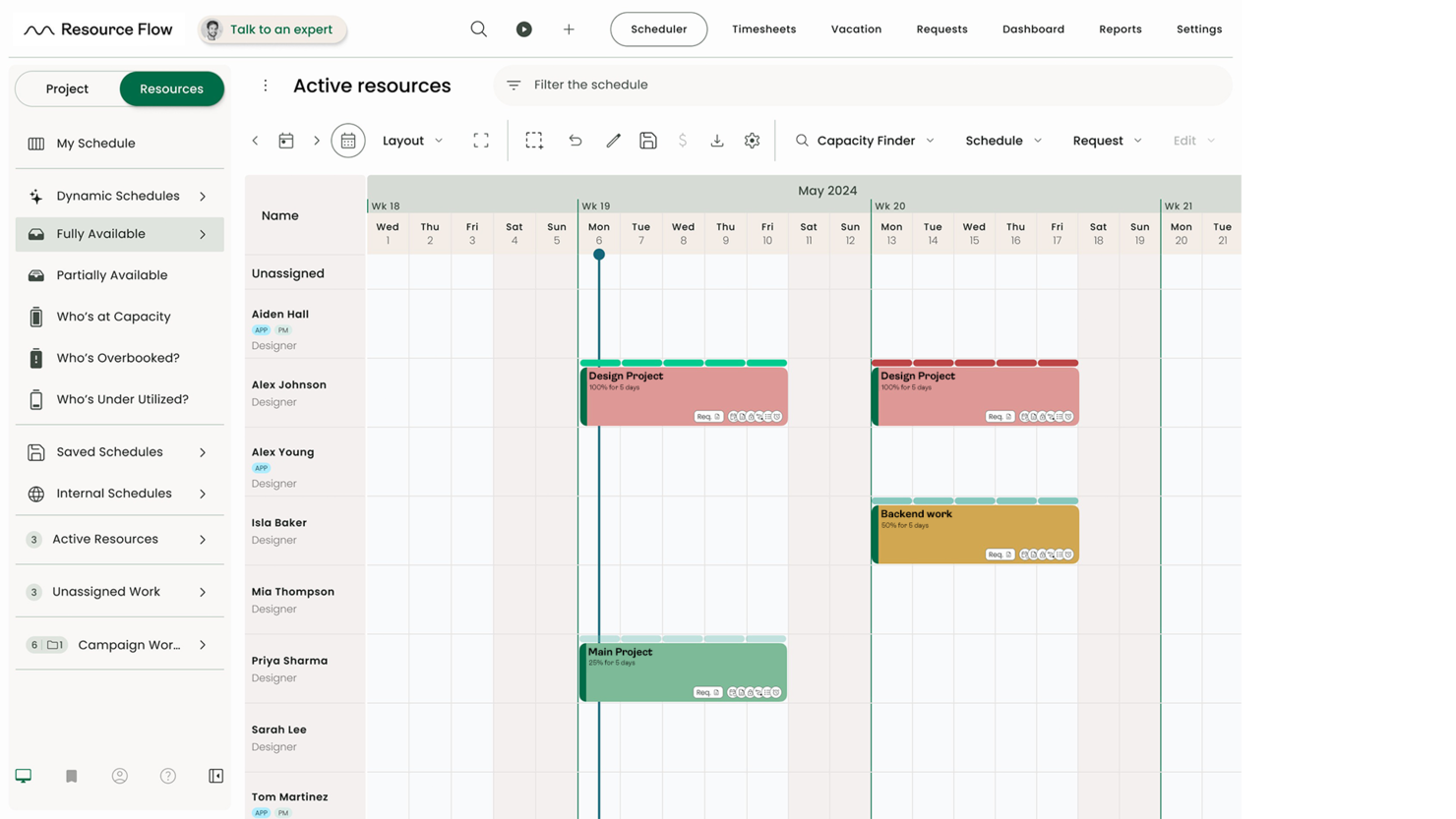
Hub Planner is a resource scheduling software with a full suite of scheduling, time entry, and reporting features. The platform’s advanced scheduling, approval workflows, and reporting tools help teams coordinate large-scale resource planning with clarity and precision.
Helen Ní Mháirtín, Head of Customer Success at Milient, highlights how the platform helps teams stay efficient: “Resource management with Hub Planner allows users to avoid overbooking and align availability accurately. It also has a powerful capacity finder, which helps identify available resources across projects.”
Who Is Hub Planner Best For?
Hub Planner by Milient is built for mid-sized and large organizations that need to manage complex resource pools across multiple projects. It’s especially useful for PMOs, operations leads, and consultancies that require granular control over capacity, forecasting, and utilization.
Why I Picked Hub Planner by Milient
For organizations with larger teams and complex project portfolios, Hub Planner by Milient offers the depth needed to manage resources at scale. The platform’s resource scheduler supports drag-and-drop planning across departments, locations, and roles, which is essential for mid-sized to large companies. I appreciate the built-in approval workflows that help maintain oversight as resource requests and changes move through different managers. Its advanced reporting and forecasting tools also give leadership the visibility they need to make informed decisions about capacity and utilization.
Hub Planner by Milient Key Features
Some other features that make Hub Planner by Milient a strong choice for resource scheduling include:
- Timesheets Module: Team members can log hours directly against projects and tasks.
- Vacation and Leave Management: Tracks all types of leave and integrates them into resource availability.
- Custom Fields: Allows you to add organization-specific data points to resources or projects.
- Project Billing Rates: Supports multiple billing rates for different projects, roles, or clients.
Hub Planner by Milient Integrations
Integrations include Basecamp, Slack, iCal, and Zapier, which lets you connect to thousands of apps. A REst API is also available for custom-built integrations.
Pros and Cons
Pros:
- Good overview of staff task/time allocations and availability
- Easily track several projects and generate reports
- Filter planning & forecasting data by project, resource, group or skill set
Cons:
- 24/7 support starts in the Premium plan
- To customize views and schedule layout you need to edit settings


Bonsai Agency Software brings resource planning and forecasting tools together for agencies and consultancies managing multiple projects and clients. It’s built for teams that need to balance workloads, track utilization, and anticipate future capacity needs. The platform’s forecasting features help leaders spot resourcing gaps and make informed staffing decisions before projects hit bottlenecks.
Who Is Bonsai Agency Best For?
Agencies and service firms that need forecasting, workload planning, and financial tracking in one system.
Why I Picked Bonsai Agency Software
Resource planning and forecasting are at the core of Bonsai Agency Software’s approach, which is why I picked it for this list. The platform offers visual workload charts and utilization dashboards that help agencies see who’s available, who’s overbooked, and where future gaps might appear. I appreciate how Bonsai lets you forecast project needs and allocate resources based on real-time and projected data. These features make it a strong choice for teams that need to plan ahead and keep projects staffed without overloading anyone.
Bonsai Agency Software Key Features
Some other features that make Bonsai Agency Software useful for resource scheduling include:
- Project Templates: Quickly set up new projects with pre-defined tasks and milestones.
- Time Tracking: Tracks billable and non-billable hours directly within each project.
- Client Portal: Provides clients with access to project status, deliverables, and communications.
- Automated Invoicing: Generates and sends invoices based on tracked time and completed work.
Bonsai Agency Software Integrations
Integrations include Gmail, Google Calendar, Zapier, Slack, QuickBooks Online, Calendly, ClickUp, Trello, Google Drive, Google Sheets, Xero, HubSpot, and more.
Pros and Cons
Pros:
- All-in-one solution with invoicing, time tracking, and accounting
- Automation features that streamline workflow and manage time
- Professional templates for contracts, proposals, and invoices
Cons:
- Limitations with scalability
- Lacks advanced features


Resource Guru is designed for teams that need a clear view of capacity and resource allocation, especially in project-based environments. It’s a strong fit for operations managers and project leads who want to balance workloads, track availability, and manage timesheets without complexity. The platform’s visual scheduling grid and built-in leave management make it easy to spot conflicts and optimize team utilization.
Who Is Resource Guru Best For?
Teams that need simple, visual capacity planning with integrated timesheets and minimal setup complexity.
Why I Picked Resource Guru
When capacity planning and timesheet management are top priorities, Resource Guru stands out for its focused approach. The tool’s scheduling grid gives you a real-time view of team availability, making it easy to allocate work without overbooking. I like how Resource Guru includes built-in timesheets that automatically capture booked hours, so you can compare planned versus actual time spent. This combination of visual scheduling and integrated time tracking is especially useful for teams that need to manage workloads and monitor utilization closely.
Resource Guru Key Features
Some other features that make Resource Guru useful for capacity planning and scheduling include:
- Resource Filters: Let you filter resources by skills, location, or custom tags for faster assignment.
- Personal Dashboards: Each team member gets a personalized dashboard showing their bookings and availability.
- Leave Management: Tracks vacation, sick days, and other leave types directly in the schedule.
- API Access: Offers an API for custom integrations with other business tools.
Resource Guru Integrations
Integrations include Google Calendar, Microsoft Outlook, Slack, Microsoft Teams, Asana, Jira Software Cloud, Google Sheets, Salesforce, HubSpot, Smartsheet, Basecamp, and Clockify.
Pros and Cons
Pros:
- Heatmaps for quick capacity insights
- Affordable per-user rate
- Daily resource summary emails
Cons:
- Limited reporting depth compared to larger enterprise tools
- Lacks zooming options in the calendar view
New Product Updates from Resource Guru

Resource Guru Launches Asana Integration
Resource Guru now integrates with Asana to enhance task scheduling by providing insights into availability and skills. For more information, visit Resource Guru's official site.
 .
.

Connecteam is a resource scheduling and employee management platform designed for deskless teams. It combines scheduling, time tracking, and task management into one mobile-friendly system, making it easier for businesses to manage employees across multiple locations.
Who Is Connecteam Best For?
Multi-location businesses with deskless or frontline employees that need shift scheduling and workforce coordination.
Why I Picked Connecteam
When you need to manage shift scheduling across several locations, Connecteam stands out for its location-based scheduling and mobile-first design. The platform lets managers assign shifts to specific sites, track employee check-ins with GPS, and quickly fill open shifts with qualified staff. I like that you can set location-specific rules and notifications, which helps prevent scheduling conflicts and ensures coverage where it’s needed most. These features make Connecteam a strong fit for businesses with distributed teams and complex shift requirements.
Connecteam Key Features
Some other features that make Connecteam useful for resource scheduling include:
- Shift Templates: Create and reuse common shift patterns for faster scheduling.
- Automated Shift Reminders: Sends push notifications to employees before their shifts start.
- Time Off Requests: Allows staff to submit vacation or sick leave requests directly in the app.
- Payroll Export: Exports timesheets and attendance data for payroll processing.
Connecteam Integrations
Integrations include Gusto, QuickBooks, Paychex, Xero, ADP, Zapier, Wix Bookings, Lightspeed POS, and PrismHR.
Pros and Cons
Pros:
- Detailed time tracking with GPS stamping
- Customizable forms and task workflows
- Auto-scheduling reduces manual shift planning
Cons:
- Geolocation tools may struggle in remote areas
- Interface can feel complex for new users


Hive is a project management and collaboration platform designed to help teams plan, execute, and monitor their work in a centralized workspace. It offers various tools to manage tasks, track progress, and facilitate communication among team members. If you need a clear view of team workloads and availability, Hive offers visual resource scheduling built for fast-moving teams
Who Is Hive Best For?
Teams that want clear visibility into team availability and workload distribution across active projects.
Why I Picked Hive
When I need to visualize team availability at a glance, Hive stands out for its clear resource management tools. The platform’s Team View gives you a real-time look at who’s busy, who’s free, and how work is distributed across your team. I like that you can filter by project, role, or individual to quickly spot scheduling conflicts or underutilized resources. These features make Hive a strong fit for project managers who want to keep workloads balanced and avoid bottlenecks.
Hive Key Features
Some other features that make Hive useful for resource scheduling include:
- Gantt Chart View: Lets you map out project timelines and dependencies visually.
- Time Tracking: Allows team members to log hours directly within tasks.
- Automated Workflows: Enables you to set up recurring tasks and approval processes.
- Native Messaging: Provides built-in chat for real-time team communication.
Hive Integrations
Integrations include Google Drive, Google Calendar, Dropbox, Microsoft Teams, Outlook Calendar, Slack, Jira, Zoom, Microsoft OneDrive, GitHub, Box, and Asana.
Pros and Cons
Pros:
- Good for optimizing team capacity
- Effective time tracking capabilities
- Comprehensive project management features
Cons:
- Mobile app lacks some desktop functionalities
- Team resourcing is a paid add-on
New Product Updates from Hive

Hive Launches AI-Powered Buzz Mail
Hive introduces Buzz Mail, an AI-driven email organizer that prioritizes messages and suggests personalized replies. For more information, visit Hive's official site.
 .
.
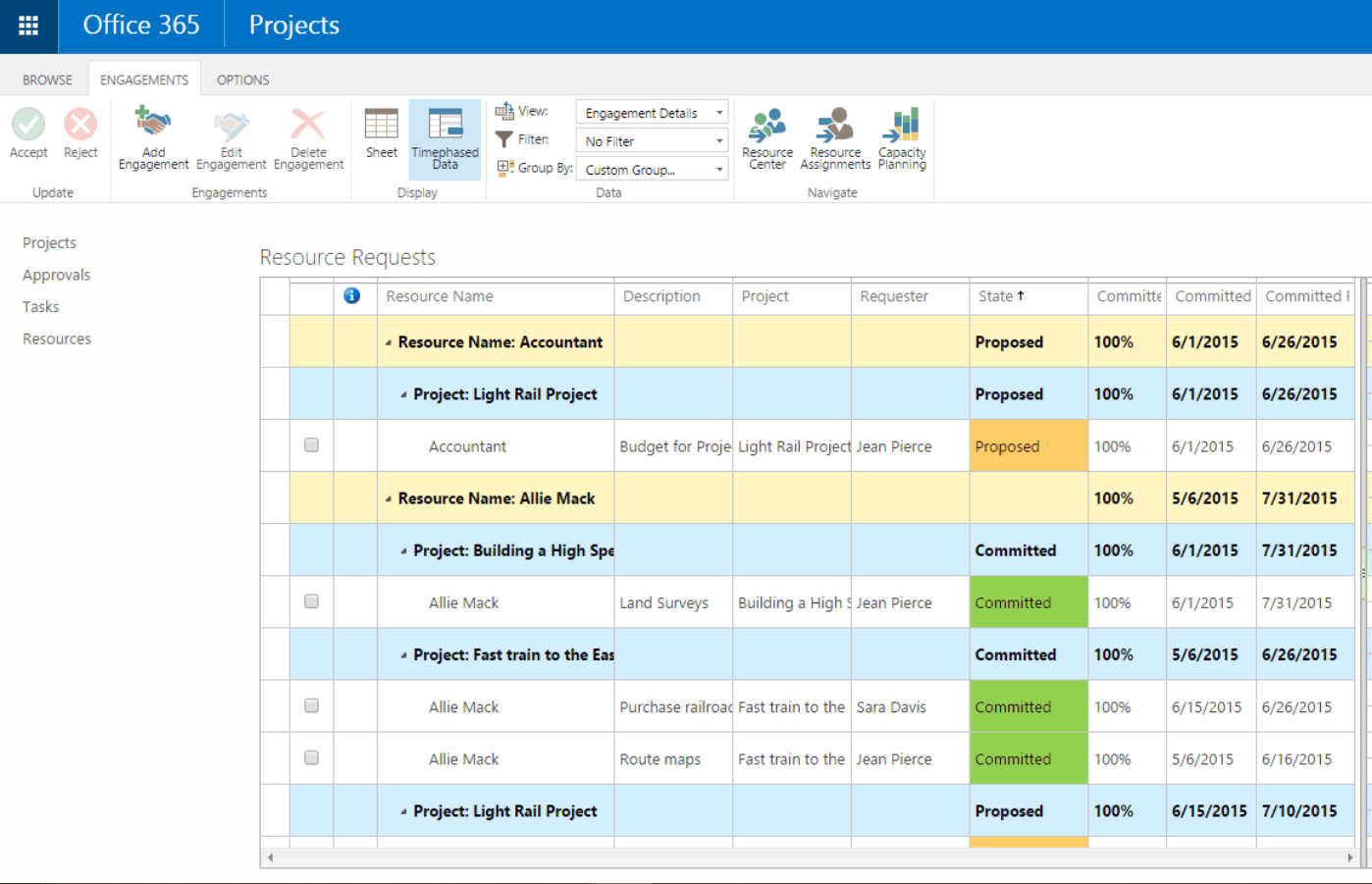
For teams already using Microsoft 365, Microsoft Project offers resource scheduling that fits right into your existing workflows. It’s a strong choice for project managers in organizations that rely on Microsoft tools for collaboration and reporting. With its deep integration across Microsoft apps, you can coordinate resources, track workloads, and manage dependencies without leaving your familiar environment.
Microsoft Project can be clunky (which is why many people search for MS Project alternatives), but MS Project is still a standard, well-supported, and widely adopted tool.
For Allan Hou, Sales Director at TSL Australia, the platform delivered clarity that spreadsheets couldn’t match: “Microsoft Project provided me with much clearer insight into time allocation compared to using a spreadsheet. I liked having the ability to frame each task in hours on the calendar instead of abstract time-based blocks, which allowed the project to progress without guesswork.”
Who Is Microsoft Project Best For?
Organizations already invested in the Microsoft ecosystem that need structured project and resource management tools.
Why I Picked Microsoft Project
Because Microsoft Project is built to work seamlessly with the Microsoft 365 suite, it’s a natural fit for teams already invested in that ecosystem. The tool’s resource scheduling features let you assign tasks, monitor workloads, and adjust allocations directly alongside your existing files and communications in Microsoft Teams, Outlook, and SharePoint. I appreciate how you can pull in data from other Microsoft apps to inform resource planning and reporting. This level of integration helps project managers keep everything connected and reduces the friction of switching between platforms.
Microsoft Project Key Features
Some other features that make Microsoft Project useful for resource scheduling include:
- Gantt Chart Visualization: Lets you build and adjust project timelines with drag-and-drop functionality.
- Resource Pool Management: Allows you to create a centralized pool of resources for use across multiple projects.
- Built-In Reporting Tools: Generates visual reports on resource allocation, project progress, and workload distribution.
- Task Dependency Mapping: Enables you to define and manage task relationships and constraints within your schedule.
Microsoft Project Integrations
Integrations include other Microsoft software, like Outlook, Excel, Skype, and more.
Pros and Cons
Pros:
- Integration with other Microsoft software
- Driver prioritization module for ranking strategies/objectives
- Helpful project template descriptions for guidance
- Can generate a Gantt chart from a spreadsheet
Cons:
- Few customization options
- Higher learning curve
- Limitations on collaboration tools


If your team manages complex projects with frequent changes and dependencies, Jira brings issue tracking and resource scheduling together in one platform. It’s especially useful for software development teams and IT departments that need to coordinate tasks, bugs, and workloads across sprints or releases. With its customizable workflows and granular assignment features, Jira helps you keep resources aligned with shifting project priorities.
Who Is Jira Best For?
Software development and technical teams that manage resources alongside issue tracking and sprint planning.
Why I Picked Jira
Jira stands out for resource scheduling when your projects revolve around tracking issues, tasks, and bugs in detail. Its issue tracking system lets you assign, prioritize, and monitor work items, making it easy to see who’s working on what and where bottlenecks might appear. I like how you can use boards and filters to visualize workloads and shift resources as priorities change. For teams that need to balance ongoing support with project delivery, Jira’s granular tracking and assignment features help keep everything organized.
Jira Key Features
Some other features that make Jira useful for resource scheduling include:
- Sprint Planning Boards: Organize and allocate tasks for each sprint cycle.
- Customizable Workflows: Allows you to tailor task progress stages to match your team’s process.
- Time Tracking Fields: Enables you to log and monitor estimated and actual time spent on tasks.
- Bulk Issue Editing: Lets you update assignments, priorities, or statuses for multiple issues at once.
Jira Integrations
Integrations include Confluence, Slack, Trello, Google Drive, Bitbucket, GitHub, Salesforce, Zoom, and Microsoft Teams.
Pros and Cons
Pros:
- Great for companies of all sizes
- Tons of integration options
- Freemium paln for 10 users
Cons:
- Limited functionality on free version
- Limited mobile app functionality


Agencies and client-focused teams looking to manage both project schedules and invoicing in one place often turn to ActiveCollab. The platform combines resource scheduling with built-in time tracking and invoicing, making it easier to connect project work to billable hours. If you need to keep client billing tightly linked to your team’s workload, ActiveCollab offers a unified approach.
Who Is ActiveCollab Best For?
Service teams that need project tracking combined with client billing and invoicing workflows.
Why I Picked ActiveCollab
For teams that need to connect project schedules directly to client billing, ActiveCollab offers a rare combination of resource scheduling and invoicing in one platform. Its built-in time tracking lets you log hours against specific tasks, which you can then convert into invoices without leaving the tool. I appreciate how you can manage project assignments and monitor billable hours side by side, making it easier to keep client work and payments aligned. This setup is especially useful for agencies and consultancies that juggle multiple client projects and need to keep billing transparent.
ActiveCollab Key Features
Some other features that make ActiveCollab useful for resource scheduling include:
- Workload Management View: Lets you see team availability and task assignments on a visual timeline.
- Recurring Tasks: Allows you to set up tasks that repeat on a regular schedule for ongoing work.
- Project Templates: Enables you to quickly launch new projects with pre-set tasks and schedules.
- Task Dependencies: Lets you define relationships between tasks to manage sequencing and deadlines.
ActiveCollab Integrations
Integrations include Google Drive, Dropbox, Trello, Basecamp, Asana, Wrike, Slack, Hubstaff, TimeCamp, QuickBooks, Xero, Authorize.Net, Braintree, PayPal, Stripe, and hundreds of other third-party apps using Zapier.
Pros and Cons
Pros:
- Great organization of task overview
- Fully customizable API
- People/role management
- Easy to invite collaborators
Cons:
- No Kanban cards/tasks
- No integration with GitHub
- Can’t duplicate task lists

Planview AdaptiveWork is designed for large organizations that need to coordinate complex projects and resources across multiple departments. Enterprise project managers can use its advanced resource scheduling, portfolio management, and workflow automation to handle high-volume, cross-team initiatives. If your business requires granular control over resource allocation and real-time visibility into enterprise-wide workloads, this platform brings those capabilities together in one place.
Who Is Planview AdaptiveWork Best For?
Enterprises managing large-scale, cross-departmental initiatives that require portfolio oversight and governance.
Why I Picked Planview AdaptiveWork
When you need to manage resources at an enterprise scale, Planview AdaptiveWork stands out for its ability to handle complex, multi-project environments. The platform offers advanced resource forecasting and capacity planning tools, which help large organizations balance workloads and avoid bottlenecks across teams. I picked it because its portfolio management features let you prioritize projects and allocate resources based on real-time business needs. For enterprise project managers, these capabilities make it possible to align resource scheduling with strategic goals and shifting priorities.
Planview AdaptiveWork Key Features
Some other features that make Planview AdaptiveWork valuable for resource scheduling include:
- Automated Workflow Engine: Lets you design and automate multi-step approval and task processes.
- Customizable Dashboards: Allows you to build real-time views of project and resource data tailored to your needs.
- Document Management: Provides a centralized space to store, share, and version project files.
- Time and Expense Tracking: Enables team members to log hours and expenses directly within each project.
Planview AdaptiveWork Integrations
Integrations include Microsoft Teams, Salesforce, Jira, SAP, Workday, ServiceNow, Google Workspace, Slack, Tableau, and QuickBooks.
Pros and Cons
Pros:
- Highlighting for what changes and the critical path
- Simpler and more intuitive to use than other apps
- Good at forecasting future workload
Cons:
- Doesn’t track or allocate requests automatically on the basis of FIFO (First-in, First-out)
- No request tracking on hourly basis
- Highlighting for what changes and the critical path


EZOfficeInventory, now known as EZO, is a versatile asset management software designed to enhance the way you handle your resources. If your team needs a single place to manage asset requests and reservations, Ezo offers a centralized platform built for that purpose. Facilities managers, IT teams, and operations leads can use it to track, schedule, and approve equipment usage across locations. Its focus on asset visibility and request workflows helps organizations avoid double-booking and keep inventory in check.
Who Is Ezo Best For?
Organizations managing shared equipment and asset requests alongside scheduling and resource allocation.
Why I Picked Ezo
Centralizing asset requests is a challenge for organizations with distributed teams and shared equipment, which is why Ezo caught my attention. The platform’s asset reservation calendar lets users see availability and book resources in advance, reducing conflicts and double-bookings. I picked Ezo because its approval workflows and automated notifications keep everyone in the loop when assets are checked out or returned. These features make it a strong fit for teams that need to manage asset scheduling and requests from a single, organized hub.
Ezo Key Features
Some other features that make Ezo useful for resource scheduling include:
- Barcode and QR Code Scanning: Lets you quickly check assets in and out using mobile devices.
- Customizable Asset Fields: Allows you to track unique details for each asset type.
- Maintenance Scheduling: Enables you to set recurring service dates and track maintenance history.
- Role-Based Access Controls: Gives you the ability to set permissions for different user groups.
Ezo Integrations
Integrations include Google Sheets, monday.com, Google Forms, Slack, QuickBooks Online, Microsoft Office 365, Smartsheet, Knack, Salesforce, HubSpot, Microsoft Teams, and Zendesk.
Pros and Cons
Pros:
- Offers cloud backup management
- Supports multiple tracking technologies like barcode, QR code, and RFID
- Customizable reporting and analytics
Cons:
- Requires training for effective use
- Lack of a sandbox environment for testing new features
Vergleichstabelle: Die beste Ressourcenplanungs-Software im Überblick
Nachfolgend haben wir eine übersichtliche Tabelle zusammengestellt, die grundlegende Informationen über die besten Ressourcen-Tools, die in diesem Artikel beschrieben werden, zusammenfasst. Es gibt eigentlich nicht “die beste Planungssoftware” auf dem Markt – man muss das richtige Tool für sich selbst finden. Ein einfaches, schlichtes Projektplanungs-Tool könnte perfekt für eine kleine interne Agentur geeignet sein, während eine Planungssoftware für kleine Unternehmen mit 100 Remote-Mitarbeitern eine Unternehmenslösung mit viel mehr Funktionalität benötigt. In der folgenden Übersichtstabelle haben wir einige der wichtigsten Features zusammengefasst, die dir helfen, eine Entscheidung zu treffen, einschließlich der Testzeit, des Preises pro Benutzer und unserer Bewertung.
| Tool | Best For | Trial Info | Price | ||
|---|---|---|---|---|---|
| 1 | Best for profitable resource scheduling | 30-day free trial available | From $7/scheduled user/month | Website | |
| 2 | Best for people-centric resource scheduling | Free demo available | Pricing upon request | Website | |
| 3 | Best for manufacturer resource planning | Free trial available | From $44.92/user/month (billed annually) | Website | |
| 4 | Best for real-time workload visibility | Free 14-day trial available + free demo available | From $19.90/user/month (billed annually) | Website | |
| 5 | Best for agencies and professional services | 14-day free trial available | From $10/user/month (billed annually) | Website | |
| 6 | Best for midsized to large companies | 14-day free trial + free demo available | From $7/user/month | Website | |
| 7 | Best for resource planning and forecasting | Free 7-day trial available | From $9/user/month (billed annually) | Website | |
| 8 | Best for capacity planning with timesheets | Free 30-day trial available | From $4.16/user/month | Website | |
| 9 | Best for multi-location shift scheduling | Free plan + free demo available | From $29/month | Website | |
| 10 | Best for visualizing team availability | Free plan available | From $1/user/month (billed annually) | Website | |
| 11 | Best for Microsoft integrations | 30-day free trial | From $10/user/month (billed annually) | Website | |
| 12 | Best for project issue tracking | 14-day free trial + free plan available | From $7.91/user/month | Website | |
| 13 | Best for client invoicing | 14-day free trial | From $12.50/month (billed annually, up to 3 users) | Website | |
| 14 | Best for enterprise project management | Free demo available | Pricing upon request | Website | |
| 15 | Best for centralized asset requests | 15-day free trial | From $35/month (billed annually) | Website |

Weitere Ressourcenplanungs-Tools
Die folgende Liste umfasst eine Reihe von zusätzlichen Ressourcenplanungs-Tools, die wir in der obigen Liste nicht näher beleuchtet haben:
- Schedule It
For contractor scheduling
- Planview Vantage
For project portfolio management
- Runn
For real-time planning
- Silverbucket
For project-based work
- Parallax
For software development firms
- Acuity PPM
For strategic portfolio resource alignment
- elapseit
For integrated financial features
- eResource Scheduler
Simple, standalone scheduling module
- Primetric
For IT service companies
- Dayshape
AI-powered resource scheduling


Möchtest Du Die Optionen Eingrenzen?
Dieses Tool ist ziemlich nützlich. In Zusammenarbeit mit Crozdesk haben wir uns bemüht, dir Zugang zu dem „Software-Finder“ zu geben.
Wenn du einige der Details über dein Projekt und die Funktionen, die du in einem Projektmanagement-Tool suchst, eingibst, wird eine Liste von Tools erstellt, die deinen Präferenzen entsprechen. Du gibst deine E-Mail an das Team weiter und es schickt dir einen nützlichen PDF-Leitfaden mit einer Zusammenfassung deiner besten Übereinstimmungen.
Was denkst du über das Thema?
Was gibt es sonst noch über Projektmanagement-Tools und Resourcing-Planungssoftware zu sagen? Wir würden uns freuen, wenn du irgendwelche Vorschläge, Tipps oder Gedanken zur Verwendung dieser Art von Software hast – lass uns deine Meinung dazu in den Kommentaren unten wissen.