

Die 10 besten Loom-Alternativen für asynchrone Videos im Jahr 2026

10 Auswahlliste der besten Loom-Alternativen


Die Rolle eines Projektmanagers kann anspruchsvoll sein. Sie jonglieren mit Fristen, koordinieren Teams und treiben die Produktivität voran. Videokommunikationstools wie Loom waren für viele die erste Wahl, aber manchmal passen sie einfach nicht zu den Anforderungen Ihres Teams.
Vielleicht suchen Sie nach besseren Funktionen, mehr Speicherplatz oder bestimmten Compliance-Anforderungen. Meiner Erfahrung nach kann die Wahl des richtigen Tools einen entscheidenden Unterschied bei der Zusammenarbeit und Effizienz machen.
In diesem Artikel stelle ich Ihnen die besten Loom-Alternativen vor. Ich habe jede Option unabhängig getestet und bewertet, um Ihnen dabei zu helfen, die perfekte Lösung zu finden. Sehen wir uns Lösungen an, die die individuellen Herausforderungen Ihres Teams wirklich unterstützen können.
Was ist Loom?
Loom ist eine Software für Videokommunikation und Zusammenarbeit, mit der Sie ganz einfach Videonachrichten aufnehmen und teilen können. Sie wird häufig von Fachleuten wie Projektmanagern, Lehrkräften und Marketingfachleuten genutzt, die komplexe Ideen schnell vermitteln müssen.
Mit Funktionen zur Aufzeichnung, Bildschirmfreigabe und sofortigen Weitergabe hilft Loom Ihnen und Ihrem Team, Nachrichten effektiv zu vermitteln. Insgesamt bietet Loom eine unkomplizierte Möglichkeit, die Kommunikation und Zusammenarbeit innerhalb von Teams zu verbessern.
Zusammenfassung der besten Loom-Alternativen
Diese Vergleichstabelle fasst die Preisdetails meiner besten Loom-Alternativen zusammen und hilft Ihnen dabei, die beste Lösung für Ihr Budget und Ihre geschäftlichen Anforderungen zu finden.
| Tool | Best For | Trial Info | Price | ||
|---|---|---|---|---|---|
| 1 | Am besten für mehrsprachige Tutorial-Dokumentation geeignet | 10-tägige kostenlose Testversion + kostenlose Demo verfügbar | Ab $40/Monat (jährlich abgerechnet) | Website | |
| 2 | Am besten für Marketingteams geeignet | Kostenloser Tarif verfügbar | Ab $79/Monat (jährlich abgerechnet) | Website | |
| 3 | Am besten für Videobearbeitung | Kostenloser Tarif verfügbar | Ab $39/Jahr | Website | |
| 4 | Am besten geeignet für Transkription | Kostenloser Tarif verfügbar | Ab $12/Nutzer/Monat | Website | |
| 5 | Am besten für Videoanalysen | Kostenloser Tarif + kostenlose Testversion + kostenlose Demo | Ab $59/Benutzer/Monat (jährlich abgerechnet) | Website | |
| 6 | Am besten zum Teilen von Dateien geeignet | 7-tägige kostenlose Testversion | Ab $8.25 /Mitglied/Monat | Website | |
| 7 | Am besten für Vertriebsinteraktionen | Kostenlose Demo verfügbar | Ab $42/Monat | Website | |
| 8 | Am besten für einfache Bildschirmaufnahmen | Kostenloser Tarif verfügbar | Ab $8.16/Nutzer/Monat (jährlich abgerechnet) | Website | |
| 9 | Am besten für kreatives Storytelling geeignet | 7-tägige kostenlose Testversion verfügbar | Ab $13/Monat (jährlich abgerechnet) | Website | |
| 10 | Am besten für KI-Einblicke | 7-tägige kostenlose Testversion verfügbar | Ab $120/Monat (jährlich abgerechnet) | Website |
Warum Sie unseren Software-Empfehlungen vertrauen können
Unser Team testet und bewertet Software seit 2012. Als Projektmanager wissen wir selbst, wie schwierig – und wichtig – es ist, die richtige Software auszuwählen.
Für diesen Leitfaden haben wir Tools mithilfe von praktischen Tests und unabhängiger Recherche bewertet und dabei unsere Bewertungskriterien angewendet. Zudem greifen wir auf Erkenntnisse von Branchenvordenkern und praktizierenden Projektmanagement-Experten zurück.
Unsere Bewertungen spiegeln unser menschliches redaktionelles Urteilsvermögen wider, keine Verkaufsstrategie.
Expertenprüfer:
Bewertungen der besten Loom-Alternativen
Nachfolgend finden Sie meine ausführlichen Zusammenfassungen der besten Loom-Alternativen, die es auf meine Auswahlliste geschafft haben. Meine Bewertungen bieten einen detaillierten Einblick in die wichtigsten Funktionen, Vor- und Nachteile, Integrationen und idealen Einsatzmöglichkeiten jedes Tools, damit Sie die beste Lösung für sich finden.

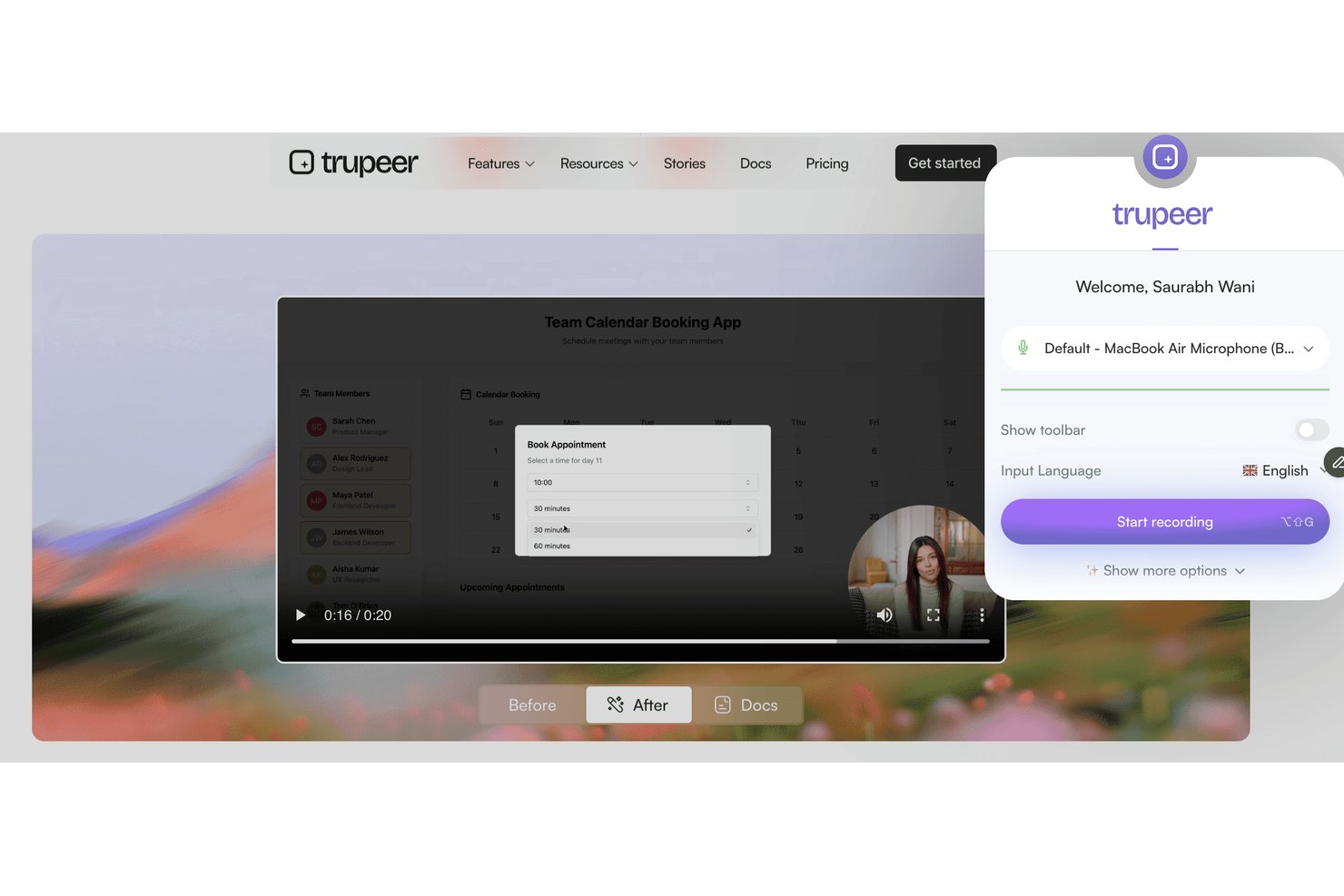
Trupeer ist eine Plattform für Bildschirmaufnahmen und Videonachrichten, die für Teams entwickelt wurde, die klare visuelle Anleitungen bereitstellen, Benutzer einarbeiten oder Prozessabläufe für verteilte oder multikulturelle Teams teilen müssen.
Für wen ist Trupeer am besten geeignet?
Trupeer eignet sich für globale Teams, die visuelle Prozessdokumentationen in verschiedenen Sprachen erstellen, teilen und lokalisieren müssen.
Warum Trupeer eine gute Loom-Alternative ist
Ich habe Trupeer ausgewählt, weil mein Team Schulungen und Anleitungen in mehreren Sprachen bereitstellen muss. Mit den automatischen mehrsprachigen Funktionen für Bildschirmaufnahmen und Videonachrichten von Trupeer kann ich Prozessdokumentationen für globale Teams erstellen, Anweisungen anschließend sofort lokalisieren und Tutorials mit Benutzern in deren bevorzugter Sprache teilen.
Wichtige Funktionen von Trupeer
- Aufzeichnungs-Dashboard in der App: Zeichnen Sie Ihren Bildschirm, Ihre Kamera oder beides direkt in Ihrem Browser auf, ohne zusätzliche Software zu installieren.
- Markenkonforme Videovorlagen: Passen Sie Ihre Aufnahmen mit dem Logo, den Farben und den markenkonformen Layouts Ihres Unternehmens an.
- Erweiterte Zuschaueranalysen: Verfolgen Sie, wer jedes Video angesehen hat, wie lange es angesehen wurde und an welchen Stellen Zuschauer abspringen.
- Granulare Zugriffskontrollen: Legen Sie Berechtigungen für Videos auf Arbeitsbereichs-, Team- oder Benutzerebene fest, um Datenschutz und Freigaben zu verwalten.
Trupeer-Integrationen
Trupeer bietet native Integrationen mit Slack, Notion, Jira und Confluence sowie Importfunktionen für Loom und Zoom. Unternehmenskunden können über die REST API benutzerdefinierte Integrationen erstellen, während MCP Trupeer mit Claude und ChatGPT verbindet.
Pros and Cons
Pros:
- Automatisch aus Aufnahmen erstellte mehrsprachige Tutorials
- Markenkonforme Videovorlagen für ein einheitliches Unternehmensbild
- Granulare Zuschauerüberwachung und Zugriffskontrollen
Cons:
- Keine nativen direkten Integrationen mit Drittanbietern
- Preise sind ohne Kontaktaufnahme mit dem Vertrieb nicht transparent

Wistia
Am besten für Marketingteams geeignet

Wistia ist eine Video-Hosting-Plattform für Unternehmen, die Videoinhalte erstellen und verwalten möchten. Sie eignet sich ideal für Marketing- und Kreativteams, die ihre Markengeschichte besser vermitteln und Zielgruppen ansprechen möchten.
Warum es eine gute Loom-Alternative ist: Wistia bietet fortschrittliche Marketingwerkzeuge, mit denen Sie die Interaktion der Zuschauer verfolgen und eine anklickbare Handlungsaufforderung in Ihre Videos integrieren können. Sie können Ihren Videoplayer an Ihre Marke anpassen und so ein einheitliches Erscheinungsbild schaffen. Die Plattform ermöglicht außerdem detaillierte Videoanalysen, mit denen Sie das Verhalten Ihrer Zielgruppe besser verstehen können. Diese Funktionen machen Wistia zu einer starken Wahl für Marketingteams, die sich auf datengestützte Videostrategien konzentrieren.
Besondere Funktionen & Integrationen:
Zu den Funktionen gehören Werkzeuge zur Suchmaschinenoptimierung von Videos für eine bessere Auffindbarkeit und Interaktionskarten zur Visualisierung der Zuschauerinteraktion. Wistia bietet außerdem Formulare zur Lead-Generierung, um Informationen über die Zielgruppe zu erfassen.
Zu den Integrationen gehören HubSpot, Mailchimp, Salesforce, Adobe Marketo Engage, Zapier, Google Analytics, Pardot und weitere.
Pros and Cons
Pros:
- Anpassbarer Videoplayer
- Fortschrittliche Marketingwerkzeuge
- Umfasst detaillierte Analysen
Cons:
- Eingeschränkte integrierte Bearbeitungsfunktionen
- Umfasst nur grundlegende Anmerkungswerkzeuge

Camtasia
Am besten für Videobearbeitung

Camtasia ist eine Software zur Videobearbeitung und Bildschirmaufnahme, die für die Erstellung von Videos in professioneller Qualität entwickelt wurde. Sie wird häufig von Lehrkräften, Marketingteams und betrieblichen Schulungsleitern verwendet, die mühelos hochwertige Inhalte erstellen müssen.
Warum es eine gute Loom-Alternative ist: Camtasia bietet erweiterte Bearbeitungswerkzeuge, mit denen Sie Ihre Videos präzise optimieren können. Funktionen wie Mehrspur-Zeitleisten und Animationen ermöglichen eine detaillierte Anpassung. Die Software stellt außerdem integrierte Vorlagen und Optionen zur Verfügung, um Ihre Projekte aufzuwerten. Diese Möglichkeiten machen Camtasia zu einer ausgezeichneten Wahl für Nutzer, die Wert auf umfassende Videobearbeitung legen.
Herausragende Funktionen & Integrationen:
Zu den Funktionen gehören Greenscreen-Effekte für kreative Hintergründe, Sprachkommentare, um Videos eine persönliche Note zu verleihen, sowie die Erstellung von Quizzen für interaktive Inhalte.
Integrationen sind nicht öffentlich aufgeführt.
Pros and Cons
Pros:
- Erweiterte Bearbeitungsmöglichkeiten
- Ausgabe in hoher Qualität
- Bietet interaktive Quizze
Cons:
- Keine gemeinsame Bearbeitung in Echtzeit
- Interaktive Videofunktionen könnten als grundlegend angesehen werden

VEED
Am besten geeignet für Transkription

Veed ist ein Online-Tool zur Videobearbeitung für Kreative und Teams, die eine unkomplizierte Videoproduktion und -bearbeitung benötigen. Es ist bei Marketingteams, Lehrkräften und Content-Erstellern beliebt, die schnell professionell ausgearbeitete Videos produzieren möchten.
Warum es eine gute Loom-Alternative ist: Veed bietet Transkriptionsdienste, die Sprache automatisch in Text umwandeln, wodurch Sie leichter barrierefreie Inhalte erstellen können. Die benutzerfreundliche Oberfläche ermöglicht es Ihnen, Videos mit Funktionen wie Textüberlagerungen und Untertiteln zu bearbeiten. Die Plattform unterstützt den Export von Videos in mehreren Formaten und erfüllt damit verschiedene Anforderungen an die Verbreitung. Diese Funktionen machen Veed zu einer starken Option für alle, die sich auf Transkription und Barrierefreiheit konzentrieren.
Herausragende Funktionen & Integrationen:
Funktionen umfassen das Zuschneiden und Schneiden von Videos zur Optimierung Ihrer Inhalte, Filter und Effekte zur Verbesserung der visuellen Wirkung sowie die Entfernung von Hintergrundgeräuschen für klareren Ton.
Integrationen sind nicht öffentlich aufgeführt.
Pros and Cons
Pros:
- Einfache Transkriptionstools
- Einfache Bearbeitungsoberfläche
- Kein Software-Download erforderlich
Cons:
- Begrenzte erweiterte Funktionen
- Einschränkungen bei der Bearbeitung großer Dateien

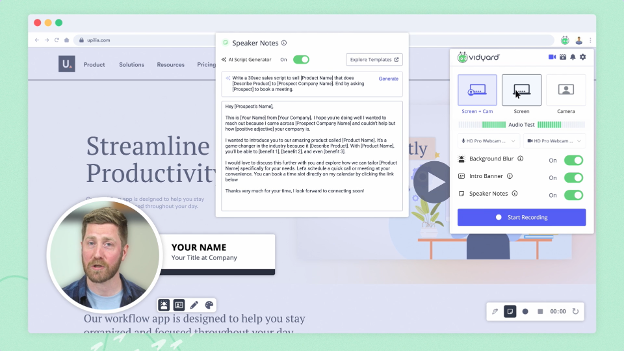
Vidyard ist eine Videoplattform für Unternehmen zur Erstellung, zum Hosting und zum Teilen von Videoinhalten. Sie wird hauptsächlich von Marketing- und Vertriebsteams genutzt, die das Engagement steigern und die Videoperformance verfolgen möchten.
Warum es eine gute Alternative zu Loom ist: Vidyard bietet fortschrittliche Videoanalysen, mit denen Sie das Zuschauerengagement und die Videoperformance überwachen können. Mit Funktionen wie der Erstellung personalisierter Videos und interaktiven Handlungsaufforderungen unterstützt es eine zielgerichtete Kommunikation. Die Plattform ermöglicht das einfache Teilen von Videos über verschiedene Kanäle und steigert dadurch Ihre Reichweite. Diese Funktionen machen Vidyard zu einer starken Wahl für Unternehmen, die sich auf datengestützte Videostrategien konzentrieren.
Besondere Funktionen & Integrationen:
Zu den Funktionen gehören Videohosting zur einfachen Verwaltung, anpassbare Videoplayer, die zu Ihrer Marke passen, und Video-SEO-Tools zur Verbesserung der Sichtbarkeit in Suchmaschinen.
Zu den Integrationen gehören Salesforce, HubSpot, Marketo, LinkedIn, Facebook, YouTube, Slack, Google Analytics und mehr.
Pros and Cons
Pros:
- Enthält fortschrittliche Analysetools
- Interaktive Funktionen
- Starke Markenbildungsfunktionen
Cons:
- Eingeschränkte Tools für die Zusammenarbeit
- Minimale Anmerkungen direkt im Video

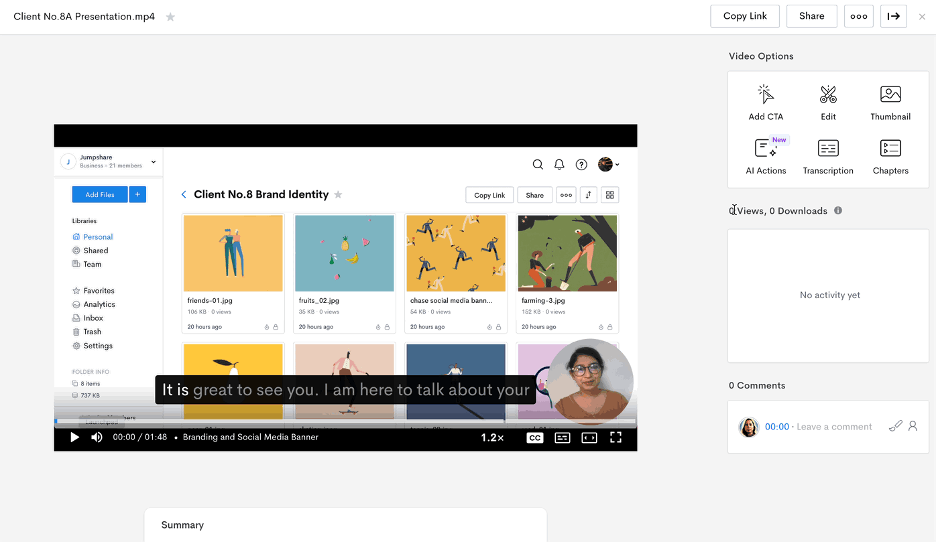
Jumpshare ist ein Tool zum Teilen von Dateien und Aufzeichnen von Bildschirminhalten, das für Teams und Einzelpersonen entwickelt wurde, die Inhalte schnell und effizient teilen müssen. Es wird häufig von Fachleuten genutzt, die Zusammenarbeit und Kommunikation durch visuelle Inhalte priorisieren.
Warum es eine gute Loom-Alternative ist: Jumpshare zeichnet sich durch seine Dateifreigabe mit Drag-and-Drop-Funktion aus, mit der du Dateien sofort teilen kannst. Du kannst deinen Bildschirm aufzeichnen und Videolinks teilen, ohne lange Uploads abzuwarten. Das Tool bietet außerdem visuelle Anmerkungen, mit denen du deine Botschaft klar vermitteln kannst. Diese Funktionen machen es ideal für Teams, die sich auf schnelle und effektive Kommunikation konzentrieren.
Herausragende Funktionen & Integrationen:
Zu den Funktionen gehören die Aufnahme von Screenshots mit Anmerkungen zum Hervorheben wichtiger Punkte, die Erstellung von GIFs für ansprechende Inhalte und die zeitgesteuerte Freigabe zur Kontrolle des Dateizugriffs.
Zu den Integrationen gehören Slack, Trello, Asana, Microsoft Teams, Google Drive, Dropbox, Jira, Salesforce, Zendesk und Basecamp.
Pros and Cons
Pros:
- Sofortige Dateifreigabe
- Visuelle Anmerkungen
- Erstellung von GIFs
Cons:
- Eingeschränkte Videobearbeitung
- Minimale Möglichkeiten zur Audiobearbeitung

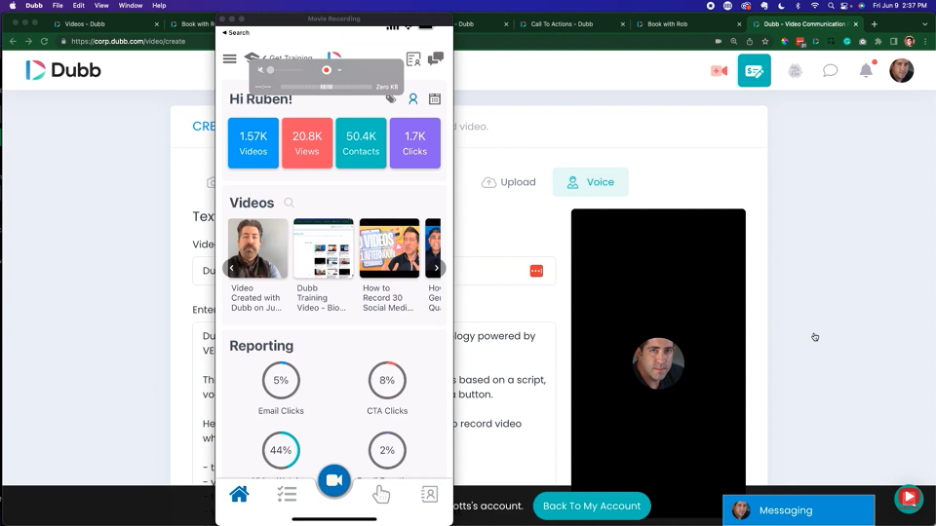
Dubb ist eine Videokommunikationsplattform, die Vertriebs- und Marketingaktivitäten durch personalisierte Videonachrichten unterstützt. Sie wird hauptsächlich von Vertriebs- und Marketingteams eingesetzt, die potenzielle Kunden und bestehende Kunden mit interaktiven Videoinhalten ansprechen möchten.
Warum Dubb eine gute Alternative zu Loom ist: Dubb bietet Funktionen wie Video-E-Mail- und SMS-Kampagnen, mit denen Sie Ihre Zielgruppe direkt erreichen können. Sie können Schaltflächen für Handlungsaufforderungen in Ihre Videos einfügen, um Interaktionen und Abschlüsse zu steigern. Die Plattform ermöglicht außerdem die Nachverfolgung von Videos, sodass Sie wissen, wie Ihre Zielgruppe mit Ihren Inhalten interagiert. Diese Funktionen machen Dubb zu einem wertvollen Tool für Teams, die ihre Vertriebsinteraktionen steigern möchten.
Herausragende Funktionen & Integrationen:
Zu den Funktionen gehören anpassbare Video-Landingpages passend zu Ihrer Marke, automatisierte Workflows zur Optimierung der Kommunikation und Videoanalysen zur Leistungsüberwachung.
Zu den Integrationen gehören Salesforce, HubSpot, Mailchimp, YouTube, Zoho CRM und mehr.
Pros and Cons
Pros:
- Personalisierte Videonachrichten
- Interaktive Schaltflächen für Handlungsaufforderungen
- Möglichkeiten zur Video-Nachverfolgung
Cons:
- Wenige Anmerkungswerkzeuge
- Eingeschränkte Audiosteuerung


Cap ist ein quelloffenes Werkzeug zur Bildschirmaufzeichnung für Nutzer, die unkomplizierte Videoaufnahmen benötigen. Es eignet sich ideal für Teams und Einzelpersonen, die Bildschirme in hoher Qualität aufzeichnen möchten.
Warum es eine gute Loom-Alternative ist: Cap bietet einfache Bildschirmaufnahmen mit Funktionen wie 4K-Aufzeichnung und Aufnahmen mit 60 fps. Die intelligente Komprimierung stellt sicher, dass Ihre Videos eine hohe Qualität aufweisen, ohne große Dateigrößen zu erzeugen. Der Sofort- und der Studio-Modus bieten Flexibilität bei der Aufnahme Ihrer Inhalte. Diese Funktionen machen Cap zu einer hervorragenden Wahl für alle, die Wert auf effiziente und hochwertige Videoaufnahmen legen.
Herausragende Funktionen und Integrationen:
Zu den Funktionen gehören automatisch erstellte Transkriptionen für eine bessere Zugänglichkeit sowie Titel und Zusammenfassungen, die dabei helfen, Ihre Inhalte zu organisieren. Cap bietet außerdem asynchrone Werkzeuge für die Zusammenarbeit mit Kommentaren und Reaktionen, um Rückmeldungen im Team zu ermöglichen.
Zu den Integrationen gehören Google Drive, Dropbox, Slack, Trello, Asana, Jira, Zoom, Microsoft Teams und monday.com.
Pros and Cons
Pros:
- Hochwertige Aufnahmen
- Flexibilität durch quelloffenen Code
- Einfach einzurichten
Cons:
- Eingeschränkte erweiterte Bearbeitungsmöglichkeiten
- Keine mobile App

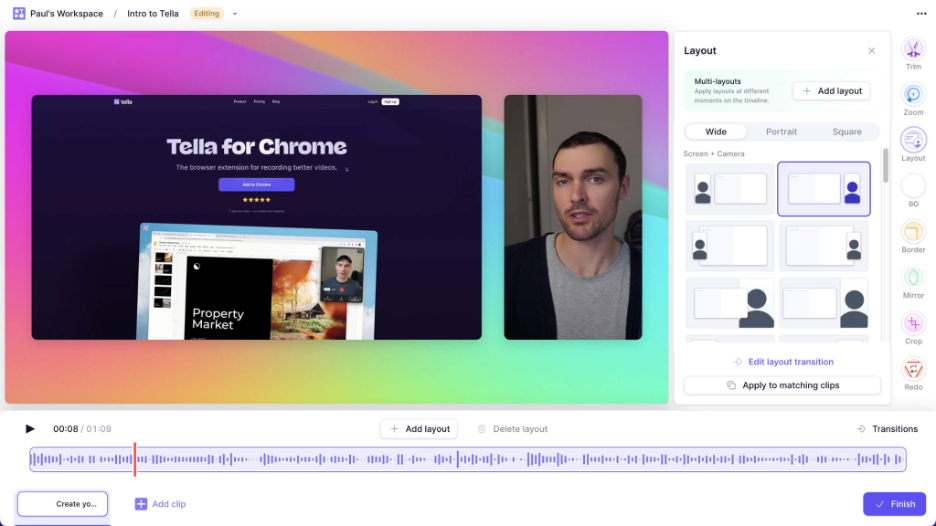
Tella ist ein Videoaufnahme- und Bearbeitungstool für Kreative und Teams, die ansprechende Videoinhalte erstellen möchten. Es ist bei Marketingteams, Lehrkräften und Content-Erstellern beliebt, die sich auf Storytelling und Präsentation konzentrieren.
Warum es eine gute Loom-Alternative ist: Tella bietet kreative Storytelling-Funktionen, mit denen Sie Videoclips, Bildschirmaufnahmen und Textüberlagerungen kombinieren können. Sie können Ihre Videos mit verschiedenen Layouts und Hintergründen anpassen und Ihren Inhalten eine einzigartige Note verleihen. Das Tool unterstützt außerdem die einfache Freigabe und Zusammenarbeit und eignet sich daher ideal für Teamprojekte. Diese Funktionen richten sich an alle, die ihr Storytelling mit Videos verbessern möchten.
Herausragende Funktionen & Integrationen:
Zu den Funktionen gehören anpassbare Videovorlagen für eine schnelle Bearbeitung, automatische Untertitel, um Inhalte zugänglich zu machen, sowie die Möglichkeit, Videos in mehreren Formaten für verschiedene Plattformen zu exportieren.
Zu den Integrationen gehören Google Drive, Dropbox, Slack, Trello, Asana, Zoom, Microsoft Teams, YouTube, Vimeo und LinkedIn.
Pros and Cons
Pros:
- Kreative Bearbeitungsoptionen
- Ansprechende Vorlagen
- Enthält automatische Untertitel
Cons:
- Begrenzte Optionen zur Audiosteuerung
- Keine erweiterten visuellen Elemente/Effekte


Clueso ist eine KI-gestützte Plattform, die entwickelt wurde, um unbearbeitete Bildschirmaufnahmen in hochwertige Produktvideos und Schritt-für-Schritt-Anleitungen zu verwandeln. Sie wird hauptsächlich von Teams in den Bereichen Kundenschulung, Produktmarketing und Vertriebsunterstützung eingesetzt, um die Inhaltserstellung zu optimieren.
Warum es eine gute Loom-Alternative ist: Clueso bietet fortschrittliche KI-Funktionen, die die Videobearbeitung automatisieren und lebensechte KI-Sprachaufnahmen bereitstellen, wodurch Sie Zeit und Aufwand sparen. Sie können intelligente automatische Zooms und auffällige Untertitel nutzen, um Ihre Videos aufzuwerten. Die Plattform erstellt außerdem automatisch Standardarbeitsanweisungen (SOPs) und ist damit ein wertvolles Werkzeug für eine detaillierte Dokumentation. Diese Funktionen machen Clueso zu einer hervorragenden Option für Teams, die KI für eine effiziente Inhaltserstellung nutzen möchten.
Herausragende Funktionen & Integrationen:
Zu den Funktionen gehören anpassbare Musikoptionen zur Aufwertung Ihrer Videos, visuelle Verbesserungen für eine Ausgabe in professioneller Qualität sowie Anpassungsmöglichkeiten für verschiedene Formate.
Integrationen sind nicht öffentlich aufgeführt.
Pros and Cons
Pros:
- Bietet automatisierte Videobearbeitung
- Lebensechte KI-Sprachaufnahmen
- Enthält automatisch erstellte SOPs
Cons:
- Begrenzte Bearbeitungsfunktionen
- Minimale Werkzeuge für Untertitel und benutzerdefinierte Einblendungen
Weitere Loom-Alternativen
Hier sind einige weitere Loom-Alternativen, die es nicht auf meine Auswahlliste geschafft haben, aber dennoch einen Blick wert sind:
- ScreenRec
Am besten für Datenschutzkontrollen geeignet
- Poindeo
Am besten für die Zusammenarbeit im Team
- UserGuiding
Am besten für das Nutzer-Onboarding geeignet
- OBS Studio
Am besten für Livestreaming


Hoe ik software voor cloudservicebeheer beoordeel
Ik kijk naar twee lagen: de kernmogelijkheden die elk platform moet hebben en de onderscheidende factoren die belangrijk zijn wanneer je team AWS, Azure en GCP vanuit één overzicht beheert.
Kernfunctionaliteit (basisvereisten voor deze lijst)
Wanneer ik tools voor mijn lijst selecteer, beoordeel ik elke tool voor elke hieronder genoemde kernfunctionaliteit op een schaal van 0 (biedt de functionaliteit niet) tot 5 (blink uit op dit gebied). Vervolgens zet ik de totaalscore van de tool om in een percentage. Elke tool moet een minimale totaalscore van 75% behalen om in aanmerking te komen voor opname.
- Inzicht in en beheer van meerdere clouds: Ik controleer of een platform AWS-, Azure- en GCP-resources in één overzicht kan samenbrengen, met consistente beheeracties voor alle providers.
- Resourceprovisioning en orkestratie: Geautomatiseerde implementatie is hierbij belangrijk. Ik zoek naar op sjablonen gebaseerde provisioning en levenscyclusbeheer, zodat teams omgevingen kunnen opzetten zonder handmatig werk.
- Kostenbewaking en -optimalisatie: Ik beoordeel hoe goed een tool uitgaven per account, project en tag bijhoudt en of het bruikbare aanbevelingen voor de juiste dimensionering of reserveringen presenteert.
- Prestatie- en gezondheidsbewaking: Realtime dashboards, drempelwaarden voor waarschuwingen en het volgen van de servicestatus spelen allemaal een rol, vooral voor teams die productieworkloads over meerdere regio's uitvoeren.
- Governance- en nalevingscontroles: Ik zoek naar ingebouwde beleidsafdwinging en auditklare rapportage die is afgestemd op raamwerken zoals CIS Benchmarks of SOC 2.
- Servicecatalogus en selfserviceportaal: Teams hebben er baat bij wanneer ontwikkelaars vooraf goedgekeurde cloudresources via een portaal met beschermingsmaatregelen kunnen aanvragen. Daarom beoordeel ik de uitgebreidheid van de catalogus en de goedkeuringsworkflows.
Zodra ik een lijst heb met tools die aan deze criteria voldoen, kijk ik naar wat elk platform onderscheidt.
Onderscheidende factoren (wat leveranciers onderscheidt)
Zo vergelijk ik verschillende leveranciers met elkaar:
Opvallende functies
Inzichten op basis van AI/ML vormen een belangrijk onderscheidend aspect. Ik zoek naar platforms die kostenafwijkingen signaleren of capaciteitstekorten voorspellen voordat deze storingen veroorzaken. Ondersteuning voor infrastructuur als code is ook belangrijk: teams die tientallen omgevingen beheren, hebben native integratie met Terraform of Pulumi nodig om hun implementaties met versiebeheer te beheren. Aangepaste automatiseringsworkflows maken het geheel compleet, vooral wanneer je met een platform herstelprocedures kunt opbouwen zonder scripts te schrijven.
Meer dan functies
De diepgang van integraties is een van de eerste dingen die ik controleer. Een platform voor cloudbeheer moet kunnen worden gekoppeld aan je bestaande ITSM-tools, identiteitsproviders en stack voor observeerbaarheid, anders wordt het slechts een extra silo. Ook beveiligingscertificeringen wegen zwaar mee. Ik zoek naar certificeringen van leveranciers, zoals SOC 2 Type II en ISO 27001, die aansluiten bij de nalevingsraamwerken die je organisatie volgt. Duidelijkheid over het prijsmodel is eveneens belangrijk, omdat een tool die een percentage van de clouduitgaven in rekening brengt heel anders schaalt dan een tool met licenties per gebruiker.
Warum nach einer Loom-Alternative suchen?
Obwohl Loom eine gute Wahl für Videokommunikation und Zusammenarbeit ist, gibt es eine Reihe von Gründen, warum manche Nutzer nach alternativen Lösungen suchen. Sie könnten aus folgenden Gründen nach einer Loom-Alternative suchen:
- Sie benötigen erweiterte Videobearbeitungsfunktionen
- Ihre Teammitglieder benötigen mehr Speicherplatz
- Sie wünschen sich bessere Analysen für Videos
- Sie müssen Datenschutzbestimmungen einhalten
- Ihr Team benötigt Offlinezugriff
- Sie benötigen mehr Anpassungsmöglichkeiten
Wenn Sie sich in einem dieser Punkte wiedererkennen, sind Sie hier richtig. Meine Liste enthält mehrere browserbasierte und für Desktop-Apps geeignete Videobearbeitungssoftwareoptionen, die für Teams infrage kommen könnten, die nach einer kostenpflichtigen oder kostenlosen Loom-Alternative suchen.
Wichtige Funktionen von Loom
Hier sind einige der wichtigsten Funktionen von Loom, damit Sie die Angebote alternativer Lösungen gegenüberstellen und vergleichen können:
- Audio- und Bildschirmaufnahme: Bildschirm und Audio können auf macOS, Windows und mobilen Geräten aufgenommen werden, sodass Teams auf jeder Plattform problemlos Videoinhalte erstellen können.
- Sofortiges Teilen: Teilen Sie Videos sofort über Links, per E-Mail oder durch Einbetten auf Websites.
- Grundlegende Bearbeitungswerkzeuge: Mit Funktionen zum Zuschneiden und Kommentieren können Videos angepasst und wichtige Punkte für das Publikum hervorgehoben werden.
- Feedbackoptionen: Binden Sie Zuschauer mit Kommentaren und Emojis ein, um interaktive Kommunikation und Feedback zu fördern.
- Untertitel: Fügen Sie Videos Untertitel hinzu, um die Barrierefreiheit zu verbessern und ein größeres Publikum zu erreichen.
- Chrome-Erweiterung: Die Erweiterung lässt sich einfach installieren und bietet schnellen und bequemen Zugriff auf die Aufnahmefunktionen.
- Aufnahmeoptionen: Die Möglichkeit, nur den Bildschirm, nur die Webcam oder beides aufzunehmen, bietet Flexibilität bei der Präsentation von Inhalten.
- Gerätekompatibilität: Die Unterstützung von Mac-, Windows-, iOS- und Android-Geräten stellt sicher, dass Teams das Tool unabhängig von ihrem Standort nutzen können.
- 720p-Aufnahme: Nehmen Sie in der kostenlosen Version mit bis zu 720p auf und nutzen Sie Upgrade-Optionen für die Videoproduktion in höherer Qualität.
Wie geht es weiter?
Wenn Sie gerade Video-Kommunikations- und Kollaborationssoftware recherchieren, wenden Sie sich an einen Berater von SoftwareSelect, um kostenlose Empfehlungen zu erhalten.
Sie füllen ein Formular aus und führen ein kurzes Gespräch, in dem die konkreten Anforderungen Ihrer Bedürfnisse besprochen werden. Anschließend erhalten Sie eine Auswahlliste von Software, die Sie prüfen können. Die Berater unterstützen Sie sogar während des gesamten Kaufprozesses, einschließlich der Preisverhandlungen.