

2026’nın Pazarlama İçin En İyi 10 Dijital Varlık Yönetimi Yazılımı

Pazarlama için En İyi Dijital Varlık Yönetimi Yazılımları Kısa Listesi


Dijital varlık yönetimi (DAM) yazılımı, içeriğinizi düzenli ve erişilebilir tutma avantajı sunar. Bu da marka tutarlılığını korumak ve pazarlama süreçlerinizi hızlandırmak açısından önemlidir.
Ancak, özellikle piyasada çok fazla seçenek varken ekibiniz için doğru DAM çözümünü bulmak zor olabilir. En iyi çözümü bulmanıza yardımcı olmak için proje yönetimi yazılımı konusundaki deneyimimi kullanarak farklı seçenekleri araştırdım ve inceledim.
İster küçük bir işletme ister büyük bir kuruluş olun, kapsamlı incelemem pazarlama çalışmalarınızı kolaylaştıracak ideal DAM aracını bulmanıza yardımcı olacaktır.
Why Trust Our Software Recommendations
Our team has been testing and reviewing software since 2012. As project managers ourselves, we know how difficult—and important—it is to choose the right software.
For this guide, we evaluated tools using hands-on testing and independent research, scoring tools using our selection criteria. We also draw on insights from industry thought leaders and practicing project management experts.
Our reviews reflect our human editorial judgment, not a sales pitch.
Expert reviewers:
Karşılaştırma Tablosu: Pazarlama için Dijital Varlık Yönetimi Yazılımları
Bu karşılaştırma tablosu, pazarlama için en iyi dijital varlık yönetimi yazılımı seçimlerimin fiyatlandırma ayrıntılarını özetlemektedir.
| Tool | Starting Price | Website | |
|---|---|---|---|
| Best for AI-driven metadata tagging | 4.4 out of 5 | Pricing upon request Not available | Website |
| Best for AI-powered asset discovery | 4.6 out of 5 | Pricing upon request Free demo available | Website |
| Best for sharing digital assets | 4.7 out of 5 | $100/month 7-day free trial + free demo available | Website |
| Best for unlimited user access | 4.8 out of 5 | $99/month Free plan + 14-day free trial + demo available | Website |
| Best for AI-powered visual search and tagging | 4.8 out of 5 | $250/month Free plan + free trial available | Website |
| Best for content workflows | 4.5 out of 5 | Pricing upon request Free demo available | Website |
| Best for cost-effective DAM | 4.7 out of 5 | $29/month 30-day free trial available | Website |
| Best for integrated DAM and PIM | 4.7 out of 5 | Pricing upon request 14-day free trial | Website |
| Best for scalable DAM | 4.5 out of 5 | $300/user/month Free trial + demo available | Website |
| Best for brand asset optimization | 4.4 out of 5 | Pricing upon request Free demo available | Website |
Pazarlama için En İyi Dijital Varlık Yönetimi Yazılımı İncelemeleri
Pazarlama sektöründe iş akışlarını kolaylaştırmaya ve iş birliğini geliştirmeye yardımcı olacak ölçeklenebilir bir dijital varlık yönetimi yazılımına sahip olmak önemlidir. Aşağıda, her çözümün avantajlarını ve dezavantajlarını, fiyatlandırmasını, özelliklerini ve entegrasyonlarını içeren pazarlama için en iyi DAM yazılımları hakkındaki incelemelerim yer almaktadır.

Papirfly
Best for AI-driven metadata tagging
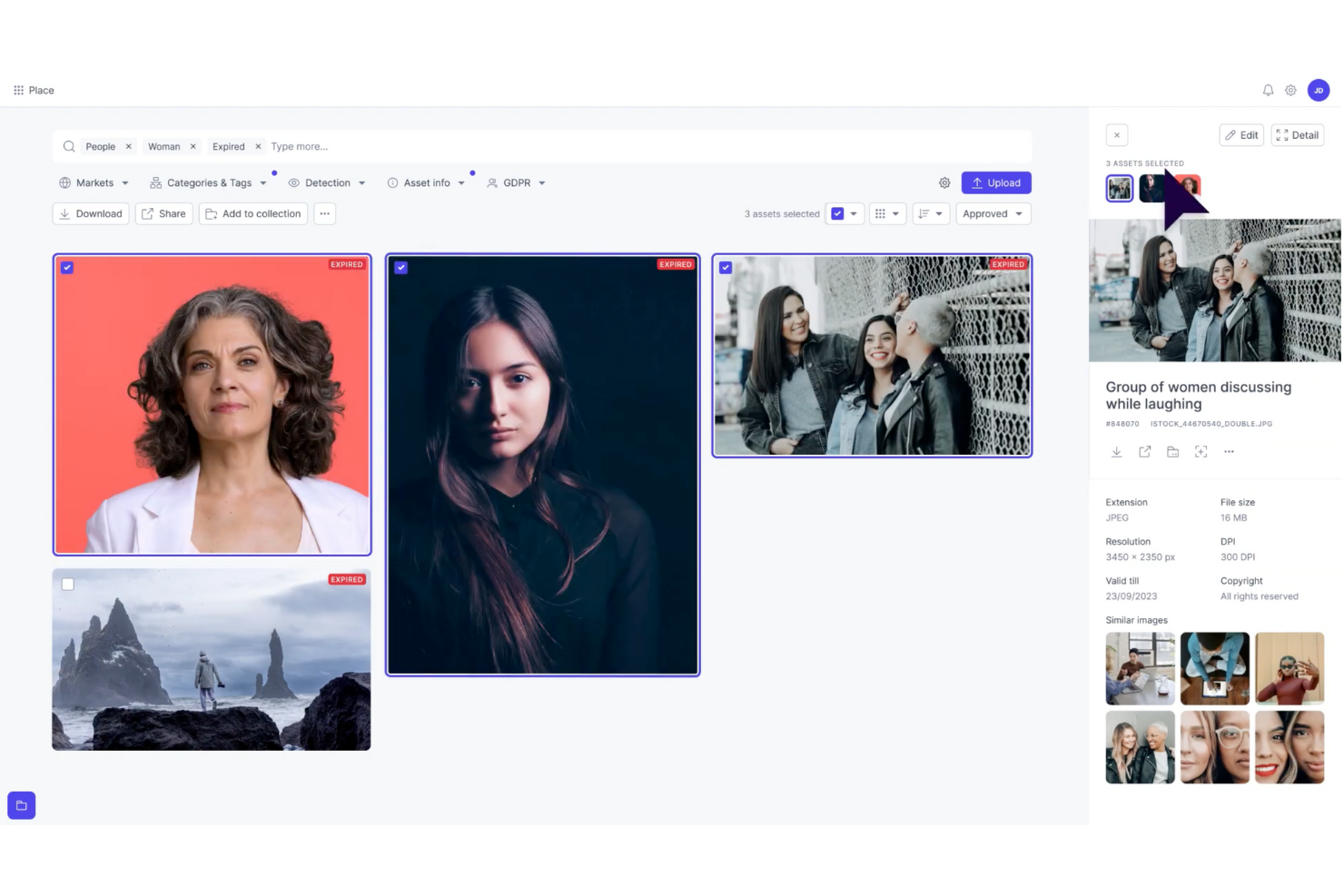
Papirfly is a digital asset management (DAM) solution built for marketing teams that need to organize and scale their content efficiently. Its AI-driven metadata tagging helps you quickly sort, store, and retrieve assets, reducing time spent searching for files. If your team struggles with scattered assets or inconsistent branding, Papirfly’s centralized platform streamlines workflows and supports brand compliance across all channels, making it especially valuable for large or multi-market organizations.
Why I Picked Papirfly
I picked Papirfly for its unique ability to enhance brand consistency through its customizable brand portals and AI-driven metadata tagging. These features ensure that your team can quickly access and utilize the right assets while maintaining brand compliance. Additionally, Papirfly's workflow automation capabilities can significantly accelerate your marketing processes, allowing your team to focus more on creative tasks rather than administrative ones.
Papirfly Key Features
In addition to AI-driven metadata tagging, Papirfly offers:
- Templated Content Creation: Provides pre-designed templates that help your team create on-brand content quickly and easily.
- Campaign Management Tools: These tools allow you to plan, execute, and manage marketing campaigns within the same platform.
- Compliance Management: Ensures that all digital assets adhere to legal and brand guidelines, reducing the risk of unauthorized usage.
- Analytics and Reporting: Offers insights into asset performance and usage, enabling data-driven marketing decisions.
Papirfly Integrations
Integrations include Adobe Creative Cloud, Microsoft Office 365, Salesforce, HubSpot, WordPress, Shopify, Google Analytics, Mailchimp, Slack, and Canva. Native integrations are not currently listed by Papirfly, but these tools facilitate seamless access and management of digital assets.
Pros and Cons
Pros:
- Centralized library helps maintain brand consistency
- Templated content creation speeds up marketing materials production
- AI-driven metadata tagging improves asset searchability
Cons:
- Limited customization options for specific industry needs
- Users report occasional slow performance
New Product Updates from Papirfly

Papirfly Prove Enterprise Adds Analytics Agent
Papirfly Prove Enterprise adds Analytics Agent for asking data questions in plain language and generating figures or charts. This helps users explore analytics without setting up filters or queries. For more information, visit Papirfly’s official site.
 .

Best for AI-powered asset discovery
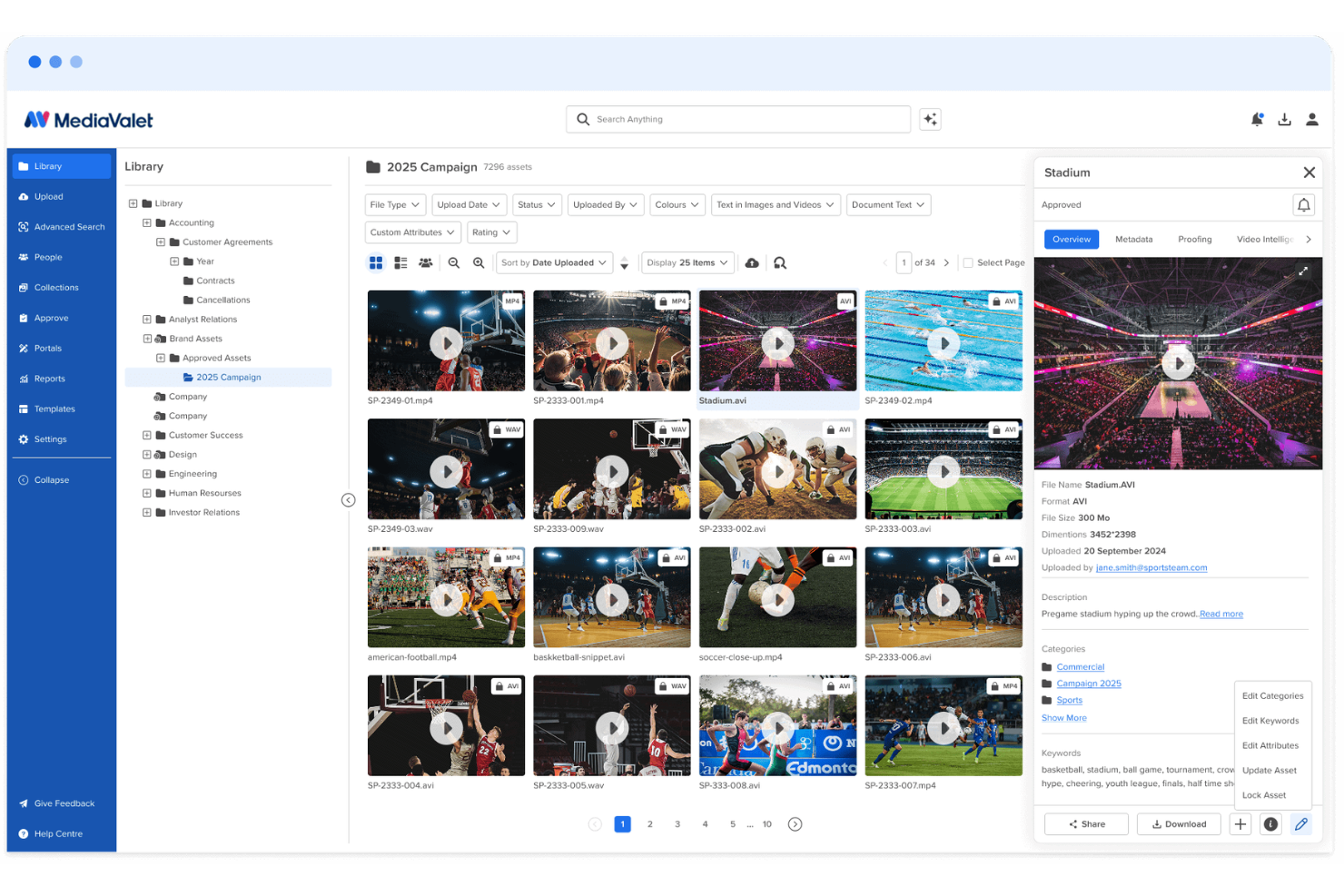
MediaValet is a digital asset management platform for marketing and creative teams that need to organize large libraries of images, videos, documents, and brand assets. Its AI-powered search, auto-tagging, branded portals, and asset reporting help teams find approved content faster, reduce duplicate work, and keep brand materials consistent across campaigns.
Who Is MediaValet Best For?
MediaValet is a good fit for enterprise marketing and creative teams that manage large volumes of digital content across multiple brands, regions, or channels.
Why I Picked MediaValet
I picked MediaValet because it helps marketing teams find approved assets faster through AI-powered asset discovery. Its auto-tagging, natural language search, object recognition, and face recognition make it easier for your team to locate images, videos, and brand files without digging through folders manually. I also like that MediaValet supports video search, so teams can find specific clips, frames, and spoken words inside media files. This makes it a good fit for marketing and creative teams managing large asset libraries across campaigns, channels, and departments.
MediaValet Key Features
Beyond asset discovery, MediaValet includes features that help marketing teams share, govern, and measure brand content:
- Experience Portals: Create branded portals to curate and share approved asset collections with internal teams, partners, or external stakeholders.
- CDN linking: Distribute assets through CDN links so teams can publish and update media across channels without manually replacing files.
- Usage reporting: Track asset views, downloads, user activity, and content performance to understand how your library is being used.
- Creative proofing: Review, comment on, and approve creative files through built-in proofing workflows before final assets are added to the library.
MediaValet Integrations
Integrations include Adobe Creative Cloud, Canva, Marq, Asana, monday.com, Microsoft 365, Contentful, Drupal, WordPress, and Salesforce Sales Cloud.
Pros and Cons
Pros:
- Usage reports show views, downloads, and asset engagement
- Branded portals simplify approved asset sharing
- AI tagging improves asset search across large libraries
Cons:
- Minor bugs can delay saved changes or affect buttons
- Search accuracy may need improvement for some users

Pics.io
Best for sharing digital assets

Pics.io is a digital asset management software that offers a wide range of features to help with marketing asset management.
Why I picked Pics.io: I chose Pics.io because of its capabilities in sharing digital assets. For marketing teams, Pics.io offers a robust file-sharing system that allows users to publish and share individual or bulk assets, showcase work with pre-made templates, and use an interactive proofing template for external collaboration. The platform's advanced metadata tagging and search functionalities also enable marketers to quickly locate and utilize the exact files they need.
Standout features & integrations:
Features include unlimited digital asset storage that allows users to store digital assets without restrictions on file types or sizes. It also offers inboxes for direct communication with external stakeholders, version control to track changes on assets, and AI capabilities such as face recognition and speech-to-text transcription.
Integrations include Google Drive, Amazon S3, Slack, Zapier, Adobe Photoshop, Adobe Premiere Pro, Shopify, Salesforce, Trello, Figma, Wrike, WordPress, monday.com, and more.
Pros and Cons
Pros:
- Dynamic AI-based tagging
- Robust collaboration features
- Search function to quickly locate assets
Cons:
- Larger files may experience slower loading times
- Web views and asset inbox could be more customizable
New Product Updates from Pics.io
Pics.io Adds Filtered Audit Trail CSV Exports
Pics.io now lets you export Audit Trail logs to CSV and apply filters before exporting, making it easier to analyze and share activity history. For more information, visit Pics.io's official site.
 .

Best for unlimited user access
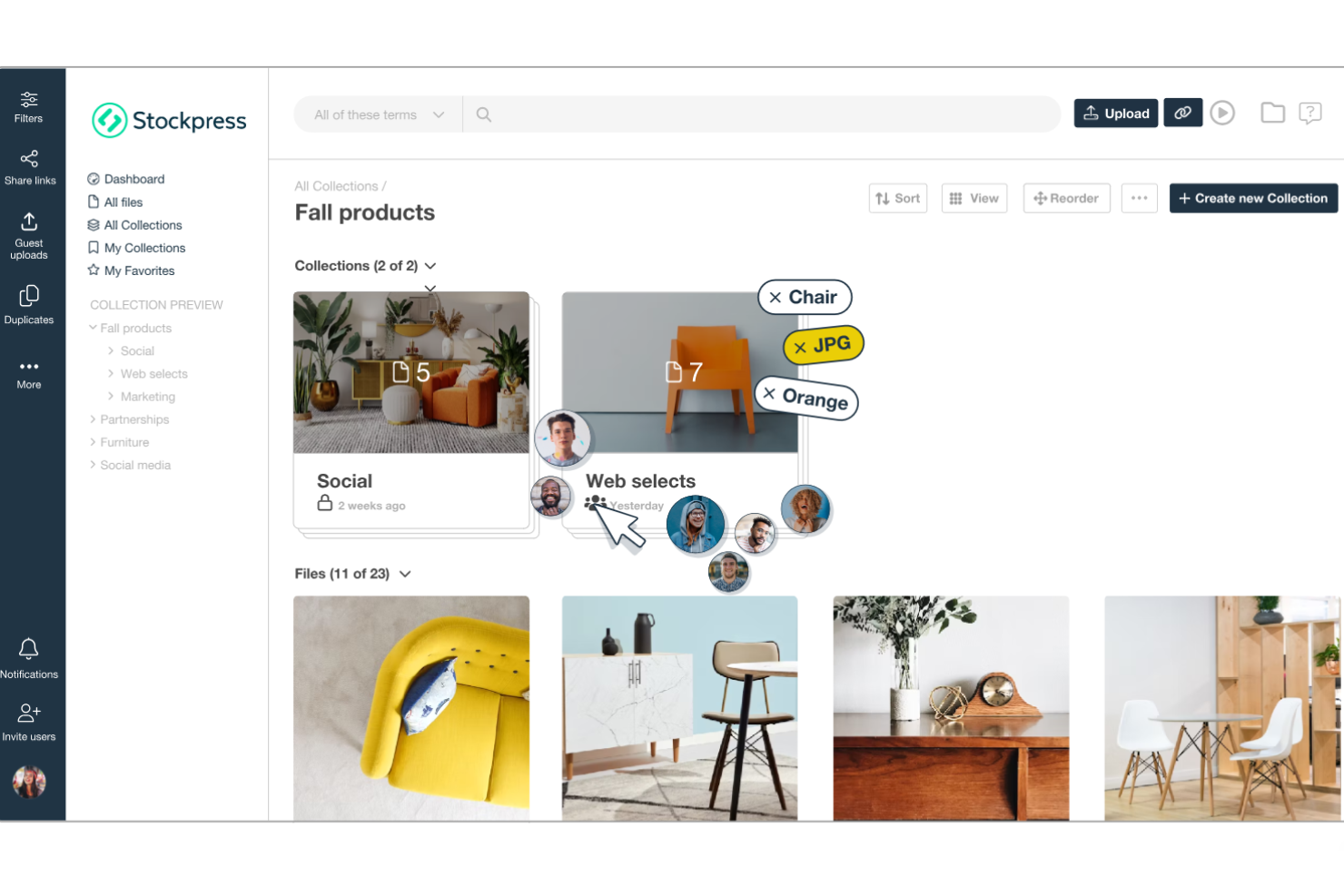
Stockpress is a digital asset management (DAM) platform designed to help teams organize, find, collaborate on, and share digital files within a single shared workspace.
Why I picked Stockpress: One thing I like about Stockpress is its AI-powered tagging system. This tool automatically assigns relevant tags to your files, enhancing searchability and saving your team from the tedious task of manual tagging. Stockpress also stands out with its unlimited user access model and customizable roles. This means that your team can work with internal and external collaborators without worrying about additional fees.
Standout features & integrations:
Features include version control, which allows your team to manage multiple iterations of a file. Additionally, the platform offers customizable share links that let you control who accesses your files and set expiration dates for added security. It also offers duplicate detection to help maintain an organized library by identifying and removing redundant files.
Integrations include Google Drive, Dropbox, Box, Adobe Photoshop, Slack, Mailchimp, Okta, Webflow, Klaviyo, Adobe Illustrator, Adobe InDesign, and Canva.
Pros and Cons
Pros:
- Robust security features for safe file sharing
- Efficient search functionality with AI tagging
- Unlimited users without additional costs
Cons:
- Initial setup may require time to organize existing assets
- Limited offline access
Best for AI-powered visual search and tagging
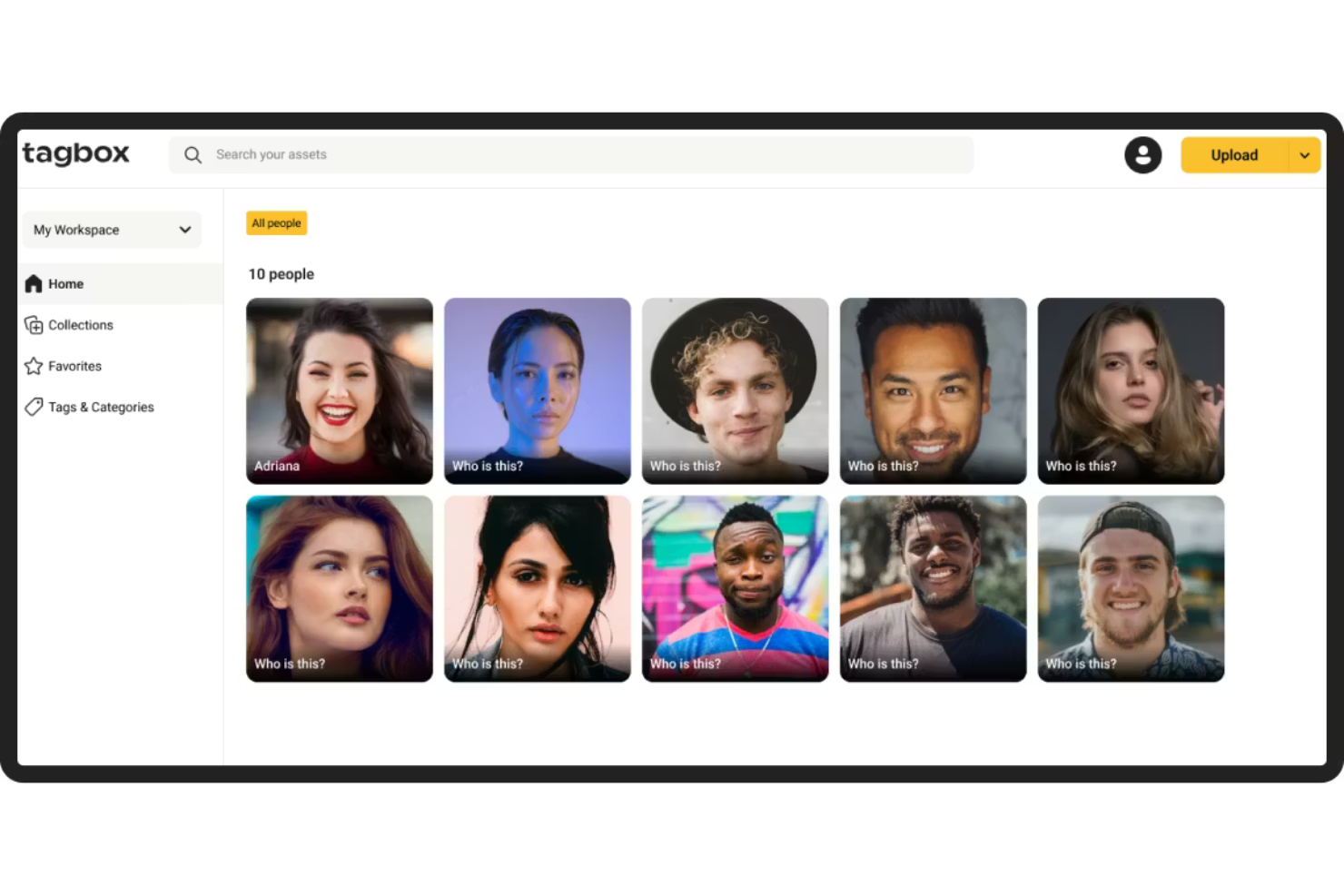
Tagbox.io is a digital asset management platform built for marketing teams that need AI-powered tagging, visual search, and structured permissions to manage large image and video libraries efficiently.
Who Is Tagbox.io Best For?
Tagbox.io is a strong fit for marketing and creative teams managing high volumes of visual content who need faster asset discovery, duplicate control, and clear permission-based access.
Why I Picked Tagbox.io
I picked Tagbox.io because its AI-powered tagging and visual search significantly reduce the time spent locating assets. The system automatically detects objects, scenes, colors, and faces, and you can apply structured custom tags that reflect your brand taxonomy. In practice, that means my team can combine natural-language search with filters like collections, people, or approval status in one query. For marketing teams managing thousands of assets, that level of search precision is a real operational advantage.
Tagbox.io Key Features
- Face recognition: Automatically detects and groups images by individual, making event and campaign photos easy to retrieve.
- Video AI analysis: Analyzes video content frame by frame to detect people and visual elements, making video files searchable.
- Duplicate detection: Identifies identical or near-identical images to reduce clutter and maintain a clean library.
- Guest uploads: Allows external collaborators to upload assets into controlled collections without full platform access.
Tagbox.io Integrations
Connect Tagbox.io through Tagbox Desktop (drag-and-drop into any app), Zapier, Make, and a REST API. Custom workflows are available for Enterprise.
Pros and Cons
Pros:
- Granular permissions for controlled marketing asset sharing
- Duplicate detection helps reduce asset clutter
- Advanced AI-powered visual search and filtering
Cons:
- No built-in image editing or creative design tools
- Advanced AI tagging may require initial taxonomy setup for best results

Bynder
Best for content workflows

Bynder is a cloud-based digital asset management (DAM) platform designed to help marketing teams efficiently organize, manage, and distribute their digital content. It serves as a centralized hub where you can store various media assets, ensuring easy access and consistent brand messaging across all channels.
Why I picked Bynder: I like its AI-powered asset management. This functionality allows your team to organize and locate files, thanks to intelligent tagging and advanced search capabilities. By leveraging AI, Bynder ensures that your marketing materials are not only well-organized but also easily retrievable. Bynder also has a robust asset workflow module that enhances the process of briefing, reviewing, and approving digital assets within your team.
Standout features & integrations:
Features include a studio for scaling and automating digital content creation and analytics that provide data-driven insights into your content and portal usage. It also has built-in security controls such as two-factor authentication and user rights and access settings to protect your content.
Integrations include Salesforce, Salsify, Sanity, SAP Commerce Cloud, Sprout Social, SharePoint, Asana, Adobe Creative Cloud, Contentful, and Contentstack.
Pros and Cons
Pros:
- Efficient search functionality allows quick access to assets
- Robust analytics and reporting
- Ability to approve assets
Cons:
- Time-consuming initial setup
- Limited customization options for certain functionalities

Filecamp
Best for cost-effective DAM

Filecamp is a digital asset management solution that excels in affordability. It stands out as the best for cost-effective DAM, offering a comprehensive set of features at a competitive price point.
Why I picked Filecamp: Filecamp provides users with a user-friendly interface and robust features tailored for branding and collaboration. It allows marketing teams to easily organize, share, and collaborate on digital assets while ensuring brand consistency through customizable branding options. I determined Filecamp to be the best for cost-effective DAM because it delivers essential DAM features without imposing a significant financial burden on its users.
Standout features & integrations:
Features include a user-friendly interface, customizable branding options, and granular permission settings. It also boasts powerful search capabilities and supports a variety of file formats.
Integrations include Slack, WordPress, Salesf
Pros and Cons
Pros:
- Advanced search capabilities
- Customizable branding options
- Unlimited users in all plans
Cons:
- Extra costs for additional storage
- Higher-tier plans are required for some features
- Limited storage with the basic plan
New Product Updates from Filecamp
Filecamp Adds Analytics, AI Thumbnails, and CDN Embed Links
Filecamp adds Analytics, AI-powered thumbnails, and CDN-backed Embed links. These updates give teams more visibility into asset usage, improve thumbnail presentation, and make embedded images easier to manage. For more information, visit Filecamp’s official site.
 .

Best for integrated DAM and PIM

4ALLPORTAL is a software that specializes in digital asset management (DAM) and product information management (PIM) solutions for various industries.
Why I picked 4ALLPORTAL: For marketing teams wanting to centralize their digital asset management system, 4ALLPORTAL allows users to create, share, and export digital assets directly within the system. It supports a range of files, including images, videos, audio files, and documents. It also has collaboration features with tailored approval workflows that can be defined by roles, folders, keywords, or specific rules. Its integrated DAM and PIM capabilities further help marketing teams looking to manage digital assets and product information in one place.
Standout features & integrations:
Features include automated processes, like batch uploading images to your CMS in the same format and correct resolution and with all the right metadata for SEO. It also has a powerful search feature, allowing you to filter based on file type, tags, keywords, release status, intended use, description, and more.
Integrations include Dropbox, Canva, Jira, Shopify, Microsoft Excel, Microsoft Teams, WordPress, Adobe Illustrator, Adobe Creative Cloud, Adobe Photoshop, Hootsuite, Adobe InDesign, Salesforce, and more.
Pros and Cons
Pros:
- Support for multiple language translations
- Workflow automation capabilities
- Scalable with the needs of a growing business
Cons:
- Customizing the portal may require a time investment
- Interface can be challenging to navigate

Best for scalable DAM

Image Relay is a digital asset management platform designed to organize, manage, and distribute brand assets.
Why I picked Image Relay: Image Relay’s unique approach to digital asset management caters to various industries and scales with business growth. Its emphasis on simplicity and efficiency in managing and sharing digital assets makes it a standout choice. I believe Image Relay is the best for scalable DAM because it offers customizable metadata fields, a user-friendly folder structure, and bulk actions, which are essential for managing large volumes of digital assets effectively.
Standout features & integrations:
Features include powerful search capabilities with customizable metadata fields, a clear folder structure for asset organization, and bulk upload, download, and update options to save time. The platform also offers customizable user permissions and self-serve capabilities for external users, streamlining the asset management process.
Integrations include Slack, Adobe Creative Cloud, Salesforce, WordPress, Hootsuite, Canva, Shopify, Asana, Zapier, and Jira.
Pros and Cons
Pros:
- Customizable user permissions for controlled asset access
- Bulk actions for uploads, downloads, and updates save time
- Customizable metadata and folder structures for efficient asset organization
Cons:
- Requires a minimum of five users, making it less accessible for smaller teams
- Higher starting price point compared to some competitors
Canto
Best for brand asset optimization

Canto is a digital asset management platform designed to organize, find, and share digital assets.
Why I picked Canto: Canto offers a comprehensive feature set that addresses the full spectrum of digital asset management needs. Its ability to streamline content workflows and enhance collaboration makes it a standout choice among other DAM solutions. I believe Canto is the best for brand asset optimization because it provides tools that ensure brand consistency across all digital assets, which is crucial for maintaining brand identity.
Standout features & integrations:
Features include AI Visual Search, Media Delivery Cloud, and Video Enhancements. It also offers security measures, archiving options, and analytics to track content performance.
Integrations include Adobe Creative Cloud, Slack, Dropbox, Google Drive, Microsoft Office, WordPress, Hootsuite, Salesforce, Mailchimp, and Zapier.
Pros and Cons
Pros:
- API integration for connecting with other platforms
- Unlimited portals and style guides for brand consistency
- Powerful search capabilities with smart tags and facial recognition
Cons:
- May experience performance issues with larger volumes of assets
- Limited customization options available
Pazarlama için Diğer Dijital Varlık Yönetimi Yazılımları
Aşağıda kısa listeme aldığım pazarlama için ek dijital varlık yönetimi yazılımlarının bir listesi yer almaktadır. İlk 10’a girememiş olsalar da yine de değerlidir ve daha fazla araştırılmaya değerdir.
- Adobe Experience Manager
For adaptable content
- Lingo
For centralized brand asset management
- Orange Logic
For managing digital rights
- MarcomCentral
For channel marketing
- Mailchimp
For email and SMS marketing
- Scaleflex
For AI asset optimization
- Aprimo
For content operations
- Adobe Experience Manager Assets
For cloud-native DAM
- Cloudinary Assets
For media asset optimization
- PhotoShelter
For visual content management
- ResourceSpace
For centralized asset storage
- Extensis Portfolio
For creative teams
- Dash
For effective brand positioning
- Daminion
For asset tagging
- Acquia DAM (Widen)
For detailed metadata tagging


How I Evaluate Digital Asset Management Software for Marketing
I split my evaluation into two layers: baseline requirements every tool must meet—like asset libraries and approval workflows—and differentiators that set platforms apart for marketing teams.
Core Functionality (Table Stakes For This List)
When I'm selecting tools for my list, I rank each one on a scale from 0 (does not offer the functionality) to 5 (excels in this area) for each core functionality listed below. Then, I calculate the tool's total score into a percentage. Each tool needs to achieve a minimum total score of 65% to be considered for inclusion.
- Centralized Asset Library: I check whether a platform lets marketing teams store, preview, and search across file types—from video edits to campaign PDFs—in one place.
- Metadata & Tagging: Custom taxonomies and auto-tagging matter here, especially for teams managing thousands of assets across seasonal campaigns or product lines.
- Version Control: I look for clear version histories with rollback, so project managers can confirm their team is always working from the latest approved creative.
- Approval Workflows: Multi-step review routing with annotation is key, like when a social asset needs sign-off from design, legal, and the brand manager before launch.
- Permissions & Rights Management: I evaluate how granular access controls are and whether the tool tracks usage licenses—helpful when assets have regional or time-bound restrictions.
- Project Management Integrations: Native connections to tools like Asana, Wrike, or Jira show me whether the DAM fits into existing marketing project workflows or creates silos.
Once I have a list of tools that meet this criteria, I consider what sets each platform apart.
Differentiating Factors (What Sets Vendors Apart)
Here's how I compare and contrast different vendors:
Standout Features
Brand portals are a big differentiator—I look for platforms that let you spin up a shareable hub where agencies and partners grab approved assets without filing requests. Creative templating is equally valuable, especially when regional teams need to localize campaign materials without pulling in a designer. I also evaluate usage analytics, since knowing which assets get downloaded and reused helps project managers justify content investment to leadership.
Beyond Features
Collaboration access matters—I check whether a platform supports guest users for agencies and freelancers without inflating seat costs, since most marketing projects involve external contributors. Ecosystem fit is just as important. A DAM that connects to your CMS, marketing automation platform, and creative tools saves project managers from becoming middlemen shuttling files between systems. I also evaluate security posture, looking for SOC 2 compliance, SSO support, and audit logs that satisfy enterprise governance requirements.
Pazarlama için Dijital Varlık Yönetimi Yazılımı Nasıl Seçilir?
Uzun özellik listeleri ve karmaşık fiyatlandırma yapıları arasında kaybolmak kolaydır. Benzersiz yazılım seçimi süreciniz üzerinde çalışırken odağınızı korumanıza yardımcı olmak için aklınızda bulundurmanız gereken faktörlerin bir kontrol listesi aşağıda yer almaktadır:
| Etken | Dikkat edilmesi gerekenler |
|---|---|
| Ölçeklenebilirlik | Yazılım ekibinizle birlikte büyüyebilir mi? Gelecekteki depolama ihtiyaçlarını ve kullanıcı sayısındaki artışı göz önünde bulundurun. Kolayca ölçeklendirmenize veya küçültmenize olanak tanıyan esnek planları tercih edin. |
| Entegrasyonlar | Mevcut araçlarınıza bağlanabiliyor mu? İş akışlarında kesintileri önlemek için mevcut teknoloji yığınınızla uyumluluğunu kontrol edin. |
| Özelleştirilebilirlik | Yazılımı süreçlerinize uyarlayabilir misiniz? Benzersiz ihtiyaçlarınıza uyacak şekilde iş akışlarını, markalama özelliklerini ve kullanıcı izinlerini özelleştirme olanağını değerlendirin. |
| Kullanım kolaylığı | Arayüz tüm kullanıcılar için sezgisel mi? Ekip üyelerinin kapsamlı bir eğitim almadan yazılımı hızlıca öğrenebileceğinden emin olun. |
| Uygulama ve kullanıma alıştırma | Yeni sisteme geçiş ne kadar sorunsuz? Geçişi kolaylaştırmak için eğitimler ve müşteri hizmetleri gibi güçlü kullanıma alıştırma desteği sunan araçları tercih edin. |
| Maliyet | Fiyatlandırma bütçenize uygun mu? Maliyetleri faydalarla karşılaştırın ve bütçenizi etkileyebilecek gizli ücretleri veya uzun vadeli sözleşmeleri göz önünde bulundurun. |
| Güvenlik önlemleri | Varlıklarınız korunuyor mu? Veri güvenliğini sağlamak için veri şifreleme, erişim kontrolleri ve GDPR gibi düzenlemelere uyumluluğu inceleyin. |
| Desteğin kullanılabilirliği | Gerektiğinde yardıma erişilebiliyor mu? Sorunları hızlıca çözmek için sağlayıcının 7/24 destek ve birden fazla iletişim seçeneği sunup sunmadığını kontrol edin. |
Pazarlama için Dijital Varlık Yönetimi Yazılımındaki Trendler
Dijital ortam gelişmeye devam ederken, pazarlamaya yönelik DAM yazılımındaki trendler, işletmelerin medya varlıklarını yönetme biçiminde devrim yaratmaya hazırlanıyor. Yapay zekâ destekli otomasyondan gelişmiş iş birliği araçlarına ve iyileştirilmiş entegrasyon özelliklerine kadar, pazarlama alanındaki DAM çözümlerinde şekillendiğini gözlemlediğim trendler şunlar:
- Yapay zekâ ve makine öğrenimiyle entegrasyon: Yapay zekâ ve makine öğrenimi, dijital varlık yönetimi yazılımlarına giderek daha fazla entegre ediliyor. Bu trend, daha akıllı varlık düzenleme ve erişimine olanak tanıyarak varlık yönetimine harcanan zamanı önemli ölçüde azaltıyor.
- Kullanıcı deneyimine verilen önem: Kullanıcı deneyimini iyileştirmek, dijital varlık yönetimi yazılımındaki temel trendlerden biridir. Geliştiriciler, üretkenliği ve kullanıcı benimseme oranlarını doğrudan etkilediği için sezgisel arayüzlere ve basitleştirilmiş iş akışlarına odaklanıyor.
- Gelişmiş güvenlik önlemleri: Güvenlik, dijital varlık yönetimi yazılımları için en önemli önceliklerden biri hâline geliyor ve hassas pazarlama varlıklarını korumak için şifreleme ile gelişmiş erişim kontrolleri uygulanıyor. Bu trend, veri ihlalleri ve fikrî mülkiyet hırsızlığına ilişkin artan endişeler nedeniyle önem taşıyor.
- Bulut tabanlı çözümlerin benimsenmesi: Bulut tabanlı dijital varlık yönetimi çözümleri, ölçeklenebilirlik ve uzaktan erişim sundukları için giderek yaygınlaşıyor. Bu gelişme, gerçek zamanlı iş birliğini ve her yerden erişimi desteklediği için ilerici bir nitelik taşıyor.
- Analiz ve raporlamaya odaklanma: Dijital varlık yönetimi yazılımlarında analiz ve raporlama özelliklerine daha fazla önem veriliyor; bu özellikler varlık kullanımı ve performansı hakkında içgörüler sağlıyor. Bu trend, pazarlamacıların içerik stratejileri hakkında veriye dayalı kararlar almasına yardımcı olduğu için benzersizdir.
Özellikler
Pazarlama için dijital varlık yönetimi yazılımı seçerken aşağıdaki temel özelliklere dikkat edin:
- Meta veri etiketleme: Kolay erişim ve yönetim için varlıkları otomatik olarak düzenleyin ve kategorilere ayırın.
- Sürüm denetimi: Herkesin dosyaların en güncel sürümleriyle çalışmasını sağlayarak hataları ve karışıklığı azaltın.
- Kullanıcı izinleri: Varlıklara kimlerin erişebileceğini ve bunları düzenleyebileceğini denetleyerek güvenliği artırın ve marka bütünlüğünü koruyun.
- Gelişmiş arama: Güçlü arama özelliklerini kullanarak belirli varlıkları hızla bulun ve zamandan ve emekten tasarruf edin.
- Özelleştirilebilir markalama: Tutarlılığı sağlamak için arayüzü markanızın kimliğini yansıtacak şekilde uyarlayın.
- İş akışı otomasyonu: Verimliliği artırmak ve diğer etkinlikler için zaman kazanmak amacıyla tekrarlayan görevleri otomatikleştirin.
- Analiz araçları: Bilinçli kararlar almanıza yardımcı olacak şekilde varlık kullanımı ve performansı hakkında içgörüler elde edin.
- Entegrasyon özellikleri: İş akışlarını kolaylaştırmak ve üretkenliği korumak için mevcut araçlara ve platformlara bağlanın.
- Ölçeklenebilir depolama: İhtiyaçlarınızla birlikte ölçeklenebilen esnek depolama seçenekleriyle büyüyen varlık kitaplıklarına uyum sağlayın.
- İş birliği özellikleri: Yerleşik iş birliği araçlarıyla ekip iletişimini ve proje koordinasyonunu kolaylaştırın.
Faydalar
Pazarlama için dijital varlık yönetimi yazılımını uygulamak, ekibiniz ve işletmeniz için çeşitli faydalar sağlar. Yararlanmayı bekleyebileceğiniz birkaç fayda şunlardır:
- Geliştirilmiş düzen: Meta veri etiketleme ve sürüm denetimi, dijital varlıklarınızı düzenli ve kolay bulunabilir durumda tutmanıza yardımcı olur.
- Geliştirilmiş iş birliği: Kullanıcı izinleri ve iş birliği özellikleri, ekibinizin projeler üzerinde verimli bir şekilde birlikte çalışmasına olanak tanır.
- Zamandan tasarruf: Gelişmiş arama ve iş akışı otomasyonu, varlıkları aramak ve tekrarlayan görevleri gerçekleştirmek için harcanan zamanı azaltır.
- Artırılmış güvenlik: Kullanıcı izinleri ve ölçeklenebilir depolama, dijital varlıklarınızın güvende olmasını ve yalnızca yetkili kullanıcılar tarafından erişilebilir olmasını sağlar.
- Daha iyi karar alma: Analiz araçları, varlık kullanımı hakkında içgörüler sunarak bilinçli pazarlama kararları almanıza yardımcı olur.
- Marka tutarlılığı: Özelleştirilebilir marka özellikleri, tüm dijital varlıkların markanızın kimliğiyle uyumlu olmasını sağlar.
- Ölçeklenebilirlik: İşletmeniz büyüdükçe ölçeklenebilir depolama ve entegrasyon özellikleri, varlık yönetimi sisteminizin sizinle birlikte büyümesine olanak tanır.
Maliyetler & Fiyatlandırma
Pazarlama için dijital varlık yönetimi yazılımı seçmek, mevcut çeşitli fiyatlandırma modellerinin ve planların anlaşılmasını gerektirir. Maliyetler; özelliklere, ekip büyüklüğüne, eklentilere ve diğer unsurlara göre değişir. Aşağıdaki tabloda, pazarlama çözümlerine yönelik dijital varlık yönetimi yazılımlarında yaygın planlar, bu planların ortalama fiyatları ve tipik olarak içerdikleri özellikler özetlenmektedir:
Pazarlama İçin Dijital Varlık Yönetimi Yazılımı Plan Karşılaştırma Tablosu
| Plan Türü | Ortalama Fiyat | Yaygın Özellikler |
|---|---|---|
| Ücretsiz Plan | $0 | Temel depolama, sınırlı kullanıcı erişimi ve temel varlık yönetimi araçları. |
| Bireysel Plan | $5-$25/kullanıcı/ay | Artırılmış depolama, kullanıcı izinleri ve temel iş birliği özellikleri. |
| İşletme Planı | $30-$75/kullanıcı/ay | Gelişmiş arama, özelleştirilebilir marka özellikleri ve iş akışı otomasyonu. |
| Kurumsal Plan | $100+/kullanıcı/ay | Sınırsız depolama, kapsamlı analizler ve gelişmiş güvenlik önlemleri. |
Pazarlama İçin Dijital Varlık Yönetimi Yazılımı Nedir?
Dijital varlık pazarlama yazılımı, dijital varlıkları yönetmek, düzenlemek ve dağıtmak için tasarlanmış özel bir araçtır. Pazarlama profesyonelleri bu aracı görseller, videolar ve belgeler gibi çok çeşitli dijital içerikleri yönetmek için kullanır. Genellikle medya varlıklarının kolayca erişilebilir olmasını ve verimli bir şekilde paylaşılabilmesini sağlayarak pazarlama faaliyetlerini destekleyen merkezi bir depo görevi görür.
Pazarlama İçin Dijital Varlık Yönetimi Yazılımı SSS'leri
Dijital varlık yönetimi yazılımı hakkında aldığım en sık sorulan sorulardan bazıları şunlardır:
Dijital varlık yönetimi yazılımını uygulamak ne kadar sürer?
Bir DAM sistemini uygulama süresi sabit değildir ve ekibin uygunluğu, DAM uzmanlığı, iş akışlarının ve gereksinimlerin karmaşıklığı gibi etkenlere bağlıdır. Bazı kuruluşlar hızlı bir şekilde kullanmaya başlayabilirken, diğerlerinin süreci tamamlaması birkaç ay sürebilir. Ekibinizin hedefleriyle uyumlu esnek bir kullanıma alma süreci büyük önem taşır.
Dijital varlık yönetimi yazılımı büyük ekipleri destekleyebilir mi?
Evet, DAM yazılımı ölçeklenebilirdir ve farklı konumlardaki büyük ekipleri destekleyebilir. Örneğin birçok ekip \u003ca href=\u0022https://thedigitalprojectmanager.com/tools/best-digital-asset-management-software-for-events/\u0022\u003eüniversiteler için DAM yazılımı\u003c/a\u003e kullanır ve birden fazla kampüste tek bir sadeleştirilmiş yazılım kullanır. Rol tabanlı erişim denetimi gibi özellikler sunarak ekip üyelerinin görev gereksinimlerine göre varlıklara uygun erişime sahip olmasını sağlar. Platform, büyük miktarda veriyi ve aynı anda birden çok kullanıcıyı işleyebilir; bu da onu karmaşık varlık yönetimi ihtiyaçları olan büyük kuruluşlar için uygun kılar.
Dijital varlık yönetimi yazılımı ne kadar güvenlidir?
Dijital varlık yönetimi yazılımı, varlıkları yetkisiz erişimden ve siber tehditlerden korumak için genellikle yüksek düzeyde güvenlik sunar. Şifrelenmiş veri depolama, güvenli dosya aktarım protokolleri ve düzenli güvenlik denetimleri gibi özellikler yaygındır. Ayrıca DAM sistemleri ayrıntılı erişim günlükleri ve farklı kullanıcılar ile gruplar için ayrıntılı izinler belirleme olanağı sunar.
Dijital varlık yönetimi yazılımıyla hangi dosya türleri yönetilebilir?
DAM yazılımı; görseller, videolar, ses dosyaları, PDF’ler ve belge dosyaları dâhil olmak üzere çok çeşitli dosya türlerini yönetebilir. Çoğu platform, büyük dosya boyutlarını ve farklı dosya biçimlerini işlemek üzere tasarlanmıştır. Böylece pazarlama ekipleri, ihtiyaç duyduklarında çeşitli dijital içerikleri depolayabilir ve bunlara erişebilir.
Dijital varlık yönetimi yazılımı pazarlama verimliliğini nasıl artırır?
DAM yazılımı tüm pazarlama varlıklarını tek bir konumda merkezileştirerek ekiplerin doğru materyalleri bulmasını ve kullanmasını daha hızlı ve kolay hâle getirir. Varlıkları aramak için harcanan zamanı azaltır ve mevcut materyallerin yeniden oluşturulmasını önlemeye yardımcı olur. Varlık yönetimini kolaylaştırarak ekiplerin pazarlama kampanyalarını daha hızlı ve uyumlu bir şekilde başlatmasını sağlar. Ayrıca ekip üyeleri ve departmanlar arasındaki iş birliğini geliştirir.