

2026’da Otomasyon için En İyi 10 Camunda Alternatifi

En İyi Camunda Alternatifleri Kısa Listesi


Camunda, kuruluşların iş akışlarını otomatikleştirmesine ve optimize etmesine yardımcı olan, verimliliği ve üretkenliği artıran güçlü bir iş süreçleri yönetimi (BPM) aracıdır. Ancak Camunda'nın güçlü yönlerine ve popülerliğine rağmen her işletme türü ve gereksinim için en uygun seçenek olmayabilir. Bu nedenle bir alternatife ihtiyaç duyabilirsiniz. Bununla birlikte, mevcut seçeneklerin sayısı fazla olduğundan nereden başlayacağınızı bilmek zor olabilir.
Aramanıza başlamanıza yardımcı olmak için proje yönetimi yazılımları ve insan kaynakları alanındaki bilgi ve deneyimimi kullanarak önde gelen Camunda alternatiflerinden birkaçını test edip karşılaştırdım. Ayrıntılı incelemelerimde, Camunda'nın yeteneklerini yeniden sunmak üzere tasarlanan her aracın avantajlarını ve dezavantajlarını, özelliklerini ve entegrasyonlarını ele alıyorum.
İster operasyonlarınızı kolaylaştırmaya ister iş akışlarını daha verimli yönetmeye ihtiyaç duyun, aşağıdaki listede bir sonraki Camunda alternatifinizi bulacağınızdan eminim.
Camunda nedir?
Camunda, iş akışı ve süreç otomasyonu konusunda uzmanlaşmış açık kaynaklı bir BPM yazılım platformudur. İş süreçlerini modellemek, yürütmek ve optimize etmek için araçlar sunarak kuruluşların karmaşık iş akışlarını kolaylaştırmasına ve çeşitli sistemlerle hizmetleri entegre etmesine olanak tanır.
Yazılım genellikle iş süreçlerini otomatikleştirmek, daha iyi karar yönetimi sağlamak ve genel operasyonel verimliliği artırmak için kullanılır.
Why Trust Our Software Recommendations
Our team has been testing and reviewing software since 2012. As project managers ourselves, we know how difficult—and important—it is to choose the right software.
For this guide, we evaluated tools using hands-on testing and independent research, scoring tools using our selection criteria. We also draw on insights from industry thought leaders and practicing project management experts.
Our reviews reflect our human editorial judgment, not a sales pitch.
Expert reviewers:
Camunda Alternatifleri Karşılaştırma Tablosu
Bu karşılaştırma tablosu, en iyi Camunda alternatifleri seçimlerim için fiyatlandırma ayrıntılarını özetlemektedir:
Score legend (out of 5)
- Excellent 4.5–5
- Good 4–4.4
- Average 3–3.9
- Below average 2–2.9
- Poor 1–1.9
| Tool | Starting Price | Website | |||||||
|---|---|---|---|---|---|---|---|---|---|
| Best with prebuilt connectors for apps | — | 1 | — | 3 | 1 | 4 | 3 | Pricing upon request 30-day free trial available | Website |
| Best for embedded iPaaS and app integrations | 3.3 out of 5 | 3 | 3 | 4 | 2 | 5 | 3 | $75/month Free plan + free demo available | Website |
| Best for AI-powered process automation | 3.7 out of 5 | 3 | 3 | 4 | 4 | 4 | 4 | Pricing upon request Free plan + demo available | Website |
| Best for decision-making and workflow processing | 3.0 out of 5 | 3 | 3 | 3 | 3 | 3 | 3 | Pricing upon request Free trial + demo available | Website |
| Best for intelligent document processing | 3.7 out of 5 | 4 | 3 | 4 | 4 | 4 | 3 | $4,000/month 7-day free trial | Website |
| Best for no-code workplace automation | 3.0 out of 5 | 2 | 3 | 3 | 3 | 4 | 3 | ₹2,470/user/month Free trial + demo available | Website |
| Best for scalable workflow orchestration | — | — | 3 | 4 | 2 | 4 | 3 | Pricing upon request Free plan available | Website |
| Best for integrated BPM and case management | 3.3 out of 5 | 2 | 3 | 4 | 3 | 4 | 4 | Pricing upon request 30-day free trial available | Website |
| Best for enterprise workload assistance | — | — | 2 | 4 | 2 | 4 | 4 | $2,400/month Free demo available | Website |
| Best for open-source process generaton | 2.8 out of 5 | 1 | 3 | 3 | 3 | 4 | 3 | Pricing upon request Free plan + demo available | Website |
En İyi Camunda Alternatifleri İncelemeleri

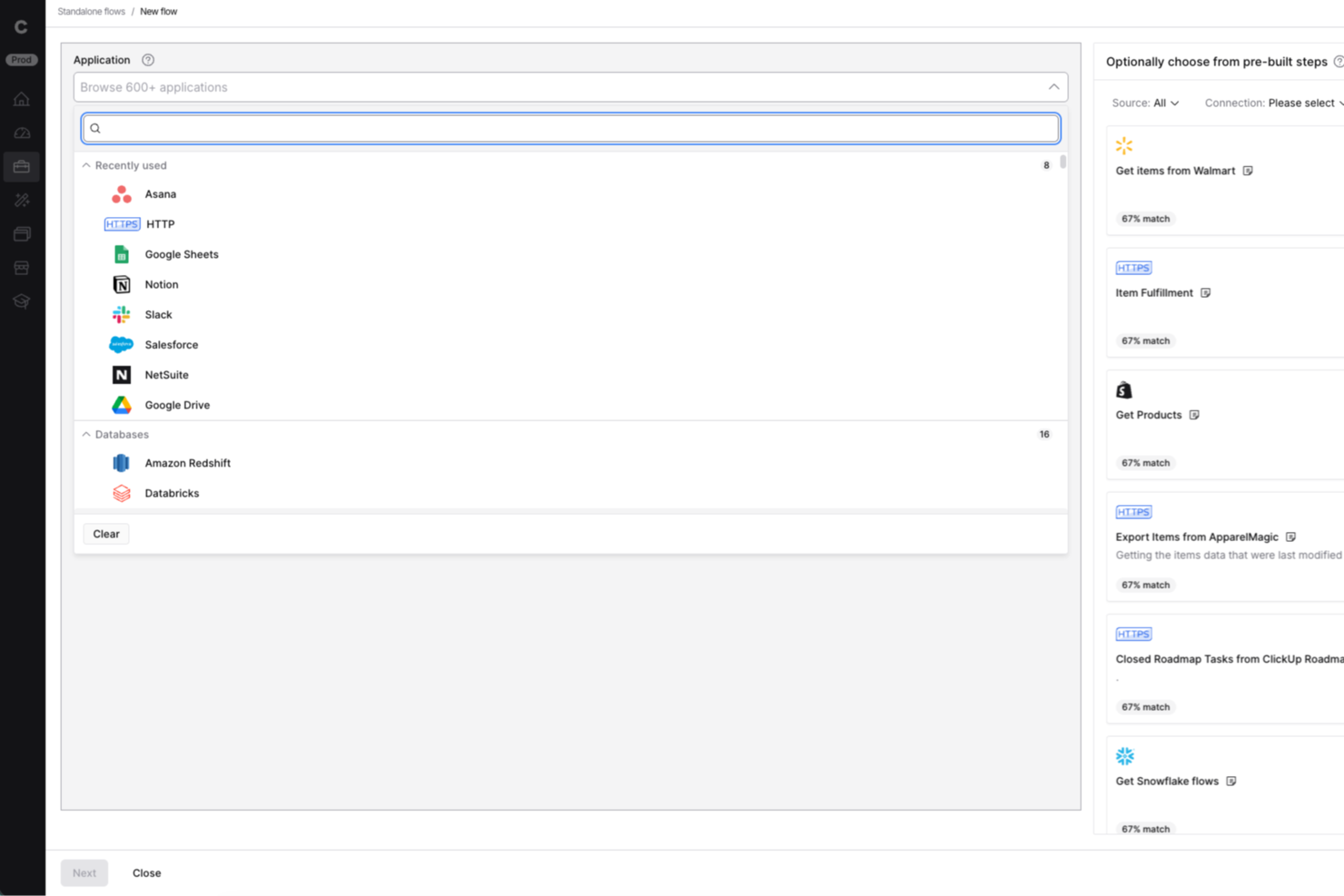
Celigo is a cloud-native intelligent automation platform that connects applications, automates multi-step workflows, manages APIs and EDI, and deploys AI agents across enterprise systems.
Who Is Celigo Best For?
Celigo works well for IT and automation teams that need to connect a large number of SaaS applications, particularly in NetSuite-heavy environments, without building integrations from scratch.
Why I Picked Celigo
I picked Celigo as one of the best because its Integration Marketplace gives you immediate access to over 1,000 prebuilt app connectors, cutting the time it takes to wire up systems like NetSuite, Salesforce, or Snowflake from weeks to hours. I especially like the Celigo tools feature, which lets you build reusable units of logic with schema-validated inputs and outputs that you can call from flows, APIs, AI agents, and MCP servers without rebuilding the same logic twice. The Agent Builder adds another layer by letting you connect LLM intent directly to those integrations, so multi-step cross-system work runs without manual handoffs.
Celigo Key Features
- Webhook-triggered flow execution: Celigo receives HTTP POST or PUT events from source applications and uses them to initiate multi-step integration flows automatically.
- Integration Lifecycle Management (ILM): ILM tracks integration revisions, supports diffing and merging changes, and lets teams revert to earlier versions across development and production environments.
- Extension framework for custom functions: You can host custom integration logic in an Express-based server or AWS Lambda and connect it directly to your Celigo flows.
- MCP Gateway for agent tool governance: The MCP Gateway controls which users can access which tools across Celigo and third-party MCP servers, and logs every call with identity and tool details.
Celigo Integrations
Celigo offers marketplace integrations with Salesforce, Oracle NetSuite, SAP, Snowflake, Microsoft Dynamics 365 Business Central, Walmart, Target, and Costco. It also supports HTTP, FTP, JDBC, AS2, GraphQL, webhooks, REST, SOAP, and API-based custom integrations.
Pros and Cons
Pros:
- Flow dashboards and logs help investigate failures
- Multi-step flows support branching and scheduled execution
- Reusable tools share logic across workflows and APIs
Cons:
- No human-task routing or case management
- No BPMN or DMN process modeling
New Product Updates from Celigo
Celigo Expands Storage, Data Imports, and Connection Management
Celigo adds a standalone storage connector, optimized Azure Synapse imports, NetSuite OAuth 2.0, flexible file templates, and expanded MCP access controls. These updates help teams manage files, process data, and secure integrations. For more information, visit Celigo’s official site.
 .

Workato
Best for embedded iPaaS and app integrations
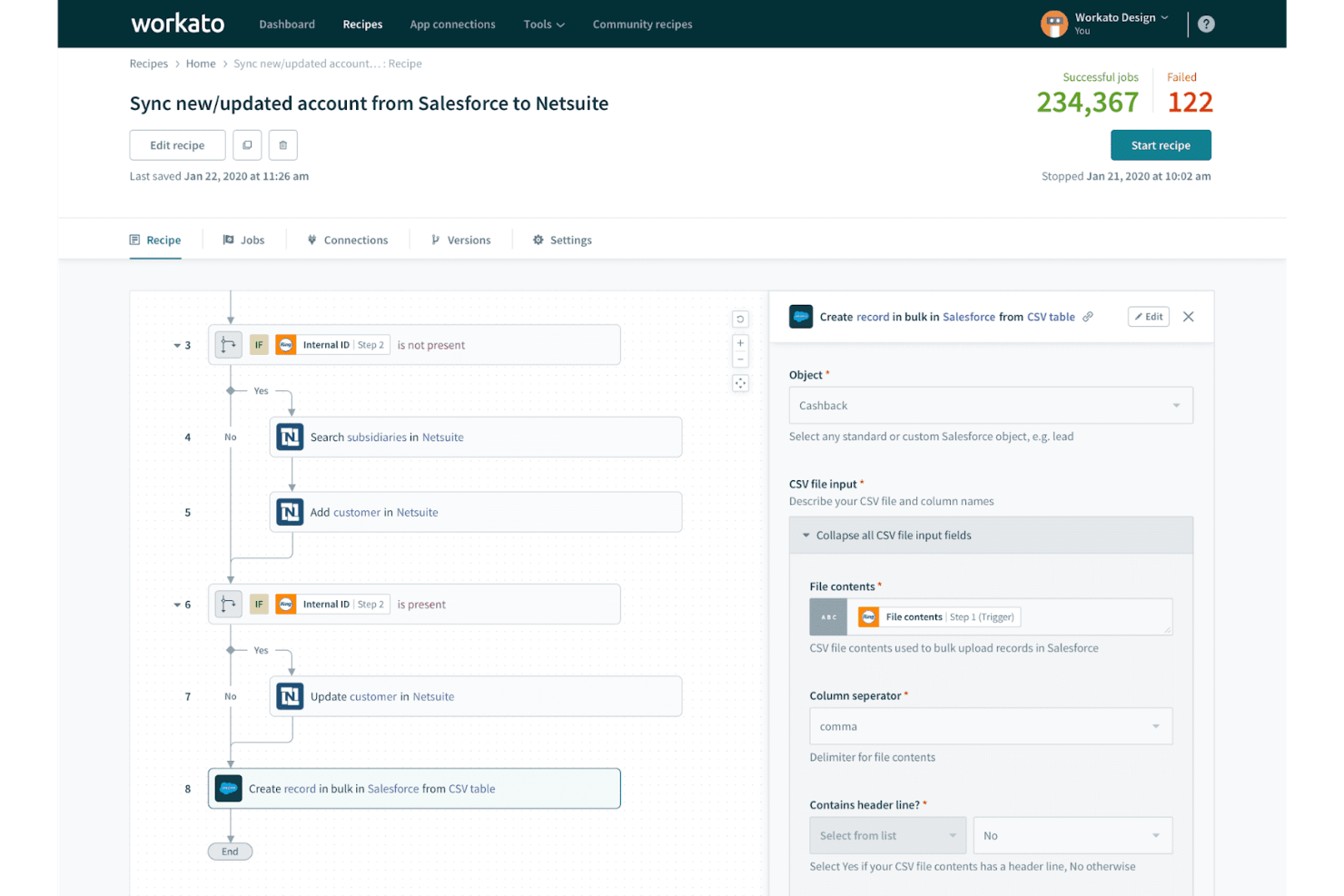
Workato is a cloud-based integration and automation platform that connects apps, data, and APIs through a visual recipe builder, supporting multi-step workflow orchestration, decision logic, human task routing, and an embedded iPaaS model for SaaS products.
Who Is Workato Best For?
Workato is a strong fit for enterprise teams that need to connect dozens of apps and automate cross-system workflows without building custom integration infrastructure from scratch.
Why I Picked Workato
I picked Workato as one of the best because its embedded iPaaS model is genuinely unlike what most process orchestration tools offer: you can place Workato's full integration and automation layer directly inside your own product UI, letting your customers build and trigger workflows without ever leaving your app. The recipe builder handles multi-step orchestration with conditional logic, loops, and parallel execution paths, and the Connector SDK lets my team build custom connectors for anything not already covered by the 1,200+ pre-built options.
Workato Key Features
- Recipe lifecycle management: Move recipe packages and their dependencies across separate development, test, and production workspaces to manage changes before they go live.
- Decision tables: Define condition rows with up to 2,000 rows, 20 input columns, and 20 output columns, and feed the outputs directly into subsequent recipe steps.
- On-premises agent: Connect private-network apps and databases to Workato cloud via an outbound TLS connection, with agent grouping available for high availability and load balancing.
- Workflow apps: Build no-code forms, dashboards, and role-based approval chains that insert human review or input steps into automated recipe workflows.
Workato Integrations
Workato offers 1,200+ native connectors, including Salesforce, Slack, and Marketo. It also supports REST and SOAP APIs, webhooks, polling, custom connectors through its Connector SDK, and connections to on-premises applications and databases.
Pros and Cons
Pros:
- Embedded automation fits directly inside products
- Business analysts can monitor production dashboards
- Flexible recipes coordinate cross-system workflows
Cons:
- No BPMN or DMN compatibility documented
- Complex recipes can become hard to debug

Appian
Best for AI-powered process automation
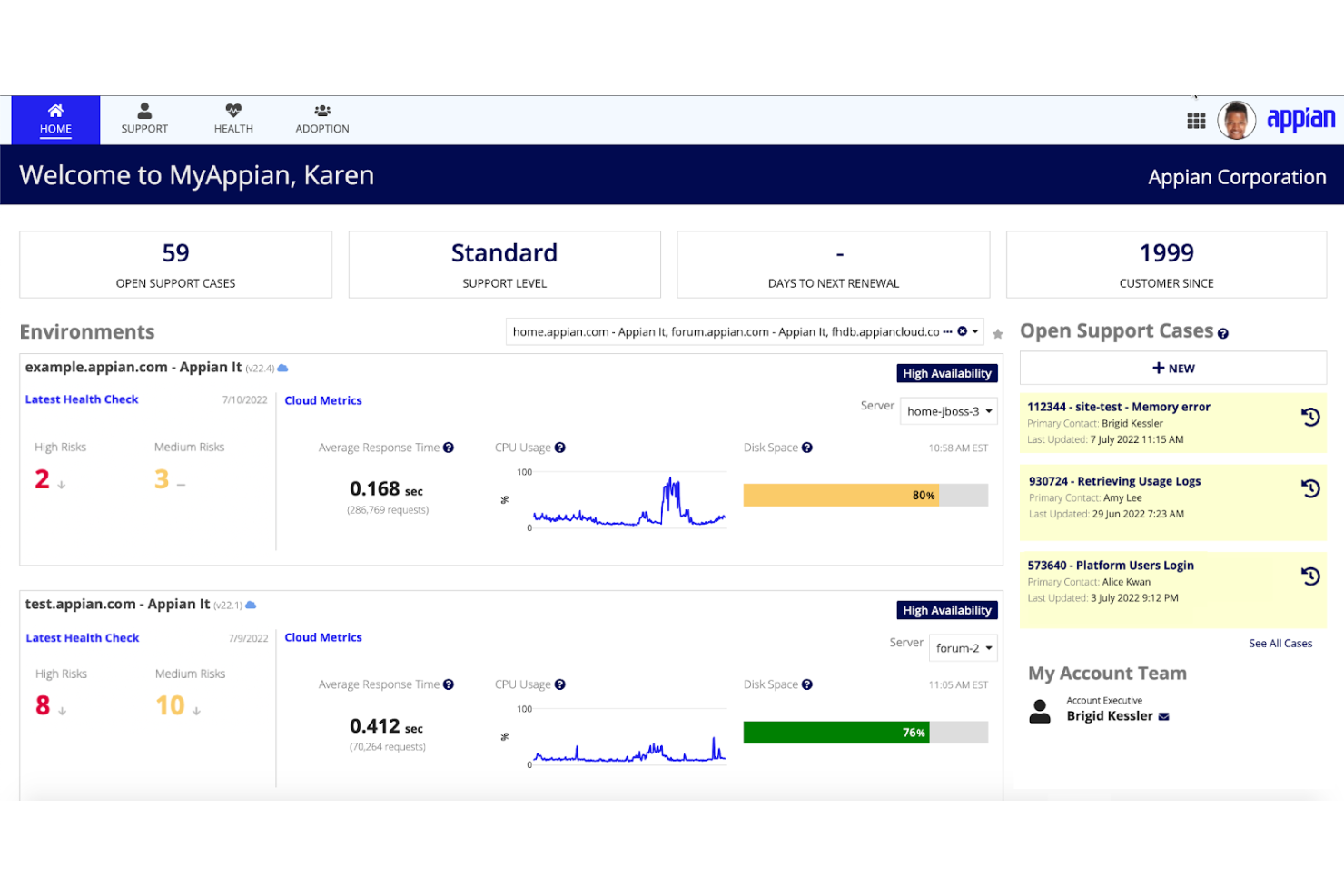
Appian is an enterprise process automation platform that combines BPMN-style process modeling, low-code application development, RPA, case management, and AI-driven workflow orchestration across cloud and self-managed deployments.
Who Is Appian Best For?
Appian is a strong fit for enterprise teams in regulated industries that need to automate complex, multi-step processes with built-in AI, governance, and compliance controls.
Why I Picked Appian
I've included Appian in my top picks because it brings genuinely sophisticated AI into the process automation layer, not just as a feature bolted on the side. I love how Appian lets you coordinate AI agents, RPA bots, and human tasks within a single BPMN-style process model, so a compliance review workflow can dynamically route between a bot, an AI agent, and a human reviewer without rebuilding the logic. Its Process Intelligence layer adds bottleneck and compliance analysis on top, which is something Camunda doesn't match natively.
Appian Key Features
- Data fabric: Connects and virtualizes enterprise data across disparate systems without requiring migration, giving processes access to live, unified data.
- Intelligent document processing: DocCenter classifies documents, extracts data, applies validation rules, and routes results directly into business workflows.
- Low-code RPA bot builder: Lets developers build bots to automate repetitive tasks across systems that lack APIs, with plan-based bot allowances.
- DMN-standard decision tables: Reusable, versioned decision objects support Unique, First, and Rule Order hit policies with built-in logic gap and overlap detection.
Appian Integrations
Appian offers hundreds of prebuilt connectors, including Salesforce, Google, Microsoft SharePoint, DocuSign, and AWS. It supports custom integrations through its Integration SDK, Web APIs, OpenAPI, REST, SOAP, and JDBC.
Pros and Cons
Pros:
- Process Intelligence reveals bottlenecks and compliance gaps
- Reviewers praise rapid workflow development
- Coordinates AI agents, bots, and human tasks
Cons:
- Complex customizations can demand specialist skills
- Camunda migration relies on dated third-party tooling

Pega
Best for decision-making and workflow processing

Pega Platform is an enterprise low-code platform that combines case management, workflow orchestration, robotic process automation, and AI-powered decisioning to automate and manage complex business processes end to end.
Who Is Pega Best For?
Pega Platform is a strong fit for enterprise teams that need to combine workflow orchestration with AI-powered decisioning across complex, multi-step business processes.
Why I Picked Pega
I picked Pega as one of the best Camunda alternatives because its AI-powered decisioning sets it apart from pure workflow engines. Where Camunda focuses on BPMN process execution, Pega combines case management with its Customer Decision Hub, which evaluates eligible actions in real time and records the rationale behind each decision. I've found that combination especially valuable for processes like financial-crime workflows or loan approvals, where the why behind a decision matters as much as the workflow itself.
Pega Key Features
- Process Mining: Translates event-log data into process models with associated metrics to identify slow, variable, or non-compliant workflows.
- Low-code application development: Lets developers and business users build enterprise applications using drag-and-drop tools in App Studio and Dev Studio.
- REST connector configuration: Supports direct integration with internal microservices and external endpoints, with configurable request and response mapping, custom headers, and query parameters.
- Assignment shapes and SLAs: Represents human tasks within process diagrams and links to routing rules and service-level agreements to manage task completion.
Pega Integrations
Native integrations are not clearly documented. Pega supports API-based custom integrations, including REST connections to internal microservices and vendor endpoints.
Pros and Cons
Pros:
- Real-time decisions record rationale for actions
- Visual low-code tools speed application building
- Handles complex case workflows end to end
Cons:
- Rigid UI limits pixel-specific interface design
- Platform-specific rules complicate debugging

Best for intelligent document processing
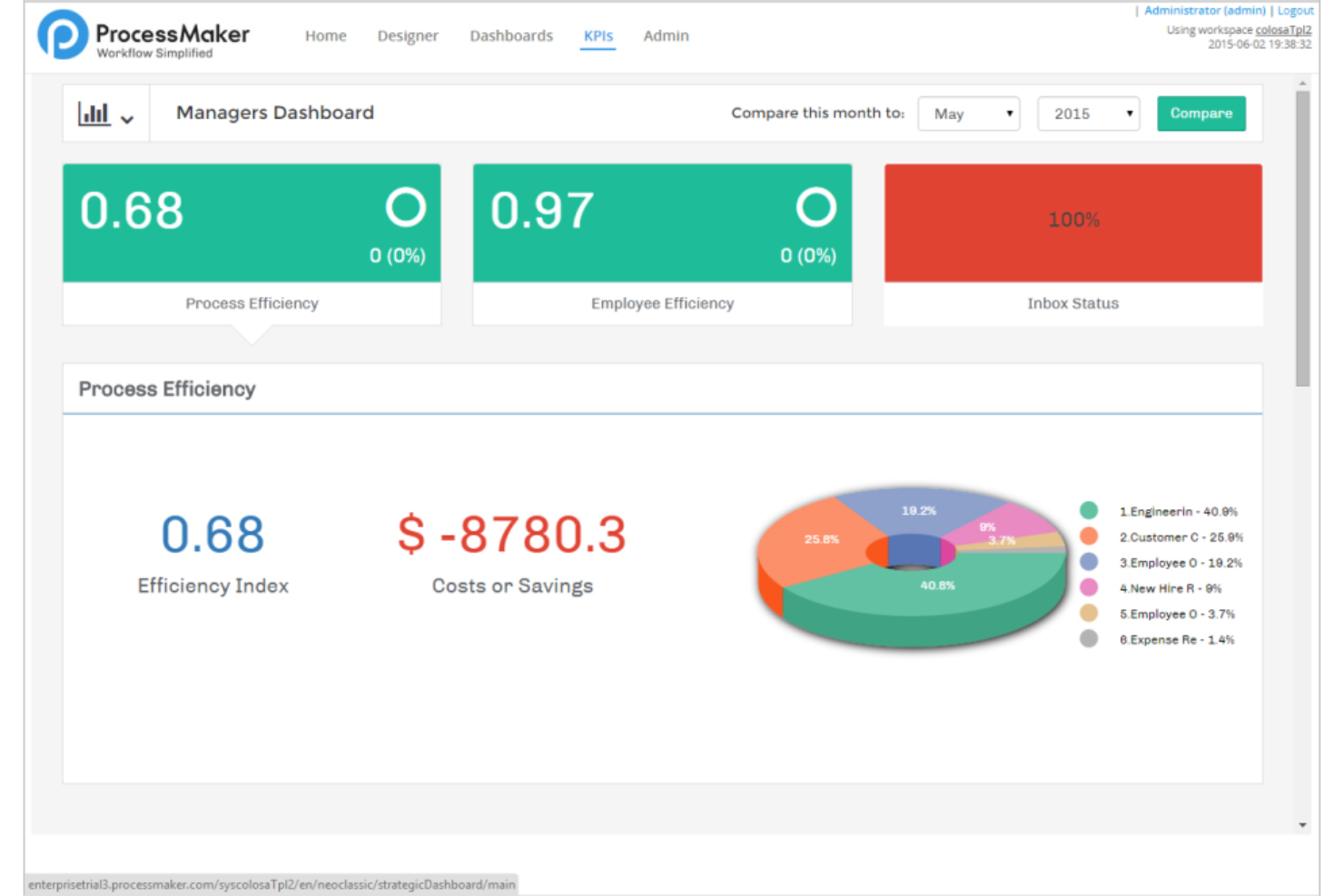
Decisions is a business process automation and orchestration platform that combines visual workflow design, a rules engine, AI agent coordination, and human task management in a single no-code environment.
Who Is ProcessMaker Best For?
ProcessMaker is a strong fit for enterprises that need to automate document-heavy workflows, like admissions processing, approvals, or compliance reviews, without building custom solutions from scratch.
Why I Picked Decisions
I picked Decisions as one of the best because its intelligent document processing capabilities go well beyond basic OCR. The platform uses AI-powered data extraction to automatically pull structured data from transcripts, forms, and other documents, then routes exceptions through approval workflows without manual intervention. I especially like that it combines this extraction layer with a visual rules engine, so you can define exactly how extracted data gets validated, enriched, and written back to downstream systems like a SIS.
Decisions Key Features
- Visual rules engine: Build and manage decision logic using decision tables, flowcharts, truth tables, and natural-language policies in a no-code visual editor.
- BPMN 2.0 import: Convert existing BPMN XML files directly into Decisions workflows, preserving activities, gateways, events, subprocesses, and tasks.
- Message queue integration: Connect to Amazon SQS, Apache Kafka, Azure Service Bus, ActiveMQ, and SolaceMQ so flows can produce or consume messages across systems.
- DevOps release traceability: Link deployments to Jira or Azure DevOps user stories and move work through governed promotion paths with quality gates and rollback triggers.
ProcessMaker Integrations
ProcessMaker documents Active Directory integration, plus Jira and Azure DevOps connections for release traceability. It supports REST, SOAP, .NET assemblies, and message queues including Apache Kafka, Azure Service Bus, and Amazon SQS.
Pros and Cons
Pros:
- Document extraction routes exceptions into approvals
- Reviewers value customizable task and case dashboards
- Visual rules govern BPMN step behavior
Cons:
- Some integrations require extra custom development
- BPMN imports lack documented Camunda compatibility

Yoroflow
Best for no-code workplace automation
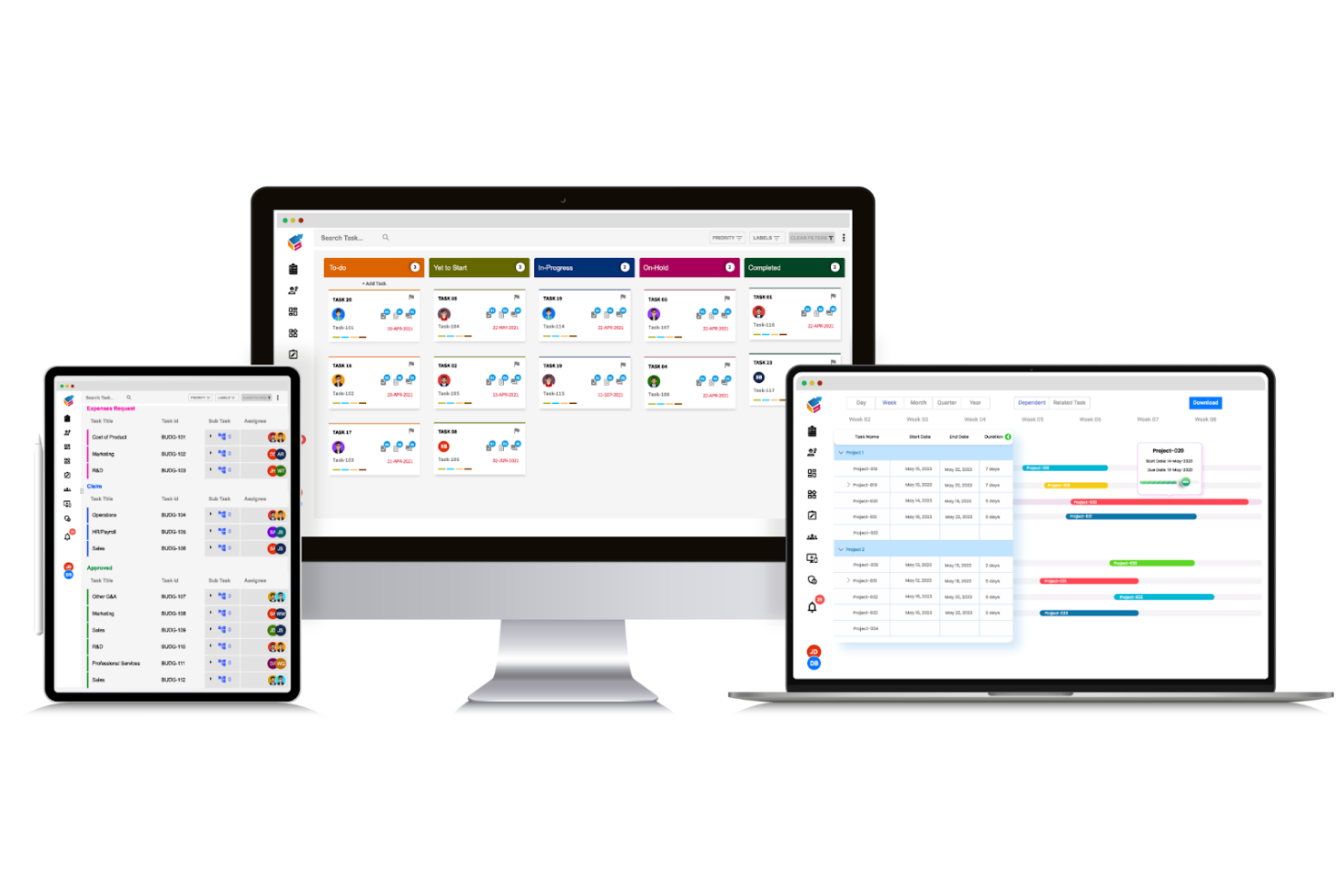
Yoroflow is a no-code workflow automation platform that combines process building, multi-tier approvals, task management, case management, and drag-and-drop workflow design with a broad library of native integrations.
Who Is Yoroflow Best For?
Yoroflow is a strong fit for operations and project teams at small to mid-sized companies that want to automate approvals, tasks, and business processes without writing a single line of code.
Why I Picked Yoroflow
I picked Yoroflow as one of the best because its no-code drag-and-drop process builder lets you replace Camunda's developer-heavy workflows without writing a single line of code. I especially like the multi-tier approval management and Decision Task node, which handle branching logic visually. If your team is moving away from BPMN-based engines to simplify operations, Yoroflow's dedicated migration support and data-import tools make that transition practical.
Yoroflow Key Features
- Rule-based workflow triggers: Set predefined conditions that automatically kick off workflows, route tasks, or approve requests without manual intervention.
- Pause Node with timeout controls: Configure wait steps in a workflow that trigger next actions based on user response or inactivity within a set timeframe.
- Custom admin dashboards: Build role-specific dashboards that surface real-time workflow activity, task status, and operational metrics in one view.
- No-code app builder: Create custom business applications using a visual drag-and-drop interface that connects with existing systems for data exchange.
Yoroflow Integrations
Yoroflow offers native integrations with Microsoft Teams, Slack, Google Drive, Gmail, HubSpot, QuickBooks, and Wrike. It supports custom connections through low-code GET/POST APIs and webservices, plus Zapier.
Pros and Cons
Pros:
- Multi-tier approvals connect human tasks to workflows
- Migration support and data-import tools ease transition
- Drag-and-drop workflows replace code-heavy setup
Cons:
- Very complex workflows require capacity testing
- No documented BPMN or DMN compatibility

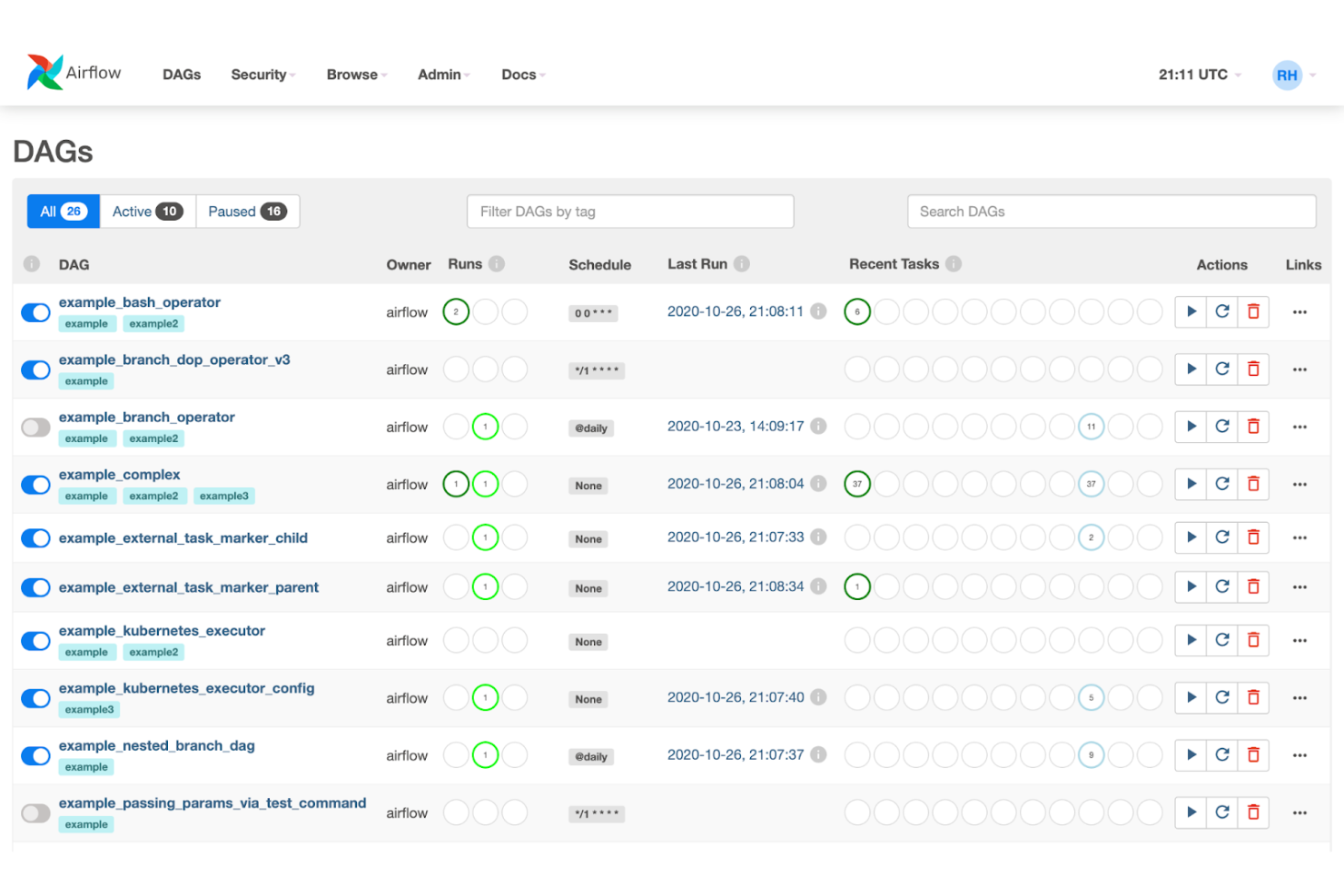
Apache Airflow is an open-source workflow orchestration platform that lets you author, schedule, and monitor pipelines as Python-defined DAGs, with built-in support for task dependencies, retries, parallel runs, and integrations across cloud platforms and third-party services.
Who Is Apache Airflow Best For?
Apache Airflow is a strong fit for developer-led teams that need to orchestrate complex, multi-step data pipelines with fine-grained control over task dependencies and scheduling.
Why I Picked Apache Airflow
Apache Airflow earns its spot on my shortlist because it handles scalable workflow orchestration better than most open-source tools I've worked with. Its Python-defined DAGs let developer teams model complex task dependencies, branching logic, and retry behavior directly in code, without a separate visual designer layer. I also like that its distributed architecture scales horizontally across workers and schedulers, so pipelines that grow from dozens to thousands of tasks don't require a platform rebuild.
Apache Airflow Key Features
- Python-defined DAGs: Author workflows as Python source files using standard language features like loops and decorators to generate task graphs dynamically.
- Human-in-the-loop (HITL) operators: Pause workflows to collect human input, approvals, or branch selections before execution continues.
- 80+ community provider packages: Install separately maintained providers to add operators, hooks, sensors, and custom connections for external services and cloud platforms.
- REST API: Trigger and manage workflows from external systems using stable, backward-compatible
/api/v2endpoints.
Apache Airflow Integrations
Apache Airflow offers integrations through 80+ community provider packages, including Google Cloud Platform, Amazon Web Services, and Microsoft Azure. Its stable REST API supports custom integrations and external workflow triggers.
Pros and Cons
Pros:
- Human approvals can pause task flows
- Retries and branching suit batch workflows
- Scales distributed orchestration across task graphs
Cons:
- No documented DMN or Camunda migration path
- Python DAGs replace visual BPMN modeling

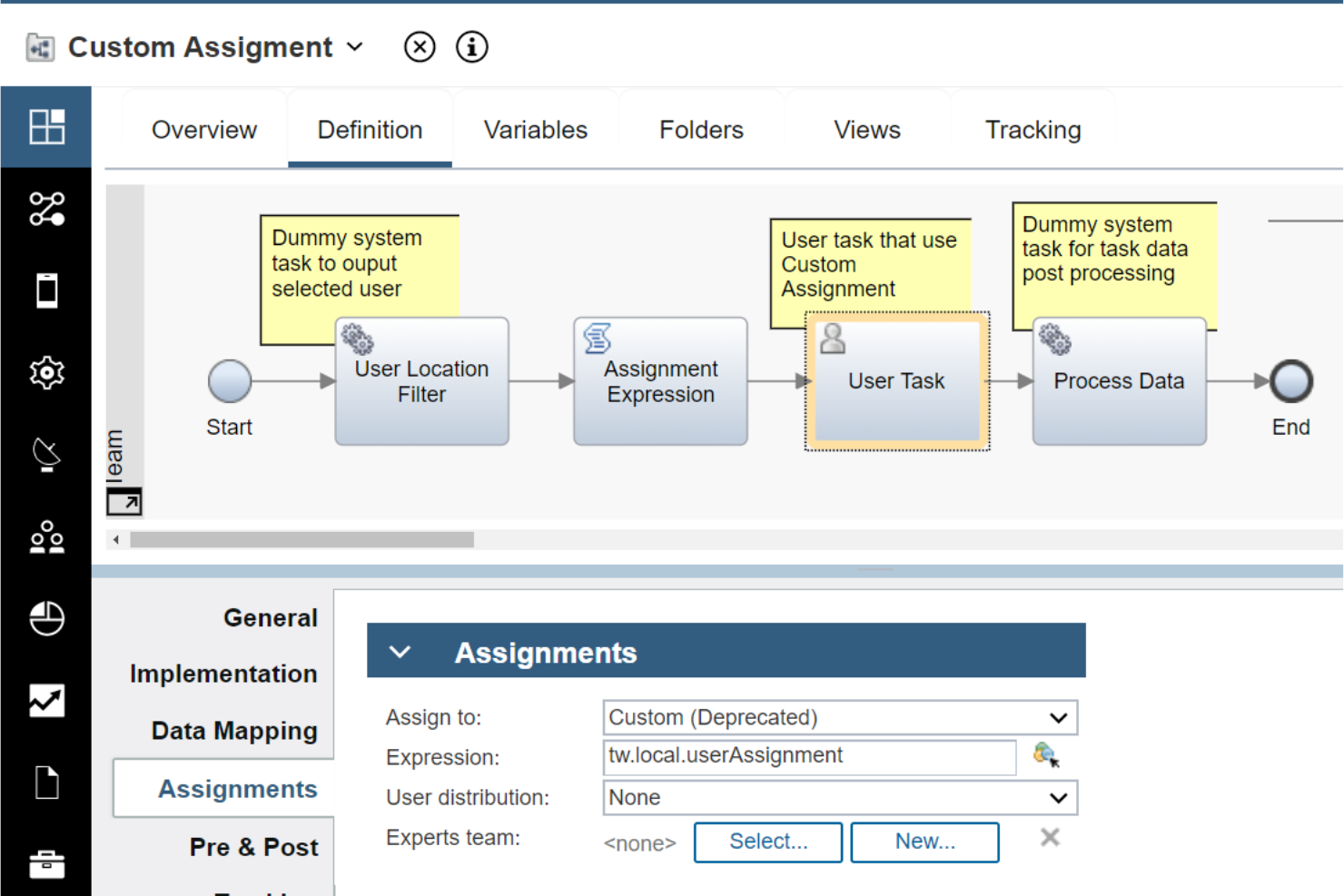
IBM Business Automation Workflow is an enterprise BPM and case management platform that combines process design, workflow orchestration, human task management, and real-time process monitoring with AI-powered automation capabilities.
Who Is IBM Business Automation Workflow Best For?
IBM Business Automation Workflow is a strong fit for enterprise teams in regulated industries—like financial services or insurance—that need to manage both structured workflows and complex case work within a single platform.
Why I Picked IBM Business Automation Workflow
IBM Business Automation Workflow earns its spot on my shortlist because it's one of the few platforms that genuinely unifies BPM and case management under one roof, rather than bolting case handling onto a pure process engine. I find the combination of structured workflow orchestration and dynamic case design especially useful when teams are managing something like an insurance claims process, where the workflow has defined stages but individual cases still require human judgment and ad hoc task routing. The platform also supports container deployments across Amazon EKS, Azure AKS, and Google GKE, so scaling that workload isn't a manual infrastructure headache.
IBM Business Automation Workflow Key Features
- OpenAPI-based REST service discovery: Generates external services and business objects directly from OpenAPI 2.0 or 3.0 JSON or YAML specifications for use in service flows.
- MCP agent connectivity: Connects Business Automation Workflow to external AI agents—including watsonx Orchestrate, Claude, and Copilot—through the open Model Context Protocol.
- Container deployment profiles: Provides small, medium, and large workload profiles for containerized deployments across Amazon EKS, Azure AKS, Google GKE, OpenShift, Rancher, and Tanzu.
- JavaScript and Java API extension points: Exposes process, case, and application APIs so developers can build or customize case interfaces using human services, coaches, and views.
IBM Business Automation Workflow Integrations
IBM Business Automation Workflow connects with watsonx Orchestrate, Claude, and Copilot through MCP. It supports REST, JavaScript, web service, and Java APIs, plus OpenAPI 2.0 and 3.0 service discovery for custom integrations.
Pros and Cons
Pros:
- Container profiles support large workloads
- Reviewers value process monitoring dashboards
- Unified BPM and case management
Cons:
- Reviewers report slowdowns under heavy workloads
- Reviewers describe the interface as dated

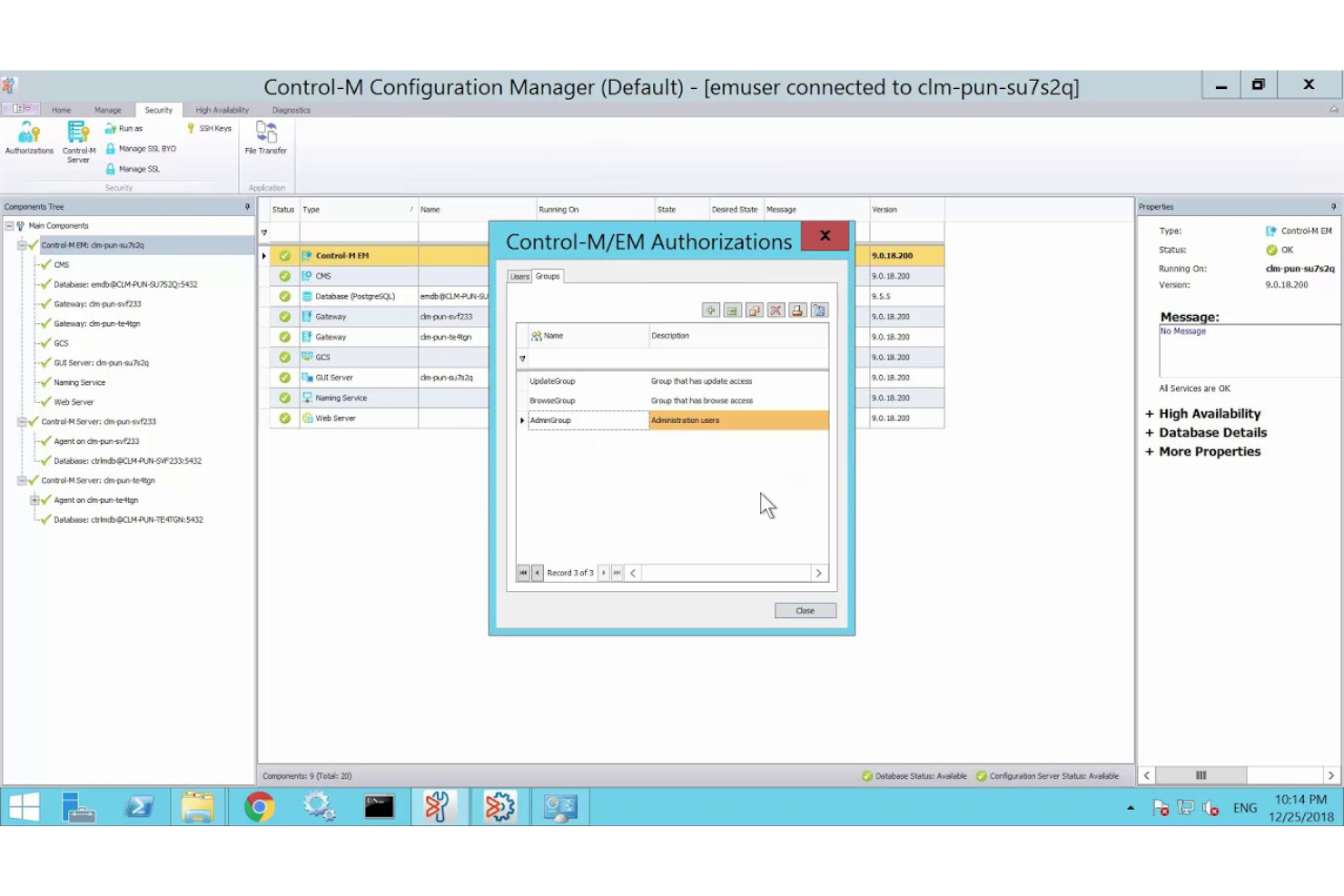
Control-M is an enterprise workload automation and orchestration platform from BMC Software that schedules, monitors, and coordinates application and data workflows across mainframe, cloud, and hybrid environments.
Who Is Control-M Best For?
Control-M is a strong fit for enterprise IT and operations teams that need to coordinate complex, cross-environment workload automation across mainframe, cloud, and hybrid infrastructure.
Why I Picked Control-M
I picked Control-M as one of the best because it handles enterprise workload automation at a scale and depth that few platforms match. Where Camunda excels at BPMN-driven process design, Control-M fills a different but equally critical need: orchestrating production workloads across mainframe, cloud, and hybrid environments from a single control plane. I especially like the SLA management and predictive delay detection, which means my team can catch a failing batch pipeline before it breaches a deadline rather than reacting after the fact.
Control-M Key Features
- Jobs-as-Code authoring: Define, test, and deploy job workflows as JSON artifacts managed in source control via REST API and CLI.
- Event-driven workflow triggers: Connect workflows to event sources including Kafka, AWS SQS, RabbitMQ, and Azure Service Bus to react to real-time events.
- Credential vault integration: Retrieve runtime credentials from Azure Key Vault, HashiCorp, and CyberArk for file transfer, database, and OS jobs.
- Control-M Archive Service: Store workflow execution history in a secure cloud archive and compare current and historical job runs for troubleshooting.
Control-M Integrations
Control-M offers integrations with Kafka, AWS SQS, RabbitMQ, Azure Service Bus, Azure Key Vault, HashiCorp, and CyberArk. It also supports REST APIs, webhooks, HTTP/HTTPS, MCP, and CI/CD workflows for custom orchestration.
Pros and Cons
Pros:
- Supports version-controlled jobs-as-code deployments
- Makes job status and SLA risks visible
- Coordinates complex batch dependencies across platforms
Cons:
- Omits DMN decisions and human-task workflows
- Doesn't provide documented BPMN process modeling

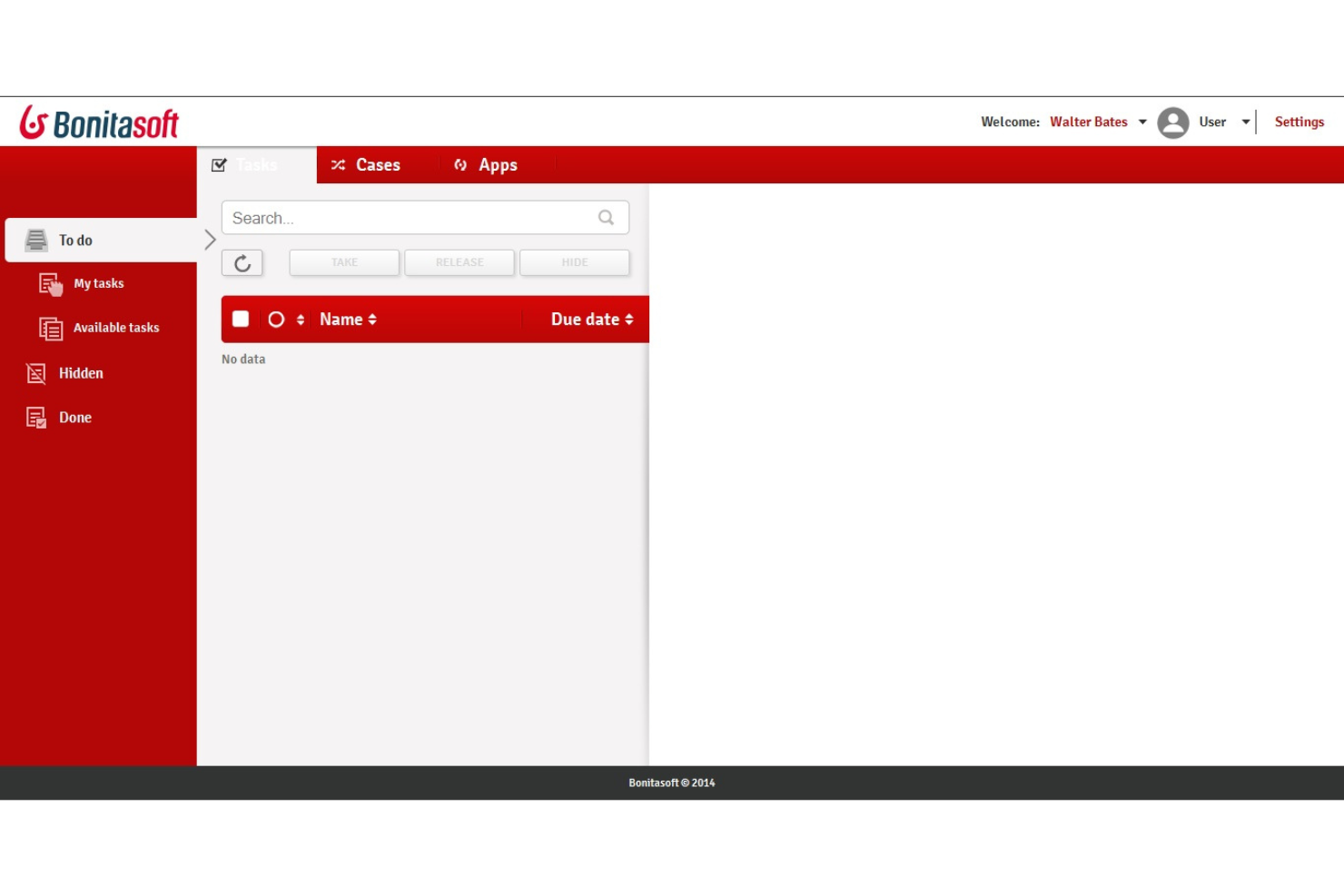
Bonita BPM is an open-source business process management platform that combines BPMN-based process modeling, workflow orchestration, adaptive case management, and a low-code UI builder for building and running process applications.
Who Is Bonitasoft Best For?
Bonita BPM is a strong fit for teams that want to build and run BPMN-based process applications on an open-source foundation without committing to a fully commercial platform from day one.
Why I Picked Bonitasoft
I've included Bonitasoft in my top picks because it's one of the few BPM platforms where the open-source foundation is genuinely usable, not just a stripped-down teaser. The Community edition builds from source via the Ofelia GitHub organization, and the BPA Studio lets you model BPMN processes with complex rules, exception paths, and SLA enforcement without touching the Enterprise tier. I also like that adaptive case management is built in, so knowledge workers can add or skip tasks in real time as conditions change.
Bonitasoft Key Features
- Actor-based task assignment: Maps process tasks to specific users, groups, roles, or memberships, with filters that route approvals to the appropriate person based on organizational relationships.
- Kubernetes deployment: Runs Bonita on Kubernetes for dynamic scaling, resource optimization, fault tolerance, and self-healing across your infrastructure.
- Custom connector creation: Lets you build and import your own connectors into Bonita Studio to integrate systems not covered by the existing catalog.
- Process Insights dashboards: Tracks case status, duration, SLA compliance, bottlenecks, and process-variant metrics across active and completed process instances.
Bonitasoft Integrations
Bonitasoft offers documented connectors for Salesforce, SAP, UiPath, Jira, LDAP/AD, databases, and generic web services. REST API access and custom connector creation support additional system orchestration.
Pros and Cons
Pros:
- Community source supports self-hosted evaluation
- Adaptive cases let workers adjust tasks
- BPMN modeling handles complex processes
Cons:
- No documented DMN decision modeling support
- No documented Camunda migration tooling
Diğer Camunda Alternatifleri
Aşağıda kısa listeme aldığım ek Camunda alternatiflerinin bir listesini bulabilirsiniz. İlk 10’a girememiş olsalar da hâlâ değerlidirler ve daha fazla araştırmaya değerlerdir.
- Flowable
For low-code business management
- CANEA ONE
For comprehensive quality management systems
- Kissflow
For low-code and no-code app development
- ClickUp
For project management and task tracking
- Tallyfy
For process documentation and automation
- Decisions
For complex workflow automation
- Prismatic
For embedded integrations in SaaS
- Orkes
For cloud-native workflow orchestration


İlgili Proje Yönetimi Yazılımı İncelemeleri
Aradığınızı hâlâ burada bulamadıysanız test edip değerlendirdiğimiz diğer ilgili araçlara göz atın:
- Proje Yönetimi Yazılımı
- Kaynak Yönetimi Yazılımı
- İş Akışı Otomasyonu Yazılımı
- Zaman Takibi Yazılımı
- Görev Yönetimi Yazılımı
- İş Birliği Araçları
- Gantt Şeması Yazılımı
- Üretkenlik Araçları
- Proje Takibi Yazılımı
- Proje Zamanlama Yazılımı
How I Evaluate Camunda Alternatives
I evaluate in two layers: the baseline every process orchestration tool must hit and the differentiators that distinguish a microservices-native engine from a no-code BPM platform.
Core Functionality (Table Stakes For This List)
When I'm selecting tools for my list, I rank each one on a scale from 0 (does not offer the functionality) to 5 (excels in this area) for each core functionality listed below. Then, I calculate the tool's total score into a percentage. Each tool needs to achieve a minimum total score of 65% to be considered for inclusion.
- BPMN Workflow Modeling: I check whether the tool offers a visual BPMN 2.0 designer with versioning, so teams can model processes like order fulfillment or employee onboarding.
- Process Orchestration Engine: The engine needs to handle long-running, stateful workflows with retries and timers, like orchestrating multi-step payment processing across services.
- Decision Automation Support: I look for DMN decision tables or a built-in rules engine that lets you define routing logic, such as approval thresholds or claims adjudication rules.
- API & System Integrations: Each tool should offer REST APIs and connectors for linking into existing systems like ERPs, CRMs, and messaging platforms your services rely on.
- Human Task Management: I evaluate how the tool handles user tasks, including task inboxes, form builders, and assignment routing for steps that need manual review or approval.
- Process Monitoring & Analytics: Dashboards and audit logs matter here. I look for real-time visibility into active instances, SLA tracking, and bottleneck detection across running workflows.
Once I have a list of tools that meet this criteria, I consider what sets each platform apart.
Differentiating Factors (What Sets Vendors Apart)
Here's how I compare and contrast different vendors:
Standout Features
Process mining is a major differentiator. Tools that analyze event logs from your existing systems and surface optimization opportunities save weeks of manual process discovery. I also look for low-code process builders that let business analysts design and iterate on workflows without waiting on engineering. For teams running DevOps pipelines, Git-based versioning and CI/CD integration make it possible to promote process definitions across environments the same way you'd deploy application code.
Beyond Features
Deployment flexibility matters a lot here. Some teams need a fully managed SaaS option, while others in regulated industries require on-premise or hybrid setups with strict data residency controls. I also evaluate the licensing model closely, especially whether there's an open-source core or community edition your team can use to prototype before committing. Developer ecosystem rounds out my evaluation. Strong documentation, active community forums, and a healthy connector marketplace tell me a platform has staying power and won't leave your engineering team solving problems alone.
Neden Camunda alternatifi aramalısınız?
Camunda güçlü bir yazılım olsa da farklı bir çözüme ihtiyaç duymanızın birkaç nedeni olabilir. Aşağıdaki konularda endişeleriniz varsa Camunda'ya alternatif arıyor olabilirsiniz:
- Maliyet: Camunda güçlü bir özellik seti sunsa da fiyatlandırması, bütçeleri sınırlı kuruluşlar için karşılanamayacak düzeyde olabilir. Maliyet önemli bir endişe kaynağıysa iş akışı otomasyonu ihtiyaçlarınızı hâlâ karşılayan daha uygun fiyatlı alternatifleri araştırmanız gerekebilir.
- Karmaşıklık: Camunda, karmaşık iş süreçlerini ele almak üzere tasarlanmıştır; bu da daha basit iş akışları için gereğinden fazla kapsamlı olabilir. Kuruluşunuzun ihtiyaçları daha doğrudansa Camunda'nın kapsamlı özelliklerini ve dik öğrenme eğrisini gereksiz bulabilirsiniz.
- Özelleştirme: Camunda süreç otomasyonu için sağlam bir çerçeve sunsa da yazılımı iş süreçlerinize tam olarak uyarlamak için daha kapsamlı özelleştirme seçeneklerine ihtiyaç duyabilirsiniz. Camunda'nın özelleştirme olanaklarını sınırlayıcı buluyorsanız benzersiz gereksinimlerinizi karşılamak için daha esnek bir alternatif gerekebilir.
- Entegrasyon: Mevcut sistemlerle etkili entegrasyon, sorunsuz iş akışı otomasyonu için önemlidir. Camunda mevcut yazılım yığınınızla entegre olmakta zorlanıyorsa veya kapsamlı yapılandırma gerektiriyorsa bu durum operasyonlarınızı aksatabilir. Bu nedenle daha iyi entegrasyon olanaklarına sahip bir alternatif daha uygun bir seçim olabilir.
- Destek: Özellikle karmaşık süreç otomasyonuyla çalışırken güvenilir müşteri desteği çok önemlidir. Camunda'nın destek hizmetlerinin yanıt verme hızı veya uzmanlık açısından yetersiz olduğunu düşünüyorsanız daha erişilebilir destek sunan bir alternatifi değerlendirmeniz gerekebilir.
Camunda alternatifleri; daha uygun fiyatlandırma, daha basit arayüzler, daha fazla özelleştirme, daha iyi entegrasyon olanakları ve üstün müşteri desteği gibi Camunda'da bulunmayabilecek özellikler ve avantajlar sunar. Bu nedenle bu alternatifler, özel ihtiyaçlarınız ve kısıtlamalarınızla daha iyi örtüşebilir.
Camunda Alternatifinin Temel Özellikleri
Alternatif yazılımınızın uygun bir seçim olabilmesi için Camunda alternatiflerinde bulunan ve yazılımınızın tekrarlayabilmesi veya geliştirebilmesi gereken bazı temel özellikler şunlardır.
- İş Akışı Optimizasyonu ve Yönetimi: İş akışlarını verimli bir şekilde düzenlemek ve yönetmek, üretkenliği korumak ve darboğazları en aza indirmek için önemlidir. Camunda alternatifi, iş akışı süreçlerini optimize etmek için güçlü araçlar sunmalı; görevlerin verimli bir şekilde ve gereksiz gecikmeler olmadan tamamlanmasını sağlamalıdır.
- İş Süreci Otomasyonu (BPMN): BPMN standartlarını kullanarak iş süreçlerini otomatikleştirmek, tutarlı ve sektörel standartlara uygun süreç yürütülmesini sağlar. Camunda alternatifi, işletmelerin karmaşık iş akışlarını tanınan süreç modelleme standartlarına bağlı kalarak otomatikleştirebilmesi için BPMN'yi desteklemelidir.
- Süreç Modelleme ve Tasarımı: İş süreçlerini görsel olarak oluşturma ve tasarlama olanağı, kullanıcıların iş akışlarını anlamasına ve iyileştirmesine yardımcı olur. Camunda alternatifi, ekiplerin iş operasyonlarını planlamasını ve geliştirmesini kolaylaştıran sezgisel süreç modelleme araçları sunmalıdır.
- Otomasyon için Yapay Zekâ Araçları: Tekrarlayan görevleri otomatikleştirmek için yapay zekâdan yararlanmak verimliliği önemli ölçüde artırabilir ve manuel iş yükünü azaltabilir. İyi bir Camunda alternatifi, süreçleri kolaylaştırmak ve ekiplerin daha stratejik faaliyetlere odaklanmasını sağlamak için yapay zekâ destekli otomasyonu bünyesinde barındırmalıdır.
- Proje Yönetimi Araçları: Görev yönetimi, görev atama, izleme ve analiz özelliklerinin sunulması, projelerin planlandığı şekilde ilerlemesini sağlamak için gereklidir. Camunda alternatifi, bir projenin tüm unsurlarının başlangıçtan sona etkili bir şekilde yönetilmesini sağlamak üzere kapsamlı proje yönetimi özelliklerini entegre etmelidir.
- Diğer Platformlarla Entegrasyon: Popüler platformlar ve araçlarla sorunsuz entegrasyon, birleşik bir iş akışı ortamı oluşturmak için hayati önem taşır. Uygun bir Camunda alternatifi, mevcut yazılımlarla entegrasyonları desteklemeli; farklı sistemler arasında sorunsuz veri akışı ve iş birliği sağlamalıdır.
- İş Kuralları ve Karar Verme: Karmaşık iş kurallarını tanımlamak ve yönetmek, otomatikleştirilmiş süreçler üzerinde hassas kontrol sağlar. Camunda alternatifi, iş kurallarını yönetmek için güçlü araçlar sunmalı ve kuruluşların iş akışları içinde bilinçli ve tutarlı kararlar almasını mümkün kılmalıdır.
- Kullanıcı Dostu Arayüz: Özelleştirilebilir ve sezgisel bir kullanıcı arayüzü, kullanıcıların benimsemesi ve kullanım kolaylığı açısından önemlidir. Camunda alternatifi, farklı kullanıcıların ihtiyaçlarına göre uyarlanabilen kullanıcı dostu bir arayüz sunmalı ve platformun tüm ekip üyeleri tarafından erişilebilir olmasını sağlamalıdır.
- İş Birliği Araçları: İletişim ve paylaşım özellikleriyle ekip iş birliğini kolaylaştırmak, etkili ekip çalışması için gereklidir. Camunda alternatifi; ekip üyelerinin iletişim kurmasına, belgeleri paylaşmasına ve projeler üzerinde sorunsuz bir şekilde birlikte çalışmasına olanak tanıyan iş birliği araçlarını içermelidir.
- Müşteri İletişimi Özellikleri: Müşteri etkileşimlerini ve iletişimini geliştirmek, güçlü ilişkiler kurulmasına ve hizmet sunumunun iyileştirilmesine yardımcı olur. İyi bir Camunda alternatifi; otomatik güncellemeler, geri bildirim döngüleri ve kişiselleştirilmiş mesajlaşma gibi etkili müşteri iletişimini destekleyen özellikler sunmalıdır.
Güçlü bir alternatif yalnızca Camunda'nın güçlü yönlerini karşılamakla kalmamalı, aynı zamanda ek esneklik, kullanım kolaylığı ve gelişmiş iş birliği araçları da sunmalıdır. Bu kritik özelliklere odaklanarak kullanım kolaylığı ve ölçeklenebilirlik sağlarken kuruluşunuzun süreç yönetimi hedeflerini etkili bir şekilde destekleyen bir çözüm seçebilirsiniz.