

2026’da Küçük Ekipler İçin En İyi 10 Kaynak Yönetimi Yazılımı

Küçük Ekipler için En İyi Kaynak Yönetimi Yazılımı Kısa Listesi


Küçük ekipler için kaynak yönetimi bunaltıcı olabilir. Sıklıkla aşırı rezervasyon veya planlama karmaşıklığı gibi sorunlarla karşılaşabilir ve ekibinizin projelerine göre uyarlanmış kaynakları etkili bir şekilde tahsis edip takip etmek için bir çözüme ihtiyaç duyabilirsiniz. Size yardımcı olabilirim! Bu yazıda, küçük ekipler için en iyi kaynak yönetimi yazılımı önerilerini paylaşmak üzere proje yönetimi alanındaki uzmanlığımdan yararlanacağım.
Burada, iş yükü ve kaynak yönetimi için merkezi bir platform sağlayarak tahsis görünürlüğünü artıran ve verimliliği geliştiren en iyi araçları bulacaksınız.
Why Trust Our Software Recommendations
Our team has been testing and reviewing software since 2012. As project managers ourselves, we know how difficult—and important—it is to choose the right software.
For this guide, we evaluated tools using hands-on testing and independent research, scoring tools using our selection criteria. We also draw on insights from industry thought leaders and practicing project management experts.
Our reviews reflect our human editorial judgment, not a sales pitch.
Expert reviewers:
Küçük Ekipler için Kaynak Yönetimi Yazılımı Karşılaştırma Tablosu
Bu karşılaştırma tablosunda, küçük ekipler için en iyi kaynak yönetimi yazılımı seçeneklerimin fiyatlandırması, ücretsiz denemeleri ve tanıtım sürümü kullanılabilirliği ele alınmaktadır.
Score legend (out of 5)
- Excellent 4.5–5
- Good 4–4.4
- Average 3–3.9
- Below average 2–2.9
- Poor 1–1.9
| Tool | Starting Price | Website | |||||||
|---|---|---|---|---|---|---|---|---|---|
| Best for client work management | 3.8 out of 5 | 4 | 4 | 3 | 4 | 4 | 4 | $9.99/user/month Free plan + 14-day free trial + free demo available | Website |
| Best for GDPR compliance | 3.7 out of 5 | 3 | 4 | 3 | 4 | 4 | 4 | $8.50/user/month 14-day free trial + 30-day money back guarantee | Website |
| Best for tying staffing to project margins | 3.8 out of 5 | 4 | 3 | 4 | 4 | 4 | 4 | $7/user/month 30-day free trial + demo available | Website |
| Best for free resourcing for two-person teams | 4.0 out of 5 | 5 | 4 | 3 | 4 | 4 | 4 | $2/user/month Free plan + 14-day free trial + free demo available | Website |
| Best for predictive scheduling | 3.8 out of 5 | 4 | 4 | 2 | 4 | 5 | 4 | $45/user/month 14-day free trial | Website |
| Best for workflow customization | 3.8 out of 5 | 3 | 4 | 4 | 4 | 4 | 4 | $9/user/month Free plan + 14-day trial available | Book Demo |
| Best for margin-aware resource planning | 3.8 out of 5 | 4 | 4 | 3 | 4 | 4 | 4 | $17/user/month 14-day free trial | Book Demo |
| Best for AI-powered planning | 3.8 out of 5 | 3 | 4 | 3 | 4 | 5 | 4 | Pricing upon request Free demo available | Book Demo |
| Best for resource planning and scheduling | 3.8 out of 5 | 3 | 4 | 4 | 4 | 4 | 4 | $7/scheduled user/month Free trial available | Book Demo |
| Best for staffing by project profitability | 3.8 out of 5 | 3 | 4 | 4 | 4 | 4 | 4 | Pricing upon request Not available | Website |
Küçük Ekipler için En İyi Kaynak Yönetimi Yazılımı İncelemeleri
Bu listede yer alan her yazılım hakkındaki ayrıntılı görüşlerim aşağıdadır; her birinin hangi konularda başarılı olduğunu ve en iyi kullanım alanlarını da bulabilirsiniz.

Best for client work management
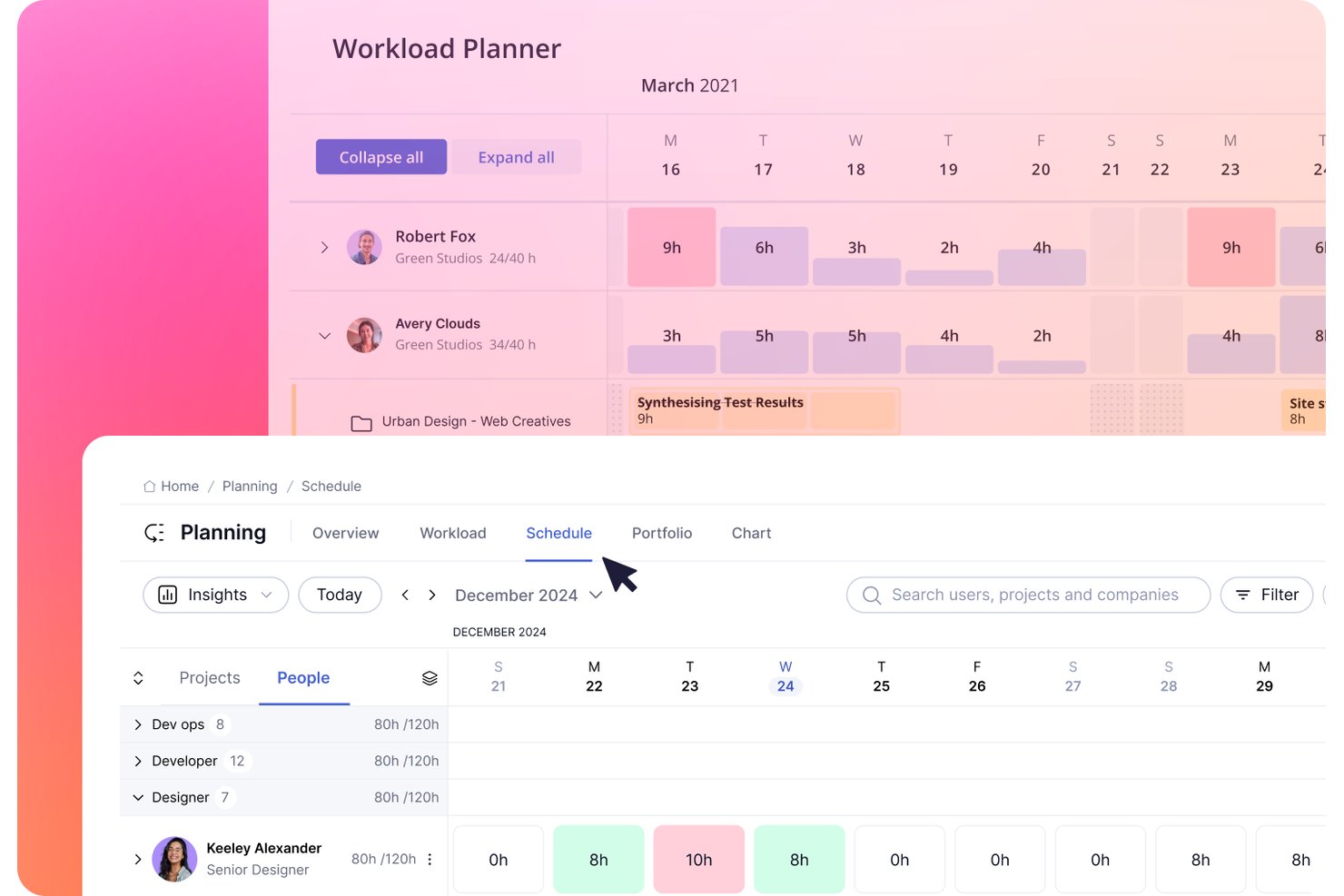
Teamwork.com is a project management platform built for client work that combines resource scheduling, workload planning, capacity tracking, utilization reporting, and time and billing management in one place.
Who Is Teamwork.com Best For?
Teamwork.com is a strong fit for agencies and client-service teams that need to connect resource planning directly to project profitability and billing.
Why I Picked Teamwork.com
I picked Teamwork.com as one of the best because it's purpose-built for client work, which means resource planning connects directly to project profitability. I love how the Workload Planner lets me drag unplanned tasks onto team members and split estimated time across days or people when capacity is tight. The Schedule's tentative projects and role-based placeholders also let me model potential incoming work before it's confirmed, so I can see capacity pressure coming before it hits.
Teamwork.com Key Features
- Utilization report: Tracks estimated, actual, and billable utilization per team member, filterable by role, project, or client, and exportable to PDF, CSV, or Excel.
- Unavailable time logging: Lets admins record time off by category—including sick leave, meetings, and paid time off—so capacity calculations stay accurate.
- Role and skill filtering: Tags team members with roles and skills so you can filter the Workload Planner and Resource Scheduler to find the right person for a task.
- Project and client profitability reporting: Shows real-time financial performance by project and client, including budget tracking and forecast financial impact.
Teamwork.com Integrations
Teamwork.com supports 150+ integrations, including native Slack, Microsoft Office Add-in, Harvest, and Xero File connections, plus Google Calendar and QuickBooks. It also offers an API and lists Zapier.
Pros and Cons
Pros:
- Drag-and-drop planning shifts unassigned tasks
- Billable time connects assignments to profitability
- Capacity views help balance project workloads
Cons:
- Dense navigation can slow cross-project reviews
- Core scheduling sits on higher tiers

awork
Best for GDPR compliance

awork aims to improve resource allocation, encourage cooperation, and increase productivity to ensure project success.
Why I Picked awork:
I chose awork for this list because of its strong commitment to GDPR compliance, which is an important consideration for businesses operating within the European Union. Its adherence to data protection regulations makes it a reliable choice for teams prioritizing privacy and security. It guarantees ISO 27001-certified server locations in Europe and full compliance with EU data protection laws, providing peace of mind for users.
Standout features and integrations:
Features include a multi-project list and timeline, customizable filters, and task management with various views such as list, board, and timeline. It also offers quick actions for task creation, project process automation, and quality assurance review flows.
Integrations include Salesforce, Saasmetrix, Slack, Microsoft Teams, Zapier, Make (formerly Integromat), Shift, Personio, Google Drive, and Microsoft OneDrive.
Pros and Cons
Pros:
- Provides a 14-day free trial without requiring a credit card
- Offers a wide range of features for project management, team scheduling, and time tracking
- GDPR compliant with ISO 27001 certified server locations in Europe
Cons:
- Some features such as milestone planning could be improved
- May have a learning curve for new users to fully utilize all features

Float
Best for tying staffing to project margins
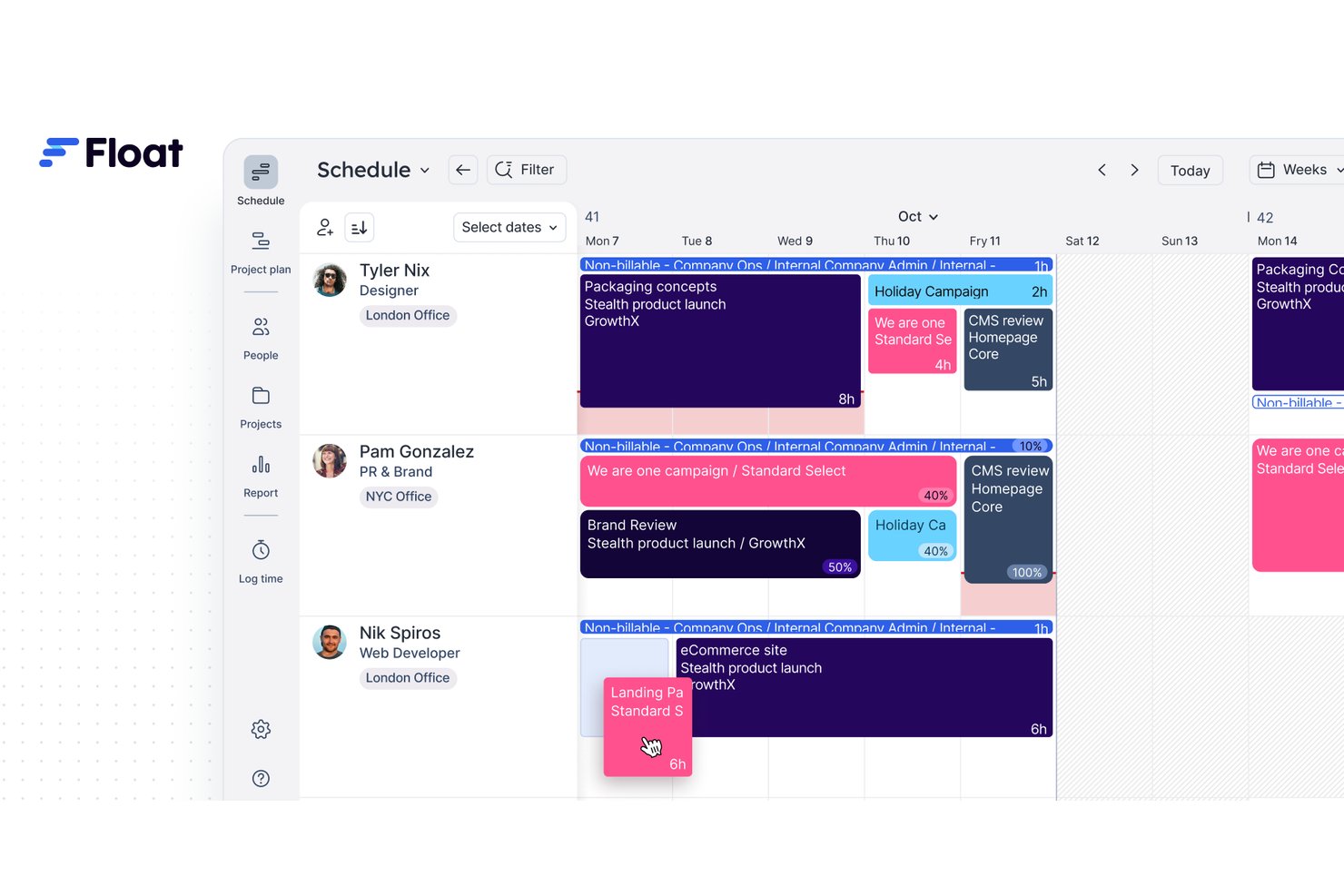
Float is a resource management platform that combines team scheduling, capacity planning, role-based staffing, and project financial tracking into a single visual workspace.
Who Is Float Best For?
Float is a strong fit for resource managers and operations leads at professional-services teams who need to connect staffing decisions directly to project margins and billable utilization.
Why I Picked Float
I've included Float in my top picks because it's one of the few resource management tools that connects staffing decisions directly to project margins. I love how Float's project finance dashboard tracks costs, billable rates, and margins live alongside the schedule, so you can see immediately when a staffing choice is eating into profitability. Smart assign reinforces that by recommending available people based on role fit, letting you staff roles against a budget model before anyone's formally assigned.
Float Key Features
- Drag-and-drop scheduling: Adjust allocations directly on the visual timeline by dragging assignments to new dates or team members.
- People Report: View capacity, billable and non-billable hours, and overtime across your team, filterable by role, department, or project.
- Draft projects: Model upcoming work and test team assignments in a sandbox environment without affecting the live schedule.
- Smart assign: Get AI-assisted staffing recommendations for unassigned roles based on role match and availability in a given date range.
Float Integrations
Float offers native integrations with Google Calendar, Outlook Calendar, and Slack, plus Asana, ClickUp, Jira, Linear, Monday.com, Trello, and Wrike integrations through Zapier. It also provides a REST API with JSON and XML support for custom integrations.
Pros and Cons
Pros:
- Capacity indicators reveal overloaded teammates early
- Drag-and-drop rescheduling adapts to shifting priorities
- Live margins connect staffing with profitability
Cons:
- Dense team schedules can obscure individual assignments
- Reports offer limited historical and analytical depth

Teamdeck
Best for free resourcing for two-person teams
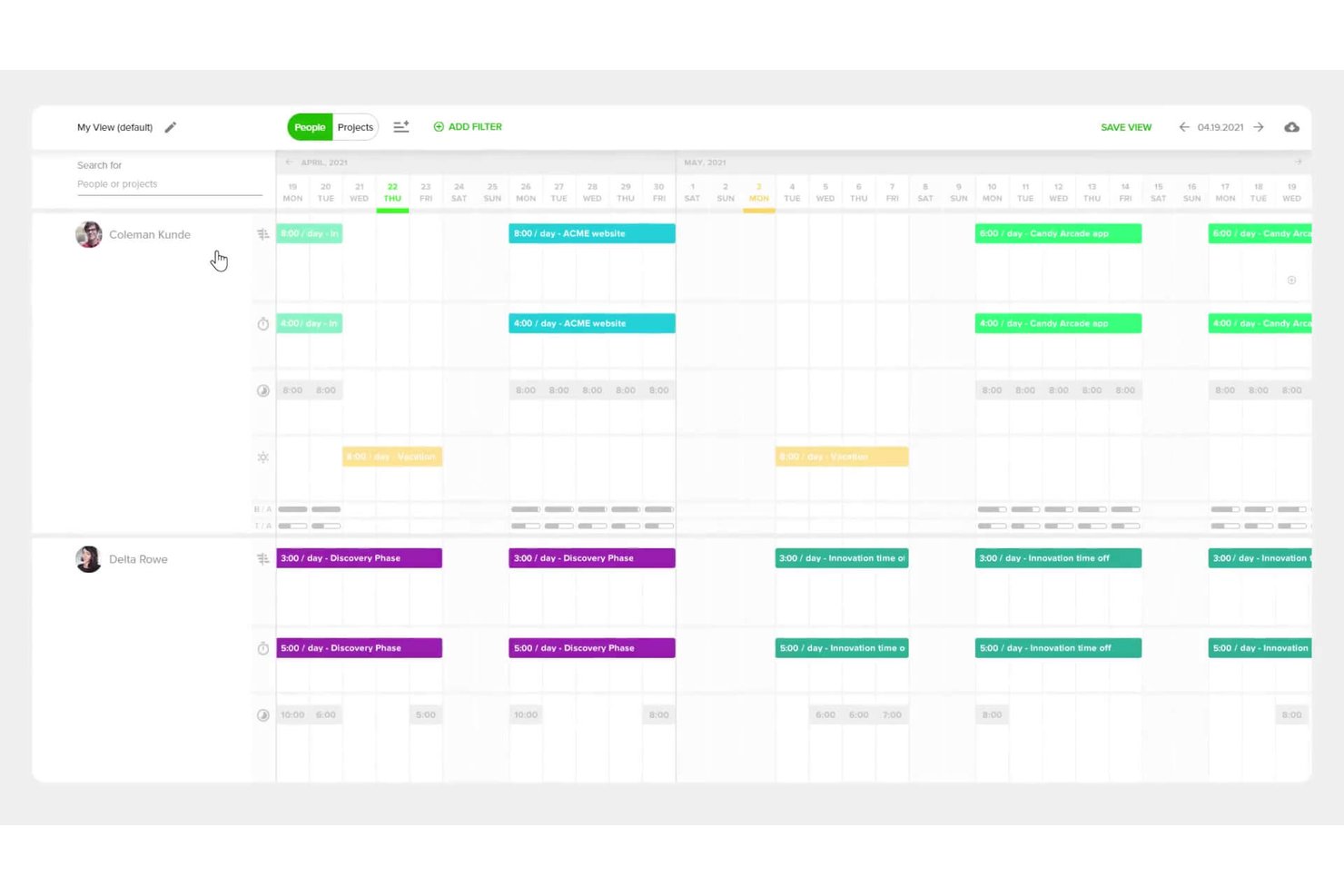
Teamdeck is a resource management tool that covers scheduling, workload tracking, time logging, and leave management across projects.
Who Is Teamdeck Best For?
Teamdeck is a strong fit for very small teams and early-stage agencies that need scheduling, time tracking, and leave management in one place without paying for seats they don't yet need.
Why I Picked Teamdeck
I picked Teamdeck as one of the best because its free Startup Plan genuinely covers two full members with no time limit, which is rare in this category. In practice, that means a two-person team gets real scheduling, workload visibility, and leave management without ever entering a credit card. I also like how the color-coded calendar workload bars immediately flag overbooking in red, so even a small team can spot conflicts before they become problems.
Teamdeck Key Features
- Custom workload indicators: Color-coded calendar bars show grey for full booking, white for available time, and red for overbooking or overtime at a glance.
- Time-off request workflow: Team members submit leave requests in-app, managers approve or dismiss them, and confirmed days off sync directly to the schedule.
- Custom report formulas: Reports support 30+ built-in functions and custom calculations, such as multiplying hourly rates by timesheet hours to estimate project cost.
- Booking tags: Tags applied to bookings distinguish billable from non-billable hours and can be used as metrics or grouping options in reports.
Teamdeck Integrations
Teamdeck lists integrations with Google Calendar, Slack, Podio, and Sage HR; its help center documents exports of bookings and approved vacations to Google Calendar and Microsoft Outlook. It also offers a REST API and webhooks for custom integrations.
Pros and Cons
Pros:
- Custom reports reveal utilization and costs
- Leave requests update shared schedules
- Color-coded capacity flags catch overbooking
Cons:
- Multi-project navigation adds extra clicks
- Reports sometimes need manual verification


Tempo Portfolio Manager, formerly LiquidPlanner, is a dynamic resource management software for small teams, providing sophisticated project scheduling and forecasting tools to optimize resource allocation and drive project success.
Why I Picked Tempo Portfolio Manager:
I chose Tempo Portfolio Manager for its distinctive predictive scheduling feature, which sets it apart from other resource management software. I believe Tempo Portfolio Manager is the best for predictive scheduling because it employs an advanced algorithm that runs simulations to provide accurate schedule predictions, allowing teams to anticipate and adjust to project changes effectively.
Standout features and integrations:
Features include a predictive scheduling engine, which helps in estimating project completion dates with greater accuracy, and its priority-based planning system, which ensures that the most critical tasks are addressed first.
Integrations include Google Drive, Dropbox, Box, Zapier, Salesforce, JIRA, Zendesk, Slack, and Trello.
Pros and Cons
Pros:
- Predictive scheduling for accurate forecasting
- Priority-based planning system
- Integration with multiple third-party tools
Cons:
- Mobile app limitations
- Higher starting price point

Best for workflow customization
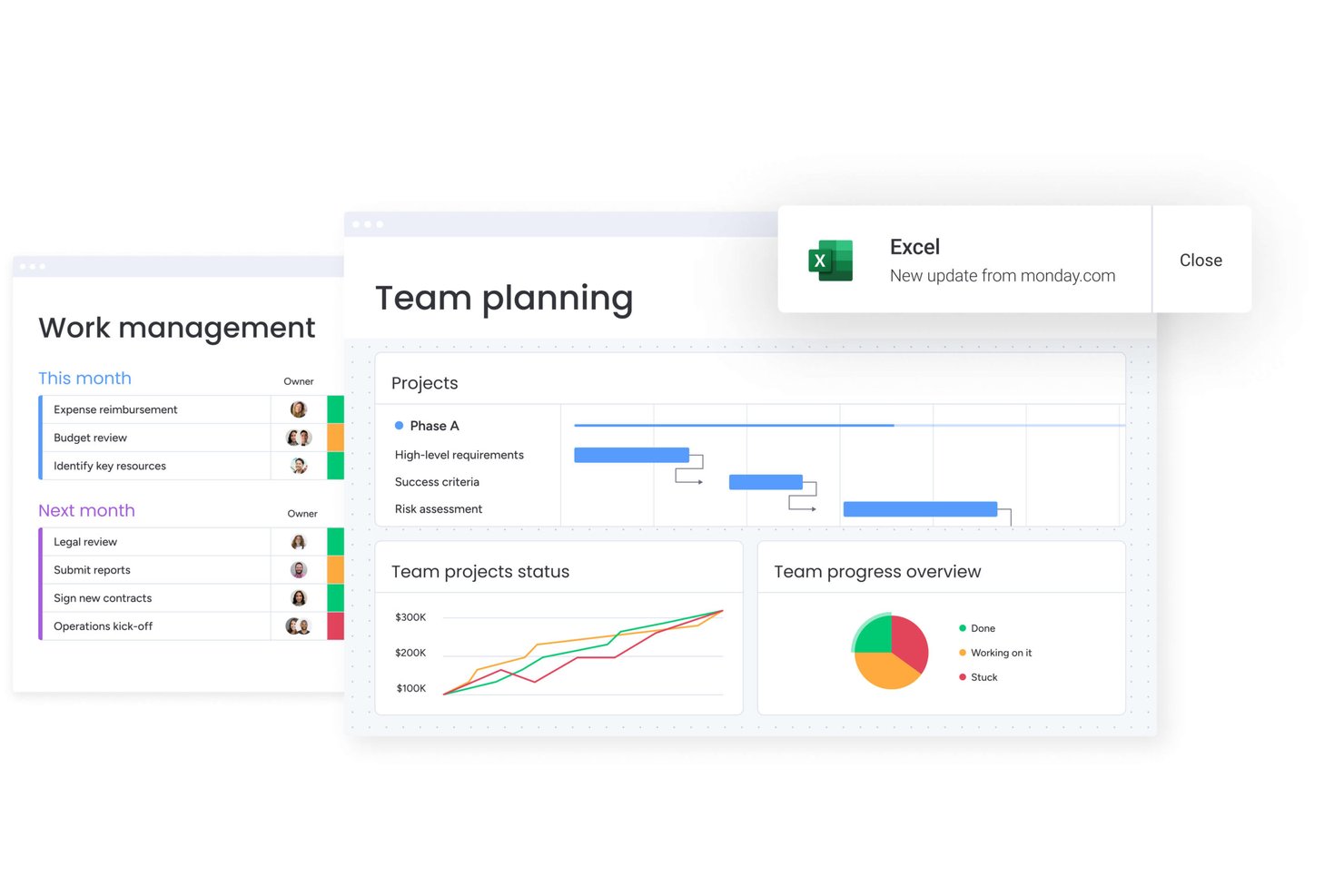
monday work management is a customizable work management platform that combines task and project tracking, workload visualization, resource allocation, and workflow automation across teams and projects.
Who Is monday AI Workspace Best For?
monday AI Workspace is a strong fit for operations managers and team leads who need deep workflow customization and cross-project visibility, and who can commit to an Enterprise plan to unlock the full resource management toolkit.
Why I Picked monday AI Workspace
monday AI Workspace earns its spot on my shortlist because of how far you can push its workflow customization without ever touching a line of code. I'm particularly drawn to the Workload widget, which uses color-coded capacity bubbles to show at a glance who's overbooked and who has room, and the Enterprise Resource planner, which lets you drag allocation bars to reschedule work across projects instantly. The AI-powered Sidekick feature can also suggest the right person for a placeholder role based on skills, availability, and project context.
monday AI Workspace Key Features
- Resource Directory: A centralized profile for each team member that stores job roles, skills, and location so you can filter and find the right person for any project.
- Portfolio-Level Resource Utilization Report: A monthly view that combines allocation, planned effort, and actual effort across all projects in a portfolio.
- Placeholder assignments: Role-based placeholders let you reserve resource slots for future hires or unconfirmed team members in the Resource planner.
- Slack integration: A native connection that lets you create monday.com items, post board updates, and receive notifications directly from Slack channels.
monday AI Workspace Integrations
monday AI Workspace offers 850+ integrations and apps, including native Slack, Google Calendar, Gmail, Microsoft Teams, QuickBooks, GitHub, and GitLab connections. Its GraphQL API, SDKs, and MCP support custom integrations.
Pros and Cons
Pros:
- Custom boards adapt to team workflows
- Workload bubbles flag overbooked teammates
- Drag-and-drop rebooking shifts allocation timelines
Cons:
- Utilization reports refresh every 24 hours
- Core resource planner requires Enterprise
New Product Updates from monday AI Workspace
monday AI Workspace Adds Human Approval Routing
monday AI Workspace adds a human-in-the-loop approval block to AI Workflows, sending approval requests and routing workflow paths based on responses. For more information, visit monday AI Workspace's official site.
 .

Scoro
Best for margin-aware resource planning
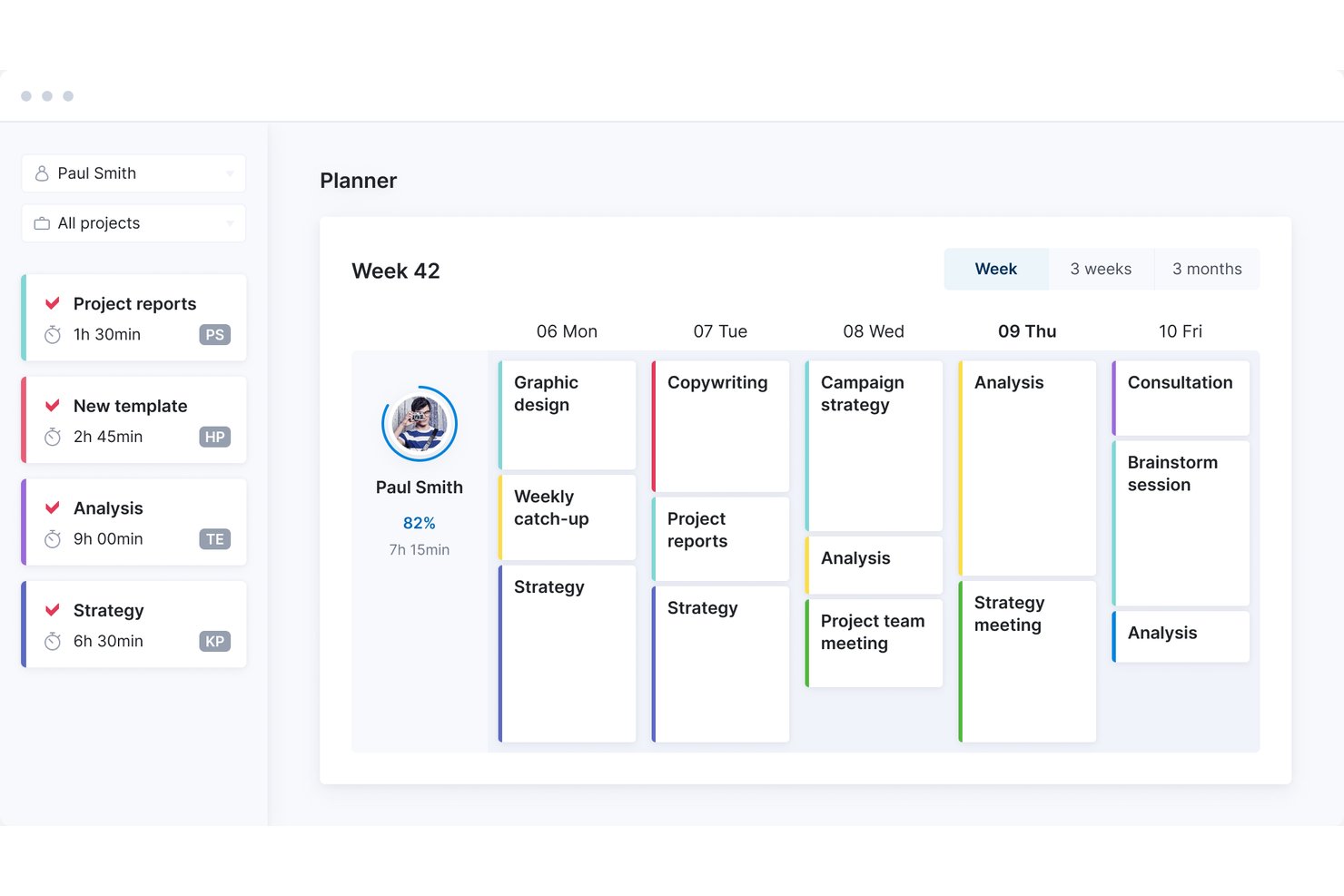
Scoro is a professional services platform that combines resource booking, capacity planning, project management, time tracking, and financial reporting in a single modular system.
Who Is Scoro Best For?
Scoro suits professional services teams—agencies, consultancies, and similar firms—that need to manage resources and track project profitability in one place.
Why I Picked Scoro
I picked Scoro as one of the best because it's the only tool on my list that ties resource planning directly to project margin. The portfolio bookings heatmap shows over-capacity in red and available capacity in green across every project at once, so I can spot overloading before it hits a deadline. What I really value is the profitability reporting: Scoro compares labor costs against billable revenue by project, client, and employee, so I can see which work is actually profitable while I'm still planning who does it.
Scoro Key Features
- Drag-and-drop Planner: Schedule tasks into team members' calendars by dragging them directly into open time slots, with day, week, and month views available.
- Tentative bookings: Reserve time for uncertain work using placeholder bookings before specific tasks or team members are confirmed.
- Billable vs. non-billable time tracking: Log time against tasks and projects, categorized by billable or non-billable status, using a timer or timesheet.
- Utilization report: Compare each team member's available capacity against booked or planned work for any selected time period.
Scoro Integrations
Scoro lists 40+ integrations, including native Google Calendar, BambooHR, Xero, QuickBooks, Jira, Slack, and Google Drive connections. It also offers a REST-style API, webhooks, and integrations through Zapier.
Pros and Cons
Pros:
- Profitability reports connect labor costs with revenue
- Tentative bookings test uncertain staffing needs
- Portfolio heatmaps expose overload across projects
Cons:
- Schedule changes require manual follow-up
- Five-seat minimum excludes the smallest teams
New Product Updates from Scoro

Scoro Adds Time Mobile App and ELI Improvements
Scoro adds the Scoro Time mobile app for iOS/Android to track time anywhere and expands ELI with attachments, smarter filtering, and trigger-based actions. For more information, visit Scoro's official site.
 .

Accelo
Best for AI-powered planning

Accelo is a professional services automation platform that connects resource scheduling, capacity planning, project management, and project financials in one system.
Who Is Accelo Best For?
Accelo is a strong fit for resource managers and operations managers at professional services firms who need to connect resourcing, project delivery, and financial performance in one place.
Why I Picked Accelo
I picked Accelo as one of the best because its AI-powered planning goes beyond basic scheduling—it recommends best-fit resources by weighing skills, availability, workload, and past performance together. I especially like how Dynamic Scheduling automatically redistributes a task's remaining time as your team logs hours or timelines shift, keeping assignments accurate without manual cleanup. Pipeline-weighted capacity forecasting also lets me model demand from unconfirmed opportunities using role-based placeholders, so I can spot staffing gaps before they become problems.
Accelo Key Features
- Team Scheduling: A single view that consolidates open tasks across projects, tickets, sales, and retainer periods alongside each team member's schedule, showing daily and weekly capacity at a glance.
- Utilization dashboard: Tracks billable and non-billable hours against each user's set weekly hours, with filtering by skill, division, group, or manager and XLS export.
- Custom work calendars: Lets admins set default work weeks and workday hours, while individual users configure personal schedules, vacation days, and regional holiday profiles.
- Project profitability report: Displays profit and profit margin for each project compared against its original budget, connecting resourcing data to financial performance.
Accelo Integrations
Accelo lists integrations with Microsoft 365, Google Workspace, Slack, Jira, HubSpot, Salesforce, QuickBooks, Xero, and Gusto; native status and total count aren’t specified. It also offers RESTful and Forms APIs, plus Zapier.
Pros and Cons
Pros:
- Pipeline forecasts expose future staffing gaps
- Dynamic scheduling adjusts as logged hours change
- Color-coded views reveal overloaded teammates
Cons:
- Utilization reports can be clunky to tailor
- Team Scheduling requires Premium Licenses
New Product Updates from Accelo

Accelo Rebuilds Mobile App for Project and Time Management
Accelo rebuilds its mobile app with task management, new work creation, and mobile timesheets for Forecast customers. This helps teams keep project and time data current while working away from a desktop. For more information, visit Accelo’s official site.
 .

Best for resource planning and scheduling

Float is a simplified resource management solution for small teams, allowing for efficient project scheduling and staff allocation to maximize productivity and project success.
Why I Picked Float:
I chose Float for this list because of its focus on resource management, which is critical for small teams that need to maximize their efficiency. Its user-friendly interface and robust planning capabilities make it stand out from other resource management software. I believe Float is best for resource planning and scheduling because it provides a real-time view of team capacity and availability, which is essential for effective project management.
Standout features & integrations:
Float's standout features include capacity management, resource scheduling, project planning, forecasting, and built-in time tracking. It also offers a mobile app, integrations, and 24/5 support.
Float integrates with Asana, Outlook, Google Calendar, Slack, Trello, and Zapier, among others.
Pros and Cons
Pros:
- Strong customer support and community
- Comprehensive planning and forecasting features
- User-friendly interface
Cons:
- Enterprise plan requires custom pricing discussion
- Limited to the number of people scheduled
- Pricing may be higher for small businesses
New Product Updates from Float.com

Float Adds Rate Cards and Multi-Currency Billing
Float introduced centralized rate cards to standardize bill rates across projects and added multi-currency support to bill clients consistently across regions. For more information, visit Float's official site.
 .

Kantata
Best for staffing by project profitability
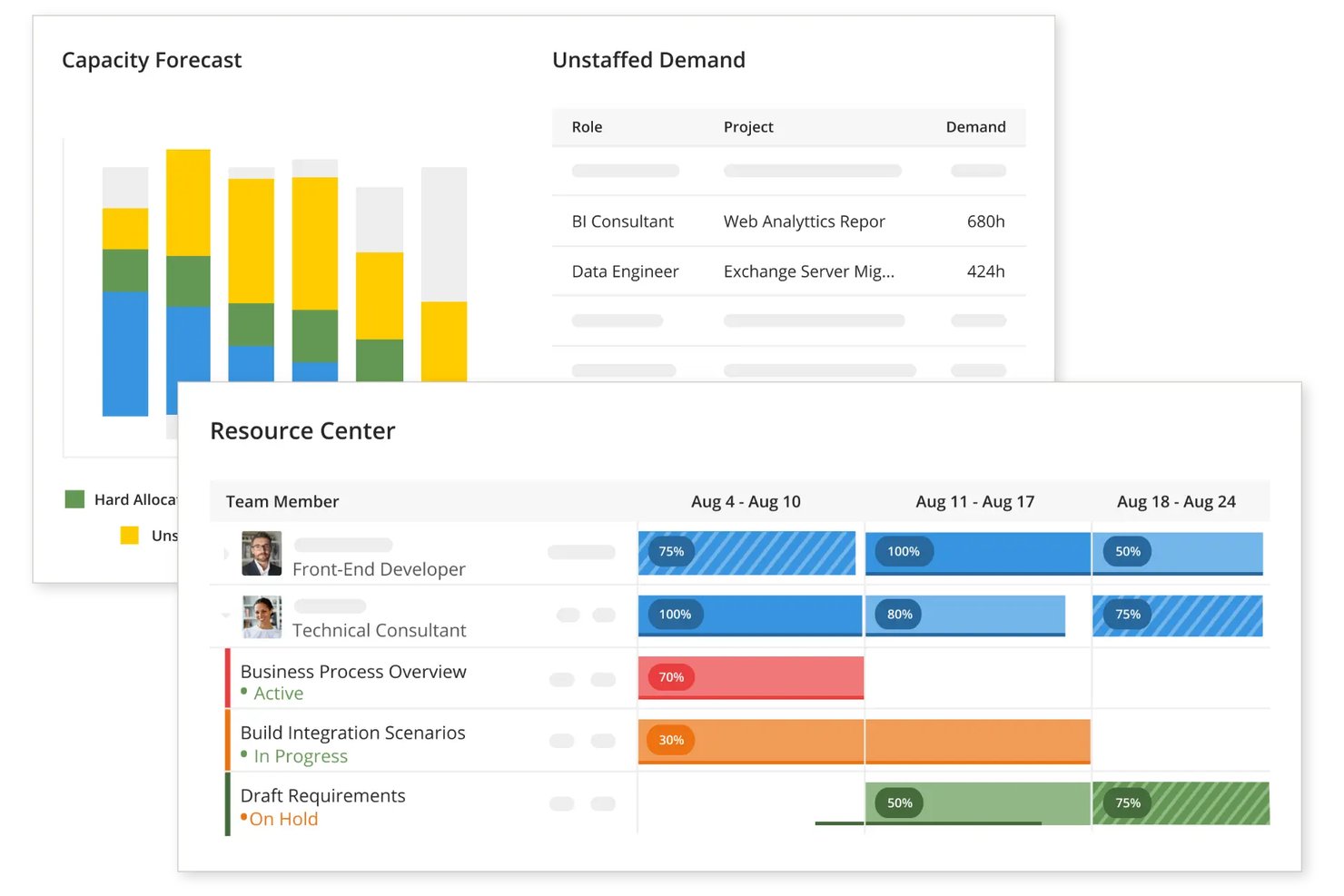
Kantata OX is a professional services automation platform that combines resource scheduling, capacity planning, skills-based staffing, project financials, and utilization reporting in one workspace.
Who Is Kantata Best For?
Kantata OX suits mid-size professional services firms that need to staff projects based on margin and profitability data, not just availability.
Why I Picked Kantata
I picked Kantata as one of the best because its Margin & Cost dashboard ties resource decisions directly to project profitability, showing T&M margin contribution and project margin at completion in real time. Its Team Builder feature ranks staffing recommendations by role, skills, and availability, so you can see exactly how a staffing choice affects margin before you commit. I also like that the Staffing & Capacity heat map flags over- and under-allocation across projects simultaneously, making it easy to rebalance without flying blind on financials.
Kantata Key Features
- Skills-based staffing: Team Builder matches project requirements to team members by role, skills, and availability, letting you compare options before committing.
- Custom work calendars: Set unique workweeks and holiday calendars per team member so available capacity calculations reflect how each person actually works.
- Availability Inspector: Shows total hours and project-level breakdowns across the next 52 weeks, with red bars flagging potential over-allocation before it becomes a problem.
- Billable and non-billable utilization tracking: Insights metrics break down actual, scheduled, and allocated hours by billable and non-billable categories across projects.
Kantata Integrations
Kantata lists over 1,200 prebuilt connectors, including Salesforce, HubSpot, QuickBooks, NetSuite, Sage Intacct, ChatGPT, Claude, and Copilot. Its REST API with OAuth 2.0 supports custom integrations.
Pros and Cons
Pros:
- Team Builder matches skills, roles, and availability
- Capacity heat maps reveal cross-project overloads
- Staffing choices connect directly to project margins
Cons:
- Utilization reports take expertise to configure
- Setup can overwhelm very small teams
New Product Updates from Kantata

Kantata Adds Access Group Change History
Kantata adds Access Groups History, letting account administrators track changes to group details, membership, and permissions in Recent History. The update also makes these events available through the Subscribed Events API for broader monitoring. For more information, visit Kantata’s official site.
 .
Küçük Ekipler için Diğer Kaynak Yönetimi Yazılımları
Aşağıda, kısa listemize aldığımız ancak en üst listeye giremeyen küçük ekipler için ek kaynak yönetimi yazılımlarının bir listesi yer alıyor. Bunlara göz atmaya değer.
- Saviom
For linking staffing plans to project margins
- Runn
For real-time planning
- Smartsheet
For real-time project visibility
- Wrike
For scaling with team growth
- Zoho Projects
For integration with Zoho suite
- Resource Guru
For lightning-fast scheduling
- Bonsai Agency Software
For profit-aware resource planning
- Asana
For task automation features
- SAP S/4HANA Cloud
For fast time-to-value
- Milient Resource Flow
For linking staffing to project costs


How I Evaluate Resource Management Software for Small Teams
I split my evaluation into three parts, giving core functionality the most weight: schedule assignments, see workloads, and account for time off. Next, I consider standout features such as scenario planning for future projects. Finally, I weigh onboarding, support, and transparent pricing for small teams.
Core Functionality (Table Stakes For This List)
When I'm selecting tools for my list, I score each one on a scale from 0 (does not offer the functionality) to 5 (excels in this area) for each core functionality listed below. I then convert the total into a percentage to help assess each tool's overall fit, with extra weight on any functionalities I’ve deemed essential.
- Resource Scheduling (Essential): I look for date- or hour-based assignments that can shift when a launch slips, with clear ownership across tasks.
- Workload Visibility (Essential): A team-level view should make overbooking visible when one designer or engineer is split across concurrent projects.
- Availability Tracking: I check whether leave, holidays, and part-time hours affect capacity, so plans don’t assign work during an absence.
- Skills And Roles: I look for searchable roles or skills, such as finding a UX designer for discovery rather than guessing from names.
- Multi-Project View: The view should show each person’s commitments across active projects, making collisions visible before promising a new start date.
- Utilization Reporting: I assess whether utilization summaries show how planned and actual time shift across a selected period.
Once I have a list of tools that meet the criteria, I consider what sets each platform apart.
Differentiating Factors (What Sets Vendors Apart)
Here's how I compare and contrast different vendors:
Standout Features
I look for scenario planning tools that let you model "what-if" staffing options before committing anyone to a new project—helpful when a client asks for a kickoff date and you need to check capacity first. Custom work calendars matter just as much, since accurate capacity math depends on each person's actual hours, part-time days, and regional holidays. I also evaluate drag-and-drop rebooking, because when a launch slips mid-sprint, managers need to shift assignments across a timeline in seconds, not rebuild a schedule from scratch.
Beyond Features
I check whether a tool separates billable from non-billable hours in its reports, since agencies and consultancies need that split to reconcile utilization against client invoices. Pricing structure matters just as much—per-seat minimums can price out a five-person team, so I look for free tiers or flexible monthly plans that scale without forcing an enterprise commitment. I also evaluate how quickly non-PM teammates can start logging time or checking schedules, because small teams rarely have a dedicated admin running onboarding.
Küçük Ekipler için Kaynak Yönetimi Yazılımı Nasıl Seçilir?
Kendinize özgü yazılım seçim sürecinizi yürütürken aşağıdaki noktaları göz önünde bulundurun:
- Gerçek Zamanlı Görünürlük ve Kullanım: Kaynakların nasıl tahsis edildiği ve kullanıldığı hakkında anında bilgiler sunan bir yazılım seçin. Bu, bazı ekip üyelerinin aşırı yük altında olduğu, bazılarının ise tam olarak görev almadığı durumlardan kaçınarak her ekip üyesinin zamanının etkili bir şekilde kullanılmasını sağlamak için küçük ekipler açısından hayati önem taşır.
- Proje Yönetimi Verimliliği: Proje yönetimi görevlerini kolaylaştıran bir araç seçin. Bu, hantal idari süreçlere zaman ayırmayı göze alamayan küçük ekipler için özellikle önemlidir.
- Öngörü ve Kapasite Planlaması: Gelecekteki kaynak ihtiyaçlarını tahmin etmeye yardımcı olacak öngörü özellikleri sunan bir yazılımı tercih edin. Bu özellik, çok fazla veya çok az çalışanı işe almanın getireceği maliyetlerden kaçınarak küçük ekiplerin en uygun iş gücünü koruması açısından kritik öneme sahiptir.
- Entegrasyon ve Kullanım Kolaylığı: Yazılımın diğer sistemlerle iyi bir şekilde entegre olduğundan ve kullanımının kolay olduğundan emin olun. Bu, küçük ekiplerin hızlı bir şekilde benimsemesini kolaylaştırmak ve yazılımın özelliklerinden en iyi şekilde yararlanmak için gereklidir.
- Finansal Yönetim ve Raporlama: Finansal yönetim araçlarını içeren yazılımları arayın. Küçük ekiplerin kârlılığını koruyabilmesi için bütçeleri ve maliyetleri yakından izlemesi gerekir. Güçlü finansal raporlama özelliklerine sahip bir kaynak yönetimi aracı, küçük bir işletmenin proje giderlerini takip etmesine, bütçeleri yönetmesine ve finansal durumunu iyileştirmek için verilere dayalı kararlar almasına yardımcı olabilir.
Küçük Ekipler için Kaynak Yönetimi Yazılımındaki Trendler
İşte küçük ekipler için kaynak yönetimi yazılımlarında fark ettiğim güncel ve ilginç trendlerden bazıları.
- Proaktif Kaynak Yönetimi: Kaynak yönetimi yazılımları, tahmin raporları ve tahsis eğilimlerini öngörmeye yönelik teknolojilerle daha proaktif hâle geliyor. Bu eğilim, tepkisel kaynak planlamasından stratejik kaynak planlamasına geçişi sağladığı, küçük ekiplerde verimliliği ve öngörü yeteneğini artırdığı için dikkat çekicidir.
- Bütünleşik Çözümler: Bütünleşik çözümlere yönelik eğilim, proje yönetiminin çeşitli yönlerini tek bir araçta birleştiriyor. Bu bütünleşme, iş akışlarını basitleştirdiği ve birden fazla bağımsız araca duyulan ihtiyacı azalttığı için önemlidir; sınırlı kaynaklara sahip küçük ekipler için özellikle faydalıdır.
- Yapay Zekâ ve Makine Öğrenimi: Yapay zekâ ve makine öğrenimi, öngörücü analizler ve otomasyon sağlamak amacıyla kaynak yönetimi yazılımlarına dâhil ediliyor. Bu eğilim, küçük ekiplerin veriye dayalı kararlar almasına ve kaynak tahsis stratejilerini geliştirmesine olanak tanıdığı için önemlidir.
- Sürdürülebilirlik ve Kaynak Verimliliği: Kaynak yönetimi araçları artık karbon ayak izi hesaplayıcıları gibi kaynak verimliliğini izlemeye ve iyileştirmeye yönelik özellikler içeriyor. Bu eğilim, iş operasyonlarında sürdürülebilirliğe verilen önemin giderek arttığını yansıttığı için önemlidir.
- Blok Zinciri Teknolojisi: Blok zinciri teknolojisi, işlemleri güvence altına almak ve kaynak tahsisinde şeffaflığı sağlamak için kullanılıyor. Bu eğilim, harici iş ortaklarıyla çalışan küçük ekipler için kritik olan iş birliğine dayalı projelerde veri bütünlüğü ve güven sorunlarını ele aldığı için dikkat çekicidir.
Küçük Ekipler İçin Kaynak Yönetimi Yazılımı Nedir?
Küçük ekipler için kaynak yönetimi yazılımı; proje yöneticilerinin, ekip liderlerinin ve küçük işletme sahiplerinin kaynakları daha iyi yönetmesine ve tahsis etmesine yardımcı olan özel bir çözümdür. Projenin başarıyla tamamlanması için uygun personelin, ekipmanın ve malzemelerin gerektiğinde hazır bulunmasını garanti eder.
Kaynakların kullanılabilirliğini ve kullanımını izleyerek planlama ve yürütme süreçlerine yardımcı olur. Temel özellikleri arasında kaynak tahsisi planlama, izleme ve raporlama bulunur; bunlar kimin ne üzerinde ve ne zaman çalıştığına dair eksiksiz bir görünüm sağlar. Ayrıca projeler ilerledikçe kaynak tahsislerinde gerçek zamanlı değişiklikler yapılmasına olanak tanır; ekiplerin kaynakların aşırı kullanımını önlerken plan dâhilinde ve bütçe sınırları içinde kalmasına yardımcı olur.
Küçük Ekipler İçin Kaynak Yönetimi Yazılımının Özellikleri
Küçük ekipler için kaynak yönetimi yazılımı seçerken, projelerin verimli bir şekilde tamamlanmasını sağlamak için kaynaklarınızı net bir şekilde anlamanız çok önemlidir. Aşağıda, bu tür bir yazılımı seçerken dikkate alınması gereken temel özellikleri açıklıyorum.
- Kullanıcı Dostu Arayüz: Basit ve sezgisel bir tasarım. Kullanıcı dostu bir arayüz, ekip üyelerinin yazılımı hızlı bir şekilde öğrenip kullanmasını sağlar; bu da verimliliğin korunması için çok önemlidir.
- Gerçek Zamanlı Görünürlük: Kaynak tahsisine anında erişim. Gerçek zamanlı görünürlük önemlidir; çünkü ekip üyelerinin aşırı görevlendirilmesini ve atıl kalmasını önlemeye yardımcı olur.
- Proje Öngörüsü: Kaynak ihtiyaçlarını tahmin etmeye yönelik araçlar. Proje öngörüsü, gelecekteki proje gereksinimlerini karşılamak üzere kaynakları etkili bir şekilde planlamak ve tahsis etmek için kritik öneme sahiptir.
- Zaman Takibi: Görevlere harcanan zamanın izlenmesi. Zaman takibi, ekip iş yükünü anlamak ve projelerin takvimine uygun ilerlemesini sağlamak için önemlidir.
- İş Birliği Araçları: Ekip iletişimini kolaylaştıran özellikler. İş birliği araçları önemlidir; çünkü ekip üyelerinin konumlarından bağımsız olarak daha etkili bir şekilde birlikte çalışmasına yardımcı olur.
- Raporlama ve Analiz: Kaynak kullanımı hakkında anlamlı veriler. Raporlama ve analiz, kaynak yönetimiyle ilgili bilinçli kararlar almak ve süreçleri iyileştirmek için önemlidir.
- Bütünleştirme Yetenekleri: Diğer yazılımlarla uyumluluk. Bütünleştirme yetenekleri önemlidir; çünkü ekip içinde kullanılan farklı araçları birbirine bağlayarak daha verimli bir iş akışı sağlar.
- Ölçeklenebilirlik: Ekip büyümesine uyum sağlama yeteneği. Ölçeklenebilirlik önemlidir; çünkü ekip genişledikçe yazılımın ekibin ihtiyaçlarını karşılamaya devam etmesini sağlar.
- Özelleştirme Seçenekleri: Yazılımı belirli ihtiyaçlara göre uyarlama. Özelleştirme seçenekleri önemlidir; çünkü yazılımın küçük bir ekibin kendine özgü süreçlerine uyarlanmasına olanak tanır.
- Mobil Erişim: Hareket hâlindeyken yönetim. Mobil erişim önemlidir; çünkü ekip üyelerinin her zaman ve her yerden güncel kalmasına ve kaynakları yönetmesine olanak tanır.
Küçük Ekipler İçin Kaynak Yönetimi Yazılımının Faydaları
Küçük ekipler için kaynak yönetimi yazılımı dönüştürücü olabilir; kaynakların etkili bir şekilde planlanması, izlenmesi ve yönetilmesi için gerekli araçları sunar. Bu çözümler, kaynak tahsisine ilişkin kapsamlı bir görünüm sağlayarak projelerin kapsamı ve bütçesi dâhilinde tamamlanmasına yardımcı olur. Bu tür yazılımların küçük ekiplere sunabileceği beş temel fayda şunlardır:
- Geliştirilmiş Planlama ve Zamanlama: Kaynak yönetimi yazılımı, kaynak ihtiyaçlarının daha iyi tahmin edilmesini sağlayarak ekiplerin doğru personeli doğru görevlere doğru zamanda atamasına olanak tanır. Bu, ekip üyelerinin zamanının ve becerilerinin daha verimli kullanılmasını sağlar.
- Geliştirilmiş Görünürlük ve Şeffaflık: Merkezi bir sistem sayesinde ekip üyeleri, kaynakların uygunluğu ve projenin ilerleyişi hakkında gerçek zamanlı bilgiler edinir. Bu da hesap verebilirliği ve bilinçli karar almayı teşvik eder.
- Maliyet Kontrolü: Küçük ekipler, kaynak kullanımını izleyerek ve aşırı kaynak tahsisinden kaçınarak bütçe aşımlarını önleyebilir ve daha uygun maliyetli kararlar alabilir.
- Artan Esneklik: Yazılım, ekiplerin proje kapsamındaki veya kaynakların uygunluğundaki değişikliklere hızla uyum sağlamasına, boşta kalma süresini azaltmasına ve proje ivmesini korumasına olanak tanır.
- Daha İyi İş Birliği: Ekipler güncellemeleri, belgeleri ve programları kolayca paylaşabilir. Bu da proje sonuçlarının iyileştirilmesini sağlayabilecek iş birlikçi bir ortamı teşvik eder.
Küçük ekipler için kaynak yönetimi yazılımından yararlanmak, proje yönetimini geliştirebilir, daha iyi sonuçlar elde edilmesini sağlayabilir, projeler üzerindeki kontrolü artırabilir ve daha iş birlikçi ve üretken bir çalışma ortamını teşvik edebilir.
Küçük Ekipler için Kaynak Yönetimi Yazılımının Maliyetleri ve Fiyatlandırması
Birçok kişi için fiyatlandırma, kaynak yönetimi yazılımı seçiminde önemli bir etkendir. Fiyatlar değişiklik gösterebilse de fiyatlandırma planları genellikle benzer kategorilere ayrılır. Bu da bir araç seçmeden önce ihtiyaç duyduğunuz özellikler ve maliyet arasındaki dengeyi anlamanızı çok daha kolaylaştırır.
Yaygın fiyatlandırma planlarını ve özellikleri anlayarak maliyet ile işlevsellik arasında denge kuran bilinçli bir karar verebilir, böylece ekibinizin üretkenliğini ve projenizin başarısını artırabilirsiniz.
Kaynak Yönetimi Yazılımı için Plan Karşılaştırma Tablosu
| Plan Türü | Ortalama Fiyat | Yaygın Özellikler |
| Ücretsiz | $0 | Temel kaynak zamanlaması, Sınırlı sayıda proje, Temel raporlama |
| Temel | $10 - $20/kullanıcı/ay | Geliştirilmiş zamanlama, Zaman takibi, Temel analizler |
| Profesyonel | $20 - $40/kullanıcı/ay | Gelişmiş kaynak planlaması, Gerçek zamanlı iş birliği, Eksiksiz proje yönetimi paketi |
| Kurumsal | Özel Fiyatlandırma | Özel entegrasyonlar, Gelişmiş güvenlik özellikleri, Kişiselleştirilmiş kullanıma alım ve destek |
Her kaynak yönetimi yazılımı planı farklı ihtiyaçlara hitap eder ve küçük ekipler, etkili kaynak yönetimi için ekip büyüklüğü, proje karmaşıklığı ve temel özellikler gibi unsurları göz önünde bulundurmalıdır.
Küçük Ekipler İçin Kaynak Yönetimi Yazılımı Hakkında SSS
Küçük ekipler için kaynak yönetimi yazılımı hakkında sıkça sorulan bazı soruları burada bulabilirsiniz.
Küçük ekiplerin kaynak yönetimi yazılımına neden ihtiyacı vardır?
Küçük ekipler, düzenli kalmalarına ve hedeflerine odaklanmalarına yardımcı olduğu için kaynak yönetimi yazılımından yararlanır. Bu yazılım, sınırlı insan gücüne sahip ekipler için kritik önem taşıyan, kimin ne üzerinde ve ne zaman çalıştığına dair net bir genel bakış sunar. Ayrıca ekip üyeleri arasındaki aşırı kaynak tahsisini ve tükenmişliği önlemeye yardımcı olur.
Kaynak yönetimi yazılımı proje planlamasına yardımcı olabilir mi?
Evet, kaynak yönetimi yazılımı proje planlamasına önemli ölçüde yardımcı olabilir. Yöneticilerin ekip üyelerinin iş yükünü ve uygunluğunu görselleştirmesine olanak tanıyarak görevleri kişisel kapasitelere ve proje zaman çizelgelerine göre atamayı kolaylaştırır.
Küçük bir ekip için kaynak yönetimi yazılımını uygulamaya koymak zor mudur?
Kaynak yönetimi yazılımını uygulamaya koymanın zorluğu, seçilen yazılıma ve ekibin özel ihtiyaçlarına bağlıdır. Modern yazılım seçeneklerinin çoğu, anlaşılır kurulum süreçleriyle kullanıcı dostu olacak şekilde tasarlanmıştır. Ayrıca sağlayıcılar, uygulamaya koyma sürecine yardımcı olmak için genellikle destek ve eğitim sunar.
Kaynak yönetimi yazılımı iş birliğini nasıl geliştirir?
Kaynak yönetimi yazılımı, ekip üyelerinin birbirlerinin görevlerini ve programlarını görebildiği bir platform sağlayarak iş birliğini geliştirir. Bu şeffaflık, çabaların koordine edilmesine, programların uyumlu hâle getirilmesine ve herkesin sorumluluklarının ve son teslim tarihlerinin farkında olmasının sağlanmasına yardımcı olur.
Kaynak yönetimi yazılımı küçük ekiplerin proje sonuçlarını nasıl iyileştirir?
Bu tür yazılımlar, doğru kaynak planlaması ve analizi için araçlar sağlayarak küçük ekiplerin kaynak ihtiyaçlarını öngörmesine, eksiklikleri veya fazlalıkları önlemesine ve planları proaktif bir şekilde ayarlamasına yardımcı olabilir. Bu da daha başarılı proje sonuçlarına ulaşılmasını sağlar.
Kaynak yönetimi yazılımını etkili bir şekilde kullanmak için hangi eğitim gereklidir?
Gerekli eğitimi yazılımın karmaşıklığı belirler. Çoğu sağlayıcı, ekiplerin yazılımı anlamasına ve etkili bir şekilde kullanmasına yardımcı olmak için çevrimiçi eğitimler, canlı web seminerleri ve müşteri desteği sunar.
Küçük ekiplerin kaynak yönetimi yazılımı olmadan karşılaştığı yaygın zorluklar nelerdir?
Küçük ekipler, bu tür bir yazılım olmadan genellikle kaynakların aşırı tahsisi, program çakışmaları ve kaynakların uygunluğuna ilişkin görünürlük eksikliğiyle mücadele eder. Bu durum gecikmelere ve bütçe aşımlarına yol açar.