

2026’da İncelenen En İyi 10 Yapay Zekâ Ajansı Yönetim Sistemi

En İyi Yapay Zekâ Ajansı Yönetim Sistemi Kısa Listesi


Yapay zekâ ajansı yönetim araçları; tekrarlayan görevleri otomatikleştirerek, görünürlüğü artırarak ve iş birliğini kolaylaştırarak ajansların müşteri çalışmalarını, proje zaman çizelgelerini ve dahili operasyonlarını kontrol altında tutmasına yardımcı olur. İster birden fazla müşteriyle, ister değişen önceliklerle, ister hibrit bir ekiple ilgileniyor olun, doğru yapay zekâ destekli platform karmaşaya düzen getirebilir.
Hızlı hareket eden ekipleri gerçekten destekleyen araçları belirlemek için önde gelen yapay zekâ ajansı yönetim yazılımlarını test edip inceledim. Proje takibi ve kaynak tahsisinden otomatik raporlamaya ve müşteri iletişimine kadar bu rehberdeki her araç, ajansların harika işleri daha hızlı ve daha az sorunla teslim etmesine yardımcı olmak için tasarlanmıştır.
Why Trust Our Software Recommendations
Our team has been testing and reviewing software since 2012. As project managers ourselves, we know how difficult—and important—it is to choose the right software.
For this guide, we evaluated tools using hands-on testing and independent research, scoring tools using our selection criteria. We also draw on insights from industry thought leaders and practicing project management experts.
Our reviews reflect our human editorial judgment, not a sales pitch.
Expert reviewers:
Yapay Zekâ Ajansı Yönetim Sistemi Karşılaştırma Tablosu
Bu karşılaştırma tablosu, en iyi yapay zekâ ajansı yönetim sistemi seçimlerimin fiyatlandırma ayrıntılarını özetlemektedir:
| Tool | Starting Price | Website | |
|---|---|---|---|
| Best for AI-driven decision-making | 4.5 out of 5 | $17/user/month 14-day free trial | Book Demo |
| Best with real-time resource allocation insights | 4.6 out of 5 | $10/user/month 14-day free trial | Book Demo |
| Best for client-to-invoice project billing | 4.5 out of 5 | $5/user/month Free plan + 14-day trial + demo available | Website |
| Best for workflow tracking across client projects | 4.4 out of 5 | Pricing upon request Free demo available | Book Demo |
| Best for AI-powered agency management | 4.6 out of 5 | Pricing upon request Not available | Book Demo |
| Best for onboarding projects | 4.8 out of 5 | $49/user/month 14-day free trial | Website |
| Best for process automation | 4.7 out of 5 | $15/user/month Not available | Website |
| Best for CRM integration | 4.4 out of 5 | $25/user/month 30-day free trial | Website |
| Best for agency profitability | — | $10/user/month 14-day free trial | Website |
| Best for insurance industry | — | Pricing upon request Free demo available | Website |
En İyi Yapay Zekâ Ajansı Yönetim Sistemi İncelemeleri
Aşağıda, kısa listemde yer alan en iyi yapay zekâ ajansı yönetim sistemlerinin ayrıntılı özetlerini bulabilirsiniz. İncelemelerim, sizin için en iyi seçeneği bulmanıza yardımcı olmak amacıyla her aracın temel özelliklerine, artılarına ve eksilerine, entegrasyonlarına ve ideal kullanım alanlarına ayrıntılı bir bakış sunuyor.

Scoro
Best for AI-driven decision-making

Scoro is designed for teams looking to elevate their agency management with AI-driven insights and automation. It caters to businesses needing project tracking, resource allocation, and financial oversight. By addressing the complexities of AI integration, Scoro appeals to those seeking efficiency and agility in their operations.
Why I Picked Scoro
I picked Scoro for its integration of AI capabilities that enhance decision-making and operational efficiency. The AI engine, ELI, stands out by interpreting complex business data and providing actionable insights. Additionally, Scoro's advanced quoting and resource planning features support precise financial management and resource allocation.
Scoro Key Features
In addition to its AI-powered insights, I also found several features that enhance its functionality:
- Time Tracking: Allows you to monitor billable and non-billable hours, ensuring accurate billing and resource allocation.
- Reporting and Dashboards: Provides real-time visibility into project progress and financial health, aiding in informed decision-making.
- Invoicing: Automates billing processes, reducing manual entry and errors while ensuring timely payments.
- Collaboration Tools: Facilitates seamless communication within teams, keeping everyone aligned and informed.
Scoro Integrations
Integrations include Google Calendar, Microsoft Exchange, Xero, QuickBooks, Sage Intacct, Exact Online, Expensify, Stripe, HubSpot, and Jira.
Pros and Cons
Pros:
- Strong financial management tools
- Advanced resource planning capabilities
- AI powered business insights
Cons:
- Steep learning curve initially
- Higher pricing for small teams
New Product Updates from Scoro

Scoro Adds Time Mobile App and ELI Improvements
Scoro adds the Scoro Time mobile app for iOS/Android to track time anywhere and expands ELI with attachments, smarter filtering, and trigger-based actions. For more information, visit Scoro's official site.
 .

Best with real-time resource allocation insights
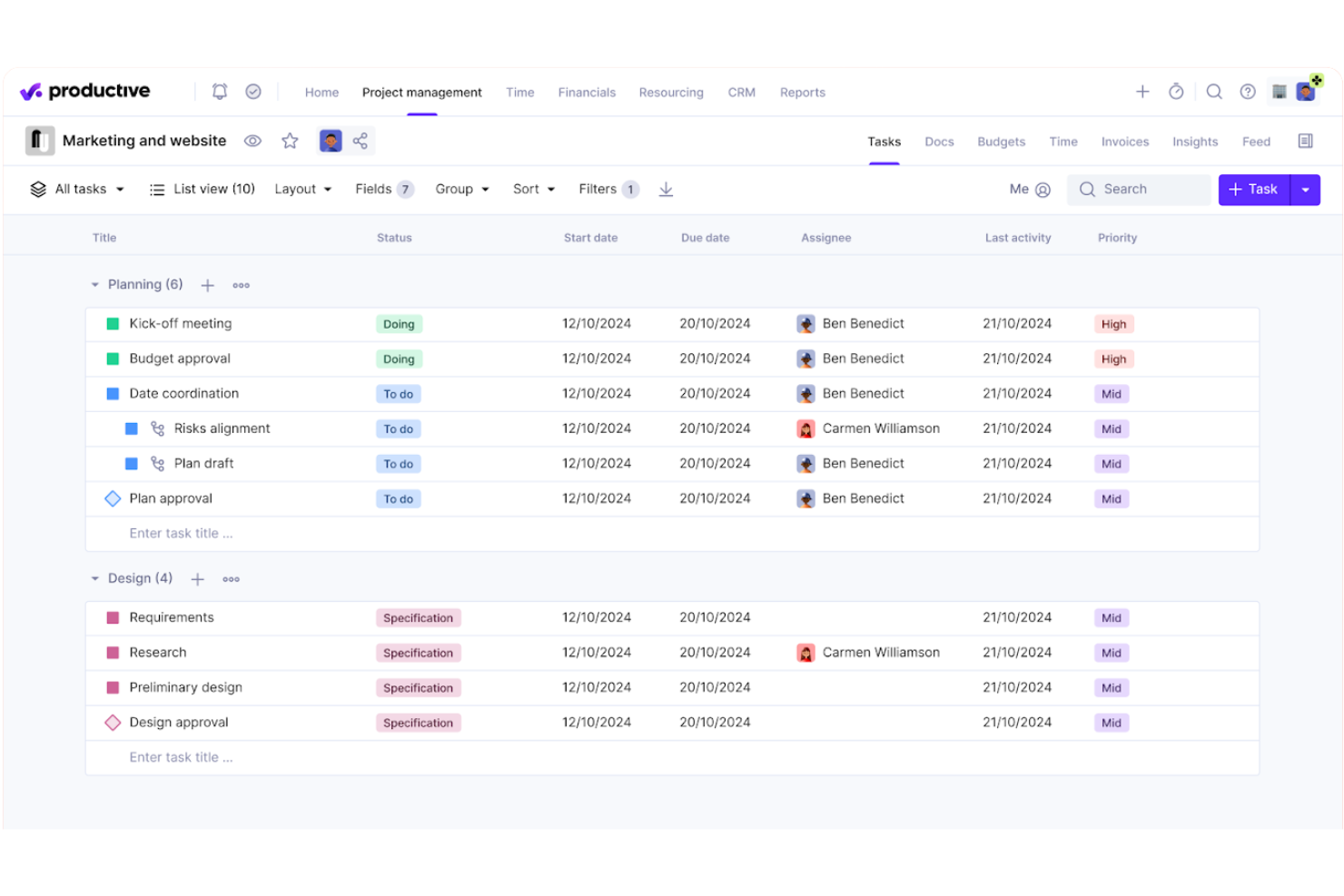
Productive is a professional services automation platform built for agencies that combines project management, resource planning, time tracking, and financial oversight—including budgeting, invoicing, and profitability reporting—in a single system.
Who Is Productive Best For?
Productive is a strong fit for digital agencies and consultancies that need to manage people, projects, and finances without stitching together multiple tools.
Why I Picked Productive
Productive earns its spot on my shortlist because of how clearly it surfaces resource data across an active portfolio. The resource planning view shows team availability, workload, and scheduled time off together, so I can catch allocation gaps before they become delivery problems. I also like the AI Reporting layer, which pulls margin and cost data instantly, and the Scenario Builder for modelling capacity before committing to new work.
Productive Key Features
- AI Assistant: Lets you draft project specs, generate content, and summarize documents right inside the platform.
- Recurring budgets: Support setting up repeating budgets for retainers or long-term projects.
- HRIS and invoicing integrations: Connect to tools like BambooHR, Personio, QuickBooks, and Xero to sync financials and HR data.
- Customizable reporting: Build dashboards and reports using custom fields for detailed insights into agency operations.
Productive Integrations
Productive offers native integrations with Slack, QuickBooks, HubSpot, Google Calendar, Xero, Jira, BambooHR, Personio, CharlieHR, BreatheHR, and Sage. An API is available for custom integrations.
Pros and Cons
Pros:
- Scenario modeling for resource planning
- Built-in AI assistant for automations
- Real-time insights into project profitability
Cons:
- Some features locked behind higher plans
- Report customization requires advanced setup
New Product Updates from Productive
Productive Adds Email and Calendar Integrations for Agents
Productive adds Gmail, Outlook, Google Calendar, and Outlook Calendar connectors for its AI agents. These integrations let agents manage emails and create calendar events directly within Productive. For more information, visit Productive’s official site.
 .
Hive
Best for client-to-invoice project billing
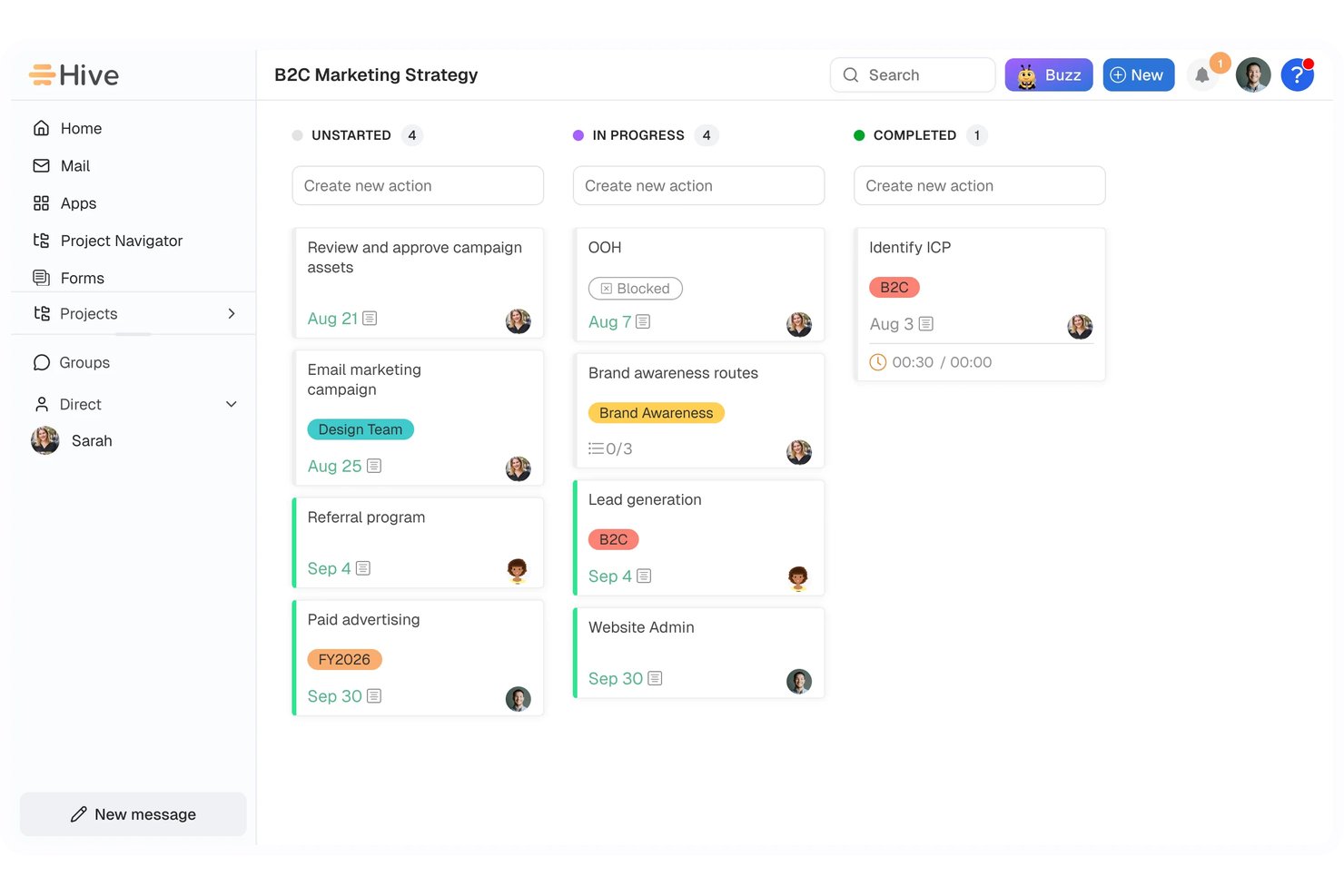
Hive is an AI-powered project and client management platform that combines task planning, CRM, resource scheduling, workflow automation, time tracking, and integrated invoicing through its Finance module.
Who Is Hive Best For?
Hive is a strong fit for agency owners and operations managers who need project delivery and client billing connected in a single workspace.
Why I Picked Hive
I've included Hive in my top picks because its Finance module creates a direct path from logged project hours to a sent invoice, which is exactly what I want from a client-to-invoice billing setup. When a project wraps, billable time flows into a worksheet, gets reviewed, and converts into a customer invoice without leaving the workspace. I also like that CRM margin checks let you price an opportunity and verify gross margin before the work even starts, keeping profitability visible from proposal to payment.
Hive Key Features
- Buzz AI workflow builder: Describe a process in plain English and Buzz generates a multi-step workflow for your review before it runs.
- Proofing and approvals: Mark up documents, video, and live pages directly in Hive and manage the full review and sign-off process in one place.
- CRM pipeline coach: Get an AI-generated summary of pipeline risks, opportunities, and recommended next steps based on your live deal data.
- 13-week cash forecast: Finance projects cash position using your billing pipeline, accounts receivable, accounts payable, and planned adjustments.
Hive Integrations
Hive lists over 1,000 integrations, including native connections to QuickBooks, Slack, Jira, GitHub, Google Drive, Dropbox, Microsoft Teams, and Zoom. It also offers an API and integrations through Zapier or an iPaaS, including HubSpot and FreshBooks.
Pros and Cons
Pros:
- Workflow recipes reduce repeat coordination
- Capacity views clarify team workload
- Client work connects directly to billing
Cons:
- Time and expense updates require manual steps
- Staffing recommendations aren’t AI-driven

Accelo
Best for workflow tracking across client projects

Accelo is a PSA platform that uses AI to connect project management, resource planning, time tracking, financial reporting, and client billing for agencies managing multiple engagements at once.
Who Is Accelo Best For?
Accelo is a strong fit for mid-size agencies and professional services firms managing multiple client engagements simultaneously across project, retainer, and support work.
Why I Picked Accelo
Accelo is one of my top picks because I love how it connects every stage of client work in one place, from the moment a quote is approved through to the final invoice. My team uses Accelo to track project milestones, dependencies, and scope in real time, and the AI surfaces project risks before they become delivery problems. I also rely on the scope creep tracking to catch out-of-scope work early and log change orders before unplanned hours quietly eat into margins.
Accelo Key Features
- AI-assisted resourcing: Assign team members to project tasks based on skill, availability, and workload using AI-powered recommendations.
- Automated timesheets: Accelo captures time spent on tasks and emails automatically, reducing manual time entry across active projects.
- Retainer tracking: Monitor retainer utilization and performance across recurring client accounts alongside one-time project work.
- Project templates: Launch new client projects from pre-built templates with auto-populated tasks, timelines, and role assignments.
Accelo Integrations
Accelo offers 30+ native integrations, including Salesforce, HubSpot, Jira, Slack, Google Workspace, Microsoft 365, QuickBooks, Xero, Sage Intacct, and GitHub. It also connects with Zapier and provides a RESTful API for custom integrations.
Pros and Cons
Pros:
- Automated time capture logs billable hours
- AI flags scope creep and margin risk
- Connects quote-to-cash workflow in one platform
Cons:
- Implementation requires weeks of guided onboarding
- Mobile app lacks full desktop functionality
New Product Updates from Accelo

Accelo Rebuilds Mobile App for Project and Time Management
Accelo rebuilds its mobile app with task management, new work creation, and mobile timesheets for Forecast customers. This helps teams keep project and time data current while working away from a desktop. For more information, visit Accelo’s official site.
 .

Best for AI-powered agency management
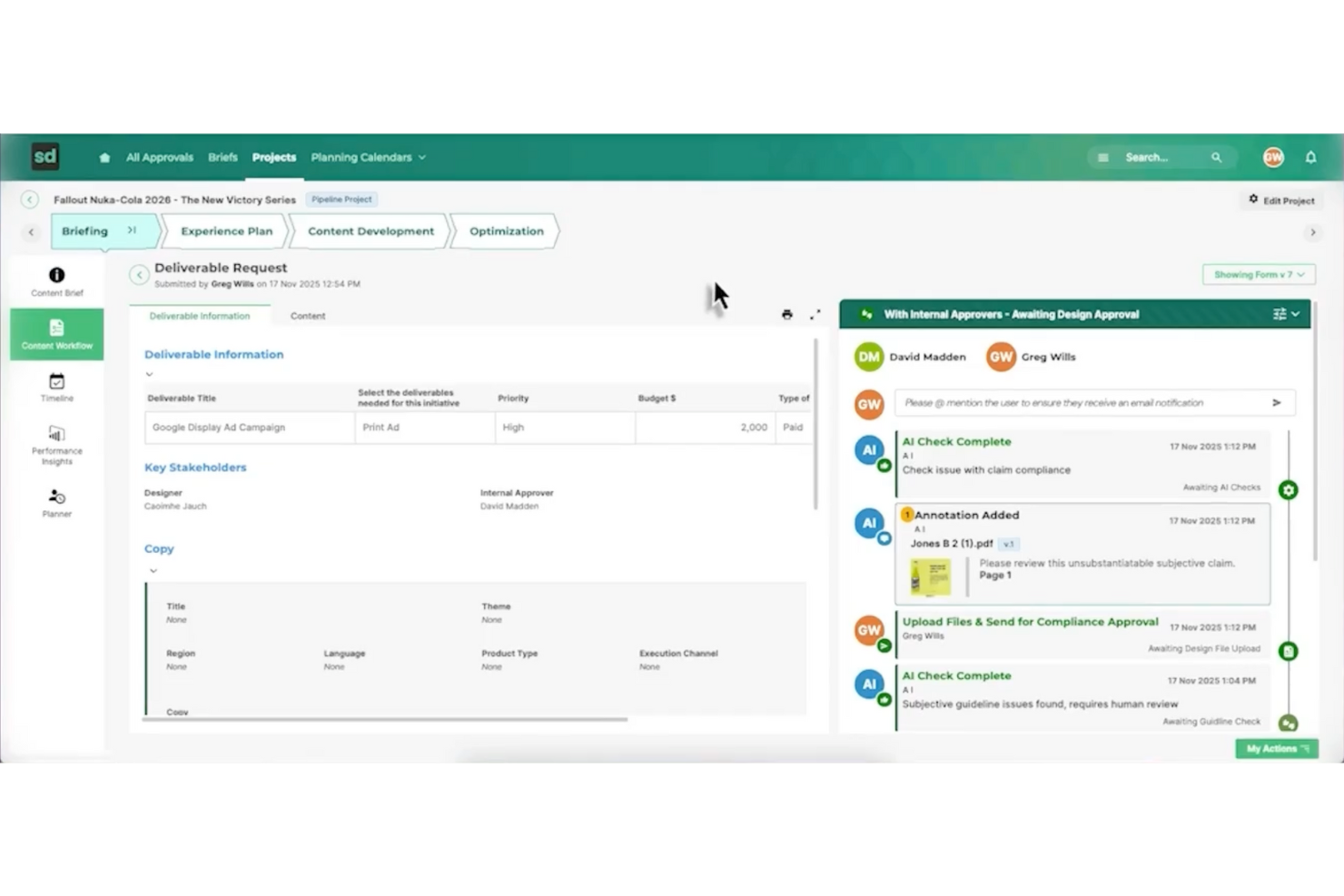
Screendragon is an AI agency management system built for marketing and creative operations that need AI-driven workflow automation. It offers a no-code platform that helps teams manage tasks, approvals, and project flows in one place. With real-time visibility into work progress, Screendragon supports better day-to-day coordination and more efficient project execution.
Why I Picked Screendragon
I picked Screendragon for its unique ability to seamlessly integrate AI-driven workflow automation with project and resource management. This system excels at automating complex workflows without programming knowledge, a significant advantage for teams aiming to improve efficiency. Additionally, its real-time insights and enterprise-grade security add functionality that directly addresses the needs of agencies managing multiple projects and teams. These features make Screendragon a compelling choice for anyone seeking a comprehensive AI agency management solution.
Screendragon Key Features
In addition to AI-driven workflow automation, Screendragon offers:
- Visual Workflow Builder: Allows you to create and customize workflows visually, simplifying the process of managing complex tasks.
- Dynamic Custom Forms: Enables your team to design forms that adapt to your specific operational needs, ensuring data collection is both relevant and efficient.
- Advanced Permission Controls: Provides robust security measures by allowing you to set detailed access permissions, safeguarding sensitive information.
- Proofing and Version Control: Facilitates creative workflows by enabling easy review and version tracking of creative content, ensuring consistency and quality.
Screendragon Integrations
Integrations include Adobe Creative Cloud, Slack, Microsoft Teams, SharePoint, Salesforce, JIRA, Workday, Oracle, SAP, and Google Workspace.
Pros and Cons
Pros:
- Project and resource management features help centralize work details
- Collaborative tools that improve team coordination and project visibility
- Flexible customization lets teams tailor workflows and project structures
Cons:
- Reporting and manual report creation can feel limited or complex
- The admin console and settings may be confusing for new users
Best for onboarding projects
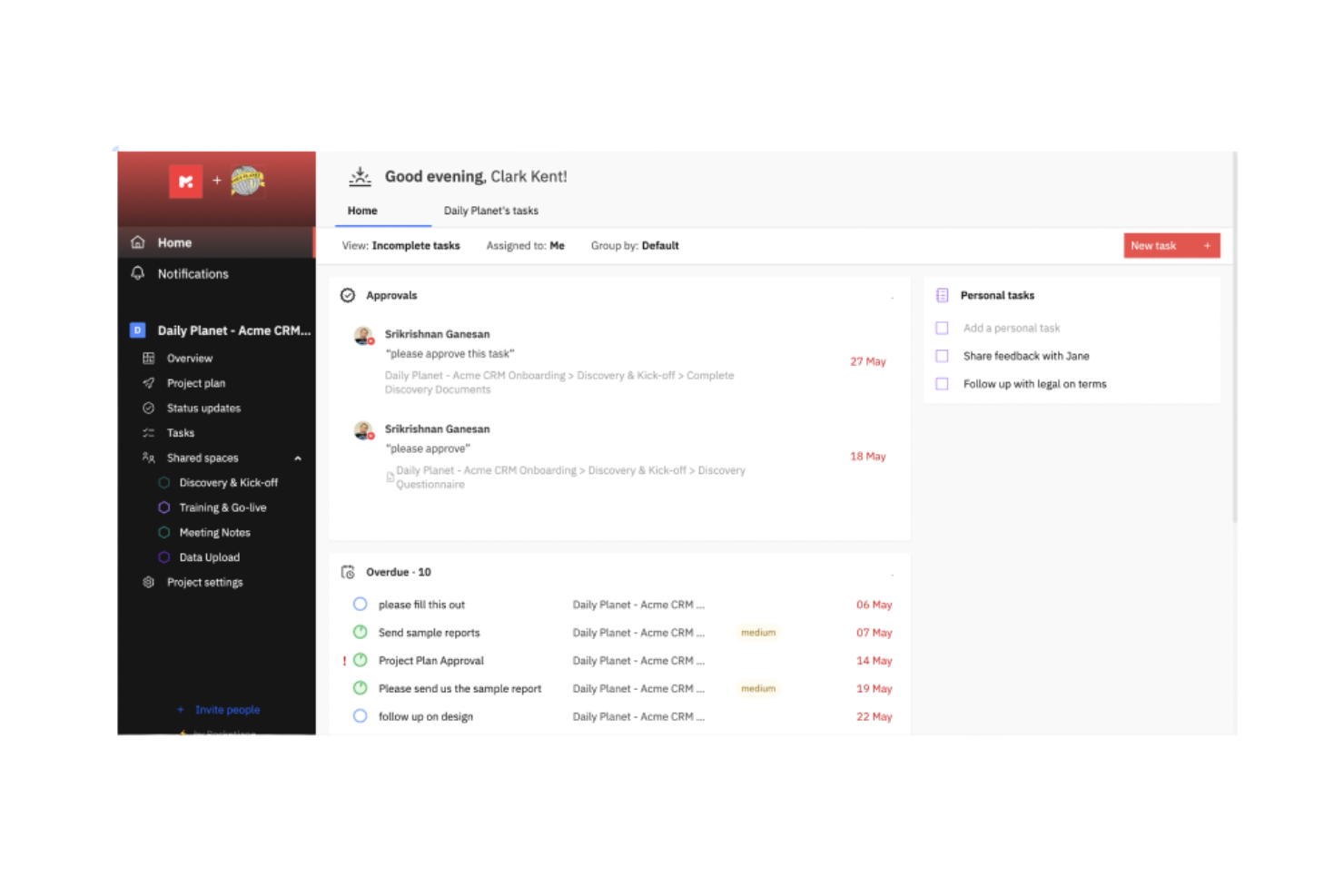
Rocketlane is a project management and customer onboarding software designed for businesses that want to enhance their project delivery and client interactions. It serves professional services teams by providing tools for efficient project tracking and customer collaboration.
Why I picked Rocketlane: Rocketlane specializes in onboarding projects, offering features like collaborative project planning and customer-facing dashboards. Its standout function is the AI-driven client updates, which keep your clients informed without manual effort. The platform also provides real-time financial insights to help your team manage resources effectively. The ability to automate time logging and integrate project data ensures that your onboarding processes are both efficient and transparent.
Standout Features & Integrations:
Features include AI-driven automations that simplify task allocation and resource planning. Time tracking is integrated to provide real-time insights into project profitability. Additionally, the tool offers collaborative workspaces that enhance communication between your team and clients.
Integrations include Salesforce, HubSpot, Slack, Microsoft Teams, Google Workspace, Trello, Asana, QuickBooks, Jira, and Zoom.
Pros and Cons
Pros:
- Detailed reporting tools
- Efficient onboarding support
- Easy to navigate interface
Cons:
- Limited day view on the schedule
- Occasional lag with large data

Creatio
Best for process automation
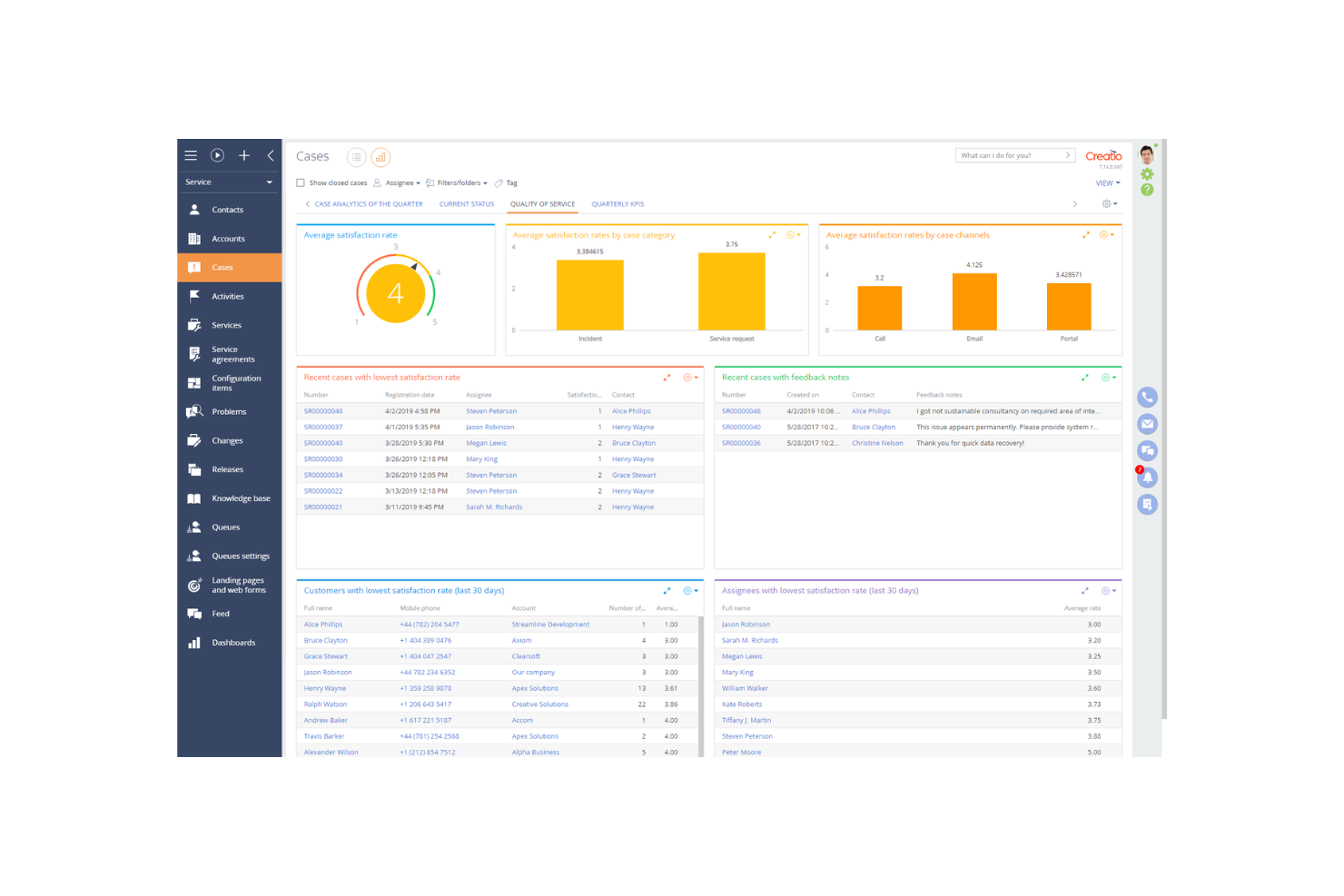
Creatio is a low-code platform designed for businesses looking to automate processes and enhance customer relationship management. It primarily serves mid-sized to large enterprises, offering tools for sales, marketing, and service automation.
Why I picked Creatio: Creatio excels in process automation, providing a platform that allows you to create workflows without extensive coding knowledge. The drag-and-drop interface simplifies the creation of custom processes. With its robust CRM capabilities, your team can manage customer interactions effectively. The platform's flexibility ensures it adapts to various business needs, making it a versatile choice for automation.
Standout Features & Integrations:
Features include the low-code process designer that simplifies workflow creation. The CRM tools offer a comprehensive view of customer interactions and data. Additionally, the marketing automation features help you manage campaigns and track results efficiently.
Integrations include Microsoft Outlook, Google Workspace, Mailchimp, Zapier, DocuSign, LinkedIn, Slack, QuickBooks, Facebook, and Twilio.
Pros and Cons
Pros:
- Flexible process automation
- Strong CRM capabilities
- Low-code platform for easy customization
Cons:
- Requires training for full utilization
- Complexity in initial setup

Best for CRM integration
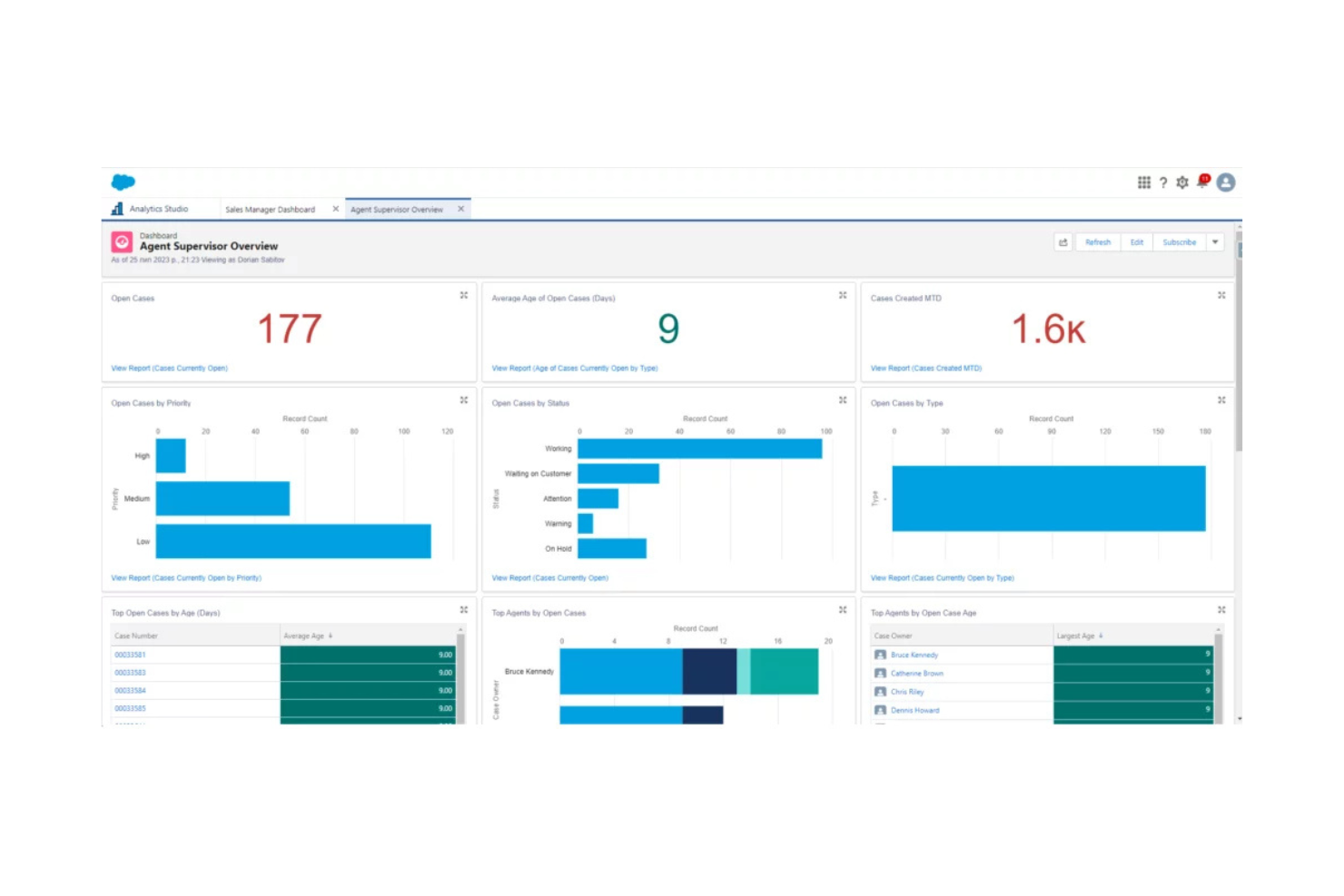
Salesforce is a cloud-based customer relationship management (CRM) platform used by businesses across various industries to manage customer interactions, sales, and data analytics. It helps companies improve customer service, automate sales processes, and enhance team collaboration.
Why I picked Salesforce: Salesforce excels in CRM integration, offering a platform that connects with numerous business tools to streamline your operations. The customizable dashboards give you insights into customer data and sales performance. With its automation capabilities, your team can handle repetitive tasks efficiently. The platform's scalability ensures it grows with your business, adapting to changing needs.
Standout Features & Integrations:
Features include customizable dashboards that let you track key metrics and performance indicators. The automation tools help manage repetitive tasks, freeing up your team for more strategic work. Additionally, the platform's scalability ensures it can grow with your business, adapting to your evolving needs.
Integrations include Mailchimp, QuickBooks, Slack, Dropbox, Google Workspace, Microsoft Outlook, LinkedIn Sales Navigator, DocuSign, Zoom, and HubSpot.
Pros and Cons
Pros:
- Extensive customization options
- Strong data analytics capabilities
- Highly scalable for growing businesses
Cons:
- Requires training for new users
- Can be complex to set up

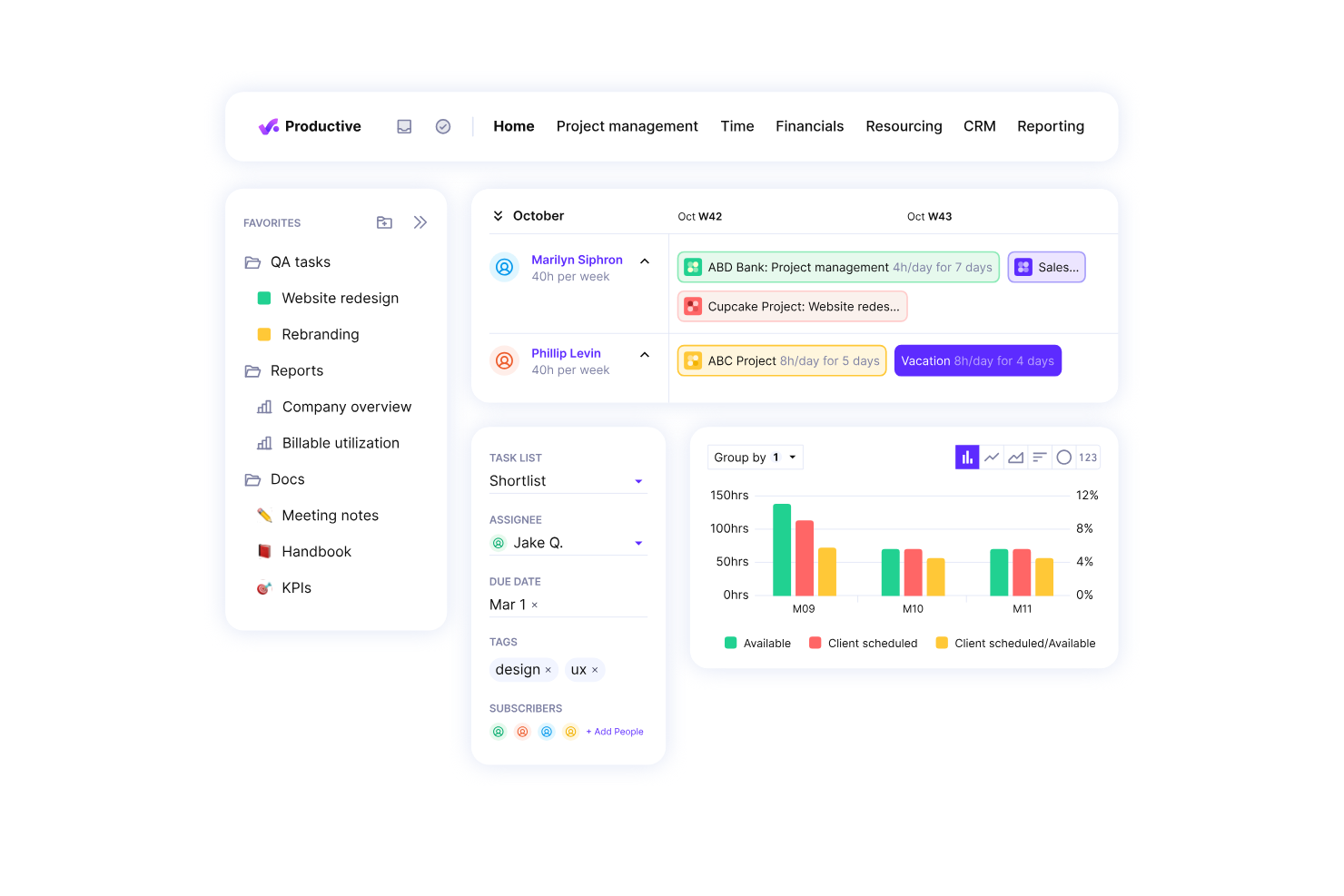
Productive.io is a professional services automation software designed for agencies and service businesses. It excels in resource planning, project management, and financial management, making it ideal for those focused on improving profitability.
Why I picked Productive.io: Productive.io is tailored for agencies aiming to boost profitability. It offers real-time profitability tracking, which helps your team make informed decisions quickly. Features like budgeting and invoicing are integrated, allowing you to handle financial aspects efficiently. The platform's growth forecasting tools ensure you can plan for future success without missing a beat.
Standout Features & Integrations:
Features include detailed project tracking that helps you monitor progress at every stage. The budgeting tools allow for precise financial planning, ensuring that your projects remain profitable. Additionally, the time tracking feature integrates seamlessly with your workflow to provide accurate billing.
Integrations include Xero, Slack, QuickBooks, Jira, Trello, Google Workspace, Microsoft Teams, Asana, HubSpot, and Zoom.
Pros and Cons
Pros:
- Effective resource planning
- Real-time profitability tracking
- Detailed financial insights
Cons:
- Complex setup for large teams
- May require training for new users


Applied Systems provides software solutions specifically designed for the insurance industry, offering tools for agency management, policy administration, and customer engagement. It serves insurance agencies and brokers by streamlining their operations and improving client interactions.
Why I picked Applied Systems: Applied Systems is tailored for the insurance industry with its comprehensive agency management capabilities. It offers policy management features that help your team handle client policies efficiently. The customer engagement tools ensure you maintain strong relationships with your clients. Its emphasis on industry-specific needs makes it a reliable choice for insurance professionals.
Standout Features & Integrations:
Features include automated policy management that simplifies handling client policies. The client communication tools enhance engagement by offering multiple channels for interaction. Additionally, the reporting feature provides insights into agency performance, helping you make informed decisions.
Integrations include Microsoft 365, Salesforce, DocuSign, QuickBooks, Vertafore, IBM, Oracle, Adobe Sign, Google Workspace, and Slack.
Pros and Cons
Pros:
- Strong client communication tools
- Efficient policy management
- Tailored for insurance agencies
Cons:
- Complex for new users
- Pricing details not transparent
Diğer Yapay Zekâ Ajansı Yönetim Sistemleri
İşte kısa listeme girmeyen ancak yine de göz atmaya değer bazı ek yapay zekâ ajansı yönetim sistemi seçenekleri:
- EZLynx
For insurance quoting
- Equisoft
For financial services
- monday.com
For team collaboration
- Attio
For contact management


How I Evaluate AI Agency Management Systems
Every tool on this list needs to deliver AI that actually moves the needle—automating client workflows, surfacing project risks, or forecasting capacity—not just slapping a chatbot on a dashboard. I split my evaluation into two layers: the core functionality a platform must have to qualify, and the differentiating factors that separate good options from great ones.
Core Functionality (Table Stakes For This List)
When I'm selecting tools for my list, I rank each one on a scale from 0 (does not offer the functionality) to 5 (excels in this area) for each core functionality listed below. Then, I calculate the tool's total score into a percentage. Each tool needs to achieve a minimum total score of 65% to be considered for inclusion.
- Agency Project Management: I look for multi-client workspace organization, milestone tracking, and dependency mapping that lets teams run concurrent engagements without cross-project confusion.
- AI Automation Engine: Each tool should automate real agency workflows like generating meeting notes, creating follow-up tasks, or drafting status updates rather than offering basic rule triggers.
- Resource & Capacity Management: I evaluate how well the platform tracks team utilization across active retainers and projects, including workload views that flag overallocation before it causes burnout.
- Time Tracking & Billing: The tool needs to connect billable hours to client invoicing, supporting common agency billing models like retainers, fixed-fee, and time-and-materials engagements.
- AI Forecasting & Insights: I check whether AI surfaces useful predictions around budget burn, delivery risk, or capacity shortfalls—not just dashboards that repackage data you already have.
- Client Collaboration Portal: Agencies need a client-facing layer for approvals, feedback, and reporting. I look for portals that reduce back-and-forth emails and keep stakeholders informed.
Once I have a list of tools that meet the criteria, I consider what sets each platform apart.
Differentiating Factors (What Sets Vendors Apart)
Here's how I compare and contrast different vendors:
Standout Features
Predictive risk alerts are a major differentiator. I look for tools that flag scope creep or timeline slippage early enough to adjust before a client escalation hits. Profitability intelligence matters just as much, especially platforms tracking margins per client or project in real time. I also evaluate whether a tool offers AI agent workflows that autonomously handle multi-step tasks like drafting weekly client reports from live project data.
Beyond Features
Integration ecosystems matter a lot for agencies. I check whether a platform connects natively with accounting tools like QuickBooks or Xero and creative tools like Figma, since broken sync between billing and project data creates real headaches. AI trust and data governance is another factor I weigh—agencies handle sensitive client work, so I look for clear policies on how AI models use that data. Pricing model alignment also deserves attention, particularly whether client or collaborator seats are included or billed separately.
Yapay Zekâ Ajansı Yönetim Sistemi Nasıl Seçilir?
Uzun özellik listeleri ve karmaşık fiyatlandırma yapılarına kapılmak kolaydır. Kendinize özgü yazılım seçim sürecinizde ilerlerken odağınızı korumanıza yardımcı olmak için aklınızda bulundurmanız gereken faktörleri içeren bir kontrol listesi hazırladım:
| Faktör | Dikkat Edilmesi Gerekenler |
|---|---|
| Ölçeklenebilirlik | Araç ajansınızla birlikte büyüyebilir mi? Performanstan ödün vermeden artan iş yüklerini ve kullanıcı sayısını karşılayıp karşılayamayacağını değerlendirin. Ölçeklenebilir fiyatlandırma planları sunan seçenekleri tercih edin. |
| Entegrasyonlar | Hâlihazırda kullandığınız araçlarla entegre oluyor mu? CRM'ler, e-posta ve proje yönetimi araçları gibi mevcut platformlarla bağlantı kurmanın ne kadar kolay olduğunu değerlendirin. |
| Özelleştirilebilirlik | Yazılımı iş akışlarınıza uyacak şekilde uyarlayabilir misiniz? Ajansınızın ihtiyaçlarına uygun olarak panolarda, raporlarda ve süreçlerde değişiklik yapmanıza izin verip vermediğini kontrol edin. |
| Kullanım Kolaylığı | Arayüz ekibiniz için sezgisel mi? Öğrenme sürecinin zor olması benimsenmeyi yavaşlatabilir. Yazılımın tüm ekip üyeleri için kullanıcı dostu olduğundan emin olmak üzere test edin. |
| Uygulama ve İşe Alıştırma | Ne kadar hızlı kullanmaya başlayabilirsiniz? Kurulum ve eğitim için gereken kaynakları göz önünde bulundurun. Basit bir işe alıştırma sürecine ve mevcut desteğe sahip yazılımları tercih edin. |
| Maliyet | Bütçenize uygun mu? Abonelik ücretleri, kurulum bedelleri ve olası gizli maliyetler de dâhil olmak üzere toplam sahip olma maliyetini karşılaştırın. Yalnızca düşük fiyatlar yerine sunduğu değeri göz önünde bulundurun. |
| Güvenlik Önlemleri | Verilerinizi koruyor mu? Müşteri ve ajans bilgilerinin güvende kalmasını sağlamak için şifreleme ve erişim denetimleri gibi uygulanan güvenlik önlemlerini değerlendirin. |
| Destek Kullanılabilirliği | Yardıma kolayca erişilebilir mi? Sorunlar ortaya çıktığında yardımcı olmak üzere sağlayıcının 7/24 destek, canlı sohbet veya özel müşteri yöneticileri sunup sunmadığını kontrol edin. |
Yapay Zekâ Ajans Yönetim Sistemi Nedir?
Yapay zekâ ajans yönetim sistemi, ajansların projelerini, kaynaklarını ve müşteri etkileşimlerini verimli bir şekilde yönetmelerine yardımcı olmak üzere tasarlanmış bir yazılım çözümüdür. Bu araçlar genellikle üretkenliği ve iş birliğini artırmak için proje yöneticileri, ekip liderleri ve ajans yöneticileri tarafından kullanılır.
Zaman takibi, görev atama ve müşteri iletişimi özellikleri; iş yüklerinin yönetilmesine, teslim tarihlerine uyulmasına ve müşteri memnuniyetinin korunmasına yardımcı olur. Genel olarak bu araçlar, ajansların daha etkili çalışmasını ve müşterilerine daha iyi sonuçlar sunmasını sağlar.
Yapay Zekâ Ajans Yönetim Sisteminin Özellikleri
Bir yapay zekâ ajans yönetim sistemi seçerken aşağıdaki temel özelliklere dikkat edin:
- Proje yönetimi: Görevlerin zamanında tamamlanmasını sağlayarak projeleri baştan sona düzenlemeye ve denetlemeye yardımcı olur.
- Zaman takibi: Görevlere ne kadar zaman harcandığını izler, üretkenlik hakkında içgörüler sunar ve doğru faturalandırmaya yardımcı olur.
- Görev atama: Sorumlulukların açıkça devredilmesini sağlar ve ekip üyelerinin ne yapmaları gerektiğini bilmelerine yardımcı olur.
- Müşteri iletişimi: Müşterilerle etkileşimi kolaylaştırarak proje yaşam döngüsü boyunca onların bilgilendirilmesini ve sürece dâhil olmasını sağlar.
- Raporlama ve analiz: Proje performansı ve ajans operasyonları hakkında içgörüler sunarak veriye dayalı karar almaya yardımcı olur.
- Özelleştirilebilirlik: Kullanılabilirliği artırarak yazılımı ajansınızın özel iş akışlarına ve ihtiyaçlarına uyacak şekilde uyarlamanıza olanak tanır.
- Entegrasyonlar: Ajansınızın kullandığı diğer araçlara bağlanarak operasyonları kolaylaştırır ve verileri merkezileştirir.
- Güvenlik önlemleri: Şifreleme ve erişim denetimleriyle hassas bilgileri koruyarak veri gizliliğini sağlar.
- Otomasyon: Tekrarlayan süreçleri otomatikleştirerek manuel görevleri azaltır ve stratejik çalışmalar için zaman kazandırır.
Yapay Zekâ Ajans Yönetim Sisteminin Faydaları
Bir yapay zekâ ajans yönetim sistemini uygulamak ekibiniz ve işletmeniz için çeşitli faydalar sağlar. İşte yararlanabileceğiniz birkaç fayda:
- Geliştirilmiş verimlilik: Otomasyon özellikleri manuel görevleri azaltarak ekibinizin stratejik çalışmalara odaklanmasını sağlar.
- Daha iyi iş birliği: Görev atama ve müşteri iletişimi araçları, ekibinizin birlikte çalışmasına ve müşterileri süreçten haberdar etmesine yardımcı olur.
- Geliştirilmiş karar alma: Raporlama ve analiz özellikleri performans hakkında içgörüler sunarak bilinçli kararlar almanıza yardımcı olur.
- Artırılmış üretkenlik: Zaman takibi, darboğazların belirlenmesine yardımcı olarak kaynakların etkili şekilde kullanılmasını sağlar.
- İhtiyaçlara uygun yapı: Özelleştirilebilirlik, sistemi ajansınızın ihtiyaçlarına göre uyarlamanıza olanak tanıyarak kullanımını kolaylaştırır.
- Merkezi operasyonlar: Entegrasyonlar, mevcut araçlarınızı birbirine bağlayarak süreçleri kolaylaştırır ve verileri tek bir yerde tutar.
Yapay Zekâ Ajans Yönetim Sisteminin Maliyetleri ve Fiyatlandırması
Bir yapay zekâ ajans yönetim sistemi seçmek, mevcut çeşitli fiyatlandırma modellerinin ve planların anlaşılmasını gerektirir. Maliyetler özelliklere, ekip büyüklüğüne, ek özelliklere ve daha fazlasına göre değişir. Aşağıdaki tabloda, yaygın planlar, ortalama fiyatları ve yapay zekâ ajans yönetim sistemi çözümlerinde genellikle sunulan özellikler özetlenmektedir:
Yapay Zekâ Ajans Yönetim Sistemi için Plan Karşılaştırma Tablosu
| Plan Türü | Ortalama Fiyat | Yaygın Özellikler |
|---|---|---|
| Ücretsiz Plan | $0 | Temel proje yönetimi, görev atama ve sınırlı entegrasyonlar. |
| Kişisel Plan | $5-$25/kullanıcı/ay | Proje yönetimi, zaman takibi, görev atama ve temel raporlama. |
| İşletme Planı | $30-$60/kullanıcı/ay | Gelişmiş raporlama, müşteri iletişimi, entegrasyonlar ve özelleştirme seçenekleri. |
| Kurumsal Plan | $75-$150/kullanıcı/ay | Tam özelleştirme, öncelikli destek, gelişmiş güvenlik özellikleri ve kapsamlı analiz. |
Yapay Zekâ Ajansı Yönetim Sistemi SSS
Yapay zekâ ajansı yönetim sistemi hakkında sık sorulan sorulara ilişkin bazı yanıtlar:
Yapay zekâ ajansı yönetim sistemini mevcut araçlarla nasıl entegre edebilirim?
Yapay zekâ ajansı yönetim sistemini mevcut araçlarınızla entegre etmek, yazılım ekosisteminizle uyumluluğunu kontrol etmeyi gerektirir. Çoğu sistem, CRM’ler, e-posta platformları ve proje yönetimi yazılımları gibi popüler araçlarla API’ler veya yerleşik entegrasyonlar sunar. Entegrasyonun kolaylığını ve sağlayıcı tarafından sunulan teknik desteği değerlendirdiğinizden emin olun.
Veri güvenliğiyle ilgili nelere dikkat etmeliyim?
Yapay zekâ ajansı yönetim sistemi seçerken veri güvenliği büyük önem taşır. Güçlü şifreleme, erişim kontrolleri ve GDPR gibi veri koruma düzenlemelerine uyumluluk sunan sistemleri tercih edin. Müşteri bilgilerinizin güvende kalmasını sağlamak için sağlayıcının güvenlik protokollerini ve veri ihlallerini nasıl ele aldığını sorun.
Yapay zekâ ajansı yönetim sistemleri uzaktan çalışan ekipleri destekleyebilir mi?
Evet, birçok yapay zekâ ajansı yönetim sistemi bulut tabanlı erişim, mobil uygulamalar ve iş birliği özellikleri sunarak uzaktan çalışmayı destekler. Bu araçlar, ekibinizin bağlantıda kalmasına yardımcı olur; böylece ekip üyeleri projeleri yönetebilir, iletişim kurabilir ve her yerden verilere erişebilir. Uzaktan iş birliğini ve bağlantıyı geliştiren özellikleri kontrol edin.
Yapay zekâ ajansı yönetim sistemleri müşteri iletişimini nasıl geliştirir?
Bu sistemler iletişim bilgilerini merkezileştirerek, etkileşimleri izleyerek ve e-posta şablonları ile sohbet gibi iletişim araçları sunarak müşteri iletişimini geliştirir. Bu, ekibinizin müşterilerle düzenli iletişim kurmasına yardımcı olur ve zamanında güncellemeler ile yanıtlar sağlayarak müşteri memnuniyetini ve bağlılığını artırır.
Ne düzeyde özelleştirme yapılabilir?
Özelleştirme düzeyi sistemler arasında değişir, ancak çoğu sistem gösterge panellerini, iş akışlarını ve raporları ihtiyaçlarınıza göre uyarlama seçenekleri sunar. Sistemi ajansınızın özel gereksinimlerine uyacak şekilde özelleştirmenin ne kadar kolay olduğunu değerlendirin. Bazı sistemlerde daha gelişmiş özelleştirmeler için teknik yardım gerekebilir; bu nedenle ekibinizin yetkinliklerini göz önünde bulundurun.
Uygulama sırasında karşılaşılan yaygın zorluklar nelerdir?
Yaygın zorluklar arasında veri taşıma, kullanıcı eğitimi ve iş akışlarını yeni sisteme uyarlama yer alır. Bunları azaltmak için sağlayıcınızın eğitimler, web seminerleri ve destek gibi kapsamlı işe alım kaynakları sunduğundan emin olun. Ekibinizin yeni sisteme baskı altında kalmadan alışabilmesi için bir geçiş dönemi planlayın.