

2026’nın En İyi 10 Dijital Süreç Otomasyonu Yazılımı

En İyi Dijital Süreç Otomasyonu Yazılımları Kısa Listesi


Bu kadar çok dijital süreç otomasyonu yazılımı seçeneği varken hangisinin sizin için doğru olduğunu belirlemek zor olabilir. İş süreçlerinizi kolaylaştırmak ve otomatikleştirmek istiyor, ancak hangi aracın en iyi olduğunu bulmanız gerekiyor. Size yardımcı olacağım! Bu yazıda, farklı sektörlerde çeşitli otomasyon araçlarını kullanırken edindiğim kişisel deneyimleri paylaşarak en iyi dijital süreç otomasyonu yazılımlarını seçmenizi kolaylaştıracağım.
Dijital süreç otomasyonu yazılımları tekrarlayan görevleri ve iş akışlarını otomatikleştirir. Verimliliği artırır ve hataları azaltır. Manuel süreçlerin, verimsizliklerin ve yüksek hata oranlarının neden olduğu sorunları çözer.
Why Trust Our Software Recommendations
Our team has been testing and reviewing software since 2012. As project managers ourselves, we know how difficult—and important—it is to choose the right software.
For this guide, we evaluated tools using hands-on testing and independent research, scoring tools using our selection criteria. We also draw on insights from industry thought leaders and practicing project management experts.
Our reviews reflect our human editorial judgment, not a sales pitch.
Expert reviewers:
Dijital Süreç Otomasyonu Yazılımları Karşılaştırma Tablosu
| Tool | Best For | Trial Info | Price | ||
|---|---|---|---|---|---|
| 1 | Best for in-chat workflow automation | Free plan available | From $7.25/user/month (billed annually) | Website | |
| 2 | Best for cross-system workflow automation | 30-day free trial available | Pricing upon request | Website | |
| 3 | Best for AI-powered document management | Free plan available | From $25/month | Website | |
| 4 | Best for scalable RPA solutions | 30-day free trial | Pricing upon request | Website | |
| 5 | Best for low-code process automation | Free plan + demo available | Pricing upon request | Website | |
| 6 | Best for hybrid deployment flexibility | Free plan available | From $1,090/month | Website | |
| 7 | Best for workflow automation templates | 30-day free trial + free demo available | From $15,000/year (billed annually) | Website | |
| 8 | Best for integrated BPM and case management | 30-day free trial available | Pricing upon request | Website | |
| 9 | Best for integrated risk management (IRM) | Free demo available | Pricing upon request | Website | |
| 10 | Best for full-stack development capabilities | Free plan + demo available | Pricing upon request | Website |
En İyi Dijital Süreç Otomasyonu Yazılımları İncelemeleri
Bu bölüm, çeşitli dijital süreç otomasyonu yazılımlarının kapsamlı bir analizini ve genel değerlendirmesini sunar. Artılarını ve eksilerini, özelliklerini ve en uygun kullanım alanlarını ele alacağız.

Slack
Best for in-chat workflow automation
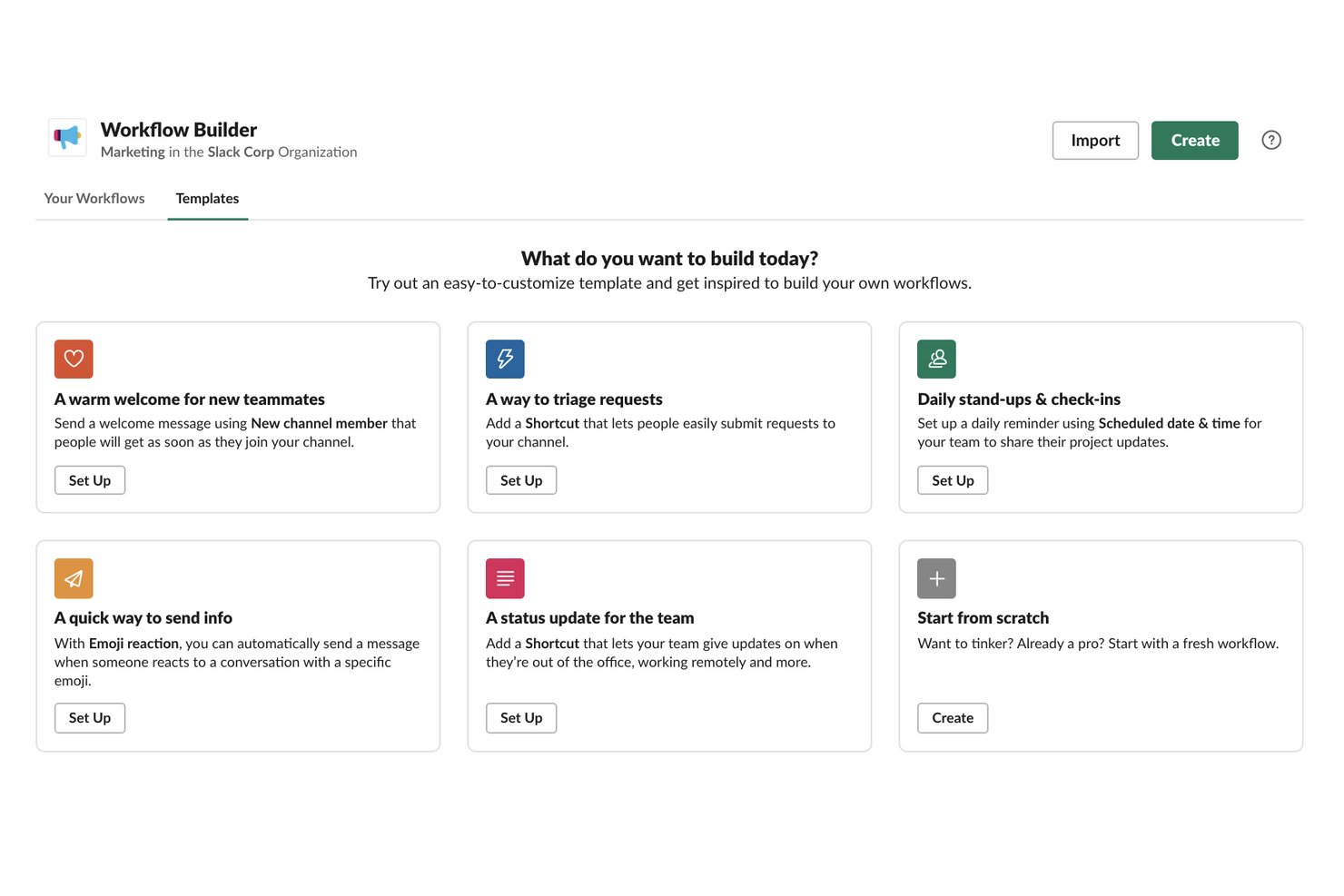
Slack is a team communication and collaboration platform that layers no-code workflow automation on top of messaging, letting you build multi-step, trigger-based workflows, automate task tracking through Lists, and connect processes across 2,600+ integrated apps.
Who Is Slack Best For?
Slack is a strong fit for teams that already live in Slack and want to automate routine processes without leaving the platform.
Why I Picked Slack
I've included Slack in my top picks because it's the only tool on this list that builds automation directly into the place where your team already communicates. Workflow Builder lets you trigger multi-step workflows from a message, an emoji reaction, or a channel join, so processes like IT ticket routing or onboarding sequences start without anyone switching apps. I also like that 80% of Slack's workflow builders are non-technical, which means your ops or HR team can own these automations without waiting on engineering.
Slack Key Features
- Conditional branching: Build workflows with up to 15 conditional branches, letting you route processes differently based on form answers, button clicks, or other workflow variables.
- Workflow connectors: Connect workflows directly to tools like Salesforce, Jira Cloud, ServiceNow, and Google Sheets using plug-and-play connectors that trigger actions in those apps.
- Slack Lists: Track tasks with assignees, due dates, custom fields, subtasks, and automated notifications that fire when field values change or deadlines approach.
- AI workflow generation: Describe a process in plain language and let Slack's AI generate a working workflow, available on Pro plans and above.
Slack Integrations
Slack offers marketplace integrations with over 2,600 apps, including Asana, Google Sheets, Jira Cloud, Salesforce, ServiceNow, and Zendesk. Its API supports custom integrations for connecting additional systems and workflows.
Pros and Cons
Pros:
- Nontechnical teams can own basic automation
- Project updates stay grouped outside email
- Routine requests become forms and reminders
Cons:
- Open-task oversight and overdue alerts are thin
- Complex conditional workflows hit builder limits
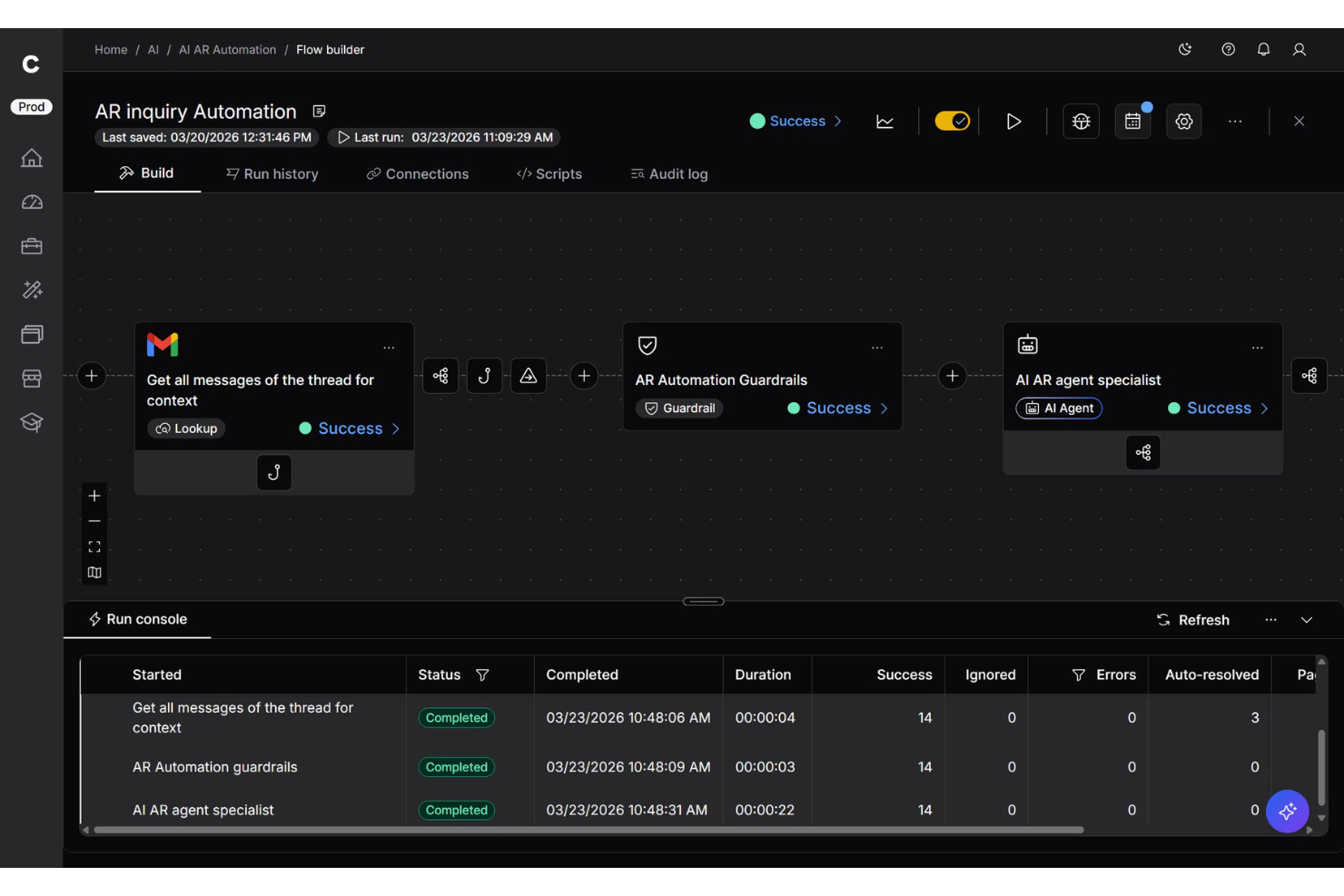
Celigo is a digital process automation platform built for teams that need to connect apps, automate repetitive workflows, and keep data moving smoothly across business systems. It’s especially useful for growing companies managing complex processes across cloud and on-premise environments. What makes it stand out is its strong integration focus, which helps reduce manual work and unify operations across disconnected tools.
Who Is Celigo Best For?
Celigo is a good fit for IT teams and operations leaders at mid-sized to large businesses that need to automate and connect multiple business applications.
Why I Picked Celigo
I picked Celigo because it’s especially good for cross-system workflow automation, helping you connect processes across the apps your team already uses. Its prebuilt connectors and integration templates reduce the amount of manual setup needed to move data between systems. I also like that it supports both cloud and on-premise applications, which is useful if your team relies on a mix of modern and legacy tools. This makes it easier to automate workflows that span multiple departments instead of managing each system separately. For teams dealing with disconnected business apps, Celigo helps keep processes consistent and data up to date.
Celigo Key Features
Some other features in Celigo support teams managing automated workflows across multiple business systems:
- Flow builder: Design multi-step automations using a visual builder that maps how data moves between systems.
- Error management dashboard: Monitor integration issues in one place so your team can troubleshoot failed workflows faster.
- Role-based access controls: Set user permissions to control who can build, edit, and manage integrations securely.
- Integration dashboard: Track flow performance, run history, and system activity to keep automated processes visible.
Celigo Integrations
Integrations include NetSuite, SAP, Microsoft Dynamics 365, Oracle, Salesforce, Shopify, Amazon, Snowflake, Jira, and Slack
Pros and Cons
Pros:
- Flexible platform supports both business users and technical teams
- Centralized error management helps teams monitor and maintain automated workflows
- Connects cloud and on-premise systems for cross-system workflow automation
Cons:
- Field mapping can be difficult for more advanced logic setups
- Error messages can be vague during troubleshooting of complex flows
New Product Updates from Celigo
Celigo Expands Storage, Data Imports, and Connection Management
Celigo adds a standalone storage connector, optimized Azure Synapse imports, NetSuite OAuth 2.0, flexible file templates, and expanded MCP access controls. These updates help teams manage files, process data, and secure integrations. For more information, visit Celigo’s official site.
 .

UiPath
Best for AI-powered document management

UiPath leverages AI to optimize and automate business processes for mining, task mining, and communications mining. It offers comprehensive robotic process automation to design, deploy, and manage business functions with high efficiency and accuracy.
Why I Picked UiPath: UiPath's Document Understanding combines RPA with AI to extract, interpret, and process data from complex documents, including those with unstructured or semi-structured formats. It supports a wide range of document types, from invoices to contracts, and uses machine learning to improve accuracy over time. This feature is niche because it allows businesses to automate document-centric processes that are traditionally difficult to handle with standard RPA, making it a powerful tool for industries like finance, legal, and insurance where document processing is critical.
Standout Features & Integrations:
Features include AI-powered process mining, task mining, and communications mining, which help identify high-ROI automation opportunities. The platform also offers low-code development, intelligent document processing, and real-time analytics to optimize automation programs at scale.
Integrations include Microsoft, Google Cloud, SAP, Amazon Web Services (AWS), Salesforce, Oracle, ServiceNow, Workday, Slack, and Jira.
Pros and Cons
Pros:
- Strong integration with major AI services
- Multi-platform automation capability
- Extensive component library
Cons:
- Resource-heavy orchestration
- Limited-out-of-the-box AI models
Best for scalable RPA solutions

Blue Prism offers enterprise-grade robotic process automation capabilities, enabling organizations to automate repetitive, rule-based tasks with high precision and reliability.
Why I Picked Blue Prism: Blue Prism was designed for scalability, allowing businesses to automate repetitive, rule-based tasks across multiple departments and geographies without compromising performance or reliability. The software can manage thousands of automated processes simultaneously, while maintaining strict security and compliance standards, making it a standout choice for organizations needing large-scale digital transformation initiatives. It leverages AI and machine learning to address more sophisticated workflows and commits to secure automation, including role-based access and audible trails.
Standout Features & Integrations:
Features include a secure and scalable intelligent automation platform, cloud-native capabilities, and various tools like desktop automation, human-digital worker collaboration, and document automation.
Integrations include Salesforce, SAP, Oracle, Microsoft Dynamics, ServiceNow, Workday, Google Cloud, Amazon Web Services, IBM Watson, and UiPath.
Pros and Cons
Pros:
- Extensive library of pre-built connectors
- Digital workforce with AI integration
- Centralized management console
Cons:
- Resource and cost-intensive implementation and customization
- Limited AI capabilities without add-ons

Appian
Best for low-code process automation

Appian is a comprehensive platform that enables organizations to develop and deploy complex business applications, integrating low-code development with powerful automation capabilities.
Why I Picked Appian: Appian provides a low-code environment with its intuitive drag-and-drop interface, allowing users to build and deploy applications without extensive knowledge and reducing development time. It has a unified platform combining process automation, case management, and AI-driven decision-making for managing structured and unstructured processes. Additionally, the platform supports rapid prototyping and iterative development where applications can be continuously refined based on user feedback and changing business conditions.
Standout Features & Integrations:
Features include low-code design, process automation with RPA and AI, and integrated data fabric. These features enable businesses to build applications quickly, automate complex workflows, and unify data across systems for better decision-making.
Integrations include Salesforce, Google, Microsoft SharePoint, DocuSign, AWS, SAP, Oracle, ServiceNow, Workday, and IBM.
Pros and Cons
Pros:
- Business process optimization tools
- Rapid prototyping with instant feedback loops
- Unified interface for developers and business users
Cons:
- Resource-intensive for advanced customization and integration
- Limited UI/UX customization
Mendix
Best for hybrid deployment flexibility
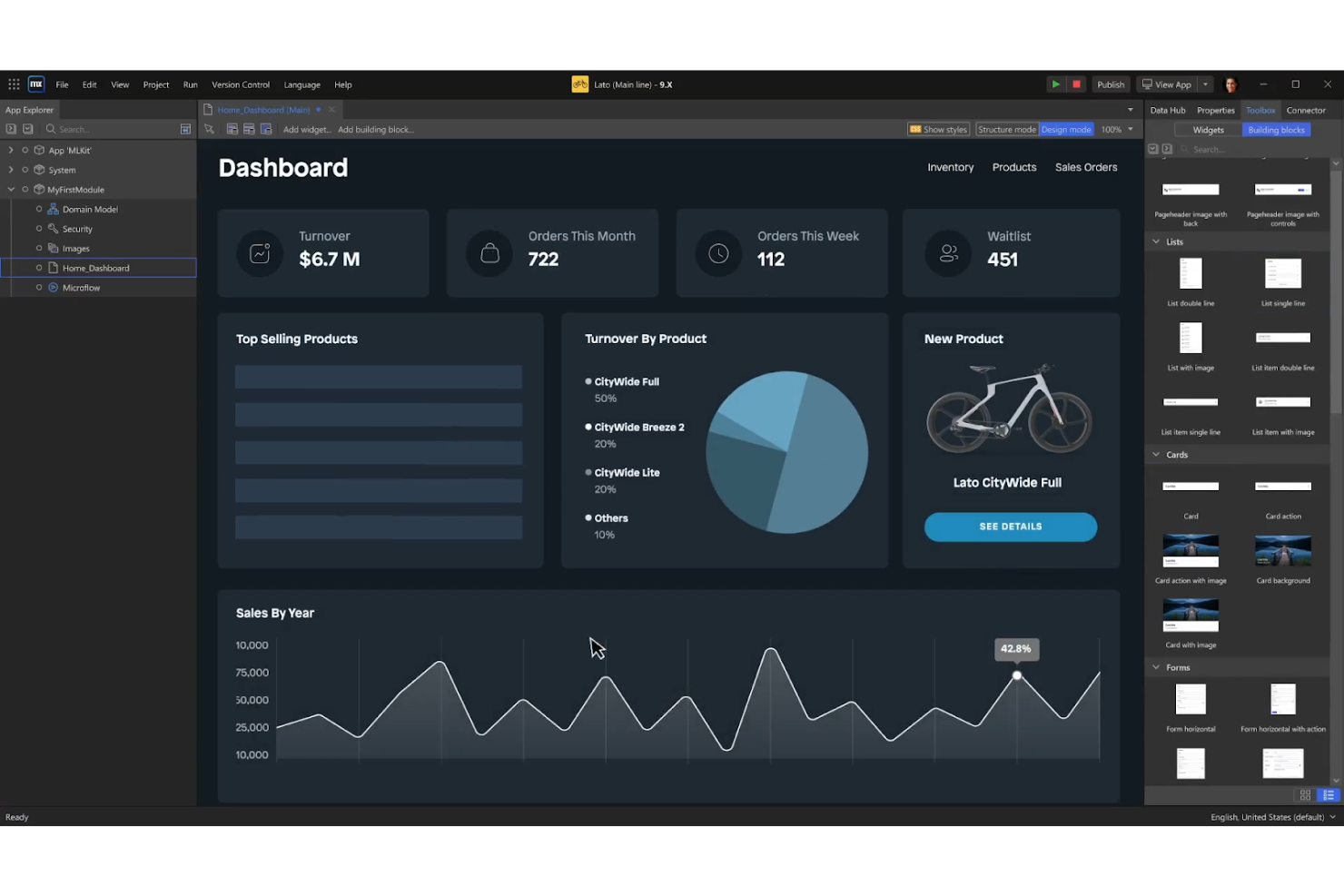
Mendix is a low-code application development that leverages AI to simplify and accelerate enterprise app development. It supports full lifecycle management with built-in integration, testing, and monitoring tools.
Why I Picked Mendix: Mendix is highly flexible when it comes to deployment options, offering multi-cloud and hybrid deployment capabilities out-of-the-box. Users can deploy applications on public clouds like AWS, Azure, and Google Cloud, on private clouds, or in hybrid environments. This flexibility is relatively uncommon and gives organizations the freedom to choose the deployment strategy that best fits their specific needs, whether that’s optimizing for cost, performance, or regulatory compliance.
Standout Features & Integrations:
Features include AI-powered development tools that accelerate delivery, a visual IDE for streamlined application development, and robust governance tools for enterprise-level control and compliance.
Integrations include AWS, Red Hat, Snowflake, SAP, Salesforce, Microsoft Azure, Google Cloud, IBM Cloud, Oracle, and ServiceNow.
Pros and Cons
Pros:
- Integrated machine learning models
- Multi-experience development
- Low-code and pro-code flexibility
Cons:
- Limited integration with non-Mendix tools
- Complexity in managing large projects

Nintex
Best for workflow automation templates

Nintex is a comprehensive platform with powerful automation capabilities that streamlines organizational and business processes and accelerates the automation journey with its workflow templates.
Why I Picked Nintex: Nintex offers an extensive library of pre-built workflow automation templates, covering various common processes like document approvals and employee onboarding. This allows organizations to implement automation solutions quickly and with minimal customizations. Nintex also offers advanced customization options for these templates, ensuring they meet organizational needs. Additionally, it provides an easy-to-use drag-and-drop interface and process mapping and analytics tools, allowing organizations to visualize and analyze their workflows in real-time.
Standout Features & Integrations:
Features include process identification, management, workflow automation, application development, forms automation, RPA, document generation, and analytics. These features collectively offer a powerful suite for managing and automating business processes.
Integrations include Microsoft 365, Salesforce, SharePoint, Adobe Sign, DocuSign, SAP, Oracle, Google Drive, Dropbox, and Box.
Pros and Cons
Pros:
- Visual process mapping
- Process automation across hybrid environments
- Extensive library of pre-built connectors
Cons:
- Lack of advanced AI features
- Limited scalability for complex processes

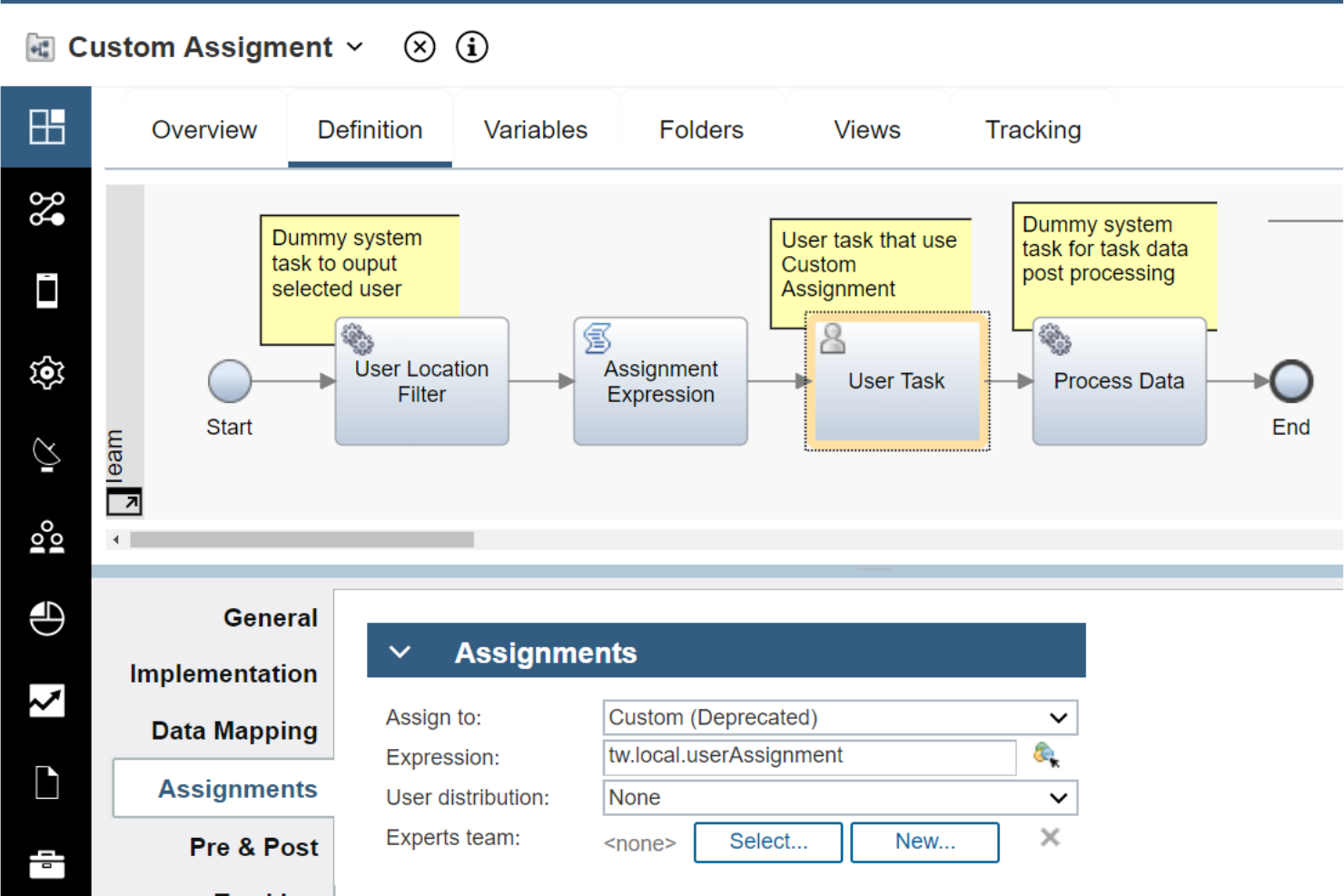
IBM Business Automation Workflow (BAW) combined business process management (BPM) and case management capabilities, enabling organizations to design, execute, and monitor complex workflows and accelerate digital transformation initiatives.
Why I Picked IBM Business Automation Workflow: IBM Business Automation Workflow (BAW)’s dual capabilities can handle complex, cross-functional processes that require rigid process control and the flexibility to manage exceptions and case-based work. It offers a highly customizable environment, allowing users to design workflows that adapt based on the context of each case, and offers powerful analytics capabilities for real-time insights into process performance. Additionally, it integrates with IBM’s strong AI and analytics tools, enabling intelligent automation and analysis of large amounts of data to identify patterns, predict outcomes, and make recommendations.
Standout Features & Integrations:
Features include built-in monitoring and analytics, which provide visibility and insights to improve productivity and prioritize work. The software also offers governance and compliance capabilities to manage information lifecycle requirements and dynamic content-centric applications for agile deployment of customized solutions.
Integrations include IBM Watsonx Orchestrate, IBM Cloud Pak for Business Automation, IBM Process Mining, Salesforce, SAP, Microsoft Dynamics, Oracle, ServiceNow, Box, and Google Workspace.
Pros and Cons
Pros:
- Advanced process monitoring
- Scalable across global enterprises
- Comprehensive BPM and case management
Cons:
- Limited out-of-the-box templates
- Complex integration with non-IBM systems


ServiceNow excels in automating and optimizing enterprise workflows across various departments, including IT, HR, customer service, and operations. It integrates with different technologies, focusing on improving productivity and maximizing return on investment.
Why I Picked ServiceNow: ServiceNow offers a comprehensive Integrated Risk Management suite that combines governance, risk, and compliance (GRC) capabilities with IT, security, and business continuity management. What makes this feature stand out is its ability to provide real-time visibility into risk across the entire organization through a unified platform. It enables businesses to align risk management with business objectives, automate compliance tasks, and respond to risks dynamically, which is particularly niche for organizations with complex regulatory and operational environments.
Standout Features & Integrations:
Features include a powerful workflow engine, low-code development environment, AI-driven analytics and automation, real-time predictive analytics, natural language processing, automated decision-making, and enterprise-grade security and compliance.
Integrations include Microsoft Azure, AWS, Google Cloud, Salesforce, SAP, Oracle, Workday, Slack, Zoom, and Microsoft Teams.
Pros and Cons
Pros:
- AI-driven task prioritization and problem resolution
- Customizable dashboards and reporting
- Advanced natural language processing (NLP)
Cons:
- Limited workflow modification flexibility
- Steep Learning curve for advanced features


OutSystems is an AI-powered low-code platform that accelerates digital transformation and application development with its highly intuitive visual development environment and scalable and customizable solutions.
Why I Picked OutSystems: Unlike many other low-code platforms that focus primarily on frontend development, OutSystems provides full-stack development capabilities, allowing developers to create both the frontend and backend of applications. This includes the ability to integrate with complex databases, APIs, and enterprise systems, as well as build custom logic and services. The platform's emphasis on enabling end-to-end development within a single environment is unusual in the low-code space and makes it particularly appealing to enterprises that need to build sophisticated, large-scale applications.
Standout Features & Integrations:
Features include AI-assisted development and lifecycle management, a comprehensive GenAI toolset, and pre-built integrations that simplify the development process. OutSystems also offers automated testing, built-in DevOps, and monitoring tools, ensuring a smooth and efficient development experience.
Integrations include Salesforce, SAP, Microsoft Dynamics 365, Oracle, AWS, Azure, Google Cloud, Slack, Twilio, and Jira.
Pros and Cons
Pros:
- Hybrid app development
- AI-driven development assistance
- Automated code refactoring
Cons:
- Dependency on platform-specific components
- Limited low-code customization
Diğer Dijital Süreç Otomasyonu Yazılımları
Aşağıda, kısa listemize aldığımız ancak en iyi listeye giremeyen ek dijital süreç otomasyonu yazılımlarının bir listesi yer alıyor. Göz atmaya değer.
- Pega
For AI-powered decision-making
- Automation Anywhere
For intelligent document processing
- Bizagi
For enterprise orchestration
- Bonitasoft
For open-source BPM
- Kissflow
For good workflow automation
- TIBCO
For good data integration capabilities
- Flowforma
For good process management in Microsoft 365
- Camunda
For good BPMN 2.0 support
- Signavio
For good collaborative process design
- AuraQuantic
For business intelligence & reporting


How I Evaluate Digital Process Automation Software
My evaluation splits into two layers: what a DPA tool must do to make the list—like visual workflow design and conditional routing—and what separates the best options for PMO teams.
Core Functionality (Table Stakes For This List)
When I'm selecting tools for my list, I rank each one on a scale from 0 (does not offer the functionality) to 5 (excels in this area) for each core functionality listed below. Then, I calculate the tool's total score into a percentage. Each tool needs to achieve a minimum total score of 65% to be considered for inclusion.
- Visual Workflow Builder: I evaluate how each tool handles multi-step process design, checking whether a PMO lead could map out a project intake-to-kickoff flow using drag-and-drop without developer help.
- Business Rules & Logic: Conditional routing matters here—I look for branching, approval escalations, and dynamic task assignments like auto-routing change requests by budget tier.
- Digital Forms & Data Capture: Each tool should offer configurable forms that feed directly into workflows, such as a project request form that auto-populates fields and triggers approval chains.
- Process Integrations & APIs: I check for prebuilt connectors to tools like Jira, Smartsheet, and Salesforce, plus REST APIs that let teams orchestrate processes across their existing stack.
- Task Automation & Triggers: Event-based and scheduled triggers are what I evaluate here, like auto-creating follow-up tasks when a milestone is marked complete, or an SLA deadline approaches.
- Process Analytics & Monitoring: Dashboards, audit trails, and SLA tracking are what I look for—teams need to spot where approvals stall or handoffs break down across project phases.
Once I have a list of tools that meet the criteria, I consider what sets each platform apart.
Differentiating Factors (What Sets Vendors Apart)
Here's how I compare and contrast different vendors:
Standout Features
Process mining is a big differentiator—I look for tools that can analyze system logs to surface where project handoffs or approvals actually slow down, not just where you think they do. AI-powered automation adds another layer, suggesting workflow optimizations or auto-classifying incoming requests by priority. I also evaluate citizen developer enablement, since PMO teams benefit when non-technical stakeholders can safely build their own workflows using governed templates and sandboxes.
Beyond Features
Integration ecosystem depth matters—I check whether a platform connects natively to tools like Jira, ServiceNow, and Microsoft 365 so project workflows can span systems without custom middleware. Implementation and time-to-value are another factor I weigh heavily. PMO teams often need to show results within a quarter, so I look for prebuilt process templates for common scenarios like change request routing or project intake. Pricing transparency also plays a role, especially whether execution-based billing could create cost surprises as automation scales.
Dijital Süreç Otomasyonu Yazılımı Nasıl Seçilir?
Kendinize özgü yazılım seçim sürecinizde ilerlerken aşağıdaki noktaları göz önünde bulundurun:
- İhtiyaçları Belirleme: Seçim sürecine başlamadan önce iş hedeflerinizi ve amaçlarınızı tanımlayın. Hangi süreçleri otomatikleştirmek istediğinizi ve hangi sonuçlara ulaşmayı umduğunuzu belirleyin. İhtiyaçlarınızı anlamak, hedeflerinizle en iyi örtüşen otomasyon çözümünü belirlemenize yardımcı olur.
- Entegrasyon Kolaylığı: Süreç otomasyonu, mevcut sistemleriniz ve araçlarınızla sorunsuz bir şekilde entegre olduğunda en etkili sonucu verir. Sorunsuz bir geçiş sağlamak ve maliyetli, zaman alan entegrasyon zorluklarından kaçınmak için çözümün CRM, ERP ve diğer yazılım uygulamalarınıza kolayca bağlanıp bağlanamayacağını değerlendirin.
- Ölçeklenebilirlik: İşletmeniz büyüdükçe otomasyon ihtiyaçlarınız da gelişecektir. Sizinle birlikte ölçeklenebilen bir çözüm seçmek çok önemlidir. Ölçeklenebilirlik, otomasyon çözümlerinin önemli kesintiler olmadan artan iş yüklerini, ek kullanıcıları ve büyüyen veri hacimlerini işleyebilmesi anlamına gelir.
- Kullanım Kolaylığı: Otomasyon girişiminizin başarısı, kullanıcıların benimsemesine bağlıdır. Sezgisel ve kullanıcı dostu bir arayüz, ekibinizin otomasyon çözümünü kolayca kullanabilmesini sağlar. Eğitim ve işe alıştırma süreçleri kolay olmalı; çözüm, çalışanlarınızın görevlerine karmaşıklık eklemek yerine daha verimli çalışmalarını sağlamalıdır.
- Güvenlik ve Uyumluluk: Otomasyon, hassas verilerin ve kritik iş süreçlerinin işlenmesini içerir. Bir çözüm seçerken güvenlik en önemli önceliklerden biri olmalıdır. Veri şifreleme, kullanıcı erişim denetimleri ve denetim izleri gibi özellikleri arayın.
Dijital Süreç Otomasyonu Yazılımlarındaki Trendler
Dijital süreç otomasyonu yazılımları hızla gelişiyor. Son dönemde takip edilmesi gereken bazı önemli trendler şunlardır.
- Yapay Zekâ Destekli Otomasyon: Yapay zekâ destekli otomasyon giderek daha yaygın hâle geliyor. Daha akıllı karar alma olanağı sunar ve manuel müdahaleyi azaltarak verimliliği ve doğruluğu artırır.
- Düşük Kodlu Platformlar: Düşük kodlu ve kodsuz platformlar ilgi görmeye devam ediyor. Kullanıcıların çok az kodlama bilgisiyle uygulamalar oluşturmasını sağlarlar. Bu durum yazılım geliştirmeyi demokratikleştirir ve dağıtımı hızlandırır.
- Hiperotomasyon: Hiperotomasyon, karmaşık süreçleri otomatikleştirmek için birden fazla teknolojiyi bir araya getirir. Yapay zekâyı, makine öğrenimini ve robotik süreç otomasyonunu entegre eder. Bu eğilim, uçtan uca iş süreçlerini yönetme potansiyeli açısından önemlidir.
- Süreç Madenciliği: Süreç madenciliği, iş akışlarını analiz etmek ve iyileştirmek için verileri kullanır. Verimsizlikler ve darboğazlar hakkında içgörüler sunar. Bu eğilim, iş operasyonlarını optimize etmek açısından kritik öneme sahiptir.
- Nesnelerin İnterneti ile Entegrasyon: Nesnelerin İnterneti cihazlarıyla entegrasyon giderek yaygınlaşıyor. Gerçek zamanlı veri toplama ve süreç otomasyonu olanağı sağlar. Bu eğilim, fiziksel ve dijital dünyaları birbirine bağladığı için ilgi çekicidir.
Dijital süreç otomasyonu yazılımları gelişmeye devam ederek işletmelere yeni fırsatlar sunuyor.
Dijital Süreç Otomasyonu Yazılımı Nedir?
Dijital süreç otomasyonu yazılımı, verimliliği ve doğruluğu artırmak amacıyla iş süreçlerini otomatikleştiren bir araçtır. Kuruluşlar bu yazılımı iş akışı yönetimini kolaylaştırmak, manuel görevleri azaltmak ve operasyonlarda tutarlılığı sağlamak için kullanır.
Herhangi bir dijital süreç otomasyonu platformunun temel bileşenleri arasında iş akışı otomasyonu yazılımı, görev otomasyonu yazılımı, süreç modelleme ve entegrasyon özellikleri yer alır. Bu unsurlar, tekrarlayan görevleri otomatikleştirmek, karmaşık süreçleri modellemek ve bütünleşik bir operasyonel çerçeve sunmak üzere diğer sistemlerle entegre olmak için birlikte çalışır.
Dijital Süreç Otomasyonu Yazılımının Özellikleri
Dijital süreç otomasyonu yazılımı, operasyonlarını kolaylaştırmak ve verimliliği artırmak isteyen işletmeler için vazgeçilmezdir. Dijital süreç otomasyonu yazılımında aranması gereken en önemli özellikler şunlardır:
- İş Akışı Otomasyonu Aracı: Bu özellik, tekrarlayan görevleri ve süreçleri otomatikleştirerek operasyonlarınızda tutarlılık ve verimlilik sağlar.
- Entegrasyon Özellikleri: Yazılım, mevcut sistemleriniz ve uygulamalarınızla sorunsuz bir şekilde entegre olmalı; farklı platformlar arasında kesintisiz veri akışı ve iletişim sağlamalıdır.
- Kullanıcı Dostu Arayüz: Basit ve sezgisel bir arayüz, kullanıcıların kapsamlı bir eğitim almadan yazılımda gezinmesini ve yazılımı kullanmasını kolaylaştırır.
- Ölçeklenebilirlik: Yazılım, artan iş yüklerini ve gerektiğinde daha karmaşık süreçleri karşılayarak işletmenizle birlikte büyüyebilmelidir.
- Özelleştirilebilirlik: İş akışlarını ve süreçleri işletmenizin özel ihtiyaçlarına uyacak şekilde özelleştirebilme, yazılımın etkinliğini en üst düzeye çıkarmak için kritik öneme sahiptir.
- Gerçek Zamanlı Analiz: Gerçek zamanlı verilere ve analizlere erişim, bilinçli kararlar almanıza ve otomatikleştirilmiş süreçlerinizin performansını izlemenize yardımcı olur.
- Güvenlik Özellikleri: Güçlü güvenlik önlemleri, hassas verilerinizi korur ve sektör düzenlemelerine uyumluluğu güvence altına alır.
- Mobil Erişim: Mobil erişim, otomatikleştirilmiş süreçlerinizi her yerden yönetmenize ve izlemenize olanak tanıyarak esneklik ve kolaylık sağlar.
- İş Birliği Araçları: Ekip üyeleri arasındaki iş birliğini kolaylaştıran özellikler, iletişimi ve koordinasyonu geliştirerek daha verimli iş akışları sağlar.
- Müşteri Desteği: Güvenilir müşteri desteği, sorunların veya soruların hızla ele alınmasını sağlayarak kesinti süresini ve aksaklıkları en aza indirir.
Bu özelliklere sahip doğru dijital süreç otomasyonu yazılımını seçmek, iş süreçlerinizi optimize etmenize, üretkenliği artırmanıza ve hedeflerinize daha etkili bir şekilde ulaşmanıza yardımcı olur.
Dijital Süreç Otomasyonu Yazılımının Faydaları
Dijital süreç otomasyonu (DPA) yazılımı, iş akışlarını kolaylaştırarak, manuel görevleri azaltarak ve genel verimliliği artırarak işletmelerin çalışma şeklini dönüştürüyor. Aşağıda dijital süreç otomasyonu yazılımının kullanıcılar ve kuruluşlar için beş temel faydası yer almaktadır.
- Artan Verimlilik: Tekrarlayan görevleri otomatikleştirerek DPA yazılımı, çalışanların daha stratejik faaliyetlere odaklanmasını sağlar ve üretkenliği ve verimliliği artırır.
- Maliyet Tasarrufu: Süreçlerin otomatikleştirilmesi, manuel iş gücü ihtiyacını azaltır ve hataları en aza indirerek hem zaman hem de kaynaklar açısından önemli maliyet tasarrufları sağlar.
- Geliştirilmiş Doğruluk: DPA yazılımı, görevlerin tutarlı ve doğru bir şekilde tamamlanmasını sağlayarak insan hatası riskini azaltır ve çıktıların kalitesini artırır.
- Geliştirilmiş Uyumluluk: Yerleşik uyumluluk özellikleriyle DPA yazılımı, kuruluşların sektör düzenlemelerine ve standartlarına uymasına yardımcı olur; uyumsuzluk ve buna bağlı cezalar riskini azaltır.
- Daha İyi Müşteri Deneyimi: Süreçleri kolaylaştırıp işlem sürelerini kısaltan DPA yazılımı, kuruluşların müşteri ihtiyaçlarına daha hızlı yanıt vermesini sağlayarak genel müşteri memnuniyetini artırır.
Dijital süreç otomasyonu yazılımına yatırım yapmak, operasyonlarını optimize etmek ve rekabetçi bir pazarda önde kalmak isteyen işletmelere fayda sağlayabilir. Kuruluşlar, otomasyonun gücünden yararlanarak daha yüksek verimlilik, maliyet tasarrufu, doğruluk, uyumluluk ve müşteri memnuniyeti elde edebilir.
Dijital Süreç Otomasyonu Yazılımının Maliyetleri ve Fiyatlandırması
Bu bölümde, ortalama dijital süreç otomasyonu yazılımı planları ve maliyetleri hakkında bir tahmin sunulmaktadır. Fiyatlandırma, plan türüne ve sunulan özelliklere göre değişir.
Dijital Süreç Otomasyonu Yazılımı için Plan Karşılaştırma Tablosu
| Plan Türü | Ortalama Fiyat | Yaygın Özellikler |
| Ücretsiz Plan | $0 | Temel iş akışı otomasyonu, sınırlı entegrasyonlar, temel raporlama ve analiz |
| Kişisel Plan | $10 - $50 aylık | Gelişmiş iş akışı otomasyonu, daha fazla entegrasyon, geliştirilmiş raporlama ve analiz |
| İşletme Planı | $50 - $200 aylık | Tam iş akışı otomasyonu, kapsamlı entegrasyonlar, gerçek zamanlı izleme, gelişmiş güvenlik ve uyumluluk, düşük kodlu geliştirme araçları |
| Kurumsal Plan | $200 - $500+ aylık | Özelleştirilebilir iş akışları, sınırsız entegrasyonlar, yapay zekâ ve makine öğrenimi özellikleri, kapsamlı raporlama ve analiz, kurumsal düzeyde güvenlik ve uyumluluk, özel destek |
Dijital Süreç Otomasyonu Yazılımı Hakkında SSS
Dijital süreç otomasyonu yazılımı hakkında bana yöneltilen yaygın sorulardan bazılarını burada bulabilirsiniz.
Dijital süreç otomasyonu yazılımını mevcut sistemlerimle nasıl entegre edebilirim?
Dijital süreç otomasyonu yazılımının mevcut sistemlerle entegrasyonu genellikle farklı yazılım uygulamaları arasındaki iletişimi sağlamak için API’lerin (Uygulama Programlama Arayüzleri) kullanılmasını içerir. Çoğu dijital süreç otomasyonu aracı, ERP, CRM ve HRM gibi popüler kurumsal sistemler için yerleşik bağlayıcılar sunar. Ayrıca, doğrudan bağlayıcıların bulunmadığı durumlarda entegrasyonu kolaylaştırmak için ara yazılım çözümlerinden yararlanılabilir.
Bir kuruluş genelinde dijital süreç otomasyonunu ölçeklendirmek için en iyi uygulamalar nelerdir?
Dijital süreç otomasyonunu etkili bir şekilde ölçeklendirmek için değeri gösterecek ve içgörü sağlayacak bir pilot projeyle başlayın. Süreçleri etki ve karmaşıklığa göre önceliklendirmeyi içeren net bir yol haritası geliştirin. Paydaşların desteğini alın ve yeterli eğitim ile destek sağlayın. Değişen iş ihtiyaçlarına uyum sağlamak için otomatikleştirilmiş süreçleri düzenli olarak gözden geçirip optimize edin.
Dijital süreç otomasyonu yazılımının yatırım getirisini nasıl ölçebilirim?
Bulut tabanlı süreç otomasyonu yönetim yazılımının yatırım getirisini ölçmek; süreç döngü süresi, hata oranları ve maliyet tasarrufları gibi temel performans göstergelerinin (KPI’ler) izlenmesini gerektirir. İyileştirmeleri nicel olarak belirlemek için bu ölçümleri uygulama öncesi ve sonrasıyla karşılaştırın. Ayrıca çalışan memnuniyeti ve müşteri deneyimindeki iyileşmeler gibi nitel faydaları da değerlendirin.
Dijital süreç otomasyonu yazılımı kullanılırken hangi güvenlik önlemleri alınmalıdır?
Dijital süreç otomasyonu yazılımı için güvenlik önlemleri veri yönetimini, veri şifrelemeyi, kullanıcı kimlik doğrulamasını ve erişim denetimlerini içermelidir. Düzenli güvenlik denetimleri ve sektör standartlarına (ör. GDPR, HIPAA) uyum esastır. Rol tabanlı erişimin uygulanması, hassas bilgilere yalnızca yetkili personelin erişebilmesini sağlar.
Otomatikleştirilmiş süreçlerdeki istisnaları ve hataları nasıl ele alabilirim?
Otomatikleştirilmiş süreçlerdeki istisnaları ve hataları ele almak, sağlam hata yönetimi mekanizmalarının kurulmasını gerektirir. Bunlar arasında otomatik uyarılar, incelenmek üzere hataların günlüğe kaydedilmesi ve geri dönüş prosedürlerinin oluşturulması yer alabilir. Hata günlüklerini düzenli olarak izlemek ve analiz etmek, tekrarlayan sorunların belirlenmesine ve süreç güvenilirliğinin artırılmasına yardımcı olur.
Dijital süreç otomasyonu yazılımı belirli iş ihtiyaçlarına uyacak şekilde özelleştirilebilir mi?
Evet, çoğu dijital süreç otomasyonu yazılımı belirli iş ihtiyaçlarına uyacak özelleştirme seçenekleri sunar. Bunlar özel iş akışlarını, kullanıcı arayüzlerini ve benzersiz iş sistemleriyle entegrasyonu içerebilir. Bir tedarikçiyle veya yetkin bir kurum içi geliştirme ekibiyle çalışmak, yazılımın kuruluşunuzun gereksinimlerini karşılayacak şekilde uyarlanmasına yardımcı olabilir.
Dijital süreç otomasyonu yazılımının uygulanması sırasında karşılaşılan yaygın zorluklar nelerdir?
Uygulama sırasındaki yaygın zorluklar arasında değişime direnç, net hedeflerin bulunmaması ve yetersiz eğitim yer alır. Paydaşları sürece erken dahil ederek, net hedefler belirleyerek ve kapsamlı eğitim ile destek sağlayarak bu zorlukların üstesinden gelin. Ayrıca seçilen yazılımın kuruluşunuzun teknik altyapısı ve iş süreçleriyle uyumlu olduğundan emin olun.
Otomatikleştirilmiş süreçler ne sıklıkla gözden geçirilmeli ve güncellenmelidir?
Otomatikleştirilmiş süreçlerin etkili kalmasını ve iş hedefleriyle uyumlu olmasını sağlamak için düzenli olarak gözden geçirilip güncellenmesi gerekir. Üç aylık bir inceleme iyi bir başlangıç noktasıdır, ancak sıklık süreçlerin karmaşıklığına ve kritik önemine göre değişebilir. Sürekli izleme ve geri bildirim döngüleri, sürekli iyileştirme alanlarının belirlenmesine, devam eden optimizasyonun sağlanmasına yardımcı olabilir.