

2026’da İncelenen En İyi 10 İş Akışı Orkestrasyon Aracı

En İyi İş Akışı Orkestrasyon Araçları Kısa Listesi


İşler, hizmetler ve veri işlem hatları gibi pek çok hareketli parçanız olduğunda yalnızca görevleri otomatikleştirmek yeterli değildir. Bunları koordine etmenin bir yoluna ihtiyacınız vardır. İş akışı orkestrasyon araçlarının en iyi yaptığı şey budur.
Bu araçlar bağımlılıkları yönetmenize, süreçleri zamanlamanıza ve sistemler arasında her şeyin sorunsuz çalışmasını sağlamanıza yardımcı olur. Kubernetes'e dağıtım yapıyor, ETL işlem hatları oluşturuyor veya gerçek zamanlı olaylara göre eylemleri tetikliyor olsanız da bu araçlar her şeyin doğru sırayla ve görünürlük sağlayacak şekilde gerçekleşmesini garanti eder.
Bu makalede teknik ekipler için en iyi iş akışı orkestrasyon araçlarını inceledim. Her biri karmaşık iş akışlarını güvenilirlik ve ölçeklenebilirlikle yönetmek üzere tasarlanmıştır. Doğru seçeneği bulmanıza yardımcı olmak için artılarını, eksilerini ve temel özelliklerini de ekledim.
Why Trust Our Software Recommendations
Our team has been testing and reviewing software since 2012. As project managers ourselves, we know how difficult—and important—it is to choose the right software.
For this guide, we evaluated tools using hands-on testing and independent research, scoring tools using our selection criteria. We also draw on insights from industry thought leaders and practicing project management experts.
Our reviews reflect our human editorial judgment, not a sales pitch.
Expert reviewers:
Karşılaştırma Tablosu: İş Akışı Orkestrasyon Araçları
Bu karşılaştırma tablosu, en iyi iş akışı orkestrasyon araçları seçimlerimin fiyatlandırma ayrıntılarını özetlemektedir.
| Tool | Starting Price | Website | |
|---|---|---|---|
| Best for secure client collaboration workflows | 4.4 out of 5 | $5,000/year Free trial + free demo available | Book Demo |
| Best for SAP system integration | 4.7 out of 5 | Pricing upon request Free demo available | Website |
| Best for centralized automation management | 4.6 out of 5 | $10,000 Free trial available | Website |
| Best for creative project routing | 4.6 out of 5 | Pricing upon request Not available | Book Demo |
| Best for no-code workflow automation | 4.3 out of 5 | $10/user/month Free plan + 14-day trial available | Book Demo |
| Best for IT ops workflow orchestration | 5.0 out of 5 | Pricing upon request Free demo available | Book Demo |
| Best for prebuilt connectors library | — | Pricing upon request 30-day free trial available | Website |
| Best for open-source automation | 4.7 out of 5 | €20/month Free trial available | Website |
| Best for complex task dependencies | — | Pricing upon request Free plan available | Website |
| Best for Kubernetes integration | — | Pricing upon request Not available | Website |
En İyi İş Akışı Orkestrasyon Aracı İncelemeleri
Aşağıda kısa listeme giren en iyi iş akışı orkestrasyon araçlarına ilişkin ayrıntılı özetlerimi bulabilirsiniz. İncelemelerim, her aracın temel özelliklerine, artılarına ve eksilerine, entegrasyonlarına ve ideal kullanım alanlarına ayrıntılı bir bakış sunarak sizin için en iyisini bulmanıza yardımcı olur.

Moxo
Best for secure client collaboration workflows

Moxo is an AI-powered workflow orchestration platform that coordinates humans, AI agents, and external systems across multi-step business processes—with conditional routing, parallel execution, SLA tracking, and a complete audit trail.
Who Is Moxo Best For?
Moxo is a strong fit for professional services teams—such as those in financial services, legal, or consulting—that manage recurring, client-facing workflows.
Why I Picked Moxo
I've included Moxo in my top picks because it handles client-facing workflow orchestration with a level of security that most tools in this space simply don't match. SOC 2 Type II certification, GDPR compliance, end-to-end encryption, and a 7+ year audit trail mean every document exchange, approval, and client action is fully logged and protected. I also like the granular role-based access controls, which let you lock down exactly who sees what at each step of a workflow, whether that's a KYC verification or a contract review.
Moxo Key Features
- Conditional workflow routing: Build multi-step workflows with branching logic that routes tasks based on form inputs, decisions, or client actions.
- SLA timers and escalation triggers: Set deadlines on individual workflow steps and automatically escalate overdue tasks to the right team member.
- AI agent coordination: Assign AI agents to handle data validation, document preparation, or follow-up actions within a running workflow.
- Parallel path execution: Run concurrent workflow branches simultaneously so multiple stakeholders can act without waiting on each other.
Moxo Integrations
Moxo offers data sync connectors with Salesforce, HubSpot, Microsoft Dynamics, Zoho, Wealthbox, Redtail, Filevine, Global Relay, Smarsh, Xero, and Follow Up Boss. It also supports native calendar integrations with Google Calendar and Outlook. Integration actions like DocuSign and Jumio can be embedded directly as workflow steps. Moxo connects with Zapier and provides a REST API with webhooks for custom integrations.
Pros and Cons
Pros:
- AI agents handle document review automatically
- SOC 2 Type II and GDPR compliant
- Embeds eSignatures and forms inside workflow steps
Cons:
- Rigid structure restricts creative workflows
- Steep learning curve and setup effort

Best for SAP system integration

In the world of workflow orchestration, RunMyJobs by Redwood stands out as a versatile tool designed to cater to enterprises seeking to automate and streamline their critical business processes. If your organization is looking to enhance efficiency and integrate seamlessly with both SAP and non-SAP systems, RunMyJobs offers a comprehensive solution. By automating tasks such as job scheduling and finance operations, it addresses the need for improved productivity and operational excellence in today's fast-paced business environment.
Why I Picked RunMyJobs by Redwood
I chose RunMyJobs by Redwood for its ability to automate complex business processes with precision, particularly its integration with SAP systems. The tool's drag-and-drop workflow designer makes it accessible for non-IT users, allowing your team to engage in automation without needing extensive technical expertise. Additionally, its advanced scheduling feature ensures that your tasks are executed at optimal times, reducing manual intervention and errors. These functionalities make it an invaluable asset for organizations aiming to enhance their workflow orchestration capabilities.
RunMyJobs by Redwood Key Features
In addition to its standout capabilities, there's also several other features that enhance its value:
- Job Scheduling: Automate the execution of tasks with precise timing to optimize business operations.
- File Transfer Capabilities: Securely transfer data across your systems, ensuring consistent and reliable information flow.
- Finance Automation: Automate up to 90% of financial tasks, streamlining operations and reducing manual workloads.
- Built-in Observability: Gain insights into your processes with real-time monitoring and alerts, enhancing decision-making and operational efficiency.
RunMyJobs by Redwood Integrations
Integrations include SAP, Oracle, Microsoft Dynamics, Salesforce, ServiceNow, Workday, Amazon Web Services (AWS), Google Cloud Platform, Microsoft Azure, and IBM Cloud.
Pros and Cons
Pros:
- Strong monitoring and security controls
- Low-code workflow orchestration design
- Deep SAP and enterprise integrations
Cons:
- Pricing less accessible for SMBs
- Steep learning curve initially

Best for centralized automation management

For organizations seeking to enhance operational efficiency, ActiveBatch offers a versatile solution designed to meet the demands of various industries. Whether you're in IT, finance, or healthcare, ActiveBatch's workflow orchestration capabilities can address challenges such as complex task automation and resource optimization. Simplifying the orchestration of intricate workflows helps teams focus on strategic initiatives rather than manual processes.
Why I Picked ActiveBatch
I picked ActiveBatch for its unique ability to centralize automation processes, which is crucial for any workflow orchestration tool. With its low-code/no-code interface, ActiveBatch allows your team to create and manage workflows without extensive programming knowledge. The platform also supports event-driven scheduling, enabling you to trigger workflows based on specific conditions or events, making it highly adaptable to dynamic business environments. Additionally, its integration capabilities with platforms like Microsoft and AWS ensure seamless connectivity across your tech stack.
ActiveBatch Key Features
In addition to centralized automation management, ActiveBatch offers:
- Job Step Library: Provides pre-built templates to streamline the creation of automation workflows.
- Customizable Reporting: Offers tools to generate insights and analytics tailored to your specific needs.
- SLA Management: Monitors and manages service level agreements to ensure compliance and performance.
- High Availability Architecture: Ensures workflows remain operational during system outages or failures.
ActiveBatch Integrations
Integrations include Microsoft, Oracle, Informatica, ServiceNow, AWS, SAP, VMware, Google Cloud, IBM, and Salesforce.
Pros and Cons
Pros:
- High availability with scalable architecture
- Optimizes cloud infrastructure resources
- Supports multi-platform scheduling and central monitoring
Cons:
- Occasional trigger failures reported by users
- Difficulty in modifying workflows as per user needs

Best for creative project routing
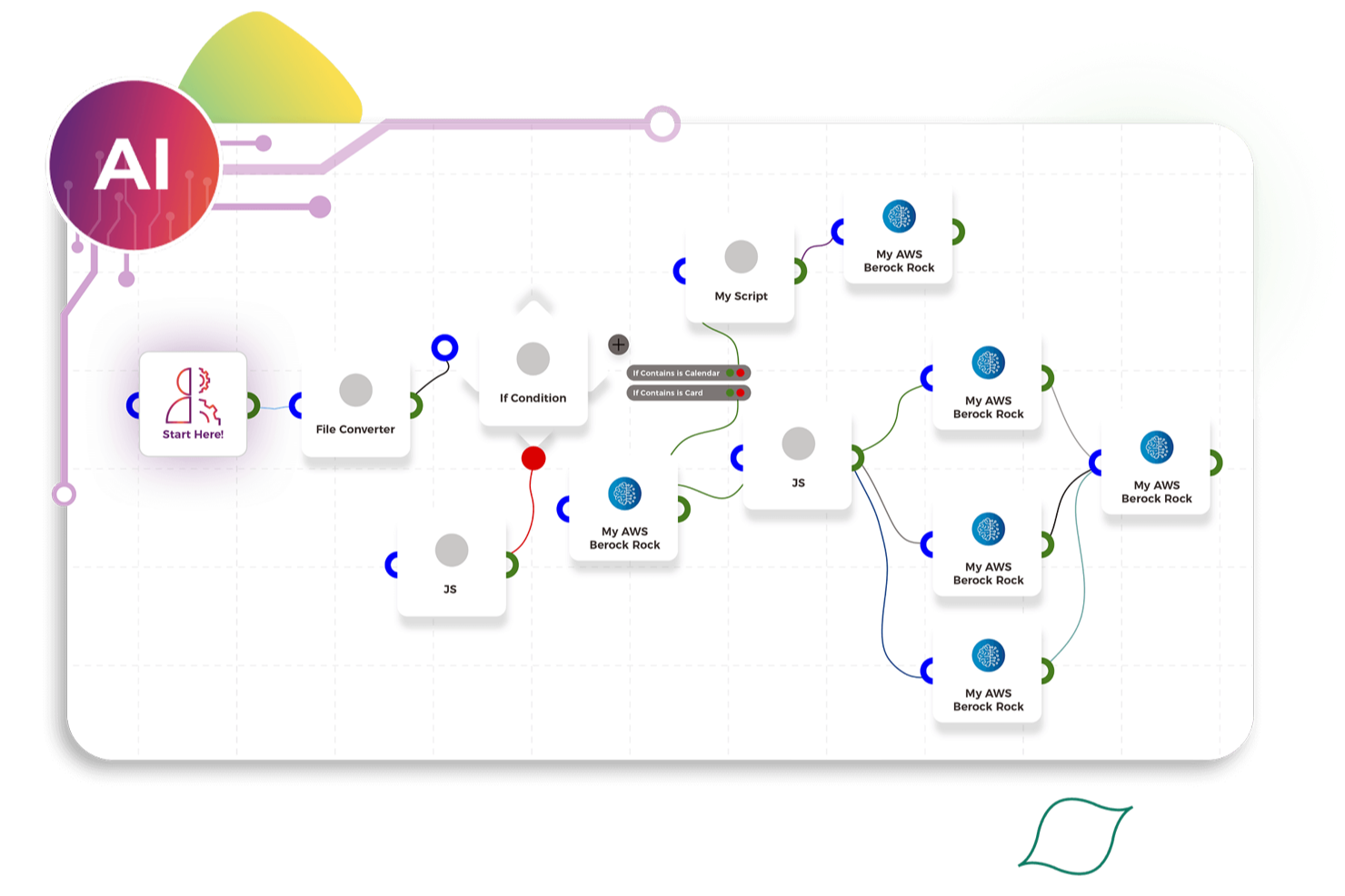
Screendragon is a no-code workflow orchestration platform built for marketing and creative operations, combining visual workflow design, automated routing, digital approvals, and compliance tracking in a single system.
Who Is Screendragon Best For?
Screendragon is a strong fit for enterprise marketing and creative teams that manage high volumes of projects with complex approval chains and strict compliance requirements.
Why I Picked Screendragon
I picked Screendragon as one of the best because of how it handles creative project routing with genuine precision. Its no-code workflow builder lets you set up conditional routing logic, so a video asset automatically follows a different approval path than a print ad. I also like that task assignment can be automated based on role or availability, which means the right creative lead gets pulled in at the right stage without manual intervention.
Screendragon Key Features
- Custom form builder: Create dynamic intake forms that trigger the correct workflow automatically based on the data submitted.
- Digital proofing and markup: Review and annotate creative assets directly in-platform, with version tracking across each review cycle.
- Workflow analytics dashboard: Monitor workflow performance in real time with visual reports on cycle times, bottlenecks, and task completion rates.
- AI-powered briefing: Use built-in AI agents to generate, review, and validate creative briefs before a project enters the workflow.
Screendragon Integrations
Screendragon offers pre-built integrations with tools like Aprimo, HubSpot, Microsoft Power BI, Amazon S3, Sitecore, Ziflow, Brandfolder, Smartsheet, and Workato, along with connectors for Jira, Google Drive, Salesforce, SAP, Adobe, Box, OneDrive, and Microsoft 365. It's available on Zapier and provides an API for custom integrations.
Pros and Cons
Pros:
- Budget tracking visible at the project level
- No-code admin tool for workflow customization
- Dynamic forms consolidate multiple inputs into one
Cons:
- Reporting lacks deeper analytical drill-downs
- Occasional freezing and page loading delays

Wrike
Best for no-code workflow automation
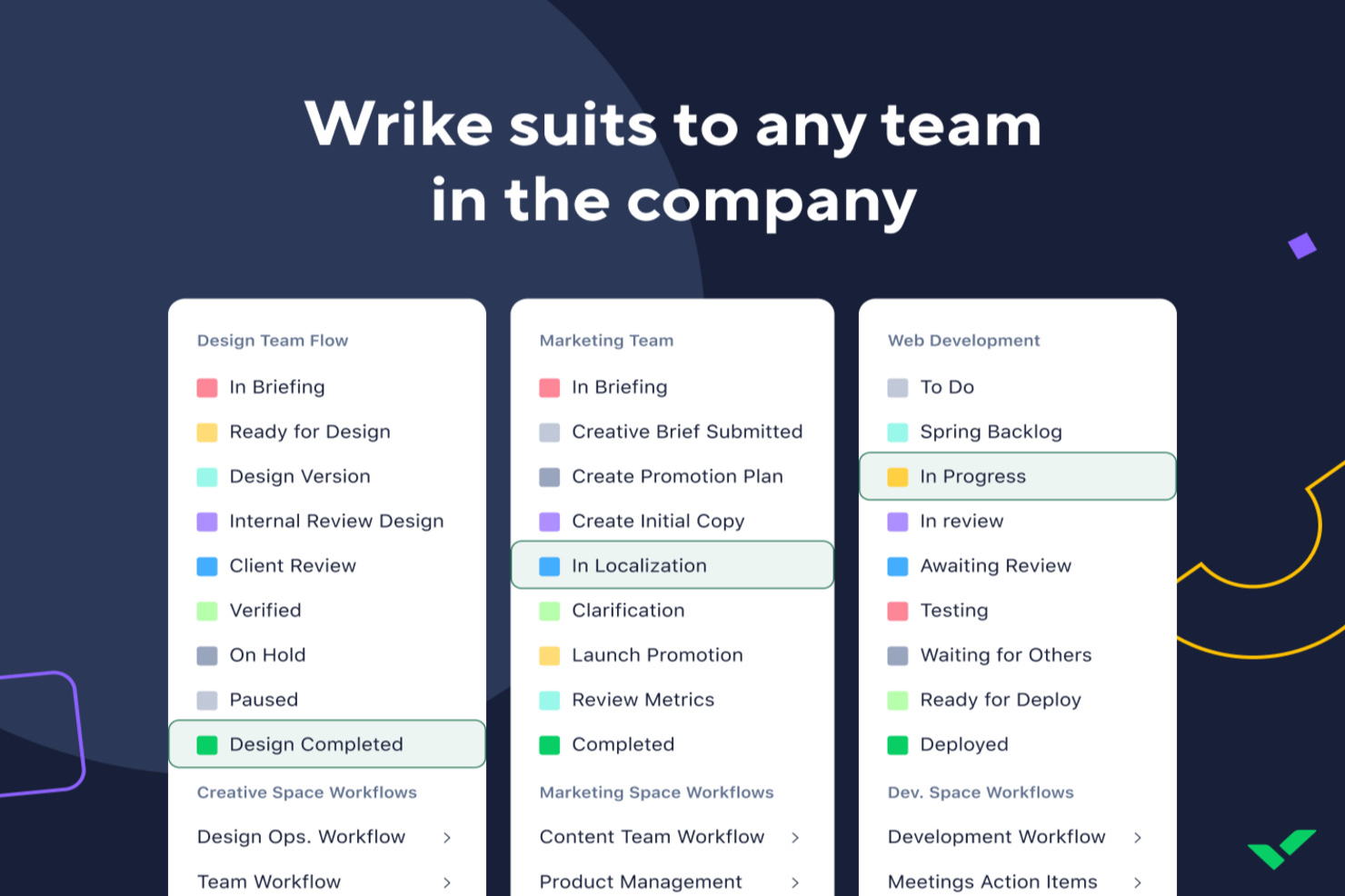
Wrike is designed for teams seeking to streamline their project management with workflow orchestration tools, offering a no-code platform that automates repetitive tasks. This makes it appealing to businesses across various industries, from tech startups to large enterprises, aiming to enhance collaboration and reduce administrative overhead. By integrating visualization options and AI capabilities, Wrike addresses the challenge of managing complex projects and helps teams focus on strategic tasks rather than mundane operations.
Why I Picked Wrike
I picked Wrike for its unique ability to automate workflows without requiring coding skills, which is crucial for teams looking to enhance efficiency. The platform's AI capabilities, such as automated project planning and task summarization, enable teams to stay ahead of deadlines and minimize errors. Additionally, Wrike's visual collaboration tools, like Gantt charts and Kanban boards, provide clarity and transparency, helping your team track progress and adjust priorities dynamically.
Wrike Key Features
In addition to its automation and AI capabilities, here are other key features that enhance workflow orchestration:
- Custom Request Forms: Wrike lets you create tailored request forms to streamline the intake process and ensure the right information is collected upfront.
- Real-Time Dashboards: Your team can access up-to-date project metrics and analytics, helping you make informed decisions quickly.
- Mobile Access: Wrike's mobile apps allow you to manage tasks and projects on the go, ensuring your team stays connected and productive from anywhere.
- Enterprise-Grade Security: With robust security measures, Wrike protects your data, giving you peace of mind while collaborating across teams.
Wrike Integrations
Integrations include Microsoft Teams, Google Sheets, Salesforce, QuickBooks, Microsoft SharePoint, Power BI, Tableau, Klaxoon, Miro, and Wrike Integrate for automation.
Pros and Cons
Pros:
- Extensive integrations support various business tools
- Approval functionality aids in efficient task management
- Mobile app allows task management and approvals on the go
Cons:
- Search functionality could be enhancement for better retrieval
- Integration with some software, like Salesforce, is limited
New Product Updates from Wrike

Wrike Redesigns Workspace Search With New Filters
Wrike introduces a redesigned Workspace Search interface with recent search shortcuts, item type and location filters, and parent-task context. These updates help users find relevant work items and navigate search results efficiently. For more information, visit Wrike’s official site.
 .

Resolve
Best for IT ops workflow orchestration
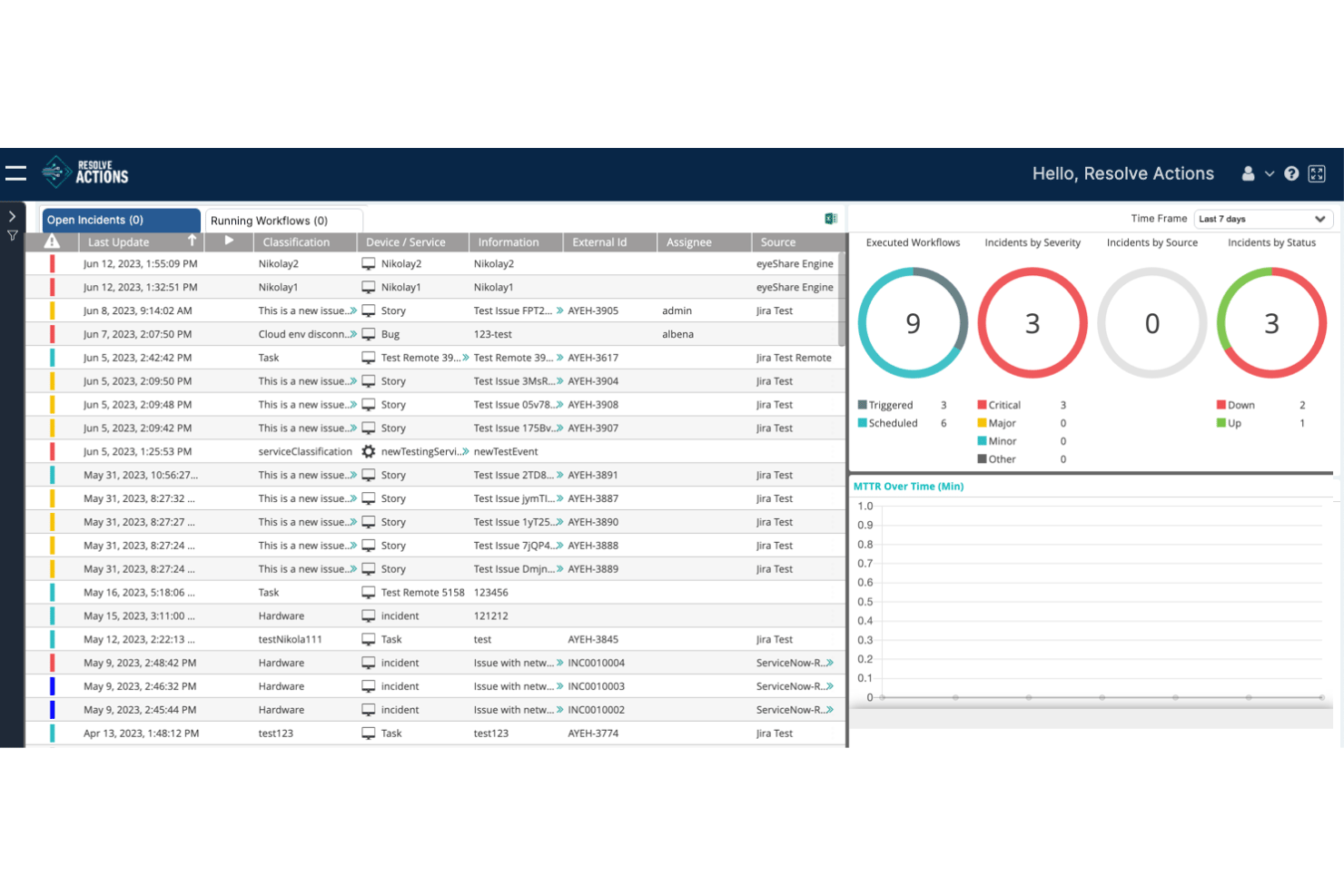
Resolve is an IT operations workflow orchestration platform that automates cross-system processes across ITSM, cloud, network, and security environments using a combination of AI-driven reasoning and no-code workflow building.
Who Is Resolve Best For?
Resolve is a strong fit for IT operations teams in large enterprises that need to automate complex, cross-system workflows across ITSM, cloud, network, and security environments.
Why I Picked Resolve
I picked Resolve as one of the best because no other tool on this list is as purpose-built for IT ops workflow orchestration specifically. Its Agentic Resolution Fabric combines AI reasoning with deterministic automation, so workflows don't just execute—they validate, remediate, and verify outcomes in a closed loop. I'm particularly impressed by Jarvis, which generates production-ready workflows from plain-language descriptions, and RITA, which autonomously resolves service desk requests like password resets and VPN issues before a ticket is ever created.
Resolve Key Features
- AgentLab: A workbench for building and publishing custom AI agents using plain-language role and guardrail definitions.
- Automation Exchange library: A catalog of 5,000+ prebuilt automations and integrations spanning ITSM, cloud, identity, security, and network systems.
- Closed-loop resolution engine: Automatically validates, diagnoses, remediates, and verifies outcomes within a single workflow execution.
- Event-driven workflow triggers: Workflows launch automatically from alerts, tickets, schedules, emails, or chat inputs across connected monitoring and ITSM tools.
Resolve Integrations
Resolve offers 5,000+ prebuilt automations and integrations, including ServiceNow, Jira, AWS, Microsoft Azure, Google Cloud, Datadog, Splunk, Okta, Microsoft Teams, and Slack.
Pros and Cons
Pros:
- No-code builder with AI-generated workflows
- Closed-loop resolution engine reduces manual work
- Automates complex IT operations workflows at scale
Cons:
- Requires third-party ITSM and monitoring tools
- No project management or portfolio features

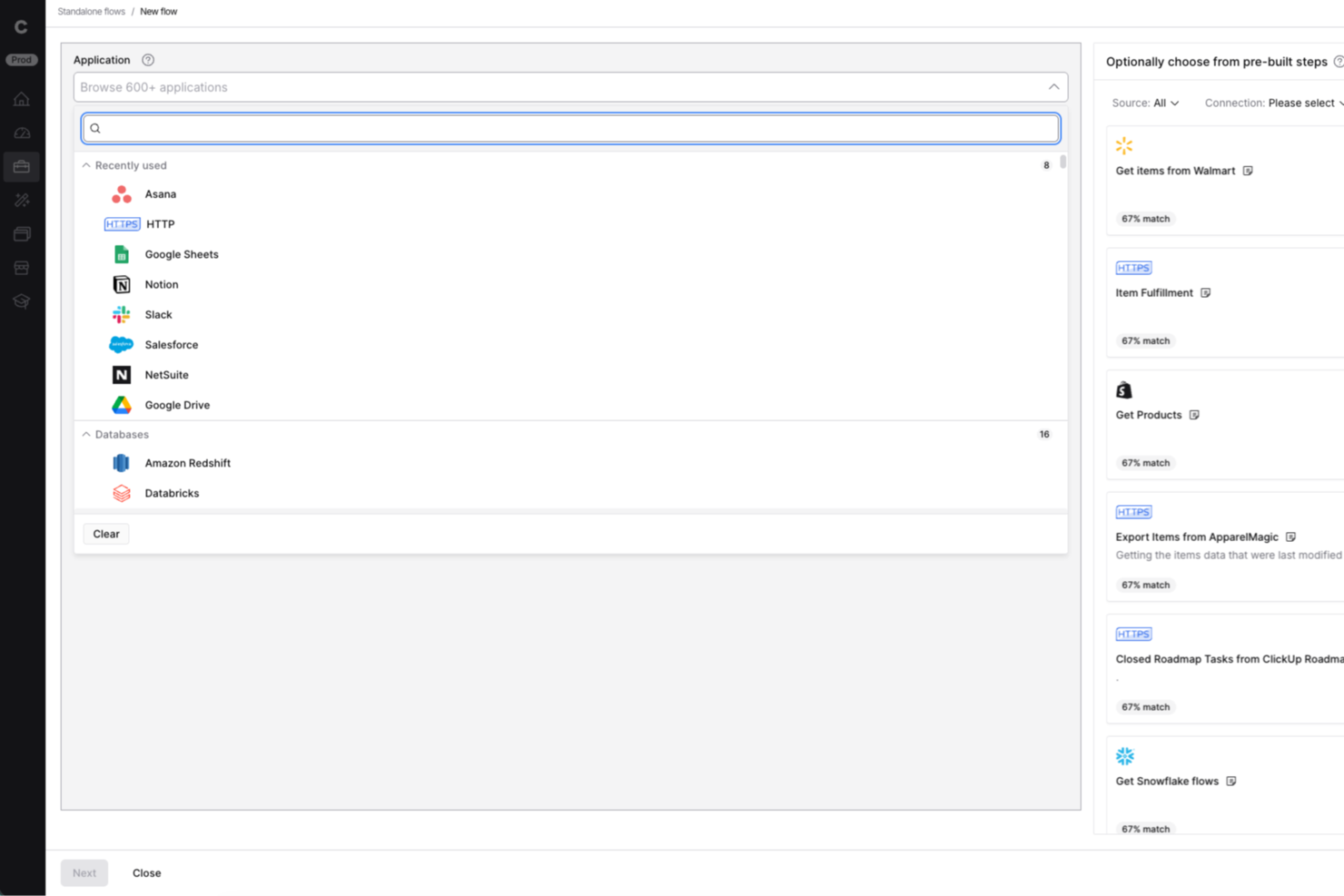
Celigo is a workflow orchestration platform that lets you automate, integrate, and manage business processes across cloud applications using a visual builder, prebuilt connectors, and advanced integration tools.
Who Is Celigo Best For?
Celigo is a good fit for IT teams and operations leaders at mid-sized to large enterprises who need to automate and connect multiple business systems.
Why I Picked Celigo
I’ve included Celigo in my top picks because its prebuilt connectors library covers a huge range of SaaS apps and business systems. My team is able to launch integrations for platforms like NetSuite, Salesforce, and Shopify without custom development. I like that we can deploy these connectors instantly and customize them to fit our workflows. In practice, that means we can automate complex multi-app processes without needing deep technical expertise.
Celigo Key Features
- Visual flow builder: Design and manage workflows using a drag-and-drop interface.
- Role-based access controls: Set permissions and manage user roles for workflow management.
- Workflow monitoring dashboard: Track process status, errors, and performance metrics in real time.
- API management tools: Manage, monitor, and secure APIs used in your workflows.
Celigo Integrations
Celigo offers 1,000+ native prebuilt connectors, including NetSuite, Salesforce, Shopify, Microsoft Dynamics 365, SAP, QuickBooks, Snowflake, Jira, Slack, and Google Sheets. An API is available for custom integrations.
Pros and Cons
Pros:
- Highly reliable data syncing
- Real-time monitoring and automated error handling
- AI-powered assistant for integration setup guidance
Cons:
- Custom scripting requires JavaScript knowledge
- Occasional delays in connector updates
New Product Updates from Celigo
Celigo Expands Storage, Data Imports, and Connection Management
Celigo adds a standalone storage connector, optimized Azure Synapse imports, NetSuite OAuth 2.0, flexible file templates, and expanded MCP access controls. These updates help teams manage files, process data, and secure integrations. For more information, visit Celigo’s official site.
 .

n8n
Best for open-source automation

n8n is an open-source workflow automation tool designed for developers and tech-savvy users. It allows you to automate tasks, connect different systems, and manage data flows efficiently, providing a flexible solution for various automation needs.
Why I picked n8n: It's open-source, which means you have the freedom to customize it to fit your specific needs. You can self-host it, giving you control over your data and infrastructure. The tool's visual workflow editor makes it easy to design and manage complex automations. Its extensive node library allows you to connect a wide range of services and applications effortlessly.
Standout features & integrations:
Features include a visual workflow editor that simplifies the process of designing and managing automations. The tool's extensive node library lets you connect a wide range of services and applications. You can also self-host n8n, giving you full control over your data and infrastructure.
Integrations include Slack, Google Sheets, Discord, Airtable, Trello, GitHub, Dropbox, Webhooks, HTTP Request, and MySQL.
Pros and Cons
Pros:
- Active community support
- Visual workflow editor
- Extensive node library
Cons:
- Documentation can be sparse
- Initial setup complexity


Apache Airflow is an open-source workflow orchestration tool used primarily by data engineers and developers. It helps automate and manage complex workflows, making it ideal for handling intricate task dependencies in data processing pipelines.
Why I picked Apache Airflow: It's built to handle complex task dependencies with ease. With features like dynamic pipeline generation using Python, you can create workflows that adapt to your needs. The modular architecture supports scalability, so it grows with your projects. The user-friendly web interface simplifies managing and monitoring workflows, which makes it accessible for teams familiar with Python.
Standout features & integrations:
Features include a scalable architecture that adapts to your workflow needs, dynamic pipeline creation with Python for flexible workflows, and a user-friendly interface for easy management. It also offers extensibility, letting you create custom operators tailored to your processes.
Integrations include Google Cloud, AWS, Azure, Apache Hadoop, Apache Spark, Kubernetes, Docker, Slack, Microsoft SQL Server, and PostgreSQL.
Pros and Cons
Pros:
- Community-driven improvements
- Extensible with custom operators
- Wide range of integrations
Cons:
- Can be resource-intensive
- No official enterprise support


Argo Workflows is an open-source container-native workflow engine for orchestrating parallel jobs on Kubernetes. It's designed for DevOps teams and developers who need an efficient Kubernetes integration to manage complex workflows.
Why I picked Argo Workflows: It's tailored for Kubernetes, making it a perfect fit for teams already using this platform. With features like container-native execution, you can run each step in its own Kubernetes pod. The support for parallel execution allows you to handle large-scale workflows efficiently. YAML-based configuration provides a flexible way to define workflows that integrate seamlessly into your existing Kubernetes infrastructure.
Standout features & integrations:
Features include container-native execution, which ensures each step runs in its own Kubernetes pod. The parallel execution feature allows you to handle large-scale workflows efficiently. YAML-based configuration offers a flexible way to define workflows that integrate seamlessly into your existing Kubernetes infrastructure.
Integrations include Kubernetes, Prometheus, Grafana, MinIO, Google Cloud Storage, S3, Vault, MySQL, PostgreSQL, and Redis.
Pros and Cons
Pros:
- Open-source community support
- Flexible YAML configuration
- Scalable for large jobs
- Supports complex workflows
- Native Kubernetes support
Cons:
- No official enterprise support
- Complex setup process
- Limited non-Kubernetes support
- Steep learning curve
- Requires Kubernetes knowledge
Diğer İş Akışı Orkestrasyon Araçları
Aşağıda kısa listeme giremeyen ancak yine de göz atmaya değer bazı ek iş akışı orkestrasyon aracı seçeneklerini bulabilirsiniz:
- Camunda
For BPMN 2.0 support
- Prefect
For dataflow automation
- Nextflow
For bioinformatics workflows
- StackStorm
For event-driven automation
- Stonebranch
For hybrid IT environments
- Bonitasoft
For low-code development
- Flowable
For microservices architecture
- jBPM
For business process integration
- Acliviti
For Java developers
- Appian
For low-code process automation
- Red Hat Ansible Automation Platform
For IT infrastructure automation
- SAP Process Automation
For SAP environments
- Azure Logic
For cloud-based integrations
- Control-M
For batch job management
- Tidal
For enterprise workload automation
- IBM Workload Automation
For hybrid cloud environments


How I Evaluate Workflow Orchestration Tools
I split my evaluation into two layers: the baseline capabilities a tool must have—like cross-system dependency handling and event-driven triggers—and the differentiators that set platforms apart.
Core Functionality (Table Stakes For This List)
When I'm selecting tools for my list, I rank each one on a scale from 0 (does not offer the functionality) to 5 (excels in this area) for each core functionality listed below. Then, I calculate the tool's total score into a percentage. Each tool needs to achieve a minimum total score of 75% to be considered for inclusion.
- Workflow Automation Engine: I evaluate whether a tool supports multi-step, event-driven automation with conditional branching—like auto-routing a design review to the right approver based on project type.
- Visual Workflow Builder: The builder should let you map and modify workflow steps on a visual canvas, so teams can design sequences like sprint intake or change request flows without writing code.
- Task & Dependency Management: I check how well each tool handles task sequencing, parallel execution, and cross-team dependencies—especially for coordinated launches that span engineering, QA, and release.
- Third-Party Integrations: A tool's connector library matters. I look at native integrations with platforms like Jira, Slack, GitHub, and Salesforce, plus API and webhook support for custom connections.
- Monitoring & Observability: Real-time dashboards, run-status tracking, and alerting are what I evaluate here—can you spot a stalled approval step or a missed SLA before it cascades downstream?
- Error Handling & Retry Logic: I look for configurable retry policies, failure notifications, and fallback paths so a broken webhook or timed-out API call doesn't silently derail an entire release workflow.
Once I have a list of tools that meet the criteria, I consider what sets each platform apart.
Differentiating Factors (What Sets Vendors Apart)
Here's how I compare and contrast different vendors:
Standout Features
AI-powered automation is a major differentiator—I look for tools that suggest workflow optimizations or auto-route tasks based on historical patterns, not just execute static rules. Reusable workflow templates also matter. A solid template library for common scenarios like project intake or vendor onboarding saves hours of setup time. For teams in regulated environments, approval and governance controls with role-based permissions and version-tracked change logs make a real difference in audit readiness.
Beyond Features
Security and compliance posture is one of the first things I check—especially whether a vendor holds SOC 2 and ISO 27001 certifications and supports SSO with SCIM provisioning. Implementation timelines vary widely, too. Some platforms require weeks of solutions engineering, while others let you launch your first production workflow in days. I also evaluate pricing transparency, particularly how costs scale as workflow volume and user count grow across a portfolio.
İş Akışı Orkestrasyon Aracı Nasıl Seçilir?
Uzun özellik listeleri ve karmaşık fiyatlandırma yapılarına kendinizi kaptırmanız kolaydır. Size özgü yazılım seçim sürecinizi yürütürken odağınızı korumanıza yardımcı olmak için aklınızda bulundurmanız gereken faktörlerin bir kontrol listesini burada bulabilirsiniz:
- Ölçeklenebilirlik: Aracın işletmenizle birlikte büyüyebildiğinden emin olun. Özellikle genişlemeyi planlıyorsanız, performans sorunları yaşamadan artan iş yüklerini karşılayabilen çözümler arayın.
- Entegrasyonlar: Aracın mevcut sistemlerinizle entegre olup olmadığını kontrol edin. AWS, Google Cloud veya Salesforce gibi platformlarla uyumluluk, iş akışlarınızı kolaylaştırabilir.
- Özelleştirilebilirlik: Süreçleri ekibinizin ihtiyaçlarına göre uyarlamanıza olanak tanıyan araçlar arayın. Buna ayarlanabilir iş akışları ve uyarlanabilir kullanıcı arayüzleri dahildir.
- Kullanım Kolaylığı: Araç, ekibinizin kolayca kullanabileceği sezgisel bir yapıya sahip olmalıdır. Hızlı bir başlangıç için kullanıcı dostu bir arayüz ve minimum eğitim gereksinimi arayın.
- Bütçe: Fiyatlandırma planlarını karşılaştırın ve bütçenize uygun olduklarından emin olun. Ek özellikler veya destek için alınabilecek gizli ücretler de dahil olmak üzere toplam sahip olma maliyetini göz önünde bulundurun.
- Güvenlik Önlemleri: Aracın güçlü güvenlik özellikleri sunduğundan emin olun. Veri şifreleme, kullanıcı erişim kontrolleri ve GDPR gibi sektör standartlarına uyumluluk arayın.
- Destek: Sunulan müşteri desteğinin düzeyini değerlendirin. 7/24 destek, özel müşteri yöneticileri ve kapsamlı bir bilgi tabanı gibi seçenekleri göz önünde bulundurun.
- Performans: Aracın yoğun kullanım koşullarında ne kadar iyi performans gösterdiğini değerlendirin. Verimliliği güvence altına almak için hızı, güvenilirliği ve eş zamanlı süreçleri nasıl yönettiğini göz önünde bulundurun.
İş Akışı Orkestrasyon Araçlarındaki Eğilimler
Araştırmam sırasında farklı iş akışı orkestrasyon aracı sağlayıcılarından sayısız ürün güncellemesi, basın bülteni ve sürüm kaydı derledim. Takip ettiğim yeni ortaya çıkan eğilimlerden bazıları şunlar:
- Yapay Zekâ Destekli Optimizasyon: Sağlayıcılar, iş akışları içindeki karar alma süreçlerini geliştirmek için yapay zekâyı kullanmaya başlıyor. Bu eğilim, ekiplerin sorunlar ortaya çıkmadan önce öngörmesine yardımcı olan tahmine dayalı analiz olanağı sunuyor. Örneğin bazı araçlar, kaynak tahsisini optimize etmek ve süreçlerin verimli bir şekilde yürütülmesini sağlamak için yapay zekâ kullanıyor.
- Kodsuz Arayüzler: Daha fazla araç, genellikle sürükle ve bırak oluşturucularla birlikte kodsuz veya düşük kodlu arayüzler sunuyor; bu da teknik bilgiye sahip olmayan kullanıcıların iş akışlarını tasarlamasını ve yönetmesini kolaylaştırıyor. Bu yaklaşım erişimi demokratikleştirerek daha fazla ekip üyesinin programlama becerilerine ihtiyaç duymadan süreç otomasyonuna katkıda bulunmasına olanak tanıyor.
- Gerçek Zamanlı İş Birliği: İş akışı araçları gerçek zamanlı iş birliği özelliklerini giderek daha fazla destekliyor. Bu, ekiplerin aynı süreçler üzerinde eş zamanlı olarak çalışabilmesi, koordinasyonu geliştirmesi ve gecikmeleri azaltması anlamına geliyor. Bazı sağlayıcılar paylaşılan panolar ve canlı düzenleme gibi özellikler ekledi.
- Gelişmiş Güvenlik Özellikleri: Veri ihlalleri artarken iş akışı araçlarındaki güvenlik de önemli bir odak noktası hâline geliyor. Sağlayıcılar, kullanıcı verilerini korumak için gelişmiş şifreleme, çok faktörlü kimlik doğrulama ve uluslararası standartlara uyumluluk gibi özellikler ekliyor.
- Uç Bilişim Entegrasyonu: Bazı araçlar artık uç bilişimi destekliyor ve süreçlerin verilerin üretildiği yere daha yakın konumlarda işlenmesine olanak tanıyor. Bu, gecikmeyi azaltıyor ve özellikle IoT ve üretim gibi gerçek zamanlı veri işleme gerektiren sektörler için kritik olan hızı artırıyor.
- Veri Hattı Entegrasyonu: İş akışları daha fazla veriye dayalı hâle geldikçe orkestrasyon araçları da karmaşık veri operasyonlarını daha iyi destekleyecek şekilde gelişiyor. Birçok platform artık hem yapılandırılmış hem de yapılandırılmamış çok çeşitli veri kaynaklarıyla yerel entegrasyonlar sunarak ekiplerin API'lerden, veritabanlarından veya veri göllerinden veri almasına olanak tanıyor. Bu araçlar ayrıca yerleşik veri dönüştürme özelliklerini de destekliyor; böylece ekipler ayrı ETL süreçlerine ihtiyaç duymadan verileri sistemler arasında temizleyebiliyor, yeniden yapılandırabiliyor ve yönlendirebiliyor. Tüm veri kümelerini tek bir orkestre edilmiş iş akışı içinde yönetebilme yeteneği önemli bir farklılaştırıcı hâline geliyor.
İş Akışı Orkestrasyon Araçları Nedir?
İş akışı orkestrasyon araçları, iş süreçlerini otomatikleştiren, yöneten ve optimize eden yazılım çözümleridir. Verimliliği ve ekipler arasındaki koordinasyonu geliştirmek için genellikle BT profesyonelleri, proje yöneticileri ve veri analistleri tarafından kullanılır. Otomasyon, gerçek zamanlı izleme ve görev planlama özellikleri, karmaşık iş akışlarının yönetilmesine ve görevlerin zamanında tamamlanmasına yardımcı olur. Genel olarak bu araçlar, tekrarlayan görevleri otomatikleştirerek ve daha iyi süreç yönetimini kolaylaştırarak zamandan tasarruf sağlar ve hataları azaltır.
İş Akışı Orkestrasyon Araçlarının Özellikleri
İş akışı orkestrasyon araçlarını seçerken aşağıdaki temel özelliklere dikkat edin:
- Otomasyon: Zaman kazanmak ve insan hatalarını azaltmak için tekrarlayan görevleri otomatikleştirir.
- Gerçek zamanlı izleme: Ekiplerin bilgi sahibi olmasına ve hızlı yanıt vermesine yardımcı olmak için süreç durumu hakkında canlı güncellemeler sağlar.
- Görev planlama: Görevlerin zamanında yürütülmesini sağlamak için kullanıcıların görevler için belirli zamanlar veya tetikleyiciler ayarlamasına olanak tanır.
- Yapay zekâ destekli optimizasyon: Karar alma süreçlerini geliştirmek ve iş akışı verimliliğini artırmak için yapay zekâ kullanır.
- Kodsuz arayüzler: Teknik bilgiye sahip olmayan kullanıcıların programlama becerileri olmadan iş akışları tasarlamasını sağlar.
- Güvenlik önlemleri: Verileri korumak için şifreleme ve çok faktörlü kimlik doğrulama gibi gelişmiş güvenlik özellikleri sunar.
- Uç bilişim entegrasyonu: Verilerin kaynağına daha yakın işlenmesini destekleyerek gerçek zamanlı uygulamalarda gecikmeyi azaltır.
- Özelleştirilebilirlik: Kullanıcıların iş akışlarını ve arayüzleri kendi özel ihtiyaçlarına uyacak şekilde düzenlemesine olanak tanır.
- Ölçeklenebilirlik: İşletmeniz büyüdükçe aracın artan iş yüklerini yönetebilmesini sağlar.
- İş birliği araçları: Paylaşılan panolar ve canlı düzenleme gibi özelliklerle gerçek zamanlı ekip çalışmasını kolaylaştırır.
İş Akışı Orkestrasyon Araçlarının Faydaları
İş akışı orkestrasyon araçlarının uygulanması ekibiniz ve işletmeniz için çeşitli faydalar sağlar. Yararlanabileceğiniz birkaç avantaj şunlardır:
- Artan verimlilik: Otomasyon ve görev planlama özellikleri manuel çalışmayı azaltmaya, zaman kazandırmaya ve hataları en aza indirmeye yardımcı olur.
- Gelişmiş iş birliği: Gerçek zamanlı izleme ve iş birliği araçları herkesin aynı bilgiye sahip olmasını sağlayarak ekip çalışmasını ve koordinasyonu geliştirir.
- Geliştirilmiş karar alma: Yapay zekâ destekli optimizasyon, içgörüler ve öneriler sunarak ekiplerin daha hızlı ve bilinçli kararlar almasına yardımcı olur.
- Ölçeklenebilirlik: Artan iş yüklerini yönetebilme özelliği, işletmeniz büyüdükçe iş akışlarınızın genişleyebilmesini sağlar.
- Daha fazla esneklik: Özelleştirilebilirlik, iş akışlarını belirli ihtiyaçlara uyarlamanıza olanak tanıyarak değişikliklere veya yeni gereksinimlere uyum sağlamayı kolaylaştırır.
- Veri güvenliği: Gelişmiş güvenlik önlemleri hassas bilgileri koruyarak sektör standartlarına uyumluluğu sağlar.
- Daha hızlı yanıt süreleri: Gerçek zamanlı güncellemeler ve uç bilişim entegrasyonu, ekiplerin değişikliklere ve zorluklara hızlı tepki vermesine yardımcı olur.
İş Akışı Orkestrasyon Araçlarının Maliyetleri ve Fiyatlandırması
İş akışı orkestrasyon araçlarını seçmek, sunulan çeşitli fiyatlandırma modellerinin ve planların anlaşılmasını gerektirir. Maliyetler özelliklere, ekip boyutuna, eklentilere ve daha fazlasına göre değişir. Aşağıdaki tablo, iş akışı orkestrasyon aracı çözümlerinde yaygın olarak sunulan planları, ortalama fiyatlarını ve genellikle dahil edilen özellikleri özetlemektedir:
İş Akışı Orkestrasyon Araçları İçin Plan Karşılaştırma Tablosu
| Plan Türü | Ortalama Fiyat | Yaygın Özellikler |
|---|---|---|
| Ücretsiz Plan | $0 | Temel otomasyon, sınırlı entegrasyonlar ve topluluk desteği. |
| Kişisel Plan | $5-$25/kullanıcı/ay | Gelişmiş otomasyon, özel iş akışları ve temel analizler. |
| İşletme Planı | $30-$75/kullanıcı/ay | Gelişmiş analizler, öncelikli destek ve artırılmış entegrasyonlar. |
| Kurumsal Plan | $100-$200/kullanıcı/ay | Özelleştirilebilir çözümler, özel destek ve kurumsal düzeyde güvenlik. |
İş Akışı Orkestrasyon Araçları Hakkında Sıkça Sorulan Sorular
İş akışı orkestrasyon araçları hakkında sık sorulan bazı soruların yanıtları şunlardır:
İş akışı orkestrasyonunun temel amacı nedir?
İş akışı orkestrasyonu platformları, görevleri otomatikleştirip koordine ederek operasyonel verimliliği artırır. Kuruluşların değişikliklere hızla uyum sağlamasına ve bilinçli kararlar almasına yardımcı olur. Bu araçlar, manuel çalışmayı azaltarak ekiplerin daha stratejik faaliyetlere odaklanmasına olanak tanır.
İş akışı otomasyonu ile orkestrasyonu arasındaki fark nedir?
İş akışı otomasyonu, bireysel görevleri otomatikleştirmeye odaklanırken orkestrasyon, bu görevlerin sırasını ve etkileşimini yönetir. Orkestrasyon, görevlerin doğru sırayla yürütülmesini sağlayarak tutarlı bir süreç oluşturur ve sürecin verimli şekilde tamamlanmasını sağlar.
İş akışı orkestrasyonu ile RPA arasındaki fark nedir?
İş akışı orkestrasyonu birden çok görevi koordine edip yönetirken Robotik Süreç Otomasyonu (RPA) bireysel görevleri otomatikleştirir. Orkestrasyon, karmaşık süreçlere daha geniş bir bakış sunarak tüm otomatikleştirilmiş görevlerin etkili bir şekilde birlikte çalışmasını sağlar; RPA ise belirli görevlerin yürütülmesini yönetir.
İş akışı orkestrasyon araçları ekip iş birliğini nasıl geliştirir?
Bu araçlar gerçek zamanlı güncellemeler, veri entegrasyonu ve paylaşılan panolar sağlayarak iş birliğini geliştirir. Veri Bilimi Ekipleri, BT Departmanları ve geliştiriciler süreçler üzerinde eş zamanlı çalışabilir; böylece gecikmeler ve darboğazlar azalırken koordinasyon iyileşir. Canlı düzenleme ve iletişim araçları gibi özellikler, herkesin gelişmelerden haberdar olmasını ve uyum içinde çalışmasını sağlar.
İş akışı orkestrasyon araçları karmaşık iş akışlarını yönetebilir mi?
Evet, görev dizilerini otomatikleştirerek ve bağımlılıkları yöneterek karmaşık iş akışlarını yönetmek üzere tasarlanmışlardır. Yapay zekâ destekli optimizasyon, makine öğrenimi yetenekleri ve gerçek zamanlı izleme ve gözlemlenebilirlik gibi özelliklerle bu araçlar, en karmaşık süreçlerin bile sorunsuz ve verimli şekilde çalışmasını sağlar. Ayrıca bu araçların çoğu, özel iş akışlarını daha iyi yönetmek için eklentileri destekler.
İş akışı orkestrasyon araçlarındaki güvenlik özellikleri verileri nasıl korur?
Şifreleme, çok faktörlü kimlik doğrulama ve standartlara uygunluk gibi güvenlik özellikleri veri korumasını sağlar. Bu güvenlik önlemleri yetkisiz erişimi önler ve işletmelerin yasal gereklilikleri karşılamasına yardımcı olur; böylece hassas bilgiler süreç boyunca güvende tutulur.