

2026’da En İyi 10 Ücretsiz Proje Portföyü Yönetimi Yazılımı

En İyi Ücretsiz Proje Portföyü Yönetimi Yazılımları Kısa Listesi


Ücretsiz proje portföyü yönetimi yazılımları, genellikle ücretsiz bir plan veya cömert bir deneme sürümü aracılığıyla, peşin ücret ödemeden kuruluşunuz genelindeki birden fazla projeyi düzenlemenize, önceliklendirmenize ve izlemenize olanak tanır. Kaynakları koordine etmenin, ilerlemeyi izlemenin ve değişen öncelikleri yönetmenin gerçekten ücretsiz yollarını arıyorsanız, muhtemelen yalnızca yüzeysel çözümler sunan seçenekleri bulmakta zorlanmışsınızdır. Bu rehber, kafa karışıklığını ortadan kaldırır ve yalnızca temel listeler için değil, gerçek portföy çalışmaları için kullanabileceğiniz en iyi ücretsiz araçları öne çıkarır. Ekibiz ve iş akışınız için doğru seçimi güvenle yapabilmeniz amacıyla ayrıntıları, sınırlamaları ve benzersiz güçlü yönleri bulacaksınız.
Why Trust Our Software Recommendations
Our team has been testing and reviewing software since 2012. As project managers ourselves, we know how difficult—and important—it is to choose the right software.
For this guide, we evaluated tools using hands-on testing and independent research, scoring tools using our selection criteria. We also draw on insights from industry thought leaders and practicing project management experts.
Our reviews reflect our human editorial judgment, not a sales pitch.
Expert reviewers:
Ücretsiz Proje Portföyü Yönetimi Yazılımları Karşılaştırma Tablosu
Bu karşılaştırma tablosu, en iyi ücretsiz proje portföyü yönetimi yazılımı seçimlerimin fiyatlandırma ayrıntılarını özetler:
| Tool | Starting Price | Website | |
|---|---|---|---|
| Best for unlimited users and projects on free plan | 4.7 out of 5 | $2.49/user/month Free plan + 14-day trial available | Website |
| Best for on-premises portfolio management | 4.5 out of 5 | €5.95/user/month Free plan available; 14-day free trial available for Enterprise Cloud and on-premises | Website |
| Best for agile program portfolio visibility | 4.3 out of 5 | 5€/month Free plan available | Website |
| Best for open source customization | 4.0 out of 5 | Pricing upon request Free plan + demo available | Website |
| Best for real-time cross-project reporting | 4.3 out of 5 | $10/user/month Free plan + 14-day trial + demo available | Book Demo |
| Best for customizable portfolio dashboards | 4.6 out of 5 | $12/user/month Free plan + free demo available | Book Demo |
| Best for visually managing multiple project boards | 4.5 out of 5 | $5/user/month Free plan + free trial available | Website |
| Best for intuitive workflow automation | 4.4 out of 5 | $10.99/user/month Free plan + trial + demo available | Website |
| Best for complex project dependency tracking | 4.4 out of 5 | $8.48/user/month Free plan + 7-day free trial available | Website |
| Best for integrated communications | 4.2 out of 5 | €69/month Free plan + 15-day free trial + free demo available | Website |
Ücretsiz Proje Portföyü Yönetimi Yazılımı İncelemeleri
Aşağıda, kısa listeme giren ücretsiz proje portföyü yönetimi yazılımlarının ayrıntılı özetlerini bulabilirsiniz. İncelemelerim, sizin için en iyi seçeneği bulmanıza yardımcı olmak amacıyla her platformun özelliklerine, en uygun kullanım alanlarına ve sınırlamalarına ayrıntılı bir bakış sunar.

Best for unlimited users and projects on free plan
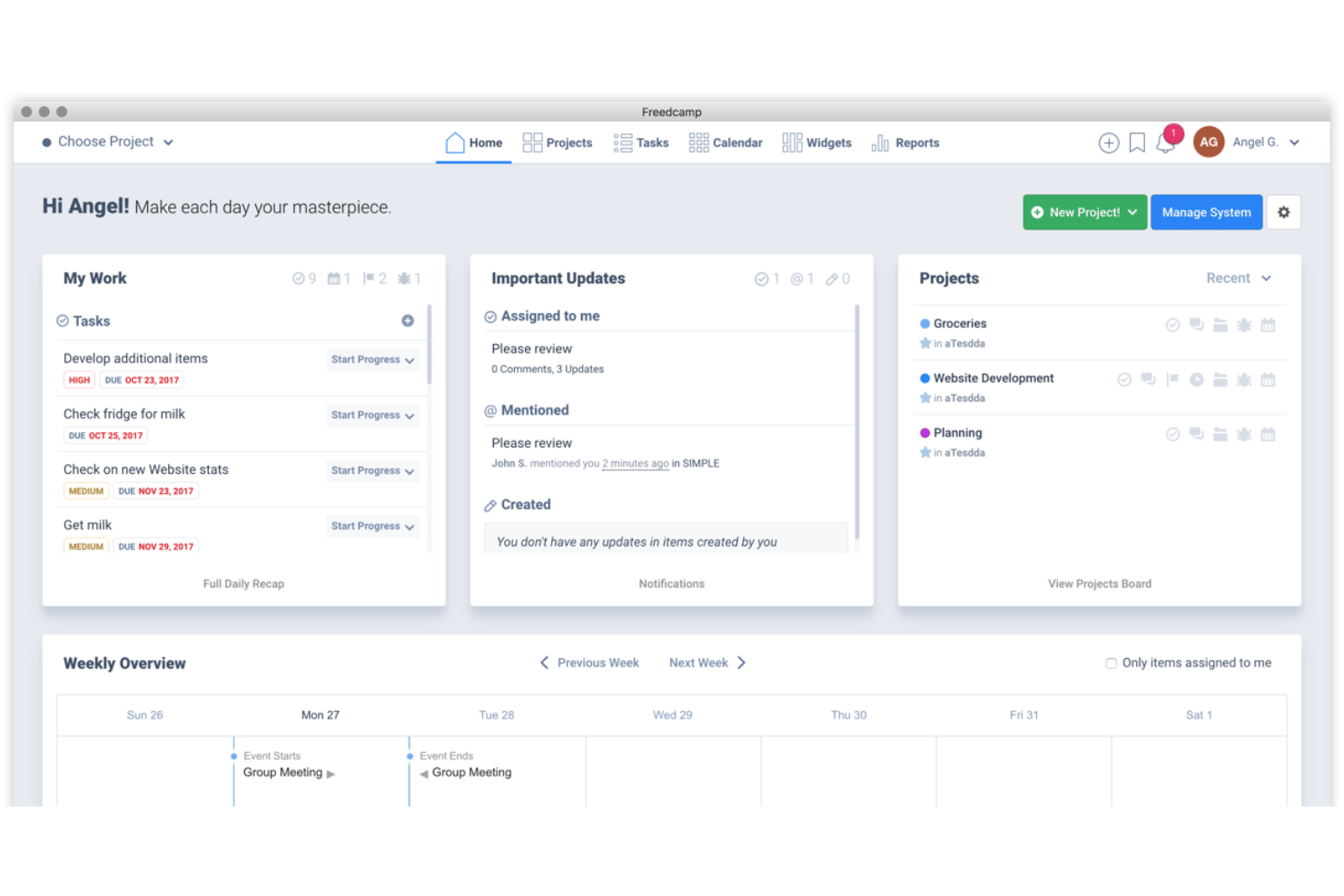
Freedcamp is a project management platform that supports unlimited projects, users, and tasks on its free plan, with task lists, Kanban boards, milestones, time tracking, and team discussions built in.
Who Is Freedcamp Best For?
Freedcamp is a strong fit for small agencies, nonprofits, and early-stage teams that need to manage multiple projects simultaneously without a per-seat cost eating into a tight budget.
Why I Picked Freedcamp
I've included Freedcamp in my top picks because it's one of the few tools that genuinely lifts both the project cap and the user cap on its free plan. In practice, my team can spin up a dedicated project for every client or workstream and add every contributor without counting seats. The free tier also includes milestones and time tracking across all active projects, giving teams a working layer of multi-project visibility before spending anything.
Freedcamp Key Features
- Kanban board: Visualize project tasks and workflows using customizable Kanban boards for each project.
- Milestone tracking: Track project milestones to monitor progress and key delivery dates across multiple projects.
- Time tracking: Log hours spent on tasks and projects, supporting team time management and reporting.
- File management: Upload, share, and store documents and files directly within each project workspace.
Freedcamp Integrations
Freedcamp offers native integrations with Google Drive, Google Calendar, Dropbox, OneDrive, Slack, and Gmail. It connects with Zapier and provides an API for custom integrations.
What's Free?
Freedcamp's free plan is free forever and includes unlimited users, projects, and tasks. Advanced features like Gantt charts, portfolio dashboards, reporting, custom fields, and multiple assignees are locked behind paid plans starting at $1.49/user/month.
Pros and Cons
Pros:
- Kanban boards included in free tier
- Milestones and time tracking free forever
- No cap on users or projects
Cons:
- Gantt charts locked behind paid upgrade
- No portfolio dashboard on free plan

Best for on-premises portfolio management
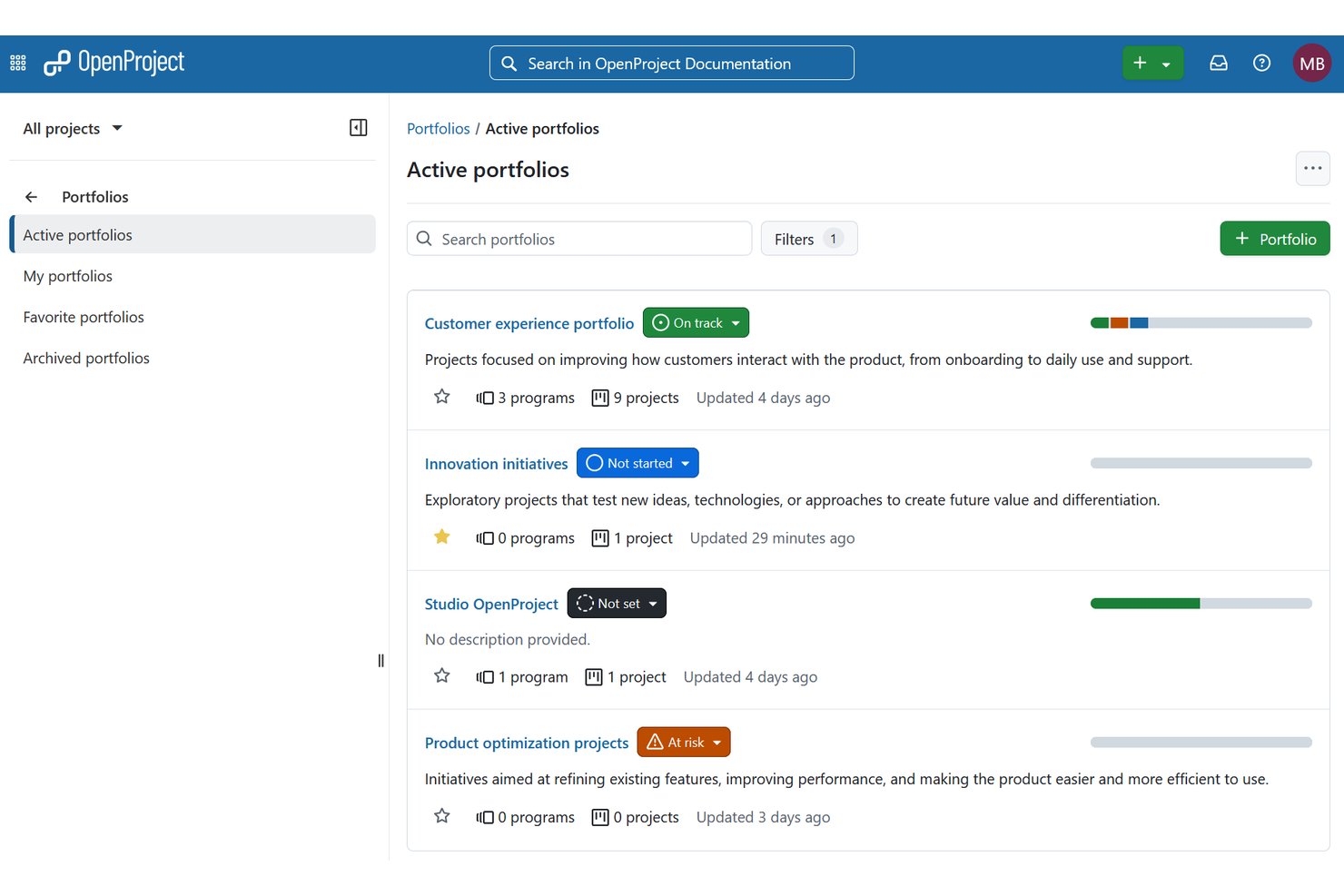
OpenProject is an open-source project management platform with Gantt charts, agile boards, work package tracking, time and cost reporting, and multi-project portfolio oversight available in a self-hosted environment.
Who Is OpenProject Best For?
OpenProject is a strong fit for IT and engineering teams that need self-hosted project management with full control over their infrastructure and data.
Why I Picked OpenProject
OpenProject earns its spot as one of the best on my shortlist because it's the rare free, self-hosted platform that handles portfolio management without routing your data through a third-party cloud. The Community edition includes a project life cycle overview and sub-project boards so I can group related initiatives and track status across all of them from one place. I also rely on the baseline comparison feature to catch portfolio drift, comparing the current state of work packages against a prior snapshot.
OpenProject Key Features
- Agile boards: Create and manage Scrum and Kanban boards for each project.
- Work package templates: Use customizable templates to standardize recurring tasks and deliverables.
- REST API access: Connect OpenProject with other software and automate workflows using a comprehensive API.
- Wiki and document collaboration: Share project documentation and knowledge with your team through integrated wikis and document editing.
OpenProject Integrations
OpenProject offers native integrations with GitHub, GitLab, Nextcloud, and Subversion. An API is available for custom integrations.
What's Free?
OpenProject's Community edition is a free-forever, open-source plan that you self-host with no user or project limits. It includes core project and portfolio management features, though advanced capabilities like premium portfolio dashboards, team capacity planning, and enterprise security features require a paid plan.
Pros and Cons
Pros:
- Built-in Gantt charts and timeline views
- Unlimited projects on the Community edition
- Self-hosted with no user count restrictions
Cons:
- Portfolio reporting limited on the free plan
- Setup requires technical server administration skills

Taiga
Best for agile program portfolio visibility
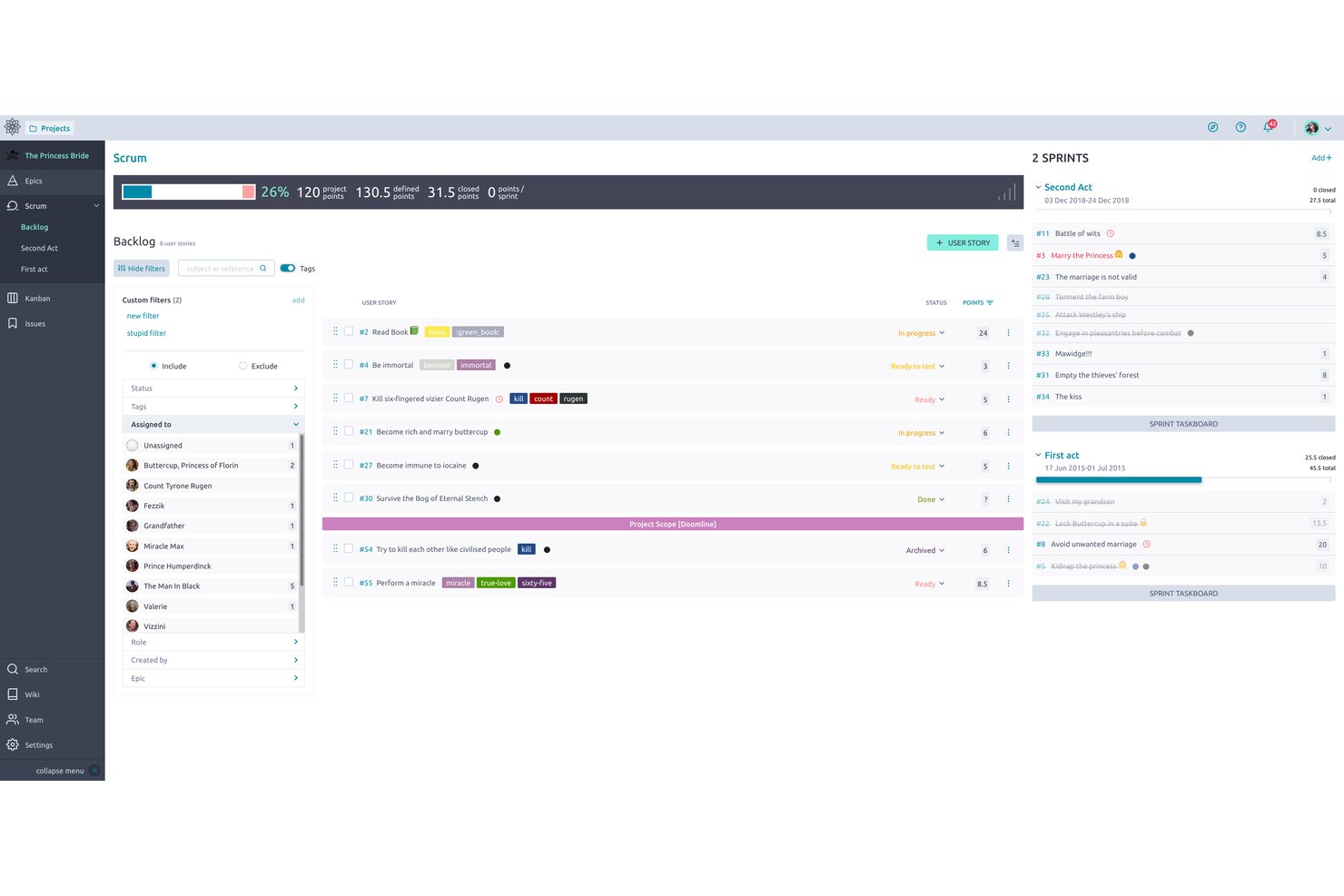
Taiga is an open-source agile project management platform with Scrum and Kanban boards, sprint planning, backlog management, issue tracking, and customizable workflows built around agile program visibility.
Who Is Taiga Best For?
Taiga is a strong fit for small-to-mid-sized software development teams that run Scrum or Kanban and want a free, open-source tool they can self-host and customize.
Why I Picked Taiga
I picked Taiga as one of the best because its EPICS structure lets me track work that spans multiple sprints and projects, which is where agile program visibility actually starts. The team performance dashboard aggregates health signals across active workstreams, and burn-down charts at both the sprint and project level let me see whether programs are on track at a glance. It's one of the few free tools where that kind of visibility is available out of the box, without configuring it from scratch.
Taiga Key Features
- Customizable Kanban and Scrum boards: Switch between agile board types and tailor workflows for each project.
- Integrated issue tracking: Manage bugs and incidents on dedicated boards with custom fields and status settings.
- Project wiki: Build and maintain internal documentation alongside project work for team access.
- Role-based permissions: Control feature access and responsibilities for each user on a per-project basis.
Taiga Integrations
Taiga offers native integrations with GitHub, GitLab, Bitbucket, and Slack, and connects with Zapier. An API is available for custom integrations.
What's Free?
Taiga's free cloud plan is free forever and includes unlimited users, but limits you to one public and one private project with 10MB of storage. If those limits are too restrictive, Taiga is fully open source, so you can self-host it for free with unlimited projects and storage.
Pros and Cons
Pros:
- Epic tracking spans multiple sprints and projects
- Open-source with full self-hosting option
- Native Scrum and Kanban boards included free
Cons:
- No portfolio-level budget or cost tracking
- Free cloud plan capped at two projects
Redmine
Best for open source customization
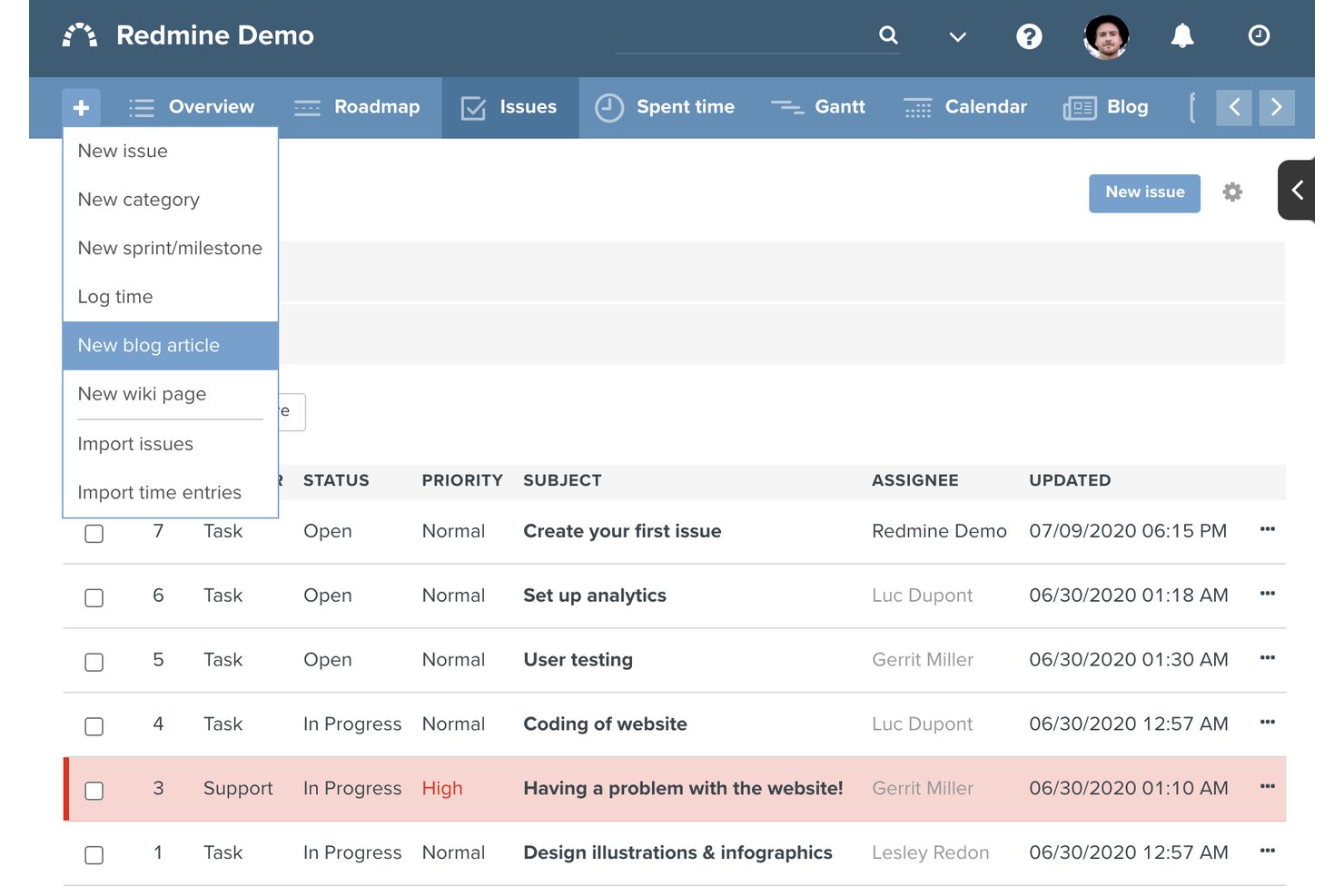
Redmine is a self-hosted, open-source project management tool that combines issue tracking, Gantt charts, time tracking, multi-project management, and wikis in a single, fully customizable platform.
Who Is Redmine Best For?
Redmine is a strong fit for software development and IT teams that have the technical resources to self-host and customize their own project management environment.
Why I Picked Redmine
Redmine earns its spot on my shortlist because the entire codebase is open to modification, meaning I can build a project tracking setup that fits my team exactly rather than conforming to a vendor's constraints. I particularly like the custom fields system, which lets me attach portfolio-level metadata to any project or issue without a plugin. The per-project module toggles and role-based permissions also let me configure governance structures that most SaaS tools gate behind paid tiers.
Redmine Key Features
- Gantt chart and calendar: Generate project Gantt charts and timelines based on issue start and due dates.
- Multi-project and subproject management: Organize, track, and manage multiple projects and subprojects in one workspace.
- Per-project wikis and forums: Create dedicated wikis and discussion forums for every project.
- Repository browser: Link Git, Subversion, and Mercurial repositories for built-in source code viewing and diff tracking.
Redmine Integrations
Redmine offers native integrations with Git, Subversion, Mercurial, CVS, and Bazaar for source control, supports multiple LDAP directories, and provides an API for custom integrations.
What's Free?
Redmine is entirely free under the GNU General Public License, with no user limits, project caps, or feature restrictions. The only cost to factor in is your own server hosting and infrastructure, since Redmine is self-hosted.
Pros and Cons
Pros:
- Multi-project Gantt charts included by default
- Fully customizable via plugins and source code
- Unlimited users and projects at no cost
Cons:
- Requires server setup and ongoing maintenance
- No built-in portfolio-level dashboard

Wrike
Best for real-time cross-project reporting
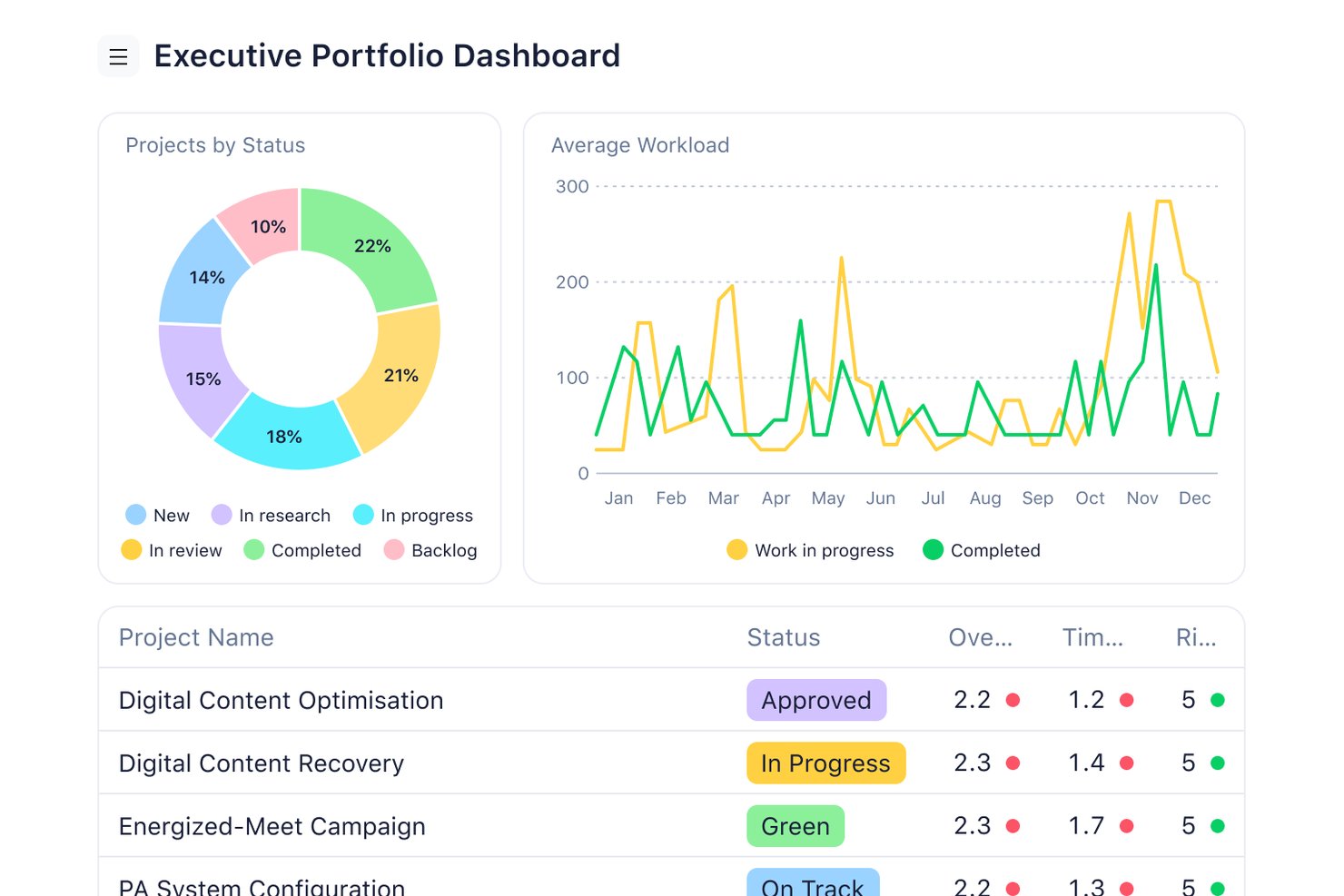
Wrike is a project portfolio management platform that combines multi-project dashboards, Gantt-based timeline planning, resource capacity management, workflow automation, and portfolio-level reporting across concurrent projects.
Who Is Wrike Best For?
Wrike is a strong fit for PMO directors and program managers at mid-sized to enterprise organizations running multiple concurrent projects across cross-functional teams.
Why I Picked Wrike
Wrike earns its spot on my shortlist because its real-time portfolio dashboards give me a live view across every active project without pulling a single report manually. I can track OKRs and portfolio KPIs directly from the dashboard and drill into individual projects when something looks off. The customizable dashboard builder lets my team surface exactly the signals that matter, whether that's budget variance, workload distribution, or milestone health.
Wrike Key Features
- Resource capacity planning: Monitor team workloads and manage resource allocation directly within project portfolios.
- Custom project templates: Standardize processes across recurring initiatives with reusable project templates.
- Cross-project dependencies: Link tasks and milestones between projects to coordinate efforts and manage interrelated delivery timelines.
- Native integrations: Connect to tools like Slack, Adobe Creative Cloud, Google Drive, and Salesforce for unified collaboration.
Wrike Integrations
Wrike offers over 400 native integrations, including Google Drive, Microsoft 365, Slack, Salesforce, Jira, Adobe Creative Cloud, Zoom, ServiceNow, Dropbox, and Tableau. An API is available for custom integrations.
What's Free?
Wrike offers a free-forever plan with unlimited users that covers basic task and project management, including board and table views. PPM-specific features like Gantt charts, portfolio dashboards, resource planning, budgeting, and advanced reporting are locked behind paid tiers, so the free plan functions more as an entry point than a true portfolio management tool.
Pros and Cons
Pros:
- Supports Agile, Waterfall, and hybrid workflows
- Real-time status roll-ups without manual input
- Unlimited users on the free plan
Cons:
- Resource planning requires a paid upgrade
- Gantt charts locked to paid plans
New Product Updates from Wrike

Wrike Redesigns Workspace Search With New Filters
Wrike introduces a redesigned Workspace Search interface with recent search shortcuts, item type and location filters, and parent-task context. These updates help users find relevant work items and navigate search results efficiently. For more information, visit Wrike’s official site.
 .
ClickUp
Best for customizable portfolio dashboards
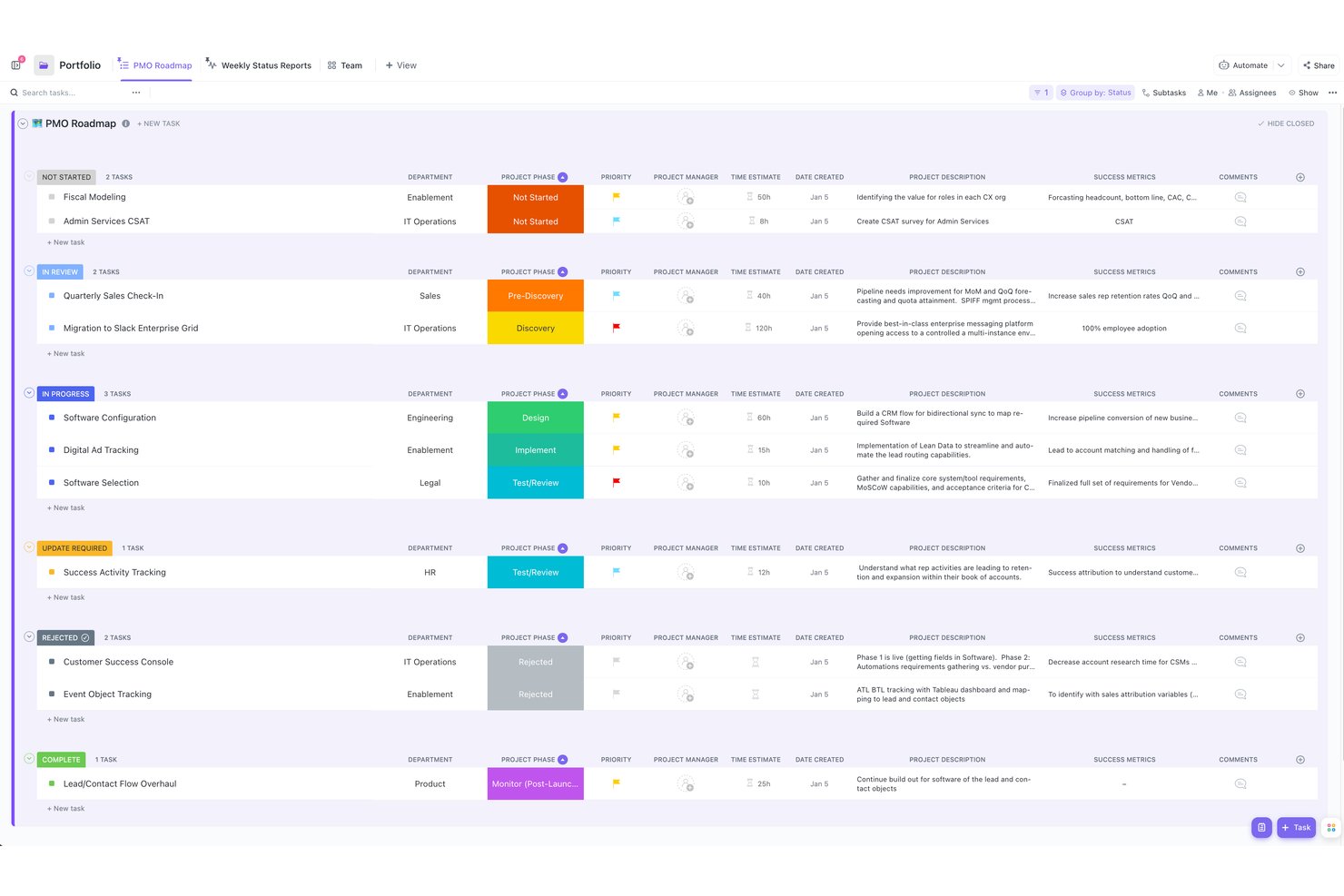
ClickUp is a work management platform that combines task management, multi-project portfolio tracking, dashboards, docs, time tracking, and workflow automation in a single workspace.
Who Is ClickUp Best For?
ClickUp suits cross-functional teams and PMO leads who need one platform to manage multiple projects without splitting work across separate tools.
Why I Picked ClickUp
ClickUp earns its spot as one of the best on my shortlist because the dashboard customization goes well beyond basic status boards. I use the Dashboards feature to build portfolio views with custom widgets that pull in sprint velocity, task completion rates, and workload data across multiple projects at once. The Portfolios feature lets me group projects by team or client and track health indicators at a glance, without digging into individual project spaces.
ClickUp Key Features
- Custom project templates: Create and reuse templates for common project types and workflows.
- Native time tracking: Log time directly on tasks and roll up tracked hours at the portfolio level.
- Task dependencies across projects: Link tasks and milestones between multiple projects to surface blockers and coordinate delivery.
- Public and guest sharing options: Share project dashboards or grant guest access for external stakeholders and executives.
ClickUp Integrations
ClickUp offers native integrations with Slack, Microsoft Teams, Google Drive, OneDrive, Dropbox, GitHub, GitLab, Bitbucket, HubSpot, and Zoom. It connects with Zapier and has an API for building custom integrations.
What's Free?
ClickUp's Free Forever plan includes unlimited tasks and members, basic dashboards, docs, and sprint management, with 60MB of storage. Portfolio and Goals features require the Unlimited plan ($7/user/month), so the free tier works best for general project tracking rather than full portfolio management.
Pros and Cons
Pros:
- Workload view spans multiple projects simultaneously
- Multiple project views included on free tier
- Dashboard widgets are deeply customizable
Cons:
- Free storage cap limits document-heavy portfolios
- Portfolio and Goals locked behind paid plans
New Product Updates from ClickUp
ClickUp Adds List Automations, Time Off Scheduling, and Org Charts
ClickUp adds template-based List automations, personal time off scheduling, a unified picker, automatic task date syncing, and Org Charts. These updates help teams automate project setup, manage availability, and organize work. For more information, visit ClickUp’s official site.
 .
Trello
Best for visually managing multiple project boards
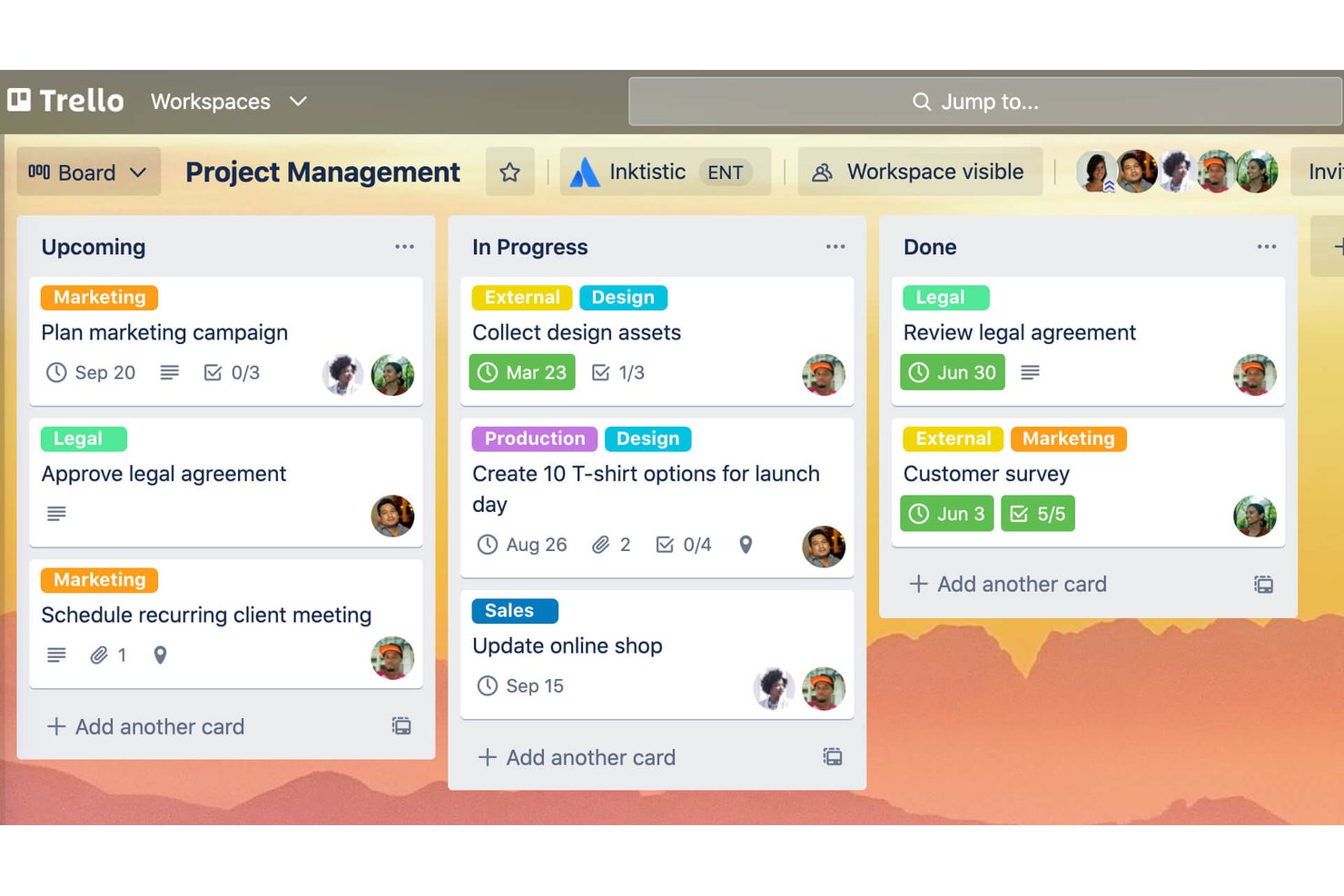
Trello is a Kanban-based project management tool with visual boards, card-level task tracking, and multi-board workspace organization across teams.
Who Is Trello Best For?
Trello fits small teams and startups that need a simple, visual way to manage several concurrent projects without a steep learning curve.
Why I Picked Trello
I've included Trello in my top picks because its drag-and-drop Kanban boards make it genuinely simple to run multiple projects in parallel without losing track of each one. Within a single workspace, my team can maintain up to 10 separate boards and use Butler's no-code automation to trigger card movements automatically across any of them. The visual layout means project status reads at a glance, without opening each board one by one.
Trello Key Features
- Workspace-level board organization: Group multiple project boards within a workspace for easy navigation and access.
- Unlimited Power-Ups per board: Add integrations for automation, file storage, reporting, or time tracking.
- Card custom fields: Add custom data points such as text, dates, or numbers to individual tasks.
- Community template library: Start projects quickly using templates built by the Trello user community.
Trello Integrations
Trello offers over 200 native integrations, including Slack, Microsoft Teams, Outlook, Gmail, Confluence, Jira, Google Drive, Salesforce, Miro, and Zoom. An API is available for custom integrations.
What's Free?
Trello's free plan is free-forever and supports up to 10 collaborators per workspace, up to 10 boards per workspace, and unlimited cards. Workspace-level views, the Timeline view, and advanced automation are locked behind the Standard ($5/user/month) and Premium ($10/user/month) plans.
Pros and Cons
Pros:
- Instant visual status across multiple boards
- Butler automation runs on the free plan
- 10 free Kanban boards per workspace
Cons:
- Timeline view locked behind paid plans
- No portfolio-level dashboard on the free tier
Asana
Best for intuitive workflow automation
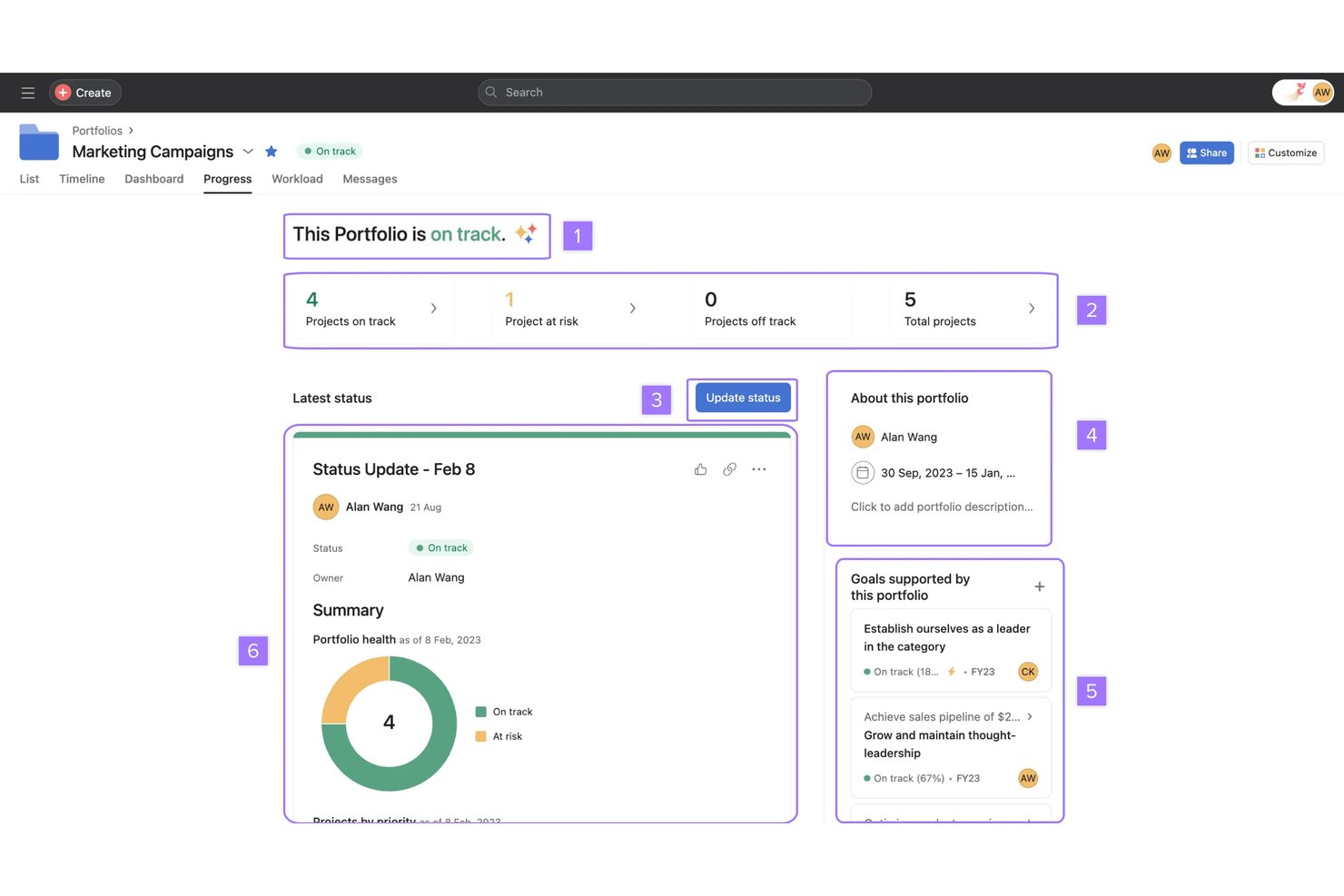
Asana is a work management platform that combines task tracking, multi-project portfolio views, goal alignment, workflow automation, and AI-powered coordination across teams and projects.
Who Is Asana Best For?
Asana fits cross-functional teams and program managers at mid-sized to enterprise organizations who need to coordinate work across multiple projects and departments.
Why I Picked Asana
I picked Asana because AI Studio lets my team build no-code automation workflows that trigger across projects without writing a single line of code. I can set up rules to auto-assign tasks, update statuses, and flag blockers the moment conditions are met. Asana's prebuilt AI Teammates go a step further, handling recurring coordination tasks like status summaries and task routing automatically.
Asana Key Features
- Portfolios: Group and track multiple projects together to get a consolidated view of status and progress.
- Goals: Align projects and tasks to organization-wide goals and monitor achievement at all levels.
- Universal reporting: Create dashboards and visual reports that aggregate metrics across projects in real time.
- Workload management: Visualize team capacity across initiatives to balance resource allocation and prevent overload.
Asana Integrations
Asana offers over 300 native integrations, including Slack, Microsoft Teams, Gmail, Outlook, Google Drive, Dropbox, Box, Salesforce, Jira Cloud, GitHub, Zoom, and Zapier. An API is also available for custom integrations.
What's Free?
Asana's Personal plan is free forever but capped at 2 users, which makes it better suited for solo work or one-on-one collaboration than team-based portfolio management. Core PPM features like Portfolios, Goals, Workload, and Reporting dashboards are locked behind paid tiers.
Pros and Cons
Pros:
- Timeline view shows cross-project dependencies visually
- Goals feature links projects to company objectives
- AI Teammates automate cross-project coordination tasks
Cons:
- Free plan limited to two users only
- Portfolio features require a paid plan upgrade
Jira
Best for complex project dependency tracking
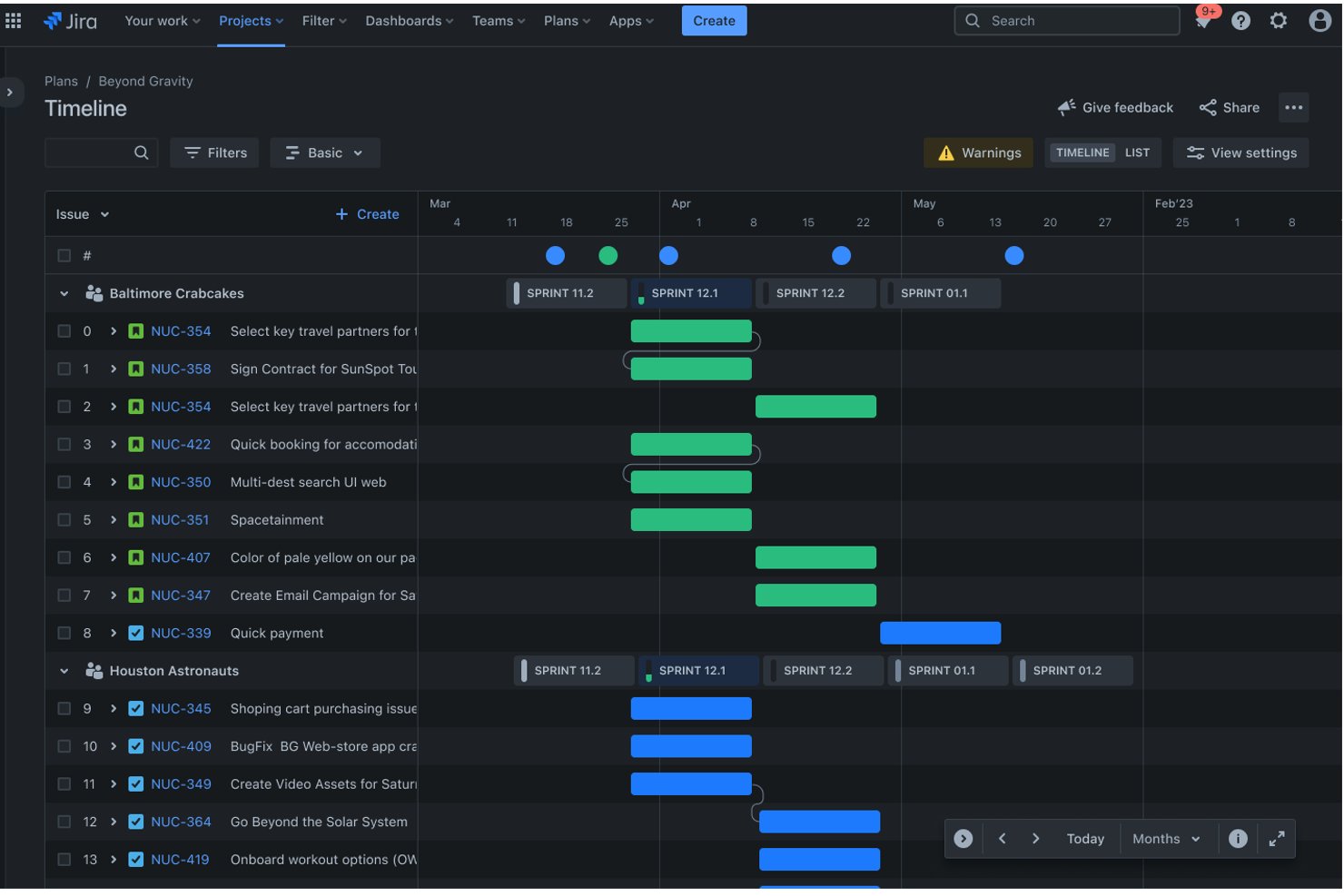
Jira is an agile project management platform that combines issue tracking, sprint planning, dependency mapping, and multi-team roadmaps across engineering, product, and marketing workflows.
Who Is Jira Best For?
Jira is a strong fit for software engineering and product teams that run agile workflows and need structured issue tracking across sprints and releases.
Why I Picked Jira
Jira earns its spot on my shortlist because of how precisely it handles dependencies across concurrent workstreams. On the free tier, you can link issues across projects using structured relationship types like "blocks," "is blocked by," and "clones," giving you a real map of how work interconnects. I find this especially useful when a sprint blocker in one team's board traces back to an unresolved item in another team's backlog, because Jira surfaces that connection directly on the issue.
Jira Key Features
- Custom workflows: Design and automate step-by-step processes for different project types or departments.
- Agile boards: Visualize project work using Kanban or Scrum boards for sprint-based or continuous delivery teams.
- Bulk issue editing: Update the status, assignees, or fields of multiple tasks across projects in one operation.
- Marketplace apps: Extend functionality with thousands of add-ons, including reporting, time tracking, and cross-team coordination tools.
Jira Integrations
Jira offers native integrations with Confluence, Bitbucket, Slack, Figma, Gmail, Google Workspace, Microsoft Teams, and GitHub. You can extend Jira with thousands of marketplace integrations and use its API for custom integrations.
What's Free?
Jira's free-forever plan supports up to 10 users and includes unlimited projects, Scrum and Kanban boards, and backlog management with 2GB of file storage. Cross-project roadmaps, capacity planning, and advanced reporting are locked behind the Premium tier.
Pros and Cons
Pros:
- Scrum and Kanban boards available without paying
- Unlimited projects on the free plan
- Granular cross-project dependency linking included free
Cons:
- Free plan capped at 10 users
- Portfolio roadmaps locked behind paid tiers

Bitrix24
Best for integrated communications
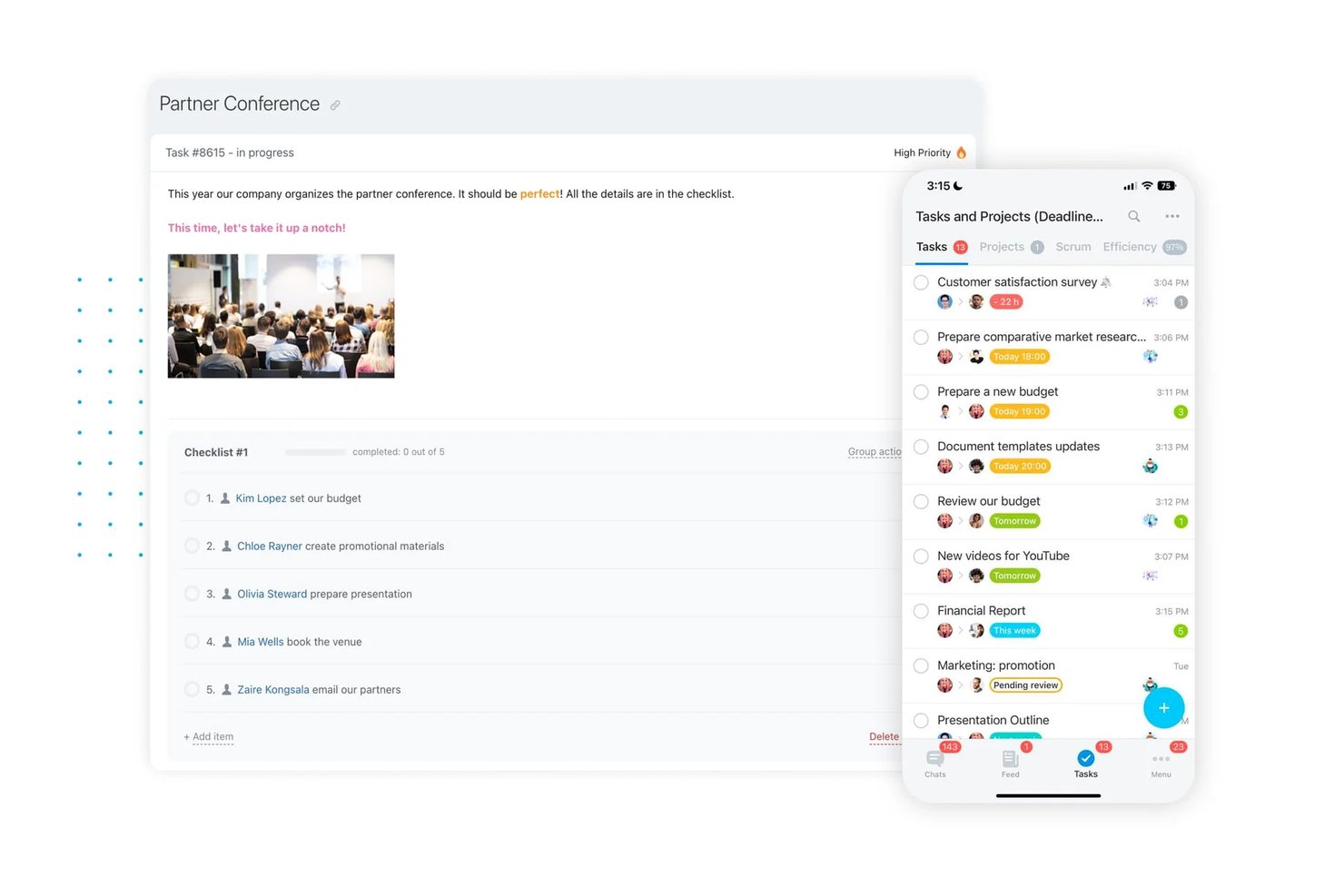
Bitrix24 is an all-in-one workspace platform that combines project and task management, CRM, built-in team chat, and video conferencing on a free plan that supports unlimited users.
Who Is Bitrix24 Best For?
Bitrix24 is a strong fit for small and mid-sized teams that need to run projects and client communications from a single platform without paying per user.
Why I Picked Bitrix24
I've included Bitrix24 in my top picks because no other free tool on this list keeps project conversations and task execution this tightly connected. My team can spin up a dedicated group chat for any project workgroup, escalate to a video call with up to 48 participants, and let CoPilot AI transcribe the call and generate a follow-up task list automatically. Action items stop getting buried in separate messaging threads because everything lives in the same workspace as the actual project.
Bitrix24 Key Features
- Kanban and Gantt project views: Switch between Kanban boards and Gantt charts to visualize and manage project timelines and workflows.
- Workgroups for multi-project management: Organize projects and teams into distinct workgroups with independent task lists, files, and calendars.
- Built-in time tracking: Track task durations and employee hours directly within projects for accountability and visibility.
- Custom access permissions: Set granular user roles and permissions to control project and data access across your workspace.
Bitrix24 Integrations
Bitrix24 offers 750+ apps and integrations through its marketplace, including native integrations with Stripe, Google Drive, Dropbox, Microsoft 365, Zoom, Telegram, and Mailchimp. An API is available for custom integrations.
What's Free?
Bitrix24 offers a free-forever plan that supports unlimited users with no time limit. The free plan includes 5GB of storage and access to core project and task management features, but workflow automation, advanced reporting, and analytics are locked behind paid tiers.
Pros and Cons
Pros:
- Multiple project views (Gantt, Kanban, list)
- Built-in chat, calls, and video conferencing
- Unlimited users on the free plan
Cons:
- Interface feels cluttered managing many projects
- Portfolio-level reporting locked to paid plans
Diğer Ücretsiz Proje Portföyü Yönetimi Yazılımları
Kısa listeme girmeyen ancak yine de göz atmaya değer bazı ek ücretsiz proje portföyü yönetimi yazılımı seçenekleri şunlardır:
- Zoho Projects
For built-in time and budget tracking
- monday.com
For easy resource allocation across teams
- Airtable
For customizable portfolio databases
- GoodDay
For unlimited project hierarchies
- Notion
For linking projects and documentation
- SmartTask
For project and client management


How I Evaluate Free Project Portfolio Management Software
First, I define what counts as free. For project portfolio management software, only free-forever plans qualify—PMO teams need continuous, long-term portfolio oversight, not a 30-day trial window. From there, I split my evaluation into the core functionality every tool must offer to make the list and the differentiators that separate one option from another.
Core Functionality (Table Stakes For This List)
In addition to my free offer requirements, I also use a scoring system to select tools for my list. Here's how it works:
I rank each one on a scale from 0 (does not offer the functionality) to 5 (excels in this area) for each core functionality listed below. Then, I calculate the tool's total score into a percentage. Each tool needs to achieve a minimum total score of 65% to be considered for inclusion.
- Multi-Project Dashboard: I look for a single view that rolls up status, progress, and health across projects—like seeing all active launches alongside internal initiatives without switching screens.
- Resource Management: Each tool should let you assign people to tasks and see workloads across projects, so you can spot who's overloaded before sprint planning falls apart.
- Project Prioritization: I evaluate whether the tool offers ways to rank or score projects by criteria like strategic value or risk, not just basic high/medium/low labels on individual tasks.
- Portfolio Reporting: Reports need to aggregate data across projects into something you can share with leadership—think rollup views of timelines, completion rates, and blockers in one export.
- Budget & Cost Tracking: I check whether you can set budgets per project and compare planned vs. actual spend, even at a basic level, without needing a paid upgrade or a separate spreadsheet.
- Cross-Project Dependencies: The tool should surface links between tasks or milestones in different projects—like flagging that a platform migration delay will push back your product launch timeline.
Once I have a list of tools that meet the criteria, I consider what sets each platform apart.
Differentiating Factors (What Sets Vendors Apart)
Here's how I compare and contrast different vendors:
Standout Features
Custom project templates matter here. When your PMO runs recurring project types like quarterly releases or client onboarding, reusable templates standardize intake and workflows from day one. I also look at resource capacity planning beyond basic task assignments—can you see who's available across the full portfolio before greenlighting a new initiative? Built-in time tracking rounds this out by letting you compare logged hours against budgets without switching to a separate tool.
Beyond Features
Free tier limits shape how useful a tool actually is—I check for caps on users, projects, and storage that could force an upgrade before you've had time to evaluate the platform. Integrations on the free plan also matter. If your team lives in Slack and GitHub, a tool that locks those connectors behind a paid tier creates friction fast. I also look at whether free users can share read-only portfolio views or export reports for stakeholders who don't need a login.
Ücretsiz Proje Portföyü Yönetimi Yazılımı Nasıl Seçilir?
Uzun özellik listeleri ve karmaşık fiyatlandırma yapıları arasında kaybolmak kolaydır. Kendinize özgü yazılım seçim sürecinizi yürütürken odaklanmanızı korumanıza yardımcı olmak için göz önünde bulundurmanız gereken faktörlerin bir kontrol listesini aşağıda bulabilirsiniz:
| Faktör | Dikkate Alınması Gerekenler |
|---|---|
| Ölçeklenebilirlik | Ücretsiz plan, büyüdükçe beklenen proje, portföy ve kullanıcı sayınızı karşılayabilecek mi, yoksa planlanandan daha erken yükseltme yapmanız mı gerekecek? |
| Entegrasyonlar | Yazılım, ekibinizin temel araçlarına (Slack, Teams, Google Drive) bağlanıyor mu, yoksa eksik entegrasyonlar manuel geçici çözümler oluşturmanıza mı neden olacak? |
| Özelleştirilebilirlik | Panoları, formları veya iş akışlarını PMO’nuzun özel raporlama, talep toplama veya süreç ihtiyaçlarına uyarlayabiliyor musunuz, yoksa katı varsayılan ayarlara mı bağlı kalıyorsunuz? |
| Kullanım kolaylığı | Arayüz, ekipler genelinde hızlı benimsenmeye yetecek kadar basit mi, yoksa bundan değer elde etmek için kapsamlı eğitim ve sürekli destek mi gerektiriyor? |
| Uygulama ve başlangıç | Ekibiniz ne kadar hızlı çalışmaya başlayabilir? Kılavuzlara, şablonlara ve destek kaynaklarına ücretsiz planda erişilebiliyor mu? |
| Maliyet | “Ücretsiz” olmanın gerçek maliyeti nedir? Uzun vadeli uygunluğu ve bütçe üzerindeki etkisini değerlendirirken yükseltme seçeneklerini, kullanıcı/proje sınırlarını ve gerekli eklentileri göz önünde bulundurun. |
| Güvenlik önlemleri | Hassas portföy ve kaynak bilgilerini korumak için temel şifreleme, erişim denetimleri ve veri dışa aktarma seçenekleri ücretsiz kullanıcılara sunuluyor mu? |
| Destek erişilebilirliği | Sağlayıcı, premium desteğe erişiminiz olmadan sorunları gidermenize yardımcı olmak için topluluk desteği, forumlar veya bilgi bankası kaynakları sunuyor mu? |
Ücretsiz Proje Portföyü Yönetimi Yazılımı Nedir?
Ücretsiz proje portföyü yönetimi yazılımı, devam eden lisans maliyetleri olmadan aynı anda birden fazla projeyi koordine etmenizi, denetlemenizi ve raporlamanızı sağlayan dijital bir sistemdir. Sonsuza kadar ücretsiz bir plan içerir; böylece ekibiniz kaynakları yönetebilir, girişimleri önceliklendirebilir ve gerçek portföy denetimi için gereken temel özelliklerle projeler arası ilerlemeyi inceleyebilir.
Ücretsiz Proje Portföyü Yönetimi Yazılımının Özellikleri
Proje portföyü yönetimi yazılımında yaygın olarak bulunan özellikleri ve bunlardan hangilerinin genellikle ücretsiz ve ücretli planlara dahil edildiğini inceleyelim.
Genellikle Ücretsiz Proje Portföyü Yönetimi Yazılımı Özellikleri
- Çoklu proje panosu: Proje durumunu görüntülemek, son teslim tarihlerini takip etmek ve engelleri tespit etmek için tek bir yer sağlar; ekiplerin aynı anda birden fazla girişimi takip etmesine yardımcı olur.
- Görev ve proje takibi: Koordineli ilerleme takibi için projeler içinde ve projeler arasında görev oluşturmanıza, atamanıza ve güncellemenize yönelik temel araçlar.
- İş birliği araçları: Ekip üyeleri arasındaki iletişimi desteklemek için proje yorumları, dosya ekleri ve paylaşılan notlar gibi özellikler.
- Temel raporlama: Aktif projeleri, tamamlanan görevleri ve genel ekip verimliliğini özetleyen önceden hazırlanmış veya basit özel raporlar.
- Kaynak atamaları: Ekibin hangi üyesinin hangi görev veya projeden sorumlu olduğunu görebilmeniz için ekip üyelerini belirli görevlere veya projelere atamanızı sağlar.
- Temel portföy görünümleri: Projeleri duruma veya türe göre gruplandıran, yöneticilere ayrıntılı özelleştirme olmadan genel bir bakış sunan üst düzey panolar.
- Şablon kullanımı: İşe alıştırmayı ve süreçlerin benimsenmesini hızlandırmak için yaygın proje türlerine veya iş akışlarına yönelik başlangıç şablonlarına erişim.
- E-posta bildirimleri: Yaklaşan son teslim tarihleri, atamalar veya durum değişiklikleri gibi önemli proje etkinlikleri için otomatik uyarılar.
- Dosya paylaşımı: Kolay başvuru için ilgili belgeleri tek tek projeler veya portföy panoları içinde yükleme ve paylaşma.
- Kullanıcı yönetimi: Doğru kişilerin her projeye erişebilmesi için kullanıcılara temel roller ekleme, kaldırma ve atama.
Genellikle Ücretli Proje Portföyü Yönetimi Yazılımı Özellikleri
- Gelişmiş kaynak kapasitesi planlaması: Tam proje portföyü genelinde iş yüklerini tahmin etmek, kullanım oranlarını dengelemek ve aşırı kaynak tahsislerini tespit etmek için gelişmiş araçlar.
- Özel raporlama ve analiz: Kullanıcıların birden fazla portföy genelindeki ölçümleri, görselleştirmeleri ve KPI toplulaştırmalarını ihtiyaçlarına göre özelleştirmesine olanak tanıyan son derece özelleştirilebilir panolar.
- Portföy düzeyinde bütçe takibi: Finans yöneticileri için toplu finansal görünümlerle projeler genelindeki bütçeleri, gerçekleşen değerleri ve sapmaları izlemeye yönelik araçlar.
- Projeler arası bağımlılıklar: Birden fazla projeye yayılan riskleri, kilometre taşlarını ve bağımlılıkları birbirine bağlama, takip etme ve yönetme olanağı.
- Özel proje kabul formları: Yeni proje taleplerini göndermek, incelemek ve onaylamak için özel alanlara sahip uçtan uca kabul iş akışları.
- Zaman takibi ve denetimler: Değişikliklerin ve proje etkinliklerinin ayrıntılı denetim kayıtları da dahil olmak üzere portföy genelinde analiz için entegre zaman kaydı.
- API veya gelişmiş entegrasyonlar: Diğer iş yönetimi, ERP veya analiz araçlarıyla API, web kancaları veya premium entegrasyonlara erişim.
- Gelişmiş otomasyon: Rutin onaylar, paydaş bildirimleri veya proje durumlarını güncelleme için iş akışı oluşturucuları ve kural tabanlı otomasyonlar.
- Güvenlik ve uyumluluk denetimleri: SSO, veri şifreleme seçenekleri veya SOC 2 ya da GDPR gibi standartlara uyumluluğu desteklemeye yönelik araçlar gibi özellikler.
- Sınırsız kullanıcı ve depolama ölçeklendirmesi: Portföy yönetimi ihtiyaçları büyüdükçe büyük portföyleri, sınırsız projeleri ve genişletilmiş veri depolama alanını destekleme.
Ücretsiz Proje Portföyü Yönetimi Yazılımının Faydaları
Ücretsiz proje portföyü yönetimi yazılımını uygulamak, ekibiniz ve işletmeniz için çeşitli faydalar sağlar. Yararlanabileceğiniz faydalardan bazıları şunlardır:
- Merkezi gözetim: Tüm projelerinizi ve girişimlerinizi tek bir portföy panosundan yönetin; böylece bilgi silolarını ve gözden kaçan bağımlılıkları azaltın.
- Azalan maliyetler: Tekrarlayan bir yazılım gideri olmadan temel portföy yönetimi özelliklerine sahip olun; böylece bütçenizi gerçek projeleri teslim etmeye odaklayabilirsiniz.
- Daha hızlı işe alıştırma: Yerleşik şablonlar, yönlendirmeli kurulum ve sezgisel kullanıcı arayüzleri, ekibinizin hızla adapte olmasına ve yeni iş akışlarını benimsemesine yardımcı olur.
- Projeler arası görünürlük: Birden fazla ekip ve iş akışı genelinde kaynak iş yüklerinin izlenmesini, ilerleme içgörülerini ve gerçek zamanlı durum güncellemelerini sağlar.
- Daha iyi önceliklendirme: Kuruluşunuz için en stratejik veya en yüksek etkiye sahip projeleri seçmenize yardımcı olacak puanlama ve sıralama araçlarına erişin.
- Kolay paydaş raporlaması: Portföy genelinde raporlar oluşturup dışa aktarın veya yöneticileri ve müşterileri her zaman gelişmelerden haberdar etmek için salt okunur erişim paylaşın.
- Ölçeklenebilir başlangıç noktası: Portföy yönetimini ücretsiz deneyin; böylece ücretli planları veya kurumsal yükseltmeleri değerlendirmeden önce kullanımı denemek, uyarlamak veya genişletmek kolaylaşır.
Proje Portföy Yönetimi Yazılımının Maliyetleri ve Fiyatlandırması
Bu makaleye ücretsiz olarak kullanılabilen en iyi proje portföy yönetimi yazılımı seçeneklerini arayarak geldiğinizi biliyorum. Ancak ücretsiz planlar yalnızca sınırlı özellikler sunduğundan, gelecekte planınızı yükseltmeniz gerekme ihtimali oldukça yüksektir.
Aşağıdaki tablo, proje portföy yönetimi yazılımlarındaki yaygın planları, ortalama fiyatlarını ve genellikle dahil edilen özellikleri özetlemektedir:
Proje Portföy Yönetimi Yazılımı İçin Plan Karşılaştırma Tablosu
| Plan Türü | Ortalama Fiyat | Yaygın Özellikler |
|---|---|---|
| Ücretsiz Plan | $0 | Temel panolar, görev ve proje izleme, temel raporlama, sınırlı entegrasyonlar, temel kaynak atamaları ve basit kullanıcı yönetimi. |
| Bireysel Plan | $5–$15/kullanıcı/ay | Ücretsiz plandaki tüm özellikler, artırılmış proje limitleri, zaman takibi, sınırlı gelişmiş raporlama, öncelikli destek ve basit otomasyonlar. |
| İşletme Planı | $20–$35/kullanıcı/ay | Bireysel plandaki tüm özellikler, gelişmiş portföy panoları, özel raporlama, kaynak kapasitesi planlaması, API erişimi ve özel alan oluşturma. |
| Kurumsal Plan | $40–$70/kullanıcı/ay | İşletme planındaki tüm özellikler, sınırsız kullanıcı, gelişmiş güvenlik denetimleri, özel destek, uyumluluk araçları, özel entegrasyonlar ve SSO seçenekleri. |
Ücretsiz Proje Portföy Yönetimi Yazılımı Hakkında SSS
Ücretsiz proje portföy yönetimi yazılımı hakkında sık sorulan soruların bazı yanıtları:
Çoğu ücretsiz proje portföy yönetimi yazılımında ne gibi sınırlamalar beklemeliyim?
Çoğu ücretsiz plan, kullanıcı, proje veya depolama alanı sayısını sınırlar. Genellikle gelişmiş raporlamaya, projeler arası bağımlılıklara veya premium entegrasyonlara erişemezsiniz; bu da ihtiyaçlarınız arttıkça portföy gözetimini sınırlayabilir.
Yalnızca ücretsiz bir planla gerçek portföy iş akışlarını yönetebilir miyim?
Evet, temel portföy faaliyetlerini gerçekleştirebilirsiniz: birden fazla projeyi izlemek, kaynak atamak ve basit raporlar oluşturmak. Ancak ücretsiz planlarda karmaşık ve işlevler arası PMO’lar için gereken özelleştirme veya görünürlük bulunmayabilir.
Ücretsiz proje portföy yönetimi araçlarını kullanmanın güvenlik riskleri var mı?
Saygın çözümlerin çoğu temel şifreleme ve erişim denetimleri sunar; ancak ücretsiz planlarda SSO veya denetim günlükleri gibi gelişmiş özellikler bulunmayabilir. Hassas proje verilerini paylaşmadan önce her aracın güvenlik belgelerini mutlaka inceleyin.
Ücretsiz planlar Slack veya Google Drive gibi araçlarla entegrasyona izin veriyor mu?
Bazı araçlar ücretsiz katmanda temel entegrasyonlar sunar; ancak API erişimi, gelişmiş entegrasyonlar veya iş akışı otomasyonları genellikle ücretli planlarla sınırlıdır. Nelerin dahil olduğunu doğrulamak için her sağlayıcının entegrasyon sayfasını kontrol edin.
Ücretsiz bir araçtan ayrılırsam veya aracı aşarsam verilerime ne olur?
Genellikle proje ve portföy verilerini dışa aktarabilirsiniz; ancak ücretsiz planlarda dışa aktarma seçenekleri sınırlı olabilir. Özellikle ileride farklı bir platforma geçiş yapmayı planlıyorsanız verilerinize erişebildiğinizden her zaman emin olun.