

2026’da En İyi 10 Bilgi Tabanı Yazılımı

En İyi Bilgi Tabanı Yazılımları Kısa Listesi


Bilgi tabanı yazılımı, ekibinizin şirket bilgilerini aranabilir bir dijital merkezde düzenlemesine, depolamasına ve paylaşmasına olanak tanır. Doğru bilgi tabanını arıyorsanız muhtemelen tekrarlayan soruları azaltmayı, ürün belgelerini güncel tutmayı ve yanıtları hem ekibiniz hem de müşterileriniz için kolayca bulunabilir hâle getirmeyi amaçlıyorsunuz. Bu kadar çok seçenek mevcutken doğru bilgi yönetimi aracını seçmek, ekibinizin işe ne kadar hızlı uyum sağladığını, sorun giderme süreçlerini nasıl yürüttüğünü ve nasıl iş birliği yaptığını etkileyebilir. Bu kılavuz, 2026'da en iyi çözümleri karşılaştırmanıza, güçlü yönlerini anlamanıza ve ihtiyaçlarınıza en uygun seçeneği bulmanıza yardımcı olacak.
Why Trust Our Software Recommendations
Our team has been testing and reviewing software since 2012. As project managers ourselves, we know how difficult—and important—it is to choose the right software.
For this guide, we evaluated tools using hands-on testing and independent research, scoring tools using our selection criteria. We also draw on insights from industry thought leaders and practicing project management experts.
Our reviews reflect our human editorial judgment, not a sales pitch.
Expert reviewers:
Karşılaştırma Tablosu: Bilgi Tabanı Yazılımları
Bu karşılaştırma tablosu, en iyi bilgi tabanı yazılımı seçimlerimin fiyatlandırma ayrıntılarını özetlemektedir.
| Tool | Starting Price | Website | |
|---|---|---|---|
| Best for version control and article rollback | 4.7 out of 5 | Pricing upon request 14-day free trial + free demo available | Website |
| Best for interactive self-serve guides | 4.8 out of 5 | Pricing upon request Free demo + 14-day free trial available | Website |
| Best for ticketing and workflow automation | 4.4 out of 5 | $29/user/month 14-day free trial available | Book Demo |
| Best for company-wide knowledge sharing | 4.5 out of 5 | £3.75/user/month Free demo available | Website |
| Best for integration with Microsoft Teams | 4.8 out of 5 | $12/user/month Free plan + 21-day trial + demo available | Website |
| Best for collaborative team documentation | 4.7 out of 5 | $10/user/month 14-day free trial + free demo available | Website |
| Best for flexible workspace organization | 4.6 out of 5 | $10/user/month Free plan + 30-day trial available | Website |
| Best for AI-powered content search | 4.6 out of 5 | Pricing upon request Free demo available | Website |
| Best for integrating with Atlassian project tools | 4.3 out of 5 | $5.78/user/month Free plan + 7-day trial available | Website |
| Best with Microsoft 365 ecosystem integration | 4.4 out of 5 | $7.30/user/month 30-day free trial available | Website |
En İyi Bilgi Tabanı Yazılımları İncelemeleri
Aşağıda, kısa listeme giren en iyi bilgi tabanı yazılımlarının ayrıntılı özetlerini bulabilirsiniz. İncelemelerim, size en uygun seçeneği bulmanıza yardımcı olmak için her platformun özelliklerine, entegrasyonlarına ve en uygun kullanım alanlarına ayrıntılı bir bakış sunuyor.

Best for version control and article rollback
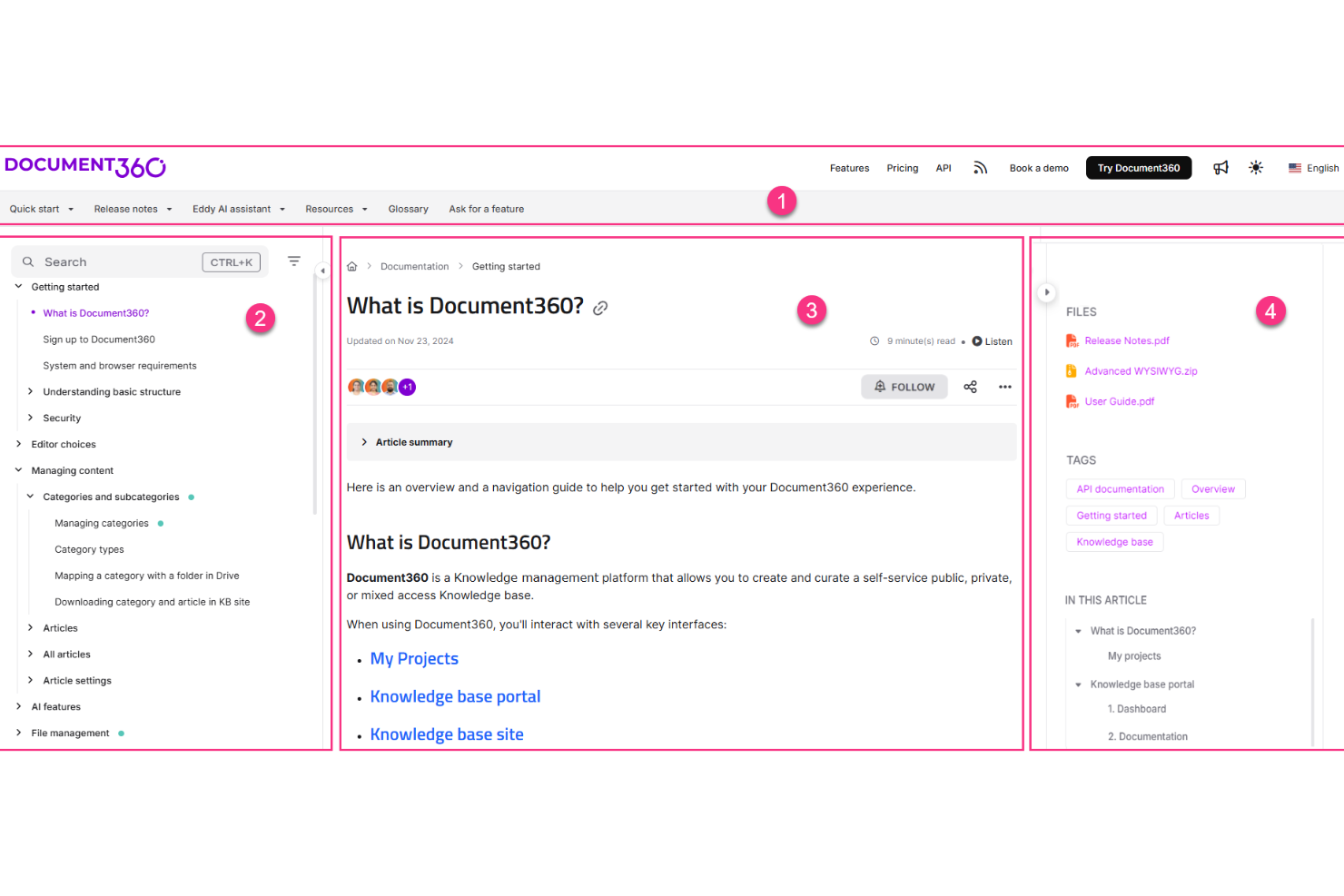
Document360 is a dedicated knowledge base platform built for creating, managing, and publishing self-service documentation, including product guides, SOPs, API docs, and internal wikis.
Who Is Document360 Best For?
Document360 is a strong fit for product and support teams at mid-size to enterprise SaaS companies that need structured, scalable documentation.
Why I Picked Document360
I've included Document360 in my top picks because its versioning and rollback capabilities are some of the most developed I've seen in a knowledge base tool. Every article maintains a full history of changes, and I can instantly compare versions side by side to see exactly what was modified and by whom. When a content update introduces errors, rolling back to a clean previous version takes seconds, not a support ticket. The built-in audit trail also makes it easy to track who changed what across a large team.
Document360 Key Features
- AI-powered search: Delivers intelligent, context-aware search results across your entire knowledge base so readers find answers without browsing.
- Category manager: Lets you organize articles into a structured, multi-level category hierarchy to keep large documentation sets navigable.
- Knowledge base widget: Embeds your knowledge base directly into your product or website as an in-app help panel.
- Review workflows: Routes articles through defined approval stages before publishing to enforce editorial standards.
Document360 Integrations
Integrations include Slack, Intercom, Zendesk, Salesforce, GitHub, Microsoft Teams, and Google Chrome.
Pros and Cons
Pros:
- AI search understands natural language queries
- Custom approval workflows for content publishing
- Supports both internal and external docs
Cons:
- Limits multi-workspace metrics to single portals
- Limited access in mobile apps
New Product Updates from Document360

Document360 Adds Feedback APIs, MCP Tools, and Zendesk Authentication
Document360 adds feedback APIs, expanded MCP tools, Zendesk account authentication, and the ability to reopen closed feedback. These updates help teams manage feedback, automate knowledge base tasks, and control integration access. For more information, visit Document360’s official site.
 .

Stonly
Best for interactive self-serve guides
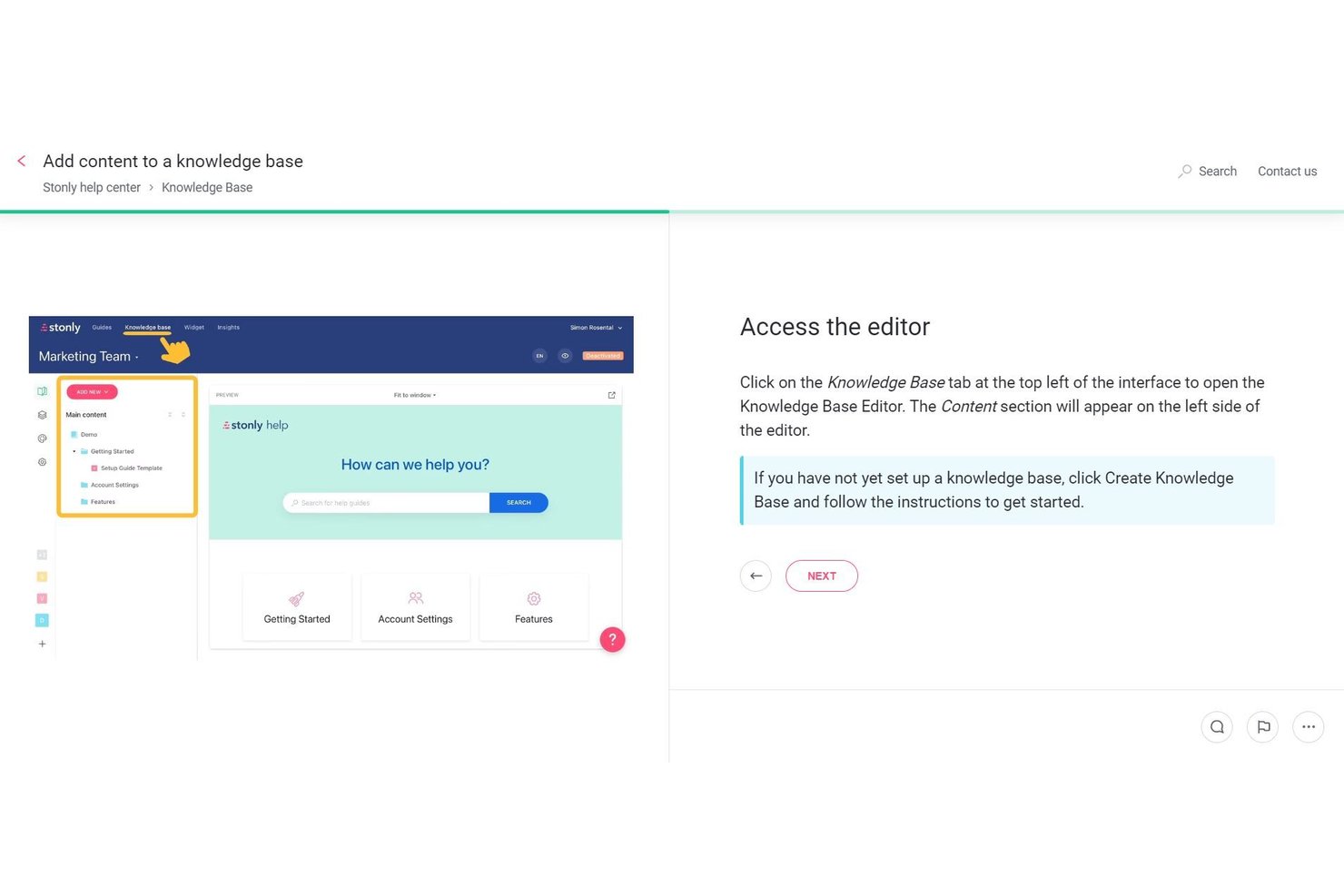
Stonly is a knowledge base platform built around interactive, branching guides that adapt based on user input, combining a WYSIWYG editor, AI-powered search, and workflow automation to deliver self-serve support experiences.
Who Is Stonly Best For?
Stonly is a strong fit for customer support and success teams that need to deliver interactive, self-serve help experiences to end users.
Why I Picked Stonly
I picked Stonly as one of the best because its branching, interactive guide format genuinely changes how users navigate self-serve support. Instead of scrolling through a static article, users answer questions and get a path tailored to their situation. I find the AI Answers feature especially compelling: it pulls from structured guide content and connected sources to deliver conversational, accurate responses with a reported 92% accuracy rate.
Stonly Key Features
- Knowledge agents: AI agents that continuously monitor your knowledge base for outdated content, gaps, and duplicates, then draft suggested updates for your review.
- Modular content snippets: Reusable content blocks you can create once and embed across multiple guides to keep information consistent without manual updates.
- Full-path analytics: Tracks how users move through each guide step-by-step, including where they drop off, so you can identify and fix friction points.
- Federated search: Pulls content from connected sources like Confluence, Notion, and Google Docs into a single search experience within your knowledge base.
Stonly Integrations
Stonly documents integrations with Confluence, Notion, Google Drive, SharePoint, Zendesk, Salesforce, and Jira. It also supports Zapier and an API for custom integrations.
Pros and Cons
Pros:
- Full-path analytics reveal content drop-off points
- AI agents continuously monitor and suggest updates
- Branching interactive guides adapt to user input
Cons:
- No project management templates or workflows
- Lacks hierarchical wiki structure for documentation

Best for ticketing and workflow automation
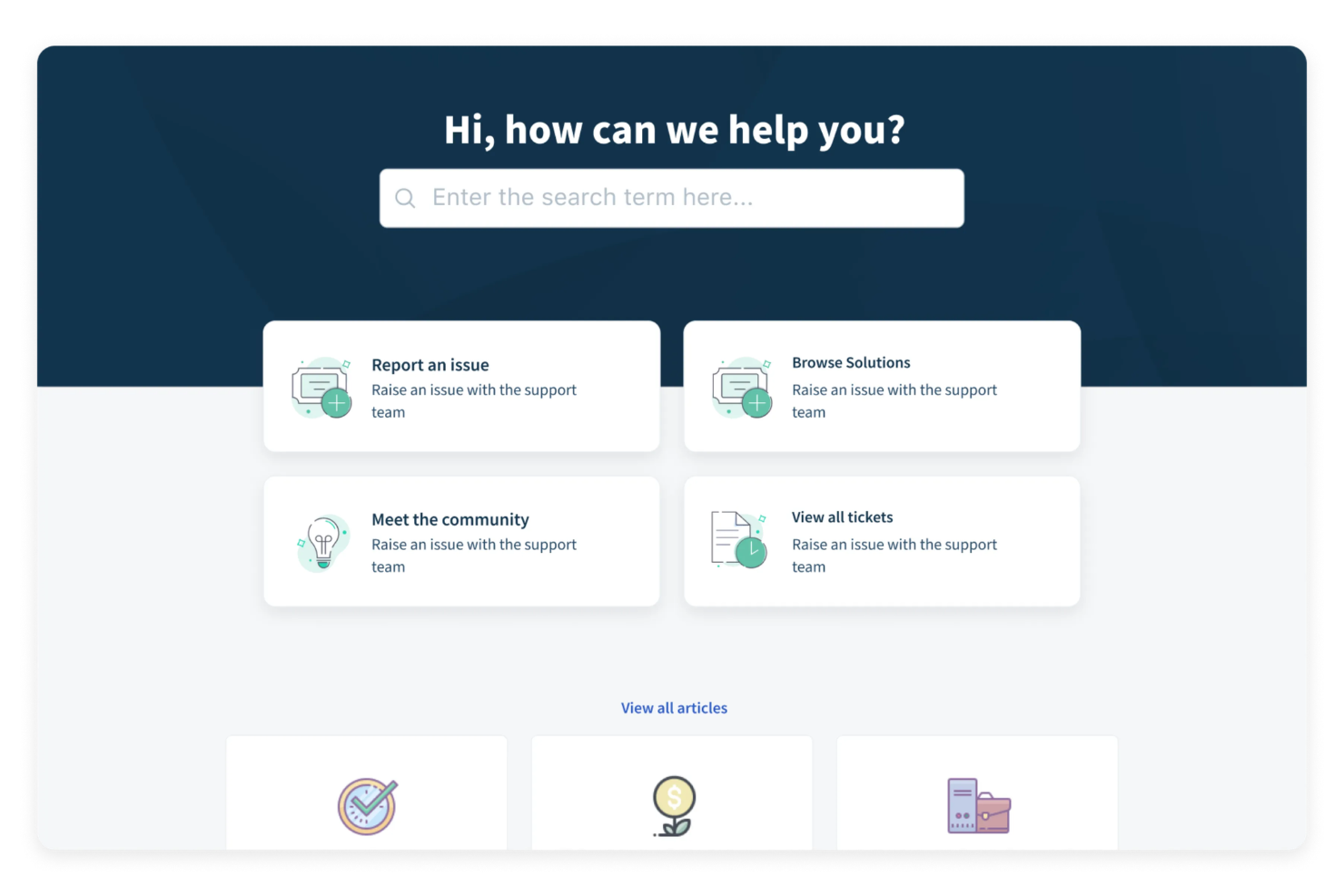
A cloud-based customer support suite, Freshdesk includes a built-in knowledge base, customizable self-service portals, ticket management, community forums, and multilingual article publishing.
Who Is Freshdesk Best For?
Freshdesk is a strong fit for mid-sized customer support teams that need a single platform to manage tickets, self-service content, and agent workflows together.
Why I Picked Freshdesk
I've included Freshdesk in my top picks because its ticket dispatch and automation rules give support teams a level of workflow control that's hard to replicate elsewhere. I particularly like the event- and time-based automation triggers: you can set rules to auto-assign, auto-escalate, and auto-resolve tickets based on specific conditions, which cuts down on the manual triage work agents deal with every day. On top of that, skill-based ticket routing and multiple SLA policies mean the right ticket gets to the right agent without anyone having to intervene.
Freshdesk Key Features
- Knowledge base article editor: Create, organize, and publish support articles into categorized folders with up to five levels of hierarchy.
- SEO optimization: Add meta titles, descriptions, and SEO-friendly URLs to knowledge base articles to improve search visibility.
- Article approval workflows: Route drafted articles through a review and approval process before they go live.
- Community forums: Give customers a space to post questions, share feedback, and find peer-sourced answers alongside your knowledge base.
Freshdesk Integrations
Freshdesk offers over 1,200 marketplace apps and integrations, including Slack, Microsoft Teams, Shopify, Salesforce, Jira, Google Calendar, Google Analytics, Atlassian Jira Plus, Aircall, and Freshsales Suite. It's also available on Zapier and provides a REST API for custom integrations.
Pros and Cons
Pros:
- Ticket replies convert into knowledge base articles
- Built-in multilingual article translations on select plans
- Helpdesk and knowledge base share one interface
Cons:
- Search performance degrades with large article volumes
- Article editor feels outdated versus standalone tools
New Product Updates from Freshdesk
Freshdesk Adds Analytics Charts to Team Dashboards
Freshdesk now lets teams add existing Analytics report charts to custom team dashboards from the same configuration pane used for live widgets. For more information, visit Freshdesk's official site.
 .

Hub
Best for company-wide knowledge sharing

Hub is a knowledge management and intranet platform where teams can create, organize, and govern internal content across pages, documents, and integrated cloud drives.
Who Is Hub Best For?
Hub is a strong fit for mid-sized to large organizations that need a centralized intranet to manage internal knowledge across multiple departments or locations.
Why I Picked Hub
Hub is one of my top picks because I love how it handles knowledge sharing at scale across a whole organization. The federated search pulls results from intranet pages, attached documents, and connected cloud drives like Google Drive and SharePoint in a single query. I also use Smart Tags to make sure the right content surfaces for the right teams, so HR content doesn't clutter engineering, and vice versa.
Hub Key Features
- Version control: Track content changes over time with a full audit history and the ability to roll back to previous page versions.
- Content expiry notifications: Set review dates on pages so owners are automatically notified when content needs to be updated or revalidated.
- Must Reads: Assign specific pages or documents as required reading and collect read receipts to confirm acknowledgment.
- No-code CMS: Build and edit pages using pre-built content templates without any technical knowledge.
Hub Integrations
Hub offers integrations with Microsoft 365 (including SharePoint, OneDrive, and Teams), Google Workspace, Slack, Confluence, Box, BambooHR, and Eventbrite. It also supports SSO through Microsoft Entra ID, Google, Office 365, OneLogin, OKTA, and Duo Mobile. An API is available for custom integrations.
Pros and Cons
Pros:
- AI writing assistant for content creation
- Built-in multi-site content management
- Must Reads feature tracks policy acknowledgment
Cons:
- No external-facing knowledge base option
- Search can miss deeply nested content

Desk365
Best for integration with Microsoft Teams
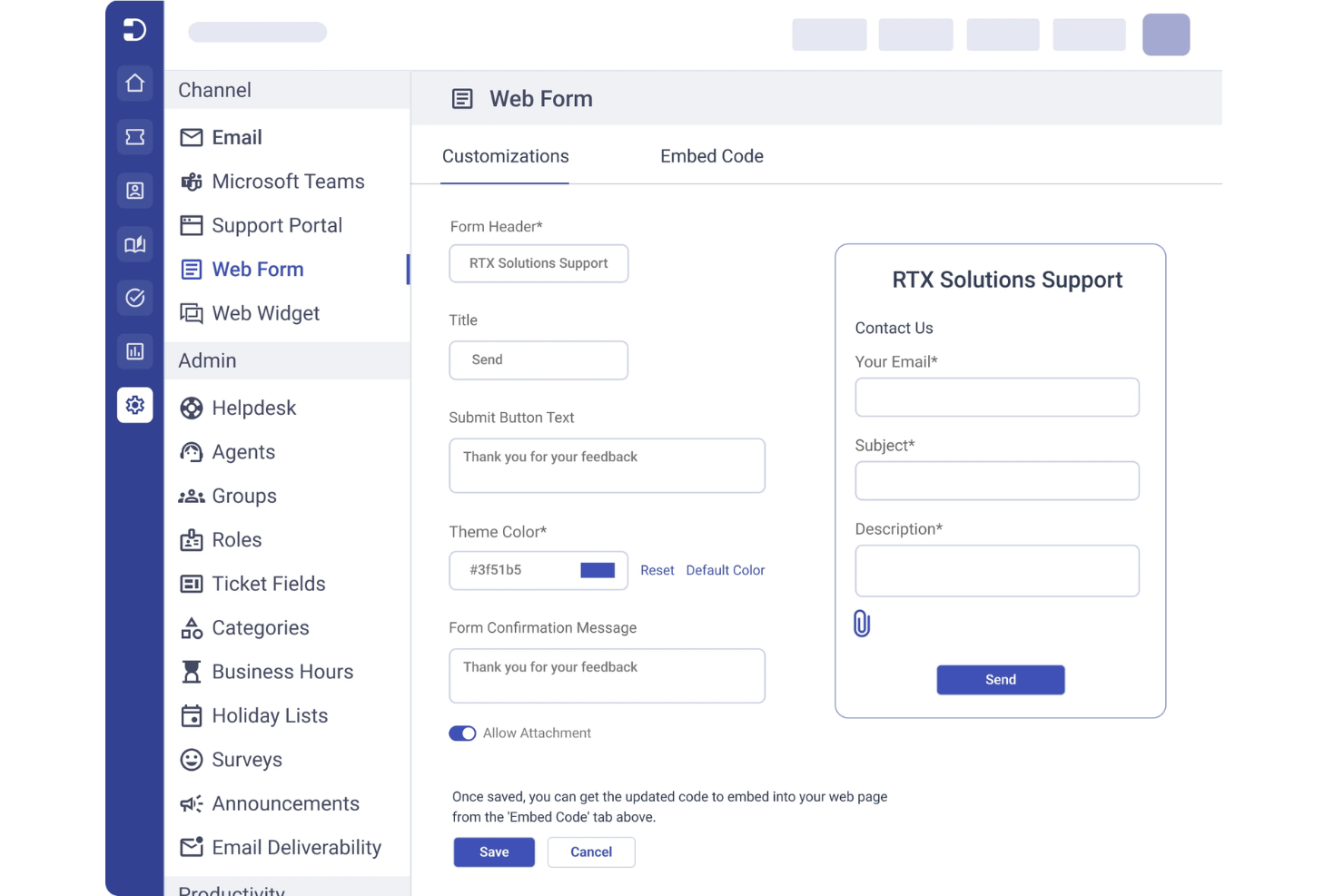
Desk365 is a cloud-based helpdesk platform designed for teams that want to manage customer support and internal requests in one place. It’s a strong fit for organizations already using Microsoft 365 who want to centralize ticketing, automate workflows, and build a searchable knowledge base. Desk365 helps reduce response times and keeps support information organized for both agents and end users.
Who Is Desk365 Best For?
Desk365 is well-suited for support teams in organizations that rely on Microsoft Teams for daily communication and ticket management.
Why I Picked Desk365
What stands out about Desk365 is how deeply it integrates with Microsoft Teams, making it a natural fit for organizations that already use Teams as their primary communication hub. I picked Desk365 because it lets users create, manage, and search knowledge base articles directly within Teams, so support agents and employees don’t have to switch platforms to find answers or resolve tickets. The ability to automate ticket creation from Teams conversations and surface relevant knowledge base content in real time helps keep support workflows efficient and contextually relevant. This approach is especially valuable for companies that want to keep all support and knowledge management activity inside their existing Microsoft 365 environment.
Desk365 Key Features
Some other Desk365 features that knowledge base buyers should know about include:
- Custom ticket fields: Add and configure custom fields to capture the exact information your team needs for each support request.
- Canned responses: Create and manage reusable response templates for common questions and issues.
- Customer portal: Offer a branded self-service portal where users can submit tickets and browse knowledge base articles.
- SLA management: Set, track, and enforce service level agreements to ensure timely responses and resolutions.
Desk365 Integrations
Integrations include Microsoft Teams, Microsoft 365, Outlook, Power Automate, Azure Active Directory, Jira, Slack, Salesforce, Google Workspace, and Zapier.
Pros and Cons
Pros:
- Good user management
- Affordable pricing
- Easy self-serve portal
Cons:
- Not for complex wikis
- Weak search analytics

Slite
Best for collaborative team documentation
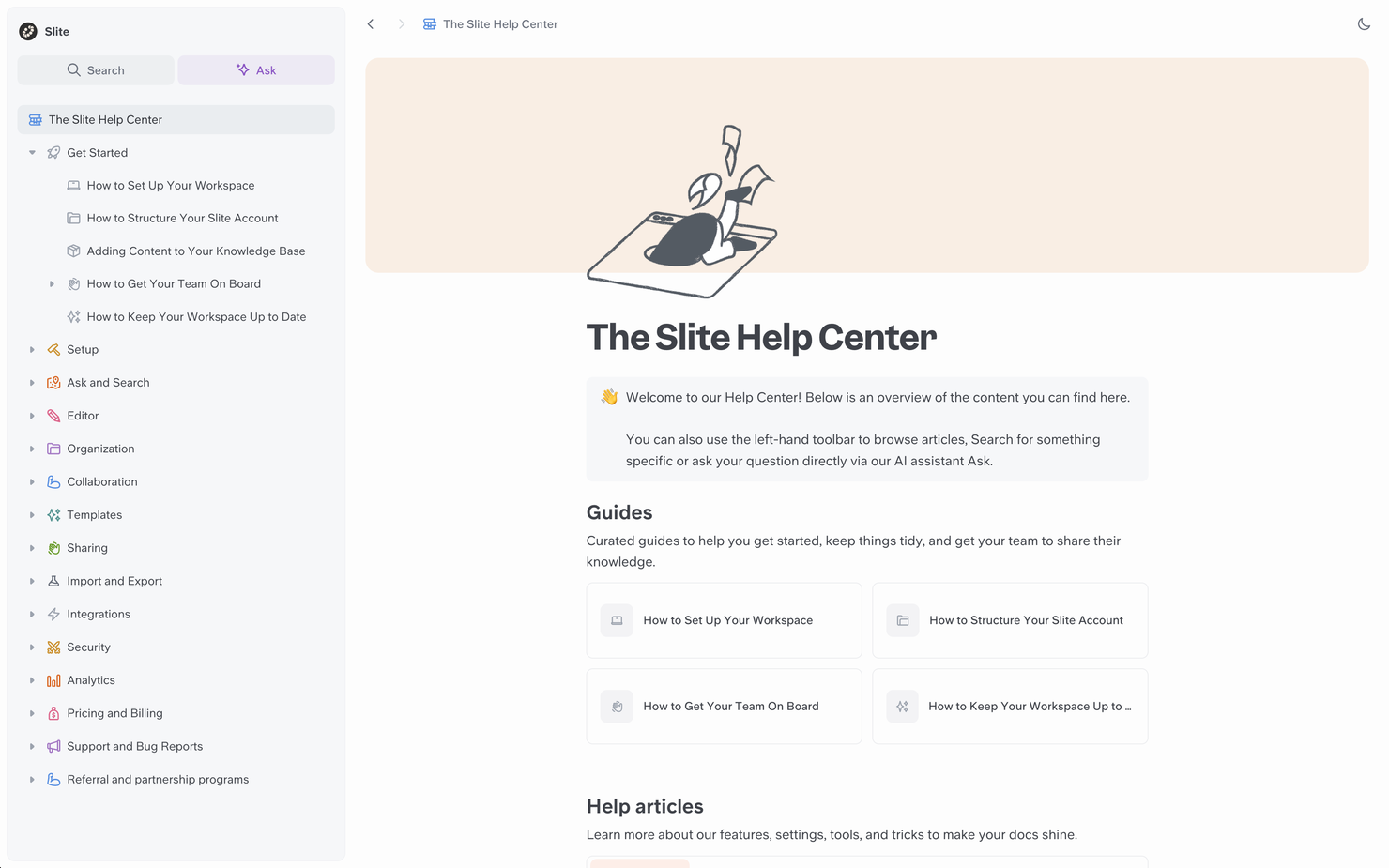
If your team needs a workspace for collaborative documentation, Slite is worth a look. The platform is designed for teams that want to organize, discuss, and update knowledge in one place. It’s especially useful for distributed teams who need to keep everyone aligned and informed as projects evolve.
Who Is Slite Best For?
Slite is a strong fit for distributed teams and startups that need a central hub for collaborative documentation and knowledge sharing.
Why I Picked Slite
What drew me to Slite is how it enables real-time collaboration on documentation, which is essential for teams that need to co-author and update knowledge together. The platform supports threaded discussions directly within documents, so teams can clarify details and resolve questions without leaving the workspace. I also appreciate the way Slite organizes content into channels and collections, making it easy for everyone to find and contribute to the right information. For teams that prioritize collaborative workflows in their knowledge base, these features make Slite a compelling choice.
Slite Key Features
Some other features that make Slite useful for knowledge management include:
- Document templates: Choose from a library of pre-built templates to quickly create meeting notes, project docs, and knowledge base articles.
- Advanced search: Use keyword and filter-based search to find documents, discussions, or attachments across your workspace.
- Access permissions: Set granular permissions for channels, collections, and individual documents to control who can view or edit content.
- Version history: Track changes and restore previous versions of any document to maintain accuracy and accountability.
Slite Integrations
Integrations include Slack, Jira, Google Drive, Figma, Asana, Trello, ClickUp, Notion, Loom, and Miro.
Pros and Cons
Pros:
- Easy daily notes
- Great for remote teams
- Real-time co-editing
Cons:
- Limited block types
- Lacks deep analytics

Notion
Best for flexible workspace organization
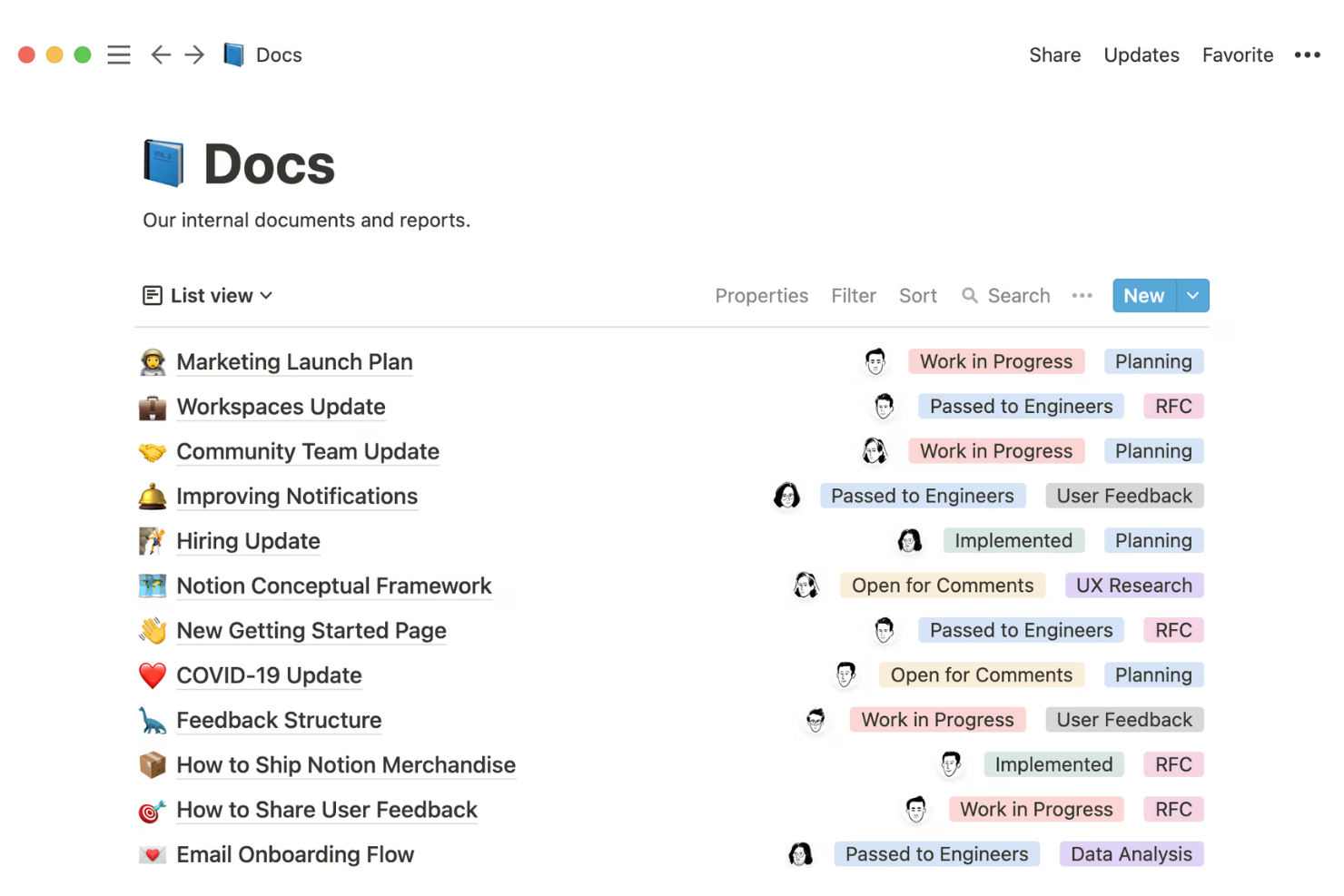
Notion offers a highly customizable platform for teams that want to build and organize their own knowledge base from the ground up. It’s especially appealing to startups, creative agencies, and tech companies that need flexible structures for documentation, project notes, and internal wikis. If your team values adaptability and collaborative editing, Notion can help you centralize information and keep everyone aligned.
Who Is Notion Best For?
Notion is a strong choice for startups and tech teams that need a flexible, collaborative workspace for organizing internal knowledge and documentation.
Why I Picked Notion
What sets Notion apart for knowledge base software is how it lets you organize information in whatever way fits your team’s workflow. I picked Notion because you can create custom databases, nested pages, and linked content blocks, so your workspace can evolve as your documentation grows. The drag-and-drop interface makes it easy to restructure content, while granular permissions let you control who can view or edit each section. This flexibility is especially useful for teams that want to adapt their knowledge base structure as their needs change.
Notion Key Features
Some other features that make Notion useful for knowledge base management include:
- Version history: Track changes to pages and restore previous versions when needed.
- Rich media embedding: Add images, videos, code snippets, and files directly into your documentation pages.
- Page commenting: Allow team members to leave feedback or ask questions directly on any page.
- Template gallery: Access a library of pre-built templates for wikis, docs, and project documentation.
Notion Integrations
Integrations include Slack, Jira, GitHub, Asana, Google Drive, Figma, Trello, Webex, Typeform, and Miro.
Pros and Cons
Pros:
- Great value for money
- Huge template gallery
- Strong AI features
Cons:
- Formatting breaks easy
- Weak access controls

Best for AI-powered content search
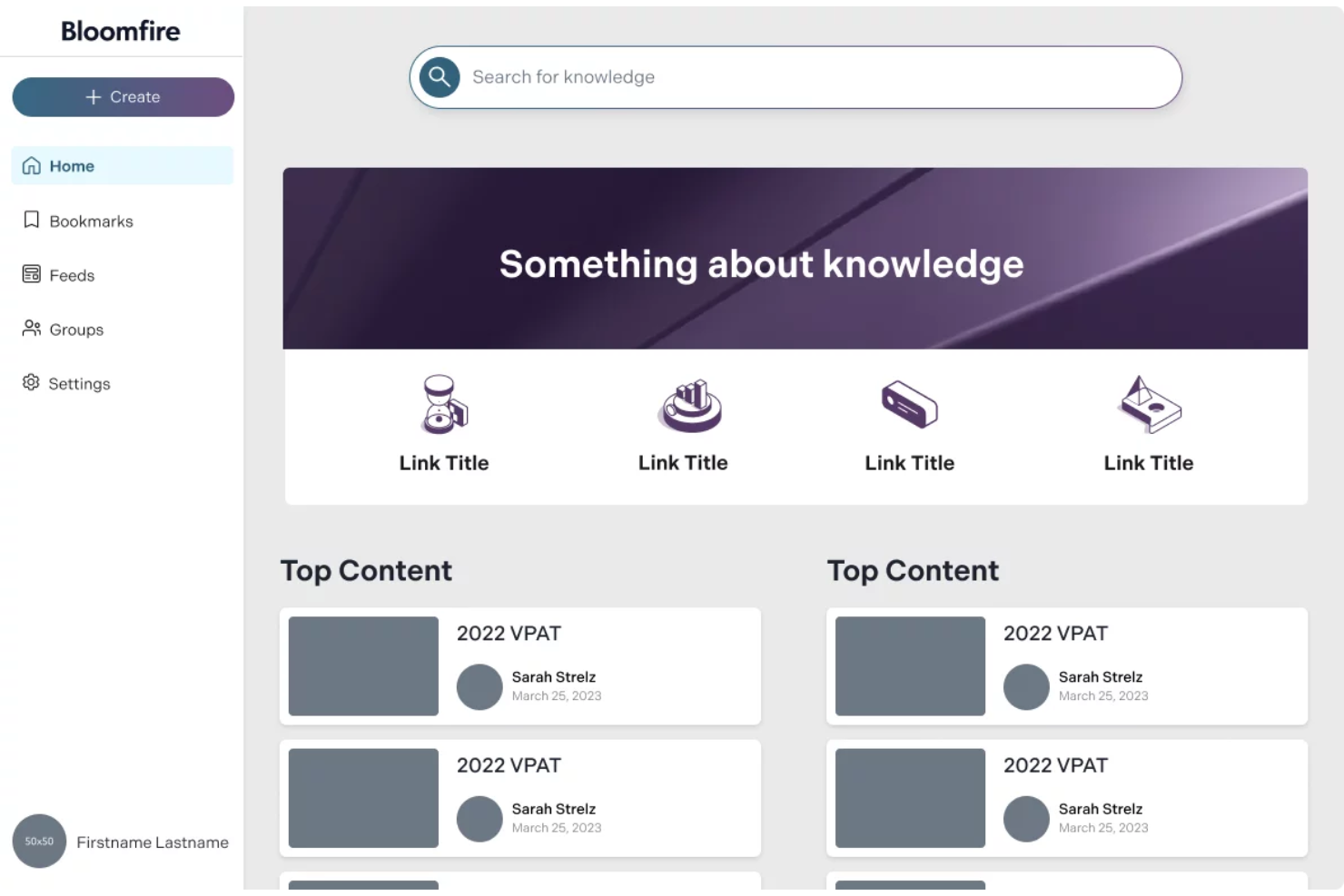
If your team needs a knowledge base that makes finding information fast and intuitive, Bloomfire is worth a look. The platform is designed for organizations that want to centralize knowledge and make it easily searchable for employees or customers. Its approach appeals to businesses that deal with large volumes of content and need to reduce time spent searching for answers.
Who Is Bloomfire Best For?
Bloomfire suits mid-sized to large organizations that need to make large volumes of internal knowledge easily searchable for distributed teams.
Why I Picked Bloomfire
What drew me to Bloomfire is how it uses AI to transform content search within a knowledge base. The platform’s AI-powered search understands natural language queries, so users can type questions as they would ask a colleague and get relevant results. I also appreciate the way Bloomfire automatically tags and organizes content, making it easier for teams to surface the right information quickly. For organizations where fast, accurate search is essential to productivity, these features make Bloomfire a strong contender.
Bloomfire Key Features
Some other features that make Bloomfire useful for knowledge management include:
- Content moderation tools: Assign moderators to review, approve, or reject posts before they go live.
- Rich media support: Upload and share videos, images, and documents directly within the knowledge base.
- Customizable user permissions: Set granular access controls for different teams, departments, or individuals.
- Q&A functionality: Allow users to ask questions and receive answers that are searchable and archived for future reference.
Bloomfire Integrations
Integrations include Salesforce, Slack, Microsoft Teams, Zendesk, and Google Drive.
Pros and Cons
Pros:
- Good content curation
- Strong Q&A workflow
- Auto-tagging features
Cons:
- Rigid folder structure
- Overkill for basic KBs

Best for integrating with Atlassian project tools
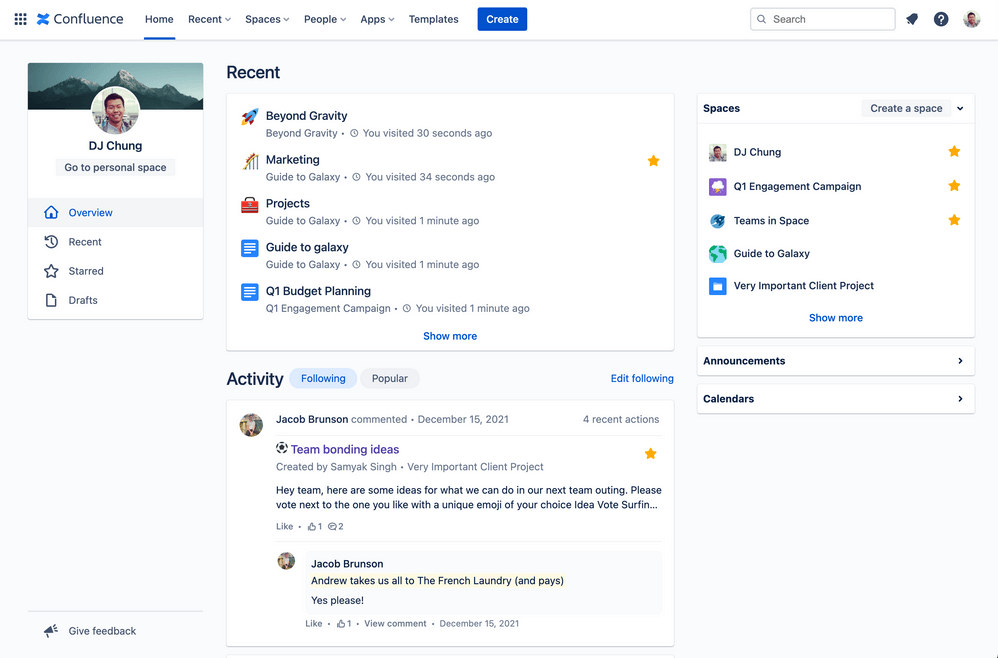
Confluence is a knowledge base platform designed for teams that need structured, collaborative documentation. It’s a strong fit for organizations already using Atlassian products or those managing complex projects across multiple departments. Teams can use Confluence to centralize information, reduce silos, and keep documentation accessible as projects evolve.
Who Is Confluence Best For?
Confluence suits project managers and cross-functional teams in mid-sized to large organizations that need structured, collaborative documentation.
Why I Picked Confluence
I chose Confluence because it offers deep integration with Atlassian project tools, making it a natural fit for teams already using Jira or Trello. This integration allows users to link project tickets, embed roadmaps, and reference tasks directly within knowledge base articles. I find this especially useful for keeping documentation and project work tightly connected, so teams always have the latest context. Confluence also supports structured page templates and permissions, which help maintain consistency and control as your knowledge base grows.
Confluence Key Features
Some other features that make Confluence a strong knowledge base platform include:
- Page version history: Track changes over time and restore previous versions of any page.
- Advanced search: Use filters and keywords to quickly locate relevant articles or documentation.
- Commenting and inline feedback: Allow team members to discuss content directly on pages for real-time collaboration.
- Analytics dashboard: Monitor page views, engagement, and popular content to understand how your knowledge base is being used.
Confluence Integrations
Integrations include Jira, Jira Service Management, Trello, Loom, Bitbucket, Compass, Rovo, Jira Align, Focus, and Talent.
Pros and Cons
Pros:
- Strong access controls
- Rich template library
- Great version control
Cons:
- Messy page hierarchy
- Slow load times

Best with Microsoft 365 ecosystem integration
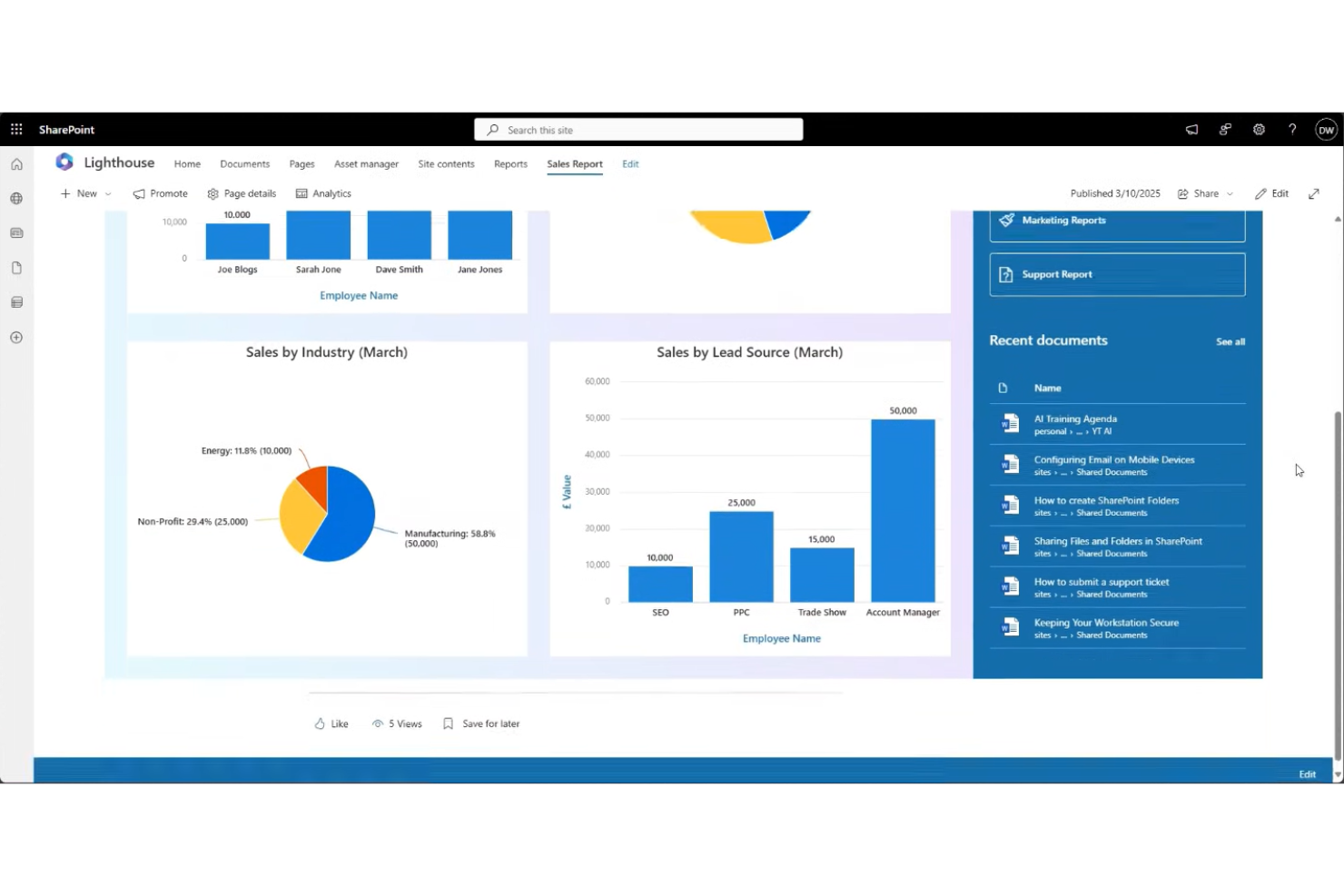
If your organization already uses Microsoft 365, Microsoft SharePoint offers a familiar way to manage and share internal knowledge. The platform is designed for businesses that need secure document management, team sites, and customizable intranets. SharePoint helps centralize company information and supports collaboration across departments and locations.
Who Is Microsoft SharePoint Best For?
SharePoint is a strong fit for mid-sized to large organizations that need secure, centralized knowledge management within the Microsoft 365 environment.
Why I Picked Microsoft SharePoint
What sets Microsoft SharePoint apart as a knowledge base software is how deeply it connects with the Microsoft 365 ecosystem. I picked SharePoint because it lets teams create, store, and manage documents directly alongside their existing Microsoft tools like Teams, Outlook, and OneDrive. This integration means you can embed files, automate workflows, and control permissions using the same identity and security framework your organization already relies on. For businesses that want their knowledge base to fit seamlessly into daily work and IT policies, SharePoint’s ecosystem alignment is a major advantage.
Microsoft SharePoint Key Features
Some other features that make SharePoint useful for knowledge management include:
- Customizable site templates: Create team sites, communication sites, or department portals tailored to your organization’s structure.
- Document versioning: Track changes and restore previous versions of files to maintain accuracy and accountability.
- Metadata tagging: Organize and categorize documents with custom tags for easier search and retrieval.
- Advanced search functionality: Use filters, keywords, and metadata to quickly locate documents and information across your knowledge base.
Microsoft SharePoint Integrations
Integrations include Microsoft Teams, OneDrive, Outlook, Microsoft Dynamics 365, and Power BI.
Pros and Cons
Pros:
- Intranet capabilities
- Massive file storage
- High security protocols
Cons:
- Needs IT to deploy
- Weak search function
Diğer Bilgi Tabanı Yazılımları
Kısa listeme girmeyen ancak yine de incelemeye değer bazı ek bilgi tabanı yazılımı seçenekleri şunlardır:
- KnowledgeOwl
For granular content permissions
- Guru
For browser extension knowledge capture
- Helpjuice
For advanced customization options
- KnowledgeBase
For rapid setup and deployment
- eGain
For AI-powered self-service support
- ClickHelp
For multi-format technical documentation
- Lark
With integrated chat and document editing
- Freshdesk
For omnichannel customer support integration


How I Evaluate Knowledge Base Software
I split my evaluation into two layers: the baseline requirements a tool must meet—like structured authoring, search, and PM integrations—and the differentiators that set the best options apart.
Core Functionality (Table Stakes For This List)
When I'm selecting tools for my list, I rank each one on a scale from 0 (does not offer the functionality) to 5 (excels in this area) for each core functionality listed below. Then, I calculate the tool's total score into a percentage. Each tool needs to achieve a minimum total score of 65% to be considered for inclusion.
- Content Authoring & Structure: I evaluate the editor's flexibility and how deeply you can nest pages—think organizing a sprint playbook into phases, ceremonies, and artifact sub-pages without hitting a ceiling.
- Search & Retrieval Quality: Finding a specific retrospective from three quarters ago shouldn't take more than a few seconds, so I check for full-text search, filters, and tagging.
- Access Controls & Permissions: I look at whether you can lock down sensitive project pages (like budget docs) to leadership while keeping process wikis open to the full delivery team.
- Collaboration & Version History: Real-time co-editing matters when multiple PMs update a shared runbook, so I evaluate commenting, change tracking, and the ability to roll back to earlier versions.
- Project Management Integrations: Tools like Jira, Asana, and Monday are central to most PM workflows, so I check for native integrations that link knowledge articles to active tasks and boards.
- Templates & Reusable Formats: Pre-built templates for project charters, post-mortems, and RACI matrices save hours of setup—I look at both the built-in library and the ability to create custom templates.
Once I have a list of tools that meet the criteria, I consider what sets each platform apart.
Differentiating Factors (What Sets Vendors Apart)
Here's how I compare and contrast different vendors:
Standout Features
AI-powered features are a big differentiator—I look for tools that can surface relevant docs when you're mid-sprint or auto-summarize lengthy post-mortems. Content analytics also matter. Knowing which pages go unread helps PMOs spot gaps in team knowledge and retire outdated process docs. Workflow automation rounds things out, with automated review reminders and scheduled archiving that keep project wikis from going stale between delivery phases.
Beyond Features
I pay close attention to the integration ecosystem—your knowledge base needs to connect with Slack, Teams, and your file storage layer, not just your PM tool. Pricing structure matters too, especially whether a vendor offers free viewer seats for stakeholders who only need to read project docs. I also evaluate migration support, because moving years of documentation out of Confluence or SharePoint is a real barrier that the right vendor can smooth out with dedicated tooling.
Bilgi Tabanı Yazılımı Nasıl Seçilir?
Uzun özellik listeleri ve karmaşık fiyatlandırma yapılarına takılıp kalmak kolaydır. Benzersiz yazılım seçim sürecinizi yürütürken odağınızı korumanıza yardımcı olmak için göz önünde bulundurmanız gereken faktörlerin bir kontrol listesi aşağıda yer alıyor:
| Faktör | Dikkat Edilmesi Gerekenler |
|---|---|
| Ölçeklenebilirlik | Yazılım, büyüyen içerik ve kullanıcı tabanınızı yönetebilecek mi? Gelecekteki ekip büyüklüğünü ve makale hacmini göz önünde bulundurun. |
| Entegrasyonlar | Mevcut araçlarınıza (ör. Slack, Teams, CRM) yerel olarak bağlanabiliyor mu? Yalnızca API erişimini değil, doğrudan entegrasyonları da kontrol edin. |
| Özelleştirilebilirlik | Kategorileri, markalamayı ve izinleri iş akışlarınıza ve şirket kimliğinize uyacak şekilde uyarlayabilir misiniz? |
| Kullanım kolaylığı | Ekibiniz ve son kullanıcılarınız yazılımı hızlı bir şekilde benimseyecek mi? Sezgisel gezinme ve minimum eğitim gereksinimleri sunan çözümleri arayın. |
| Uygulama ve işe alıştırma | Kurulum ne kadar sürecek ve hangi kaynaklara ihtiyaç duyulacak? Veri taşıma desteği, şablonlar ve işe alıştırma yardımı hakkında bilgi alın. |
| Maliyet | Ölçeğinizi büyüttükçe fiyatlandırma kademeleri net ve öngörülebilir mi? Gizli ücretlere, kullanıcı sınırlarına veya temel özellikler için ek ücretlere dikkat edin. |
| Güvenlik önlemleri | Platform, veri koruma standartlarınızı karşılıyor mu? Şifreleme, erişim denetimleri ve uyumluluk sertifikalarını kontrol edin. |
| Destek erişilebilirliği | Hangi destek kanalları ve yanıt süreleri sunuluyor? 7/24 yardıma veya özel işe alıştırma desteğine ihtiyacınız olup olmadığını değerlendirin. |
Bilgi Tabanı Yazılımı Nedir?
Bilgi tabanı yazılımı, kuruluşların bilgileri merkezi ve aranabilir bir depoda oluşturmasına, düzenlemesine ve paylaşmasına olanak tanıyan dijital bir platformdur. Ekipler bu yazılımı süreçleri belgelemek, sık sorulan soruları yanıtlamak ve hem kurum içi hem de kurum dışı hedef kitleler için başvuru materyallerini depolamak amacıyla kullanır. Bu yazılım, tekrarlayan bilgi taleplerini azaltmaya, self servis desteğini güçlendirmeye ve doğru, güncel bilgilerin ihtiyaç duyan kişiler tarafından her zaman erişilebilir olmasını sağlamaya yardımcı olur.
Özellikler
Bilgi tabanı yazılımı seçerken aşağıdaki temel özelliklere dikkat edin:
- Makale yönetimi: Bilgilerin doğru kalmasını ve kuruluşunuz büyüdükçe kolayca güncellenebilmesini sağlamak için makaleler oluşturmanıza, düzenlemenize, organize etmenize ve yayımlamanıza olanak tanır.
- Arama işlevi: Kullanıcılara anahtar kelimeleri, filtreleri veya etiketleri kullanarak ilgili makaleleri ya da belgeleri hızlı ve sezgisel bir şekilde bulma olanağı sunar.
- Kategori düzenleme: Makaleleri klasörler veya kategoriler halinde gruplandırmanıza olanak tanıyarak kullanıcıların konuya göre bilgilere göz atmasını ve bu bilgileri bulmasını kolaylaştırır.
- Kullanıcı izinleri: İçeriği kimlerin görüntüleyebileceğini, düzenleyebileceğini veya yayımlayabileceğini kontrol etmenizi sağlayarak hem kurum içi hem de kurum dışı bilgi paylaşımını destekler.
- Sürüm geçmişi: Makalelerde zaman içinde yapılan değişiklikleri izleyerek gerektiğinde önceki sürümleri incelemenize, geri yüklemenize veya denetlemenize olanak tanır.
- Özel markalama: Logolar, renkler ve alan adı dahil olmak üzere bilgi tabanınızın görünümünü ve tarzını şirketinizin kimliğine uyacak şekilde özelleştirmenizi sağlar.
- Geri bildirim ve puanlamalar: Kullanıcıların makaleleri puanlamasına veya geri bildirim bırakmasına olanak tanıyarak belgelerinizdeki eksiklikleri ya da iyileştirme alanlarını belirlemenize yardımcı olur.
- Multimedya desteği: Açıklığı artırmak ve daha kapsamlı açıklamalar sunmak için makalelere görseller, videolar ve ekler yerleştirilmesini destekler.
- Analiz ve raporlama: Etkinliği ölçebilmeniz ve popüler konuları belirleyebilmeniz için makale kullanımı, arama eğilimleri ve kullanıcı etkileşimi hakkında içgörüler sunar.
- Öz hizmet portalı: Kullanıcıların destek ekibiyle iletişime geçmeden yanıt arayabileceği, soru gönderebileceği veya kaynaklara erişebileceği özel bir arayüz sunar.
Yaygın Yapay Zekâ Özellikleri
Yukarıda listelenen standart bilgi tabanı yazılımı özelliklerinin yanı sıra bu çözümlerin birçoğu aşağıdaki gibi özelliklerle yapay zekâyı da bünyesine katıyor:
- Otomatik makale önerileri: Yanıt aramak için harcanan zamanı azaltarak arama sorgularına veya destek taleplerine göre kullanıcılara ilgili makaleleri önermek için yapay zekâdan yararlanır.
- İçerik boşluğu analizi: Bilgi tabanınızdaki eksik konuları veya yeterince geliştirilmemiş alanları belirlemek için kullanıcı aramalarını ve etkileşimlerini analiz ederek yeni içeriklere öncelik vermenize yardımcı olur.
- Yapay zekâ destekli sohbet robotları: Doğal dil işleme kullanarak kullanıcı sorularını yanıtlar ve onları en ilgili makalelere yönlendirerek anında, sohbet tabanlı destek sunar.
- Otomatik içerik etiketleme: İçeriklerine göre makalelere akıllı etiketler uygulayarak arama doğruluğunu artırır ve büyük bilgi tabanlarını düzenlemeyi kolaylaştırır.
- Makale özetleme: Uzun makalelerin kısa özetlerini oluşturmak için yapay zekâdan yararlanır ve kullanıcıların belgenin tamamını okumadan temel noktaları hızla kavramasını sağlar.
Avantajlar
Bilgi tabanı yazılımını uygulamak ekibiniz ve işletmeniz için çeşitli avantajlar sağlar. Yararlanabileceğiniz avantajlardan bazıları şunlardır:
- Bilgilere daha hızlı erişim: Merkezi arama ve düzenlenmiş kategoriler, kullanıcıların destek beklemeden yanıtları hızlıca bulmasına yardımcı olur.
- Tutarlı belgeler: Sürüm denetimi ve izinler, herkesin en doğru ve güncel bilgilere başvurmasını sağlar.
- Tekrarlanan taleplerde azalma: Öz hizmet portalları ve makale önerileri, kullanıcıların yaygın soruları bağımsız olarak çözmesini sağlar.
- Geliştirilmiş işe alıştırma: Eğitim kaynakları, şablonlar ve rehberli turlar, yeni ekip üyelerinin daha hızlı şekilde sürece uyum sağlamasına yardımcı olur.
- Daha iyi bilgi muhafazası: Makale yönetimi ve analizler kurumsal bilgiyi korur ve gelecekteki iyileştirmeler için eksiklikleri öne çıkarır.
- Gelişmiş iş birliği: Kullanıcı geri bildirimleri, izinler ve içerik düzenleme özellikleri ekipler arası katkıları ve bilgi paylaşımını destekler.
- Ölçeklenebilir destek: Otomatik iş akışları ve yapay zekâ destekli araçlar, bilgi tabanınızın işletmeniz ve kullanıcı tabanınızla birlikte büyümesini sağlar.
Maliyetler ve Fiyatlandırma
Bilgi tabanı yazılımı seçmek, mevcut çeşitli fiyatlandırma modellerinin ve planların anlaşılmasını gerektirir. Maliyetler özelliklere, ekip büyüklüğüne, eklentilere ve daha birçok unsura göre değişir. Aşağıdaki tablo, bilgi tabanı yazılımı çözümlerinde yaygın planları, ortalama fiyatlarını ve genellikle dahil edilen özellikleri özetlemektedir:
Plan Karşılaştırma Tablosu
| Plan Türü | Ortalama Fiyat | Yaygın Özellikler |
|---|---|---|
| Ücretsiz Plan | $0 | Temel makale yönetimi, sınırlı depolama, basit arama ve topluluk desteği. |
| Kişisel Plan | $5-$15/kullanıcı/ay | Sınırsız makale, temel analizler, özel markalama ve e-posta desteği. |
| İşletme Planı | $10-$25/kullanıcı/ay | Gelişmiş izinler, entegrasyonlar, sürüm geçmişi, analizler ve öncelikli destek. |
| Kurumsal Plan | $20-$50/kullanıcı/ay | SSO, gelişmiş güvenlik, özel iş akışları, özel işe alıştırma ve premium destek. |
Bilgi Bankası Yazılımı SSS
Bilgi bankası yazılımı hakkında sık sorulan soruların bazı yanıtlarını aşağıda bulabilirsiniz:
Ekibimin bilgi bankası yazılımına ihtiyacı olup olmadığını nasıl anlarım?
Ekibiniz aynı soruları yanıtlamak için zaman harcıyor veya belgeleri düzenli ve erişilebilir tutmakta zorlanıyorsa büyük olasılıkla bilgi bankası yazılımına ihtiyacınız vardır. Bu yazılım, bilgileri merkezileştirerek herkesin kaynakları bulmasını ve güncellemesini kolaylaştırır.
Bilgi bankası yazılımı hem kurum içi hem de kurum dışı kitleler için kullanılabilir mi?
Evet, çoğu bilgi bankası yazılımı hem kurum içi hem de kurum dışı kullanımı destekler. İçeriği kimlerin görüntüleyebileceğini veya düzenleyebileceğini kontrol etmek için izinleri ayarlayabilir, böylece bilgileri gerektiğinde çalışanlarınızla, müşterilerinizle veya iş ortaklarınızla paylaşabilirsiniz. Özellikle çalışanlara yönelik bilgiye odaklanan ekipler bu amaçla kurum içi wiki yazılımını kullanabilir.
Mevcut bir dokümantasyon sisteminden geçiş yaparken nelere dikkat etmeliyim?
İçe aktarma araçlarını, geçiş desteğini ve mevcut dosya formatlarınızla uyumluluğu araştırın. Geçiş sırasında veri kaybını veya karışıklığı önlemek için yeni yazılımın yapıyı, bağlantıları ve kullanıcı izinlerini nasıl yönettiğini değerlendirin.
Bilgi bankası yazılımı ne kadar güvenlidir?
Çoğu çözüm şifreleme, erişim kontrolleri ve uyumluluk sertifikaları sunar. Özellikle hassas veya düzenlemeye tabi bilgileri işliyorsanız satıcının güvenlik belgelerini mutlaka inceleyin ve veri koruma önlemlerini sorun. Bazı açık kaynaklı bilgi bankası çözümleri, dağıtım ve veriler üzerinde daha fazla kontrol sahibi olmak isteyen ekipler için kendi sunucusunda barındırmayı da destekler.
Bilgi bankası içeriğimi ne sıklıkla güncellemeliyim?
Süreçler değiştiğinde, yeni ürünler piyasaya çıktığında veya aynı soruların tekrarlandığını fark ettiğinizde bilgi bankanızı güncelleyin. Düzenli incelemeler ve kullanıcı geri bildirimleri, bilgilerin kitleniz için doğru ve güncel kalmasına yardımcı olur.