

2026’da Ekipler İçin En İyi 10 Google Workspace Alternatifi

Google Workspace İçin En İyi Alternatifler Kısa Listesi


Bir proje yöneticisi olarak günlük başarınız, karmaşık ekipleri düzenli ve üretken tutmanıza bağlıdır. Bulut tabanlı üretkenlik araçları görevleri ve platformlar arası iletişimi yönetmek için çoğu zaman bir can simidi olsa da Google Workspace her zaman mükemmel bir seçim değildir. İster Google'ın yerel araçlarının sınırlarına ulaşmış olun ister özel yazılımlarla daha sıkı bir entegrasyona ihtiyaç duyun, doğru Google Workspace alternatifini bulmak iş standartlarınızı ölçeklendirmek açısından kritik öneme sahiptir.
Bu kılavuzda, Google Workspace'in geride bıraktığı boşlukları dolduran en iyi yazılım çözümlerini bağımsız olarak inceledim. Listem geleneksel CRM yerine yüksek performanslı proje yönetimine ve iş birliğine odaklanıyor; ancak her öneri, müşteri verilerinizi bağlantılı tutmak için üçüncü taraf entegrasyonları sunuyor.
İster eksiksiz bir paket alternatifi ister Microsoft veya Apple cihazlarındaki iş akışınızı güçlendirecek özel bir web uygulaması arıyor olun, bu Google Workspace alternatifleri iş hayatınızı kolaylaştırmak ve ekibinizi daha verimli hâle getirmek için tasarlanmıştır.
Google Workspace nedir?
Eskiden G Suite olarak bilinen Google Workspace, ekiplerin Google ekosistemi içinde ve dışında etkili bir şekilde iş birliği yapmasına ve iletişim kurmasına yardımcı olan bulut tabanlı bir üretkenlik aracıdır. Üretkenliği ve ekip iş birliğini artırma becerisi sayesinde proje yöneticileri, pazarlamacılar, küçük işletmeler ve eğitimciler de dâhil olmak üzere çeşitli sektörlerdeki profesyoneller tarafından yaygın olarak kullanılır.
Google Dokümanlar, Google E-Tablolar ve Google Meet gibi araçlar belge oluşturmayı, veri yönetimini ve iletişimi destekler. Bu özellikler sizin ve ekibinizin düzenli ve bağlantıda kalmasına yardımcı olur. Genel olarak Google Workspace, farklı iş ihtiyaçlarına uyum sağlayan çok yönlü bir platform sunarak iş yeri verimliliğini artırmak için değerli bir araç hâline gelir.
Google Workspace Alternatifleri Karşılaştırma Tablosu
Aşağıdaki tablo, en iyi Google Workspace alternatiflerimin fiyatlandırma ayrıntılarını karşılaştırmaktadır.
| Tool | Starting Price | Website | |
|---|---|---|---|
| Best for customizable task boards | 4.5 out of 5 | $5/user/month Free plan available | Website |
| Best for Office app integration | 4.6 out of 5 | $21/user/month Free plan available | Website |
| Best for knowledge management | 3.5 out of 5 | Pricing upon request Free demo available | Website |
| Best for project management features | — | $12/user/month Free plan + trial + demo available | Website |
| Best for offline task management | — | Free to use Free plan available | Website |
| Best for secure collaboration | — | Pricing upon request Free demo available | Website |
| Best for team messaging integration | 4.6 out of 5 | $7.25/user/month Free plan available | Website |
| Best for work management | 4.4 out of 5 | $9/user/month 30-day free trial + free demo available | Website |
| Best for enterprise project management | 4.3 out of 5 | $10/user/month Free plan + 14-day free trial + free demo available | Book Demo |
| Best for video conferencing | 5.0 out of 5 | $13.33/user/month Free plan available | Website |

Yazılım Önerilerimize Neden Güvenebilirsiniz?
Ekibimiz 2012’den beri yazılımları test ediyor ve inceliyor. Biz de proje yöneticisi olduğumuz için doğru yazılımı seçmenin ne kadar zor ve önemli olduğunu biliyoruz.
Bu rehber için araçları uygulamalı testler ve bağımsız araştırmalarla değerlendirdik ve seçim kriterlerimize göre puanladık. Ayrıca sektörün fikir önderlerinin ve alanında çalışan proje yönetimi uzmanlarının görüşlerinden de yararlanıyoruz.
İncelemelerimiz bir satış konuşması değil, editör ekibimizin kendi değerlendirmesidir.
Uzman inceleyenler:
En İyi Google Workspace Alternatifleri İncelemeleri
Aşağıda, kısa listeme giren en iyi Google Workspace alternatiflerinin ayrıntılı özetlerini bulabilirsiniz. İncelemelerim, sizin için en uygun seçeneği bulmanıza yardımcı olmak amacıyla her aracın temel özelliklerine, artılarına ve eksilerine, entegrasyonlarına ve ideal kullanım alanlarına ayrıntılı bir bakış sunuyor.
Best for customizable task boards
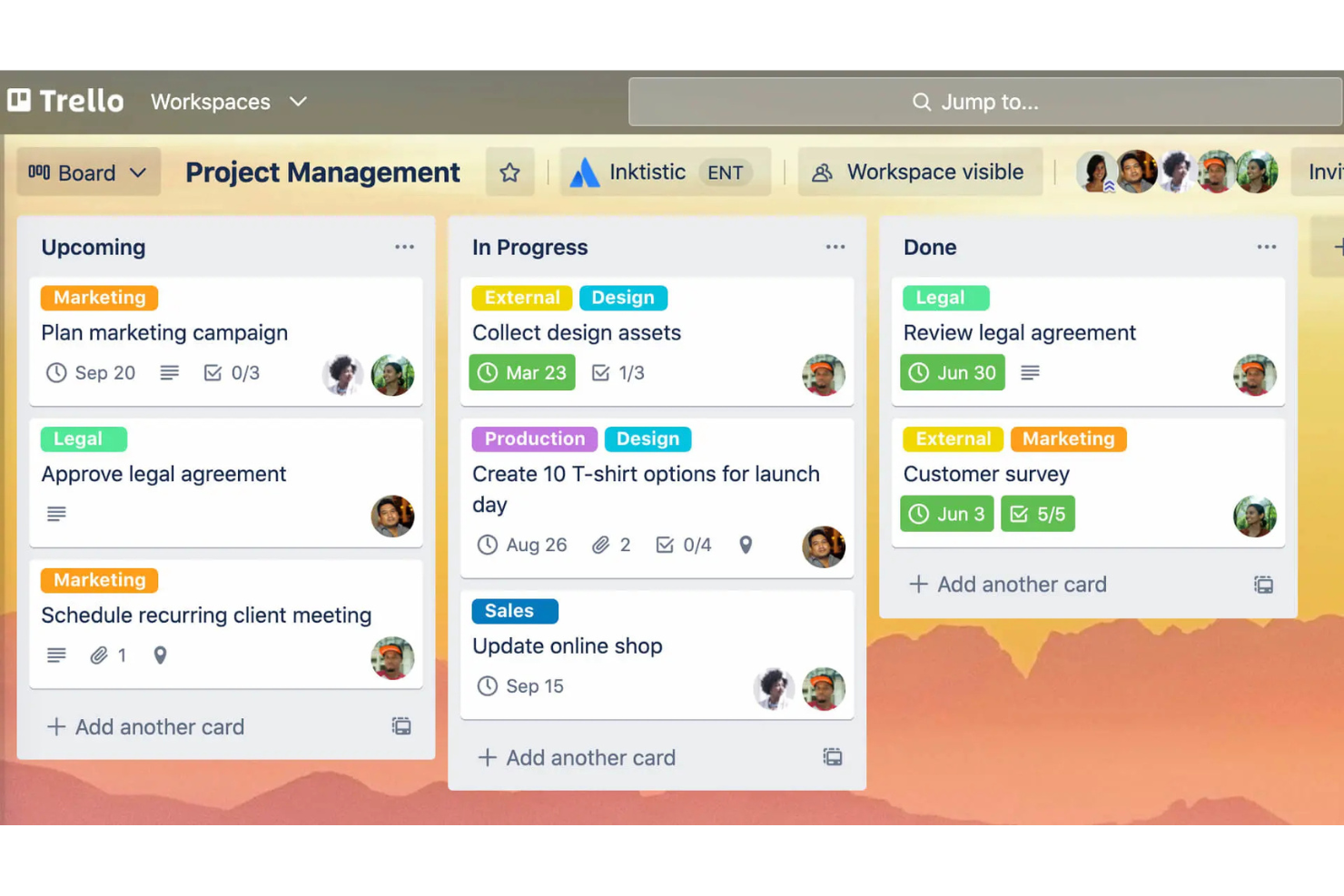
Atlassian Trello is a project management tool known for its user-friendly visual approach to organizing tasks using boards, lists, and cards. It's popular among teams of all sizes that need to manage projects and tasks effectively.
Why it's a good Google Workspace alternative: Atlassian Trello offers customizable task boards that cater to your team's specific needs, unlike Google Workspace's more standardized approach. You can create boards tailored to different projects, which allows for flexibility in how tasks are managed. The drag-and-drop feature makes it easy to move tasks across different stages. Atlassian Trello's visual interface helps you and your team see the big picture and track progress at a glance.
Standout Features and Integrations:
Features include the ability to add due dates and checklists to tasks, color-code labels for easy categorization, and the option to attach files directly to cards. You can also use Butler, Atlassian Trello's built-in automation tool, to automate repetitive tasks. Another feature is the power-ups, which strengthen the board's functionality with additional tools and integrations.
Integrations include Slack, Google Drive, Dropbox, Microsoft Teams, Evernote, Jira, GitHub, Salesforce, Mailchimp, Zendesk, and more.
Pros and Cons
Pros:
- Easy task movement
- Visual project tracking
- Customizable task boards
Cons:
- Poor for complex projects
- Lacks native time tracking

Best for Office app integration
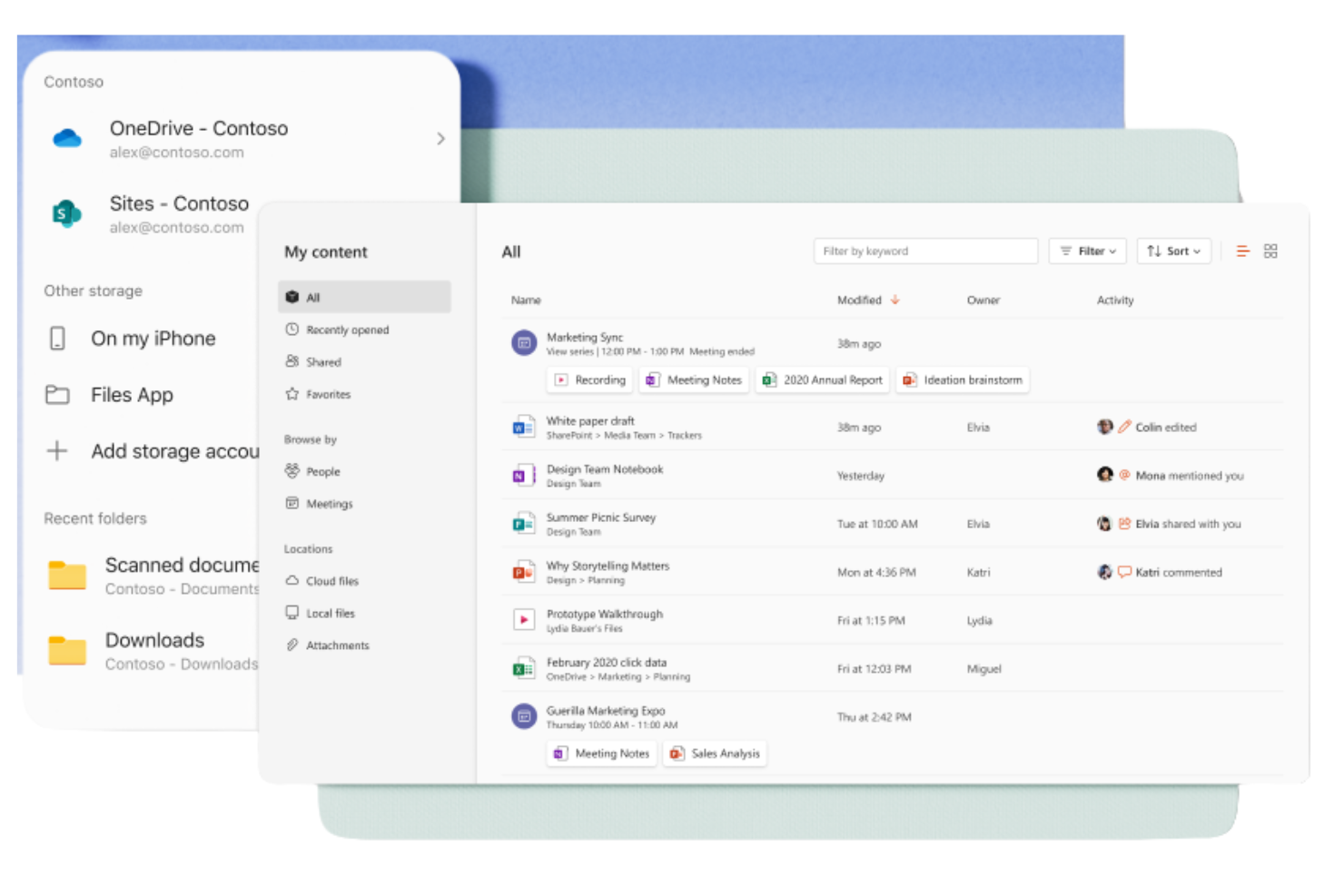
Microsoft 365 Copilot is a subscription-based suite of productivity tools designed for businesses and individuals to help them create, collaborate, and communicate. It's widely used by professionals who need access to Windows applications such as Word, Excel, and PowerPoint for everyday business functions.
Why it's a good Google Workspace alternative: Microsoft 365 Copilot provides smooth integration with Office apps, offering a familiar environment for users who rely heavily on these tools. With cloud storage through OneDrive, you can access and share documents readily. The suite also includes Microsoft Teams for communication and collaboration, making it a complete solution for business needs. Its strong security features keep your data protected at all times.
Standout Features and Integrations:
Features include advanced data analysis capabilities with Excel spreadsheets, which can help your team make informed decisions. The suite also offers customizable templates in Word and PowerPoint, allowing you to create professional documents and presentations. Additionally, Outlook provides an integrated email and calendar solution to keep you organized.
Integrations include Salesforce, Atlassian Trello, Asana, Dropbox, Zoom, Slack, Adobe Acrobat, GitHub, LinkedIn, DocuSign, and more.
Pros and Cons
Pros:
- In-depth security features
- Strong document collaboration
- Familiar interface for Microsoft Office users
Cons:
- Requires OneDrive for Excel
- Inconsistent output quality

Guru
Best for knowledge management
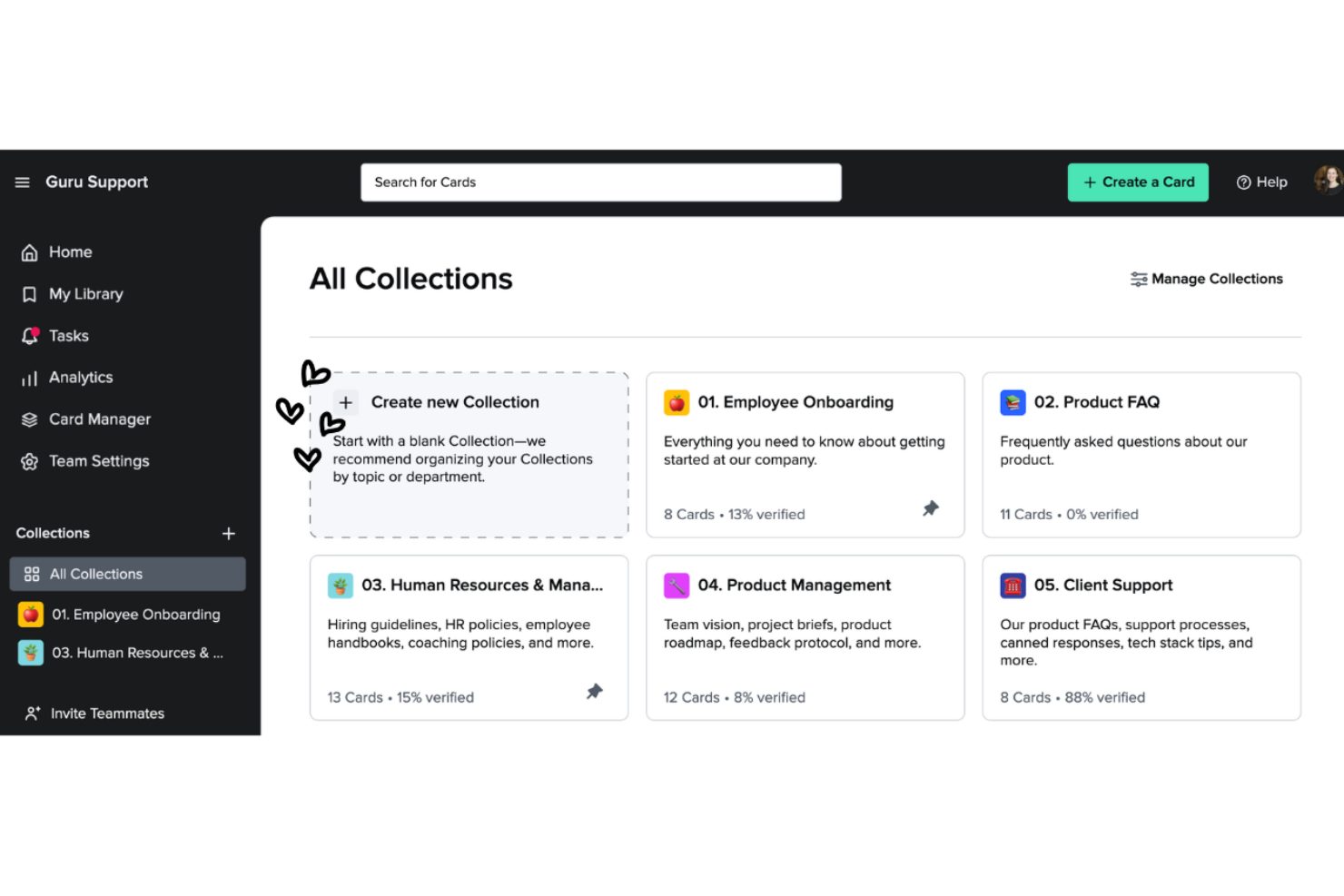
Guru is a knowledge management tool that helps teams capture, organize, and access information efficiently. It's popular among businesses that need to give their teams easy access to critical knowledge and resources.
Why it's a good Google Workspace alternative: Guru offers knowledge management capabilities that go beyond Google Workspace's document storage. Its card-based system lets you create and categorize information for quick retrieval. The verification feature keeps your team's knowledge up-to-date and accurate. Real-time updates and notifications keep everyone informed about the latest changes, fostering collaboration.
Standout Features and Integrations:
Features include a browser extension that allows you to access and capture information directly from your web browser, making it easy to gather and store knowledge. The analytics feature provides insights into how your team uses the knowledge base, which helps you identify gaps and areas for improvement. You can also benefit from the AI-powered suggestions that offer relevant information when you need it.
Integrations include Slack, Microsoft Teams, Salesforce, Zendesk, Intercom, Chrome, Outlook, Google Workspace, Zapier, and more.
Pros and Cons
Pros:
- Verification maintains accuracy
- Real-time updates
- Effective knowledge organization
Cons:
- Requires constant maintenance
- Formatting options are limited


ClickUp is a project management tool designed for teams and businesses of all sizes to help organize tasks, projects, and workflows. It offers an array of features that help optimize project management and increase productivity.
Why it's a good Google Workspace alternative: ClickUp provides extensive project management features that go beyond what Google Workspace offers. Task management lets you assign and track tasks with ease, and customizable dashboards allow you to view project progress in a way that suits you best. ClickUp's goal-setting feature lets your team align on objectives, keeping everyone on the same page.
Standout Features and Integrations:
Features include time tracking, which helps you monitor how much time is spent on tasks. The document management feature allows you to create and store documents directly within the platform. You can use the mind maps to visually organize ideas and plans, aiding in better project planning. Standard plan features include Kanban boards and 24/7 support.
Integrations include Slack, Google Drive, Dropbox, Microsoft Teams, Zoom, GitHub, Atlassian Trello, Salesforce, Zapier, and more.
Pros and Cons
Pros:
- Scalable for large teams
- Effective goal-setting features
- Detailed task management
Cons:
- Learning curve for advanced features
- Occasional performance issues


Super Productivity is an open-source task manager that integrates task management, time tracking, and note-taking, designed for developers, freelancers, and other professionals. It focuses on boosting productivity while protecting user privacy by keeping data offline.
Why it's a good Google Workspace alternative: Unlike Google Workspace, which relies heavily on cloud-based services, Super Productivity offers offline task management, protecting your privacy and giving you full control over your data. With features such as customizable boards, you can organize tasks in ways that suit your workflow. The focus mode and Pomodoro timer help you maintain concentration during work sessions. Additionally, its one-click time tracking and detailed work logging make it easy to monitor productivity. It's also compatible with Linux.
Standout Features and Integrations:
Features include customizable task management with options for subtasks and due dates, allowing you to tailor your workflow. Calendar integration provides a detailed daily overview to help you plan effectively. The plugin system lets you add functionality, making it adaptable to your needs.
Integrations include GitHub, GitLab, Jira, and more.
Pros and Cons
Pros:
- In-depth task management
- Strong privacy and offline usage
- Highly customizable workflows
Cons:
- No built-in cloud syncing
- Minimal team collaboration
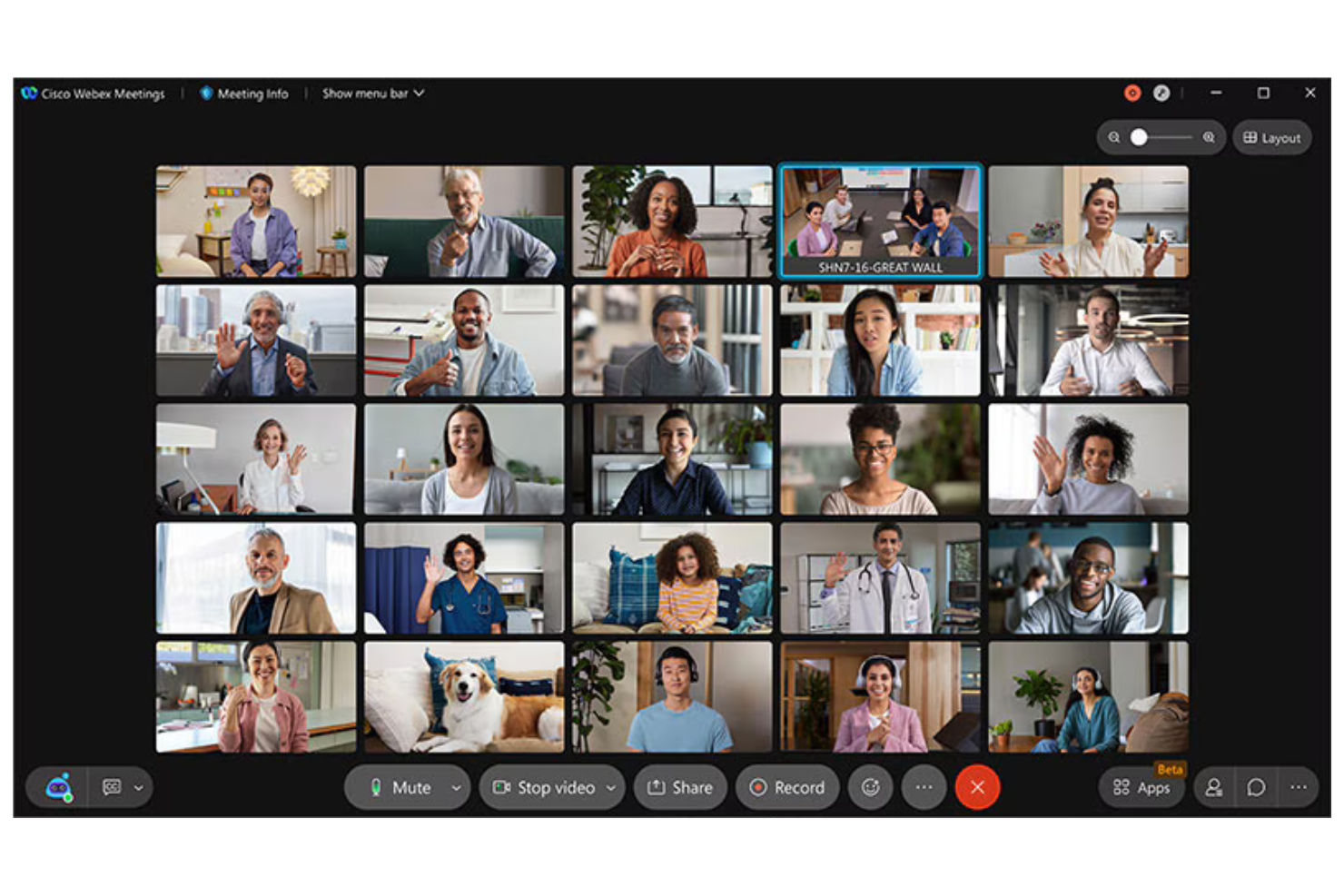
Cisco Webex is a video conferencing and collaboration platform used by businesses and educational institutions for virtual meetings, webinars, and team collaboration. It provides tools for remote communication, which makes it essential for teams that need reliable, secure connections.
Why it's a good Google Workspace alternative: Cisco Webex offers security features that keep meetings safe and private, setting it apart from Google Workspace's general tools. With end-to-end encryption, your communications remain confidential. The platform supports HD video and audio, providing clear and effective meetings. Additionally, its ability to host large-scale events makes it versatile for various business needs.
Standout Features and Integrations:
Features include customizable meeting layouts, allowing you to arrange video feeds according to your preferences. The platform also offers noise cancellation technology, which helps minimize background distractions during calls. Cisco Webex Assistant provides real-time transcription, making note-taking easier and more efficient.
Integrations include Microsoft Teams, Salesforce, Google Workspace, Slack, ServiceNow, Atlassian Trello, Dropbox, Zendesk, Asana, and more.
Pros and Cons
Pros:
- Noise cancellation technology
- High-quality video and audio
- Strong security features
Cons:
- The Interface can feel cluttered
- Requires technical knowledge for setup

Slack
Best for team messaging integration
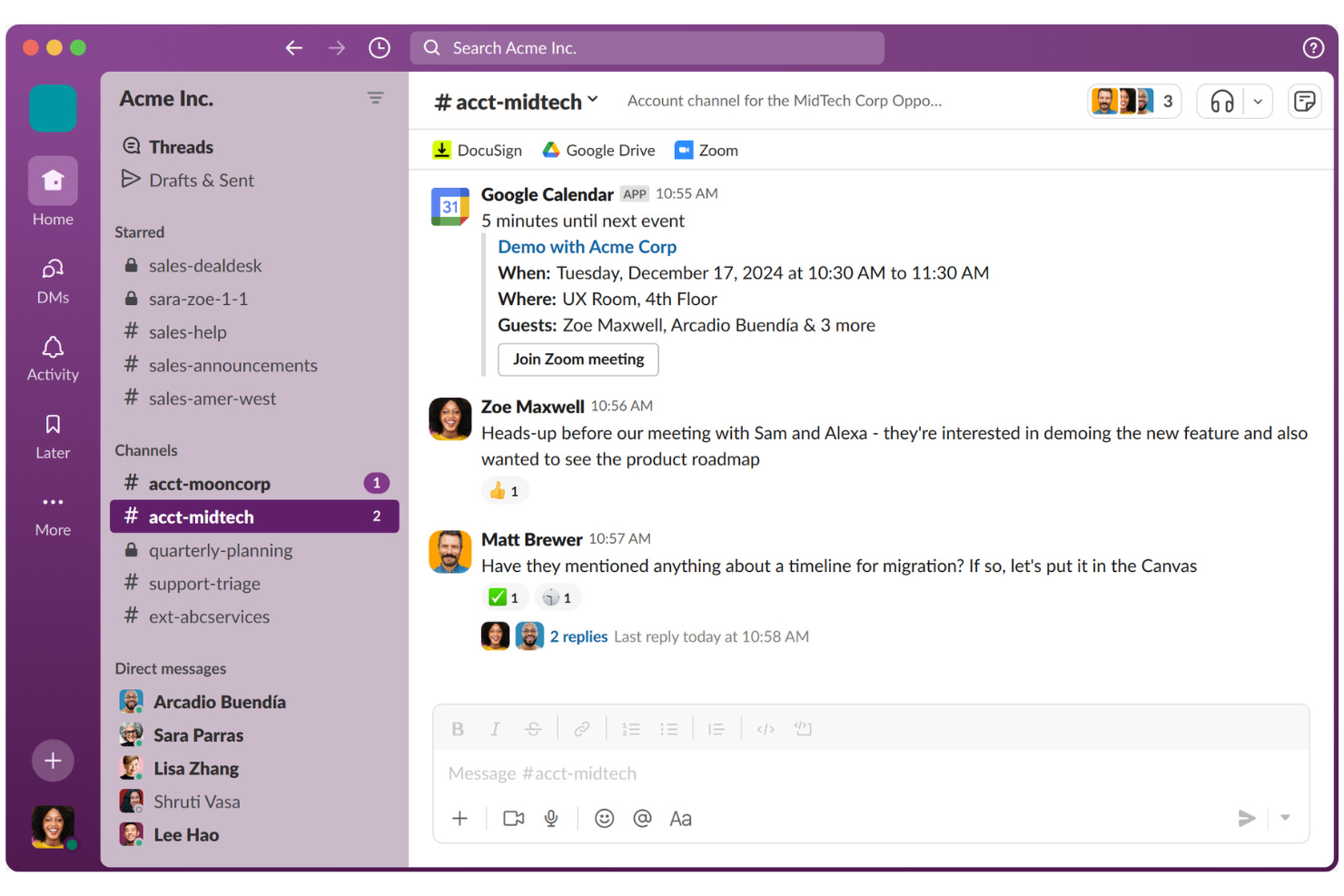
Slack is a collaboration platform designed to help teams communicate and collaborate efficiently. It's widely used by businesses of all sizes for messaging, file sharing, and organizing team communications.
Why it's a good Google Workspace alternative: Unlike Google Workspace's more document-focused approach, Slack excels in team messaging integration. Channels allow you to organize discussions by topics or projects, making communication clear and structured. Slack Connect lets you collaborate with external partners, expanding your communication network. With features such as Huddles for quick audio/video calls, your team can stay connected and responsive.
Standout Features and Integrations:
Features include the ability to create custom workflows using the Workflow Builder, which helps automate routine tasks. You can also use Slack's Canvas feature for document creation and sharing. Additionally, AI-powered tools assist in summarizing conversations and identifying key action items.
Integrations include Google Drive, Microsoft 365 Copilot, Dropbox, Salesforce, Zoom, Asana, Atlassian Trello, GitHub, Zendesk, and more.
Pros and Cons
Pros:
- Custom workflow creation
- Strong external collaboration
- Excellent messaging features
Cons:
- Notifications can be distracting
- Mobile sync can be buggy
Best for work management

Smartsheet is a work management and automation platform used by teams and organizations to plan, capture, manage, and report on work. It's a popular project management platform and is good for teams that need a flexible tool for tracking and managing projects.
Why it's a good Google Workspace alternative: Smartsheet offers work management capabilities that provide a more structured approach than Google Workspace. With its grid-based interface, you can organize tasks and projects efficiently. The platform's automation features help reduce manual work, allowing your team to focus on more important tasks. Smartsheet's reporting tools provide insights into project progress, helping you make data-driven decisions.
Standout Features and Integrations:
Features include the ability to create custom forms for data collection, which simplifies gathering information from your team. The platform provides Gantt chart views, making it easy to visualize project timelines and dependencies. You can also use dashboards to track key metrics and project statuses in real time.
Integrations include Microsoft Teams, Slack, Google Workspace, Salesforce, Jira, Box, Dropbox, DocuSign, ServiceNow, Tableau, and more.
Pros and Cons
Pros:
- Effective project tracking
- Strong automation feature
- Flexible work management tools
Cons:
- Pricing adds up with add-ons
- Mobile lacks Gantt views
New Product Updates from Smartsheet

Smartsheet Adds Plan-Wide reCAPTCHA Controls for Forms
Smartsheet introduces centralized reCAPTCHA controls for existing and future forms through Admin Center. This feature strengthens bot protection and reduces spam submissions. For more information, visit Smartsheet’s official site.
 .

Wrike
Best for enterprise project management
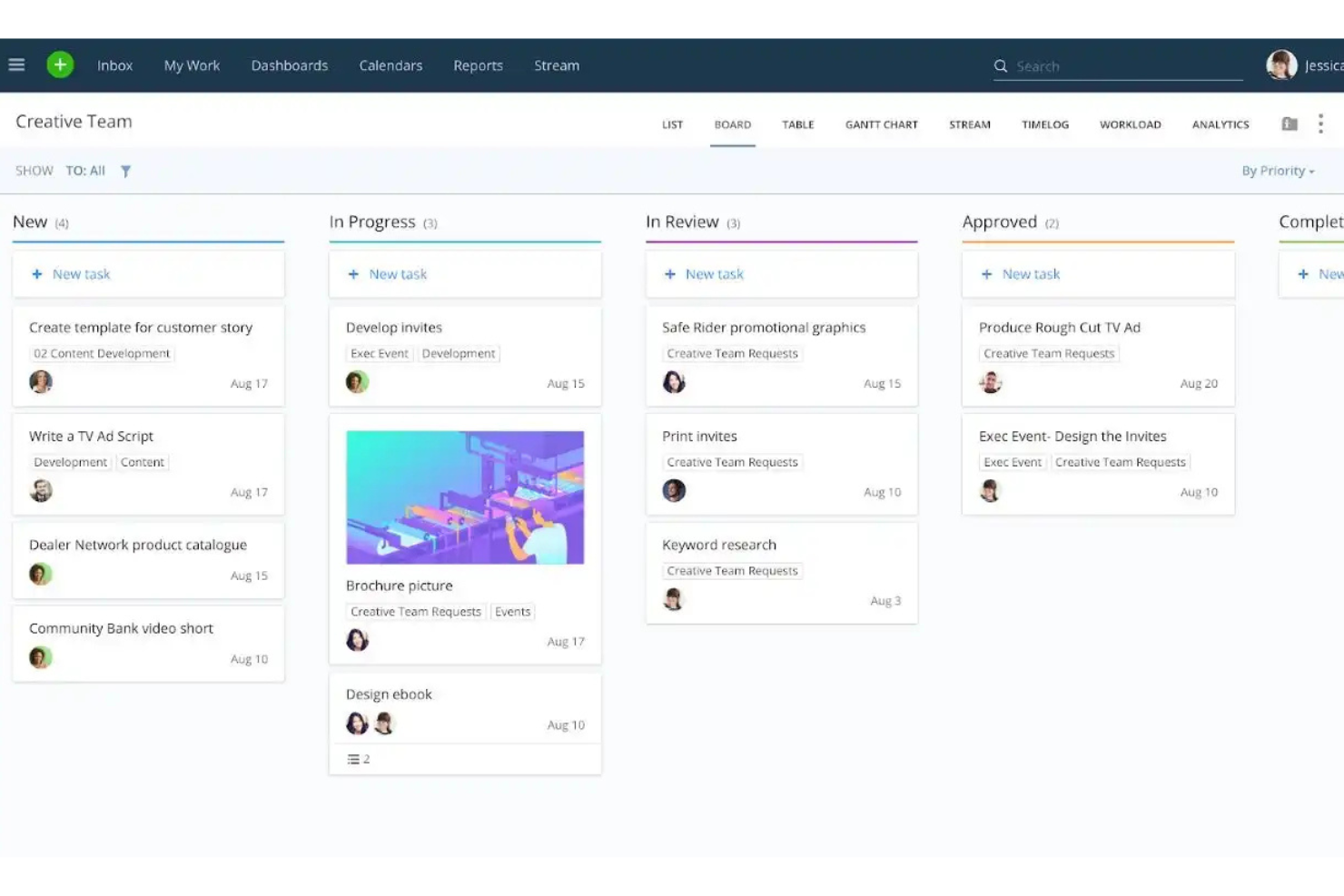
Wrike is a project management and collaboration platform designed for teams and enterprises that need to manage tasks, projects, and workflows efficiently. It's used by professionals who need a centralized tool for planning, executing, and tracking project progress.
Why it's a good Google Workspace alternative: Wrike offers enterprise project management features that provide more depth than Google Workspace's basic tools. Gantt charts help you visualize project timelines and dependencies clearly, and the platform's workload management module helps you allocate resources effectively across your team. Additionally, real-time reporting provides insights into project performance, enabling data-driven decisions. Both a free version and paid plans are available.
Standout Features and Integrations:
Features include custom request forms that simplify the intake process, helping your team capture all necessary information up front. The time-tracking feature helps monitor how long tasks take, aiding in productivity analysis. You can also create dashboards to view key metrics and project updates at a glance.
Integrations include Microsoft Teams, Salesforce, Google Drive, Slack, Dropbox, Box, Adobe Creative Cloud, Tableau, and more.
Pros and Cons
Pros:
- Real-time project tracking
- Effective resource allocation
- Extensive project management tools
Cons:
- Frequent unannounced UI shifts
- Some features are hidden in menus
New Product Updates from Wrike

Wrike Adds a Whiteboard Template Gallery
Wrike introduces a Whiteboard Template Gallery with a dedicated templates section, template previews, smart sorting, and usage counters. These features simplify whiteboard creation and template discovery. For more information, visit Wrike’s official site.

Zoom
Best for video conferencing

Zoom is a video communication platform widely used by businesses, educational institutions, and individuals for virtual meetings and webinars. It facilitates real-time collaboration and communication through video, audio, and chat functions.
Why it's a good Google Workspace alternative: Zoom offers a dedicated platform for video conferencing, which is more specialized than Google Workspace's general communication tools. With features such as HD video and audio, your team can have clear and effective meetings. Breakout rooms allow for smaller group discussions within larger meetings, improving collaboration.
Standout Features and Integrations:
Features include virtual backgrounds that let you customize your meeting environment, adding a professional touch. Host controls provide you with the ability to manage participants effectively, keeping meetings running smoothly. Zoom also offers webinars and large meetings, accommodating up to thousands of participants, making it versatile for different needs.
Integrations include Microsoft Teams, Slack, Salesforce, Google Calendar, Outlook, Dropbox, HubSpot, Calendly, Zapier, Asana, and more.
Pros and Cons
Pros:
- Effective host controls
- Versatile meeting options
- High-quality video and audio
Cons:
- Security concerns in the past
- Can consume significant bandwidth
Diğer Google Workspace Alternatifleri
Kısa listeme girmeyen ancak yine de göz atmaya değer bazı ek Google Workspace alternatifleri şunlardır:
- Obsidian
For personal knowledge management
- Routine
For integrated task and calendar management
- Zoho Workplace
For affordable, all-in-one suite migration


How I Evaluate Google Workspace Alternatives
I split my evaluation into baseline requirements—real-time docs, business email, cloud storage—and the differentiators that make one platform worth migrating to over another.
Core Functionality (Table Stakes For This List)
When I'm selecting tools for my list, I rank each one on a scale from 0 (does not offer the functionality) to 5 (excels in this area) for each core functionality listed below. Then, I calculate the tool's total score into a percentage. Each tool needs to achieve a minimum total score of 65% to be considered for inclusion.
- Document Collaboration: I check whether teams can co-edit docs, spreadsheets, and slides in real time with commenting, version history, and change tracking.
- Cloud Storage & File Sharing: Each platform's storage, folder structure, and sharing permissions matter—especially for teams passing deliverables to external stakeholders.
- Business Email & Calendar: I look for custom-domain email and shared calendars with scheduling tools, since most project teams rely on these daily.
- Team Communication: Built-in chat, video calls, or channels keep conversations close to the work. Platforms like Zoho Workplace and Microsoft 365 bundle these natively.
- Task & Project Tracking: I evaluate whether the platform offers assignable tasks, due dates, or project views—features that connect productivity tools to actual delivery.
- Third-Party Integrations: Connecting to tools like Jira, Asana, or Slack through native integrations or an open API is essential for fitting into an existing PM stack.
Once I have a list of tools that meet this criteria, I consider what sets each platform apart.
Differentiating Factors (What Sets Vendors Apart)
Here's how I compare and contrast different vendors:
Standout Features
AI-powered assistants add real value here—I look for platforms where AI can draft documents, summarize threads, or auto-generate tasks from notes. Client and guest portals matter when your team shares deliverables externally. Platforms like Notion and Zoho Workplace offer limited external access without requiring paid seats. No-code automation builders are worth evaluating too, since triggering approvals or routing tasks across tools can replace standalone workflow apps entirely.
Beyond Features
Migration ease is the first thing I evaluate—switching from Google Workspace means moving years of files, emails, and folder structures. Platforms like Microsoft 365 and Zoho Workplace offer dedicated import tools that reduce that friction. Pricing models also vary widely; I check whether guest or external collaborator access requires paid seats, since project teams often loop in contractors. Security certifications like SOC 2 and GDPR compliance matter too, especially for teams handling sensitive project data across regions.
Neden bir Google Workspace alternatifi aramalısınız?
Google Workspace bulut tabanlı bir üretkenlik aracı için iyi bir seçim olsa da bazı kullanıcıların alternatif çözümler aramasının çeşitli nedenleri vardır. Şu nedenlerle bir Google Workspace alternatifi arıyor olabilirsiniz:
- Daha iyi veri gizliliği denetimlerine ihtiyacınız var
- Ekibiniz daha gelişmiş özelliklere ihtiyaç duyuyor
- Diğer araçlarla entegrasyon sorunları yaşıyorsunuz
- Daha fazla özelleştirme seçeneği istiyorsunuz
- İşletmenizin yerel veri barındırmaya ihtiyacı var
- Daha uygun maliyetli bir çözüm arıyorsunuz
Bunlardan herhangi biri size uyuyorsa doğru yere geldiniz. Listemde, Google ekosistemiyle ilgili bu zorluklarla karşılaşan ve alternatif çözümler arayan ekipler için daha uygun olan çeşitli bulut tabanlı üretkenlik aracı seçenekleri yer alıyor.
Özellikler
Alternatif çözümlerin sunduklarını karşılaştırmanıza yardımcı olmak için Google Workspace'in bazı temel özelliklerini burada bulabilirsiniz:
- Profesyonel E-posta: Markanızın güvenilirliğini artırmak için Gmail e-posta hizmeti ve özel alan adlarıyla e-posta barındırma ve kurumsal e-posta adresleri sağlar.
- Dosya Yönetimi: Ekibiniz için Google Drive aracılığıyla güvenli dosya depolama ve paylaşım seçenekleri sunar.
- Video Toplantıları: Gerçek zamanlı iş birliği ve video konferans için Google Meet'i kullanır. Google Workspace'in değiştirmek istediğiniz bölümü toplantılarsa Google Meet alternatiflerini karşılaştırın.
- Uygulama Entegrasyonu: İş akışlarınızı iyileştirmek için harici uygulamalarla sorunsuz bir şekilde entegre olur.
- Yönetici Yönetimi: Yönetici konsolu üzerinden kullanıcı hesapları ve güvenlik ayarları üzerinde merkezi kontrol sağlar.
- Veri Güvenliği: Google Vault'u kullanarak güvenlik amacıyla kurumsal verileri saklar ve izler; çeşitli kimlik doğrulama protokollerini destekler.
- Web Sitesi Oluşturma: Programlama bilgisi olmadan Google Sites ile kolayca web sitesi geliştirmeye olanak tanır.
- Otomasyon: İş süreçlerinizi daha verimli hâle getirmek için görevleri otomatikleştirir.
- Cihaz Uyumluluğu: Özellikle Google Chrome ile Android ve macOS dahil olmak üzere çeşitli tarayıcılar ve işletim sistemlerinde kullanıma göre optimize edilmiştir.
- Gerçek Zamanlı İş Birliği: Birden fazla kullanıcının belgeleri aynı anda düzenlemesine olanak tanıyarak ekip çalışmasını geliştirir.