

2026’da Denemeye Değer 10 Microsoft Whiteboard Alternatifi

Microsoft Whiteboard Alternatifleri Kısa Listesi


Güçlü bir Microsoft Whiteboard alternatifi, ekibinize ister Windows ister macOS üzerinde kullanabileceğiniz esnek bir sanal beyaz tahta, güçlü bir iş birliği platformu ve iş akışınıza uygun entegrasyonlar sunar. Conceptboard gibi çevrim içi bir beyaz tahta veya başka bir beyaz tahta aracı arıyorsanız muhtemelen gelişmiş beyaz tahta özelliklerine, entegre görev yönetimine ya da öğrenme eğrisi yumuşak, modern bir kullanıcı arayüzüne ihtiyacınız vardır. Bu liste, 2026'nın en iyi beyaz tahta yazılımlarını karşılaştırmanıza yardımcı olacak; böylece ekibinizin çalışma tarzına uyan, kritik karar alma süreçlerini destekleyen ve çalışma şeklinize uyum sağlayan kullanıcı dostu bir çözüm bulabileceksiniz.
Microsoft Whiteboard Nedir?
Microsoft Whiteboard, ücretsiz sürümü aracılığıyla kolayca erişilebilen, Microsoft'un sunduğu serbest biçimli bir beyaz tahta platformudur. Bireylerin ve uzaktan çalışan ekiplerin gerçek zamanlı olarak çizim yapmasına, yazı yazmasına, yapışkan notlar eklemesine ve fikirlerini paylaşmasına olanak tanır; bu da planlama veya geriye dönük değerlendirmeler için görselleştirmeyi sorunsuz hâle getirir. Microsoft Whiteboard, Microsoft 365 uygulamalarıyla doğrudan entegre olur ve Teams ile OneNote'un yanı sıra yüksek kullanım kolaylığı sağlar. Cihazlar arasında beyin fırtınası, planlama ve görsel iş birliği için tasarlanmıştır.
Microsoft Whiteboard Alternatifleri Karşılaştırma Tablosu
Aşağıdaki tablo, en iyi Microsoft Whiteboard alternatiflerim için fiyatlandırma ayrıntılarını karşılaştırmaktadır.
Score legend (out of 5)
- Excellent 4.5–5
- Good 4–4.4
- Average 3–3.9
- Below average 2–2.9
- Poor 1–1.9
| Tool | Starting Price | Website | |||||||
|---|---|---|---|---|---|---|---|---|---|
| Best for design-to-whiteboard workflows | 4.3 out of 5 | 3 | 5 | 4 | 4 | 5 | 5 | $3/user/month Free plan available | Website |
| Best for GDPR-compliant EU-hosted whiteboarding | 3.5 out of 5 | 2 | 4 | 3 | 4 | 4 | 4 | $6/user/month Free plan + free trial available | Website |
| Best for turning meetings into structured outputs | 4.0 out of 5 | 4 | 3 | 4 | 4 | 4 | 5 | Pricing upon request Free plan + 30-day trial + free demo available | Website |
| Best for multimedia board sharing in class | 3.8 out of 5 | 4 | 4 | 4 | 4 | 4 | 3 | $11.61/month Free plan available | Website |
| Best for workshop facilitation controls | 4.0 out of 5 | 3 | 4 | 4 | 4 | 4 | 5 | $9.99/user/month Free plan available | Website |
| Best for GDPR-compliant workshop facilitation | 3.5 out of 5 | 2 | 3 | 4 | 4 | 4 | 4 | €5/user/month Free plan + 30-day trial available | Website |
| Best for wireframing and UI planning | 3.5 out of 5 | 2 | 4 | 4 | 4 | 4 | 3 | $9/user/month Free plan available | Website |
| Best for defense-grade secure visual collaboration | 3.8 out of 5 | 2 | 4 | 4 | 4 | 4 | 5 | Pricing upon request Free demo available | Website |
| Best for brainstorming with design assets on hand | 3.5 out of 5 | 3 | 4 | 3 | 3 | 4 | 4 | Free plan available Free plan available | Website |
| Best for large-scale team collaboration | 4.2 out of 5 | 4 | 4 | 4 | 4 | 4 | 5 | $8/user/month Free plan + 14-day trial available | Website |

Why Trust Our Software Recommendations
Our team has been testing and reviewing software since 2012. As project managers ourselves, we know how difficult—and important—it is to choose the right software.
For this guide, we evaluated tools using hands-on testing and independent research, scoring tools using our selection criteria. We also draw on insights from industry thought leaders and practicing project management experts.
Our reviews reflect our human editorial judgment, not a sales pitch.
Expert reviewers:
Microsoft Whiteboard Alternatifleri İncelemeleri
Aşağıda, kısa listeme giren en iyi Microsoft Whiteboard alternatifleri hakkındaki ayrıntılı özetlerimi bulabilirsiniz. İncelemelerim, size en uygun seçeneği bulmanıza yardımcı olmak için her platformun özelliklerine, en iyi kullanım alanlarına ve entegrasyonlarına ayrıntılı bir bakış sunuyor.

FigJam
Best for design-to-whiteboard workflows
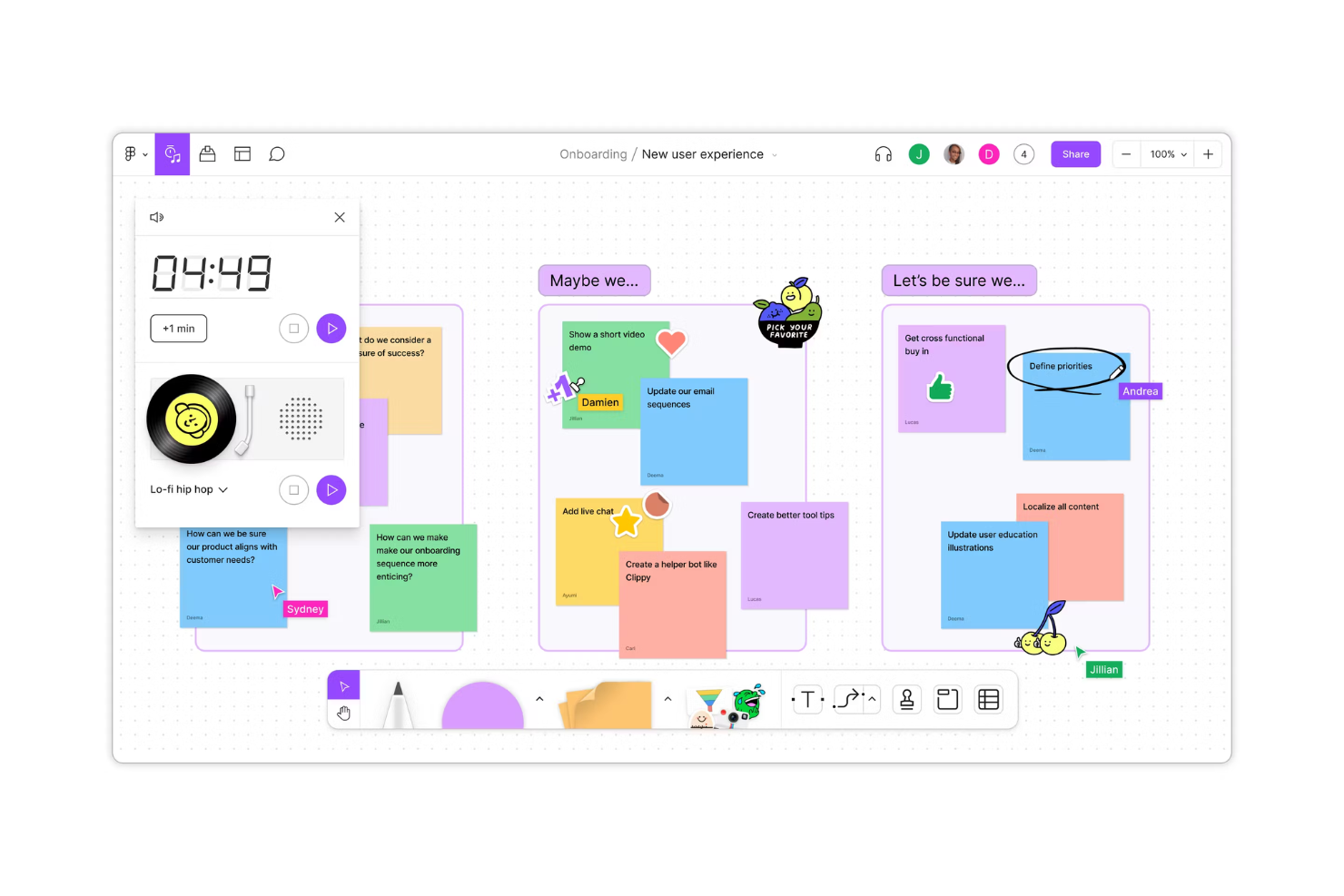
FigJam is Figma’s collaborative whiteboard for product and design teams that need to gather ideas, map decisions, and keep cross-functional work aligned.
Who Is FigJam Best For?
FigJam suits UX and product teams that want to move from design work into collaborative workshops and planning.
Why I Picked FigJam
I picked FigJam because it earns “Best for design-to-whiteboard workflows.” I can bring Figma frames into a board, then use sticky notes and connectors to collect feedback on specific screens. My team can turn that discussion into a prioritized flow while keeping the design context visible.
FigJam Key Features
- Voting: Run timed votes with set limits per participant.
- Timer: Add a countdown timer to keep workshop activities on schedule.
- Audio chat: Talk with collaborators directly from the board.
- Templates: Start with ready-made layouts for activities like retrospectives and planning.
FigJam Integrations
FigJam offers integrations with Jira, Asana, and GitHub; its Jira widget lets you turn board stickies into issues. Figma also supports Slack, Zapier, and an API for custom integrations.
Pros and Cons
Pros:
- Run timed votes and workshop activities
- Collect feedback alongside specific design screens
- Bring Figma designs directly into workshops
Cons:
- Large boards can become messy or slow
- Advanced diagramming options remain limited

Best for GDPR-compliant EU-hosted whiteboarding
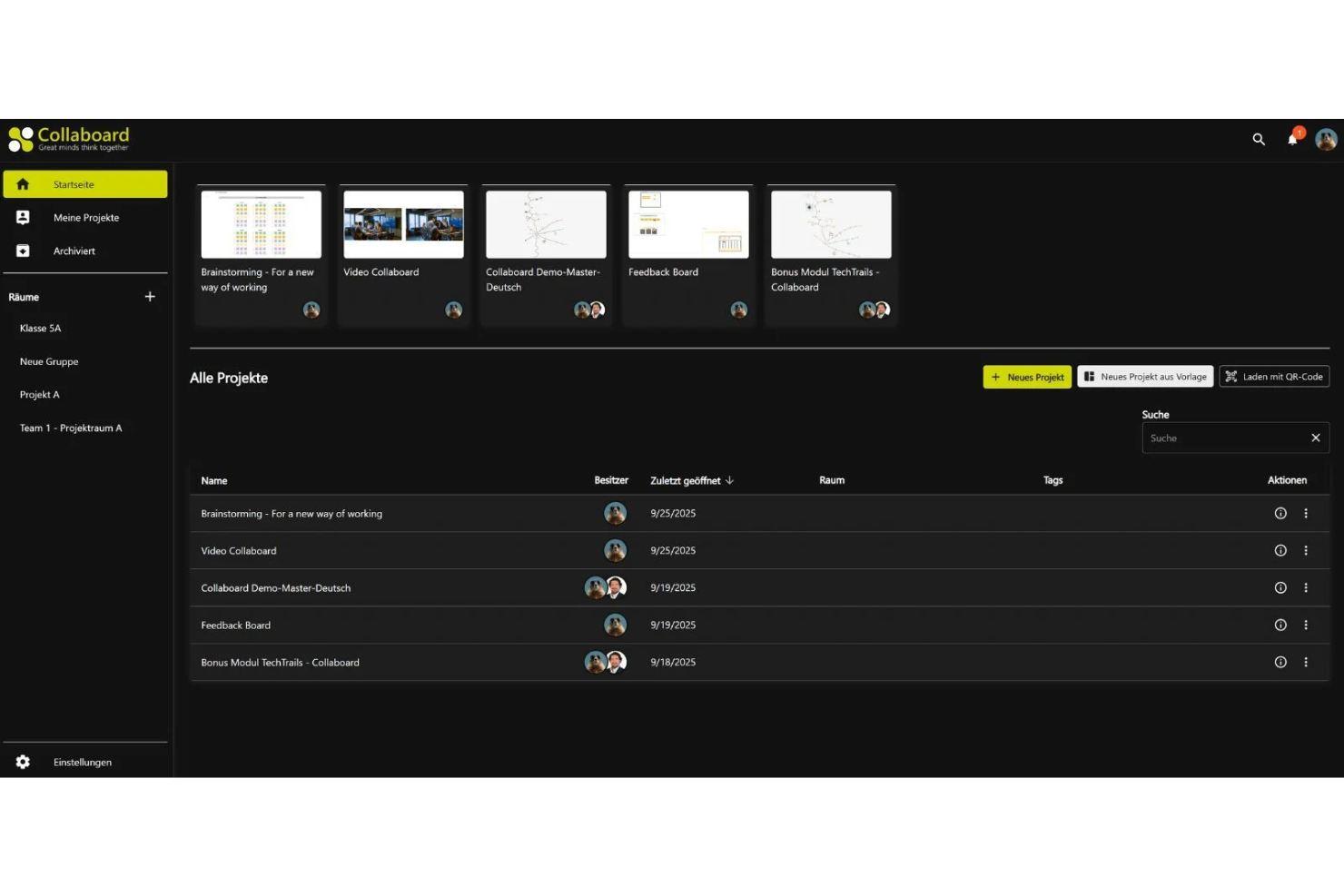
For product and project teams that need more than a blank canvas, Collaboard is an online whiteboard for brainstorming, mapping workflows, and aligning on shared plans.
Who Is Collaboard Best For?
Collaboard suits teams that need a collaborative whiteboard with EU hosting and GDPR-focused data protection.
Why I Picked Collaboard
I picked Collaboard for GDPR-compliant EU-hosted whiteboarding, with hosting options that include Germany and the Netherlands. I value its TLS encryption in transit and AES-256 encryption at rest. Role-based permissions and password-protected boards help me control access to project plans and workshop notes.
Collaboard Key Features
- Infinite canvas: Zoom and add sticky notes, shapes, drawings, and mind maps.
- Templates: Choose from more than 150 Collaboard and community templates.
- Anonymous voting: Collect votes and ratings directly on a board.
- Jira integration: Import issues to plan projects, workshops, and retrospectives.
Collaboard Integrations
Collaboard documents integrations with Jira, Pexip, Microsoft Teams, Nextcloud, Cisco Webex, and Rocket.Chat. It also offers a public API for custom integrations.
Pros and Cons
Pros:
- Editable imports help preserve existing board content
- Anonymous voting and timers support workshops
- EU-hosted boards support data-sovereignty needs
Cons:
- Handwriting and mind mapping need refinement
- Some reviewers describe the interface as dated

Best for turning meetings into structured outputs
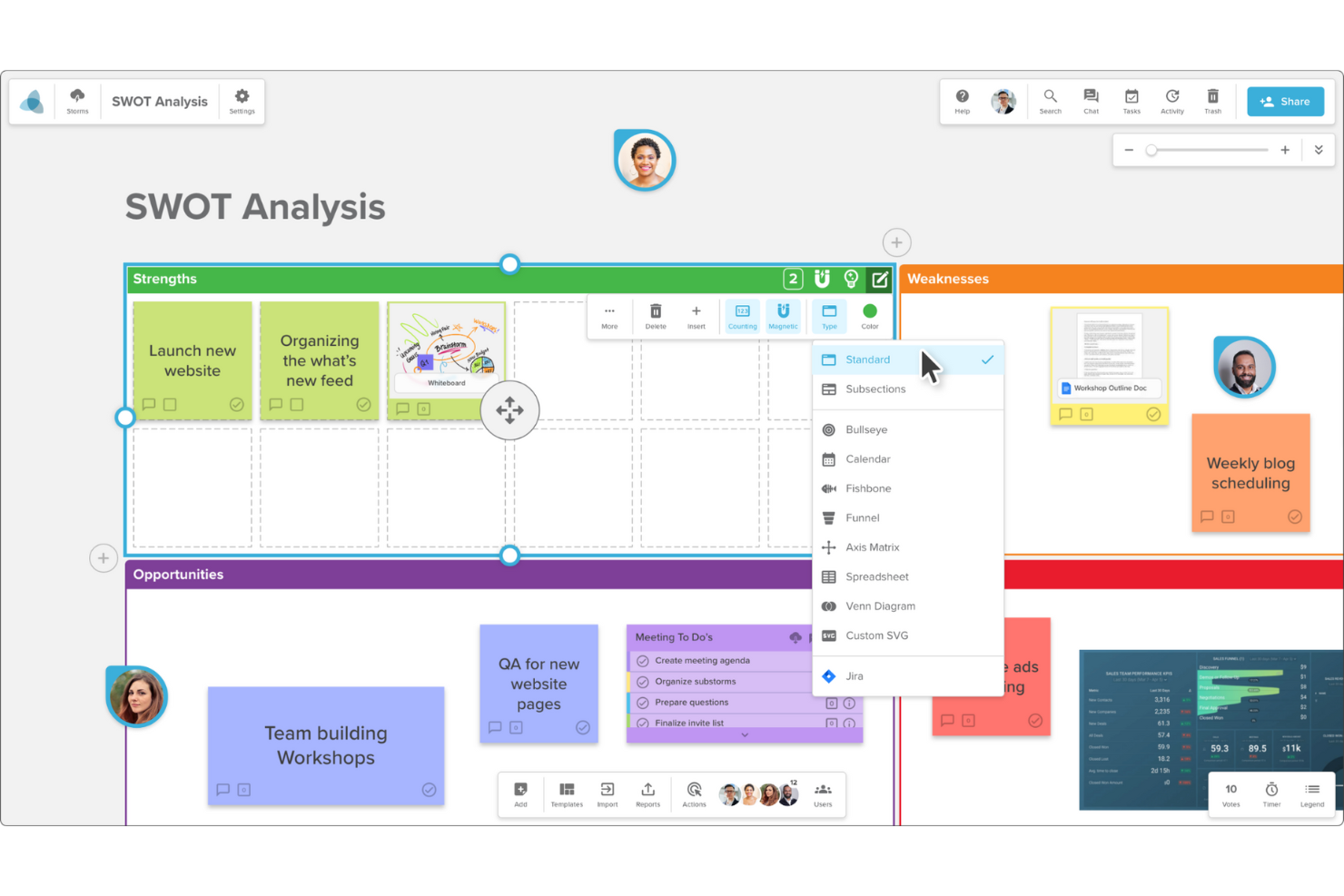
Stormboard is an online whiteboard for project and product teams who need to organize ideas, map workflows, and carry workshop discussions into project work.
Who Is Stormboard Best For?
Stormboard suits project managers who run cross-functional planning sessions and need to capture decisions and follow-up work in one shared workspace.
Why I Picked Stormboard
I picked Stormboard for “Best for turning meetings into structured outputs.” Its reports turn board content into editable meeting minutes or presentations, while task exports capture assignees, due dates, and status. I like how those exports give decisions from a Microsoft Whiteboard alternative a clear path into follow-up work.
Stormboard Key Features
- Customizable templates: Choose from templates for brainstorming, project planning, Agile workflows, and meetings.
- Infinite canvas: Add and resize template sections, then adjust their colors, backgrounds, titles, and types.
- Comments and chat: Discuss ideas in comments or message teammates within a Storm.
- Dot voting: Vote on ideas with dotmocracy to help prioritize options.
Stormboard Integrations
Stormboard offers integrations with Microsoft Teams, Google Drive, Jira, Rally, Azure DevOps, Webex, Zoom, Slack, Dropbox, and Box, and connects with Zapier. It also provides a REST API for custom integrations.
Pros and Cons
Pros:
- Dot voting helps prioritize workshop ideas
- Task exports preserve owners and due dates
- Editable reports turn discussions into minutes
Cons:
- Finding items across storms feels difficult
- Large boards can lag with many users
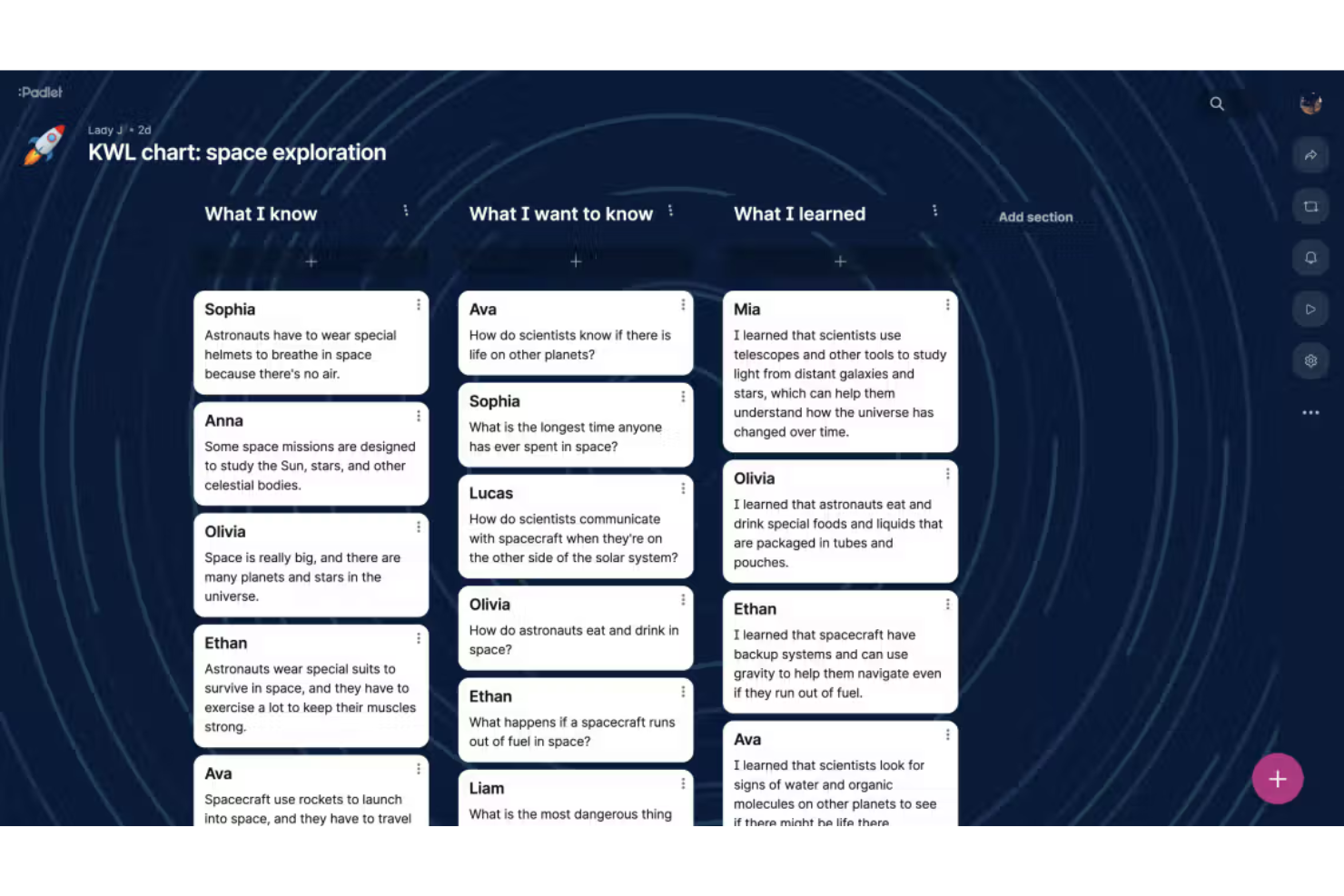
Padlet is a visual collaboration platform for educators and project teams who need a flexible Microsoft Whiteboard alternative to gather ideas and organize shared work.
Who Is Padlet Best For?
Padlet is a good fit for teachers and instructors who want students to share ideas, media, and project work on a collaborative classroom board.
Why I Picked Padlet
I picked Padlet because it’s Best for multimedia board sharing in class. Students can add images, video, audio, and links to a shared board, then respond to classmates’ posts with comments and reactions. I like it as a Microsoft Whiteboard alternative when a lesson or project needs students to collect and discuss media, not just sketch ideas.
Padlet Key Features
- Board layouts: Arrange posts in formats such as a grid, columns, or canvas.
- Visitor permissions: Set access levels, from read-only to post approval.
- Board embedding: Embed a board on another website or share it by QR code.
- Export options: Save board content as an image, PDF, CSV, or Excel spreadsheet.
Padlet Integrations
Padlet supports LTI 1.3 integrations with Moodle, Canvas, Blackboard, Brightspace, Schoology, itslearning, Google Classroom, and Microsoft Teams; LMS integrations require a School subscription. It also connects with Zapier and offers a public API for custom integrations.
Pros and Cons
Pros:
- Comments and reactions support peer feedback
- Anonymous responses invite broader participation
- Students can post videos, audio, and images
Cons:
- Board limits hinder use across multiple classes
- Dense boards become hard to scan

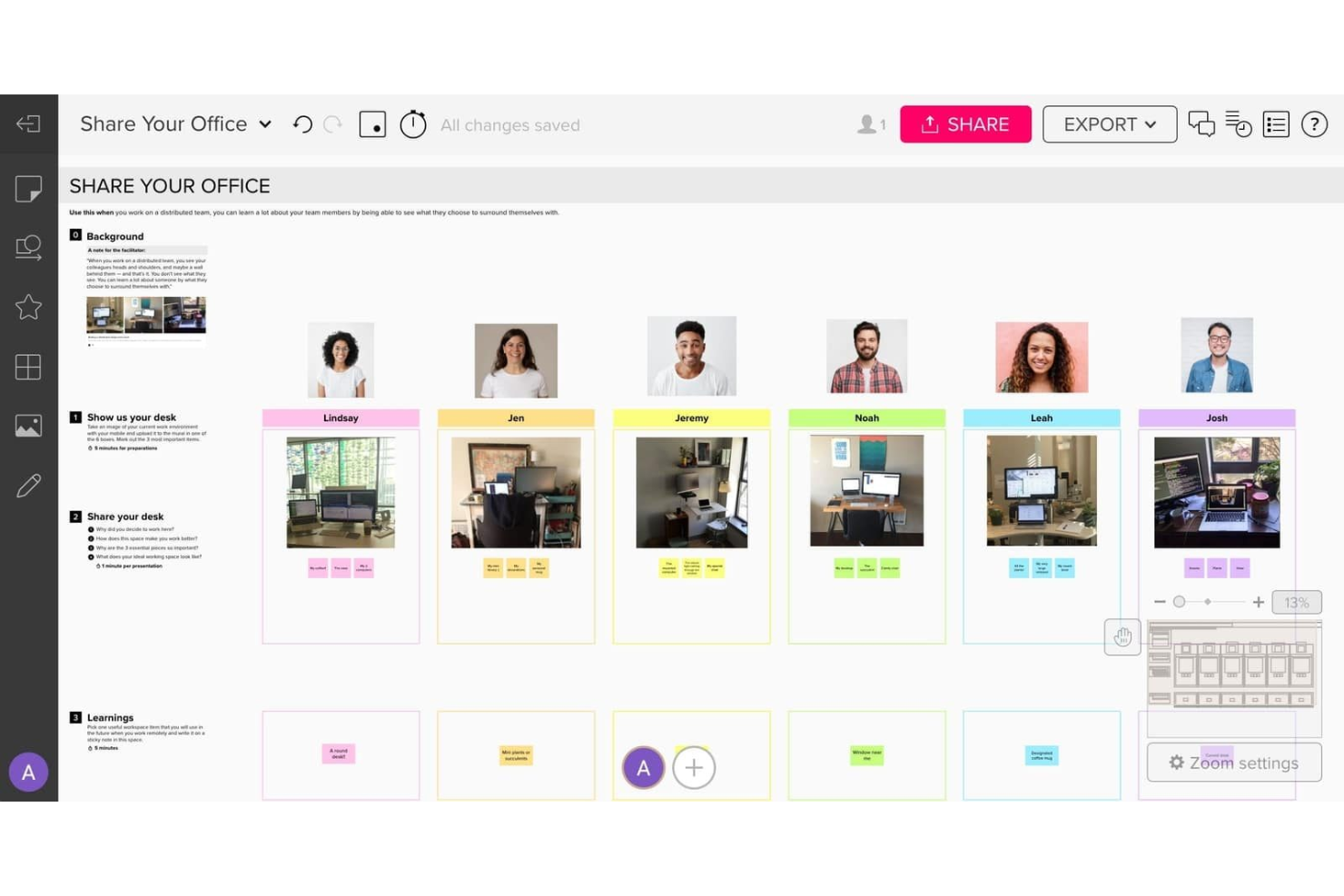
For product, design, and delivery teams that need more structure than Microsoft Whiteboard offers, Mural is an online whiteboard for mapping ideas, planning work, and aligning stakeholders across projects.
Who Is Mural Best For?
Mural suits project managers and workshop facilitators who need structured controls to guide collaborative planning and decision-making sessions.
Why I Picked Mural
I picked Mural as “Best for workshop facilitation controls” because it gives me ways to guide live sessions beyond a blank canvas. I use private mode to collect ideas before revealing them, then voting to help a group prioritize options. A timer keeps breakout activities on track.
Mural Key Features
- Templates: Start from ready-made boards for planning, mapping, and retrospectives.
- Sticky notes: Add and arrange text notes on the canvas.
- Connectors: Link shapes and notes to show relationships between ideas.
- Comments: Add comments to specific areas of a mural for asynchronous discussion.
Mural Integrations
Mural’s documented integrations include Microsoft Teams, Jira, Asana, Azure DevOps, Slack, Confluence, Figma, GitHub, and Linear, and it connects with Zapier. Mural also offers an API for custom integrations.
Pros and Cons
Pros:
- Templates structure planning beyond blank canvases
- Timers and voting keep workshops focused
- Private mode prevents groupthink during ideation
Cons:
- Tables and charts trail Miro’s options
- Large boards can lag with collaborators

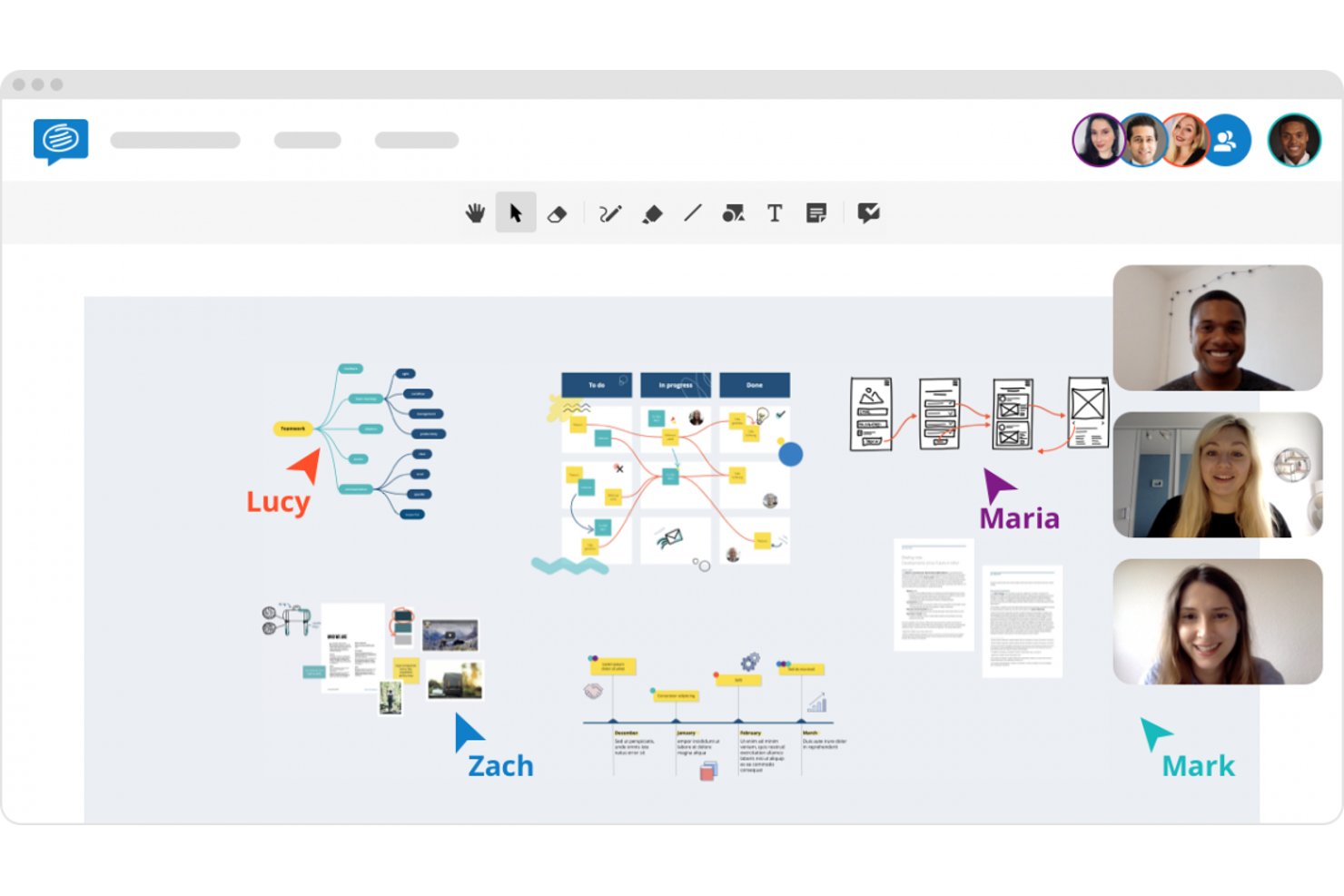
For product and project teams seeking a Microsoft Whiteboard alternative, Conceptboard is an online whiteboard for mapping ideas, planning work, and coordinating distributed collaboration on shared visual boards.
Who Is Conceptboard Best For?
Project managers and facilitators who run distributed workshops and need a GDPR-compliant visual collaboration space.
Why I Picked Conceptboard
I picked Conceptboard as a Microsoft Whiteboard alternative because it’s Best for GDPR-compliant workshop facilitation. Its Germany-based hosting and board-level permissions support sensitive workshops. I can invite stakeholders as reviewers, grant editing access during the session, then revoke it afterward.
Conceptboard Key Features
- Workshop templates: Start sessions with templates for retrospectives, brainstorming, and process mapping.
- Board tasks: Turn board content into tasks with assignees, deadlines, and tags.
- Live comments: Add comments directly to board content during collaborative sessions.
- Voting: Let participants vote on ideas and options directly on the board.
Conceptboard Integrations
Conceptboard documents integrations with Microsoft Teams, Jira, Azure, Confluence, Webex, Google Drive, OneDrive, and Dropbox. These connections let teams embed boards in collaboration tools and bring tickets or files into their visual workflows.
Pros and Cons
Pros:
- Board tasks retain ideas with owners
- Workshop templates structure facilitated sessions
- Board-level permissions protect sensitive workshops
Cons:
- Sticky notes can snap or glitch
- Large boards can load slowly

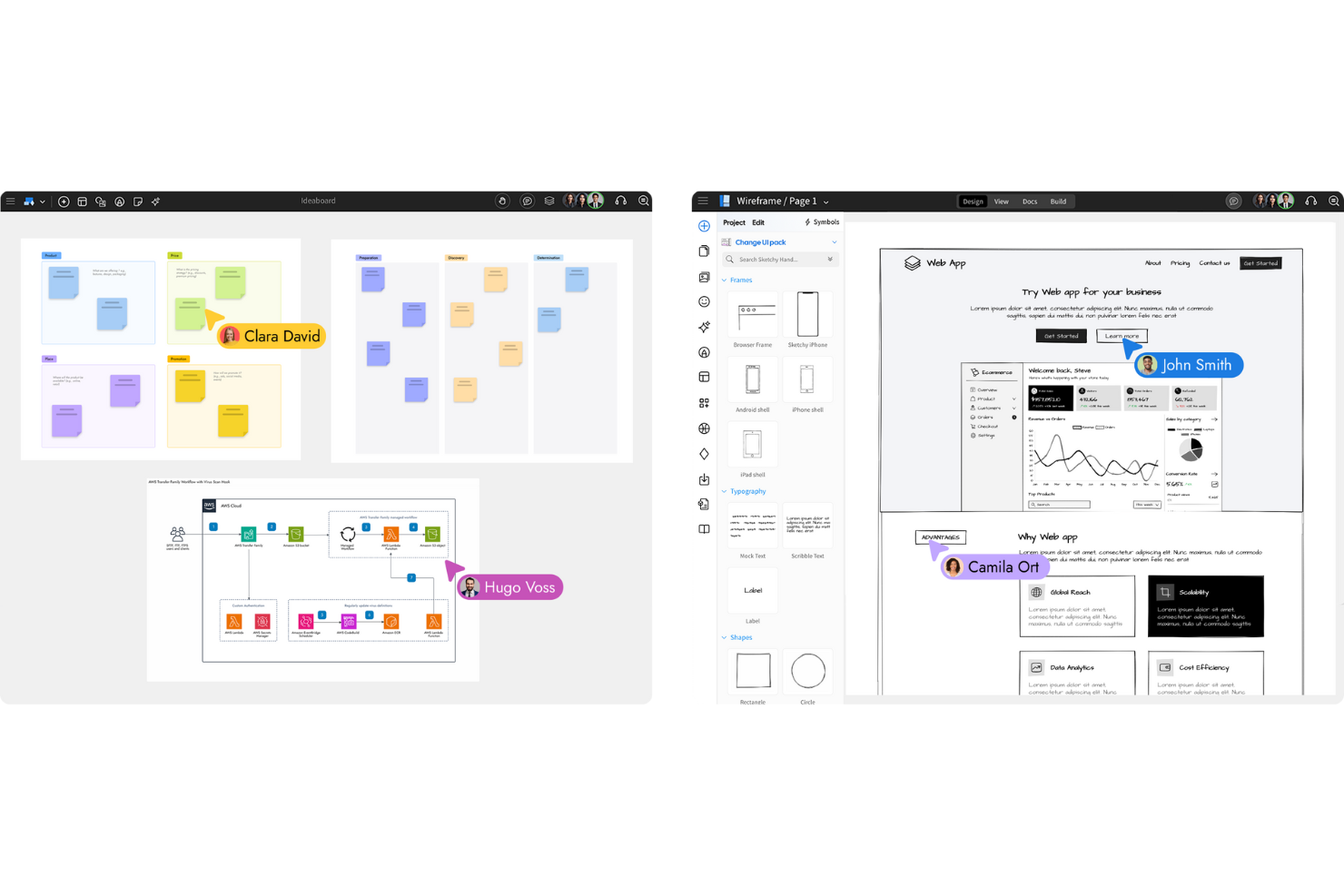
MockFlow gives product and design teams an online visual workspace to organize early ideas, align stakeholders, and clarify project decisions as an alternative to Microsoft Whiteboard.
Who Is MockFlow Best For?
Product managers and UX designers on digital product teams can use MockFlow to sketch interfaces and align on UI plans before development.
Why I Picked MockFlow
I picked MockFlow as a Microsoft Whiteboard alternative because its wireframe editor combines a UI widget library and reusable UI packs with a shared canvas. I like how teams can link onboarding screens into a clickable prototype, then preview the flow full-screen or on a phone before engineering starts.
MockFlow Key Features
- Board components: Add sticky notes, mind maps, kanban boards, diagrams, and polls to a board.
- AI board generation: Create boards from prompts, meeting notes, transcripts, or product requirements documents.
- Board meetings: Run audio or video calls and present live from a board.
- Pinned comments: Attach text, audio, or video comments to specific board locations.
MockFlow Integrations
MockFlow offers board integrations with Microsoft Teams, Google Meet, Confluence, Jira, Trello, and Slack, plus live data connectors for Notion, GitHub, and Google Drive. A Boards API and webhooks are available for custom integrations.
Pros and Cons
Pros:
- Clickable prototypes preview flows on phones
- Whiteboards and UI planning share one workspace
- Quick low-fidelity wireframes clarify screen structure
Cons:
- Prototype controls don’t simulate interactions realistically
- Some UI elements feel dated or incomplete

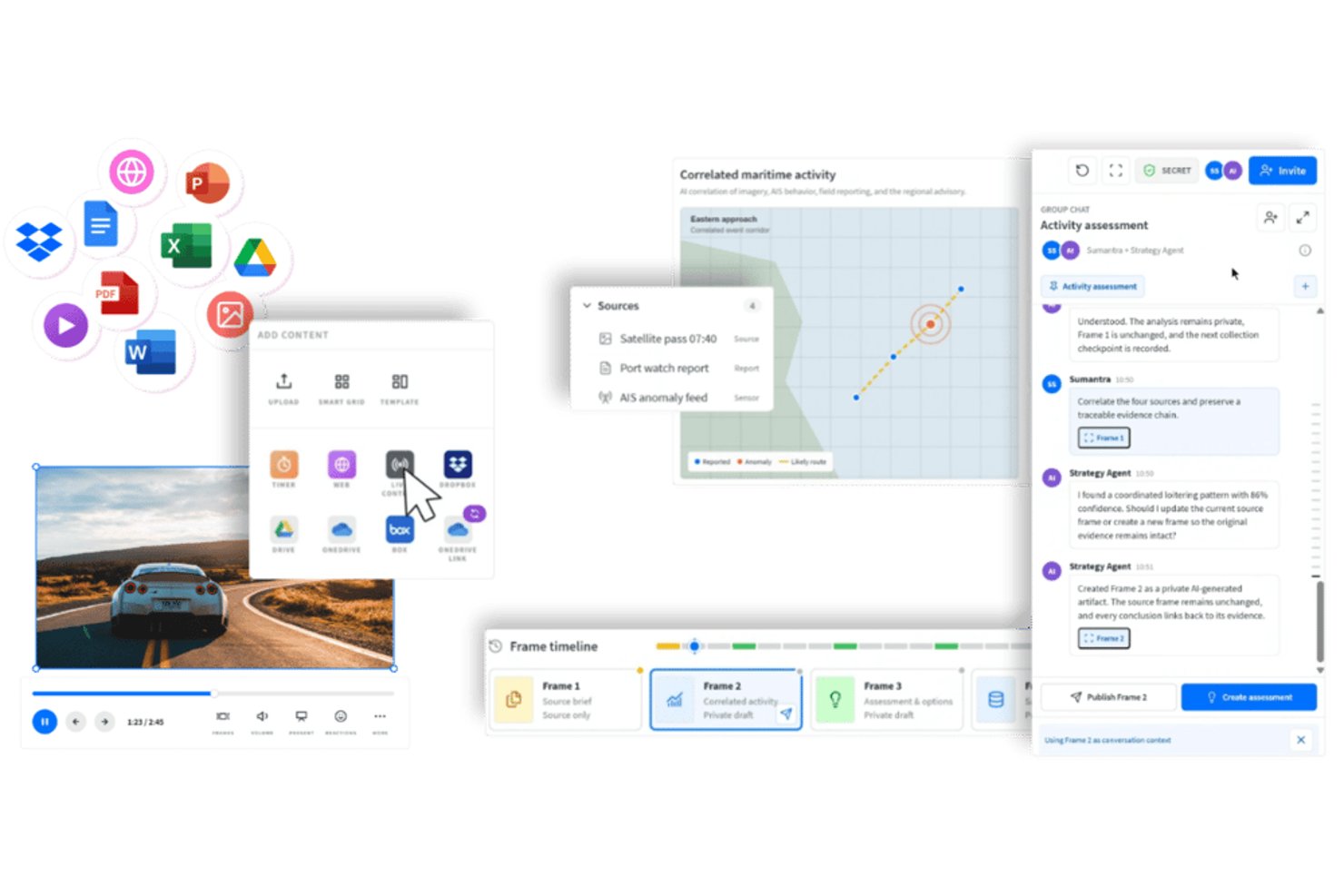
Bluescape is an online visual collaboration workspace for product, engineering, and design teams that need to organize project materials, map workflows, and align stakeholders on shared canvases.
Who Is Bluescape Best For?
Bluescape is a good fit for defense and government teams that need secure visual collaboration to coordinate plans and align stakeholders.
Why I Picked Bluescape
I picked Bluescape as a Microsoft Whiteboard alternative because its USP is “Best for defense-grade secure visual collaboration.” I like that teams can deploy it on-premises or in a private cloud, set role-, attribute-, or policy-based access, and bring documents and live feeds onto a persistent canvas for operational planning.
Bluescape Key Features
- Synchronized video playback: Upload videos, review them frame by frame, and keep playback synchronized for everyone.
- Document annotation: View and annotate documents with full-screen viewing, zoom, and page extraction.
- Canvas carousels: Automatically present selected canvases at configured intervals.
- Multi-page PDF export: Organize selected canvases and export them as a multi-page PDF.
Bluescape Integrations
Bluescape has a native integration with n8n and integrations with Microsoft Teams, OneDrive, Microsoft 365, Webex by Cisco, Box, Autodesk Flow Production Tracking, and Slack. Its REST API supports custom integrations with external systems.
Pros and Cons
Pros:
- Persistent canvas keeps project files and decisions together
- Frame-synchronized video review beats screen sharing
- Secure on-premises deployment supports sensitive planning
Cons:
- Comments don’t translate readily into tracked tasks
- Large workspaces can lag or feel cumbersome

Canva Whiteboard gives product, design, and marketing teams a shared online space to map ideas, discuss workflows, and keep visual collaboration connected to their wider Canva work.
Who Is Canva Whiteboard Best For?
Canva Whiteboard suits product and UX teams that want to brainstorm early ideas alongside Canva’s templates, photos, and other design assets.
Why I Picked Canva Whiteboard
I picked Canva Whiteboard as a Microsoft Whiteboard alternative because it’s best for brainstorming with design assets on hand. I like using its shared board to map early ideas and workflows alongside Canva templates, photos, and other design assets. For example, I can sketch a product concept while keeping relevant visual references on the board.
Canva Whiteboard Key Features
- Timers: Add a timer to keep group activities on schedule.
- Comments: Leave comments directly on the whiteboard.
- Sticky-note reactions: Add reactions to sticky notes.
- Sketching tools: Draw and annotate ideas on the canvas.
Canva Whiteboard Integrations
Canva lists integrations with Slack, Google Drive, Mailchimp, and HubSpot. Canva AI also supports read-only connections to Notion, Asana, Gmail, and Zoom.
Pros and Cons
Pros:
- Presentation slides can expand into whiteboards
- Templates cover mind maps and project plans
- Canva's design library adds visual references
Cons:
- Stylus strokes may lag during writing
- Complex boards can slow editing
Miro
Best for large-scale team collaboration
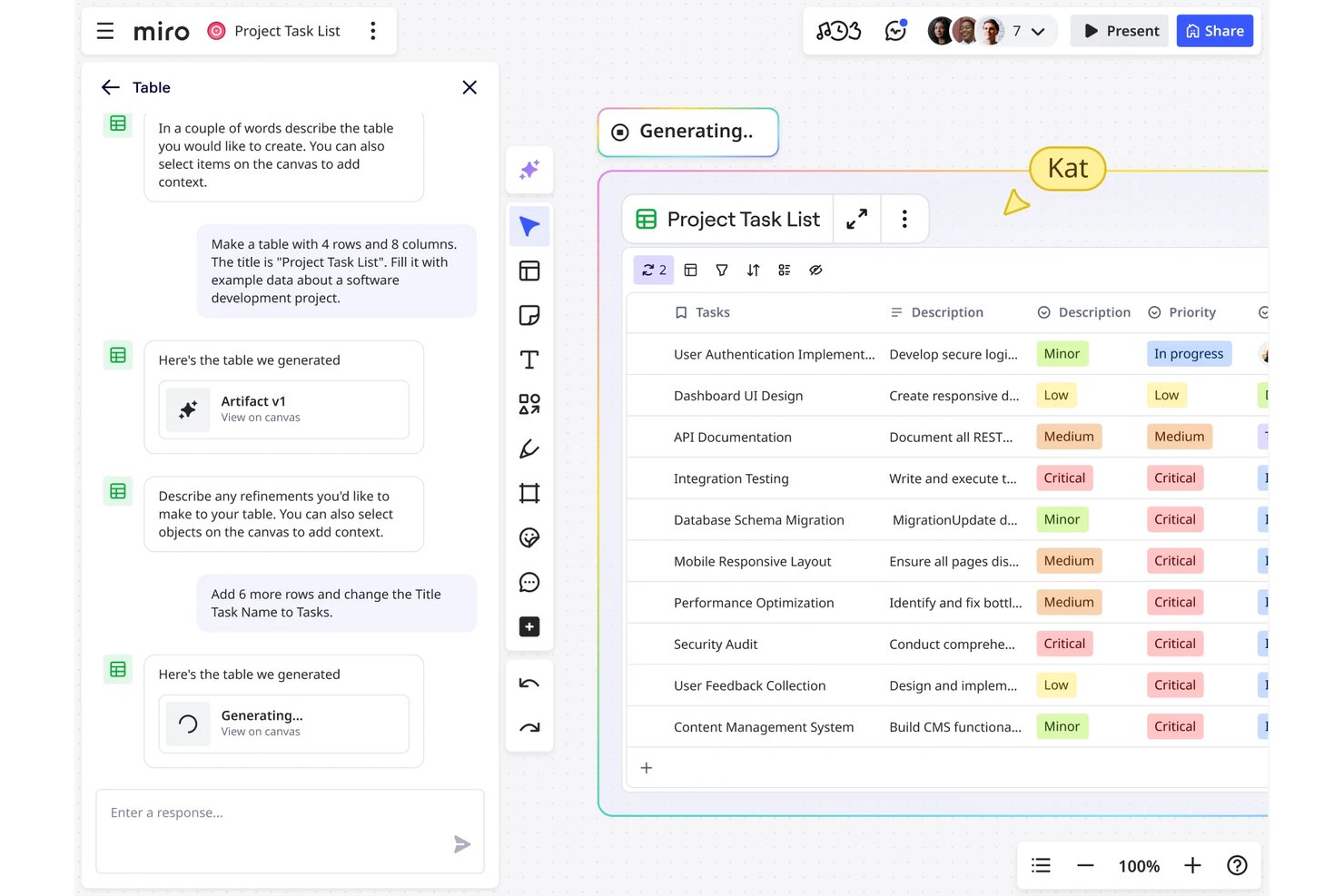
Miro is an online whiteboard for product, design, and project teams that need to map ideas, plan workflows, and keep distributed stakeholders aligned beyond Microsoft Whiteboard’s basic canvas.
Who Is Miro Best For?
Miro suits project and product teams at growing or large organizations that need a shared visual workspace for cross-functional planning across departments.
Why I Picked Miro
I picked Miro as a Microsoft Whiteboard alternative for its stated strength: “Best for large-scale team collaboration.” Its infinite canvas and frames let product, design, and engineering teams map workstreams and dependencies on one board. I like using built-in voting to help a large workshop prioritize ideas while keeping the discussion context visible.
Miro Key Features
- Template library: Start workshops with templates for storyboarding, design thinking, and brainstorming.
- Sticky note clustering: Group notes by tag, color, author, or selection.
- Board timer: Set a timer to pace activities during meetings and workshops.
- File support: Add images, GIFs, documents, spreadsheets, and PDFs to a board.
Miro Integrations
Miro’s marketplace lists 250+ apps, integrations, and AI tools, including Jira Cards, Azure Cards, Google Drive, Miro for Microsoft Teams, Slack, and Miro for Google Meet, with connections across Microsoft 365, Google Workspace, and Atlassian. Miro also connects with Zapier and offers APIs and SDKs for custom integrations.
Pros and Cons
Pros:
- Templates support mapping, storyboarding, and planning
- Voting and timers guide group prioritization
- Real-time input supports distributed workshops
Cons:
- Crowded boards are hard to navigate
- Large boards can slow during collaboration
New Product Updates from Miro
Miro Adds Japan Data Residency for Enterprise Customers
Miro has introduced Japan data residency for enterprise customers, offering in-region storage for production data, backups, and metadata, plus in-region compute infrastructure. For more information, visit Miro's official site.
Diğer Microsoft Whiteboard Alternatifleri
Kısa listeme giremeyen ancak yine de göz atmaya değer bazı ek Microsoft Whiteboard alternatifleri şunlardır:
- Klaxoon
For gamified workshop facilitation
- Lucidspark
With visual ideation tools
- Creately
For diagramming-led project workflows
- Whimsical
For diagrams and wireframes in one canvas
- Weje
For free, no-limit board organization
- Explain Everything
For recording whiteboard video explanations
- Milanote
For creative moodboarding and visual planning
- Boardmix
For AI-aided flowchart and diagram mapping
- tldraw
For building custom canvas apps
- ClickUp Whiteboards
For turning whiteboard ideas into tracked tasks


Microsoft Whiteboard Alternatifleri Seçim Kriterleri
Bu listeye dâhil edilecek en iyi Microsoft Whiteboard alternatiflerini seçerken, yapılandırılmış tel çerçeve oluşturmayı desteklemek ve gerçek zamanlı ekip iş birliğini mümkün kılmak gibi, serbest biçimli dijital tuval ve iş birliği yazılımı ürünleriyle ilgili yaygın alıcı ihtiyaçlarını ve sorunlarını göz önünde bulundurdum. Değerlendirmemi yapılandırılmış ve adil tutmak için aşağıdaki çerçeveyi de kullandım:
Temel İşlevler (toplam puanın %25'i)
Bu listeye dâhil edilebilmek için her çözümün aşağıdaki yaygın kullanım alanlarını karşılaması gerekiyordu:
- Dijital beyaz tahtalar oluşturma ve düzenleme
- Birden fazla kullanıcıyla gerçek zamanlı iş birliği yapma
- Yapışkan notlar, şekiller ve bağlayıcılar ekleme
- Tahtaları ekip üyeleriyle veya konuklarla paylaşma
- Tahtaları yaygın dosya biçimlerine aktarma
Öne Çıkan Ek Özellikler (toplam puanın %25'i)
Rakipleri daha da daraltmaya yardımcı olmak için şu benzersiz özellikleri de aradım:
- Yerleşik tel çerçeve oluşturma ve prototip hazırlama araçları
- Tasarım sistemi yönetimi özellikleri
- Gelişmiş izin ve erişim denetimleri
- Proje yönetimi platformlarıyla entegrasyon
- Yapay zekâ destekli diyagram veya içerik önerileri
Kullanılabilirlik (toplam puanın %10'u)
Her sistemin kullanılabilirliği hakkında fikir edinmek için aşağıdakileri değerlendirdim:
- Temiz ve sezgisel arayüz tasarımı
- Temel özelliklere erişmek için gereken minimum tıklama sayısı
- Büyük panolarda duyarlı performans
- Özelleştirilebilir çalışma alanı düzenleri
- Engelli kullanıcılar için erişilebilirlik
Başlangıç Süreci (toplam puanın %10'u)
Her platformun başlangıç deneyimini değerlendirmek için aşağıdakileri göz önünde bulundurdum:
- Adım adım ürün turlarının bulunması
- Eğitim videolarına ve belgelere erişim
- Yaygın kullanım senaryoları için önceden hazırlanmış şablonlar
- Uygulama içi sohbet robotları veya yönlendirmeli yardım
- Web seminerleri veya canlı başlangıç oturumları
Müşteri Desteği (toplam puanın %10'u)
Her yazılım sağlayıcısının müşteri destek hizmetlerini değerlendirmek için aşağıdakileri göz önünde bulundurdum:
- Birden fazla destek kanalı (sohbet, e-posta, telefon)
- Sorulara hızlı yanıt süreleri
- Aranabilir bir bilgi bankasına erişim
- Topluluk forumları veya kullanıcı grupları
- Özel hesap yöneticilerinin bulunması
Fiyat-Performans (toplam puanın %10'u)
Her platformun fiyat-performans oranını değerlendirmek için aşağıdakileri göz önünde bulundurdum:
- Şeffaf ve esnek fiyatlandırma planları
- Daha düşük seviyeli planlara dahil edilen özellikler
- Ücretsiz plan veya deneme sürümünün bulunması
- Yıllık faturalandırma veya kâr amacı gütmeyen kuruluşlar için indirimler
- Gizli ücret veya beklenmedik ek ücret bulunmaması
Müşteri Değerlendirmeleri (toplam puanın %10'u)
Genel müşteri memnuniyeti hakkında fikir edinmek için müşteri değerlendirmelerini okurken aşağıdakileri göz önünde bulundurdum:
- İş birliği özellikleri hakkında olumlu geri bildirimler
- Güvenilir çalışma süresi ve performansla ilgili bildirimler
- Ekiplerin kullanıma geçme kolaylığı hakkındaki yorumlar
- Özellik eksiklikleri veya sınırlamalarla ilgili eleştiriler
- Genel değer ve memnuniyet puanları
Microsoft Whiteboard'a Alternatif Aramalısınız?
Microsoft Whiteboard, bir Teams toplantısı sırasında kullanılmadığı sürece şirketiniz dışındaki kişilerle paylaşılamaz ve bazı ekipler atölye çalışmaları yürütmek için sunduğu araçları yetersiz bulur. Başka bir aracın daha uygun olabileceği durumlar şunlardır:
- Şirketiniz dışındaki müşterilerle veya iş ortaklarıyla iş birliği yapıyorsunuz. Whiteboard uygulamaları panoların harici kullanıcılarla paylaşılmasını desteklemez ve konuklar bir pano üzerinde yalnızca Teams toplantısı sırasında çalışabilir. Padlet gibi platformlar panoları bağlantı veya QR kodu aracılığıyla paylaşmanıza ve ziyaretçi izinlerini ayarlamanıza olanak tanır.
- Yapılandırılmış atölye çalışmaları ve retrospektifler yürütüyorsunuz. Bazı kullanıcılar Whiteboard'un çizim ve not araçlarını, bunları özelleştirmenin sınırlı yolları nedeniyle yetersiz bulur. Mural gibi araçlar oylama, zamanlayıcılar ve özel mod ekler; FigJam ise retrospektifler için süreli oylama ve şablonlar sunar.
- Tek bir panoda çok sayıda kişiyle büyük oturumlar yürütüyorsunuz. Bazı kullanıcılar, özellikle daha büyük gruplarla çalışırken gecikmeler ve zaman zaman çökmeler bildirmektedir. Bu listedeki birçok araç da kalabalık panolarda yavaşlar; bu nedenle ücretsiz deneme sırasında en büyük panonuzu tam bir grupla test edin.
Microsoft Whiteboard hâlâ doğru seçimdir, eğer Teams toplantılarına yerleşik, kalemle mürekkep kullanımı, yapışkan notlar ve toplantı sohbetinden yeniden açabileceğiniz panolar sunan serbest biçimli bir tuval istiyorsanız. Toplantılarının çoğunu Teams'te gerçekleştiren ekipler için bu avantajlar, sınırlı dış paylaşım ve temel atölye araçlarından daha ağır basabilir.
Microsoft Whiteboard'un Önemli Özellikleri
Alternatif çözümlerin sunduklarını karşılaştırmanıza yardımcı olmak için Microsoft Whiteboard'un bazı önemli özelliklerini aşağıda bulabilirsiniz:
- Paylaşılan panolarda gerçek zamanlı çok kullanıcılı iş birliği
- Microsoft Teams ve Office 365 ile entegrasyon
- Yapışkan notlar, metin, şekiller ve çizim araçları
- Serbest biçimli beyin fırtınası için sonsuz tuval
- Yaygın toplantı ve atölye çalışması senaryoları için şablonlar
- Görsel ve belge yükleme desteği
- Mürekkeple yazma ve el yazısı tanıma
- Panoların kurum içi ve harici kullanıcılarla paylaşılması
- Sürüm geçmişi ve pano kurtarma seçenekleri
- Web, Windows, iOS ve Android uygulamalarının bulunması