

2026’da Avukatlar İçin En İyi 10 Proje Yönetimi Yazılımı

Avukatlar İçin Proje Yönetimi Yazılımı Kısa Listesi


Avukatlar için proje yönetimi yazılımı, hukuk firmanıza davaları düzenlemek, son tarihleri takip etmek, belgeleri yönetmek ve müvekkiller ile meslektaşlarla iş birliği yapmak için merkezi bir alan sağlar. Avukatlar için en iyi proje yönetimi yazılımını arıyorsanız muhtemelen karmaşık dava dosyaları, uyumluluk gereklilikleri ve herkesin aynı bilgilerden haberdar olmasını sağlama ihtiyacıyla uğraşıyorsunuzdur. Doğru araç, manuel işleri azaltmanıza, görünürlüğü artırmanıza ve hukuk uygulamanızın sorunsuz ilerlemesini sağlamanıza yardımcı olabilir. Bu rehberde, hukuk işlerinin kendine özgü gereksinimlerine uygun, uzmanlar tarafından değerlendirilmiş seçenekleri bulacaksınız. Böylece ekibiniz ve müvekkilleriniz için en uygun seçeneği belirleyebilirsiniz.
Why Trust Our Software Recommendations
Our team has been testing and reviewing software since 2012. As project managers ourselves, we know how difficult—and important—it is to choose the right software.
For this guide, we evaluated tools using hands-on testing and independent research, scoring tools using our selection criteria. We also draw on insights from industry thought leaders and practicing project management experts.
Our reviews reflect our human editorial judgment, not a sales pitch.
Expert reviewers:
Avukatlar İçin Proje Yönetimi Yazılımı Karşılaştırma Tablosu
Aşağıdaki tabloda, avukatlar için en iyi proje yönetimi yazılımı seçeneklerimin fiyatlandırma ayrıntıları karşılaştırılmaktadır.
Score legend (out of 5)
- Excellent 4.5–5
- Good 4–4.4
- Average 3–3.9
- Below average 2–2.9
- Poor 1–1.9
| Tool | Starting Price | Website | |||||||
|---|---|---|---|---|---|---|---|---|---|
| Best for automatic legal time tracking | 3.5 out of 5 | 4 | 4 | 3 | 3 | 4 | 3 | Pricing upon request Free trial available | Website |
| Best for jurisdiction-specific deadline chains | 3.8 out of 5 | 4 | 4 | 4 | 4 | 4 | 3 | $49/user/month 7-day free trial | Website |
| Best for case management and client communication | 3.7 out of 5 | 3 | 4 | 4 | 4 | 4 | 3 | $50/user/month 10-day free trial available | Website |
| Best for Kanban-style matter pipelines and intake | 3.3 out of 5 | 4 | 3 | 4 | 2 | 4 | 3 | $49/user/month Free plan + trial available | Website |
| Best for document-driven case management | 4.0 out of 5 | 4 | 4 | 4 | 4 | 4 | 4 | Pricing upon request Free demo available | Website |
| Best for legal CRM and matter management | 3.8 out of 5 | 4 | 4 | 3 | 4 | 4 | 4 | Pricing upon request Free demo available | Website |
| Best for integrated billing and trust accounting | 3.7 out of 5 | 3 | 4 | 4 | 3 | 4 | 4 | $49/user/month 10-day free trial + free demo available | Website |
| Best for legal billing tied to matter workflows | 3.3 out of 5 | 3 | 4 | 3 | 3 | 4 | 3 | $59/user/month 10-day free trial + free demo available | Website |
| Best for legal workflow and matter management | 3.5 out of 5 | 3 | 4 | 4 | 3 | 4 | 3 | Pricing upon request Free demo available | Website |
| Best for AI-native matter and billing management | 3.8 out of 5 | 3 | 4 | 3 | 3 | 5 | 5 | Pricing upon request Free demo available | Website |
Avukatlar İçin Proje Yönetimi Yazılımı İncelemeleri
Aşağıda, avukatlar için proje yönetimi yazılımı kısa listeme giren seçeneklerin ayrıntılı özetlerini bulabilirsiniz. İncelemelerim, size en uygun seçeneği bulmanıza yardımcı olmak için her platformun özelliklerini, en uygun kullanım alanlarını ve entegrasyonlarını ayrıntılı biçimde ele alıyor.

Best for automatic legal time tracking
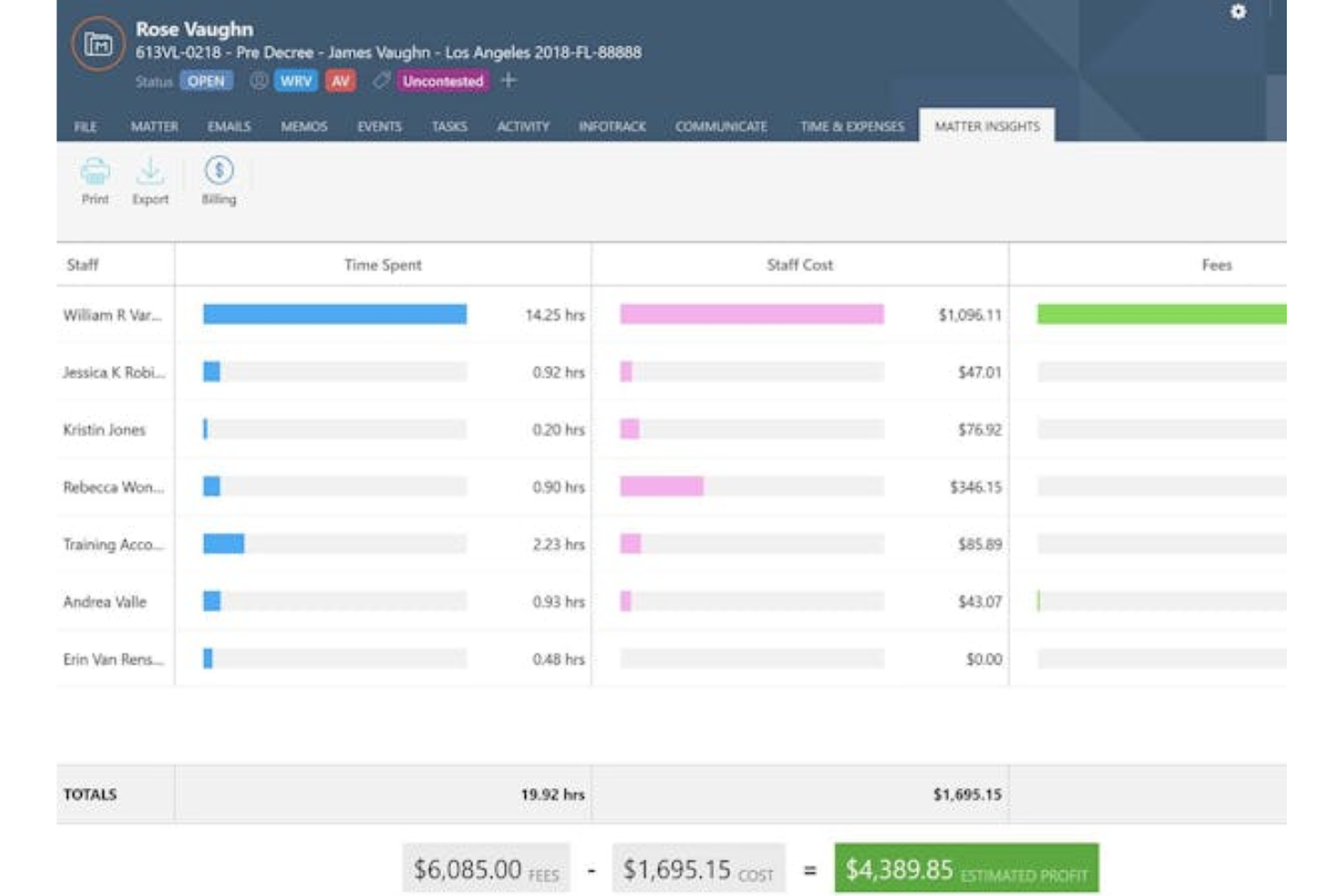
Smokeball is a legal practice management platform built specifically for law firms, combining matter management, document automation, billing, and automatic time tracking.
Who Is Smokeball Best For?
Smokeball is a strong fit for small to mid-sized law firms that need to capture every billable minute without relying on manual time entry.
Why I Picked Smokeball
I rate Smokeball highly because it automatically tracks time in the background as lawyers work, eliminating the need to start and stop timers manually. Its Activity Intelligence feature records every document drafted, email sent, and call logged without any input from the user. I've found this especially valuable for firms that bill hourly, since captured time that would otherwise slip through translates directly into recovered revenue.
Smokeball Key Features
- Document automation: Generates legal documents from pre-built templates, pulling in matter details automatically to reduce manual drafting time.
- Matter management dashboard: Centralizes all case information, tasks, deadlines, and contacts in a single matter-specific workspace.
- Client portal: Gives clients a secure space to view updates, share documents, and communicate with their legal team.
- Built-in billing and invoicing: Converts tracked time entries directly into invoices, letting firms review, edit, and send bills without switching platforms.
Smokeball Integrations
Smokeball offers native integrations with Microsoft Word and Outlook, including time tracking across both applications. These integrations let legal teams draft, email, and manage matter activity without switching screens.
Pros and Cons
Pros:
- Legal templates reduce repetitive document drafting
- Matter files, deadlines, and tasks stay centralized
- Automatic capture recovers otherwise missed billable time
Cons:
- Large matters can slow down performance
- Auto-tracking can miss or misclassify activity

Best for jurisdiction-specific deadline chains
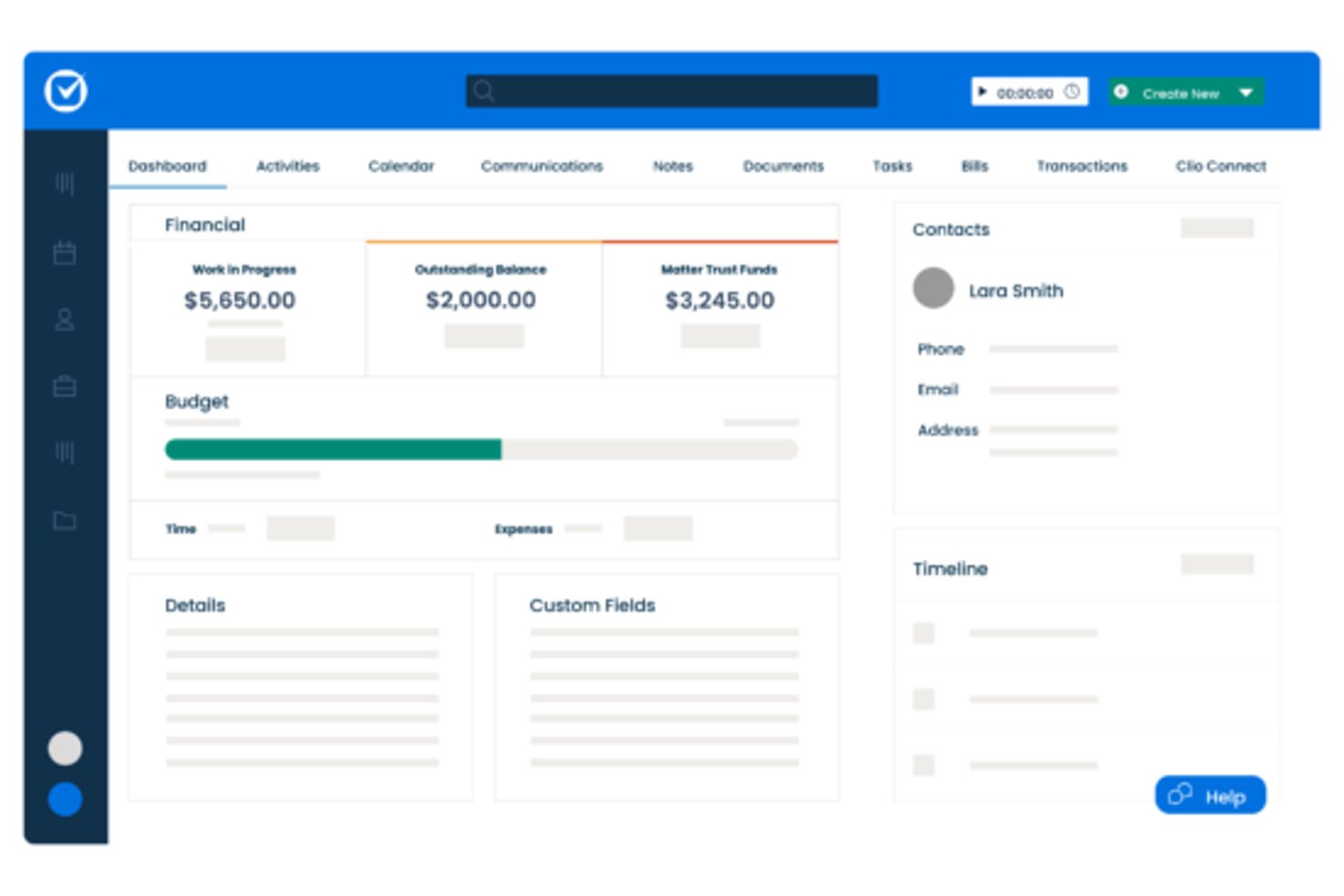
Clio Manage is a legal practice management platform that covers matter management, time tracking, billing, document storage, and court deadline calendaring for law firms.
Who Is Clio Manage Best For?
Clio Manage is a strong fit for litigation-focused law firms that need to track court deadlines across multiple jurisdictions without missing a filing date.
Why I Picked Clio Manage
Clio Manage earns its spot on my shortlist because of how it handles jurisdiction-specific court deadline chains. I love that you can set up a matter and have Clio automatically calculate cascading deadlines based on the court's local rules, so if a hearing date shifts, every dependent filing deadline recalculates with it. Its Calendar Rules feature pulls in court-specific rule sets across multiple jurisdictions, which removes the manual guesswork that leads to missed dates.
Clio Manage Key Features
- Matter management: Organize all case files, contacts, notes, and documents under a single matter record for each client.
- Time tracking: Log billable hours directly from any matter or calendar event using built-in timers.
- Client portal: Give clients a secure space to exchange documents, messages, and invoices without using email.
- Trust accounting: Track client trust funds separately from operating accounts to meet legal compliance requirements.
Clio Manage Integrations
Clio Manage connects with 300+ apps, including Outlook, Gmail, Google Calendar, Dropbox, OneDrive, NetDocuments, QuickBooks, Xero, and Zoom. It offers an open API for custom integrations and supports Zapier.
Pros and Cons
Pros:
- Keeps case documents and notes together
- Recalculates dependent dates when hearings shift
- Calculates cascading deadlines from court rules
Cons:
- Case management takes priority over project boards
- Court-rule coverage varies by jurisdiction

MyCase
Best for case management and client communication
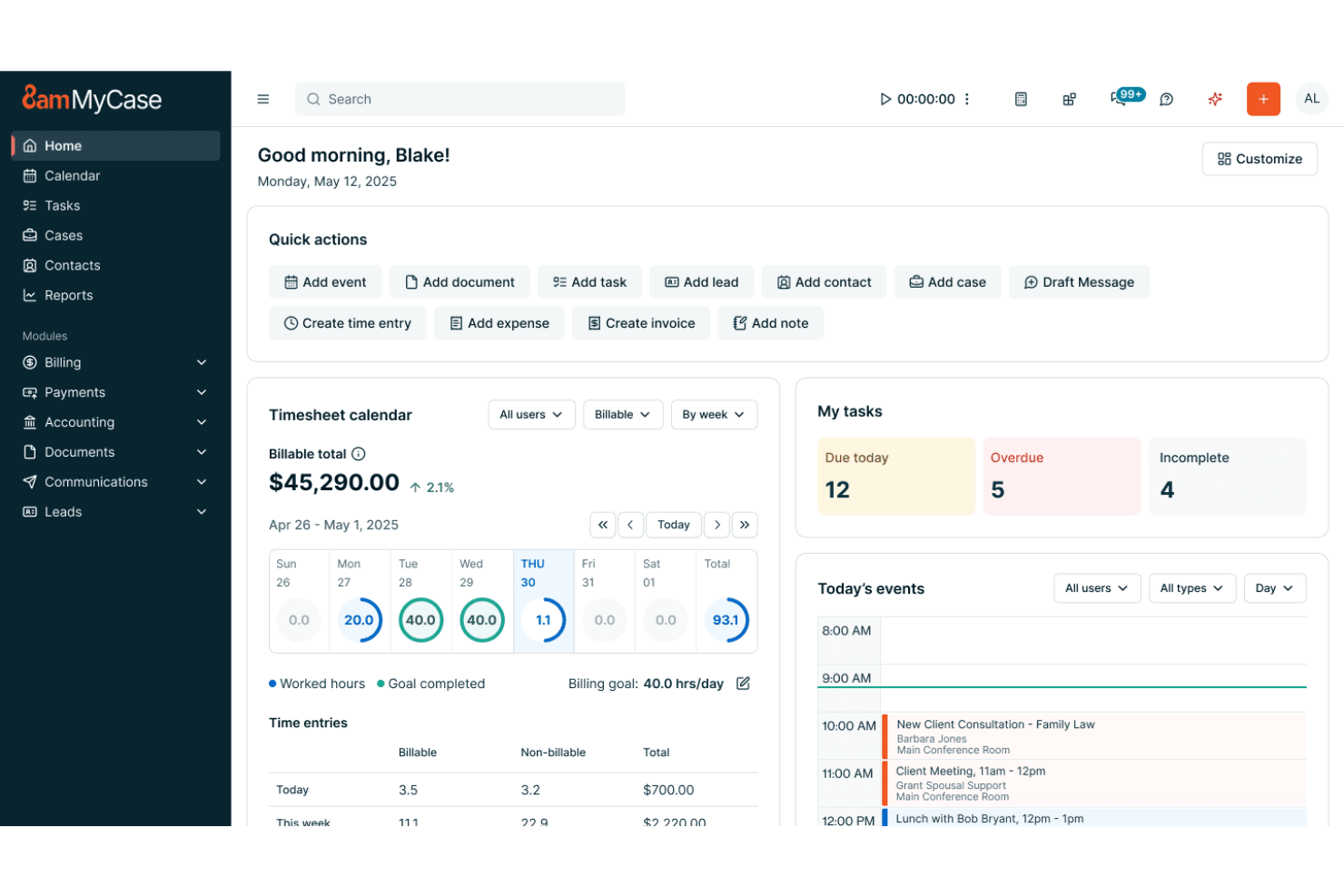
MyCase is a legal practice management platform that combines case management, client communication, billing, document storage, and task tracking in one place.
Who Is MyCase Best For?
MyCase is a strong fit for small to mid-sized law firms that need to manage client relationships and case workflows in one place.
Why I Picked MyCase
I picked MyCase as one of the best because it handles case management and client communication in a way that genuinely fits how law firms operate. The client portal lets attorneys share documents, send messages, and collect e-signatures without relying on email threads that are hard to track. I also like that case timelines and task assignments stay tied directly to individual matters, so nothing slips between cracks when a case gets busy.
MyCase Key Features
- Time tracking and billing: Lets attorneys log billable hours directly from a matter and generate invoices without switching between tools.
- Legal calendaring: Provides a built-in calendar that links court dates and deadlines to specific cases and syncs with external calendars.
- Client intake forms: Allows firms to collect new client information through customizable online forms before a matter is opened.
- Trust accounting: Includes dedicated IOLTA ledger tracking to help firms manage client funds separately from operating accounts.
MyCase Integrations
MyCase lists 61 integrations, including QuickBooks, LawPay, Google Calendar, Microsoft Outlook, Gmail, Dropbox, and LawToolBox. It also supports custom connections through its Open API and workflows through Zapier.
Pros and Cons
Pros:
- Time capture connects directly with invoicing
- Matter-linked tasks and deadline tracking
- Client portal keeps documents and conversations together
Cons:
- Trust accounting and billing feel difficult
- Calendar entries can miss desktop synchronization

Lawcus
Best for Kanban-style matter pipelines and intake
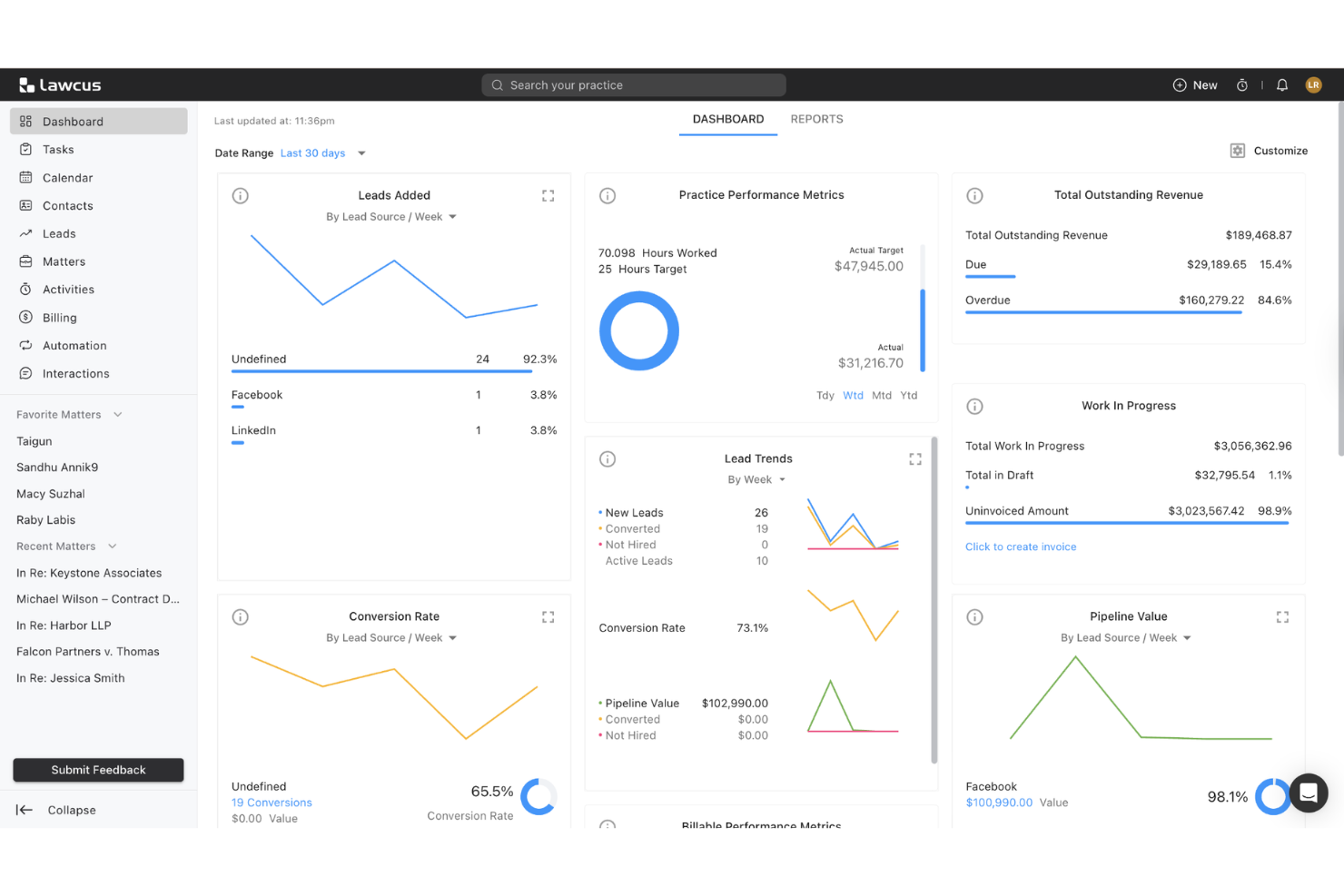
Lawcus is a legal practice management platform that combines matter management, client intake, CRM, billing, and document handling in one tool.
Who Is Lawcus Best For?
Lawcus is a strong fit for small to mid-sized law firms that want to visualize matter progress and client intake through Kanban-style pipelines.
Why I Picked Lawcus
Lawcus earns its spot on my shortlist because its Kanban-style pipelines let you track both matters and client intake as visual workflows, so nothing slips through the cracks between first contact and active case. I particularly like how intake forms connect directly to matter pipelines, automatically moving a prospect into the right stage without manual handoffs. The built-in CRM also ties client relationships to specific matters, giving you a clear picture of where every case stands at a glance.
Lawcus Key Features
- Time and expense tracking: Log billable hours and expenses directly within matters to keep billing accurate and audit-ready.
- Document management: Store, organize, and access case files and templates from a central location tied to each matter.
- Trust accounting: Manage client funds and retainers with built-in trust accounting tools designed to meet legal compliance standards.
- Two-way email and calendar sync: Connect your existing email and calendar so all client communications and deadlines stay linked to the right matter.
Lawcus Integrations
Lawcus offers documented integrations with Gmail, Microsoft Outlook, Google Calendar, Microsoft 365, QuickBooks, Xero, Dropbox, Google Drive, Box, and LawPay. It also supports an API on Elite and above and Zapier.
Pros and Cons
Pros:
- Matter-linked CRM keeps client context visible
- Intake forms route prospects into pipelines
- Kanban boards clarify matter-stage ownership
Cons:
- Complex matters may need detailed task dependencies
- Pipeline views offer limited scheduling depth

Filevine
Best for document-driven case management
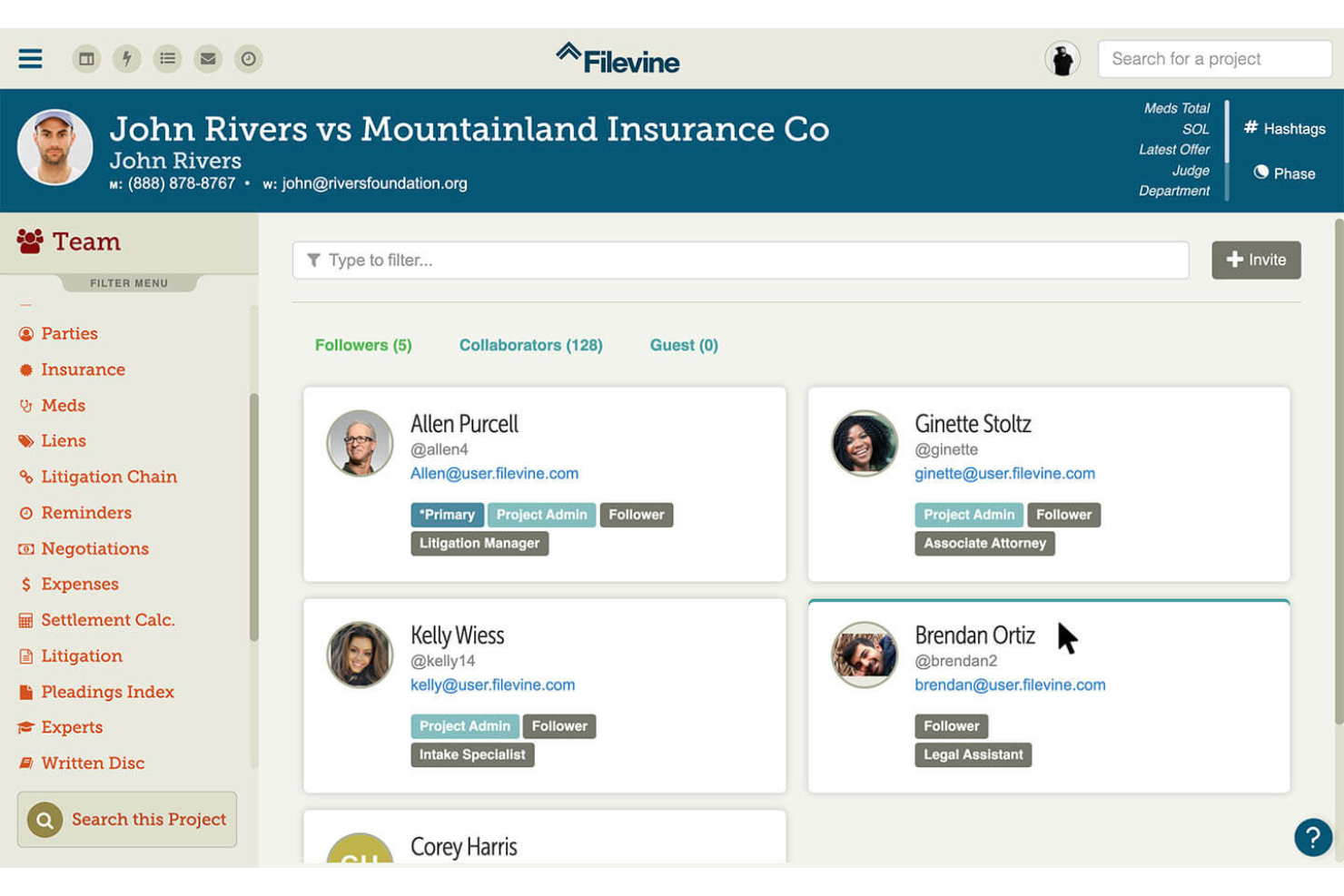
Filevine is a legal practice management platform built around case and document workflows, offering matter tracking, client intake, document management, deadline tracking, and team collaboration tools tailored to law firms.
Who Is Filevine Best For?
Filevine is a strong fit for litigation and plaintiff-side law firms that manage high document volumes across active cases.
Why I Picked Filevine
Filevine earns its spot on my shortlist because of how well it handles document-heavy caseloads, which is where most litigation workflows actually break down. I love that it lets you build custom document templates tied directly to case fields, so details like party names and dates populate automatically across filings. Its document versioning keeps every draft traceable, which matters when multiple attorneys are working the same matter.
Filevine Key Features
- Client intake forms: Configurable intake forms capture client and case details directly into the platform, eliminating manual data entry across matters.
- Deadline and statute tracking: Built-in calendaring tools automatically calculate and flag critical legal deadlines based on case type and jurisdiction.
- Task assignment and matter timelines: Attorneys and staff can assign tasks to specific team members with due dates tied to active case milestones.
- Reporting and analytics dashboard: Firm-wide dashboards surface case progress, team workload, and matter status across your entire docket in one view.
Filevine Integrations
Filevine integrations include Microsoft Office, Slack, Google Calendar, Gmail, and DOMO, with an open API for custom connections. It also supports Zapier.
Pros and Cons
Pros:
- Matter files stay organized with version history
- Custom workflows track tasks across active matters
- Case-linked document generation reduces repetitive drafting
Cons:
- Search and large-file performance can lag
- Extensive workflow setup can take months

Best for legal CRM and matter management
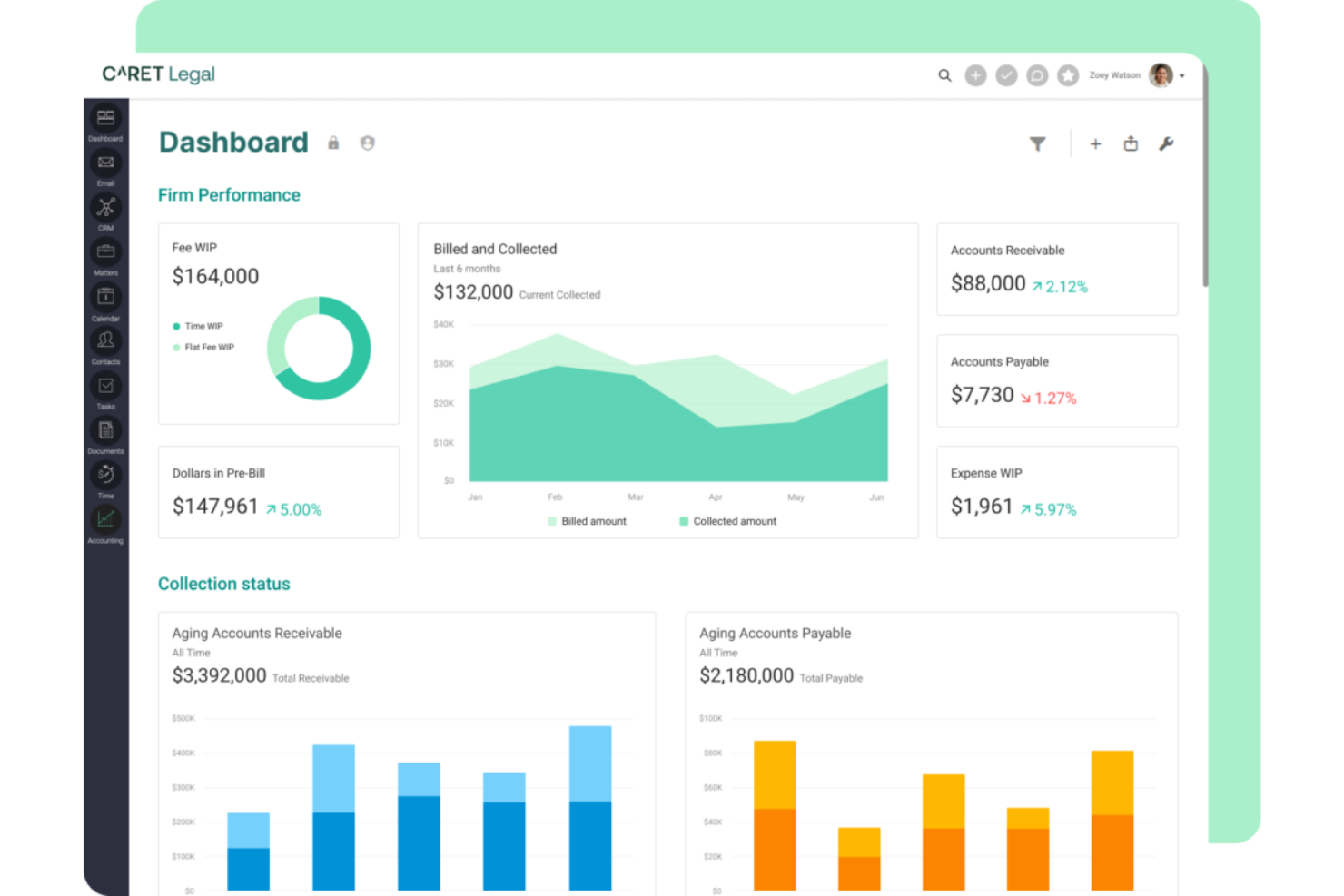
CARET Legal is a legal practice management platform that combines matter management, CRM, document automation, time tracking, and billing into a single system built specifically for law firms.
Who Is CARET Legal Best For?
CARET Legal is a strong fit for small to mid-sized law firms that need their client relationships and matter workflows managed in one place.
Why I Picked CARET Legal
I've included CARET Legal in my top picks because it's one of the few tools that genuinely unifies CRM and matter management rather than bolting one onto the other. I like how client intake flows directly into matter records, so nothing gets lost between first contact and active case work. The built-in document automation also ties directly to matter data, which cuts down on the manual drafting work that slows legal teams down.
CARET Legal Key Features
- Time tracking: Log billable hours directly against matters using built-in timers or manual entry.
- Client portal: Give clients a secure space to view case updates, share documents, and communicate with your firm.
- Trust accounting: Manage IOLTA accounts and client funds with built-in ledgers designed for legal compliance.
- Calendar and deadline management: Sync court dates, deadlines, and appointments with matter records to keep your whole team on schedule.
CARET Legal Integrations
CARET Legal integrates with Microsoft 365, Google Workspace, QuickBooks Online, OneDrive, NetDocuments, LawToolBox, Lawmatics, HotDocs, RMail, and Zapier.
Pros and Cons
Pros:
- Client portal supports secure case communication
- Matter-linked document templates reduce repetitive drafting
- Centralizes matters, documents, time, and billing
Cons:
- Users report slow document loading and freezes
- Mobile app offers limited case management

CosmoLex
Best for integrated billing and trust accounting
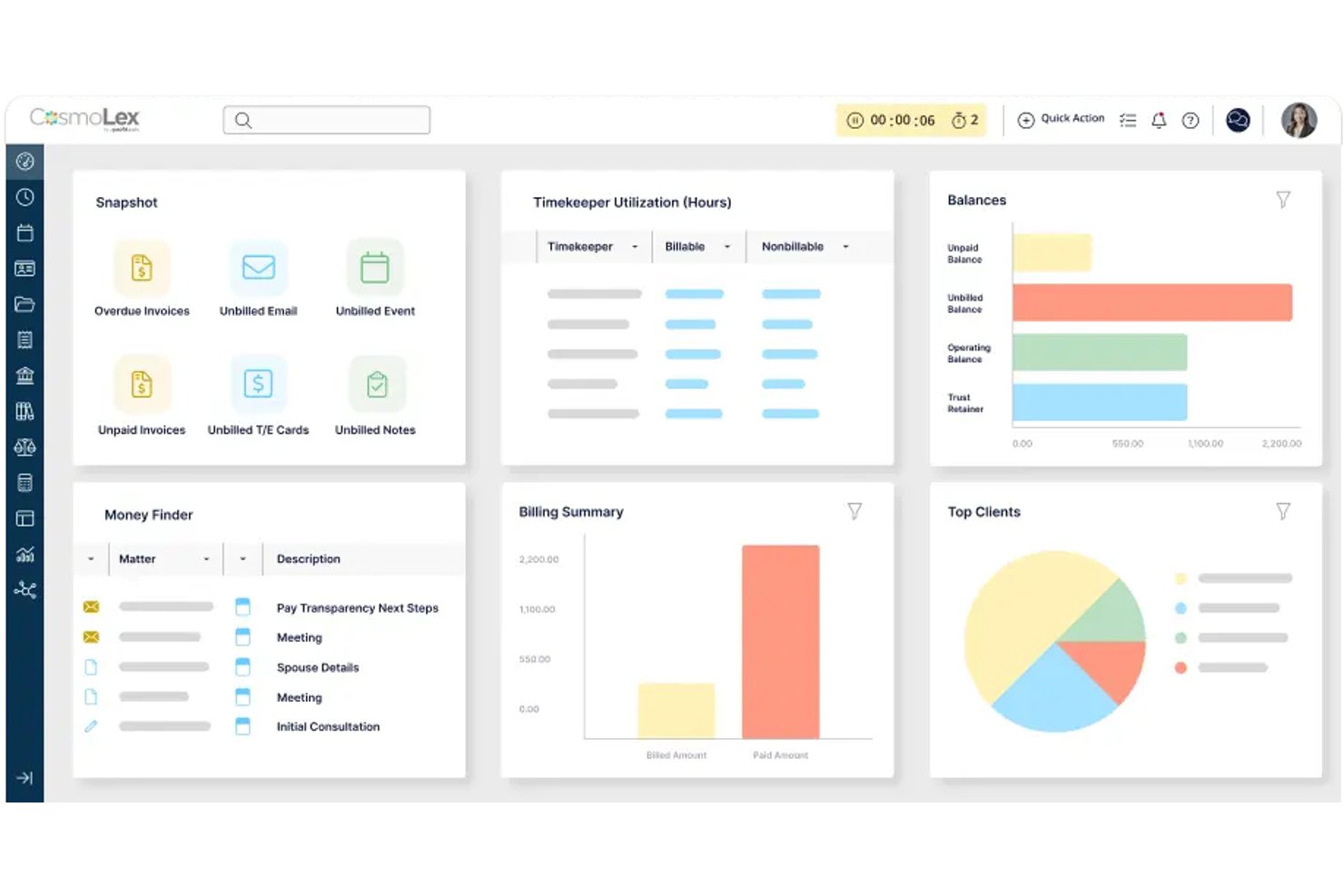
CosmoLex is a cloud-based legal practice management platform that combines matter management, time tracking, billing, trust accounting, and document management in a single system built specifically for law firms.
Who Is CosmoLex Best For?
CosmoLex is a strong fit for small to mid-sized law firms that need billing, trust accounting, and matter management in one place without stitching together separate tools.
Why I Picked CosmoLex
I picked CosmoLex as one of the best because it's the only tool on my list that handles trust accounting natively, without requiring a QuickBooks connection or a workaround. Its built-in IOLTA ledger automatically tracks client funds separately from operating accounts, which keeps you compliant without manual reconciliation. Billing and matter management live in the same system, so time entries flow directly into invoices tied to specific cases.
CosmoLex Key Features
- Matter-centric document storage: Attach, organize, and retrieve case documents directly within each matter record for quick access during active cases.
- Court deadline calendaring: Automatically calculate and add court deadlines and statute of limitations dates to your calendar based on jurisdiction rules.
- Client portal: Share invoices, documents, and case updates with clients through a secure, branded online portal without using email attachments.
- Built-in legal accounting reports: Generate balance sheets, income statements, and trust ledger reports formatted to meet bar association requirements.
CosmoLex Integrations
CosmoLex lists four integrations: Microsoft 365, Dropbox, LawPay, and QuickBooks Online, connecting legal practice management with documents, payments, and accounting.
Pros and Cons
Pros:
- Task reminders support time-sensitive follow-ups
- Matter-linked time flows into invoices
- Trust-account reconciliation is quick
Cons:
- Bank feeds sometimes stop syncing
- Updates can glitch or lose entries

Best for legal billing tied to matter workflows
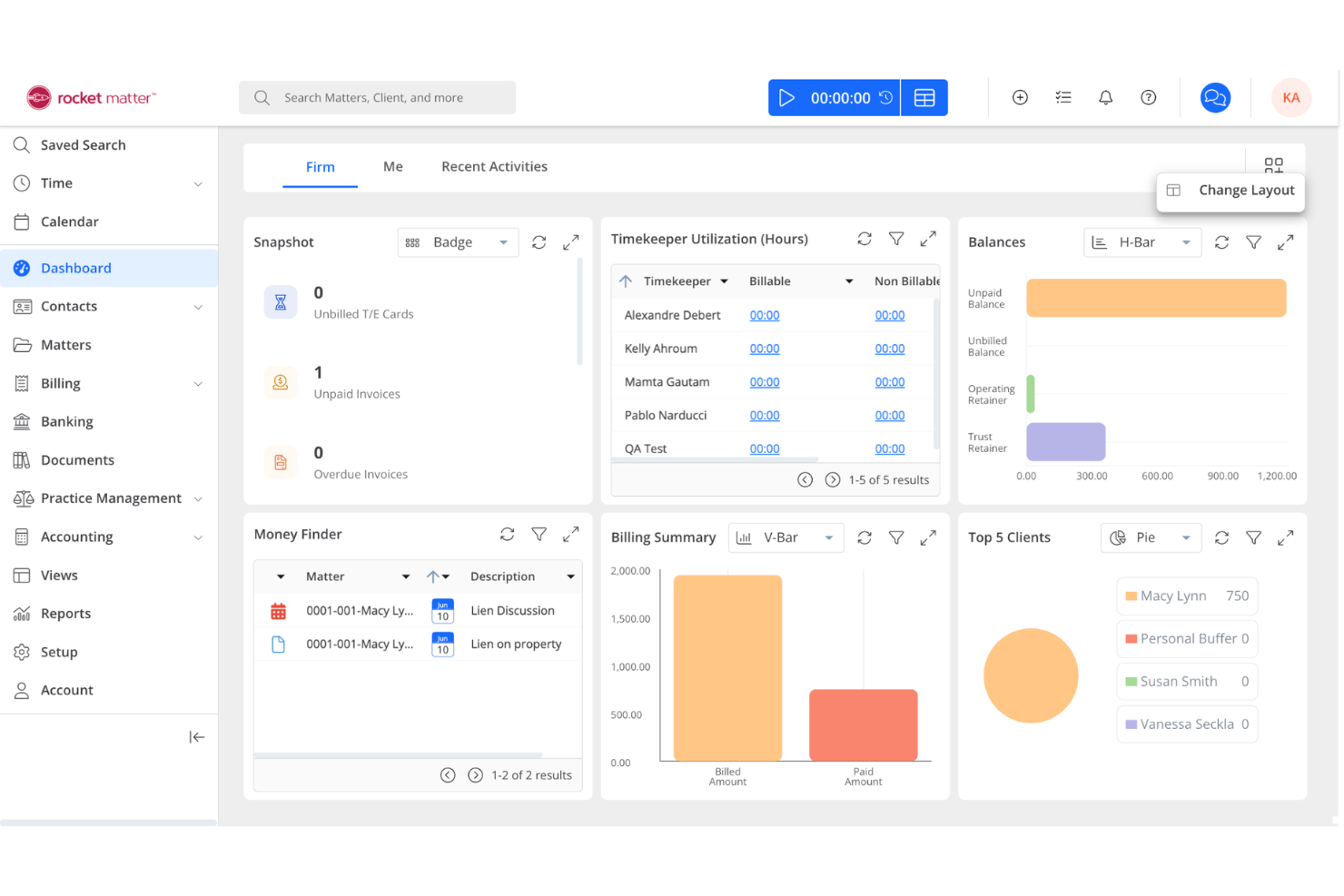
Rocket Matter is a cloud-based legal practice management platform for law firms that combines case management, time and billing, document automation, and calendaring in one system.
Who Is Rocket Matter Best For?
Small to mid-sized law firms that need cloud-based case management and integrated time and billing tools.
Why I Picked Rocket Matter
I picked Rocket Matter as one of the best because I rely on its cloud-based time and billing tools to track hours and generate invoices directly from case files. My team uses the document automation features to quickly assemble legal documents without leaving the platform. I also like how Rocket Matter’s calendaring and task management keep our casework organized and deadlines visible for everyone.
Rocket Matter Key Features
- Matter dashboards: View case status, contacts, and key dates in one place.
- Custom intake forms: Collect client information with tailored online forms.
- Trust accounting: Manage client trust funds with compliance safeguards.
- Batch billing: Generate invoices for multiple matters at once.
Rocket Matter Integrations
Rocket Matter offers native integrations with QuickBooks Online, Dropbox, Box, Microsoft 365 Outlook, Google Calendar, and more. An API is available for custom integrations.
Pros and Cons
Pros:
- Document assembly supports legal templates
- Automated recurring billing for subscription client
- Kanban-style matter management board included
Cons:
- Reporting exports limited to certain formats
- No advanced client intake automation

Best for legal workflow and matter management
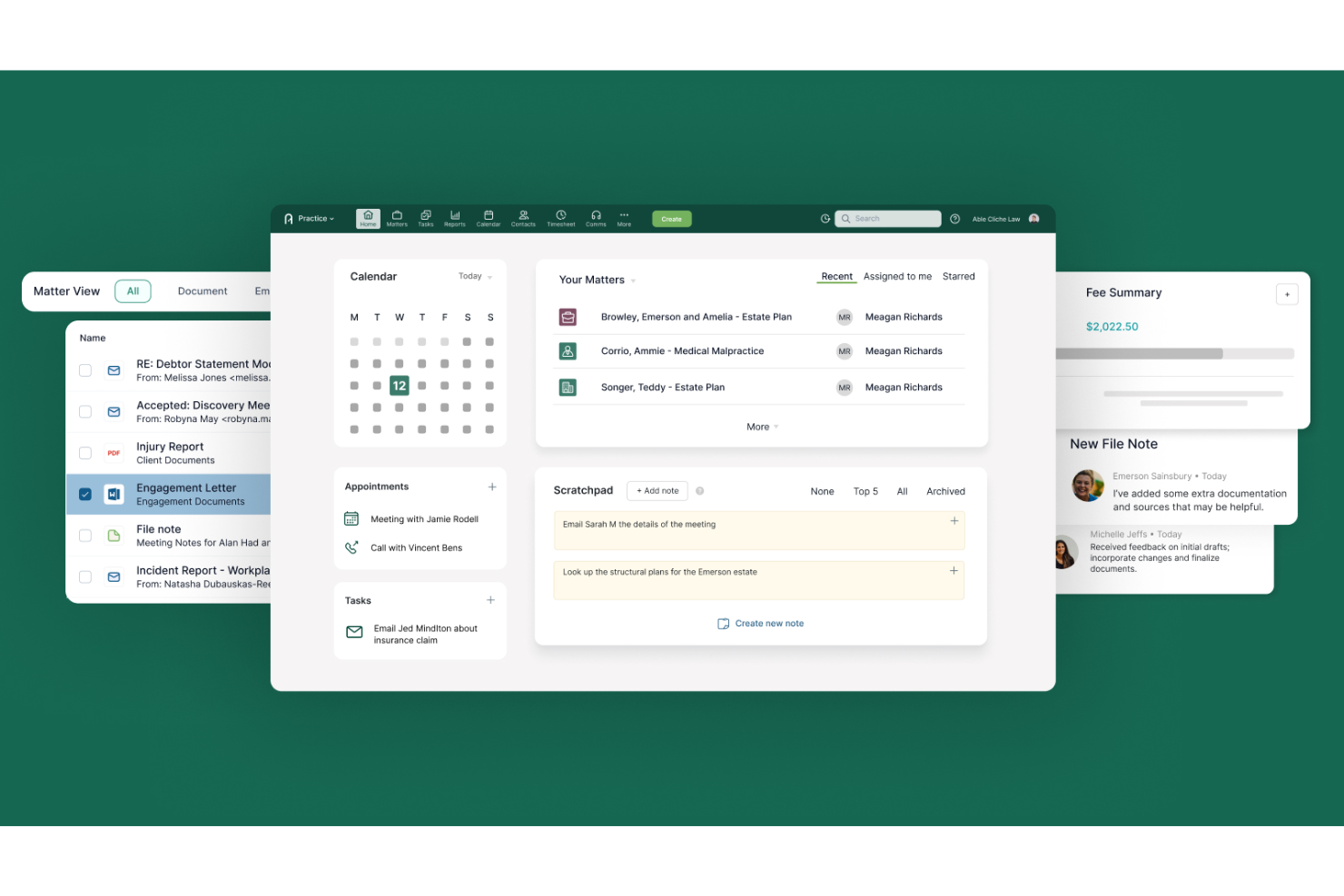
Actionstep is a legal practice management platform built specifically for law firms, combining matter management, legal workflow automation, document management, billing, and client portal tools in one system.
Who Is Actionstep Best For?
Actionstep is a strong fit for small to mid-sized law firms that need structured, repeatable workflows built directly into their matter management process.
Why I Picked Actionstep
Actionstep earns its spot on my shortlist because it builds workflow automation directly into matter management, which is something most generic project tools can't replicate. I love how you can configure stage-based workflows that automatically trigger tasks, document requests, and deadline reminders as a matter moves through each phase. Its document assembly feature lets firms generate templated legal documents tied to specific matter data, cutting the manual work out of routine case prep.
Actionstep Key Features
- Time and expense tracking: Log billable hours and expenses directly within a matter, keeping all billing data tied to the relevant case.
- Client portal: Share documents, collect information, and communicate with clients through a secure, branded online portal.
- Trust accounting: Manage client trust accounts with built-in ledgers that track deposits, disbursements, and balances per matter.
- Custom reporting: Build reports on matter status, billing totals, and team activity using configurable report templates.
Actionstep Integrations
Actionstep lists integrations with First AML, InfoTrack, and Microsoft Outlook through its Office 365 add-in. It also offers an API for custom connections and supports Zapier.
Pros and Cons
Pros:
- Trust ledgers track balances by matter
- Document assembly pulls data from matters
- Stage-based workflows automate matter deadlines
Cons:
- Billing and trust accounting can glitch
- Setup requires substantial workflow configuration

Litify
Best for AI-native matter and billing management

Litify is a legal operations platform built on Salesforce that covers matter management, document handling, time tracking, and billing in a single system designed specifically for law firms.
Who Is Litify Best For?
Litify is a strong fit for mid-to-large law firms that want a single platform to manage matters, billing, and client intake on top of Salesforce infrastructure.
Why I Picked Litify
Litify earns its spot on my shortlist because it brings AI directly into matter management and billing in ways I haven't seen replicated elsewhere. I love how its AI-powered intake automatically classifies matters and flags billing anomalies before they become write-offs. Built on Salesforce, it also lets lawyers track time against specific matter phases and generate invoices without switching tools.
Litify Key Features
- Client portal: A dedicated portal where clients can view matter updates, upload documents, and communicate directly with their legal team.
- Role-based dashboards: Customizable dashboards that surface the data most relevant to each user's role, from intake coordinators to managing partners.
- Automated workflow builder: A drag-and-drop tool for creating matter workflows that trigger tasks, notifications, and document generation at each stage.
- Salesforce AppExchange integration: Native access to hundreds of third-party apps through Salesforce's ecosystem, extending Litify's functionality without custom development.
Litify Integrations
Litify supports marketplace integrations through Salesforce AppExchange, giving firms access to third-party apps.
Pros and Cons
Pros:
- Matter-phase time tracking supports legal workflows
- Billing anomaly flags help prevent write-offs
- AI intake classifies matters automatically
Cons:
- Broad platform may burden solo practices
- Salesforce architecture can add implementation overhead
Avukatlar İçin Diğer Proje Yönetimi Yazılımları
İşte kısa listeme giremeyen ancak yine de göz atmaya değer bazı ek avukatlar için proje yönetimi yazılımı seçenekleri:
- LEAP
For integrated billing and matter management
- PracticePanther
For legal workflow automation at any firm size
- Smartsheet
For spreadsheet-style legal task tracking
- Asana
For automating multi-step legal workflows
- ProProfs Project
For tracking tasks across client matters
- CasePeer
For personal injury case tracking and deadlines
- Lawmatics
For intake-to-matter conflict checking
- Perfect Practice
For transaction-triggered deadline automation
- Dashboard Legal
For matter management backed by legal research
- Legalboard
For matter workflow visibility across a firm


How I Evaluate Project Management Software For Lawyers
I split my evaluation into three parts, with the most weight on core functionality: organizing work by matter, assigning tasks, and tracking jurisdiction-sensitive deadlines. Next, I look for standout features such as court-rule deadline chains. Finally, I consider support, onboarding, data migration, and pricing value.
Core Functionality (Table Stakes For This List)
When I'm selecting tools for my list, I score each one on a scale from 0 (does not offer the functionality) to 5 (excels in this area) for each core functionality listed below. I then convert the total into a percentage to help assess each tool's overall fit, with extra weight on any functionalities I’ve deemed essential.
- Tasks & Deadlines (Essential): I look for assigned tasks, due dates, reminders, and dependencies when filings rely on prior review.
- Matter Organization (Essential): I assess whether matters hold client and status details, phases, and reusable case-type templates rather than sitting as generic projects.
- Matter Documents: I check whether files link to matters and individual tasks, with version history and permissions for drafts and evidence.
- Legal Calendars: I evaluate shared calendars, recurring dates, and jurisdiction-specific deadline chains, including how conflicts or changes surface.
- Client & Team Access: I look for role-based client and co-counsel access, comments, notifications, and activity records around matter progress.
- Matter Time Tracking: I assess whether timers or entries link to matters, and whether billing reports connect with invoicing and trust-accounting workflows.
Once I have a list of tools that meet the criteria, I consider what sets each platform apart.
Differentiating Factors (What Sets Vendors Apart)
Here's how I compare and contrast different vendors:
Standout Features
I look for a court rules engine that auto-generates deadline chains from jurisdiction-specific procedural rules. Missing a single filing window can derail a case, so I check whether the tool calculates backward from hearing dates and adjusts when courts shift schedules. Trust accounting support is equally non-negotiable—I evaluate how each platform tracks retainer balances and flags disbursements that would violate bar requirements. I also consider conflict checking, since catching a potential conflict before intake saves firms from costly disqualification motions down the line.
Beyond Features
I evaluate how well each tool fits a firm's size and IT capacity—solo practitioners need fast setup with minimal overhead, while multi-office firms need departmental reporting and cross-practice standardization. Integration matters just as much: I check for calendar sync with Outlook or Google, e-signature connectors, and compatibility with billing platforms like Clio or QuickBooks to avoid duplicate data entry. I also look at security posture, since attorney-client privilege requires encryption, granular role-based access, and secure client portals that protect sensitive case data from exposure.
Avukatlar İçin Proje Yönetimi Yazılımı Nasıl Seçilir?
Uzun özellik listeleri ve karmaşık fiyatlandırma yapıları içinde kaybolmak kolaydır. Kendinize özgü yazılım seçim sürecinizde ilerlerken odağınızı korumanıza yardımcı olmak için göz önünde bulundurmanız gereken faktörleri aşağıda bir kontrol listesi hâlinde bulabilirsiniz:
| Faktör | Dikkate Alınması Gerekenler |
|---|---|
| Ölçeklenebilirlik | Yazılım, firmanızın zaman içindeki büyümesini, yeni uzmanlık alanlarını veya artan dava dosyası sayısını kaldırabilecek mi? |
| Entegrasyonlar | Mevcut belge yönetimi, faturalandırma veya takvim araçlarınıza yerel olarak bağlanabiliyor mu? |
| Özelleştirilebilirlik | İş akışlarını, alanları ve izinleri firmanızın süreçlerine ve terminolojisine uyacak şekilde özelleştirebilir misiniz? |
| Kullanım kolaylığı | Ekibiniz yazılımı hızlı bir şekilde benimseyecek mi, yoksa eğitim ve destek sürekli gerekli mi olacak? |
| Uygulama ve kullanıma alma | Kurulum ne kadar sürecek ve tedarikçi geçiş için hangi kaynakları veya desteği sağlayacak? |
| Maliyet | Fiyatlandırma kademeleri açık mı ve firmanızın büyüklüğü, kullanım şekli ve bütçe beklentileriyle uyumlu mu? |
| Güvenlik önlemleri | Platform, hukuk sektörünün standartlarını karşılayan şifreleme, denetim kayıtları ve erişim kontrolleri sunuyor mu? |
| Uyumluluk gereklilikleri | Yazılım, GDPR, HIPAA veya yerel baro kuralları gibi yükümlülükleri karşılamanıza yardımcı olacak mı? |
Avukatlar İçin Proje Yönetimi Yazılımı Nedir?
Avukatlara yönelik proje yönetimi yazılımı, hukuk bürolarının hukuki dosyaları, görevleri, son tarihleri ve belgeleri düzenlemesine, izlemesine ve yönetmesine yardımcı olmak üzere tasarlanmış bir hukuk uygulaması yönetim yazılımıdır. Bu araçlar ekip çalışmasını destekler, iş akışlarını basitleştirir ve bilgileri merkezileştirerek müvekkil beklentilerinin ve mevzuat gerekliliklerinin karşılanmasını kolaylaştırır. Büroların karmaşık projeleri yönetmesine, kilometre taşlarını belirleyip izlemesine ve darboğazları azaltırken ilerlemeyi takip etmesine yardımcı olurlar. Birçok platform ayrıca hukuki araştırmayı destekler, müvekkil memnuniyetini artırır ve daha iyi kaynak yönetimi sayesinde kârlılığı yükseltir. Genellikle kullanıcı dostu olan ve bazen yapay zekâ destekli çalışan bu araçlar, küçük bürolar da dâhil olmak üzere kendine özgü ihtiyaçları bulunan bürolara modern hukuki hizmetleri destekleyen daha geniş bir hukuk teknolojisi ekosisteminin parçasıdır.
Avukatlara Yönelik Proje Yönetimi Yazılımının Özellikleri
Avukatlara yönelik proje yönetimi yazılımı seçerken aşağıdaki temel özelliklere dikkat edin:
- Dosya yönetimi: Kolay erişim ve izleme için davayla ilgili tüm bilgileri, belgeleri ve iletişimleri tek bir yerde merkezileştirir.
- Görev atama: Sorumluluğu ve görevlerin zamanında tamamlanmasını güvence altına alarak hukuk ekibiniz genelinde görevleri devretmenize, önceliklendirmenize ve izlemenize olanak tanır.
- Belge yönetimi: Hukuki dosyalar ve deliller için güvenli depolama, sürüm denetimi ve arama özellikleri sunar.
- Zaman takibi: Doğru faturalandırmayı ve mevzuata uyumu desteklemek üzere belirli dosyalarla ilişkilendirilmiş faturalandırılabilir ve faturalandırılamaz saatleri kaydeder.
- Takvim yönetimi: Kaçırılan yükümlülüklerin önlenmesine yardımcı olmak için hatırlatıcılarla birlikte duruşma tarihlerini, son tarihleri ve randevuları planlar.
- Faturalama ve fatura oluşturma: İzlenen zaman ve giderlere göre faturalar oluşturur ve basitleştirilmiş mali yönetim için muhasebe sistemleriyle entegre olur.
- Kişi yönetimi: Her dosya için müvekkillerin, karşı taraf avukatlarının, tanıkların ve diğer önemli kişilerin ayrıntılı kayıtlarını tutar.
- İzin denetimleri: Gizliliği ve mevzuata uyumu desteklemek için hassas bilgilere erişimi kullanıcı rollerine göre kısıtlar.
- Çıkar çatışması denetimi: Yeni dosyalar kabul edilmeden önce olası çıkar çatışmalarını belirleyerek büroların etik sorunlardan kaçınmasına yardımcı olur.
- Raporlama ve analiz: Veriye dayalı karar almayı desteklemek üzere dava ilerlemesi, iş yükü ve mali durum hakkında özelleştirilebilir raporlar sunar.
Avukatlara Yönelik Proje Yönetimi Yazılımının Faydaları
Avukatlara yönelik proje yönetimi yazılımını uygulamak, ekibiniz ve işletmeniz için çeşitli faydalar sağlar. Yararlanabileceğiniz birkaç fayda şunlardır:
- Gelişmiş organizasyon: Merkezileştirilmiş dosya ve belge yönetimi, tüm dava bilgilerinin erişilebilir olmasını sağlar ve dosya aramak için harcanan zamanı azaltır.
- Daha fazla hesap verebilirlik: Görev atama ve izleme özellikleri, bir davadaki her adımdan kimin sorumlu olduğunu netleştirir.
- Gelişmiş mevzuata uyum: İzin denetimleri ve çıkar çatışması denetimi, büronuzun etik ve mevzuata ilişkin gereklilikleri karşılamasına yardımcı olur.
- Doğru faturalandırma: Entegre zaman takibi ve fatura oluşturma, faturalandırılabilir saatlerin kaydedilmesini ve müvekkillerin doğru şekilde faturalandırılmasını sağlar.
- Son tarihlerin kaçırılma riskinin azalması: Takvim yönetimi ve otomatik hatırlatıcılar, ekibinizin duruşma tarihlerini ve kritik görevleri zamanında takip etmesine yardımcı olur.
- Daha iyi müvekkil hizmeti: Basitleştirilmiş iş akışları ve açık iletişim araçları, daha hızlı yanıt sürelerini ve daha düzenli müvekkil bilgilendirmelerini destekler.
- Veriye dayalı içgörüler: Raporlama ve analiz özellikleri, dava ilerlemesi, ekip iş yükü ve büronun performansı hakkında görünürlük sağlar.
Avukatlara Yönelik Proje Yönetimi Yazılımının Maliyetleri ve Fiyatlandırması
Avukatlara yönelik proje yönetimi yazılımını seçmek, mevcut çeşitli fiyatlandırma modellerinin ve planların anlaşılmasını gerektirir. Maliyetler özelliklere, ekip büyüklüğüne, eklentilere ve diğer unsurlara göre değişir. Aşağıdaki tablo, avukatlara yönelik proje yönetimi yazılımı çözümlerinde yaygın planları, bu planların ortalama fiyatlarını ve genellikle dâhil edilen özellikleri özetlemektedir:
Avukatlara Yönelik Proje Yönetimi Yazılımı İçin Plan Karşılaştırma Tablosu
| Plan Türü | Ortalama Fiyat | Yaygın Özellikler |
|---|---|---|
| Ücretsiz Plan | $0 | Temel hukuki iş yönetimi, sınırlı görev takibi, basit belge depolama ve temel kullanıcı izinleri. |
| Kişisel Plan | $5-$25/kullanıcı/ay | Hukuki iş yönetimi, görev atama, belge yönetimi, zaman takibi ve temel raporlama. |
| İşletme Planı | $25-$60/kullanıcı/ay | Gelişmiş iş akışı otomasyonu, faturalandırma ve fatura kesme, takvim yönetimi, izin denetimleri ve entegrasyonlar. |
| Kurumsal Plan | $60-$120/kullanıcı/ay | Özel iş akışları, gelişmiş güvenlik, uyumluluk araçları, özel destek, gelişmiş analizler ve API erişimi. |
Avukatlar için Proje Yönetimi Yazılımı SSS
Avukatlar için proje yönetimi yazılımı hakkında sık sorulan bazı soruların yanıtlarını burada bulabilirsiniz:
Avukatlar için proje yönetimi yazılımı, genel proje yönetimi araçlarından nasıl farklıdır?
Avukatlar için proje yönetimi yazılımı; hukuki iş yönetimi, çıkar çatışması denetimi ve uyumluluk araçları gibi hukuka özgü özellikler içerir. Bu özellikler hukuk bürolarının hassas verileri yönetmesine, faturalandırılabilir saatleri takip etmesine ve genel araçların ele almadığı düzenleyici gereklilikleri karşılamasına yardımcı olur.
Avukatlar için proje yönetimi yazılımı, hukuki faturalandırma veya belge yönetimi sistemleriyle entegre olabilir mi?
Evet, birçok hukuki proje yönetimi aracı faturalandırma, muhasebe ve belge yönetimi sistemleriyle entegrasyon sunar. Bu, büronuzun verileri tutarlı tutmasına, manuel veri girişini azaltmasına ve platformlar arasındaki iş akışlarını kolaylaştırmasına yardımcı olur.
Büromun verilerini yeni bir proje yönetimi sistemine taşımak zor mudur?
Hayır, çoğu hukuki proje yönetimi yazılımı sağlayıcısı veri içe aktarma araçları, işe alıştırma desteği veya geçiş hizmetleri sunar. Planınıza nelerin dahil olduğunu incelemeli ve hukuki işleri, kişileri ve belgeleri taşıma konusunda sunulan desteği sormalısınız.
Avukatlar için proje yönetimi yazılımında hangi güvenlik özelliklerini aramalıyım?
Şifreleme, role dayalı erişim denetimleri, denetim izleri ve uyumluluk sertifikalarını arayın. Bu özellikler hassas müvekkil verilerinin korunmasına ve büronuzun etik ve düzenleyici yükümlülüklerini desteklemesine yardımcı olur.
Bir proje yönetimi aracının büromun iş akışına uygun olup olmadığını nasıl anlarım?
Yazılımı ücretsiz deneme sürümü veya demo ile test edin ve değerlendirme sürecine avukatları ve personeli dahil edin. Karar vermeden önce iş akışlarını, alanları ve izinleri büronuzun süreçlerine uyacak şekilde özelleştirip özelleştiremeyeceğinizi kontrol edin.