

2026 İçin Müşteri Portallarına Sahip En İyi 10 Proje Yönetimi Aracı

10 Müşteri Portalına Sahip En İyi Proje Yönetimi Yazılımları Kısa Listesi


Sürekli durum bildirimleri, kaybolan dosya ekleri ve yanlışlıkla gereğinden fazla bilgi paylaşılması müşteri ilişkilerini zedeler ve proje yönetimi ekibinin kapasitesini tüketir. Müşteri portalına sahip özel bir proje yönetimi yazılımı, onaylar, teslimatlar ve zaman çizelgeleri için güvenli, kendi kendine hizmet sunan bir merkez oluşturarak bu sorunu çözer.
20 yılı aşkın dijital teslimat deneyimimden yararlanarak, proje yönetimi ekibinin kapasitesini gerçekten koruyan ve paydaşlar için sürtüşme yaratmayan platformları sunmak amacıyla bu yılın müşteri portallarına sahip en iyi proje yönetimi araçlarını operasyonel açıdan analiz ettim.
Why Trust Our Software Recommendations
Our team has been testing and reviewing software since 2012. As project managers ourselves, we know how difficult—and important—it is to choose the right software.
For this guide, we evaluated tools using hands-on testing and independent research, scoring tools using our selection criteria. We also draw on insights from industry thought leaders and practicing project management experts.
Our reviews reflect our human editorial judgment, not a sales pitch.
Expert reviewers:
Karşılaştırma Tablosu: Müşteri Portalına Sahip Proje Yönetimi Yazılımları
Müşteri portalına sahip en iyi proje yönetimi yazılımları için fiyatlandırmayı, ücretsiz denemeleri ve demo seçeneklerini incelemek üzere bu karşılaştırma tablosunu kullanın.
Score legend (out of 5)
- Excellent 4.5–5
- Good 4–4.4
- Average 3–3.9
- Below average 2–2.9
- Poor 1–1.9
| Tool | Starting Price | Website | |||||||
|---|---|---|---|---|---|---|---|---|---|
| Best for milestone-driven client sign-off workflows | 3.8 out of 5 | 3 | 4 | 5 | 4 | 3 | 4 | €5.50/active project/month 14-day free trial | Website |
| Best for agency profitability tracking | 2.5 out of 5 | 1 | 2 | 2 | 4 | 3 | 3 | $10/user/month 14-day free trial | Book Demo |
| Best for collaboration for teams of all sizes | 3.2 out of 5 | 1 | 2 | 5 | 4 | 4 | 3 | $10/user/month Free plan + 14-day trial + demo available | Book Demo |
| Best for enterprise agency workflows | 3.2 out of 5 | 2 | 2 | 5 | 4 | 3 | 3 | Pricing upon request Not available | Book Demo |
| Best for tagging clients to get feedback easily | 2.3 out of 5 | 1 | 1 | 2 | 2 | 4 | 4 | $9/user/month Free plan + 14-day trial available | Book Demo |
| Best for combining team chat and project workflows | 3.8 out of 5 | 3 | 2 | 5 | 4 | 5 | 4 | $9.99/user/month Free plan + 14-day free trial + free demo available | Website |
| Best for quote-to-cash automation | 3.8 out of 5 | 3 | 4 | 5 | 5 | 3 | 3 | Pricing upon request Free demo available | Book Demo |
| Best for automated client follow-ups | 4.3 out of 5 | 5 | 4 | 5 | 4 | 4 | 4 | $5,000/year Free trial + free demo available | Book Demo |
| Best for creating custom-branded client portals | 3.0 out of 5 | 2 | 2 | 2 | 4 | 4 | 4 | Pricing upon request Free plan + 15-day trial + demo available | Website |
| Best for multi-client branded portal management | 4.0 out of 5 | 4 | 4 | 3 | 4 | 5 | 4 | $11/user/month 10-day free trial | Website |
Müşteri Portalına Sahip En İyi Proje Yönetimi Yazılımlarının İncelemeleri
Listemde yer alan müşteri portalına sahip yazılımların her birinin en iyi yaptığı işi gösteren kısa açıklamalarını ve bazı özellikleri öne çıkaran ekran görüntülerini burada bulabilirsiniz.

Ziggu
Best for milestone-driven client sign-off workflows
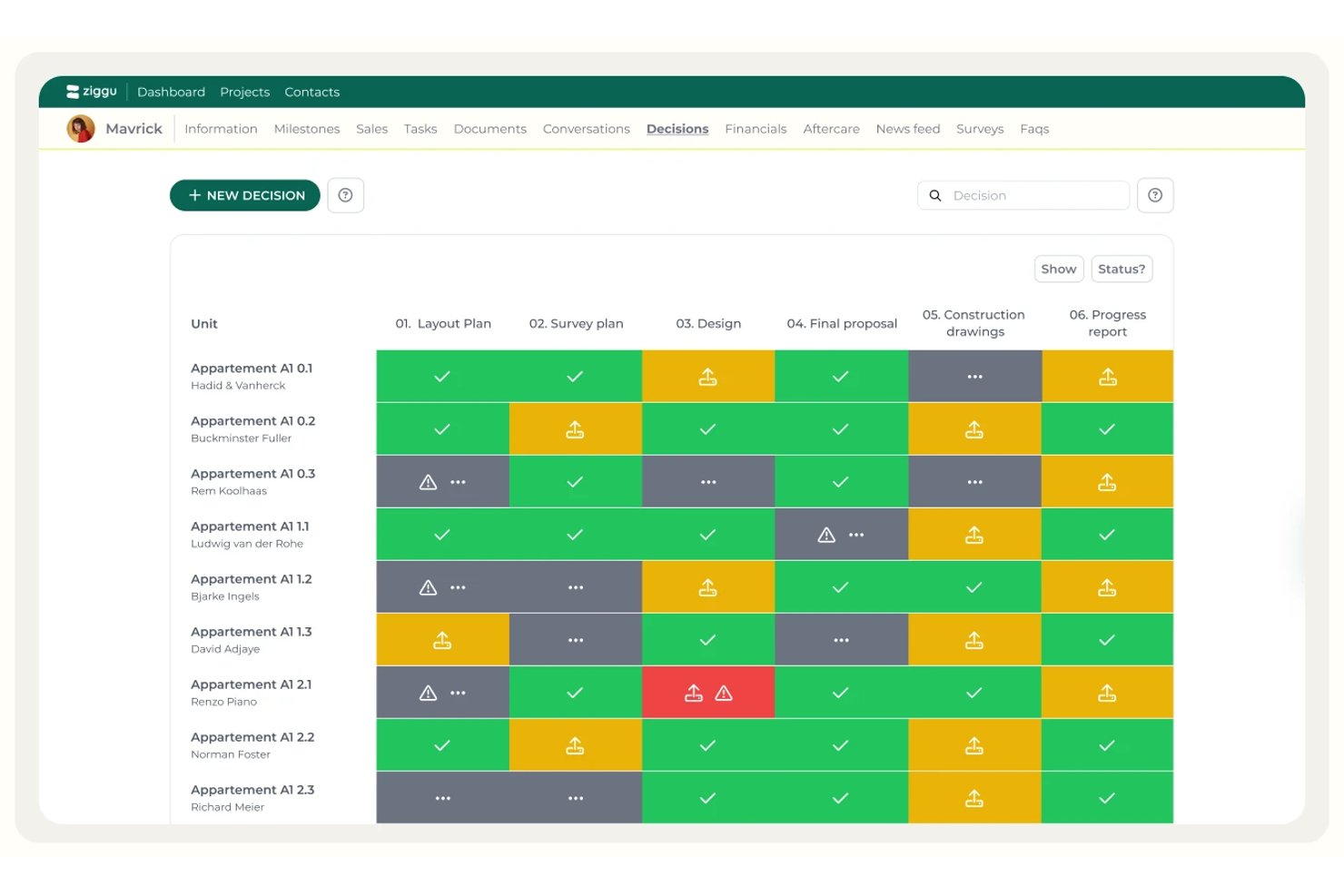
Ziggu is a client portal platform built around milestone-driven project delivery, offering branded client workspaces, structured approval workflows, document management, and automated stakeholder communication.
Who Is Ziggu Best For?
Ziggu is a strong fit for agencies and project-based firms in architecture, interior design, or property development that need structured client sign-off workflows at every project phase.
Why I Picked Ziggu
Ziggu earns its spot on my shortlist because the client portal isn't a feature—it's the entire product. I'm drawn to how milestone-driven sign-off workflows are baked into the core: when a milestone activates, decisions, forms, and reminders fire automatically to the right people. The Decisions feature logs every client approval with timestamps and supports PDF signing, so there's a clear audit trail if anything is disputed later.
Ziggu Key Features
- Unified conversations inbox: A centralized inbox that consolidates all client communication across projects, with internal team notes invisible to clients.
- Milestone-triggered automation: Tasks, messages, forms, and decisions auto-trigger when a milestone is activated, keeping every stakeholder on schedule.
- Post-handover issue tracking: Clients log warranty or punch-list issues with photos directly in the portal, with deadlines and sign-off tracked inside Ziggu.
- Real-time budget visibility: Clients can view live budget breakdowns, upgrade costs, and outstanding offers synced with your invoicing software (Plus plan).
Ziggu Integrations
Ziggu offers native integrations with Exact Online, Salesforce, Teamleader, Google Drive, Dropbox, Microsoft SharePoint, Power BI, and Archisnapper. Its REST API supports custom integrations.
Pros and Cons
Pros:
- Automated post-handover issue tracking for clients
- Unlimited branded client portal access for clients
- Milestone-triggered client approvals with full audit trail
Cons:
- Lacks native visual proofing and annotation
- No built-in Gantt or Kanban views

Best for agency profitability tracking

Productive is a project management platform for agencies that brings together client portals, project tracking, budgeting, time tracking, and invoicing in one workspace.
Who Is Productive Best For?
Productive is a strong fit for digital agencies and professional services firms that need to manage client projects, track billable time, and monitor project profitability in one place.
Why I Picked Productive
Productive earns its spot on my shortlist because it's one of the few project management tools that connects client-facing work directly to financial performance. I love that the budgeting and profitability tracking isn't a separate report you pull at the end of a project—it updates in real time as your team logs hours. So if a project is burning through budget faster than expected, I can see it happening and act before it becomes a problem. The client portal also lets me give clients direct access to their project budgets and custom dashboards, so they're not emailing me for status updates—they can just log in and see exactly where things stand.
Productive Key Features
- Multiple project views: Switch between Gantt, Kanban board, calendar, timeline, and workload views to manage tasks across different project types.
- Resource planning: See team capacity, billable hours, and availability in one view, and use placeholder bookings to plan for tentative or unconfirmed projects.
- Automated project workflows: Set up automations to trigger actions like creating invoices or sending Slack messages when project conditions are met.
- Client feedback forms: Build forms to collect client input and automatically convert responses into tasks.
Productive Integrations
Productive offers native integrations with Slack, Google Calendar, Xero, QuickBooks, HubSpot, and Jira. It also connects with Zapier and provides an API for custom integrations.
Pros and Cons
Pros:
- Shared real-time project financial dashboards
- Granular comment privacy controls for clients
- Free access for unlimited client portal users
Cons:
- No native client payment gateway integration
- Advanced fields locked to higher plans
New Product Updates from Productive
Productive Adds Email and Calendar Integrations for Agents
Productive adds Gmail, Outlook, Google Calendar, and Outlook Calendar connectors for its AI agents. These integrations let agents manage emails and create calendar events directly within Productive. For more information, visit Productive’s official site.
 .

Wrike
Best for collaboration for teams of all sizes

Wrike is a project management platform that lets teams organize projects, manage tasks, and collaborate with clients through customizable client portals and secure document sharing.
Who Is Wrike Best For?
Wrike is a good fit for mid-size to enterprise teams in marketing, professional services, and tech that need structured project management with external client collaboration built in.
Why I Picked Wrike
Wrike earns its spot as one of the best on my shortlist because it handles collaboration across internal teams and external clients without requiring clients to have a paid seat. I like that external requesters can submit work through custom request forms and leave comments directly on tasks, keeping all communication in one place rather than scattered across email threads. The built-in approvals feature lets clients review and sign off on deliverables from inside the platform, and you can track exactly where each approval stands. That combination of external request forms, in-task commenting, and approval tracking makes Wrike one of the most complete options for teams managing client-facing projects at scale.
Wrike Key Features
- Gantt chart view: Visualize project timelines, dependencies, and milestones across tasks using an interactive Gantt chart that updates in real time.
- Custom dashboards: Build dashboards that surface task status, workload, and project progress across multiple teams or workstreams in a single view.
- Resource bookings: Reserve time from specific team members or job roles and check availability before assigning work to a project.
- User activity reports: Generate audit reports that log every action taken by each user in your account, including edits, comments, and status changes.
Wrike Integrations
Wrike integrates with 400+ apps, including the most popular applications from Microsoft, Slack, Google, and Dropbox, along with sales and marketing software like Salesforce and Marketo. Check the app directory to see all the apps Wrike works with.
Pros and Cons
Pros:
- Dynamic request forms for client intakes
- Native asset proofing for client feedback
- Granular permission controls for client views
Cons:
- Guest user limits on lower plans
- Custom branding locked behind Enterprise plan
New Product Updates from Wrike

Wrike Redesigns Workspace Search With New Filters
Wrike introduces a redesigned Workspace Search interface with recent search shortcuts, item type and location filters, and parent-task context. These updates help users find relevant work items and navigate search results efficiently. For more information, visit Wrike’s official site.
 .

Best for enterprise agency workflows
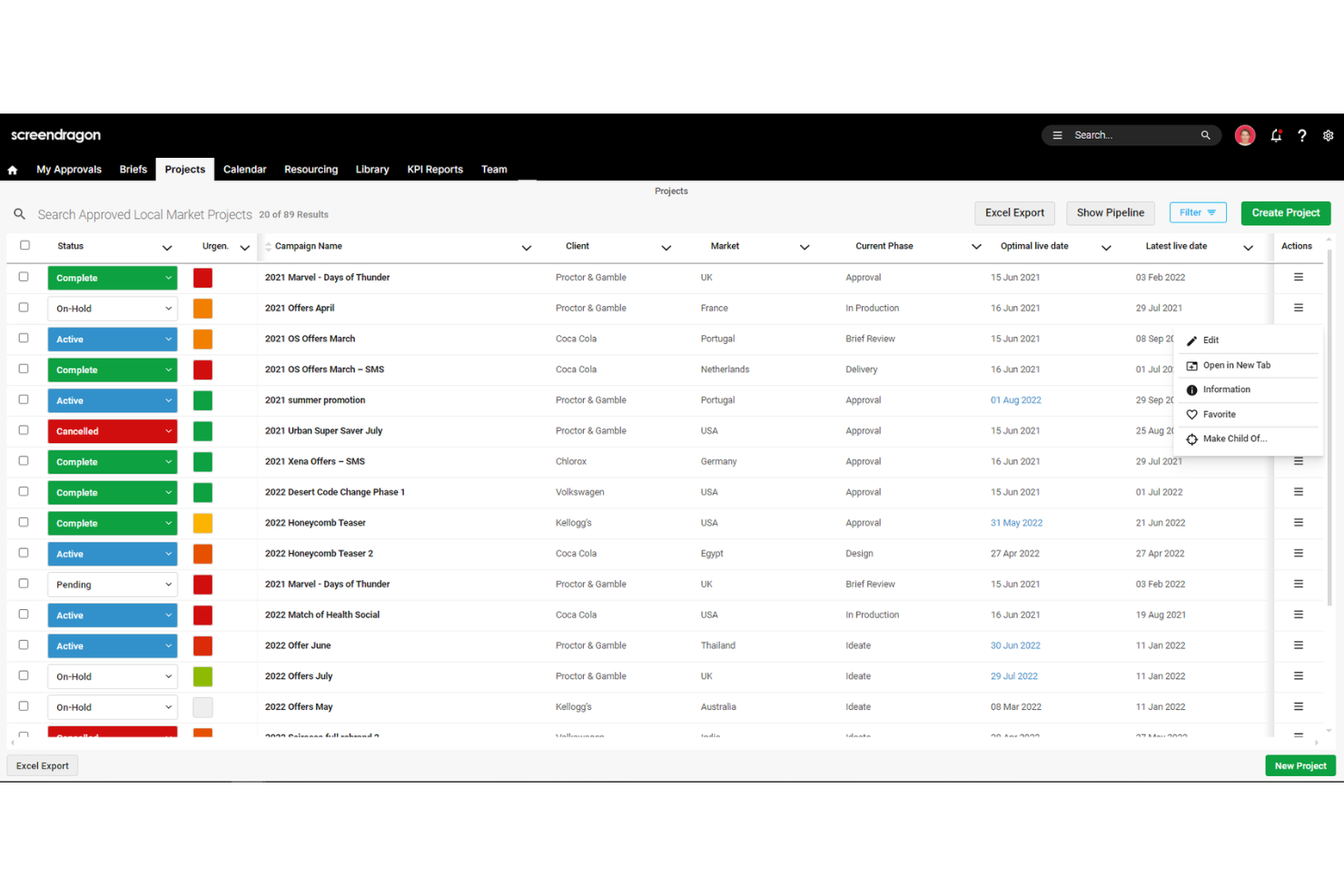
Screendragon is an AI-powered work management platform built for enterprise agencies and marketing teams, combining workflow automation, multi-stage approval routing, resource planning, and external client collaboration.
Who Is Screendragon Best For?
Screendragon suits enterprise agency networks and in-house marketing teams that need multi-stage client approvals and governance at scale across dozens of brands, markets, or external partners.
Why I Picked Screendragon
I picked Screendragon as one of the best because its multi-stage approval routing is genuinely best-in-class for enterprise agency workflows. I love how every asset version keeps a full audit trail showing exactly who approved what and when, which matters when you're managing sign-offs across dozens of brands or external partners. The no-code workflow builder lets you set up conditional, parallel approval chains without dev support, and Kellogg's reported a 95% drop in revision rounds using it.
Screendragon Key Features
- Role-based field-level permissions: Control access down to individual fields, so external clients only see what you choose to expose.
- Client estimate builder: Generate client-facing estimates from templates, with automatic margin calculations and built-in financial approval routing.
- Automated status report emails: Schedule and send project status reports automatically, so clients receive regular updates without manual effort.
- AI-powered dynamic intake briefs: Briefing forms adapt their fields based on team, client, or market, pulling external requests directly into project workflows.
Screendragon Integrations
Screendragon documents 13 pre-built connectors, including Slack, Microsoft Teams, Google Cloud Storage, Amazon S3, Smartsheet, Workato, HubSpot, and Microsoft Power BI. Its REST API supports OAuth 2.0, webhooks, and JSON for custom integrations.
Pros and Cons
Pros:
- Reviewers praise responsive support
- Field-level permissions limit external client access
- Auditable approval trails support complex client sign-offs
Cons:
- Occasional reviewers report difficulty navigating workflows
- No clearly documented, dedicated client portal

Best for tagging clients to get feedback easily
monday AI Workspace is a configurable work management platform that combines project planning, task tracking, AI-powered automations, and external guest access to support client-facing project delivery.
Who Is monday AI Workspace Best For?
monday AI Workspace is a strong fit for client services teams and agencies managing multiple concurrent projects across a mix of internal collaborators and external stakeholders.
Why I Picked monday AI Workspace
monday AI Workspace earns its spot on my shortlist because of how naturally it handles client feedback loops. I like that you can guest users directly in item update threads, which pulls clients into the exact conversation that needs their input. In practice, my team uses this to flag deliverables for review by tagging a client contact on a specific task, and they respond directly in the thread without needing a paid seat.
monday AI Workspace Key Features
- Customizable dashboards: Build dashboards that display project status, milestones, and timelines for both internal teams and clients.
- Role-based permission controls: Set granular access levels to separate what clients and internal users see on shared boards.
- Automated workflow builder: Automate repetitive processes, reminders, and handoffs across projects using built-in automation recipes.
- Integrated file sharing and approvals: Attach, share, and manage project files within boards, including tracking client approval or sign-off stages.
monday AI Workspace Integrations
monday AI Workspace offers hundreds of native integrations through its built-in integrations and marketplace, including Slack, Salesforce, Google Workspace, Microsoft 365, HubSpot, Zoom, Dropbox, Jira, Trello, and GitHub. It also supports Zapier and provides an API for custom integrations.
Pros and Cons
Pros:
- AI automation reduces manual project update work
- Highly configurable dashboards for client-facing views
- Guest access available on lower-tier plans
Cons:
- Board complexity can confuse external client users
- No dedicated white-labeled client portal environment
New Product Updates from monday AI Workspace
monday AI Workspace Adds Human Approval Routing
monday AI Workspace adds a human-in-the-loop approval block to AI Workflows, sending approval requests and routing workflow paths based on responses. For more information, visit monday AI Workspace's official site.
 .
Best for combining team chat and project workflows
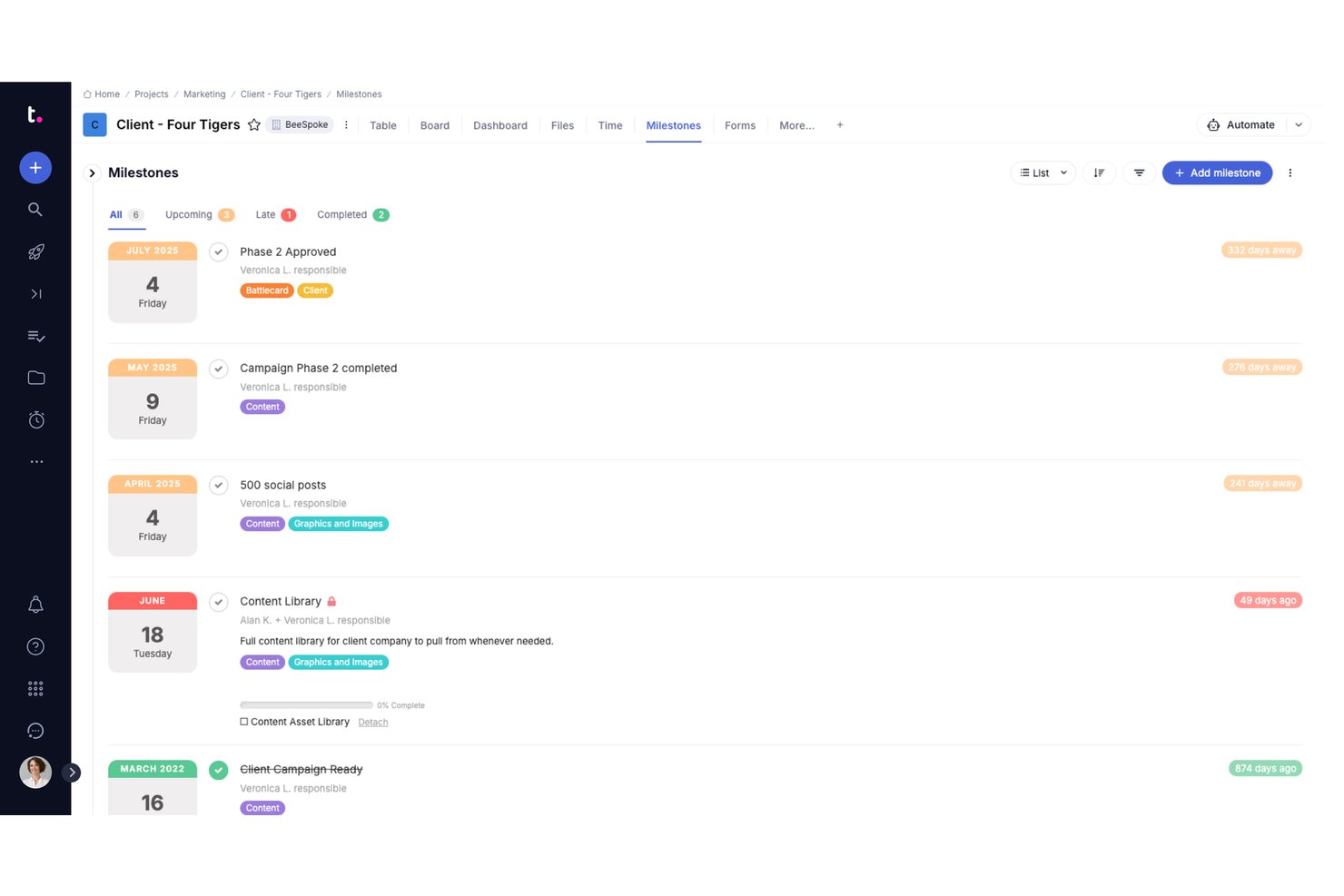
Teamwork.com is a client-focused project management platform that combines task management, time tracking, billing, and a built-in client portal with configurable permissions and approval workflows.
Who Is Teamwork.com Best For?
Teamwork.com is a strong fit for agencies and professional services teams that bill clients for their time and need to manage multiple client projects simultaneously.
Why I Picked Teamwork.com
I picked Teamwork.com as one of the best because it's one of the few platforms where Teamwork Chat sits directly inside the project view, so my team can discuss a deliverable without switching tools. What I especially like is the clean separation: internal chat threads stay hidden from clients, who log into the portal and only see the milestones, task progress, and Proofs workflows I've configured. I can move a file through internal review in chat, then trigger a Proofs approval for client sign-off, all within the same project.
Teamwork.com Key Features
- Proofs and approvals: Route files through client sign-off workflows and capture annotation feedback directly in the portal.
- Granular client permissions: Assign roles that separate internal activities from client visibility and control exactly what external users see.
- Time tracking with invoicing: Track billable hours on projects for each client and generate invoices from logged time.
- Project template library: Access a range of ready-to-use templates to standardize onboarding and recurring project work.
Teamwork.com Integrations
Teamwork.com offers native integrations with HubSpot, Slack, Microsoft 365, Google Drive, QuickBooks, Xero, Dropbox, and Harvest. Zapier and an open API are also available for custom integrations.
Pros and Cons
Pros:
- Time tracking links directly to client invoicing
- Proofs tool supports direct client file annotation
- Built-in client portal with permissioned access
Cons:
- Setup complexity grows with larger client volumes
- Client portal branding limited on lower-tier plans
Accelo
Best for quote-to-cash automation
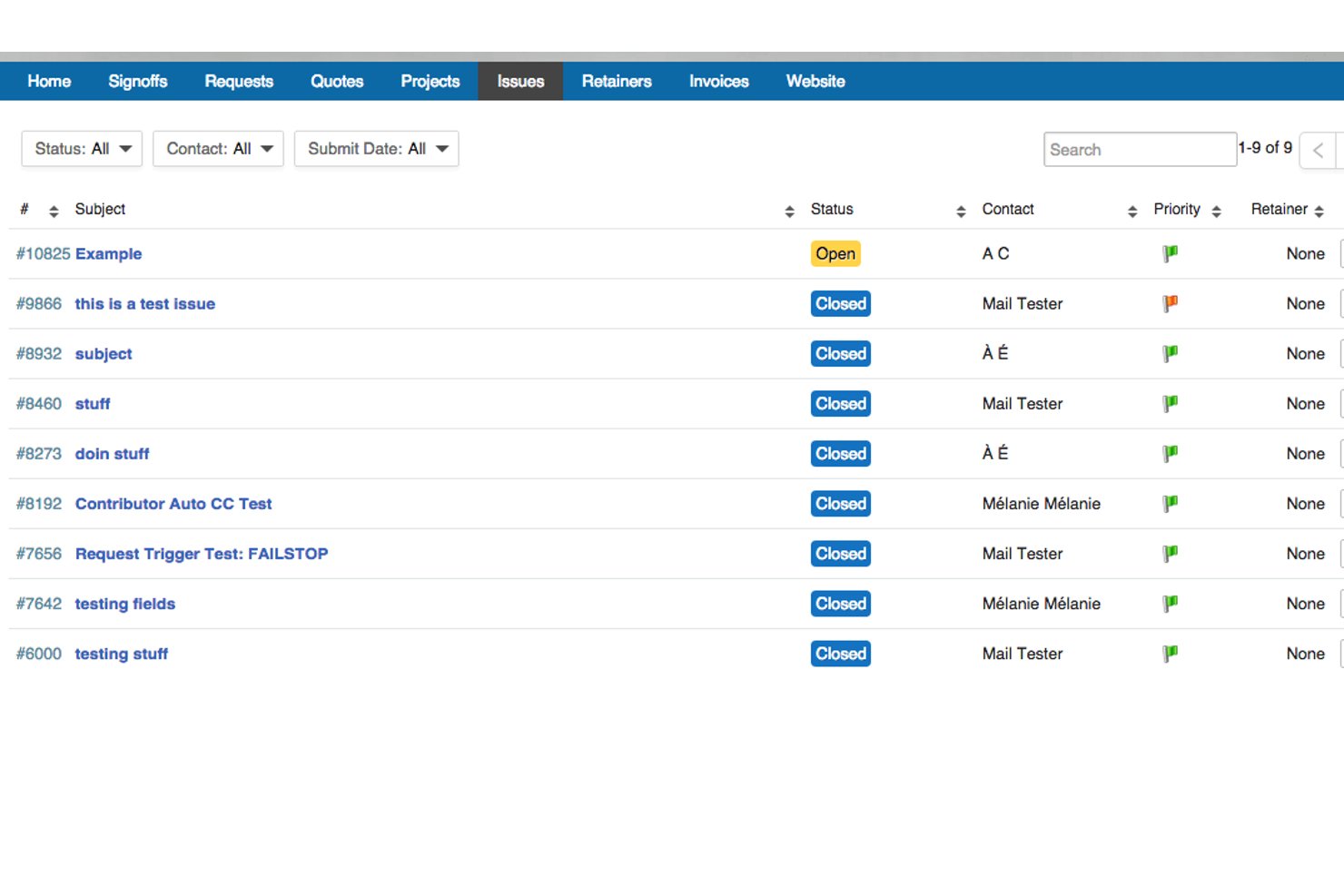
Accelo is an AI-powered professional services automation platform that combines project management, client portal access, time tracking, billing, ticketing, retainer management, and quote-to-cash workflows in one system.
Who Is Accelo Best For?
Accelo is built for professional services firms—agencies, consultancies, and IT service providers—that need to manage client delivery and billing in one place.
Why I Picked Accelo
Accelo earns its spot on my shortlist because the quote-to-cash flow is genuinely end-to-end: once a client approves a quote, a project launches automatically, time logs against it, and invoices generate from that activity without manual handoffs. I also like the four-layer permission model, which lets me expose budget data on one project while keeping it hidden on another for the same client. The Client Workspace ties it together, giving clients a branded portal with live Gantt views and milestone dashboards so they're never waiting on a status email.
Accelo Key Features
- Magic link client access: Clients join their branded workspace through a secure magic link, with no password or account setup required.
- AI-suggested time entries: Accelo's AI reviews activity and drafts timesheet entries automatically for team members to review and approve before billing.
- Retainer management: Track retainer hours, burn rates, and budget consumption in real time, with client-visible dashboards showing usage trends.
- Portfolio-level delivery view: Internal dashboards surface project health, resourcing, and profitability across all active clients and workstreams in one view.
Accelo Integrations
Accelo offers native integrations with Jira, Azure DevOps, GitHub, Slack, Microsoft 365, Google Workspace, QuickBooks Online, Xero, HubSpot, and Salesforce. It also provides REST and Forms APIs for custom integrations and supports Zapier.
Pros and Cons
Pros:
- Project activity feeds billing automatically
- Timestamped approvals clarify client sign-offs
- Client access can vary by project
Cons:
- Portal branding stops short of full white-labeling
- Email management duplicates Outlook follow-up
New Product Updates from Accelo

Accelo Rebuilds Mobile App for Project and Time Management
Accelo rebuilds its mobile app with task management, new work creation, and mobile timesheets for Forecast customers. This helps teams keep project and time data current while working away from a desktop. For more information, visit Accelo’s official site.
 .

Moxo
Best for automated client follow-ups
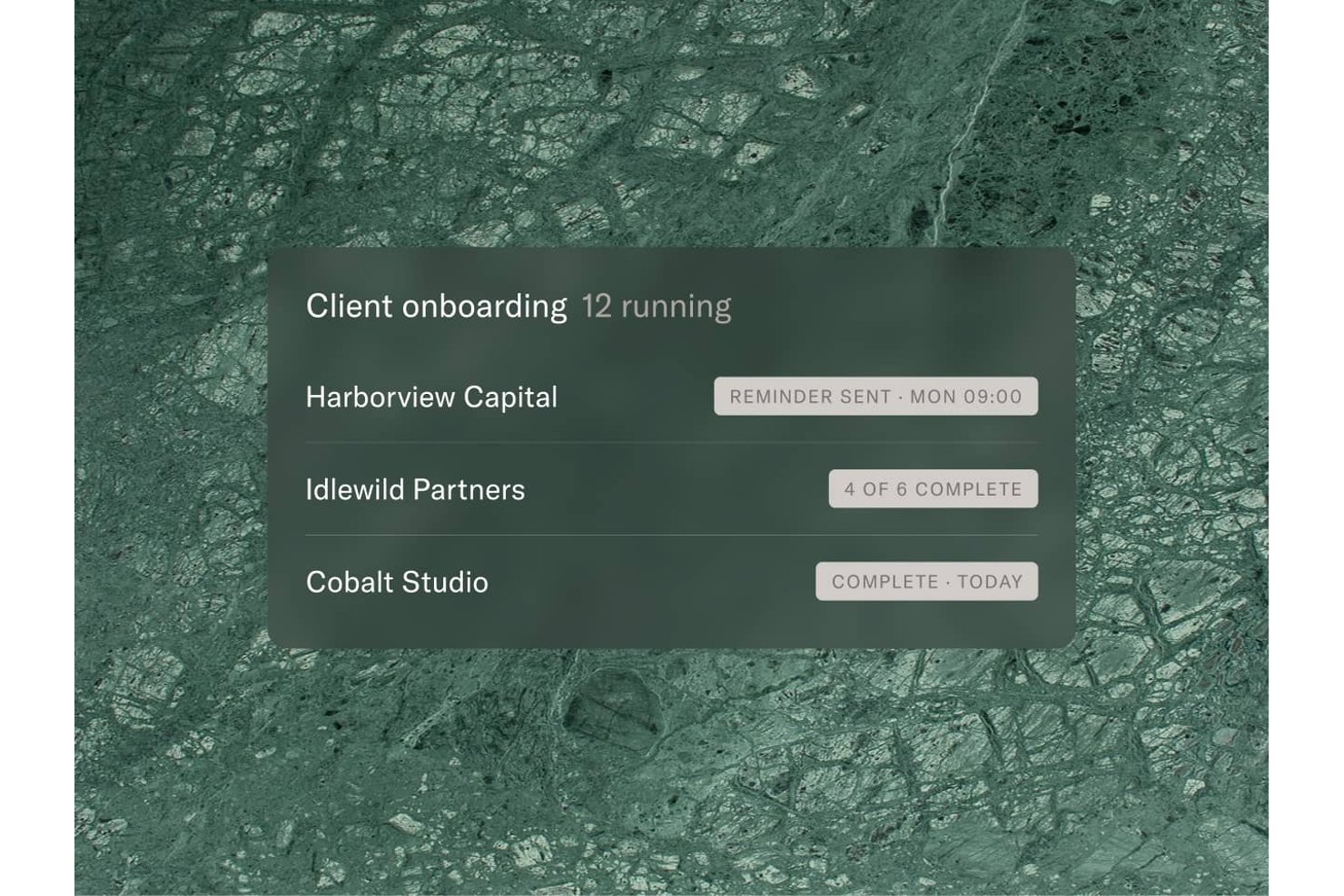
Moxo is a client portal and workflow platform that combines branded portals, structured approval workflows, AI-driven task automation, and multi-client dashboards for operations and client-facing teams.
Who Is Moxo Best For?
Moxo is a strong fit for operations teams and agency account managers juggling multiple active client accounts who need automated follow-ups built into every step of the workflow.
Why I Picked Moxo
I picked Moxo as one of the best because its automated follow-up system is genuinely built into every workflow step, not bolted on after the fact. AI agents proactively chase overdue tasks, and configurable reminders fire before, on, and after due dates so no client action slips through. I also love the multi-client dashboard, which surfaces stalled steps and overdue items across every active account at a glance.
Moxo Key Features
- Magic-link client access: Clients open their branded portal through a single secure link—no account, password, or app download needed.
- Sequential and parallel approvals: Approval workflows route sign-offs in sequence or at once, with completion rules for one, a majority, or all assignees.
- AI agent suite: Built-in Preparer, Reviewer, and Advisor agents handle document drafting, submission checks, and client Q&A inside each workspace.
- SOC 2 Type II security: Enterprise-grade encryption, SAML SSO, audit trails, and private cloud or on-premises deployment support regulated client environments.
Moxo Integrations
Moxo offers documented integrations with Salesforce, HubSpot, QuickBooks, Xero, Stripe, Google Drive, Dropbox, ClickUp, Jira, and Slack. It also supports REST APIs, SDKs, webhooks, and Zapier for custom integrations.
Pros and Cons
Pros:
- Branded portals focus clients on assigned tasks
- Approval paths support majority or sequential sign-off
- Automated reminders chase overdue client actions
Cons:
- Clients may still default to email
- Workflow setup takes time to configure

Best for creating custom-branded client portals

Zoho Projects is a project management platform for teams who need client-facing workspaces, offering tools for task tracking, document sharing, time tracking, and customizable client access.
Who Is Zoho Projects Best For?
Zoho Projects is a good fit for agencies and client-services teams that need to give clients direct, branded access to project progress and deliverables.
The pricing page confirms the custom domain feature (available on Enterprise plan), client users feature, custom profiles and roles, and role-based access controls.
Why I Picked Zoho Projects
I picked Zoho Projects as one of the best because of how far it goes with portal branding. Most project management tools let you add clients as users—Zoho Projects lets you map your own company domain to the portal, so clients access their project workspace through your URL, not a zoho.com address. That's a meaningful difference when you're trying to present a polished, agency-branded experience. I also like that client access is tightly controlled through custom profiles and roles, so you can define exactly what each client user sees and does within a project. Combined with automated notifications that keep clients updated on task and issue status changes, the portal functions as a real client-facing workspace rather than just a shared task list.
Zoho Projects Key Features
- Gantt chart: Visualize task timelines, set dependencies, and reschedule tasks directly within the chart view.
- Blueprint workflow automation: Design step-by-step task workflows that assign the right people and trigger field updates as task statuses change.
- Timesheet and invoicing: Log time against tasks and convert those time logs into invoices through a Zoho Books or Zoho Invoice integration.
- Portfolio dashboard: View task status, budget health, and project progress across all active projects from a single dashboard.
Zoho Projects Integrations
Zoho Projects offers native integrations with Zoho CRM, Zoho Books, Zoho Invoice, Google Drive, Microsoft 365, Slack, GitHub, Bitbucket, Dropbox, and Zapier. An API is available for custom integrations.
Pros and Cons
Pros:
- Built-in interactive team chat threads
- Affordable pricing for small team tiers
- Native integration with Zoho CRM ecosystem
Cons:
- Account storage capacity caps on plans
- Requires paid guest client user add-ons
New Product Updates from Zoho Projects
Zoho Projects Adds CodeX Scripts for Custom Modules
Zoho Projects now supports CodeX Scripts for custom modules, enabling conditional logic and rules for creating, updating, and deleting records. For more information, visit Zoho Projects' official site.
 .

Clinked
Best for multi-client branded portal management
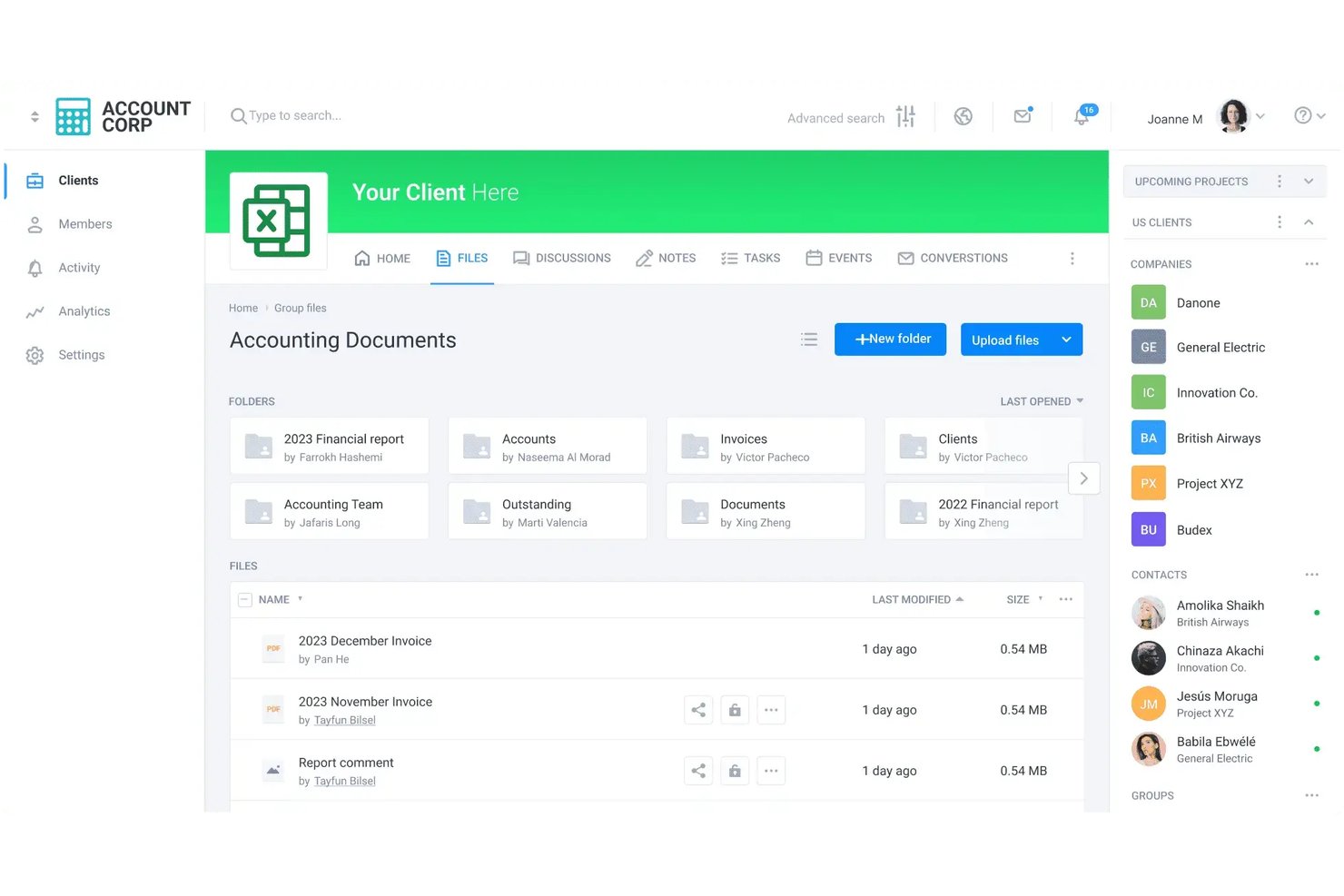
Clinked is a white-label client portal platform that combines branded workspaces, file sharing, task management, and client communication tools for teams managing multiple external accounts.
Who Is Clinked Best For?
Clinked is a strong fit for agencies and professional services firms that manage several external client relationships and need each client to see only their own branded workspace.
Why I Picked Clinked
Clinked earns its spot on my shortlist because of how well it handles branded portal management across multiple client accounts simultaneously. Each client gets its own isolated, branded workspace with a custom domain and your logo, so clients never see each other's work or even know they're on the same platform. I especially like the Restricted Groups feature, which prevents clients within the same group from seeing or messaging one another, a detail that matters when you're running several accounts in parallel. File Approvals add another layer, letting you request reviews and track sign-offs without chasing clients over email.
Clinked Key Features
- Reachouts: Send a single announcement or update to multiple client groups at once without leaving the platform.
- Guest Share: Grant one-time access to a specific file, folder, or note with configurable upload and download permissions.
- Temporary Members: Set time-limited access for clients or contractors so portal permissions expire automatically.
- Audit trail: Track a complete record of all portal activity across every client workspace, available on Standard plans and above.
Clinked Integrations
Clinked offers native integrations with DocuSign, Adobe Acrobat Sign, Google Workspace, Microsoft OneDrive, Jotform, Typeform, Power BI, Zoom, Proposify, QuickBooks, Dropbox, Box, and SharePoint. It also supports Zapier and provides a REST API for custom integrations.
Pros and Cons
Pros:
- Reviewers praise responsive support
- Separate branded spaces prevent client overlap
- Clients navigate portals without training
Cons:
- Some reviewers report delayed notifications
- No native time tracking or Gantt charts
Müşteri Portalına Sahip Diğer Proje Yönetimi Yazılımı Seçenekleri
Listeye giremeyen ancak yine de değerlendirilmeye değer birkaç müşteri portalına sahip proje yönetimi aracı:
- Assembly
For compliance-focused client data protection
- Project.co
For flat-rate unlimited client access
- Scoro
For real-time project insights
- Ravetree
For PSA-led client and resource oversight
- Rocketlane
For PSA teams running AI-driven delivery
- SuiteDash
For white-label portals
- Bonsai Agency Software
For freelance and agency client billing
- Dock
For no-login client project visibility
- Kitchen.co
For passwordless client file sharing
- CoordinateHQ
For unlimited free client access


How I Evaluate Project Management Software With Client Portals
I split my evaluation into three parts, weighting core functionality most: restrict clients to their projects and let them review files, discuss work, and approve deliverables in a simple portal. Next, I look for automated status reports. Finally, I consider onboarding, security, support, and pricing as client numbers grow.
Core Functionality (Table Stakes For This List)
When I'm selecting tools for my list, I score each one on a scale from 0 (does not offer the functionality) to 5 (excels in this area) for each core functionality listed below. I then convert the total into a percentage to help assess each tool's overall fit, with extra weight on any functionalities I’ve deemed essential.
- Client Access Controls (Essential): I look for project- and file-level permissions that keep one client’s tasks and documents separate from another’s.
- Dedicated Client Portal (Essential): I assess whether clients get a clear, simplified workspace to check project status without navigating the internal team’s full setup.
- File Exchange: I check whether clients can view, upload, download, and comment on deliverables in the project workspace.
- Client Communication: I look for threaded comments tied to tasks or files, so feedback and decisions stay in context.
- Portal Branding: I consider whether teams can apply their logo, colors, or domain to match the client experience to their business.
- Approvals And Feedback: I assess whether clients can approve deliverables or request changes, with statuses that help teams track sign-off.
Once I have a list of tools that meet the criteria, I consider what sets each platform apart.
Differentiating Factors (What Sets Vendors Apart)
Here's how I compare and contrast different vendors:
Standout Features
I look for automated status reports that clients can receive on a set schedule, since manually writing weekly updates across ten or more accounts burns hours. I also evaluate multi-client dashboards—an agency running thirty active portals needs a single view to spot at-risk projects fast. Custom intake forms matter too; letting clients submit requests through a branded form beats scattered emails and keeps briefs structured from day one.
Beyond Features
I check whether clients can access the portal without creating a full account—guest links or magic-link invitations cut onboarding friction, especially for non-technical stakeholders. Pricing models matter too; per-client portal fees add up fast when you're running thirty-plus accounts, so I look for unlimited or tiered portal structures. I also evaluate data segregation between clients and integration depth with tools like HubSpot, QuickBooks, or Slack.
Müşteri Portalına Sahip Proje Yönetimi Yazılımı Nasıl Seçilir?
Müşteri portalına sahip doğru proje yönetimi yazılımını seçmek için ayrıntılı izin denetimlerine, müşterilerin sorunsuz bir şekilde sisteme alınmasına ve şeffaf fiyatlandırma modellerine odaklanın. İdeal araç, ekip içi taslaklarınızı, yorumlarınızı ve bütçelerinizi tamamen gizli tutarken paydaşlara üst düzey durum görünürlüğü ve kendi kendine hizmet sunan onay seçenekleri sağlar. Akılda tutulması gereken faktörler için aşağıdaki kontrol listesini kullanabilirsiniz:
| Faktör | Dikkate Alınması Gerekenler |
|---|---|
| Ayrıntılı İzinler | Araç, tek tıklamayla "Yalnızca Dahili" ve "Müşteriye Görünür" seçenekleri arasında geçiş yapma imkânı sunuyor mu? Görevleri çoğaltmadan ham çalışmaları ve ekip içi yorumları gizleyebilmeniz gerekir. |
| Müşteriyi Sisteme Alma Sürecindeki Zorluklar | Müşteriler sihirli bağlantılar veya basitleştirilmiş konuk görünümleri üzerinden giriş yapabiliyor mu? Erişim için 30 dakikalık bir kurulum gerekiyorsa paydaşlar e-postaya geri dönecektir. |
| Konuk Kullanıcı Fiyatlandırması | Müşteri kullanıcıları sınırsız ve ücretsiz mi? Konuk erişiminin kurumsal paketlerin arkasına gizlenmediğinden veya tam kullanıcı ücretleriyle fiyatlandırılmadığından emin olun. |
| Beyaz Etiketleme ve Markalama | Kurumsal bir ajans imajını korumak için özel alan adları, özel logolar ve markalı bildirim e-postaları kullanabiliyor musunuz? |
| İnceleme ve Onaylar | Portal, uygulama içi belirli noktaları, zaman damgalı video geri bildirimlerini ve net durum etiketlerini (ör. Onaylandı, Değişiklik İstendi) destekliyor mu? |
| Kendi Kendine Hizmet Sunan Panolar | Meşgul yöneticilerin size e-posta göndermeden proje durumunu 10 saniye içinde kontrol edebilmesi için üst düzey kilometre taşı zaman çizelgeleri ve ilerleme grafikleri otomatikleştiriliyor mu? |
Uzman İpucu: Satın almadan önce ekibinizin dışından biriyle 60 saniyelik bir test yapın. Bu kişi sizin yardımınız olmadan bir kilometre taşı durumunu bulamıyor veya bir belge yükleyemiyorsa müşterileriniz de bunu yapamayacaktır.
Müşteri Portalına Sahip Proje Yönetimi Yazılımı Nedir?
Müşteri portallarına sahip proje yönetimi yazılımı, dahili proje takip özelliklerini müşterilerin güncellemeleri görüntüleyebileceği, dosya paylaşabileceği ve iş birliği yapabileceği güvenli bir alanla birleştiren bir araçtır.
Bu araçlar, müşterilere ilerleme, teslimatlar ve geri bildirim konusunda görünürlük sağlayarak ajansların, serbest çalışanların ve hizmet ekiplerinin iletişimi kolaylaştırmasına yardımcı olur; hem de bitmek bilmeyen e-posta zincirleri veya durum toplantıları olmadan. Bu araçlar genellikle görev yönetimi ve belge paylaşımı gibi proje yönetimi araçlarını, mesajlaşma ve müşterilerin erişimi için özel izinlerle bir araya getirir.
Temel Özellikler
Müşteri portalına sahip proje yönetimi yazılımlarının temel özellikleri, paydaşlarınıza proje ilerlemesi, teslimatlar ve onaylar için etkileşimli bir pencere sunarken ekibinizin dahili iş akışlarını, ham taslaklarını ve dahili görüşmelerini kesin olarak ayrı tutar. Aranması gereken yedi özellik şunlardır:
- Müşteriler için proje görünürlüğü: Müşterilerin dahili iş akışlarını görmeden görevler veya dosyalar hakkında onay ve geri bildirim sağlayabileceği anlaşılır bir kontrol paneli.
- Özelleştirilebilir müşteri deneyimi: Profesyonel bir müşteri deneyimi sunmak için müşteri portalını marka unsurlarıyla (logolar, renkler, alan adı vb.) özelleştirebilme.
- Güvenli mesajlaşma ve iş birliği: Harici araçlara güvenmeden iletişimi kolaylaştıran yerleşik mesajlaşma veya yorum dizileri. Bu merkezi alan, proje belgelerinin, sözleşmelerin ve varlıkların güvenli bir şekilde paylaşılmasına yardımcı olabilir.
- Role dayalı erişim ve izinler: Farklı izin düzeyleri belirleyebilme özelliği, dahili ekip görüşmelerinin, mali bilgilerin ve gizli bilgilerin özel kalmasını sağlar.
- Etkileşimli doğrulama ve açıklama araçları: Müşterilerin görsel dosyalarına doğrudan tarayıcı üzerinden işaretler bırakmasına, metin taslaklarını vurgulamasına veya video dosyalarına zaman damgalı yorumlar eklemesine olanak tanıyan yerel görsel geri bildirim motorları.
- Merkezi varlık depoları: Müşteriye sunulan tüm varlıkları klasör veya göreve göre düzenleyen, sürüm kontrollü dosya merkezleri; böylece e-postaların içindeki ekler ve yinelenen dosyalardan kaynaklanan karmaşa ortadan kalkar.
- Dinamik müşteri talep formları: Müşterilerin yeni talepler, değişiklik emirleri veya hata raporları göndermesine ve bunların ekibiniz için otomatik olarak dahili görevlere dönüştürülmesine olanak tanıyan yerleşik form oluşturucular.
Faydalar
Müşteri portalına sahip proje yönetimi yazılımlarını kullanmak, müşteri iletişimindeki sürtüşmeyi azaltan, ekibin kapasitesini koruyan ve proje onaylarını hızlandıran merkezi bir merkez oluşturur. En önemli beş fayda şunlardır:
- Daha Az Durum E-postası: Paydaşlara gerçek zamanlı proje ilerlemesine kendi başlarına erişme olanağı sunarak sürekli gelen "Kısa bir güncelleme var mı?" mesajlarını ortadan kaldırır.
- Daha Hızlı İnceleme ve Onaylar: Müşterilere geri bildirim bırakabilecekleri ve teslimatları onaylayabilecekleri doğrudan ve sorunsuz bir portal sunarak inceleme döngülerini hızlandırır.
- Daha Güvenli Dahili Sınırlar: Müşterilerin nihai kilometre taşlarına odaklanmasını sağlarken ekibinizin ham taslaklarını, özel sohbetlerini ve dahili notlarını korur.
- Daha Net Denetim İzleri: Her onayı, dosya sürümünü ve değişiklik talebini tek bir yerde merkezileştirerek "Ben bunu hiç kabul etmedim" kapsam anlaşmazlıklarını ortadan kaldırır.
- İyileştirilmiş Marka Algısı: Özel marka unsurları ve beyaz etiketli müşteri görünümleri aracılığıyla modern ve profesyonel bir ajans deneyimi sunar.
Maliyetler ve Fiyatlandırma Dağılımı
Müşteri portallarına sahip proje yönetimi yazılımları genellikle kullanıcı başına aylık 10 ila 45 $ arasındadır; ancak toplam yazılım harcamanız, her platformun harici konuk kontenjanları ile dahili ekip üyeleri için nasıl ücretlendirme yaptığına büyük ölçüde bağlı olacaktır.
- Ücretsiz Konuk / Müşteri Kontenjanı Modelleri: Ajanslar için en uygun kurulumlar, sınırsız sayıda müşterinin çalışmaları ücretsiz olarak görüntülemesine, yorum yapmasına ve onaylamasına izin verir; sizden yalnızca temel dahili ekip üyeleri için ücret alınır.
- Ücretli Konuk Kontenjanı Modelleri: Bazı araçlar harici müşterileri tam ücretli kullanıcılar olarak değerlendirir veya katı bir oranı aştığınızda (ör. ücretli kullanıcı başına 5 ücretsiz konuk) ücretli "Konuk Geçişleri" satın almanızı gerektirir; bu durum müşteri listeniz büyüdükçe maliyetleri hızla artırabilir.
- Katmana Bağlı Özellik Modelleri: Özel alan adı eşleme (
projects.youragency.com), beyaz etiketleme ve ayrıntılı gizlilik kontrolleri gibi gelişmiş portal işlevleri genellikle daha üst düzey İşletme veya Kurumsal planlarının ($20–$40+/kullanıcı/ay) arkasında kilitlidir. - Sabit Ücretli Sınırsız Fiyatlandırma: Bazı platformlar, dahili kullanıcılar ve müşteri konukları için sınırsız kullanım karşılığında sabit aylık veya yıllık ücret alır; böylece ajansın büyüklüğünden bağımsız olarak bütçeleme öngörülebilir olur.
Müşteri Portalına Sahip PM Yazılımları için Plan Karşılaştırma Tablosu
| Fiyatlandırma Modeli | Ortalama Maliyet Aralığı | En Uygun Olduğu | Dikkat Edilmesi Gerekenler |
| Ücretsiz Sınırsız Konuklar | $10–$25 /kullanıcı/ay | Büyüyen ajanslar ve stüdyolar | Özel alan adları gibi özellikler daha üst katmanlarda kilitli olabilir. |
| Katmana Göre Sınırlandırılmış Konuk Geçişleri | $15–$35 /kullanıcı/ay | Orta ölçekli proje yönetimi ekipleri | Konuk oranı sınırını aştığınızda ek kullanım ücretleri hızla uygulanır. |
| Sabit Ücretli Sınırsız | $15–$300/aylık sabit ücret | Yüksek hacimli ve büyüyen ekipler | Kullanıcı başına ücretlendiren platformlara kıyasla daha az ayrıntılı izin denetimleri. |
Müşteri Portalı Erişimi Sunan Ücretsiz Proje Yönetimi Araçları
Özel beyaz etiketli portallar genellikle ücretli planlar gerektirse de bazı platformlar, müşterilerle paylaşım özelliklerine sahip, kalıcı olarak ücretsiz kullanılabilen güçlü katmanlar sunar. Ancak bu ücretsiz seçenekler; çok düşük dosya depolama sınırları, proje limitleri veya kısıtlı yönetici görünümleri gibi, bunların etrafından dolaşarak çalışmanızı gerektiren katı operasyonel sınırlamalarla birlikte gelir. Bazı seçenekler şunlardır:
- ClickUp: Harici konukları özel panoları ve görev panolarını görüntülemeye davet etmenize olanak tanır; ancak tüm çalışma alanı depolamasını 60 MB ile sınırlar ve özel beyaz etiketli markalamayı ücretli katmanların arkasında kilitler.
- Agiled: markalı bir müşteri portalı ve sınırsız müşteri hesabı içeren, kalıcı olarak ücretsiz bir plan sunar; ancak depolama alanını sınırlar ve özel alan adı eşlemesini (
projects.youragency.com) ücretli katmanların arkasında kilitler. - Project.co: paylaşılan proje merkezlerinde sınırsız müşteri kullanıcısını destekler; ancak sizi 10 etkin proje ve toplam 1 GB depolama sınırıyla kısıtlar.
- GoodDay: ücretsiz konuk/müşteri erişimi içerir (en fazla 15 dahili ekip üyesi için); böylece müşteriler kullanıcı koltuklarını tüketmeden ilerleme panolarını görüntüleyebilir, ancak gelişmiş yönetim denetimlerini ve özel markalamayı kısıtlar.
- Kitchen.co: sınırsız müşteri için görsel geri bildirim ve müşteri görev panoları sunar; ancak sizi 2 dahili kullanıcı, toplam 2 GB depolama sınırı (dosya başına 500 MB) ve ücretsiz planda özel alan adı eşlemesinin bulunmamasıyla kısıtlar.
- Zoho Projects: kilometre taşlarını görüntülemek için yerel müşteri kullanıcı erişimi içerir; ancak ücretsiz katmanı kesin olarak 2 etkin proje, 3 ekip üyesi ve çok düşük 10 MB depolama sınırıyla kısıtlar.
Ücretsiz Müşteri Portalları Ne Zaman Artık Yeterli Olmaz?
Ücretsiz araçlar serbest çalışanlar ve küçük pilot çalışmalar için iyi sonuç verir; ancak ajansınız veya müşteri listeniz büyüdükçe ücretsiz katmanlar, üretkenliğinize ve müşteri deneyimine zarar veren operasyonel engellere hızla ulaşır. Şu durumlarda özel ve ücretli bir müşteri portalı aracına geçmeniz gerekir:
- Uygulama İçi Onaylara ve İncelemeye İhtiyacınız Varsa: Kapsam kaymasını ortadan kaldırmak için görsel işaretler bırakma veya videolara zaman damgası ekleme gibi etkileşimli geri bildirim araçlarına ve resmi Onaylandı veya Değişiklik İstendi durum düğmelerine ihtiyacınız vardır.
- Yüksek Hacimli Varlık Teslimine İhtiyacınız Varsa: Yüksek çözünürlüklü tasarım dosyaları, video taslakları veya büyük medya brifinglerinde dosya boyutu sınırlarına ulaşırsınız ve bu da sizi yeniden üçüncü taraf dosya aktarım bağlantılarına yönelmeye zorlar.
- Profesyonel Marka Sahipliğine İhtiyacınız Varsa: Özel alan adı barındırma (
projects.youragency.com), markanıza uyarlanmış stil ve ajansınızın marka otoritesini güçlendiren düzenli e-posta bildirimleri istersiniz. - Gerçek Dahili Gizlilik Denetimlerine İhtiyacınız Varsa: Çalışmaların müşteri müdahalesi olmadan perde arkasında yürütülebilmesi için taslak görevlerde, özel notlarda ve dahili ekip tartışmalarında açık "Yalnızca Dahili" anahtarlarına ihtiyacınız vardır.
- Ölçeklenebilir Müşteri Katılımına İhtiyacınız Varsa: Aylık yazılım maliyetlerinizi artırmadan sınırsız müşteri hesabı gerektiren katı etkin proje veya konuk limitlerini aşarsınız.
Uygulama İçin En İyi Uygulamalar
Bir müşteri portalını başarıyla kullanıma sunmak; müşterilerin benimsemesini sağlamaya, ilk günden itibaren net iletişim sınırları belirlemeye ve paydaşların platforma gerçekten tek doğru bilgi kaynağı olarak güvenmesi için platformu güncel tutmaya bağlıdır. Müşteri portalını şu şekilde uygulayabilirsiniz:
- Canlı Müşteri Portalı Tanıtımı Gerçekleştirin: Başlangıç toplantınız sırasında paydaşlara portal arayüzünü tanıtarak kilometre taşlarını nasıl takip edeceklerini, teslimatları nasıl görüntüleyeceklerini ve onayları nasıl göndereceklerini gösterin.
- Portal Öncelikli İletişim Kuralını Uygulayın: Doğrudan portal bağlantıları içeren yanıtlar vererek tüm müşteri durum e-postalarını portala yönlendirin ve paydaşlara portal üzerinden iletilen taleplerin daha hızlı ele alındığını öğretin.
- Günlük Görev Durumu Güncellemelerini Sürdürün: Kilometre taşı ilerlemesinin, görev durumlarının ve zaman çizelgelerinin gerçek zamanlı ilerlemeyi yansıtmasını sağlamak için proje yöneticilerinden müşteriye açık panoları günlük olarak gözden geçirmelerini isteyin.
- Role Dayalı Müşteri Erişim İzinlerini Yapılandırın: Paydaşların kıdemine göre açık kullanıcı izinleri belirleyin; üst düzey yöneticilere genel durum panoları, günlük müşteri iletişim kişilerine ise görev düzeyinde erişim sağlayın.
- Çalışma Alanı Dosya Adlandırma Kurallarını Standartlaştırın: Müşterilerin proje yöneticisinin yardımına ihtiyaç duymadan onaylanmış varlıkları bulabilmesi için tüm projelerde tutarlı klasör hiyerarşileri ve sürüm kontrollü dosya adlandırma yapıları uygulayın.
- Portalları Seçili Beta Müşterileriyle Pilot Olarak Deneyin: Tüm müşteri portföyünüzde kullanıma sunmadan önce kullanıcı deneyimindeki sorunlu noktaları belirlemek için müşteriye açık portal iş akışlarını ilk olarak güvenilir 2–3 müşteri hesabında test edin.
SSS
Müşteri portalına sahip proje yönetimi yazılımları hakkında sık sorulan soruların bazı yanıtları:
Proje yönetiminde müşteri portalı nedir?
Müşteri portalı; dış paydaşlara gerçek zamanlı proje güncellemelerine, teslimatlara, dosya eklerine ve onay iş akışlarına doğrudan erişim sağlayan güvenli, web tabanlı bir çalışma alanıdır. Müşterilerin proje ilerlemesini takip edebileceği, geri bildirim bırakabileceği ve dahili çalışma alanınıza veya özel ekip görüşmelerinize erişmeleri gerekmeden çalışmalarınızı onaylayabileceği özel bir merkez görevi görür.
Müşteri portalı ile misafir erişim bağlantısı arasındaki fark nedir?
Müşteri portalı, müşterilere kendi projelerine ve belgelerine erişim sağlayan özel bir giriş ve kontrol paneli sunarken, misafir erişim bağlantısı genellikle tek tek dosyalara veya sayfalara daha sınırlı ve tek seferlik erişim sağlar.
Müşterilerim gerçekten bir müşteri portalı kullanır mı?
Erişim sorunsuz ve basitse müşteriler bir portalı benimser. Parolasız sihirli bağlantılara veya tek oturum açmaya (SSO) dayanan portallar, yüksek müşteri kullanımı görür. Bir portal karmaşık ve çok adımlı hesap kurulumları gerektiriyorsa müşteriler e-postaya geri döner. Proje başlangıç toplantınız sırasında paydaşları sürece dahil etmek ve iletişim için “önce portal” kuralını uygulamak, uzun vadeli benimsemeyi garanti eder.
Müşteri portalını farklı müşteriler için özelleştirebilir miyim?
Evet, üst düzey proje yönetimi yazılımlarının çoğu, temel izinlerden tamamen markasızlaştırılmış markalamaya kadar portalları müşteri başına özelleştirmenize olanak tanır. Yalnızca ilgili müşteriye özgü kilometre taşlarını, görevleri ve dosyaları gösteren benzersiz kontrol panelleri oluşturabilirsiniz. Gelişmiş platformlar ayrıca özel markalamaya (logolar, marka renkleri) ve hesap ya da çalışma alanı başına özel URL’lere izin verir.
Bu platformların teknik bilgisi olmayan müşteriler için kullanımı kolay mı?
Evet, önde gelen seçeneklerin çoğu sezgisel gezinme ve basit arayüzler için tasarlanmıştır; bu sayede teknik becerileri sınırlı olan müşteriler projeleri görüntüleyebilir, teslimatları onaylayabilir ve kolayca iletişim kurabilir.
Kendi müşteri portalımı ücretsiz oluşturabilir miyim?
Evet, kod gerektirmeyen araçları ve mevcut yazılımları kullanarak özel, ücretsiz bir müşteri portalı oluşturabilirsiniz:
-
Notion veya Coda: İçine görev panoları, dosya bağlantıları ve gömülü formlar yerleştirilmiş paylaşılan bir çalışma alanı sayfası oluşturun, ardından bunu müşteriye özel izinlerle paylaşın.
-
Google Workspace / Looker Studio: Varlıklar için paylaşılan bir Google Drive klasörü oluşturun ve durum takibi amacıyla Google E-Tablolar’dan veri alan canlı bir Looker Studio kontrol paneliyle bunu eşleştirin.
-
WordPress + Ücretsiz Eklentiler: Bir web sitesi barındırıyorsanız ücretsiz müşteri portalı eklentileri, dosya paylaşımı ve güncellemeler için parola korumalı müşteri alanları oluşturmanıza olanak tanır.