

2026 İçin İncelenen En İyi 10 Ekip İş Birliği Aracı

10 En İyi Ekip İş Birliği Araçları Kısa Listesi


Bu kadar çok seçenek varken doğru ekip iş birliği aracını seçmek zordur. Ekibinizde iletişimi ve üretkenliği geliştirmek istiyorsunuz, ancak hangi aracın size en uygun olduğunu belirlemeniz gerekiyor. Yardımcı olabilirim!
Dijital projeleri yönetme ve çeşitli iş birliği araçlarını kullanma konusundaki yıllara dayanan deneyimimden yararlanarak, en iyi seçenekleri bulmanıza yardımcı olacağım. Bu araçlar gerçek zamanlı iletişimi ve proje takibini kolaylaştırır. Yanlış anlaşılmaları azaltmaya, iş akışlarını düzenlemeye ve herkesin aynı anlayışta olmasını sağlamaya yardımcı olurlar.
Why Trust Our Software Recommendations
Our team has been testing and reviewing software since 2012. As project managers ourselves, we know how difficult—and important—it is to choose the right software.
For this guide, we evaluated tools using hands-on testing and independent research, scoring tools using our selection criteria. We also draw on insights from industry thought leaders and practicing project management experts.
Our reviews reflect our human editorial judgment, not a sales pitch.
Expert reviewers:
Ekip İş Birliği Araçları Karşılaştırma Tablosu
| Tool | Best For | Trial Info | Price | ||
|---|---|---|---|---|---|
| 1 | Best for email-first team collaboration | 30-day free trial available | From $14/user/month (billed annually) | Website | |
| 2 | Best for AI-driven project workflow automation | Free plan + 14-day trial + demo available | From $5/user/month | Website | |
| 3 | Best for task-linked conversations | Free plan + 14-day trial + demo available | From $10/user/month (billed annually) | Website | |
| 4 | Best for all-in-one workspace | Free plan + free trial + free demo available | From $10/user/month | Website | |
| 5 | Best for comprehensive productivity tools | 14-day free trial available | From $7/user/month (billed annually) | Website | |
| 6 | Best for cross-functional team collaboration | 30-day free trial + free plan available | From $4.50/user/month (billed annually) | Website | |
| 7 | Best for integrated Office 365 collaboration | Free plan + 1-month free trial available | From $4/user/month (billed annually) | Website | |
| 8 | Best for Salesforce-integrated collaboration | Not available | From $10/user/month (billed annually) | Website | |
| 9 | Best for customizable workflows | Free plan + 30-day free trial + free demo available | From $14/user/month | Website | |
| 10 | Best for software development tracking | Free plan available | From $8.48/user/month (billed annually) | Website |

En İyi Ekip İş Birliği Araçları İncelemeleri
Bu bölüm, çeşitli ekip iş birliği araçlarının ayrıntılı bir analizini ve genel görünümünü sunar. Her aracın avantajlarını ve dezavantajlarını, özelliklerini ve en uygun kullanım alanlarını ele alacağım.
Missive
Best for email-first team collaboration
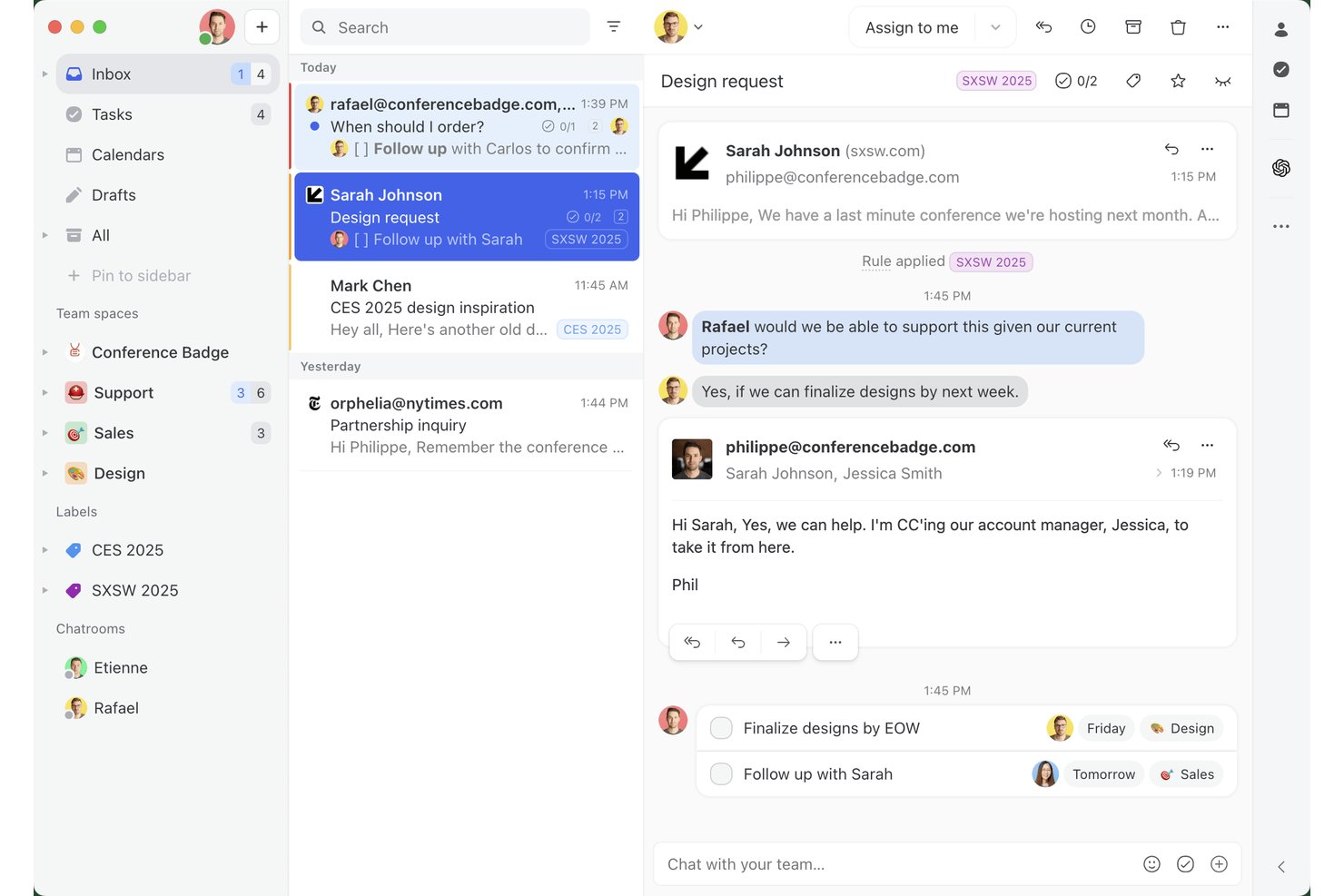
Missive is a collaborative inbox and team messaging platform that unifies email, SMS, WhatsApp, and social messaging channels into a shared workspace with internal threads, task management, and workflow automation.
Who Is Missive Best For?
Missive is a strong fit for customer-facing and cross-functional teams that live in their inboxes and need to collaborate on external communication without switching tools.
Why I Picked Missive
Missive earns its spot on my shortlist because it's the only team collaboration tool I've found that treats email as a genuinely shared workspace rather than a solo activity. I love how internal threads let my team debate a client reply directly inside the conversation, invisible to the recipient, so nothing gets lost across chat apps. Real-time co-drafting means two teammates can edit the same outgoing email simultaneously, like a Google Doc but for your inbox.
Missive Key Features
- Multi-channel unified inbox: Manage email, SMS, WhatsApp, Instagram, and Facebook Messenger from a single shared workspace.
- Rules-based workflow automation: Build up to 1,000 automation rules to handle auto-assignment, follow-ups, escalations, and canned responses.
- Guest access: Invite external collaborators like clients or contractors into specific conversations without giving them full account access.
- AI-powered assistance: Connect OpenAI, Claude, or Gemini to summarize threads, translate messages, and trigger smart automation rules.
Missive Integrations
Missive offers native integrations with Google Drive, Dropbox, Asana, ClickUp, Trello, Todoist, Zoom, Google Meet, HubSpot, and Salesforce. It also supports custom integrations through its API, webhooks, and Zapier.
Pros and Cons
Pros:
- Customizable automation rules for workflow control
- Real-time co-drafting of outgoing emails
- Turns email into collaborative team workspace
Cons:
- AI assistant requires separate provider setup
- No Kanban boards or timeline views
New Product Updates from Missive

Missive Adds Multi-Step Automations With Timed Rules
Missive adds time-based rule steps that let automations run through multiple stages on the same conversation. This helps teams build follow-ups and SLA escalations without creating separate rules. For more information, visit Missive’s official site.
 .
Hive
Best for AI-driven project workflow automation
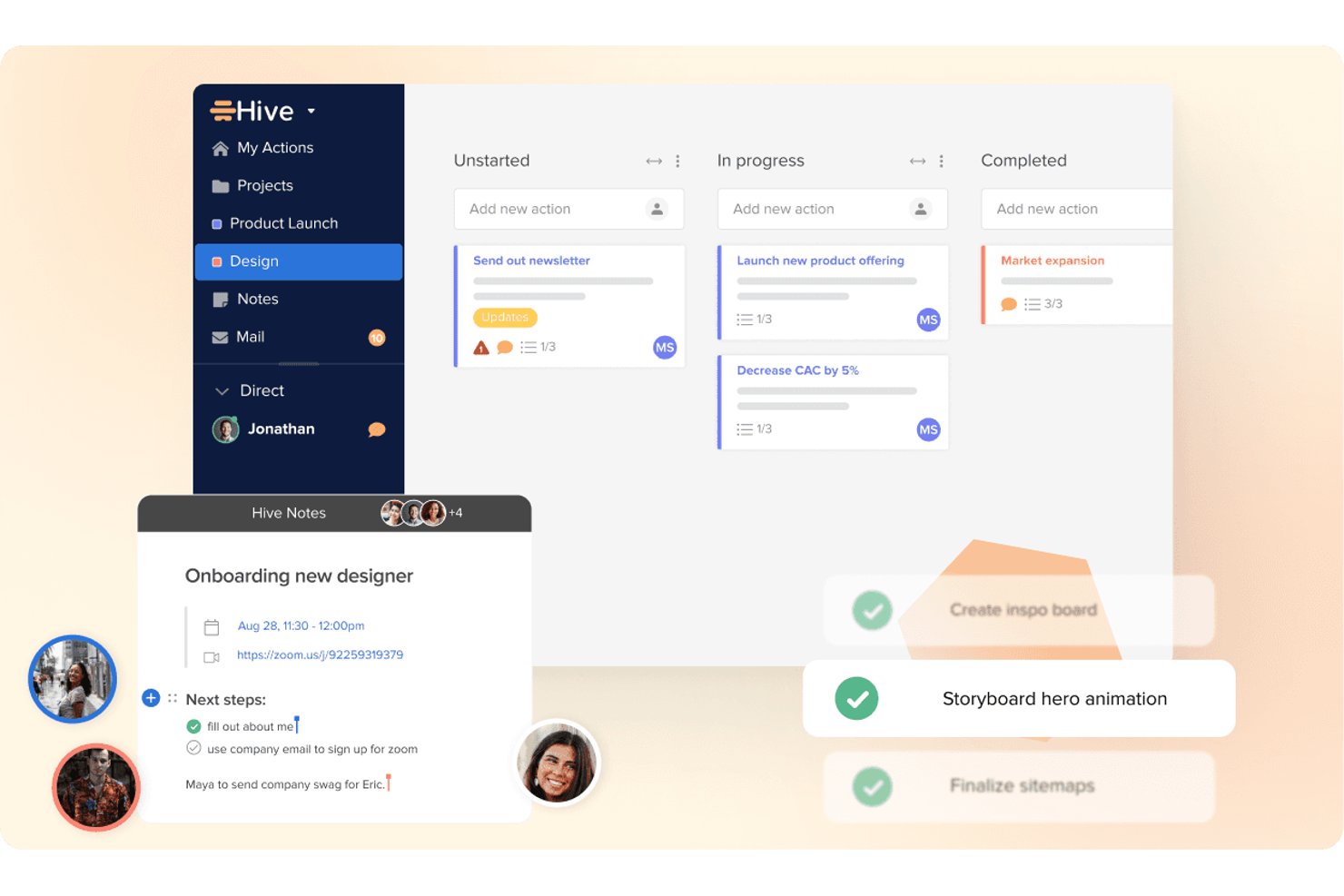
Hive is an AI workspace that combines task management, project planning, messaging, notes, and workflow automation in one platform.
Who Is Hive Best For?
Hive is a strong fit for project managers who want AI-powered automation and task management built into a single workspace.
Why I Picked Hive
I've included Hive in my top picks because its AI-driven automation genuinely sets it apart from other collaboration tools. Buzz, Hive's built-in AI assistant, can build entire multi-step workflows from a plain-English description, so my team spends less time configuring and more time executing. I also rely on it to convert emails and meeting notes directly into task cards with owners and deadlines attached.
Hive Key Features
- Hive Notes: A shared document editor that lets multiple teammates write and edit content at the same time, with comments and slash-command formatting built in.
- Proofing & Approvals: A paid add-on for reviewing documents, images, and video files with markup tools, side-by-side version comparison, and multi-stage approval rounds.
- Guest and client access: The External Users add-on lets clients and partners join specific projects to view tasks, upload files, comment, and submit forms without a full licence.
- Granular notification controls: Per-category settings let you manage banner, email, and push alerts individually, with admin-lockable defaults available on Enterprise plans.
Hive Integrations
Hive offers about 15 native integrations, including Slack, Microsoft Teams, Zoom, Google Drive, Dropbox, OneDrive, Google Calendar, Outlook Calendar, Jira, and GitHub. It also provides a public API and Zapier connectivity.
Pros and Cons
Pros:
- External users collaborate inside project spaces
- Shared notes support real-time co-editing
- AI builds multi-step project workflows
Cons:
- Video meetings require third-party conferencing tools
- Messaging lacks threads, channels, and search

Wrike
Best for task-linked conversations
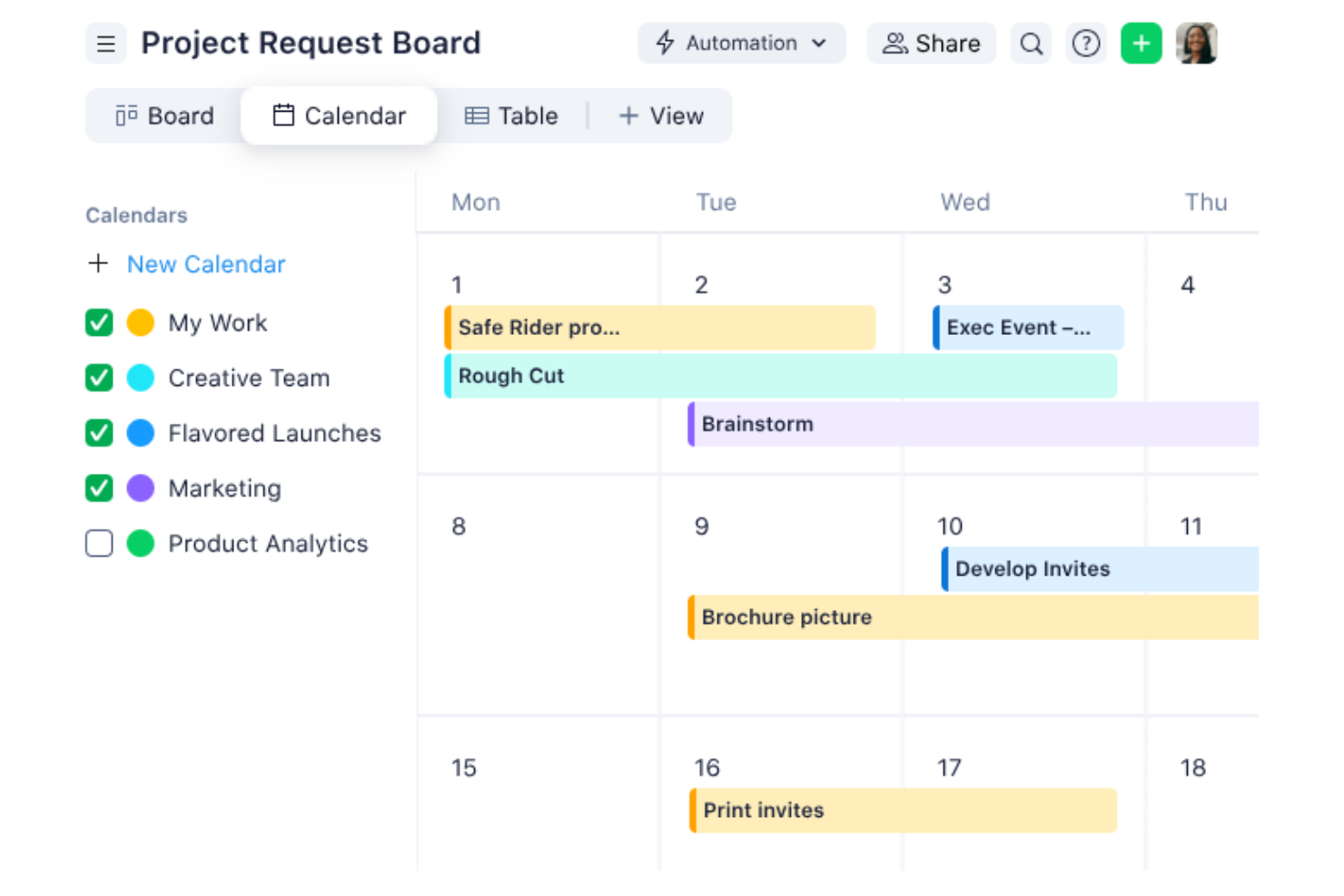
Wrike is a cloud-based work management platform that combines task management, project planning, Gantt scheduling, proofing, approvals, and task-linked commenting across projects and portfolios.
Who Is Wrike Best For?
Wrike is a strong fit for project managers and PMO leads who want all task-related discussion, approvals, and feedback tied directly to the work item.
Why I Picked Wrike
Wrike earns its spot on my shortlist because every conversation lives directly on the work item. When you a teammate in a task comment, Wrike automatically shares that task with them and adds them as a follower, so nothing gets lost in email. I also rely on the proofing and approvals feature to keep feedback on the actual deliverable, not scattered across threads. The live-editable description field even lets multiple people write and revise simultaneously, with named cursors, so context stays exactly where the work happens.
Wrike Key Features
- Proofing and approvals: Leave visual feedback directly on files and share approval links with internal or external reviewers without requiring a Wrike account.
- Interactive Gantt chart: Map task dependencies and milestones across projects, then adjust timelines by dragging and dropping directly on the chart.
- No-code automation builder: Create workflow automation rules in plain language, or let AI generate them, to trigger status changes, assignments, and notifications automatically.
- Wrike Whiteboard: A built-in collaborative canvas with sticky notes, mind maps, and diagrams that syncs directly with tasks, so whiteboard output converts into actionable work items.
Wrike Integrations
Wrike offers 400+ integrations, including Slack, Microsoft Teams, Zoom, Google Workspace, Microsoft 365, Miro, Adobe Creative Cloud, Jira, GitHub, and Salesforce. It also provides an open REST API, Wrike Integrate, and an MCP Server for custom connectivity.
Pros and Cons
Pros:
- Proofing keeps visual feedback on files
- @Mentions automatically share and follow tasks
- Conversations stay attached to deliverables
Cons:
- Attachment editing locks files for teammates
- No native chat or video meetings
New Product Updates from Wrike

Wrike Redesigns Workspace Search With New Filters
Wrike introduces a redesigned Workspace Search interface with recent search shortcuts, item type and location filters, and parent-task context. These updates help users find relevant work items and navigate search results efficiently. For more information, visit Wrike’s official site.
Notion
Best for all-in-one workspace

Notion is a connected workspace that brings docs, wikis, project tracking, and AI-powered tools into one platform for teams who want to manage knowledge and work in the same place.
Who Is Notion Best For?
Notion is a great fit for tech and product teams that want to consolidate their docs, wikis, and project workflows into a single shared environment.
Why I Picked Notion
Notion earns its spot as one of the best on my shortlist because it genuinely replaces multiple tools at once. My team uses Notion to write specs, track sprints, and maintain our product wiki without ever switching tabs. I also like how Notion AI sits inside the same environment, so I can search across every doc, summarize meeting notes, and draft follow-ups directly in context. The Teamspaces feature lets different functions own their own space while still sharing visibility across the org.
Notion Key Features
- Connected database views: Switch between table, board, calendar, and timeline views on the same dataset without duplicating any data.
- Synced blocks: Embed a block of content across multiple pages so updates appear everywhere automatically, keeping shared info consistent.
- Notion Forms: Build forms that feed responses directly into a Notion database, routing incoming requests into your team's existing workflows.
- Custom Agents: Set up automated agents that handle repetitive tasks like triaging requests, tagging items, or generating status updates on a schedule.
Pros and Cons
Pros:
- Supports collaborative editing and real-time updates
- Combines multiple tools into one platform
- Highly customizable workspace
Cons:
- Performance issues with large databases
- Limited offline access features
- Can be overwhelming for new users

Best for comprehensive productivity tools

Google Workspace is a cloud-based productivity and collaboration suite that brings together email, video conferencing, team messaging, document co-editing, and shared storage in one platform.
Who Is Google Workspace Best For?
Google Workspace is a natural fit for distributed and hybrid teams that need a single platform for communication, document collaboration, and file management.
Why I Picked Google Workspace
Google Workspace is one of my top picks because no other platform gives my team a fully connected set of tools for communication and document work under one roof. I can start a conversation in Google Chat, share a Google Doc for review, and jump into a Google Meet call without ever leaving the browser tab. What I find especially useful is real-time co-editing in Docs, Sheets, and Slides, where I can see cursor positions, comments, and edits from colleagues as they happen. The Gemini AI integration also lets my team draft content, summarize threads, and generate meeting notes directly inside the apps they're already using.
Google Workspace Key Features
- Shared drives: Store files under team ownership in Google Drive so everyone retains access even when colleagues leave or change roles.
- Google Calendar: Create shared team calendars, schedule meetings with availability overlays, and book shared resources like conference rooms.
- Google Forms: Build surveys, intake forms, and team polls that feed responses directly into a connected Google Sheet for quick review.
- Google Sites: Create internal team sites or project hubs using a drag-and-drop editor, and embed Docs, Sheets, or Slides directly into the page.
Pros and Cons
Pros:
- Excellent cloud storage and sharing options
- Strong real-time collaboration features
- Comprehensive suite of productivity tools
Cons:
- Offline access is somewhat limited
- Limited customization outside Google ecosystem
- Can be overwhelming for new users

Flock
Best for cross-functional team collaboration

Flock is a team messaging and collaboration platform that brings channel-based communication, video conferencing, file sharing, and built-in productivity tools like shared to-dos, notes, and reminders into a single workspace.
Who Is Flock Best For?
Flock is a good fit for small to mid-sized teams that need a straightforward messaging and collaboration hub without the complexity of enterprise-grade platforms.
Why I Picked Flock
Flock earns its spot on my shortlist because of how well it handles collaboration across teams that don't naturally work together day-to-day. I particularly like Smart Channels, which use auto-membership rules to pull the right people in—so when product, engineering, and marketing need to align, no one is left out of the loop. My team also relies on the built-in polls and shared to-dos to make decisions and assign follow-ups without leaving the conversation.
Flock Key Features
- Video conferencing: Launch audio and video calls with screen sharing directly from any channel or direct message.
- Announcement channels: Post one-way broadcasts to keep the entire team informed without opening up a thread to replies.
- Guest access: Invite external collaborators into specific channels without giving them access to your full workspace.
- Advanced search: Search across messages, files, and links using filters to pinpoint specific conversations or shared content.
Pros and Cons
Pros:
- Affordable pricing structure
- Built-in productivity tools
- Supports cross-functional team collaboration
Cons:
- Lacks advanced project management features
- Interface can be cluttered
- Limited third-party app integrations

Best for integrated Office 365 collaboration

Microsoft Teams is a collaboration platform that brings together persistent chat, video meetings, file sharing, and real-time document collaboration in a single workspace built around the Microsoft 365 ecosystem.
Who Is Microsoft Teams Best For?
Microsoft Teams is a natural fit for mid-size to enterprise organizations already running on Microsoft 365 who want a single hub for communication and collaboration.
Why I Picked Microsoft Teams
Microsoft Teams stands out because the depth of its Microsoft 365 integration is unmatched. When my team is in a Teams channel, we can co-author a Word doc, pull up a SharePoint file, or jump into a PowerPoint presentation without leaving the app. I also rely on the Outlook calendar sync—meeting links are created and joined directly from calendar invites, which simplifies scheduling across the organization.
Microsoft Teams Key Features
- Channels and threaded chat: Organize conversations by project, team, or topic using dedicated channels with threaded replies to keep discussions in context.
- Video meetings with breakout rooms: Host meetings with up to 300 participants and split attendees into smaller breakout rooms for focused group discussions.
- Guest access: Invite external collaborators like clients or contractors into specific channels without giving them full access to your organization's environment.
- Microsoft Copilot integration: Use AI-generated meeting recaps, live transcription, and suggested action items directly within the Teams interface.
Pros and Cons
Pros:
- Strong security and compliance features
- Supports large teams and organizations
- Deep integration with Office 365
Cons:
- Performance can slow with heavy usage
- Limited customization outside Office ecosystem
- Can be complex for new users

Quip
Best for Salesforce-integrated collaboration
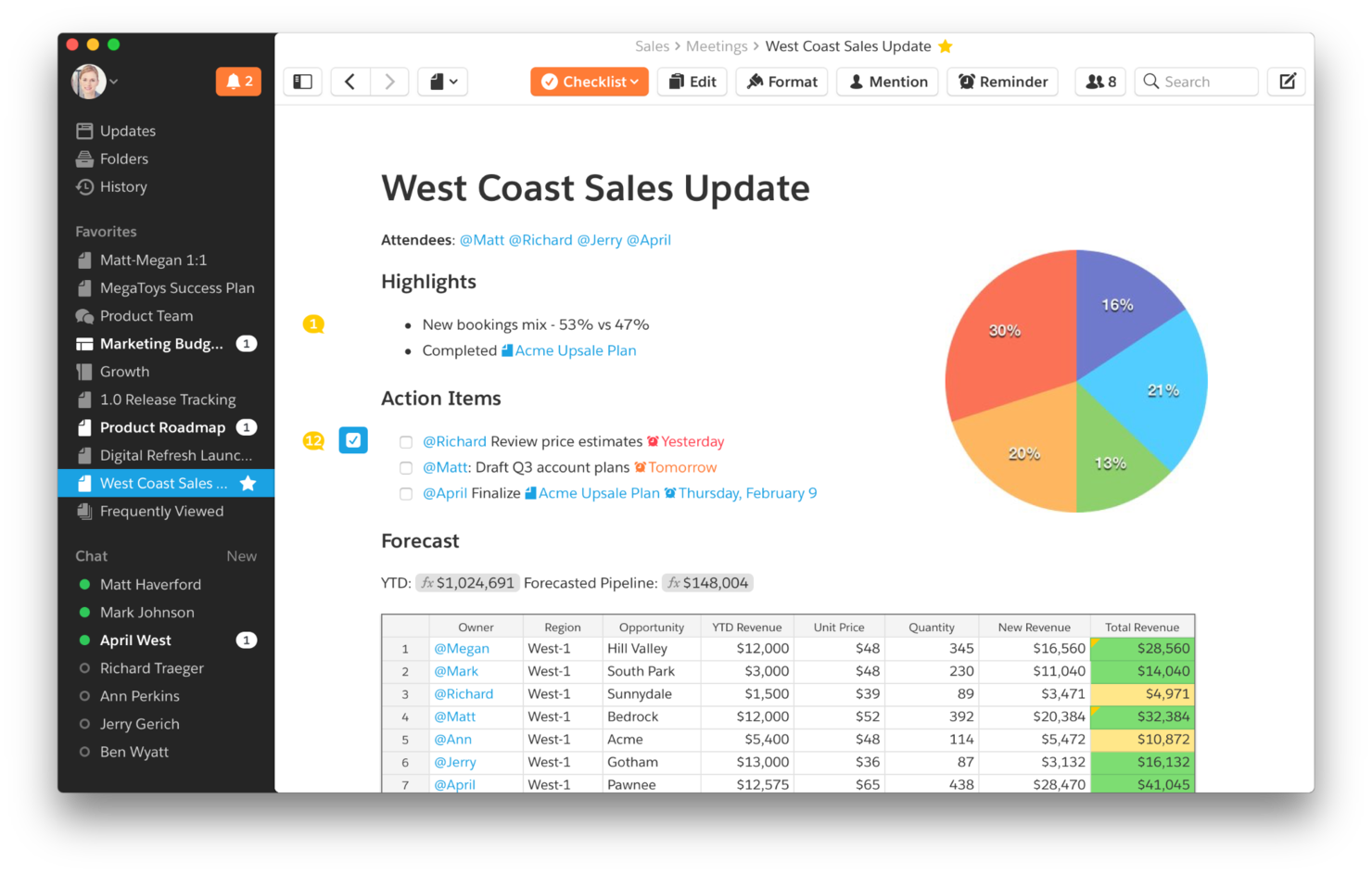
Quip is a Salesforce-built collaboration platform that combines live documents, spreadsheets, and team chat in a single workspace with native CRM data embedded directly into your content.
Who Is Quip Best For?
Quip is a strong fit for sales teams already working inside Salesforce who want to collaborate on documents without leaving their CRM.
Why I Picked Quip
I've included Quip in my top picks because no other tool places collaborative documents inside Salesforce records like Quip. I like how your team can embed a live Mutual Close Plan or Account Plan inside an opportunity record, with Salesforce data updating in real time as the deal progresses. The built-in document-level chat lets my team discuss a spreadsheet or sales playbook without switching to a separate messaging tool.
Quip Key Features
- Embedded spreadsheets: Place spreadsheets inside Quip documents so your team can view data and written context side by side.
- Sales templates: Pre-built templates for Account Plans, Sales Playbooks, and Case Swarms give teams a structured starting point for common sales workflows.
- Team chat rooms: Create dedicated chat rooms for groups, plus channels separate from document threads for broader team conversations.
- Version history: Track document changes over time and restore previous versions to keep a clear record of how content has evolved.
Pros and Cons
Pros:
- Real-time collaboration features
- Combines documents, spreadsheets, and chat
- Smooth Salesforce integration
Cons:
- Interface may feel basic for power users
- Limited features outside Salesforce ecosystem
- Higher cost for smaller teams

Podio
Best for customizable workflows

Podio is a team collaboration platform built around customizable workspaces, letting you combine task management, file sharing, real-time messaging, and no-code app building in one place.
Who Is Podio Best For?
Podio is a good fit for small to mid-sized teams that need to tailor their workspace structure to match how they work.
Why I Picked Podio
I've included Podio in my top picks because its no-code app builder lets my team design custom workspaces from scratch rather than bending our work to fit a rigid template. I particularly like Podio's automated workflow tool, which triggers actions like status updates, task assignments, and notifications based on conditions we define. Combined with custom fields and views, my team can map out a content approval process or client onboarding flow exactly as it needs to run.
Podio Key Features
- Activity streams: Each workspace has a real-time feed where team members can comment, attach files, and @mention colleagues directly on any item.
- Workspace permissions: Assign employee, light user, or external access roles to control who sees and interacts with each workspace.
- Task management: Create, assign, and track tasks with due dates inside any workspace or app.
- File sharing: Attach files directly to individual items, keeping documents tied to the relevant work.
Pros and Cons
Pros:
- Supports automation of repetitive tasks
- Strong task and project management features
- Highly customizable workflows
Cons:
- Interface may feel cluttered to some users
- Can become costly for small teams
- Steeper learning curve

Jira
Best for software development tracking

Jira is Atlassian's project and issue tracking platform built for software and engineering teams, combining sprint planning, backlog management, bug tracking, and cross-team workflow automation in one workspace.
Who Is Jira Best For?
Jira is a strong fit for software engineering and product teams that need structured issue tracking, sprint planning, and release management across multiple squads.
Why I Picked Jira
Jira earns its spot as one of the best on my shortlist because no other tool tracks software development work with the same level of structure. I love how Scrum and Kanban boards let my team visualize sprint progress in real time, while the backlog keeps upcoming work prioritized and groomed. The dev panel ties commits, pull requests, and branches directly to individual issues, so my team can trace exactly where a feature or bug fix stands without leaving Jira.
Jira Key Features
- Timeline view: A visual roadmap that maps work across multiple teams, showing dependencies and scheduling conflicts at a glance.
- Workflow automation: Rule-based triggers that auto-assign issues, update statuses, or notify teammates when conditions are met.
- Cross-team reporting dashboards: Customizable dashboards that surface sprint velocity, issue counts, and workload distribution across projects.
- Forms: Structured intake forms that route incoming requests directly into the right project queue with pre-filled fields.
Pros and Cons
Pros:
- Customizable workflows and dashboards
- Strong support for agile methodologies
- Tailored for software development teams
Cons:
- Costs increase with additional features
- Can be overwhelming for small teams
- Steeper learning curve for new users
Diğer Ekip İş Birliği Araçları
Aşağıda, kısa listeye aldığım ancak en üst listeye giremeyen ek ekip iş birliği araçlarının bir listesi yer alıyor. Bunlara kesinlikle göz atmaya değer.
- Stackfield
For end-to-end encrypted teamwork
- Trello
For visual project tracking
- Huddle
Good for secure document collaboration
- Miro
For visual collaboration and brainstorming
- Slack
For organized team communication
- Smartsheet
For project and portfolio management
- Asana
For goal-oriented project management
- Basecamp
For simple project management
- Zoho Projects
For integration with Zoho suite
- monday AI Workspace
Good for visual project tracking
- Redbooth
Good for task and time tracking
- ClickUp
For all-in-one project management


How I Evaluate Team Collaboration Tools
I split my evaluation into two layers: baseline must-haves like threaded messaging and task integration, and the differentiators—AI, security, and ecosystem fit—that determine the best pick.
Core Functionality (Table Stakes For This List)
When I'm selecting tools for my list, I rank each one on a scale from 0 (does not offer the functionality) to 5 (excels in this area) for each core functionality listed below. Then, I calculate the tool's total score into a percentage. Each tool needs to achieve a minimum total score of 75% to be considered for inclusion.
- Real-Time Messaging: I check for channels, threads, and direct messages—the kind of structured chat that keeps a sprint standup recap separate from a design review discussion.
- File Sharing & Co-Editing: Teams pass specs, mockups, and briefs back and forth constantly, so I look for inline previews, version history, and the ability to co-edit without leaving the platform.
- Task & Project Integration: I evaluate whether conversations connect to actual deliverables—for example, turning a chat message into a tracked task with an assignee and due date.
- Video & Voice Conferencing: Built-in or deeply embedded video calls matter when your team needs to jump from async chat to a live screen-share session without switching apps.
- Notifications & @Mentions: Granular notification controls are what I look for here—targeted @mentions, per-channel muting, and smart filters that help PMs stay on top of critical updates.
- Third-Party Integrations: I evaluate how well each tool connects to PM platforms like Jira, Asana, or monday.com, plus storage and productivity suites your team already relies on.
Once I have a list of tools that meet this criteria, I consider what sets each platform apart.
Differentiating Factors (What Sets Vendors Apart)
Here's how I compare and contrast different vendors:
Standout Features
AI features like thread summaries and auto-generated action items save PMs hours of post-meeting documentation. I also look for guest and client access controls—when you're coordinating with external vendors or agency partners, shared channels with scoped permissions keep conversations in one place without exposing internal work. No-code workflow automation is another differentiator I evaluate, especially the ability to auto-route approvals or trigger task updates in connected PM tools when a message or status changes.
Beyond Features
Security and compliance matter when your team handles sensitive project data—I check for SSO, MFA, and certifications like SOC 2 or ISO 27001. PM ecosystem fit is equally important; I evaluate how deeply a tool syncs with platforms like Jira or Asana, since a two-way connection between chat and your task board changes how updates flow. I also consider total cost of ownership, paying close attention to how vendors handle per-user pricing, guest access fees, and storage limits as teams scale.
Ekip İş Birliği Araçları Nasıl Seçilir
Kendi benzersiz yazılım seçim sürecinizi yürütürken aşağıdaki noktaları göz önünde bulundurun:
- Entegrasyon Kolaylığı: Ekip iş birliği aracının hâlihazırda kullandığınız diğer yazılımlarla ne kadar iyi entegre olduğunu değerlendirin. Örneğin, ekibiniz Trello veya Asana gibi proje yönetimi araçlarına büyük ölçüde güveniyorsa, kesintileri önlemek için seçtiğiniz iş birliği aracının bu platformlarla sorunsuz şekilde senkronize olabildiğinden emin olun. Entegrasyon eksikliği, iş akışında verimsizliklere ve ekip üyeleri arasında hayal kırıklığına yol açabilir.
- İletişim Özellikleri: Araçta sunulan sohbet, görüntülü konferans ve dosya paylaşımı gibi iletişim özelliklerini değerlendirin. Bu özellikler, bağlantıda kalması ve görevler konusunda uyum içinde olması gereken uzaktan çalışan ekipler için kritik öneme sahiptir. Örneğin, ekibiniz farklı saat dilimlerinde çalışıyorsa gerçek zamanlı mesajlaşma ve eş zamanlı olmayan iletişim seçenekleri temel önem taşıyacaktır.
- Ölçeklenebilirlik: İşletmeniz büyüdükçe aracın işletmenizle birlikte ölçeklenip ölçeklenemeyeceğini değerlendirin. Küçük bir girişim temel iş birliği özelliklerini yeterli bulabilir; ancak ekip genişledikçe özelleştirilebilir iş akışları, gelişmiş izinler ve kullanıcı rolleri gibi daha gelişmiş özellikler gerekli hâle gelebilir. Sizinle birlikte büyüyebilecek bir araç seçmek, daha sonra platform değiştirme zahmetinden kaçınmanıza yardımcı olur.
- Kullanıcı Deneyimi: Teknik beceri düzeyleri ne olursa olsun aracın tüm ekip üyeleri için ne kadar kolay ve sezgisel olduğunu değerlendirin. Fazla karmaşık bir araç, benimseme oranlarının düşük olmasına yol açabilirken fazla basit bir araç temel özelliklerden yoksun olabilir. Örneğin, kullanıcı dostu bir arayüze ve kapsamlı destek kaynaklarına sahip bir araç, ekibinizdeki herkesin aracı etkili bir şekilde kullanabilmesini sağlayabilir.
- Güvenlik ve Uyumluluk: Ekip iş birliği aracının sektörünüzün güvenlik standartlarını ve uyumluluk gereksinimlerini karşıladığından emin olun (ör. HIPAA Uyumlu İş Birliği Araçları). Hassas bilgileri işleyen, sağlık hizmetleri veya finans sektörlerinde faaliyet gösteren işletmeler için veri şifreleme ve GDPR veya HIPAA gibi düzenlemelere uyum tartışmaya açık değildir. Güvenlik hususlarını göz ardı etmek veri ihlallerine ve hukuki sorunlara yol açabilir.
Ekip İş Birliği Araçlarındaki Trendler
Ekip iş birliği araçlarının görünümü gelişmeye devam ediyor. Temel trendler, ekiplerin birlikte çalışma ve süreçlerini kolaylaştırma biçimlerini şekillendiriyor.
- Yapay Zekâ Destekli İş Birliği: İş birliği araçlarında yapay zekâ entegrasyonu artıyor ve otomatik görev yönetimi ile akıllı öneriler aracılığıyla verimliliği yükseltiyor. Bu trend, manuel çabayı azalttığı ve ekiplerin stratejik çalışmalara odaklanmasına yardımcı olduğu için önem taşıyor. Yapay zekâ destekli içgörüler, veriye dayalı karar alma süreçleri için vazgeçilmez hâle geliyor.
- Hibrit Çalışmayı Destekleme: Araçlar, ofiste çalışanlara ve uzaktan çalışanlara yönelik özellikler sunarak hibrit çalışma ortamlarını giderek daha fazla destekliyor. Bu trend, esnek çalışma düzenlerine geçişi yansıttığı için önemlidir. Gelişmiş görüntülü konferans ve sanal çalışma alanları bu değişimin ön saflarında yer alıyor.
- Gelişmiş Güvenlik ve Uyumluluk: Siber tehditler arttıkça iş birliği araçları güçlü güvenlik özelliklerine ve küresel düzenlemelere uyuma odaklanıyor. Bu trend, hassas verilerle çalışan sektörler için kritik önem taşıyor ve iş birliğinin güvenliği tehlikeye atmamasını sağlıyor. Şirketler, şifreleme ve güvenli iletişim kanalları sunan araçlara öncelik veriyor.
- Entegre Ekosistemler: İş birliği araçları entegrasyonlarını genişleterek çeşitli iş uygulamalarını birbirine bağlayan ekosistemler oluşturuyor. Bu trend, iş akışlarını basitleştirdiği ve birden fazla platforma duyulan ihtiyacı azalttığı için dikkate değerdir. Araçlar arasında sorunsuz veri paylaşımı artık standart bir beklenti hâline geliyor.
- Kişiselleştirme ve Özel İş Akışları: Belirli ekip ihtiyaçlarına uygun özelleştirilebilir iş akışlarına verilen önem giderek artıyor. Bu trend ilgi çekicidir; çünkü ekiplerin araçları kendilerine özgü süreçlere göre uyarlamasına ve verimliliği artırmasına olanak tanır. Kişiselleştirme, iş birliği platformları arasındaki temel farklılaştırıcılardan biri hâline geliyor.
Bu trendler, ekip iş birliği araçlarının dinamik yapısını ortaya koyuyor.
Ekip İş Birliği Araçları Nedir?
Ekip iş birliği araçları, aynı yerde bulunan veya uzaktan çalışan ekip üyeleri arasındaki iletişimi, koordinasyonu ve iş birliğini kolaylaştırmak için tasarlanmış yazılım çözümleridir. Ekiplerin bilgi paylaşmasına, görevleri takip etmesine ve projeler üzerinde gerçek zamanlı olarak birlikte çalışmasına olanak tanır; iş akışlarını kolaylaştırmak için genellikle diğer üretkenlik araçlarıyla entegre olur.
Ekip iş birliği yazılımlarının başlıca kullanıcıları, farklı departmanlar veya konumlar arasında etkili iletişim ve koordinasyon gerektiren her büyüklükteki işletmeler, proje ekipleri ve kuruluşlardır. Kullanıcılar, iletişim, belge paylaşımı ve görev takibi için merkezi bir platform sağlayarak verimliliği artırmak, herkesin proje hedefleri konusunda uyum içinde olmasını sağlamak ve görevleri verimli bir şekilde yönetmek için bu yazılıma ihtiyaç duyar.
Ekip İş Birliği Yazılımının Özellikleri
Çevrim içi iş birliği araçlarını seçerken, ekibimin ihtiyaçlarını karşıladığından emin olmak için aradığım birkaç temel özellik vardır. Bu özellikler iletişimi kolaylaştırmaya, projeleri verimli bir şekilde yönetmeye ve herkesin aynı bilgiye sahip olmasını sağlamaya yardımcı olur.
- Gerçek Zamanlı Mesajlaşma: Ekip üyeleri nerede olurlarsa olsunlar anında iletişim kurmalarını sağlar.
- Görev Yönetimi: Kullanıcıların ekip içindeki görevleri atamasına, takip etmesine ve önceliklendirmesine olanak tanır.
- Dosya Paylaşımı: Belgelerin, görsellerin ve diğer dosyaların platform içinde kolayca paylaşılmasını sağlar.
- Video Konferans: Ekip üyeleri, müşteriler veya paydaşlarla sanal toplantıları destekler.
- Entegrasyonlar: İş akışlarını kolaylaştırmak için e-posta, takvimler ve proje yönetimi yazılımları gibi diğer araçlarla bağlantı kurar.
- Belge İş Birliği: Birden fazla kullanıcının belgeleri aynı anda düzenlemesine ve yorum yapmasına olanak tanır.
- Bildirimler: Ekibi güncellemeler, son teslim tarihleri ve değişiklikler hakkında gerçek zamanlı olarak bilgilendirir.
- Özelleştirilebilir Çalışma Alanları: Ekiplerin belirli proje ihtiyaçlarına uygun çalışma alanları oluşturmasına ve düzenlemesine olanak tanır.
- Güvenlik Özellikleri: Hassas verileri şifreleme, erişim denetimleri ve sektör standartlarına uyumluluk ile korur.
- Mobil Erişim: Mobil uygulamalar aracılığıyla platforma erişim sağlayarak hareket hâlinde iş birliğine olanak tanır.
- Kanban Panoları: Görevleri kartlar üzerinde gösteren, bir projenin farklı aşamalarını temsil eden sütunlar hâlinde düzenlenmiş ve ilerlemenin takip edilmesine yardımcı olan görsel araçlardır.
- Ekran Paylaşımı: Kullanıcıların toplantılar sırasında ekranlarını paylaşmasına olanak tanıyarak gerçek zamanlı gösterimler ve ortak çalışmayı mümkün kılar.
- Gantt Şemaları: Görevleri, tarihleri, kilometre taşlarını, bağımlılıkları ve ilerlemeyi gösteren; proje zaman çizelgelerinin planlanmasına ve takip edilmesine yardımcı olan görsel zaman çizelgeleridir.
- İçerik İncelemesi: Ekiplerin dijital içerikleri incelemesine, üzerine açıklama eklemesine ve onaylamasına olanak tanıyarak son hâline getirilmeden önce kalitenin güvence altına alınmasını sağlar.
- İş Akışı Yönetimi: Süreçleri otomatikleştirir ve kolaylaştırır, görevlerin önceden tanımlanmış adımlar arasında verimli bir şekilde ilerlemesini sağlar.
Bu özellikler, yazılımın etkili ekip iş birliğini desteklemesini ve genel üretkenliği artırmasını sağlamak için gereklidir.
Ekip İş Birliği Yazılımının Faydaları
Ekip iş birliği yazılımı, ekiplerin birlikte çalışma ve hedeflerine ulaşma biçimini önemli ölçüde iyileştirebilecek çeşitli temel faydalar sunar. Bu faydalar özellikle üretkenliği, iletişimi ve proje yönetimini geliştirmek isteyen kuruluşlar için değerlidir.
- Geliştirilmiş İletişim: Ekipler arasındaki iletişimi kolaylaştırır ve eşzamansız iletişimi mümkün kılarak yanlış anlaşılmaları azaltır ve herkesin proje hedefleri ile görevleri konusunda aynı doğrultuda olmasını sağlar.
- Artan Üretkenlik: Projeyle ilgili tüm bilgileri ve görevleri merkezileştirerek ekip üyelerinin birden fazla araç arasında geçiş yapmak zorunda kalmadan işlerine odaklanmasına olanak tanır.
- Gelişmiş İş Birliği: Belgeler ve görevler üzerinde gerçek zamanlı iş birliğini kolaylaştırarak ekiplerin uzaktan çalışırken bile verimli bir şekilde birlikte çalışmasını sağlar.
- Daha İyi Proje Yönetimi: İlerlemeyi takip etmek, son teslim tarihlerini yönetmek ve görevleri atamak için araçlar sunarak projelerin planlandığı şekilde ve bütçe dâhilinde ilerlemesini sağlar.
- Daha Güçlü Veri Güvenliği: Hassas bilgileri şifreleme ve erişim denetimleri aracılığıyla koruyarak işletmelere belge ve veri paylaşımı konusunda güven verir.
Bu faydalar, ekiplerinin birlikte çalışma biçimini iyileştirmek isteyen her kuruluş için ekip iş birliği yazılımını değerli bir yatırım hâline getirir. İşletmeler doğru aracı seçerek verimliliği artırabilir, daha iyi iletişimi teşvik edebilir ve projelerinde daha büyük başarı elde edebilir.
Ekip İş Birliği Yazılımının Maliyetleri ve Fiyatlandırması
En iyi iş birliği araçlarının maliyetlerini ve fiyatlandırmasını değerlendirirken mevcut farklı planları ve bunların ekibinizin ihtiyaçlarıyla ne ölçüde örtüştüğünü göz önünde bulundurmak önemlidir. Bu seçenekleri anlamak, kuruluşunuz için işlevsellik ve maliyet arasında doğru dengeyi sunan bir plan seçmenize yardımcı olur.
| Plan Türü | Ortalama Fiyat | Yaygın Özellikler |
| Ücretsiz Plan | $0/user/month | Temel mesajlaşma, dosya paylaşımı, sınırlı entegrasyonlar ve küçük ekip desteği. |
| Temel | $5-$10/user/month | Görev yönetimi, dosya depolama, grup sohbeti ve temel entegrasyonlar. |
| Standart | $10-$20/user/month | Video konferans, gelişmiş güvenlik, gelişmiş entegrasyonlar ve proje yönetimi araçları. |
| Premium | $20-$30/user/month | Özelleştirilebilir iş akışları, öncelikli destek, kapsamlı raporlama ve uyumluluk özellikleri. |
| Kurumsal | $30+/user/month | Gelişmiş güvenlik, sınırsız depolama, özel destek ve kurumsal düzeyde entegrasyonlar. |
Bir plan seçerken ekibinizin büyüklüğünü, projelerinizin karmaşıklığını ve kuruluşunuzun ihtiyaç duyduğu destek düzeyini göz önünde bulundurun. Doğru plan, gereksiz özelliklere fazla harcama yapmadan ekibinizin ihtiyaçlarını karşılamak için gerekli özellikleri sunmalıdır.
Ekip İşbirliği Yazılımı SSS
Ekip işbirliği yazılımı üretkenliği nasıl artırır?
Ekip işbirliği yazılımı iletişimi, görev yönetimini ve belge paylaşımını tek bir platformda merkezileştirir. Bu, farklı araçlar arasında geçiş yapma ihtiyacını azaltarak iş akışlarını kolaylaştırır ve ekiplerin görevlerine odaklanmasına yardımcı olur. Ayrıca gerçek zamanlı güncellemelere ve işbirliğine olanak tanır; bu da gecikmeleri en aza indirir ve projelerin ilerlemesini sağlar.
Ekip işbirliği yazılımı uzaktan çalışan ekipler için kullanılabilir mi?
Evet, ekip işbirliği yazılımı uzaktan çalışma için idealdir. Konumdan bağımsız olarak ekip üyelerinin bağlantıda kalmasını sağlayan video konferans, mesajlaşma ve dosya paylaşımı gibi özellikler sunar. Bu araçlar, farklı yerlerden çalışırken bile iletişimin sürdürülmesine ve herkesin proje hedefleriyle aynı doğrultuda olmasına yardımcı olur.
Ekip işbirliği yazılımıyla yaygın olarak hangi entegrasyonlar kullanılır?
Yaygın entegrasyonlar arasında Google Drive, Google Calendar, Google Docs, Slack, Trello, Zoom ve Microsoft Teams gibi araçlar bulunur. Bu entegrasyonlar, kullanıcıların mevcut araçlarını işbirliği platformuna bağlamasına olanak tanır ve görevleri yönetmeyi, farklı uygulamalar arasında bilgi paylaşmayı kolaylaştırır.
Ekip işbirliği yazılımı kullanılırken veriler güvende midir?
Çoğu ekip işbirliği yazılımı şifreleme, erişim denetimleri ve sektör standartlarına uyumluluk gibi güvenlik özellikleri içerir. Bu önlemler hassas bilgileri korur ve verilere yalnızca yetkili kullanıcıların erişebilmesini sağlar. Böylece yazılım, kurumsal iletişim ve işbirliği için güvenli bir seçenek sunar.
Ekip işbirliği yazılımı ne ölçüde özelleştirilebilir?
Birçok ekip işbirliği aracı; iş akışları, kullanıcı izinleri ve arayüz ayarları gibi özelleştirilebilir özellikler sunar. Bu, ekiplerin yazılımı kendi özel ihtiyaçlarına göre uyarlamasına ve daha yüksek verimlilik için iş akışlarını optimize etmesine olanak tanır.
Ekip işbirliği yazılımından en çok hangi büyüklükteki ekipler yararlanır?
Ekip işbirliği yazılımı, küçük girişimlerden büyük işletmelere kadar her büyüklükteki ekibe fayda sağlar. Önemli olan, ekibinizle birlikte ölçeklenebilen ve özel iş akışınızı ve proje gereksinimlerinizi desteklemek için gerekli özellikleri sunan bir araç seçmektir.
Ekip işbirliği yazılımı proje ilerlemesini takip edebilir mi?
Evet, birçok ekip işbirliği aracı görev takibi, zaman çizelgeleri ve ilerleme panoları gibi proje yönetimi özellikleri içerir. Bu araçlar ekiplerin ilerlemelerini izlemelerine, darboğazları belirlemelerine ve projelerin programa uygun şekilde ilerlemesini sağlamalarına yardımcı olur.
Ekip işbirliği yazılımını kullanmak için eğitim gerekli midir?
Bazı ekip işbirliği uygulamaları kullanımı kolay olsa da gelişmiş özelliklerden tam olarak yararlanmak için eğitim gerekebilir. Temel kullanıcılar genellikle çok az rehberlikle çalışmaya başlayabilir; ancak daha karmaşık iş akışları ve entegrasyonlar için bir öğrenme süreci gerekebilir.