

2026 İçin En İyi 10 Sürükle ve Bırak İş Akışı Oluşturma Aracı

10 En İyi Sürükle ve Bırak İş Akışı Oluşturucu Kısa Listesi


Why Trust Our Software Recommendations
Our team has been testing and reviewing software since 2012. As project managers ourselves, we know how difficult—and important—it is to choose the right software.
For this guide, we evaluated tools using hands-on testing and independent research, scoring tools using our selection criteria. We also draw on insights from industry thought leaders and practicing project management experts.
Our reviews reflect our human editorial judgment, not a sales pitch.
Expert reviewers:
Sürükle ve Bırak İş Akışı Oluşturucu Karşılaştırma Tablosu
Bu karşılaştırma tablosu, en iyi sürükle ve bırak iş akışı oluşturucu seçimlerimin fiyatlandırma ayrıntılarını özetlemektedir:
| Tool | Starting Price | Website | |
|---|---|---|---|
| Best for secure client onboarding workflows | 4.4 out of 5 | $5,000/year Free trial + free demo available | Book Demo |
| Best for connecting apps with advanced automation | 4.7 out of 5 | $9/month Free plan + free demo available | Website |
| Best for open-source workflow customization | 4.7 out of 5 | €20/month Free trial available | Website |
| Best for visual collaboration on workflow diagrams | 4.4 out of 5 | $8/user/month Free plan + 30-day free trial available | Website |
| Best for designing conversational workflows | 4.5 out of 5 | Pricing upon request Free trial + free demo available | Website |
| Best for integrating forms with workflow automation | 4.2 out of 5 | $83/month 14-day free trial | Website |
| Best for automating multi-step business processes | 4.7 out of 5 | ₹2,470/user/month Free trial + demo available | Website |
| Best for developers building workflow-driven apps | — | $20/month Free plan available | Website |
| Best for rapid prototyping of workflow ideas | — | $37/month 14-day free trial | Website |
| Best for on-premise deployment flexibility | — | Pricing upon request | Website |
En İyi Sürükle ve Bırak İş Akışı Oluşturucu İncelemeleri
Aşağıda, kısa listeme giren sürükle ve bırak iş akışı oluşturucu araçlarının ayrıntılı özetlerini bulabilirsiniz. İncelemelerim, ekibiniz için en iyi seçeneği bulmanıza yardımcı olmak amacıyla her platformun özelliklerine, en uygun kullanım alanlarına ve entegrasyonlarına ayrıntılı bir bakış sunuyor.

Moxo
Best for secure client onboarding workflows
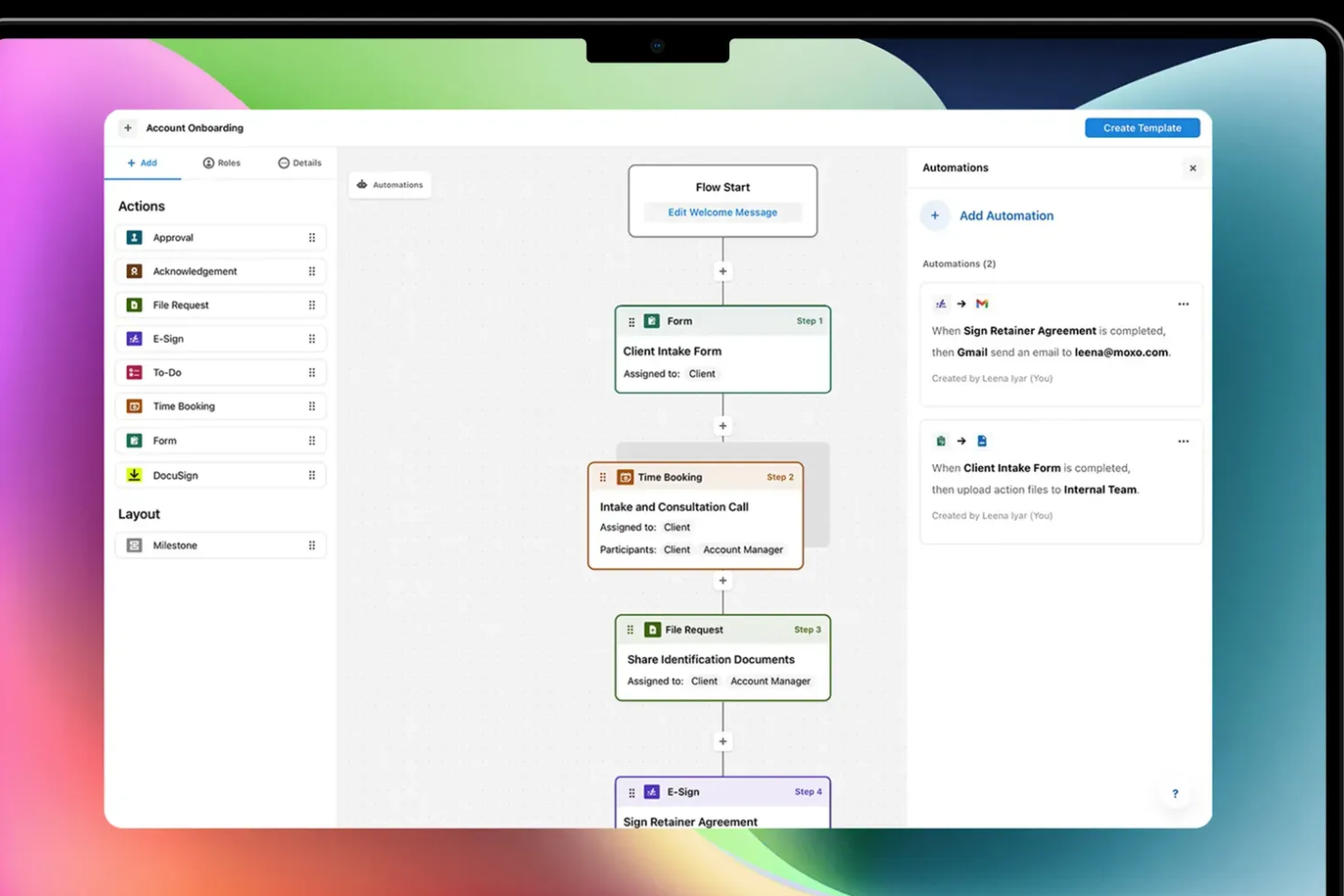
Moxo is a drag-and-drop workflow builder that lets you design and automate client-facing processes—combining approvals, file requests, e-signatures, forms, and conditional logic into structured, trackable flows.
Who Is Moxo Best For?
Moxo is a strong fit for professional services teams—think financial services, legal, and consulting—that manage recurring, multi-step client workflows.
Why I Picked Moxo
I've included Moxo in my top picks because its drag-and-drop flow builder is purpose-built for client-facing onboarding, not just internal task routing. When I build a client onboarding flow in Moxo, I can embed KYC verification steps, secure document requests, and acknowledgment actions directly into the canvas, with conditional branching that routes clients down different paths based on their inputs. What I find particularly useful is the role-based access control, which locks each participant to only their relevant steps, so a new client never sees internal review stages or another client's data. On top of that, Moxo is SOC 2 Type II certified, GDPR compliant, and encrypts all data in transit and at rest, which matters a lot when your onboarding flows involve sensitive financial or legal documents.
Moxo Key Features
- Workflow template library: Access and deploy pre-built onboarding flow templates, or save your own custom flows as reusable templates for repeat client types.
- SLA timers and escalations: Set time limits on individual workflow steps and trigger automatic escalations when a client or internal reviewer misses a deadline.
- Progress tracking dashboard: Monitor completion rates, step-level delays, and bottlenecks across all active onboarding flows from a single reporting view.
- Branded client portal: Deliver onboarding flows through a white-labeled portal with your logo and domain, keeping the client experience consistent with your brand.
Moxo Integrations
Moxo offers direct data sync integrations with Salesforce, HubSpot, Microsoft Dynamics, Zoho, Wealthbox, Redtail, Filevine, Global Relay, Smarsh, Xero, and Follow Up Boss, and supports additional integrations with tools like DocuSign, Jira, Slack, Stripe, Zendesk, Google Drive, Dropbox, Box, OneDrive, monday.com, QuickBooks, and Notion. It connects with Zapier and provides a REST API and webhooks for custom integrations.
Pros and Cons
Pros:
- Chat, video, and files in one flow
- White-label branding for client portals
- Built-in e-signatures inside workflow steps
Cons:
- Limited flexibility for cyclical workflows
- No built-in task timer for time tracking

Make
Best for connecting apps with advanced automation
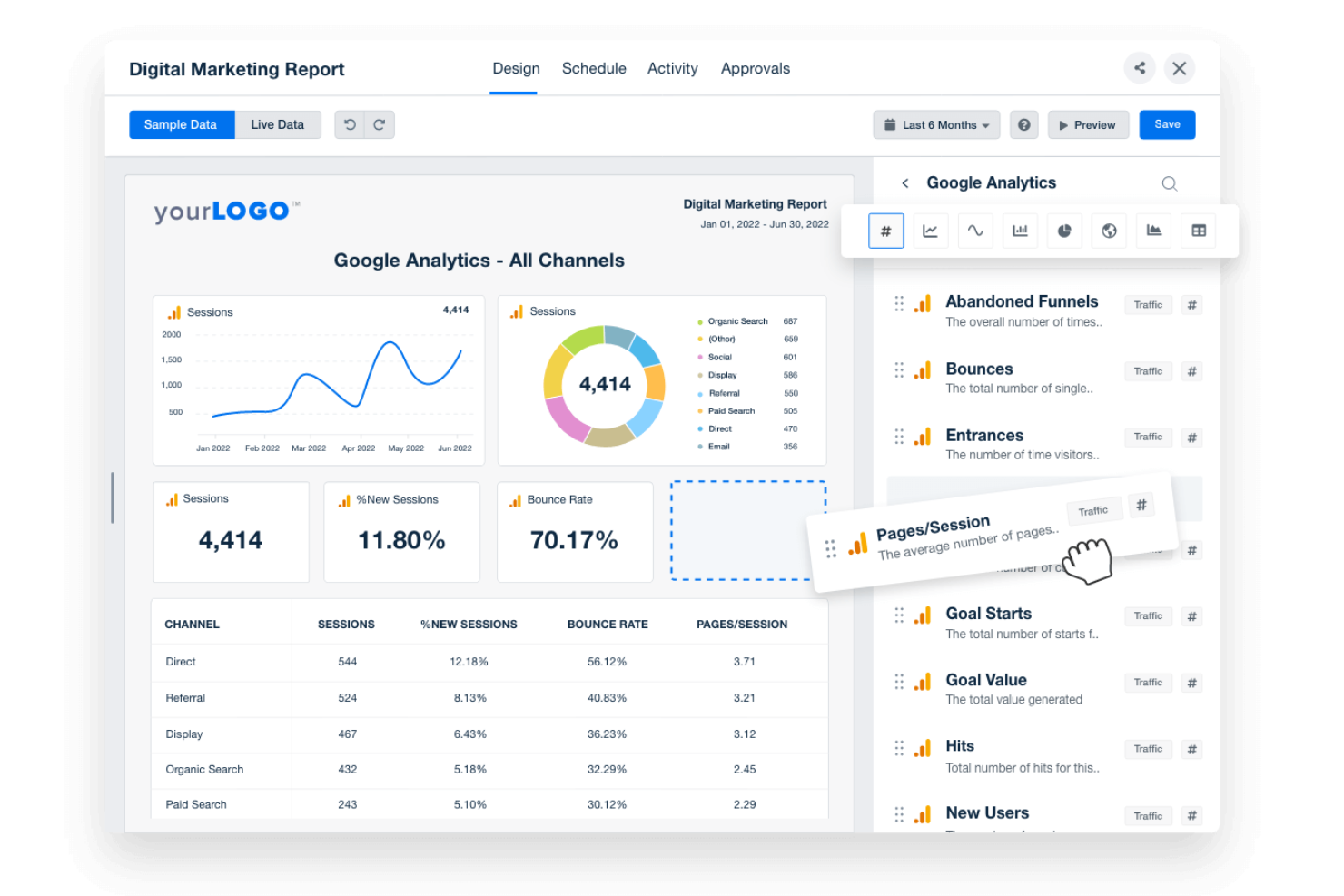
If you need to automate complex workflows across multiple apps, Make offers a visual builder that connects hundreds of tools with advanced logic. IT teams, operations leads, and product managers can design multi-step automations using a drag-and-drop canvas, branching, and custom triggers. Make stands out for users who want to build intricate, conditional workflows that go far beyond simple task automation.
Why I Picked Make
Unlike basic automation tools, Make gives you a drag-and-drop workflow builder designed for advanced, multi-app automation. I picked Make because it lets you visually map out complex workflows with branching logic, custom triggers, and conditional paths. The platform supports building automations that can handle data transformations and error handling within the same visual interface. This makes it a strong choice for teams that need to connect multiple systems and automate sophisticated processes without writing code.
Make Key Features
Some other features that make Make useful for workflow automation include:
- Scenario Versioning: Save and restore previous versions of your automation scenarios.
- Built-In Scheduling: Set workflows to run at specific times or intervals.
- Error Handling Tools: Configure custom responses for failed steps or data issues.
- Data Store Modules: Store and retrieve data within workflows without relying on external databases.
Make Integrations
Integrations include Google Sheets, Slack, Gmail, Airtable, Trello, Dropbox, HubSpot, Shopify, Facebook Pages, and more.
Pros and Cons
Pros:
- Scenario versioning allows rollback to previous states
- Supports scheduling automations by minute or hour
- Visual builder supports multi-step, branching workflows
Cons:
- Error messages can be difficult to interpret
- No built-in AI or machine learning modules

n8n
Best for open-source workflow customization
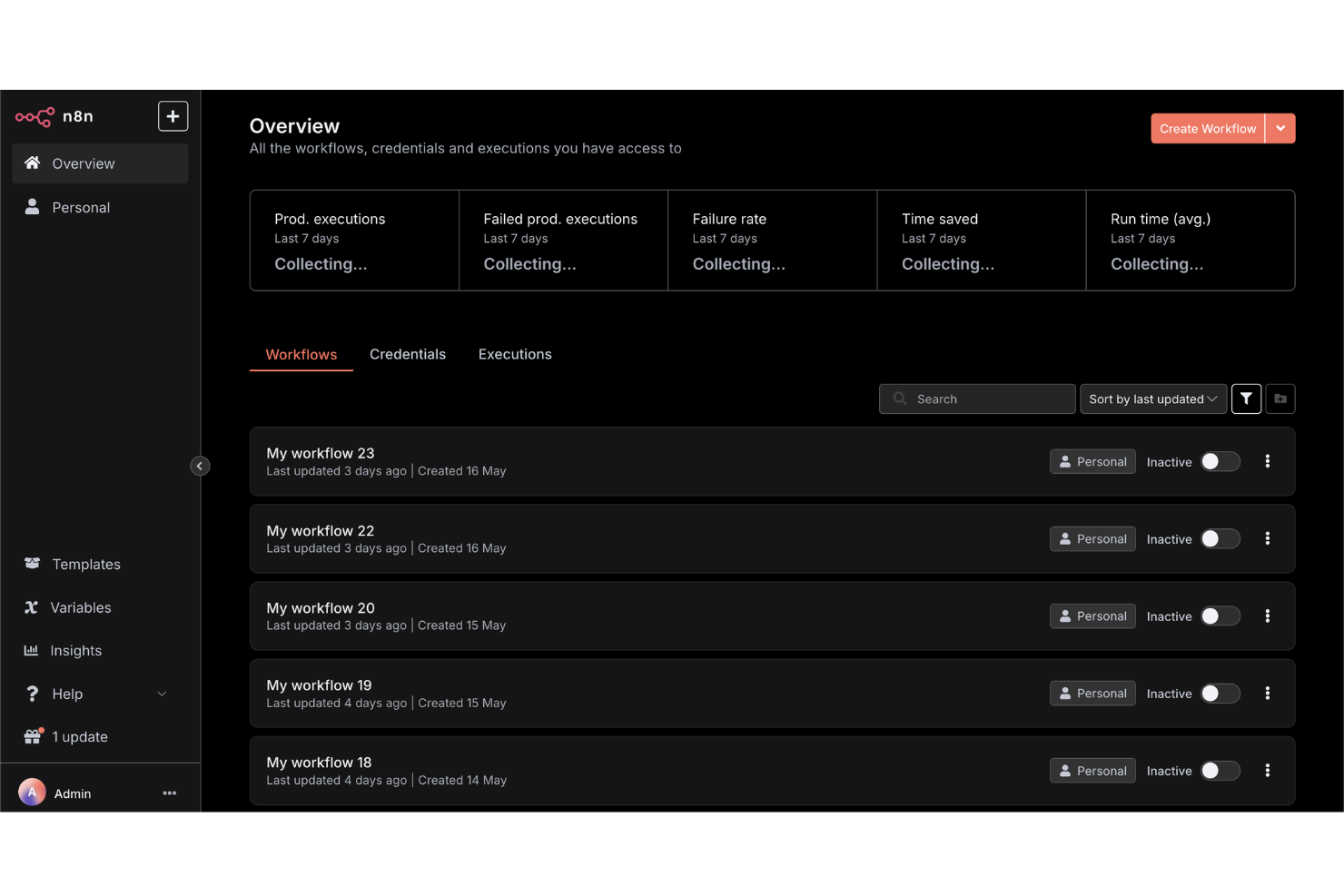
For teams that want full control over their workflow automations, n8n offers an open-source platform with deep customization options. Developers, IT teams, and technical operations leads can build, self-host, and extend workflows using a visual editor and custom code nodes. n8n is a strong fit if you need to tailor integrations or logic beyond what most drag-and-drop workflow builders allow.
Why I Picked n8n
What sets n8n apart is its open-source approach to workflow automation, which gives you full flexibility to customize and self-host your automations. I picked n8n because it lets you use a drag-and-drop builder alongside custom code nodes, so you can extend workflows far beyond standard templates. The platform supports building custom integrations and logic, making it ideal for teams with unique requirements or strict data control needs. If you want to tailor every aspect of your workflow builder, n8n offers the depth and control that many other tools don’t.
n8n Key Features
Some other features that make n8n appealing for workflow automation include:
- Built-In Credential Management: Securely store and manage authentication details for connected services.
- Webhooks Support: Trigger workflows from external apps or events using custom webhooks.
- Execution Logs: Access detailed logs for every workflow run to help with troubleshooting.
- Environment Variables: Configure workflows to use different settings across development, staging, and production.
n8n Integrations
Integrations include Google Sheets, Gmail, Slack, OpenAI, Airtable, Notion, Trello, HubSpot, Discord, and more.
Pros and Cons
Pros:
- Unlimited workflow executions on self-hosted plans
- Custom node creation with JavaScript or TypeScript
- Self-hosting option supports strict data privacy
Cons:
- Requires manual updates for self-hosted deployments
- Lacks built-in templates for common workflows

Creately
Best for visual collaboration on workflow diagrams
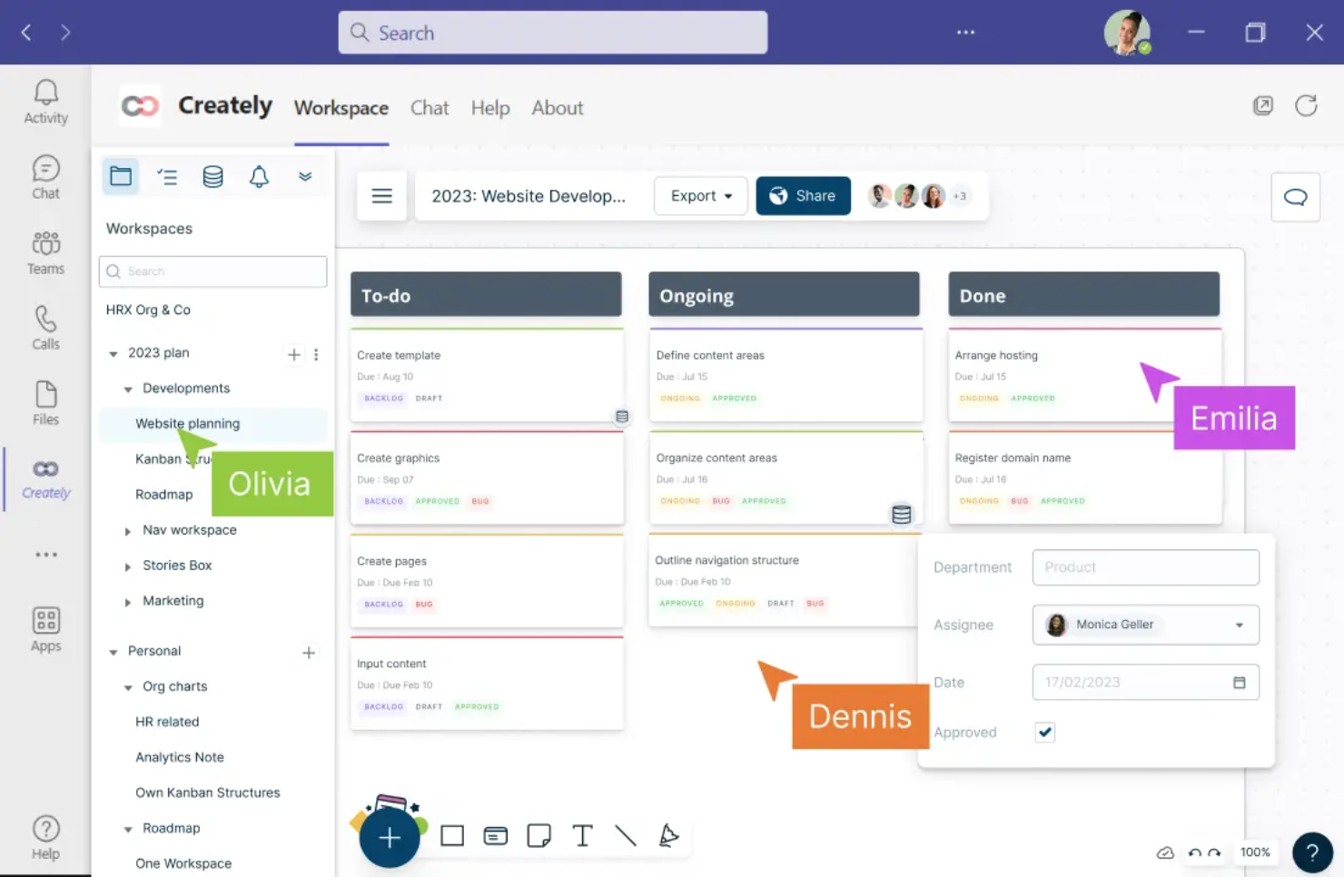
Creately offers a visual workspace built for teams that need to collaborate on workflow diagrams in real time. It’s a strong fit for project managers, business analysts, and cross-functional teams who want to map, discuss, and refine processes together. With features like multi-user editing and contextual comments, Creately helps teams turn complex workflows into clear, actionable diagrams.
Why I Picked Creately
For teams that need to collaborate visually on workflow diagrams, Creately brings real-time co-editing and discussion into a single workspace. I picked Creately because it lets multiple users build, edit, and comment on diagrams together, which is essential for cross-functional process mapping. The tool’s contextual commenting and in-diagram chat features help teams resolve questions and iterate on workflows without switching platforms. This focus on collaborative diagramming makes Creately a strong choice for anyone prioritizing teamwork in their workflow builder.
Creately Key Features
In addition to its collaborative diagramming tools, Creately offers several other features worth noting:
- Extensive Shape and Icon Library: Choose from thousands of shapes and icons to represent different workflow elements.
- Data Linking: Attach data sets or tables directly to workflow objects for richer context.
- Presentation Mode: Present workflow diagrams directly within the platform without exporting.
- Revision History: Track changes and restore previous versions of diagrams as needed.
Creately Integrations
Integrations include Google Drive, Slack, Confluence, and Microsoft Teams.
Pros and Cons
Pros:
- Presentation mode enables in-app workflow walkthroughs
- Data linking connects diagrams to live tables
- Real-time multi-user editing supports team workflows
Cons:
- Large diagrams can experience occasional lag
- Export options are restricted on lower plans
Best for designing conversational workflows
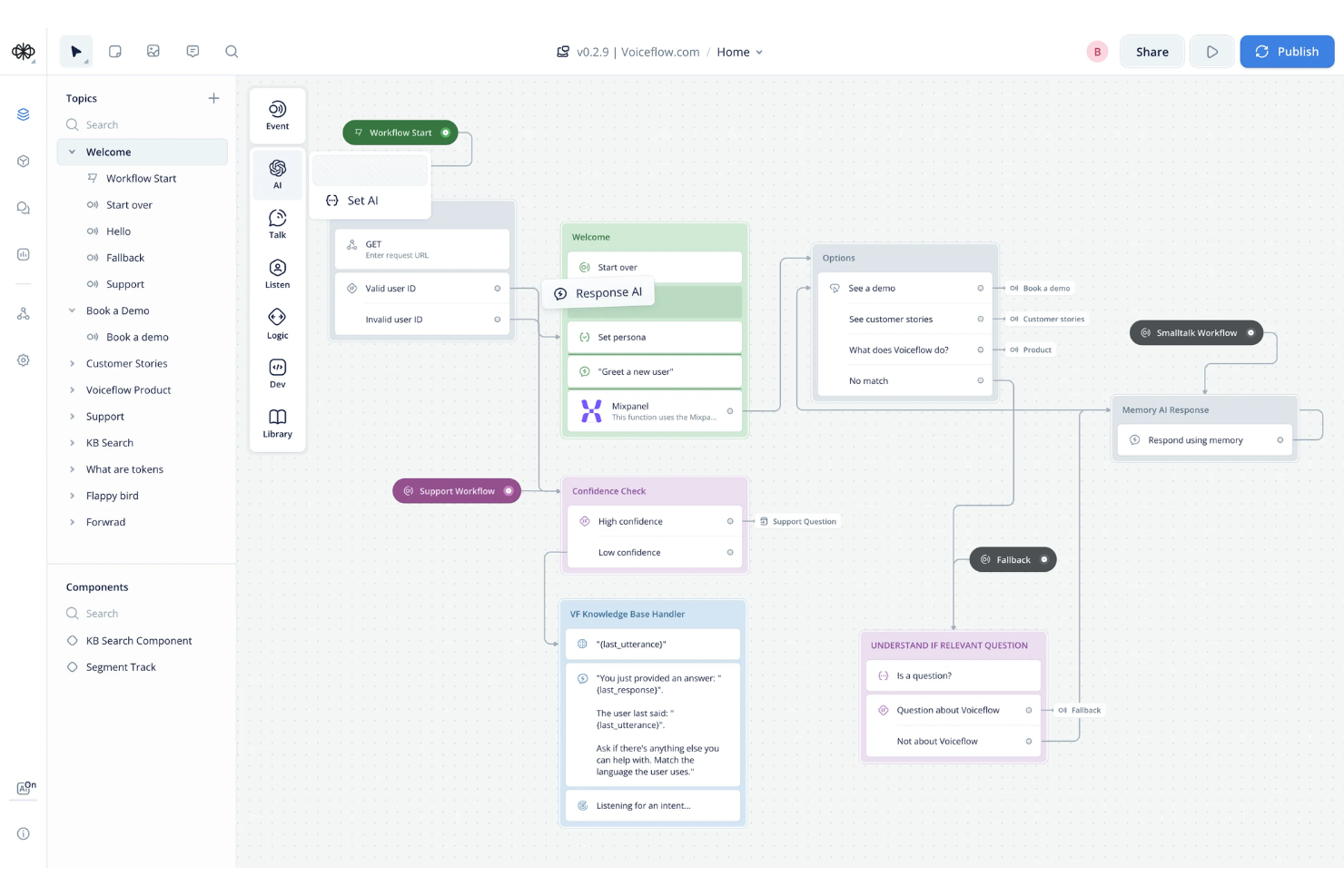
Voiceflow stands out for teams designing conversational workflows for chatbots, voice assistants, and AI agents. It’s built for product managers, conversation designers, and developers who need to map out complex, multi-turn dialogues visually. With Voiceflow, you can prototype, test, and iterate on conversational flows without writing code, making it easier to align technical and non-technical stakeholders.
Why I Picked Voiceflow
For teams focused on building conversational experiences, Voiceflow offers a specialized drag-and-drop workflow builder tailored to dialogue design. I picked it because it lets you visually map out conversation logic, branching paths, and context variables in a way that’s purpose-built for chatbots and voice assistants. The platform supports reusable components and modular flows, so you can manage complex, multi-turn conversations without getting lost in code. This makes Voiceflow a strong choice for anyone designing, prototyping, or iterating on conversational workflows.
Voiceflow Key Features
Some other features that make Voiceflow useful for workflow design include:
- AI Step Blocks: Add generative AI responses and logic directly into your conversational flows.
- Version History: Track changes and revert to previous versions of your workflow projects.
- User Testing Mode: Simulate conversations and gather feedback before deploying to production.
- Team Collaboration Tools: Invite team members to co-design, comment, and review workflows in real time.
Voiceflow Integrations
Integrations include Airtable, Discord, HubSpot, Linear, Manychat, Notion, SendGrid, Shopify, WhatsApp, Zendesk, and more.
Pros and Cons
Pros:
- Version history tracks all workflow changes
- User testing mode for pre-launch validation
- Built-in AI step for generative responses
Cons:
- Occasional lag with large, complex projects
- Limited export options for non-technical users

Best for integrating forms with workflow automation
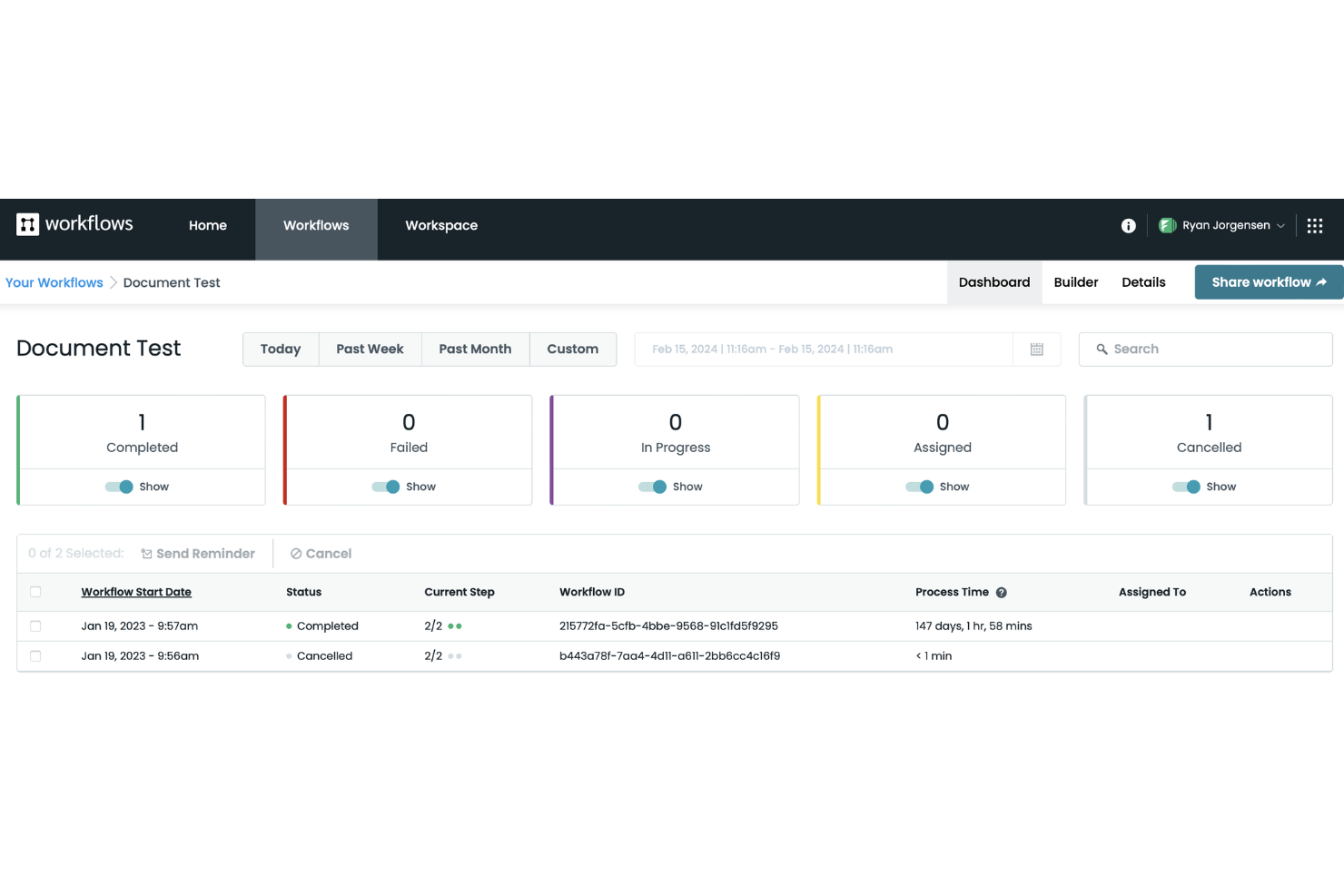
Formstack stands out for teams that need to connect forms directly to automated workflows without coding. It’s especially useful for operations, HR, and IT teams that want to capture data and trigger multi-step processes from a single form submission. If you’re looking to automate approvals, onboarding, or service requests with a drag-and-drop builder, Formstack is built for that kind of integration.
Why I Picked Formstack
Formstack caught my attention because it connects form submissions directly to workflow automation, which is a rare strength among drag-and-drop builders. The platform lets you build custom forms and then map each form field to workflow steps, so you can trigger approvals, notifications, or document generation automatically. I like that you can visually design both the form and the workflow in one place, making it easy to manage complex processes without switching tools. This approach is especially useful for teams that need to automate multi-step tasks starting from a single data entry point.
Formstack Key Features
Some other features that make Formstack useful for workflow automation include:
- Conditional Logic: Build workflows that branch based on user responses or data inputs.
- Document Generation: Automatically create PDFs or other documents from form data within a workflow.
- E-signature Collection: Collect legally binding signatures as part of automated processes.
- Role-Based Permissions: Control access to workflow steps and data based on user roles.
Formstack Integrations
Integrations include Salesforce, Amazon S3, PayPal, Stripe, HubSpot, Airtable, Microsoft, and more.
Pros and Cons
Pros:
- Prebuilt templates for common business processes
- Automated document generation from form data
- Native e-signature collection in workflows
Cons:
- No built-in chatbot or conversational forms
- Workflow versioning is not available

Yoroflow
Best for automating multi-step business processes
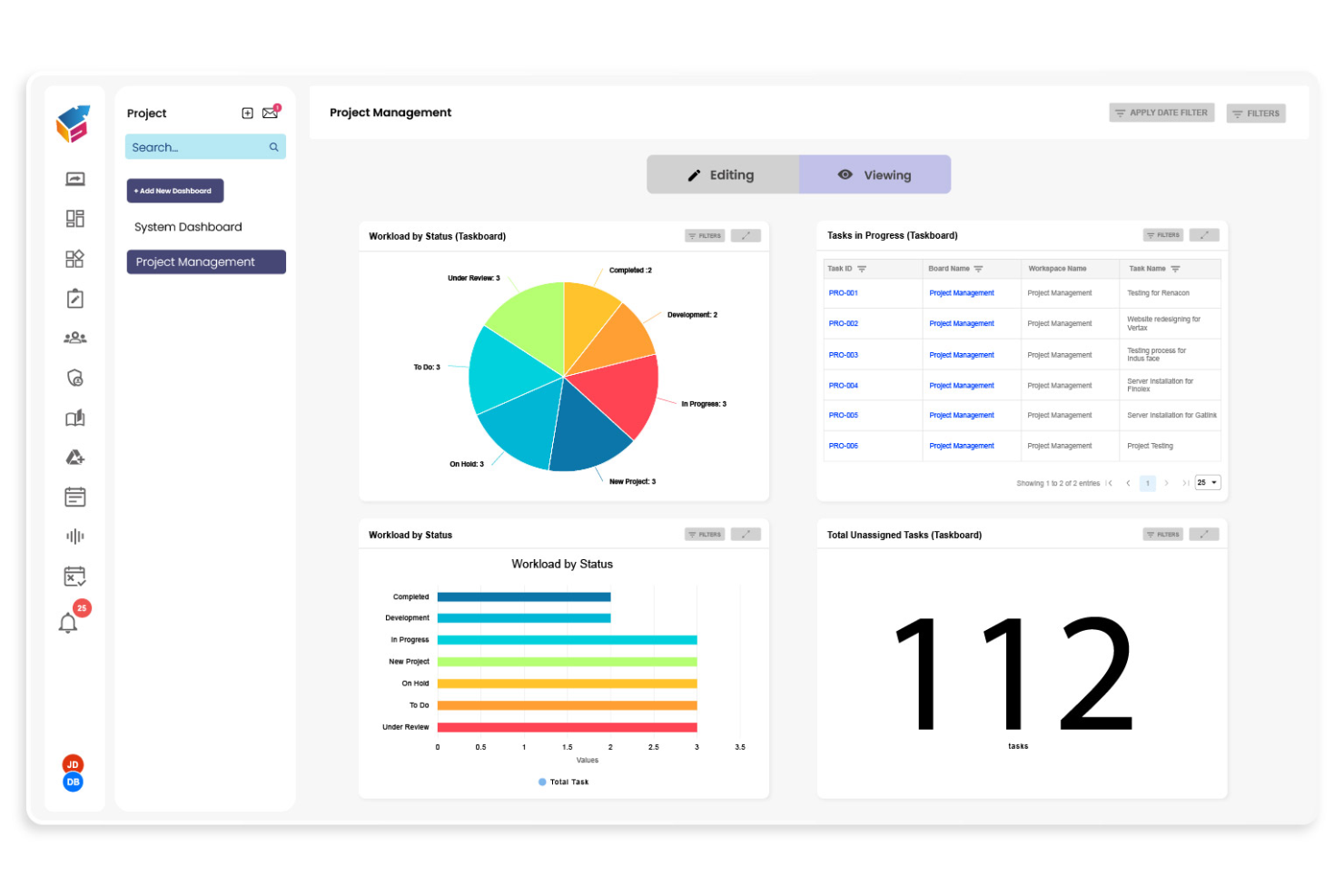
Yoroflow gives teams a way to automate complex, multi-step business processes without writing code. It’s a strong fit for operations managers, project leads, and IT teams who need to coordinate tasks across departments or systems. If you’re looking to build workflows that handle approvals, notifications, and integrations in one place, Yoroflow is designed for that level of control.
Why I Picked Yoroflow
I chose Yoroflow because it’s built to handle multi-step business processes that require more than just simple task automation. The platform’s drag and drop workflow builder lets you map out complex sequences, including conditional logic and parallel task branches, all from a visual interface. I like that you can set up automated approvals and notifications within the same workflow, which is essential for teams managing layered processes. Yoroflow’s focus on orchestrating multiple steps in a single flow makes it a strong choice for organizations with intricate operational needs.
Yoroflow Key Features
Some other features in Yoroflow that stand out for workflow builders include:
- Form Designer: Build custom forms to collect data and trigger workflows directly from user submissions.
- Document Management: Store, organize, and attach documents to workflow steps for easy reference and compliance.
- Role-Based Access Control: Assign permissions to users or groups to control who can view or edit specific workflows.
- Analytics Dashboard: Monitor workflow performance and track key metrics with built-in reporting tools.
Yoroflow Integrations
Native integrations are not currently listed.
Pros and Cons
Pros:
- Pre-built templates for common business processes
- Built-in document management and storage
- Multi-step workflows with conditional logic
Cons:
- Custom branding options are restricted
- Project board UX can slow navigation at scale

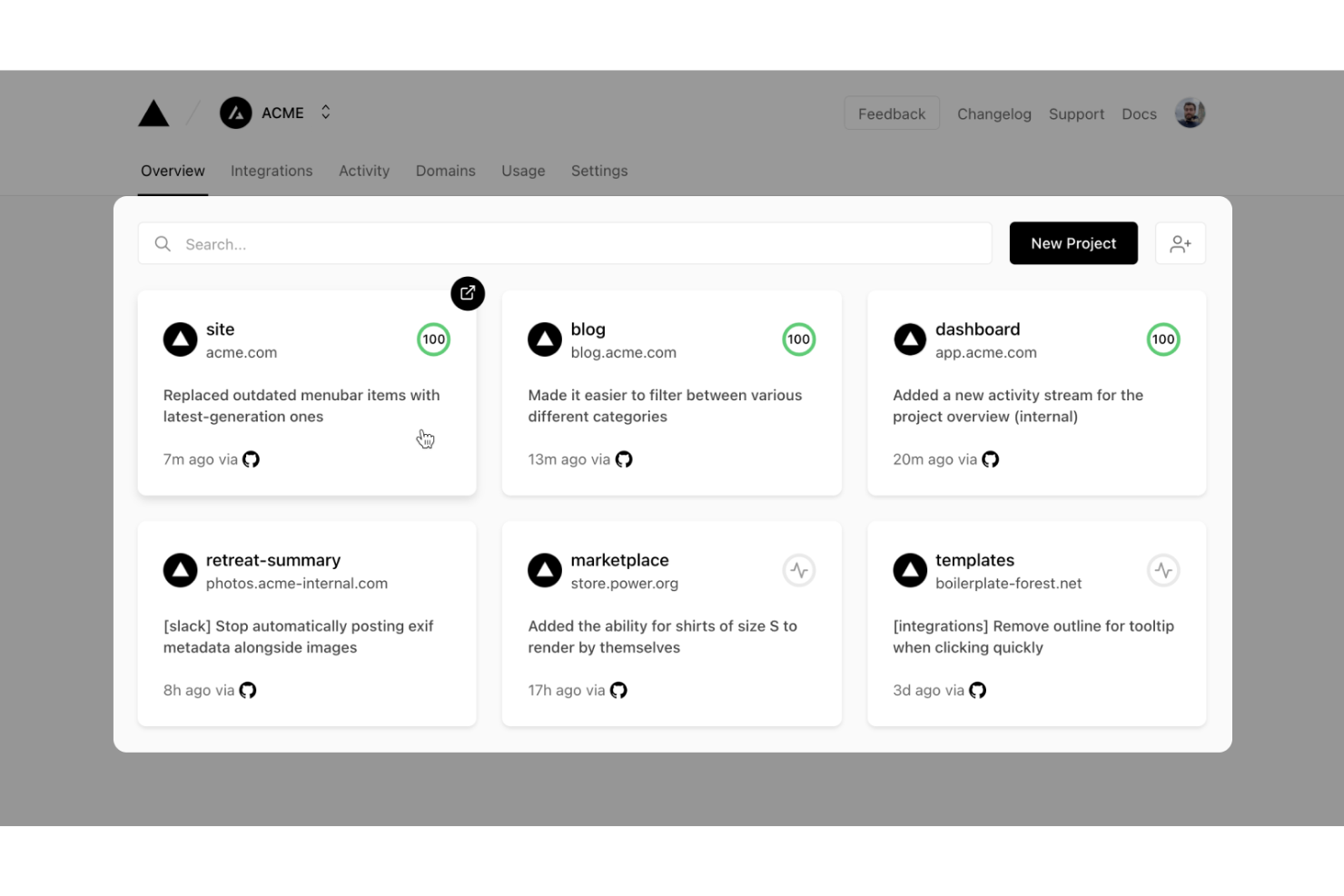
Vercel gives developers a platform to build, deploy, and scale workflow-driven web applications with modern frameworks. It’s especially useful for engineering teams who want to automate deployment pipelines and manage dynamic workflows in real time. With built-in serverless functions and instant preview environments, Vercel helps teams iterate quickly on workflow logic and user experience.
Why I Picked Vercel
What sets Vercel apart for workflow-driven app development is its focus on developer-centric automation and deployment. I picked Vercel because it lets teams build custom workflow logic using serverless functions and deploy changes instantly with preview environments. The platform’s Git-based workflow means every code push triggers automated builds and deployments, which is ideal for teams iterating on workflow builders. This approach gives developers full control over workflow customization while keeping deployment fast and reliable.
Vercel Key Features
Some other features that make Vercel appealing for workflow-driven app development include:
- Edge Middleware: Run custom logic at the edge to personalize workflows and handle requests before they reach your app.
- Environment Variable Management: Store and manage environment variables securely for different deployment stages.
- Custom Domains: Assign and manage custom domains directly from the Vercel dashboard.
- Analytics Dashboard: Access real-time performance and traffic analytics for deployed workflow apps.
Vercel Integrations
Integrations include GitHub, GitLab, Bitbucket, Slack, Datadog, Sentry, Contentful, Shopify, AWS, Sanity, and more.
Pros and Cons
Pros:
- Environment variable management for workflow configuration
- Middleware supports real-time workflow customization
- Instant preview deployments for workflow changes Edge
Cons:
- Custom domain setup can be complex for teams
- Limited visual workflow debugging tools

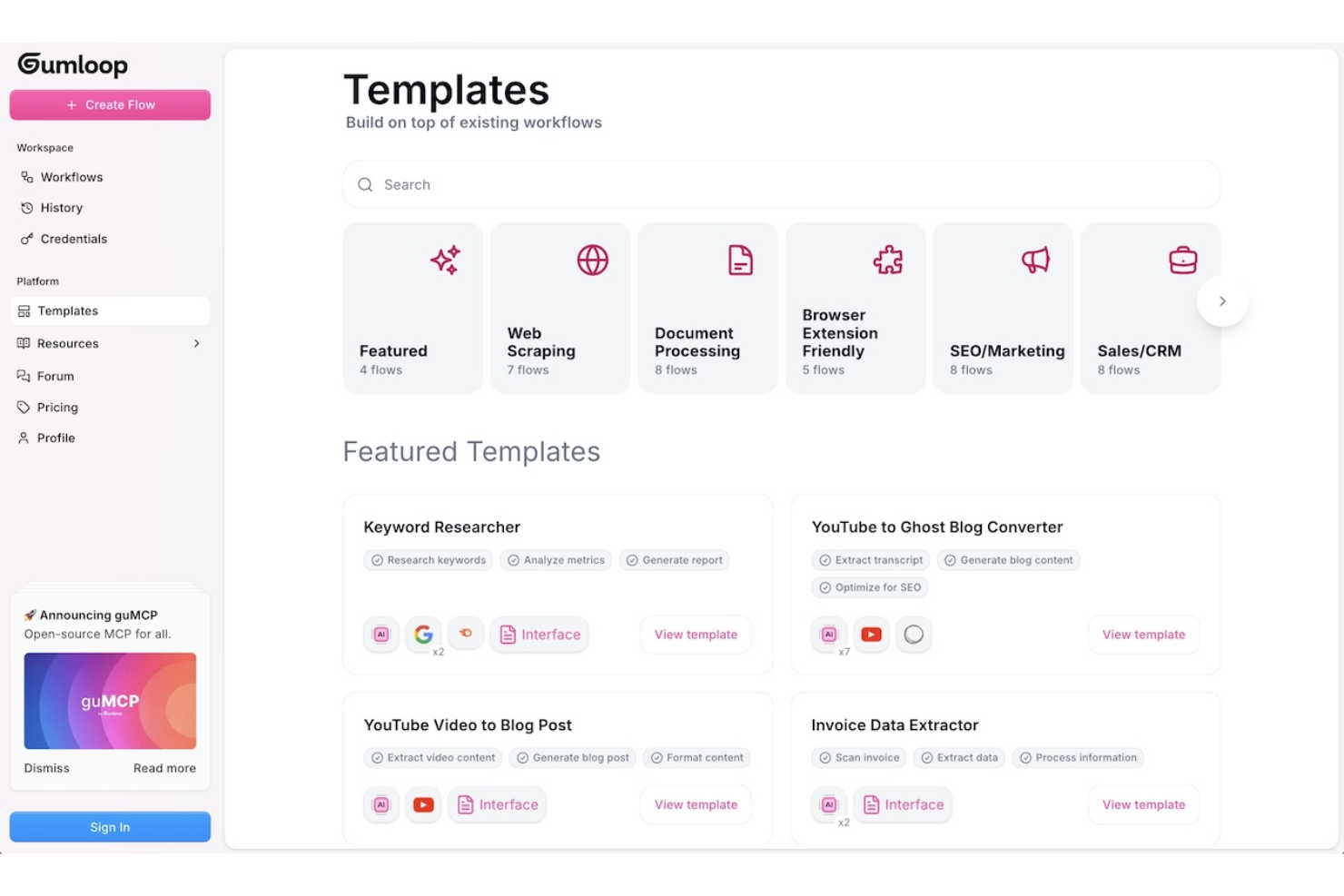
Gumloop is designed for teams and individuals who need to quickly prototype and test workflow ideas before committing to full development. It’s especially useful for product managers, UX designers, and innovation teams looking to validate concepts with interactive, drag-and-drop flows. With Gumloop, you can create and share workflow prototypes in minutes, making it easier to gather feedback and iterate early in the process.
Why I Picked Gumloop
When you need to move from idea to interactive prototype fast, Gumloop stands out for rapid workflow prototyping. I picked it because you can drag and drop steps, decisions, and actions to quickly visualize and test workflow logic without writing code. The tool supports instant sharing and live previews, so you can gather feedback from stakeholders or teammates right away. This makes Gumloop a strong fit for teams that want to validate workflow concepts before investing in full-scale development.
Gumloop Key Features
Some other features that make Gumloop useful for workflow prototyping include:
- Template Library: Access a collection of pre-built workflow templates to jumpstart new projects.
- Conditional Logic Blocks: Add if/then logic to simulate real-world decision points in your workflows.
- Commenting and Feedback Tools: Collect input directly on your prototypes from collaborators or stakeholders.
- Export to PDF or Image: Download workflow diagrams for documentation or presentations.
Gumloop Integrations
Integrations include Slack, Gmail, Google Sheets, Salesforce, Notion, HubSpot, Outlook, Google Drive, Apollo, and more.
Pros and Cons
Pros:
- No-code interface for non-technical team member
- Conditional logic blocks support complex flows
- Templates accelerate initial workflow prototyping
Cons:
- No built-in version control for prototypes
- Limited automation beyond visual prototyping stage

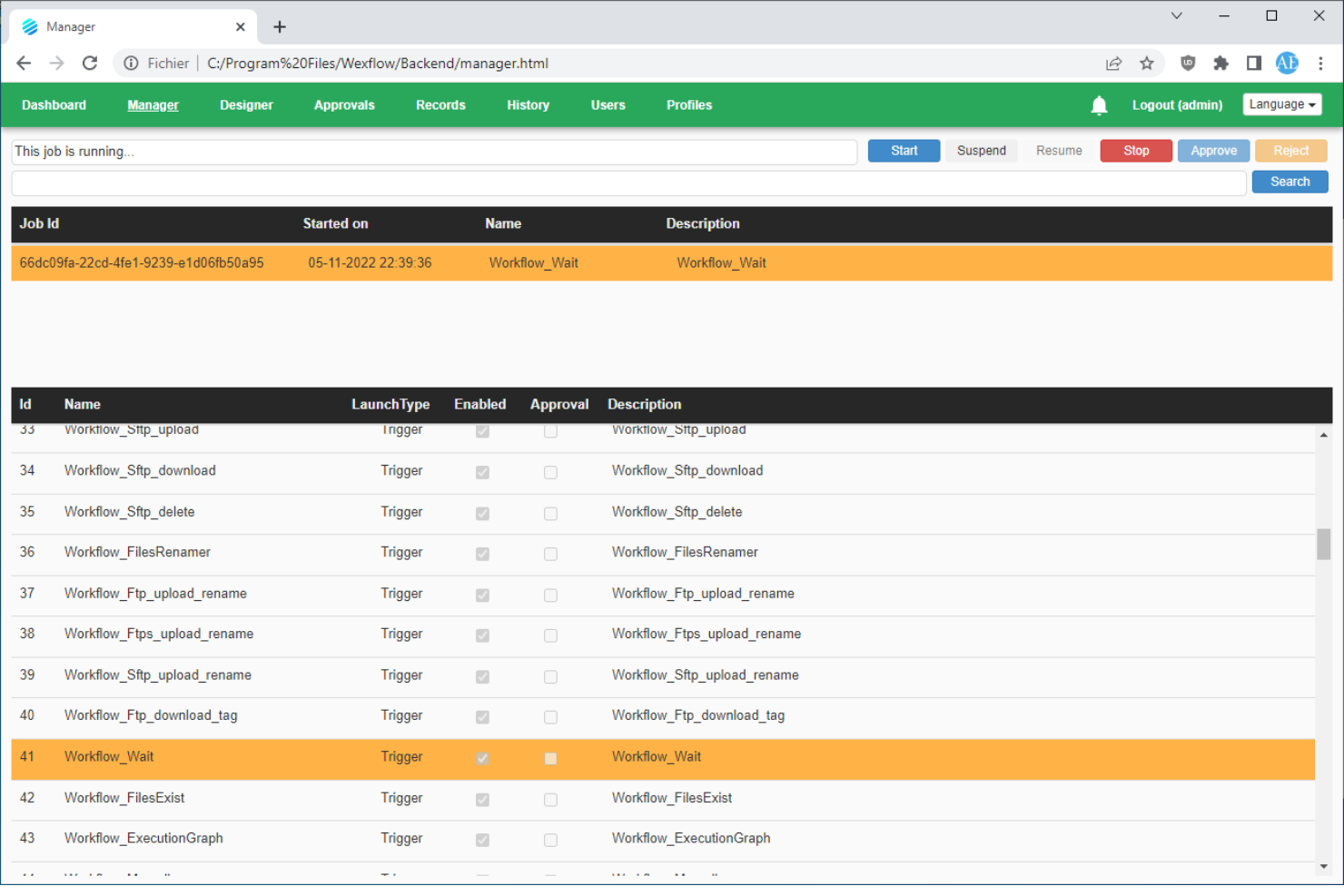
Wexflow is designed for IT teams and organizations that need full control over workflow automation in on-premise environments. It’s a fit for businesses with strict data security or compliance requirements that can’t use cloud-based workflow tools. If you want to build, schedule, and monitor automated processes on your own infrastructure, Wexflow gives you that deployment flexibility.
Why I Picked Wexflow
What sets Wexflow apart is its focus on on-premise deployment, which is rare among drag-and-drop workflow builders. I picked it because it lets you install and run the platform entirely within your own infrastructure, giving you full control over data and process security. Wexflow’s visual designer allows you to build, schedule, and monitor workflows without relying on cloud services. This makes it a strong choice for organizations with strict compliance needs or those operating in regulated industries.
Wexflow Key Features
Some other features that make Wexflow stand out for workflow automation include:
- Extensive Task Library: Choose from over 100 built-in tasks for automating file operations, email, database actions, and more.
- XML-Based Workflow Definitions: Edit and manage workflows using XML files for precise control and versioning.
- Real-Time Monitoring Dashboard: Track workflow execution status and logs through a web-based dashboard.
- Custom Script Integration: Add custom C# or PowerShell scripts directly into workflows for advanced automation needs.
Wexflow Integrations
Native integrations are not currently listed.
Pros and Cons
Pros:
- Built-in support for C# and PowerShell scripting
- XML workflow editing for advanced customization
- On-premise deployment supports strict data control
Cons:
- Lacks visual workflow version comparison
- No built-in cloud or SaaS option
Diğer Sürükle ve Bırak İş Akışı Oluşturucuları
Kısa listeme giremeyen, ancak yine de göz atmaya değer bazı ek sürükle ve bırak iş akışı oluşturucu seçenekleri şunlardır:
- Kolleno
For finance and accounts receivable teams
- React Flow
For custom workflow UI development
- MyShyft
For shift scheduling and workforce management
- Retool
For building internal tool workflows
- Puzzle
With real-time workflow collaboration


How I Evaluate Drag and Drop Workflow Builders
I split my evaluation into two layers: whether a tool can visually build branching workflows with approvals and automation, and what differentiates it in integrations and governance.
Core Functionality (Table Stakes For This List)
When I'm selecting tools for my list, I rank each one on a scale from 0 (does not offer the functionality) to 5 (excels in this area) for each core functionality listed below. Then, I calculate the tool's total score into a percentage. Each tool needs to achieve a minimum total score of 65% to be considered for inclusion.
- Visual Drag-and-Drop Canvas: I evaluate how easily you can place, rearrange, and connect workflow steps on a canvas—like mapping a sprint review process by dragging stages into sequence.
- Conditional Logic & Branching: Each tool should let you set if/then rules that route work down different paths, such as escalating a task when a budget threshold is exceeded.
- Task & Stage Automation: I look for automated triggers that fire when work moves between stages—auto-assigning a QA reviewer, updating statuses, or sending Slack alerts on completion.
- Project Management Integration: The builder should connect to your existing PM stack. I check for native links to tools like Jira, Asana, or monday.com so workflows stay synced with live project data.
- Approvals & Handoffs: Structured approval gates matter. I evaluate whether you can insert review steps where a design lead signs off before dev picks up the next stage.
- Templates & Reusability: Saving a workflow as a reusable template—like a client onboarding sequence your PMO runs every quarter—should be straightforward and shareable across teams.
Once I have a list of tools that meet the criteria, I consider what sets each platform apart.
Differentiating Factors (What Sets Vendors Apart)
Here's how I compare and contrast different vendors:
Standout Features
Version history is one of the first things I check. When a PMO lead updates a release workflow mid-sprint, the ability to compare revisions and roll back matters. I also evaluate whether the builder surfaces analytics like stage duration and bottleneck detection—knowing where tasks stall between design review and dev handoff is far more useful than raw task counts. AI-powered workflow generation is increasingly relevant too, especially for teams that need to spin up new processes from a plain-language prompt.
Beyond Features
Integration ecosystem depth is something I always evaluate. A workflow builder that connects natively to your PM tools, Slack, and file storage means fewer manual handoffs between systems. Governance and access control also carry real weight—when multiple teams share a workspace, role-based permissions and sandbox environments prevent a junior coordinator from accidentally publishing changes to a production workflow. I also consider how well a vendor supports onboarding, especially whether they offer prebuilt templates and guided setup to shorten the ramp-up for new builders.
Sürükle ve Bırak İş Akışı Oluşturucu Nasıl Seçilir?
Uzun özellik listeleri ve karmaşık fiyatlandırma yapıları arasında kaybolmak kolaydır. Benzersiz yazılım seçimi süreciniz üzerinde çalışırken odağınızı korumanıza yardımcı olmak için aklınızda bulundurmanız gereken faktörlerin bir kontrol listesi aşağıda yer alıyor:
| Faktör | Dikkat Edilmesi Gerekenler |
| Ölçeklenebilirlik | Ekibiniz veya işletmeniz büyüdükçe araç iş akışı hacminizi kaldırabilecek mi? Kullanıcı, iş akışı veya çalıştırma sınırlarını kontrol edin. |
| Entegrasyonlar | Ekibinizin güvendiği uygulamalara ve hizmetlere yerel olarak bağlanabiliyor mu? Eksik noktalar veya geçici çözümler için entegrasyon listesini inceleyin. |
| Özelleştirilebilirlik | İş akışlarını benzersiz süreçlere veya gereksinimlere uyacak şekilde uyarlayabiliyor musunuz? Özel mantık, komut dosyası oluşturma veya düğüm oluşturma desteği olup olmadığına bakın. |
| Kullanım kolaylığı | Teknik olmayan kullanıcılar, sürekli BT desteği almadan iş akışları oluşturup yönetebilecek mi? Arayüzü gerçek kullanıcılarla test edin. |
| Uygulama ve işe alıştırma | Çalışmaya başlayabilmeniz ne kadar sürecek? Taşıma gereksinimlerini, eğitim kaynaklarını ve şablonların veya yönlendirmeli kurulumun kullanılabilirliğini değerlendirin. |
| Maliyet | Kullanım arttıkça fiyatlandırma katmanları açık ve öngörülebilir mi? Gizli ücretlere, aşım ücretlerine veya gerekli eklentilere dikkat edin. |
| Güvenlik önlemleri | Platform, kuruluşunuzun veri gizliliği ve güvenlik standartlarını karşılıyor mu? Şifreleme, erişim denetimleri ve denetim günlükleri hakkında bilgi alın. |
| Destek kullanılabilirliği | Sorunlar ortaya çıktığında zamanında yardım alabilecek misiniz? Destek saatlerini, kanalları ve yanıt süresi taahhütlerini kontrol edin. |
Sürükle ve Bırak İş Akışı Oluşturucu Nedir?
Sürükle ve bırak iş akışı oluşturucu, kullanıcıların bileşenleri dijital bir tuval üzerinde düzenleyerek çok adımlı süreçleri tasarlamasını, otomatikleştirmesini ve yönetmesini sağlayan görsel bir araçtır. Bu platformlar bir otomasyon platformu ve iş akışı motoru görevi görerek ekiplerin düşük kod esnekliğiyle kodsuz iş akışları oluşturmasına olanak tanır. Görevleri, tetikleyicileri ve eylemleri CRM gibi uygulamalar ile diğer veri kaynakları arasında bağlamanıza olanak sağlayarak ekiplerin süreçleri daha veri odaklı bir şekilde düzenlemesine yardımcı olurlar. Genellikle görsel iş akışı oluşturucu olarak tanımlanan birçok araç, yapay zekâ destekli özellikler de içerir ve girişimler ile büyüyen ekipler tarafından yaygın olarak kullanılır. Otomasyonu hem teknik hem de teknik olmayan kullanıcılar için erişilebilir hâle getiren bu platformlar, ekiplerin tekrarlayan görevleri basitleştirmesine, görünürlüğü artırmasına ve örnek olay incelemeleri gibi örnekler aracılığıyla sonuçları doğrulamasına yardımcı olur.
Özellikler
Sürükle ve bırak iş akışı oluşturucuyu seçerken aşağıdaki temel özelliklere dikkat edin:
- Görsel iş akışı düzenleyicisi: Dijital bir tuval üzerinde adımları sürükleyip bağlayarak iş akışlarını tasarlamanıza ve düzenlemenize olanak tanır; bu da süreç haritalamayı sezgisel ve erişilebilir hâle getirir.
- Çoklu uygulama entegrasyonları: Mevcut teknoloji yığınınız genelinde görevleri otomatikleştirebilmeniz için çok çeşitli üçüncü taraf araçlara ve hizmetlere bağlanır.
- Koşullu mantık: İş akışları içinde kurallar ve dallanma yolları belirlemenize olanak tanır; böylece belirli tetikleyicilere veya veri değerlerine göre farklı eylemler gerçekleştirilebilir.
- Yeniden kullanılabilir iş akışı şablonları: Özelleştirebileceğiniz, önceden oluşturulmuş iş akışı örnekleri sunarak hızlı bir başlangıç yapmanıza ve yaygın süreçleri standartlaştırmanıza yardımcı olur.
- Gerçek zamanlı izleme: İş akışı yürütmelerini canlı olarak takip etmenizi sağlar; böylece ilerlemeyi görebilir, darboğazları belirleyebilir ve sorunları ortaya çıktıkları anda giderebilirsiniz.
- Hata işleme denetimleri: Güvenilirliği sağlamak için yeniden denemeler, bildirimler veya alternatif yollar gibi bir iş akışı adımı başarısız olduğunda ne olacağını tanımlamanıza olanak tanır.
- Rollere dayalı erişim denetimleri: İş akışlarını kimlerin görüntüleyebileceğini, düzenleyebileceğini veya çalıştırabileceğini yönetmenizi sağlayarak ekipler arasında güvenli iş birliğini destekler.
- Zamanlama ve tetikleyiciler: İş akışlarının zamana, olaylara veya harici sinyallere göre otomatik olarak çalıştırılmasını destekleyerek manuel müdahale ihtiyacını azaltır.
- Sürüm geçmişi: İş akışlarında zaman içinde yapılan değişiklikleri izleyerek önceki sürümlere dönmenize veya uyumluluk amacıyla değişiklikleri denetlemenize olanak tanır.
- Uygulama içi belgeler: İş akışı oluşturucu içinde yerleşik yardım, araç ipuçları veya notlar sunarak kullanıcıların karmaşık süreçleri anlamasını ve sürdürmesini kolaylaştırır.
Avantajlar
Sürükle ve bırak iş akışı oluşturucuyu uygulamak, ekibiniz ve işletmeniz için çeşitli avantajlar sağlar. Yararlanmayı bekleyebileceğiniz avantajlardan bazıları şunlardır:
- Daha hızlı süreç otomasyonu: Görsel düzenleyiciler ve şablonlar, kodlama yapmadan otomatik iş akışlarını hızlı bir şekilde oluşturup kullanıma sunmanıza olanak tanır.
- Ekipler arası daha fazla iş birliği: Rollere dayalı erişim denetimleri ve paylaşılan iş akışı tuvaller, birden fazla paydaşın süreçlere katkıda bulunmasını ve süreçleri incelemesini kolaylaştırır.
- Daha az manuel hata: Otomatik tetikleyiciler, hata işleme ve koşullu mantık, manuel görev yönetiminde sıklıkla ortaya çıkan hataların ortadan kaldırılmasına yardımcı olur.
- Geliştirilmiş görünürlük ve takip: Gerçek zamanlı izleme ve sürüm geçmişi özellikleri, iş akışının durumu ve zaman içindeki değişiklikler hakkında net bir görünüm sağlar.
- Yeni kullanıcılar için daha kolay işe alıştırma: Uygulama içi belgeler ve sezgisel sürükle ve bırak arayüzleri, teknik olmayan ekip üyelerinin otomasyona katılmasının önündeki engelleri azaltır.
- İhtiyaçlar arttıkça ölçeklenebilirlik: Çoklu uygulama entegrasyonları desteği ve özelleştirilebilir iş akışları, otomasyonunuzun işletme gereksinimlerinizle birlikte genişlemesini sağlar.
- Geliştirilmiş güvenlik ve uyumluluk: Rollere dayalı izinler ve denetim izleri, hassas süreçler üzerindeki kontrolü korumanıza ve kurumsal standartları karşılamanıza yardımcı olur.
Maliyetler ve Fiyatlandırma
Sürükle ve bırak iş akışı oluşturucuyu seçmek, mevcut çeşitli fiyatlandırma modellerini ve planları anlamayı gerektirir. Maliyetler özelliklere, ekip büyüklüğüne, eklentilere ve diğer unsurlara göre değişir. Aşağıdaki tablo, sürükle ve bırak iş akışı oluşturucu çözümlerinde yaygın planları, ortalama fiyatlarını ve genellikle sunulan özellikleri özetlemektedir:
Sürükle ve Bırak İş Akışı Oluşturucu İçin Plan Karşılaştırma Tablosu
| Plan Türü | Ortalama Fiyat | Yaygın Özellikler |
| Ücretsiz Plan | $0 | Temel iş akışı düzenleyicisi, sınırlı entegrasyonlar, tek kullanıcı erişimi, topluluk desteği ve sınırlandırılmış iş akışı çalıştırmaları. |
| Kişisel Plan | $10-$25/kullanıcı/ay | Sınırsız iş akışları, daha fazla entegrasyon, daha yüksek kullanım limitleri, e-posta desteği ve temel şablonlar. |
| İşletme Planı | $25-$50/ kullanıcı/ay | Çok kullanıcılı iş birliği, gelişmiş entegrasyonlar, rol tabanlı izinler, denetim günlükleri ve öncelikli destek. |
| Kurumsal Plan | $50-$100+/ kullanıcı/ay | Özel entegrasyonlar, özel işe alıştırma süreci, gelişmiş güvenlik denetimleri, SLA destekli yardım ve uyumluluk özellikleri. |
Sürükle ve Bırak İş Akışı Oluşturucu SSS
Sürükle ve bırak iş akışı oluşturucu hakkında sık sorulan soruların bazı yanıtları:
Teknik bilgisi olmayan kullanıcılar, sürükle ve bırak iş akışı oluşturucularıyla iş akışları oluşturabilir mi?
Evet, çoğu sürükle ve bırak iş akışı oluşturucu, teknik bilgisi olmayan kullanıcıların iş akışlarını görsel olarak oluşturup yönetebilmesi için tasarlanmıştır. Arayüz genellikle bir tuval ve önceden oluşturulmuş bileşenler kullanır; bu nedenle görevleri otomatikleştirmek veya uygulamaları bağlamak için kod yazmanız gerekmez.
Sürükle ve bırak iş akışı oluşturucularında hatalar veya başarısız adımlar nasıl ele alınır?
Çoğu platform, bir adım başarısız olduğunda ne olacağını tanımlamanıza olanak tanıyan hata işleme denetimleri içerir. İş akışlarının devam etmesini veya bir sorun olduğunda doğru kişilerin uyarılmasını sağlamak için yeniden denemeler, bildirimler ya da alternatif yollar ayarlayabilirsiniz.
Sürükle ve bırak iş akışı oluşturucularıyla ne tür süreçler otomatikleştirilebilir?
Onaylar, bildirimler, veri eşitleme, işe alıştırma ve birden fazla uygulamaya yayılan çok adımlı görevler dâhil olmak üzere çok çeşitli süreçleri otomatikleştirebilirsiniz. Bu araçlar, farklı ekiplerdeki hem basit hem de karmaşık iş akışlarını destekleyecek kadar esnektir.
İş akışlarının veya çalıştırmaların sayısıyla ilgili sınırlar var mı?
Evet, çoğu plan oluşturabileceğiniz iş akışı sayısına veya iş akışlarının her ay kaç kez çalıştırılabileceğine sınır koyar. Daha üst düzey planlar genellikle artırılmış ya da sınırsız kullanım sunar; bu nedenle ihtiyaçlarınıza uygun planı seçmek için plan ayrıntılarını inceleyin.
Sürükle ve bırak iş akışı oluşturucu platformları ne kadar güvenlidir?
Güvenlik sağlayıcıya göre değişir; ancak işletmelere odaklanan çoğu platform şifreleme, erişim denetimleri, denetim günlükleri ve uyumluluk sertifikaları gibi özellikler sunar. Platformu kullanmaya başlamadan önce kuruluşunuzun güvenlik ve gizlilik gereksinimlerini karşıladığından her zaman emin olun.