

2026 İçin En İyi 10 Scrum Yazılımı Aracı ve Scrum Panosu

10 En İyi Scrum Yazılımları Listesi


Scrum yazılımı, ekiplerin sprintleri planlamasına, iş listelerini yönetmesine ve hızlı, yinelemeli geliştirme döngüleri boyunca uyum içinde çalışmasına yardımcı olur. İster hızınızı takip ediyor, ister günlük toplantıları kolaylaştırıyor veya sprint değerlendirmelerini organize ediyor olun, doğru araç Çevik iş akışlarına yapı kazandırabilir ve ekibinizin daha iyi sonuçları daha hızlı teslim etmesine yardımcı olabilir.
Gerçekten Çevik ekipleri destekleyenleri öne çıkarmak için düzinelerce proje genelinde önde gelen Scrum platformlarını test edip inceledim. Sprint planlama ve görev panolarından iş bitirme grafiklerine ve iş birliği özelliklerine kadar bu rehberdeki her araç, ekibinizin netlik ve hızla ilerlemesini sağlamak üzere tasarlanmış işlevler sunuyor.
Why Trust Our Software Recommendations
Our team has been testing and reviewing software since 2012. As project managers ourselves, we know how difficult—and important—it is to choose the right software.
For this guide, we evaluated tools using hands-on testing and independent research, scoring tools using our selection criteria. We also draw on insights from industry thought leaders and practicing project management experts.
Our reviews reflect our human editorial judgment, not a sales pitch.
Expert reviewers:
En İyi Scrum Yazılımları Karşılaştırma Tablosu
| Tool | Starting Price | Website | |
|---|---|---|---|
| Best for Scrum and agile templates | 4.3 out of 5 | $10/user/month Free plan + 14-day trial available | Book Demo |
| Best for custom workflow automation | 4.4 out of 5 | $35/user/month 30-day free trial + free demo available | Website |
| Best Scrum board for real-time collaboration | 4.4 out of 5 | $1/user/month Free plan available | Website |
| Best scrum tool with built-in video conferencing | 4.8 out of 5 | $8/user/month Free plan + 14-day trial available | Book Demo |
| Best for API documentation | 4.4 out of 5 | $9.99/user/month Free plan + 14-day free trial + free demo available | Website |
| Best scrum software for enterprises | 4.4 out of 5 | $8.48/user/month Free plan + 7-day free trial available | Website |
| Best scrum software for sprint retrospectives | 4.4 out of 5 | Pricing upon request Free trial + demo available | Website |
| Best for agencies and consultancies | 4.4 out of 5 | $9/user/month 7-day free trial | Website |
| Best Scrum software for app integrations | 4.4 out of 5 | $12.49 project-planning/user/month Free plan available | Website |
| Best for small teams and startups | 4.4 out of 5 | $96 7-day free trial | Website |
En İyi Scrum Yazılımları İncelemeleri
Listemde yer alan scrum araçlarının her birinin en iyi yaptığı şeyleri gösteren kısa açıklamaları ve bazı özellikleri öne çıkaran ekran görüntülerini burada bulabilirsiniz.

Wrike
Best for Scrum and agile templates

Wrike is a project management software suitable for teams of five or more. It includes Scrum tools and features, and is highly configurable, allowing users to customize workflows, dashboards, reports, and request forms.
Wrike enables users to switch between Agile Kanban boards, one-click Gantt charts, and traditional workload views. The tool also comes with a number of pre-built Agile templates, and features task lists, subtasks, schedules, shared workflows, file sharing, and real-time collaboration. Automatically prioritize your backlog, plan sprints with Gantt charts and Kanban boards, and track your sprint success with reports.
Wrike has an easy-to-use, intuitive interface and navigation with distinct spaces, folders, and tasks. Users can toggle between the home screen and timesheets, dashboards, calendars, reports, and an activity stream. Wrike has a dedicated help center with interactive training, videos, a ‘Getting Started’ guide, and a thriving community.
Wrike offers 400+ pre-built native integrations, including integrations with the most popular file management software from Microsoft, Google, and Dropbox, along with sales and marketing software from Salesforce and Marketo.
Pros and Cons
Pros:
- Users have access to a variety of fully customizable dashboards
- User-friendly and intuitive for all skill levels
- View projects and tasks in different views (list, table, Kanban, Gantt)
- Excellent email integration
Cons:
- Time tracking is included in Business/Enterprise plans only
- No task prioritization levels, high priority flags only
- No alerts to warn against unassigned/untagged tasks
New Product Updates from Wrike

Wrike Redesigns Workspace Search With New Filters
Wrike introduces a redesigned Workspace Search interface with recent search shortcuts, item type and location filters, and parent-task context. These updates help users find relevant work items and navigate search results efficiently. For more information, visit Wrike’s official site.
 .

Best for custom workflow automation

QuickBase is a cloud-based application development platform that enables users to create custom business applications without the need for coding expertise. Its platform can also be adapted for use as scrum software, supporting agile project management methodologies. This allows teams to manage sprints, backlogs, and user stories within a customizable framework.
QuickBase's flexibility in application design and data management additionally allows scrum teams to configure the system to their specific workflow requirements, facilitating the iterative development and continuous improvement central to scrum practices.
QuickBase integrates with Microsoft Teams, Tableau, Slack, Salesforce, NetSuite, QuickBooks, Dropbox, Google Drive, Marketo, and Zendesk.
QuickBase costs from $35/user/month (billed annually) and comes with a 30-day free trial.
Pros and Cons
Pros:
- Can scale with growing businesses
- Provides excellent customer support for users
- Intuitive interface
Cons:
- Some issues with slow loading times
- Lacks easily formattable reports

Best Scrum board for real-time collaboration
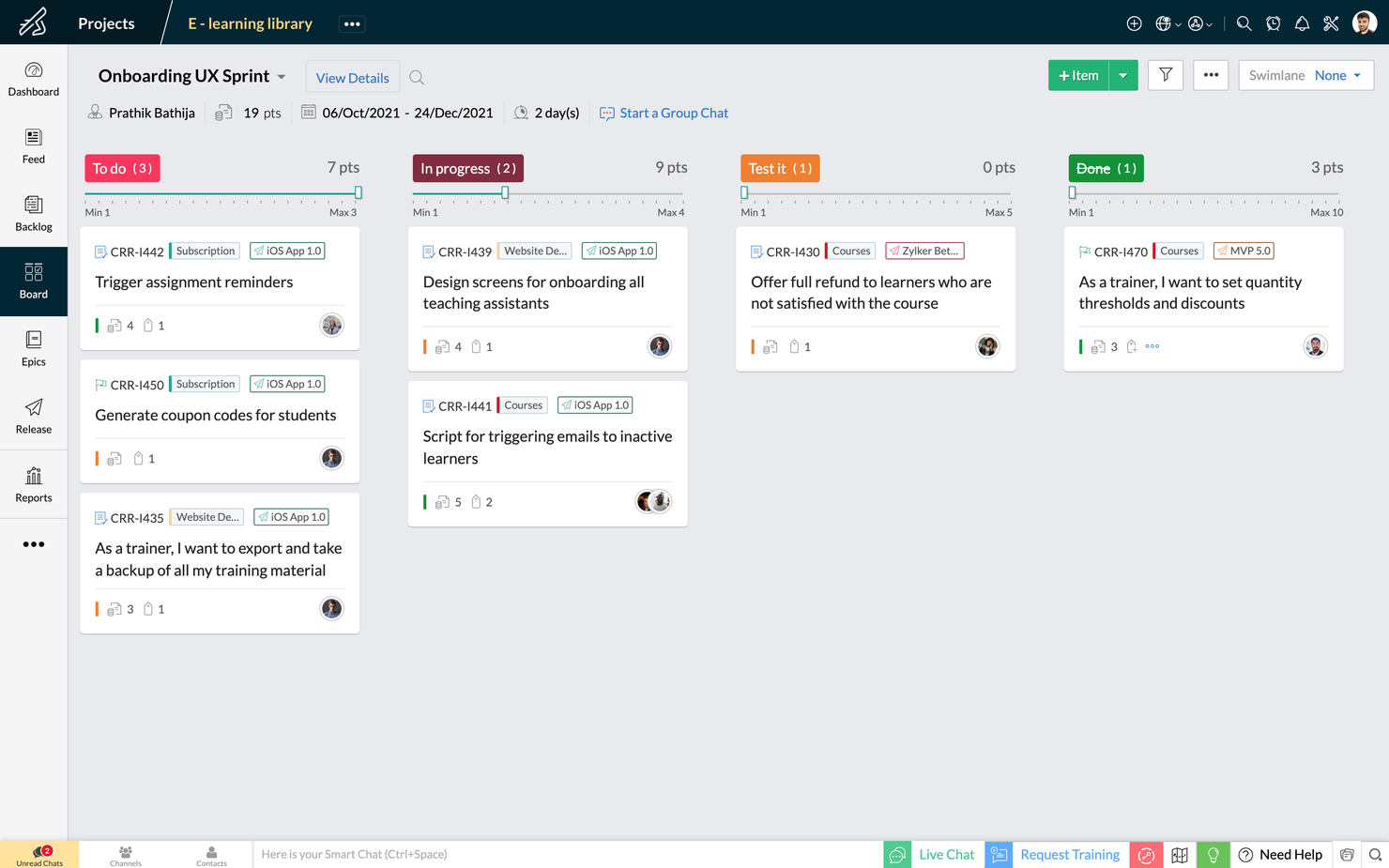
Zoho Sprints is an agile project management tool that helps Scrum teams organize user stories, manage backlogs, and track progress on Scrum Boards. It’s a simple and clutter-free Scrum software that helps teams to focus on shipping great quality work.
The drag and drop planning builder helps teams plan their upcoming sprints by moving items from their project backlog to their sprint backlog. The project backlog serves as the repository of all user stories, tasks, and bugs. The dedicated planning center equips teams to refine their project backlog with options to filter, sort and search items across default and custom parameters.
The Scrum Board in Zoho Sprints is highly customizable and provides visibility and transparency of everyone’s progress. It is effortless to drag-and-drop stories into completion, create custom statuses and set WIP limits. Teams can sort work items into swimlanes based on priority, story, or estimation points, and track the progress of sprints in an exclusive sprint dashboard.
Zoho Sprints provides real-time reports and insights into the overall progress. The Velocity Chart calculates the amount of work delivered in each sprint and helps teams to plan and estimate future sprints. Meanwhile, Burndown and Burnup charts help teams to track the pace at which they are burning estimation points by comparing the current and ideal progress line.
Communication and collaboration are crucial in every aspect of life, and
they're especially critical when you're working with cross-functional teams. With Zoho Sprints, product teams can collaborate within the context of their work through features like built-in chat, virtual meetings, and an interactive project feed.
Zoho Sprints integrates well with popular code repository management tools like GitHub, GitLab, Bitbucket. DevOps teams can also automate their CI/CD pipelines by integrating with developer tools like Jenkins and Azure DevOps. Teams can leverage webhooks and APIs to build their integrations or browse through a growing library of apps listed on Zoho's marketplace.
Zoho Sprints starts at $6/user/month (billed annually). They offer a freemium version for up to 3 users for 3 projects. Zoho Sprints offers a free trial for 15 days (no credit card required).
New Product Updates from Zoho Sprints

Zoho Sprints Adds ServiceDesk Plus Integration
Zoho Sprints now offers Zoho Sprints for ServiceDesk Plus in Zoho Marketplace, enabling IT teams to send requests, changes, and releases to developers and track progress in SDP. For more information, visit Zoho Sprints' official site.
 .

Miro
Best scrum tool with built-in video conferencing

Miro is a collaborative online whiteboard with built-in video conferencing widely used across various industries, including major Fortune 100 companies. It offers an extensive array of templates and formats, from Kanban boards to flowcharts.
As a scrum software tool, Miro includes interactive collaboration features like stickies and comments, enabling dynamic discussions during scrum sessions. Its integration with project management tools like Jira and Asana centralizes task tracking within the scrum framework. Additionally, Miro's planner tool assists in visualizing and organizing tasks, aiding teams in maintaining a clear overview of their projects and sprints.
Miro has integrations with a whole suite of tools, including Zoom, Figma, Confluence, Asana, monday.com, Microsoft Teams, Jira, Slack, Google Drive, Box, Airtable, Notion, Azure, and Webex. Some integrations are limited to paid plans only.
Pros and Cons
Pros:
- Free forever plan available
- Intuitive and easy setup
- Built-in communication features for streamlined collaboration
Cons:
- Visitor/guest accounts locked to paid plans only
- Zooming can be jumpy on larger projects
- Free version does not allow high-quality export to pdf
New Product Updates from Miro
Miro Adds Japan Data Residency for Enterprise Customers
Miro has introduced Japan data residency for enterprise customers, offering in-region storage for production data, backups, and metadata, plus in-region compute infrastructure. For more information, visit Miro's official site.
 .
Best for API documentation

Used by over 20K companies, Teamwork is a project management tool that highlights accountability and collaboration with time tracking, workload management, and templates and automation. Teamwork's API is flexible and accessible with different self-help modules for manipulating data, building integrations, customizing product development workflows, and visualizing your content. Scrum-oriented cross-functional teams will love this adaptability.
Teamwork costs from $10/user/month and they also offer a freemium version of the tool for up to 5 users. They also offer a 30-day free trial for all paid plans.
Pros and Cons
Pros:
- Features can be turned on/off (tasks, messages, time, risks, billing)
- Easy zoom in/zoom out on project plans
- Easy to communicate task status with clients or team
Cons:
- No CSS template option for advanced customization
- No industry-specialized project templates or formats
- No easy way to measure your team’s capacity

Jira
Best scrum software for enterprises
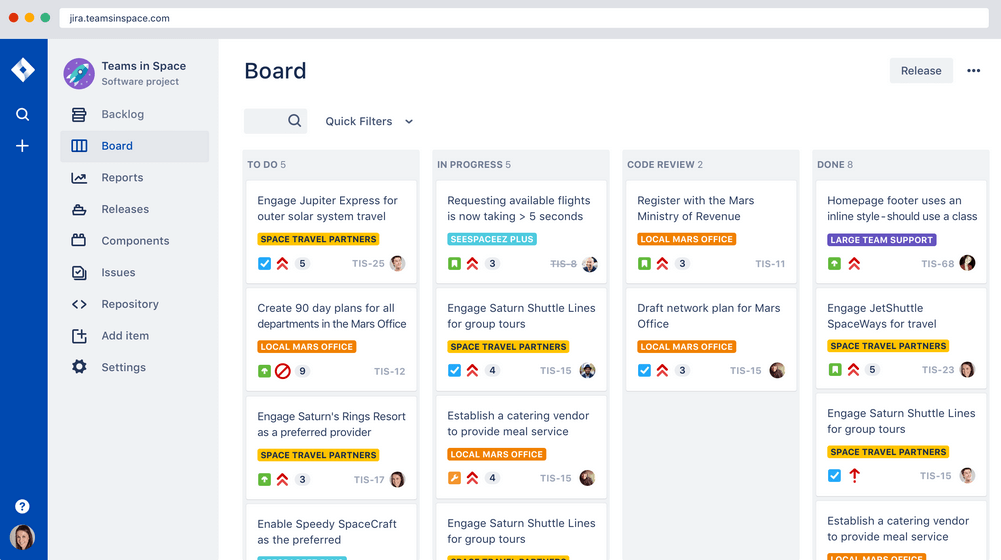
Jira Scrum board takes this workflow software powerhouse and hones it around team collaboration and incremental delivery starts. A few features scrum masters will find handy are their printable agile user story cards, 25+ agile extensions and filters, and a robust project template manager. Atlassian owns Jira, Confluence, Trello, BitBucket, SourceTree, Bamboo—making it great for enterprises who want everything in a single ecosystem.
Jira costs from $7/month for up to 10 users. They also offer free licensing for groups of 10 users or less.
Pros and Cons
Pros:
- Single view for all user stories
- Can create tasks, sub-tasks, spikes, and epics
- Houses all historical works for future reference
- Centralized administration across all Atlassian Cloud products
Cons:
- Limited collaboration features
- Needs better linking within stories and tasks
- No mass-editing and scripting (rename a whole set of labels, etc.)
Best scrum software for sprint retrospectives

Targetprocess is a Scrum team management app with tailored solutions for product owners, release train engineers, portfolio managers, and agile coaches. They make sprint retrospectives simple with built-in tools to check team happiness, organize feedback, or just record a high-level summary of a project. Targetprocess has board tags for "worked well," "didn't work well," and "improvement ideas", making collaborative retrospectives even easier.
Targetprocess offers customized pricing upon request.
Pros and Cons
Pros:
- Can choose between unique or standard views per user
- Responsive customer support team
- Robust graphical and custom reports to pinpoint trends
Cons:
- No means to reuse steps
- Does not include iteration tracking
- Can be tricky to move entities into different levels of the hierarchy
Best for agencies and consultancies

Bonsai is a versatile business management platform tailored for agencies, consultancies, and professional services. It combines tools for client and project management with financial tracking, offering an all-in-one solution for business operations. With features like CRM, proposal and contract management, scheduling, and expense tracking, Bonsai helps teams organize workflows, manage sprints, and complete projects.
Bonsai's robust task management system makes it a valuable tool for Scrum teams. It includes task assignments, prioritization, deadlines, and Kanban views for progress tracking, essential for managing Scrum sprints. The integrated timers and collaboration tools ensure that teams can maintain clear communication and stay on schedule throughout their projects.
Furthermore, Bonsai offers features like customizable templates, automated invoicing, project timelines, client portals, and comprehensive reporting and analytics. Bonsai also integrates with popular tools such as Google Calendar, Calendly, QuickBooks Online, ClickUp, Google Drive, Google Sheets, Zapier, Slack, HubSpot, Gmail, Xero, and more.
Pros and Cons
Pros:
- Client portal for direct communication
- Flexible task management with Kanban views
- Automation for repetitive tasks
Cons:
- Lacks more advanced scrum features like backlog management
- May not be the best for larger businesses
Nutcache
Best Scrum software for app integrations

Nutcache is a Scrum project management tool with the ability to measure task progress, set a business value to cards (ROI), assign complexity points to cards, display real-time sprint statistics, and use acceptance tests to set cards as completed. Nutcache has a healthy list of third-party integration options and also works with a paid Zapier plan to unlock thousands more. They also offer a flexible API to connect Nutcache to your existing tools and workflow.
Nutcache costs from $6/user/month with a “Pro” plan that requires 5 users.
Pros and Cons
Pros:
- Robust project dashboards
- Intuitive to learn and use
- Great time and expense tracking
- Easy to integrate new employees (scalable)
Cons:
- Complicated security levels for employees
- Need more third party integrations
VivifyScrum
Best for small teams and startups
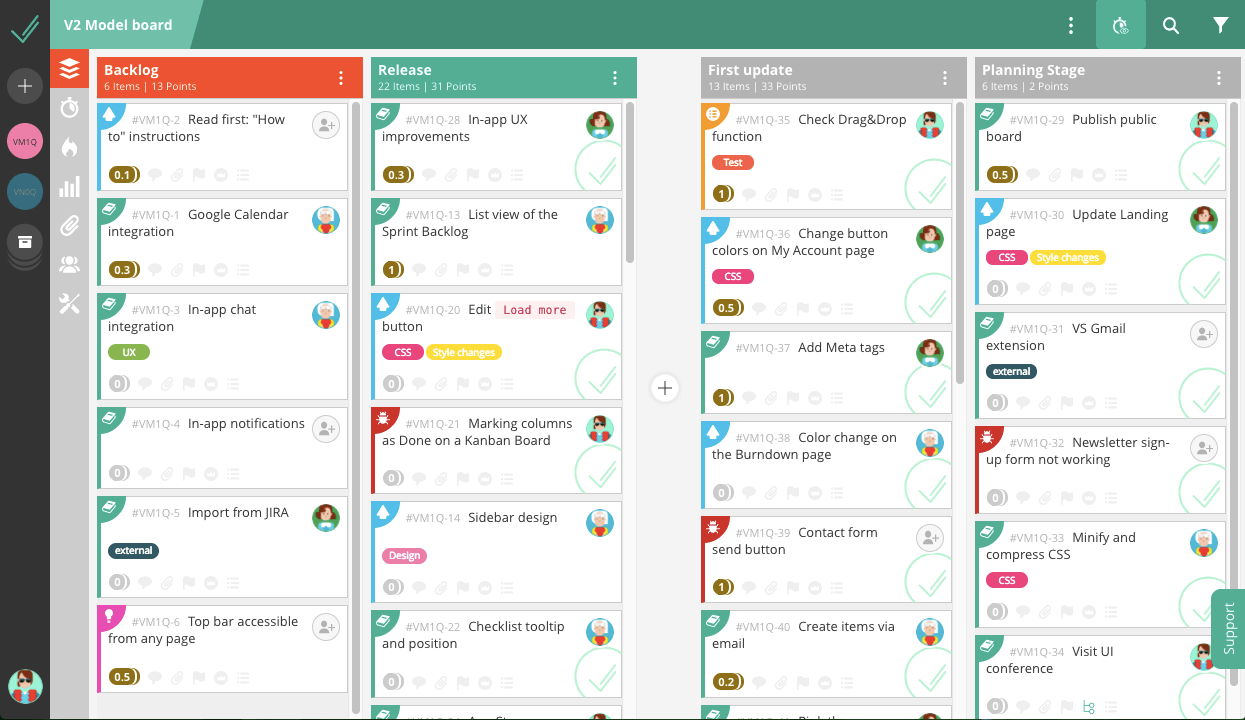
VivifyScrum is a web-based project management tool that comes with free Scrum training via their VivifySCrum EDU course—just one of the many added benefits that small teams and startups will appreciate. They also have fixed price licensing for SMBs trying to navigate the growing world of monthly workflow app subscriptions. Additionally, teams of all sizes will appreciate their flexible agile boards, burndown charts, and Scrum metrics graphs.
VivifyScrum costs from $96 as a one-time fee for 10 users and offers a 7-day free trial as well as a 30-day refund policy upon purchase.
Pros and Cons
Pros:
- Easy to add and rearrange tasks on board
- Labels and card types work well for added organization
- Helpful shortcuts to quickly assign, label, type tasks
Cons:
- Lacking in 3rd party integrations
- Can’t sort backlog items in dashboard view
- Gitlab connection could be better
Diğer Scrum Yazılımları
İşte en iyi listeye giremeyen birkaç seçenek daha.
- SwiftKanban
Scrum tool for engineering
- Height
Efficient Agile development made simple.
- Axosoft
Sprint dashboard
- Orangescrum
Scrum software with resource management
- monday AI Workspace
With AI-driven risk detection and reporting
- ClickUp
For freelancers &
- Celoxis
For resource management
- Hubstaff
Free scrum software
- Lucidspark
Scrum board for integrations and collaboration
- GoodDay
For backlog prioritization
- Asana
Free Scrum software
- Basecamp
Scrum tool for non-software projects
- Scoro
Agile Scrum software
- Trello
Widely-used Scrum board software
- SprintGround
For web developers
- Zoho Sprints
Scrum software within a connected suite of other business tools
- Scrumdesk
Objectives and key results (OKR) planning


How I Evaluate Scrum Software
I split my evaluation into two layers—whether a tool covers the sprint planning, backlog grooming, and burndown reporting fundamentals, then what sets it apart for teams scaling across multiple squads.
Core Functionality (Table Stakes For This List)
When I'm selecting tools for my list, I rank each one on a scale from 0 (does not offer the functionality) to 5 (excels in this area) for each core functionality listed below. Then, I calculate the tool's total score into a percentage. Each tool needs to achieve a minimum total score of 65% to be considered for inclusion.
- Product Backlog Management: I evaluate how each tool handles creating, ranking, and grooming user stories and epics—like dragging items to reprioritize after a stakeholder review.
- Sprint Planning & Execution: Each tool should let you define sprints with goals, pull items from the backlog, and track capacity so your team commits to realistic workloads.
- Scrum Board Visualization: I look for drag-and-drop boards with customizable columns and swimlanes that reflect how your team actually moves work from "To Do" through "Done."
- Agile Reporting & Metrics: Burndown charts, velocity tracking, and cumulative flow diagrams matter here—I check whether reports update in real time as the sprint progresses.
- Story Point Estimation: Tools should support story points at the item level and roll them up across sprints, similar to how Jira and Azure DevOps surface velocity history.
- Team Collaboration on Work Items: I look at whether team members can comment, @mention, attach files, and receive notifications directly on stories and tasks within a sprint.
Once I have a list of tools that meet this criteria, I consider what sets each platform apart.
Differentiating Factors (What Sets Vendors Apart)
Here's how I compare and contrast different vendors:
Standout Features
Built-in retrospective tools are a big differentiator—I look for templates like Start/Stop/Continue with voting and action items that carry into the next sprint. Developer integrations also matter: linking GitHub or GitLab commits directly to user stories gives the whole team visibility into what's shipped. I also check for no-code automation rules that handle recurring tasks like rolling unfinished items into the next sprint or notifying the Scrum Master when a story is blocked.
Beyond Features
Ecosystem fit is one of the first things I evaluate—whether a tool connects with your existing Slack, Confluence, or Figma setup shapes daily workflows more than most features do. I also consider how well a platform scales; a tool that works for one Scrum team can fall apart when you're coordinating ten squads across a portfolio. Onboarding matters, too. Pre-built Scrum templates and migration support from tools like spreadsheets or legacy PM platforms can cut weeks off your team's ramp-up time.
Scrum Yazılımı Nasıl Seçilir?
Uzun özellik listeleri ve karmaşık fiyatlandırma yapılarına takılıp kalmak kolaydır. Kendinize özgü yazılım seçim sürecinizde ilerlerken odağınızı korumanıza yardımcı olmak için göz önünde bulundurmanız gereken faktörleri içeren bir kontrol listesi hazırladım:
| Faktör | Nelere Dikkat Edilmeli? |
| Ölçeklenebilirlik | İhtiyaçlarınız genişledikçe bu araç ekibinizle birlikte büyüyebilecek mi? Aracın sizinle birlikte büyüyüp büyüyemeyeceğini görmek için fiyatlandırma planlarına ve özelliklerine bakmanız gerekir. |
| Entegrasyonlar | Yazılım, ekibinizin mevcut araçlarıyla entegre oluyor mu? Örneğin bazı şirketler özellikle Jira ile entegre olan proje yönetimi yazılımı arıyor. |
| Özelleştirilebilirlik | Yazılımı iş akışlarınıza uyacak şekilde uyarlayabilir misiniz? |
| Kullanım Kolaylığı | Aracın arayüzü ekibinizin hızlıca öğrenebileceği kadar sezgisel mi? |
| Bütçe | Fiyatlandırma, ekibinizin mali sınırları içinde kalıyor mu? |
| Güvenlik Önlemleri | Yazılım, verilerinizi korumak için güçlü güvenlik özellikleri sunuyor mu? |
| İş Birliği | Yazılım, ekibinizin projeler üzerinde iş birliği yapma biçimini iyileştirecek mi? |
| Raporlama Araçları | Yazılım, ekibinizin ihtiyaçlarını karşılayan raporlar sunuyor mu? Bu konu genellikle gözden kaçırılır ve birçok araçta güçlü raporlama modülleri bulunmaz. |
2025'te Scrum Yazılımlarındaki Eğilimler
Araştırmam sırasında farklı Scrum yazılımı sağlayıcılarının sayısız ürün güncellemesini, basın bültenini ve sürüm kaydını inceledim. Takip ettiğim yükselen eğilimlerden bazıları şunlar:
- Yapay Zekâ Destekli Sprint Planlama: Tedarikçiler, geçmiş performans verilerine dayanarak görev sürelerini tahmin etmek ve ekip üyelerini otomatik olarak görevlendirmek için yapay zekâyı sprint planlama yazılımlarına entegre etmeye başladı. Bu, planlamayı daha verimli hâle getirir ve insan hatasını azaltarak ekiplerin genel olarak daha hızlı ilerlemesine yardımcı olur.
- Etkileşim İçin Oyunlaştırma: Scrum yöneticisi araçları, ekip üyelerinin motivasyonunu korumak için oyunlaştırma özelliklerini kullanıyor. İlerlemeyi rozet veya puanlarla ödüllendiren bu özellikler, Scrum görev panolarının kullanımını daha ilgi çekici hâle getirir ve sprintler sırasında üretkenliği artırmaya yardımcı olur.
- Uzaktan İş Birliğine Odaklanma: Çevrim içi Scrum panosu platformları, uzaktaki ekipleri daha iyi bir araya getirmek için gerçek zamanlı güncellemeler ve yerleşik iletişim araçları sunarak sanal iş birliği özelliklerini geliştiriyor. Bazı Scrum uygulamaları artık yerleşik video konferans veya sohbet özellikleri içeriyor ve bu da uzaktan iş birliğini daha sorunsuz hâle getiriyor.
- Gelişmiş Raporlama ve Analiz: Daha fazla Scrum yönetimi aracı sprint hızına, görev tamamlanma oranlarına ve darboğazlara ilişkin ayrıntılı bilgiler sunuyor. Bu çevik panoları kullanan ekipler artık daha fazla veriye dayalı kararlar alabilir ve zaman içindeki performans eğilimlerini daha yüksek hassasiyetle takip edebilir.
- Görsel Sprint Takibi: Scrum beyaz tahtaları ve Scrum tasarımı, daha görsel ve etkileşimli platformlara dönüşüyor. Tedarikçiler, Scrum sistemlerine sürükle ve bırak arayüzleri, renklerle kodlanmış görev önceliklendirmesi ve dinamik grafikler ekleyerek sprint ilerlemesini bir bakışta takip etmeyi kolaylaştırıyor.
Scrum Yazılımı Nedir?
Scrum yazılımı, çalışmaları kısa ve yinelemeli sprintler hâlinde düzenleyerek ekiplerin Scrum çerçevesini uygulamasına yardımcı olan bir proje yönetimi aracıdır.
Çevik yazılım geliştirmede yaygın olarak kullanılan bu yazılım; sprint planlama, iş listesi yönetimi, görev takibi ve günlük toplantılar için özellikler içerir. Scrum araçları, ekip iş birliğini geliştirir, şeffaflığı artırır ve ekiplerin değişime hızlı bir şekilde yanıt vermesine yardımcı olarak sürekli teslimatı destekler.
Scrum Yazılımının Özellikleri
Scrum yazılımı seçerken aşağıdaki temel özelliklere dikkat edin:
- Sprint planlama: Ekiplerin bir sprint planlama aracı kullanarak çalışmaları planlamasına ve yönetilebilir sprintlere ayırmasına yardımcı olur ve zamanında teslimatı güvence altına alır.
- İş listesi yönetimi: Çevik Scrum yönetimi için gerekli olan ürün iş listesi içindeki görevlerin kolayca önceliklendirilmesini ve düzenlenmesini sağlar.
- Tükenme grafikleri: Çevik bir Scrum panosunda iş ilerlemesinin görsel bir temsilini sunarak ekiplerin hızlarını takip etmesine ve tamamlanma zamanını tahmin etmesine yardımcı olur.
- Kullanıcı hikâyesi haritalama: Ekiplerin çevik Scrum yazılım geliştirme sürecinde kullanıcı hikâyelerini verimli bir şekilde yapılandırmasını ve çalışmaları müşteri ihtiyaçlarıyla uyumlu hâle getirmesini sağlar.
- Özelleştirilebilir iş akışları: Çevik Scrum aracı sistemlerinde belirli ekip süreçlerine uyum sağlayarak çalışmaların izlenme ve tamamlanma biçiminde esneklik sunar; Scrum iş akışları için idealdir.
- İş birliği araçları: Sohbet, yorumlar ve dosya paylaşımı gibi özelliklerle ekip iletişimini kolaylaştırır.
- Retrospektif araçları: Tamamlanan sprintleri gözden geçirmek ve tartışmak için yapılandırılmış yöntemler sunarak sürekli gelişimi teşvik eder.
- Raporlama ve analiz: Ekip performansına ilişkin bilgiler sunarak Scrum projelerinde süreçlerin optimize edilmesine yardımcı olur.
- Role dayalı izinler: Ekip üyelerinin uygun araçlara ve bilgilere erişmesini sağlayarak hassas verileri korur; Scrum ekiplerini ve iş akışlarını yönetmek için kritik öneme sahiptir.
- Entegrasyon olanakları: Proje yönetimi ekosistemindeki diğer araçlara bağlanarak platformlar arasındaki iş akışlarını kolaylaştırır.
Scrum Yazılımının Faydaları
Scrum yazılımını uygulamak ekibiniz ve işletmeniz için çeşitli faydalar sağlar. Yararlanabileceğiniz birkaç fayda şunlardır:
- Artan iş birliği: Scrum araçları, ekiplerin paylaşılan panolar ve görev listeleri aracılığıyla iletişim kurmasını ve birlikte çalışmasını kolaylaştırır.
- Daha hızlı teslimat: Ekipler, büyük görevleri daha küçük ve yönetilebilir sprintlere ayırmak için sprint planlama uygulamalarını kullanarak projeleri daha hızlı teslim edebilir.
- Daha iyi şeffaflık: Scrum panosu yazılımı, herkesin görevlerin ilerlemesini gerçek zamanlı olarak görmesine olanak tanır; böylece kimin ne yaptığı konusunda kafa karışıklığı yaşanmaz.
- Geliştirilmiş esneklik: Çevik yazılım araçları, ekiplerin proje hedeflerini gözden kaçırmadan değişikliklere hızlı bir şekilde uyum sağlamasına olanak tanır.
- Daha kolay önceliklendirme: Sprint yazılımı gibi Scrum yöneticilerine yönelik araçlar, ekiplerin görevleri önemlerine göre yeniden düzenlemesine yardımcı olarak önceliğin önce tamamlanması gereken işlere verilmesini sağlar.
- Daha fazla hesap verebilirlik: Scrum yöneticisi yazılımı, görev ve son teslim tarihlerini açıkça belirleyerek her görevden kimin sorumlu olduğunu takip etmeyi kolaylaştırır.
- Azalan darboğazlar: Ekipler, iş akışını görselleştirmek için çevik sprint panosu gibi araçları kullanarak ilerlemeyi yavaşlatan sorunları tespit edip çözebilir.
Scrum Yazılımı için Maliyetler ve Fiyatlandırma
Scrum yazılımını seçmek, mevcut çeşitli fiyatlandırma modellerinin ve planların anlaşılmasını gerektirir. Maliyetler; özelliklere, ekip büyüklüğüne, eklentilere ve daha fazlasına göre değişir. Aşağıdaki tablo, Scrum yazılımı çözümlerinde yaygın olarak sunulan planları, ortalama fiyatlarını ve genellikle dahil edilen özellikleri özetlemektedir:
Scrum Yazılımı için Plan Karşılaştırma Tablosu
| Plan Türü | Ortalama Fiyat | Yaygın Özellikler |
| Ücretsiz Plan | $0-$10/kullanıcı/ay | Temel görev yönetimi, sınırlı sayıda proje, temel raporlama ve sınırlı entegrasyonlar. |
| Kişisel Plan | $0-$10/kullanıcı/ay | Gelişmiş görev takibi, özel iş akışları, raporlama araçları ve standart entegrasyonlara erişim. |
| İşletme Planı | $15-$50/kullanıcı/ay | Proje şablonları, ayrıntılı raporlama, özel panolar ve ekip iş birliği özellikleri. |
| Kurumsal Plan | $30-$100/kullanıcı/ay | Sınırsız proje, öncelikli destek, gelişmiş güvenlik özellikleri ve kurumsal düzeyde entegrasyonlar. |
SSS
Scrum Metodolojisi nedir?
Scrum ile ilişkilendirilen değerler nelerdir?
Scrum çerçevesinin bileşenleri nelerdir?
Scrum ile Kanban arasındaki fark nedir?
Scrum sprint değerlendirmesi nedir?
Scrum'ların Scrum'ı tekniği nedir?
Scrum metodolojisiyle ilişkili zorluklar nelerdir?
Benzer Araç İncelemeleri
Ayrıca Trello'ya benzer alternatifler ve daha genel anlamda çevik proje yönetimi araçları gibi benzer araçlar hakkında da yazdım.