

2026 İçin En İyi 10 Envanter Kaynak Yönetimi Yazılımı

10 En İyi Envanter Kaynak Yönetimi Yazılımları Kısa Listesi


Envanter sayılarını ve manuel güncellemeleri takip etmeye çalışırken kendinizi elektronik tablolar denizinde yüzüyor gibi mi hissediyorsunuz? Envanter yönetimi söz konusu olduğunda her gün yeni zorluklar getirir. Envanter kaynak yönetimi yazılımı; doğru stok seviyelerini koruma, envanter ihtiyaçlarını tahmin etme, sipariş karşılamayı, çevrim içi satışları ve ürün paketlemeyi verimli bir şekilde yönetme gibi günlük zorlukları kolaylaştırmak için tasarlanmıştır.
Bu araçlar; fazla stokların azaltılması, satış noktası entegrasyonları, stok tükenmesinin önlenmesi ve zaman tasarrufu gibi temel sorunları ele alarak işletmenizin diğer kritik yönlerine odaklanmanızı sağlar.
Ancak doğru yazılımı seçmek samanlıkta iğne aramak gibi hissettirebilir. Çeşitli dijital proje yönetimi araçlarıyla ilgili kapsamlı deneyimimden yararlanarak, mevcut en iyi envanter kaynak yönetimi yazılımlarını artıları ve eksileri, fiyatlandırmaları, temel özellikleri ve daha fazlasıyla birlikte inceledim. Gelin, sizin için en iyi envanter yönetimi yazılımı aracını bulalım.
Why Trust Our Software Recommendations
Our team has been testing and reviewing software since 2012. As project managers ourselves, we know how difficult—and important—it is to choose the right software.
For this guide, we evaluated tools using hands-on testing and independent research, scoring tools using our selection criteria. We also draw on insights from industry thought leaders and practicing project management experts.
Our reviews reflect our human editorial judgment, not a sales pitch.
Expert reviewers:
Envanter Kaynak Yönetimi Yazılımları Karşılaştırma Tablosu
Bu karşılaştırma tablosu, en iyi envanter kaynak yönetimi yazılımı seçimlerim için fiyatlandırma ayrıntılarını özetlemektedir:
Score legend (out of 5)
- Excellent 4.5–5
- Good 4–4.4
- Average 3–3.9
- Below average 2–2.9
- Poor 1–1.9
| Tool | Starting Price | Website | |||||||
|---|---|---|---|---|---|---|---|---|---|
| Best for small-scale manufacturers | 3.0 out of 5 | 2 | 4 | 3 | 3 | 3 | 3 | $49/user/month 15 + 15-day free trial available | Website |
| Best for maintenance-based parts forecasts | 3.0 out of 5 | 3 | 4 | 3 | 3 | 2 | 3 | $45/user/month Free plan + free trial + free demo available | Website |
| Best for batch traceability across production | 2.8 out of 5 | 3 | 4 | 2 | 3 | 2 | 3 | Pricing upon request Free plan + 15-day free trial + free demo available | Website |
| Best for planning jobsite materials and crews | 3.0 out of 5 | 3 | 4 | 4 | 2 | 3 | 2 | Pricing upon request 14-day free trial for Procore Estimating + free demo available | Website |
| Best for tying truck stock to jobs | 3.0 out of 5 | 2 | 4 | 3 | 2 | 3 | 4 | Pricing upon request Free demo available | Website |
| Best for forecast-led production replenishment | 3.3 out of 5 | 4 | 4 | 3 | 3 | 3 | 3 | Pricing upon request Free demo available | Website |
| Best for forecast-led component replenishment | 2.8 out of 5 | 4 | 4 | 2 | 2 | 1 | 4 | $99/month 14-day free trial | Website |
| Best for live inventory-to-ledger accounting | 3.0 out of 5 | 3 | 4 | 2 | 2 | 3 | 4 | Pricing upon request Free demo available | Website |
| Best for stock and project staffing in one ERP | 3.3 out of 5 | 4 | 4 | 3 | 3 | 2 | 4 | Pricing upon request Free demo available | Website |
| Best for coordinating shop-floor resources | 3.3 out of 5 | 3 | 4 | 3 | 4 | 3 | 3 | Pricing upon request Free demo available | Website |
En İyi Envanter Kaynak Yönetimi Yazılımları İncelemeleri
Aşağıdaki incelemelerde, sizin ve ekibinizin bilinçli bir yazılım kararı verebilmesi için her bir araçla ilişkili artıları ve eksileri, özellikleri, entegrasyonları ve daha fazlasını ele alacağım.

MRPeasy
Best for small-scale manufacturers
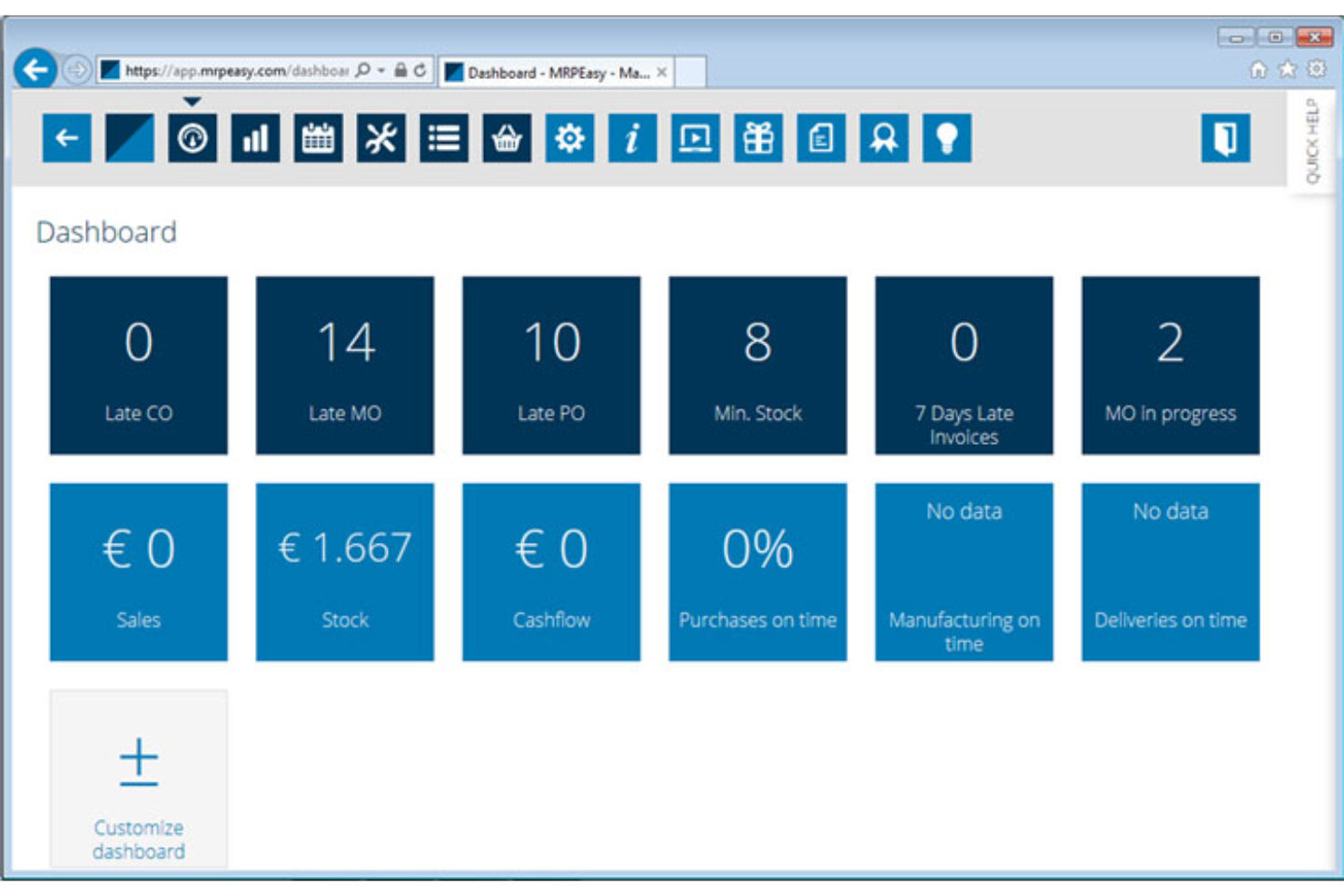
MRPeasy is a cloud-based manufacturing ERP that brings production planning, inventory tracking, procurement, and workforce scheduling into one system for small manufacturers.
Who Is MRPeasy Best For?
MRPeasy suits small manufacturers who need to manage production, inventory, and purchasing in one place without the cost or complexity of enterprise ERP.
Why I Picked MRPeasy
I picked MRPeasy as one of the best because it brings real-time stock visibility, lot traceability, and multi-site inventory into one system built specifically for small manufacturers. I love how reorder points feed directly into the Critical on-hand report, so your team knows exactly which materials need purchasing before production stalls. The workstation loading reports and OEE tracking let you see capacity against demand at a glance, which is genuinely useful when you're balancing production schedules and material availability at the same time.
MRPeasy Key Features
- Multi-site stock transfer orders: Move inventory between geographically separate sites using dedicated transfer orders, keeping each site's stock levels accurate and up to date.
- Lot and serial number traceability: Track individual stock lots and serial numbers through every stage of production, from raw material receipt to finished goods shipment.
- Workstation maintenance cycles: Define maintenance schedules for workstations by working hours, parts processed, or days elapsed, with counters that reset automatically after each completed service.
- B2B customer portal: Give business customers direct access to a self-service portal for order visibility and communication, available on the Professional plan and above.
MRPeasy Integrations
MRPeasy offers native integrations with QuickBooks Online, Xero, and ShipStation, plus integrations with Shopify, Salesforce, and Microsoft Power BI. API and webhooks support custom connections, and Zapier is also listed.
Pros and Cons
Pros:
- Workstation loading and OEE reveal capacity bottlenecks
- Links material planning to production orders
- Live multi-site stock with batch traceability
Cons:
- Reorder alerts don’t create purchase orders
- Forecasts capped at 12 products per run
New Product Updates from MRPeasy
MRPeasy Adds Stocktake for Physical Inventory Counts
MRPeasy adds Stocktake for planning, conducting, and documenting physical inventory counts. This supports both full warehouse counts and cycle counts for selected items. For more information, visit MRPeasy’s official site.
 .
Fiix
Best for maintenance-based parts forecasts
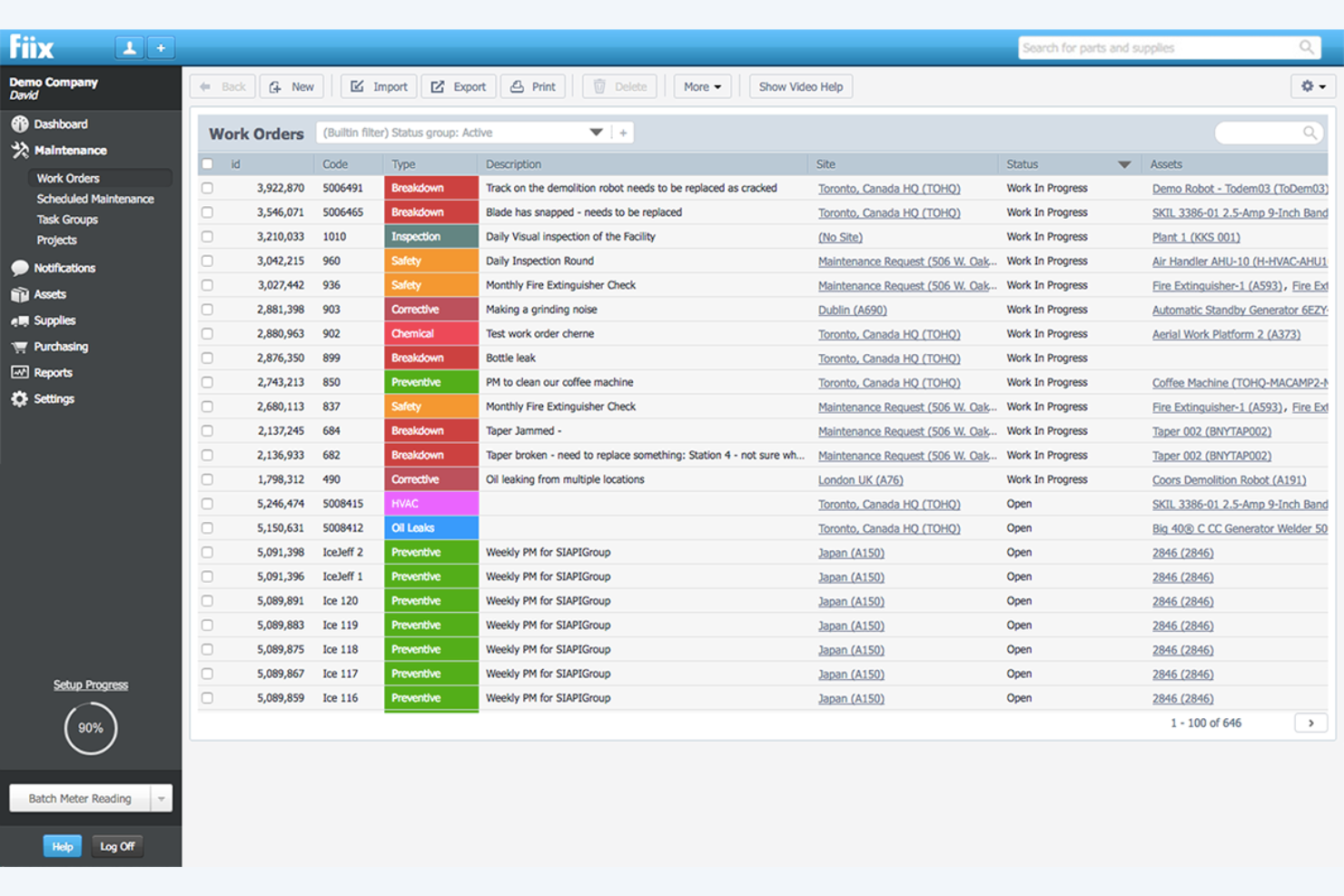
Fiix is a CMMS platform built by Rockwell Automation that combines parts and inventory tracking, asset management, work order scheduling, and AI-driven maintenance forecasting across single and multi-site operations.
Who Is Fiix Best For?
Fiix is a strong fit for operations and maintenance teams in asset-heavy industries who need to connect parts inventory directly to equipment upkeep schedules.
Why I Picked Fiix
I picked Fiix as one of the best because its AI-driven Parts Forecaster is the most maintenance-specific demand tool I've seen: it pulls directly from historical work-order data to predict which parts you'll need before scheduled jobs hit, flagging potential shortages before they stall your team. I also like how it ties minimum stock thresholds to automatic RFQ triggers, so low inventory on a critical component doesn't wait for a manual review.
Fiix Key Features
- Multi-site inventory tracking: View and manage stock levels, locations, and transfers across multiple facilities from a single platform.
- Labor availability dashboard: Compare theoretical available labor hours against assigned hours to support maintenance planning by site, user, or team.
- Cycle counts: Record stock levels, count dates, and the person who performed each count to keep inventory records accurate.
- Barcode and QR code scanning: Scan supported code types from the mobile app to open associated part, asset, or work-order records instantly.
Fiix Integrations
Fiix offers integrations with Oracle, Microsoft, Power BI, Tableau, and NetSuite, plus marketplace integrations through Fiix App Exchange. Its open API supports custom connections, but API access is limited to Enterprise customers.
Pros and Cons
Pros:
- Users value linked parts and work-order records
- Multi-site stock visibility supports maintenance teams
- Parts forecasts tie demand to work orders
Cons:
- Reviewers report custom inventory reports take effort
- Labor capacity doesn't resolve project conflicts

Katana
Best for batch traceability across production

Katana is a cloud-based inventory and manufacturing management platform that centralizes stock tracking, production workflows, order management, and replenishment across multiple locations and sales channels.
Who Is Katana Best For?
Katana is a strong fit for small to mid-sized product businesses and manufacturers that need real-time batch and lot traceability from raw materials through to finished goods.
Why I Picked Katana
I picked Katana as one of the best because its batch and lot traceability is genuinely end-to-end, linking raw materials from the supplier purchase order through every production step to the finished goods on a sales order. I love how Katana automatically traces batch numbers across manufacturing and inventory in one view, so you can pinpoint exactly which input materials ended up in which shipped units. Expiry date tracking per batch adds another layer that product businesses with shelf-life constraints will find especially useful.
Katana Key Features
- Multilocation and multibin inventory tracking: Monitor stock across warehouses, stores, and partner locations down to individual bin levels in real time.
- Demand forecasting and replenishment suggestions: Calculate suggested order quantities using sales history, safety stock, lead times, and minimum order quantities.
- Shop Floor App: Give operators task lists, priorities, and instructions directly on the shop floor while tracking production execution in real time.
- Barcode-enabled warehouse workflows: Scan item and batch barcodes for receiving, picking, packing, stocktaking, and material consumption using a mobile device or infrared scanner.
Katana Integrations
Katana integrates with Shopify, WooCommerce, BigCommerce, Amazon, QuickBooks, Xero, ShipStation, and ShipBob. It offers an open API for custom integrations and connects to Zapier.
Pros and Cons
Pros:
- Replenishment suggestions help time material purchases
- Live stock visibility clarifies material availability
- End-to-end batch traceability across production
Cons:
- Scheduling lacks calendar-based workload planning
- No cross-project resource conflict management

Procore
Best for planning jobsite materials and crews
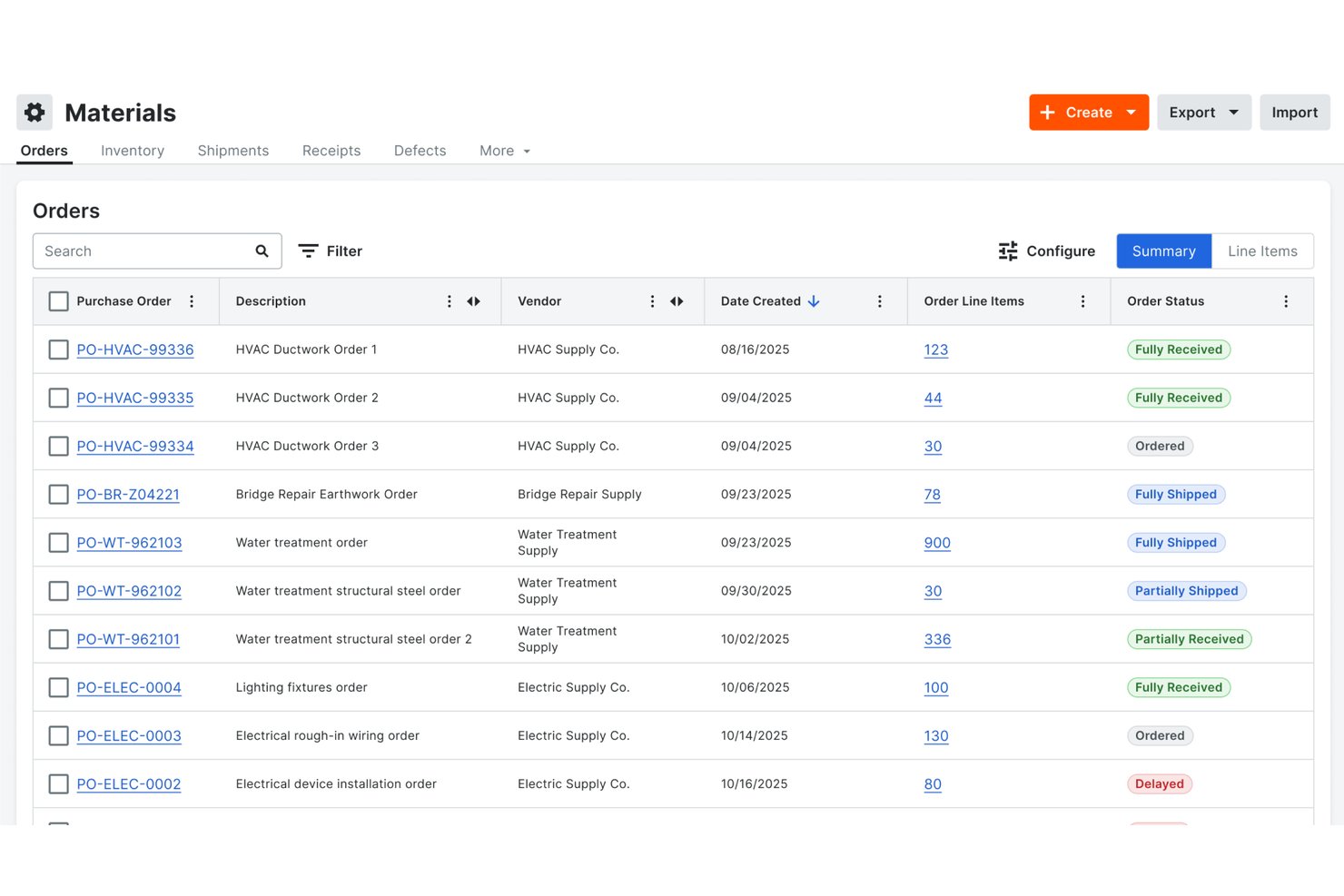
Procore is a construction-focused resource management platform that centralizes labor scheduling, equipment tracking, and materials inventory across projects and jobsites.
Who Is Procore Best For?
Procore is a strong fit for construction companies that need to coordinate labor, equipment, and materials across multiple active jobsites from a single platform.
Why I Picked Procore
I picked Procore as one of the best because it's purpose-built for construction teams that need to coordinate materials and crews across multiple active jobsites. I especially like how the Materials Inventory tab gives real-time visibility into quantities by item and location, with transfers trackable across projects as materials move or get installed on site. Layer in labor planning with SmartBench AI-ranked worker suggestions based on availability, skills, and distance, and you have a genuinely connected picture of what's on site and who's doing the work.
Procore Key Features
- Labor forecasting: Plan workforce needs weeks or years ahead using project schedules, vacations, and availability data to generate labor curves and bulk resource requests.
- Equipment register: Centralize owned, rented, and managed equipment in a single register, with allocation to jobs and crews coordinated alongside labor schedules.
- Stock limit alerts: Set minimum and maximum thresholds for material inventory items, and receive alerts when quantities fall outside those bounds.
- Equipment telematics sync: Connect to supported providers like Caterpillar, John Deere, and Samsara to pull equipment location, utilization, and operating-hours data into Procore.
Procore Integrations
Procore documents integrations with CMiC, Viewpoint, Sage, Foundation, Microsoft Dynamics, Caterpillar, John Deere, Samsara, and United Rentals. It also offers an Open API for custom integrations.
Pros and Cons
Pros:
- Crew and equipment plans share project context
- Transfers record destination, quantity, and condition
- Live inventory tracks quantities across locations
Cons:
- Resource planning date controls frustrate schedulers
- Stock alerts don’t trigger automatic replenishment

Best for tying truck stock to jobs
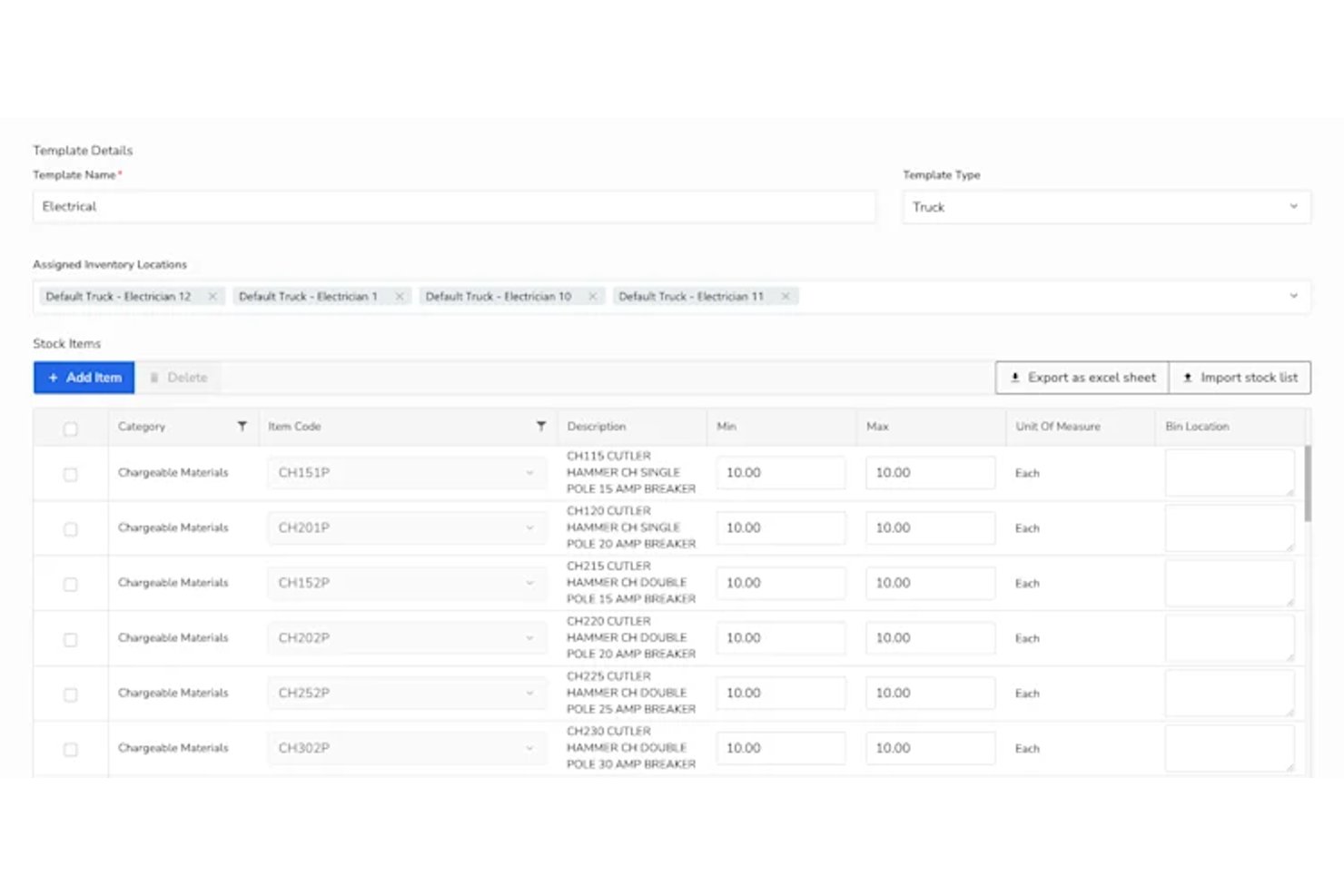
ServiceTitan is a field service management platform built for the trades that combines inventory tracking, purchasing, dispatch, scheduling, and job costing across trucks, warehouses, and field teams.
Who Is ServiceTitan Best For?
ServiceTitan is a strong fit for trades contractors—HVAC, plumbing, electrical, and similar businesses—that need to connect truck and warehouse stock directly to job costs.
Why I Picked ServiceTitan
I picked ServiceTitan as one of the best because no other tool on this list is built as specifically around the trades workflow of connecting what's on a truck to what gets used on a job. The Inventory Locations view tracks stock across every truck and warehouse in real time, showing available, on-hold, on-order, and on-hand quantities with full transaction history. I also like the Transfer-to-Job workflow, where technicians record full or partial material consumption in the field and it flows directly onto the job invoice.
ServiceTitan Key Features
- Inventory Locations view: Displays available, on-hold, on-order, and on-hand quantities across all configured trucks and warehouses with full transaction history.
- Inventory templates: Define minimum and maximum stock thresholds per location, automatically generating replenishment records when quantities fall below the set minimum.
- Job requisitions: Let technicians check stock levels and request materials or equipment directly from the field for their current job.
- Legacy Job Costing Report: Breaks down labor burden, material costs, equipment, and purchase-order costs per invoice, with filters for technician, job type, and business unit.
ServiceTitan Integrations
ServiceTitan offers 70+ pre-built integrations, including Viewpoint Spectrum and Sage, plus marketplace integrations with ABC Supply and Avalara. Its REST APIs, bulk export endpoints, and webhooks support custom integrations.
Pros and Cons
Pros:
- Job material consumption reaches invoices
- Barcode-assisted mobile counts reduce audits
- Truck and warehouse stock visibility
Cons:
- Limited inventory utilization reporting
- No consumption-based inventory forecasting

SYSPRO
Best for forecast-led production replenishment

SYSPRO is a manufacturing and distribution ERP that covers inventory tracking, demand forecasting, warehouse management, material requirements planning, and production cost control across multi-site operations.
Who Is SYSPRO Best For?
SYSPRO suits manufacturers and distributors who need demand-driven inventory planning and production replenishment built into a single ERP.
Why I Picked SYSPRO
I picked SYSPRO as one of the best because its Inventory Planning module is purpose-built for forecast-led replenishment, using a Competition mode that tests multiple forecasting algorithms against your actual demand history and selects the best fit per SKU. I love how validated forecasts feed directly into Requirements Planning, which then recommends production jobs and purchase orders based on time-phased stock policies you've modeled before committing. That closed loop between forecasting and MRP is what makes SYSPRO genuinely strong for manufacturers who need demand to drive production, not the other way around.
SYSPRO Key Features
- Multi-bin warehouse tracking: Assigns specific bin locations to stock items for receipts, issues, and warehouse transfers across multiple sites.
- Work in Progress (WIP) job costing: Records employee labor rates, machine information, and material allocations against individual production jobs with estimated-vs-actual cost comparisons.
- Pareto (ABC) stock classification: Ranks and classifies stock items by sales value, gross profit, or movement frequency to support prioritized inventory decisions.
- Planned maintenance job management: Links equipment codes to assets, schedules date-driven maintenance jobs, and issues parts and labor against each job through integration with Requirements Planning.
SYSPRO Integrations
SYSPRO offers marketplace integrations including GeoRep for mobile stock management, WMS Connect for ecommerce and field execution, and TRAILD for procure-to-pay workflows. Its e.net API supports custom integrations through OData, WCF, and XML.
Pros and Cons
Pros:
- Forecast competition selects algorithms using demand history
- WIP schedules show jobs and completion times
- Reviewers value live inventory visibility
Cons:
- No portfolio-level resource conflict detection documented
- Reviewers report dated interface and reporting limitations

Best for forecast-led component replenishment
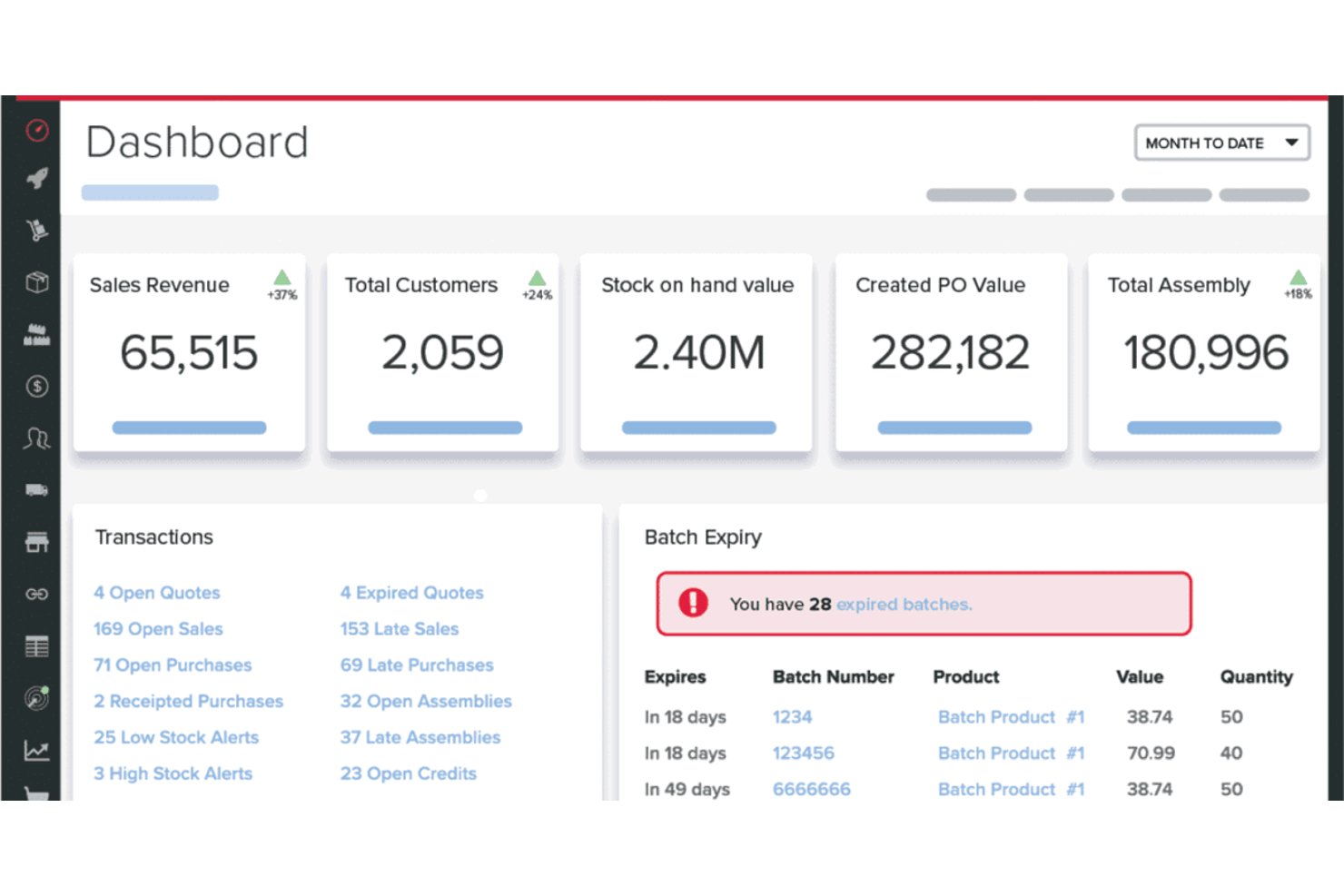
Unleashed is a cloud-based inventory management platform that handles real-time stock tracking, purchasing, demand forecasting, and production workflows for product-based businesses.
Who Is Unleashed Best For?
Unleashed is a strong fit for product-based businesses—particularly manufacturers, wholesalers, and distributors—that need real-time stock control across multiple warehouses alongside forecast-driven purchasing.
Why I Picked Unleashed Software
I picked Unleashed Software as one of the best because its Advanced Inventory Manager (AIM) handles forecast-led component replenishment in a way I rarely see executed this well. AIM pulls historical sales performance and seasonal trends to build product-level forecasts, then surfaces those forecasts directly in a replenishment tab where you can filter by supplier or warehouse and generate purchase orders for components based on finished-goods demand. That means if you're manufacturing a product with ten components, Unleashed works backward from your forecast to tell you what to reorder and when.
Unleashed Software Key Features
- Batch and serial number tracking: Assign unique identifiers to individual products or groups and monitor their full transaction history and expiry dates from raw materials through to finished goods.
- Multi-warehouse stock transfers: Move inventory between locations, view bin-level stock detail per site, and fulfill orders from multiple warehouses within a single system.
- Bills of materials: Define the components and quantities needed to build a finished product, with production orders automatically drawing down component stock and capturing associated costs.
- Automated purchase order generation: Generate purchase orders based on reorder points, current inventory levels, and sales data, reducing the manual effort involved in restocking decisions.
Unleashed Integrations
Unleashed offers 30+ integrations, including native connections with Xero, QuickBooks, Shopify, Amazon Inventory Management, and WooCommerce, plus marketplace integrations such as Salesforce. Its API supports custom integrations with JSON, XML, and webhooks.
Pros and Cons
Pros:
- Forecasts connect finished-goods demand to component replenishment
- Batch and serial tracking support product traceability
- Reviewers praise real-time stock visibility across warehouses
Cons:
- AIM replenishment calculations remain in beta
- Stock allocation doesn’t cover project or staff assignments

Fulfil
Best for live inventory-to-ledger accounting

Fulfil is an ERP platform built for DTC and ecommerce brands that covers multi-location inventory tracking, order and warehouse management, purchasing, and a built-in general ledger.
Who Is Fulfil Best For?
Fulfil is a strong fit for DTC and Shopify Plus brands that need inventory, fulfillment, and accounting managed in a single system.
Why I Picked Fulfil
I've included Fulfil in my top picks because no other tool on this list connects live inventory movements directly to the general ledger the way Fulfil does. Every time stock shifts, COGS updates automatically and posts to the GL in real time. I also love the six-month, margin-weighted demand forecasts paired with auto-create PO workflows, so replenishment decisions are grounded in actual sales velocity, not gut feel.
Fulfil Key Features
- Multi-location inventory sync: View and manage live stock across warehouses, 3PLs, retail stores, and sales channels from a single system.
- Cycle counting and shrinkage posting: Run blind or full-audit cycle counts that automatically reconcile discrepancies and post shrinkage to the general ledger.
- Supplier collaboration portal: Give suppliers a dedicated portal to acknowledge POs, add shipment tracking, and upload documents.
- Lot, batch, and serial number tracking: Track individual units or production batches from receipt onward, including expiration dates for traceability and recalls.
Fulfil Integrations
Fulfil offers documented native integrations with Shopify, Amazon, BigCommerce, eBay, Walmart, 400+ 3PLs, and 500+ EDI retailers. It also supports REST APIs, JSON-RPC, webhooks, and Google Pub/Sub for custom, high-volume integrations.
Pros and Cons
Pros:
- Inventory and purchasing workflows stay connected
- Flexible fulfillment routing across locations
- Multi-site stock visibility reduces errors
Cons:
- No project-based equipment or staff scheduling
- Custom dashboards may require report building

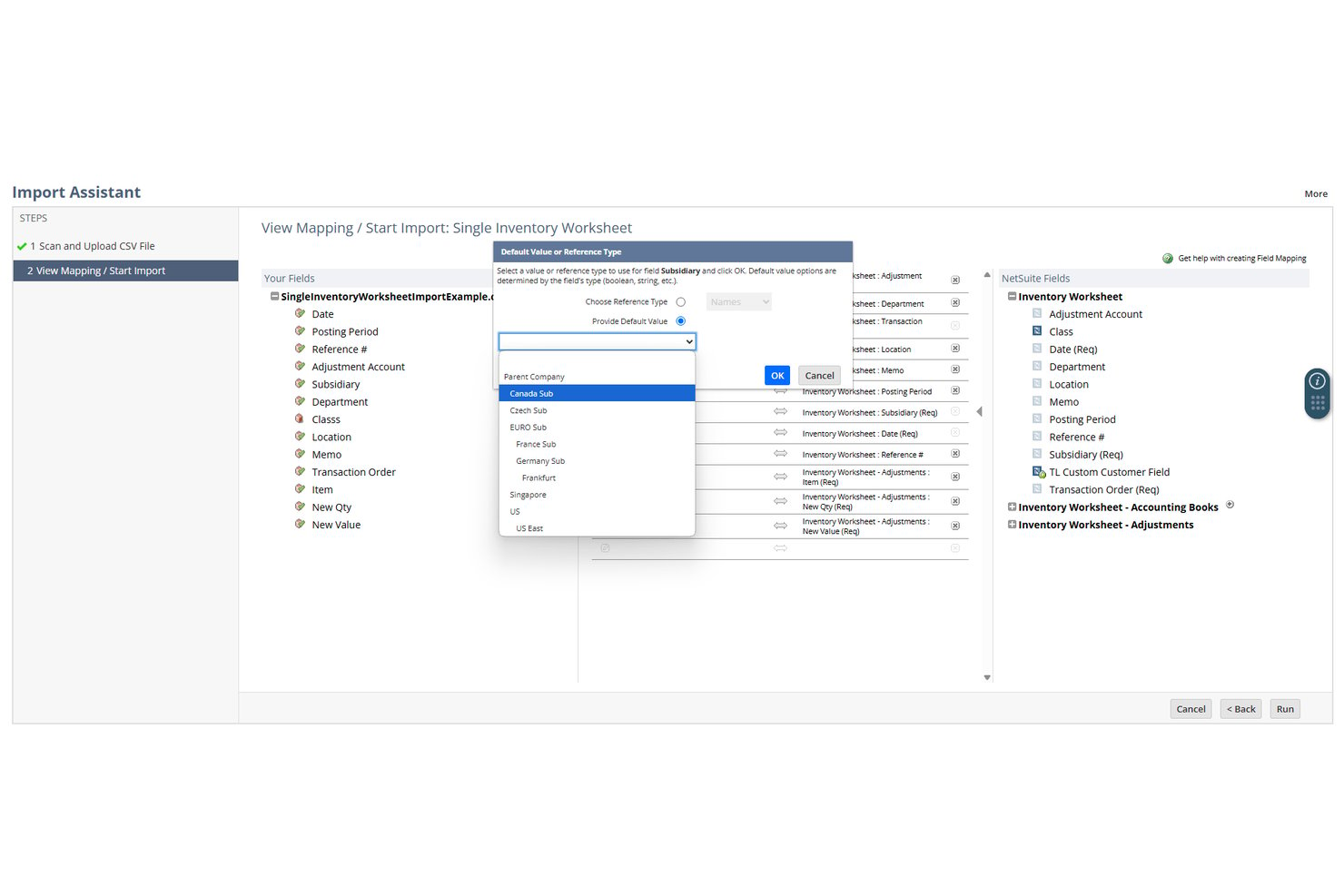
NetSuite is a cloud ERP from Oracle that combines inventory tracking, demand forecasting, reorder automation, and project-based staff allocation across a unified platform.
Who Is NetSuite Best For?
NetSuite is a strong fit for mid-market and enterprise operations teams that need inventory tracking and project staffing managed within a single ERP.
Why I Picked NetSuite
I picked NetSuite as one of the best because it's the only tool on this list that handles real-time inventory tracking and project-based staff allocation inside a single ERP. I like that demand-based replenishment automatically calculates reorder points using historical sales, lead times, and seasonality, then pushes tasks directly to purchasing managers. Resource allocation lets you assign employees to projects by skill set and availability, then measure worked hours against capacity using built-in utilization reporting.
NetSuite Key Features
- Smart Count cycle counting: Tracks item quantities and transactions during a count on a mobile device without freezing activity across the rest of the location.
- Lot and serial traceability: Records quantities, costs, and movement for individual items using lot or serial numbers, supporting strategies like first-expiring, first-out.
- Multi-location fulfillment rules: Lets you define how stock is transferred, held, or shipped across warehouses, 3PLs, drop shippers, and other locations based on availability.
- No-code workflow automation: Visual, no-code workflows automate recurring processes like purchase approvals without requiring custom scripting or developer involvement.
NetSuite Integrations
NetSuite offers hundreds of marketplace integrations, including Slimstock Inventory Optimization, Netstock, FreightPOP TMS, and Amazon MCF. Its API supports REST, SOAP, custom REST endpoints, CSV imports, ODBC/JDBC, and .NET interfaces for custom connections.
Pros and Cons
Pros:
- Staff capacity tracked against project hours
- Low-stock alerts feed purchasing workflows
- Live stock visibility across locations
Cons:
- Forecasts depend on usable sales history
- Time-off conflicts require manual resolution

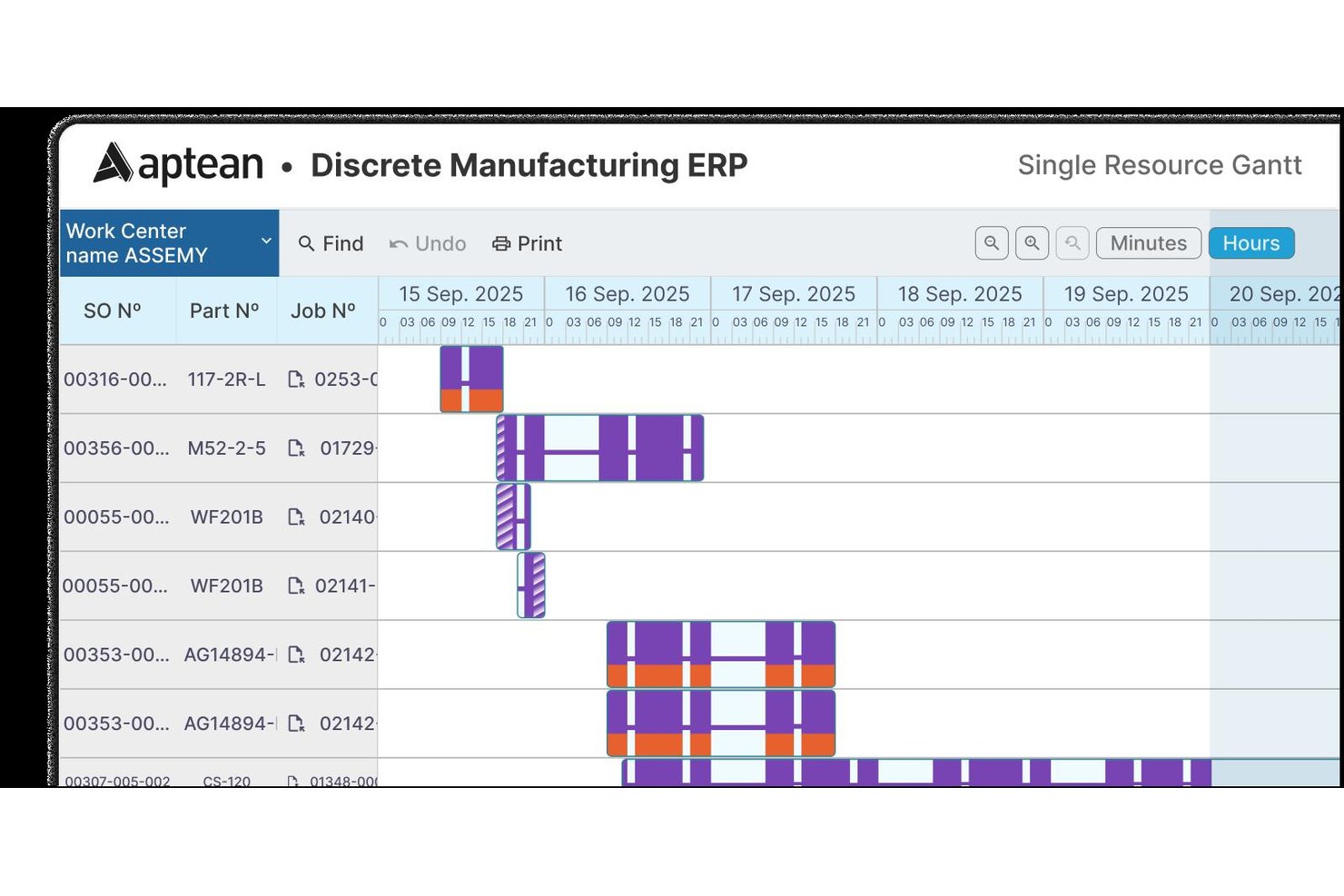
Aptean Industrial Manufacturing ERP is a manufacturing-focused ERP system that covers inventory control, production scheduling, shop-floor resource management, job costing, and distribution operations.
Who Is Aptean Industrial Manufacturing ERP Best For?
Aptean Industrial Manufacturing ERP is a strong fit for manufacturers running job-shop or project-based production who need tight control over shop-floor resources, labor, and materials.
Why I Picked Aptean Industrial Manufacturing ERP
I've included Aptean Industrial Manufacturing ERP in my top picks because its Routing and Resources module does something I find genuinely useful: it defines labor, machinery, and tooling together, then combines them into step-by-step routings with queue, setup, run, wait, and move times. That level of shop-floor granularity is hard to replicate in a general-purpose tool. I also like that priority-based dispatching and job-status visibility run alongside project-level costing, so you're tracking both where resources are and what they're costing in one place.
Aptean Industrial Manufacturing ERP Key Features
- Multi-location inventory tracking: Inventory records store quantities, valuation, costs, and prices across as many locations as needed per item, with lot and serial number support.
- Requirements planning: Forecasts future inventory demand using item, part, and assembly histories across multiple methodologies, with time-phased reporting and automatic purchase requisition generation.
- Info-Alert notifications: Sends automated alerts by email or printed report when items fall below their defined order point, and can trigger selected automated procedures.
- Role-based workspaces: Configures user access and dashboards based on individual roles, keeping relevant operational data visible to the right people.
Aptean Industrial Manufacturing ERP Integrations
Integrations include Aptean EAM, OEE, transportation management, and EDI tools, plus optional interfaces with Sales, General Ledger, and Payroll. Specific data flows, integration count, and API availability aren’t documented.
Pros and Cons
Pros:
- Routes labor, machinery, and tooling
- Customizable reports clarify stock status
- Tracks inventory across multiple locations
Cons:
- Reporting gaps leave some workflows manual
- Dated interface complicates navigation
Diğer Envanter Kaynak Yönetimi Yazılımları
Aşağıda kısa listeme aldığım ek envanter kaynak yönetimi yazılımlarının bir listesi yer almaktadır. İlk 10’a girememiş olsalar da hâlâ değerlidir ve daha fazla araştırılmaya değerdir.
- EZOfficeInventory
For project-based equipment and stock
- Fishbowl
For tracking tools and stock on jobsites
- Acumatica
For project inventory and job costs
- Odoo Inventory
For businesses with varied stock flows
- SAP Business One
For stock planning around open orders
- Sortly
For AppFolio work-order inventory
- inFlow Inventory
For field-service tool and parts tracking
- BuildOps
For contractor stock tied to field jobs
- Cin7
For production-linked stock replenishment
- OPERA Cloud Sales and Event Management
For project-based inventory costing


İlgili Yönetim Yazılımı İncelemeleri
Aradığınızı hâlâ bulamadıysanız, test edip değerlendirdiğimiz diğer ilgili araçlara göz atın:
- Proje Yönetimi Yazılımı
- Kaynak Yönetimi Yazılımı
- İş Akışı Otomasyonu Yazılımı
- Zaman Takibi Yazılımı
- Görev Yönetimi Yazılımı
- İş Birliği Araçları
- Gantt Şeması Oluşturucu
- Üretkenlik Araçları
- Proje Takibi Yazılımı
- Proje Planlama Yazılımı
How I Evaluate Inventory Resource Management Software
I split my evaluation into three parts, giving the most weight to core functions: track stock by site, check availability, and allocate materials to project schedules. Next, I consider standout features such as mobile barcode scanning. Finally, I weigh support, onboarding, and pricing value beyond the feature set.
Core Functionality (Table Stakes For This List)
When I'm selecting tools for my list, I score each one on a scale from 0 (does not offer the functionality) to 5 (excels in this area) for each core functionality listed below. I then convert the total into a percentage to help assess each tool's overall fit, with extra weight on any functionalities I’ve deemed essential.
- Inventory Tracking (Essential): I look for current stock levels, locations, and item status across sites, so teams can confirm materials are available before project work begins.
- Resource Allocation (Essential): Can teams assign and schedule materials or equipment to jobs, see availability, and spot conflicts before they delay a project?
- Utilization Reporting: Usage trends by item or project help identify equipment sitting idle at one site while another team faces a shortage.
- Demand Forecasting: I check whether forecasts account for past consumption and planned projects, such as estimating materials needed for an upcoming production run.
- Reorder Management: Look for configurable reorder points, low-stock notifications, or recommendations that help purchasing teams replenish items before work is blocked.
- Multi-Resource Support: I assess whether teams can track materials, equipment, and, where relevant, labor in a shared view for project planning.
Once I have a list of tools that meet the criteria, I consider what sets each platform apart.
Differentiating Factors (What Sets Vendors Apart)
Here's how I compare and contrast different vendors:
Standout Features
I look for mobile barcode scanning that lets field crews update stock from a job site using a smartphone—no dedicated hardware required. Kitting and bundling matters too, especially when a project deploys the same material sets repeatedly; prebuilt kits cut prep time and reduce pick errors. I also evaluate whether a tool ties inventory consumption directly to project budgets through job costing sync, so cost overruns surface before a deliverable is closed out.
Beyond Features
I check whether a vendor offers native integrations with project management, accounting, and procurement tools—bidirectional sync between inventory consumption and project budgets saves hours of manual reconciliation. Deployment model matters too. Cloud-based platforms give distributed teams real-time visibility across sites, but I look at whether on-premise options exist for buyers with strict data residency needs. I also evaluate onboarding support, especially data migration assistance and field-staff training, since a tool that warehouse crews can't adopt on day one stalls the whole rollout.
Envanter Kaynak Yönetimi Yazılımı Nasıl Seçilir?
Kendinize özgü yazılım seçim sürecinizi yürütürken aşağıdaki noktaları göz önünde bulundurun:
- Ölçeklenebilirlik: İşletmeler büyüdükçe envanter ihtiyaçları genellikle daha karmaşık hale gelir. Daha sonra maliyetli ve zaman alıcı bir geçiş yapma ihtiyacını önlemek için işletmenizle birlikte ölçeklenebilecek bir yazılım seçtiğinizden emin olun.
- Entegrasyon Yetenekleri: Muhasebe yazılımı veya e-ticaret platformları gibi diğer sistemler ve eklentilerle entegre olabilme özelliği kritik öneme sahiptir. Bu, verilerin sistemler arasında sorunsuz bir şekilde akmasını sağlayarak manuel veri girişi ihtiyacını ve buna bağlı hata riskini azaltır.
- Gerçek Zamanlı Veriler: Gerçek zamanlı envanter verilerine erişim, işletmelerin bilinçli kararlar almasına, stok tükenmelerini önlemesine ve fazla envanteri azaltmasına yardımcı olur. Örneğin, talepte mevsimsel dalgalanmalar yaşayan bir şirket, envanter seviyelerini buna göre ayarlamak için gerçek zamanlı verilerden yararlanır. Birden fazla konumun senkronizasyonu, bir mobil uygulama aracılığıyla gerçek zamanlı güncellemeler, POS sistemleriyle otomatik senkronizasyon ve zamana duyarlı bildirimler gibi unsurları göz önünde bulundurun.
- Kullanıcı Dostu Arayüz: Eğitim süresini ve hataları en aza indirmek için yazılımın kullanımı kolay olmalıdır. Kullanıcı dostu bir arayüz, özellikle personel devir hızının yüksek olduğu veya kapsamlı eğitim için zamanı olmayabilecek perakende işletmeleri gibi mevsimlik çalışanlar istihdam eden işletmeler için önemlidir.
- Özelleştirme: Her işletmenin kendine özgü ihtiyaçları vardır ve yazılım, belirli süreçleri ve iş akışlarını karşılayacak şekilde özelleştirilebilir olmalıdır. Örneğin, karmaşık bir montaj sürecine sahip bir işletme, üretim aşamaları boyunca bileşenleri ve alt montajları takip edebilen bir yazılıma ihtiyaç duyabilir.
Envanter Kaynak Yönetimi Yazılımındaki Trendler
Envanter kaynak yönetimi yazılımı hızla gelişiyor ve işletmelerin stoklarını yönetme biçimini yeniden tanımlayan yeni trendler ortaya çıkıyor. Bu gelişmeler, dinamik bir pazarda rekabet gücünü korumak için kritik öneme sahiptir. Envanter kaynak yönetimi yazılımında fark ettiğim başlıca trendlerden bazıları şunlardır:
- Çok Kanallı Envanter Kontrolü: Çok kanallı envanter kontrolü, birden fazla satış kanalı üzerinden faaliyet gösteren işletmeler için vazgeçilmez hale geliyor. Bu trend, tüm platformlardaki envanter seviyelerinin ve talebin gerçek zamanlı olarak izlenmesini sağlayarak stokun ihtiyaç duyulan yerde ve zamanda mevcut olmasını mümkün kılar.
- Bulut Tabanlı Yönetim: Bulut tabanlı envanter yönetimi sistemleri, esneklikleri ve erişilebilirlikleri nedeniyle popülerlik kazanıyor. Bu sistemler, işletmelerin envanteri her yerden yönetmesini sağlar; bu da özellikle uzaktan çalışan ekipleri veya birden fazla konumu olan şirketler için faydalıdır. Bu trend önemlidir çünkü gerçek zamanlı güncellemelere ve karar almaya olanak tanıyarak stok tükenmesi veya fazla envanter riskini azaltır.
- Tahmine Dayalı Envanter: Tahmine dayalı envanter yönetimi, talebi öngörmek ve stok seviyelerini optimize etmek için yapay zekâ ve makine öğrenimini kullanır. Bu trend, daha doğru tahminler sağlayarak envanter yönetimini dönüştürüyor; bu da israfı azaltıyor ve ürünlerin müşterilerin ihtiyaç duyduğu zamanda mevcut olmasını sağlıyor.
- Tersine Lojistik: İşletmeler sürdürülebilirliğe ve müşteri hizmetlerine odaklandıkça tersine lojistik, envanter yönetiminin daha öne çıkan bir unsuru haline geliyor. Bu trend, karmaşık bir süreç olabilen iadelerin verimli bir şekilde ele alınmasını kapsar. Yalnızca müşteri memnuniyetini artırmakla kalmaz, aynı zamanda israfı azaltma ve döngüsel ekonomiyi destekleme potansiyeline de sahiptir.
- Üçüncü Taraf Lojistiği (3PL): Üçüncü taraf lojistik sağlayıcılarının kullanımı, tedarik zincirinin bazı unsurlarını dış kaynak kullanımı yoluyla devrederek envanter yönetimini yeniden şekillendiren bir trenddir. 3PL sağlayıcıları genellikle uzmanlaşmış bilgi birikimine ve teknolojiye sahip olduğundan bu yaklaşım, verimliliğin artmasını ve maliyet tasarruflarını sağlayabilir. Kendi lojistik altyapılarına büyük yatırımlar yapmadan ölçeklenmek isteyen işletmeler için önemli bir trenddir.
Bu trendler, pazarın ve tüketici davranışlarının değişen taleplerine uyum sağlayabilen, daha entegre, akıllı ve esnek envanter kaynak yönetimi sistemlerine doğru bir geçiş olduğunu gösteriyor. Bu değişimlerden yararlanan işletmeler muhtemelen daha yüksek verimlilik, maliyet tasarrufu ve müşteri memnuniyeti elde edecektir.
Envanter Kaynak Yönetimi Yazılımı Nedir?
Envanter kaynak yönetimi yazılımı; ürünlerin stok seviyelerini, siparişlerini, satışlarını ve teslimatlarını izlemek ve yönetmek için tasarlanmış dijital bir araçtır. Esas olarak, doğru ürünlerin doğru miktarda stokta bulunmasını sağlamak ve ürünlerin aşırı stoklanmasını ve tükenmesini önlemek amacıyla envanteri takip etmesi gereken işletmeler tarafından kullanılır.
Envanter Kaynak Yönetimi Yazılımının Özellikleri
Envanter kaynak yönetimi yazılımını seçerken işletmenizi destekleyecek ve geliştirecek özellikleri göz önünde bulundurmanız önemlidir. Doğru araç seti, envanterinizi ne kadar etkili yönettiğiniz konusunda büyük fark yaratabilir. Aramanız gereken başlıca özelliklerden bazıları şunlardır:
- Gerçek Zamanlı Envanter Takibi: Stok tükenmelerini ve satışları ve depolama maliyetlerini etkileyebilecek aşırı stoklamayı önlemek için doğru envanter seviyeleri çok önemlidir. Gerçek zamanlı envanter takibi sayesinde işletmeler stok seviyeleri hakkında anlık güncellemelere sahip olabilir ve buna göre değişiklikler yapabilir.
- Barkodlama ve Tarama: Ürünlerin hızlı bir şekilde taranması, manuel veri girişine kıyasla hataları azaltır ve zamandan tasarruf sağlar; bu da genel envanter işleme sürecini hızlandırır.
- Talep Tahmini: Doğru tahminler, geçmiş verileri kullanarak gelecekteki satışları öngörür; envanter seviyelerinin planlanmasına yardımcı olur ve fazla veya yetersiz stok riskini azaltır.
- Raporlama ve Analizler: Eğilimleri ve kalıpları anlamak, stok yönetimi hakkında bilinçli kararlar almak için çok önemlidir; kapsamlı raporlar envanter performansı hakkında içgörüler sağlar.
- Tedarikçi Yönetimi: Etkili tedarikçi yönetimi, stokların zamanında yenilenmesini sağlar ve koşullar ile fiyatlar konusunda daha iyi pazarlık yapılmasına yardımcı olabilir. Bu, tedarikçilerle iletişim ve işlemleri kolaylaştırır.
- Sipariş Yönetimi: Etkili sipariş yönetimi, gelen ve giden envanter arasındaki dengenin korunması açısından kritik öneme sahiptir. Bu işlev, satış ve satın alma siparişlerini tek bir yerde birleştirir.
- Birden Fazla Konum Desteği: Birden fazla depolama konumuna sahip işletmeler için bu özellik, uyumlu stok yönetimi sağlar ve envanterin birden fazla depo veya mağaza genelinde takip edilmesine olanak tanır.
- Parti Takibi: Bu özellik, son kullanma tarihleri veya seri numaraları olan ürünleri takip eder ve özellikle bozulabilir ürünlerle veya izlenebilirlik gerektiren ürünlerle çalışan işletmeler için önemlidir.
- Bulut Tabanlı Erişim: Günümüzün mobil dünyasında envanteri herhangi bir konumdan ve herhangi bir zamanda yönetebilmek giderek daha önemli hale gelmektedir. Envanter verilerine uzaktan erişim sayesinde işletmeler, operasyonlarının kontrolünü korurken esnek kalabilir.
- Entegrasyon Yetenekleri: Muhasebe, CRM veya e-ticaret platformlarıyla entegrasyon, daha verimli bir iş akışı oluşturabilir ve süreçleri basitleştirebilir.
Doğru envanter kaynak yönetimi yazılımı çözümüne sahip olmak, envanterinizin her zaman kontrol altında olmasını sağlayan güvenilir bir asistana sahip olmak gibidir. Bu, hızlı ve bilinçli kararlar vermek için gereken bilgilere anında erişebilmek anlamına gelir. Bu özelliklerle, maliyetleri kontrol altında tutarken müşterilerinizin ihtiyaçlarını karşılayan sağlıklı bir envanteri koruyabilirsiniz.
Envanter Kaynak Yönetimi Yazılımının Faydaları
Envanter kaynak yönetimi yazılımı; stok seviyeleri üzerindeki kontrolü korumak, doğru takip sağlamak ve genel operasyonel verimliliği artırmak isteyen işletmeler için değerli bir araçtır. Kuruluşlar bu tür yazılımları operasyonlarına entegre ederek daha iyi karar alma ve maliyet tasarrufu sağlayabilecek çok sayıda avantaj elde edebilir.
Doğru envanter kaynak yönetimi yazılımıyla kullanıcıların ve kuruluşların elde edebileceği avantajlardan bazıları şunlardır:
- Gerçek Zamanlı Envanter Takibi: Gerçek zamanlı envanter takibi sayesinde işletmeler stok tükenmelerini ve aşırı stoklamayı önleyebilir; böylece envantere çok fazla sermaye bağlamadan müşteri talebini karşılayabilir.
- Geliştirilmiş Sipariş Doğruluğu: Envanter takibini ve yönetimini otomatikleştirerek insan hatası olasılığı önemli ölçüde azaltılır; bu da daha doğru siparişlere ve daha yüksek müşteri memnuniyetine yol açar.
- Envanterde Maliyet Tasarrufu: Envanter devir hızı hakkında ayrıntılı içgörüler sunmak, işletmelerin envanter satın alma ve depolama konusunda bilinçli kararlar almasına yardımcı olabilir; bu da önemli maliyet düşüşleri sağlayabilir.
- Gelişmiş Raporlama ve Tahmin: Kapsamlı veri analizi ve raporlama araçlarına erişim sayesinde işletmeler talebi daha doğru tahmin edebilir, mevsimsel değişikliklere hazırlanabilir ve envanter seviyelerini buna göre ayarlayabilir.
- Kolaylaştırılmış Operasyonlar: Envanter kaynak yönetimi yazılımının entegrasyonu, operasyonel süreçleri kolaylaştırır ve yeniden sipariş noktaları ile stok seviyesi uyarıları gibi birçok rutin görevi otomatikleştirir.
Envanter kaynak yönetimi yazılımı, günümüz pazarında rekabet avantajını korumayı hedefleyen işletmeler için temel bir dayanak niteliğindedir. Kuruluşlar bu teknolojinin gücünden yararlanarak yalnızca envanterlerini daha yakından takip etmekle kalmaz, aynı zamanda genel operasyonel etkinliklerini de artırabilir; bu da daha iyi müşteri hizmeti ve kârlılık sağlar.
Envanter Kaynak Yönetimi Yazılımının Maliyetleri ve Fiyatlandırması
Envanter kaynak yönetimi yazılımları, temel ücretsiz sürümlerden çok sayıda özelliğe sahip gelişmiş sistemlere kadar farklı işletme ihtiyaçlarını karşılamak üzere çeşitli plan seçenekleri sunar. Her planın fiyatlandırmasını ve özelliklerini anlamak, özellikle bu tür yazılımları kullanma konusunda çok az deneyimi olan veya hiç deneyimi olmayan yazılım alıcıları için önemlidir.
Aşağıda, her planda bulunan yaygın özelliklerle birlikte plan seçeneklerinin ve fiyatlandırmalarının ayrıntılı bir dökümü yer almaktadır.
Envanter Kaynak Yönetimi Yazılımı İçin Plan Karşılaştırma Tablosu
| Plan Türü | Ortalama Fiyat | Yaygın Özellikler |
|---|---|---|
| Ücretsiz | $0 | Temel envanter takibi, sınırlı sipariş ve kullanıcı sayısı, bazı entegrasyonlar ve düşük stok uyarıları |
| Standart | $29 - $59 aylık | Artırılmış sipariş limitleri, ek kullanıcılar, barkod tarama ve bazı gelişmiş özellikler |
| Profesyonel | $89 - $149 aylık | Çoklu depo yönetimi, gelişmiş analizler, API erişimi, artırılmış sipariş ve kullanıcı limitleri |
| Premium | $179 - $349 aylık | Profesyonel plandaki tüm özelliklere ek olarak ilave entegrasyonlar, gelişmiş otomasyon ve daha yüksek limitler |
| Kurumsal | $1,000+ aylık veya fiyat teklifi | Özelleştirilebilir özellikler, sınırsız sipariş ve kullanıcı, eksiksiz entegrasyon paketi ve özel destek |
Bir envanter kaynak yönetimi yazılımı planı seçerken operasyonlarınızın ölçeğini ve envanter yönetimi ihtiyaçlarınızın karmaşıklığını göz önünde bulundurun. Ücretsiz planlar, temel gereksinimleri olan küçük işletmeler için uygun olabilirken daha büyük kuruluşların premium veya kurumsal planların gelişmiş özelliklerine ve özelleştirilebilirliğine ihtiyacı olabilir.
Envanter Kaynak Yönetimi Yazılımı Hakkında Sıkça Sorulan Sorular
Envanter kaynak yönetimi yazılımı hakkında sıkça sorulan bazı sorular şunlardır:
Envanter yönetimi yazılımı doğruluğu nasıl artırır?
Envanter yönetimi yazılımı, envanter seviyelerinin, siparişlerin ve satışların takibini otomatikleştirerek doğruluğu artırır. Manuel takip sırasında oluşabilecek insan hatası olasılığını azaltır. Yazılım genellikle, ürünlerin tedarik zinciri boyunca ilerlerken hassas bir şekilde takip edilmesini sağlayan barkod tarama ve diğer veri girişi yöntemlerini içerir.
Bulut tabanlı envanter yönetimi yazılımı, şirket içi çözümlerden daha mı iyidir?
Bulut tabanlı envanter yönetimi yazılımı; daha düşük başlangıç maliyetleri, şirket içi BT bakımı gerektirmemesi ve sisteme internet bağlantısı olan her yerden erişilebilmesi dahil olmak üzere şirket içi çözümlere kıyasla çeşitli avantajlar sunar. Ancak en iyi seçim, işletmenin özel ihtiyaçlarına ve kaynaklarına bağlıdır.
Envanter yönetimi yazılımı birden fazla konumu nasıl yönetir?
Envanter yönetimi yazılımı, gerçek zamanlı olarak güncellenen merkezi bir veritabanı sağlayarak birden fazla konumdaki envanteri takip edebilir. Bu, işletmelerin stok seviyelerini izlemesine, envanteri konumlar arasında transfer etmesine ve siparişleri tek bir platformdan yönetmesine olanak tanıyarak tüm konumlarda tutarlılık ve kontrol sağlar.
Envanter yönetimi yazılımıyla ne tür bir destek bekleyebilirim?
Envanter yönetimi yazılımı için destek seçenekleri genellikle bilgi bankaları ve kullanıcı forumları gibi çevrimiçi kaynakların yanı sıra e-posta, telefon veya canlı sohbet yoluyla doğrudan desteği içerir. Bazı sağlayıcılar, kurulum ve sürekli kullanım konusunda yardımcı olmak için eğitim oturumları ve özel hesap yöneticileri de sunabilir.