

Os 10 melhores softwares de calendário analisados em 2026

Lista restrita do melhor software de calendários


Gerir o horário da sua equipa pode ser difícil. As reuniões, os prazos e as tarefas acumulam-se, dificultando o acompanhamento de tudo. É aí que entra o software de calendários, ajudando-o a organizar, definir prioridades e colaborar de forma mais eficaz.
Na minha experiência, a ferramenta de calendário certa pode tornar o seu dia de trabalho muito mais simples. Testei e analisei várias opções para lhe apresentar uma lista imparcial do melhor software de calendários disponível. O meu objetivo é ajudá-lo a encontrar a solução perfeita para as necessidades da sua equipa.
Neste artigo, encontrará as melhores opções de aplicações de calendário e versões para computador, cada uma com funcionalidades únicas para resolver os seus desafios de gestão de horários.
Why Trust Our Software Recommendations
Our team has been testing and reviewing software since 2012. As project managers ourselves, we know how difficult—and important—it is to choose the right software.
For this guide, we evaluated tools using hands-on testing and independent research, scoring tools using our selection criteria. We also draw on insights from industry thought leaders and practicing project management experts.
Our reviews reflect our human editorial judgment, not a sales pitch.
Expert reviewers:
Tabela de comparação de software de calendários
Esta tabela de comparação resume os detalhes dos preços das minhas principais escolhas de software de calendários:
| Tool | Best For | Trial Info | Price | ||
|---|---|---|---|---|---|
| 1 | Best for team collaboration | Free demo available | From $119/month | Website | |
| 2 | Best for scheduling meetings | Free plan + demo available | From $10/user/month (billed annually) | Website | |
| 3 | Best for group polls | Free plan + free demo available | From $16/user/month (billed annually) | Website | |
| 4 | Best for appointment booking | Free plan + 30-day trial + demo available | From $12/user/month | Website | |
| 5 | Best for time blocking | 14-day free trial | $7.56/month | Website | |
| 6 | Best for simple scheduling | 7-day free trial + free plan available | From $9/user/month (billed annually) | Website | |
| 7 | Best for minimalist design | Free trial available | From $49.99/year | Website | |
| 8 | Best for email integration | Free plan available | From $12.50/month (billed annually) | Website | |
| 9 | Best for Apple users | Free plan available | Pricing upon request | Website | |
| 10 | Best for AI scheduling | 14-day free trial available | From $16/user/month (billed annually) | Website |
Análises do melhor software de calendários
Abaixo encontrará os meus resumos detalhados do melhor software de calendários que entrou na minha lista restrita. As minhas análises apresentam uma visão detalhada das principais funcionalidades, vantagens e desvantagens, integrações e casos de utilização ideais de cada ferramenta, para o ajudar a encontrar a melhor opção para si.

Teamup
Best for team collaboration

Teamup is a shared calendar tool for groups and organizations to manage events and schedules collaboratively. It gives teams a less complex centralized platform to coordinate activities and share calendars compared to traditional scheduling tools.
Why I picked Teamup: The tool fosters team collaboration by allowing multiple users to access and manage shared calendars. You can set up sub-calendars for different projects or departments for better team organization. Its color-coded calendar system helps you quickly identify and categorize events, making scheduling more intuitive. With customizable access permissions, you can ensure that each team member has the right level of access to the information they need.
Standout Features and Integrations:
Features include the ability to view calendars in multiple formats, such as day view, week, month, and year, providing flexibility in how to view tasks. You can also set up email reminders to keep everyone on track with upcoming events. The calendar link sharing option makes it easy to distribute schedules without requiring user accounts.
Integrations include Slack, Google Calendar, Microsoft Outlook, Apple Calendar, Zapier, OttoKit, and more.
Pros and Cons
Pros:
- Customizable access permissions
- Great for managing shift schedules
- Easy calendar link sharing
Cons:
- Limited integrations
- Short free trial for higher plans

Calendly
Best for scheduling meetings

Calendly is an online scheduling tool for professionals and teams needing to organize meetings without the back-and-forth of email. It simplifies the process of setting appointments by allowing users to share their availability and letting invitees book meetings for time slots that work for them.
Why I picked Calendly: It works great for scheduling meetings efficiently, saving you and your team valuable time. You can create custom meeting types, each with its own settings and availability. The tool allows you to set buffer times between meetings to prevent back-to-back scheduling. Time zone detection ensures your meetings are accurately scheduled for all participants.
Standout Features and Integrations:
Features include personalized booking links, which make it easy for others to schedule time with you. You can also set up automated reminders to reduce no-shows and cancellations. The tool offers various meeting duration options, giving you flexibility in how you allocate your time.
Integrations include Zoom, Microsoft Teams, Slack, Salesforce, HubSpot, Google Analytics, Stripe, PayPal, Mailchimp, Zapier, and more.
Pros and Cons
Pros:
- Automated reminders reduce no-shows
- Personalized booking links
- Buffer times between meetings
Cons:
- High pricing for small teams
- Limited features on free plan

Doodle
Best for group polls
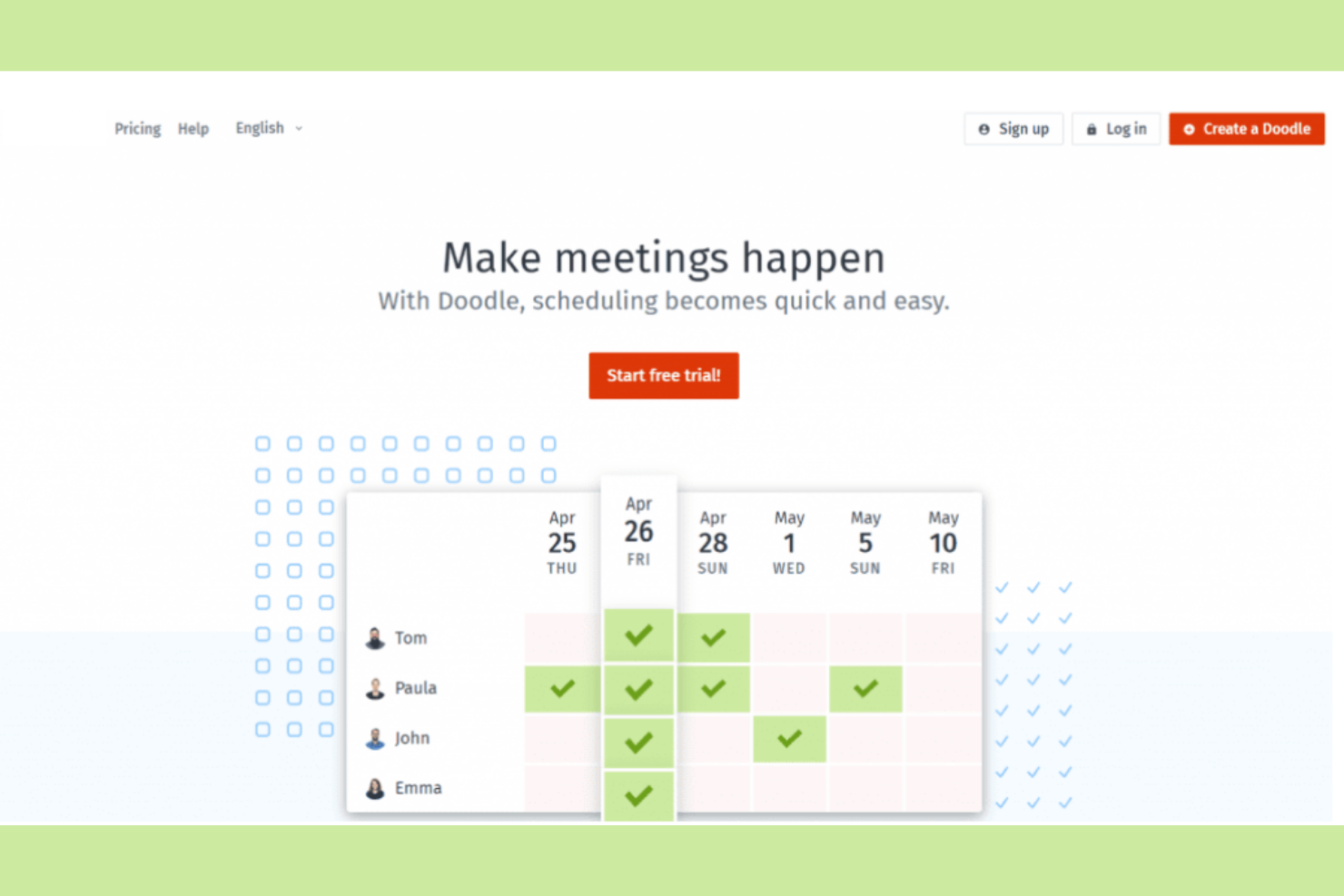
Doodle is a scheduling tool that makes it easier to find the best time for group meetings. Teams and organizations use it to coordinate schedules without the hassle of multiple emails.
Why I picked Doodle: It organizes group polls for scheduling, so you and your team can find common availability. You can create polls quickly, allowing participants to vote on their preferred times. The tool's straightforward interface makes setting up and managing polls easy. With options for time zone adjustments, you can coordinate with international teams effectively.
Standout Features and Integrations:
Features include the ability to create polls for event scheduling to find mutually convenient times. You can also set deadlines for responses to ensure timely scheduling. The tool provides a calendar view to help you visualize potential meeting times at a glance.
Integrations include Google Calendar, Microsoft Outlook, Zoom, Webex, Microsoft Teams, iCloud, Zapier, Stripe, and more.
Pros and Cons
Pros:
- Integrates with payment processors
- Offers branded booking pages
- Efficient group scheduling polls
Cons:
- No poll-taking reminders
- Add-heavy in free version

Setmore
Best for appointment booking
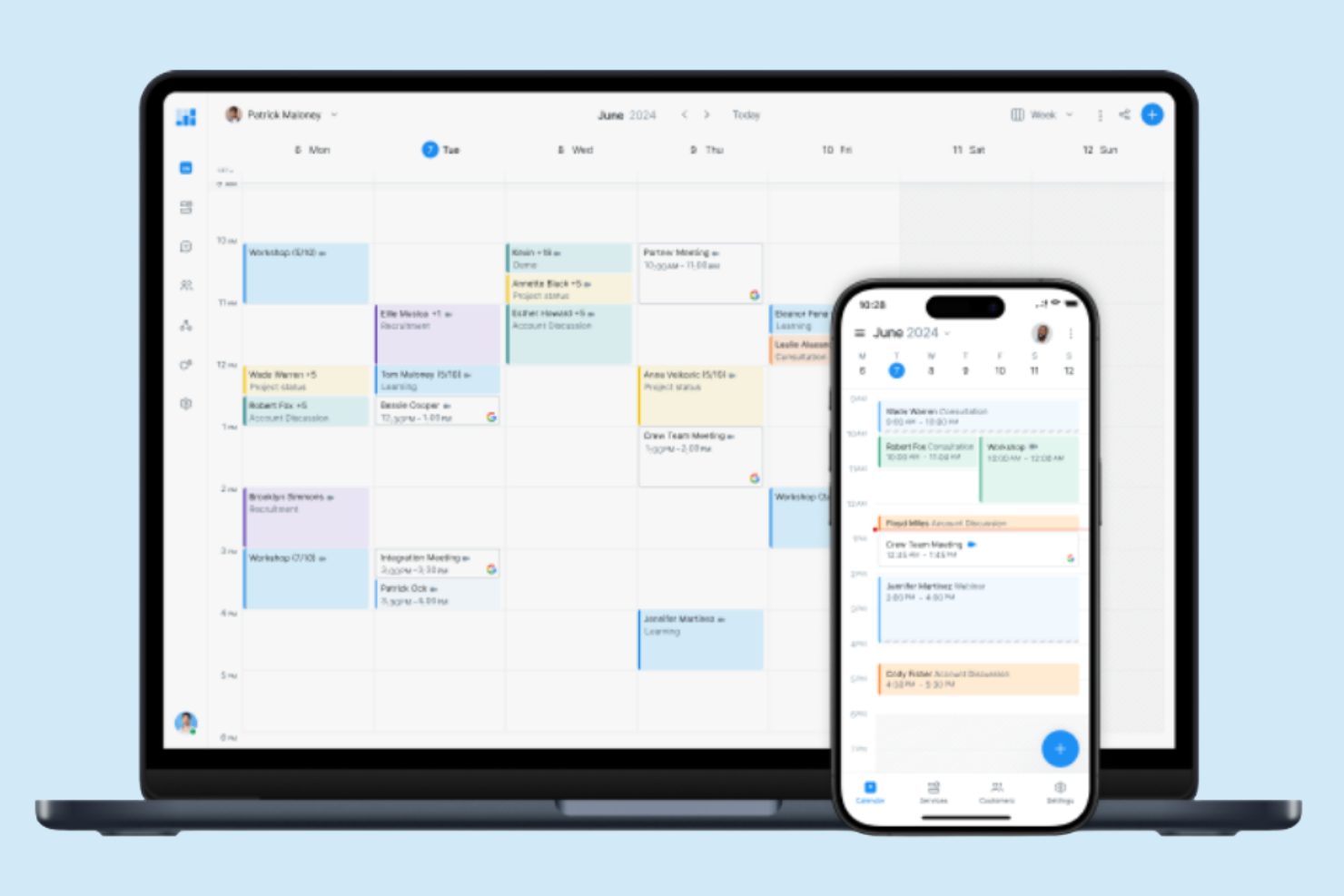
Setmore is an online scheduling platform for small businesses and professionals who need to manage appointments and bookings efficiently. It offers users a straightforward way to handle customer appointments, helping optimize the booking process and improve operational efficiency.
Why I picked Setmore: It's made for appointment booking, making it a great choice for businesses that rely on scheduled services. You can create a customizable booking page that clients can access to book their appointments directly. The tool also provides automated reminders to reduce no-shows and cancellations. With its user-friendly interface, you can manage staff calendars and sync appointments across devices.
Standout Features and Integrations:
Features include the ability to coordinate schedules within your team using individual calendars. You can also set up recurring appointments for regular clients, saving you time on scheduling. The platform offers analytics to give you insights into your booking patterns and client interactions.
Integrations include Google Calendar, Microsoft Outlook, Zendesk, Zoom, Facebook, Slack, QuickBooks, Salesforce, Stripe, PayPal, Mailchimp, and more.
Pros and Cons
Pros:
- Great for advance payment
- Offers one-click video meetings
- Customizable booking pages
Cons:
- Free tier limitations
- Restricted analytics

Best for time blocking
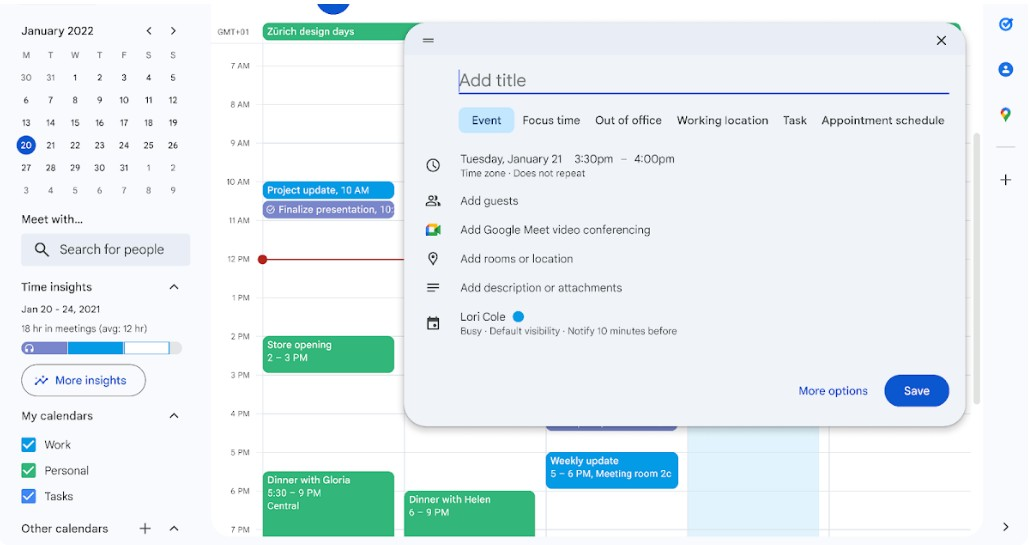
Google Calendar is a versatile scheduling tool that individuals and teams use to manage appointments, meetings, and deadlines. Businesses use it for its integration with other Google Workspace applications, such as Google Tasks and Google Docs, and better productivity and collaboration.
Why I picked Google Calendar: This tool helps you manage your time efficiently with features geared toward time blocking. You can set up different calendars for work and personal events, making it easier to focus on specific tasks. Google Calendar also allows you to organize your schedule by using visual prompts to quickly identify different types of events.
Standout Features and Integrations:
Features include creating multiple calendars for different aspects of your life, color-coding events for easy identification, and setting recurring events and reminders to keep track of ongoing tasks across teams.
Integrations include Google Meet, Gmail, Google Drive, Microsoft Outlook, Apple Calendar, Zoom, Slack, Trello, Asana, Salesforce, and more.
Pros and Cons
Pros:
- Paid plan includes Google Workplace
- Supports multiple calendars
- Suggests times for group meetings
Cons:
- Limited time zone display
- No dedicated desktop app

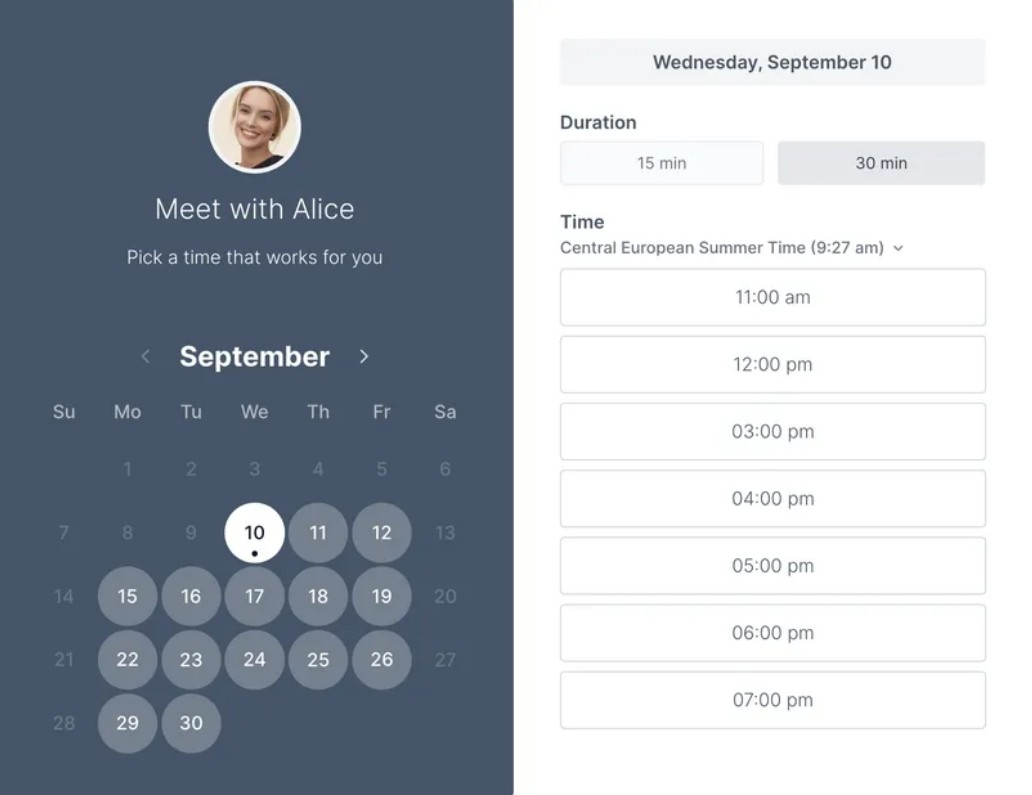
Koalendar is an intuitive scheduling tool for individuals and small teams that need an easy way to organize meetings and appointments. It makes setting up schedules straightforward for better time management.
Why I picked Koalendar: You can quickly create booking links to share with others, allowing them to view your availability and book appointments directly. The tool's clean interface ensures you can manage your schedule without distractions, and email reminders help keep track of upcoming appointments.
Standout Features and Integrations:
Features include customizable booking pages that let you control how others see your availability. You can also set buffer times between meetings to prevent back-to-back scheduling or use the automatic time zone detection to coordinate meetings with people in different regions.
Integrations include Google Calendar, Microsoft Outlook, Zoom, Shopify, Microsoft Teams, Apple Calendar, Zapier, Webhooks, WordPress, and more.
Pros and Cons
Pros:
- Email notifications for appointments
- Automatic language detection for guests
- Built-in payment options
Cons:
- Focus on basic scheduling
- Lacks deep integrations

Best for minimalist design

Tweek is a simple and elegant calendar application for users who appreciate a minimalist approach to scheduling appointments and other tasks. Individuals and teams appreciate its clean interface and straightforward functionality.
Why I picked Tweek: It offers a minimalist design that reduces clutter and focuses on the essentials when scheduling. You can quickly jot down tasks and appointments without getting slowed down by unnecessary features. The tool's weekly planner layout gives a clear view of your commitments, helping you focus on the big picture. Tweek is ideal if you want to manage your time without distractions.
Standout Features and Integrations:
Features include a weekly view that allows you to see all your tasks at a glance. The tool also offers a simple task management system where you can prioritize and check off completed items. You have the option to customize your planner with different colors.
Integrations include Google Calendar, Apple Calendar, and more.
Pros and Cons
Pros:
- Customizable themes
- Quick task entry and management
- Minimalist and clean design
Cons:
- Limited functions for big teams
- No integrations with the free version

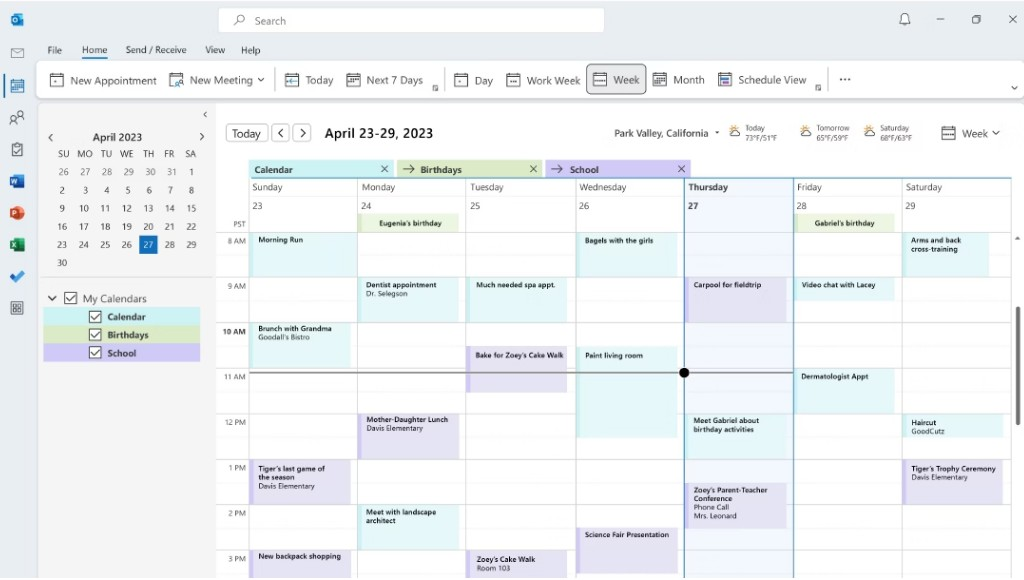
Microsoft Outlook Calendar is a scheduling tool that professionals and businesses rely on to organize meetings, appointments, and events. It serves as a central hub for managing personal and work schedules by connecting with email and other productivity tools.
Why I picked Microsoft Outlook Calendar: This calendar integrates well with your email, making scheduling more efficient for you and your team. You can create events directly from your inbox, reducing the need to switch between apps. Sharing calendars allows for better team coordination and knowledge of each other's schedules. With its intuitive interface, managing multiple calendars and setting reminders becomes a breeze.
Standout Features and Integrations:
Features include the ability to categorize events with colors, set up meetings with a scheduling assistant, and manage multiple time zones for global teams. The user-friendly interface allows you to quickly navigate through your schedule and make adjustments to calendar events. You can also customize calendar views to focus on daily, weekly, or monthly agendas.
Integrations include Microsoft Teams, OneDrive, SharePoint, Zoom, Slack, Trello, Asana, Salesforce, Google Calendar, and more.
Pros and Cons
Pros:
- Direct email to event conversion
- Customizable calendar views
- Smart email integration
Cons:
- Requires Microsoft 365 subscription
- Integrates with Microsoft's to-do list
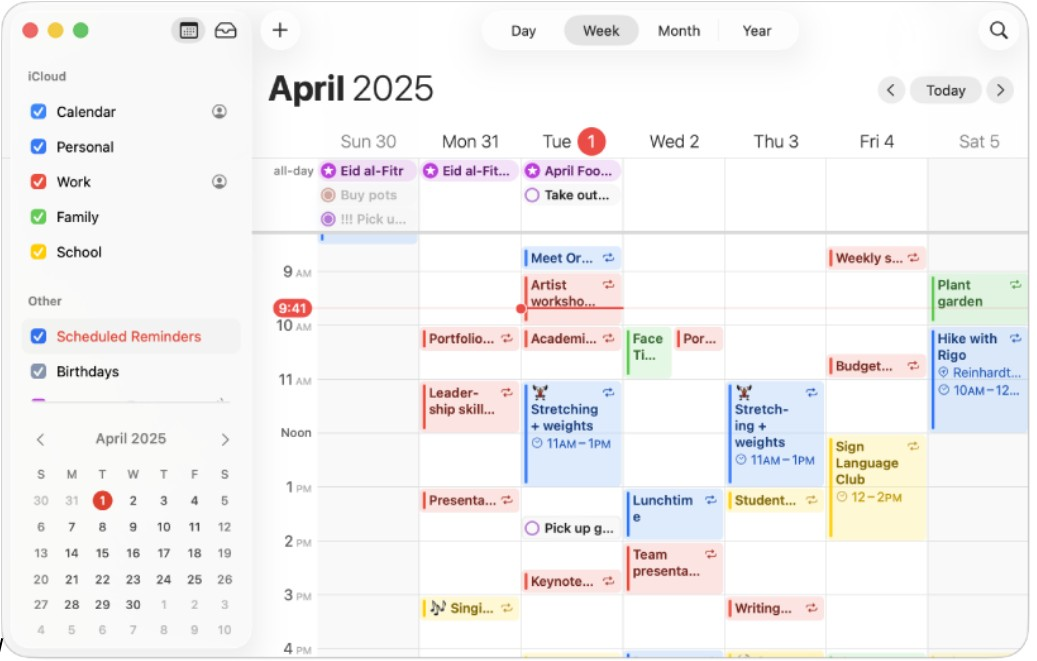
Apple Calendar is a straightforward calendar application for Apple device users, offering essential scheduling and event management functions. It caters to individuals and teams who rely on Apple's ecosystem to organize their daily activities and want real-time sync across devices.
Why I picked Apple Calendar: This tool integrates flawlessly with Apple's ecosystem, making it ideal for users of other Apple products. You can sync your calendar across your iPhone, iPad, and Mac, ensuring you always have access to your schedule. The interface is clean and intuitive, allowing you to create and manage events with ease.
Standout Features and Integrations:
Features include the ability to set and customize event alerts, view your calendar in day, week, or month format, and manage shared calendars for team coordination. You can also use the natural language input feature to quickly add events. The calendar supports time zones, which is great for scheduling international meetings.
Integrations include iCloud, Siri, Apple Maps, Mail, Contacts, FaceTime, Zoom, Microsoft Exchange, Google Calendar, and more.
Pros and Cons
Pros:
- Pre-installed on Apple devices
- Free for all users
- Syncs across Apple devices
Cons:
- Only available on Apple devices
- No premium plan available

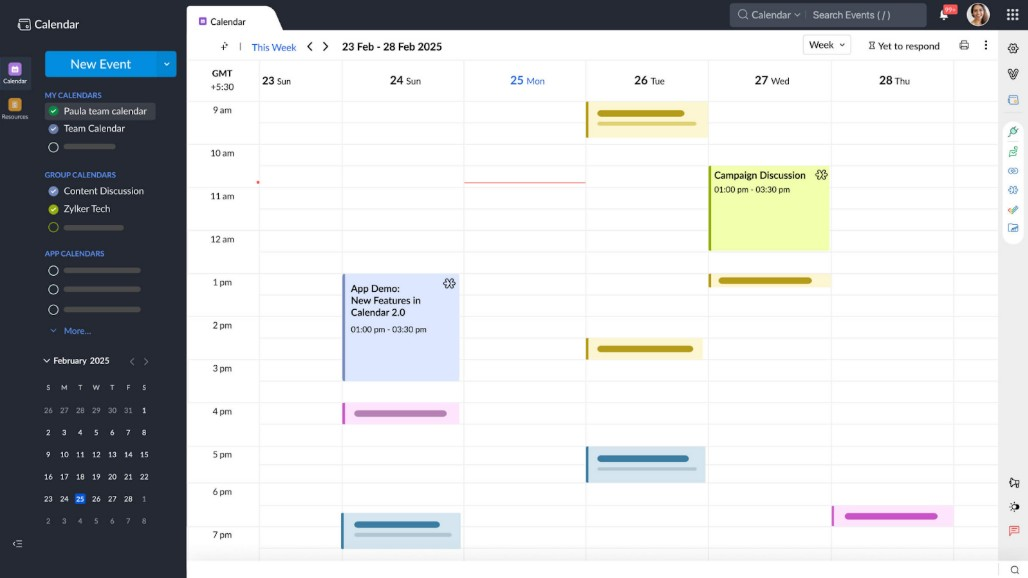
Calendar is an intelligent scheduling tool to optimize time management for professionals and businesses. It provides solutions for scheduling meetings, managing events, and analyzing time usage.
Why I picked Calendar: It uses AI to improve scheduling efficiency, making it perfect for busy teams. AI-powered insights help you understand how you and your team spend time, allowing for better planning. You can also automate meeting scheduling by sharing availability and letting others book directly. The tool's smart suggestions help minimize scheduling conflicts and maximize productivity.
Standout Features and Integrations:
Features include advanced analytics that give you insights into your time allocation. You can set up personalized scheduling links to optimize the booking process. The tool also provides customizable reminders to allow follow-up with upcoming commitments.
Integrations include Google Calendar, Apple Calendar, Zoom, Salesforce, HubSpot, Zapier, Microsoft Teams, and more.
Pros and Cons
Pros:
- Advanced time analytics
- Offers browser extensions
- AI-driven scheduling insights
Cons:
- Support can be slow for lower plans
- Paid professional tier model only
Outro software de calendários
Eis algumas opções adicionais de software de calendários que não entraram na minha lista restrita, mas que vale a pena conhecer:
- Fantastical
For natural language input
- Morgen
For AI-driven task management
- SimplyBook.me
For business management
- YouCanBookMe
For personalized bookings
- Appointy
For small businesses
- OnceHub
For lead generation
- Zoho Calendar
For Zoho users
- Motion
For task automation
- Square Appointments
For class bookings
- Acuity
For client self-scheduling
- ClickUp
For project management
- Clockwise
For AI-driven team scheduling


How I Evaluate Calendar Software
I look at calendar software in two layers: the core scheduling, syncing, and sharing a tool must nail, and the differentiators—like Gantt views and workload overlays—that matter to project teams.
Core Functionality (Table Stakes For This List)
When I'm selecting tools for my list, I rank each one on a scale from 0 (does not offer the functionality) to 5 (excels in this area) for each core functionality listed below. Then, I calculate the tool's total score into a percentage. Each tool needs to achieve a minimum total score of 65% to be considered for inclusion.
- Calendar View Options: I check whether the tool offers day, week, month, and agenda views with filtering and color-coding so teams can zoom in on a sprint or zoom out on a quarterly roadmap.
- Task Scheduling & Assignment: Each tool should let you create tasks with dates, durations, assignees, and dependencies—like scheduling a QA review to start only after a design handoff wraps.
- Team Calendar Sharing: I evaluate how teams share and collaborate on calendars, including role-based permissions that let a project lead edit schedules while stakeholders get view-only access.
- External Calendar Sync: Two-way sync with Google Calendar, Outlook, and iCal matters here—project deadlines should flow into a team member's personal calendar without manual re-entry.
- Deadline Notifications & Reminders: Tools should offer multi-channel alerts (email, in-app, mobile push) with configurable timing so your team gets a heads-up before a milestone review, not after.
- Timeline & Gantt Views: I look for interactive Gantt charts that map task dependencies, milestones, and critical paths—helpful when you need to show leadership how a delayed API integration ripples across the release schedule.
Once I have a list of tools that meet this criteria, I consider what sets each platform apart.
Differentiating Factors (What Sets Vendors Apart)
Here's how I compare and contrast different vendors:
Standout Features
Multi-project overlay is a big one—when you're running three launches at once, seeing all timelines in a single view helps you spot conflicts before they become blockers. I also evaluate workload management features that show team capacity right on the calendar, so you know whether a developer is double-booked before assigning another task. Automated scheduling is worth checking too, especially tools that rebalance timelines when a deadline shifts mid-sprint.
Beyond Features
Integrations matter a lot here. I check whether a tool connects natively with the PM platforms your team already uses—Jira, Asana, monday.com—so calendar updates flow both ways without manual syncing. Scalability is another factor I evaluate, especially how well a tool handles growth from a single team to multiple departments running concurrent projects. Mobile access rounds things out; project managers who split time between meetings and their desk need full scheduling capability from their phone, not a stripped-down companion app.
Como escolher software de calendários
É fácil perder-se em listas longas de funcionalidades e estruturas de preços complexas. Para o ajudar a manter o foco enquanto percorre o seu processo único de seleção de software, eis uma lista de verificação dos fatores a ter em conta:
| Fator | O que considerar |
|---|---|
| Escalabilidade | O software pode crescer com a sua equipa? Verifique se consegue suportar mais utilizadores, eventos e dados à medida que as suas necessidades aumentam. Evite ferramentas que possam limitar o crescimento futuro. |
| Integrações | Funciona com as ferramentas que já utiliza? Certifique-se de que se liga a software como aplicações de e-mail, CRM e gestão de projetos para otimizar os fluxos de trabalho e a partilha de dados. |
| Personalização | Pode adaptá-lo ao seu fluxo de trabalho? Procure definições flexíveis para ajustar vistas, notificações e permissões de acordo com as necessidades específicas da sua equipa. |
| Facilidade de utilização | É fácil de utilizar para todos? Escolha uma ferramenta que os membros da equipa consigam aprender rapidamente, sem formação extensiva. Evite sistemas excessivamente complexos que dificultem a adoção. |
| Implementação e integração inicial | Com que rapidez pode começar a utilizá-lo? Verifique se existem recursos como tutoriais, apoio e documentação clara para o ajudar a começar a utilizar a ferramenta de forma eficaz. |
| Custo | Enquadra-se no seu orçamento? Compare os planos de preços, incluindo taxas ocultas ou suplementos necessários. Considere o valor proporcionado pelo custo, não apenas o preço. |
| Medidas de segurança | Os seus dados estão protegidos? Procure funcionalidades como encriptação, controlos de acesso e conformidade com os regulamentos de proteção de dados para manter as suas informações seguras. |
| Disponibilidade do apoio | Obterá ajuda quando precisar? Verifique a disponibilidade de canais de apoio, como chat em direto, e-mail ou telefone, bem como os tempos de resposta, para garantir que consegue resolver os problemas rapidamente. |
O que é um software de calendário?
Um software de calendário é uma ferramenta digital que ajuda indivíduos e equipas a agendar e gerir eventos e compromissos. Profissionais como gestores de projetos, executivos e pessoal administrativo utilizam estas ferramentas para organizarem o seu tempo e melhorarem a produtividade. Funcionalidades como o agendamento, os lembretes e as integrações ajudam a gerir o tempo de forma eficiente, a coordenar atividades com outras pessoas e a acompanhar as tarefas. Estas ferramentas proporcionam uma forma centralizada de acompanhar os horários e os compromissos.
Funcionalidades
Ao selecionar um software de calendário, procure as seguintes funcionalidades principais:
- Agendamento: Permite aos utilizadores marcar rapidamente reuniões e compromissos, garantindo que não existem conflitos de horários.
- Lembretes: Envia notificações para manter os utilizadores informados sobre os próximos eventos e prazos.
- Eventos recorrentes: Permite configurar eventos que se repetem automaticamente, poupando tempo na introdução repetida de dados.
- Integrações: Liga-se a outros softwares, como ferramentas de e-mail e CRM, para otimizar os fluxos de trabalho.
- Suporte para fusos horários: Ajusta os horários dos eventos com base na localização dos participantes, facilitando a coordenação global.
- Vistas personalizáveis: Permite aos utilizadores ajustar os esquemas do calendário de acordo com as suas preferências e necessidades.
- Permissões de acesso: Permite controlar quem pode ver ou editar as entradas do calendário, melhorando a segurança.
- Análise: Fornece informações sobre a utilização do tempo e os padrões de agendamento para melhorar a gestão do tempo.
- Acesso móvel: Garante que os utilizadores podem gerir os seus horários em qualquer lugar através de dispositivos móveis.
- Codificação por cores: Permite aos utilizadores categorizar visualmente os eventos, tornando os horários mais fáceis de ler.
Vantagens
A implementação de um software de calendário proporciona várias vantagens à sua equipa e à sua empresa. Eis algumas das que pode esperar:
- Melhor organização: Ajuda a acompanhar compromissos e prazos, reduzindo o risco de perder eventos importantes.
- Poupança de tempo: Automatiza o agendamento e os lembretes, libertando tempo para tarefas mais importantes.
- Maior colaboração: Permite aos membros da equipa partilhar calendários e coordenar horários, melhorando o trabalho em equipa e a comunicação.
- Aumento da produtividade: Fornece informações sobre a gestão do tempo, ajudando os utilizadores a alocar recursos de forma mais eficaz.
- Flexibilidade: Oferece acesso móvel e vistas personalizáveis, permitindo aos utilizadores gerir os seus horários a partir de qualquer lugar.
- Melhor planeamento: Suporta eventos recorrentes e codificação por cores, facilitando o planeamento de projetos a longo prazo.
- Segurança: Garante a proteção dos dados através de permissões de acesso, mantendo as informações sensíveis seguras.
Custos & Preços
A seleção de um software de calendário exige compreender os vários modelos de preços e planos disponíveis. Os custos variam consoante as funcionalidades, a dimensão da equipa, os complementos e outros fatores. A tabela abaixo resume os planos comuns, os respetivos preços médios e as funcionalidades normalmente incluídas nas soluções de software de calendário:
Tabela de comparação de planos de software de calendário
| Tipo de plano | Preço médio | Funcionalidades comuns |
|---|---|---|
| Plano gratuito | $0 | Agendamento básico, integrações limitadas e lembretes básicos. |
| Plano pessoal | $4.75-$12/mês | Agendamento avançado, várias vistas de calendário e lembretes por e-mail. |
| Plano empresarial | $14-$70/mês | Ferramentas de colaboração em equipa, integrações com outras aplicações e análise avançada. |
| Plano empresarial de grande dimensão | $125-$1,250/mês | Permissões de acesso personalizáveis, suporte dedicado e funcionalidades de segurança de nível empresarial. |
Perguntas frequentes sobre software de calendários
Eis algumas respostas a perguntas comuns sobre software de calendários:
O software de calendários pode integrar-se com outras ferramentas que já utilizamos?
Sim, a maioria dos softwares de calendários integra-se com ferramentas comuns, como plataformas de e-mail, sistemas de CRM e aplicações de gestão de projetos. Esta conectividade ajuda a otimizar o seu fluxo de trabalho, permitindo a troca de dados entre o seu calendário e outros sistemas. Consulte as opções de integração de cada software para garantir a compatibilidade com as ferramentas que já utiliza.
É fácil migrar os meus dados existentes para o novo software de calendários?
Sim, muitas ferramentas de calendários oferecem funcionalidades de importação para ajudar a transferir os dados existentes. Procure software com processos simples de migração de dados, como importações de CSV ou integração direta com os sistemas de calendários atuais. Antes de efetuar a migração, faça uma cópia de segurança dos seus dados para evitar qualquer perda durante a transferência.
Que medidas de segurança devo esperar de um software de calendários?
Espere que o software de calendários ofereça funcionalidades básicas de segurança, como encriptação e controlos de acesso. Estas medidas de proteção salvaguardam os seus dados contra acessos não autorizados. Para empresas que tratam informações sensíveis, procure software que cumpra os regulamentos de proteção de dados e ofereça funcionalidades de segurança adicionais, como a autenticação de dois fatores.