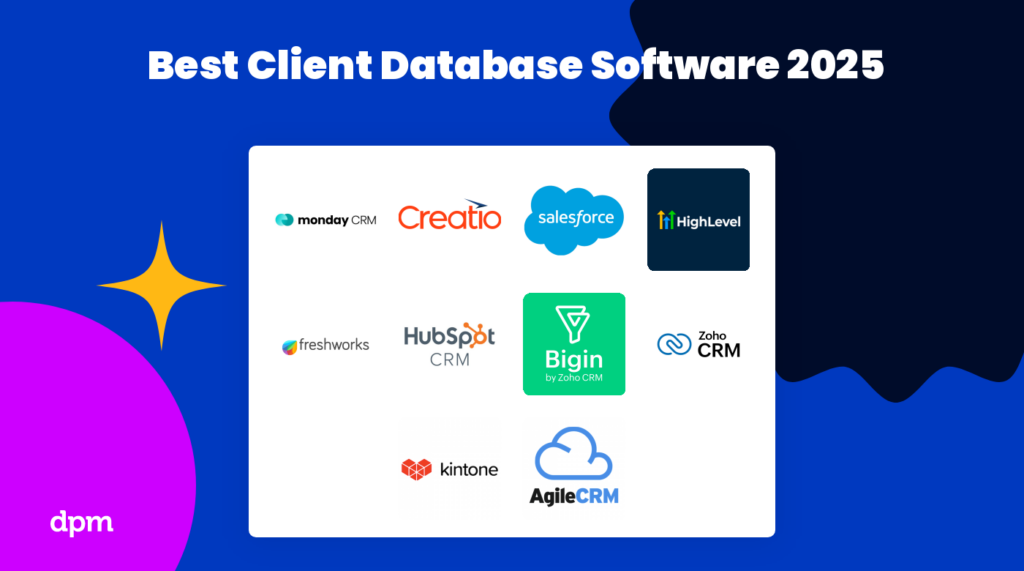
Os 10 Melhores Softwares de Bases de Dados de Clientes e de Consumidores para 2026

10 Lista restrita do melhor software de bases de dados de clientes


Quer recolher, armazenar e gerir informações sobre os seus clientes — e precisa da ferramenta certa para o efeito. Mas a vasta gama de software de bases de dados de clientes disponível pode tornar a seleção do melhor numa tarefa difícil. Eu posso ajudar!
Nesta publicação, recorro à minha experiência pessoal na gestão de vários clientes e na utilização de muitas plataformas diferentes de bases de dados de clientes para compilar uma lista das minhas escolhas das melhores ferramentas de bases de dados de clientes disponíveis no mercado.
Why Trust Our Software Recommendations
Our team has been testing and reviewing software since 2012. As project managers ourselves, we know how difficult—and important—it is to choose the right software.
For this guide, we evaluated tools using hands-on testing and independent research, scoring tools using our selection criteria. We also draw on insights from industry thought leaders and practicing project management experts.
Our reviews reflect our human editorial judgment, not a sales pitch.
Expert reviewers:
Tabela comparativa: software de bases de dados de clientes e de bases de dados de consumidores &
Eis uma tabela-resumo com informações essenciais: compare facilmente períodos de avaliação gratuitos, demonstrações e preços.
| Tool | Best For | Trial Info | Price | ||
|---|---|---|---|---|---|
| 1 | Best for sales pipeline visibility | 14-day free trial + free demo available | From $12/user/month (billed annually) | Website | |
| 2 | Cloud-based CRM software that helps businesses manage their sales, marketing, & customer service | 30-day free trial | From $25/user/month | Website | |
| 3 | Best client and customer database software for AI capabilities | Free plan + 15-day free trial+ free demo available | From $14/user/month (billed annually) | Website | |
| 4 | Best client and customer database for small business | Free plan available | From $7/user/month (billed annually) | Website | |
| 5 | Client database and CRM that lets your team use AI-based lead scoring, phone, email, activity capture, and more | 21-day free trial | From $9/user/month (billed annually) | Website | |
| 6 | Build custom client databases with a drag-and-drop app builder & workflow automations | 30-day free trial + free demo available | From $24/user/month | Website | |
| 7 | Track and close deals by capturing information from several sources including spreadsheets, LinkedIn, or even a business card | 15-day free trial | From $13/user/month | Website | |
| 8 | Best for maximizing conversions, boosting customer retention, and making better data-driven decisions | 14-day free trial | From $14/user/month (billed annually) | Website | |
| 9 | Sales and project management software with automation, data, and analytics, built right into Gmail | 14-day free trial | From $59/user/month | Website | |
| 10 | A cloud-based SaaS service with sales enablement, marketing automation, customer service, and more | Free plan available | From $8.99/user/month | Website |

Avaliações do melhor software de bases de dados de clientes
Eis uma breve descrição de cada um dos programas de software de bases de dados apresentados nesta lista dos 10 melhores.
Best for sales pipeline visibility

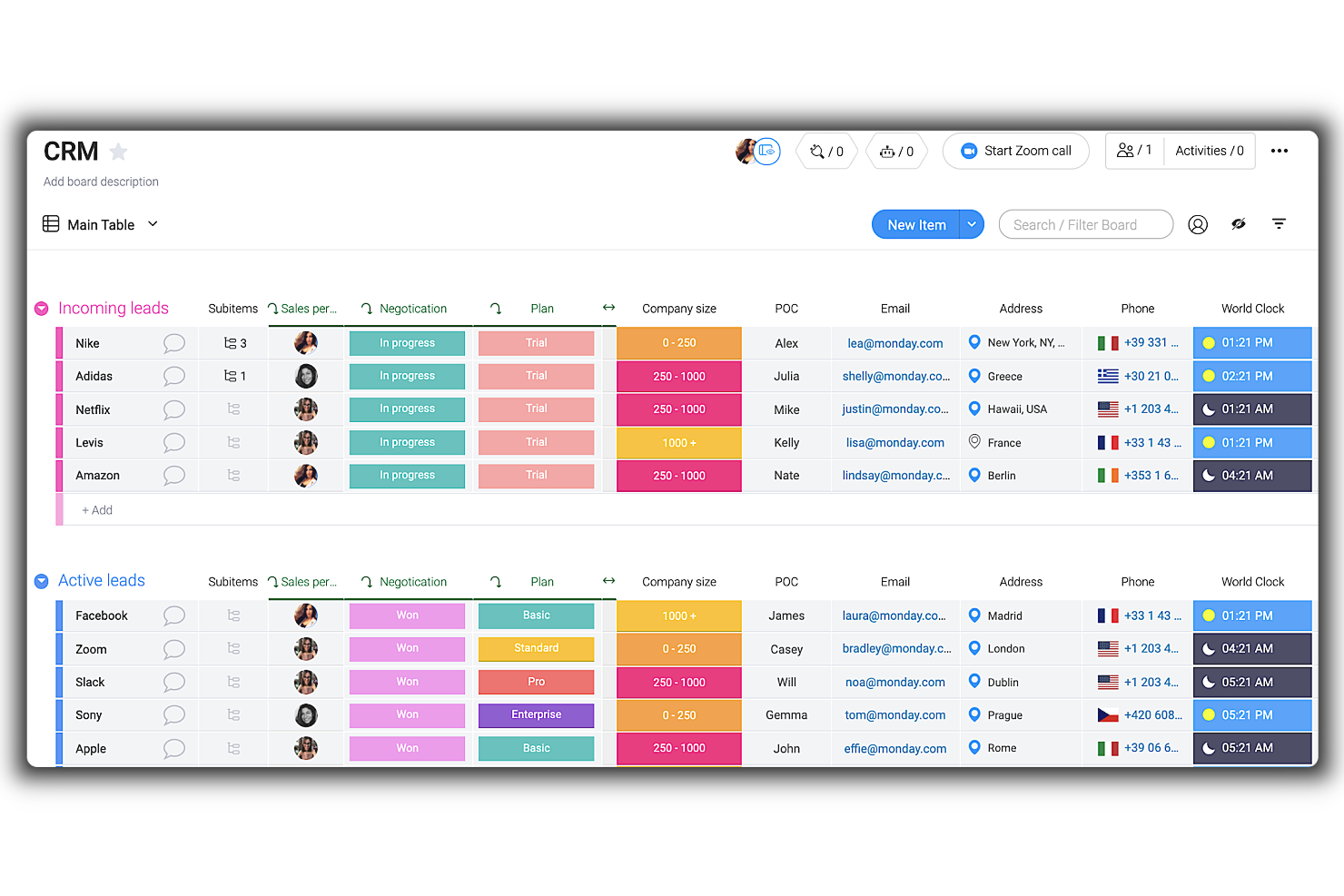
Monday sales CRM is a customizable tool designed to provide businesses with clear visibility into their sales pipeline. It centralizes client communication, automates sales processes, and offers a comprehensive overview of deals, which supports its unique selling proposition as the best tool for sales pipeline visibility.
This tool's highly customizable nature and automation capabilities are crucial for tailoring the system to specific business needs and streamlining client interactions. One thing that impressed me is the ease with which users can adapt the CRM to their workflows without requiring development resources, coupled with centralized communication channels for all client interactions.
Like many other tools, it's incorporating AI into its platform. Therefore, monday.com employs AI to assist in composing emails, drawing from past interactions and successful templates to improve communication. The CRM also offers mass email capabilities, activity management to record all customer interactions, and performance tracking through key metrics and KPIs.
Customizable dashboards, sales forecasting, goal setting, structured data organization, lead capturing, no-code automations, and visual sales pipeline management are additional features that support sales teams in managing their customer relationships and sales activities.
monday sales CRM provides integrations with a range of software tools to centralize data and automate work processes. Key integrations include communication and collaboration tools, such as Outlook, Slack, Google Drive, and Trello. Additionally, for tools not listed, users can utilize the open API to connect their preferred software to the CRM platform.
New Product Updates from monday CRM

monday CRM Adds Meta Conversions API Integration
monday CRM now lets you connect Meta Conversions API and sync lead status back to Meta, improving targeting and conversions via a new Meta integration automation recipe. For more information, visit monday CRM's official site.
Cloud-based CRM software that helps businesses manage their sales, marketing, & customer service
Salesforce CRM is a cloud-based CRM system that helps businesses of all sizes improve their customer service, sales processes, and marketing campaigns. It allows users to store all their customer data in one secure location and access it from anywhere with an internet connection. This allows them to easily track customers, analyze data, create reports, manage accounts, monitor leads, and more. It includes features such as lead management, contact management, account management, report generation, and analytics. Other features include mobile access so users can access the system from any device, email integration so users can send emails directly from the system, and activity tracking which keeps track of activities such as calls and emails sent.
Salesforce enables businesses to effectively manage large amounts of data, including customer contact information and sales records. Data can be organized into custom fields, allowing users to quickly search for specific items or view summaries of data across multiple fields. Additionally, it provides powerful analytics tools that allow users to identify key trends in their data. Salesforce's segmentation feature allows businesses to group customers based on different criteria such as location, purchase history, and demographics. This makes it easier for businesses to target specific groups with tailored marketing campaigns and special offers.
Salesforce offers advanced segmentation features such as dynamic segmentation which automatically updates segments based on new customer information. As the business grows, users can add additional features or services without having to purchase additional software or hardware. Additionally, because it is cloud-based it requires no setup or maintenance costs which makes it an attractive option for businesses with limited budgets or resources. It features powerful security measures such as encryption and two-factor authentication which ensures that all customer data always remains safe and secure.
Features include sales management, marketing automation, customer service and support, collaboration, customization, mobile access, integration, analytics & reporting, and built-in data security.
Integrations include Google Workspace, Slack, Quickbooks, MailChimp, LinkedIn, Docusign, JIRA, HelloSign, Code Science, Active Campaign, and Dropbox.
New Product Updates from Salesforce CRM

Salesforce CRM Simplifies Email Sends From Contact and Lead Lists
Salesforce CRM simplifies list-based email sends by removing the need to create a Data 360 segment first. This helps teams send Contact and Lead emails faster with fewer setup steps. For more information, visit Salesforce CRM’s official site.
 .
Zoho CRM
Best client and customer database software for AI capabilities
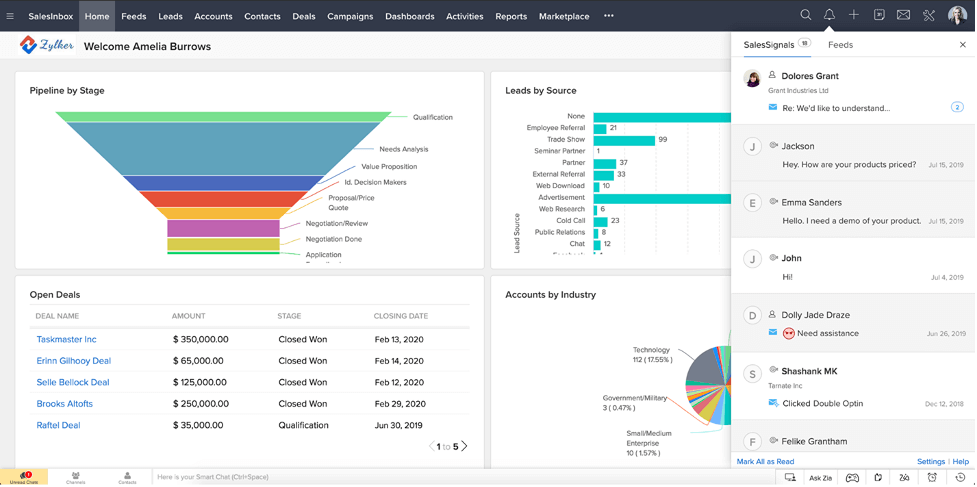
Zoho CRM is a cloud-based, easy-to-use client database management software with a simple UI and highly customizable workflows for generating, qualifying, and nurturing leads into deals and lifelong customers.
Users can track purchase history, product preference, and personal information on a timeline of activities dating back to the first interaction and lead source. The tool includes advanced filters and fields for deal stage, campaign source, email status, notes added, and even profitability percentage.
Choose from pre-built reports or dashboard templates, or create your own to visualize customer behaviour and metrics in the form of charts, KPIs, and funnels. Team members can export reports as Excel, CSV, or PDF files, embed dashboards on a website and/or make it accessible on a Slack channel.
Mobile-enabled features allow you to log prospect details on-the-go, pull up price lists and agreements, and post significant updates on your team forum or chat. Another great feature is the AI-powered sales assistant that can auto-fill empty fields in your CRM.
Zoho CRM has over 40 native integrations and 500+ third-party integrations that include Google (G Suite), Microsoft Office 365, MailChimp, RingCentral, Quickbooks, Zapier, Xero, and other popular apps.
Zoho CRM starts at $14/month with a 15-day free trial, and also offers a free version for up to 3 users.
New Product Updates from Zoho CRM

Zoho CRM Adds Workflow Automation for Subform Actions
Zoho CRM now lets you automate subform events with workflow rules, triggering actions when rows are added, edited, or deleted based on conditions. For more information, visit Zoho CRM's official site.
 .
Best client and customer database for small business
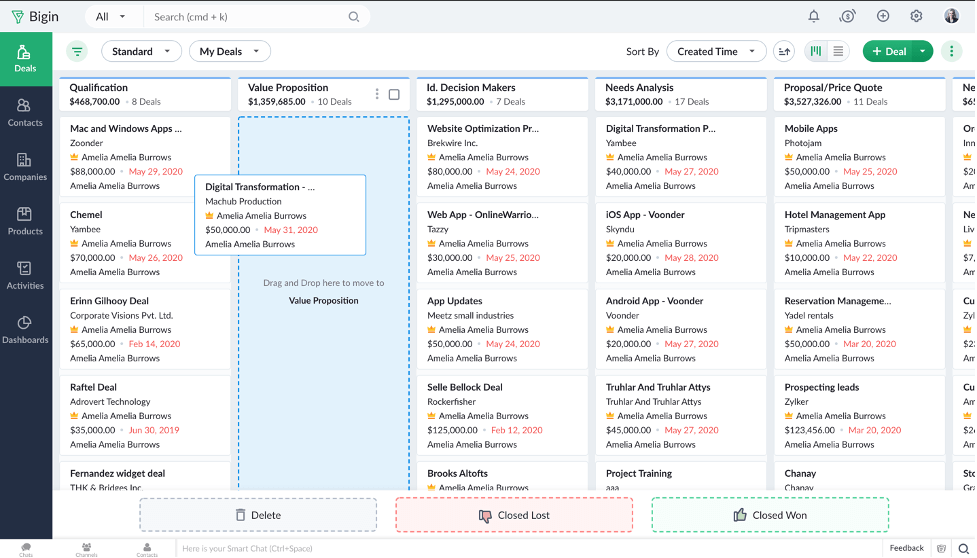
Bigin by Zoho CRM provides a client and customer database as one of its core features. The platform is a lean customer relationship management (CRM) software that caters to the needs of small businesses. It's user-friendly and intuitive, and helps you keep track of your client records, manage your client communications, and automate parts of your sales pipeline.
The software's central database keeps contact information for all your clients safely stored. You can populate the database by importing data from an existing spreadsheet, and collect new data by creating custom forms through the system. Custom fields can be configured to best reflect your company's operations and ensure you collect the right data for every client record. Should you ever need to, you can export data out of the system, too.
In addition to a client database, the software provides multi-channel communication tools to help you manage your phone, email, and social media communications with clients. You can set up workflow automations to move new prospects through your sales funnel, and track your deals through each stage with the pipeline builder. Custom reporting and an analytics dashboard are also available to help you track your performance metrics.
Paid plans start from $7/user/month, and a 14-day free trial is available.
New Product Updates from Bigin by Zoho CRM

Bigin iOS Adds Interactive WhatsApp Templates and Quick Replies
Bigin’s iOS app now supports interactive WhatsApp templates and Quick Replies, making it easier to preview and send instant messages to customers. For more information, visit Bigin by Zoho CRM's official site.
 .
Client database and CRM that lets your team use AI-based lead scoring, phone, email, activity capture, and more
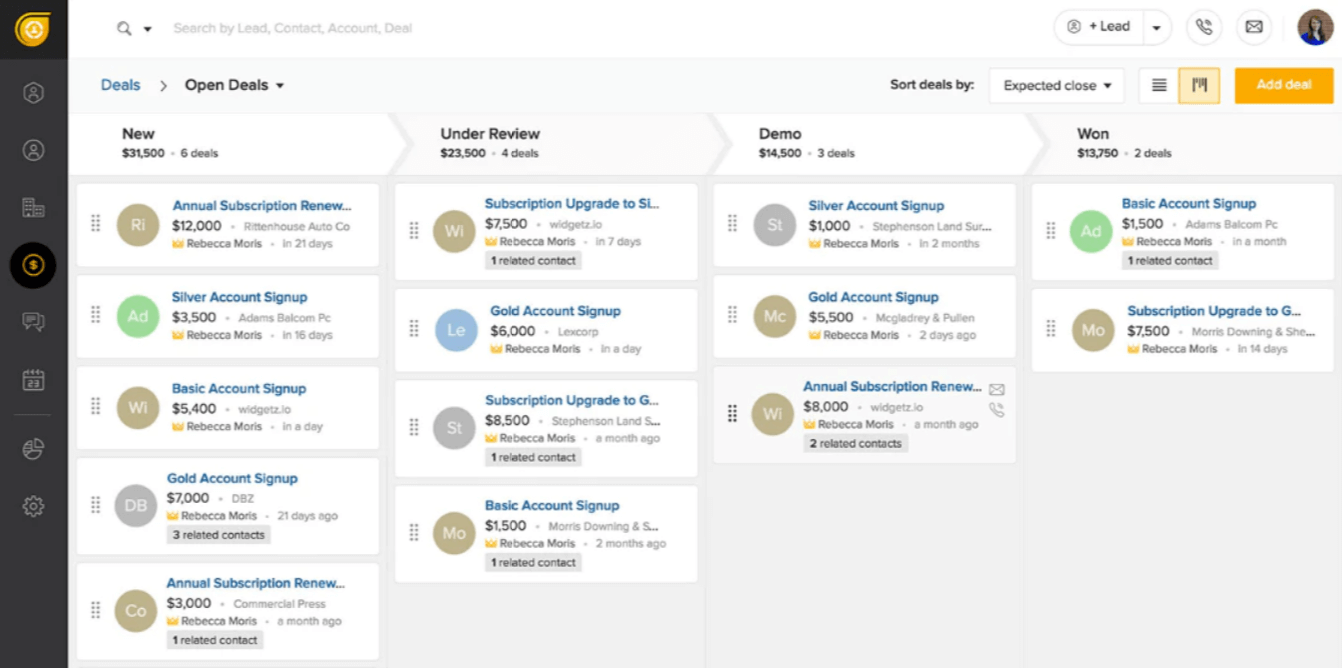
Boasting over 150,000 clients and users, Freshsales aims to simplify CRM solutions. To do so, they offer AI-based lead scoring; phone, email, activity capture; sales lead acquisition assistance; sales pipeline management; event tracking (website and app); and more.
Freshsales does email segmentation, sorting, and display-by-relevance very well. This tool categorized conversations in a way that makes them easy to retrieve and sort by customer and it also uses conversation records (text, call, chat, email) to their full potential.
Native integrations include Freshdesk, Freshchat, Freshconnect, Freshcaller, Google calendar, Mailchimp, Segment, Office 365 Calendar, Hubspot, Freshsales for Web, PieSync, Google Apps, Quickbooks, Google Contacts, Xero, and many more through Zapier. Other integrations include Calendly, Facebook, GetAccept, Clenty, Justcall, Toky, 24sessions, Integromat, Akito, Trello, Magento, and more.
Setting up and learning the software was quite time-consuming, losing them some minor points in the Usability section of the evaluation criteria. Migrating from another CRM platform, in particular, has many pain points.
Freshsales starts at $15/user/month and has a 21-day free trial.
Kintone
Build custom client databases with a drag-and-drop app builder & workflow automations

Kintone is a customizable client database tool used by teams at Volvo Trucks North America, Japan Airlines, Shiseido, and over 23,000 organizations worldwide. Their unique approach to client database tools lets you build a wide variety of customizable “apps” either from scratch, using templates or from your existing spreadsheets, for data management, business processes, and workflows. Kintone apps can be customized for project management, sales CRM, client databases and activity logs, expense reports, shared to-do lists, equipment management, product feedback, and much more.
Kintone lets you build client database apps by dragging and dropping elements that you want to see onto the page: rich text fields, date fields, drop-down menus, number fields with built-in calculations, spaces for attachments, user or group selection menus, related data from other apps, tables, and more.
Once you’ve built the app you want, you can use it to more easily manage whatever data and tasks you and your team need to track. And with custom notifications and reminders as well as detailed permissions settings, your client database solution can look and work however you want it to.
What makes Kintone particularly great for client databases is the customizability—users can tailor what information the CRM records and holds, update and change fields or entire workflows without relying on IT support, and create automated reminders to notify sales members of important deadlines.
Kintone’s built-in communication features also allow your team to discuss customers or tasks directly in the database and in topic or project-based threads. Dedicated “spaces” organize all of the information your team needs about your customers in one place, including your customer database, customer inquiries and interactions, and more.
Kintone lets you expand its capabilities with both free native plugins built by the Kintone team as well as integrations with other tools like Slack, Gmail, Google Calendar, Outlook, Tableau, Dropbox, Salesforce, HubSpot, Eventbrite, WordPress, QuickBooks, MailChimp, and many more through a paid plan with Zapier or via API integrations.
Kintone costs $24/user/month with a minimum requirement of 5 users. They offer a 30-day free trial (no credit card required) and discounted prices for nonprofits and educators. Kintone’s team also offers a free custom app build as part of the free trial process.

noCRM.io
Track and close deals by capturing information from several sources including spreadsheets, LinkedIn, or even a business card

The “No” in the software name is a cheeky representation of their dedication to functional simplicity and low-effort onboarding. Even with ease at its core, this software enables users to define lead fields, personalize with widgets, create custom sales activities, and more.
True to its name and marketing promise, NoCRM is superbly easy to use and adopt. They also offer a “NoCRM Academy” filled with video resources to help users learn the ins-and-outs of the tool. Thus, they rated quite highly in the Usability category of our evaluation criteria.
Integrations include G Suite, Quickbooks, PieSync, FreshBooks, RingCentral, Aircall, Xero, Tilkee, ActiveDEMAND, and over 750+ more through Zapier.
The only major con is the lack of email marketing campaign tools. You will need to integrate capabilities from elsewhere in order to achieve this functionality.
NoCRM.io starts at $12/user/month and has a free 15-day trial.

Best for maximizing conversions, boosting customer retention, and making better data-driven decisions

Pipedrive is a sales CRM software that helps you keep track of client and customer data effectively. It also has a visual, drag-and-drop sales pipeline to help you track leads through each stage of your sales process. The pipeline is customizable, and you can either build one from scratch or use one of the pre-built templates provided in the system.
You can add context to your client and customer records by adding notes, and the system's smart data feature gathers additional data from the web to enrich your records. This helps you keep information up to date, but can also provide you with additional contextual data you might not otherwise have had.
In addition to its sales pipeline and record keeping features, the software also has an email tool. You can connect your email account and send and receive emails right in the platform, reducing app-switching and keeping client communications centralized. Reporting and analytics tools are also included, providing you with data about your sales performance and insights into which leads are most likely to close, average deal time, and more.
Pipedrive integrates with other contact management and sales tools like Pipechat, Microsoft Teams, Trello, Slack, Zapier, and others. Plans start from $21.90 per user, per month, and a 14-day free trial is available.

Streak
Sales and project management software with automation, data, and analytics, built right into Gmail

Streak CRM integrates directly with Gmail, so users can track and manage their sales pipeline, contacts, and emails right in G Suite. You can also set reminders for easy follow-ups with tasks and clients.
You can import and export client and lead data in any format, including numbers, text, lists, checkboxes, tags, formulas, contacts, and more, making it useful for tracking and reporting on data. Streak CRM will auto-fill data such as ‘Date created’ or ‘Date of Last Email'.
Another great feature is the ability to automatically share emails, notes, and call logs with your team so you can pick up where they left off. Streak CRM offers a mobile app as well, for ease of use and access.
Streak CRM’s open API integrates with G Suite and Zapier to connect your Streak to any existing app or tool you use.
Streak CRM has a basic plan that is completely free. Paid plans cost from $15/user/month.

Agile CRM
A cloud-based SaaS service with sales enablement, marketing automation, customer service, and more

Free for up to 10 users, Agile CRM is an excellent option for small to mid-sized businesses. Features vary between free and paid plans and may include sales enablement through gamification, marketing automation, customer service, contact management, and more.
Agile CRM’s monthly subscription price is one of the lowest per-user on this list, not to mention they have a freemium version for 10 users or less. This ensured they scored top marks in the Value for Cost section of the evaluation criteria.
Integrations include Twitter, Facebook, TowerData (Rapleaf), LinkedIn, Zendesk, ClickDesk, HelpScout, LiveHelpNow, Tidio Chat, UserVoice, IMAP, Google Apps, Microsoft Exchange, Twilio, VoIP, RingCentral, Bria, Mandrill, SendGrid, Amazon SES, FreshBooks, Xero, QuickBooks, and many more. Connect additional tools using Zapier, as well.
A few cons to note are limitations/restrictions in certain automation capabilities, some cumbersome sales tracking elements, and a lack of search/sorting fields.
Agile CRM starts at $8.99/user/month and has a freemium version for up to 10 users.
Avaliações de outro software de bases de dados de clientes
Eis mais algumas ferramentas que não chegaram ao topo, mas que continuam a merecer a sua consideração.
- Ontraport
Store every customer click, purchase, and action throughout your campaigns and use landing pages and forms to bring people in
- Salesforce Financial Services Cloud
A robust client database system that helps you forecast sales, improve service satisfaction, task automation, and more
- GoHighLevel
For centralized agency client management
- Tray.io
A great small business database, Tray.io sports after-care programs like post-sales processing, onboarding, churn detection, etc
- Pipeline Deals
Full visibility into customer accounts pre- and post-sales to manage key deliverables, project details, milestones, and deadlines
- All Clients
A web-based database software with non-technical users in mind; includes workflows, funnels, responsive email templates, and more
- Creatio AI CRM
For no-code automation with 360-degree customer views
- Salesflare
For automated data entry
- ClickUp
Customized and searchable tables where you can build your client database and keep track of interactions.
- Copper
For teams using Google Workspace
- Insightly
Build robust pictures of your customers by unifying marketing, sales, and project delivery teams data in one system
- GreenRope
For tapping into email marketing, social media, advanced marketing automation
- Accelo
For service businesses
- Zendesk Sell
Build and log customer interactions across phone, chat, email, social media, and any other channel you use for your business
- Airtable
Part spreadsheet, part database, Airtable lets you add attachments, text notes, links to records, and even barcodes
- Maximizer
Lead, contact, and campaign management to segment and track your marketing and sales efforts with a variety of CRM features.


How I Evaluate Client Database Software for Small Business
When an agency PM jumps on a client call and needs instant context—past projects, notes, contacts—I evaluate two layers: baseline must-haves and the differentiators that set tools apart.
Core Functionality (Table Stakes For This List)
When I'm selecting tools for my list, I rank each one on a scale from 0 (does not offer the functionality) to 5 (excels in this area) for each core functionality listed below. Then, I calculate the tool's total score into a percentage. Each tool needs to achieve a minimum total score of 65% to be considered for inclusion.
- Centralized Client Records: I look for profiles that store contacts, custom fields, and project history so your team pulls up a full client snapshot in one view.
- Interaction & Communication Tracking: Each tool should log emails, calls, and meeting notes on the client timeline—not buried in a separate inbox or external app.
- Project-Client Linking: I evaluate how directly you can tie a client record to active projects and deliverables—like pulling up all open work for a retainer client.
- Document & File Management: Contracts, SOWs, and briefs should attach to client records with version tracking, so you're never searching shared drives mid-meeting.
- Client Segmentation & Filtering: I check for tags, custom fields, and saved filters that let you sort clients by project status, account type, or engagement tier.
- Small Business Accessibility: Pricing tiers, onboarding effort, and feature availability should suit teams of one to twenty without requiring enterprise-level budgets or setup.
Once I have a list of tools that meet this criteria, I consider what sets each platform apart.
Differentiating Factors (What Sets Vendors Apart)
Here's how I compare and contrast different vendors:
Standout Features
Automated workflow triggers make a real difference—when a project stage changes, the tool should fire off follow-up tasks or client notifications without manual effort. I also look for client portal access, which lets clients check project status and approve deliverables on their own instead of emailing you for updates. Reporting and client insights round things out. Dashboards that surface project profitability and engagement frequency per account help small teams prioritize where to focus.
Beyond Features
Integration support matters a lot here. I check whether a tool connects natively with project management platforms like Asana or Monday and syncs with Gmail or Outlook, since small teams can't afford to manually copy data between systems. Time-to-value is another factor I weigh—tools with CSV import, guided setup, and ready-made templates let a three-person agency get running in a day instead of a week. Pricing transparency also shapes my evaluation, especially whether core features stay accessible on entry-level plans as your team grows.
Como escolher software de bases de dados de clientes
É fácil perder-se em listas extensas de funcionalidades e estruturas de preços complexas. Para o ajudar a manter-se concentrado enquanto conduz o seu processo específico de seleção de software, eis uma lista de verificação dos fatores a ter em conta:
| Fator | O que considerar |
| Escalabilidade | Certifique-se de que o software pode crescer com a sua empresa. Procure opções que suportem um número crescente de utilizadores, armazenamento de dados e funcionalidades avançadas à medida que a sua base de clientes se expande. |
| Integrações | Escolha software que se ligue facilmente às ferramentas que a sua equipa já utiliza, como CRM, plataformas de marketing por e-mail e sistemas de faturação, para simplificar os fluxos de trabalho. |
| Personalização | Opte por uma solução que lhe permita adaptar campos, esquemas e vistas de utilizador às suas necessidades específicas de acompanhamento de clientes e preferências de elaboração de relatórios. |
| Facilidade de utilização | Procure software intuitivo que minimize a curva de aprendizagem, permitindo à sua equipa gerir os dados dos clientes sem frustração ou formação extensiva. |
| Orçamento | Escolha software que esteja de acordo com o seu orçamento, tendo em conta possíveis complementos, níveis de utilizadores e custos futuros de expansão, para evitar gastar demasiado em funcionalidades desnecessárias. |
| Medidas de segurança | Dê prioridade à proteção dos dados através de encriptação robusta, atualizações de segurança regulares e controlos de acesso baseados em funções, para proteger informações sensíveis dos clientes. |
| Ferramentas de elaboração de relatórios | Escolha software que disponibilize relatórios e análises abrangentes, permitindo-lhe obter informações sobre tendências nos dados dos clientes, métricas de envolvimento e muito mais. |
| Assistência ao cliente | Selecione um fornecedor com opções de assistência acessíveis e rápidas (por exemplo, conversação em direto e assistência telefónica) para ajudar na configuração, resolução de problemas e esclarecimento de dúvidas contínuas. |
Tendências no software de bases de dados de clientes para 2026
Na minha pesquisa, recolhi inúmeras atualizações de produtos, comunicados de imprensa e registos de lançamento de diferentes fornecedores de software de gestão de clientes. Eis algumas das tendências emergentes que estou a acompanhar:
- Informações baseadas em IA: Cada vez mais fornecedores estão a utilizar IA em plataformas de gestão de dados de clientes para analisar dados e fornecer informações acionáveis, como recomendar os momentos ideais para o envolvimento ou identificar clientes de elevado valor. Esta tendência ajuda as empresas a tomar decisões mais inteligentes e a personalizar as interações com os clientes de forma mais eficaz.
- Análise preditiva: As ferramentas preditivas estão a tornar-se mais populares, permitindo que as empresas prevejam as necessidades dos clientes com base em dados históricos. Por exemplo, as soluções de CRM para clientes destacam agora os clientes que estão prontos para uma venda adicional ou em risco de partir, ajudando as equipas a interagir proativamente com os clientes.
- Conceção centrada na privacidade: Com leis de privacidade de dados mais rigorosas, as plataformas de gestão de bases de dados estão cada vez mais focadas em funcionalidades que privilegiam a privacidade, como controlos de acesso de utilizadores personalizáveis e encriptação de dados integrada. Isto ajuda os utilizadores a cumprir regulamentos como o RGPD para proteger as informações dos clientes.
- Análise de sentimentos: O acompanhamento dos sentimentos está agora a ser integrado em aplicações de bases de dados em linha para avaliar a satisfação dos clientes através das interações e do feedback. Alguns softwares de gestão de clientes em linha oferecem até uma pontuação automática de sentimentos a partir de emails ou mensagens de conversação, ajudando as empresas a dar prioridade aos acompanhamentos.
- Reconhecimento de voz e texto: Os fornecedores estão a adicionar funcionalidades de reconhecimento de voz e texto para registar as interações com os clientes nos seus sistemas de gestão de clientes. Isto permite transcrições automáticas de chamadas e documentação de conversas, facilitando o registo e a análise das interações pelas empresas sem introdução manual.
O que é um software de bases de dados de clientes?
O software de bases de dados de clientes é uma ferramenta para armazenar, organizar e gerir informações sobre clientes. Normalmente, inclui funcionalidades para registar dados de contacto, histórico de interações, preferências e transações. Este software fornece um sistema estruturado para que as empresas acompanhem as informações dos seus clientes num único local centralizado.
Os benefícios da utilização de ferramentas de bases de dados de clientes incluem uma melhor gestão das relações com os clientes, uma organização eficiente dos dados e um serviço de apoio ao cliente personalizado melhorado através de processos eficazes de integração de clientes. Permitem estratégias de comunicação direcionadas com base nas informações dos clientes, apoiam a tomada de decisões baseada em dados e ajudam a identificar oportunidades de vendas. Além disso, permitem poupar tempo ao simplificar a gestão das informações dos clientes e garantem uma melhor segurança dos dados sensíveis dos clientes.
Funcionalidades do software de bases de dados de clientes
Ao selecionar um software de bases de dados de clientes, esteja atento às seguintes funcionalidades principais:
- Organização de contactos: Fornece uma base de dados de contactos centralizada para armazenar e organizar os dados dos clientes, garantindo um acesso rápido e fácil às informações dos clientes.
- Acompanhamento das interações com os clientes: Regista todas as interações com os clientes, permitindo que o software de gestão de contactos de vendas acompanhe os acompanhamentos e mantenha um histórico completo das comunicações.
- Segmentação: Permite aos utilizadores agrupar clientes por dados demográficos ou comportamento de compra, tornando muito mais fácil a organização das bases de dados de contactos de vendas e marketing e a comunicação direcionada.
- Lembretes automáticos: Envia lembretes para acompanhamentos e tarefas, ajudando-o a manter-se no caminho certo.
- Armazenamento de documentos: Permite armazenar documentos num único local, o que é fundamental para um programa de gestão de clientes que lida com grandes quantidades de documentação de clientes.
- Campos personalizáveis: Permite adaptar o software às suas necessidades específicas através da criação de campos personalizados.
- Relatórios e análises: Fornece informações valiosas sobre as tendências dos dados dos clientes e as métricas de desempenho, o que é especialmente importante para as ferramentas de gestão de clientes que se concentram no acompanhamento do envolvimento dos clientes.
- Importação/exportação de dados: Simplifica a transferência de dados de outras opções de soluções de bases de dados em linha, garantindo a integração com as ferramentas existentes e evitando silos de dados.
- Controlo de acesso baseado em funções: Permite controlar o acesso a dados sensíveis dos clientes, uma funcionalidade frequentemente incluída no software de gestão de clientes para garantir a segurança das informações.
- Capacidades de integração: Liga o software a outras ferramentas, como software de bases de dados de correio eletrónico e sistemas de contabilidade, tornando o software de criação de bases de dados altamente versátil para um fluxo de trabalho simples entre departamentos.
Benefícios do software de bases de dados de clientes
A implementação de um software de bases de dados de clientes pode proporcionar vários benefícios à sua equipa e à sua empresa. Eis alguns dos benefícios que pode esperar:
- Melhor organização: Mantém todas as informações dos clientes numa base de dados de contactos centralizada, facilitando o acesso aos detalhes, ao histórico de interações e às notas sempre que necessário.
- Melhores relações com os clientes: Regista as interações e define lembretes de acompanhamento, o que é útil para as empresas que utilizam software de organização de clientes para se manterem ligadas e criarem relações sólidas com os clientes.
- Poupança de tempo: Automatiza tarefas rotineiras, como a introdução de dados e os alertas de acompanhamento, libertando tempo para trabalhos mais importantes.
- Colaboração melhorada da equipa: Permite que vários membros da equipa acedam e atualizem registos num software de base de dados baseado na Web, garantindo que todos estão informados e alinhados quanto às necessidades dos clientes.
- Decisões baseadas em dados: Disponibiliza análises e relatórios para revelar tendências dos clientes e apoiar uma melhor tomada de decisões.
- Maior segurança dos dados: Disponibiliza acesso baseado em funções e encriptação, essenciais para manter a privacidade dos dados num software de base de dados que armazena informações confidenciais dos clientes.
- Escalabilidade: Cresce com a sua empresa, suportando mais utilizadores e contactos ao longo do tempo, o que o torna ideal tanto para organizações pequenas como grandes que procuram a melhor solução de base de dados de contactos para as suas necessidades.
Custos & preços do software de base de dados de clientes
A seleção de software de base de dados de clientes requer uma compreensão dos vários modelos de preços e planos disponíveis. Os custos variam consoante as funcionalidades, o tamanho da equipa, os complementos e muito mais. A tabela abaixo resume os planos comuns, os respetivos preços médios e as funcionalidades normalmente incluídas no software de gestão de clientes:
Tabela de comparação de planos para software de base de dados de clientes
| Tipo de plano | Preço médio | Funcionalidades comuns |
| Plano gratuito | $0 | Armazenamento básico de contactos, importação/exportação de dados limitada e relatórios básicos. |
| Plano pessoal | $5-$25/utilizador/mês | Gestão de contactos, acompanhamento de interações, personalização limitada e análises simples. |
| Plano empresarial | $30-$50/utilizador/mês | Segmentação avançada de clientes, automatização de tarefas, segurança reforçada, campos personalizáveis e suporte para equipas. |
| Plano empresarial de grande escala | $60-$100/utilizador/mês | Armazenamento ilimitado, integrações personalizadas, relatórios e análises avançados, suporte prioritário e funcionalidades de conformidade. |
Perguntas frequentes sobre software de bases de dados de clientes
Aprender mais sobre bases de dados empresariais é um bom ponto de partida. Mesmo que isto pareça básico, uma breve visão geral é útil para preparar as suas capacidades mentais antes de explorar as especificações do software. Eis algumas perguntas frequentes para começar.
O que é uma base de dados de clientes?
Quais são alguns tipos diferentes de software de bases de dados?
Que tipos de dados de clientes podem ser recolhidos?
Qual é o melhor software de bases de dados para Windows?
O que é a segmentação de contactos?
Quais são alguns dos desafios da gestão de bases de dados?