10 Melhores Softwares de Registo de Tempo e Faturação Analisados em 2026

10 Seleção dos melhores softwares de controlo de tempo e faturação


Gerir projetos significa equilibrar prazos, orçamentos e a coordenação da equipa — tudo isto enquanto mantém o trabalho no bom caminho. O software adequado de controlo de tempo e faturação pode simplificar esse processo e dar à sua equipa um maior controlo.
Na minha experiência, as ferramentas de controlo de tempo facilitam a visualização da forma como as horas da sua equipa são utilizadas e garantem que os clientes são faturados com precisão, para que se possa concentrar mais no trabalho que importa e menos nas tarefas administrativas. Depois de testar e analisar várias opções, elaborei uma lista imparcial dos melhores softwares de controlo de tempo e faturação disponíveis atualmente.
Neste artigo, encontrará as minhas principais escolhas, cada uma selecionada pelas suas funcionalidades diferenciadoras e pela capacidade de resolver desafios do mundo real. Vejamos mais de perto o que torna estas ferramentas dignas de consideração para a sua equipa.
Why Trust Our Software Recommendations
Our team has been testing and reviewing software since 2012. As project managers ourselves, we know how difficult—and important—it is to choose the right software.
For this guide, we evaluated tools using hands-on testing and independent research, scoring tools using our selection criteria. We also draw on insights from industry thought leaders and practicing project management experts.
Our reviews reflect our human editorial judgment, not a sales pitch.
Expert reviewers:
Tabela comparativa de softwares de controlo de tempo e faturação
Esta tabela comparativa resume os detalhes de preços das minhas principais escolhas de software de controlo de tempo e faturação:
| Tool | Best For | Trial Info | Price | ||
|---|---|---|---|---|---|
| 1 | Best for end-to-end agency billing workflows | 14-day free trial | From $17/user/month | Website | |
| 2 | Best for real-time activity analysis | Free trial available | From $10/user/month | Website | |
| 3 | Best for custom, actionable time reports | Free plan available; 30-day free trial; Free demo available | From $9/user/month | Website | |
| 4 | Best for structured time tracking | Free plan + Free trial + Free demo available | From $6/user/month | Website | |
| 5 | Best for payroll and tax automation | 30-day free trial + free demo available | From $80/month | Website | |
| 6 | Best for scalable workspace controls | Free plan + 7-day trial + demo available | From $3.99/user/month (billed annually) | Website | |
| 7 | Best for QuickBooks integration | 30-day free trial | From $20/month + $10/user/month | Website | |
| 8 | Best for automatic, AI-powered time tracking | Free 14-day trial + free demo available | From $9/user/month (billed annually) | Website | |
| 9 | Best for unlimited project tracking | Free plan + 14-day free trial + free demo available | From $5/user/month | Website | |
| 10 | Best for freelancers and consultants | Free plan + free trial + free demo available | From $3.99/user/month (billed annually) | Website |


Análise dos melhores softwares de controlo de tempo e faturação
Apresentamos abaixo os meus resumos detalhados dos melhores softwares de controlo de tempo e faturação que entraram na minha seleção. As minhas análises apresentam uma visão detalhada das principais funcionalidades, vantagens e desvantagens, integrações e casos de utilização ideais de cada ferramenta, para o ajudar a encontrar a melhor opção para si.

Scoro
Best for end-to-end agency billing workflows
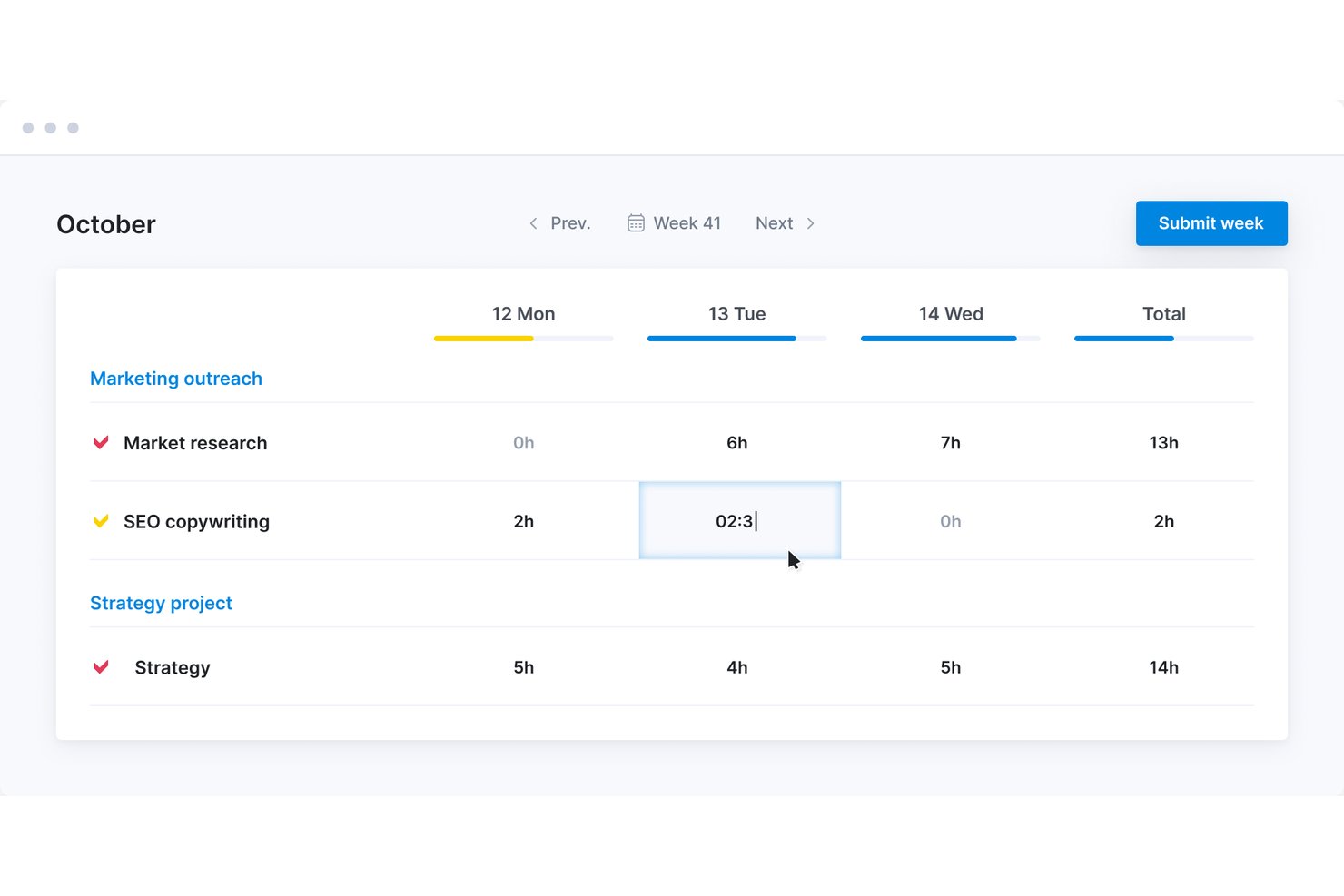
Scoro is a professional services automation platform that connects time tracking, client billing, project management, resource planning, and expense management in a single configurable system.
Who Is Scoro Best For?
Scoro fits agencies and professional services teams that manage the full cycle from quoting to invoicing and need time tracking, resource planning, and billing in one place.
Why I Picked Scoro
I picked Scoro as one of the best because it handles the entire agency billing cycle without forcing you to stitch together separate tools. What I find most compelling is how a confirmed quote converts directly into a project budget, so logged hours automatically carry the right role or service rate when it's time to invoice. I also like that you can pull billable time from multiple projects into a single client invoice, which is exactly how retainer and multi-project agency work actually runs.
Scoro Key Features
- Utilization report: Compares each team member's capacity against booked and planned work, with heatmap views and filters by role, user, project, and activity type.
- Watchdog alerts: Monitors numerical thresholds in bookmarked views, including budget burn and retainer usage, and sends email notifications when a set threshold is crossed.
- Retainer project tracking: Supports billing periods measured in days, weeks, or months, with fixed-fee, capped, and uncapped time-and-materials revenue models.
- Scheduled invoices: Generates invoices automatically at monthly, quarterly, semiannual, or annual intervals, with options to send automatically or queue for manual review.
Scoro Integrations
Scoro lists 40+ connected tools, including native integrations with Xero, QuickBooks, Stripe, Expensify, Google Calendar, Jira, HubSpot, Salesforce, and Slack. It also supports Zapier and a REST API for custom integrations.
Pros and Cons
Pros:
- Utilization views clarify workload and capacity
- Retainer billing accommodates varied client agreements
- Quote-to-invoice workflows connect logged work
Cons:
- Task and time-entry workflows take extra clicks
- Reports may need manual category-level summaries
New Product Updates from Scoro

Scoro Adds Time Mobile App and ELI Improvements
Scoro adds the Scoro Time mobile app for iOS/Android to track time anywhere and expands ELI with attachments, smarter filtering, and trigger-based actions. For more information, visit Scoro's official site.

Best for real-time activity analysis

Insightful is an AI-powered workforce intelligence platform that provides real-time visibility into employee activity and productivity. Designed for remote and hybrid teams, it uses live dashboards and automated tracking to capture work as it happens, allowing managers to instantly align resources, identify bottlenecks, and drive operational excellence without manual check-ins.
Why I Picked Insightful
I chose Insightful for its live activity monitoring, which offers an immediate view of team workflows and focus levels. Unlike traditional trackers, its automatic time mapping captures task durations in real-time, ensuring billing accuracy and reducing administrative friction. These features empower teams to make fast, data-driven decisions that prevent burnout and maximize output.
Insightful Key Features
In addition to its real-time tracking capabilities, Insightful offers many key features that enhance its value:
- Comprehensive Reporting: Generate detailed reports on productivity trends to make informed decisions and optimize workflows.
- Workflow Optimization: Tools to reclaim lost hours and improve output by identifying and addressing workload imbalances.
- InsightsAI: Uses conversational AI to generate instant, real-time reports on team performance.
Insightful Integrations
Integrations include Asana, BambooHR, GitLab, ClickUp, Jira, Trello, BigQuery, and the option for custom integrations through a public API.
Pros and Cons
Pros:
- Effective for both small and large businesses
- Strong customer support
- Customizable dashboards offer tailored views
Cons:
- Occasional syncing issues with certain integrations
- No free version available, limiting trial options
New Product Updates from Insightful
Insightful Expands MCP and HRIS Integrations
Insightful adds OAuth connections for ChatGPT and Microsoft Copilot Studio through its MCP Server, while HRIS integrations gain manager scope syncing in Beta. These updates expand AI access and automate permission management. For more information, visit Insightful’s official site.
 .

Toggl
Best for custom, actionable time reports
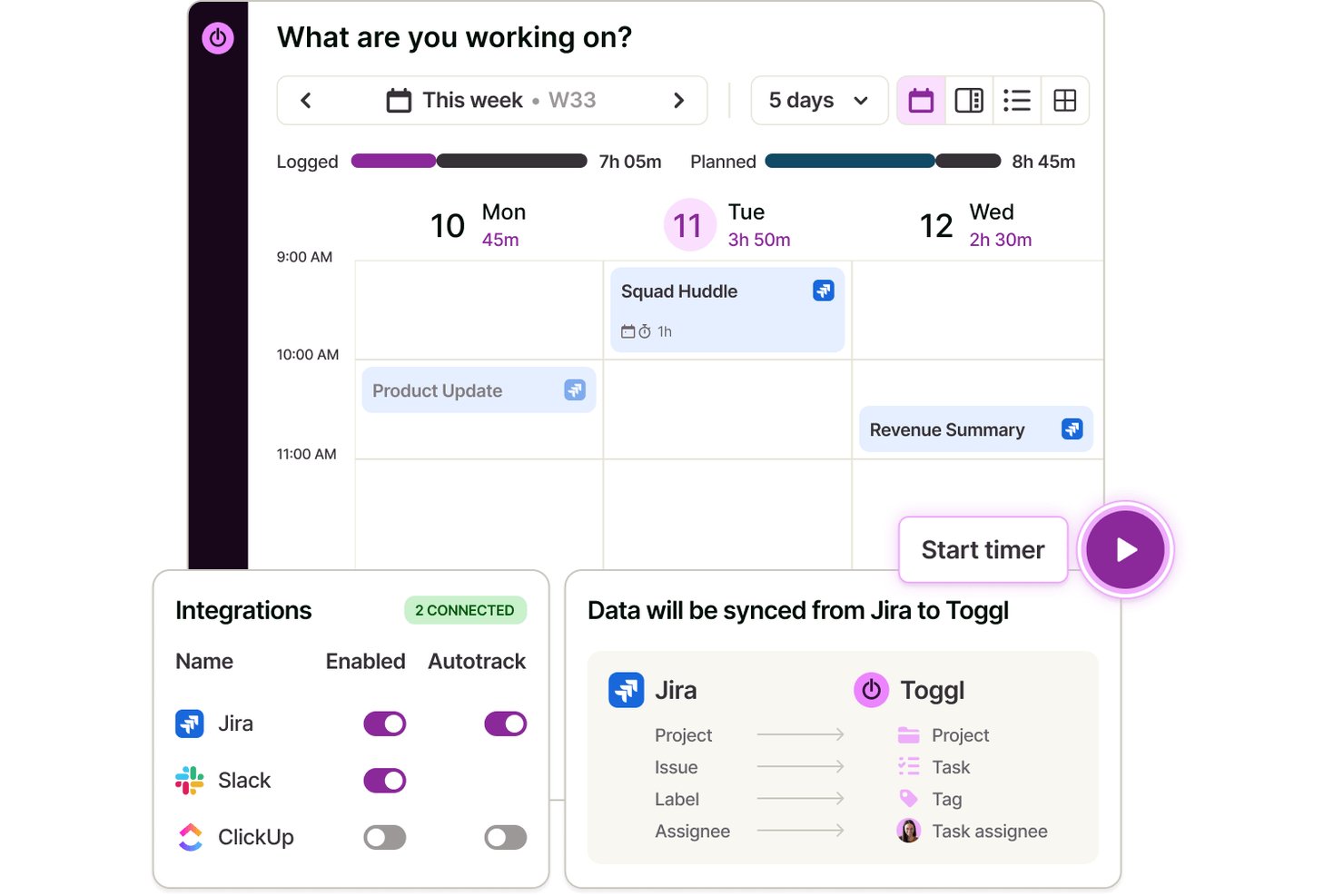
Toggl is a dedicated time tracking and billing software for managing detailed project hours, tracking billable work across clients, managing tasks, customizing team roles, and generating time, profitability, and team workload reports.
Who Is Toggl Best For?
Project-based teams, agencies, and freelancers who need flexible, granular time tracking and capacity planning across multiple clients and projects.
Why I Picked Toggl
I picked Toggl as one of the best because I rely on its custom, actionable time reports when I need to track billable time by project, client, or task. I can segment data quickly and export detailed reports for invoicing and budget reviews.
Toggl Key Features
- Automated idle detection: Identifies periods of inactivity to help maintain accurate time entries.
- Multi-device tracking: Lets you track time from desktop, mobile apps, browser extensions, and calendar integrations.
- Project, task, and client hierarchy: Organizes entries by client, project, and task for clear assignment and review across Kanban, List, Calendar, and Timeline views
- Toggl AI assistant: Gives you plain-language answers to questions around hours logged, billable vs. non-billable, projects over estimate, and more.
Toggl Integrations
Toggl offers native integrations with Asana, Jira, Google Calendar, Outlook, GitHub, Todoist, and more. It also connects with Zapier, provides an API for custom integrations, and has an MCP for connecting to Claude, Cursor, and Codex
Pros and Cons
Pros:
- Flexible billable rates by project or user
- Granular time entry with detailed reporting
- Customizable multi-project and client tracking
Cons:
- Lacks built-in payroll processing
- No recurring invoices or payment collection

actiTIME
Best for structured time tracking
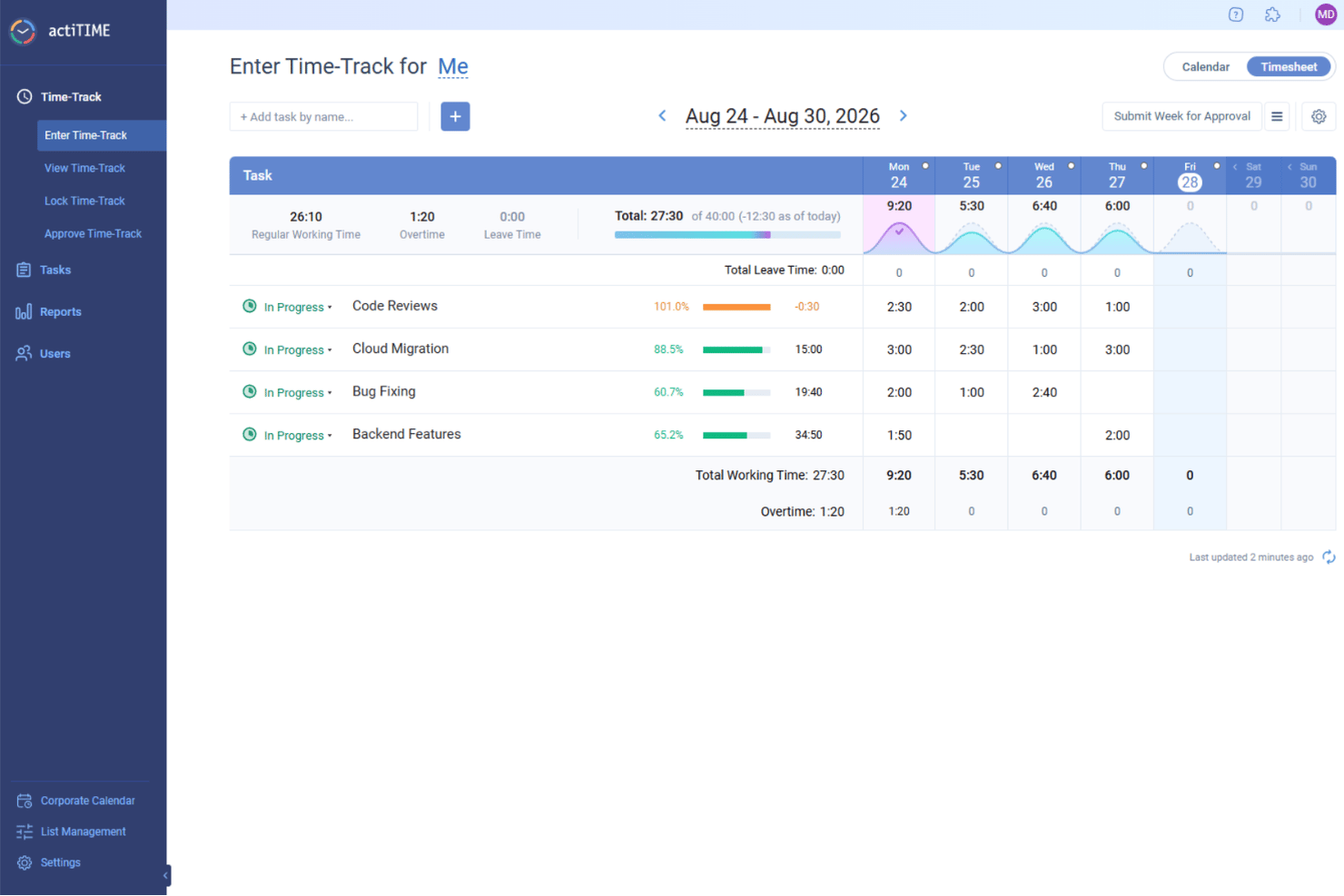
actiTIME is a versatile web-based time tracking and management tool, helping you oversee team capacity and project costs. Whether you're managing architectural projects, consulting services, or e-commerce operations, this tool helps you log hours against specific tasks, manage leave requests, and generate detailed billing reports for clients. With actiTIME, your team can focus on delivering quality work while ensuring that billing is precise and hassle-free.
Why I Picked actiTIME
I picked actiTIME because it excels in providing a structured approach to time tracking and billing, important for businesses aiming to optimize their financial management. The software's time tracking feature allows your team to log hours directly against projects, ensuring transparency and accountability. Additionally, its invoicing capabilities automatically generate invoices based on tracked time and predefined rates, reducing manual errors and saving time. These features are particularly beneficial if you're looking to maintain accurate billing records without the need for complex manual calculations.
actiTIME Key Features
In addition to its core strengths, I also found actiTIME offers several other valuable features for your team:
- Project Tracking: Monitor project progress in real-time to adhere to deadlines and budgets.
- Leave Management: Manage employee leave requests and approvals within the platform.
- Custom Workflows: Tailor workflows to match your specific business processes, improving productivity.
- Budget Tracking: Keep track of project budgets to avoid overspending and ensure financial efficiency.
actiTIME Integrations
Integrations include QuickBooks and Zapier. An API is available for custom integrations.
Pros and Cons
Pros:
- Offline mobile time tracking
- Automates billing workflow
- Highly customizable reporting widgets
Cons:
- Limited native integration options
- Lacks advanced project templates
New Product Updates from actiTIME

actiTIME Visual Hour Indicator and Time-Track Report Redesign
actiTIME adds a wave-style hour indicator to the Timesheet and Calendar views and refreshes the Time-Track report for smoother navigation and clearer visuals. For more information, visit actiTIME's official site.

TimeTrex
Best for payroll and tax automation

TimeTrex is a workforce management platform that combines time tracking, payroll processing, scheduling, and attendance management in one system. It supports web, mobile, and biometric clock-ins, helping businesses track employee hours accurately and connect that data directly to payroll and labor costs.
Who Is TimeTrex Best For?
TimeTrex is a strong fit for mid-sized to large businesses that manage hourly employees, especially those with multiple locations or more complex payroll and compliance needs.
Why I Picked TimeTrex
TimeTrex stands out for how tightly it connects time tracking with payroll processing. Hours worked flow directly into payroll calculations, including wages, deductions, and tax withholdings. It also supports tax reporting, which helps reduce the need for separate systems or manual data handling. For teams managing large hourly workforces, this setup makes payroll more efficient and keeps labor data consistent across the board.
TimeTrex Key Features
- Time tracking: Record employee hours through web, mobile, or physical time clock devices.
- Payroll processing: Automate wage calculations, deductions, and tax withholdings based on tracked time.
- Shift scheduling: Create and manage employee schedules, assign shifts, and handle availability.
- Attendance management: Monitor attendance, track absences, and manage leave accruals.
- Reporting and analytics: Generate reports on hours worked, overtime, and labor costs for better decision-making.
TimeTrex Integrations
TimeTrex natively integrates with QuickBooks, Sage, ADP, and Paychex. It also offers an API for custom integrations.
Pros and Cons
Pros:
- Built-in employee self-service and HR tools
- In-depth labor cost and compliance reporting
- Automatic syncing between attendance and payroll
Cons:
- Payroll tax automation is limited to specific countries
- Interface and reports can feel dated
New Product Updates from TimeTrex
TimeTrex Redesigns Workforce Management With New Payroll, Scheduling, and AI Tools
TimeTrex redesigns its workforce management experience with new dashboards, scheduling and timesheet tools, a rebuilt payroll workflow, and expanded AI assistance. These updates give teams more flexible ways to manage schedules, payroll, reporting, and employee data. For more information, visit TimeTrex’s official site.
 .

Clockify
Best for scalable workspace controls
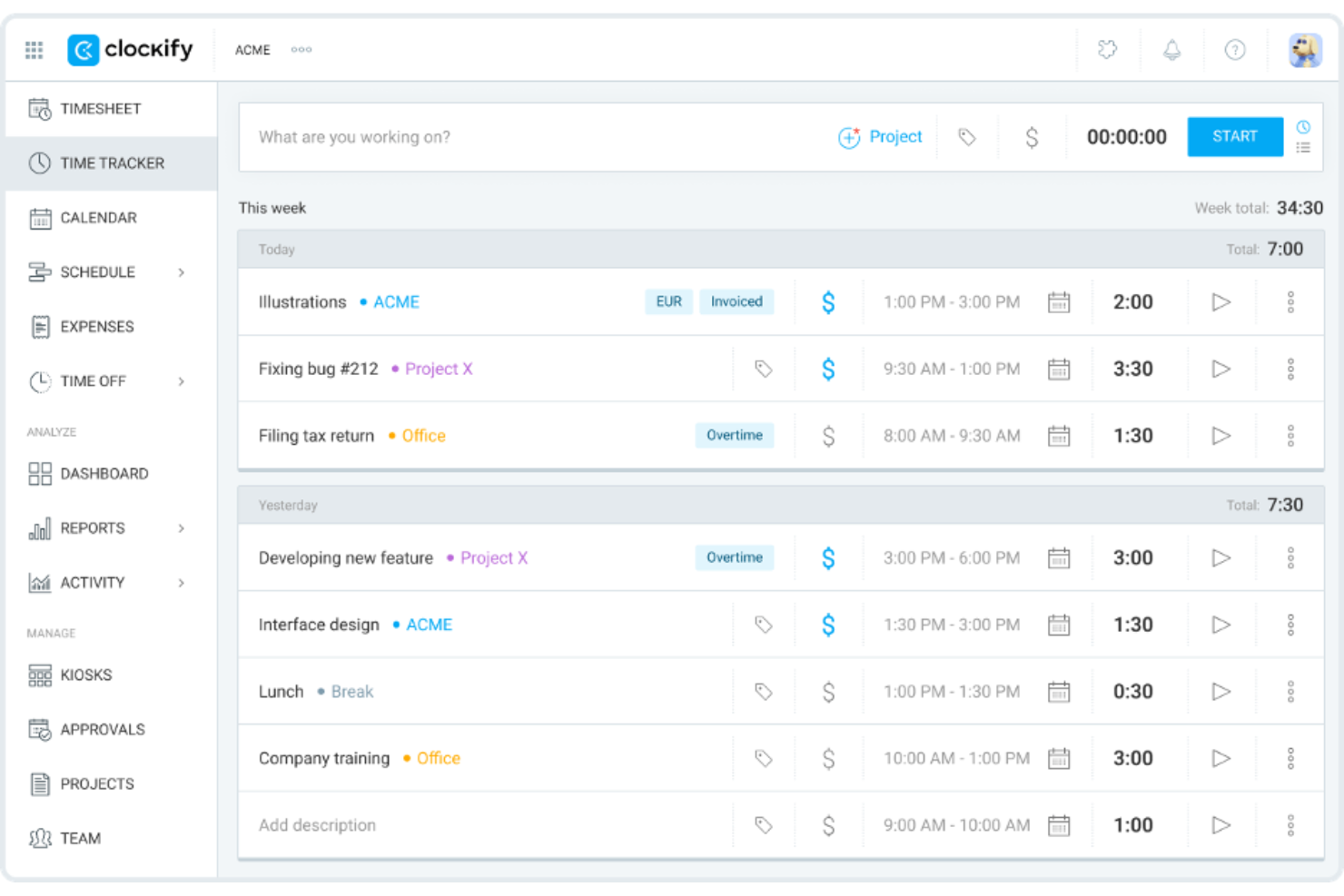
Clockify is a time tracking and billing software that caters to businesses of all sizes. It helps teams track work hours, manage projects, and generate reports for client billing.
Why I picked Clockify: This tool is a good fit for teams of any size because it offers unlimited user access, making it scalable for growing businesses. You can track hours across projects without worrying about user limits. Clockify provides detailed reporting features that help you analyze productivity and project costs. It also has an intuitive interface, so your team can start tracking time on it immediately without needing additional training.
Standout Features and Integrations:
Features include customizable time entries, allowing you to adjust and categorize time as needed. The dashboard provides a visual overview of team time, team activities, and project progress. You can also set hourly rates for different team members.
Integrations include Asana, Trello, Jira, QuickBooks, Zapier, Google Calendar, Microsoft Outlook, monday.com, and more.
Pros and Cons
Pros:
- Scalable and flexible controls for growing teams
- Bulk time-entry editing for fast cleanup
- Extensive free plan with generous features
Cons:
- Limited time-entry support for large volumes of data
- Limited invoice customization

Best for QuickBooks integration

QuickBooks Time is a time tracking and billing software designed for businesses that already use QuickBooks for accounting. It helps teams track time, manage payroll, and coordinate scheduling efficiently.
Why I picked QuickBooks Time: It integrates with QuickBooks, making it an excellent choice for businesses already using QuickBooks for their accounting needs. You can transfer time tracking data to QuickBooks for accurate payroll processing. With the scheduling features, you can assign shifts and notify team members to keep everyone on the same page. GPS tracking supports employee monitoring, as it allows you to verify employee locations, which is useful for businesses with mobile workforces.
Standout Features and Integrations:
Features include customizable alerts that remind your team to clock in and out, which can help reduce the number of missed punches. The platform offers detailed timesheet reports that provide insights into team productivity. Its mobile app allows employees to track time while on the go.
Integrations include Sage Intacct, Namely, Xero, and more.
Pros and Cons
Pros:
- Offers strong crew-management features
- Includes field-service-friendly tools
- Built for QuickBooks integration
Cons:
- Overtime calculations can be inconsistent for complex teams
- Limited to QuickBooks users

Timely
Best for automatic, AI-powered time tracking

Timely is a time tracking and billing software that caters to professionals who need accurate tracking without manual input. It automates time tracking, making it a strong fit for freelancers and teams who want to focus on work rather than logging hours.
Why I picked Timely: Timely's automatic tracking feature captures time spent on various tasks without requiring manual entries, which helps reduce the chance of error. You can review and approve tracked hours before billing. The visual timeline allows you to see how your time is distributed across projects, helping you manage your workload. Timely also offers project budgeting tools, so you can keep track of project costs and stay within budget.
Standout Features and Integrations:
Features include memory tracking, which logs all your work activities and creates a detailed timeline. The project dashboard gives you a quick overview of project progress and time allocation. You can also set notifications to remind you of tasks and deadlines.
Integrations include Slack, Google Calendar, Asana, Trello, Jira, Zapier, Xero, and more.
Pros and Cons
Pros:
- Memory-based timeline feature
- Strong privacy controls
- Automatic time tracking
Cons:
- Limited control over data organization
- Task-planning features not included

My Hours
Best for unlimited project tracking

My Hours is a time tracking and billing software suitable for teams that need to manage multiple projects. It allows users to track time, manage tasks, and handle client billing.
Why I picked My Hours: My Hours is a good fit for teams balancing multiple projects, offering features such as project time tracking and task tracking that cater to extensive workloads. You can create detailed reports to analyze project profitability. The software's task management capabilities can help you keep organized and stay on top of deadlines. It also offers customizable billing options, allowing you to tailor invoices to each client.
Standout Features and Integrations:
Features include project profitability analysis, which helps you prioritize projects based on labor rates and expenses. Expense tracking allows you to attach files and generate reports for invoicing. The payroll management system can be used to track attendance and time off, supporting accurate payroll processing.
Integrations include QuickBooks, Zapier, Google Calendar, Microsoft Teams, Asana, Jira, Xero, and more.
Pros and Cons
Pros:
- Flexible rate structure
- Actionable profitability and efficiency insights
- Task-grouping organization system
Cons:
- Mobile performance is inconsistent
- Limited support for compliance-oriented tracking

TimeCamp
Best for freelancers and consultants

TimeCamp is a time tracking and billing software designed for freelancers and small businesses. It helps track billable hours, manage projects, and generate invoices.
Why I picked TimeCamp: Freelancers may benefit from its ability to automatically track time spent on tasks, which supports accurate billing for every minute worked. You can categorize time entries by project and client to organize your workload. The invoicing feature allows you to create professional invoices directly from tracked hours. TimeCamp also offers productivity tracking, giving insights into how well you manage your time.
Standout Features and Integrations:
Features include idle time detection, which pauses tracking when no activity is detected. You can set goals for projects to help you stay focused and productive. The reporting feature provides detailed insights into time usage, aiding in better time management and planning.
Integrations include Trello, Asana, Slack, monday.com, Jira, QuickBooks, Xero, GitHub, Google Calendar, and more.
Pros and Cons
Pros:
- Built-in productivity scoring
- Idle time detection
- Color-coded timesheets
Cons:
- Access controls are limited for complex team hierarchies
- Automatic tracking rules require frequent tuning
Outros softwares de controlo de tempo e faturação
Eis algumas opções adicionais de software de controlo de tempo e faturação que não entraram na minha seleção, mas que vale a pena conhecer:
- Everhour
For Asana integration
- TMetric
For real-time cost and time-burn insights
- TimeSolv
For matter-based billing and trust accounting
- Harvest
For small team collaboration
- Bill4time
For custom rate models
- TimeTracker by eBillity
For court-compliant timekeeping
- Paymo
For a unified workspace for distributed teams
- Avaza
For client-facing team collaboration
- FunctionFox
For creative teams
- ClickTime
For custom dashboards
- Hubstaff
For GPS tracking and activity metrics
- Zoho Invoice
For multi-currency support
- Xero
For project accounting


How I Evaluate Time Tracking and Billing Software
I evaluate every tool across two layers: the baseline features a project manager needs to move from time log to client invoice, and the differentiators that separate good tools from great ones.
Core Functionality (Table Stakes For This List)
When I'm selecting tools for my list, I rank each one on a scale from 0 (does not offer the functionality) to 5 (excels in this area) for each core functionality listed below. Then, I calculate the tool's total score into a percentage. Each tool needs to achieve a minimum total score of 65% to be considered for inclusion.
- Time Tracking Methods: I look for flexible input options—timers, manual entry, timesheets—and check whether entries can be tagged to specific projects, tasks, and clients.
- Invoicing & Billing: The tool should convert tracked hours into client-ready invoices, with support for branded templates, tax line items, and multi-currency billing.
- Project & Client Organization: I evaluate how each platform structures work, looking for a clear hierarchy where time entries roll up from tasks to projects to clients.
- Billable Rate Configuration: Rate flexibility matters—tools should handle hourly, fixed-fee, and retainer models with the ability to set rates per user, project, or task.
- Reporting & Budget Tracking: I check for reports that surface billable utilization, project budget burn, and profitability so you can catch overruns before they hit margins.
- Payment & Accounting Integration: Native connections to platforms like QuickBooks, Xero, or Stripe close the loop from logged hours to collected revenue.
Once I have a list of tools that meet this criteria, I consider what sets each platform apart.
Differentiating Factors (What Sets Vendors Apart)
Here's how I compare and contrast different vendors:
Standout Features
Approval workflows matter a lot when a team of ten is logging hours across multiple clients—you need multi-tier timesheet reviews before anything lands on an invoice. I also check for expense and mileage tracking, since reimbursable costs often get billed alongside hours and shouldn't require a separate tool. Retainer management is another differentiator, especially for agencies juggling prepaid hour blocks that need automated drawdown visibility.
Beyond Features
Ecosystem fit is high on my list—I look at whether a tool syncs with the PM and accounting platforms your team already uses, like Jira, Asana, QuickBooks, or Xero. Pricing structure also shapes my evaluation, particularly whether plans scale by user count or feature tier as your team grows. Finally, mobile access matters for consultants who log time on-site or between meetings, so I check for full-featured apps with offline entry that syncs when connectivity returns.
Como escolher software de controlo de tempo e faturação
É fácil ficar preso a longas listas de funcionalidades e estruturas de preços complexas. Para o ajudar a manter-se concentrado enquanto avança no seu processo específico de seleção de software, eis uma lista de fatores a ter em conta:
| Fator | O que considerar |
| Escalabilidade | O software acompanhará o crescimento da sua empresa? Considere o número de utilizadores que suporta e se consegue lidar com um aumento de dados à medida que a sua equipa cresce. Procure ferramentas que ofereçam modelos de preços flexíveis para a expansão. |
| Integrações | A ferramenta integra-se com os seus sistemas existentes? Verifique a compatibilidade com ferramentas de gestão de projetos, contabilidade e comunicação para apoiar uma integração fluida dos fluxos de trabalho. |
| Possibilidade de personalização | Pode adaptar o software às suas necessidades específicas? Procure opções para personalizar relatórios, painéis e modelos de faturação de acordo com os processos da sua empresa. |
| Facilidade de utilização | A interface é intuitiva? Teste o software para verificar se é fácil de utilizar e navegar pela sua equipa sem necessidade de formação extensiva. Sistemas complicados podem atrasar a adoção e reduzir a produtividade. |
| Implementação e integração inicial | Com que rapidez pode começar? Avalie os recursos disponibilizados para a integração inicial, como tutoriais e assistência, para apoiar uma transição fluida sem interromper as suas operações. |
| Custo | O preço enquadra-se no seu orçamento? Compare os planos de preços e verifique se existem custos ocultos. Considere os custos a longo prazo e se as funcionalidades disponibilizadas justificam o preço. |
| Medidas de segurança | Quão seguros estão os seus dados? Procure normas de encriptação, opções de cópia de segurança dos dados e conformidade com os regulamentos de proteção de dados para proteger informações sensíveis. |
| Disponibilidade do apoio | Existe ajuda quando precisa dela? Confirme a disponibilidade das opções de apoio ao cliente, como chat em direto, telefone e assistência por e-mail, especialmente durante o seu horário de trabalho. |
O que é o software de controlo de tempo e faturação?
O software de controlo de tempo e faturação é uma ferramenta que ajuda as empresas a monitorizar as horas de trabalho e a gerar faturas. Profissionais como freelancers, consultores e proprietários de pequenas empresas utilizam estas ferramentas para melhorar a precisão da faturação e gerir projetos de forma eficiente. As funcionalidades de controlo de tempo, faturação e elaboração de relatórios apoiam uma faturação e uma gestão de projetos precisas. Em última análise, estas ferramentas permitem poupar tempo e reduzir a carga de trabalho administrativo.
Funcionalidades
Ao selecionar um software de controlo de tempo e faturação, esteja atento às seguintes funcionalidades essenciais:
- Controlo de tempo: Registe automaticamente as horas dedicadas às tarefas, ajudando a manter uma faturação e uma gestão do tempo precisas.
- Faturação: Gere faturas diretamente a partir do tempo registado, simplificando o processo de faturação e reduzindo os erros manuais.
- Controlo do orçamento: Monitorize as despesas dos projetos e receba alertas quando se aproximar dos limites orçamentais, ajudando-o a gerir as finanças.
- Relatórios: Obtenha informações sobre a utilização do tempo e os custos dos projetos, apoiando a tomada de decisões e a análise da produtividade.
- Gestão de despesas: Registe as despesas relacionadas com os projetos para apoiar uma faturação precisa e uma supervisão financeira eficaz.
- Modelos personalizáveis: Adapte as faturas e os relatórios de tempo às necessidades da sua empresa, aumentando o profissionalismo e a clareza.
- Acesso móvel: Permita o controlo do tempo e a faturação em qualquer lugar, apoiando a flexibilidade e a conveniência do trabalho remoto.
- Integrações: Ligue-se a outras ferramentas, como software de gestão de projetos e contabilidade, melhorando os fluxos de trabalho e a partilha de dados.
- Alertas e notificações: Lembre os utilizadores das tarefas e dos prazos, ajudando a manter os projetos no bom caminho e a reduzir as oportunidades de faturação perdidas.
- Medidas de segurança: Proteja os dados sensíveis através de encriptação e do cumprimento dos regulamentos de proteção de dados, para maior tranquilidade.
Vantagens
A implementação de um software de controlo de tempo e faturação proporciona várias vantagens à sua equipa e à sua empresa. Eis algumas das que pode esperar:
- Maior precisão: O registo automático das horas reduz os erros manuais e valida a precisão do tempo faturável.
- Poupança de tempo: A geração de faturas diretamente a partir do tempo registado reduz as tarefas administrativas, libertando mais tempo para o trabalho produtivo.
- Melhor supervisão financeira: O controlo do orçamento e a gestão de despesas ajudam-no a acompanhar de perto os custos dos projetos, evitando derrapagens orçamentais.
- Aumento da produtividade: As funcionalidades de elaboração de relatórios fornecem informações sobre a forma como o tempo é utilizado, permitindo-lhe identificar áreas a melhorar.
- Maior flexibilidade: O acesso móvel permite-lhe controlar o tempo e as despesas a partir de qualquer lugar, apoiando o trabalho remoto e móvel.
- Profissionalismo: Os modelos personalizáveis para faturas e relatórios ajudam a manter uma imagem profissional junto dos clientes.
- Segurança dos dados: As medidas de segurança protegem as informações sensíveis, proporcionando tranquilidade relativamente à privacidade dos dados.
Custos e preços
A seleção de software de controlo de tempo e faturação requer uma compreensão dos vários modelos de preços e planos disponíveis. Os custos variam consoante as funcionalidades, o tamanho da equipa, os complementos e muito mais. A tabela abaixo resume os planos comuns, os seus preços médios e as funcionalidades normalmente incluídas nas soluções de software de controlo de tempo e faturação:
Tabela de comparação de planos para software de controlo de tempo e faturação
| Tipo de plano | Preço médio | Funcionalidades comuns |
| Plano gratuito | $0 | Controlo básico do tempo, projetos limitados e relatórios simples. |
| Plano pessoal | $4-$15/utilizador/mês | Controlo do tempo, faturação, gestão de projetos e relatórios básicos. |
| Plano empresarial | $7-$30/utilizador/mês | Relatórios avançados, integrações, controlo do orçamento e gestão de despesas. |
| Plano empresarial de grande dimensão | $12-$70/utilizador/mês | Funcionalidades personalizáveis, suporte dedicado, medidas de segurança e ferramentas de conformidade. |
Perguntas frequentes sobre software de controlo de tempo e faturação
Eis algumas respostas a perguntas frequentes sobre software de controlo de tempo e faturação:
Como é que o software de controlo do tempo garante a exatidão dos dados?
O software de controlo do tempo garante a exatidão dos dados ao registar automaticamente as horas à medida que trabalha, reduzindo os erros de introdução manual. Algumas ferramentas disponibilizam funcionalidades como a deteção de inatividade e lembretes para iniciar e terminar o registo de horas, o que ajuda a manter registos exatos. Além disso, pode rever e editar os registos para corrigir quaisquer discrepâncias antes de finalizar relatórios ou faturas
O software de controlo do tempo pode integrar-se com as minhas ferramentas atuais?
Sim, muitas soluções de software de controlo do tempo podem integrar-se com ferramentas populares de gestão de projetos, contabilidade e comunicação. Verifique as capacidades de integração do software para garantir a compatibilidade com os seus sistemas atuais. As integrações podem melhorar os fluxos de trabalho ao sincronizar dados entre plataformas, reduzir registos duplicados e aumentar a eficiência geral.
Os meus dados estão seguros com um software de controlo do tempo?
Sim, a maioria dos fornecedores de software de controlo do tempo reputados implementa medidas de segurança para proteger os seus dados. Procure software que disponibilize encriptação, cópias de segurança regulares dos dados e conformidade com os regulamentos de proteção de dados. É essencial escolher um fornecedor com uma sólida reputação em matéria de segurança e confirmar que as suas informações permanecerão protegidas.
Como posso escolher o software de controlo do tempo adequado para a minha empresa?
Para escolher o software adequado, comece por identificar as necessidades e os fluxos de trabalho específicos da sua equipa. Tenha em consideração fatores como as integrações, a facilidade de utilização e a escalabilidade. Teste algumas opções através de períodos de avaliação gratuitos para verificar qual se adapta melhor. Preste atenção às avaliações dos utilizadores e à disponibilidade do apoio ao cliente para garantir uma experiência tranquila.