10 Melhores Softwares de Registo de Tempo para Consultores em 2026

Melhor software de controlo de tempo para consultores


O melhor software de controlo de tempo para consultores ajuda-o a manter-se organizado, a faturar com precisão e a gerir vários clientes e prazos apertados, para que possa tirar o máximo partido do seu tempo. Sem a ferramenta de software certa, não saberá quanto tempo está a gastar em cada projeto e cliente, o que torna a faturação num pesadelo.
Durante o período em que trabalhei como gestor de projetos, utilizei muitas ferramentas de controlo de tempo e observei a forma como aumentam a produtividade e a eficiência. Para este guia, testei e analisei de forma independente as opções mais populares, para o ajudar a encontrar uma ferramenta que corresponda aos seus requisitos em termos de facilidade de utilização, funcionalidades principais e valor global.
Abaixo, apresento-lhe as principais opções e explico o que cada uma oferece, para que possa escolher a solução certa com confiança.
Why Trust Our Software Recommendations
Our team has been testing and reviewing software since 2012. As project managers ourselves, we know how difficult—and important—it is to choose the right software.
For this guide, we evaluated tools using hands-on testing and independent research, scoring tools using our selection criteria. We also draw on insights from industry thought leaders and practicing project management experts.
Our reviews reflect our human editorial judgment, not a sales pitch.
Expert reviewers:
Tabela comparativa: software de controlo de tempo para consultores
Esta tabela comparativa resume os detalhes de preços das minhas principais escolhas de software de controlo de tempo para consultores:
| Tool | Best For | Trial Info | Price | ||
|---|---|---|---|---|---|
| 1 | Best as AI for business | Free trial + Free demo available | From $8/user/month | Website | |
| 2 | Best for agency management | 14-day free trial | From $10/user/month (billed annually) | Website | |
| 3 | Best with calendar integrations for time entry | Free plan available; 30-day free trial; Free demo available | From $9/user/month | Website | |
| 4 | Best with privacy-focused time tracking | Free trial available | From $6.42/user/month (billed annually) | Website | |
| 5 | Best for simple time management | Free plan + Free trial + Free demo available | From $6/user/month | Website | |
| 6 | Best for multi-rate client billing | Free plan + 7-day trial + demo available | From $3.99/user/month (billed annually) | Website | |
| 7 | Best for automatic time tracking | Free 14-day trial + free demo available | From $9/user/month (billed annually) | Website | |
| 8 | Best for mid-sized agencies and consultancies | Free demo available | Pricing upon request | Website | |
| 9 | Best for maximizing billable utilization | 21-day free trial + free demo available | From $17/user/month (billed annually) | Website | |
| 10 | Best for expense tracking | Free trial + free plan available | From $9/user/month (billed annually) | Website |


Análises do melhor software de controlo de tempo para consultores
Eis os meus resumos detalhados do melhor software de controlo de tempo para consultores que integrou a minha seleção. Abordei as principais funcionalidades, vantagens e desvantagens, integrações e casos de utilização ideais para o ajudar a encontrar a melhor opção para si.\r\n

Best as AI for business
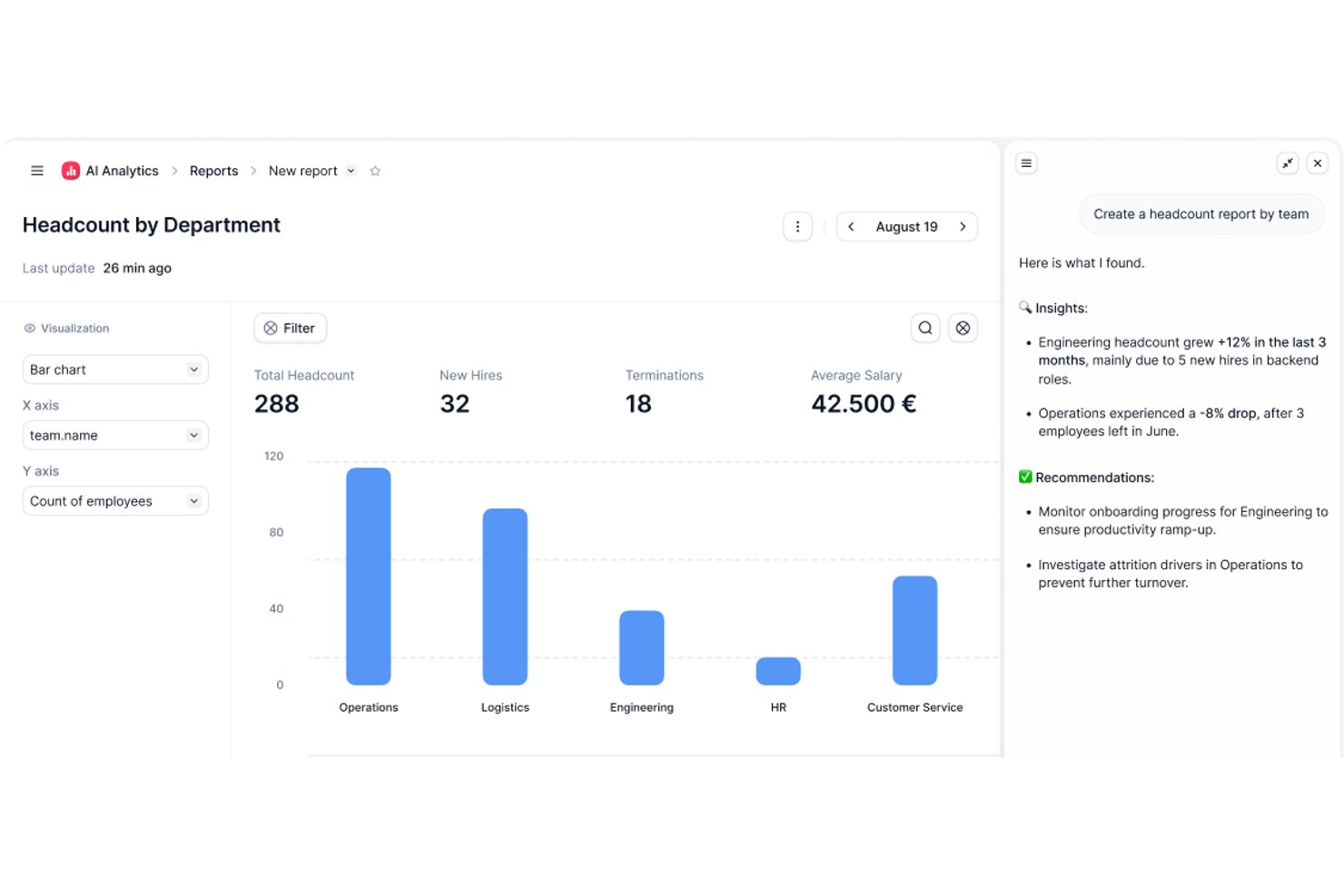
Factorial is an AI-driven HR and business operations platform that combines time tracking, shift management, timesheet approvals, and project-hour logging with AI-assisted tools for scheduling, reporting, and employee policy queries.
Who Is Factorial Best For?
Factorial suits HR and operations teams in growing companies that want AI assistance built into daily workflows like scheduling, reporting, and policy management.
Why I Picked Factorial
I've included Factorial in my top picks because its AI-driven approach to business operations brings real intelligence to daily HR and time-management workflows. I like how it uses AI to assist with scheduling, generate reports, and answer employee policy questions automatically. Consultants managing teams can track project hours, approve timesheets in bulk, and request employee e-signatures without manual chasing.
Factorial Key Features
- Project hour logging: Employees can clock into assigned projects to record hours worked against specific client engagements.
- Bulk timesheet export: Approved timesheets can be exported in bulk, with employee e-signature requests supported directly in the platform.
- Shift scheduling: Managers can build and manage team schedules using drag-and-drop planning, automated shifts, and rotating shift configurations.
- Mobile clock-in with geolocation: Employees can clock in and out via the mobile app or QR code, with geolocation and geofencing options available.
Factorial Integrations
Factorial lists marketplace integrations with Microsoft Power BI, Google Workspace, Slack, Sage 200, DATEV LODAS, and Okta. It also supports a Public API, webhooks, SDKs, OAuth 2.0, API keys, OpenAPI, and Zapier.
Pros and Cons
Pros:
- Familiar interface simplifies routine time entry
- Project-hour tracking with manager approvals
- Quick clock-ins and timesheet submissions
Cons:
- Limited analytics hinder profitability reviews
- No documented client-specific bill-rate controls

Best for agency management

Productive is a project management and time tracking tool built for agencies and service-based teams. It helps you manage projects, track time, and improve daily operations, and it’s a good fit for teams that want to work more efficiently.
Why I picked Productive: Productive combines project management and time tracking in one place. Your team can track hours and manage budgets without switching tools. The budgeting feature helps you keep project costs in check. You can also manage leads and monitor upcoming work with the sales pipeline. It’s different from other time tracking tools because it ties time tracking, project delivery, and business performance together.
Standout Features & Integrations:
Features include the ability to generate invoices directly from tracked time and project data. Productive also offers detailed analytics and insights into project performance, time usage, and profitability.
Integrations include QuickBooks, Slack, Google Calendar, Microsoft Outlook, Jira, and Xero.
Pros and Cons
Pros:
- Accurate time tracking
- Effective budgeting feature
- Seamless agency management tools
Cons:
- May need customization for specific needs
- Limited offline functionality
New Product Updates from Productive
Productive Adds Voice Dictation, Slack Connector, Proposals, and Overtime
Productive adds voice dictation, a Slack Connector, proposal controls, and overtime tracking. These updates support faster AI interactions, client proposals, and time management. For more information, visit Productive’s official site.
Toggl
Best with calendar integrations for time entry
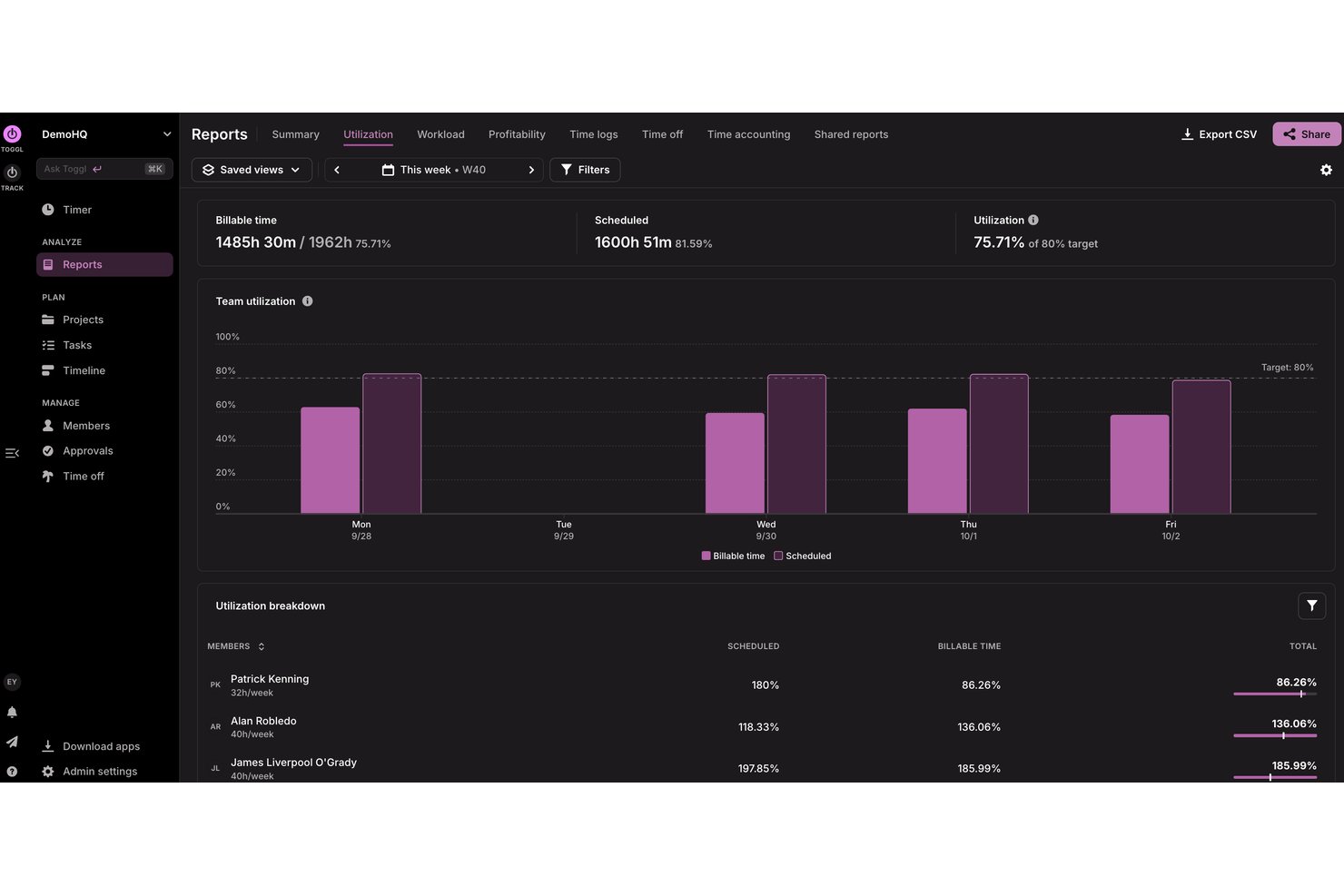
Toggl is a time tracking platform for consultants that brings together timer-based and manual time entry, capacity planning, multi-project organization, billable rate management, profitability reporting, and integrations with popular tools.
Who Is Toggl Best For?
Toggl is a strong fit for consultants and freelancers who want to capture billable time through calendar events without switching between tools.
Why I Picked Toggl
I've included Toggl in my top picks because its calendar integration is genuinely one of the best I've seen for consultants who live in Google Calendar or Outlook. You can set up keyword-based matching rules that automatically assign calendar events to the right client project, tag them as billable, and log them without any manual input. I also like that the Premium Profitability Report breaks down revenue, cost, and margin by client and project, so you always know which engagements are actually worth your time.
Toggl Key Features
- Billable rate management: Set hourly rates at the workspace, member, project, or project-member level, with historical rate retention for accurate reporting over time.
- Timesheet approvals: Submit, review, approve, or reject team timesheets with multi-layer approval support, configurable reminders, and a full audit log.
- Fixed-fee project tracking: Set a client budget for fixed-fee engagements and track logged time and rates against it to monitor spend in real time.
- AI-assisted time logging: Ask Toggl AI in plain language to log time, create projects, or update tasks directly within your workspace.
Toggl Integrations
Toggl offers native integrations with Google Calendar, Outlook Email & Calendar, Asana, Jira, Slack, GitHub, Todoist, Google Docs, Gmail, and iCal. It also provides a REST API, webhooks, an MCP server, and CLI for custom integrations.
Pros and Cons
Pros:
- Estimate-versus-actual views help catch scope drift
- Profitability reports expose engagement-level margins
- Client-project tracking keeps billable work organized
Cons:
- Invoice layouts and recurring automation remain limited
- Client approval isn't part of timesheet workflow

DeskTime
Best with privacy-focused time tracking
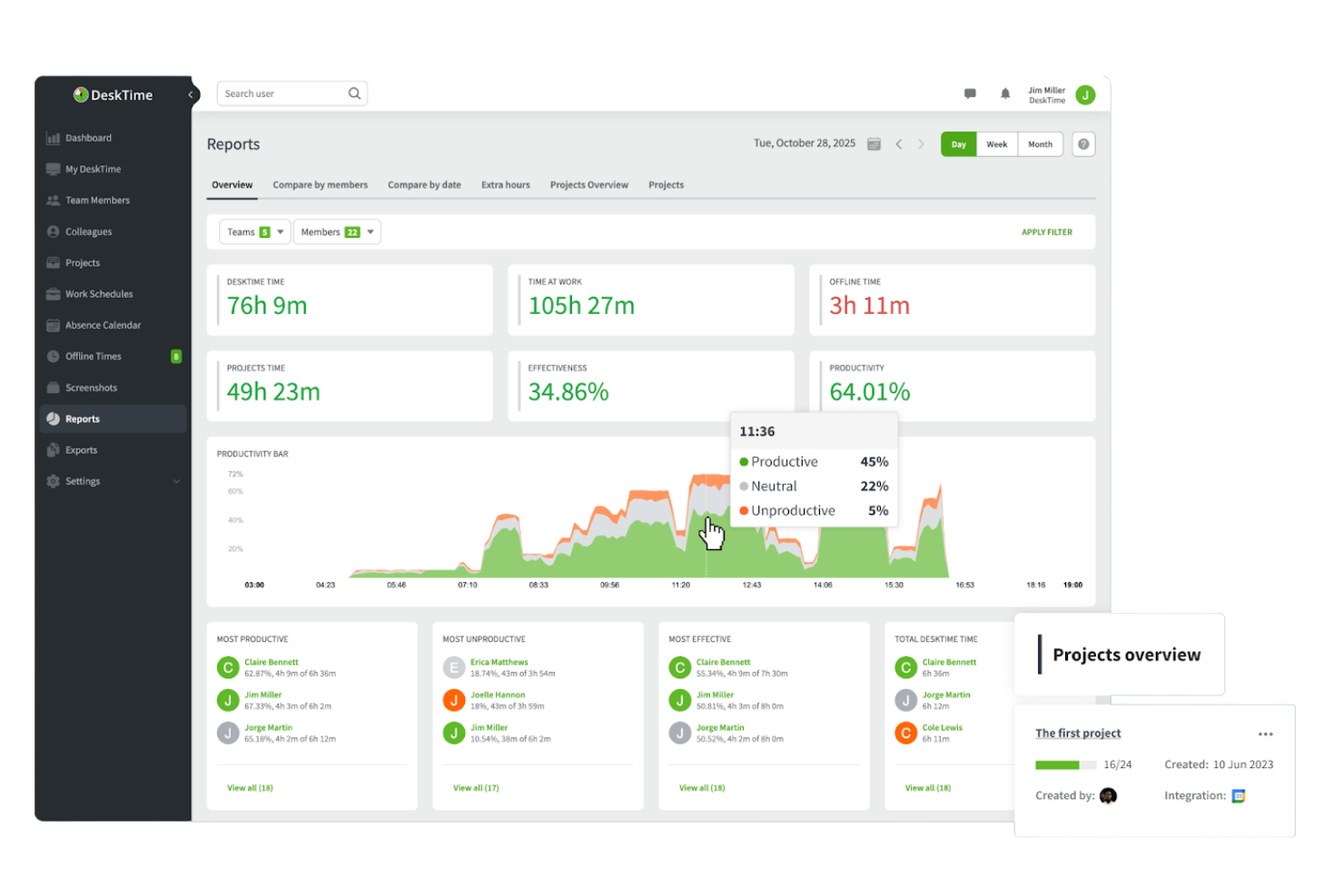
DeskTime is an automatic time tracking tool that logs billable hours, tracks application and URL usage, monitors project costs, and generates productivity reports across clients and teams.
Who Is DeskTime Best For?
DeskTime suits small consulting teams and independent consultants who need automatic, hands-off time tracking without invasive employee monitoring.
Why I Picked DeskTime
I picked DeskTime as one of the best because its approach to privacy is genuinely different from other automatic tracking tools. The Private Time feature lets users pause all monitoring with one click, so personal browsing or confidential client calls are never captured. When screenshots are on, they blur automatically before appearing on any admin dashboard. I've seen that kind of control become non-negotiable once consultants start tracking hours across sensitive client engagements.
DeskTime Key Features
- Automatic desktop time tracking: Captures all app, website, and document activity as consultants work, without manual timers.
- Project and task tracking: Lets you assign tracked time directly to projects, clients, or tasks for more detailed reporting.
- Mobile and offline time entry: Allows logging of hours when meeting on-site with clients or working away from a computer.
- Calendar integrations: Syncs with Outlook and Google Calendar to automatically log scheduled consulting appointments as time entries.
DeskTime Integrations
DeskTime offers native integrations with Jira, Asana, Trello, GitLab, and supports Zapier and an API for custom integrations.
Pros and Cons
Pros:
- Absence scheduling simplifies consultant leave management
- Private Time feature protects sensitive client sessions
- Automatic tracking catches unlogged billable hours
Cons:
- Reporting lacks per-client profitability breakdowns
- No native invoicing for client billing

actiTIME
Best for simple time management
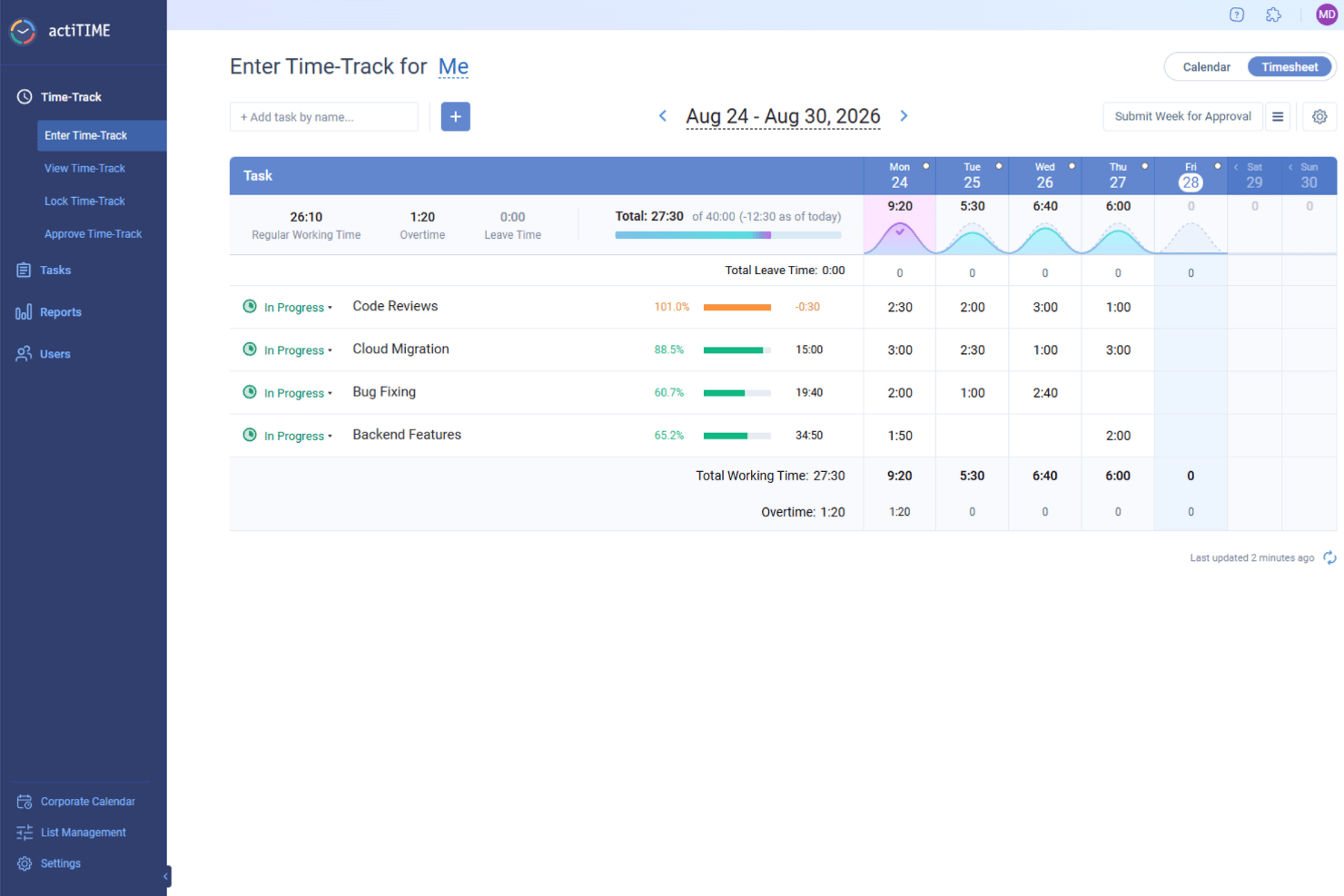
actiTIME is a time tracking and management tool for teams that want a simple way to track hours and manage projects. It’s commonly used by small to mid-sized teams that want time tracking and task management in one platform.
Why I picked actiTIME: actiTIME offers a simple approach to time management with features like manual time entries and daily timesheets. Its user-friendly interface makes it easy for your team to get started. You can set up projects and tasks quickly and stay organized easily. The reporting feature gives you clear insights into how the team’s time is spent, which you can use in decision-making.
Standout Features & Integrations:
Features include customizable billing rates that let you set different rates for different projects or clients. The task management feature helps you organize and prioritize work efficiently. actiTIME also offers time off management so you can track vacations and leaves.
Integrations include QuickBooks and Zapier.
Pros and Cons
Pros:
- Customizable billing rates
- Easy project setup
- Simple manual time entries
Cons:
- Basic user interface
- Limited advanced features
New Product Updates from actiTIME

actiTIME Visual Hour Indicator and Time-Track Report Redesign
actiTIME adds a wave-style hour indicator to the Timesheet and Calendar views and refreshes the Time-Track report for smoother navigation and clearer visuals. For more information, visit actiTIME's official site.

Clockify
Best for multi-rate client billing

Clockify is a time tracking tool used by freelancers, small teams, and larger organizations. It helps you track work hours, manage projects, and stay productive.
Why I picked Clockify: I selected Clockify because it allows consultants to set custom hourly rates for specific projects, clients, and individual team members. Independent advisors and small firms can assign distinct billable values across different tasks within the same project, ensuring accurate invoice math. This makes it ideal for consultants who need to streamline multi-rate client billing and protect project profit margins without paying for expensive enterprise software.
Standout Features & Integrations:
Features include a Pomodoro timer that encourages focused work periods. The dashboard provides a clear overview of tracked time and project progress. Clockify also offers invoicing functionality, so you can create invoices directly from tracked hours.
Integrations include Asana, Trello, Jira, Google Calendar, QuickBooks, Zapier, monday.com, and Basecamp.
Pros and Cons
Pros:
- Detailed reporting capabilities
- Scalable for growing teams
- Five users on free plan
Cons:
- May require manual adjustments
- Basic features in free version

Timely
Best for automatic time tracking

Timely is an automatic time tracking tool designed for consultancies, agencies, and SaaS teams. It features memory tracking and AI-generated timesheets which help improve time management and boost operational efficiency.
Why I picked Timely: Timely uses automatic tracking to take the pressure off your team when it comes to logging hours. The memory tracker records work in the background, and AI features can build out timesheets for you. You get a clear view of where your time goes without chasing team members for updates. It’s different from other time tracking tools because it maintains accuracy and doesn’t require you to micromanage your team.
Standout Features & Integrations:
Features include project dashboards that offer a clear view of your team's workload and progress. Invoicing capabilities help you manage billing and convert tracked hours into invoices. Detailed reporting offers insights into time usage so you can make informed decisions.
Integrations include Asana, Trello, Google Calendar, Microsoft Teams, Slack, QuickBooks, Zapier, Zoom, Jira, and Outlook.
Pros and Cons
Pros:
- Detailed memory tracking
- AI-generated timesheets
- Automatic time tracking
Cons:
- May require manual adjustments
- Limited offline capabilities

Forecast
Best for mid-sized agencies and consultancies

Forecast is an AI-powered project and resource management tool designed to help consultants manage time, projects, and financials in one platform. Its AI-assisted time tracking captures hours automatically, reducing manual input and improving billing accuracy. The tool also supports project planning, resource allocation, and financial tracking, making it a comprehensive choice for consulting teams.
Why I picked Forecast: I picked Forecast because its AI-powered time tracking removes the need for manual timesheets while giving you real-time visibility into how your team’s hours are spent. You can spot risks early with predictive alerts and use utilization reports to balance workloads. Unlike other tools, Forecast ties time tracking directly into budgeting and project delivery, so you can keep margins healthy while staying on schedule.
Standout Features & Integrations:
Features include automated time tracking, risk prediction alerts, and real-time project dashboards. Forecast also offers resource optimization and budget management to help you prevent bottlenecks and maintain financial control.
Integrations include Salesforce, HubSpot, Pipedrive, Slack, Google Calendar, MS Teams, Zapier, Trello, Jira Cloud, QuickBooks, Xero, and Sage Intacct.
Pros and Cons
Pros:
- Strong resource planning tools
- Predictive risk management
- Accurate AI time tracking
Cons:
- Limited reporting depth
- Steep learning curve

Best for maximizing billable utilization

Projectworks is a cloud-based PSA platform designed specifically for consulting firms. It combines time and expense tracking, resource planning, and financial reporting to help teams stay profitable and on schedule. With features tailored to consulting workflows, Projectworks can give you full visibility into utilization rates and project margins.
Why I picked Projectworks: I picked Projectworks because it helps you maximize billable hours while reducing admin overhead. The live time and expense tracking makes it easy to keep client billing accurate, and the utilization dashboards give you a clear view of workload distribution across projects. I also like that it integrates directly with accounting tools like Xero and QuickBooks, so invoicing stays smooth and financials are always up to date.
Projectworks standout features and integrations:
Features include resource planning tools that help you allocate staff effectively, automated invoicing to reduce billing errors, and real-time project reporting so you always know where projects stand financially. Consultants can also track reimbursable expenses alongside time entries, ensuring full cost visibility.
Integrations include Xero, QuickBooks, HubSpot, Salesforce, 12d Synergy, MYOB, Jira, Azure DevOps, Employment Hero, Zapier, direct data connections, and API connections.
Pros and Cons
Pros:
- Automated invoicing
- Strong utilization insights
- Accurate real-time tracking
Cons:
- Initial setup takes time
- Limited reporting customization

Harvest
Best for expense tracking

Harvest is a time tracking and expense management tool used by freelancers and small to mid-sized teams. It helps track time, manage costs, and keep better control over projects.
Why I picked Harvest: Harvest makes it easy to track expenses and keep project costs organized. Your team can log expenses quickly using a simple interface. Time tracking and invoicing are built in, so billing stays accurate. Reports combine time and expense data to help you make better financial decisions. It’s different from other time tracking tools because it brings time, cost, and billing together in one place.
Standout Features & Integrations:
Features include the ability to generate detailed invoices directly from tracked time and expenses. The project budgeting feature helps you monitor project financials and stay within budget. Harvest also lets you review and approve logged time easily.
Integrations include QuickBooks, Slack, Asana, Trello, Xero, Stripe, Zapier, Google Calendar, Basecamp, and GitHub.
Pros and Cons
Pros:
- Timesheet approval process
- Detailed invoicing features
- Effective expense management
Cons:
- Can be expensive for large teams
- Limited customization options
Outro software de controlo de tempo para consultores
Eis algumas opções adicionais de software de controlo de tempo para consultores que não integraram a minha seleção, mas que ainda assim vale a pena conhecer:\r\n
- FunctionFox
For creative teams
- Ravetree
For all-in-one project management
- ProWorkflow
For project collaboration
- Timogix
For user-friendly interface
- Insightful
For automatic time mapping
- Resource Guru
For resource scheduling
- Accelo
For project-level tracking of time & costs
- GoodDay
With customizable dashboards
- Kantata
For professional services teams
- Runn
For real-time forecasting
- Asana
For task management
- Wrike
For cross-team collaboration
- TimeCamp
For automatic activity tracking
- Jibble
For attendance tracking
- ClickUp
For all-in-one productivity
- Hubstaff
For remote team management
- TMetric
For detailed time reports
- Rocketlane
For project delivery
- monday.com
For customizable workflows


How I Evaluate Time Tracking Software for Consultants
I split my evaluation into two layers: the baseline features every tool must have—like client-level billing rates and timesheet approvals—and the differentiators that set the best options apart.
Core Functionality (Table Stakes For This List)
When I'm selecting tools for my list, I rank each one on a scale from 0 (does not offer the functionality) to 5 (excels in this area) for each core functionality listed below. Then, I calculate the tool's total score into a percentage. Each tool needs to achieve a minimum total score of 65% to be considered for inclusion.
- Billable Hours Tracking: I check whether a tool lets you distinguish billable from non-billable hours and set different rates per client, project, or consultant role.
- Client & Project Structuring: Every consulting engagement has layers, so I look for tools that organize time by client, project, phase, and task.
- Invoicing From Time Entries: I evaluate how each tool converts logged hours into client invoices, whether natively or through direct accounting integrations.
- Timesheet Approvals & Submission: Approval workflows matter when billing clients, so I look for structured submit-and-approve flows with entry locking.
- Budget & Utilization Reporting: I look for reports that show budget burn, utilization rates, and per-client profitability rather than just raw hour totals.
- Project Management Integration: Consultants live in PM tools, so I evaluate whether time entries connect to tasks and milestones in platforms like Asana or Jira.
Once I have a list of tools that meet this criteria, I consider what sets each platform apart.
Differentiating Factors (What Sets Vendors Apart)
Here's how I compare and contrast different vendors:
Standout Features
Automatic time capture is a real differentiator—tools that log activity from calendars, apps, and meetings in the background help consultants recover hours they'd otherwise forget to bill. I also evaluate whether a platform offers client portal access, where clients can review logged time and approve entries directly. For firms managing ongoing engagements, retainer and fixed-fee tracking matters because it lets you monitor burn-down rates and flag clients before a balance runs out.
Beyond Features
Integrations with accounting tools like QuickBooks and Xero matter because consultants need logged hours to flow into invoicing without manual re-entry. I also evaluate firm size fit—a solo consultant needs a same-day setup and a lightweight interface, while a 50-person firm needs multi-level approvals and portfolio-level views. Pricing transparency is another factor I check, particularly whether free tiers or trials give independent consultants enough room to validate the tool before committing.
Como escolher software de controlo de tempo para consultores
É fácil ficar atolado em listas extensas de funcionalidades e estruturas de preços complexas. Para o ajudar a manter-se concentrado enquanto conduz o seu processo específico de seleção de software, eis uma lista de verificação dos fatores a ter em conta:
| Fator | O que considerar |
|---|---|
| Escalabilidade | O software consegue acompanhar o crescimento da sua equipa? Considere se suporta o número de utilizadores de que prevê necessitar à medida que a sua empresa cresce. Procure opções que ofereçam níveis de preços flexíveis. |
| Integrações | O software liga-se às ferramentas que já utiliza? Certifique-se de que se integra com as suas plataformas de gestão de projetos, contabilidade e comunicação. Isto poupa tempo e reduz a introdução manual de dados. |
| Personalização | Pode adaptar o software aos seus fluxos de trabalho? Verifique se pode personalizar relatórios, painéis e permissões de utilizador. Esta flexibilidade pode tornar a ferramenta mais eficaz para as suas necessidades específicas. |
| Facilidade de utilização | O software é intuitivo para a sua equipa? Procure uma interface fácil de utilizar que minimize a curva de aprendizagem. Considere agendar uma demonstração para verificar com que facilidade a sua equipa consegue utilizar a plataforma. |
| Implementação e integração inicial | Com que rapidez a sua equipa pode começar a trabalhar? Avalie se o fornecedor disponibiliza recursos de formação, como vídeos ou tutoriais, para facilitar uma transição tranquila. |
| Custo | O software está dentro do seu orçamento? Compare os planos de preços e tenha em conta quaisquer custos ocultos. Procure uma solução que equilibre o custo com as funcionalidades de que necessita. |
| Medidas de segurança | Como protege o software os seus dados? Verifique se oferece encriptação, cópias de segurança regulares e conformidade com os regulamentos de proteção de dados. |
| Disponibilidade do apoio | Que opções de apoio estão disponíveis? Considere se o fornecedor oferece apoio 24 horas por dia, 7 dias por semana, chat em direto ou assistência telefónica, especialmente se a sua equipa trabalhar em diferentes fusos horários. |
O que é o software de controlo de tempo para consultores?
O software de controlo de tempo para consultores é um tipo de ferramenta de software utilizada para registar horas faturáveis e gerir o tempo dos projetos. É utilizado por consultores, trabalhadores independentes e pequenas equipas para melhorar a precisão da faturação e a produtividade.
Funcionalidades essenciais, como o registo de tempo, a faturação e os relatórios, ajudam a melhorar a gestão e o acompanhamento do tempo nos seus projetos e ajudam-no, a si e à sua equipa, a tirar o máximo partido do seu tempo e dos seus recursos.
Funcionalidades do software de controlo de tempo para consultores
Ao escolher software de controlo de tempo para consultores, esteja atento às seguintes funcionalidades essenciais:
- Registo de tempo: Permite acompanhar com precisão as horas faturáveis e registar todo o trabalho realizado para os clientes.
- Faturação: Gera faturas diretamente a partir do tempo registado, simplifica o processo de faturação e poupa tempo.
- Relatórios: Fornece informações sobre a utilização do tempo e o progresso dos projetos, para que possa tomar decisões fundamentadas.
- Acompanhamento de despesas: Monitoriza as despesas relacionadas com os projetos e ajuda-o a controlar os custos e a manter-se dentro do orçamento.
- Integrações: Liga-se a outras ferramentas, como software de gestão de projetos e de contabilidade, para melhorar os seus fluxos de trabalho.
- Painéis personalizáveis: Permite adaptar as visualizações para se concentrar nos dados mais relevantes para as necessidades da sua equipa.
- Acesso móvel: Permite controlar o tempo em qualquer lugar, aumentando a flexibilidade e a conveniência do trabalho remoto.
- Permissões de utilizador: Gere os níveis de acesso dos diferentes membros da equipa para manter a segurança e a privacidade dos dados.
- Gestão de projetos: Organiza tarefas e prazos para que possa manter os projetos no caminho certo e cumprir as expectativas dos clientes.
Benefícios do software de controlo de tempo para consultores
A implementação de software de controlo de tempo para consultores proporciona vários benefícios à sua equipa e à sua empresa. Eis alguns dos benefícios que pode esperar:
- Maior precisão da faturação: Regista com precisão as horas faturáveis, garantindo que os clientes são faturados corretamente e reduzindo os litígios.
- Maior produtividade: Fornece informações sobre a utilização do tempo e ajuda a identificar ineficiências e a otimizar os fluxos de trabalho.
- Melhor gestão de projetos: Organiza tarefas e prazos para que possa manter os projetos dentro do prazo e do orçamento.
- Controlo de custos: Monitoriza as despesas para que possa gerir os custos dos projetos e evitar gastos excessivos.
- Faturação eficiente: Gera faturas automaticamente a partir do tempo registado, poupando tempo e reduzindo erros manuais.
- Decisões baseadas em dados: Fornece relatórios detalhados que ajudam a tomar decisões empresariais fundamentadas e a planear de forma eficaz.
- Maior flexibilidade: Permite o acesso móvel, para que a sua equipa possa controlar o tempo a partir de qualquer lugar, apoiando o trabalho remoto.
Custos e preços do software de controlo de tempo para consultores
Escolher um software de controlo de tempo para consultores implica compreender os diferentes modelos de preços e planos disponíveis. Os custos podem variar consoante as funcionalidades, o tamanho da equipa, os complementos e outros fatores. A tabela abaixo apresenta os tipos de planos mais comuns, os preços médios e as funcionalidades normalmente encontradas nas ferramentas de controlo de tempo para consultores.
Tabela de comparação de planos de software de controlo de tempo para consultores
| Tipo de plano | Preço médio | Funcionalidades comuns |
|---|---|---|
| Plano gratuito | $0 | Controlo de tempo básico, projetos limitados e relatórios básicos. |
| Plano pessoal | $5 - $15/utilizador/mês | Controlo de tempo, faturação e gestão de projetos. |
| Plano empresarial | $15 - $30/utilizador/mês | Relatórios avançados, integrações e controlo de despesas. |
| Plano empresarial de grande dimensão | $30 - $50/utilizador/mês | Não mencionada |
Perguntas frequentes sobre software de controlo de tempo para consultores
Eis algumas respostas a perguntas comuns sobre software de controlo de tempo para consultores:
Como controlar as horas trabalhadas enquanto consultor?
Aplicações de controlo de tempo como o Clockify e o Toggl Track ajudam a registar as horas de trabalho. Pode controlar o tempo em vários projetos e com vários clientes, o que facilita a gestão das horas faturáveis. Funcionalidades como temporizadores e introdução manual oferecem flexibilidade, consoante a forma como trabalha.
Como gerir o tempo enquanto consultor?
Uma gestão eficaz do tempo implica definir objetivos realistas e estabelecer prioridades para as tarefas. O software de controlo de tempo ajuda a planear as suas horas e a evitar reservas excessivas. Estas ferramentas permitem acompanhar o seu horário, para que possa cumprir prazos e manter a produtividade.
Qual é a aplicação de controlo de tempo para consultores?
O Clockify é uma escolha popular entre consultores devido ao seu rastreio por GPS e à sua interface simples. Permite registar horas de trabalho, controlar o tempo faturável e criar faturas. Isto torna-o útil para consultores que trabalham no local e precisam de registos de tempo precisos.
O software de controlo de tempo pode integrar-se com outras ferramentas empresariais?
Sim, a maioria dos softwares de controlo de tempo integra-se com ferramentas de gestão de projetos, contabilidade e comunicação. Isto ajuda a simplificar os fluxos de trabalho e reduz a introdução manual de dados. Verifique as opções de integração de qualquer ferramenta que esteja a considerar, para garantir que funciona com os seus sistemas atuais.
Existem opções gratuitas de controlo de tempo para consultores?
Muitas ferramentas de controlo de tempo oferecem planos gratuitos com funcionalidades básicas, que funcionam bem para consultores individuais ou equipas pequenas. Estes planos incluem normalmente o registo de tempo e relatórios básicos, mas podem não oferecer faturação ou integrações. Verifique se o plano gratuito inclui tudo aquilo de que precisa.