

10 melhores alternativas ao Redmine para equipas de projeto em 2026

Melhores alternativas ao Redmine — seleção


Suponha que o Redmine não esteja a satisfazer as necessidades específicas da sua equipa devido à falta de determinadas funcionalidades ou a uma interface pouco prática. Nesse caso, existem muitas alternativas ao Redmine que pode utilizar para gerir prazos, recursos e a dinâmica da equipa.
O software adequado pode ajudá-lo a organizar-se e a melhorar a produtividade. Utilizei a minha experiência a testar e analisar ferramentas de gestão de projetos para avaliar as principais alternativas ao Redmine e ajudá-lo a encontrar a solução mais adequada para a sua equipa.
Vou guiá-lo por cada opção e explicar o que as distingue, para que possa perceber qual é a ferramenta que melhor o ajudará a enfrentar os seus desafios.
O que é o Redmine?
O Redmine é um software de gestão de projetos que ajuda as equipas a organizar e acompanhar os seus projetos. É normalmente utilizado por gestores de projetos, programadores e profissionais de TI que precisam de gerir tarefas, prazos e recursos de forma eficiente.
Funcionalidades como o acompanhamento de problemas, o registo de tempo e os gráficos de Gantt ajudam-no a manter os seus projetos no caminho certo e a sua equipa alinhada.
Tabela comparativa das alternativas ao Redmine
Esta tabela comparativa resume os detalhes de preços das minhas principais escolhas de alternativas ao Redmine:
| Tool | Best For | Trial Info | Price | ||
|---|---|---|---|---|---|
| 1 | Best for self-hosted data sovereignty | Free plan available; 14-day free trial available for Enterprise Cloud and on-premises | From €5.95/user/month (billed annually) | Website | |
| 2 | Best for modern agile sprints and repo linking | Free plan available | Pricing upon request | Website | |
| 3 | Best for code-native issue and sprint tracking | Free plan + free trial available | From $29/user/month (billed annually) | Website | |
| 4 | Best for regulated-industry ALM traceability | Free demo available | Pricing upon request | Website | |
| 5 | Best for JetBrains-native dev team tracking | Free plan available | From $4.50/user/month (billed annually) | Website | |
| 6 | Best for cross-functional workflow automation | Free plan + 14-day free trial + free demo available | From $9/user/month (billed annually) | Website | |
| 7 | Best for customizable cross-industry workflows | Free plan available | From $12/user/month | Website | |
| 8 | Best for AI-automated work intake and routing | Free plan + trial + demo available | From $10.99/user/month (billed annually) | Website | |
| 9 | Best for detailed reporting and time tracking | Free plan + 14-day trial + demo available | From $10/user/month (billed annually) | Website | |
| 10 | Best for Microsoft-stack agile dev teams | Free plan available | From $6/user/month | Website |


Why Trust Our Software Recommendations
Our team has been testing and reviewing software since 2012. As project managers ourselves, we know how difficult—and important—it is to choose the right software.
For this guide, we evaluated tools using hands-on testing and independent research, scoring tools using our selection criteria. We also draw on insights from industry thought leaders and practicing project management experts.
Our reviews reflect our human editorial judgment, not a sales pitch.
Expert reviewers:
Análises das melhores alternativas ao Redmine
Abaixo encontram-se resumos detalhados das melhores alternativas ao Redmine que entraram na minha seleção. As minhas análises apresentam uma visão detalhada das principais funcionalidades, vantagens e desvantagens, integrações e casos de utilização ideais de cada ferramenta, para ajudá-lo a encontrar a melhor opção para si.

Best for self-hosted data sovereignty

OpenProject is an open-source project management platform for software and product teams that brings task tracking, agile planning, and project timelines together to coordinate work and manage changing priorities.
Who Is OpenProject Best For?
It suits project managers at organizations that need to host project data on their own infrastructure and maintain direct control over access and governance.
Why I Picked OpenProject
I picked OpenProject as a Redmine alternative for its “Best for self-hosted data sovereignty” focus. I like that teams can run it on their own infrastructure and use role-based permissions to control who can access project work. That keeps hosting and access decisions in your hands.
OpenProject Key Features
- Gantt charts: Schedule work packages, milestones, and dependencies on project timelines.
- Agile boards: Organize backlogs, sprints, and work with Scrum or Kanban boards.
- Time tracking: Log hours against work packages and compare effort with estimates.
- Project wiki: Create pages to document project decisions, processes, and reference material.
OpenProject Integrations
OpenProject documents integrations with GitHub and GitLab for linking development work to work packages, and with Nextcloud for file collaboration; it also supports XWiki, OneDrive, and SharePoint, with some requiring eligible Enterprise plans. The API and webhooks support custom integrations.
Pros and Cons
Pros:
- Configurable workflows adapt to varied project practices
- Native Gantt dependencies reduce plugin dependence
- Self-hosted deployment preserves direct data control
Cons:
- Higher server resource use than Redmine
- No native mobile app limits field access

Plane
Best for modern agile sprints and repo linking
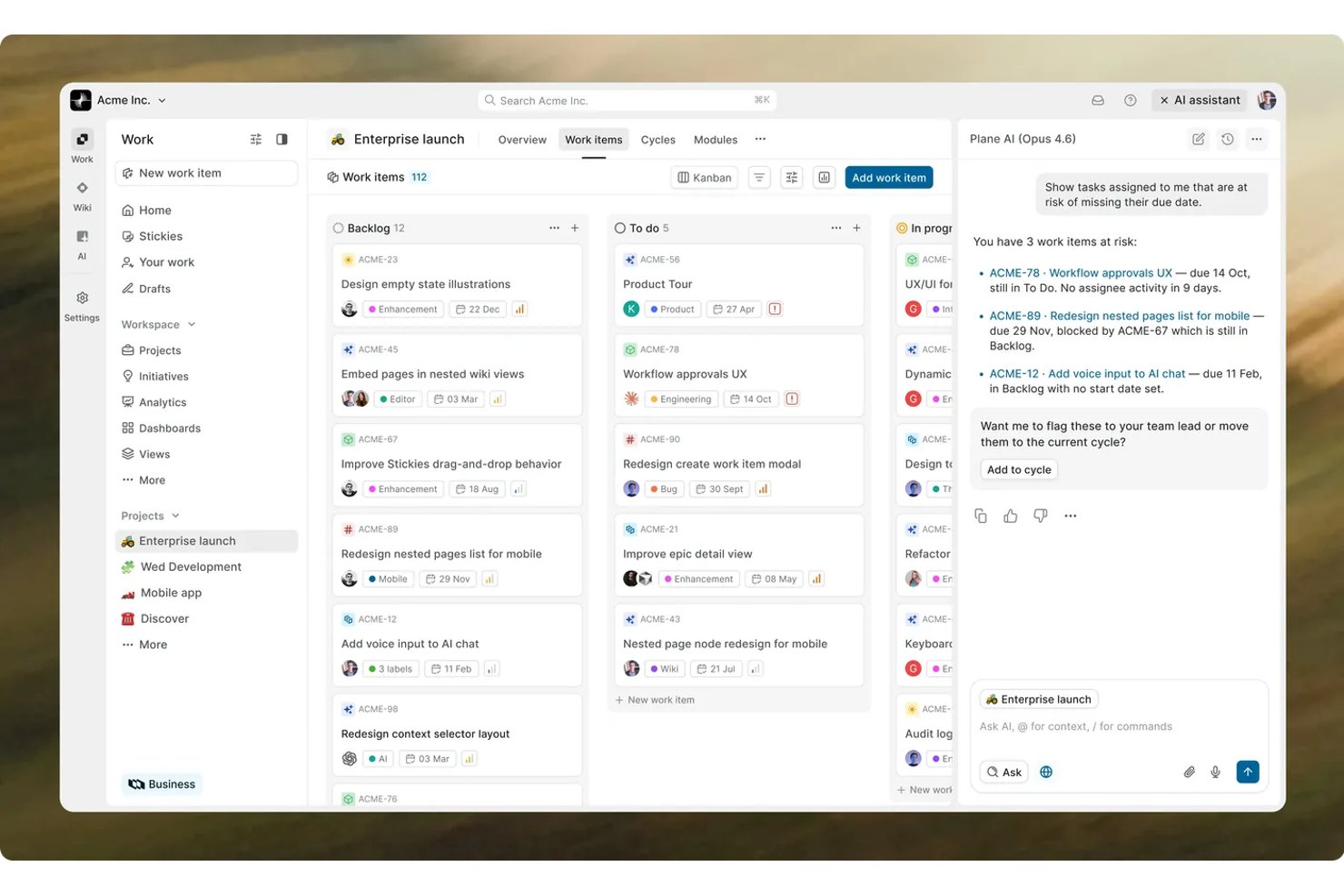
For product and engineering teams that need clear ownership across fast-changing work, Plane is a project management platform for organizing issues, projects, and team collaboration.
Who Is Plane Best For?
Plane suits software teams that run agile sprints and want issue tracking connected to their code repositories.
Why I Picked Plane
I picked Plane because it pairs modern agile sprints and repo linking with issue-level planning. Its cycles organize sprint work, while repository connections link issues to related pull requests and commits. I use that connection to trace a planned change from the backlog into code when evaluating Redmine alternatives.
Plane Key Features
- Custom views: Save filtered, sorted, and formatted work-item views.
- Modules: Group related work items into project components or features.
- Project pages: Create documentation, guides, specifications, and knowledge bases.
- Intake forms: Collect and triage requests before adding them to the backlog.
Plane Integrations
Plane documents seven native integrations: Bitbucket, Cursor, Draw.io, GitHub, GitLab, Sentry, and Slack; GitHub and GitLab support issue syncing, while Bitbucket links pull requests to work items. Plane also offers a REST API and webhooks for custom integrations.
Pros and Cons
Pros:
- Built-in docs keep specs beside issues
- Modules group feature work across cycles
- Time-boxed cycles support sprint planning
Cons:
- Advanced resource and portfolio reporting remains limited
- Self-hosted upgrades can require hands-on debugging

GitLab
Best for code-native issue and sprint tracking
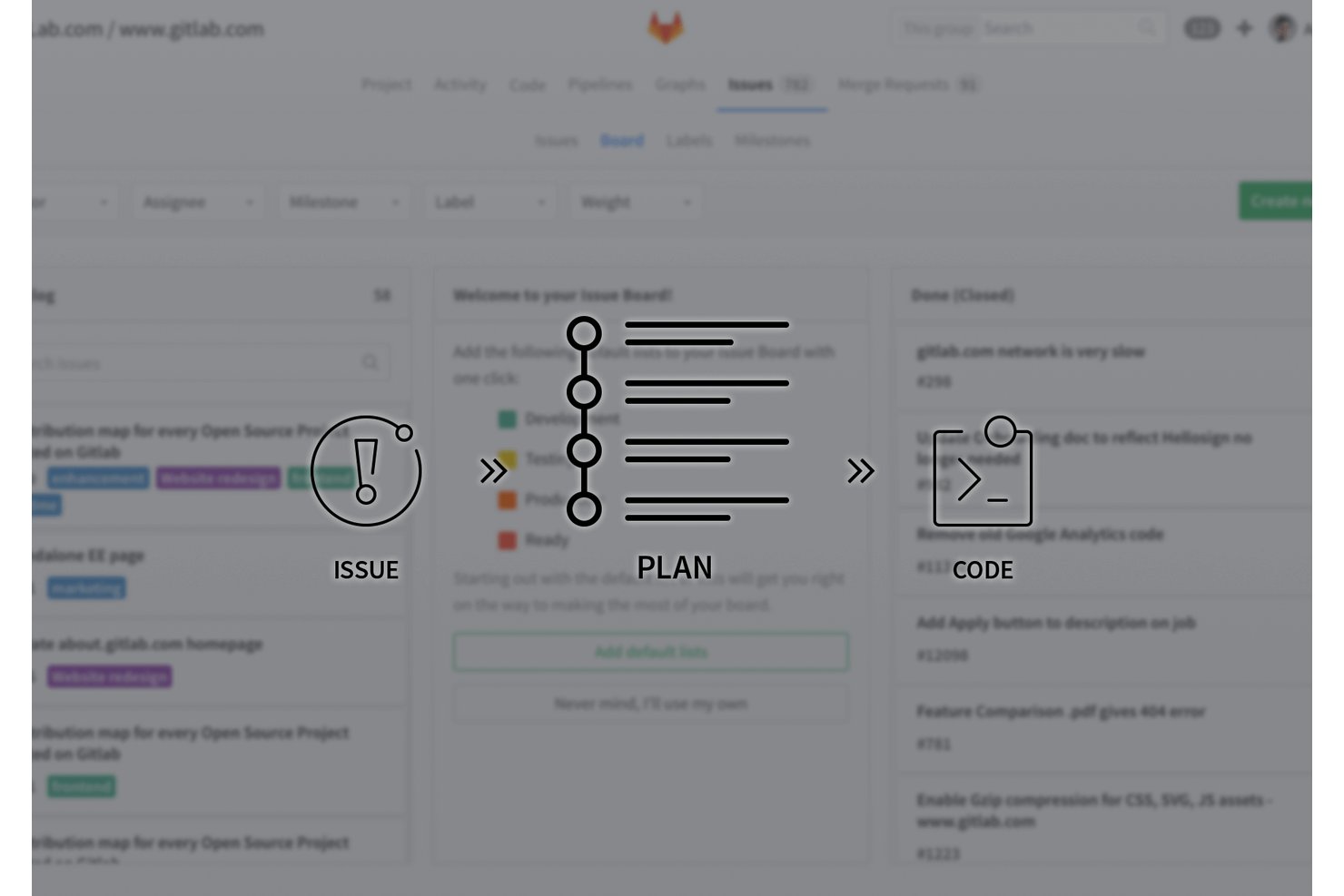
GitLab is a DevSecOps platform for software teams that brings project planning, collaboration, source code, and delivery workflows together, helping engineering groups coordinate work across the software lifecycle.
Who Is GitLab Best For?
GitLab suits software engineering teams that want project planning and issue tracking alongside source control, code review, and delivery workflows.
Why I Picked GitLab
Best for code-native issue and sprint tracking, GitLab is one of my Redmine alternatives because it connects planning with software delivery. I like how issue boards group work by status and iterations organize tasks into sprint cycles. Linking issues to merge requests also lets my team follow implementation progress alongside planned work.
GitLab Key Features
- Epics: Group related issues under larger work items and track progress across them.
- Milestones: Assign issues and merge requests to a milestone with a due date.
- Labels: Categorize issues and merge requests with customizable tags.
- Issue dependencies: Mark issues as blocked by or blocking other issues.
GitLab Integrations
GitLab’s built-in project integrations include Jira, the native GitLab for Slack app, Jenkins, Datadog, and Microsoft Teams notifications. GitLab also provides a project integrations API and webhooks for custom connections.
Pros and Cons
Pros:
- Epics group work across related issues
- Boards support label-based workflows and WIP limits
- Issues connect directly to merge requests
Cons:
- Velocity reporting requires external tracking
- Backlog management feels tedious beside Jira

Tuleap
Best for regulated-industry ALM traceability
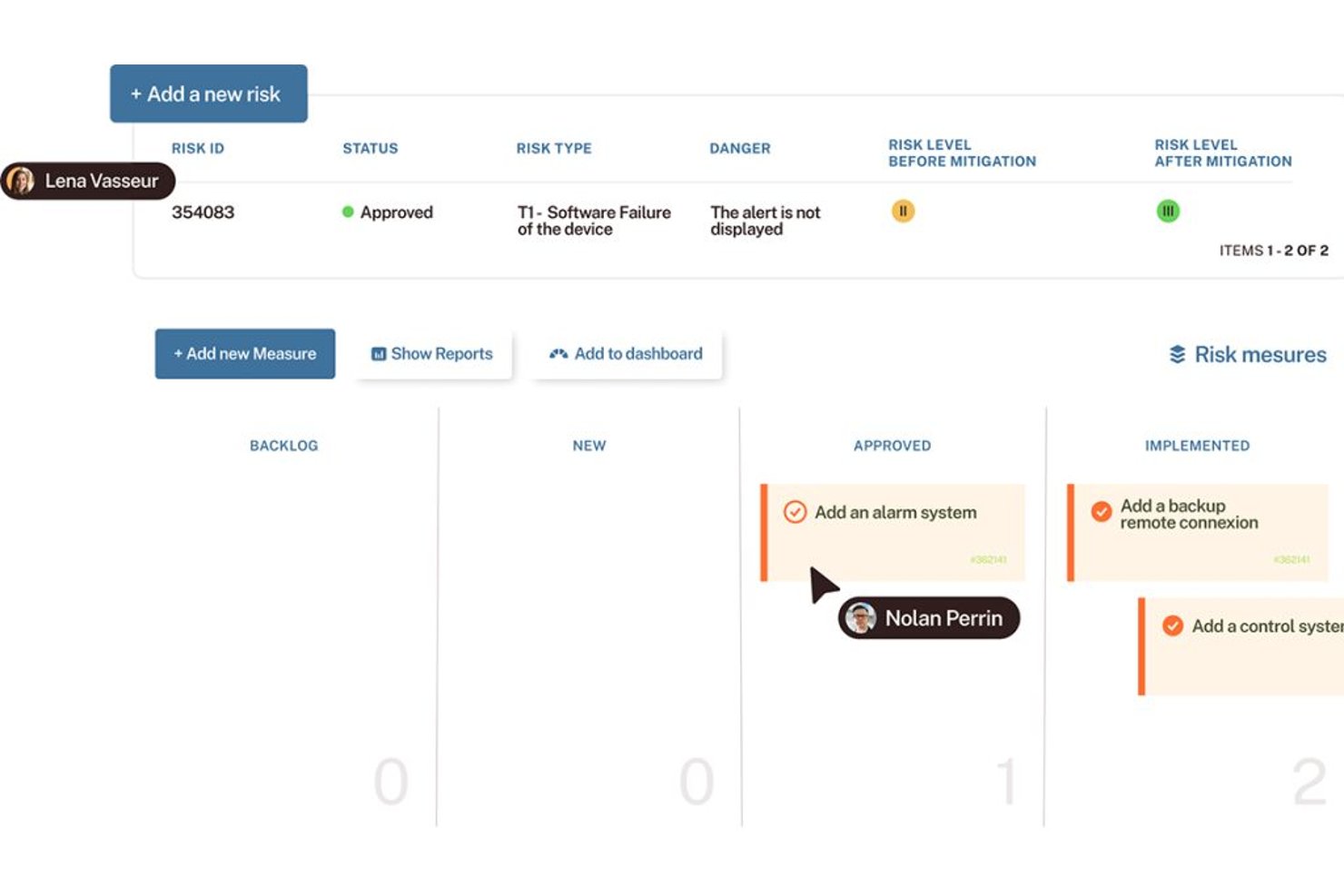
Tuleap is an open-source project management and application lifecycle management platform for software teams that need to coordinate project work, requirements, development, and testing in one workspace.
Who Is Tuleap Best For?
Tuleap suits engineering teams in regulated industries that need to connect requirements, development work, and tests for end-to-end traceability.
Why I Picked Tuleap
I picked Tuleap as a Redmine alternative for the “Best for regulated-industry ALM traceability” use case. It links test cases to requirements and user stories, then maps dependencies among requirements, tests, and bugs. Test campaigns combine manual and automated checks, while traceability matrices provide audit evidence.
Tuleap Key Features
- Product backlog: Organize stories, bugs, and tasks, then drag and drop items to prioritize them.
- Kanban boards: Set columns and work-in-progress limits, and manage who can change board items.
- Sprint tracking: View remaining effort and task progress with customizable charts.
- Custom dashboards: Share views of project progress, blockers, and key metrics.
Tuleap Integrations
Tuleap offers native integrations with Jenkins and GitLab for CI/CD workflows and traceability between development work and Tuleap artifacts. It also provides stable APIs for custom integrations.
Pros and Cons
Pros:
- Supports Agile and Waterfall delivery models
- Configurable trackers fit tailored project workflows
- Maps tests and bugs to requirements
Cons:
- Document management workflows feel dated and awkward
- Initial setup can challenge nontechnical teams
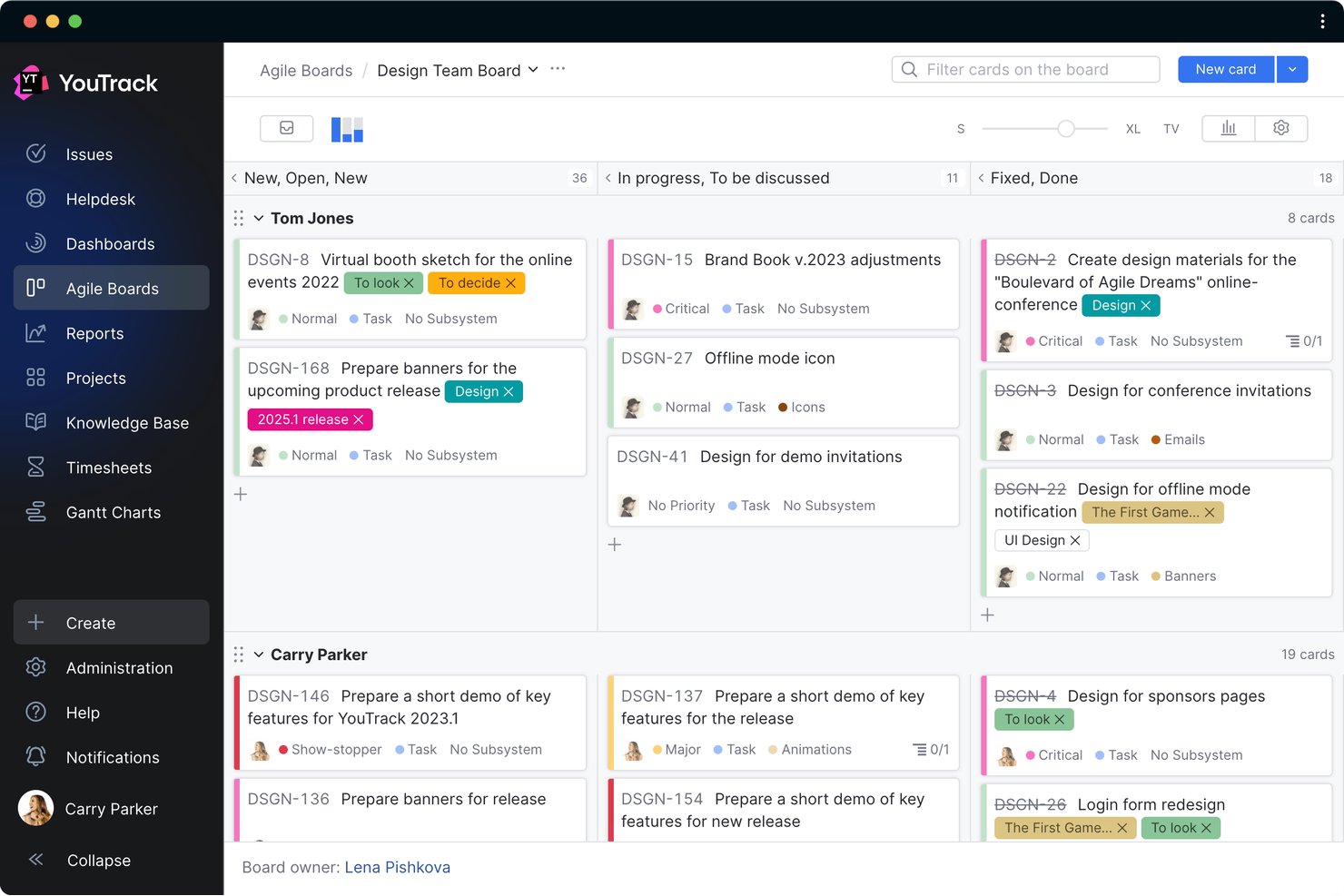
YouTrack is JetBrains’ issue and project tracking platform for software teams, bringing bugs, agile boards, tasks, and customizable workflows into one workspace to coordinate delivery and adapt processes as project needs change.
Who Is YouTrack Best For?
Software engineering teams already working in the JetBrains ecosystem can use YouTrack to coordinate development work and project delivery in one place.
Why I Picked YouTrack
I picked YouTrack because “Best for JetBrains-native dev team tracking” fits Redmine users coordinating software work in the JetBrains ecosystem. I like its agile boards for sprint planning and customizable workflows for routing bugs through review, so teams can track development work and adapt issue handling as project needs change.
YouTrack Key Features
- Time tracking: Record estimated and actual time spent on tasks.
- Reports: Generate reports on project progress, workload, and time.
- Dashboards: Combine reports and project metrics on one page.
- Knowledge base: Create and organize articles in nested hierarchies.
YouTrack Integrations
YouTrack has native version control integrations with GitHub, GitLab, and Bitbucket, plus an official plugin for JetBrains IDEs and a YouTrack app for Slack. Its REST API supports custom integrations.
Pros and Cons
Pros:
- Built-in time tracking and Gantt timelines
- Link issues, sprints, and documentation
- Custom workflows automate bug-state transitions
Cons:
- Reporting customization trails Jira’s options
- Dense interface complicates cross-project issue navigation

Best for cross-functional workflow automation
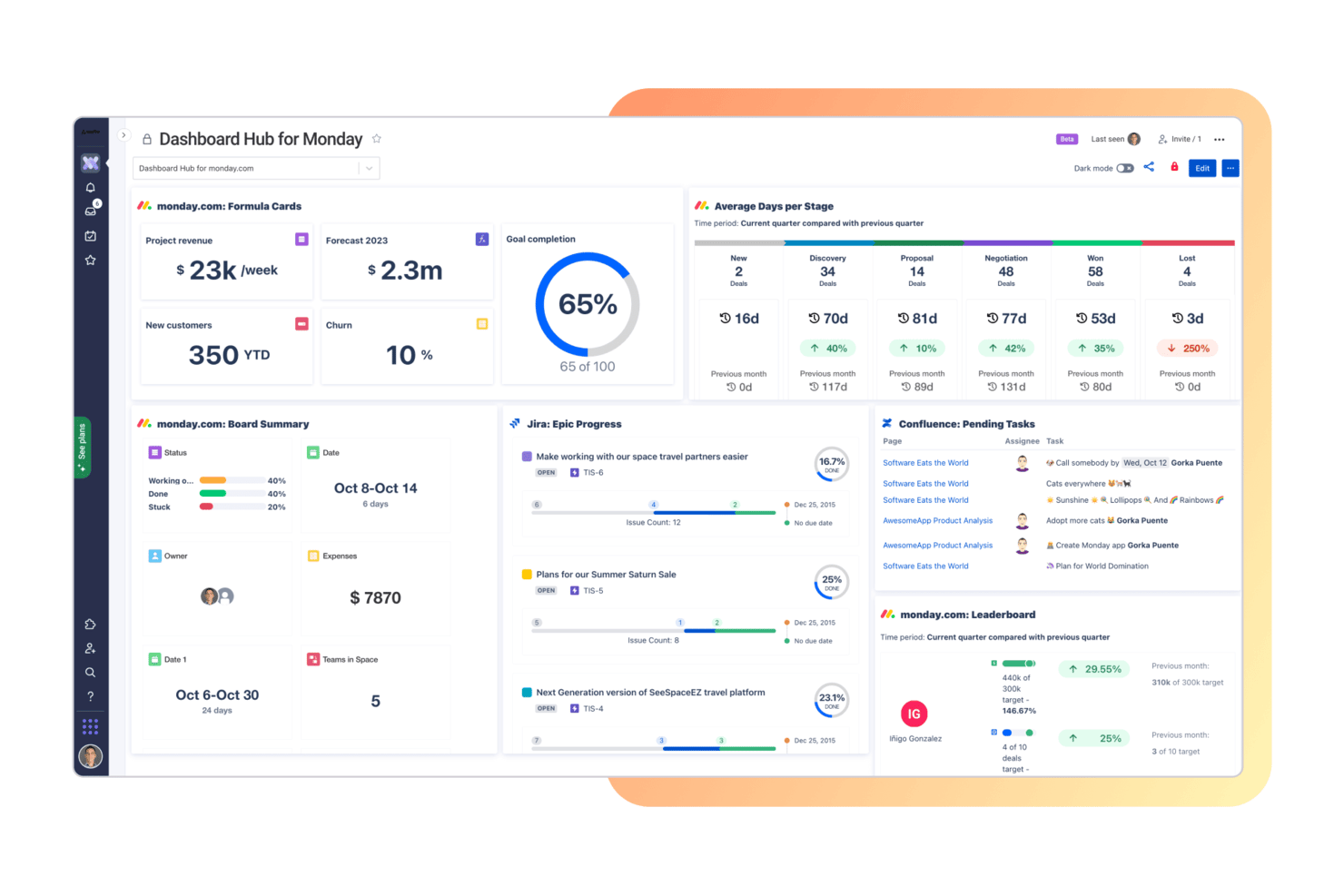
monday AI Workspace gives project and digital teams a configurable work management platform for organizing tasks, tracking priorities, and keeping changing plans visible across teams.
Who Is monday AI Workspace Best For?
Product, engineering, and operations teams coordinating dependencies across shared workflows are a good fit for monday AI Workspace.
Why I Picked monday AI Workspace
I use monday AI Workspace as a Redmine alternative when product, engineering, and operations need one view of a launch. Its customizable workflows connect assignments and timelines across teams, while dependency tracking and AI-spotted risks flag schedule conflicts before handoffs slip. That makes it my “Best for cross-functional workflow automation” pick.
monday AI Workspace Key Features
- Live dashboards: Build project and portfolio dashboards with current data and reports.
- Gantt and Kanban views: View project work as a timeline or a board of task columns.
- WorkForms: Collect project requests and details through customizable forms.
- Workdocs: Create project documents and connect them to boards.
monday AI Workspace Integrations
monday.com lists 850+ integrations and apps, including GitHub, GitLab, Slack, Microsoft Teams, Google Calendar, Outlook, Salesforce, and HubSpot, and it connects with Zapier. It also provides a GraphQL API for custom integrations.
Pros and Cons
Pros:
- Gantt and Kanban views clarify dependencies
- Dashboards show status across boards
- Automations connect cross-team handoffs
Cons:
- Advanced reporting takes manual configuration
- Nested subtasks stop at one level
New Product Updates from monday AI Workspace
monday AI Workspace Adds Human Approval Routing
monday AI Workspace adds a human-in-the-loop approval block to AI Workflows, sending approval requests and routing workflow paths based on responses. For more information, visit monday AI Workspace's official site.

ClickUp
Best for customizable cross-industry workflows

ClickUp combines project planning, task tracking, documentation, and collaboration in one workspace, helping product and engineering teams coordinate changing requirements and keep project work visible.
Who Is ClickUp Best For?
ClickUp suits project teams across industries that need configurable workflows for different processes, from task tracking to project planning.
Why I Picked ClickUp
I picked ClickUp as a Redmine alternative because it’s best for customizable cross-industry workflows. I use custom statuses and fields to track team-specific steps and requirements, then switch between List, Board, and Gantt views to manage tasks and dependencies.
ClickUp Key Features
- ClickUp Docs: Create and edit project documentation alongside your work.
- Goals: Set measurable targets and link them to tasks.
- Time tracking: Log time against tasks and review timesheets.
- Automations: Trigger actions when task conditions or statuses change.
ClickUp Integrations
ClickUp offers native integrations with Slack, GitHub, GitLab, Bitbucket, Microsoft Teams, Google Drive, Sentry, and Zoom. It also supports Zapier and provides an API for custom integrations.
Pros and Cons
Pros:
- Docs, goals, and time tracking share one workspace
- Gantt, list, and board views share task data
- Custom statuses and fields fit varied workflows
Cons:
- Extra configuration can complicate team processes
- Large workspaces can slow task views
Asana
Best for AI-automated work intake and routing

Asana is a project management platform where product, engineering, and design teams can coordinate cross-functional work, track dependencies, and keep shifting priorities and deadlines visible.
Who Is Asana Best For?
Asana suits project and operations teams that need to manage incoming work requests and route them to the right owners.
Why I Picked Asana
I picked Asana as a Redmine alternative for AI-automated work intake and routing. AI Studio adds AI steps to workflows, while forms capture request details and rules route submissions based on their answers. I’d use this setup to direct bug reports or feature requests to the right product or engineering owner.
Asana Key Features
- Timeline view: Map tasks across a project timeline and adjust their dates.
- Task dependencies: Link tasks to show which work must happen first.
- Custom fields: Add fields to tasks to track details such as priority or status.
- Workload view: See task assignments across a team and review capacity.
Asana Integrations
Asana lists 200+ app integrations, including Slack, Microsoft Teams, Google Drive, GitHub, Jira Cloud, GitLab, Azure DevOps, and ServiceNow, and it connects with Zapier. Asana also provides an API for custom integrations.
Pros and Cons
Pros:
- Workload view exposes team capacity
- Dependencies link work across project timelines
- AI-assisted intake routes requests automatically
Cons:
- No native sprint or velocity tracking
- Issue tracking lacks Redmine’s workflow depth

Wrike
Best for detailed reporting and time tracking
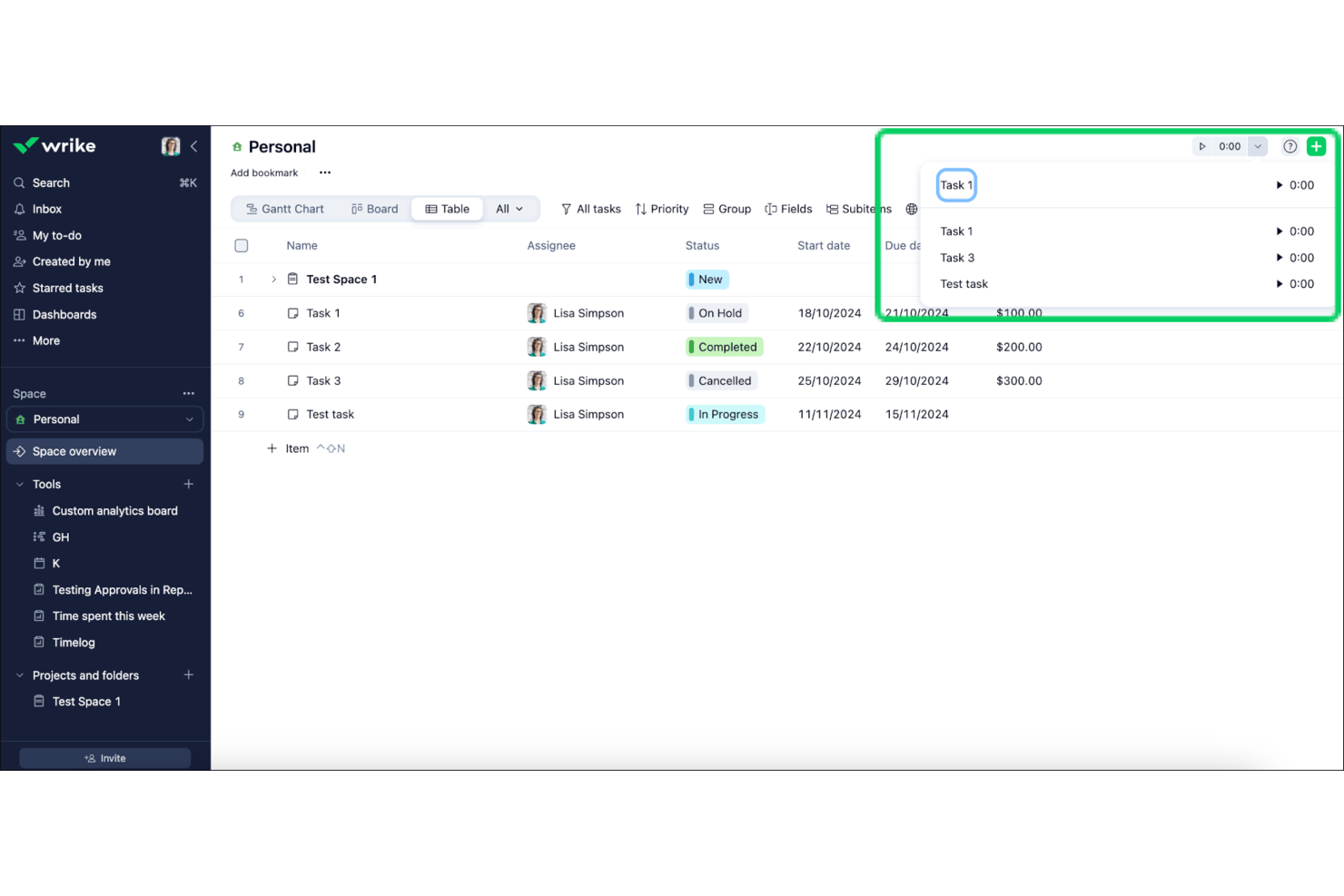
Wrike is a project management platform for cross-functional teams that need to coordinate complex work, track dependencies, and keep project plans and priorities visible as requirements change.
Who Is Wrike Best For?
Wrike suits project and operations managers who need detailed reporting and time tracking to monitor work across teams.
Why I Picked Wrike
I picked Wrike as a Redmine alternative because it’s Best for detailed reporting and time tracking. I like that teams can log time against tasks and use custom reports to compare tracked hours with project progress. That gives me a clearer view of where engineering effort goes and which workstreams need attention.
Wrike Key Features
- Gantt charts: Map tasks, durations, and dependencies on a project timeline.
- Custom workflows: Define task statuses and transitions for different work processes.
- Request forms: Collect project requests and route them into Wrike as tasks or projects.
- Proofing and approvals: Review files with annotations and manage approval steps.
Wrike Integrations
Wrike’s integrations catalog includes Microsoft Teams, Outlook, Google Sheets, Salesforce, and Power BI; paid Wrike Sync adds two-way syncing with Jira, GitHub, GitLab, and Bitbucket. Wrike also supports Zapier and offers a REST API for custom integrations.
Pros and Cons
Pros:
- Gantt charts map task dependencies visually
- Custom dashboards surface cross-project delivery metrics
- Task-level time logs connect effort to work
Cons:
- Complex reports may require spreadsheet exports
- Dense menus can slow new-user onboarding
New Product Updates from Wrike
Wrike Expands Gantt Planning, Approvals, and AI Work Intake
Wrike adds cross-project Gantt dependencies, flexible approval routing, and AI work intake through Wrike MCP. These updates give teams more control over planning, decision-making, and incoming work. For more information, visit Wrike’s official site.


Azure Boards is an agile project management tool for software teams, helping you organize backlogs, track bugs, and monitor delivery progress across projects.
Who Is Azure Boards Best For?
Product and engineering teams invested in Microsoft’s development ecosystem can coordinate agile work in Azure DevOps with Azure Boards.
Why I Picked Azure Boards
I picked Azure Boards as a Redmine alternative because it’s Best for Microsoft-stack agile dev teams. Its sprint backlogs and Kanban boards organize work items such as bugs, user stories, and tasks. I like how teams can plan iterations and track delivery within Azure DevOps.
Azure Boards Key Features
- Work item queries: Build and save filters to find records by fields, status, or assigned team.
- Customizable processes: Adjust work item types, fields, states, and rules to match your team’s workflow.
- Analytics views: Create data sets for Power BI reports on project and team activity.
- GitHub integration: Link commits and pull requests to Azure Boards work items.
Azure Boards Integrations
Azure Boards integrates with GitHub, and official Azure Boards apps for Microsoft Teams and Slack support work item creation and activity notifications. Its REST API supports custom integrations.
Pros and Cons
Pros:
- Supports sprint backlogs and Kanban views
- Connects planning work to delivery status
- Custom work-item types and workflow rules
Cons:
- Reporting lacks ready-made templates
- Cluttered interface obscures large backlogs
Outras alternativas ao Redmine
Eis algumas alternativas adicionais ao Redmine que não entraram na minha seleção, mas que continuam a merecer uma análise:
- GoodDay
For running multiple project methodologies
- Jira
For agile dev teams at scale
- Zoho Projects
For bug tracking within the Zoho ecosystem
- Teamwork.com
For client-facing project billing and reporting
- Twproject
For Gantt and budget tracking in one tool
- Backlog
For migrating from Redmine with built-in Git
- Nifty
For milestone-driven roadmap tracking
- Linear
For code-native issue tracking


How I Evaluate Redmine Alternatives
I split my evaluation into three parts. First, I check that a tool can track and manage issues with customizable workflows and organize work into projects or hierarchies—these carry the most weight. Then I look for standout features like cross-project dependency linking or self-hosted deployment options. Finally, I consider migration support and total cost of ownership.
Core Functionality (Table Stakes For This List)
When I'm selecting tools for my list, I score each one on a scale from 0 (does not offer the functionality) to 5 (excels in this area) for each core functionality listed below. I then convert the total into a percentage to help assess each tool's overall fit, with extra weight on any functionalities I’ve deemed essential.
- Issue & Task Tracking (Essential): I look for assignable issues, priorities, customizable statuses, and workflows that can handle bugs and changing project work.
- Project Organization (Essential): I assess project hierarchies and task sequencing, such as organizing releases into phases and tracking dependencies across work.
- Agile Planning: Boards, backlogs, and sprint views should support planning iterations and reviewing work as priorities shift.
- Repository Integration: I check whether commits, branches, or pull requests can link to issues so teams can trace code changes to planned work.
- Time Tracking & Reporting: I look for time logs and reports that show progress or workload across tasks and projects.
- Role-Based Access: I assess whether project-level permissions let teams control who can view, edit, or manage work.
Once I have a list of tools that meet the criteria, I consider what sets each platform apart.
Differentiating Factors (What Sets Vendors Apart)
Here's how I compare and contrast different vendors:
Standout Features
I check whether a tool supports cross-project dependency linking, because teams running multiple initiatives need portfolio-level visibility into how work connects. An agency juggling five client projects, for example, needs to see when a shared resource bottleneck in one project delays another. I also evaluate self-hosted and cloud deployment options. Teams with strict data residency requirements or existing infrastructure often need on-premise control, while others prefer offloading maintenance to a SaaS provider. Tools like GitLab and Plane offer both paths. Finally, I look for a built-in wiki or knowledge base tied directly to projects, which keeps runbooks and decisions next to the work they describe.
Beyond Features
I evaluate migration support first—teams with years of Redmine tickets need import utilities that preserve custom fields and attachments, not just basic CSV dumps. Total cost of ownership matters just as much, since per-user pricing can spiral for larger engineering orgs, while open-source options like Plane trade subscription fees for server maintenance. I also check API and webhook coverage, because most teams need real-time syncing with CI/CD pipelines and internal tools the vendor won't natively support.
Por que motivo procurar uma alternativa ao Redmine?
Embora o Redmine seja uma boa escolha de software de gestão de projetos, existem várias razões pelas quais alguns utilizadores procuram soluções alternativas. Pode estar à procura de uma alternativa ao Redmine porque…
- Precisa de uma interface mais fácil de utilizar
- A sua equipa necessita de opções avançadas de personalização
- Pretende uma melhor integração com outras ferramentas
- Precisa de acesso móvel para trabalhar remotamente
- Os seus projetos exigem funcionalidades de relatórios mais robustas
- Precisa de um melhor apoio ao cliente
Se alguma destas situações lhe é familiar, veio ao sítio certo. A minha lista inclui várias opções de software de gestão de projetos mais adequadas para equipas que enfrentam estes desafios com o Redmine e procuram soluções alternativas.
Principais funcionalidades do Redmine
Eis algumas das principais funcionalidades do Redmine, para ajudá-lo a comparar as soluções alternativas disponíveis:
- Suporte para vários projetos: Faça a gestão de vários projetos e subprojetos, o que lhe permite gerir prioridades concorrentes e prestar apoio a uma variedade de clientes e partes interessadas.
- Controlo de acesso flexível baseado em funções: Atribua diferentes funções e permissões aos membros da equipa e certifique-se de que as pessoas certas têm o acesso adequado.
- Sistema personalizável de acompanhamento de problemas: Acompanhe problemas com campos personalizáveis, o que facilita a monitorização e a gestão de tarefas.
- Gráficos de Gantt: Visualize os calendários e as dependências dos projetos para manter a sua equipa dentro do prazo.
- Registo de tempo: Registe e gira o tempo dedicado às tarefas para ajudar a sua equipa a cumprir os prazos.
- Wikis e fóruns específicos de cada projeto: Promova a colaboração da equipa através de wikis e fóruns dedicados a cada projeto.
- Integração com sistemas de controlo de versões: Integre vários sistemas de controlo de versões para uma gestão fácil do código.
- Feeds e notificações por e-mail: Mantenha a sua equipa atualizada com feeds RSS e notificações por e-mail sobre quaisquer alterações.
- Suporte multilingue: Pode aceder à plataforma em 49 idiomas, o que a torna adequada para equipas globais.
- Compatibilidade com bases de dados: Utilize bases de dados MySQL, PostgreSQL e SQLite para obter flexibilidade na gestão de dados.