

10 melhores alternativas ao Akiflow para gestão de tarefas em 2026

Lista restrita de alternativas ao Akiflow


Uma alternativa sólida ao Akiflow combina a divisão do tempo em blocos, a gestão de tarefas e a integração com o calendário numa única plataforma digital tudo-em-um. Se procura aplicações de produtividade que correspondam ou superem a abordagem do Akiflow ao planeamento do seu dia, provavelmente precisa de mais flexibilidade, melhores integrações ou funcionalidades adaptadas ao seu fluxo de trabalho.
Com tantas opções disponíveis, é difícil saber quais as plataformas que oferecem realmente agendamento inteligente, sincronização entre plataformas e planeamento diário orientado. Alguns utilizadores preferem aplicações de planeamento como a Amie pela sua experiência integrada e agradável, enquanto outros procuram ferramentas baseadas em IA para automatizar o trabalho pesado. Esta lista ajudá-lo-á a comparar as principais alternativas ao Akiflow para 2026, para que possa encontrar a opção certa para as necessidades de produtividade e planeamento da sua equipa.
O que é o Akiflow?
O Akiflow é uma aplicação digital de planeamento por blocos de tempo que combina a gestão de tarefas e o agendamento do calendário numa única plataforma. Permite-lhe organizar tarefas, reservar tempo no seu calendário e sincronizar com outras ferramentas de produtividade. O Akiflow foi concebido para utilizadores que querem planear os seus dias com precisão, gerir várias prioridades e manter todo o seu agendamento e as suas tarefas num único espaço de trabalho unificado.
Tabela de comparação de alternativas ao Akiflow
A tabela abaixo compara os detalhes dos preços das minhas principais alternativas ao Akiflow.
| Tool | Best For | Trial Info | Price | ||
|---|---|---|---|---|---|
| 1 | Best for cross-platform task syncing | Free plan available | From $5/user/month (billed annually) | Website | |
| 2 | Best for built-in habit tracking | Free plan available | From $49.99/year (billed annually) | Website | |
| 3 | Best with Google Workspace connectivity | 14-day free trial | $7.56/month | Website | |
| 4 | Best for voice-powered task entry | Free plan + free demo available | From $4.99/user/month (billed annually) | Website | |
| 5 | Best for automatic task prioritization | Free trial available | From $19/seat/month (billed annually) | Website | |
| 6 | Best for smart scheduling with AI-driven time blocking | Free plan available | From $10/seat/month | Website | |
| 7 | Best for Apple ecosystem compatibility | Not available | Pricing upon request | Website | |
| 8 | Best for combining notes and tasks in one place | Free plan available | From $10/month (billed annually) | Website | |
| 9 | Best with Notion workspace integration | Free plan available | From $10/user/month | Website | |
| 10 | Best for daily planning with guided workflows | 14-day free trial | From $17/user/month (billed annually) | Website |
Why Trust Our Software Recommendations
Our team has been testing and reviewing software since 2012. As project managers ourselves, we know how difficult—and important—it is to choose the right software.
For this guide, we evaluated tools using hands-on testing and independent research, scoring tools using our selection criteria. We also draw on insights from industry thought leaders and practicing project management experts.
Our reviews reflect our human editorial judgment, not a sales pitch.
Expert reviewers:
Avaliações das alternativas ao Akiflow
Seguem-se os meus resumos detalhados das alternativas ao Akiflow que entraram na minha lista restrita. As minhas avaliações apresentam uma análise detalhada das funcionalidades, integrações e melhores casos de utilização de cada plataforma, para o ajudar a encontrar a melhor opção para si.

Todoist
Best for cross-platform task syncing

If you need a task manager that works across every device and platform, Todoist is built for you. Teams and individuals who want to sync tasks between desktop, mobile, and web without friction will find its cross-platform support reliable. Unlike Akiflow, Todoist’s native apps and browser extensions keep your to-dos accessible and up to date wherever you work.
Why Todoist Is a Good Akiflow Alternative
Todoist stands out for anyone who needs their tasks to sync instantly across multiple devices and platforms. I picked Todoist because its native apps for Windows, macOS, iOS, Android, and browser extensions make it easy to manage your schedule from anywhere. The real-time sync ensures that updates on one device appear everywhere else, which is essential for time-blocking and planning on the go. This makes Todoist a strong choice if you want a digital planner that keeps your workflow unified across all your tools.
Todoist Key Features
Some other features in Todoist help you organize and manage your time-blocking workflow:
- Task Labels and Filters: Create custom labels and filters to sort and view tasks by context, priority, or project.
- Recurring Due Dates: Set tasks to repeat on custom schedules for ongoing routines or deadlines.
- Project Sections and Subtasks: Break projects into sections and add subtasks for detailed planning and tracking.
- Productivity Tracking: Use built-in productivity visualizations like streaks and completed task counts to monitor progress.
Todoist Integrations
Integrations include Google Calendar, Outlook Mail, Trello, Jira, Slack, Microsoft Teams, Task Assist, Apple Calendar, Zapier, and Twist.
Pros and Cons
Pros:
- Highly affordable premium
- Huge integration library
- Great custom filter views
Cons:
- Subtasks can be clunky
- Cannot pull external tasks

TickTick
Best for built-in habit tracking
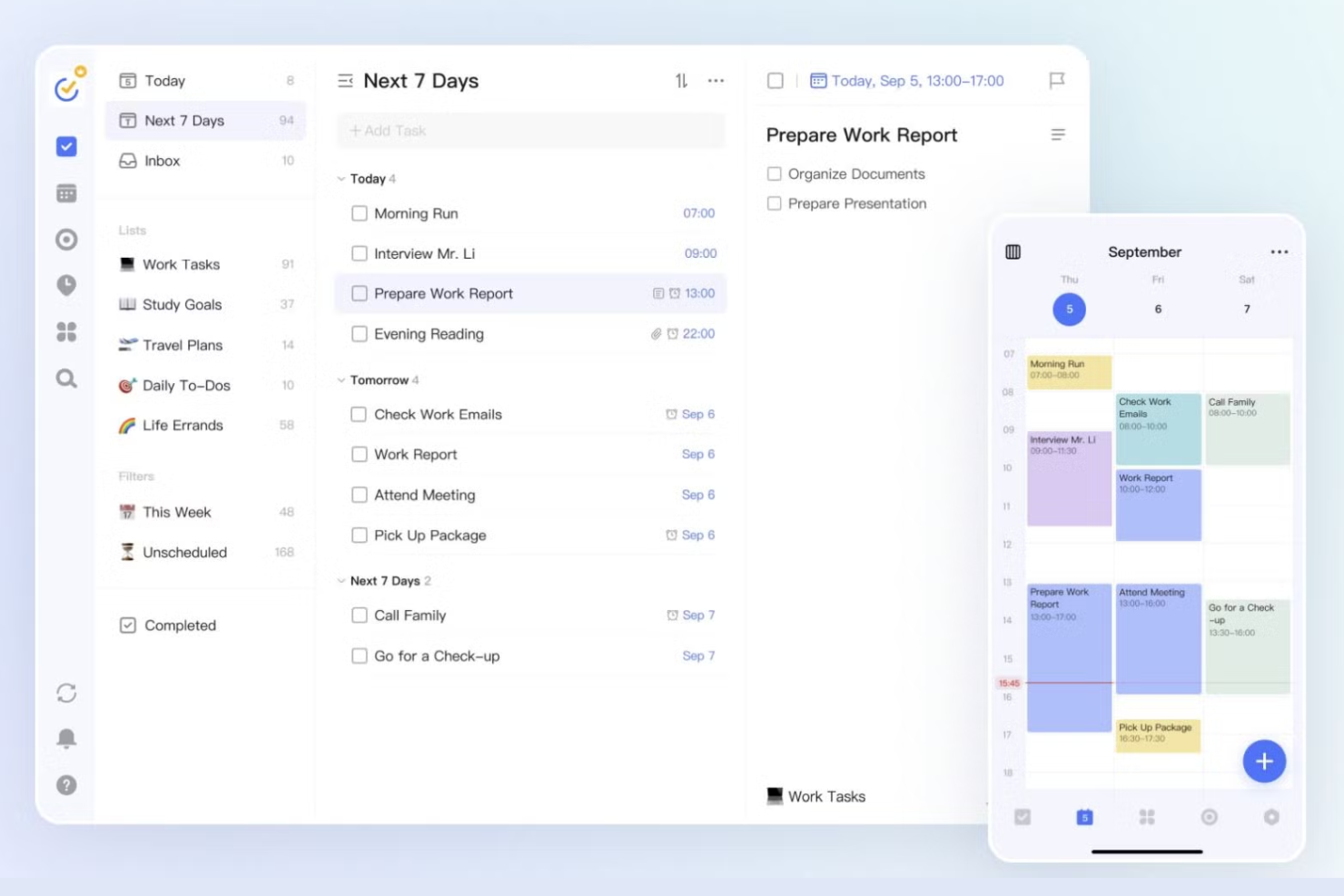
For anyone who wants to combine task management with habit tracking, TickTick offers a unique approach. Professionals and teams who need to build routines alongside their daily planning will appreciate its built-in habit tracker. Unlike Akiflow, TickTick lets you manage tasks and track personal or work habits in one place.
Why TickTick Is a Good Akiflow Alternative
What sets TickTick apart is its built-in habit tracking, which goes beyond standard task management. I picked TickTick for anyone who wants to track daily routines and habits alongside their work tasks in a single platform. The habit tracker lets you set recurring habits, visualize your progress, and receive reminders to help you stay consistent. This makes TickTick a strong choice if you want a digital planner that supports both productivity and personal growth.
TickTick Key Features
In addition to its habit tracking capabilities, TickTick offers several other features for managing your schedule and tasks:
- Calendar View: See your tasks and events in a daily, weekly, or monthly calendar layout for better time-blocking.
- Pomodoro Timer: Use a built-in Pomodoro timer to break work into focused intervals with scheduled breaks.
- Task Prioritization: Assign priority levels to tasks to help you focus on what matters most each day.
- List Sharing: Share task lists with others for collaborative planning and project management.
TickTick Integrations
Integrations include Gmail, Spark, Amazon Alexa, Apple Shortcuts, Outlook, Slack, Chatmind, Zapier, and IFTTT.
Pros and Cons
Pros:
- Very affordable pricing
- Voice input works well
- Solid calendar view option
Cons:
- Calendar needs premium
- Lacks external task sync

Best with Google Workspace connectivity
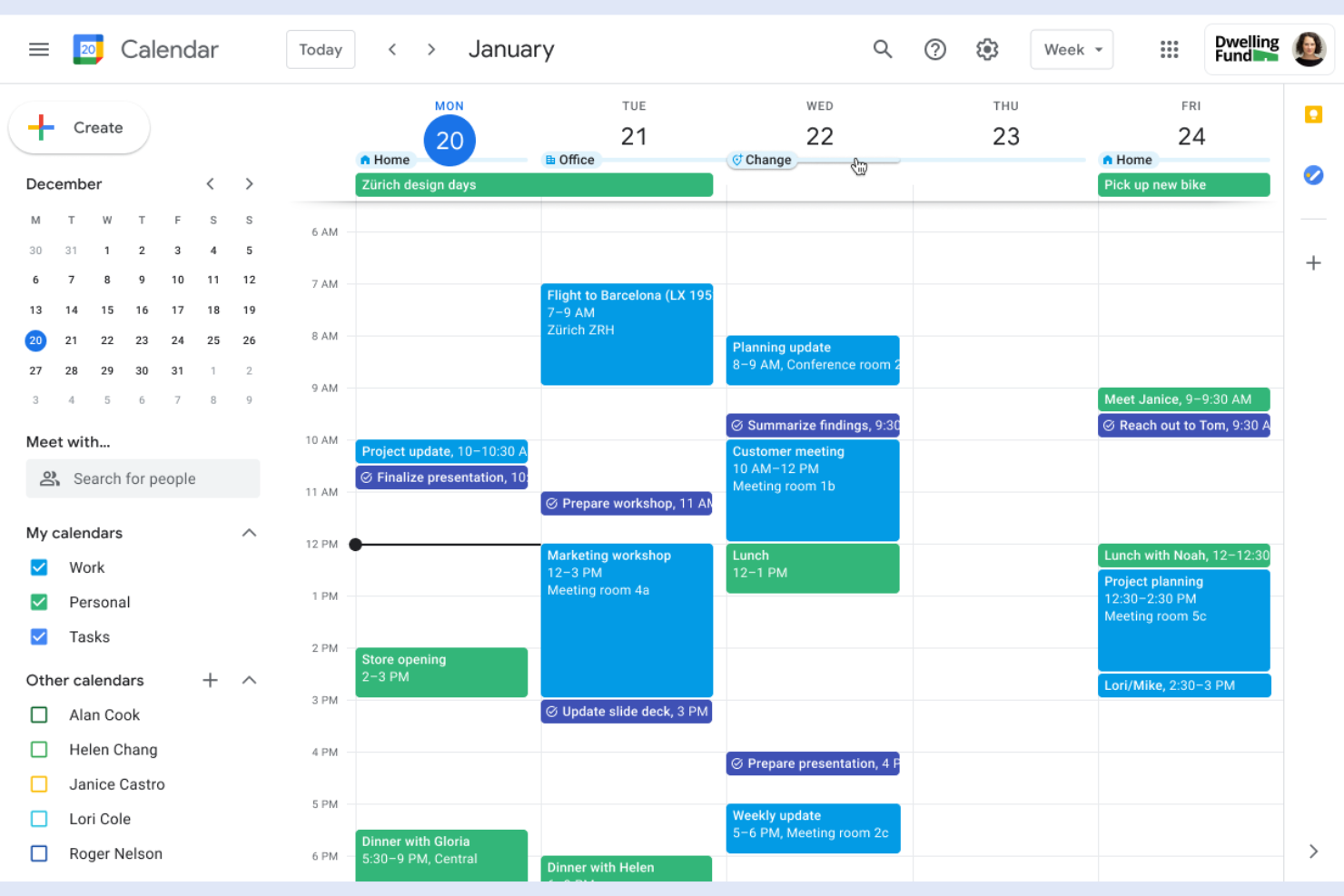
Teams that rely on Google Workspace for collaboration will find Google Calendar tightly woven into their daily workflow. Project managers and digital teams can use it to coordinate meetings, block focused work time, and manage shared calendars without leaving the Google ecosystem. Unlike Akiflow, Google Calendar offers direct integration with Gmail, Google Meet, and Drive, making it easy to connect scheduling with communication and file sharing.
Why Google Calendar Is a Good Akiflow Alternative
For anyone already using Google Workspace, Google Calendar offers unmatched connectivity with the rest of Google’s productivity tools. I picked Google Calendar because it lets you schedule events, set reminders, and manage multiple calendars that sync instantly with Gmail, Google Meet, and Drive. Its time-blocking features allow you to visually organize your day and coordinate with team members in real time. If your workflow depends on Google’s ecosystem, Google Calendar is a natural fit as an Akiflow alternative.
Google Calendar Key Features
Some other features that make Google Calendar useful for digital planning include:
- Color-Coded Calendars: Assign different colors to calendars or events for quick visual organization.
- Event Attachments: Add files and documents directly to calendar events for easy access during meetings.
- Out of Office Scheduling: Automatically decline meeting requests during set out-of-office periods.
- Public Calendar Sharing: Share calendars publicly or with specific people to coordinate schedules across teams.
Google Calendar Integrations
Integrations include Gmail, Google Meet, Google Drive, Google Tasks, Google Keep, Google Contacts, Google Maps, Apple Calendar, Microsoft Outlook, and Slack.
Pros and Cons
Pros:
- Highly reliable uptime
- Easy shared team calendars
- Native Google Tasks sync
Cons:
- UI has not changed in years
- Lacks AI auto scheduling

Any.do
Best for voice-powered task entry

If you want to add tasks hands-free, Any.do is designed with voice-powered entry at its core. Busy professionals and teams who need to capture ideas or to-dos on the go will find its voice assistant especially useful. Unlike Akiflow, Any.do lets you quickly add, manage, and organize tasks using natural language voice commands across devices.
Why Any.do Is a Good Akiflow Alternative
Any.do stands out for its voice-powered task entry, which is ideal if you want to capture tasks without typing. I picked Any.do because its voice assistant lets you add, reschedule, or complete tasks using natural language commands on mobile and desktop. The tool also supports voice reminders, so you can set up notifications hands-free. This makes Any.do a strong choice for anyone who needs a digital planner that fits into a fast-paced, multitasking workflow.
Any.do Key Features
Some other features that make Any.do useful for digital planning and time management include:
- Calendar Integration: Sync your tasks and events with Google Calendar, Outlook, and Apple Calendar for unified scheduling.
- Task Collaboration: Assign tasks, share lists, and comment with team members directly in the app.
- Recurring Tasks: Set up daily, weekly, or custom recurring tasks to automate routine planning.
- Location-Based Reminders: Trigger reminders based on your geographic location for context-aware task management.
Any.do Integrations
Integrations include Slack, Microsoft Teams, Zoom, Google Meet, WhatsApp, Gmail, Google Calendar, Trello, Asana, and Monday.com.
Pros and Cons
Pros:
- Easy grocery list sorting
- Good WhatsApp integration
- Clean and simple design
Cons:
- No external app aggregator
- Lacks complex task routing

Motion
Best for automatic task prioritization
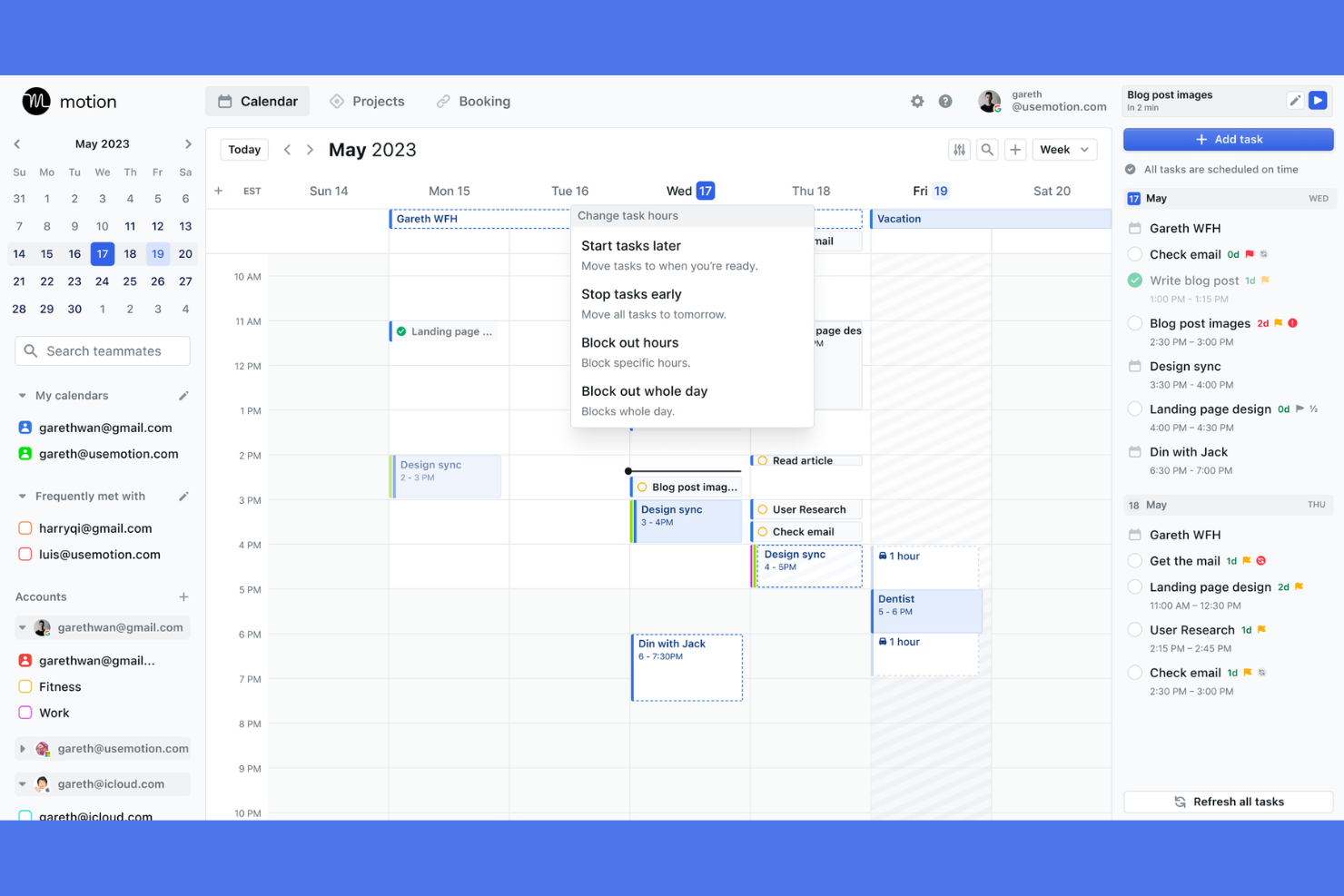
Motion takes a unique approach by automatically prioritizing and scheduling your tasks based on urgency and deadlines. This platform is a strong fit for project managers, founders, and busy teams who need their calendars to adapt as priorities shift. Unlike Akiflow, Motion’s AI-driven engine continuously reorders your day to help you focus on what matters most.
Why Motion Is a Good Akiflow Alternative
What sets Motion apart is its ability to automatically prioritize tasks and fit them into your calendar without manual effort. I picked Motion because its AI engine constantly evaluates your deadlines, meetings, and workload to reorder your schedule in real time. You can add tasks with due dates, and Motion will automatically block time for them, shifting events as priorities change. This makes it a strong choice for anyone who wants a planner that actively manages shifting priorities for you.
Motion Key Features
Some other features in Motion help teams and individuals manage their workday more efficiently:
- Meeting Scheduler: Share booking links that automatically respect your existing calendar events and task blocks.
- Team Workspace: Assign tasks, track progress, and view team schedules in a shared environment.
- Recurring Task Support: Set up tasks that repeat on custom intervals and have them automatically scheduled.
- Calendar Sync: Connect Google and Outlook calendars to keep all commitments visible in one place.
Motion Integrations
Integrations include Google Calendar, Microsoft Outlook, iCloud Calendar, Zoom, Google Meet, and Microsoft Teams.
Pros and Cons
Pros:
- High priority task focus
- Built in meeting scheduler
- Great for complex projects
Cons:
- AI is rigid and bossy
- UI is incredibly dense

Reclaim
Best for smart scheduling with AI-driven time blocking

Reclaim uses AI to automatically schedule tasks, habits, and meetings around your existing calendar events. This makes it especially useful for busy professionals and teams who need to protect focus time while adapting to shifting priorities. Unlike Akiflow, Reclaim stands out for its smart, dynamic time blocking that continuously optimizes your schedule as new commitments arise.
Why Reclaim Is a Good Akiflow Alternative
For anyone who wants their calendar to adapt automatically, Reclaim offers AI-driven time blocking that goes beyond manual scheduling. I picked Reclaim because it can automatically find the best times for tasks, habits, and meetings, even as your calendar changes throughout the day. Its smart routines let you set up recurring habits that flex around your priorities, and its dynamic task scheduling helps you protect focus time without constant adjustments. This makes Reclaim a strong choice if you want a planner that actively manages your time for you.
Reclaim Key Features
Some other features in Reclaim help teams and individuals manage their schedules more precisely:
- Calendar Sync: Connect multiple Google Calendars to keep all events and commitments in one view.
- Smart 1:1 Scheduling: Automatically finds the best time for recurring meetings between two people.
- Buffer Time Settings: Add automatic buffers before and after meetings to prevent back-to-back scheduling.
- Analytics Dashboard: View reports on how your time is allocated across meetings, tasks, and habits.
Reclaim Integrations
Integrations include Google Calendar, Google Tasks, Todoist, Asana, Jira, ClickUp, Linear, and Slack.
Pros and Cons
Pros:
- Great Google Task sync
- Adapts to calendar changes
- Syncs personal and work cals
Cons:
- UI can get very cluttered
- AI can feel unpredictable


For anyone deeply invested in Apple devices, Things 3 offers a planner built specifically for macOS, iOS, and iPadOS. Creative professionals and teams who rely on Apple’s ecosystem will appreciate its native design, fast sync, and deep integration with system features like widgets and Siri Shortcuts. Unlike Akiflow, Things 3 delivers a seamless experience across all Apple platforms, making it easy to organize tasks and schedules without leaving the Apple environment.
Why Things 3 Is a Good Akiflow Alternative
If you’re looking for a planner that feels truly native on Apple devices, Things 3 is purpose-built for the Apple ecosystem. I picked Things 3 because it offers deep integration with macOS, iOS, and iPadOS features like widgets, Siri Shortcuts, and system-wide quick entry. Its fast sync across devices and support for Apple Calendar make it easy to manage tasks and schedules in one place. For anyone who wants a digital platform that works seamlessly within Apple’s environment, Things 3 is a strong Akiflow alternative.
Things 3 Key Features
Some other features that make Things 3 a strong option for digital planning include:
- Project Organization: Group related tasks into projects with headings and checklists for structured planning.
- Today and Upcoming Views: See tasks scheduled for today and the days ahead in dedicated, automatically updating views.
- Tags and Filters: Add tags to tasks and use filters to quickly find and organize items across projects.
- Mail to Things: Forward emails directly into your task list using a unique Things Cloud email address.
Things 3 Integrations
Integrations include Apple Calendar, Apple Reminders, Apple Shortcuts, Siri, Mail to Things, and Apple Watch.
Pros and Cons
Pros:
- Sleek calendar integration
- Great project structuring
- Fast keyboard shortcuts
Cons:
- Lacks API for integrations
- No native team sharing
Routine
Best for combining notes and tasks in one place

Routine brings together note-taking and task management in a single workspace, making it easy to capture ideas and plan your day without switching tools. This platform is especially useful for product managers, founders, and anyone who wants to keep meeting notes, tasks, and schedules tightly connected. Unlike Akiflow, Routine’s unified approach helps you link actionable items directly to your notes and calendar events.
Why Routine Is a Good Akiflow Alternative
Routine stands out for anyone who wants to manage both notes and tasks in one place. I picked Routine because it lets you capture meeting notes, ideas, and to-dos in a single workspace, so you don’t have to juggle multiple apps. You can link tasks directly to notes or calendar events, making it easy to turn ideas into actionable steps. This approach is especially helpful if you want your time-blocking planner to double as a digital notebook.
Routine Key Features
Some other features in Routine help you organize your day and information more effectively:
- Daily Planner View: See your tasks, events, and notes for the day in a single dashboard.
- Quick Capture Shortcut: Instantly add tasks or notes from anywhere using a keyboard shortcut.
- Calendar Integration: Sync with Google Calendar to keep your schedule and tasks aligned.
- Task Prioritization: Drag and drop tasks to reorder and set priorities for your workflow.
Routine Integrations
Integrations include Google Calendar, Microsoft Outlook, Apple iCloud Calendar, Google Meet, Zoom, Microsoft Teams, Slack, Discord, Intercom, and Segment.
Pros and Cons
Pros:
- Easy daily habit tracking
- Great natural language input
- Clean minimalist design
Cons:
- Development can feel slow
- No auto scheduling AI

Notion Calendar is designed for teams and professionals who already rely on Notion to manage projects, docs, and knowledge. If you want your calendar, tasks, and project timelines to live alongside your Notion databases, this tool keeps everything in sync without extra integrations. Unlike Akiflow, Notion Calendar lets you connect events directly to Notion pages, so your planning and documentation always stay linked.
Why Notion Calendar Is a Good Akiflow Alternative
For anyone already using Notion as a workspace, Notion Calendar offers a direct way to connect your scheduling with your project documentation. I picked Notion Calendar because it lets you link calendar events to specific Notion pages, so meeting notes, project briefs, and tasks are always just a click away from your schedule. You can also view and edit Notion databases right from your calendar, which keeps your planning and documentation tightly integrated. This setup is especially useful if you want your time-blocking planner to work seamlessly with your existing Notion workflows.
Notion Calendar Key Features
Some other features in Notion Calendar help you manage your time and projects more efficiently:
- Multiple Calendar Views: Switch between daily, weekly, and monthly layouts to see your schedule from different perspectives.
- Color-Coded Events: Assign colors to events for quick visual organization and context.
- Google Calendar Sync: Connect your Google Calendar to keep external and internal schedules aligned.
- Drag-and-Drop Rescheduling: Move events directly on the calendar to quickly adjust your plans.
Notion Calendar Integrations
Integrations include Notion, Google Calendar, Google Meet, Zoom, and Apple Calendar.
Pros and Cons
Pros:
- Included free with Notion
- Fast meeting link sharing
- Easy multiple time zones
Cons:
- No AI auto time blocking
- Lacks third party task sync

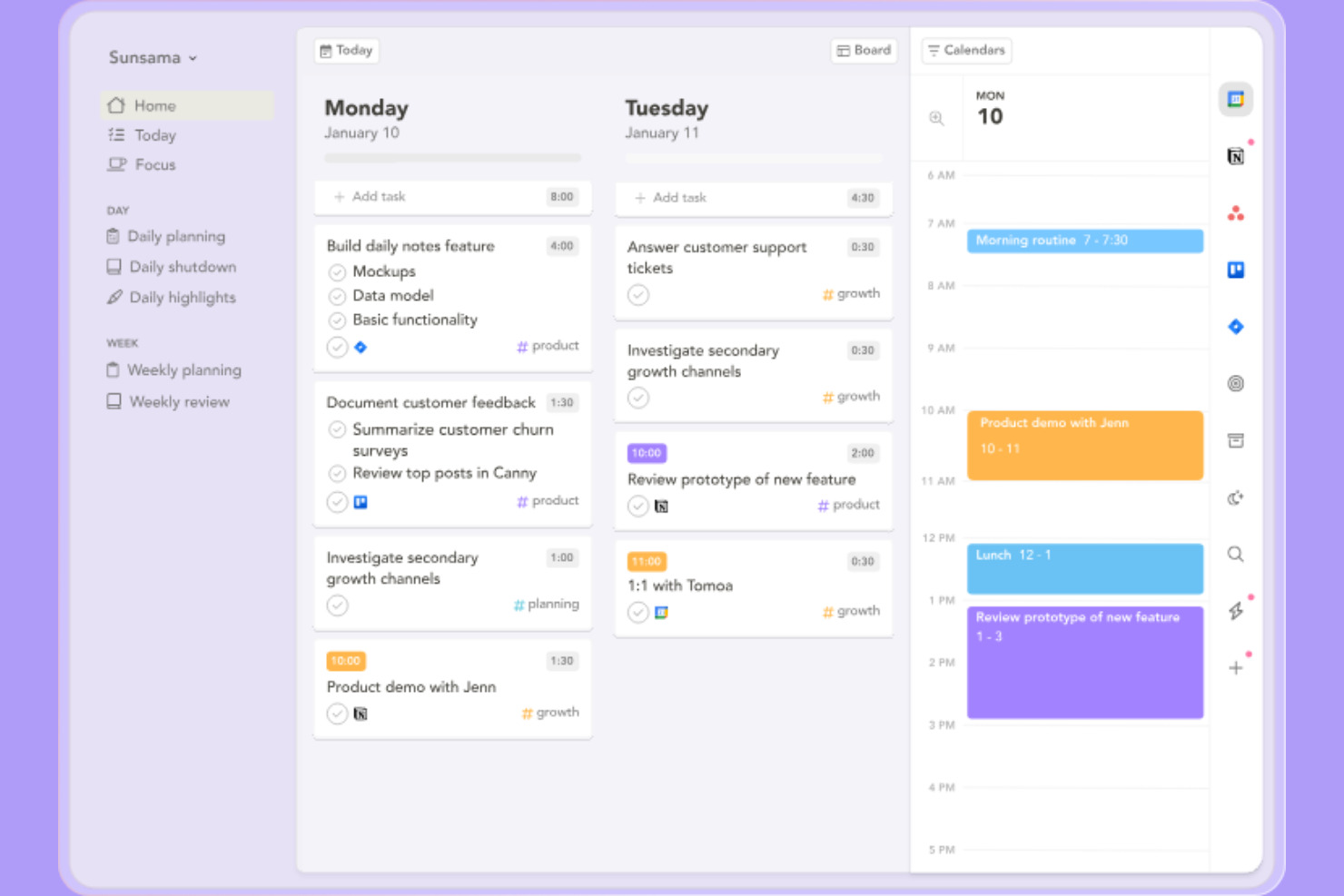
Sunsama guides you through a structured daily planning process, making it a strong fit for professionals who want more intention and reflection in their workday. If you’re looking for a tool that helps you set realistic goals and prioritize tasks with a mindful approach, Sunsama stands out from Akiflow by offering built-in guided workflows. This makes it especially appealing for those who value daily review and planning rituals as part of their productivity routine.
Why Sunsama Is a Good Akiflow Alternative
Unlike most digital planners, Sunsama guides you through a daily workflow that encourages thoughtful planning and reflection. I picked Sunsama as an Akiflow alternative because it prompts you to set intentions, review your workload, and time-block tasks each day. Its daily planning assistant helps you break down goals into actionable steps and ensures you don’t overcommit. This approach is especially useful if you want a planner that supports mindful productivity and sustainable work habits.
Sunsama Key Features
Some other features in Sunsama help round out its daily planning toolkit:
- Drag-and-Drop Task Scheduling: Move tasks directly onto your calendar to allocate time blocks.
- Email Task Import: Turn emails from Gmail or Outlook into actionable tasks within your daily plan.
- Focus Mode: Minimize distractions by viewing only the current task and time block.
- Daily Shutdown Ritual: Review completed work and unfinished tasks at the end of each day.
Sunsama Integrations
Integrations include Google Calendar, Microsoft Outlook, Todoist, Asana, Trello, Jira, GitHub, Notion, and Linear.
Pros and Cons
Pros:
- Drag and drop time blocking
- Deep Slack integration
- Promotes healthy work limits
Cons:
- No AI auto scheduling
- Takes time to plan each day
Outras alternativas ao Akiflow
Eis algumas opções adicionais de alternativas ao Akiflow que não entraram na minha lista restrita, mas que ainda vale a pena conhecer:
- Morgen
For managing multiple calendars in one view
- Superlist
For collaborative team task management
- Smartsheet
For spreadsheet-style task management
- Wrike
For advanced reporting dashboards
- Microsoft To Do
With Microsoft 365 integration
- Asana
For visual project timeline tracking
- ClickUp
For customizable workflow templates
- FlowSavvy
For automatic schedule optimization
- Lunatask
For privacy-focused productivity tools


How I Evaluate Akiflow Alternatives
I evaluate every tool against two layers: the core capabilities a daily planner must have to qualify, and the differentiators that make one a better fit for, say, a solopreneur vs. an agency PM.
Core Functionality (Table Stakes For This List)
When I'm selecting tools for my list, I rank each one on a scale from 0 (does not offer the functionality) to 5 (excels in this area) for each core functionality listed below. Then, I calculate the tool's total score into a percentage. Each tool needs to achieve a minimum total score of 65% to be considered for inclusion.
- Unified Task Inbox: I check whether the tool pulls tasks, emails, and messages from multiple sources into one actionable list—like seeing a Slack request next to a Trello card and a flagged email.
- Calendar Time-Blocking: I look for drag-and-drop scheduling that lets you slot tasks directly onto your calendar, similar to how Sunsama and Akiflow handle daily planning sessions.
- Third-Party Integrations: The tool should connect natively with the apps project managers actually live in—Gmail, Outlook, Slack, Asana, Notion, Jira—with real sync, not just one-way pushes.
- Task Capture & Conversion: Quick capture matters. I evaluate whether you can turn a Slack message or email into a task with a keyboard shortcut or command bar instead of copying and pasting manually.
- Recurring Tasks & Rituals: Daily standups, weekly reviews, and repeating deliverables need proper recurrence support. I look for custom schedules and structured planning routines beyond basic daily repeats.
- Cross-Platform Sync: Real-time sync across desktop, web, and mobile is what I evaluate here—your task list on your phone should match what you see on your laptop without a refresh delay.
Once I have a list of tools that meet this criteria, I consider what sets each platform apart.
Differentiating Factors (What Sets Vendors Apart)
Here's how I compare and contrast different vendors:
Standout Features
AI-powered scheduling is a major differentiator—tools like Motion and Reclaim can auto-slot tasks into open calendar gaps based on priority and deadlines, which saves real planning time during hectic weeks. I also evaluate natural language input, where typing "prep sprint review Friday 2pm" creates a fully structured task instantly. Built-in time tracking and analytics round things out by showing where your hours actually go, which is valuable for freelancers billing clients or PMs reporting team capacity to leadership.
Beyond Features
I look closely at whether a tool is built for solo users or teams—a freelancer tracking their own week needs a different experience than an agency PM coordinating across five accounts. Pricing flexibility matters here too, since many of these tools charge per seat and a free tier or generous trial lets you actually commit to a daily workflow before paying. Integration depth is another factor I weigh: tools that sync bi-directionally with both Google Workspace and Microsoft 365 fit into more tech stacks without workarounds.
Por que procurar uma alternativa ao Akiflow?
Embora o Akiflow seja uma boa escolha como aplicação de planeamento por blocos de tempo e plataforma digital, existem várias razões pelas quais alguns utilizadores procuram soluções alternativas. Pode estar à procura de uma alternativa ao Akiflow porque…
- Precisa de funcionalidades mais avançadas de colaboração em equipa
- Quer integrações nativas com as ferramentas que já utiliza
- Precisa de um calendário ou de uma vista de linha temporal integrados
- Precisa de um suporte melhor para tarefas recorrentes
- Prefere uma solução com opções de preços mais flexíveis
Se alguma destas situações lhe é familiar, veio ao lugar certo. A minha lista inclui várias opções de aplicações de planeamento por blocos de tempo e plataformas digitais mais adequadas para equipas que enfrentam estes desafios com o Akiflow e procuram soluções alternativas.
Principais funcionalidades do Akiflow
Eis algumas das principais funcionalidades do Akiflow, para o ajudar a contrastar e comparar o que as soluções alternativas oferecem:
- Organização por blocos de tempo para o planeamento diário e semanal
- Caixa de entrada unificada para recolher tarefas de várias fontes
- Sincronização bidirecional do calendário com o Google e o Outlook
- Captura rápida de tarefas com atalhos de teclado
- Agendamento de tarefas e eventos através de arrastar e largar
- Modo de concentração para minimizar distrações
- Tarefas e lembretes recorrentes
- Barra de comandos para navegação e ações rápidas
- Integração com ferramentas de produtividade populares
- Notificações e alertas personalizáveis