

De 10 beste programvarene for booking av fleksible skrivebord i 2026

Beste programvare for bestilling av fleksible skrivebord


Programvare for bestilling av fleksible skrivebord lar teamet ditt reservere skrivebord og arbeidsplasser ved behov, noe som gjør det enklere å administrere fleksible kontorløsninger. Hvis du leter etter den beste programvaren for bestilling av fleksible skrivebord, må du sannsynligvis håndtere hybride arbeidsplaner, skiftende behov i teamet og presset om å holde arbeidsplassen effektiv og rettferdig.
Det riktige verktøyet kan hjelpe deg med å unngå dobbeltbookinger, gi alle oversikt over tilgjengelige skrivebord og støtte en smidig tilbakevending til kontoret.
I denne veiledningen finner du en tydelig sammenligning av de beste plattformene for bestilling av fleksible skrivebord, slik at du kan velge den som passer arbeidsflyten og målene dine for plassadministrasjon.
Hvorfor du kan stole på våre programvareanbefalinger
Teamet vårt har testet og anmeldt programvare siden 2012. Vi er selv prosjektledere, så vi vet hvor vanskelig og hvor viktig det er å velge riktig programvare.
I denne guiden har vi vurdert verktøyene gjennom praktisk testing og uavhengig research og gitt dem poeng ut fra våre utvelgelseskriterier. Vi bygger også på innsikt fra ledende eksperter i bransjen og erfarne prosjektledere.
Anmeldelsene våre bygger på vår egen redaksjonelle vurdering. De er ikke et salgsargument.
Ekspertanmeldere:
Sammenligningstabell for programvare til bestilling av fleksible skrivebord
Denne sammenligningstabellen oppsummerer prisopplysningene for mine beste utvalgte programmer for bestilling av fleksible skrivebord:
| Tool | Best For | Trial Info | Price | ||
|---|---|---|---|---|---|
| 1 | Best for AI-powered desk recommendations | Free demo available | From $500/month | Website | |
| 2 | Best for booking desks by team neighborhood | Not available | From $3000/year | Website | |
| 3 | Best for occupancy monitoring by zone | Free demo available | Pricing upon request | Website | |
| 4 | Best for delegating guest desks | Free demo available | Pricing upon request | Website | |
| 5 | Best for automated desk assignment rules | Free demo available | From $5/bookable resource/month (billed annually) | Website | |
| 6 | Best for access to global coworking locations | Free plan available | From $32.58/user/month (billed annually) | Website | |
| 7 | Best for interactive floor plan visualization | 30-day free trial + free demo available | From $13.50/month (billed annually) | Website | |
| 8 | Best for instant desk booking with one tap | Free plan available; 14-day free trial; free demo available | From €1.7/user/month (billed annually) | Website | |
| 9 | Best for advanced analytics and reporting | Free demo available | From £99/month | Website | |
| 10 | Best for mobile-first desk reservations | Free demo available | Pricing upon request | Website |

Vurderinger av programvare for bestilling av fleksible skrivebord
Nedenfor finner du mine detaljerte sammendrag av programmene for bestilling av fleksible skrivebord som kom med på listen min. Vurderingene mine gir en detaljert gjennomgang av funksjonene, de beste bruksområdene og integrasjonene til hver plattform, slik at du kan finne den beste løsningen for deg.

elia
Best for AI-powered desk recommendations

elia is a workplace operations platform that covers desk and room booking, occupancy management, service requests, visitor management, and hybrid office coordination through an interactive floor plan interface.
Who Is elia Best For?
elia is well-suited for mid-size to large enterprises managing hybrid work across multiple office locations that need centralized control over workspace resources.
Why I Picked elia
I picked elia as one of the best because its AI Analytics & Recommendations feature goes beyond basic reporting to actively surface desk suggestions based on usage patterns and occupancy data. This is particularly useful in large offices where employees struggle to find the right desk for the day without manually scanning the floor plan. Pair that with occupancy sensor data feeding directly into the analytics engine, and the recommendations become grounded in real, anonymous usage signals rather than guesswork.
elia Key Features
- Interactive floor plan: Browse real-time desk availability directly on a visual map of your office and book a specific desk in a few clicks.
- Neighborhood booking: Assign teams to designated office zones so colleagues can book desks within the same area on shared in-office days.
- Automated check-in/check-out: Trigger desk check-ins via QR code or mobile app, with auto-release for no-shows to free up unused desks.
- Colleague booking: Reserve desks on behalf of teammates or invite colleagues to book alongside you for coordinated in-office days.
elia Integrations
elia offers native integrations with Microsoft 365, Google Workspace, and Slack, with meeting room booking synced with Outlook and Google Calendar. API access and a custom integration builder for IoT and software are available on the Enterprise plan.
Pros and Cons
Pros:
- Free plan includes unlimited users
- Anonymized occupancy sensor data collection
- Built-in floor plan builder for layouts
Cons:
- Mobile app less polished than desktop
- Limited scheduling status options available
Tactic
Best for booking desks by team neighborhood
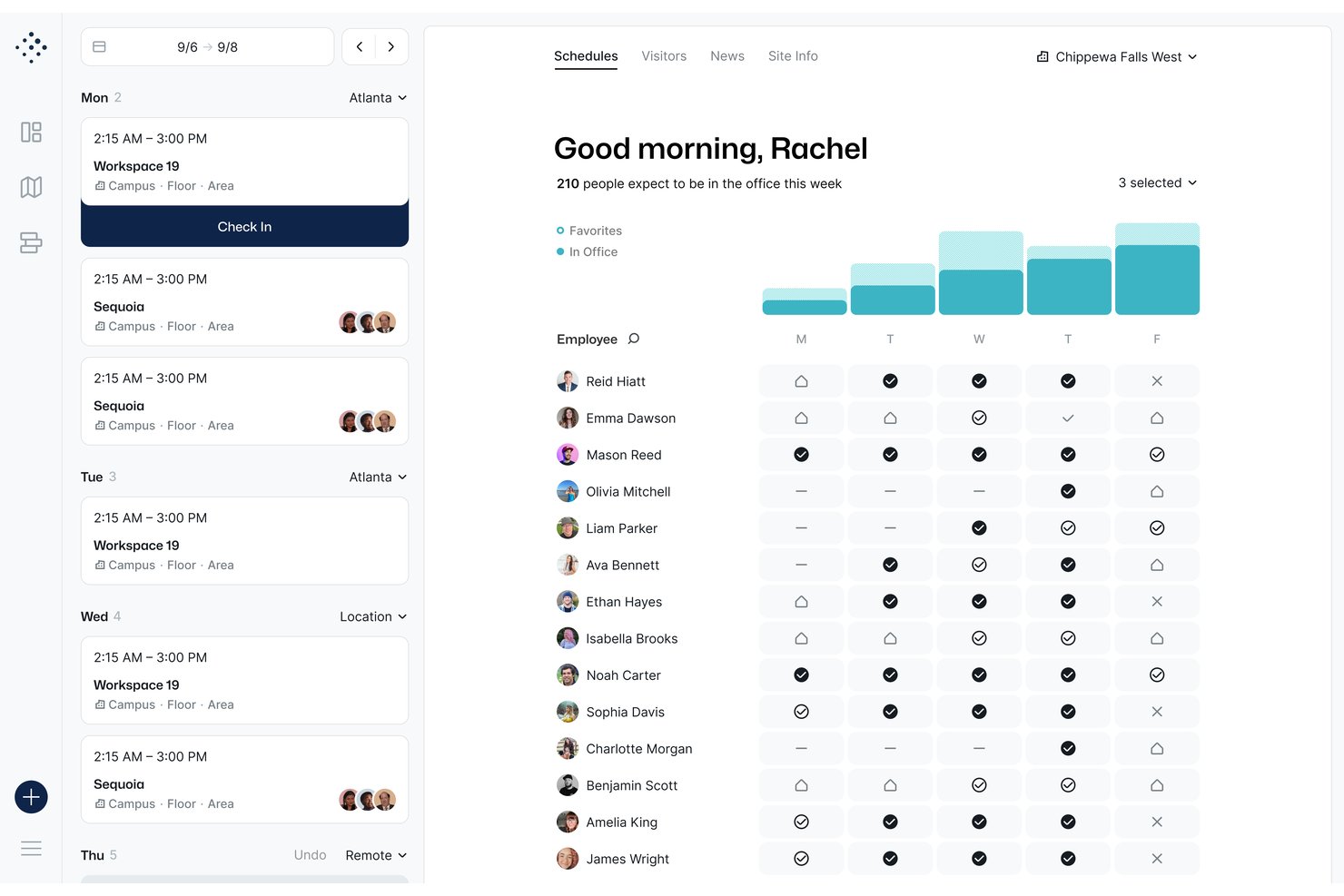
Tactic is a hot desk booking platform that combines interactive floor plan booking, team neighborhood grouping, AI-assisted reservation, and workplace analytics across desks, rooms, and custom resources.
Who Is Tactic Best For?
Tactic is a strong fit for small to mid-sized companies managing hybrid teams who need a simple, low-friction way to coordinate on-site seating without complex admin overhead.
Why I Picked Tactic
Tactic earns its spot on my shortlist because of how it handles team neighborhoods. I can filter the interactive floor map by team zone, see exactly where teammates are sitting, and book a desk right next to them in a few clicks. On top of that, Tessa, Tactic's AI assistant, lets me search for available desks near my team using plain language, which cuts the time I'd otherwise spend hunting through an availability grid.
Tactic Key Features
- Delegated booking: Admins and executive assistants can reserve desks or rooms on behalf of other users or guests.
- Automated desk check-in: Users can check in via QR codes, Slack, Teams, Wi-Fi, or in-app, with no-shows automatically released.
- Two-way calendar integration: Bookings sync in real time with both Google Calendar and Outlook for seamless workplace coordination.
- Custom resource management: Reserve parking, lockers, or equipment alongside desks from a single interface.
Tactic Integrations
Tactic offers native integrations with Google Calendar, Outlook, Slack, Microsoft Teams, Microsoft 365, Microsoft Entra, and supports SSO and SCIM. An API is available for custom integrations.
Pros and Cons
Pros:
- Colleague locator shows real-time teammate seating
- AI assistant simplifies desk search
- Team neighborhood booking is uniquely intuitive
Cons:
- Mobile app experience lags behind desktop version
- Analytics reporting lacks depth for large teams

Best for occupancy monitoring by zone

Hybrid Hero is a hot desk booking platform that combines interactive floor plans, neighbourhood-based workspace configuration, QR code check-in, and zone-level occupancy analytics across single and multi-site offices.
Who Is Hybrid Hero Best For?
Hybrid Hero is a good fit for mid-size to enterprise companies managing hybrid work schedules across multiple office locations or floors.
Why I Picked Hybrid Hero
I've included Hybrid Hero in my top picks because its zone-level occupancy data is genuinely granular. Rather than showing a single utilisation number for an entire floor, Hybrid Hero breaks down occupancy heat maps by neighbourhood or zone, so I can see which sections of the office are overloaded on a Tuesday and which sit empty all week. That kind of visibility is what makes a real estate conversation with a COO or CFO actually defensible. Pair that with no-show tracking and peak day trend reporting, and you've got a clear picture of how each zone performs over time.
Hybrid Hero Key Features
- Interactive floor plan: View real-time desk availability across your office layout and book directly from the map.
- QR code check-in: Employees check in at their desk via QR code, and unclaimed desks are automatically released back into the pool.
- Amenity-based desk search: Filter available desks by specific amenities like monitors, standing desks, or phone booths.
- Recurring desk booking: Set up repeating bookings across multiple days or weeks without re-booking each session manually.
Hybrid Hero Integrations
Hybrid Hero offers native integrations across the Microsoft ecosystem, including Microsoft Outlook, Microsoft Teams, and Azure AD, as well as Google Workspace, Okta, and Slack. It also provides a REST API and webhooks for connecting to HRIS, access control, and other internal systems. Zapier support is not clearly documented.
Pros and Cons
Pros:
- Per-desk pricing suits high desk-to-employee ratios
- AI booking via natural language requests
- Unified platform covers desks, rooms, and parking
Cons:
- Mobile app can feel slow to load
- No free trial or free plan available
Best for delegating guest desks
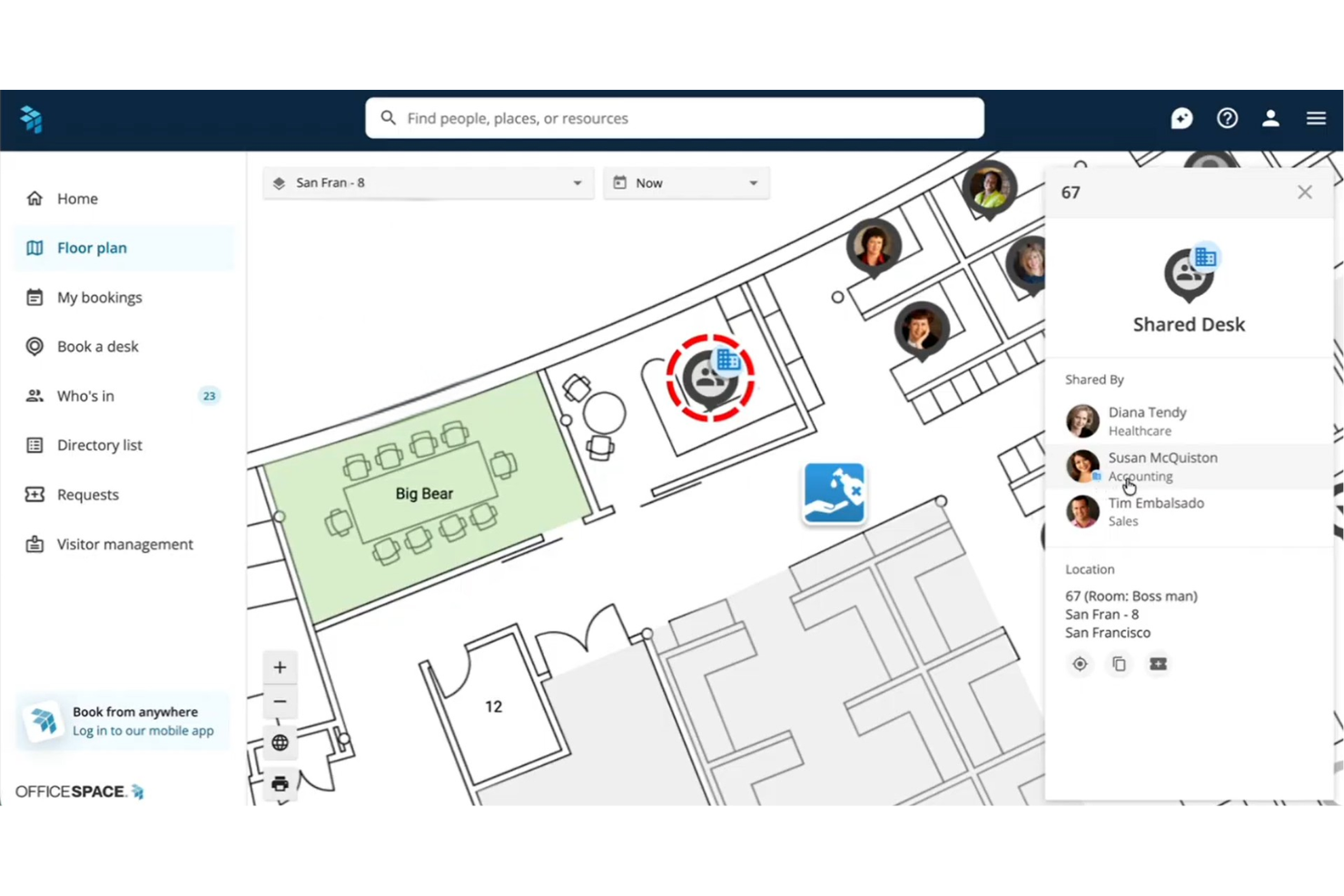
OfficeSpace is an enterprise hot desk booking platform that combines interactive floor plan navigation, neighborhood-based desk assignments, delegate booking controls, and utilization analytics across single and multi-site offices.
Who Is OfficeSpace Best For?
It's a strong fit for enterprise workplace and facilities teams managing hybrid seating across large, multi-location offices with complex permission and capacity needs.
Why I Picked OfficeSpace
OfficeSpace earns its spot on my shortlist because of how granularly it handles guest desk permissions. I love that you can designate Neighborhood Captains, specific team members who can book and manage desks on behalf of visitors without needing full admin access. You can also configure per-group advanced booking windows, so VIP guests or project cohorts get priority access before the general desk pool opens up.
OfficeSpace Key Features
- Interactive floor plans: Browse dynamic, multi-site office maps with real-time desk availability and wayfinding.
- Utilization analytics: Access dashboards tracking desk occupancy, booking patterns, and workspace trends with IoT and sensor data.
- Calendar integrations: Sync bookings with Google Calendar, Office 365, Outlook, Slack, Teams, and more.
- Automated check-ins: Trigger desk check-in via badge scans or WiFi presence to help automate attendance and release unused spaces.
OfficeSpace Integrations
OfficeSpace offers native integrations with Microsoft 365, Google Workspace, Slack, Microsoft Teams, Zoom, Okta, Workday, ADP, and PeopleSoft. An API is available for custom integrations.
Pros and Cons
Pros:
- Strong utilization reporting with sensor data support
- Wayfinding helps teams navigate large offices
- Granular desk permission controls per user group
Cons:
- Floor plan configuration can be slow to update
- Implementation requires significant IT setup time
New Product Updates from OfficeSpace

OfficeSpace Adds Work Order Status and Cost Reports
OfficeSpace adds Work Order Status and Work Order Cost reports for built-in maintenance reporting. These reports help facilities teams track work order activity and costs without relying on manual spreadsheets. For more information, visit OfficeSpace’s official site.
 .
Envoy
Best for automated desk assignment rules
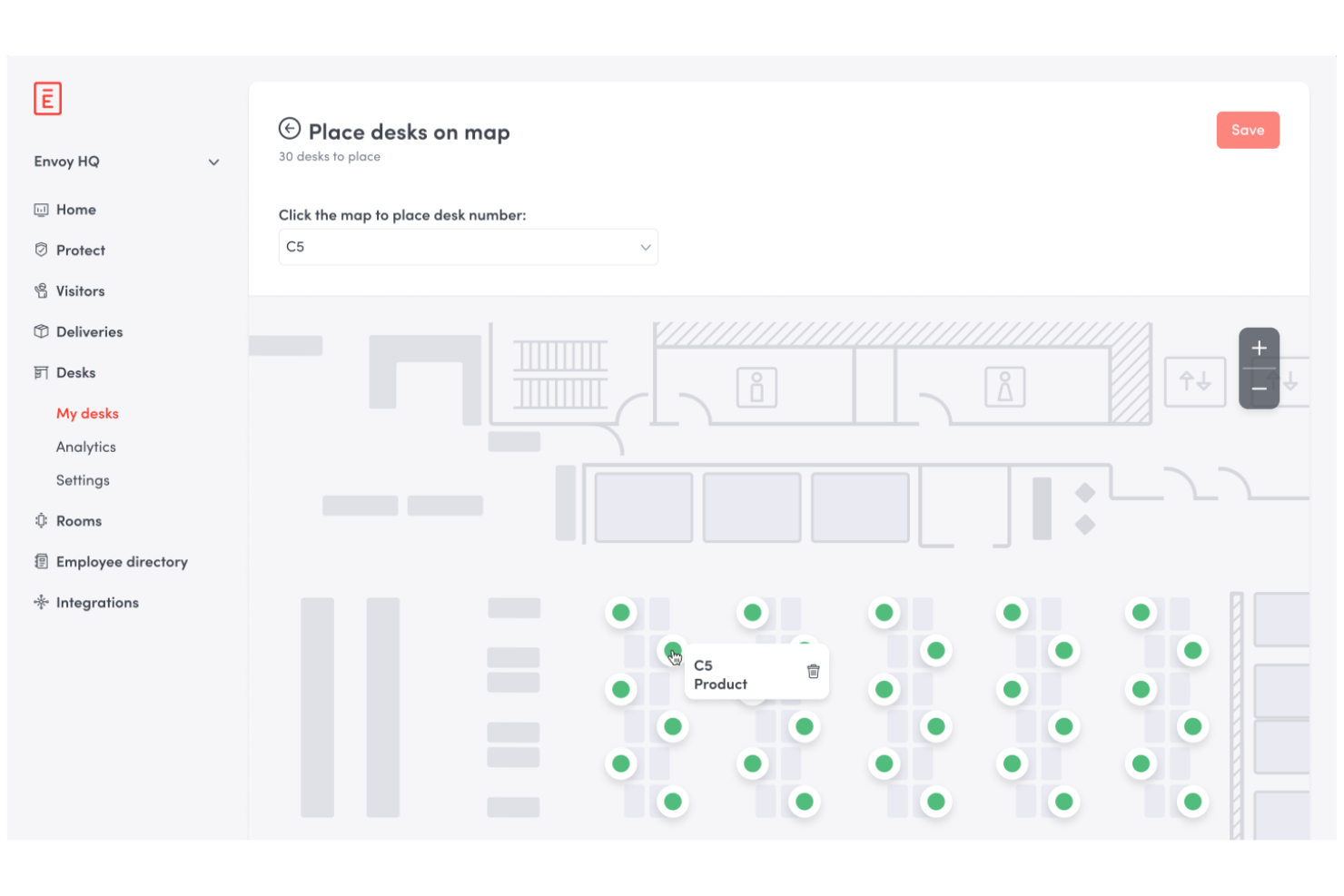
Envoy is a workplace management platform for hot desk booking that lets you automate desk assignments, manage reservations, set booking policies, and monitor office occupancy from a centralized dashboard.
Who Is Envoy Best For?
Office managers at mid-size and large companies who need automated desk assignment and centralized workspace management.
Why I Picked Envoy
I picked Envoy as one of the best because I can set up automated desk assignment rules that match my team's policies and preferences. I like how I can configure neighborhoods, restrict bookings by team or schedule, and automatically assign desks based on employee needs. My team uses the analytics dashboard to monitor occupancy and adjust our space planning in real time.
Envoy Key Features
- Interactive floor plan visualization: See available desks and bookings on a live office map.
- Mobile app booking: Reserve desks and manage bookings directly from your phone.
- Visitor management integration: Track and manage guest access alongside desk reservations.
- Health and safety screening: Require employees to complete health checks before booking a desk.
Envoy Integrations
Envoy offers native integrations with Google Workspace, Microsoft 365, Slack, Zoom, Okta, Cisco Meraki, Aruba, Salesforce, and has an API for custom integrations.
Pros and Cons
Pros:
- Strong visibility into office usage trends
- Centralized workplace and occupancy management
- Automated desk assignment based on policies
Cons:
- Limited flexibility in custom booking logic
- Dashboard usability can be inconsistent
Best for access to global coworking locations
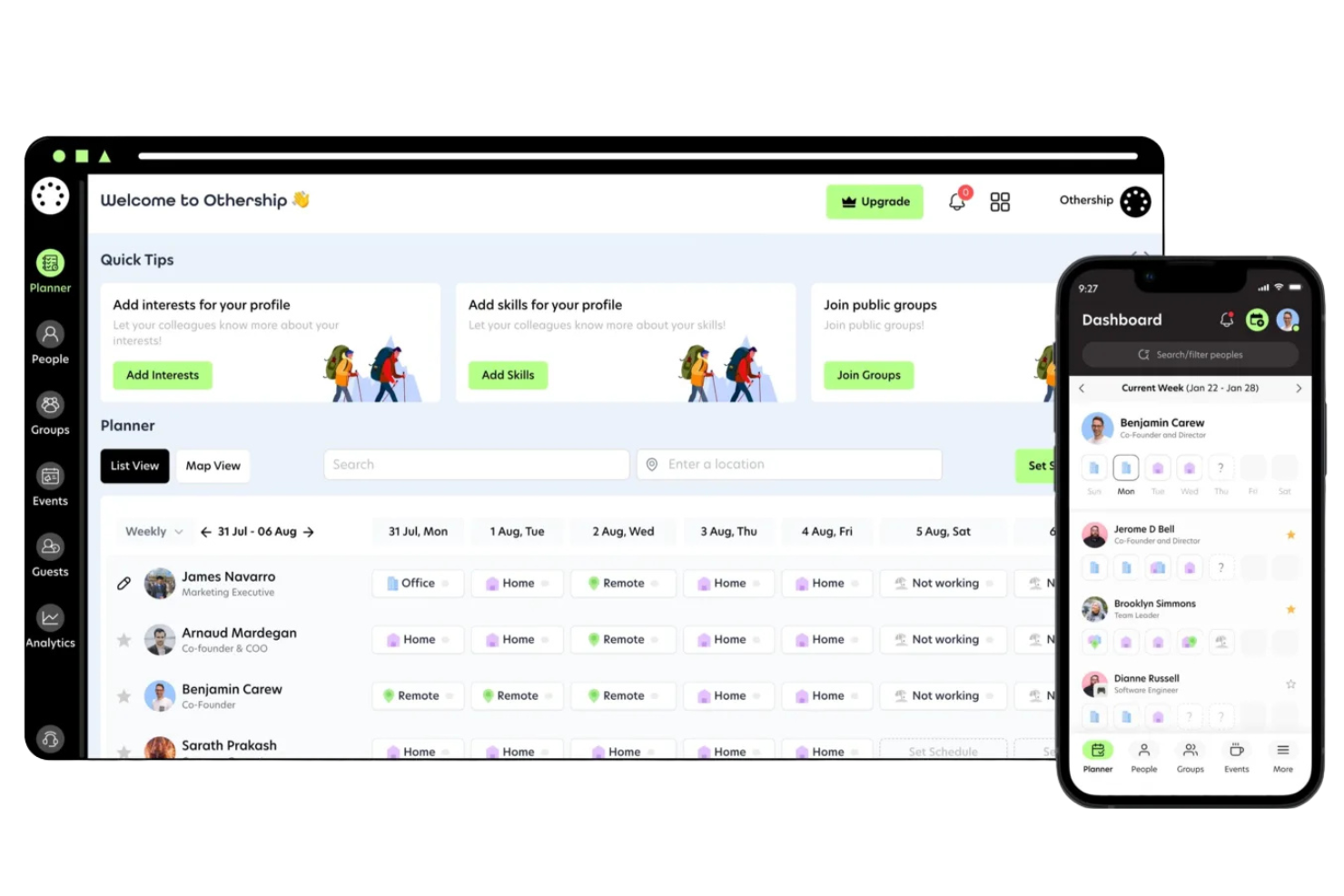
Othership is a workspace booking platform that lets you reserve desks, meeting rooms, and private offices across a curated network of coworking locations in multiple countries.
Who Is Othership Best For?
Remote professionals and distributed teams who need flexible workspace options across multiple cities or countries.
Why I Picked Othership
I picked Othership as one of the best because I can access a curated network of coworking spaces in dozens of cities worldwide. I like that I can search by location, amenities, or workspace type and instantly book desks or meeting rooms. My team uses the platform to coordinate in-person workdays when traveling or working remotely across different countries.
Othership Key Features
- Team management dashboard: Manage team members, permissions, and workspace usage from a central dashboard.
- Workspace access controls: Set who can book, check in, or access specific locations.
- Booking history export: Download detailed booking records for reporting or expense tracking.
- Mobile app support: Book, check in, and manage reservations directly from your phone.
Othership Integrations
Native integrations are not clearly documented. The tool supports integrations via API for custom integrations.
Pros and Cons
Pros:
- Mobile-friendly reservation management
- Simple booking across multiple cities
- Curated global coworking location access
Cons:
- No built-in visitor management features
- Limited reporting and usage insights
Best for interactive floor plan visualization
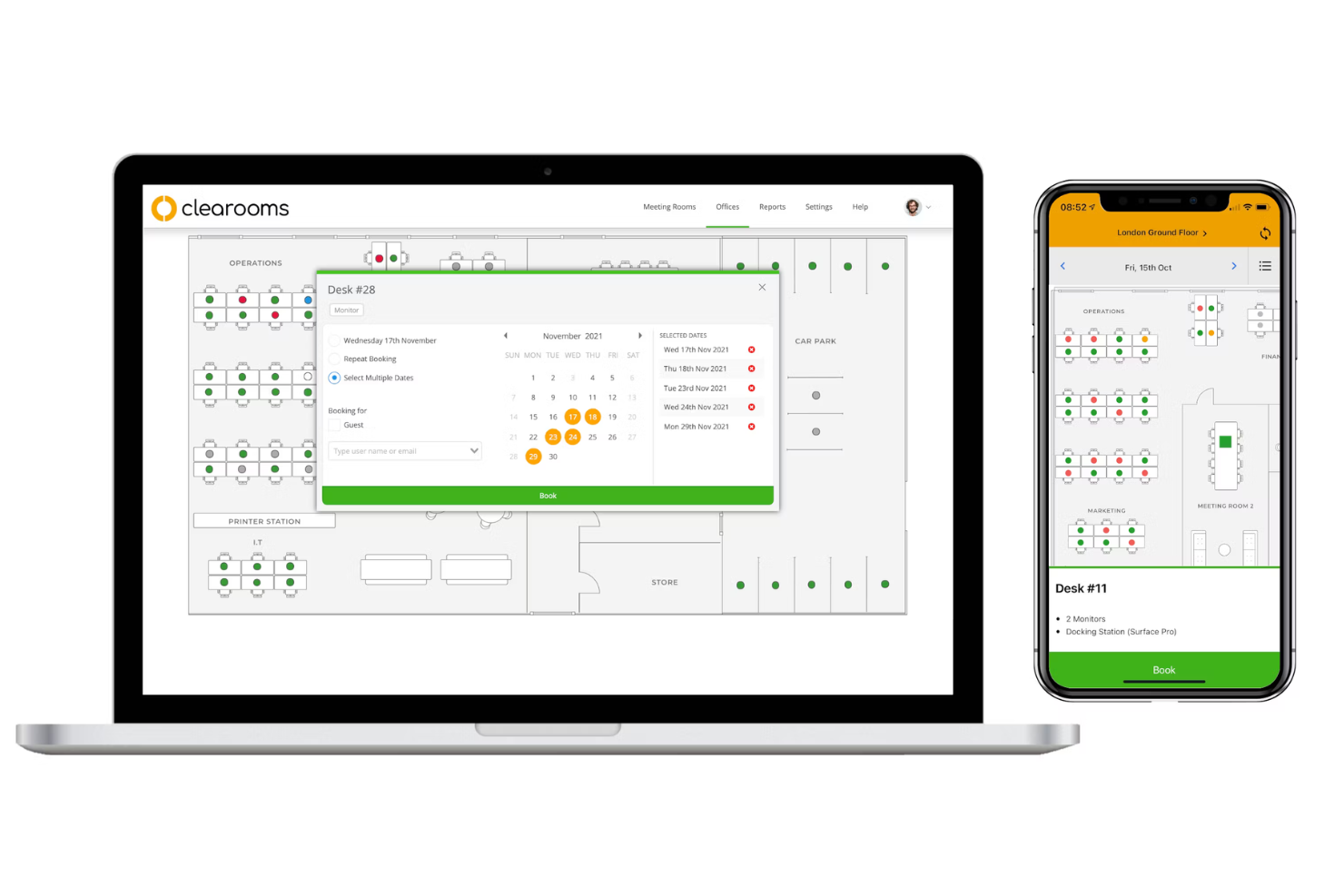
Clearooms is a hot desk booking platform that lets you manage desk reservations, meeting room scheduling, and interactive floor plans for flexible office environments.
Who Is Clearooms Best For?
Facilities managers at mid-size and large offices who need detailed, interactive floor plan management for desk and room bookings.
Why I Picked Clearooms
I picked Clearooms as one of the best because I can upload detailed office floor plans and create interactive maps for desk and room booking. I like how I can assign amenities and resources to each space, making it easy for my team to find the right spot. My team uses the drag-and-drop editor to update layouts as our needs change.
Clearooms Key Features
- Desk booking via mobile app: Book desks and rooms directly from your smartphone.
- Visitor management: Register and track guests entering the office.
- Outlook and Google Calendar integration: Sync bookings with your existing calendar tools.
- Contactless check-in: Use QR codes for touch-free desk and room check-in.
Clearooms Integrations
Clearooms offers native integrations with Google Calendar, Office 365, Microsoft Teams, Slack, Paxton Access, and supports single sign-on with Azure, Google Workspace, JumpCloud, Microsoft AD FS, Okta, and OneLogin. An API is available for custom integrations.
Pros and Cons
Pros:
- Built-in visitor tracking and management
- Easy desk and room booking via mobile
- Highly visual and interactive floor plan editor
Cons:
- Limited customization for booking rules
- Interface may feel overwhelming initially

Dibsido
Best for instant desk booking with one tap
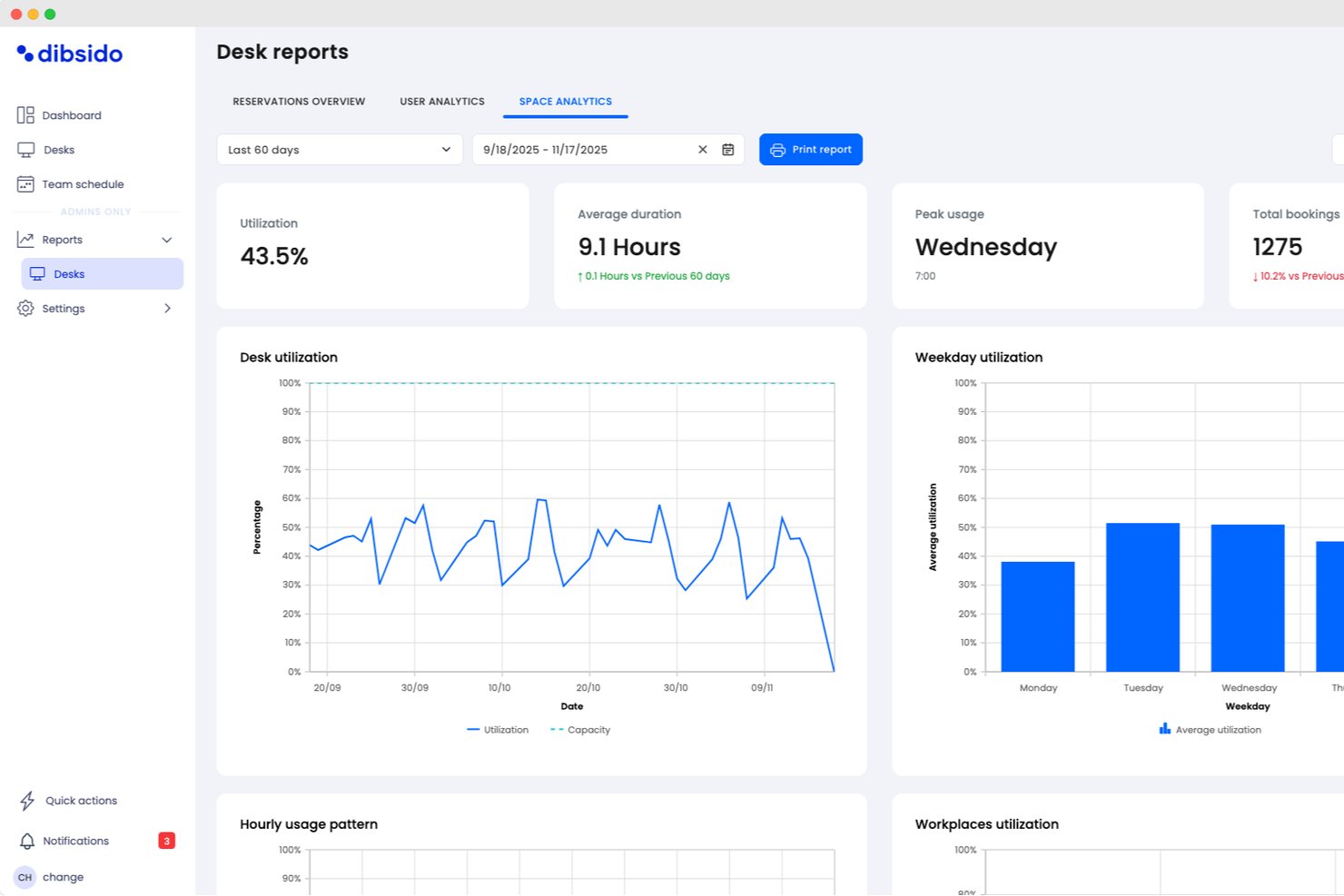
Dibsido is a hot desk booking platform designed for quick, one-tap reservations across desks, meeting rooms, and parking spots, with visual floor plans and mobile app support.
Who Is Dibsido Best For?
Hot desk coordinators and office managers at small to midsize businesses looking for rapid, app-based workspace booking.
Why I Picked Dibsido
I picked Dibsido as one of the best because I can book any available desk instantly with a single tap, even from my phone. The interactive office map and one-tap reservation feature make it incredibly fast to grab a space as soon as I need one.
Dibsido Key Features
- Multi-language interface: Users can switch between 11 supported languages within the app.
- Admin analytics dashboard: Track booking patterns and workspace usage with visual reports.
- Microsoft Teams integration: Reserve workspaces directly from the Teams interface.
- Parking spot management: Automate reservations with waitlists that instantly assign freed-up spots, priority rules for company cars, and quick spot transfers to colleagues.
Dibsido Integrations
Dibsido offers native integrations with Microsoft Teams and Slack, plus two-way calendar sync with Microsoft Outlook and Google Calendar. Enterprise SSO is supported through Microsoft Entra ID, Google Workspace, and SAML 2.0, with an API available for custom integrations.
Pros and Cons
Pros:
- Built-in QR codes for check-ins
- Floor plan view for workspace selection
- Auto-cancels unused hot desk reservations
Cons:
- Basic analytics and reporting functionality
- Limited advanced admin controls
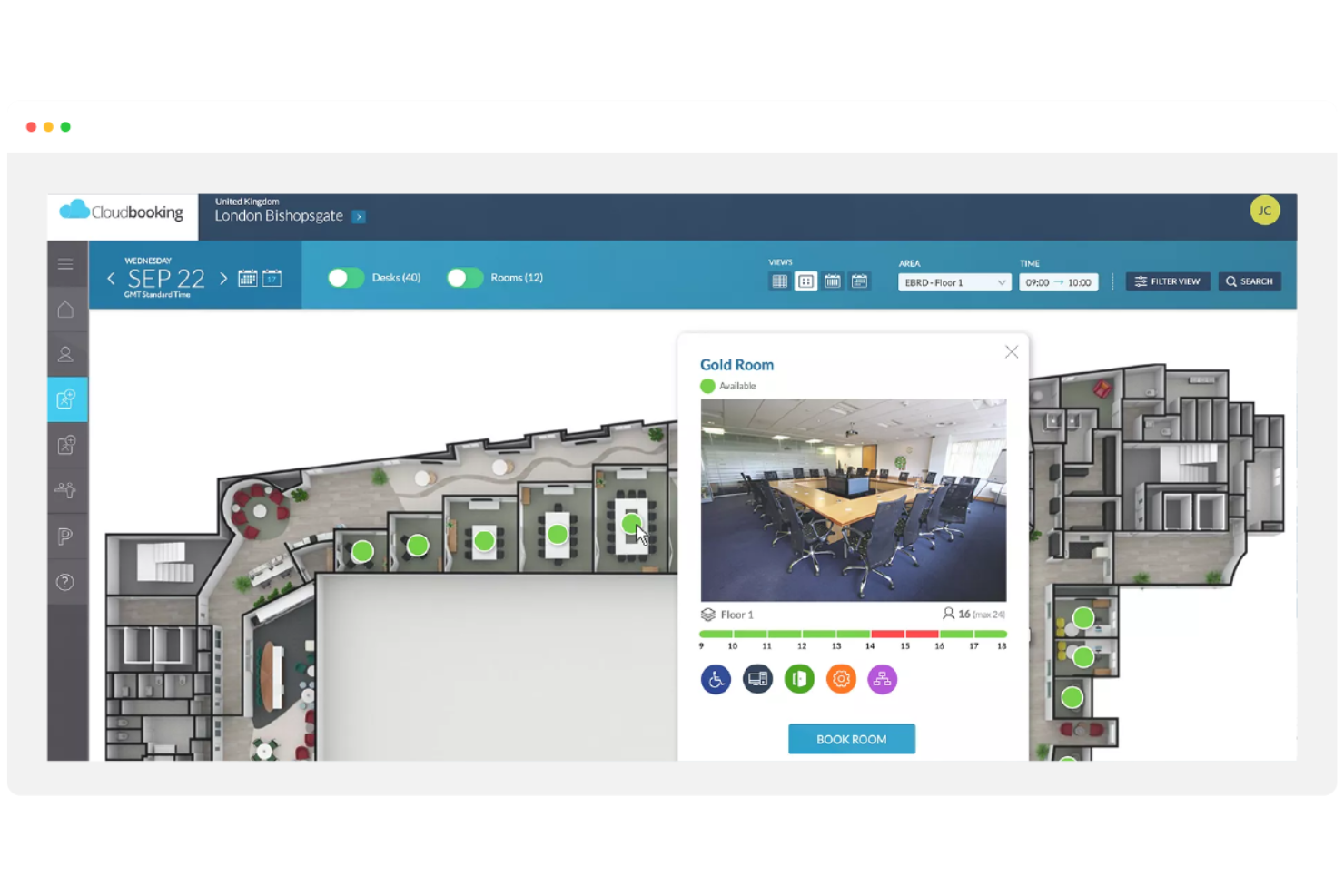
Cloudbooking is a workplace management platform for hot desk booking that offers desk reservations, meeting room scheduling, visitor management, and advanced analytics tools for tracking workspace usage.
Who Is Cloudbooking Best For?
Facilities managers at large enterprises who need detailed workspace analytics and centralized desk booking.
Why I Picked Cloudbooking
I picked Cloudbooking as one of the best because I can access granular workspace usage data and generate custom reports for different departments. I like how the platform lets me visualize occupancy trends and export analytics for leadership. My team uses the dashboard to monitor desk utilization and optimize our office layout based on real-time insights.
Cloudbooking Key Features
- Desk booking portal: Users can reserve desks through a web-based interface.
- Interactive floor plans: Visual maps display available and booked desks in real time.
- Visitor management integration: Manage guest check-ins alongside workspace reservations.
- Mobile app access: Book desks and manage reservations from any mobile device.
Cloudbooking Integrations
Cloudbooking offers native integrations with Microsoft 365, Outlook, Google Workspace, and Active Directory, and provides an API for custom integrations.
Pros and Cons
Pros:
- Centralized control for desk and room
- Clear visualization of workspace occupancy
- Advanced reporting with detailed usage insights
Cons:
- Customization options for booking rules are limited
- Interface may require onboarding to fully use


Eptura Engage is a workplace management platform for hot desk booking that offers desk reservations, interactive floor plans, visitor management, and mobile app access for on-site and hybrid teams.
Who Is Eptura Engage Best For?
Workplace managers at mid-size and large organizations who need mobile-first desk booking for hybrid teams.
Why I Picked Eptura Engage
I picked Eptura Engage as one of the best because I can manage desk reservations directly from my phone, which is perfect for hybrid teams on the move. I like the interactive floor plans and QR code check-in that make booking and finding desks quick. My team uses the mobile app to coordinate in-office days and reserve spaces without needing to log in from a desktop.
Eptura Engage Key Features
- Visitor management integration: Manage guest check-ins alongside workspace reservations.
- Outlook and Google Calendar sync: Sync desk bookings with your existing calendar tools.
- Space utilization analytics: Track workspace usage with built-in reporting dashboards.
- Access control integration: Connect with building access systems for secure entry.
Eptura Engage Integrations
Eptura Engage offers native integrations across the Microsoft ecosystem, including Microsoft 365 and Outlook, as well as access control, visitor management, video meeting rooms, and HR systems. An API is available for custom integrations.
Pros and Cons
Pros:
- Interactive floor plans for quick booking
- Strong support for hybrid workplace coordination
- Mobile-first experience for desk reservations
Cons:
- Dashboard can feel complex for new users
- Limited flexibility in booking rule configuration
Annen programvare for bestilling av fleksible skrivebord
Her er noen andre alternativer for programvare til bestilling av fleksible skrivebord som ikke kom med på listen min, men som likevel er verdt å se nærmere på:
- Robin
For managing hybrid workplace schedules
- Zynq
For integrating desk and meeting room booking
- Ronspot
For customizable booking policies
- HotDesk+
For on-demand workspace access
- Deskfound
For Slack integration
- deskbird
For flexible booking durations
- Officely
For Slack-based desk reservations
- DeskFlex
With visitor management integration
- FloorPlanMapper
For interactive office mapping


How I Evaluate Hot Desk Booking Software
I evaluate these platforms in two layers: the baseline booking, floor plan, and admin controls a tool must have, then the differentiators like team clustering and project tool sync that matter most.
Core Functionality (Table Stakes For This List)
When I'm selecting tools for my list, I rank each one on a scale from 0 (does not offer the functionality) to 5 (excels in this area) for each core functionality listed below. Then, I calculate the tool's total score into a percentage. Each tool needs to achieve a minimum total score of 65% to be considered for inclusion.
- Real-Time Desk Reservation: I check whether users can book, modify, and cancel desks on their own across locations—say, grabbing a desk at the London office before a Wednesday stand-up.
- Interactive Floor Plan Views: Visual maps with live availability matter here. I look for click-to-book maps where a project lead can scan a floor and pick desks near a huddle room.
- Team Booking & Grouping: For sprint weeks or cross-functional workshops, I evaluate whether the tool lets a manager reserve a block of desks for a project team in one action.
- Calendar & Collaboration Integrations: I look for native sync with Google Calendar, Microsoft 365, Slack, or Teams so desk bookings show up where your team already plans its day.
- Admin Booking Rules & Policies: The ability to set booking windows, enforce check-ins, cap daily capacity, or restrict certain zones to specific teams is something I evaluate closely.
- Workspace Utilization Analytics: Dashboards that surface occupancy trends, no-show rates, and peak-day patterns help justify real estate decisions—I look for filters by team, floor, and date range.
Once I have a list of tools that meet the criteria, I consider what sets each platform apart.
Differentiating Factors (What Sets Vendors Apart)
Here's how I compare and contrast different vendors:
Standout Features
A colleague locator is a feature I value highly. When a delivery manager needs to pull scattered team members into an impromptu retro, seeing who's seated where on a live map saves real time. I also look for meeting room bundling, which lets you reserve a desk and an adjacent huddle space in one booking flow for full working sessions. Automated check-in through QR codes or geofencing is another differentiator, since it frees no-show desks back into the pool and keeps utilization data accurate.
Beyond Features
Integration depth matters here. I evaluate whether a platform connects with SSO providers and HRIS systems so IT doesn't have to manage another standalone login. Security certifications like SOC 2 and GDPR readiness are also something I check, especially for teams operating across multiple regions with employee location data flowing through the system. Pricing flexibility rounds things out—I look for per-user or per-desk models that let you pilot with a single project team before committing org-wide.
Slik velger du programvare for bestilling av fleksible skrivebord
Det er lett å gå seg vill i lange funksjonslister og kompliserte prismodeller. For å hjelpe deg med å holde fokus mens du går gjennom den unike prosessen din for programvarevalg, får du her en sjekkliste over faktorer du bør ha i bakhodet:
| Faktor | Hva bør du vurdere? |
|---|---|
| Skalerbarhet | Vil programvaren håndtere den nåværende og fremtidige kontorstørrelsen, lokasjonene og veksten i antall brukere? |
| Integrasjoner | Kobler den seg direkte til samarbeidsverktøyene, HR-systemene eller kalenderplattformene dine? |
| Tilpasningsmuligheter | Kan du tilpasse bestillingsregler, godkjenningsflyter og plantegninger slik at de samsvarer med virksomhetens retningslinjer? |
| Brukervennlighet | Vil de ansatte ta i bruk verktøyet raskt, eller trenger de omfattende opplæring for å kunne reservere plasser? |
| Implementering og oppstart | Hvor lang tid vil oppsettet ta, og hvilke ressurser eller hvilken støtte tilbyr leverandøren ved lansering? |
| Kostnad | Er prisnivåene tydelige, og samsvarer de med bruksmønstrene og budsjettbegrensningene dine? |
| Sikkerhetstiltak | Tilbyr verktøyet SSO, datakryptering og tilgangskontroller for å beskytte sensitive data om arbeidsplassen? |
| Tilgjengelig support | Hvilke supportkanaler tilbys, og er svartidene raske nok for virksomhetens behov? |
Hva er programvare for bestilling av fleksible skrivebord?
Programvare for bestilling av fleksible skrivebord er en løsning for bestilling av skrivebord som gjør det mulig å dele skrivebord og reservere plasser i fleksible kontormiljøer. Den lar team reservere arbeidsplasser i kontorfellesskap og administrere fleksibel bruk av skrivebord, med sanntidsoversikt over tilgjengelighet og belegg.
Disse verktøyene støtter administrasjon av skrivebord ved å hjelpe organisasjoner med å skape et mer brukervennlig Wi-Fi-miljø og en bedre arbeidsplassopplevelse, spesielt for hybride team som balanserer arbeid på kontoret og eksternt arbeid.
Funksjoner
Vær oppmerksom på følgende nøkkelfunksjoner når du velger programvare for booking av fleksible arbeidsplasser:
- System for reservasjon av arbeidsplasser: Lar brukere booke, endre eller avbestille reservasjoner av arbeidsplasser på bestemte datoer og tidspunkter, slik at tilgjengeligheten på arbeidsplasser sikres og planleggingskonflikter reduseres.
- Interaktive plantegninger: Gir et visuelt kart over kontorlokalene, slik at brukere kan velge bestemte arbeidsplasser eller områder basert på beliggenhet og fasiliteter.
- Tilgjengelighet i sanntid: Viser oppdatert informasjon om hvilke arbeidsplasser som er ledige eller opptatte, slik at ansatte kan ta informerte beslutninger om bookinger.
- Gjentakende bookinger: Støtter planlegging av regelmessige reservasjoner for brukere som trenger en fast arbeidsplass på bestemte dager eller i bestemte uker.
- Booking av nabolag eller soner: Gjør det mulig for team eller avdelinger å reservere blokker med arbeidsplasser innenfor bestemte kontorsoner for bedre samarbeid.
- Tilgang via mobilapp: Gjør det mulig for brukere å administrere bookinger, kontrollere tilgjengelighet og motta varsler fra smarttelefoner eller nettbrett.
- Innsjekking og utsjekking: Krever at brukere bekrefter ankomst og avreise, slik at organisasjoner kan følge faktisk bruk av arbeidsplasser og forhindre at reserverte plasser står ubrukt.
- Analyseoversikt for administratorer: Tilbyr rapporteringsverktøy for å overvåke utnyttelsen av arbeidsplasser, bookingtrender og beleggsgrad, slik at beslutninger kan tas basert på data.
- Integrasjon med samarbeidsverktøy: Kobler seg til plattformer som Microsoft Teams eller Slack for å effektivisere bookingprosesser og varsler.
- Integrasjon med besøkshåndtering: Koordinerer gjestetilgang og tildeling av arbeidsplasser til eksterne besøkende, noe som styrker sikkerheten og arbeidet i resepsjonen.
Programvareløsninger for booking av fleksible arbeidsplasser inkluderer vanligvis ikke AI som en del av funksjonstilbudet.
Fordeler
Implementering av programvare for booking av fleksible arbeidsplasser gir flere fordeler for teamet og virksomheten din. Her er noen av fordelene du kan se frem til:
- Optimalisert arealutnyttelse: Tilgjengelighet for arbeidsplasser i sanntid og analyseoversikter hjelper deg med å utnytte kontorarealet best mulig.
- Bedre koordinering av hybridarbeid: Systemer for reservasjon av arbeidsplasser og interaktive plantegninger gjør det enklere for team å planlegge kontordager sammen.
- Færre planleggingskonflikter: Funksjoner for booking og avbestilling forhindrer dobbeltbooking og sikrer at alle har tilgang til en arbeidsplass ved behov.
- Bedre medarbeideropplevelse: Tilgang via mobilapp og integrasjoner med samarbeidsverktøy forenkler bookingprosessen for brukerne.
- Datadrevet beslutningstaking: Rapporter om utnyttelse og beleggsanalyse gir innsikt til fremtidig kontorplanlegging og ressursfordeling.
- Effektivisert besøkshåndtering: Integrasjon med verktøy for besøkshåndtering sikrer at gjester får tildelte arbeidsplasser og en smidig innsjekkingsprosess.
- Økt fleksibilitet på arbeidsplassen: Alternativer for gjentakende bookinger og booking av nabolag støtter ulike arbeidsstiler og teambehov.
Kostnader og priser
Valg av programvare for booking av fleksible arbeidsplasser krever en forståelse av de ulike prismodellene og abonnementene som er tilgjengelige. Prisene varierer fra gratis programvare for booking av fleksible arbeidsplasser til betalingsplaner som skaleres basert på funksjoner, teamstørrelse, tillegg og mer. Tabellen nedenfor oppsummerer vanlige abonnementer, gjennomsnittsprisene deres og typiske funksjoner som er inkludert i programvareløsninger for booking av fleksible arbeidsplasser:
Sammenligningstabell for abonnementer for programvare for booking av fleksible arbeidsplasser
| Abonnementstype | Gjennomsnittspris | Vanlige funksjoner |
|---|---|---|
| Gratisabonnement | $0 | Grunnleggende booking av arbeidsplasser, begrenset antall brukere, enkel visning av plantegning og e-poststøtte. |
| Personlig abonnement | $5-$15/bruker/måned | Individuelle reservasjoner, tilgang via mobilapp, tilgjengelighet i sanntid og grunnleggende rapportering. |
| Forretningsabonnement | $15-$30/bruker/måned | Teambookinger, interaktive plantegninger, integrasjoner med samarbeidsverktøy, administratorkontroller og analyser. |
| Virksomhetsabonnement | $30-$50/bruker/måned | Tilpassede arbeidsflyter, avansert sikkerhet, API-tilgang, dedikert støtte og avansert rapportering. |
Vanlige spørsmål om programvare for booking av fleksible arbeidsplasser
Her er svar på vanlige spørsmål om programvare for booking av fleksible arbeidsplasser:
Hvordan støtter programvare for booking av fleksible arbeidsplasser hybride arbeidsmodeller?
Programvare for booking av fleksible arbeidsplasser lar ansatte reservere skrivebord bare når de planlegger å være på kontoret. Dette gjør det enklere å koordinere hybride arbeidsplaner og unngå bortkastet plass. Denne fleksibiliteten hjelper team med å håndtere varierende oppmøte og støtter en kombinasjon av fjernarbeid og arbeid på kontoret.
Kan programvare for booking av fleksible arbeidsplasser integreres med verktøyene vi allerede bruker?
Ja, det meste av programvaren for booking av fleksible arbeidsplasser kan integreres med samarbeidsplattformer som Microsoft Teams, Slack og Google Workspace. Disse integrasjonene bidrar til å effektivisere bookingprosesser, synkronisere kalendere og sende varsler der teamet allerede jobber.
Hvilke sikkerhetsfunksjoner bør jeg se etter i programvare for booking av fleksible arbeidsplasser?
Se etter funksjoner som enkel pålogging (SSO), datakryptering og rollebaserte tilgangskontroller. Disse sikkerhetstiltakene bidrar til å beskytte sensitive data om arbeidsområdet og sikre at bare autoriserte brukere kan opprette eller administrere bookinger.
Hvor lang tid tar det å implementere programvare for booking av fleksible arbeidsplasser?
Implementeringstiden varierer, men mange løsninger tilbyr rask konfigurering med maler, produktvisninger og støtte ved oppstart. For de fleste team kan du forvente å være i gang i løpet av noen dager til et par uker, avhengig av kontorets størrelse og behovet for tilpasninger.
Passer programvare for booking av fleksible arbeidsplasser for små kontorer?
Ja, programvare for booking av fleksible arbeidsplasser kan passe godt for små kontorer som ønsker å utnytte plassen maksimalt og tilby fleksible sitteplasser. Mange leverandører tilbyr kostnadsfrie eller rimelige abonnementer utviklet for mindre team med grunnleggende bookingbehov.