

10 beste programvarer for prosjektstyring i offentlig sektor vurdert i 2026

10 Beste programvare for prosjektstyring i offentlig sektor – kortliste


Det kan være krevende å lede offentlige prosjekter med tidsfrister, budsjetter og krav til etterlevelse. Det er her prosjektstyringsprogramvare kommer inn i bildet. Den hjelper deg med å holde oversikt over alt på ett sted, slik at hverdagen blir litt enklere.
Jeg har brukt tid på å teste og vurdere de beste verktøyene for prosjektstyring i offentlig sektor. Målet mitt er å gi deg et upartisk innblikk i hva som fungerer, og hva som ikke gjør det. Jeg deler de beste alternativene som kan hjelpe deg med å håndtere utfordringene dine.
I denne artikkelen finner du en oversikt over programvare som kan dekke behovene dine. Enten du jobber med små team eller store prosjekter, finnes det noe her for deg. La oss se nærmere på alternativene som kan utgjøre en forskjell for teamet ditt.
Hvorfor du kan stole på våre programvareanbefalinger
Teamet vårt har testet og anmeldt programvare siden 2012. Vi er selv prosjektledere, så vi vet hvor vanskelig og hvor viktig det er å velge riktig programvare.
I denne guiden har vi vurdert verktøyene gjennom praktisk testing og uavhengig research og gitt dem poeng ut fra våre utvelgelseskriterier. Vi bygger også på innsikt fra ledende eksperter i bransjen og erfarne prosjektledere.
Anmeldelsene våre bygger på vår egen redaksjonelle vurdering. De er ikke et salgsargument.
Ekspertanmeldere:
Sammenligningstabell for programvare for prosjektstyring i offentlig sektor
Tabellen nedenfor sammenligner prisdetaljene for mine beste utvalgte programmer for prosjektstyring i offentlig sektor.
Score legend (out of 5)
- Excellent 4.5–5
- Good 4–4.4
- Average 3–3.9
- Below average 2–2.9
- Poor 1–1.9
| Tool | Starting Price | Website | |||||||
|---|---|---|---|---|---|---|---|---|---|
| Best for reporting dashboards | 3.2 out of 5 | 3 | 5 | 4 | 3 | 3 | 1 | $10/user/month 14-day free trial | Website |
| Best for government construction projects | 3.7 out of 5 | 4 | 4 | 3 | 4 | 4 | 3 | Pricing upon request 14-day free trial for Procore Estimating + free demo available | Website |
| Best for earned value management in federal programs | 4.0 out of 5 | 4 | 5 | 5 | 3 | 4 | 3 | Pricing upon request Free demo available | Website |
| Best for FedRAMP High-cleared program oversight | 3.7 out of 5 | 4 | 4 | 4 | 4 | 4 | 2 | $10/user/month Free trial available | Website |
| Best for large-scale critical path scheduling | 3.5 out of 5 | 4 | 5 | 4 | 3 | 3 | 2 | $125/user/month Free demo available | Website |
| Best for task tracking and deadlines | 3.5 out of 5 | 4 | 4 | 3 | 4 | 4 | 2 | $10.99/user/month Free plan available | Website |
| Best for task management | 3.3 out of 5 | 4 | 4 | 4 | 3 | 4 | 1 | $8/month 14 days free trial | Website |
| Best for customizable workflows | 3.5 out of 5 | 4 | 2 | 3 | 5 | 4 | 3 | Pricing upon request Free demo available | Website |
| Best for public infrastructure lifecycle management | 3.8 out of 5 | 4 | 3 | 4 | 5 | 3 | 4 | Pricing upon request Free demo available | Website |
| Best for owner-led government capital programs | 3.5 out of 5 | 4 | 3 | 3 | 4 | 4 | 3 | Pricing upon request Free demo + free trial available | Website |
Vurdering av den beste programvaren for prosjektstyring i offentlig sektor
Nedenfor finner du mine detaljerte sammendrag av den beste programvaren for prosjektstyring i offentlig sektor som kom med på kortlisten min. Vurderingene mine gir et detaljert innblikk i de viktigste funksjonene, fordelene og ulempene, integrasjonene og ideelle bruksområdene for hvert verktøy, slik at du kan finne det beste alternativet for deg.

Celoxis
Best for reporting dashboards

Celoxis is a project and portfolio management platform built for complex organizations that need multi-project scheduling, RAID tracking, resource management, and configurable reporting across programs and workstreams.
Who Is Celoxis Best For?
Celoxis is a strong fit for mid-to-large government agencies and public sector organizations managing multiple concurrent projects with strict oversight and compliance requirements.
Why I Picked Celoxis
I picked Celoxis as one of the best options for government project management because of how far its reporting goes beyond standard status views. I can build drill-down charts that pull from custom fields (including formula fields), then schedule those reports for automatic email delivery to multiple stakeholders. For government teams that need to present portfolio-level progress to oversight bodies on a regular cadence, that kind of built-in, schedulable reporting removes a lot of manual prep work. I also like that dashboards are fully customizable with resizable widgets, and users can hold multiple shared dashboards at once.
Celoxis Key Features
- Interactive Gantt charts: Visualize project timelines with drag-and-drop task scheduling, dependency mapping, and critical path tracking across multiple projects.
- RAID log tracking: Log and monitor risks, actions, issues, and decisions in a centralized register tied directly to individual projects.
- Resource workload management: View team capacity across projects and reassign tasks based on availability to avoid over-allocation.
- Budget and cost tracking: Monitor planned vs. actual costs at the task, project, and portfolio level with real-time financial summaries.
Celoxis Integrations
Celoxis offers native integrations with Google Drive, Microsoft Excel, Microsoft Project, Salesforce, Jira, Zendesk, Slack, QuickBooks Online, and more. It also connects with Zapier, and an API is available for custom integrations.
Pros and Cons
Pros:
- Portfolio-level risk and issue registers
- On-premise and cloud deployment options
- Built-in EVM and financial tracking
Cons:
- Database filters use restrictive AND logic
- Mobile app limited to viewing tasks

Procore
Best for government construction projects

Procore is a construction management software designed for construction professionals, including project managers, contractors, and architects. It facilitates project management, financial management, and resource planning, making it a competitive solution for business operations in the construction industry.
Why I picked Procore: Procore is particularly effective in managing construction projects with its detailed project tracking and financial management features. You can manage project documents, track expenses, and schedule tasks efficiently.
Its detailed reporting tools provide insights into project progress and financial health. The software's ability to centralize communication and documentation makes it invaluable for construction teams.
Standout features & integrations:
Features include project tracking, financial management, and resource planning. You can efficiently manage documents and track project expenses. The software also offers reporting tools to help monitor project progress and financial health.
Integrations include QuickBooks, Sage 300, Microsoft Project, Dropbox, Bluebeam, DocuSign, Smartsheet, Viewpoint, Autodesk BIM 360, and PlanGrid.
Pros and Cons
Pros:
- Centralized communication
- Strong financial management
- Thorough project tracking
Cons:
- Can be costly for small teams
- Requires training for full use
Cora PPM
Best for earned value management in federal programs
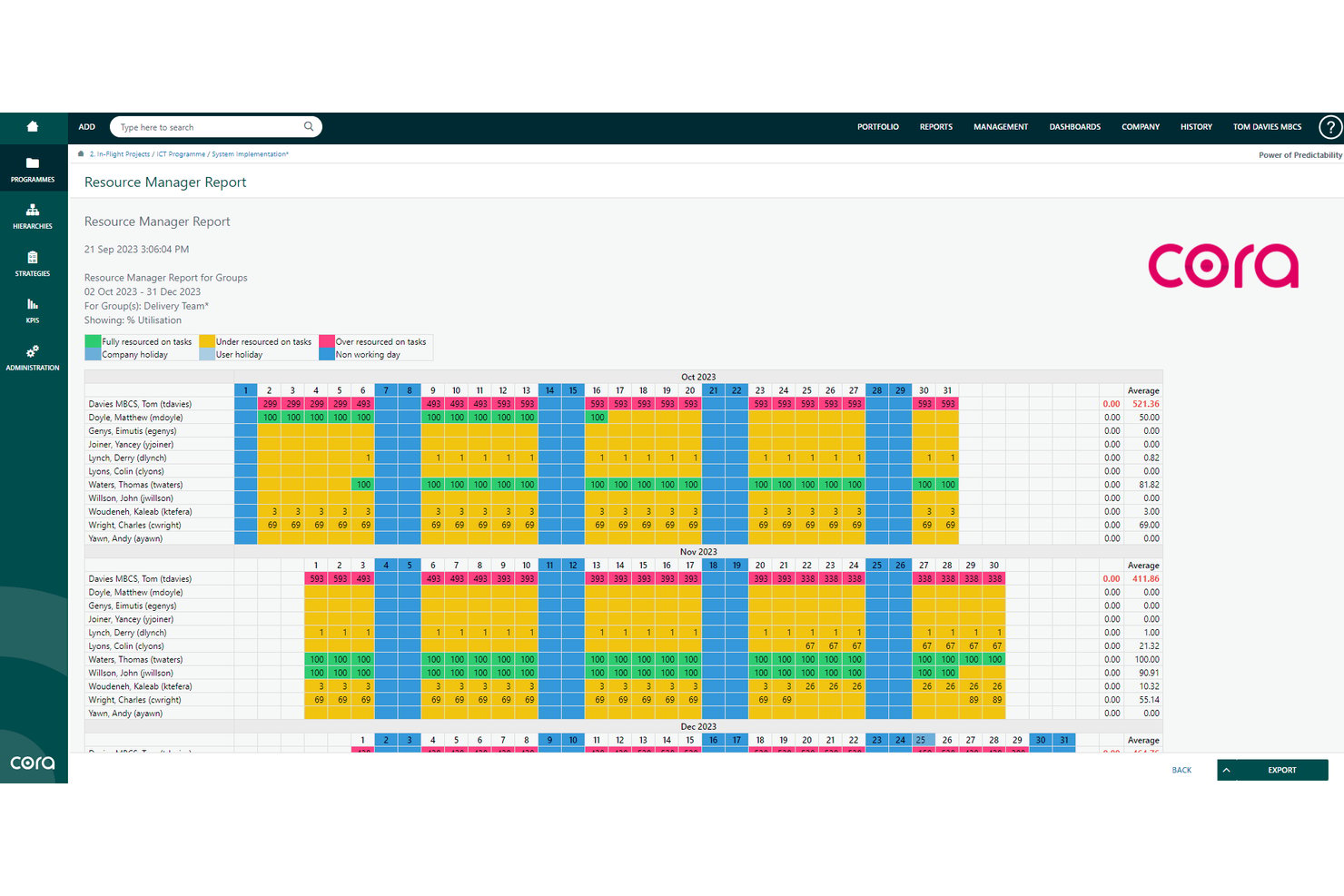
Cora PPM (now branded as antaivo by Cora) is a portfolio and project management platform built for complex program environments, combining integrated master scheduling, earned value management, financial control, and multi-agency resource tracking.
Who Is Cora PPM Best For?
Cora PPM fits federal program offices and defense contractors that need to track earned value, manage integrated master schedules, and report against DCMA and DoD standards.
Why I Picked Cora PPM
Cora PPM earns its spot on my list because it's one of the few tools built around earned value management from the ground up, not bolted on as an afterthought. I'm particularly drawn to its DCMA 14-point schedule health check, which runs directly against the Gantt and logs results to a dedicated audit page, giving federal program offices a traceable record of schedule integrity. I also like how it handles alternative reporting hierarchies, letting teams report against WBS structures, MIL-STD-881 appendices, and contract obligations in the same platform.
Cora PPM Key Features
- Integrated master schedule: Links milestones, dependencies, and WBS elements in a single schedule that updates cost, risk, and earned value in real time when changes occur.
- Cross-agency resource and budget visibility: Displays workforce utilization and budget status across federal projects and multi-agency programs from one portfolio view.
- Baseline change control: Assesses schedule, cost, and resource impacts before approval and applies approved changes directly to the live project baseline.
- Configurable workflow and audit trail: Lets teams configure approval steps, notifications, and conditions with a time-, date-, and user-stamped audit trail attached to every action.
Cora PPM Integrations
Cora PPM offers native integrations with SAP BTP Connector (S/4HANA), Microsoft Teams, Jira, and Salesforce. It also supports REST APIs, webhooks, and Boomi-powered iPaaS integrations, including Workday.
Pros and Cons
Pros:
- Audit exports support traceable oversight reviews
- Reviewers praised Gantt-based task and milestone tracking
- Earned value aligns schedules with federal reporting
Cons:
- Reviewers wanted clearer reports and export options
- Administrators found back-end setup daunting
OnePlan
Best for FedRAMP High-cleared program oversight
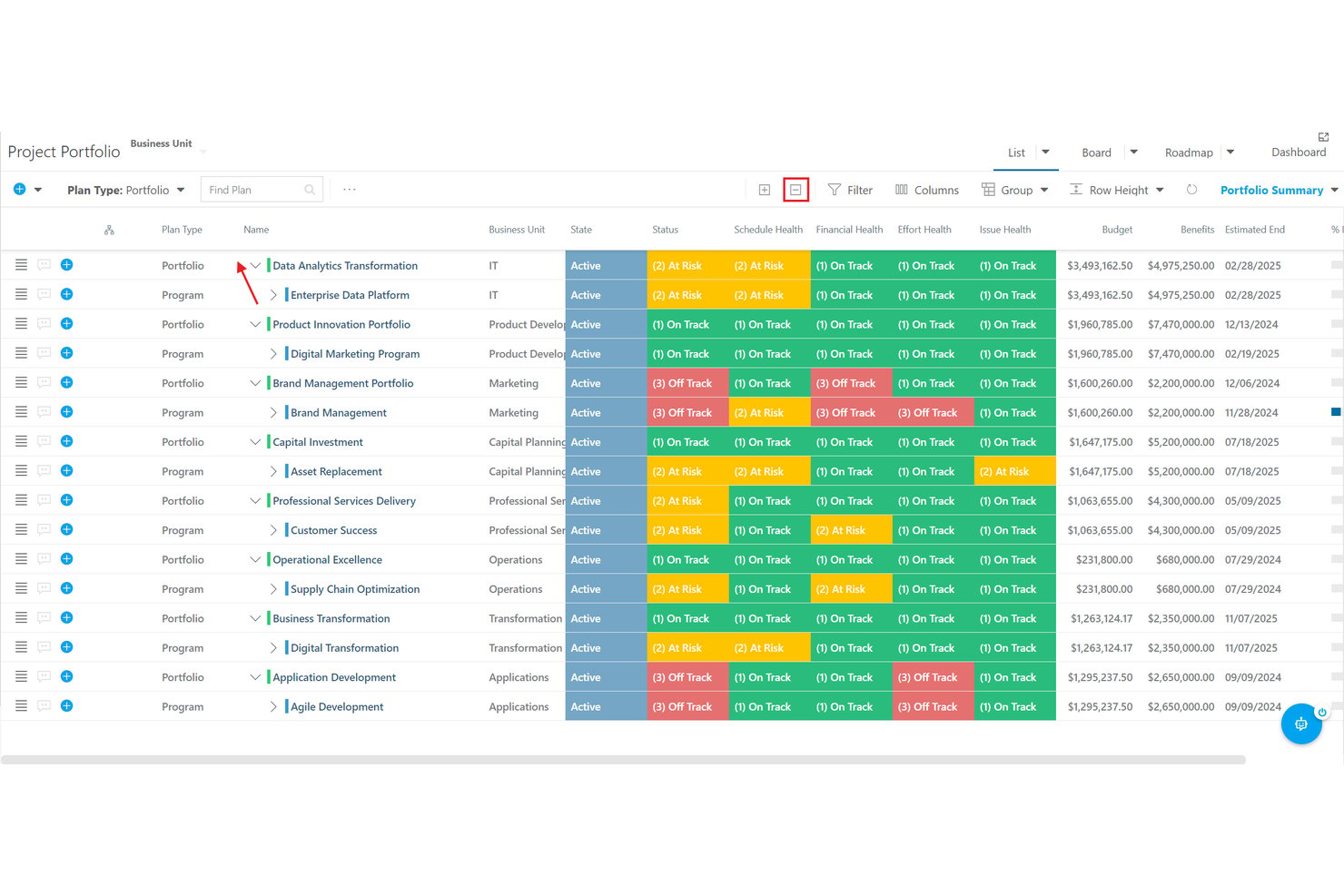
OnePlan is a strategic portfolio and program management platform that connects government agency strategy, financials, resource planning, and work execution—spanning integrated master schedules, earned value tracking, and oversight reporting across federal, defense, and state programs.
Who Is OnePlan Best For?
OnePlan is a strong fit for federal and defense program managers who need FedRAMP High-cleared infrastructure for oversight across multi-program portfolios.
Why I Picked OnePlan
OnePlan earns its spot on my shortlist because its FedRAMP High authorization isn't just a checkbox—it comes with PIV/CAC authentication, phishing-resistant MFA, and FIPS 140-validated encryption built into the government tier. I picked it specifically for program oversight work because it connects Integrated Master Schedules to Work Breakdown Structures and rolls cost, schedule, and earned value (CPI/SPI) up to a single portfolio view that authorizing officials can actually act on.
OnePlan Key Features
- Integrated Master Schedule builder: Build government-grade schedules linked directly to Work Breakdown Structures, with milestone, task, risk, and issue tracking against a baseline.
- Sofia AI assistant: Query live portfolio data, surface budget variances and at-risk projects, and generate oversight-ready reports using natural language.
- Multi-Authentication for external collaborators: Invite contractors or partner agencies without adding them to your Microsoft Entra ID tenant, using either Office 365 or native OnePlan accounts.
- Time-phased Financial Planner: Track budgets, forecasts, and actuals by cost category and period, with export to Excel or HTML and CPI/SPI earned value calculations.
OnePlan Integrations
OnePlan offers integrations across the Microsoft ecosystem, including Microsoft Teams, Microsoft Project, Azure DevOps, Power BI, SharePoint, and SQL Server, plus Jira and SAP. Enterprise includes an API, and Zapier is also supported.
Pros and Cons
Pros:
- IMS-to-WBS schedules connect milestones and costs
- FedRAMP High controls support sensitive oversight
- Dashboards clarify budgets, status, and resources
Cons:
- Complex multi-phase plans can strain coordination
- Reports may need manual setup and polishing

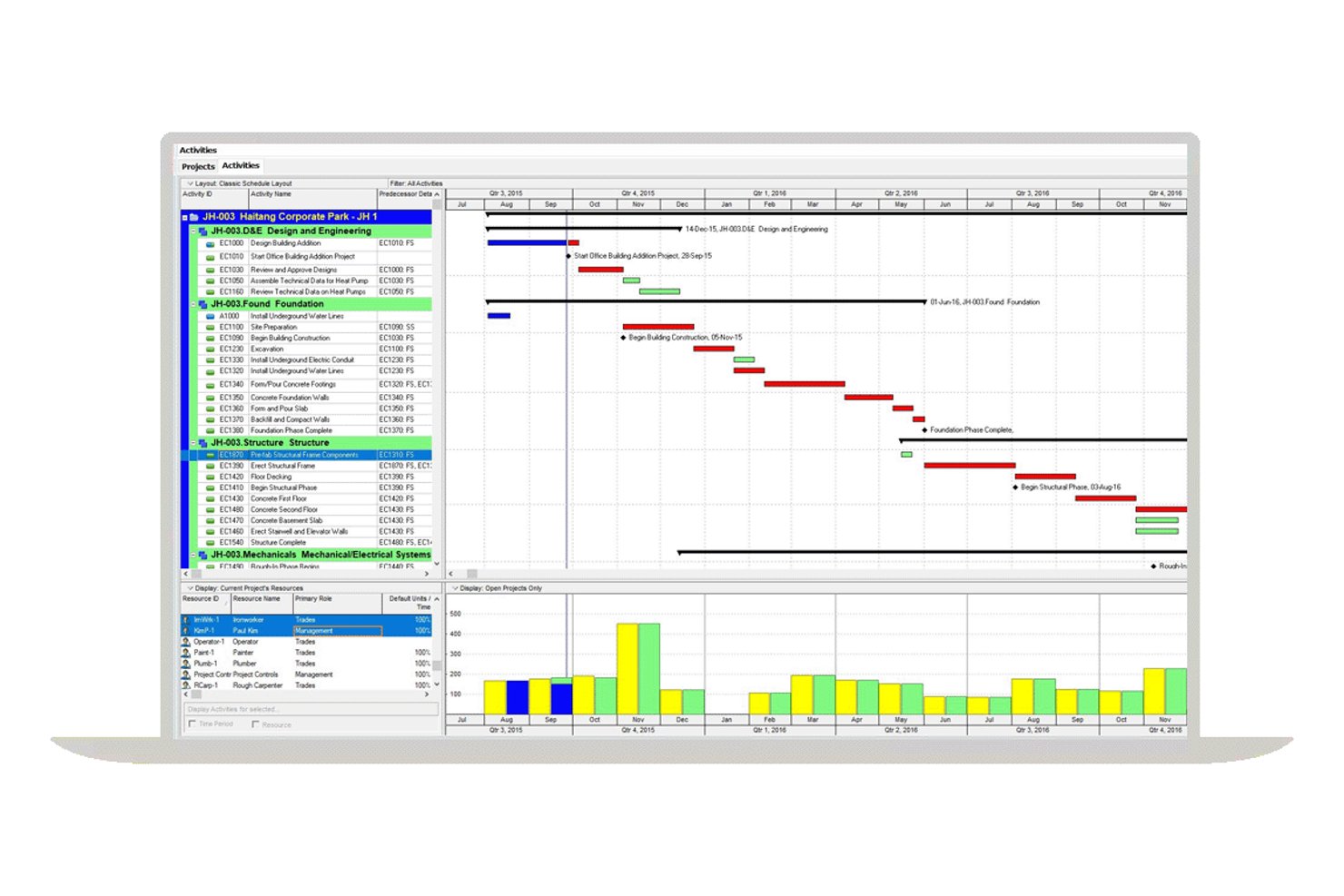
Oracle Primavera P6 is an enterprise project portfolio management tool that handles large-scale program scheduling, multi-project coordination, resource planning, and budget tracking across complex capital programs.
Who Is Oracle Primavera P6 Best For?
Oracle Primavera P6 is a strong fit for program managers overseeing large, multi-project capital programs where critical path scheduling and detailed resource tracking are non-negotiable.
Why I Picked Oracle Primavera P6
Oracle Primavera P6 earns its spot on my shortlist because no other tool I've evaluated matches its depth of critical path scheduling for large, multi-project capital programs. I particularly like how you can manage thousands of interdependent activities across concurrent projects, with full baseline tracking and earned value reporting built in. The funding source hierarchy also lets program teams assign and track multiple funding contributors at different enterprise project structure levels, which maps well to how capital programs are actually funded.
Oracle Primavera P6 Key Features
- Funding source hierarchy: Assign and track multiple funding contributors at different enterprise project structure levels within a hierarchical list of funding sources.
- Budget change log: Record and manage budget change requests with approval workflows, keeping original amounts intact until authorized project participants approve updates.
- Configurable audit reporting: Track user activity, field-level changes, old and new values, and operation types across project data through configurable audit settings.
- Role-based security profiles: Control user access to schedules, project structures, and organizational breakdown structure elements through global and project-level security profiles.
Oracle Primavera P6 Integrations
Oracle Primavera P6 integrates with Primavera Unifier and other Primavera Cloud Services through Primavera Gateway. Its REST API supports custom integrations with agency systems, although specific Tyler Technologies and SAP Public Sector connectors aren’t documented.
Pros and Cons
Pros:
- Reviewers value resource and earned-value planning
- Auditable budget changes with approval history
- Critical-path control across large programs
Cons:
- Reviewers report extra formatting for management reports
- No documented U.S. FedRAMP or CJIS authorization
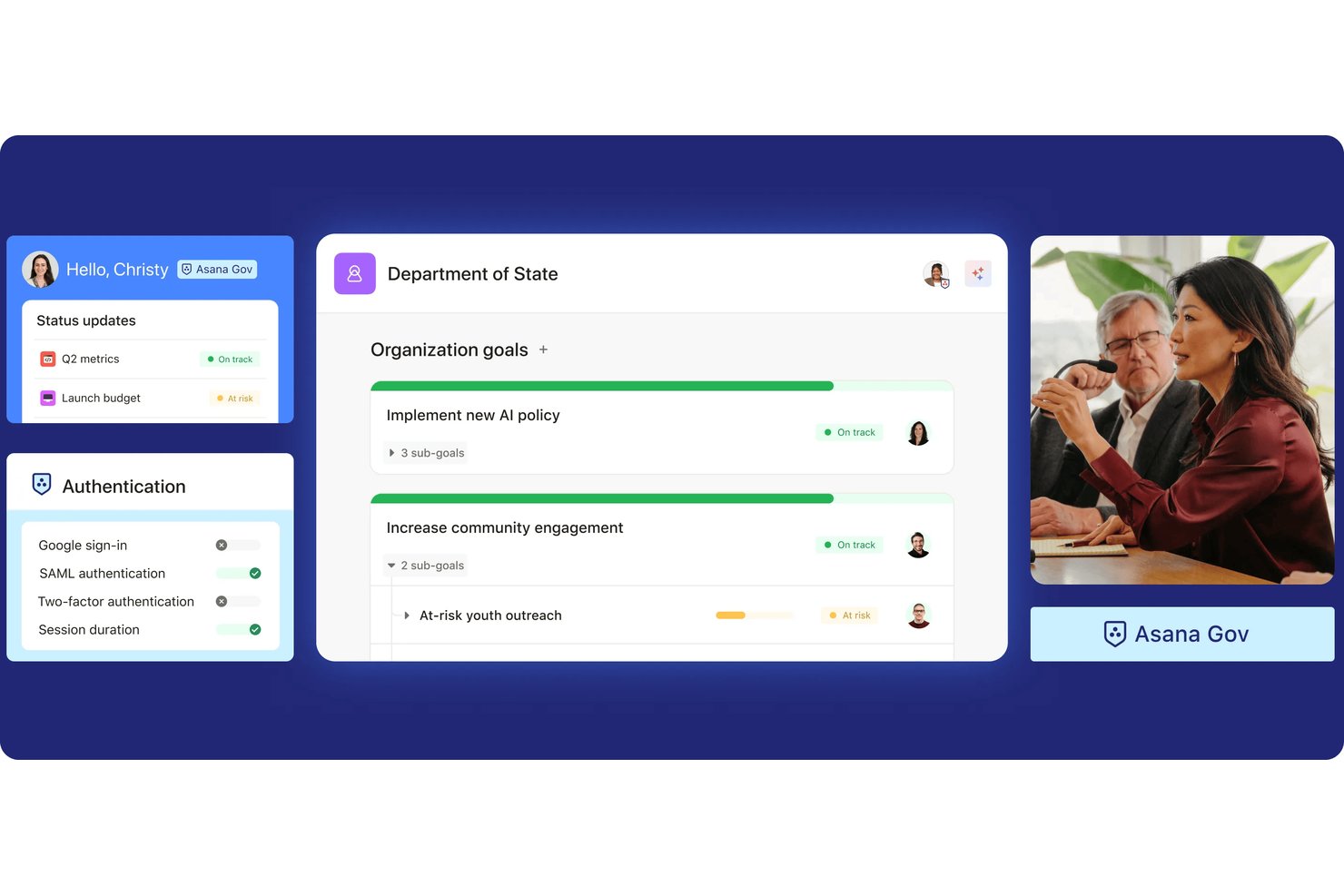
Asana is a work management platform that organizes government and public sector projects through task tracking, dependencies, timeline views, cross-department collaboration, and compliance-grade audit controls.
Who Is Asana Best For?
Asana is a strong fit for cross-functional government teams that need to coordinate work across departments, track task ownership, and keep projects on deadline.
Why I Picked Asana
I picked Asana as one of the best because its task tracking and dependency management genuinely shine in cross-department government work. When one team's deliverable blocks another's, Asana's timeline view flags the conflict automatically and lets you shift dependent deadlines in bulk. I also like that you can multi-home a task across multiple projects, so a shared deliverable stays in sync without duplicating work across agency teams.
Asana Key Features
- Audit log API: Captures over 100 security- and compliance-related events, including admin changes, sign-ins, and deletions, in an immutable log accessible via API.
- Portfolio rollups: Aggregates estimated, actual, and budgeted time or cost across related projects for a single high-level view of program spending.
- Asana Gov environment: A dedicated FedRAMP Moderate-authorized environment with FIPS 140-2 encryption, SAML SSO enforcement, and NIST 800-53 Rev. 5 controls for federal use.
- Multi-homed tasks: Lets a single task live in multiple projects simultaneously, keeping shared deliverables in sync across agency teams without duplicating work.
Asana Integrations
Asana offers 100+ free integrations and 200+ app-directory partners, including Microsoft 365, Microsoft Teams, SharePoint, Salesforce Government Cloud, ServiceNow, Jira Cloud, Tableau, Power BI, Splunk, Okta, and Entra ID. It also provides an API and supports Zapier.
Pros and Cons
Pros:
- Separate Asana Gov offers FedRAMP Moderate
- Shared projects keep cross-team ownership visible
- Dependency timelines flag deadline conflicts
Cons:
- Audit logs retain events for 90 days
- Government procurement workflows need manual configuration

Best for task management

Orangescrum is a versatile project management tool that caters to industries like government, healthcare, and construction. It focuses on task management, resource utilization, and time tracking to enhance project delivery and collaboration.
Why I picked Orangescrum: Orangescrum shows impressive results in task management with its adaptable features for various industries. You can manage backlogs, burndown charts, and resource schedules effectively.
The platform offers real-time collaboration and compliance reporting, making it ideal for government projects. Its ability to integrate existing tools and provide a hassle-free migration process further supports its task management capabilities.
Standout features & integrations:
Features include advanced task management, resource utilization, and time tracking. You can manage project timelines and client engagement lifecycles efficiently. The platform also offers real-time collaboration and compliance reporting.
Integrations include Google Drive, Dropbox, Slack, QuickBooks, Zoom, Zapier, Mailchimp, GitHub, Jira, and Microsoft Teams.
Pros and Cons
Pros:
- Compliance reporting features
- Real-time collaboration
- Easy tool integration
Cons:
- Not ideal for large enterprises
- Limited advanced analytics


Kahua is a project management platform specifically designed for the construction and real estate industries, with a focus on customizable workflows and document management. Its primary users include project managers, contractors, and developers who require flexibility in managing complex projects.
Why I picked Kahua: Kahua offers customizable workflows that adapt to your project's unique needs. You can create and modify workflows to fit specific project requirements, ensuring efficiency.
Its document management system helps you organize and access important files effortlessly. The platform's collaboration features support team communication and project tracking, making it ideal for managing construction projects.
Standout features & integrations:
Features include customizable workflows, document management, and collaboration tools. You can set up workflows that match your project's needs, enhancing productivity. The platform also provides tools for tracking project progress and team communication.
Integrations include Microsoft Outlook, Microsoft Project, Bluebeam, Procore, PlanGrid, Autodesk BIM 360, DocuSign, Smartsheet, Box, and Tableau.
Pros and Cons
Pros:
- Enhances team collaboration
- Supports complex projects
- Strong document management
Cons:
- Initial setup may be time-consuming
- Steeper learning curve
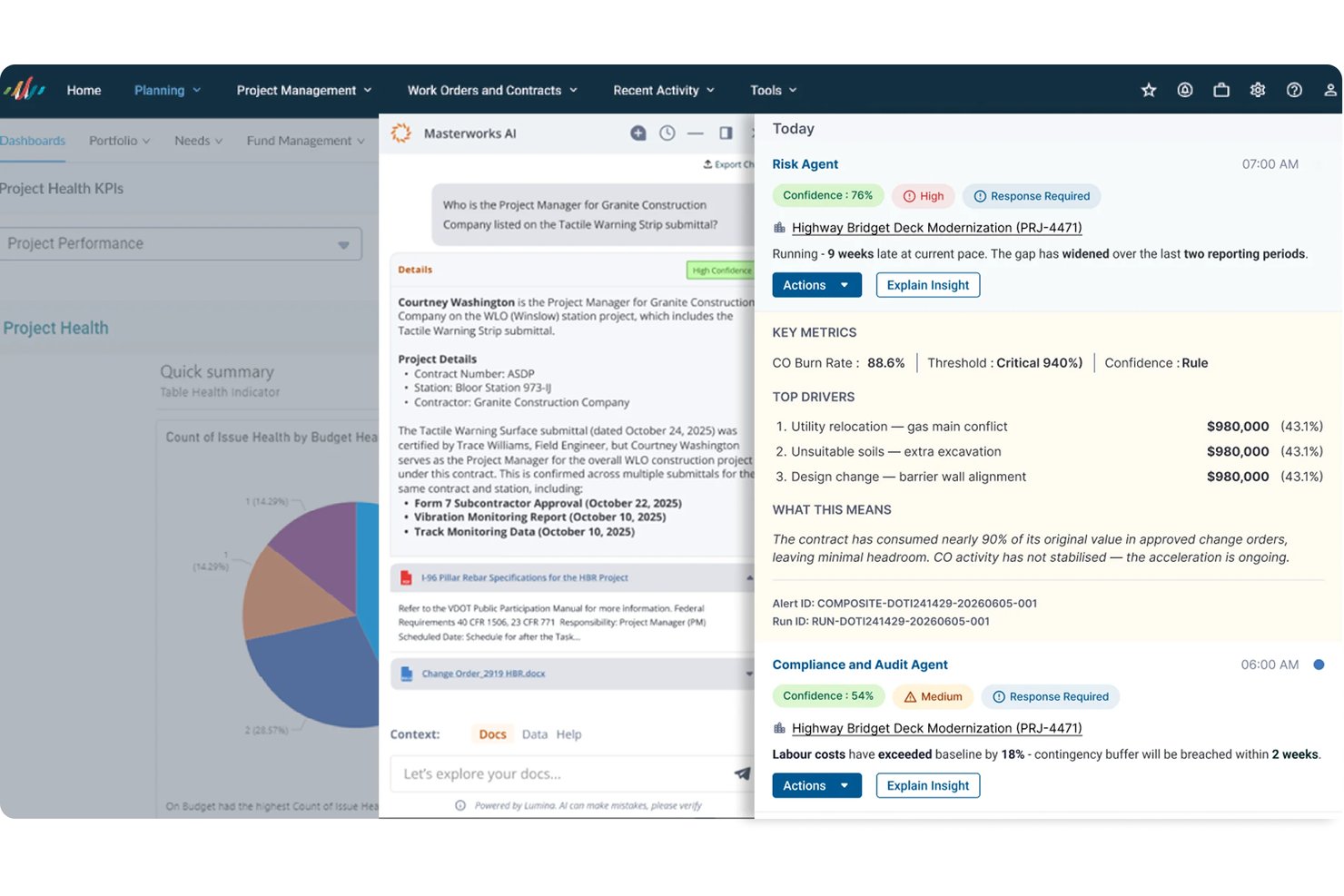
Aurigo Masterworks is a cloud-based capital program management platform built for government agencies, covering the full project lifecycle across capital planning, grants management, construction delivery, and asset maintenance.
Who Is Aurigo Masterworks Best For?
Aurigo Masterworks is a strong fit for public sector agencies that need to manage capital programs across the full project lifecycle, from funding and planning through construction and long-term asset maintenance.
Why I Picked Aurigo Masterworks
Aurigo Masterworks earns its spot on my shortlist because it's one of the few platforms built specifically for public infrastructure lifecycle management, covering capital planning, construction delivery, and asset maintenance in a single system. I'm particularly impressed by its Grants Management module, which tracks federal, state, and local-match funding from discovery through closeout with 2 CFR 200 compliance baked in. The AI-powered Scenario Planning Agent also stands out to me for how it helps agencies model funding trade-offs across multiyear capital programs.
Aurigo Masterworks Key Features
- Construction project management: Coordinate contracts, change orders, payments, schedules, and field inspections through auditable workflows with real-time project-performance visibility.
- Asset condition assessment: Capture condition assessments, estimate remaining useful life and replacement costs, and score assets by condition, criticality, and consequence of failure.
- Mobile field work: Use native mobile apps to capture inspections, photos, GPS data, daily reports, and work updates, including offline, with automatic sync on reconnection.
- Federal aid reimbursement: Manage reimbursement from STIP generation through final billing, tracking eligibility, compliance, and supporting documentation with FMIS 5 integration.
Aurigo Masterworks Integrations
Aurigo Masterworks offers native integrations with ESRI ArcGIS, Zoom, and DocuSign, plus SharePoint connectivity. It supports open APIs and business-process APIs for connecting ERP, financial, scheduling, document, and GIS systems.
Pros and Cons
Pros:
- Offline field reporting supports infrastructure project teams
- Grant tracking links spending to funding sources
- Reviewers value status histories for monitoring progress
Cons:
- Some reviewers report challenging implementation experiences
- Custom reports can be difficult to build
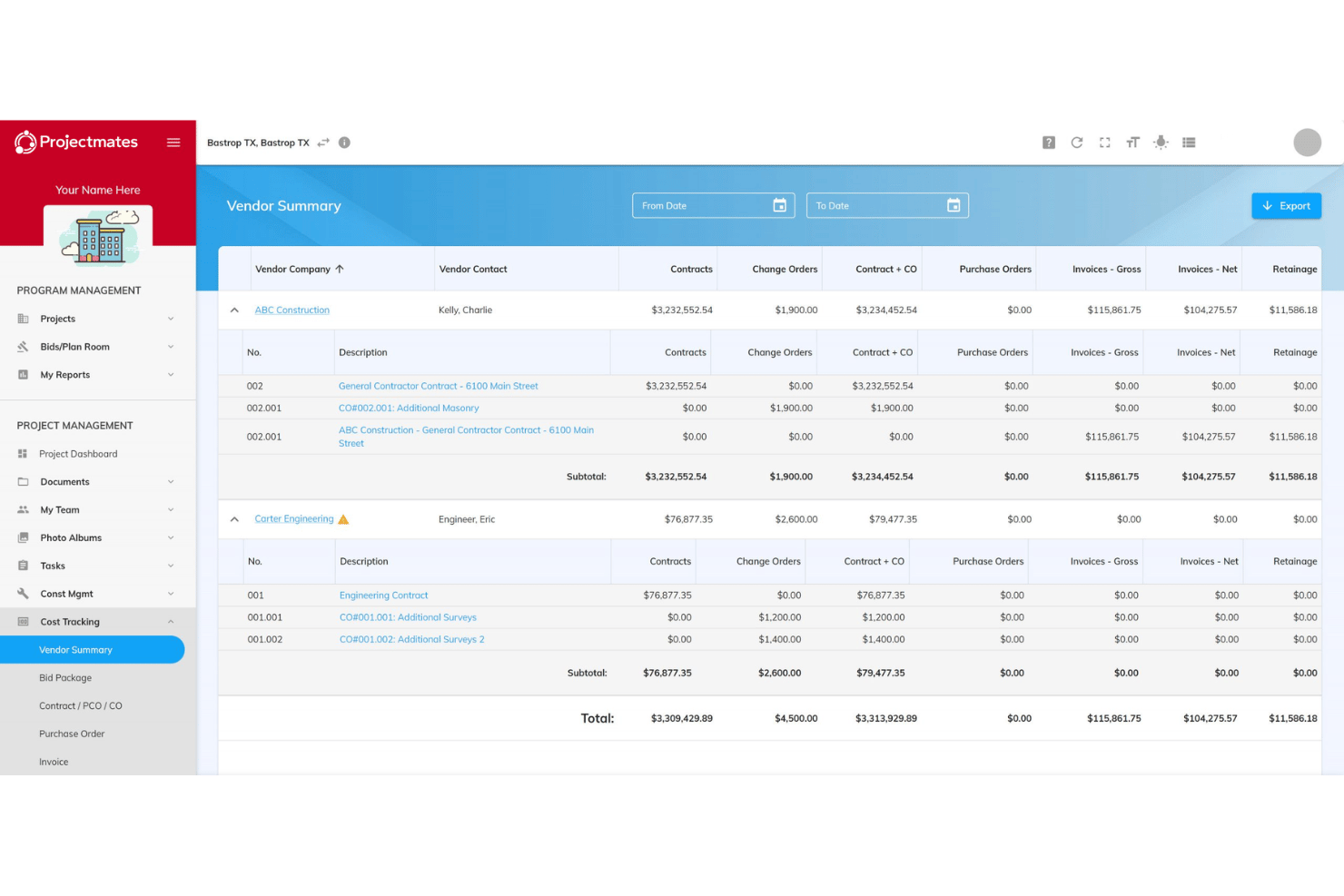
Projectmates is a web-based construction project management platform built for owners, covering capital program planning, cost tracking, bid management, document control, and government-specific workflows like RFIs, submittals, and punch lists.
Who Is Projectmates Best For?
Projectmates suits government owners and public agencies managing capital construction programs, from bid solicitation through closeout.
Why I Picked Projectmates
I picked Projectmates as one of the best because it's purpose-built for the owner side of government capital programs, which is rare. I love how it handles the full program lifecycle: public agencies can submit and rank project requests using configurable criteria, then track multiple funding sources, commitments, and actuals across fiscal years. The built-in bid solicitation, virtual plan room, and side-by-side bid leveler are exactly what procurement teams at water districts or municipal agencies need to keep the process clean and auditable.
Projectmates Key Features
- Document version control: Track every document revision with a full activity history showing who was notified, downloaded, or opened each version.
- Configurable RFI and submittal workflows: Set up and automate RFI, submittal, and approval routing to match your agency's specific review and sign-off process.
- Mobile field reporting: Create daily field reports, manage punch lists, and route submittals directly from the mobile app on iOS or Android.
- Side-by-side bid leveler: Compare contractor bids in a structured, automated view to support auditable award decisions.
Projectmates Integrations
Projectmates offers native integrations with EarthCam, DocuSign, Box, and Dropbox, plus integrations with Esri ArcGIS, Microsoft Power BI, Tableau, OneDrive, Microsoft Project, and Primavera. A REST API supports custom integrations.
Pros and Cons
Pros:
- Reviewers value centralized project files
- Funding tracks commitments across fiscal years
- Bidder portal supports structured public procurement
Cons:
- Task audit logs omit predecessor changes
- Capital planning is an add-on module
Annen programvare for prosjektstyring i offentlig sektor
Her er noen flere alternativer for prosjektstyring i offentlig sektor som ikke kom med på kortlisten min, men som likevel er verdt å se nærmere på:
- Wrike
For remote team collaboration
- Epicflow
For resource allocation
- Smartsheet
For spreadsheet-like project planning
- monday AI Workspace
With AI-powered risk identification
- ServiceNow
For enterprise-wide government portfolio alignment
- PMWeb
For multi-agency capital project oversight
- OpenGov
For cross-department capital budget visibility
- Broadcom Clarity
For FedRAMP-authorized portfolio oversight
- Oracle Primavera Unifier
For public agency capital program control
- Trimble Unity Construct
For capital program budget tracking


How I Evaluate Government Project Management Software
I split my evaluation into three parts, weighting core functionality most: protect sensitive data, schedule dependencies, and track budget use. Next, I look for citizen transparency portals that show project status. Finally, beyond features, I consider public-sector onboarding, agency references, and procurement-fit pricing.
Core Functionality (Table Stakes For This List)
When I'm selecting tools for my list, I score each one on a scale from 0 (does not offer the functionality) to 5 (excels in this area) for each core functionality listed below. I then convert the total into a percentage to help assess each tool's overall fit, with extra weight on any functionalities I’ve deemed essential.
- Compliance & Security (Essential): I look for documented government security alignment, role-based access, and auditable permissions for sensitive project and funding records.
- Project Scheduling (Essential): For a roadworks or facilities program, I assess dependencies, milestones, and multi-phase timelines that expose schedule conflicts.
- Budget & Resources: I check whether teams can compare planned and actual costs and labor capacity across projects with restricted funding.
- Procurement & Grants: I look for funding-source records, approval steps, and grant requirement tracking tied to public purchasing workflows.
- Reporting & Audit Trails: I assess exportable status reports and historical change records that help answer oversight questions and support reviews.
- Cross-Department Collaboration: I consider shared visibility and controlled contractor access when departments coordinate a joint service or infrastructure initiative.
Once I have a list of tools that meet the criteria, I consider what sets each platform apart.
Differentiating Factors (What Sets Vendors Apart)
Here's how I compare and contrast different vendors:
Standout Features
I look for citizen transparency portals that let the public view live project status and spending—useful when a municipality needs to show capital program progress to council and taxpayers alike. Encumbrance accounting is another separator, since it tracks committed-but-unspent funds against appropriations so teams avoid overspending restricted budgets. I also check for contractor and vendor portals that give external parties a secure way to submit updates without needing full system access, which matters when dozens of subcontractors feed into a single infrastructure program.
Beyond Features
I check whether a vendor has documented deployments with similar-sized agencies, since a tool proven in municipal capital programs carries less adoption risk than one that recently added a "gov" label. Data sovereignty options matter too—I look for clear on-premise or government-cloud hosting terms that satisfy public records retention and jurisdictional mandates. Finally, pricing needs to fit multi-year public contracts and tie to grant-eligible budget line items, because a model built around monthly SaaS billing can stall procurement approval.
Slik velger du programvare for prosjektstyring i offentlig sektor
Det er lett å gå seg vill i lange funksjonslister og kompliserte prisstrukturer. For å hjelpe deg med å holde fokus mens du går gjennom den unike prosessen med å velge programvare, har vi laget en sjekkliste over faktorer du bør ha i tankene:
| Faktor | Hva du bør vurdere |
| Skalerbarhet | Kan programvaren vokse sammen med teamet ditt? Se etter verktøy som støtter et økende antall brukere, prosjekter og datamengder uten store forstyrrelser eller ekstra kostnader. |
| Integrasjoner | Kan den kobles til verktøyene du bruker i dag? Se etter innebygde integrasjoner med plattformer som Microsoft Office, Google Workspace eller bransjespesifikke apper. |
| Tilpasningsmuligheter | Kan du tilpasse programvaren etter behovene dine? Vurder om du kan endre arbeidsflyter, oversikter og rapporter slik at de passer prosessene dine, uten ekstra hjelp. |
| Brukervennlighet | Er programvaren intuitiv? Sørg for at teammedlemmene kan bruke den uten omfattende opplæring. Se etter et ryddig grensesnitt og oversiktlige alternativer. |
| Implementering og innføring | Hvor raskt kan du komme i gang? Vurder tiden og ressursene som kreves for oppsett og innledende opplæring. Se etter leverandører som tilbyr støtte ved innføringen. |
| Kostnad | Er den innenfor budsjettet ditt? Sammenlign prisnivåer og se etter skjulte gebyrer. Ta hensyn til langsiktige kostnader og mulige besparelser som følge av økt effektivitet. |
| Sikkerhetstiltak | Beskytter den sensitive data? Kontroller at programvaren følger offentlige regler og standarder som GDPR eller FedRAMP. |
| Krav til etterlevelse | Oppfyller den myndighetskravene? Sørg for at verktøyet støtter nødvendige standarder for etterlevelse i bransjen og området ditt, slik at du unngår potensielle juridiske problemer. |
Hva er programvare for prosjektstyring i offentlig sektor?
Programvare for prosjektstyring i offentlig sektor er et verktøy utviklet for å hjelpe offentlige etater med å planlegge, gjennomføre og følge opp prosjekter på en effektiv måte. Disse verktøyene brukes vanligvis av prosjektledere, avdelingsledere og teamledere for å holde prosjekter på rett spor og innenfor budsjettet.
Funksjoner for planlegging, ressursfordeling og sporing av regelverksetterlevelse støtter de unike behovene til offentlige prosjekter. Samlet sett gir disse verktøyene verdifull innsikt og kontroll for effektiv håndtering av komplekse prosjekter.
Funksjoner i programvare for prosjektstyring i offentlig sektor
Når du velger programvare for prosjektstyring i offentlig sektor, bør du se etter følgende viktige funksjoner:
- Planlegging: Gjør det mulig å planlegge tidslinjer og sette frister, slik at prosjektene holder seg på rett spor.
- Ressursfordeling: Hjelper deg med å fordele ressurser effektivt for å forhindre overbelastning eller ressursmangel.
- Sporing av regelverksetterlevelse: Sikrer at prosjektene følger nødvendige regler og standarder, noe som reduserer juridisk risiko.
- Budsjettstyring: Overvåker økonomien for å holde prosjektene innenfor budsjettet og unngå overforbruk.
- Rapportering og analyse: Gir innsikt i prosjektets resultater, slik at du kan ta velinformerte beslutninger.
- Dokumenthåndtering: Organiserer og lagrer prosjektdokumenter på en sikker måte for enkel tilgang og samarbeid.
- Oppgavestyring: Gjør det mulig å tildele og følge opp oppgaver, slik at hvert teammedlem kjenner ansvarsområdene sine.
- Samarbeidsverktøy: Legger til rette for kommunikasjon og koordinering mellom teammedlemmer og styrker dermed samarbeidet.
- Tilpassbare arbeidsflyter: Lar deg tilpasse prosessene til prosjektets spesifikke behov og preferanser.
- Sikkerhetstiltak: Beskytter sensitive data med kryptering og overholdelse av sikkerhetsstandarder.
Fordeler med programvare for prosjektstyring i offentlig sektor
Implementering av programvare for prosjektstyring i offentlig sektor gir flere fordeler for teamet og virksomheten din. Her er noen av fordelene du kan se frem til:
- Økt effektivitet: Automatiserer planlegging og oppgavestyring, slik at teamet kan fokusere på mer strategiske aktiviteter.
- Bedre regelverksetterlevelse: Følger opp regulatoriske krav og standarder og reduserer risikoen for manglende etterlevelse.
- Bedre ressursstyring: Fordeler ressurser effektivt, sikrer optimal utnyttelse og forhindrer overbelastning.
- Økt åpenhet: Tilbyr rapportering og analyse som gir tydelig innsikt i prosjektets fremdrift og resultater.
- Sikker dokumenthåndtering: Håndterer og lagrer dokumenter på en trygg måte og legger til rette for sikker tilgang og samarbeid mellom teammedlemmer.
- Kostnadskontroll: Overvåker budsjettene nøye for å holde prosjektene økonomisk på rett spor og unngå unødvendige utgifter.
- Bedre kommunikasjon: Tilbyr samarbeidsverktøy som forbedrer teamkoordinering og informasjonsdeling.
Kostnader og priser for programvare for prosjektstyring i offentlig sektor
Valg av programvare for prosjektstyring i offentlig sektor krever en forståelse av de ulike prismodellene og abonnementene som er tilgjengelige. Kostnadene varierer ut fra funksjoner, teamstørrelse, tillegg og mer. Tabellen nedenfor oppsummerer vanlige abonnementer, gjennomsnittsprisene deres og typiske funksjoner som er inkludert i løsninger for prosjektstyring i offentlig sektor:
Sammenligningstabell for programvare for prosjektstyring i offentlig sektor
| Abonnementstype | Gjennomsnittspris | Vanlige funksjoner |
| Gratisabonnement | $0 | Grunnleggende oppgavestyring, begrenset antall brukere og minimal lagringsplass. |
| Personlig abonnement | $5-$25/bruker/måned | Oppgavestyring, grunnleggende rapportering og begrensede integrasjoner. |
| Bedriftsabonnement | $30-$60/bruker/måned | Avansert planlegging, ressursfordeling, sporing av regelverksetterlevelse og forbedrede samarbeidsverktøy. |
| Enterprise-abonnement | $70-$120/bruker/måned | Tilpassbare arbeidsflyter, avanserte sikkerhetstiltak, dedikert brukerstøtte og analyse. |
Vanlige spørsmål om programvare for prosjektstyring i offentlig sektor
Her er noen svar på vanlige spørsmål om programvare for prosjektstyring i offentlig sektor:
Hvor sikker er programvare for prosjektstyring i offentlig sektor?
Programvare for prosjektstyring i offentlig sektor er utviklet med høye sikkerhetsstandarder for å sikre databeskyttelse. Du bør sørge for at programvaren overholder relevante forskrifter, for eksempel GDPR, NIST AI RMF eller FedRAMP. Det er viktig å kontrollere at programvaren tilbyr kryptering og gjennomfører regelmessige sikkerhetsrevisjoner for å beskytte informasjonen din og begrense sårbarheter. Disse faktorene er viktige for å bygge tillit til programvaren og samtidig redusere risikoen.
Kan programvare for prosjektstyring i offentlig sektor integreres med eksisterende systemer?
Ja, de fleste verktøy for prosjektstyring i offentlig sektor tilbyr integrasjoner med andre systemer. Kontroller at programvaren kan integreres med verktøyene du bruker i dag, for eksempel Microsoft Office, Google Workspace eller bransjespesifikke applikasjoner. Dette sikrer en smidig arbeidsflyt og konsistente data på tvers av plattformer.
Hvilken brukerstøtte er tilgjengelig for programvare for prosjektstyring i offentlig sektor?
Støtten varierer fra leverandør til leverandør, men mange tilbyr hjelp døgnet rundt, alle dager, gjennom flere kanaler. Se etter alternativer som direktechat, e-post og telefonstøtte. Det er også nyttig hvis leverandøren tilbyr et hjelpesenter med veiledninger, vanlige spørsmål og brukerveiledninger som kan hjelpe deg med å løse problemer.
Hvor tilpasningsdyktig er programvare for prosjektstyring i offentlig sektor?
Tilpasningsmulighetene varierer, men mange verktøy lar deg tilpasse arbeidsflyter, dashbord og rapporter. Finn ut om du kan endre programvaren slik at den passer til de spesifikke prosessene dine, uten omfattende teknisk bistand. Denne fleksibiliteten kan gjøre programvaren bedre egnet til teamets behov.
Hvilken opplæring er tilgjengelig for nye brukere?
Opplæringsressurser er viktige for en smidig introduksjonsprosess og en god brukeropplevelse. Sjekk om programvareleverandøren tilbyr opplæringsvideoer, webinarer, interaktive produktomvisninger eller en tilsvarende kunnskapsbase. Disse ressursene hjelper teamet ditt med å komme raskt i gang og bruke verktøyet effektivt fra første dag.
Hvordan vurderer jeg kostnadseffektiviteten til programvare for prosjektstyring i offentlig sektor?
For å vurdere kostnadseffektiviteten må du sammenligne prisnivåer og funksjoner. Ta hensyn til langsiktige kostnader, mulige besparelser som følge av økt effektivitet, og om funksjonene dekker behovene dine. Det er lurt å se etter eventuelle skjulte gebyrer og sikre at programvaren gir god verdi for investeringen når du vurderer å beholde programvaren.