

10 beste programvarer for klienthåndtering for små bedrifter i 2026

Kortliste over programvare for klientadministrasjon for små bedrifter


Programvare for klientadministrasjon hjelper små bedrifter med å organisere kontakter, følge opp interaksjoner og effektivisere salgs- eller tjenestearbeidsflyter på ett sted. Hvis du leter etter den beste måten å holde oversikt over klienter på, samle kommunikasjonen og støtte teamet ditt etter hvert som bedriften vokser, har du kommet til rett sted. Med så mange alternativer kan det være vanskelig å vite hvilke verktøy som faktisk passer behovene, budsjettet og hverdagen din.
Denne listen gir en oversikt over den beste programvaren for klientadministrasjon for små bedrifter i 2026, slik at du kan sammenligne funksjoner, se viktige forskjeller og ta en trygg beslutning for teamet ditt.
Why Trust Our Software Recommendations
Our team has been testing and reviewing software since 2012. As project managers ourselves, we know how difficult—and important—it is to choose the right software.
For this guide, we evaluated tools using hands-on testing and independent research, scoring tools using our selection criteria. We also draw on insights from industry thought leaders and practicing project management experts.
Our reviews reflect our human editorial judgment, not a sales pitch.
Expert reviewers:
Sammenligningstabell: Programvare for klientadministrasjon for små bedrifter
Denne sammenligningstabellen oppsummerer prisdetaljene for mine beste utvalgte programmer for klientadministrasjon for små bedrifter.
| Tool | Best For | Trial Info | Price | ||
|---|---|---|---|---|---|
| 1 | Best for simple, intuitive user experience | 30-day free trial available | From $15/user/month | Website | |
| 2 | Best for action-focused contact management | 21-day free trial | From $9.95/user/month (billed annually) | Website | |
| 3 | Best with Microsoft 365 ecosystem integration | Free trial available | From $65/user/month (billed annually) | Website | |
| 4 | Best for marketing and sales alignment | Free plan available | From $20/user/month | Website | |
| 5 | Best for project and task integration | 14-day free trial | From $29/user/month (billed annually) | Website | |
| 6 | Best for automated follow-up sequences | 14-day free trial | From $299/month | Website | |
| 7 | Best with advanced automation tools | 30-day free trial | From $25/user/month | Website | |
| 8 | Best for visual sales pipeline management | 14-day free trial available | From $14/user/month (billed annually) | Website | |
| 9 | Best for AI-powered lead scoring | 21-day free trial | From $9/user/month (billed annually) | Website | |
| 10 | Best for built-in team collaboration features | Free plan + 15-day free trial + free demo available | From $49/organization/month (billed annually) | Website |
Beste programvare for klientadministrasjon for små bedrifter
Nedenfor finner du mine detaljerte oppsummeringer av programvare for klientadministrasjon for små bedrifter som kom med på kortlisten. Anmeldelsene mine gir en detaljert gjennomgang av funksjonene, de beste bruksområdene og integrasjonene til hver plattform, slik at du kan finne den som passer best for deg.

Best for simple, intuitive user experience
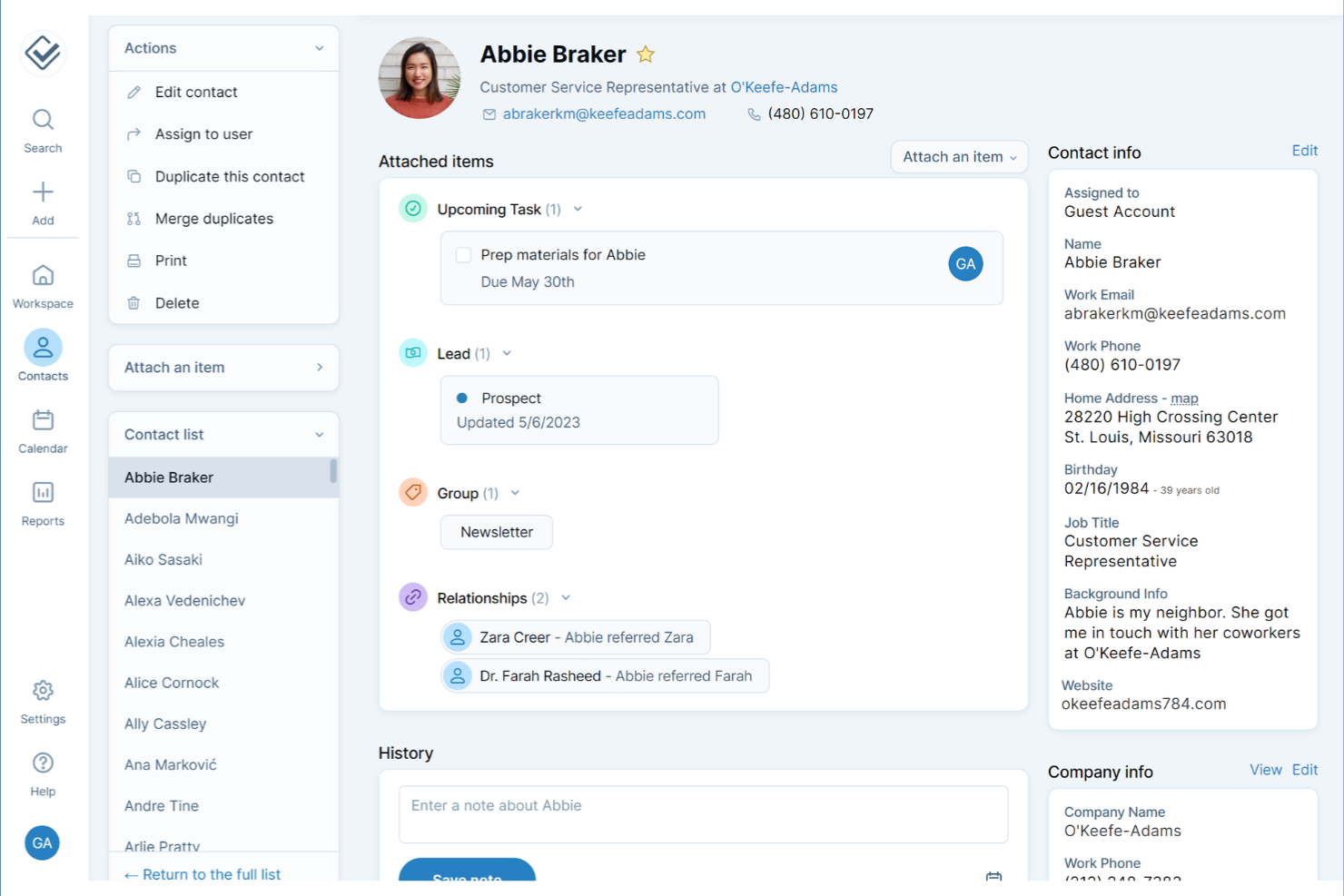
If you’re looking for a client management tool that skips the clutter and confusion, Less Annoying CRM is designed with simplicity at its core. It’s a strong fit for small business owners and solo professionals who want to manage the entire customer experience from contacts, to follow-ups, and tasks without a steep learning curve. The interface keeps everything straightforward, so you can focus on building client relationships instead of figuring out your software.
Why I Picked Less Annoying CRM
What sets Less Annoying CRM apart is its focus on a simple, intuitive user experience that doesn’t overwhelm small business teams. The dashboard puts contacts, tasks, and follow-ups front and center, so you always know what needs attention. I appreciate how the tool keeps navigation minimal, with everything just a click or two away. For small businesses and startups that want to avoid unnecessary complexity, Less Annoying CRM makes it easy to stay organized and on top of client relationships.
Less Annoying CRM Key Features
Some other features in Less Annoying CRM that small businesses may find useful include:
- Calendar and Event Scheduling: Schedule meetings, calls, and deadlines with a built-in calendar that syncs with your contacts.
- Pipeline Management: Track leads and deals through customizable pipelines to monitor sales progress.
- Team Collaboration Tools: Share contacts, notes, and tasks with team members for better coordination.
- Daily Agenda Emails: Receive a daily summary email with your upcoming tasks and events.
Less Annoying CRM Integrations
Native integrations are not currently listed by Less Annoying CRM. However, it does offer an open API for custom integrations.
Pros and Cons
Pros:
- Built-in calendar supports event scheduling and reminders
- Daily agenda emails help users stay on top of follow-ups
- Contact records include unlimited custom fields for client details
Cons:
- Reporting options are limited compared to other CRMs
- Lacks native integrations with popular accounting or marketing tools
Best for action-focused contact management
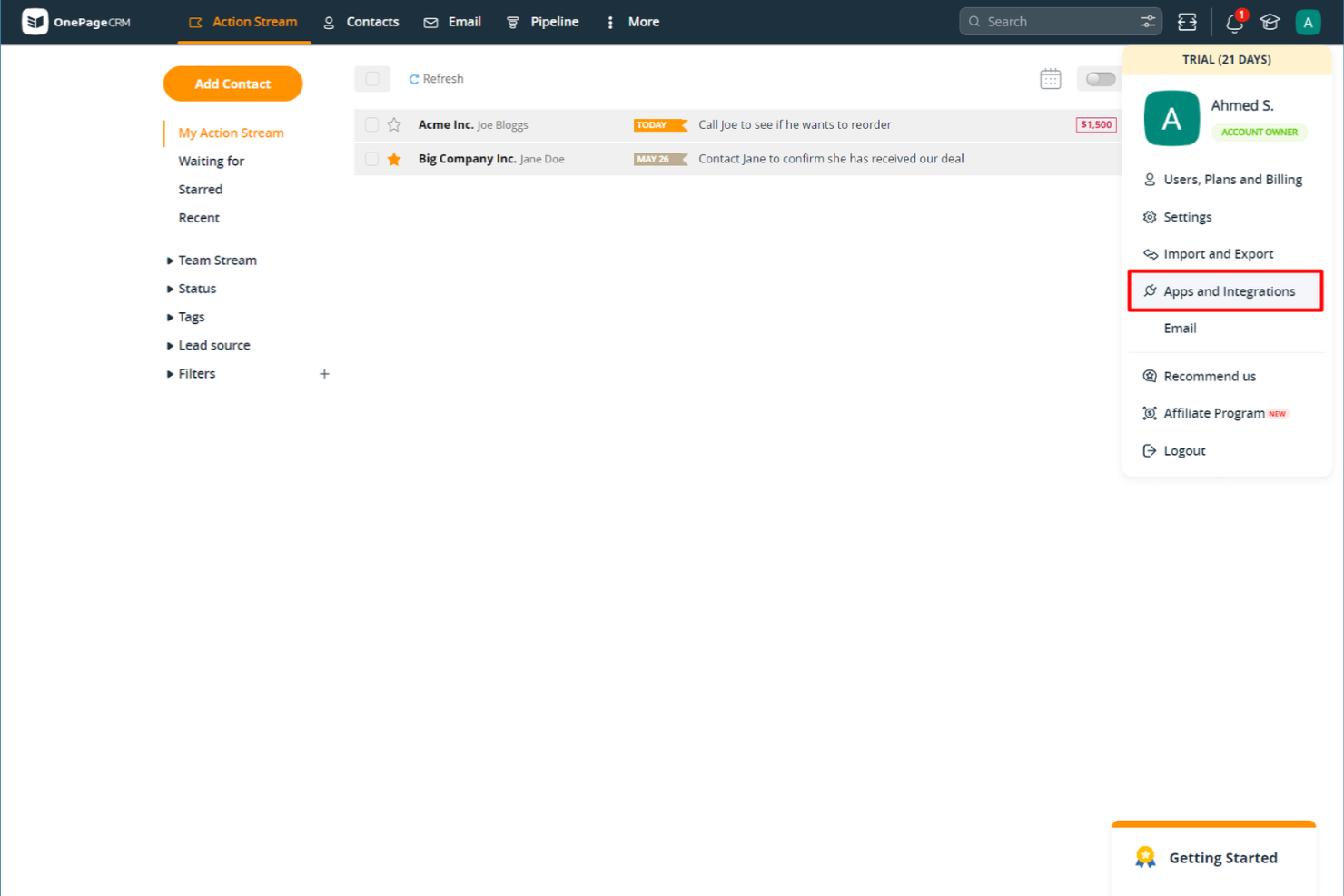
If you want a client management tool that keeps your team focused on next steps, OnePageCRM is worth a look. It’s designed for small businesses and sales teams that need a simple way to turn contacts into actionable tasks. With its action-focused approach, OnePageCRM helps you avoid letting leads slip through the cracks.
Why I Picked OnePageCRM
What sets OnePageCRM apart is its focus on turning every contact into a clear, actionable next step. Instead of just storing client information, the platform prompts you to assign and track follow-up actions for each contact, which helps small business teams stay proactive. I appreciate how the Next Action sales method is built right into the workflow, making it easy to prioritize and manage daily client tasks. For small businesses that want to keep momentum with leads and clients, this action-focused approach is a practical fit.
OnePageCRM Key Features
Some other features in OnePageCRM that small business users may find helpful include:
- Contact Import and Export: Quickly bring in or move out contact lists using CSV files or integrations.
- Email Sync and Templates: Connect your email account to send, receive, and track emails directly from the platform.
- Deal Management: Organize, track, and update sales opportunities with a simple pipeline view.
- Mobile App: Access contacts, actions, and deals on the go with dedicated iOS and Android apps.
OnePageCRM Integrations
Integrations include Gmail, Outlook, Mailchimp, Zapier, Xero, Google Calendar, Slack, HubSpot, and Pipedrive. Additionally, OnePageCRM offers an open API for custom integrations.
Pros and Cons
Pros:
- Email sync allows sending and tracking messages from the CRM
- Sales pipeline view offers simple drag-and-drop deal tracking
- Action-focused task lists help teams prioritize daily follow-ups
Cons:
- Bulk editing contacts is not available for all data fields
- No built-in marketing automation for email campaigns
Best with Microsoft 365 ecosystem integration
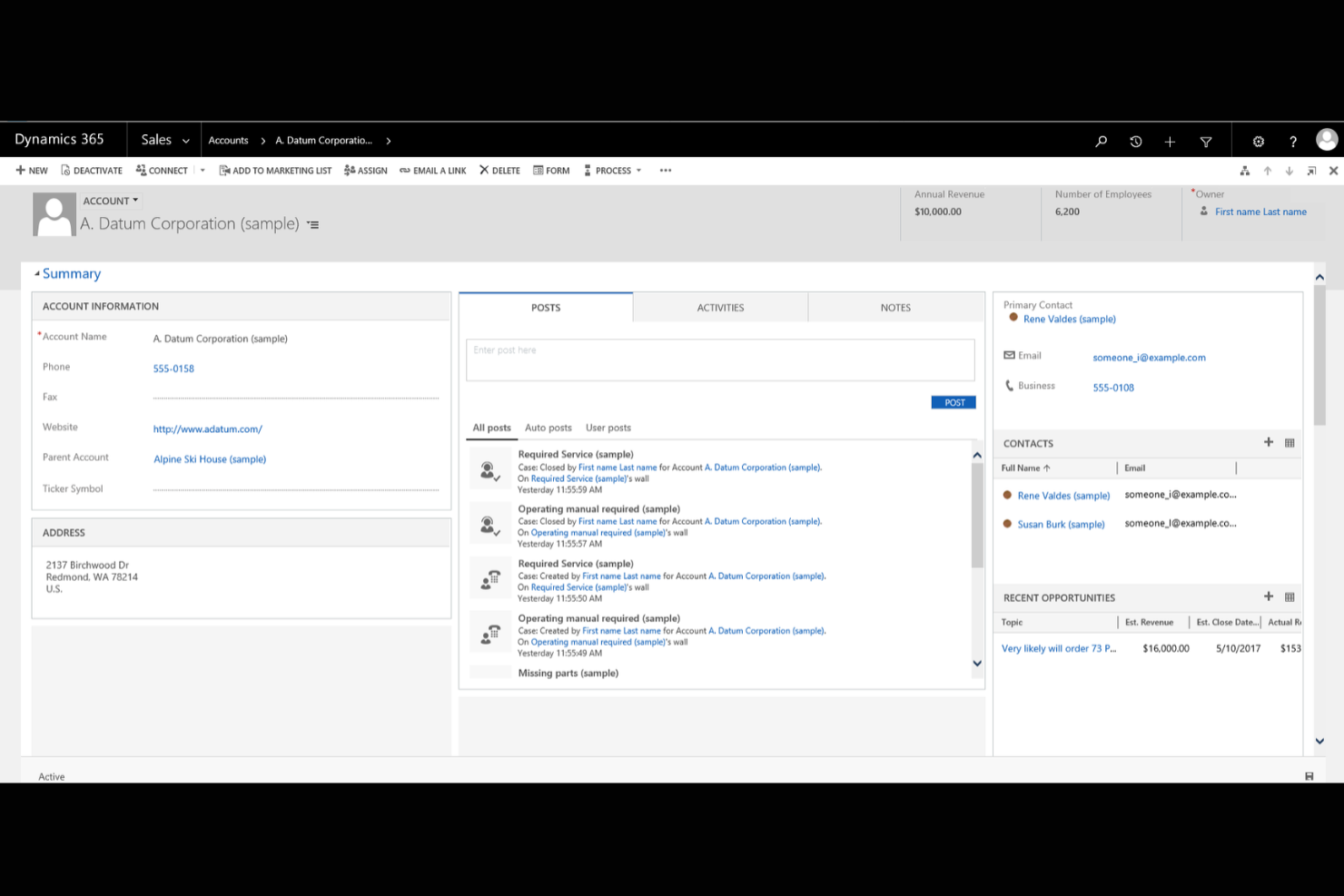
If your business already relies on Microsoft 365 tools, Microsoft Dynamics 365 offers a client management platform that fits right into your existing workflows. It’s designed for small businesses that want to connect sales, customer service, and marketing data across familiar Microsoft apps. With deep integration into Outlook, Teams, and Excel, Dynamics 365 helps you manage client relationships without switching between multiple systems.
Why I Picked Microsoft Dynamics 365
What sets Microsoft Dynamics 365 apart for small businesses is how deeply it connects with the Microsoft 365 ecosystem. I picked it because you can manage client data, track communications, and schedule meetings directly from familiar tools like Outlook and Teams. The platform also lets you automate workflows between Dynamics 365 and Excel, making it easier to update records and generate reports without manual data entry. For businesses already using Microsoft apps, this level of integration helps keep client management organized and efficient.
Microsoft Dynamics 365 Key Features
Some other features in Microsoft Dynamics 365 that small business users may find valuable include:
- Customizable Dashboards: Create visual dashboards to track sales, service, and marketing metrics in real time.
- Case Management: Organize and resolve customer service requests with built-in case tracking tools.
- Lead and Opportunity Management: Capture, qualify, and manage leads and sales opportunities from a single interface.
- Role-Based Access Controls: Set permissions and data visibility based on user roles within your organization.
Microsoft Dynamics 365 Integrations
Integrations include Microsoft 365, Power BI, LinkedIn Sales Navigator, Outlook, SharePoint, Teams, Azure, Adobe Sign, and OneDrive. Microsoft Dynamics 365 also offers an API for custom integrations.
Pros and Cons
Pros:
- Built-in case management supports structured customer service workflows
- Customizable dashboards let you track sales and service metrics
- Deep integration with Outlook, Teams, and other Microsoft 365 apps
Cons:
- Integration with non-Microsoft tools is more limited than that of some competitors
- Initial setup and configuration can require significant IT resources

HubSpot
Best for marketing and sales alignment
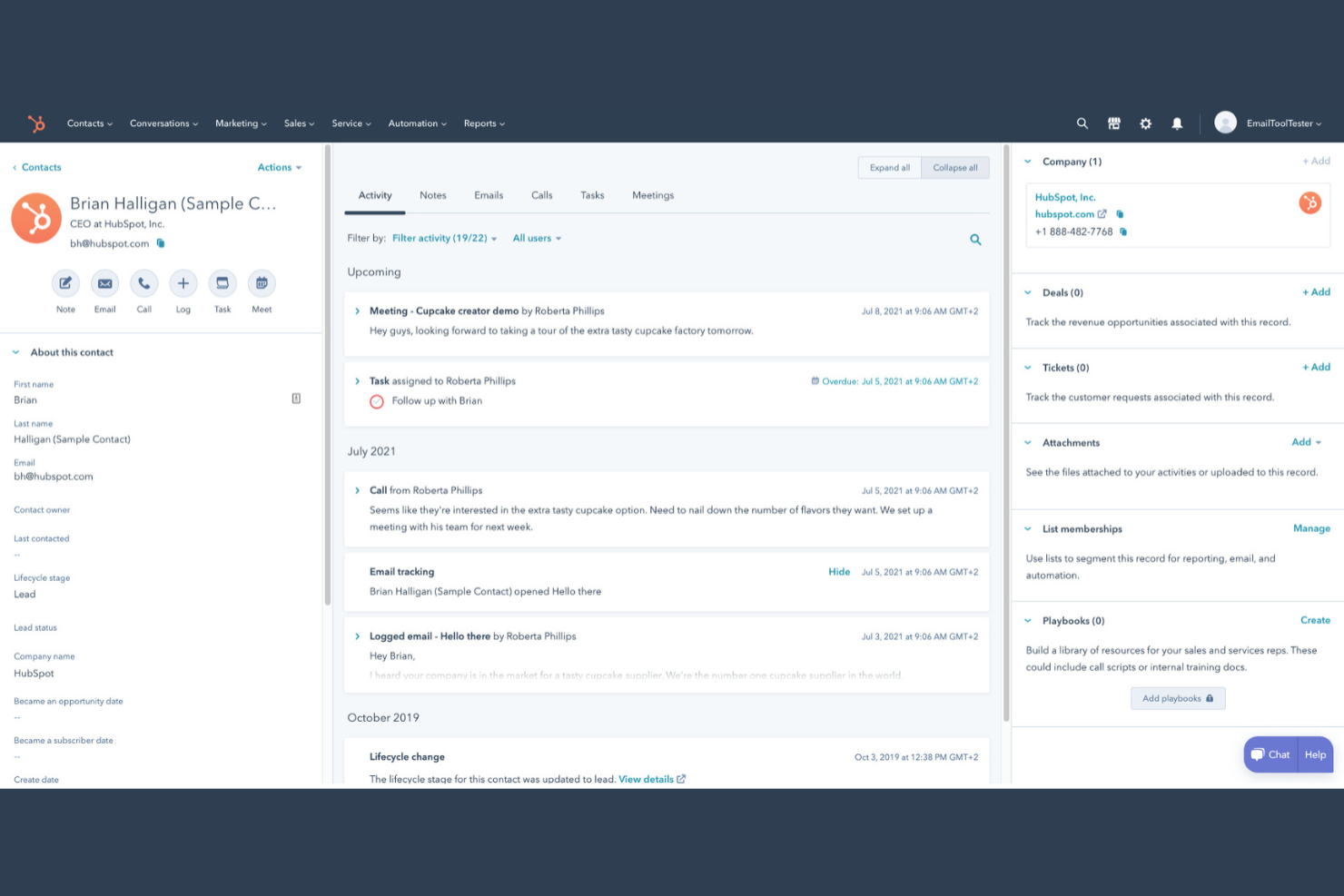
If you’re looking for a client management platform that connects your marketing and sales teams, HubSpot is worth a look. This tool is designed for small businesses that want to manage contacts, automate outreach, and track deals in one place. HubSpot stands out for its unified approach to client data, making it easier to align your sales and marketing efforts.
Why I Picked HubSpot
I chose HubSpot because it brings marketing and sales activities together in a way that’s especially useful for small businesses managing client relationships. The platform lets you track every client interaction, from first website visit to closed deal, all in one place. I like that you can automate email marketing campaigns and set up lead nurturing workflows that keep both sales and marketing teams on the same page. HubSpot’s shared contact database and deal pipelines help ensure no client details slip through the cracks as your team grows.
HubSpot Key Features
Some other features in HubSpot that small businesses may find useful include:
- Meeting Scheduler: Book appointments directly through the CRM system and sync with your calendar.
- Live Chat Widget: Add real-time chat to your website to connect with visitors and capture leads.
- Task Management: Assign, track, and prioritize tasks for your team within each client record.
- Document Tracking: Upload, share, and monitor client engagement and customer interactions with sales documents right from the platform.
HubSpot Integrations
Integrations include Salesforce, Shopify, WordPress, Slack, Zoom, Microsoft Outlook, Gmail, Mailchimp, SurveyMonkey, and Eventbrite.
Pros and Cons
Pros:
- Provides customizable pipelines for tracking deals and client status
- Offers built-in email tracking and automated follow-up reminders
- Centralizes client communication history across marketing and sales teams
Cons:
- Integration setup can be time-consuming for non-technical users
- Advanced automation features require upgrading to higher-tier plans

Best for project and task integration
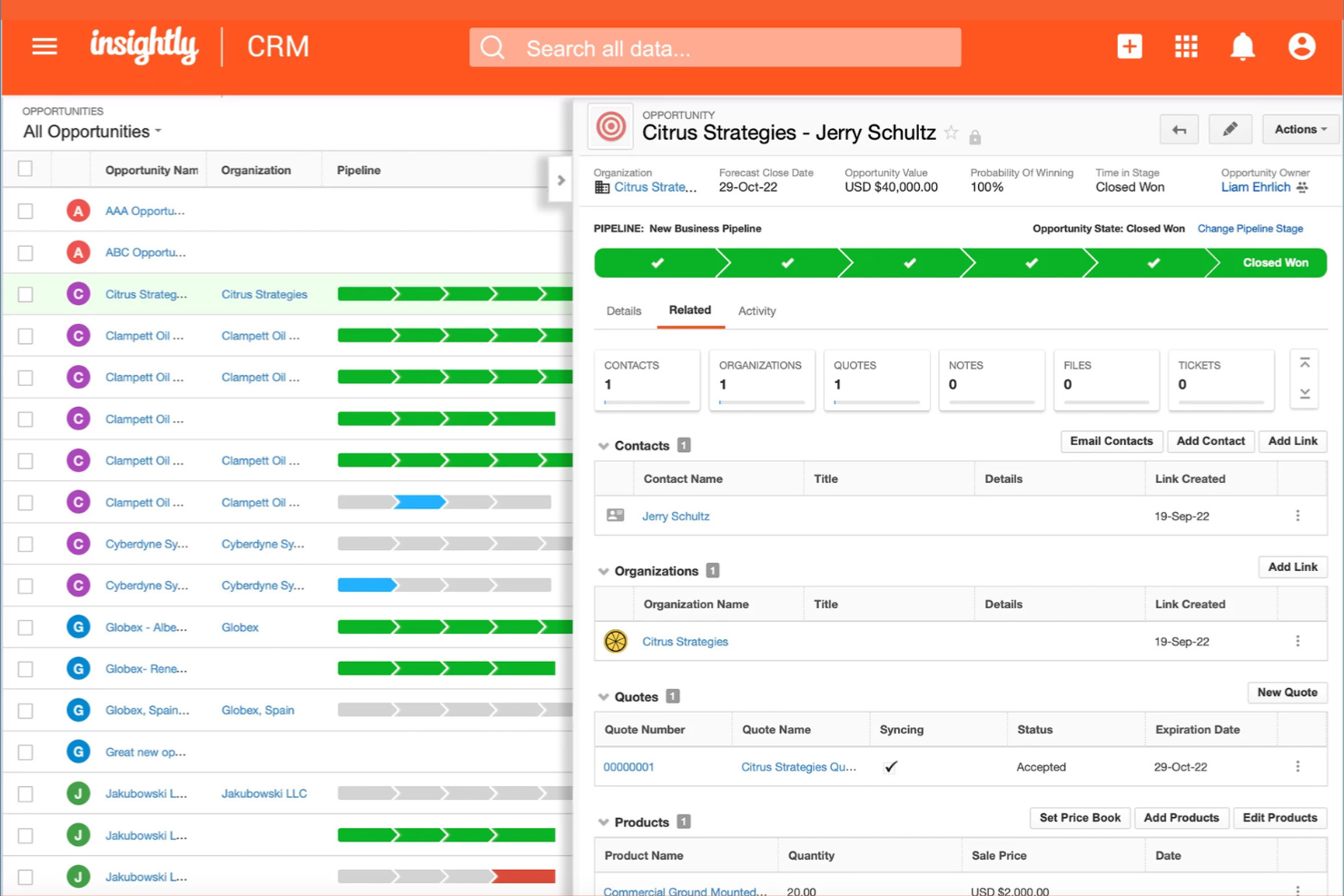
If your small business needs client management that connects directly with project and task workflows, Insightly is worth a look. This platform is designed for teams that want to manage customer relationships and project delivery in one place. It helps you link contacts, sales, and project tasks so nothing falls through the cracks as you move from deal to delivery.
Why I Picked Insightly
What sets Insightly apart for me is how it brings project and task management directly into the client management workflow. You can convert opportunities into projects with a single click, keeping all related client information and activities connected throughout the process. I appreciate that you can assign tasks, set milestones, and track project progress right alongside your client records. For small businesses juggling both sales and project delivery, Insightly’s integrated approach helps keep everything organized and visible in one place.
Insightly Key Features
Some other features in Insightly that small business teams may find valuable include:
- Relationship Linking: Connect contacts, organizations, and opportunities to see how everyone and everything is related.
- Custom Fields and Page Layouts: Tailor records and views to match your business’s unique processes and data needs.
- Email Templates and Tracking: Create reusable email templates and track when messages are opened or clicked.
- Workflow Automation: Set up automated actions and notifications based on triggers you define.
Insightly Integrations
Integrations include Gmail, Outlook, Mailchimp, QuickBooks, Slack, Dropbox, Google Drive, Microsoft Teams, Xero, and HubSpot. Insightly also offers an API for custom integrations.
Pros and Cons
Pros:
- Email templates and tracking support client communication efforts
- Custom fields and layouts adapt to unique business processes
- Workflow automation reduces manual data entry for small teams
Cons:
- Bulk data import can require manual cleanup and mapping
- Mobile app features are less extensive than the web version
Keap
Best for automated follow-up sequences

Keap stands out for small businesses that want to automate client follow-up and nurture leads without manual effort. It’s built for service providers and solopreneurs who need to keep track of contacts, appointments, and communications in one place. With Keap, you can set up automated email and text sequences that help you stay connected with clients at every stage.
Why I Picked Keap
Automated follow-up is where Keap really shines for small business client management. You can build custom email and text message sequences that trigger based on client actions, so you never miss a chance to follow up or nurture a lead. I like that Keap also lets you set reminders and automate appointment scheduling, which helps keep client communications timely and organized. For businesses that rely on consistent outreach and want to reduce manual follow-up, Keap’s automation tools are a strong fit.
Keap Key Features
Some other features in Keap that small business users may find useful include:
- Built-In CRM: Store, organize, and segment all your client contact details in one place.
- Invoice and Payment Processing: Send invoices and accept payments directly through the platform.
- Landing Page Builder: Create custom landing pages to capture leads and grow your contact list.
- Sales Pipeline Management: Track deals and opportunities as they move through your sales process.
Keap Integrations
Integrations include QuickBooks, Gmail, Outlook, Zapier, WordPress, Shopify, Facebook Ads, Google Calendar, Stripe, and PayPal.
Pros and Cons
Pros:
- CRM includes tagging and segmentation for targeted communication
- Built-in invoicing and payment tools support service businesses
- Automated follow-up sequences can be customized for each client
Cons:
- Pricing increases significantly as your contact list grows
- Workflow builder can be complex for first-time users

Best with advanced automation tools
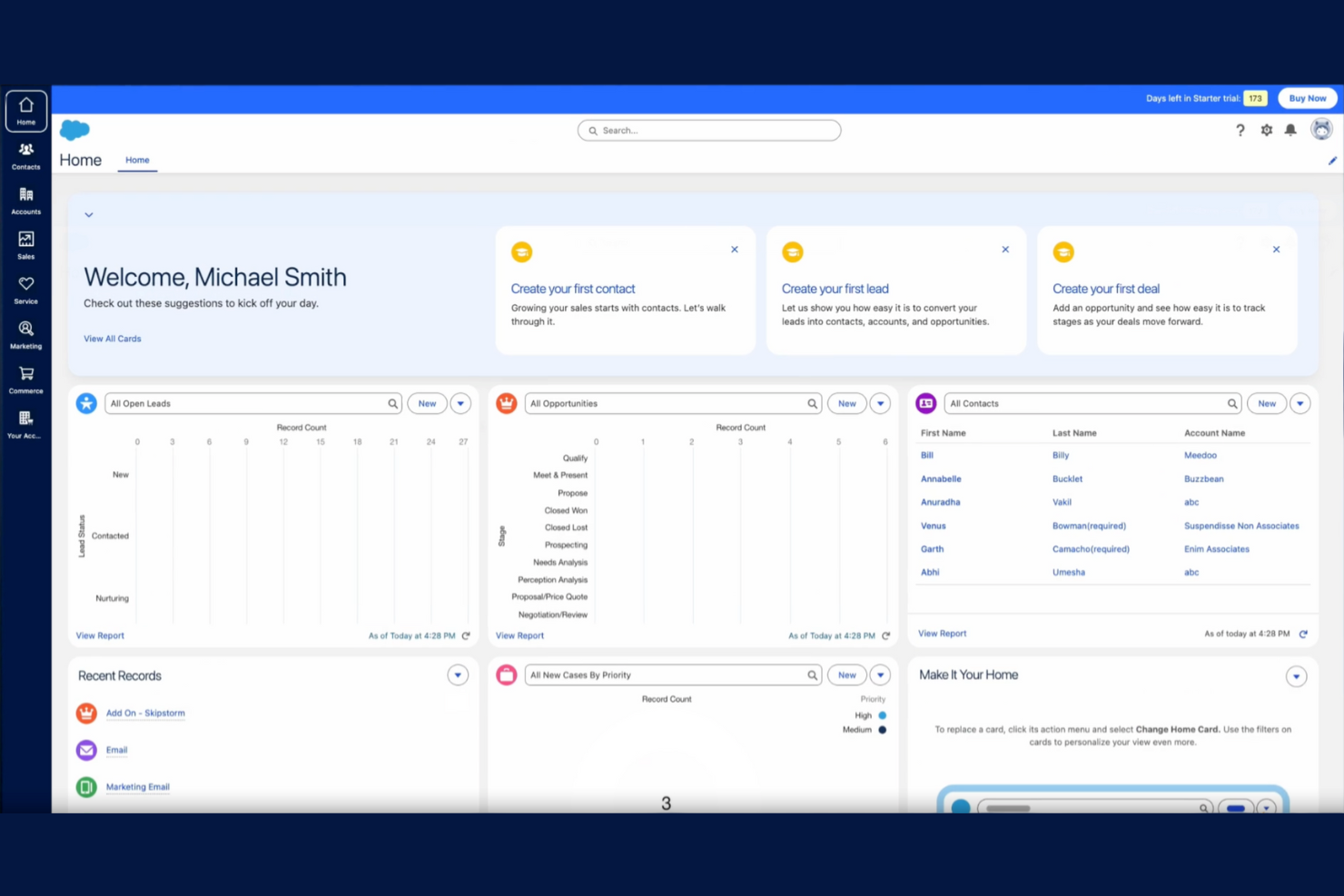
Salesforce gives small businesses access to automation tools that are usually reserved for larger organizations. If your team needs to manage complex client workflows, automate repetitive tasks, or set up custom sales processes, Salesforce offers a flexible platform to do it. Its advanced automation features help small businesses handle growing client lists and evolving sales cycles without losing track of important details.
Why I Picked Salesforce
What sets Salesforce apart as a small business CRM is its advanced automation capabilities that go far beyond basic client tracking. You can build custom workflows to automate lead assignments, follow-up reminders, and approval processes, which helps teams stay organized as client volume grows. I appreciate how Salesforce’s automation tools let you set up triggers and actions based on client behavior, so nothing falls through the cracks. For small businesses ready to scale, these user-friendly features make it possible to handle more clients without adding manual work.
Salesforce Key Features
Some other features in Salesforce that small businesses may find valuable include:
- Opportunity Management: Track and optimize every stage of your sales pipeline and update deal progress in real time.
- Contact and Account Management: Store detailed client information, notes, and communication history in one place.
- Customizable Dashboards: Build visual dashboards to monitor sales performance, forecasts, and client activity.
- Mobile App Access: Manage client records and sales tasks from anywhere using the Salesforce mobile app.
Salesforce Integrations
Integrations include Outlook, Gmail, Slack, Mailchimp, HubSpot, QuickBooks, DocuSign, Zoom, LinkedIn Sales Navigator, and Google Drive. Salesforce also offers an API for custom integrations.
Pros and Cons
Pros:
- Built-in reporting tools support detailed sales and client analysis
- Highly customizable fields and layouts for unique business needs
- Advanced workflow automation reduces manual client management tasks
Cons:
- Subscription costs are higher than many small business alternatives
- Initial setup and configuration can require significant time investment

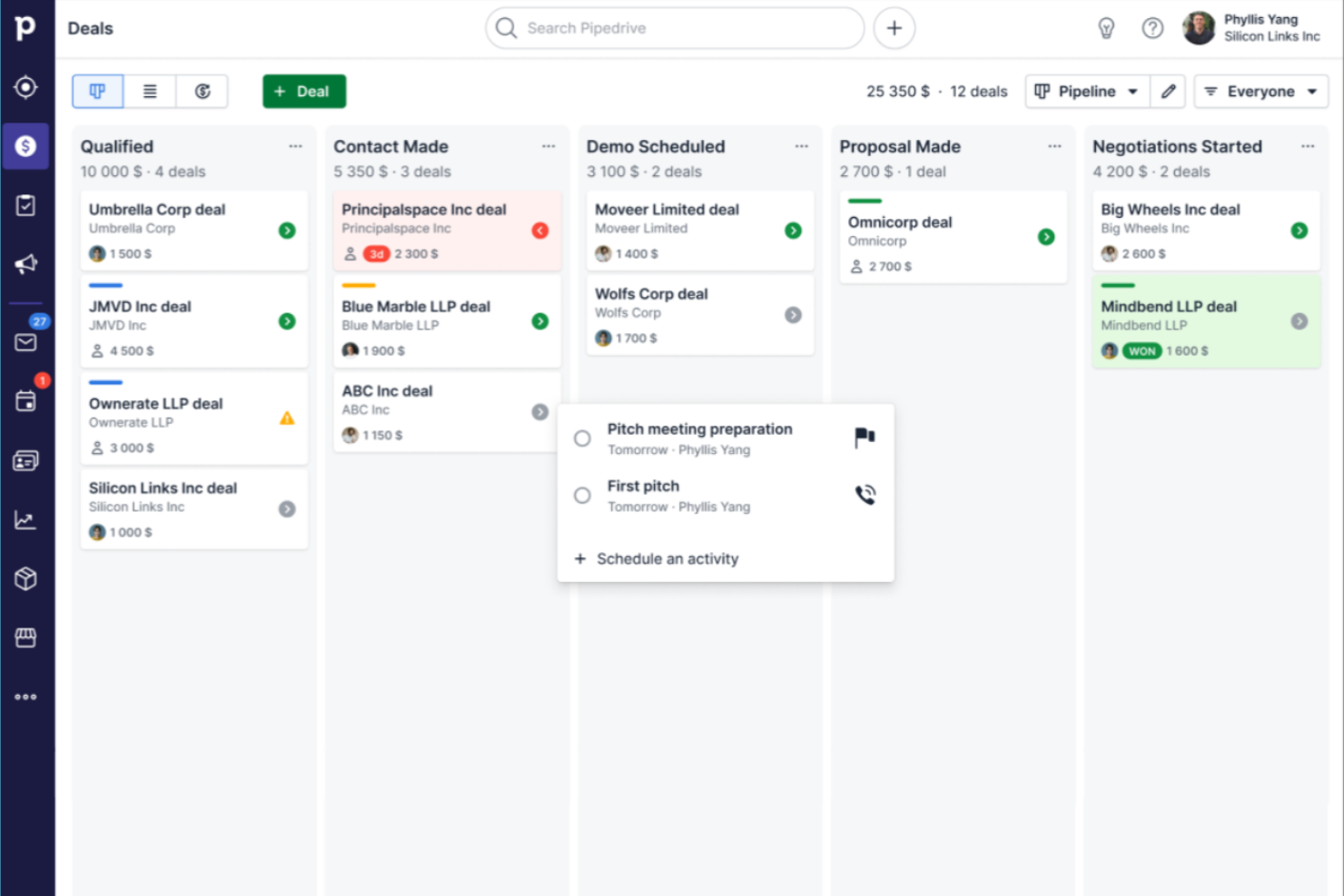
Sales-focused teams that want a clear, visual way to manage deals often turn to Pipedrive. This CRM is built for small businesses that need to track leads, activities, and progress through customizable pipeline stages. Its drag-and-drop interface helps you quickly spot bottlenecks and keep your sales process moving.
Why I Picked Pipedrive
What drew me to Pipedrive is its focus on visual sales pipeline management, which is especially valuable for small businesses that need to keep deals organized and moving forward. The drag-and-drop pipeline lets you see every deal’s stage at a glance and quickly update progress as things change. I like that you can customize pipeline stages to match your unique sales process, making it easy to adapt as your business grows. For teams that want a clear, actionable overview of their sales activity, Pipedrive’s visual approach stands out.
Pipedrive Key Features
Some other features in Pipedrive that small business teams may find useful include:
- Email Integration: Connect your email account to send, receive, and track messages directly within Pipedrive.
- Activity Reminders: Set reminders for calls, meetings, and follow-ups to keep deals moving.
- Contact and Organization Management: Store and organize detailed information about clients and companies in one place.
- Customizable Reports: Generate and customize sales and activity reports to monitor team performance.
Pipedrive Integrations
Integrations include Gmail, Outlook, Mailchimp, Trello, Slack, Zapier, Google Calendar, HubSpot, QuickBooks, and Microsoft Teams. Pipedrive also offers an open API for custom integrations.
Pros and Cons
Pros:
- Activity reminders help teams stay on top of follow-ups
- Email sync allows tracking conversations within each deal
- Visual pipelines make it simple to track deal progress
Cons:
- Workflow automation is only available on higher-priced plans
- Reporting features are limited on lower-tier plans
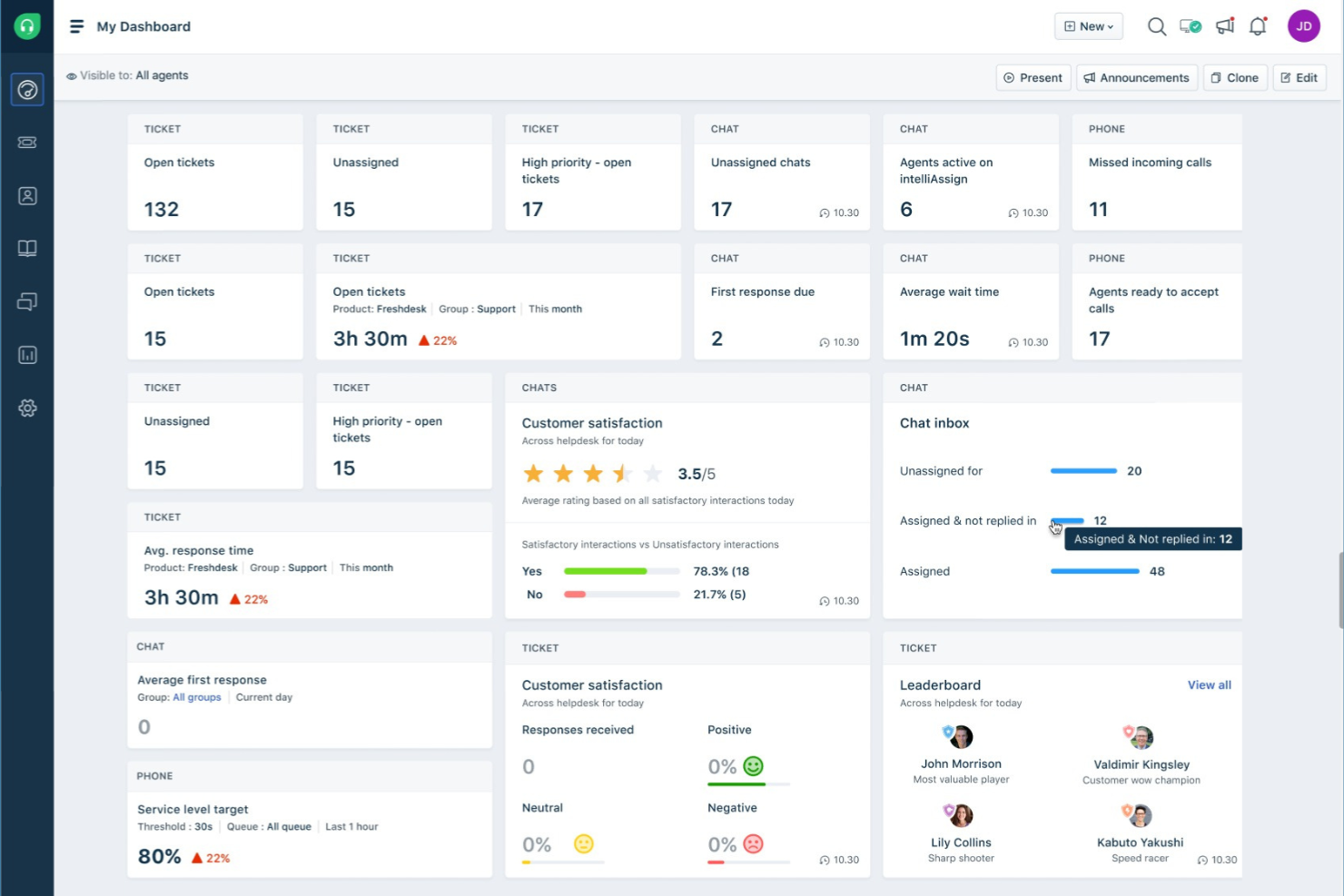
Freshworks CRM stands out for small businesses that want to prioritize leads using AI-driven insights. It’s built for sales teams and client-focused professionals who need to identify and act on high-potential opportunities quickly. With its AI-powered lead scoring, Freshworks CRM helps you focus your efforts where they matter most.
Why I Picked Freshworks CRM
What drew me to Freshworks CRM is its advanced use of AI to help small businesses focus on the right leads. The platform’s AI-powered lead scoring automatically analyzes contact behavior and engagement, ranking leads so your team can prioritize outreach. I like that it also offers predictive contact scoring, which helps you spot deals that are most likely to close. For small businesses that need to make the most of limited sales resources, these AI-driven features can make a real difference in how you manage and convert leads.
Freshworks CRM Key Features
Some other features in Freshworks CRM that small business teams may find useful include:
- Built-In Phone and Email: Make calls and send emails directly from the CRM, with automatic logging of all communications.
- Workflow Automation: Set up rules to automate repetitive tasks like follow-ups and data entry.
- Customizable Sales Pipelines: Design multiple pipelines to match different sales processes or business lines.
- Mobile App: Access contacts, deals, and tasks from anywhere using iOS and Android devices.
Freshworks CRM Integrations
Integrations include Gmail, Outlook, Mailchimp, Zapier, Slack, Google Calendar, QuickBooks, Shopify, Microsoft Teams, and Zoom.
Pros and Cons
Pros:
- Workflow automation reduces manual follow-up and data entry tasks
- Built-in phone and email tools centralize client communications
- AI-powered lead scoring helps prioritize high-potential sales opportunities
Cons:
- Bulk data import and export options are less flexible than alternatives
- Advanced features are only available on higher-tier plans
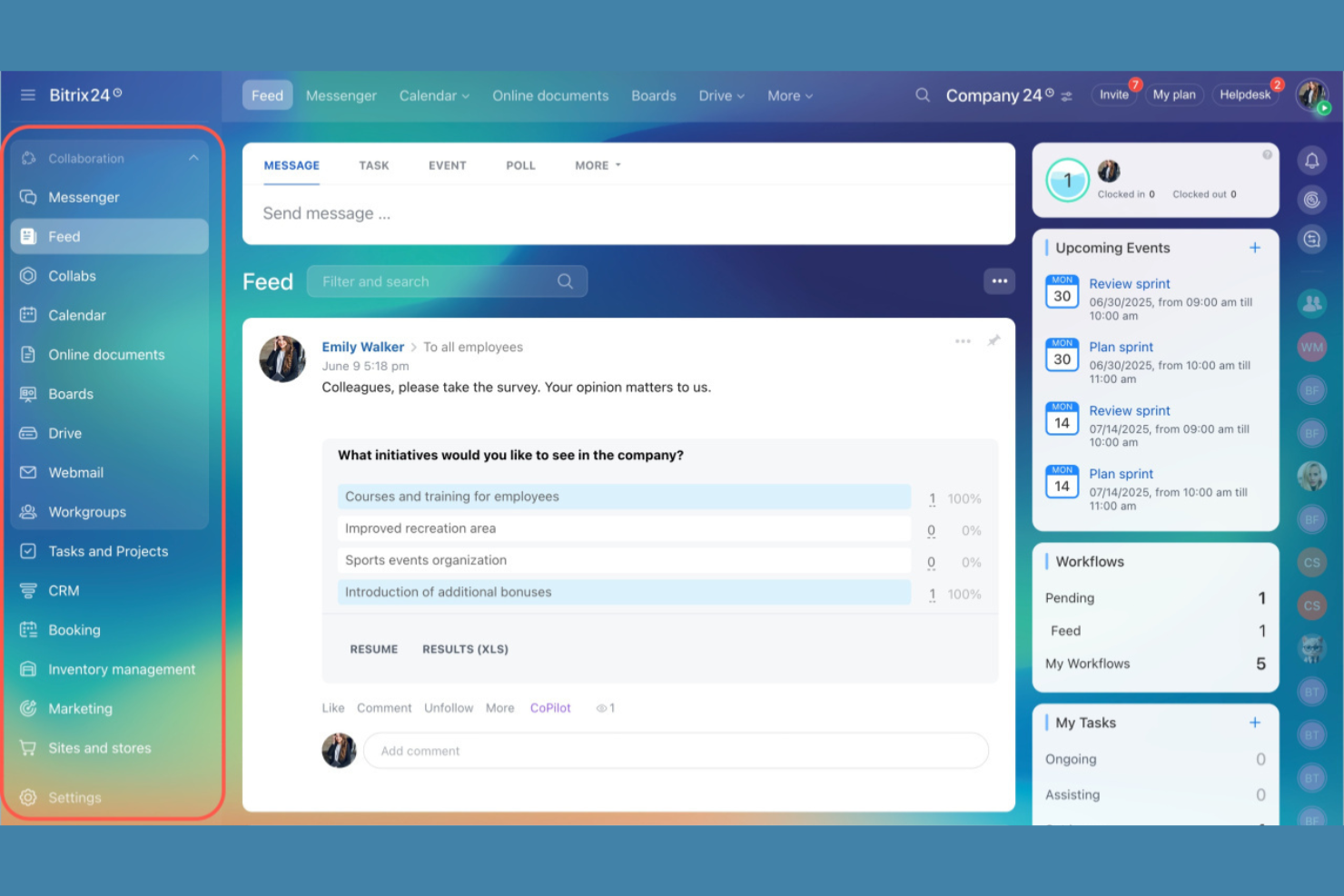
If your small business needs client management software with built-in team chat, document sharing, and project workspaces, Bitrix24 is worth a look. It’s designed for teams that want to manage client relationships and internal collaboration from a single platform. Service providers, agencies, and distributed teams can use Bitrix24 to keep client info, conversations, and tasks all in one place.
Why I Picked Bitrix24
What sets Bitrix24 apart for small businesses is its focus on team collaboration built right into the client management experience. You get group chat, shared calendars, and document management alongside your client records, so your team can coordinate work without switching tools. I appreciate how Bitrix24 lets you assign tasks, share files, and discuss client projects directly within the platform. This approach helps small teams stay organized and responsive, especially when client work requires input from multiple people.
Bitrix24 Key Features
Some other features in Bitrix24 that small businesses may find useful include:
- Client Database Management: Store, organize, and search all client information in a centralized database.
- Sales Funnel Visualization: Track deals and monitor progress through customizable sales pipelines.
- Web Form Builder: Create and embed custom forms to capture leads directly into your CRM.
- Time Tracking Tools: Log hours spent on client projects and tasks for better accountability.
Bitrix24 Integrations
Integrations include Microsoft Office 365, Google Workspace, Mailchimp, Slack, Zoom, Dropbox, OneDrive, Facebook, Instagram, and WhatsApp. Bitrix24 also offers an open API for custom integrations.
Pros and Cons
Pros:
- Document sharing and storage are available within the platform
- Task and project management tools are included with CRM features
- Built-in chat and video calls support real-time team collaboration
Cons:
- Interface can feel cluttered with many features enabled at once
- Email integration setup can be confusing for new users
Annen programvare for klientadministrasjon for små bedrifter
Her er noen flere alternativer innen programvare for klientadministrasjon for små bedrifter som ikke kom med på kortlisten, men som likevel er verdt å se nærmere på:
- monday CRM
For customizable workflow boards
- Zoho CRM
For multichannel communication tracking
- Act!
For in-depth contact history tracking
- Nimble
For social media contact enrichment
- HoneyBook
For workflow automation in creative services
- SuiteDash
For all-in-one client portals
- Bonsai
For contract and proposal management
- Zendesk
For integrated customer support tools
- Dubsado
For customizable client intake forms
- Rednote CRM
For WhatsApp integration
- Agency Handy
For agency-specific templates


How I Evaluate Client Management Software for Small Businesses
I split my evaluation into baseline functionality every tool must cover and the differentiators that separate a capable platform from one a small agency or consultant will actually stick with.
Core Functionality (Table Stakes For This List)
When I'm selecting tools for my list, I rank each one on a scale from 0 (does not offer the functionality) to 5 (excels in this area) for each core functionality listed below. I then calculate the tool's total score into a percentage, using 65% as a benchmark to help assess its overall fit for the list.
- Client Database: I check whether the tool stores full contact records with notes, tags, custom fields, and a timeline of past interactions tied to projects and invoices.
- Project & Task Management: Each tool should let you create tasks and projects linked directly to client records, with assignments, deadlines, and views like Kanban or Gantt.
- Client Communication: I look for two-way email sync or in-app messaging that threads conversations to specific clients and projects rather than living in a separate inbox.
- Client Portal: The platform should offer a shared workspace where clients can view progress, upload files, leave comments, or approve deliverables without needing a full license.
- Billing & Invoicing: I evaluate whether invoicing ties back to client accounts or tracked time, with support for payment gateways like Stripe or PayPal to close the loop on collections.
- Automation & Workflow: Tools earn higher marks when they include a workflow builder with triggers and conditions, such as auto-assigning onboarding tasks when a new client record is created.
Once I have a list of tools that meet the criteria, I consider what sets each platform apart.
Differentiating Factors (What Sets Vendors Apart)
Here's how I compare and contrast different vendors:
Standout Features
I look for built-in time tracking that converts logged hours directly into client invoices. Tools like HoneyBook and Dubsado handle this natively, while others require a third-party integration. Proposal and e-signature tools also matter because they let you move a client from signed contract to active project without leaving the platform. Beyond that, I check whether the client portal supports white-label branding so your clients see your logo and colors instead of the vendor's.
Beyond Features
I check whether client and portal users count as paid seats, since agencies inviting dozens of external collaborators can see costs spike fast on per-user plans. Pricing transparency matters just as much as the sticker price. I also evaluate how quickly a small team without dedicated IT staff can go live. Prebuilt templates for onboarding sequences or invoicing workflows cut setup from weeks to days. Finally, native integrations with QuickBooks, Xero, Stripe, and Google Calendar are near-mandatory for keeping client records, payments, and scheduling in sync without duct-taping tools together through workarounds.
Slik velger du programvare for klientadministrasjon for en liten bedrift
Det er lett å gå seg vill i lange funksjonslister og kompliserte prismodeller. For å hjelpe deg med å holde fokus mens du går gjennom den unike prosessen med å velge programvare, får du her en sjekkliste over faktorer du bør ha i bakhodet:
| Faktor | Hva bør du vurdere? |
|---|---|
| Skalerbarhet | Vil programvaren støtte virksomheten din når du får flere kunder, brukere eller tjenester? Se etter brukerbegrensninger, datagrenser og muligheter for oppgradering. |
| Integrasjoner | Kan verktøyet kobles direkte til eksisterende e-post-, kalender-, regnskaps- eller markedsføringsplattformer? Mangler her kan føre til manuelt arbeid. |
| Tilpasningsmuligheter | Kan du tilpasse felter, arbeidsflyter og oversikter slik at de samsvarer med prosessene dine? Lite fleksible systemer kan tvinge deg til å endre arbeidsflyten. |
| Brukervennlighet | Hvor raskt kan teamet lære seg og ta i bruk verktøyet? Se etter tydelig navigasjon, minimalt behov for opplæring og et logisk grensesnitt. |
| Implementering og oppstart | Hvilke ressurser og hvor mye tid kreves for å komme i gang? Ta hensyn til datamigrering, opplæring og leverandørstøtte under oppsettet. |
| Kostnad | Er prisnivåene transparente og forutsigbare når teamet vokser? Vær oppmerksom på tilleggskostnader, minimumsantall brukere eller påkrevde årskontrakter. |
| Sikkerhetstiltak | Tilbyr programvaren kryptering, brukertillatelser og samsvar med relevante standarder? Spør om hvor data lagres og hvilke retningslinjer som gjelder for sikkerhetskopiering. |
| Tilgjengelig kundestøtte | Hvilke supportkanaler tilbys, og på hvilke tidspunkter? Hvis teamet ditt jobber utenfor vanlig arbeidstid, kan brukerstøtte døgnet rundt være avgjørende. |
Hva er kundeoppfølgingsprogramvare for små bedrifter?
Kundeoppfølgingsprogramvare er et digitalt verktøy som hjelper deg med å organisere, følge opp og administrere all interaksjon og informasjon knyttet til kundene dine. Det samler kontaktopplysninger, kommunikasjonshistorikk, oppgaver og salgsaktiviteter på ett sted – slik at du slipper å håndtere regneark, e-posttråder og lapper for å danne deg et fullstendig bilde.
For små bedrifter gjør disse verktøyene mer enn å lagre data. De skaper struktur rundt hvordan du følger opp kunder, sporer muligheter og leverer jevn service, selv med et lite team. I stedet for å basere deg på hukommelse eller uformelle prosesser får du felles oversikt over kundestatus, ansvarsområder og neste steg. Det riktige systemet legger til rette for sterkere relasjoner, mer pålitelig oppfølging og skalerbare prosesser – slik at vekst ikke automatisk fører til kaos.
Funksjoner i kundeoppfølgingsprogramvare for små bedrifter
Når du velger kundeoppfølgingsprogramvare for en liten bedrift, bør du se etter følgende viktige funksjoner:
- Kontaktadministrasjon: Lagre, organiser og oppdater kontaktopplysninger, notater og relaterte dokumenter om kunder i en sentralisert database.
- Registrering av interaksjoner: Loggfør samtaler, e-poster, møter og annen kommunikasjon for å opprettholde en komplett historikk over kundeinteraksjoner.
- Oppgave- og aktivitetsadministrasjon: Tildel, planlegg og følg opp oppgaver eller kundeoppfølging for hver kunde for å sikre at tiltak gjennomføres i tide.
- Pipeline-administrasjon: Visualiser og administrer salgsmuligheter eller prosjektfaser, slik at du kan følge fremdriften fra første kontakt til avslutning.
- Dokumentlagring: Last opp, del og administrer kontrakter, tilbud og andre kundefiler på en sikker måte i plattformen.
- Kalenderintegrasjon: Synkroniser avtaler, frister og påminnelser med den eksisterende kalenderen din for å unngå glemte møter eller oppfølginger.
- Rapportering og analyse: Generer rapporter om kundeaktivitet, salgsresultater og teamets produktivitet for å ta informerte forretningsbeslutninger. AI-drevne verktøy for kundeoppfølging gir i tillegg prediktiv innsikt i kundenes behov og atferd.
- Rollebasert tilgangskontroll: Angi tillatelser slik at teammedlemmer bare får tilgang til kundedataene og funksjonene som er relevante for rollene deres.
- Tilpassede felter og tagger: Legg til tilpassede datafelter eller tagger for å tilpasse systemet til dine unike behov for kundeoppfølging.
- Mobil tilgang: Bruk en mobilapp eller et responsivt nettgrensesnitt for å administrere kundeinformasjon og oppgaver mens du er på farten.
Fordeler med kundeoppfølgingsprogramvare for en liten bedrift
Implementering av kundeoppfølgingsprogramvare i en liten bedrift gir flere fordeler for både teamet og virksomheten. Her er noen av fordelene du kan se frem til:
- Sentralisert kundeinformasjon: Oppbevar alle kontaktopplysninger, all kommunikasjonshistorikk og alle dokumenter på ett tilgjengelig sted for hele teamet.
- Bedre oppfølging: Bruk oppgavehåndtering og påminnelser for å sikre at ingen kundeforespørsler eller muligheter blir oversett.
- Større kundelojalitet: Spor hver interaksjon og tilpass kommunikasjonen basert på en fullstendig kundehistorikk.
- Større ansvarlighet i teamet: Tildel oppgaver, følg med på fremdriften og angi rollebaserte tillatelser for å tydeliggjøre ansvarsområder og beskytte sensitive data.
- Bedre beslutningsgrunnlag: Få tilgang til rapporter og analyser i sanntid for å forstå kundeaktivitet, salgsresultater og teamets arbeidsbelastning.
- Raskere opplæring: Benytt maler, produktveiledninger og verktøy for dataimport for å få nye teammedlemmer raskt i gang.
- Bedre mobilitet: Administrer kundeinformasjon og oppgaver hvor som helst ved hjelp av mobiltilgang eller skybaserte plattformer.
Kostnader og priser for programvare for kundeoppfølging for små bedrifter
Valg av programvare for kundeoppfølging for en liten bedrift krever forståelse av de ulike prismodellene og abonnementene som er tilgjengelige. Kostnadene varierer basert på funksjoner, teamstørrelse, tillegg og mer. Tabellen nedenfor oppsummerer vanlige abonnementer, gjennomsnittsprisene deres og typiske funksjoner som er inkludert i programvareløsninger for kundeoppfølging for små bedrifter:
Sammenligningstabell for abonnementer i programvare for kundeoppfølging for SMB-er
| Abonnementstype | Gjennomsnittspris | Vanlige funksjoner |
|---|---|---|
| Gratisabonnement | $0 | Grunnleggende kontaktadministrasjon, begrenset oppgavesporing, grunnleggende rapportering og brukerstøtte på e-post. |
| Personlig abonnement | $5-$25/bruker/måned | Kontakt- og avtalehåndtering, kalenderintegrasjon, enkel automatisering og begrensede tilpasningsmuligheter. |
| Bedriftsabonnement | $25-$60/bruker/måned | Avansert rapportering, automatisering av arbeidsflyter, dokumentlagring, integrasjoner med andre verktøy og mobiltilgang. |
| Abonnement for større virksomheter | $60-$120/bruker/måned | Tilpassede roller og tillatelser, avansert sikkerhet, prioritert brukerstøtte, API-tilgang og hjelp med oppstart. |
Vanlige spørsmål om programvare for kundeoppfølging for SMB-er
Her er noen svar på vanlige spørsmål om programvare for kundeoppfølging for små bedrifter:
Hvordan vet jeg om den lille bedriften min trenger programvare for kundeoppfølging?
Hvis du har problemer med å holde oversikt over kundeopplysninger, oppfølging eller kommunikasjonshistorikk ved hjelp av bare regneark eller e-post, er det på tide å vurdere programvare for kundeoppfølging. Disse verktøyene hjelper deg med å organisere informasjon, automatisere påminnelser og sørge for at ingenting blir glemt etter hvert som kundebasen vokser.
Kan programvare for kundeoppfølging integreres med verktøyene jeg allerede bruker?
Ja, de fleste programvareløsninger for kundeoppfølging for små bedrifter tilbyr integrasjoner med populære plattformer for e-post, kalender, regnskap og markedsføring. Før du velger en løsning, bør du kontrollere at den kan kobles til verktøyene teamet ditt allerede bruker, slik at du unngår manuell dataregistrering og forstyrrelser i arbeidsflyten.
Hva er forskjellen mellom programvare for kundeoppfølging og CRM?
Programvare for kundeoppfølging fokuserer på å organisere kundeinformasjon, spore interaksjoner og administrere oppgaver. CRM-systemer (systemer for kunderelasjonshåndtering) omfatter ofte disse funksjonene, men kan også tilby avanserte verktøy for salg, markedsføring og analyse som er utviklet for større eller mer komplekse organisasjoner.
Er programvare for kundeoppfølging sikker for lagring av sensitive kundedata?
Ja, anerkjente programvareløsninger for kundeoppfølging bruker kryptering, tilgangskontroller og regelmessige sikkerhetsoppdateringer for å beskytte dataene dine. Gå alltid gjennom leverandørens sikkerhetspolicyer og samsvarssertifiseringer for å sikre at de oppfyller bedriftens krav til personvern og regelverk.
Hvor lang tid tar det å implementere programvare for kundeoppfølging?
Implementeringstiden varierer etter verktøy og teamstørrelse. Mange små bedrifter kan komme i gang i løpet av noen få dager ved hjelp av maler, produktveiledninger og verktøy for dataimport. Mer komplekse oppsett med tilpassede arbeidsflyter eller integrasjoner kan ta noen uker å konfigurere fullstendig og få teamet i gang.