

10 beste programvarer for fakturaautomatisering i 2026

Kortliste over beste programvare for automatisering av fakturering


Programvare for automatisering av fakturering digitaliserer og forenkler hele faktureringsprosessen, fra registrering av data til godkjenning og betaling. Hvis du ser etter den beste programvaren for automatisering av fakturering, ønsker du sannsynligvis å redusere manuelt arbeid, begrense antall feil og få bedre oversikt over leverandørgjelden. Med så mange alternativer på markedet kan det være vanskelig å vite hvilke verktøy som faktisk leverer når det gjelder hastighet, nøyaktighet og integrasjon med de eksisterende systemene dine. Denne veiledningen hjelper deg med å sammenligne de beste løsningene, slik at du kan finne det som passer best for teamets arbeidsflyt og virksomhetens mål i 2026.
Why Trust Our Software Recommendations
Our team has been testing and reviewing software since 2012. As project managers ourselves, we know how difficult—and important—it is to choose the right software.
For this guide, we evaluated tools using hands-on testing and independent research, scoring tools using our selection criteria. We also draw on insights from industry thought leaders and practicing project management experts.
Our reviews reflect our human editorial judgment, not a sales pitch.
Expert reviewers:
Sammenligningstabell for programvare for automatisering av fakturering
Denne sammenligningstabellen oppsummerer prisopplysningene for mine beste utvalgte programmer for automatisering av fakturering:
| Tool | Best For | Trial Info | Price | ||
|---|---|---|---|---|---|
| 1 | Best for collaborative invoice processing | Free demo available | Pricing upon request | Website | |
| 2 | Best for global payables automation | Free demo available | From $99/month | Website | |
| 3 | Best for real-time invoice automation | Demo available upon request | From £129 | Website | |
| 4 | Best for spend and invoice management | Free plan available | From $12/user/month | Website | |
| 5 | Best for mid-market invoice automation | Free demo available | Pricing upon request | Website | |
| 6 | Best for AI invoice data capture | 14-day free trial + free demo available | From $18,000/year | Website | |
| 7 | Best for cloud-based AP automation | Free demo available | Pricing upon request | Website | |
| 8 | Best for AI invoice processing | Free demo available | Pricing upon request | Website | |
| 9 | Best for AP automation with analytics | Free demo available | Pricing upon request | Website | |
| 10 | Best for small business invoice management | Free plan + free demo available | From $49/user/month | Website |
Anmeldelser av programvare for automatisering av fakturering
Nedenfor finner du mine detaljerte sammendrag av den beste programvaren for automatisering av fakturering som kom med på kortlisten. Anmeldelsene mine gir en grundig gjennomgang av funksjonene, integrasjonene og prisene for hver plattform, slik at du kan finne den beste løsningen for deg.

Stampli
Best for collaborative invoice processing
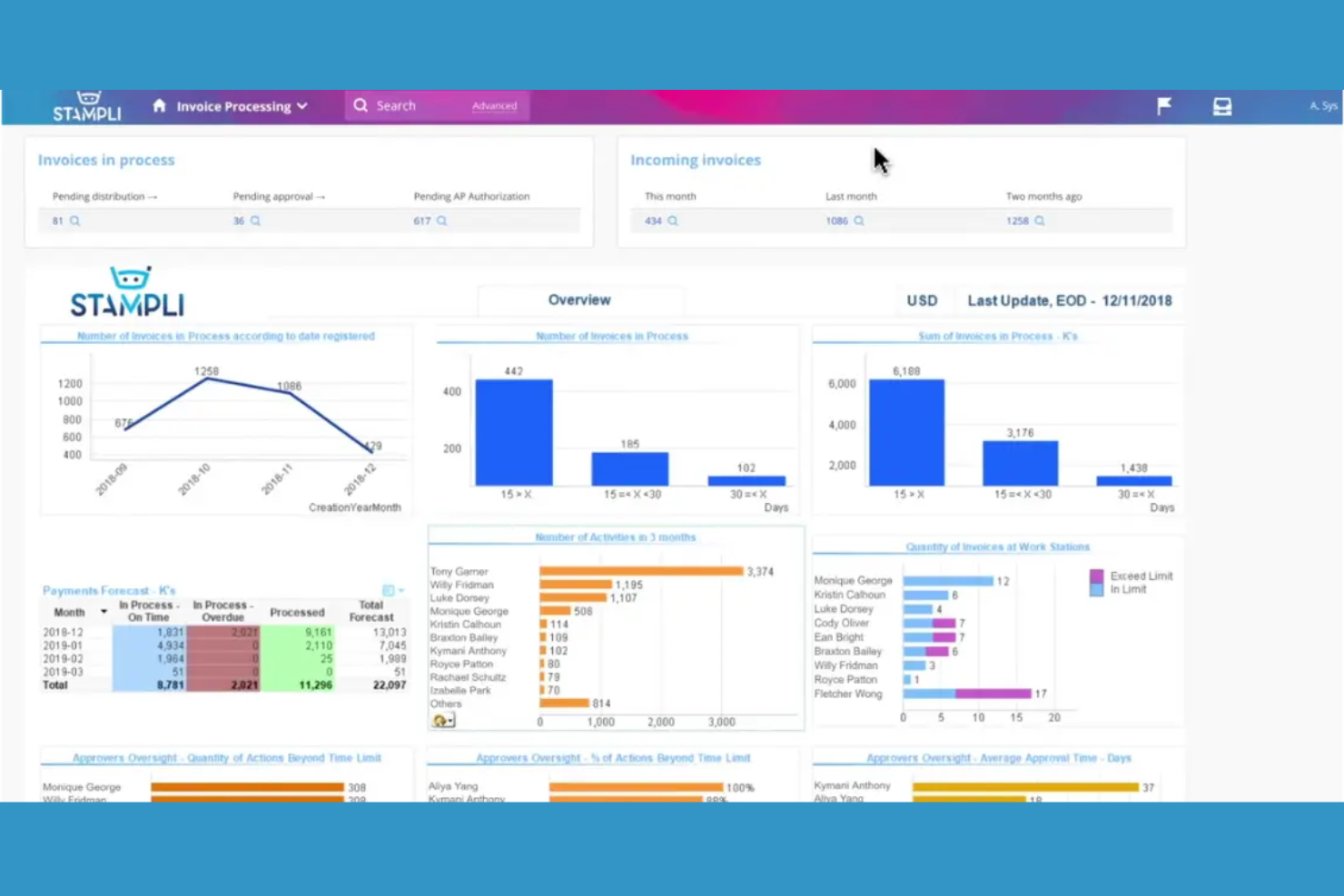
Stampli is an invoice automation platform that combines AP workflow management, team collaboration, AI-driven invoice coding, and document capture in one system.
Who Is Stampli Best For?
AP teams at mid-sized and enterprise companies that need collaborative invoice management and AI-powered coding.
Why I Picked Stampli
I picked Stampli as one of the best because I rely on its collaborative invoice management features to keep AP, procurement, and department heads in sync on every invoice. I like how the AI-powered coding automatically suggests GL codes and flags anomalies, which saves my team time on manual review. My team also uses the built-in communication threads to resolve invoice questions directly within the platform.
Stampli Key Features
- Vendor portal: Lets vendors submit invoices and check payment status online.
- Duplicate invoice detection: Flags potential duplicate invoices before processing.
- Audit trail: Tracks every action taken on invoices for compliance.
- Mobile app: Allows invoice review and approval from any device.
Stampli Integrations
Stampli offers native integrations with Oracle NetSuite, Sage Intacct, QuickBooks Online, Microsoft Dynamics 365, SAP, Acumatica, and more. An API is available for custom integrations.
Pros and Cons
Pros:
- Duplicate invoice detection with audit trails
- Direct integration with major ERP platforms
- Flexible approval routing by department
Cons:
- No support for cross-border invoice payments
- Vendor portal lacks advanced self-service options
Tipalti
Best for global payables automation
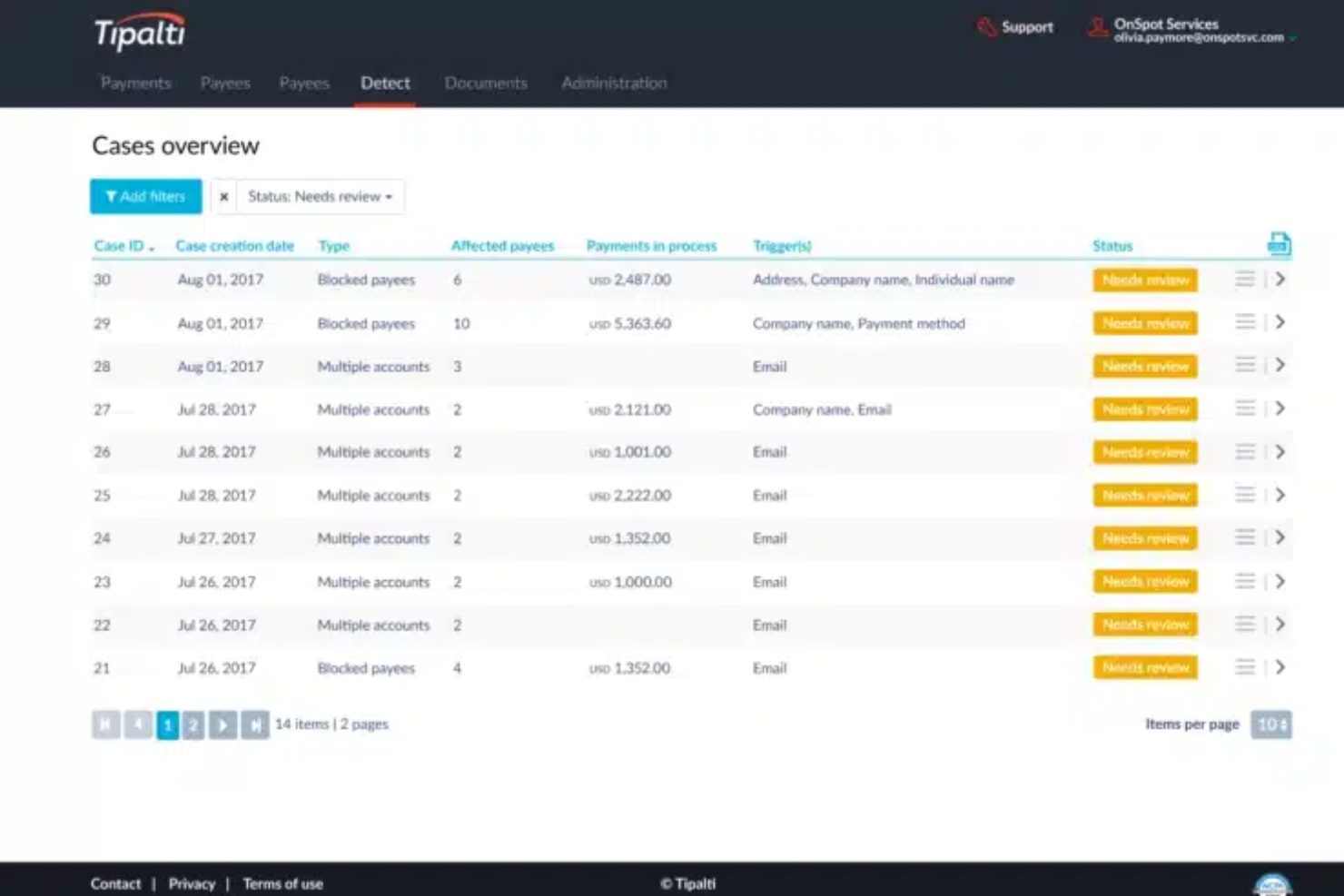
Tipalti is an invoice automation software platform that combines global invoice processing, supplier management, tax compliance, and payment reconciliation in one system.
Who Is Tipalti Best For?
Finance teams at multinational companies that need automated invoice processing and built-in tax compliance.
Why I Picked Tipalti
I picked Tipalti as one of the best because I rely on its built-in tax compliance to handle global supplier payments without manual intervention. I use the platform’s automated invoice capture and validation to process high volumes of invoices across multiple entities. The system’s end-to-end audit trail lets my team track every approval and payment for compliance reporting.
Tipalti Key Features
- PO matching: Matches invoices to purchase orders and receipts automatically.
- Supplier portal: Lets vendors submit invoices and track payment status.
- Multi-currency support: Processes invoices and payments in over 120 currencies.
- Automated approval workflows: Routes invoices for approval based on custom rules.
Tipalti Integrations
Tipalti offers native integrations with Oracle NetSuite, QuickBooks Online, Xero, Sage Intacct, Oracle, Microsoft Dynamics 365, SAP, Workday, Slack, and more. An API is available for custom integrations.
Pros and Cons
Pros:
- Mobile app for invoice capture and approvals
- AI-driven data extraction from multiple sources
- Real-time fraud detection on invoice processing
Cons:
- Limited flexibility for custom approval workflows
- ACH and wire transfer fees can add up
Yooz
Best for real-time invoice automation
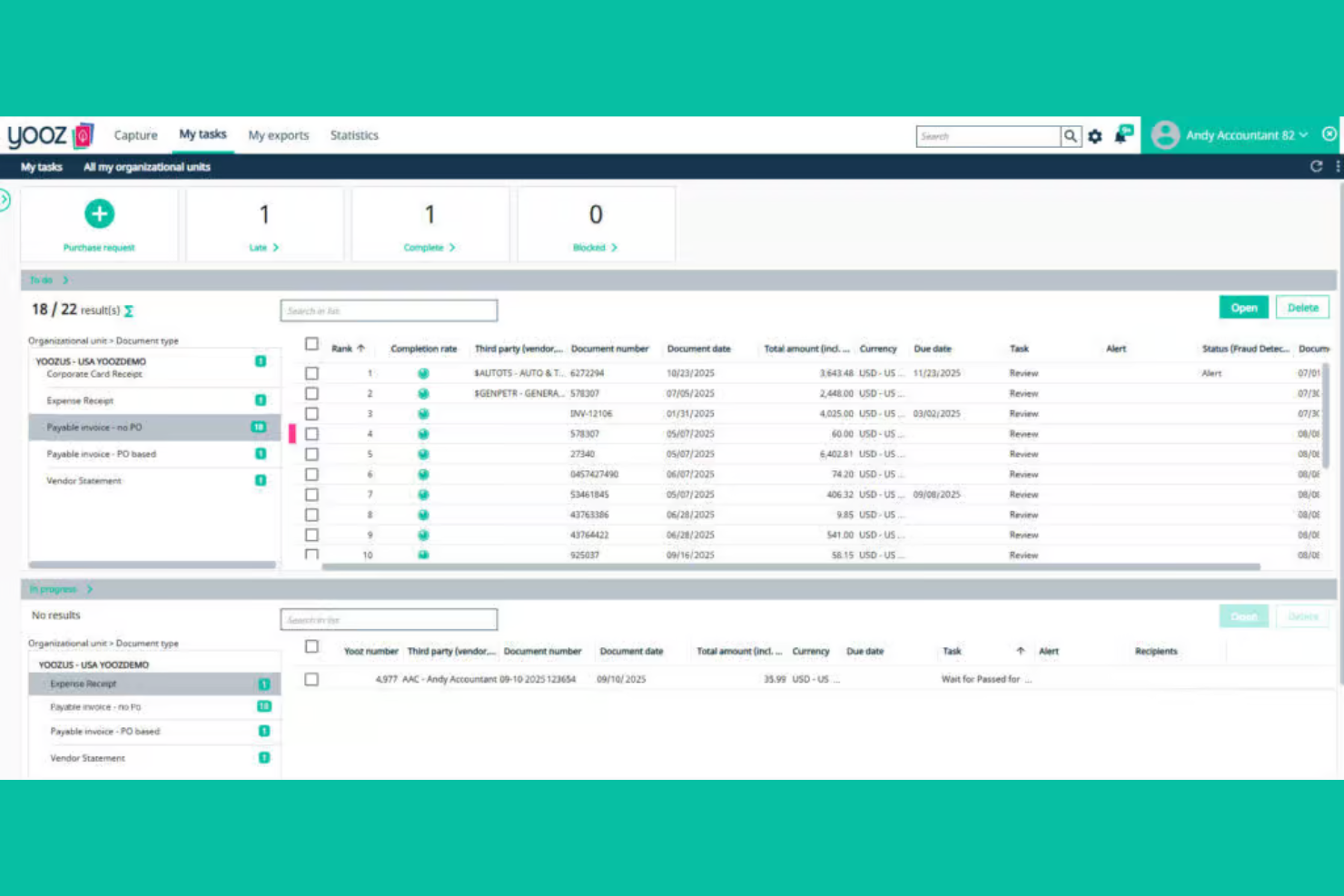
Yooz is an invoice automation software platform that combines AI-driven data capture, real-time invoice processing, fraud detection, and customizable approval workflows for accounts payable teams.
Who Is Yooz Best For?
Accounts payable teams in mid-sized to large organizations that need real-time invoice processing and advanced fraud detection.
Why I Picked Yooz
I picked Yooz as one of the best because I like how its real-time invoice automation flags suspicious transactions instantly, which helps my team catch fraud before it hits our books. I use the AI-driven data extraction to process invoices from email, scan, or mobile upload without manual entry. The customizable approval workflows let me set up multi-level reviews that fit our internal controls.
Yooz Key Features
- Mobile invoice capture: Snap and upload invoices directly from your phone.
- Duplicate invoice detection: Automatically flags potential duplicate submissions for review.
- Purchase order matching: Matches invoices to purchase orders and receipts for validation.
- Audit trail: Maintains a detailed log of all invoice actions and approvals.
Yooz Integrations
Yooz offers 250+ native integrations, including Sage Intacct, QuickBooks, Microsoft Dynamics 365, SAP, Oracle NetSuite, Xero, Blackbaud, Sage 50, and more. An API is available for custom integrations.
Pros and Cons
Pros:
- Strong multi-entity and multi-currency support
- Real-time duplicate invoice detection
- Fast invoice capture with OCR and mobile app
Cons:
- Vendor portal lacks self-service features
- Advanced analytics require higher-tier plans

Brex
Best for spend and invoice management
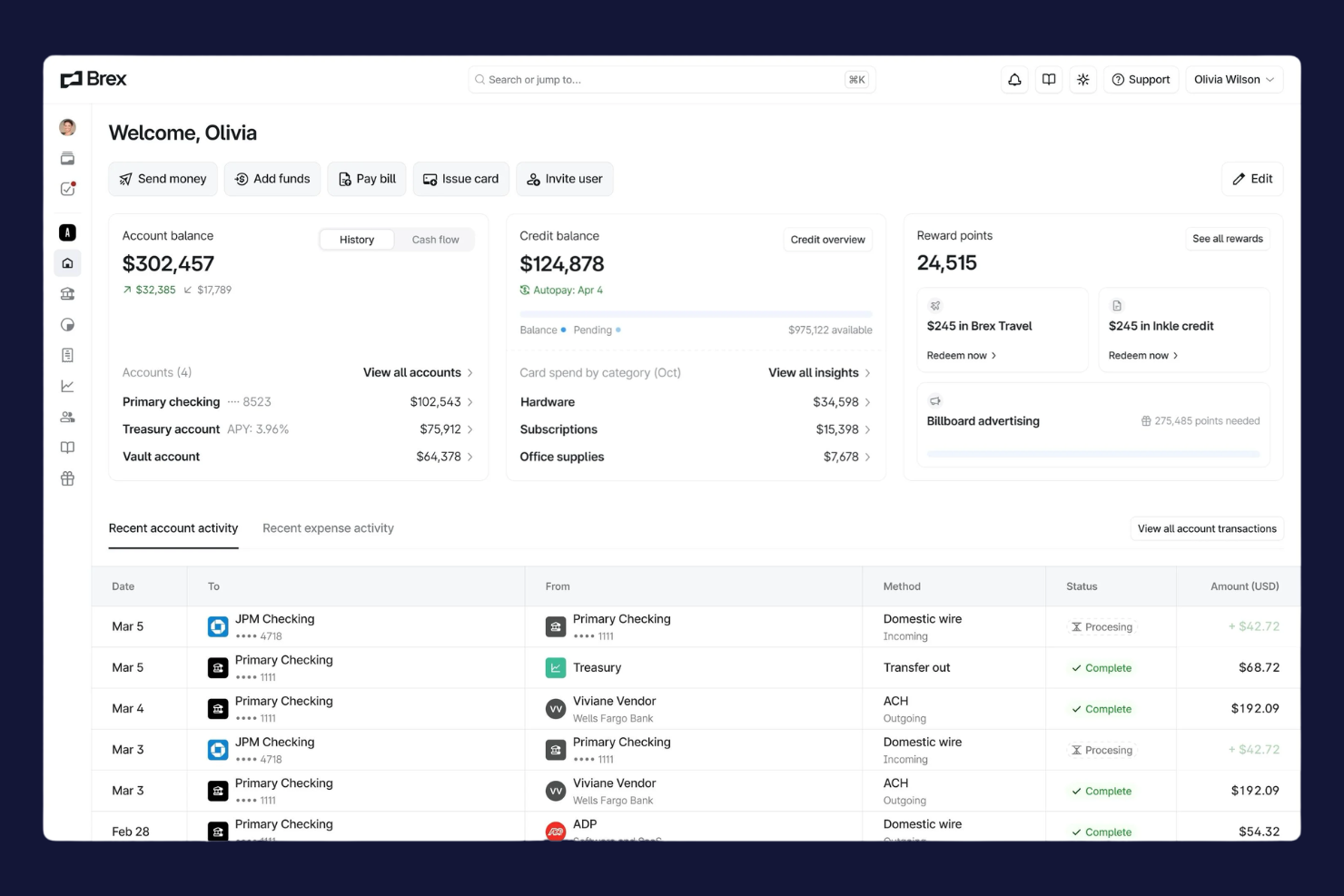
Brex is a spend management platform for finance teams that combines corporate cards, invoice automation, bill pay, and real-time expense tracking in one system.
Who Is Brex Best For?
Finance teams at fast-growing startups and global companies that need unified spend, card, and invoice management.
Why I Picked Brex
I picked Brex as one of the best because I use its real-time spend controls and global payments to manage invoices and expenses across multiple entities. I like that I can issue virtual cards for vendors and automate invoice approvals in one dashboard. My team is able to sync transactions instantly with our accounting system, which keeps our books up to date.
Brex Key Features
- Automated invoice capture: Extracts invoice data from uploads and emails for processing.
- Multi-entity management: Lets you manage invoices and payments across subsidiaries in one platform.
- Custom approval workflows: Allows you to set up multi-level invoice approval chains.
- Audit-ready reporting: Generates detailed reports for compliance and audit requirements.
Brex Integrations
Brex offers native integrations with QuickBooks Online, NetSuite, Xero, Sage Intacct, Rippling, Gusto, Slack, and Plaid, and connects with Zapier. An API is available for custom integrations.
Pros and Cons
Pros:
- Fast ACH and wire payment processing
- Built-in spend controls for each department
- Multi-entity support for global teams
Cons:
- No advanced purchase order matching
- Limited support for non-US bank accounts
Best for mid-market invoice automation
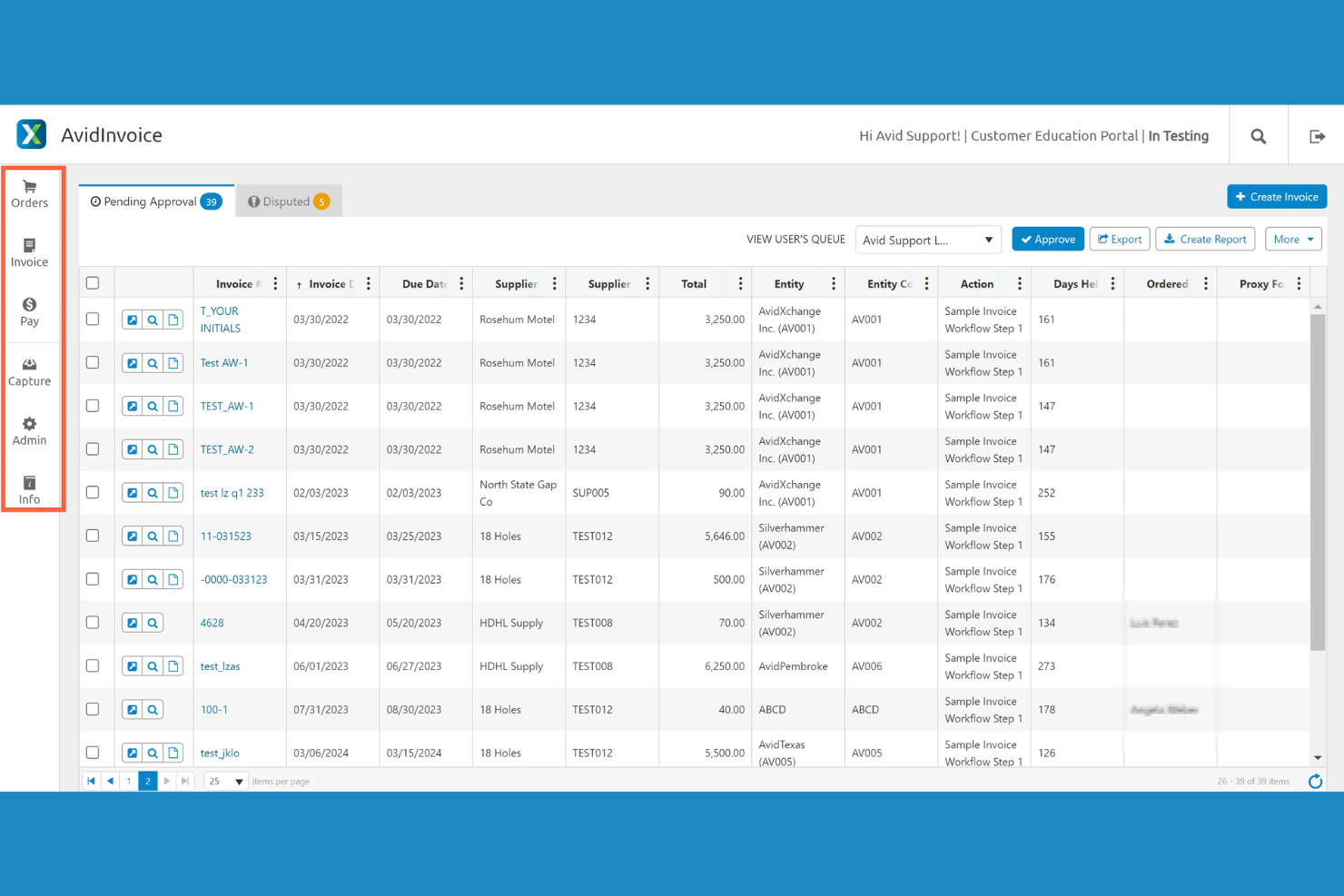
AvidXchange is an invoice automation software platform that digitizes invoice capture, automates approval workflows, and connects with accounting systems for mid-market businesses.
Who Is AvidXchange Best For?
Accounts payable teams at mid-market companies in real estate, construction, or community management.
Why I Picked AvidXchange
I picked AvidXchange as one of the best because I rely on its invoice automation software to handle high invoice volumes for mid-market businesses. I use its configurable approval workflows to match our internal controls, and the platform’s deep integrations with industry-specific accounting systems let my team keep everything in sync without manual entry.
AvidXchange Key Features
- Invoice capture automation: Digitizes and extracts data from invoices using OCR technology.
- Supplier portal: Lets vendors submit invoices and check payment status online.
- Audit trail tracking: Records every action taken on each invoice for compliance.
- Customizable notifications: Send alerts for pending approvals and status changes.
AvidXchange Integrations
AvidXchange offers native integrations with Oracle NetSuite, QuickBooks, Sage Intacct, Microsoft Dynamics 365, MRI Software, Yardi, RealPage, Oracle, SAP, TimberScan, and Viewpoint, and provides an API for custom integrations.
Pros and Cons
Pros:
- Flexible payment options including virtual cards
- Centralized dashboard for invoice status tracking
- Automated invoice approval routing for large teams
Cons:
- Some users report duplicate invoice notifications
- Invoice search functionality can be slow

Rossum
Best for AI invoice data capture
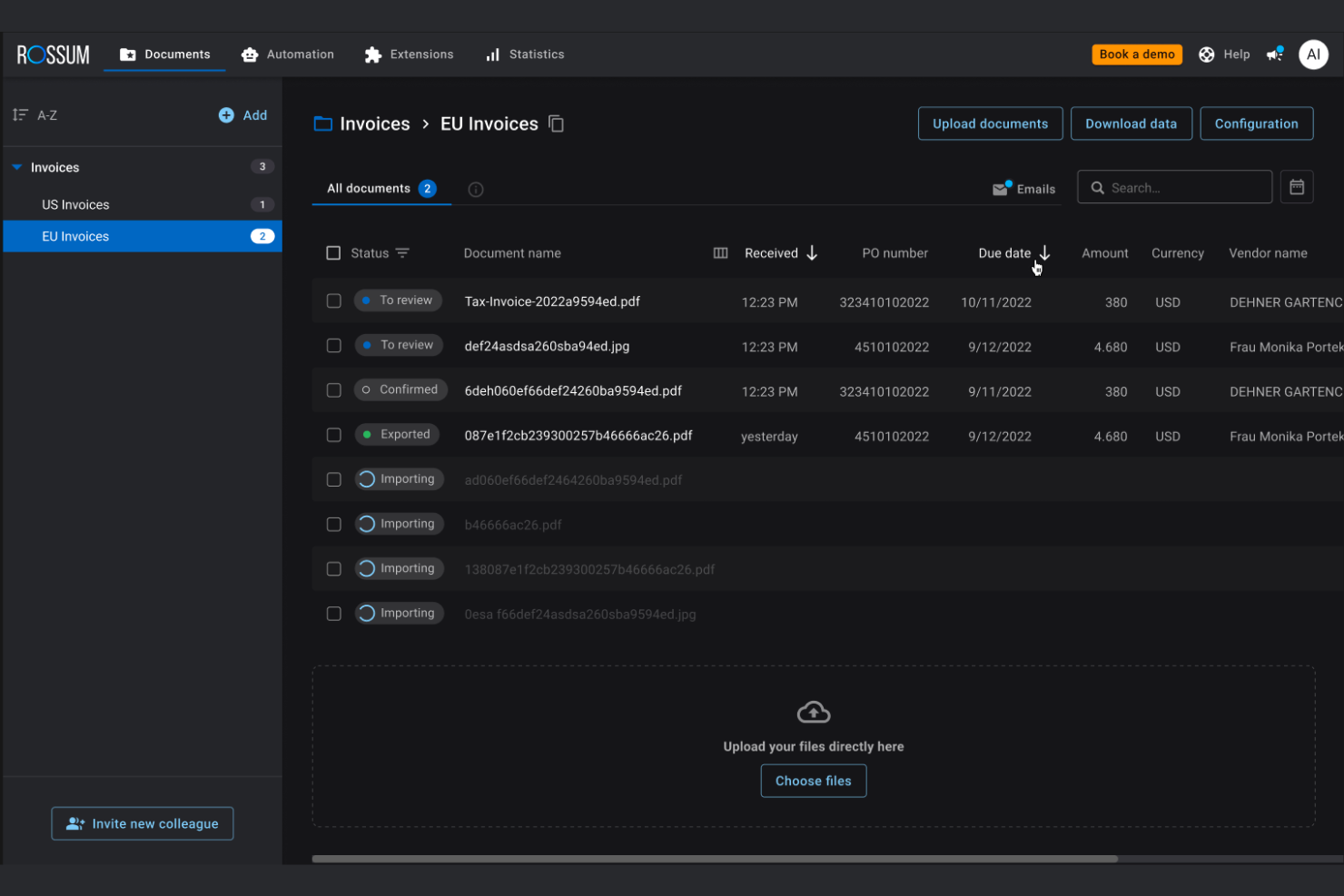
Rossum is an invoice automation platform that uses AI to extract, validate, and organize invoice data from multiple formats and integrates with your existing accounts payable systems.
Who Is Rossum Best For?
Large accounts payable teams in finance, logistics, or retail that need AI-powered data capture for high invoice volumes.
Why I Picked Rossum
I picked Rossum as one of the best because its AI-powered data capture stands out for handling complex, multi-format invoices without heavy template setup. I like how it learns from corrections, so my team can process new invoice layouts quickly. The validation engine flags anomalies and missing fields, which helps us catch issues before approval.
Rossum Key Features
- Custom workflow builder: Design and automate multi-step invoice approval processes tailored to your team’s needs.
- Role-based access controls: Set granular permissions for users across different departments and locations.
- Audit trail: Track every action taken on an invoice with a detailed, time-stamped log.
- API integrations: Connect Rossum with ERP, accounting, and procurement systems for smooth data flow.
Rossum Integrations
Rossum offers native integrations with SAP, Oracle NetSuite, Microsoft Dynamics 365, Coupa, Blue Prism, UiPath, and connects with Zapier. An API is available for custom integrations.
Pros and Cons
Pros:
- Detailed audit trail for compliance tracking
- Integrates with major ERP and RPA tools
- AI learns from user corrections over time
Cons:
- Processing speed slows with very large batches
- Customization requires technical expertise
Medius
Best for cloud-based AP automation
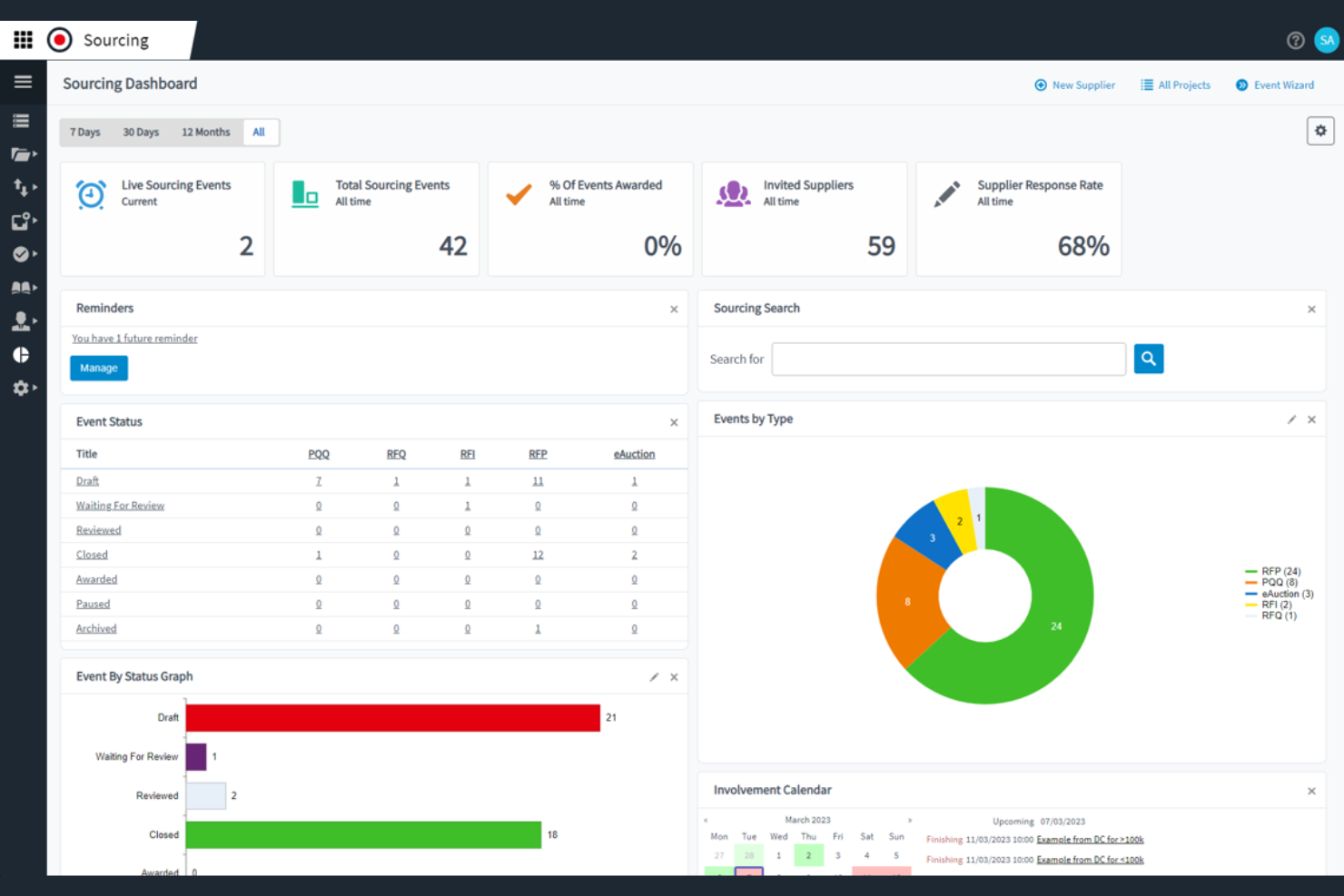
Medius is an invoice automation platform for finance teams that combines AP workflow automation, spend analytics, fraud detection, and supplier management in one system.
Who Is Medius Best For?
Medius is a strong fit for enterprise finance teams that need advanced AP automation and spend analytics.
Why I Picked Medius
I picked Medius as one of the best because I rely on its advanced spend analytics and fraud detection to spot unusual invoice activity before it becomes a problem. I like how the platform automates AP workflows and provides real-time visibility into spend patterns. My team uses the audit trail and exception handling features to keep our compliance tight and our processes transparent.
Medius Key Features
- Invoice capture automation: Uses AI to extract and enter invoice data automatically.
- PO matching engine: Matches invoices to purchase orders and receipts for validation.
- Supplier self-service portal: Lets suppliers submit invoices and track payment status online.
- Multi-currency support: Handles invoices and payments in multiple currencies for global operations.
Medius Integrations
Medius offers native integrations with SAP, Microsoft Dynamics 365, Oracle, Infor M3, Sage, and more, and provides an API for custom integrations.
Pros and Cons
Pros:
- Vendor portal for real-time invoice status
- Centralized communication threads for invoice questions
- AI-driven invoice coding suggestions save time
Cons:
- Limited language support for global teams
- No built-in payment processing feature

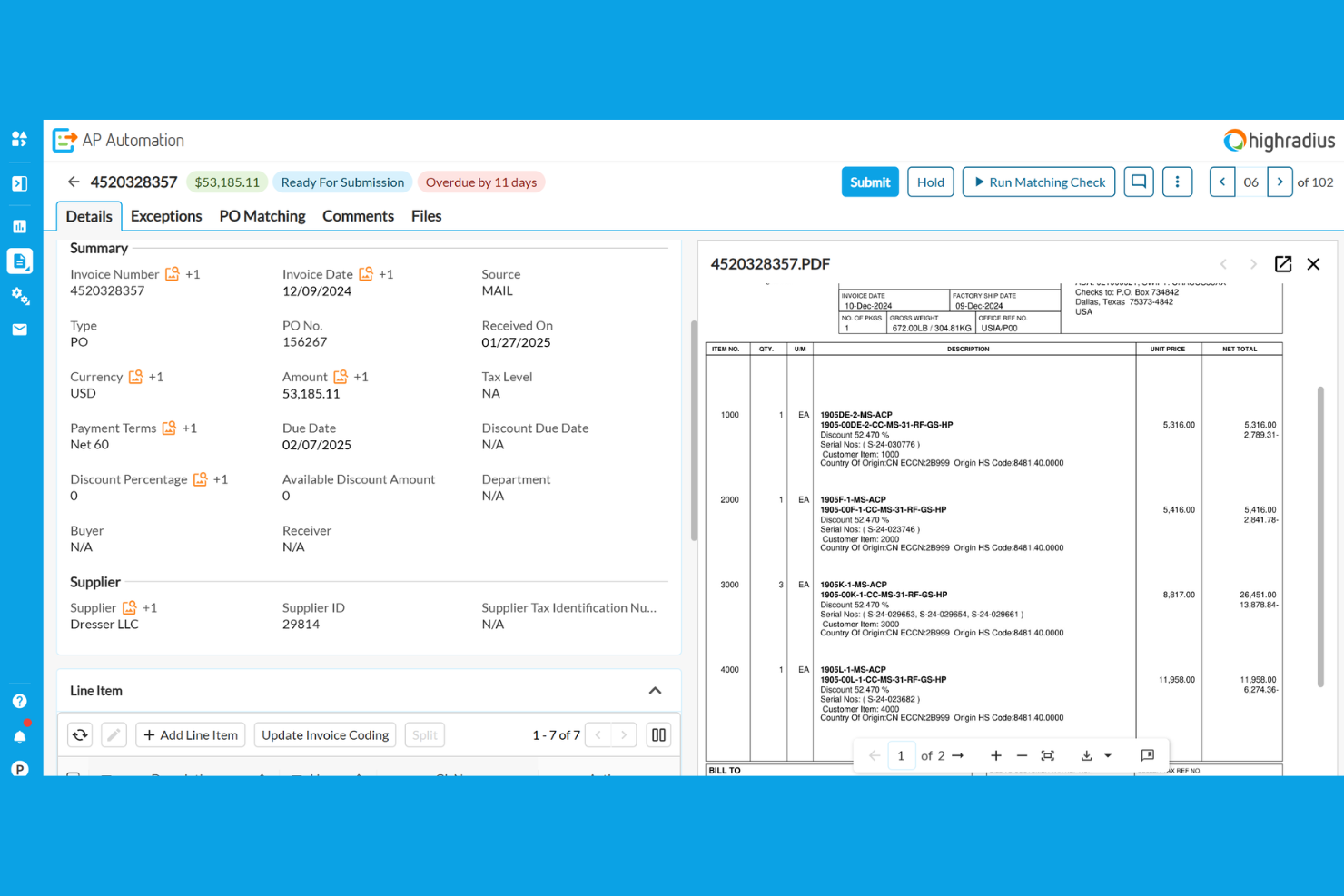
HighRadius is an invoice automation platform for finance teams that combines AI-powered invoice processing, cash application, credit management, and collections in one system.
Who Is HighRadius Best For?
HighRadius is a strong fit for large enterprise finance teams in manufacturing, distribution, and retail sectors.
Why I Picked HighRadius
I picked HighRadius as one of the best because I rely on its AI-powered invoice automation and cash application to handle high transaction volumes with minimal manual intervention. I like how the platform uses machine learning to match payments to invoices and flag exceptions for review. My team uses its real-time dashboards to monitor receivables and automate dispute management, which keeps our process moving fast.
HighRadius Key Features
- Automated invoice delivery: Sends invoices to customers through email or customer portals automatically.
- Customer self-service portal: Lets customers view, download, and pay invoices online.
- Configurable approval workflows: Allows you to set up multi-level invoice approval processes.
- ERP integration connectors: Connects directly with SAP, Oracle, Microsoft Dynamics, and other major ERP systems.
HighRadius Integrations
HighRadius offers native integrations with SAP, Oracle, Microsoft Dynamics 365, NetSuite, Sage, Infor, Workday, and Salesforce, and provides an API for custom integrations.
Pros and Cons
Pros:
- Customizable dashboards for invoice analytics
- Automated matching with purchase orders
- AI-powered invoice data extraction accuracy
Cons:
- Mobile app functionality is not fully developed
- Occasional sync delays with ERP systems
Quadient
Best for AP automation with analytics

Quadient is an invoice automation software platform that combines document management, digital workflow routing, and automated invoice capture for accounts payable teams.
Who Is Quadient Best For?
Accounts payable teams in mid-sized and large organizations that need advanced document management and workflow controls.
Why I Picked Quadient
I picked Quadient as one of the best because I rely on its advanced document management to organize, store, and retrieve invoices with granular access controls. I use its workflow designer to build multi-step approval processes that match our internal policies. The platform’s audit-ready tracking lets my team monitor every document change and approval in real time.
Quadient Key Features
- Automated invoice capture: Uses OCR to extract data from scanned and emailed invoices.
- Supplier portal: Lets vendors submit invoices and track payment status online.
- Duplicate invoice detection: Flags potential duplicate invoices before processing.
- Multi-currency support: Handles invoices and payments in multiple currencies.
Quadient Integrations
Quadient offers native integrations with Oracle NetSuite, Microsoft Dynamics 365, Sage, QuickBooks, Xero, and provides an API for custom integrations.
Pros and Cons
Pros:
- Detailed audit trails for compliance tracking
- Cloud-based platform with remote access
- Automated three-way matching for invoices
Cons:
- Supplier onboarding tools are basic
- Limited language support for global teams


BILL is an invoice automation platform for finance teams that handles accounts payable, accounts receivable, digital payments, and document management in one system.
Who Is BILL Best For?
Accounts payable and receivable teams at mid-sized businesses that need automated workflows and deep accounting integrations.
Why I Picked BILL
I picked BILL as one of the best because I rely on its automated AP and AR workflows to handle high invoice volumes without manual entry. I like that I can set up custom approval chains and sync transactions directly with QuickBooks or NetSuite. My team uses the document management feature to keep all invoice records organized and audit-ready.
BILL Key Features
- Vendor management: Lets you store and manage vendor details and payment preferences.
- Recurring payments: Schedule and automate recurring invoice payments to vendors.
- Mobile app: Approve, pay, and track invoices from your phone.
- Audit trail: Tracks every action taken on invoices for compliance and transparency.
BILL Integrations
BILL offers native integrations with QuickBooks, Xero, Oracle NetSuite, Sage Intacct, Microsoft Dynamics 365, Acumatica, and more. An API is available for custom integrations.
Pros and Cons
Pros:
- Vendor network for faster electronic payments
- ACH, check, and international payment options
- Approval workflows with role-based permissions
Cons:
- Batch payment processing can experience delays
- International payments have limited currency support
Annen programvare for automatisering av fakturering
Her er noen flere alternativer for programvare for automatisering av fakturering som ikke kom med på kortlisten min, men som likevel kan være verdt å se nærmere på:
- Rillion
For user-friendly invoice automation
- Concur Invoice
For compliant invoice processing
- FreshBooks
For small business invoicing
- Sage Intacct
For cloud financial management
- Coupa
For spend and AP management
- Xero
For cloud accounting and invoicing
- Docsumo
For AI invoice data extraction
- Order.co
For automated purchasing and invoicing
- Lido
For spreadsheet-based invoice automation


How I Evaluate Invoice Automation Software
I evaluate these tools in two layers: the core capabilities—like milestone-based invoicing and accounting sync—every tool must have, and the differentiators that set the best options apart.
Core Functionality (Table Stakes For This List)
When I'm selecting tools for my list, I rank each one on a scale from 0 (does not offer the functionality) to 5 (excels in this area) for each core functionality listed below. Then, I calculate the tool's total score into a percentage. Each tool needs to achieve a minimum total score of 65% to be considered for inclusion.
- Project-Based Invoice Generation: I check whether a tool can produce invoices tied to milestones, deliverables, or retainer schedules rather than forcing you to build each invoice from scratch.
- Time & Expense Billing: Approved timesheets and logged expenses should flow into invoices with the correct rates applied, so I look at how each tool handles role-based or client-specific billing rules.
- Recurring & Scheduled Invoicing: For retainer clients or phased engagements, I evaluate whether the tool supports automated invoice runs on custom schedules or event-based triggers.
- Accounting & ERP Integration: I look for native, bidirectional sync with platforms like QuickBooks, Xero, or NetSuite so invoice and payment data stays consistent across systems.
- Payment Tracking & AR Management: Each tool should surface real-time invoice status, aging balances, and outstanding receivables at the project level rather than only at the account level.
- Approval Routing & Tax Compliance: I evaluate how the tool handles multi-step invoice approvals across project teams and whether it supports multi-currency and regional tax configurations.
Once I have a list of tools that meet the criteria, I consider what sets each platform apart.
Differentiating Factors (What Sets Vendors Apart)
Here's how I compare and contrast different vendors:
Standout Features
Budget burn alerts are a big differentiator. I look for tools that flag when billable spend trends past a set threshold so billing conversations happen before margin erosion sets in. Client-facing portals also matter, especially for agencies managing multiple accounts where clients expect to review and approve invoices on their own. For longer engagements, I evaluate whether a tool supports revenue recognition methods like percentage-of-completion, which keeps financials accurate across multi-phase projects.
Beyond Features
I evaluate how well each tool connects to the project management platforms teams already use, like Jira, Asana, or monday.com. A tool with deep native integrations cuts down on manual data handoffs between delivery and finance. Pricing transparency is another focus area. I check whether costs scale predictably as headcount or project volume grows, since hidden fees for payment processing or premium connectors can erode the ROI quickly. Reporting also matters. Project profitability dashboards that tie invoiced revenue back to logged effort help PMs prove margin health to leadership.
Slik velger du programvare for automatisering av fakturering
Det er lett å gå seg vill i lange funksjonslister og komplekse prismodeller. For å hjelpe deg med å holde fokus når du går gjennom den unike prosessen med å velge programvare, får du her en sjekkliste over faktorer du bør ha i bakhodet:
| Faktor | Hva bør du vurdere? |
|---|---|
| Skalerbarhet | Vil programvaren håndtere fakturavolumet ditt etter hvert som virksomheten vokser? Spør om brukerbegrensninger og transaksjonsgrenser. |
| Integrasjoner | Kobler den seg direkte til regnskaps-, ERP- og innkjøpssystemene dine? Kontroller at den er kompatibel med teknologistakken din. |
| Tilpasningsmuligheter | Kan du tilpasse arbeidsflyter, godkjenningsregler og varsler slik at de passer til prosessene dine? Unngå rigide systemer som tvinger deg til å finne omveier. |
| Brukervennlighet | Vil teamet ditt ta løsningen i bruk raskt? Se etter intuitiv navigasjon og et minimalt behov for opplæring. Be om en demonstrasjon for å teste grensesnittet. |
| Implementering og oppstart | Hvor lang tid vil oppsettet ta, og hvilken støtte tilbys? Spør om hjelp til migrering, opplæringsressurser og vanlig tidsramme frem til produksjonsstart. |
| Kostnad | Er prisnivåene tydelige og forutsigbare? Vær oppmerksom på ekstra gebyrer for integrasjoner, brukere eller avanserte funksjoner. Sammenlign de totale eierkostnadene. |
| Sikkerhetstiltak | Tilbyr leverandøren kryptering, revisjonslogger og tilgangskontroller? Sørg for at løsningen oppfyller virksomhetens standarder for databeskyttelse. |
| Tilgjengelig kundestøtte | Hvilke supportkanaler tilbys, og når er de tilgjengelige? Vurder om du trenger hjelp døgnet rundt eller dedikert kundeoppfølging. |
Hva er programvare for automatisering av fakturering?
Programvare for fakturaautomatisering er en løsning for automatisering av leverandørreskontro og fakturaer som bidrar til å effektivisere mottak, godkjenning og behandling av fakturaer. Den erstatter manuelle prosesser og oppgaver med en automatiseringsløsning som reduserer behandlingstiden og eliminerer tidkrevende arbeidsflyter. Disse verktøyene bruker forretningsregler til å håndtere hele fakturaens livssyklus, forbedre prosessen for leverandørreskontro og legge til rette for bedre leverandørforhold. Mange plattformer inneholder også funksjoner for prognoser, håndtering av betalinger som kredittkortbetalinger og identifisering av muligheter som rabatter ved tidlig betaling. Ved å automatisere fakturaarbeidsflyter kan økonomiteam optimalisere effektiviteten, redusere feil og få bedre oversikt over driften av leverandørreskontroen.
Funksjoner
Her er de viktigste funksjonene all god programvare for fakturaautomatisering bør ha:
- Mottak av fakturaer: Digitaliserer innkommende fakturaer fra e-post, PDF eller skannede dokumenter, slik at de kan søkes i og klargjøres for behandling.
- Godkjenningsarbeidsflyter: Automatiserer videresending av fakturaer til riktige personer for gjennomgang og godkjenning, noe som reduserer flaskehalser og manuell oppfølging.
- Sammenligning med innkjøpsordrer: Sammenligner fakturaer med innkjøpsordrer og varemottak for å sikre nøyaktighet og forhindre overbetaling eller svindel.
- Duplikatkontroll: Merker mulige duplikatfakturaer for å bidra til å forhindre dobbeltbetalinger og opprettholde ryddige registre.
- Revisjonsspor: Sporer alle handlinger som utføres på en faktura, og gir en transparent oversikt for etterlevelse og interne gjennomganger.
- Leverandørportal: Lar leverandører sende inn fakturaer, kontrollere betalingsstatus og kommunisere direkte med teamet ditt for leverandørreskontro.
- ERP- og regnskapsintegrasjoner: Kobler seg direkte til de eksisterende økonomisystemene dine for å synkronisere data og redusere manuell registrering.
- Tilpassbare varsler: Sender varsler og påminnelser til godkjennere eller økonomimedarbeidere når det er nødvendig å gjøre noe, eller når frister nærmer seg.
- Rapportering og analyse: Gir oversikter og rapporter som kan eksporteres, slik at du kan følge med på fakturastatus, godkjenningstider og utviklingen i utgifter.
- Brukertillatelser: Lar deg kontrollere hvem som kan se, redigere eller godkjenne fakturaer, og støtter interne kontroller og sikkerhetspolicyer.
Vanlige AI-funksjoner i programvare for fakturaautomatisering
I tillegg til standardfunksjonene i programvare for fakturaautomatisering som er nevnt ovenfor, tar mange av disse løsningene i bruk AI med funksjoner som:
- Intelligent datauthenting: Bruker AI til å gjenkjenne og hente ut viktige fakturadetaljer – som leverandørnavn, fakturanummer og beløp – fra en rekke ulike formater, noe som reduserer manuell registrering og feil.
- Automatisert hovedbokskoding: Bruker AI til å foreslå eller tilordne hovedbokskoder basert på fakturainnhold og historiske kodingsmønstre, noe som gjør klassifiseringen raskere og reduserer feil.
- Avviksdeteksjon: Bruker AI til å merke uvanlige fakturabeløp, duplikatinnsendinger eller mistenkelige leverandører, slik at team kan oppdage svindel eller problemer med etterlevelse på et tidlig tidspunkt.
- Prediktiv videresending til godkjenning: Bruker AI til å lære av tidligere godkjenningsatferd og automatisk videresende fakturaer til de best egnede godkjennerne, slik at forsinkelser reduseres.
- Smart avvikshåndtering: Bruker AI til å identifisere og kategorisere avvik – som manglende innkjøpsordrer eller beløp som ikke stemmer overens – og anbefale neste trinn for å løse dem.
Fordeler
Implementering av programvare for fakturaautomatisering gir flere fordeler for teamet og virksomheten din. Her er noen av fordelene du kan se frem til:
- Raskere fakturagodkjenninger: Automatiserte arbeidsflyter og varsler bidrar til at fakturaer raskt går gjennom prosessen for gjennomgang og godkjenning (dedikerte verktøy for fakturagodkjenning kan gi mer målrettet støtte i dette trinnet).
- Mindre manuell dataregistrering: Digitalt mottak og AI-basert datauthenting eliminerer gjentatt inntasting og reduserer risikoen for menneskelige feil.
- Bedre etterlevelse og revisjonsberedskap: Innebygde revisjonsspor og tilgangskontroller gjør det enklere å oppfylle regulatoriske krav og forberede seg til revisjoner.
- Bedre oversikt over leverandørreskontroen: Sanntidsoversikter og rapportering gir økonomiteam et tydelig bilde av fakturastatus, utviklingen i utgifter og flaskehalser.
- Lavere risiko for duplikat- eller svindelbetalinger: Duplikatkontroll og avviksvarsler bidrar til å oppdage problemer før betalinger gjennomføres.
- Enklere samarbeid med leverandører: Leverandørportaler og automatiserte statusoppdateringer holder leverandørene informert og reduserer kommunikasjon frem og tilbake.
- Smidig integrasjon med økonomisystemer: Direkte tilkoblinger til ERP- og regnskapsplattformer sikrer konsistente data og reduserer arbeidet med avstemming.
Kostnader og priser
Valg av programvare for automatisering av fakturaer krever en forståelse av de ulike prismodellene og abonnementene som er tilgjengelige. Kostnadene varierer basert på funksjoner, teamstørrelse, tillegg og mer. Tabellen nedenfor oppsummerer vanlige abonnementer, gjennomsnittsprisene deres og typiske funksjoner som inngår i programvareløsninger for automatisering av fakturaer:
Sammenligningstabell for abonnementer for programvare for automatisering av fakturaer
| Abonnementstype | Gjennomsnittspris | Vanlige funksjoner |
|---|---|---|
| Gratisabonnement | $0 | Grunnleggende registrering av fakturaer, begrensede godkjenningsarbeidsflyter, begrensede integrasjoner og grunnleggende rapportering. |
| Personlig abonnement | $10-$30/bruker/måned | Ubegrenset antall fakturaer, standardiserte godkjenningsarbeidsflyter, brukerstøtte via e-post og eksport til regnskapsprogramvare. |
| Forretningsabonnement | $30-$80/bruker/måned | Avansert ruting av godkjenninger, matching mot innkjøpsordrer, revisjonsspor, ERP-integrasjoner og analyse. |
| Virksomhetsabonnement | $80-$200/bruker/måned | Tilpassede arbeidsflyter, støtte for flere enheter, avansert sikkerhet, dedikert brukerstøtte og verktøy for samsvar. |
Vanlige spørsmål
Her er noen svar på vanlige spørsmål om programvare for automatisering av fakturaer:
Kan programvare for automatisering av fakturaer integreres med det eksisterende regnskapssystemet mitt?
Ja, de fleste programmer for automatisering av fakturaer tilbyr integrasjoner med populære regnskaps- og ERP-systemer. Før du velger en løsning, bør du kontrollere at den er kompatibel med den nåværende teknologistakken din, og spørre om tilgjengelige koblinger eller API-er.
Hvor lang tid tar det å implementere programvare for automatisering av fakturaer?
Implementeringstiden varierer, men de fleste team kan komme i gang i løpet av noen uker. Faktorer som datamigrering, tilpasning av arbeidsflyter og brukeropplæring kan påvirke tidsplanen, så avklar forventningene med leverandøren tidlig.
Er programvare for automatisering av fakturaer sikker for sensitive økonomiske data?
Ja, anerkjente løsninger bruker kryptering, tilgangskontroller og revisjonslogger for å beskytte dataene dine. Gå alltid gjennom leverandørens sikkerhetssertifiseringer og standarder for samsvar for å sikre at de oppfyller organisasjonens krav.
Hvilke typer fakturaer kan behandles med automatiseringsprogramvare?
De fleste plattformer håndterer et bredt spekter av fakturaformater, inkludert PDF-filer, skannede bilder og elektroniske fakturaer. Noen løsninger støtter også internasjonale fakturaer og behandling i flere valutaer.
Trenger jeg teknisk kompetanse for å bruke programvare for automatisering av fakturaer?
Nei, de fleste moderne verktøy for automatisering av fakturaer er utviklet for brukere uten teknisk kompetanse. Se etter intuitive grensesnitt, ressurser for introduksjon og kundestøtte som kan hjelpe teamet ditt raskt i gang.