

10 beste programmer for prosjektstyring for advokater i 2026

Kortliste over prosjektstyringsprogramvare for advokater


Prosjektstyringsprogramvare for advokater gir advokatfirmaet ditt et sentralt sted for å organisere saker, følge opp frister, administrere dokumenter og samarbeide med klienter og kolleger. Hvis du leter etter den beste prosjektstyringsprogramvaren for advokater, håndterer du sannsynligvis komplekse saksmengder, krav til samsvar og behovet for å holde alle oppdatert. Det rette verktøyet kan hjelpe deg med å redusere manuelt arbeid, få bedre oversikt og sørge for at virksomheten fungerer smidig. I denne veiledningen finner du alternativer vurdert av eksperter, som passer til de unike kravene i juridisk arbeid, slik at du kan velge det beste alternativet for teamet og klientene dine.
Hvorfor du kan stole på våre programvareanbefalinger
Teamet vårt har testet og anmeldt programvare siden 2012. Vi er selv prosjektledere, så vi vet hvor vanskelig og hvor viktig det er å velge riktig programvare.
I denne guiden har vi vurdert verktøyene gjennom praktisk testing og uavhengig research og gitt dem poeng ut fra våre utvelgelseskriterier. Vi bygger også på innsikt fra ledende eksperter i bransjen og erfarne prosjektledere.
Anmeldelsene våre bygger på vår egen redaksjonelle vurdering. De er ikke et salgsargument.
Ekspertanmeldere:
Sammenligningstabell for prosjektstyringsprogramvare for advokater
Tabellen nedenfor sammenligner prisdetaljer for mine beste utvalgte prosjektstyringsprogrammer for advokater.
| Tool | Best For | Trial Info | Price | ||
|---|---|---|---|---|---|
| 1 | Best for automatic legal time tracking | Not available | Pricing upon request | Website | |
| 2 | Best for jurisdiction-specific deadline chains | 7-day free trial | From $49/user/month | Website | |
| 3 | Best for case management and client communication | 10-day free trial | From $50/user/month (billed annually) | Website | |
| 4 | Best for Kanban-style matter pipelines and intake | 14-day free trial | From $39/user/month (billed annually) | Website | |
| 5 | Best for document-driven case management | Free trial + free demo available | Pricing upon request | Website | |
| 6 | Best for legal CRM and matter management | Free demo available | Pricing upon request | Website | |
| 7 | Best for integrated billing and trust accounting | 10-day free trial | From $49/user/month (billed annually) | Website | |
| 8 | Best for legal billing tied to matter workflows | 10-day free trial | From $59/user/month (billed annually) | Website | |
| 9 | Best for legal workflow and matter management | Free demo available | Pricing upon request | Website | |
| 10 | Best for AI-native matter and billing management | Free demo available | From $150/user/month | Website |
Anmeldelser av prosjektstyringsprogramvare for advokater
Nedenfor finner du mine detaljerte sammendrag av prosjektstyringsprogrammene for advokater som kom med på kortlisten. Anmeldelsene mine gir en detaljert oversikt over funksjonene, de beste bruksområdene og integrasjonene til hver plattform, slik at du kan finne den beste for deg.

Best for automatic legal time tracking
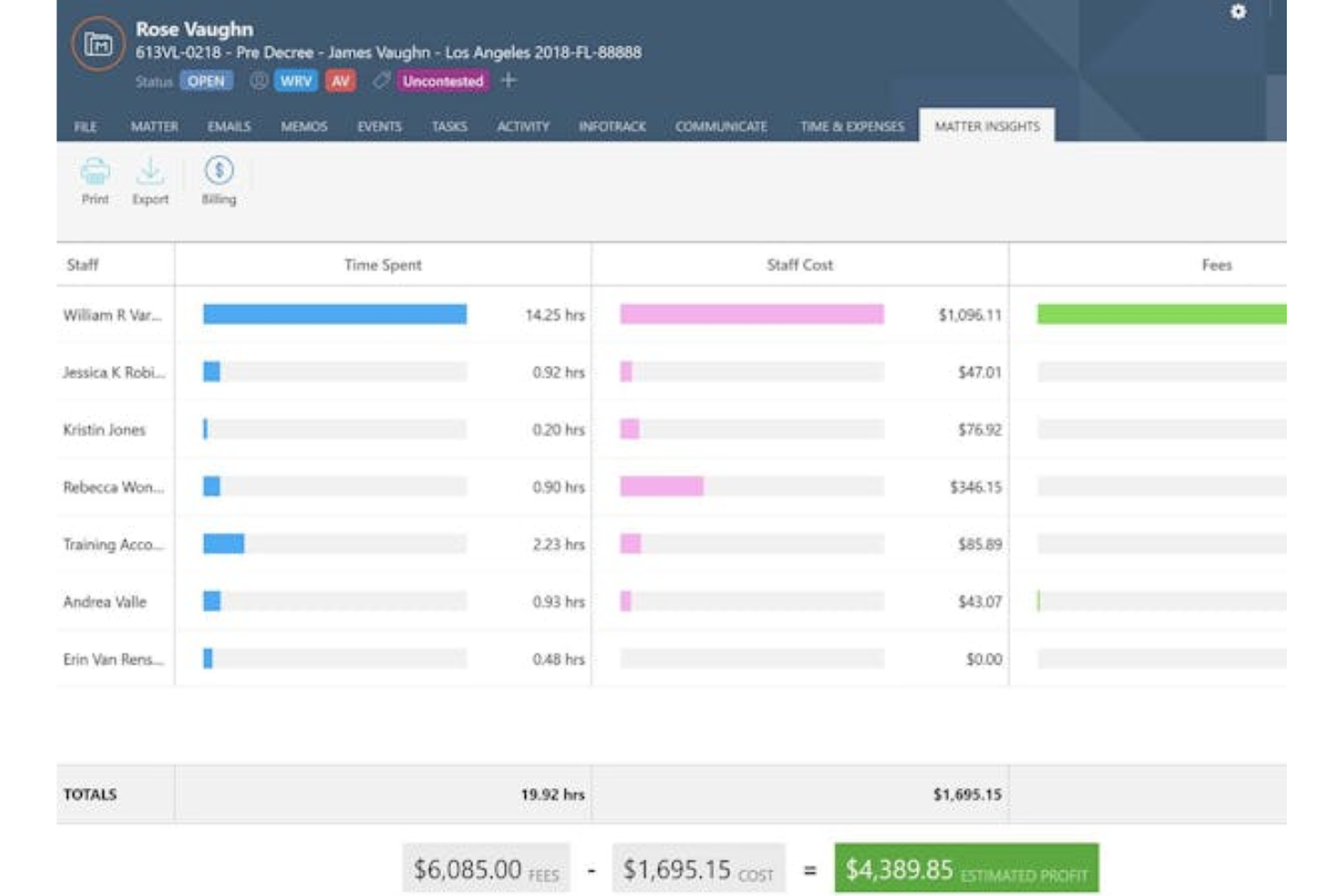
Smokeball is a legal practice management platform built specifically for law firms, combining matter management, document automation, billing, and automatic time tracking.
Who Is Smokeball Best For?
Smokeball is a strong fit for small to mid-sized law firms that need to capture every billable minute without relying on manual time entry.
Why I Picked Smokeball
I rate Smokeball highly because it automatically tracks time in the background as lawyers work, eliminating the need to start and stop timers manually. Its Activity Intelligence feature records every document drafted, email sent, and call logged without any input from the user. I've found this especially valuable for firms that bill hourly, since captured time that would otherwise slip through translates directly into recovered revenue.
Smokeball Key Features
- Document automation: Generates legal documents from pre-built templates, pulling in matter details automatically to reduce manual drafting time.
- Matter management dashboard: Centralizes all case information, tasks, deadlines, and contacts in a single matter-specific workspace.
- Client portal: Gives clients a secure space to view updates, share documents, and communicate with their legal team.
- Built-in billing and invoicing: Converts tracked time entries directly into invoices, letting firms review, edit, and send bills without switching platforms.
Smokeball Integrations
Smokeball offers native integrations with Microsoft Word and Outlook, including time tracking across both applications. These integrations let legal teams draft, email, and manage matter activity without switching screens.
Pros and Cons
Pros:
- Legal templates reduce repetitive document drafting
- Matter files, deadlines, and tasks stay centralized
- Automatic capture recovers otherwise missed billable time
Cons:
- Large matters can slow down performance
- Auto-tracking can miss or misclassify activity

Best for jurisdiction-specific deadline chains
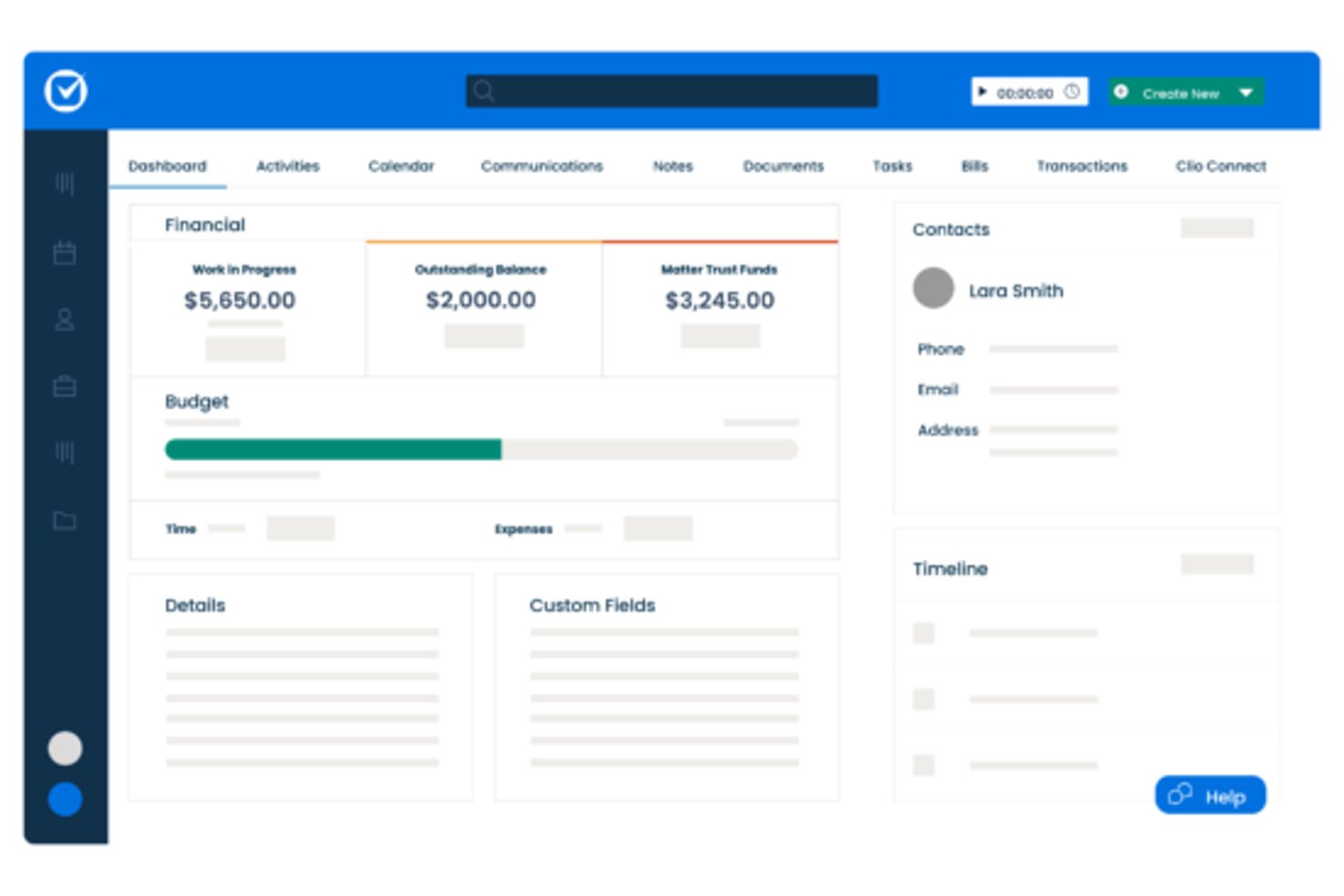
Clio Manage is a legal practice management platform that covers matter management, time tracking, billing, document storage, and court deadline calendaring for law firms.
Who Is Clio Manage Best For?
Clio Manage is a strong fit for litigation-focused law firms that need to track court deadlines across multiple jurisdictions without missing a filing date.
Why I Picked Clio Manage
Clio Manage earns its spot on my shortlist because of how it handles jurisdiction-specific court deadline chains. I love that you can set up a matter and have Clio automatically calculate cascading deadlines based on the court's local rules, so if a hearing date shifts, every dependent filing deadline recalculates with it. Its Calendar Rules feature pulls in court-specific rule sets across multiple jurisdictions, which removes the manual guesswork that leads to missed dates.
Clio Manage Key Features
- Matter management: Organize all case files, contacts, notes, and documents under a single matter record for each client.
- Time tracking: Log billable hours directly from any matter or calendar event using built-in timers.
- Client portal: Give clients a secure space to exchange documents, messages, and invoices without using email.
- Trust accounting: Track client trust funds separately from operating accounts to meet legal compliance requirements.
Clio Manage Integrations
Clio Manage connects with 300+ apps, including Outlook, Gmail, Google Calendar, Dropbox, OneDrive, NetDocuments, QuickBooks, Xero, and Zoom. It offers an open API for custom integrations and supports Zapier.
Pros and Cons
Pros:
- Keeps case documents and notes together
- Recalculates dependent dates when hearings shift
- Calculates cascading deadlines from court rules
Cons:
- Case management takes priority over project boards
- Court-rule coverage varies by jurisdiction

MyCase
Best for case management and client communication
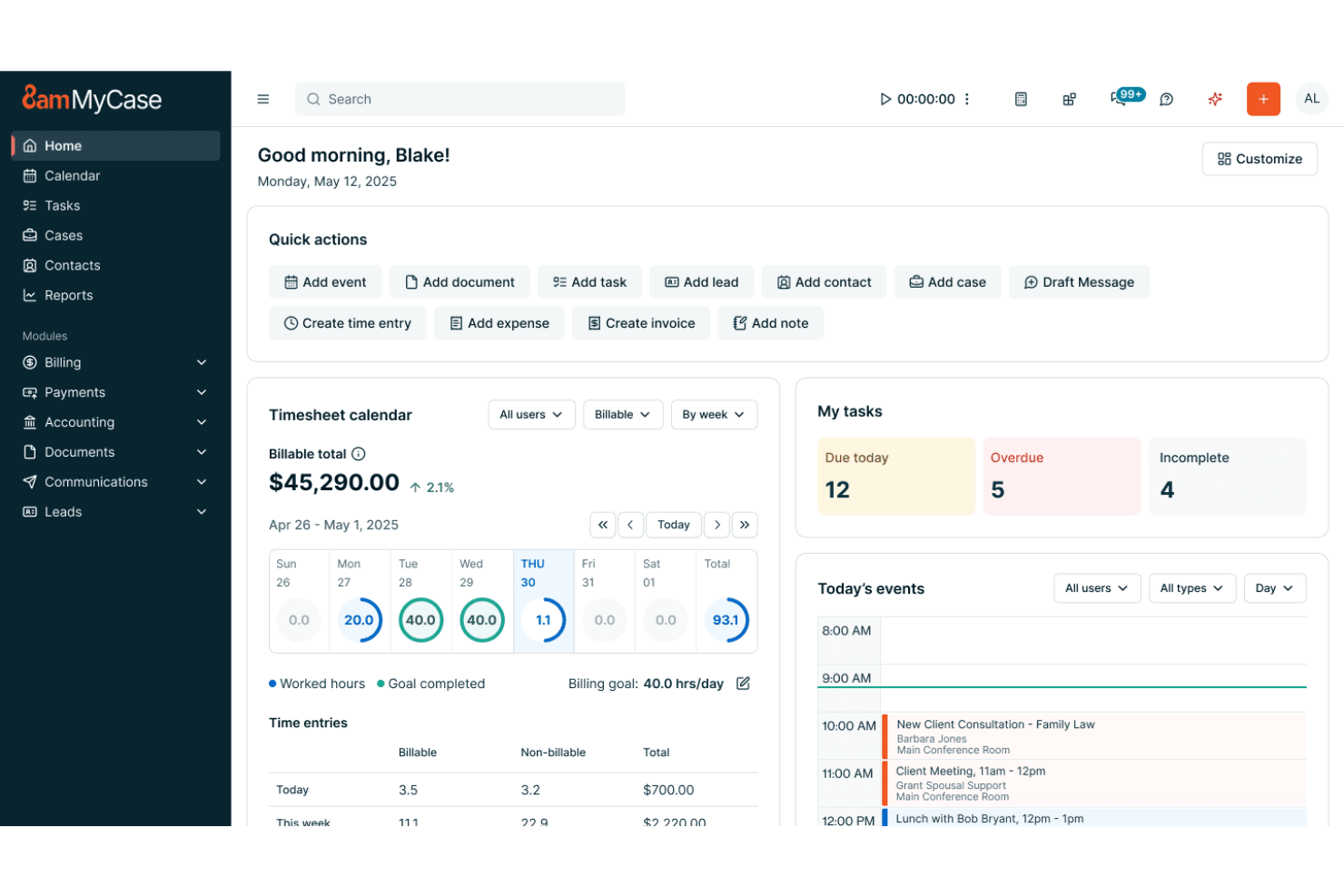
MyCase is a legal practice management platform that combines case management, client communication, billing, document storage, and task tracking in one place.
Who Is MyCase Best For?
MyCase is a strong fit for small to mid-sized law firms that need to manage client relationships and case workflows in one place.
Why I Picked MyCase
I picked MyCase as one of the best because it handles case management and client communication in a way that genuinely fits how law firms operate. The client portal lets attorneys share documents, send messages, and collect e-signatures without relying on email threads that are hard to track. I also like that case timelines and task assignments stay tied directly to individual matters, so nothing slips between cracks when a case gets busy.
MyCase Key Features
- Time tracking and billing: Lets attorneys log billable hours directly from a matter and generate invoices without switching between tools.
- Legal calendaring: Provides a built-in calendar that links court dates and deadlines to specific cases and syncs with external calendars.
- Client intake forms: Allows firms to collect new client information through customizable online forms before a matter is opened.
- Trust accounting: Includes dedicated IOLTA ledger tracking to help firms manage client funds separately from operating accounts.
MyCase Integrations
MyCase lists 61 integrations, including QuickBooks, LawPay, Google Calendar, Microsoft Outlook, Gmail, Dropbox, and LawToolBox. It also supports custom connections through its Open API and workflows through Zapier.
Pros and Cons
Pros:
- Time capture connects directly with invoicing
- Matter-linked tasks and deadline tracking
- Client portal keeps documents and conversations together
Cons:
- Trust accounting and billing feel difficult
- Calendar entries can miss desktop synchronization

Lawcus
Best for Kanban-style matter pipelines and intake
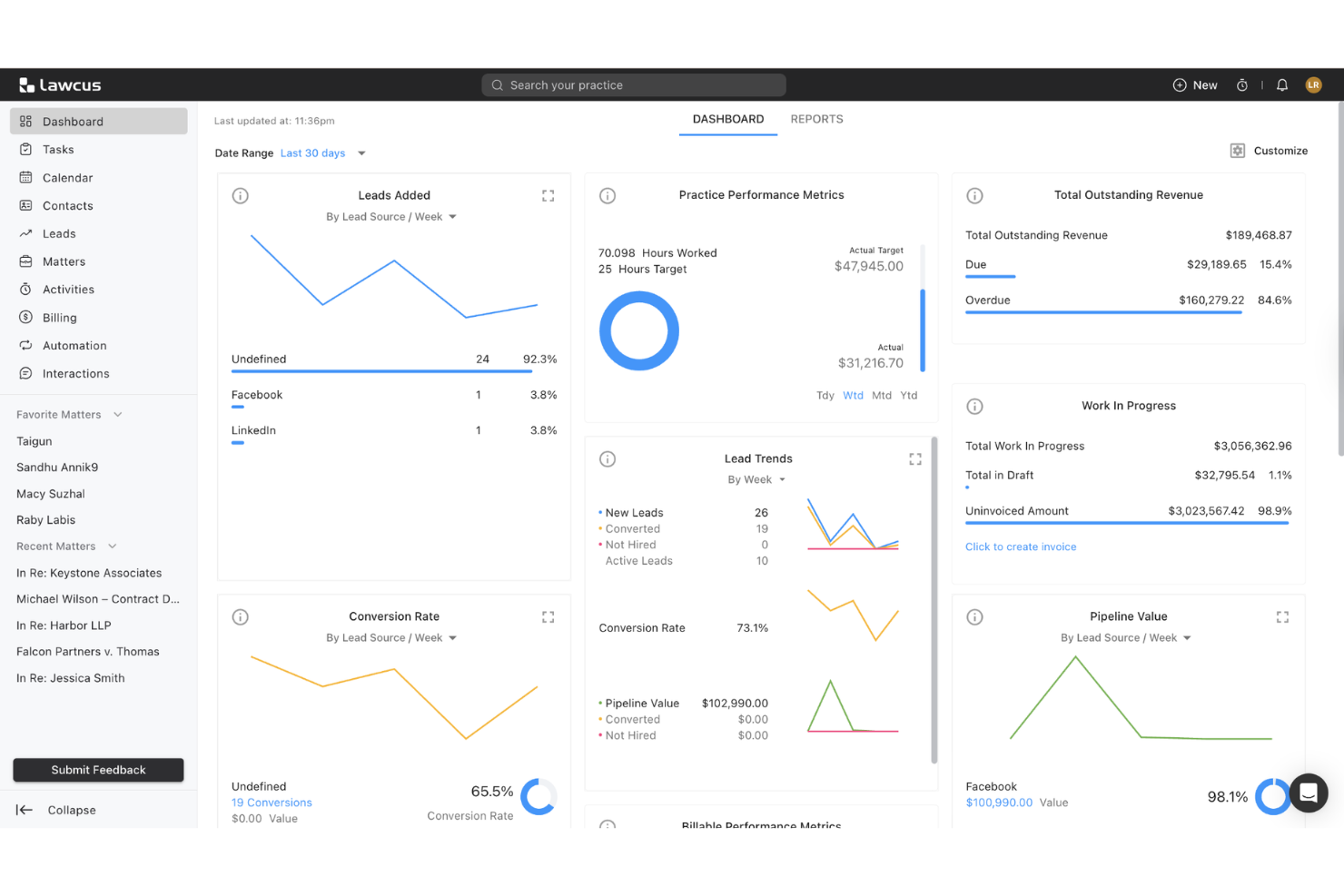
Lawcus is a legal practice management platform that combines matter management, client intake, CRM, billing, and document handling in one tool.
Who Is Lawcus Best For?
Lawcus is a strong fit for small to mid-sized law firms that want to visualize matter progress and client intake through Kanban-style pipelines.
Why I Picked Lawcus
Lawcus earns its spot on my shortlist because its Kanban-style pipelines let you track both matters and client intake as visual workflows, so nothing slips through the cracks between first contact and active case. I particularly like how intake forms connect directly to matter pipelines, automatically moving a prospect into the right stage without manual handoffs. The built-in CRM also ties client relationships to specific matters, giving you a clear picture of where every case stands at a glance.
Lawcus Key Features
- Time and expense tracking: Log billable hours and expenses directly within matters to keep billing accurate and audit-ready.
- Document management: Store, organize, and access case files and templates from a central location tied to each matter.
- Trust accounting: Manage client funds and retainers with built-in trust accounting tools designed to meet legal compliance standards.
- Two-way email and calendar sync: Connect your existing email and calendar so all client communications and deadlines stay linked to the right matter.
Lawcus Integrations
Lawcus offers documented integrations with Gmail, Microsoft Outlook, Google Calendar, Microsoft 365, QuickBooks, Xero, Dropbox, Google Drive, Box, and LawPay. It also supports an API on Elite and above and Zapier.
Pros and Cons
Pros:
- Matter-linked CRM keeps client context visible
- Intake forms route prospects into pipelines
- Kanban boards clarify matter-stage ownership
Cons:
- Complex matters may need detailed task dependencies
- Pipeline views offer limited scheduling depth

Filevine
Best for document-driven case management
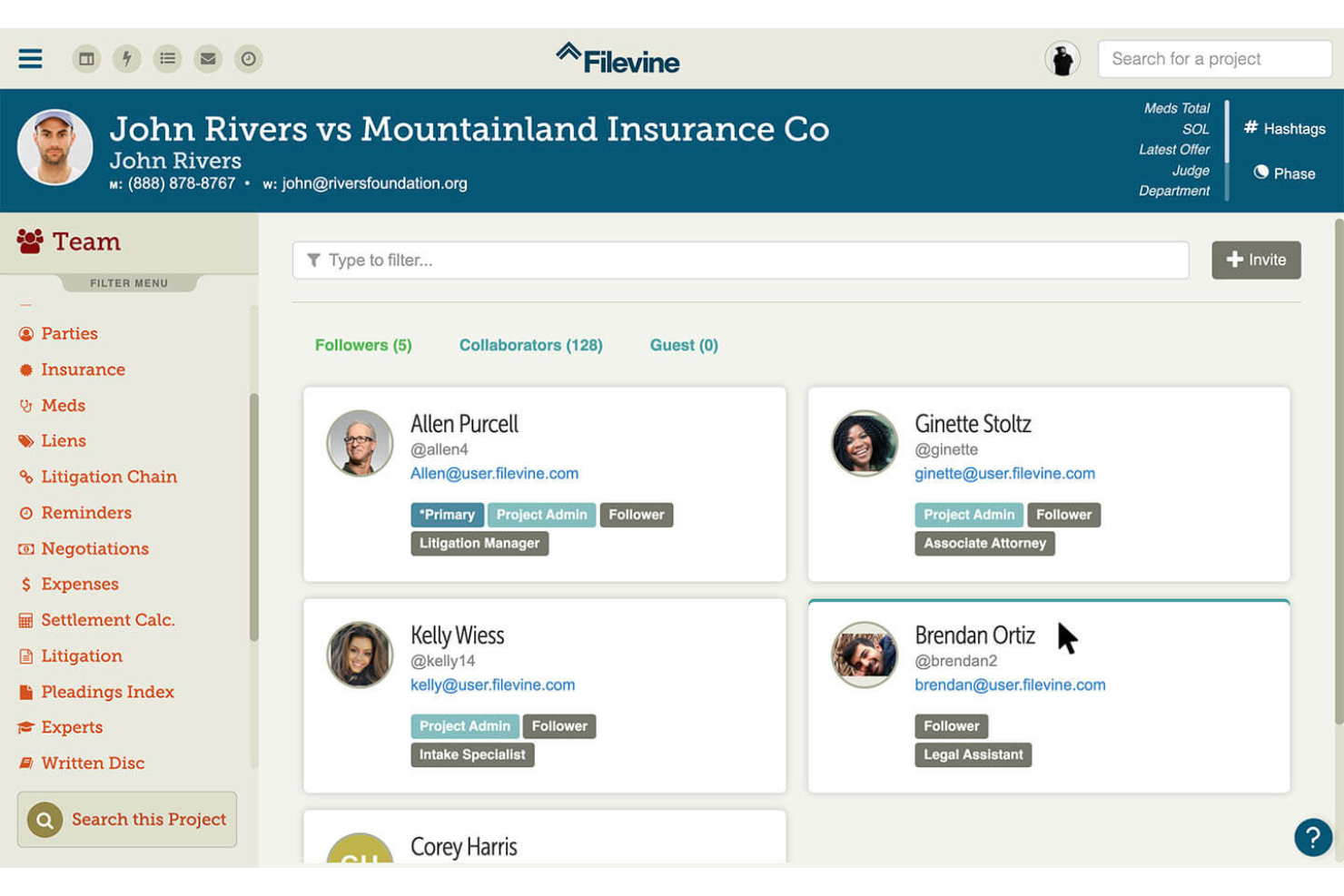
Filevine is a legal practice management platform built around case and document workflows, offering matter tracking, client intake, document management, deadline tracking, and team collaboration tools tailored to law firms.
Who Is Filevine Best For?
Filevine is a strong fit for litigation and plaintiff-side law firms that manage high document volumes across active cases.
Why I Picked Filevine
Filevine earns its spot on my shortlist because of how well it handles document-heavy caseloads, which is where most litigation workflows actually break down. I love that it lets you build custom document templates tied directly to case fields, so details like party names and dates populate automatically across filings. Its document versioning keeps every draft traceable, which matters when multiple attorneys are working the same matter.
Filevine Key Features
- Client intake forms: Configurable intake forms capture client and case details directly into the platform, eliminating manual data entry across matters.
- Deadline and statute tracking: Built-in calendaring tools automatically calculate and flag critical legal deadlines based on case type and jurisdiction.
- Task assignment and matter timelines: Attorneys and staff can assign tasks to specific team members with due dates tied to active case milestones.
- Reporting and analytics dashboard: Firm-wide dashboards surface case progress, team workload, and matter status across your entire docket in one view.
Filevine Integrations
Filevine integrations include Microsoft Office, Slack, Google Calendar, Gmail, and DOMO, with an open API for custom connections. It also supports Zapier.
Pros and Cons
Pros:
- Matter files stay organized with version history
- Custom workflows track tasks across active matters
- Case-linked document generation reduces repetitive drafting
Cons:
- Search and large-file performance can lag
- Extensive workflow setup can take months

Best for legal CRM and matter management
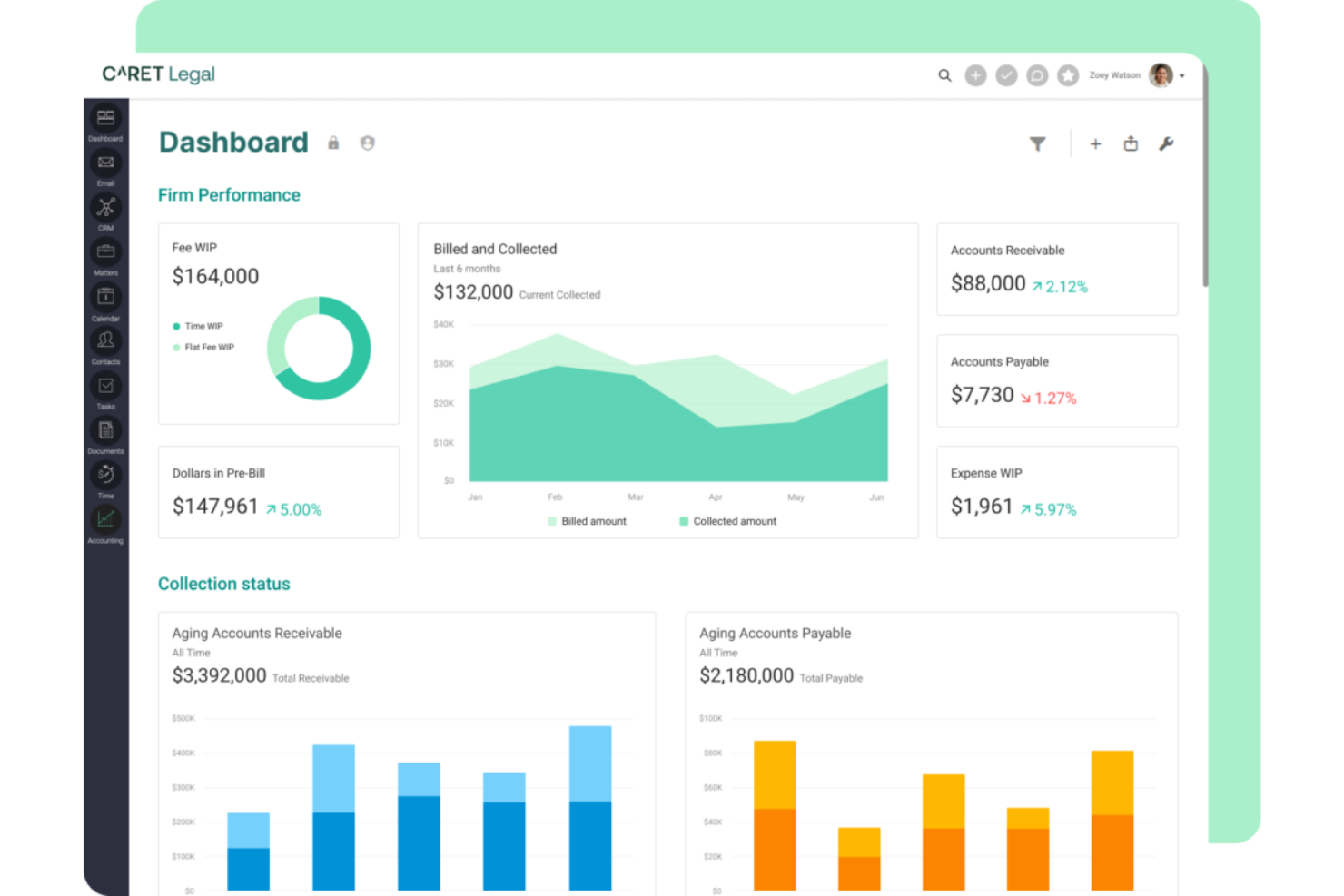
CARET Legal is a legal practice management platform that combines matter management, CRM, document automation, time tracking, and billing into a single system built specifically for law firms.
Who Is CARET Legal Best For?
CARET Legal is a strong fit for small to mid-sized law firms that need their client relationships and matter workflows managed in one place.
Why I Picked CARET Legal
I've included CARET Legal in my top picks because it's one of the few tools that genuinely unifies CRM and matter management rather than bolting one onto the other. I like how client intake flows directly into matter records, so nothing gets lost between first contact and active case work. The built-in document automation also ties directly to matter data, which cuts down on the manual drafting work that slows legal teams down.
CARET Legal Key Features
- Time tracking: Log billable hours directly against matters using built-in timers or manual entry.
- Client portal: Give clients a secure space to view case updates, share documents, and communicate with your firm.
- Trust accounting: Manage IOLTA accounts and client funds with built-in ledgers designed for legal compliance.
- Calendar and deadline management: Sync court dates, deadlines, and appointments with matter records to keep your whole team on schedule.
CARET Legal Integrations
CARET Legal integrates with Microsoft 365, Google Workspace, QuickBooks Online, OneDrive, NetDocuments, LawToolBox, Lawmatics, HotDocs, RMail, and Zapier.
Pros and Cons
Pros:
- Client portal supports secure case communication
- Matter-linked document templates reduce repetitive drafting
- Centralizes matters, documents, time, and billing
Cons:
- Users report slow document loading and freezes
- Mobile app offers limited case management

CosmoLex
Best for integrated billing and trust accounting
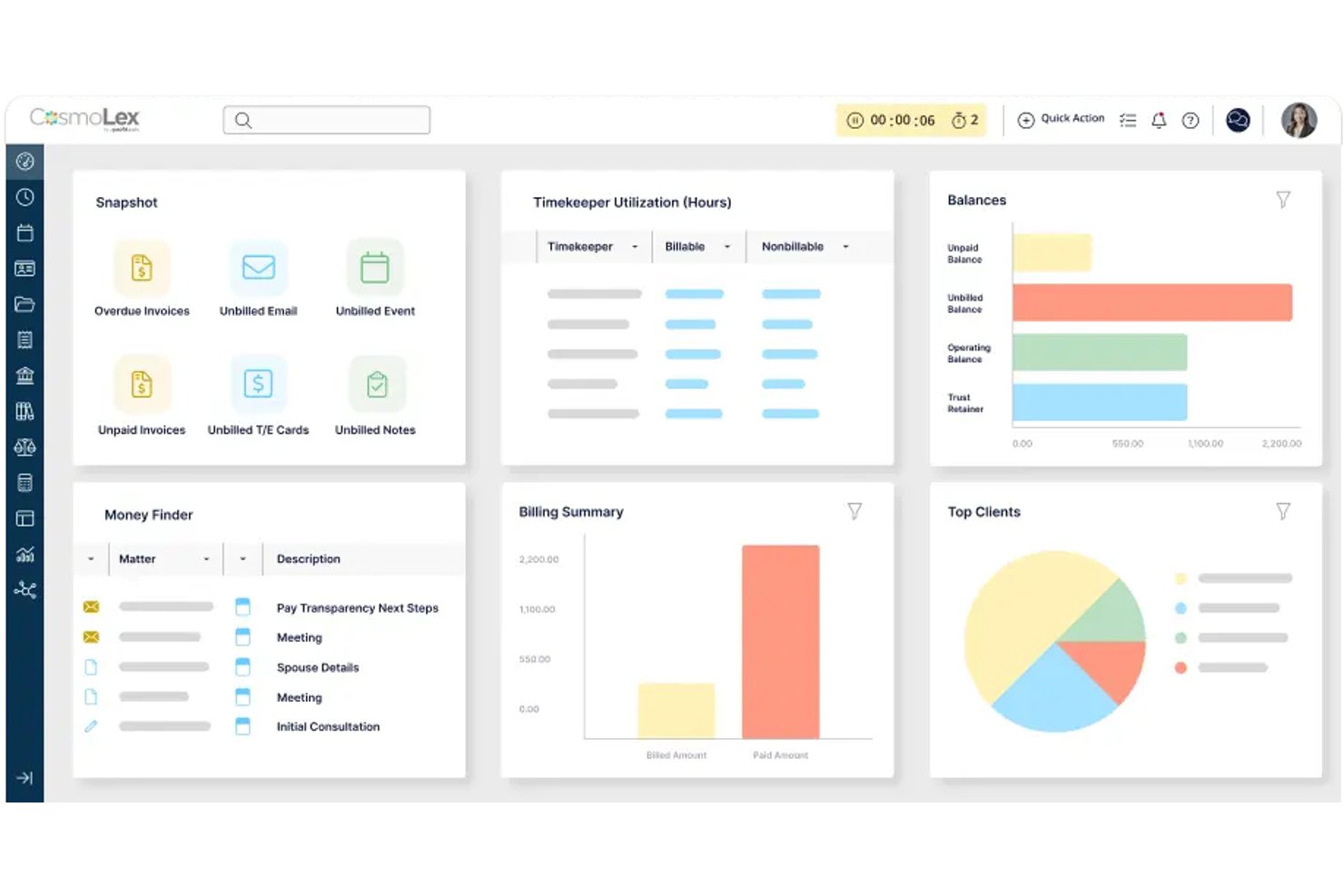
CosmoLex is a cloud-based legal practice management platform that combines matter management, time tracking, billing, trust accounting, and document management in a single system built specifically for law firms.
Who Is CosmoLex Best For?
CosmoLex is a strong fit for small to mid-sized law firms that need billing, trust accounting, and matter management in one place without stitching together separate tools.
Why I Picked CosmoLex
I picked CosmoLex as one of the best because it's the only tool on my list that handles trust accounting natively, without requiring a QuickBooks connection or a workaround. Its built-in IOLTA ledger automatically tracks client funds separately from operating accounts, which keeps you compliant without manual reconciliation. Billing and matter management live in the same system, so time entries flow directly into invoices tied to specific cases.
CosmoLex Key Features
- Matter-centric document storage: Attach, organize, and retrieve case documents directly within each matter record for quick access during active cases.
- Court deadline calendaring: Automatically calculate and add court deadlines and statute of limitations dates to your calendar based on jurisdiction rules.
- Client portal: Share invoices, documents, and case updates with clients through a secure, branded online portal without using email attachments.
- Built-in legal accounting reports: Generate balance sheets, income statements, and trust ledger reports formatted to meet bar association requirements.
CosmoLex Integrations
CosmoLex lists four integrations: Microsoft 365, Dropbox, LawPay, and QuickBooks Online, connecting legal practice management with documents, payments, and accounting.
Pros and Cons
Pros:
- Task reminders support time-sensitive follow-ups
- Matter-linked time flows into invoices
- Trust-account reconciliation is quick
Cons:
- Bank feeds sometimes stop syncing
- Updates can glitch or lose entries

Best for legal billing tied to matter workflows
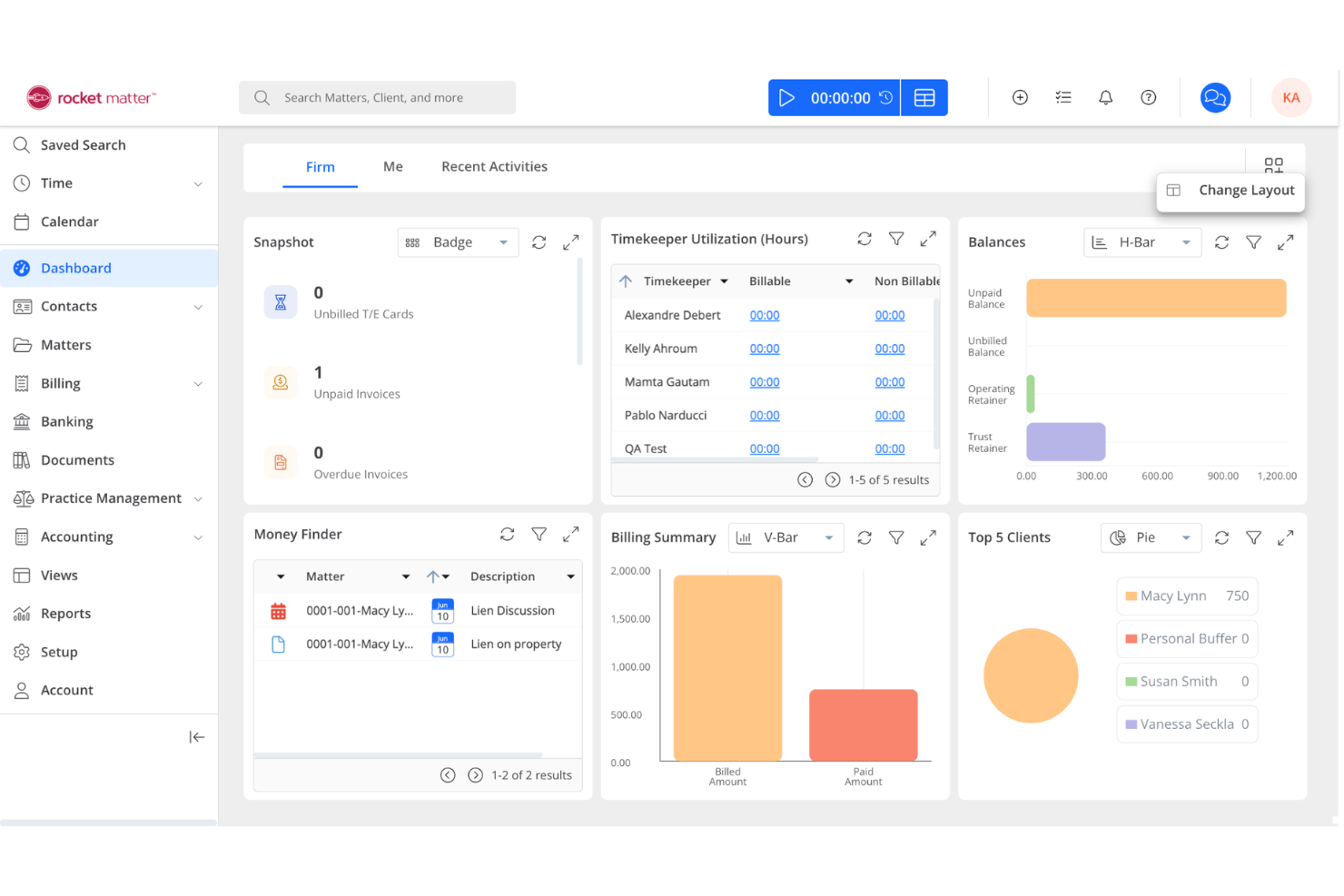
Rocket Matter is a cloud-based legal practice management platform for law firms that combines case management, time and billing, document automation, and calendaring in one system.
Who Is Rocket Matter Best For?
Small to mid-sized law firms that need cloud-based case management and integrated time and billing tools.
Why I Picked Rocket Matter
I picked Rocket Matter as one of the best because I rely on its cloud-based time and billing tools to track hours and generate invoices directly from case files. My team uses the document automation features to quickly assemble legal documents without leaving the platform. I also like how Rocket Matter’s calendaring and task management keep our casework organized and deadlines visible for everyone.
Rocket Matter Key Features
- Matter dashboards: View case status, contacts, and key dates in one place.
- Custom intake forms: Collect client information with tailored online forms.
- Trust accounting: Manage client trust funds with compliance safeguards.
- Batch billing: Generate invoices for multiple matters at once.
Rocket Matter Integrations
Rocket Matter offers native integrations with QuickBooks Online, Dropbox, Box, Microsoft 365 Outlook, Google Calendar, and more. An API is available for custom integrations.
Pros and Cons
Pros:
- Document assembly supports legal templates
- Automated recurring billing for subscription client
- Kanban-style matter management board included
Cons:
- Reporting exports limited to certain formats
- No advanced client intake automation

Best for legal workflow and matter management
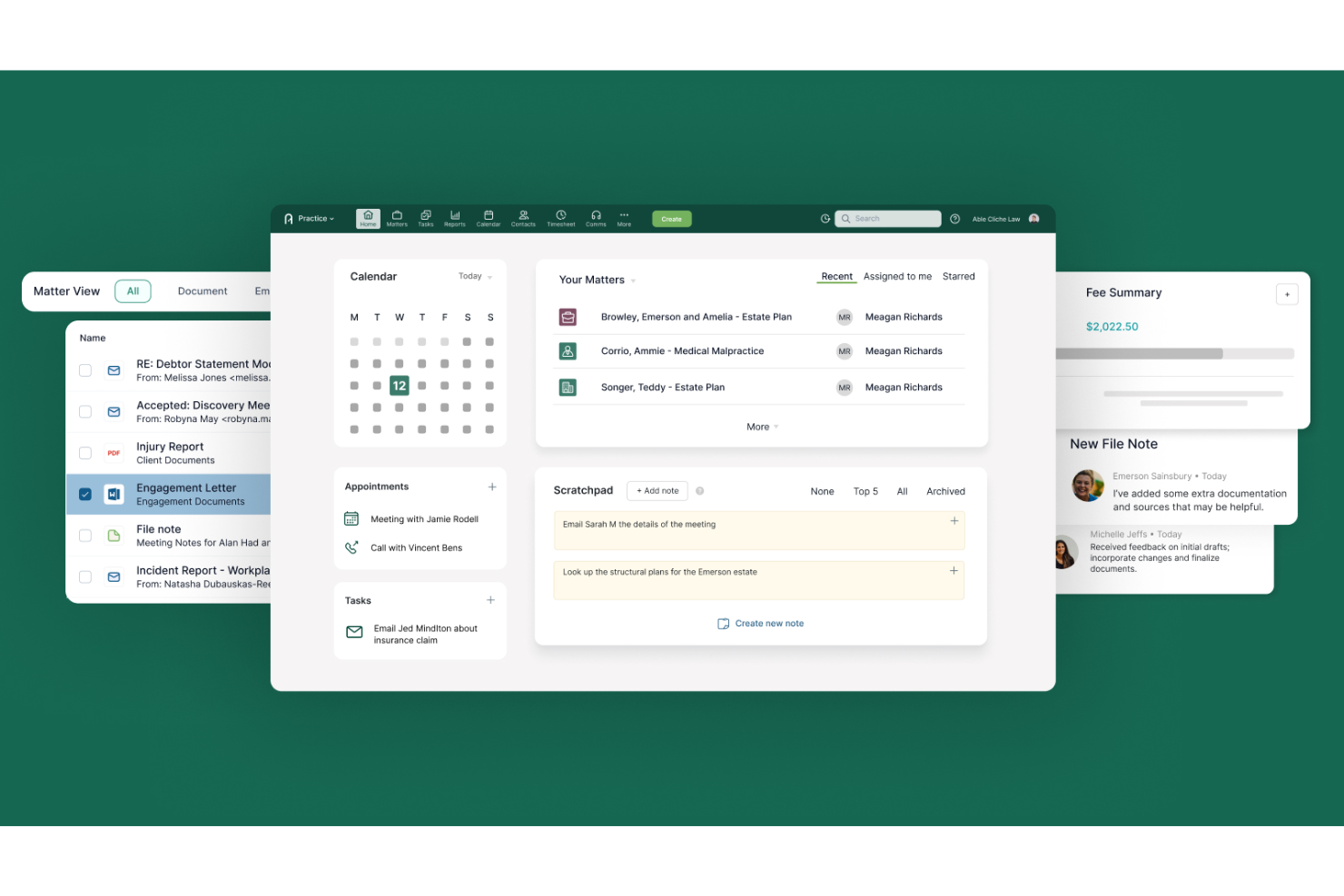
Actionstep is a legal practice management platform built specifically for law firms, combining matter management, legal workflow automation, document management, billing, and client portal tools in one system.
Who Is Actionstep Best For?
Actionstep is a strong fit for small to mid-sized law firms that need structured, repeatable workflows built directly into their matter management process.
Why I Picked Actionstep
Actionstep earns its spot on my shortlist because it builds workflow automation directly into matter management, which is something most generic project tools can't replicate. I love how you can configure stage-based workflows that automatically trigger tasks, document requests, and deadline reminders as a matter moves through each phase. Its document assembly feature lets firms generate templated legal documents tied to specific matter data, cutting the manual work out of routine case prep.
Actionstep Key Features
- Time and expense tracking: Log billable hours and expenses directly within a matter, keeping all billing data tied to the relevant case.
- Client portal: Share documents, collect information, and communicate with clients through a secure, branded online portal.
- Trust accounting: Manage client trust accounts with built-in ledgers that track deposits, disbursements, and balances per matter.
- Custom reporting: Build reports on matter status, billing totals, and team activity using configurable report templates.
Actionstep Integrations
Actionstep lists integrations with First AML, InfoTrack, and Microsoft Outlook through its Office 365 add-in. It also offers an API for custom connections and supports Zapier.
Pros and Cons
Pros:
- Trust ledgers track balances by matter
- Document assembly pulls data from matters
- Stage-based workflows automate matter deadlines
Cons:
- Billing and trust accounting can glitch
- Setup requires substantial workflow configuration

Litify
Best for AI-native matter and billing management

Litify is a legal operations platform built on Salesforce that covers matter management, document handling, time tracking, and billing in a single system designed specifically for law firms.
Who Is Litify Best For?
Litify is a strong fit for mid-to-large law firms that want a single platform to manage matters, billing, and client intake on top of Salesforce infrastructure.
Why I Picked Litify
Litify earns its spot on my shortlist because it brings AI directly into matter management and billing in ways I haven't seen replicated elsewhere. I love how its AI-powered intake automatically classifies matters and flags billing anomalies before they become write-offs. Built on Salesforce, it also lets lawyers track time against specific matter phases and generate invoices without switching tools.
Litify Key Features
- Client portal: A dedicated portal where clients can view matter updates, upload documents, and communicate directly with their legal team.
- Role-based dashboards: Customizable dashboards that surface the data most relevant to each user's role, from intake coordinators to managing partners.
- Automated workflow builder: A drag-and-drop tool for creating matter workflows that trigger tasks, notifications, and document generation at each stage.
- Salesforce AppExchange integration: Native access to hundreds of third-party apps through Salesforce's ecosystem, extending Litify's functionality without custom development.
Litify Integrations
Litify supports marketplace integrations through Salesforce AppExchange, giving firms access to third-party apps.
Pros and Cons
Pros:
- Matter-phase time tracking supports legal workflows
- Billing anomaly flags help prevent write-offs
- AI intake classifies matters automatically
Cons:
- Broad platform may burden solo practices
- Salesforce architecture can add implementation overhead
Annen prosjektstyringsprogramvare for advokater
Her er noen flere alternativer innen prosjektstyringsprogramvare for advokater som ikke kom med på kortlisten, men som likevel er verdt å se nærmere på:
- LEAP
For integrated billing and matter management
- PracticePanther
For legal workflow automation at any firm size
- Smartsheet
For spreadsheet-style legal task tracking
- Asana
For automating multi-step legal workflows
- ProProfs Project
For tracking tasks across client matters
- CasePeer
For personal injury case tracking and deadlines
- Lawmatics
For intake-to-matter conflict checking
- Perfect Practice
For transaction-triggered deadline automation
- Dashboard Legal
For matter management backed by legal research
- Legalboard
For matter workflow visibility across a firm


How I Evaluate Project Management Software For Lawyers
I split my evaluation into three parts, with the most weight on core functionality: organizing work by matter, assigning tasks, and tracking jurisdiction-sensitive deadlines. Next, I look for standout features such as court-rule deadline chains. Finally, I consider support, onboarding, data migration, and pricing value.
Core Functionality (Table Stakes For This List)
When I'm selecting tools for my list, I score each one on a scale from 0 (does not offer the functionality) to 5 (excels in this area) for each core functionality listed below. I then convert the total into a percentage to help assess each tool's overall fit, with extra weight on any functionalities I’ve deemed essential.
- Tasks & Deadlines (Essential): I look for assigned tasks, due dates, reminders, and dependencies when filings rely on prior review.
- Matter Organization (Essential): I assess whether matters hold client and status details, phases, and reusable case-type templates rather than sitting as generic projects.
- Matter Documents: I check whether files link to matters and individual tasks, with version history and permissions for drafts and evidence.
- Legal Calendars: I evaluate shared calendars, recurring dates, and jurisdiction-specific deadline chains, including how conflicts or changes surface.
- Client & Team Access: I look for role-based client and co-counsel access, comments, notifications, and activity records around matter progress.
- Matter Time Tracking: I assess whether timers or entries link to matters, and whether billing reports connect with invoicing and trust-accounting workflows.
Once I have a list of tools that meet the criteria, I consider what sets each platform apart.
Differentiating Factors (What Sets Vendors Apart)
Here's how I compare and contrast different vendors:
Standout Features
I look for a court rules engine that auto-generates deadline chains from jurisdiction-specific procedural rules. Missing a single filing window can derail a case, so I check whether the tool calculates backward from hearing dates and adjusts when courts shift schedules. Trust accounting support is equally non-negotiable—I evaluate how each platform tracks retainer balances and flags disbursements that would violate bar requirements. I also consider conflict checking, since catching a potential conflict before intake saves firms from costly disqualification motions down the line.
Beyond Features
I evaluate how well each tool fits a firm's size and IT capacity—solo practitioners need fast setup with minimal overhead, while multi-office firms need departmental reporting and cross-practice standardization. Integration matters just as much: I check for calendar sync with Outlook or Google, e-signature connectors, and compatibility with billing platforms like Clio or QuickBooks to avoid duplicate data entry. I also look at security posture, since attorney-client privilege requires encryption, granular role-based access, and secure client portals that protect sensitive case data from exposure.
Slik velger du prosjektstyringsprogramvare for advokater
Det er lett å gå seg vill i lange funksjonslister og komplekse prisstrukturer. For å hjelpe deg med å holde fokus mens du går gjennom den unike prosessen for valg av programvare, får du her en sjekkliste over faktorer du bør ha i mente:
| Faktor | Hva bør du vurdere? |
|---|---|
| Skalerbarhet | Vil programvaren håndtere advokatfirmaets vekst, nye rettsområder eller økt saksmengde over tid? |
| Integrasjoner | Har den innebygd kobling til eksisterende verktøy for dokumenthåndtering, fakturering eller kalender? |
| Tilpasningsmuligheter | Kan du tilpasse arbeidsflyter, felt og tillatelser slik at de samsvarer med advokatfirmaets prosesser og terminologi? |
| Brukervennlighet | Vil teamet ditt ta det i bruk raskt, eller vil opplæring og brukerstøtte være et konstant behov? |
| Implementering og innføring | Hvor lang tid vil oppsettet ta, og hvilke ressurser eller hvilken støtte tilbyr leverandøren ved migrering? |
| Kostnad | Er prisnivåene tydelige, og samsvarer de med advokatfirmaets størrelse, bruk og budsjettforventninger? |
| Sikkerhetstiltak | Tilbyr plattformen kryptering, revisjonsspor og tilgangskontroller som oppfyller standardene i den juridiske bransjen? |
| Samsvarskrav | Vil programvaren hjelpe deg med å oppfylle krav som GDPR, HIPAA eller regler fra lokale advokatforeninger? |
Hva er prosjektstyringsprogramvare for advokater?
Prosjektstyringsprogramvare for advokater er programvare for juridisk praksisadministrasjon som er utviklet for å hjelpe advokatfirmaer med å organisere, spore og administrere juridiske saker, oppgaver, frister og dokumenter. Disse verktøyene støtter samarbeid, forenkler arbeidsflyter og samler informasjon på ett sted, noe som gjør det enklere å innfri klientenes forventninger og regulatoriske krav. De hjelper firmaer med å håndtere komplekse prosjekter, fastsette og følge opp milepæler og spore fremdrift, samtidig som flaskehalser reduseres. Mange plattformer støtter også juridisk research, forbedrer klienttilfredsheten og øker lønnsomheten gjennom bedre ressursstyring. Disse verktøyene er ofte brukervennlige og noen ganger drevet av kunstig intelligens, og inngår i et bredere økosystem for juridisk teknologi som støtter moderne juridiske tjenester for firmaer med særegne behov, inkludert små firmaer.
Funksjoner i prosjektstyringsprogramvare for advokater
Når du velger prosjektstyringsprogramvare for advokater, bør du se etter følgende viktige funksjoner:
- Saksadministrasjon: Samler all saksrelatert informasjon, dokumenter og kommunikasjon på ett sted for enkel tilgang og oppfølging.
- Oppgavetildeling: Lar deg delegere, prioritere og følge opp oppgaver på tvers av det juridiske teamet, slik at ansvar er tydelig og oppgavene fullføres i tide.
- Dokumentadministrasjon: Gir sikker lagring, versjonskontroll og søkefunksjoner for juridiske filer og bevis.
- Tidsregistrering: Registrerer fakturerbare og ikke-fakturerbare timer knyttet til bestemte saker, noe som støtter korrekt fakturering og etterlevelse av krav.
- Kalenderadministrasjon: Planlegger rettsdatoer, frister og avtaler, med påminnelser som bidrar til å forhindre at forpliktelser blir oversett.
- Fakturering: Genererer fakturaer basert på registrert tid og utgifter, og integreres med regnskapssystemer for enklere økonomistyring.
- Kontaktadministrasjon: Opprettholder detaljerte opplysninger om klienter, motpartens advokater, vitner og andre viktige kontakter for hver sak.
- Tilgangskontroller: Begrenses tilgangen til sensitiv informasjon basert på brukerroller, noe som støtter konfidensialitet og etterlevelse av krav.
- Interessekonfliktsjekk: Identifiserer potensielle interessekonflikter før nye saker aksepteres, slik at firmaer kan unngå etiske problemer.
- Rapportering og analyse: Tilbyr tilpassbare rapporter om saksfremdrift, arbeidsbelastning og økonomi for å støtte datadrevet beslutningstaking.
Fordeler med prosjektstyringsprogramvare for advokater
Implementering av prosjektstyringsprogramvare for advokater gir flere fordeler for teamet og virksomheten din. Her er noen av fordelene du kan se frem til:
- Bedre organisering: Sentralisert saks- og dokumentadministrasjon gjør all saksinformasjon tilgjengelig og reduserer tiden som brukes på å lete etter filer.
- Større ansvarlighet: Funksjoner for oppgavetildeling og -oppfølging gjør det tydelig hvem som har ansvaret for hvert trinn i en sak.
- Bedre etterlevelse: Tilgangskontroller og interessekonfliktsjekk hjelper firmaet med å oppfylle etiske og regulatoriske krav.
- Korrekt fakturering: Integrert tidsregistrering og fakturering sikrer at fakturerbare timer registreres, og at klientene faktureres korrekt.
- Redusert risiko for å oversitte frister: Kalenderadministrasjon og automatiske påminnelser hjelper teamet med å holde oversikt over rettsdatoer og kritiske oppgaver.
- Bedre klientservice: Forenklede arbeidsflyter og tydelige kommunikasjonsverktøy støtter raskere responstider og mer regelmessige oppdateringer til klientene.
- Datadrevet innsikt: Funksjoner for rapportering og analyse gir innsyn i saksfremdrift, teamets arbeidsbelastning og firmaets resultater.
Kostnader og priser for prosjektstyringsprogramvare for advokater
Ved valg av prosjektstyringsprogramvare for advokater må du forstå de ulike prismodellene og abonnementene som er tilgjengelige. Kostnadene varierer basert på funksjoner, teamstørrelse, tilleggstjenester og mer. Tabellen nedenfor oppsummerer vanlige abonnementer, gjennomsnittsprisene deres og typiske funksjoner som er inkludert i løsninger for prosjektstyringsprogramvare for advokater:
Sammenligningstabell for abonnementer for prosjektstyringsprogramvare for advokater
| Plantype | Gjennomsnittlig pris | Vanlige funksjoner |
|---|---|---|
| Gratisplan | $0 | Grunnleggende håndtering av juridiske saker, begrenset oppgavesporing, enkel dokumentlagring og grunnleggende brukertillatelser. |
| Personlig plan | $5-$25/bruker/måned | Håndtering av juridiske saker, oppgavetildeling, dokumenthåndtering, tidsregistrering og grunnleggende rapportering. |
| Forretningsplan | $25-$60/bruker/måned | Avansert arbeidsflytautomatisering, fakturering og utsendelse av fakturaer, kalenderhåndtering, tillatelseskontroller og integrasjoner. |
| Foretaksplan | $60-$120/bruker/måned | Tilpassede arbeidsflyter, avansert sikkerhet, verktøy for overholdelse av regelverk, dedikert brukerstøtte, avansert analyse og API-tilgang. |
Vanlige spørsmål om prosjektstyringsprogramvare for advokater
Her er noen svar på vanlige spørsmål om prosjektstyringsprogramvare for advokater:
Hvordan skiller prosjektstyringsprogramvare for advokater seg fra generelle prosjektstyringsverktøy?
Prosjektstyringsprogramvare for advokater inkluderer juridiske funksjoner som håndtering av juridiske saker, kontroll av interessekonflikter og verktøy for overholdelse av regelverk. Dette hjelper advokatfirmaer med å håndtere sensitive data, spore fakturerbare timer og oppfylle regulatoriske krav som generelle verktøy ikke dekker.
Kan prosjektstyringsprogramvare for advokater integreres med systemer for juridisk fakturering eller dokumenthåndtering?
Ja, mange juridiske prosjektstyringsverktøy tilbyr integrasjoner med systemer for fakturering, regnskap og dokumenthåndtering. Dette hjelper firmaet med å holde dataene konsistente, redusere manuell registrering og forenkle arbeidsflyter på tvers av plattformer.
Er det vanskelig å overføre firmaets data til et nytt prosjektstyringssystem?
Nei, de fleste leverandører av juridisk prosjektstyringsprogramvare tilbyr verktøy for dataimport, støtte ved oppstart eller migreringstjenester. Du bør undersøke hva som er inkludert i planen din, og spørre om støtte til å flytte saker, kontakter og dokumenter.
Hvilke sikkerhetsfunksjoner bør jeg se etter i prosjektstyringsprogramvare for advokater?
Se etter kryptering, rollebaserte tilgangskontroller, revisjonsspor og samsvarssertifiseringer. Disse funksjonene bidrar til å beskytte sensitive klientdata og støtter firmaets etiske og regulatoriske forpliktelser.
Hvordan vet jeg om et prosjektstyringsverktøy passer til firmaets arbeidsflyt?
Test programvaren med en gratis prøveperiode eller demonstrasjon, og involver advokater og ansatte i evalueringen. Kontroller om du kan tilpasse arbeidsflyter, felt og tillatelser slik at de samsvarer med firmaets prosesser, før du tar en beslutning.