

10 beste iPaaS-løsninger i 2026

Kortliste over de beste iPaaS-løsningene


iPaaS-løsninger er skybaserte plattformer som lar deg koble sammen, automatisere og administrere dataflyt mellom forretningsverktøyene dine uten omfattende spesialutvikling. Hvis du vurderer iPaaS-alternativer, opplever du sannsynligvis flaskehalser på grunn av frakoblede apper, manuelt arbeid og utfordringer med å skalere integrasjoner etter hvert som teknologistakken din vokser.
I denne kortlisten hjelper jeg deg med raskt å sammenligne de beste iPaaS-verktøyene, hva hvert av dem er best på, og hvordan de passer til reelle behov innen prosjektstyring. Bruk denne veiledningen til å velge en plattform som håndterer kompleksitet og holder integrasjonene dine i gang på en smidig måte gjennom hele 2026.
Why Trust Our Software Recommendations
Our team has been testing and reviewing software since 2012. As project managers ourselves, we know how difficult—and important—it is to choose the right software.
For this guide, we evaluated tools using hands-on testing and independent research, scoring tools using our selection criteria. We also draw on insights from industry thought leaders and practicing project management experts.
Our reviews reflect our human editorial judgment, not a sales pitch.
Expert reviewers:
Sammenligningstabell for iPaaS-løsninger
Denne sammenligningstabellen oppsummerer prisopplysningene for mine utvalgte iPaaS-løsninger:
| Tool | Best For | Trial Info | Price | ||
|---|---|---|---|---|---|
| 1 | Best for integration, API, and EDI management | 30-day free trial | Pricing upon request | Website | |
| 2 | Best for visual workflow design and debugging | Free plan + free demo available | From $9/month (billed annually) | Website | |
| 3 | Best for self-hosted and open-source deployments | Free trial available | From €20/month (billed annually) | Website | |
| 4 | Best for lifetime access with unlimited tasks | Free plan available | From $16/month | Website | |
| 5 | Best for B2B/EDI and data hub governance | 30-day free trial | From $99/month | Website | |
| 6 | Best for RPA within the Microsoft ecosystem | 30-day free trial + free plan | From $15/user/month (billed annually) | Website | |
| 7 | Best for governing AI agents | Free plan available | From $19.99/month (billed annually) | Website | |
| 8 | Best for API lifecycle management at scale | Free trial + free demo available | Pricing upon request | Website | |
| 9 | Best for building agents with embedded integrations | Free demo available | Pricing upon request | Website | |
| 10 | Best for AI-powered no-code agent creation | Free demo available | From $9,995/year (billed annually) | Website |
Anmeldelser av de beste iPaaS-løsningene
Nedenfor finner du mine detaljerte sammendrag av de beste iPaaS-løsningene som kom med på kortlisten min. Anmeldelsene mine gir en detaljert gjennomgang av funksjonene, integrasjonene og de beste bruksområdene for hver plattform, slik at du kan finne den som passer best for deg.

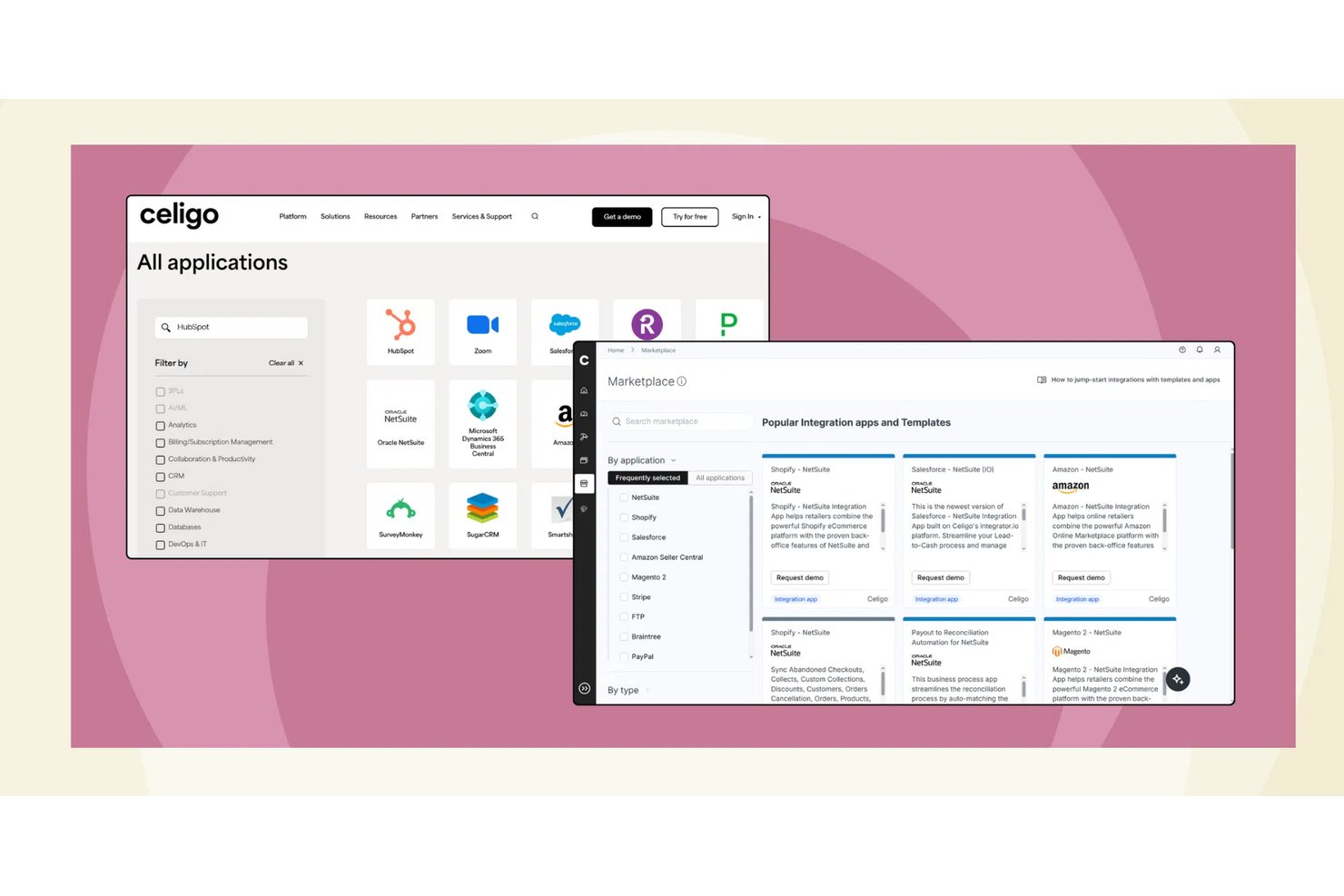
Celigo is an iPaaS that unifies application integration, API management, B2B/EDI, and AI-powered automation in a single platform, connecting cloud and on-premises systems through a library of prebuilt connectors and flow-based workflow tools.
Who Is Celigo Best For?
Celigo is a strong fit for mid-market IT and operations teams managing complex, multi-system environments built around ERP platforms like NetSuite.
Why I Picked Celigo
Celigo earns its spot on my shortlist because it's one of the few iPaaS platforms that handles application integration, API management, and EDI under one roof. I like that the B2B Manager covers the full trading partner lifecycle and EDI transaction processing without requiring a separate tool. On top of that, the API Builder lets me expose internal integrations as governed, shareable APIs, which means I'm not rebuilding point-to-point connections every time a new system enters the stack.
Celigo Key Features
- Visual flow builder: Design, schedule, and manage multi-step workflows across systems using a drag-and-drop interface.
- Celigo Ora (natural language automation): Build and manage integrations by describing automation needs in plain language.
- Integration monitoring dashboards: Track status, errors, and performance in real time with self-service alerting and SLA tracking tools.
- Reusable integration templates: Deploy preconfigured automation blueprints for popular project management, CRM, and ERP tool combinations.
Celigo Integrations
Celigo offers hundreds of native integrations, including NetSuite, Salesforce, Shopify, Jira, Asana, Monday.com, Smartsheet, Wrike, Amazon, and Microsoft 365. An API is available for custom integrations.
Pros and Cons
Pros:
- Prebuilt templates cut deployment time significantly
- AI-assisted mapping speeds up workflow configuration
- Handles API, EDI, and app integration natively
Cons:
- EDI configuration can be time-consuming to set up
- Advanced scripting requires developer involvement
New Product Updates from Celigo
Celigo Adds SuiteTax and Variant Publishing for Shopify–NetSuite
Celigo adds NetSuite SuiteTax support and variant-level sales channel publishing to its Shopify–NetSuite integration. These updates improve tax handling and give merchants more control over how product variants are published. For more information, visit Celigo’s official site.
 .
.
Make
Best for visual workflow design and debugging

Make is a visual iPaaS platform that lets you build automated workflows, multi-step integrations, and AI agents across 3,000+ pre-built app connectors—without writing code.
Who Is Make Best For?
Make is a strong fit for operations and automation teams at mid-sized companies who need to build complex, multi-step workflows without relying on engineering resources.
Why I Picked Make
Make earns its spot on my shortlist because of how well its canvas-based scenario builder handles complex branching logic visually. I can see data flowing between modules in real time, and when something breaks, Make's execution history pinpoints the exact module that failed with full input/output detail. That level of step-by-step visibility is what sets it apart for debugging multi-app workflows.
Make Key Features
- AI agent builder: Create and deploy AI agents directly inside scenarios using Make's native AI modules, including support for large language model connections.
- Custom webhooks: Set up instant triggers using incoming or outgoing webhooks to connect apps that lack native connectors.
- Data mapping tools: Transform, parse, and format data between modules using built-in functions for text, numbers, dates, and arrays.
- Scenario scheduling: Set automated run intervals down to the minute to control exactly when workflows execute.
Make Integrations
Make offers 3,000+ native integrations, including OpenAI, Google Gemini, Anthropic Claude, HubSpot, Microsoft 365, Pipedrive, Perplexity AI, Telegram, and Instagram for Business, with an API available for custom integrations.
Pros and Cons
Pros:
- Built-in error handler routes per module
- Visual canvas shows data at every step
- Operations-based pricing keeps small workflows cheap
Cons:
- No self-hosted or on-premise deployment option
- Operation counts spike with complex scenarios

n8n
Best for self-hosted and open-source deployments
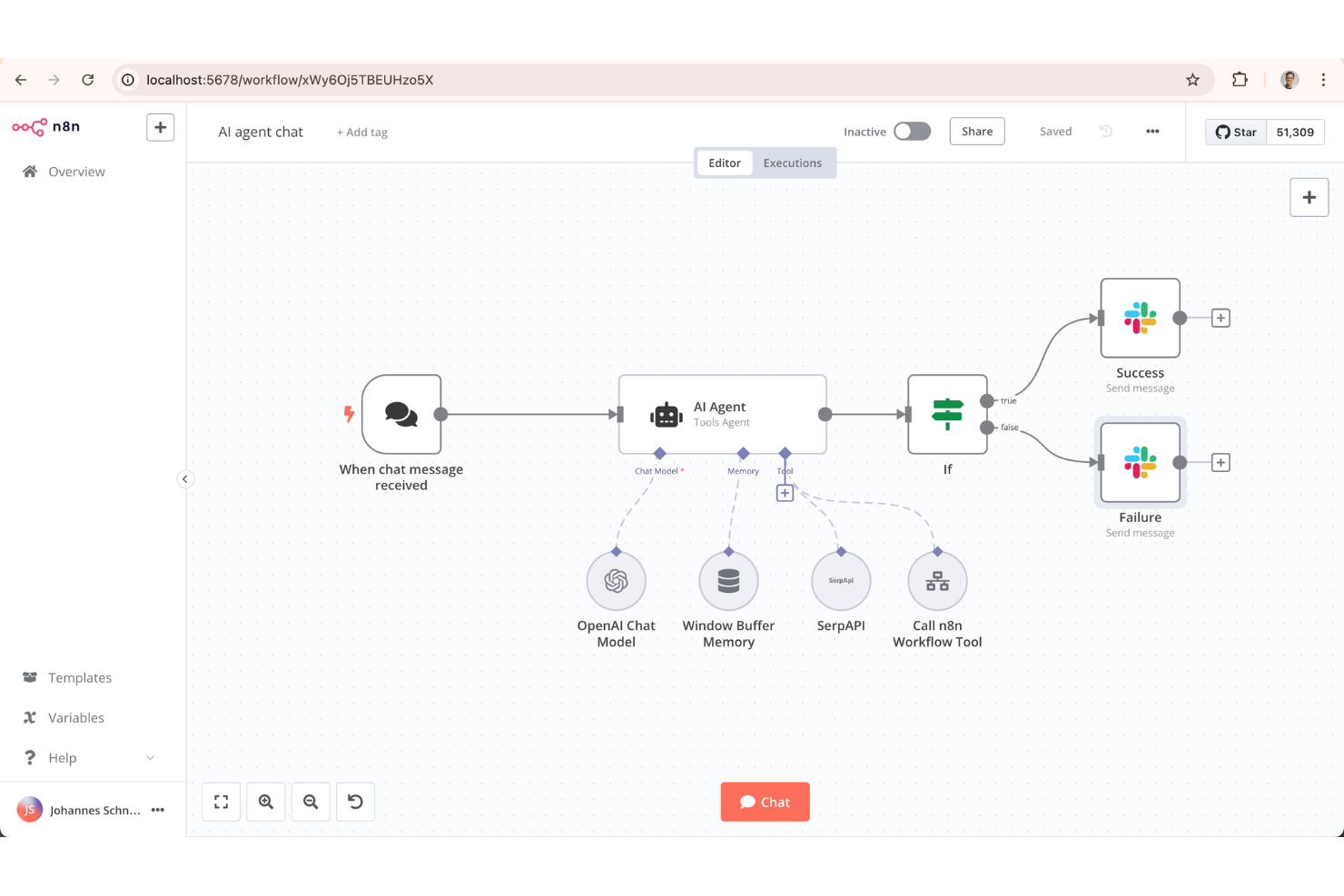
With a node-based visual builder and a fully open-source codebase, n8n is a workflow automation platform for building app integrations and multi-step automations across cloud and self-hosted environments.
Who Is n8n Best For?
n8n is a strong fit for technical teams and developers who need full control over their automation infrastructure, including data residency and custom deployment environments.
Why I Picked n8n
I've included n8n in my top picks because the self-hosted deployment option is genuinely production-ready. I run it via Docker on my own infrastructure, so workflow data never leaves my environment. The fair-code license also means my team can read, fork, and modify the source, and we've written custom nodes in TypeScript to cover connectors that don't exist natively.
n8n Key Features
- Visual workflow canvas: Build automations by connecting nodes on a drag-and-drop canvas, with real-time output previews at each step.
- AI agent nodes: Chain LLM calls using built-in agent nodes that connect to OpenAI, Anthropic, and other models.
- Execution history logs: Review a full record of past workflow runs, including input and output data at each node.
- Conditional branching: Route data through different paths based on field values, status codes, or custom JavaScript expressions.
n8n Integrations
n8n offers 350+ native integrations, including Google Sheets, Slack, Shopify, Discord, Notion, Trello, Salesforce, GitHub, MySQL, and Microsoft 365, with an API for custom integrations.
Pros and Cons
Pros:
- Limited built-in data transformation options
- Workflow version history tracks every change
- Built-in AI agent and LLM nodes
- Free community edition for unlimited workflows
Cons:
- No mobile app for monitoring workflows

Best for lifetime access with unlimited tasks
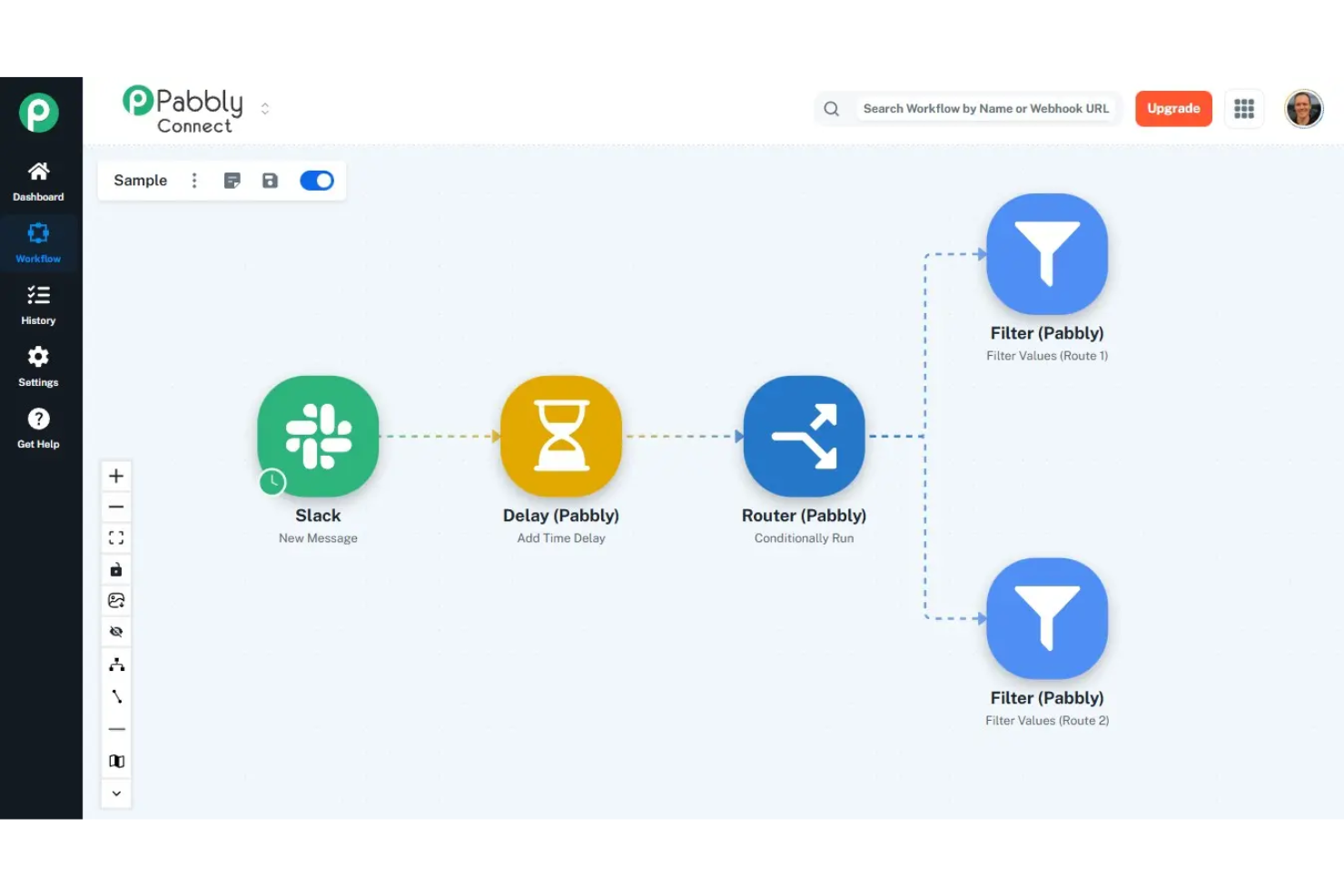
An integration and automation platform, Pabbly Connect offers a visual workflow builder with multi-step actions, conditional routing, webhook support, data formatting, and connections across 2,000+ apps.
Who Is Pabbly Connect Best For?
Pabbly Connect is a strong fit for marketing and operations teams that run high-volume automations across CRM, email, and e-commerce tools.
Why I Picked Pabbly Connect
Pabbly Connect earns its spot on my shortlist because even internal steps like formatters, iterators, and filters don't count toward your task total. I've run 8-step lead enrichment workflows across HubSpot, Slack, and Google Sheets without a single extra task logged. The iterator step lets me loop through array data mid-workflow, which would consume dozens of counted tasks in Zapier.
Pabbly Connect Key Features
- API connector: Send custom HTTP requests to any REST API endpoint within a workflow, without needing a native integration.
- Delay action: Pause a workflow for a set duration between steps before the next action fires.
- Capture webhook response: Map response data returned from an outbound webhook call into later workflow steps.
- Connection management: Reconnect or update app credentials from the connections dashboard without rebuilding workflows.
Pabbly Connect Integrations
Pabbly Connect offers 2,000+ built-in app integrations, including Google Sheets, Mailchimp, Stripe, WooCommerce, Trello, Slack, HubSpot, and Zoom. An API module is also available for connecting to any application with a REST API.
Pros and Cons
Pros:
- No per-workflow limits on any plan
- Internal steps don't count as tasks
- Lifetime pricing removes recurring costs
Cons:
- Fewer app integrations than Zapier offers
- Lower-tier plans lack multi-step workflows

Boomi
Best for B2B/EDI and data hub governance

Boomi is a cloud-native iPaaS that covers application integration, data management, B2B/EDI, managed file transfer, API management, and agentic workflow governance across hybrid and multi-cloud environments.
Who Is Boomi Best For?
Boomi is a natural fit for mid-market and enterprise teams in supply chain, retail, or manufacturing that rely on EDI-based trading partner networks.
Why I Picked Boomi
I've included Boomi in my top picks because its B2B/EDI management and Boomi Data Hub sit inside the same platform as the rest of your integrations. That means when you're connecting trading partners via EDI, you're using the same connector framework and the same hub-and-spoke architecture that governs your internal data. I particularly like how Data Hub's golden record management enforces data quality centrally—validation rules, fuzzy matching, and survivorship logic apply once at the hub, and clean records sync bi-directionally back to systems like SAP and Salesforce automatically.
Boomi Key Features
- Event Streams: A built-in event broker that lets you build real-time, event-driven integrations without standing up separate middleware.
- Boomi Flow: A low-code application builder for creating user-facing workflows and web forms that sit on top of your integrations.
- Managed file transfer: Secure, automated file transfer with audit logging, scheduling, and compliance controls built directly into the platform.
- AgentStudio: A visual environment for building, governing, and orchestrating AI agents and MCP-enabled tools across your enterprise stack.
Boomi Integrations
Boomi offers native integrations with Salesforce, NetSuite, SAP, Workday, ServiceNow, Shopify, Microsoft Dynamics 365, and QuickBooks. An API is available for custom integrations.
Pros and Cons
Pros:
- Master Data Hub with golden record matching
- Hybrid and on-premise Atom deployment
- Built-in B2B/EDI trading partner management
Cons:
- Single JVM per Atom limits auto-scaling
- Mapper failures cause full batch failures

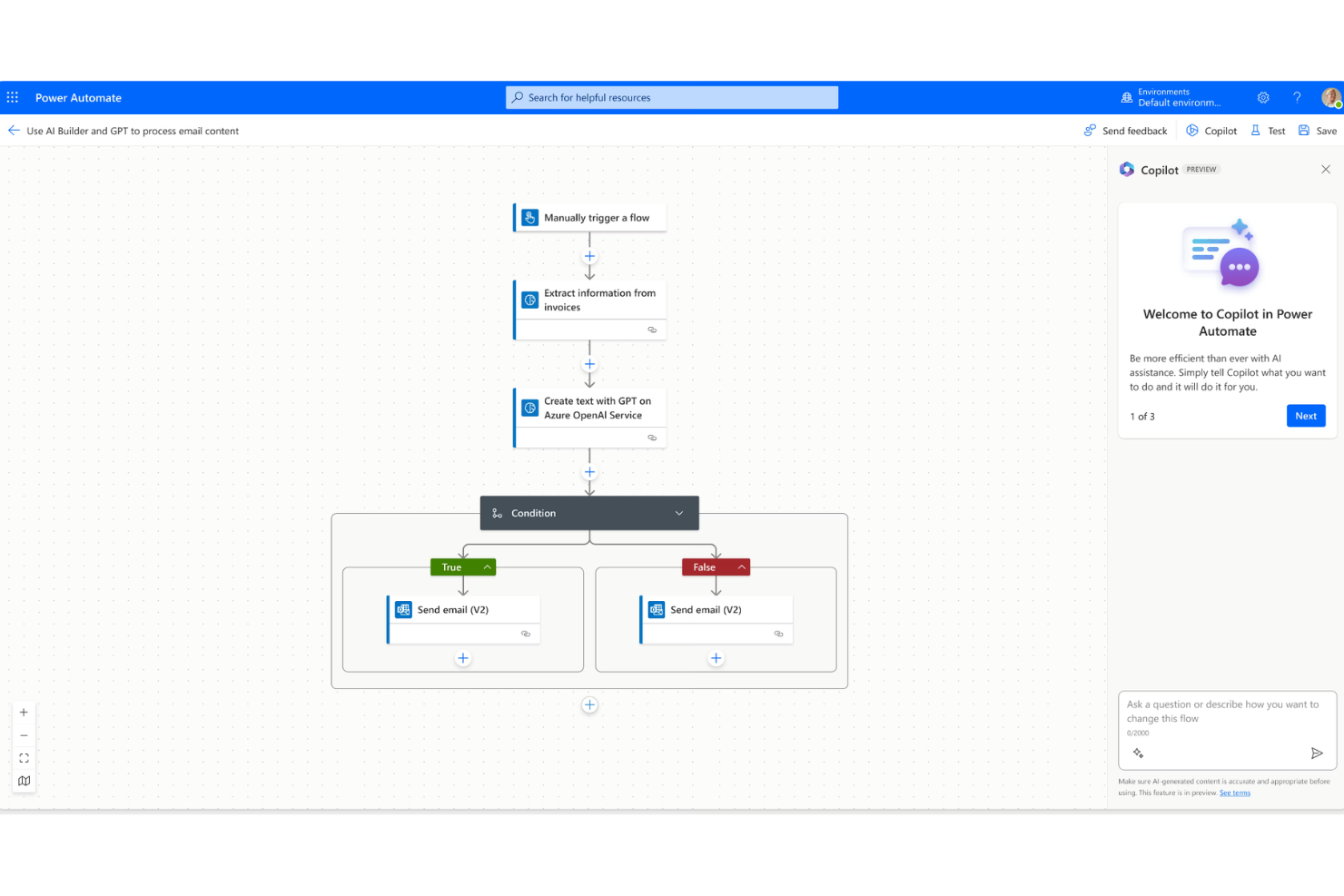
Microsoft Power Automate is a cloud and desktop automation platform that combines workflow automation, RPA, and process mining across cloud services and legacy on-premise applications.
Who Is Microsoft Power Automate Best For?
Microsoft Power Automate is a natural fit for mid-to-enterprise teams already running Microsoft 365, Azure, or Dynamics 365 who want to automate workflows without leaving that ecosystem.
Why I Picked Microsoft Power Automate
I picked Microsoft Power Automate because its desktop flows give my team genuine RPA access to legacy apps that don't have APIs, like older ERP screens or internal web portals, without writing code. What I find compelling is how attended and unattended desktop flows run within the same platform as cloud flows, so I'm not switching tools to handle both human-in-the-loop and fully autonomous automation. Copilot in Power Automate also lets me describe a flow in plain language and get a working draft to edit, which cuts build time noticeably.
Microsoft Power Automate Key Features
- Process mining: Analyzes event logs from connected systems to surface automation opportunities across existing workflows.
- AI Builder: Lets you add pre-trained AI models, like document processing or sentiment detection, directly into flows without custom ML work.
- Business process flows: Guides users through multi-step processes in a structured sequence to enforce consistent task completion.
- Pre-built flow templates: A library of ready-to-run templates for common automation scenarios across Microsoft and third-party apps.
Microsoft Power Automate Integrations
Microsoft Power Automate has native integrations across the Microsoft ecosystem, including Microsoft 365 and Azure.
Pros and Cons
Pros:
- No-code drag-and-drop flow builder
- Desktop and cloud flows in one platform
- Deep native integration with Microsoft 365 apps
Cons:
- Weak support for non-Microsoft on-premise systems
- Premium connectors locked behind paid plans


Zapier is a no-code automation platform that connects web apps through trigger-based workflows, multi-step Zaps, and AI-powered agents built across its library of app connectors.
Who Is Zapier Best For?
Zapier is a strong fit for ops and revenue teams at SMBs and mid-market companies who need to automate cross-app workflows without involving engineering.
Why I Picked Zapier
I've included Zapier on my shortlist because it's one of the only iPaaS tools I've seen that lets you govern AI agents at the policy level, not just the workflow level. IT admins can define exactly which apps and actions are available, and those rules apply uniformly across MCP clients and SDK callers. I also like the AI guardrails feature, which screens for sensitive data and unsafe inputs before anything is sent or saved across connected systems.
Zapier Key Features
- Paths: Add conditional logic to Zaps so actions branch based on specific field values or filter conditions.
- Formatter: Transform, split, and reformat data between steps without writing code using built-in text, number, and date operations.
- Zapier Tables: Store, retrieve, and update records across Zaps using a built-in database that connects directly to your workflows.
- Transfer: Run bulk data migrations between apps by moving large batches of historical records through a Zap on demand.
Zapier Integrations
Zapier offers over 6,000 native integrations, including Google Sheets, Slack, Salesforce, HubSpot, Gmail, Trello, Asana, QuickBooks, Airtable, Shopify, and Mailchimp, and provides an API for custom integrations.
Pros and Cons
Pros:
- Built-in tables store workflow data
- Multi-step Zaps with branching paths
- Largest app directory with 9,000+ connectors
Cons:
- Extra tasks charged at 1.25x rate
- Task-based pricing escalates at scale

MuleSoft is an iPaaS and API management platform that lets you connect apps, automate data flows, and manage the full API lifecycle across cloud, on-premises, and hybrid environments using both low-code tools and custom code.
Who Is MuleSoft Best For?
MuleSoft is a strong fit for large enterprises with complex integration needs, particularly those managing high volumes of APIs across distributed systems.
Why I Picked MuleSoft
MuleSoft earns its spot on my shortlist because of how deeply it integrates API design, deployment, and governance into a single environment. I picked it specifically for teams managing APIs at scale—MuleSoft's Anypoint Platform lets you design APIs, publish reusable assets to a shared marketplace, and enforce governance policies all in one place. I also like that DataWeave, its native data transformation language, handles complex format conversions without relying on third-party tools.
MuleSoft Key Features
- Anypoint Exchange: A built-in marketplace of pre-built connectors, templates, and reusable assets you can plug directly into your integration flows.
- CloudHub deployment: A fully managed cloud infrastructure that supports auto-scaling, automatic failover, and zero-downtime deployments across 12 global regions.
- Anypoint Omni Gateway: An API gateway that lets you deploy to Docker, Kubernetes, AWS, Azure, GCP, or on-premises from a single control plane.
- MuleSoft MCP: A model context protocol implementation that lets developers turn APIs and Mule apps into MCP servers in just a few clicks.
MuleSoft Integrations
MuleSoft offers native integrations across the Salesforce ecosystem, SAP, ServiceNow, Workday, and NetSuite. MuleSoft Anypoint Platform provides an API for custom integrations.
Pros and Cons
Pros:
- Granular API governance and policy enforcement
- Reusable API assets across teams
- 400+ pre-built connectors on Exchange
Cons:
- Anypoint Studio debugging can be slow
- DataWeave requires dedicated technical expertise
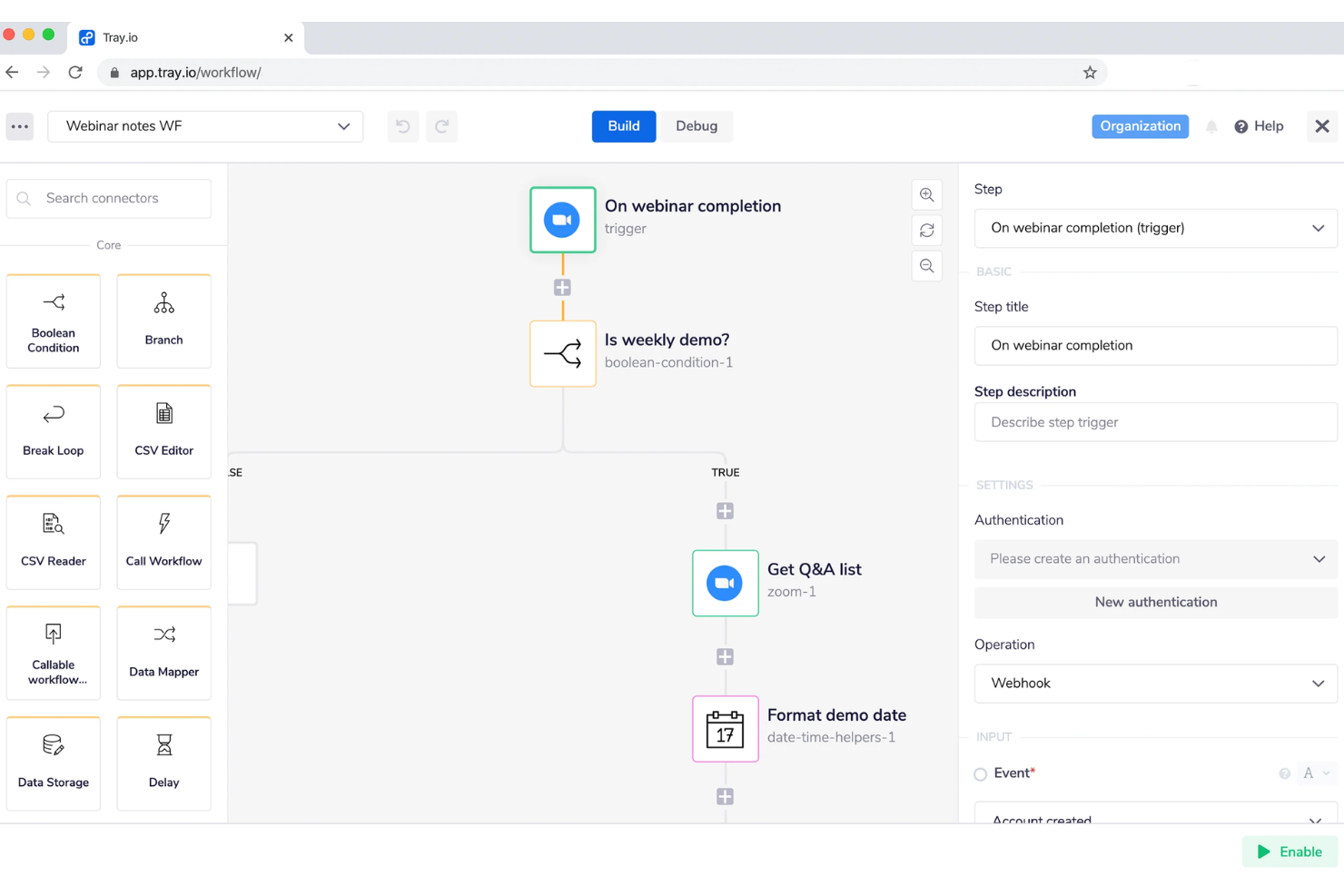
Tray.ai is an AI orchestration platform built around an intelligent iPaaS layer that connects enterprise apps, databases, and AI services through workflow automation, API management, and no-code agent development.
Who Is Tray.ai Best For?
Tray.ai is a strong fit for mid-market and enterprise product and engineering teams who need to embed integration and automation capabilities directly into their own software products.
Why I Picked Tray.ai
I've included Tray.ai in my top picks because it's one of the only iPaaS platforms where you can ship integration capabilities directly inside your own product. The embedded integrations feature lets your customers connect their own tools without ever leaving your app, which is a genuinely different positioning from standard automation tools. I also like the Merlin Agent Builder, which lets IT and business users design, test, and deploy AI agents using a no-code interface built on top of the same connector library your workflows use.
Tray.ai Key Features
- Universal connector: Connect to any API endpoint using a configurable HTTP connector, without waiting for a pre-built integration.
- Data mapping and digital transformation: Transform, filter, and reformat data between systems directly inside the workflow builder using a visual interface.
- Multi-tenant workspace management: Manage separate workflow environments for different customers or business units from a single admin console.
- Event-based triggers: Fire workflows automatically based on webhooks, schedules, or real-time data events from connected systems.
Tray.ai Integrations
Tray.ai offers native integrations, including Salesforce, HubSpot, Slack, NetSuite, Google Sheets, Zendesk, Snowflake, and Microsoft 365. An API is available for custom integrations.
Pros and Cons
Pros:
- SOC 2 Type II and HIPAA-ready compliance
- White-label embedded iPaaS on enterprise tier
- Built-in AI agent builder with guardrails
Cons:
- Debugging multi-branch workflows is difficult
- Has unpredictable costs

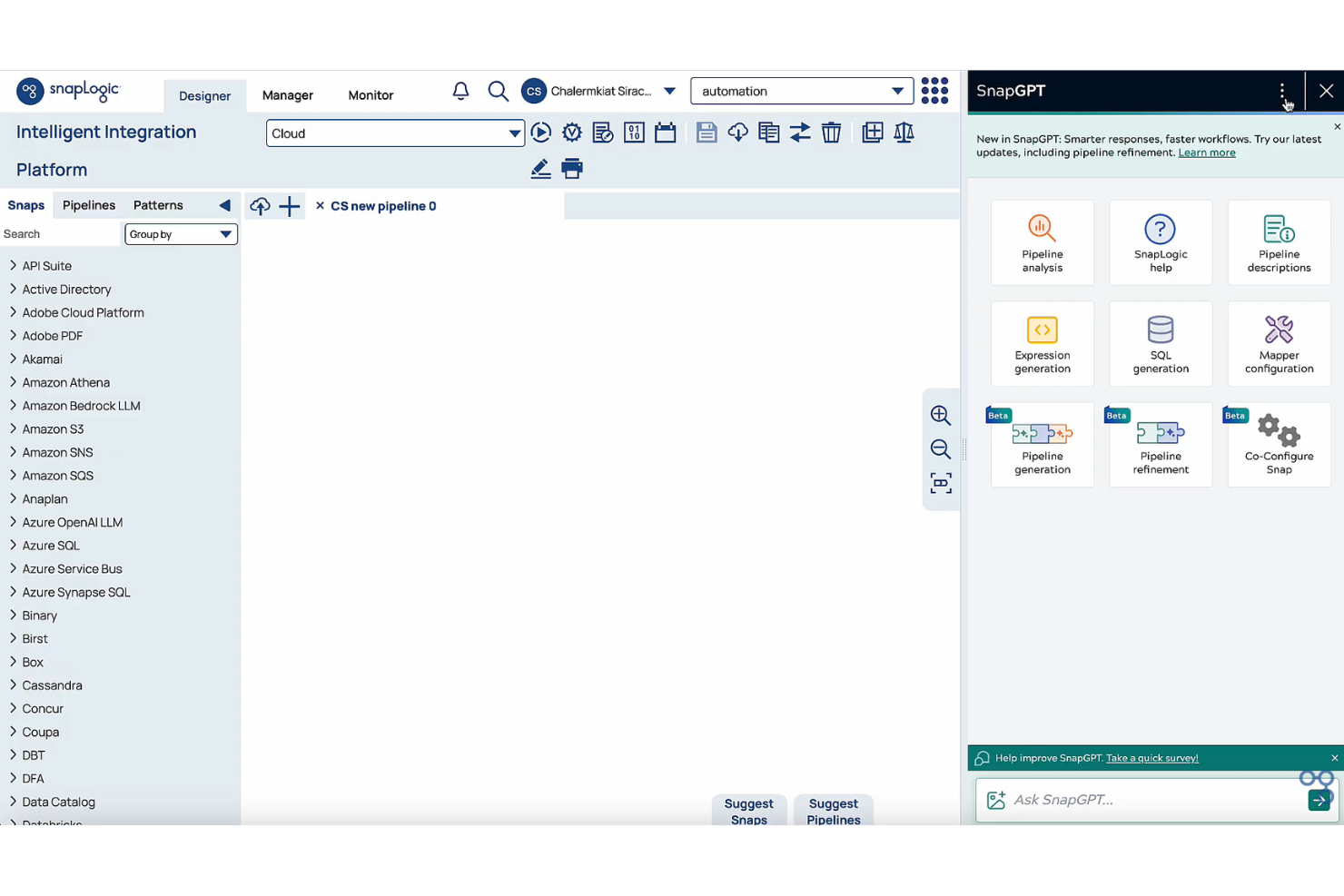
SnapLogic is a cloud-native iPaaS platform that combines application integration, data integration, API management, and AI agent creation in a single no-code/low-code environment.
Who Is SnapLogic Best For?
SnapLogic is a strong fit for enterprise data and integration teams that need to connect cloud apps, data pipelines, and AI workflows without heavy developer involvement.
Why I Picked SnapLogic
SnapLogic earns its spot on my shortlist because of AgentCreator, its no-code environment for building and deploying AI agents that can automate complex workflows across connected systems without writing any code. I also like that SnapGPT lets me describe an integration in plain language and generate a working pipeline from that prompt. Together, these two capabilities make SnapLogic genuinely different from other iPaaS platforms that bolt AI onto an existing workflow builder as an afterthought.
SnapLogic Key Features
- AutoSync: Automates data ingestion from SaaS applications directly into cloud data warehouses without manual pipeline setup.
- SLIM: Identifies and migrates integrations from legacy platforms by analyzing existing workflows and suggesting optimal migration paths.
- API management: Lets you create, manage, and secure APIs with a visual Policy Studio, a developer hub, and built-in governance controls.
- AutoPrep: Cleans, normalizes, and transforms raw data for use in pipelines or AI workflows without writing transformation code.
SnapLogic Integrations
SnapLogic offers native integrations with Salesforce, Workday, NetSuite, Snowflake, ServiceNow, SAP, Google BigQuery, Databricks, and Slack. An API is available for custom integrations.
Pros and Cons
Pros:
- Reusable pipeline templates speed up builds
- Self-hosted Groundplex for on-premise processing
- SnapGPT generates pipelines from plain language
Cons:
- Occasionally hallucinates functions in suggestions
- Version control and CI/CD gaps persist
Andre iPaaS-løsninger
Her er noen flere iPaaS-leverandører som ikke kom med på kortlisten min, men som likevel er verdt å se nærmere på:
- Jitterbit
For fast enterprise implementation
- SAP Integration Suite
For connecting SAP-centric landscapes
- Informatica IDMC
For data quality and cataloging
- Workato
For enterprise MCP and agent orchestration
- Integrately
For pre-built one-click automations
- Exalate
For cross-company two-way issue syncing
- TIBCO
For real-time event-driven architectures
- Albato
For white-label embedded SaaS integrations
- APPSeCONNECT
For ERP-centric mid-market businesses
- Oracle Integration
For Oracle Cloud ERP and HCM workflows


How I Evaluate iPaaS Solutions
I split my evaluation into two layers: the baseline capabilities a tool must have to qualify—like syncing Jira to Salesforce—and the differentiators that separate strong options from the rest.
Core Functionality (Table Stakes For This List)
When I'm selecting tools for my list, I rank each one on a scale from 0 (does not offer the functionality) to 5 (excels in this area) for each core functionality listed below. Then, I calculate the tool's total score into a percentage. Each tool needs to achieve a minimum total score of 65% to be considered for inclusion.
- Pre-Built Connector Library: I check how many connectors ship out of the box and whether key PM tools like Jira, Asana, Monday, and Smartsheet are covered natively.
- Workflow Automation Engine: Multi-step, conditional workflows matter here—like auto-creating a Jira ticket when a Salesforce deal closes and notifying Slack.
- Data Mapping & Transformation: I evaluate whether the tool supports field-level mapping and format conversion, such as syncing custom fields between ClickUp and HubSpot.
- Real-Time & Batch Sync: Both event-driven triggers and scheduled batch runs should be available so teams can match sync frequency to each workflow's urgency.
- API Management Tools: I look for the ability to build, expose, and secure custom API endpoints for cases where a native connector doesn't exist yet.
- Monitoring & Error Handling: Dashboards, alerting, and automated retry logic are what I evaluate—especially for high-volume flows where a silent failure can stall a sprint.
Once I have a list of tools that meet the criteria, I consider what sets each platform apart.
Differentiating Factors (What Sets Vendors Apart)
Here's how I compare and contrast different vendors:
Standout Features
A low-code or no-code builder matters for PMO teams who want to connect Asana to their finance system without filing a dev ticket. Bi-directional sync is another feature I evaluate closely—keeping task status mirrored between tools like Jira and Monday without creating duplicates saves hours of manual cleanup. Pre-built templates for common PM scenarios, like syncing a CRM deal stage to a project kickoff workflow, can cut setup time from days to minutes.
Beyond Features
Pricing transparency is something I always check—iPaaS vendors structure costs around connectors, task volume, or data throughput, and surprises at scale can blow a PMO's budget. Security and compliance posture also gets close attention, especially SOC 2 and GDPR certifications, since project data often flows between systems that hold sensitive client or personnel information. I also evaluate onboarding support and documentation quality, because even the best platform stalls adoption if your team can't self-serve past the initial setup.
Slik velger du iPaaS-løsninger
Det er lett å gå seg vill i lange funksjonslister og komplekse prisstrukturer for integrasjonsløsninger. For å hjelpe deg med å holde fokus mens du går gjennom den unike prosessen din for programvarevalg, får du her en sjekkliste over faktorer du bør ha i bakhodet:
| Faktor | Hva du bør vurdere |
|---|---|
| Skalerbarhet | Kan plattformen håndtere flere brukere, større datamengder og mer kompleks automatisering etter hvert som virksomheten vokser? Se etter tydelige begrensninger og muligheter for oppgradering. |
| Integrasjoner | Støtter verktøyet appene og systemene arbeidsflytene dine er avhengige av, direkte? Er egendefinerte API-tilkoblinger tilgjengelige hvis direkte integrasjon ikke er oppført? |
| Tilpasningsmuligheter | Kan du tilpasse arbeidsflyter, felt og automatiseringslogikk slik at de samsvarer med organisasjonens unike prosesser? Er logikkalternativene og datatilordningen fleksible nok? |
| Brukervennlighet | Er arbeidsflyter enkle å bygge, endre og overvåke uten inngående tekniske ferdigheter? Be om en direktedemonstrasjon for å sjekke om teamet ditt føler seg komfortabelt med grensesnittet. |
| Implementering og innføring | Hvilke ressurser, hvor mye tid og hvilke ferdigheter trengs for å ta automatiseringene i bruk? Finnes det praktisk støtte, dokumentasjon eller en spesialist på innføring? |
| Kostnad | Hvordan er prisnivåene strukturert rundt oppgaver, brukere eller integrasjoner? Dobbeltsjekk eventuelle gebyrer for overskridelse, kostnader per tilkobling eller begrensninger i prøve- og gratisabonnementer. |
| Sikkerhetstiltak | Hvilke kontroller finnes for brukertillatelser, datakryptering og revisjonsspor? Sørg for at løsningen er i samsvar med retningslinjene dine, og se etter uavhengige sikkerhetssertifiseringer. |
| Tilgjengelig kundestøtte | Hvilke kanaler (e-post, chat, telefon) og svartider kan du forvente? Tilbys kundestøtte i arbeidstiden din og i regionen din? |
Hva er iPaaS-løsninger?
iPaaS (Integration Platform as a Service)-løsninger er skybaserte plattformer som kobler sammen, automatiserer og administrerer dataflyter mellom ulike applikasjoner eller systemer. De lar teamet ditt bygge og vedlikeholde integrasjoner uten spesialutvikling, noe som gjør det enklere å samordne arbeidsflyter og holde data konsistente på tvers av verktøy. De fleste iPaaS-plattformer støtter integrasjoner for både lokalt installerte og skybaserte applikasjoner, slik at driften blir smidigere etter hvert som virksomheten vokser og endrer seg.
Funksjoner i iPaaS-løsninger
Når du velger iPaaS-løsninger, bør du se etter følgende viktige funksjoner:
- Ferdigbygde koblinger: Integrer med populære skybaserte og lokalt installerte apper gjennom et bibliotek med ferdige koblinger, slik at oppsettstiden og behovet for koding reduseres.
- Visuell arbeidsflytbygger: Utform, kartlegg og automatiser komplekse arbeidsflyter ved hjelp av et intuitivt dra-og-slipp-grensesnitt med tydelige logikkbaner.
- Verktøy for datatransformasjon: Manipuler, rens og endre data mellom systemer slik at de oppfyller formatkravene til hver applikasjon, uten manuell datahåndtering.
- Synkronisering i sanntid: Hold data oppdatert på tvers av applikasjoner umiddelbart, slik at teamet ditt alltid arbeider med den nyeste informasjonen.
- Feilovervåking og varsler: Følg med på feil eller problemer i integrasjonene dine i sanntid, motta varsler og feilsøk raskt for å minimere nedetid.
- Rollebasert tilgangskontroll: Tildel tillatelser og administrer hvem som kan vise, endre eller distribuere skyintegrasjoner for å holde systemene dine sikre og sørge for samsvar med krav.
- API-administrasjon: Aktiver tilpassede integrasjoner og administrer API-kall, autentisering og bruksgrenser på en sikker måte fra ett sentralt sted.
- Støtte for flere leietakere: Tillat at integrasjoner og data for ulike team eller datterselskaper holdes atskilt innenfor samme plattform, noe som støtter større organisasjoner.
- Revisjonslogger: Oppretthold detaljerte oversikter over all arbeidsflytaktivitet, endringer og brukerhandlinger for samsvars- og feilsøkingsformål.
Vanlige AI-funksjoner i iPaaS-løsninger
I tillegg til standardfunksjonene i iPaaS-løsninger som er nevnt ovenfor, tar mange av disse løsningene i bruk AI med funksjoner som:
- Intelligent datakartlegging: Bruker AI til automatisk å oppdage, samsvare og kartlegge datafelter mellom ulike systemer, noe som reduserer behovet for manuell konfigurasjon og gjør oppsettet av integrasjoner raskere.
- Automatisert avviksdeteksjon: Overvåker kontinuerlig dataflyter og arbeidsflyter ved hjelp av AI for å oppdage uvanlige mønstre, og markerer raskt problemer som kan tyde på integrasjonsfeil eller sikkerhetstrusler.
- Forutseende optimalisering av arbeidsflyter: Analyserer ytelsen til arbeidsflyter og bruksmønstre over tid for å foreslå forbedringer, slik at team proaktivt kan forbedre automatiseringer for større pålitelighet eller effektivitet.
- Bygger for integrasjoner med naturlig språk: Lar brukere beskrive ønskede integrasjoner med vanlig språk, og bruker deretter AI til å generere arbeidsflyter eller automatiseringstrinn, noe som forenkler oppsettet for teammedlemmer uten teknisk kompetanse.
- Selvreparerende automatiseringer: Bruker AI til automatisk å løse vanlige arbeidsflytfeil eller mislykkede dataoverføringer uten menneskelig innblanding, slik at nedetid og manuell feilsøking minimeres.
Fordeler med iPaaS-løsninger
Implementering av iPaaS-løsninger gir flere fordeler for teamet og virksomheten din. Her er noen av fordelene du kan se frem til:
- Forenklede integrasjoner: Sentraliser alle dataflyter og systemtilkoblinger på én plattform, slik at avhengigheten av spesialkode og manuelle integrasjonsprosesser reduseres.
- Raskere utrulling av automatisering: Start og vedlikehold arbeidsflyter effektivt ved hjelp av visuelle byggere og ferdigbygde koblinger, slik at teamet ditt raskt kan reagere på endrede behov.
- Konsistente data i sanntid: Hold informasjon synkronisert på tvers av alle appene og databasene dine, slik at alle arbeider med den mest nøyaktige og oppdaterte innsikten.
- Bedre skalerbarhet: Tilpass automatiserings- og integrasjonsfunksjonene etter hvert som virksomhetens behov utvikler seg, uten å være begrenset av infrastruktur eller manuelle arbeidsmengder.
- Større innsyn i prosessene: Bruk administrasjonsdashbord og revisjonslogger til å følge arbeidsflytstatus, overvåke ytelsen og identifisere problemer før de fører til driftsforstyrrelser.
- Bedre sikkerhet og samsvar: Bruk rollebaserte kontroller, kryptering og sporing av brukeraktivitet for å støtte IT-team, retningslinjer og regulatoriske krav.
- Forbedret feilhåndtering: Oppdag, varsle om og løs integrasjonsfeil automatisk, slik at teamet ditt kan opprettholde uavbrutte forretningsprosesser.
Kostnader og priser for iPaaS-løsninger
Valg av iPaaS-løsninger krever en forståelse av de ulike prismodellene og abonnementene som er tilgjengelige. Kostnadene varierer basert på funksjoner, teamstørrelse, tillegg og mer. Tabellen nedenfor oppsummerer vanlige abonnementer, gjennomsnittsprisene deres og typiske funksjoner som er inkludert i iPaaS-løsninger:
Sammenligningstabell for iPaaS-løsninger
| Plantype | Gjennomsnittlig pris | Vanlige funksjoner |
|---|---|---|
| Gratisabonnement | $0 | Begrenset antall forhåndsbygde koblinger, grunnleggende arbeidsflytautomatisering, brukerstøtte fra fellesskapet og begrenset datamengde. |
| Personlig abonnement | $20-$50/bruker/måned | Flere koblinger, visuell arbeidsflytbygger, moderate oppgavebegrensninger, brukerstøtte via e-post og enkel rapportering. |
| Forretningsabonnement | $60-$150/bruker/måned | Avanserte integrasjoner, datatransformasjon, feilhåndtering, datasynkronisering i sanntid, API-tilgang og rollebaserte tillatelser. |
| Virksomhetsabonnement | $200-$500+/bruker/måned | Tilpassede integrasjoner, prioritert brukerstøtte, avansert sikkerhet, revisjonslogger, skaleringskontroller og støtte for flere leietakere. |
Vanlige spørsmål om iPaaS-løsninger
Her er noen svar på vanlige spørsmål om iPaaS-løsninger:
Hvordan håndterer iPaaS-løsninger datasikkerhet?
PaaS-løsninger bruker vanligvis kryptering, tilgangskontroller og samsvarssertifiseringer for å beskytte dataene dine under overføring og når de er lagret. De fleste plattformer tilbyr også revisjonslogger og rollebaserte tillatelser, slik at teamet ditt kan overvåke aktiviteten og kontrollere hvem som har tilgang til sensitiv informasjon.
Kan iPaaS-løsninger koble sammen både skybaserte og lokale systemer?
Ja, de fleste iPaaS-løsninger er utviklet for å koble skybasert programvare sammen med lokale systemer. Dette gjør det mulig for teamet ditt å automatisere arbeidsflyter og dele data mellom eldre systemer og moderne skyapper uten å være avhengig av manuell import eller eksport, noe som reduserer datasiloer.
Hva er de viktigste forskjellene mellom iPaaS og tradisjonell integrasjon?
iPaaS er skybasert og har forhåndsbygde koblinger, visuelle byggere og forenklet administrasjon, noe som gjør løsningen raskere å ta i bruk og enklere å vedlikeholde enn tradisjonelle, tilpassede integrasjoner. Eldre metoder krever ofte omfattende programmering og infrastrukturadministrasjon, mens iPaaS-plattformer reduserer kompleksiteten og det løpende vedlikeholdsbehovet.
Hvordan støtter iPaaS-løsninger skalering etter hvert som virksomheten vokser?
iPaaS-løsninger tilbyr skalerbare prisnivåer, tilpassbare arbeidsflyter og muligheten til å legge til brukere og koblinger etter hvert som behovene dine utvikler seg. Mange plattformer tilbyr også automatisering av repetitive oppgaver og ressursbegrensninger som du kan justere for å håndtere økt datamengde eller ytterligere integrasjonskrav.
Krever iPaaS-løsninger programmeringskunnskaper?
Nei, de fleste iPaaS-løsninger tilbyr grensesnitt uten kode eller med lite kode, slik at alle i teamet ditt kan sette opp integrasjoner og automatiseringer. Teknisk kunnskap kan likevel være nyttig når du oppretter avanserte eller tilpassede arbeidsflyter, særlig hvis du må koble til nisjeapper via API-er.