

10 beste gratis programvareløsninger for styring av forretningsprosesser i 2026

Beste gratis programvare for forretningsprosessstyring – kortliste


Gratis programvare for forretningsprosessstyring lar deg kartlegge, automatisere og optimalisere arbeidsflyter uten å betale for en lisens – de fleste verktøy tilbyr en gratisversjon eller prøveperiode for å komme i gang. Hvis du ser etter praktiske måter å forbedre teamsamarbeidet, redusere manuelt arbeid og holde prosjekter på rett spor uten å belaste budsjettet, har du kommet til rett sted.
Jeg går gjennom de beste gratis BPM-alternativene, forklarer hva hvert av dem egner seg best til, og hjelper deg raskt med å finne ut hvilke verktøy som passer til teamets behov.
Hvorfor du kan stole på våre programvareanbefalinger
Teamet vårt har testet og anmeldt programvare siden 2012. Vi er selv prosjektledere, så vi vet hvor vanskelig og hvor viktig det er å velge riktig programvare.
I denne guiden har vi vurdert verktøyene gjennom praktisk testing og uavhengig research og gitt dem poeng ut fra våre utvelgelseskriterier. Vi bygger også på innsikt fra ledende eksperter i bransjen og erfarne prosjektledere.
Anmeldelsene våre bygger på vår egen redaksjonelle vurdering. De er ikke et salgsargument.
Ekspertanmeldere:
Sammenligningstabell for gratis programvare for forretningsprosessstyring
Denne sammenligningstabellen oppsummerer prisdetaljene for mine utvalgte gratisprogrammer for forretningsprosessstyring:
| Tool | Best For | Trial Info | Price | ||
|---|---|---|---|---|---|
| 1 | Best for visual request tracking | Free plan available | Pricing upon request | Website | |
| 2 | Best for low-code simplicity | Free plan available; 15-day free trial | Pricing upon request | Website | |
| 3 | Best for collaborative diagram creation online | Free plan + 30-day trial available | Pricing upon request | Website | |
| 4 | Best for simulating process outcomes | Free demo available | Pricing upon request | Website | |
| 5 | Best for multilingual process documentation | Free plan available | Pricing upon request | Website | |
| 6 | Best for regulated industries | Free plan available | Pricing upon request | Website | |
| 7 | Best for Java-based developer environments | Free forever | Free forever | Website | |
| 8 | Best for open-source human-centric tasks | Free forever | Free forever | Website | |
| 9 | Best for advanced automation control | Free plan available | Pricing upon request | Website | |
| 10 | Best for complex systems and workflows | Free plan + free demo available | Pricing upon request | Website |
Anmeldelser av den beste gratis programvaren for forretningsprosessstyring
Nedenfor finner du mine detaljerte sammendrag av den gratis programvaren for forretningsprosessstyring som kom med på kortlisten. Anmeldelsene mine gir en detaljert gjennomgang av funksjonene, de beste bruksområdene og integrasjonene til hver plattform, slik at du kan finne den som passer best for deg.

Pipefy
Best for visual request tracking
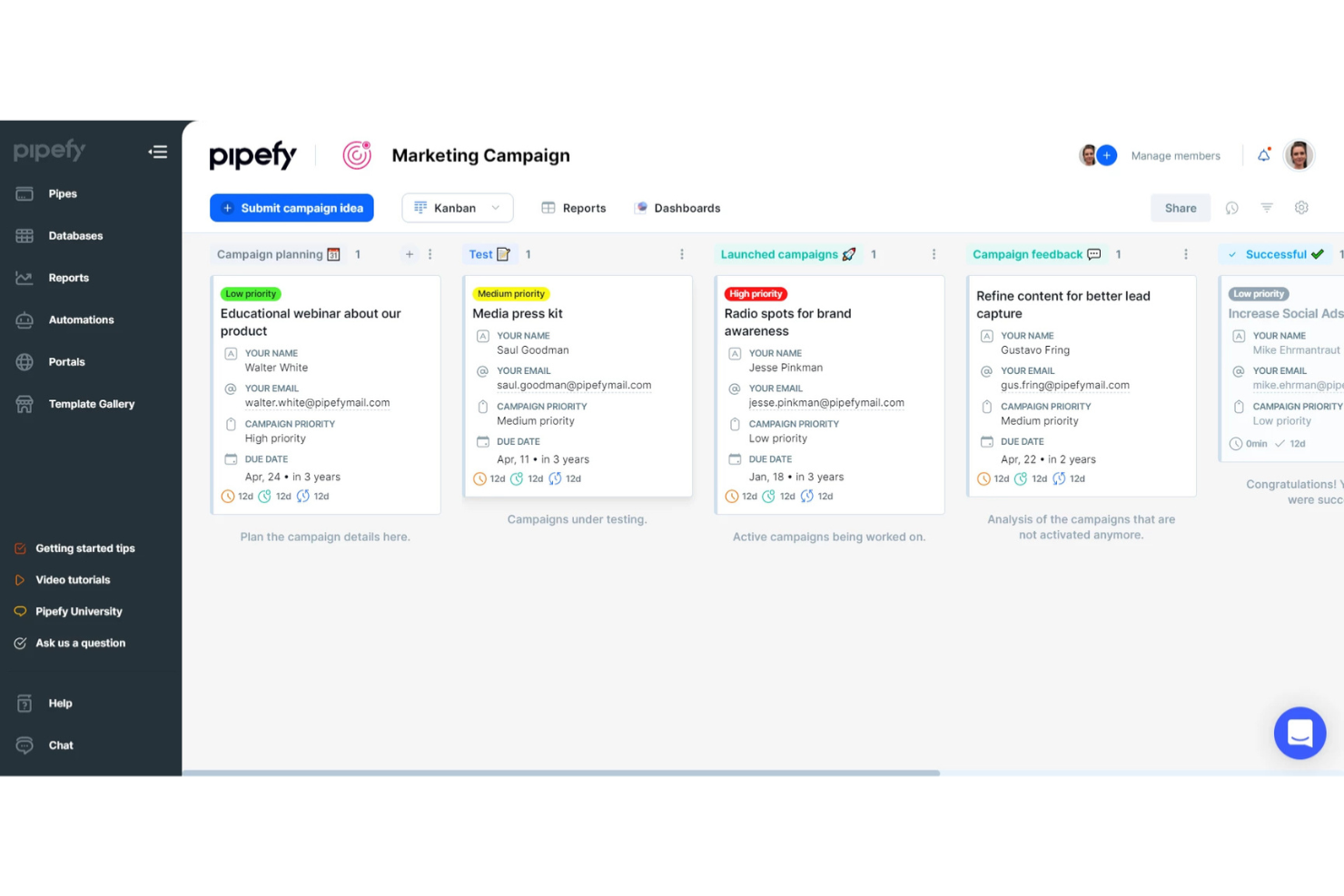
Pipefy is a no-code business process management platform that lets you design workflows, automate repetitive tasks, visualize process stages, and centralize request tracking for teams of all sizes.
Who Is Pipefy Best For?
Pipefy suits operations, finance, and HR teams who want to manage requests and processes visually without relying on IT resources.
Why I Picked Pipefy
I picked Pipefy as one of the best because its Kanban-style boards let my team visually monitor incoming requests at every stage, automate handoffs between teams, and trigger conditional workflows based on form submissions.
Pipefy Key Features
- Form designer: Build custom intake forms with drag-and-drop fields.
- Automated email templates: Send personalized emails triggered by workflow actions.
- Process analytics dashboards: Track process metrics and bottlenecks in real time.
- Role-based permission controls: Limit access to specific workflows and data by user role.
Pipefy Integrations
Pipefy offers native integrations with Slack, GitHub, and Bitbucket. An API is available for custom integrations.
What's Free?
Pipefy offers a free-forever starter plan for up to 10 users and 5 processes. The free plan has limited features, such as restricted integrations and automation options, compared to paid tiers.
Pros and Cons
Pros:
- Custom form designer for intake processes
- Conditional logic for process automation
- Built-in process analytics and dashboards
Cons:
- No built-in document storage repository
- Native integrations available only in paid version

Best for low-code simplicity
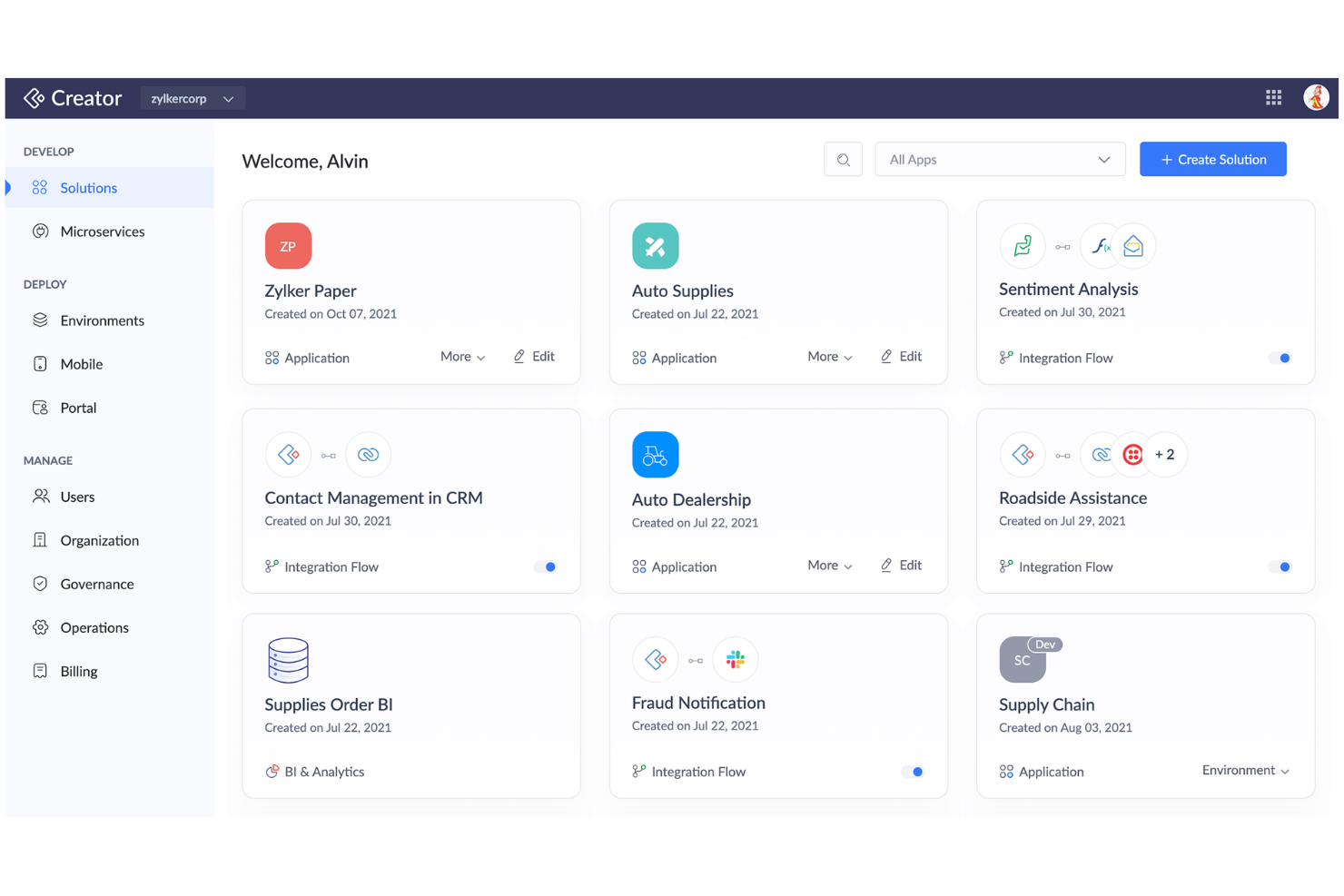
Zoho Creator is a cloud-based business process and workflow management platform where you can design custom workflows, automate routine processes, and build tailored applications using both prebuilt templates and low-code development tools.
Who Is Zoho Creator Best For?
Zoho Creator suits small to mid-sized teams who want to automate processes and quickly build custom business applications without heavy coding.
Why I Picked Zoho Creator
I picked Zoho Creator as one of the best because I can build end-to-end business processes with its drag-and-drop workflow builder, widget-rich app designer, and prebuilt process automation blueprints—making low-code simplicity a reality.
Zoho Creator Key Features
- AI field integration: Add sentiment analysis, OCR, and prediction fields directly into forms.
- Multi-platform app deployment: Launch your apps simultaneously on web, Android, and iOS.
- Role-based access controls: Assign granular permissions to manage users and data securely.
- Custom approval workflows: Configure multi-stage approval processes for tasks and requests.
Zoho Creator Integrations
Zoho Creator offers native integrations with Zoho apps like Zoho CRM, Zoho Books, Zoho Invoice, Google Workspace, Salesforce, QuickBooks, PayPal, Twilio, Razorpay, and connects with Zapier.
What's Free?
Zoho Creator offers a free-forever plan limited to one user and one application with basic features only. Access to advanced integrations, custom branding, and some automation options requires a paid upgrade.
Pros and Cons
Pros:
- Multi-platform deployment with one app build
- AI-driven fields like sentiment analysis
- Includes visual workflow and form builders
Cons:
- No offline app building capabilities
- Free plan limited to one user


Camunda is a cloud-based business process management platform that lets teams design, model, and collaborate on BPMN workflows, decision tables, and process diagrams using web-based tools.
Who Is Camunda Best For?
Camunda suits process analysts and IT teams in midsize to large organizations that need to collaboratively design and model complex business workflows.
Why I Picked Camunda
I picked Camunda because it offers instant, real-time BPMN diagram editing in the browser—my team can co-create, comment, and share process models online. I like using its drag-and-drop modeler with versioning and role-based permissions.
Camunda Key Features
- BPMN standards support: Create and export diagrams using BPMN 2.0 specifications.
- Import/export options: Import existing BPMN diagrams or export completed models as XML or image files.
- Integration with Camunda Platform: Deploy process models directly to process automation engines, including RPA.
- Decision modeling (DMN): Design, edit, and share decision tables alongside process diagrams.
Camunda Integrations
Camunda offers native integrations with the Camunda Platform workflow and decision engines. An API is available for custom integrations.
What's Free?
Camunda offers a free-forever browser-based BPMN and DMN modeler with unlimited diagrams and no user restrictions. You can design, export, and collaborate on diagrams, but automation and advanced features require the paid Camunda Platform.
Pros and Cons
Pros:
- Export diagrams as XML and image files
- Real-time multiuser diagram editing and sharing
- Free browser-based BPMN and DMN modeler
Cons:
- Requires Camunda Platform for process deployment
- No built-in automation or workflow execution


Bizagi is a business process management suite that lets you model, automate, monitor, and optimize processes with tools for process mapping, workflow automation, and process analytics.
Who Is Bizagi Best For?
Process analysts and IT teams in midsize and large organizations needing complex process simulation and automation across departments.
Why I Picked Bizagi
I picked Bizagi as one of the best because I can simulate process outcomes before launching automation and test scenarios with resource changes. It also helps with visualization of bottlenecks with built-in process mapping and analytics.
Bizagi Key Features
- Process modeler: Drag-and-drop interface for building workflow diagrams.
- Form designer: Customize task forms using graphical design tools.
- Collaboration tools: Share process models and gather feedback in real-time.
- Version control: Track changes and manage process model versions.
Bizagi Integrations
Integrations include SAP, Salesforce, SharePoint, Oracle, Microsoft Dynamics, Outlook, Dropbox, Box, and Google Drive.
What's Free?
Bizagi offers a free-forever plan with Bizagi Modeler, allowing unlimited process modeling and export. Automation, collaboration, and integration features are only available on paid plans.
Pros and Cons
Pros:
- Built-in analytics for process improvement
- Advanced workflow automation for large enterprises
- Process simulation with visual modeling tools
Cons:
- Mobile capabilities are limited on free tier
- Cloud automation features require paid plan

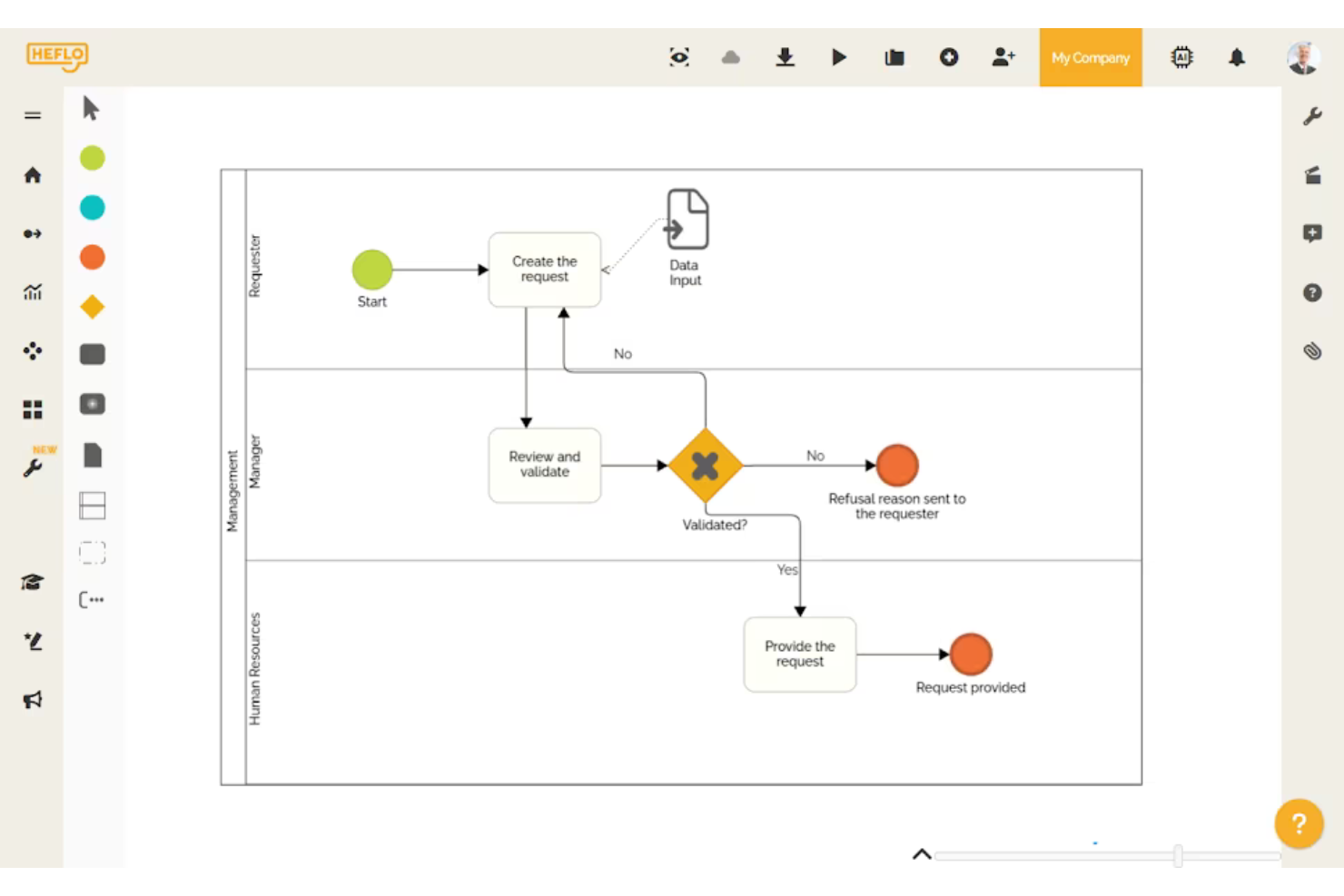
Heflo is a cloud-based business process management software that offers visual BPMN 2.0 process modeling, process documentation, workflow automation, and collaboration tools for teams managing and documenting business processes.
Who Is Heflo Best For?
Heflo is a good fit for process analysts and documentation managers in multinational organizations who need to create, share, and manage standardized process documentation.
Why I Picked Heflo
I picked Heflo as one of the best because I can automatically generate process documentation in multiple languages and publish process maps as interactive web portals. I regularly use its BPMN 2.0 modeling and multi-language documentation features.
Heflo Key Features
- Workflow automation: Design and trigger automated workflows for business processes from within the platform
- Role-based access control: Assign and manage user permissions at each step of a process
- Process version control: Track changes, manage revisions, and restore previous versions of process maps
- Cloud-based collaboration: Work with team members in real time on process modeling and edits
Heflo Integrations
Native integrations are not clearly documented.
What's Free?
Heflo offers a free-forever plan that includes BPMN process modeling, process documentation, and cloud storage. The free plan is limited to two users and does not include workflow automation or advanced automation features.
Pros and Cons
Pros:
- Multi-language interface and documentation
- Auto-generation of process documentation
- Free plan supports basic modeling needs
Cons:
- No built-in task management tools
- Limited process automation on free plan


Flowable is an open-source business process management suite that lets you model, automate, and monitor workflows, case management, and business rules with BPMN, DMN, and CMMN standards.
Who Is Flowable Best For?
Flowable is a strong fit for compliance-driven organizations in banking, insurance, government, and healthcare that require enterprise-grade workflow automation.
Why I Picked Flowable
I picked Flowable as one of the best because I can model BPMN, CMMN, and DMN flows together and leverage audit-ready tools built for regulated sectors. I've used its granular access controls and detailed audit trails to address compliance needs directly.
Flowable Key Features
- REST API support: Connects processes to other applications and services using standard web protocols.
- Embedded task forms: Lets users design and deploy interactive forms within workflow tasks.
- Process versioning: Supports management of multiple iterations of process models.
- Process monitoring dashboard: Visualizes process execution metrics with real-time dashboards and reports.
Flowable Integrations
Flowable offers native integration with Elasticsearch and provides an API for custom integrations.
What's Free?
Flowable offers a free, open-source community edition that is free forever. The free version lacks premium support and some advanced enterprise features like clustering, advanced analytics, and extended connectors.
Pros and Cons
Pros:
- Customizable task forms with UI designer
- Supports case management and advanced workflows
- Strong audit logging and compliance features
Cons:
- No built-in AI or machine learning tools
- Reporting requires paid version of Flowable

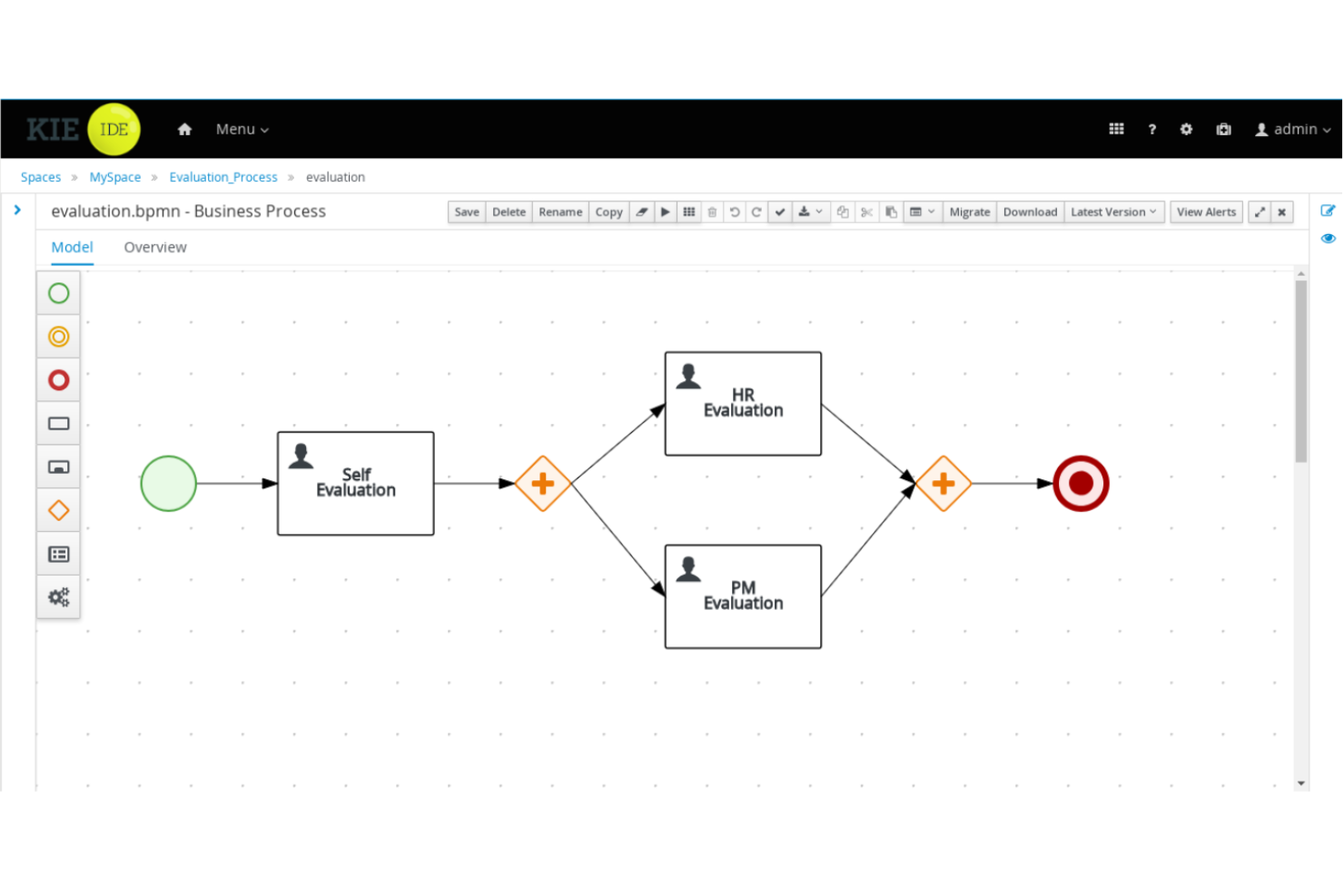
jBPM is an open-source business process management suite distributed under the Apache License 2.0. It’s for Java developers that provides process modeling, workflow automation, rules management, and event processing.
Who Is jBPM Best For?
Java development teams or enterprises that want to embed process management directly into custom software applications.
Why I Picked jBPM
I picked jBPM as one of the best because it lets my developers design, execute, and monitor business processes right inside Java apps. I use its flexible BPMN modeling, workflow automation, and embedded process engine to tightly integrate process logic with code.
jBPM Key Features
- Form modeler: Design and customize user task forms directly within the process workflow.
- Human task management: Delegate tasks to users and track progress using the integrated worklist.
- Advanced rule engine: Incorporate business rules with Drools for complex decision logic.
- REST and Java APIs: Integrate processes with external systems using robust API options.
jBPM Integrations
jBPM supports custom integrations via REST and Java APIs.
What's Free?
jBPM is offered as a free, open-source business process management suite with no user or feature limitations. You can use it indefinitely without subscription costs or trial expiration.
Pros and Cons
Pros:
- Embeddable process engine for Java apps
- Supports BPMN 2.0 and DMN standards
- Open-source and free for developers
Cons:
- Lacks built-in cloud deployment options
- Requires Java expertise to implement

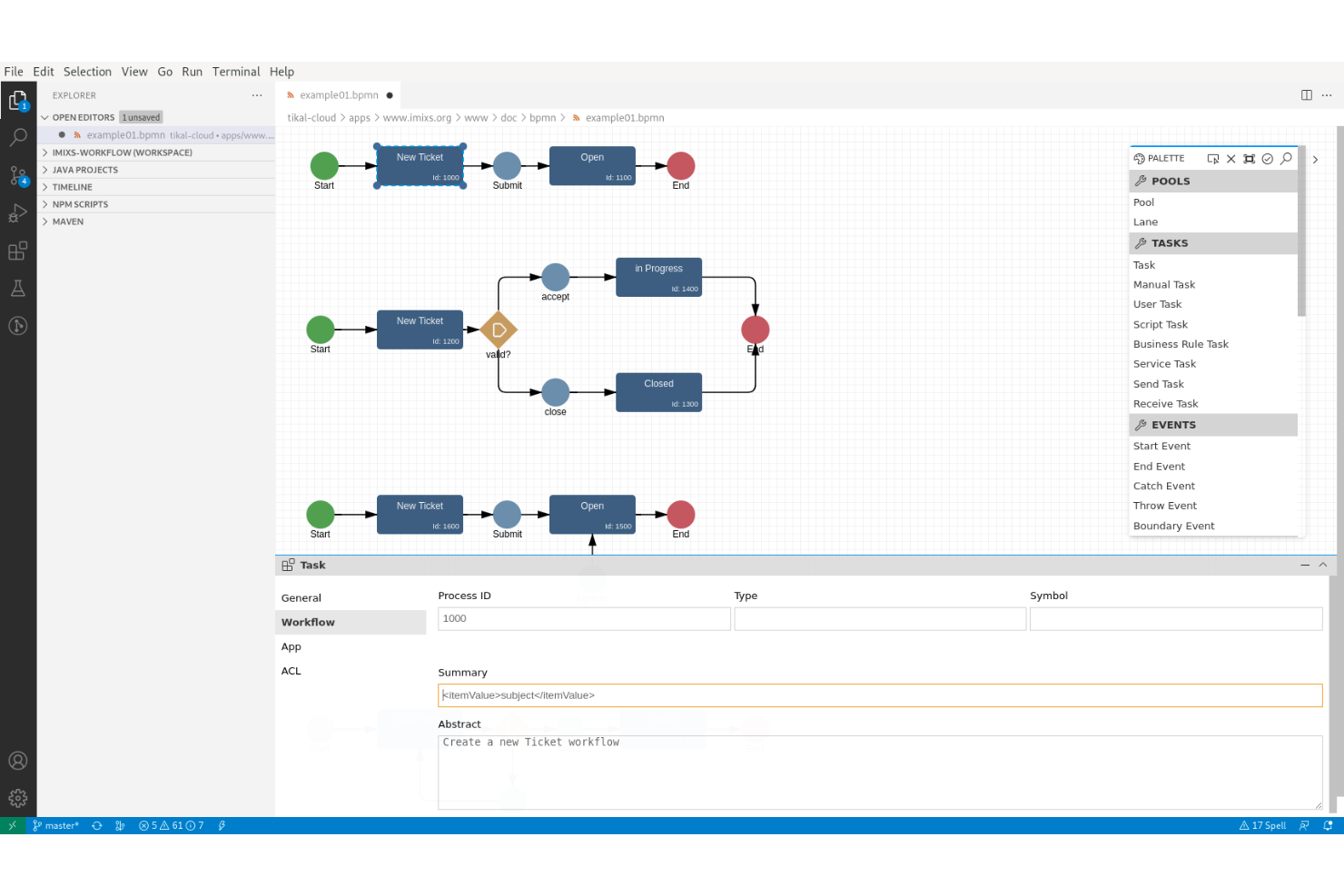
Imixs-Workflow is an open-source business process management suite focused on modeling, automating, and tracking human-centric workflows for organizations and IT teams.
Who Is Imixs-Workflow Best For?
Designed for IT teams and organizations that need to model and automate complex workflows using open-source software.
Why I Picked Imixs-Workflow
I picked Imixs-Workflow as one of the best because it's open-source and puts a clear focus on supporting human-centric task management. I like that I can model workflows, handle approvals, and incorporate complex decision points all within a fully auditable environment.
Imixs-Workflow Key Features
- BPMN 2.0 modeling: Design custom workflows using a standard process modeling language.
- RESTful API support: Integrate workflows with existing systems and applications through APIs.
- Role-based access control: Limit access and actions based on user roles and permissions.
- Document management integration: Attach and manage files directly within workflows.
Imixs-Workflow Integrations
Imixs-Workflow offers an API for custom integrations.
What's Free?
Imixs-Workflow is completely free and open-source, with no feature or user restrictions. All core workflow modeling and management components are included under the open-source license.
Pros and Cons
Pros:
- Human-centric workflow and decision management
- Runs on Java enterprise platforms
- Built-in auditing and workflow tracing
Cons:
- Limited documentation compared to larger projects
- Steeper setup process for non-developers


Activepieces is an open-source workflow automation platform designed for automating business processes with visual flow building, advanced task scheduling, and custom connector support.
Who Is Activepieces Best For?
Workflow builders, system administrators, and developers at startups or small businesses who need broad integration options and customization in business process automation.
Why I Picked Activepieces
I picked Activepieces as one of the best because I can automate advanced multi-step processes using visual workflows, scheduling, and rich variable logic. I like having control over error handling and using custom code or webhooks where needed.
Activepieces Key Features
- Drag-and-drop workflow builder: Build and edit automation flows visually without code.
- Built-in app integrations: Connect to platforms like Slack, Google Sheets, and Notion.
- On-premises deployment option: Install and run Activepieces in your own environment.
- Open-source platform: Access source code and contribute or customize components.
Activepieces Integrations
Activepieces offers native integrations with Google Sheets, Notion, Slack, Discord, Telegram, and Twilio. An API is available for custom integrations.
What's Free?
Activepieces offers a free plan with 10 free active flows and unlimited runs. The platform also has a self-hosted community edition with core features.
Pros and Cons
Pros:
- Custom code step for complex automations
- Built-in native integrations with popular tools
- Drag-and-drop workflow builder
Cons:
- Community support may be inconsistent
- Limited templates compared to competitors
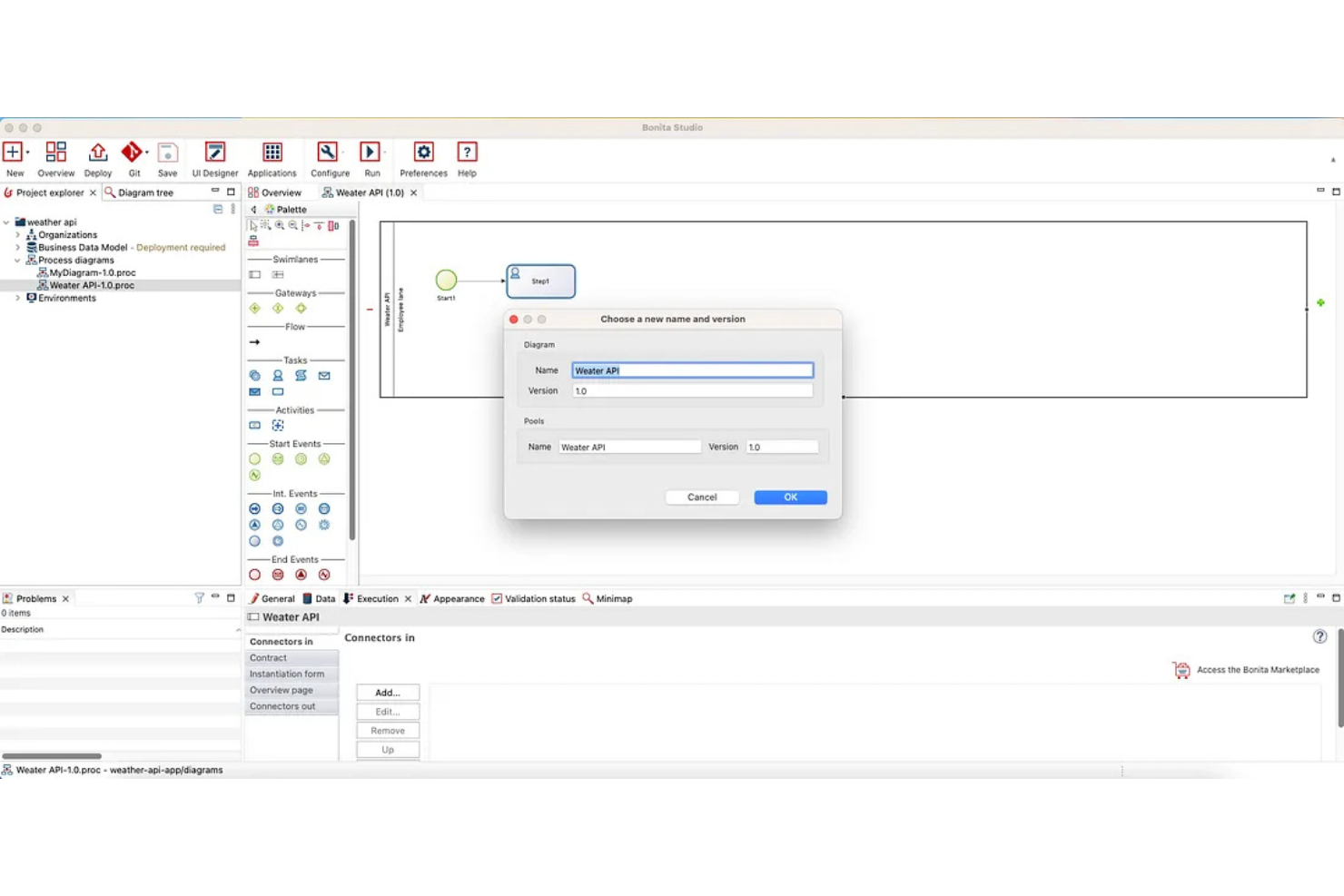
Bonita BPM (formerly Bonitasoft) is a business process management suite with an open-source version. It lets you design, automate, and optimize process workflows, integrate with external systems, and build complex application logic within a flexible development environment.
Who Is Bonita BPM Best For?
Bonita BPM suits midsize and large companies with development teams managing sophisticated, multi-system process automation projects.
Why I Picked Bonita BPM
I picked Bonita BPM as one of the best because I can model, automate, and optimize complex, multi-system workflows with its BPMN engine, extensive API access, and strong support for custom business logic.
Bonita BPM Key Features
- Visual process designer: Drag-and-drop interface for building custom workflows.
- Form builder: Create and customize user task forms within process applications.
- Process monitoring dashboard: View real-time metrics and monitor workflow execution.
- Connector library: Integrate systems out-of-the-box with built-in connectors.
Bonita BPM Integrations
An API is available for custom integrations.
What's Free?
Bonitasoft offers a free community edition with unlimited users. Some advanced features, connectors, and scalability options are only available in paid subscription plans.
Pros and Cons
Pros:
- Extensive automation tools and scripting options
- Custom connectors for external systems possible
- Visual workflow and process modeler included
Cons:
- On-premises installation requires server resources
- Initial setup can require developer support
Annen gratis programvare for forretningsprosessstyring
Her er noen flere gratis alternativer for forretningsprosessstyring som ikke kom med på kortlisten, men som likevel er verdt å ta en titt på:
- Activiti
For embedding lightweight engines
- ADONIS:Community Edition
For AI-based process modeling
- Smartsheet
For enterprise-scale integrations
- Wrike
For visual project tracking with Gantt charts
- monday AI Workspace
For building custom workflow apps without code
- ProcessMaker
For AI-powered process documentation
- Appian
For automating complex, regulated operations
- Bitrix24
For unlimited free users on one account
- Lark Base
For all-in-one collaboration workspaces
- AgilePoint
For cross-platform governance and compliance


How I Evaluate Free Business Process Management Software
I look at free BPM tools in two layers: the baseline a vendor must meet—like mapping a project intake process or automating approval routing—and the differentiators that set strong tools apart.
Core Functionality (Table Stakes For This List)
When I'm selecting tools for my list, I rank each one on a scale from 0 (does not offer the functionality) to 5 (excels in this area) for each core functionality listed below. Then, I calculate the tool's total score into a percentage. Each tool needs to achieve a minimum total score of 65% to be considered for inclusion.
- Free Tier Availability: I check whether the tool offers a genuinely usable free plan—not just a 14-day trial—that supports enough users and processes for a small project team to run real workflows.
- Process Modeling & Mapping: Visual design tools matter here, so I evaluate whether you can map a multi-step process like a project intake flow using flowcharts, swim lanes, or BPMN-style elements.
- Workflow Automation: I look for the ability to automate recurring steps like approval routing, status changes, or deadline-triggered notifications without writing custom code.
- Project Process Templates: Pre-built templates for common project workflows—like change requests, sprint retrospectives, or delivery handoffs—save significant setup time, so I check each tool's library.
- Collaboration & Task Management: Teams need to work inside these processes together, so I evaluate multi-user task assignment, role-based access, and in-context commenting on process steps.
- Process Monitoring & Reporting: Dashboards that surface where work is stuck—like an approval bottleneck delaying a release—help me gauge whether a tool offers actionable visibility into process health.
Once I have a list of tools that meet this criteria, I consider what sets each platform apart.
Differentiating Factors (What Sets Vendors Apart)
Here's how I compare and contrast different vendors:
Standout Features
Low-code form builders are a major differentiator—I look for tools that let you build custom project intake or approval forms without pulling in a developer. Version control and audit trails also carry weight, especially when a PMO needs to trace how a delivery process changed across quarters or project phases. AI-assisted process generation is newer to the space, but tools that can draft a workflow from a plain-language description save real setup time when you're standardizing dozens of processes.
Beyond Features
Free plan limits matter more than most buyers expect. I check whether caps on users, processes, or storage will block a growing team from running real workflows—like when a five-person PMO hits a user ceiling mid-sprint. Integration with project management tools is equally important; a BPM tool that connects to Jira, Asana, or Monday.com keeps process data flowing where your team already works. I also evaluate upgrade paths, because the best free tools make it easy to migrate processes to paid tiers without rebuilding everything from scratch.
Slik velger du gratis programvare for forretningsprosessstyring
Det er lett å gå seg vill i lange funksjonslister og kompliserte prismodeller. For å hjelpe deg med å holde fokus mens du går gjennom den unike prosessen med å velge programvare, får du her en sjekkliste over faktorer du bør ha i tankene:
| Faktor | Hva du bør vurdere |
| Skalerbarhet | Vil dette verktøyet støtte prosessvolumet og brukerøkningen din om seks til tolv måneder uten å tvinge deg til å oppgradere til en betalingsversjon? |
| Integrasjoner | Fungerer det direkte med appene teamet ditt allerede bruker, for eksempel Slack, Google Workspace eller CRM-systemet ditt? |
| Tilpasningsmuligheter | Kan du tilpasse prosessflyter, roller, skjemaer og varsler uten avansert IT-støtte eller programmeringskunnskaper? |
| Brukervennlighet | Vil nye brukere – særlig ansatte uten teknisk bakgrunn – forstå hvordan de raskt og trygt kan starte og endre prosesser? |
| Implementering og opplæring | Følger det med opplæringsressurser, maler eller veiledning i appen, slik at teamet kan komme i gang med minimalt driftsavbrudd? |
| Kostnad | Hva er gratisversjonens absolutte begrensninger (brukere, prosesskompleksitet eller automatiseringsutløsere), og når vil du nå dem? |
| Sikkerhetstiltak | Vil plattformen holde prosessdataene dine private? Se etter kryptering, støtte for SSO og informasjon om datalagring. |
| Tilgjengelig kundestøtte | Kan du få hjelp når du trenger det i gratisversjonen? Sjekk åpningstider, støttekanaler og aktiviteten i brukerfellesskapet. |
Hva er gratis programvare for forretningsprosessstyring?
Gratis programvare for forretningsprosessstyring (BPM-programvare) er et digitalt verktøy som lar team utforme, automatisere, overvåke og optimalisere arbeidsflyter i virksomheten uten forhåndskostnader. Disse plattformene organiserer oppgaver, godkjenninger og datainnsamling i repeterbare prosesser. Gratisversjoner omfatter vanligvis grunnleggende arbeidsflytautomatisering, samarbeidsverktøy og dokumenthåndtering, men kan ha begrensninger på antall brukere, integrasjoner eller avanserte funksjoner.
Funksjoner
La oss gå gjennom funksjonene som vanligvis finnes i verktøy for styring av forretningsprosesser, og hvilke som vanligvis er inkludert i gratis- og betalingsabonnementer.
Vanlige funksjoner i gratis programvare for styring av forretningsprosesser
- Arbeidsflytdesigner: Lar deg bygge og redigere arbeidsflyter ved hjelp av trinn som kan dras og slippes, og koble sammen oppgaver, skjemaer og godkjenninger i en visuell redigerer.
- Oppgavetildeling: Gjør det mulig å delegere oppgaver til bestemte teammedlemmer og følge fremdriften i hver prosess.
- Skjemautforming: Lar deg opprette egendefinerte inntaksskjemaer for å samle inn strukturerte data fra brukere, ansatte eller kunder.
- Varsler: Sender automatiske varsler til brukere om tildelte oppgaver, kommende frister eller oppdateringer av arbeidsflytstatus.
- Grunnleggende rapportering: Tilbyr enkle oversikter og sammendragsvisninger som viser status for fullføring av prosesser, antall oppgaver eller historikk over individuelle tildelinger.
- Malbibliotek: Tilbyr ferdige prosessmaler som hjelper team med å starte standardiserte arbeidsflyter raskt med minimalt oppsett.
- Mobiltilgang: Gir teammedlemmer mulighet til å se og oppdatere oppgaver ved hjelp av en mobilapp eller nettportal.
- Kommentering: Lar brukere legge til kontekst eller samarbeide i individuelle oppgaver eller trinn i arbeidsflyten ved å publisere kommentarer.
Vanlige funksjoner i betalingsbasert programvare for styring av forretningsprosesser
- Avansert automatisering: Støtter betingede utløsere i flere trinn, planlagte handlinger og kompleks logikk for å automatisere prosesser fra start til slutt.
- Tilgangskontroller basert på roller: Begrenser hvem som kan se, redigere eller godkjenne bestemte oppgaver og arbeidsflyter, basert på forhåndsdefinerte brukerroller eller tillatelser.
- Integrasjonskoblinger: Kobler til eksterne verktøy som CRM-systemer, ERP-systemer eller e-postplattformer ved hjelp av innebygde koblinger eller koblinger fra markedsplassen for å automatisere arbeidsflyter på tvers av plattformer.
- Egendefinert profilering: Lar organisasjoner bruke egne logoer, fargevalg og utforming på grensesnitt, skjemaer og varsler for arbeidsflyter.
- Dokumentbehandling: Tilbyr lagring med versjonskontroll, søk og deling av filer som trengs i forretningsprosesser.
- Prosessanalyse: Leverer detaljert analyse for å spore flaskehalser i arbeidsflyten, måle behandlingstider og identifisere områder som kan optimaliseres.
- Revisjonsspor: Vedlikeholder en fullstendig, eksporterbar logg over all aktivitet på plattformen, noe som støtter samsvar og sporbarhet i prosessene.
- API-tilgang: Gjør det mulig for team å utvikle egendefinerte integrasjoner eller automatisere handlinger ved å koble direkte til plattformens API.
- Enkel pålogging (SSO): Sentraliserer brukerautentisering og forbedrer sikkerheten ved å integrere med organisasjonens identitetsleverandør.
- Prioritert kundestøtte: Gir tilgang til raskere svartider, egne kundestøtteteam eller praktisk hjelp med oppstarten.
Fordeler
Implementering av gratis programvare for styring av forretningsprosesser gir flere fordeler for teamet og virksomheten din. Her er noen av fordelene du kan se frem til:
- Kostnadsbesparelser: Du kan automatisere oppgaver og arbeidsflyter uten kostnadene ved en betalingsløsning, noe som gjør skalering mulig selv med stramme budsjetter.
- Prosessåpenhet: Alle kan se prosessstatus, tildelinger og frister, noe som hjelper team med å holde seg samkjørte og ansvarlige gjennom delte oversikter og varsler.
- Raskere opplæring: De fleste plattformer tilbyr maler, veiledede omvisninger og enkle grensesnitt som hjelper nye brukere raskt i gang og reduserer tiden som kreves til oppsett.
- Bedre samarbeid: Innebygd kommentering, delte skjemaer og oppdateringer i sanntid gjør det mulig for team å samarbeide mer effektivt om forespørsler og godkjenninger.
- Mindre manuelt arbeid: Funksjoner for automatisering av arbeidsflyter og tildeling av oppgaver eliminerer gjentakende e-poster og regneark, slik at det frigjøres tid til oppgaver med høyere verdi.
- Tilgjengelig overalt: Skybaserte og mobilvennlige plattformer lar teamet administrere og oppdatere prosesser fra hvor som helst, noe som støtter fleksibelt arbeid.
- Test før oppgradering: Gratisabonnementer lar deg kontrollere om programvaren passer til behovene dine før du forplikter deg eller ruller den ut til flere brukere.
Kostnader og priser
Jeg forstår at du kom til denne artikkelen på jakt etter de beste alternativene for programvare til styring av forretningsprosesser som er tilgjengelige gratis. Ettersom gratisabonnementer bare tilbyr begrensede funksjoner, er det imidlertid stor sannsynlighet for at du må oppgradere abonnementet ditt senere.
Tabellen nedenfor oppsummerer vanlige abonnementer, gjennomsnittsprisene deres og typiske funksjoner som er inkludert i programvare for forretningsprosessstyring:
Sammenligningstabell for programvare for forretningsprosessstyring
| Abonnementstype | Gjennomsnittspris | Vanlige funksjoner |
| Gratisabonnement | $0 | Grunnleggende arbeidsflytdesigner, oppgavetildeling, varsler, begrenset antall brukere og et lite utvalg av malbaserte arbeidsflyter. |
| Personlig abonnement | $5–$15/bruker/måned | Ubegrensede personlige arbeidsflyter, grunnleggende automatisering, tilpasning av skjemaer, mobiltilgang og rapportering på nybegynnernivå. |
| Forretningsabonnement | $15–$30/bruker/måned | Full automatisering av arbeidsflyter, teamadministrasjon, avansert rapportering, integrasjoner og rollebaserte tilgangskontroller. |
| Virksomhetsabonnement | $30–$60/bruker/måned | Tilpassede integrasjoner, prioritert kundestøtte, sikkerhet for virksomheter, prosessanalyse, SSO og avanserte verktøy for samsvar. |
Vanlige spørsmål om gratis programvare for forretningsprosessstyring
Her er noen svar på vanlige spørsmål om gratis programvare for forretningsprosessstyring:
Er gratis verktøy for forretningsprosessstyring sikre?
Ja, de fleste gratis verktøyene for forretningsprosessstyring tilbyr grunnleggende sikkerhetsfunksjoner som kryptert dataoverføring og regelmessige sikkerhetskopier, men avanserte sikkerhetsalternativer som SSO eller detaljerte revisjonslogger er vanligvis forbeholdt betalte abonnementer. Sjekk alltid personvernerklæringen til hvert verktøy før du lagrer sensitive data.
Hvordan kan gratisabonnementer sammenlignes med betalt programvare for forretningsprosessstyring?
Gratisabonnementer dekker vanligvis grunnleggende arbeidsflytverktøy som prosessutforming og oppgavetildeling, men begrenser ofte antallet brukere, automatiseringer, integrasjoner eller avanserte rapporteringsfunksjoner. Betalte abonnementer gir tilgang til mer tilpasning, skalerbarhet, funksjoner for prosjektstyring og støttealternativer etter hvert som behovene dine øker.
Kan du migrere data fra et gratisabonnement hvis du oppgraderer?
Ja, de fleste BPM-plattformer lar deg migrere dataene dine til et betalt abonnement når du oppgraderer. Arbeidsflytene, oppgavene, metodene som er brukt, og postene dine forblir vanligvis intakte, men det er lurt å gå gjennom migreringsprosessen og retningslinjene for dataoppbevaring for hvert verktøy.
Fungerer gratis løsninger for forretningsprosessstyring for fjernteam?
Ja, mange gratis BPM-verktøy er skybaserte og mobilvennlige, noe som gjør dem tilgjengelige for distribuerte team overalt og forbedrer brukeropplevelsen. Se etter plattformer som støtter samarbeid i sanntid og tilbyr mobilapper, slik at ineffektivitet reduseres.
Hva er vanlige begrensninger i gratis programvare for forretningsprosessstyring?
De fleste gratis BPM-løsninger begrenser antallet brukere, arbeidsflyter, automatiseringer og integrasjoner du kan sette opp. Du kan også oppleve begrenset tilgang til kundestøtte, rapportering, prosessmaler eller revisjonsspor. Sjekk begrensningene i hvert leverandørabonnement før du tar i bruk en løsning.