

10 beste faktureringsprogrammer i 2026

Beste faktureringsprogramvare


Faktureringsprogramvare lar deg opprette, sende og følge opp fakturaer, slik at du kan få betalt raskere og holde faktureringen organisert. Hvis du ser etter den beste faktureringsprogramvaren, er du sannsynligvis lei av å følge opp betalinger, holde styr på regneark eller håndtere tungvinte manuelle prosesser.
Det riktige verktøyet kan hjelpe deg med å administrere kunder, automatisere påminnelser og håndtere betalinger – samtidig som du får en tydelig oversikt over kontantstrømmen. I denne veiledningen finner du de beste faktureringsplattformene for 2026, slik at du kan velge den som passer arbeidsflyten din, og endelig få kontroll over faktureringen.
Hvorfor du kan stole på våre programvareanbefalinger
Teamet vårt har testet og anmeldt programvare siden 2012. Vi er selv prosjektledere, så vi vet hvor vanskelig og hvor viktig det er å velge riktig programvare.
I denne guiden har vi vurdert verktøyene gjennom praktisk testing og uavhengig research og gitt dem poeng ut fra våre utvelgelseskriterier. Vi bygger også på innsikt fra ledende eksperter i bransjen og erfarne prosjektledere.
Anmeldelsene våre bygger på vår egen redaksjonelle vurdering. De er ikke et salgsargument.
Ekspertanmeldere:
Sammenligningstabell for faktureringsprogramvare
Denne sammenligningstabellen oppsummerer prisdetaljene for mine beste utvalgte faktureringsprogrammer:
| Tool | Best For | Trial Info | Price | ||
|---|---|---|---|---|---|
| 1 | Best for customizable invoice templates | Free plan available | From $11.67/month (billed annually) | Website | |
| 2 | Best for flexible payment options for clients | Free plan + free demo available | From $0.30/transaction | Website | |
| 3 | Best for tracking time and expenses | Free plan available | From $9.99/month | Website | |
| 4 | Best for automating recurring billing | 7-day free trial | From $9/user/month (billed annually) | Website | |
| 5 | Best for billable time integration | Free trial + free plan available | From $9/user/month (billed annually) | Website | |
| 6 | Best for mobile invoicing on iOS and Android | Free plan available | From $19/month | Website | |
| 7 | Best for client self-service portals | Not available | Free forever plan | Website | |
| 8 | Best for global payment method support | Not available | From 2.9% + 30¢ per transaction | Website | |
| 9 | Best for WhatsApp invoice sharing | Free plan + free demo available | From $8/month (billed annually) | Website | |
| 10 | Best for instant invoice status notifications | Free plan available | From $7.60/month (billed annually) | Website |
Anmeldelser av den beste faktureringsprogramvaren
Nedenfor finner du mine detaljerte sammendrag av faktureringsprogrammene som kom med på listen min. Anmeldelsene mine gir en detaljert gjennomgang av funksjonene, de beste bruksområdene og integrasjonene til hver plattform, slik at du kan finne den beste løsningen for deg.

Best for customizable invoice templates
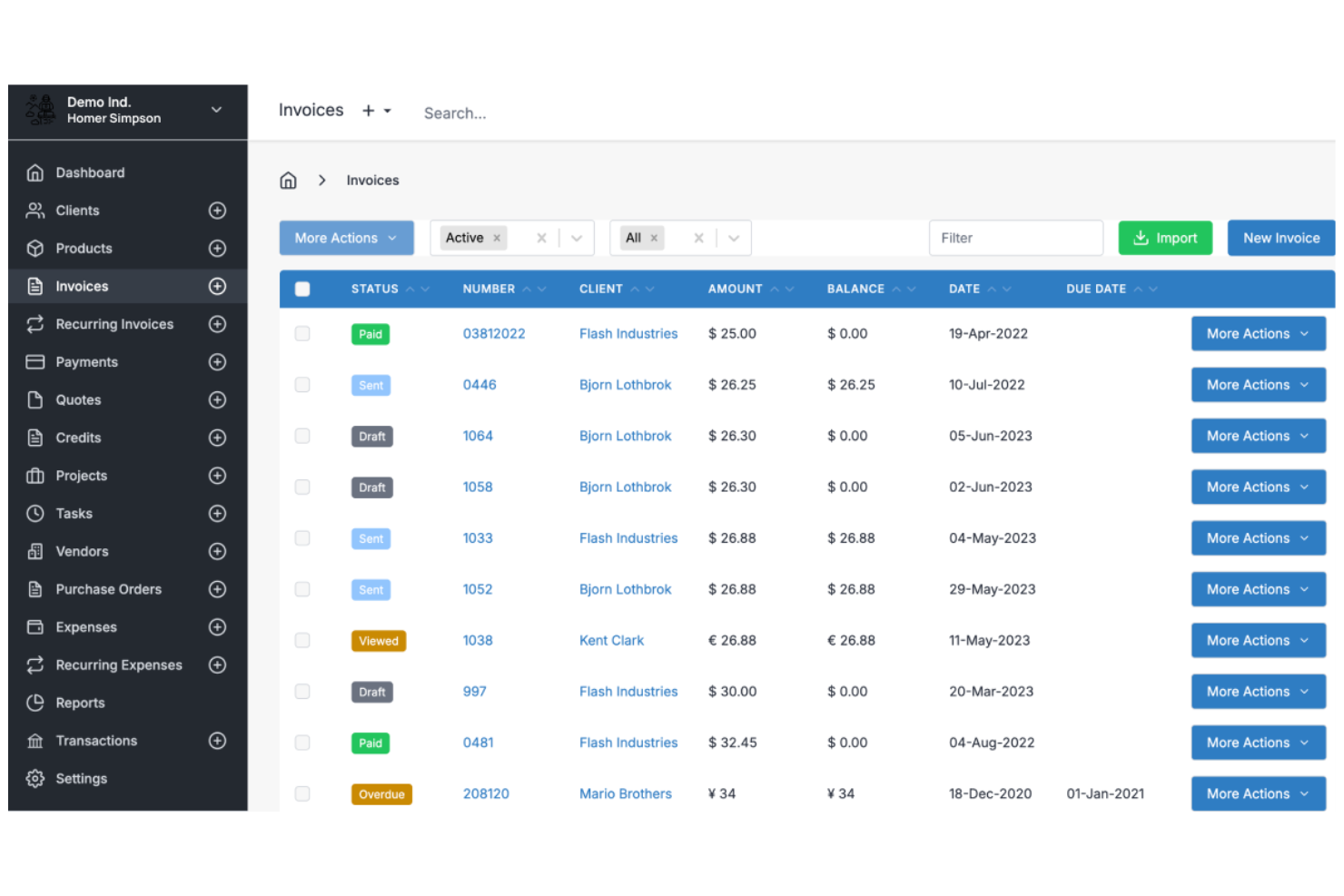
Invoice Ninja is a cloud-based invoicing software platform for freelancers and small businesses that offers invoice creation, time tracking, expense management, and client management features.
Who Is Invoice Ninja Best For?
Freelancers, agencies, and small businesses that want flexible invoice design and client billing tools.
Why I Picked Invoice Ninja
I picked Invoice Ninja as one of the best because I can fully customize invoice templates using its drag-and-drop editor and custom fields. I like that my team can add company branding, adjust layouts, and include dynamic variables for each client. In practice, that means we can create invoices that match our brand and client requirements without workarounds.
Invoice Ninja Key Features
- Time tracking: Track billable hours directly within the platform.
- Expense management: Record and categorize expenses for each client or project.
- Client portal: Give clients access to view invoices, quotes, and payment history.
- Multi-currency support: Send invoices and accept payments in multiple currencies.
Invoice Ninja Integrations
Invoice Ninja offers native integrations with PayPal, Stripe, WePay, and GoCardless for payment processing, and connects with Zapier. An API is available for custom integrations.
Pros and Cons
Pros:
- Live PDF preview during editing
- Extensive custom CSS styling options
- Open source for self-hosted control
Cons:
- Quote-to-invoice conversion requires paid plan
- Technical setup for self-hosted users

PayPal
Best for flexible payment options for clients

PayPal is an online invoicing software that lets you create, send, and manage invoices while offering built-in payment processing for credit cards, debit cards, PayPal, and Venmo.
Who Is PayPal Best For?
Freelancers and small businesses who want to offer clients a wide range of payment options.
Why I Picked PayPal
I picked PayPal as one of the best because I can let clients pay invoices using credit cards, debit cards, PayPal, or even Venmo. I like that I can add partial payments or tips directly to invoices, which is something my clients often request. My team uses PayPal to send invoices to clients in different countries and get paid in multiple currencies without extra setup.
PayPal Key Features
- Invoice tracking dashboard: Monitor sent, viewed, and paid invoices in real time.
- Customizable invoice templates: Add your logo, business details, and itemized charges.
- Automated payment reminders: Schedule reminders to prompt clients for outstanding payments.
- Multi-currency invoicing: Create and send invoices in over 25 currencies.
PayPal Integrations
PayPal offers native integrations with QuickBooks, Xero, WooCommerce, Shopify, BigCommerce, Salesforce, and FreshBooks. An API is available for custom integrations.
Pros and Cons
Pros:
- Offers partial payments and tipping options
- Instant brand recognition for client trust
- Accepts payments via PayPal, Venmo, and cards
Cons:
- Frequent account holds for high amounts
- Transaction fees are higher than competitors
Best for tracking time and expenses
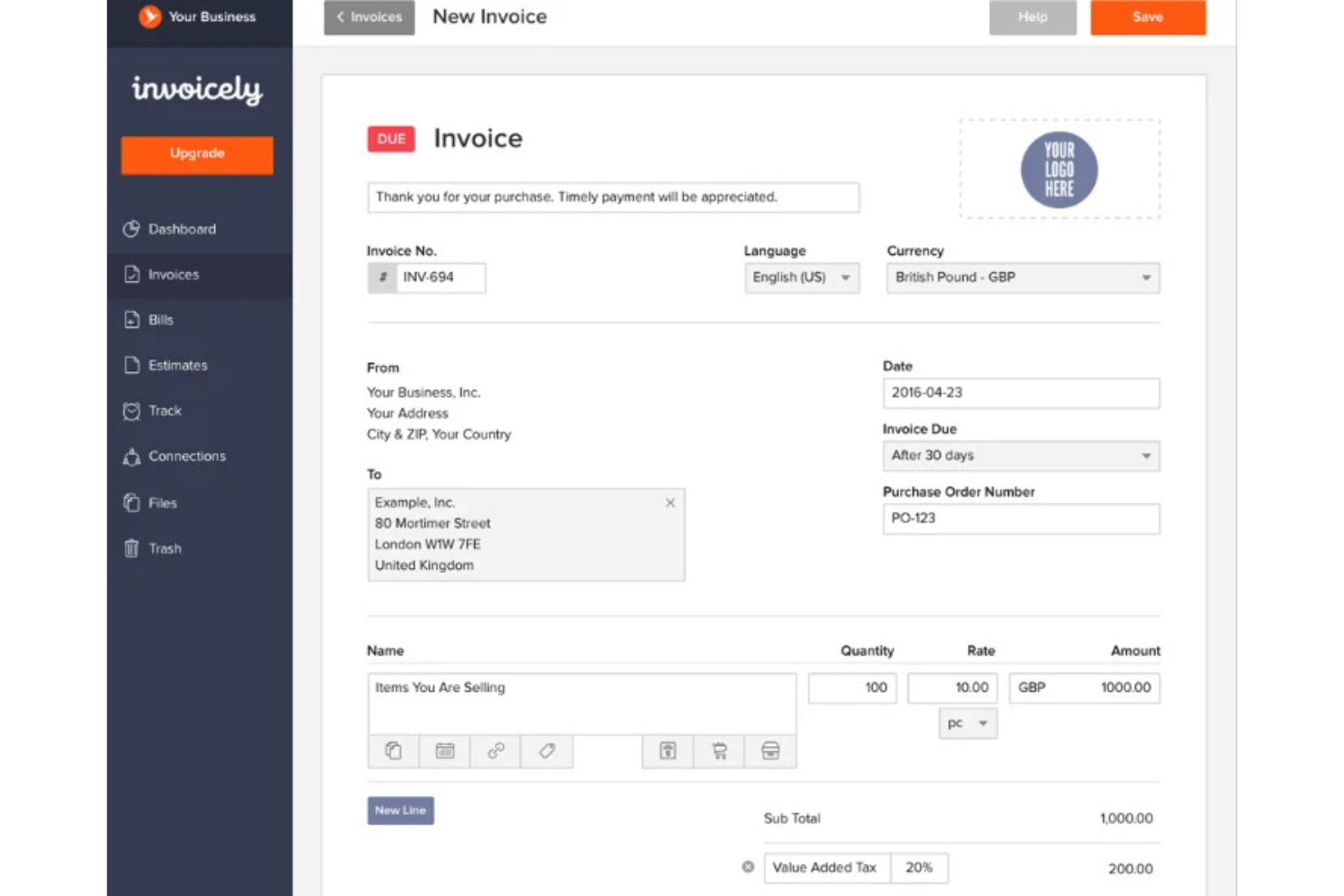
invoicely is a cloud-based invoicing software platform that lets you create invoices, track billable hours, manage expenses, and handle multiple currencies for small businesses and freelancers.
Who Is invoicely Best For?
Freelancers and small businesses that need to track time and expenses alongside invoicing.
Why I Picked invoicely
I picked invoicely as one of the best because it lets me track billable hours and expenses directly within each invoice. I like that I can log time for multiple projects and automatically convert those hours into line items. My team is able to manage mileage, expenses, and recurring invoices all in one place.
invoicely Key Features
- Multi-currency support: Create and send invoices in over 160 currencies.
- Custom branding: Add your logo, colors, and business details to every invoice.
- Online payment integration: Accept payments via PayPal, Stripe, and other gateways.
- Client management: Store client contact details and view invoice history for each client.
invoicely Integrations
invoicely offers native integrations with PayPal and Stripe for payment processing. An API is available for custom integrations.
Pros and Cons
Pros:
- Automated tax and discount calculations
- Log billable hours per project
- Track expenses in multiple currencies
Cons:
- Five client limit on entry plan
- Limited branding on free tier

Bonsai
Best for automating recurring billing
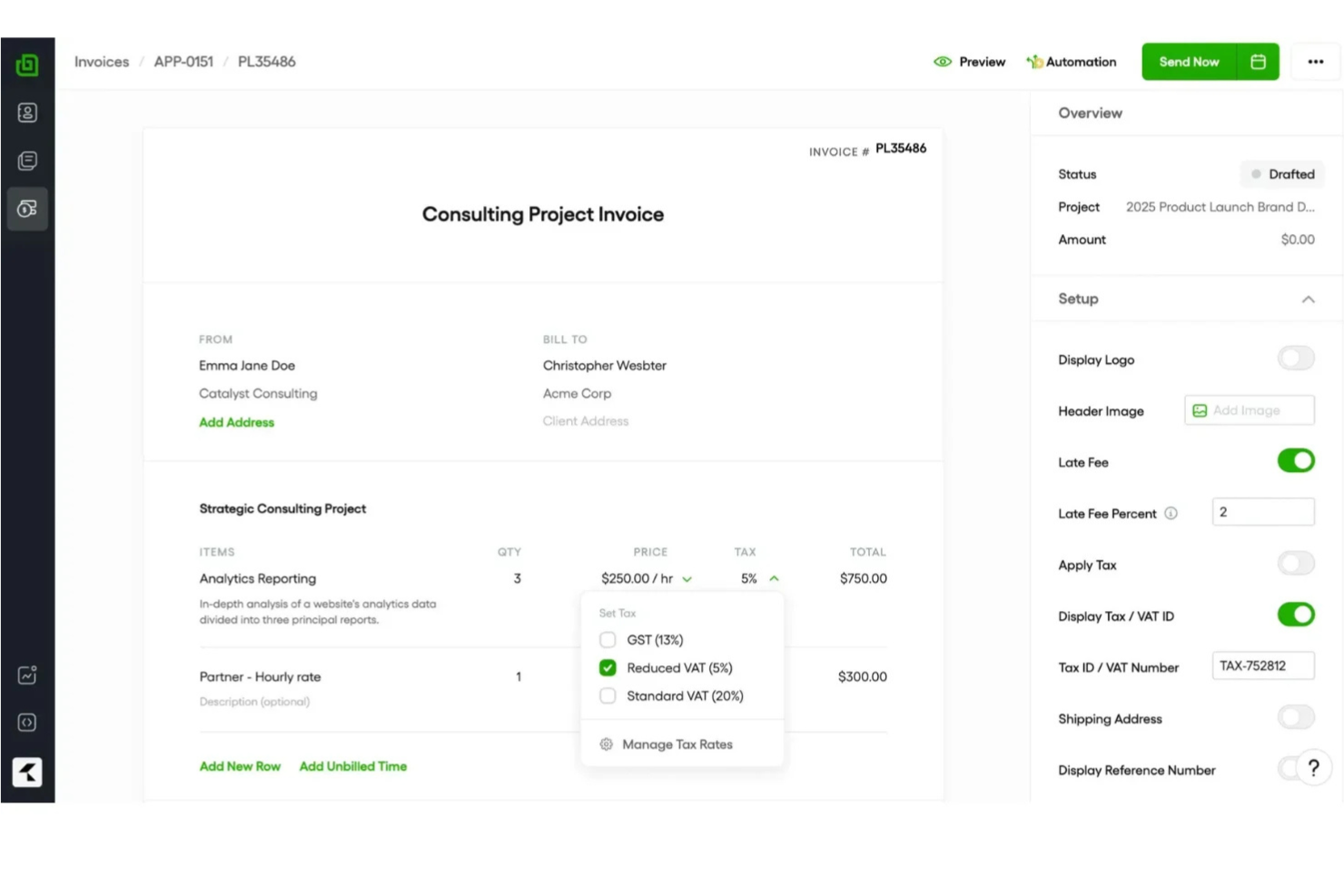
Bonsai is an invoicing software platform for freelancers and small businesses that offers invoicing, contract management, client CRM, time tracking, and automated payment collection in one system.
Who Is Bonsai Best For?
Freelancers and small business owners who need to automate recurring invoices and manage client billing in one place.
Why I Picked Bonsai
I picked Bonsai as one of the best because I can set up automated recurring invoices for clients, so billing happens on schedule without manual work. I like that Bonsai lets me link contracts and proposals directly to invoices, keeping everything organized in one place. My team uses its payment scheduling and auto-reminders to reduce missed payments and keep cash flow predictable.
Bonsai Key Features
- Client portal: Clients can view and pay invoices online.
- Multi-currency support: Issue invoices in different currencies for global clients.
- Expense tracking: Track and categorize expenses alongside invoices.
- Tax calculation tools: Automatically calculate and add taxes to invoices.
Bonsai Integrations
Bonsai offers native integrations with QuickBooks, Zapier, and Calendly, and provides an API for custom integrations.
Pros and Cons
Pros:
- Automated late fee application settings
- Auto-generated invoices from signed proposals
- Smart contracts with integrated e-signatures
Cons:
- Manual project creation from proposals
- No white-labeling on basic plans

Harvest
Best for billable time integration
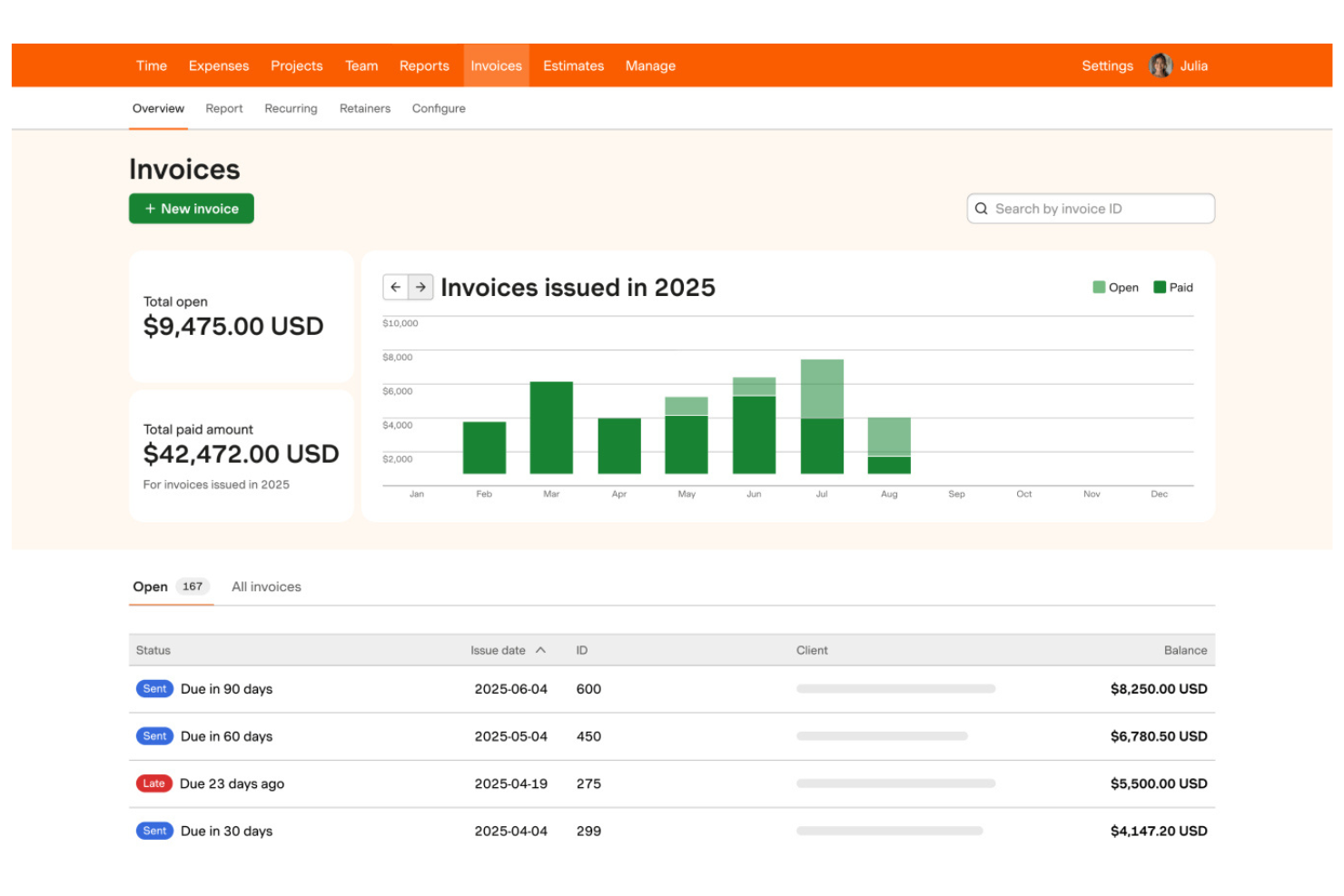
Harvest is a time tracking and invoicing software that lets teams track billable hours, generate invoices from timesheets, manage expenses, and monitor project budgets in one platform.
Who Is Harvest Best For?
Freelancers and small agencies who need to track billable hours and invoice clients based on time worked.
Why I Picked Harvest
I picked Harvest as one of the best because I can turn tracked billable hours into invoices with just a few clicks, making it easy to bill clients accurately. My team uses its built-in expense tracking to add reimbursable costs directly to invoices. I also like that Harvest lets me monitor project budgets alongside invoicing, so I always know where we stand financially.
Harvest Key Features
- Automated payment reminders: Send scheduled reminders to clients for unpaid invoices.
- Multi-currency invoicing: Create and send invoices in different currencies.
- Custom invoice branding: Add your logo and adjust invoice colors and layout.
- Detailed invoice history: View a timeline of invoice creation, edits, and payments.
Harvest Integrations
Harvest offers native integrations with QuickBooks Online, Xero, Stripe, PayPal, Asana, Trello, Basecamp, Slack, and Google Workspace. It also connects with Zapier and provides an API for custom integrations.
Pros and Cons
Pros:
- Direct integration with major project tools
- One-click time entry to invoice conversion
- Visual project budget progress bars
Cons:
- No built-in client portal for payments
- No native payment processing system

Wave
Best for mobile invoicing on iOS and Android
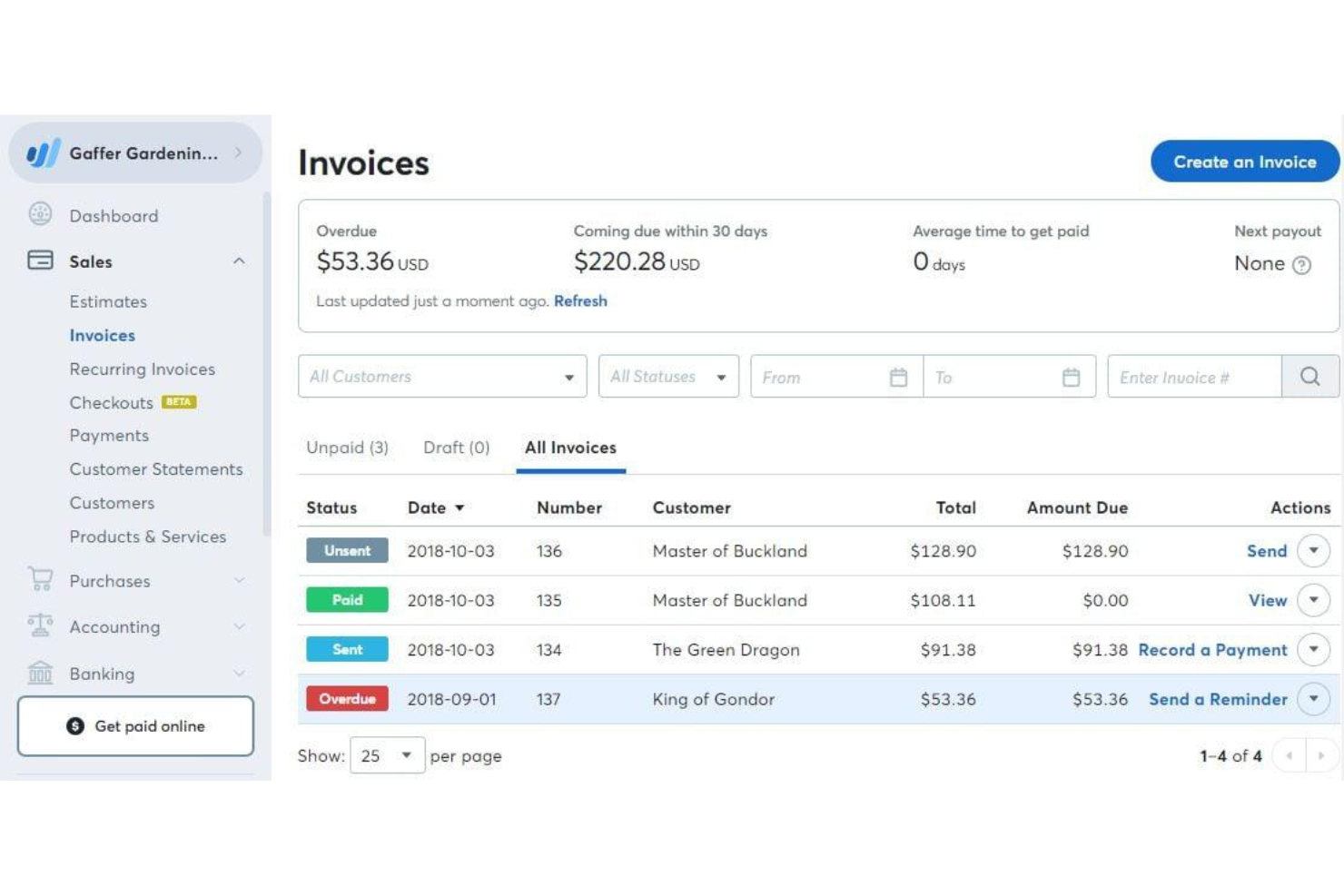
Wave is a cloud-based invoicing software that lets you create, customize, and send invoices, manage client contacts, accept online payments, and track income from a web dashboard or mobile app.
Who Is Wave Best For?
Freelancers and small business owners who want to manage invoicing and payments from their mobile devices.
Why I Picked Wave
I picked Wave as one of the best because I can invoice clients, send payment reminders, and accept payments right from my phone—whether I’m on iOS or Android. I like that the mobile app lets me create and send invoices on the go, track payment status, and even scan receipts for expense tracking. My team uses Wave’s mobile notifications to stay updated on invoice activity without needing to log in on a desktop.
Wave Key Features
- Customizable invoice templates: Choose and personalize invoice designs to match your brand.
- Automatic tax calculations: Apply and track sales tax on invoices automatically.
- Multi-currency invoicing: Send invoices and accept payments in different currencies.
- Customer management: Store and organize client contact details within the platform.
Wave Integrations
Native integrations are not publicly listed.
Pros and Cons
Pros:
- Built-in payment processing for credit cards
- Mobile app supports invoicing and payments
- Unlimited invoicing with no monthly fee
Cons:
- No automated time tracking features
- High fees for instant payouts

Best for client self-service portals
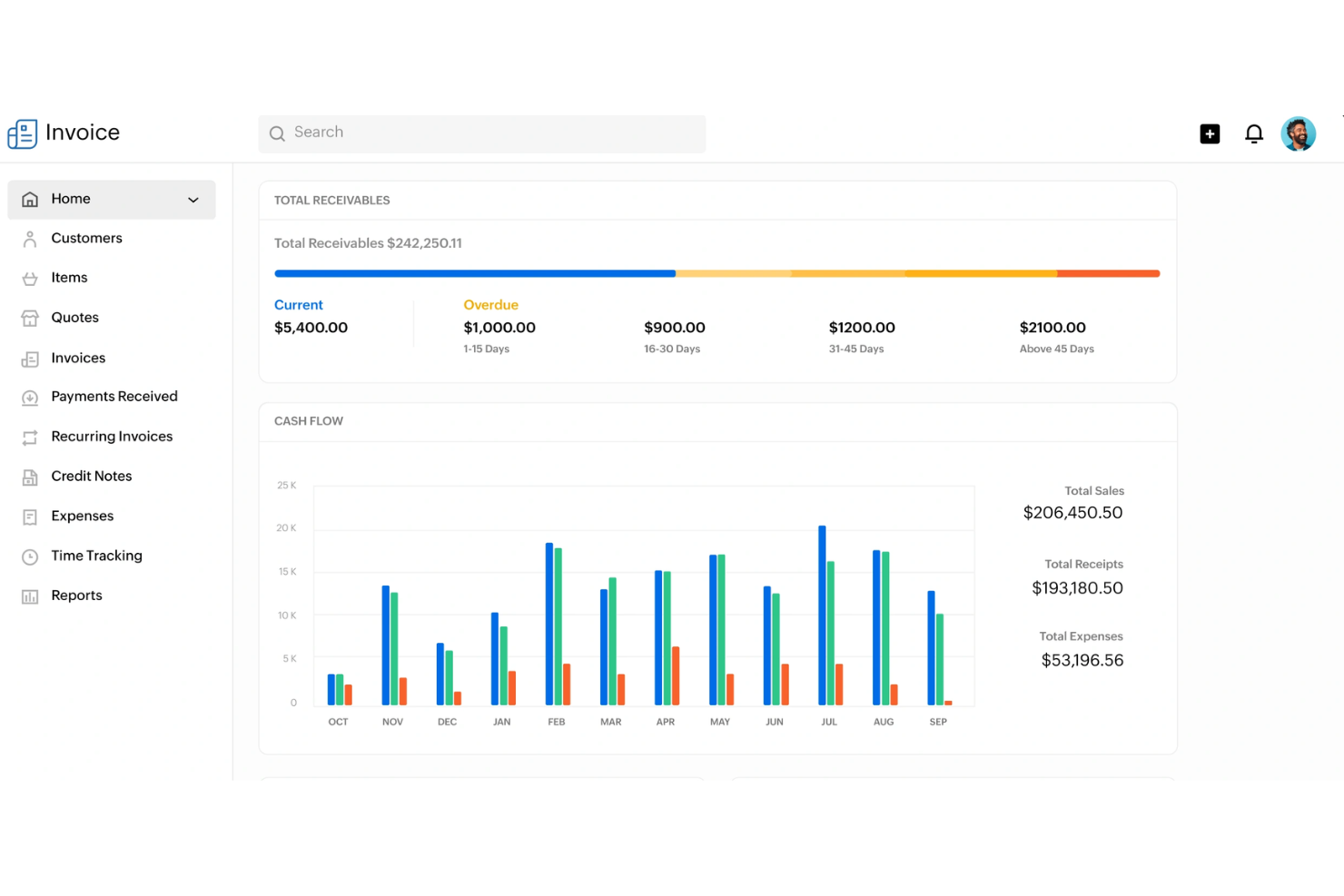
Zoho Invoice is a cloud-based invoicing software that lets you create and send invoices, automate payment reminders, manage expenses, and offer client-facing portals for self-service account management.
Who Is Zoho Invoice Best For?
Freelancers and small businesses that want to offer clients a self-service portal for managing invoices and payments.
Why I Picked Zoho Invoice
I picked Zoho Invoice as one of the best because I can give clients their own portal to view, download, and pay invoices directly. I like that my team can automate payment reminders and let clients track their payment history without emailing us. The portal also lets clients update their contact details and view past transactions, which saves us time on back-and-forth communication.
Zoho Invoice Key Features
- Time tracking: Track billable hours and convert them into invoices.
- Expense management: Record, categorize, and attach receipts to expenses.
- Multi-currency invoicing: Create and send invoices in multiple currencies.
- Custom invoice templates: Design and personalize invoice layouts to match your brand.
Zoho Invoice Integrations
Zoho Invoice offers native integrations with Zoho Books, Zoho CRM, Stripe, PayPal, Square, Razorpay, and Slack. An API is available for custom integrations.
Pros and Cons
Pros:
- Deep integration with Zoho ecosystem apps
- Automated snail mail invoice delivery option
- Complete client self-service payment portal
Cons:
- Limited custom domain mapping options
- Yearly revenue cap on free plan


Stripe Invoicing is an online invoicing platform that lets you create, send, and manage invoices while supporting a wide range of payment methods and automated billing workflows.
Who Is Stripe Invoicing Best For?
Global businesses and online sellers who need to accept payments in multiple currencies and payment methods.
Why I Picked Stripe Invoicing
I picked Stripe Invoicing as one of the best because I can send invoices that support dozens of global payment methods, including cards, bank transfers, and local wallets. My team uses its built-in tax calculation and automatic currency conversion to invoice clients in different countries. I also like that we can automate payment reminders and reconciliation for international transactions.
Stripe Invoicing Key Features
- Custom invoice templates: Create and personalize invoice layouts to match your brand.
- One-click payment links: Add secure payment links directly to invoices for fast online payments.
- Invoice status tracking: Monitor when invoices are viewed, paid, or overdue in real time.
- Bulk invoice creation: Generate and send multiple invoices at once using CSV uploads or the API.
Stripe Invoicing Integrations
Stripe Invoicing offers native integrations with QuickBooks, Xero, NetSuite, FreshBooks, and Salesforce. An API is available for custom integrations.
Pros and Cons
Pros:
- Smart retries for failed card payments
- Accepts ACH, SEPA, cards, and local wallets
- Supports over 135 currencies for invoicing
Cons:
- Limited invoice template customization options
- Higher transaction fees than bank transfers


Refrens is an invoicing software platform that lets you create, customize, and send invoices, manage client records, track payments, and handle quotations and purchase orders.
Who Is Refrens Best For?
Freelancers and small businesses in India who need to send invoices and payment reminders directly through WhatsApp.
Why I Picked Refrens
I picked Refrens as one of the best because I can send invoices directly to clients on WhatsApp, which speeds up communication and payment cycles. I like that Refrens lets me track invoice delivery and read status right from the dashboard. My team uses its built-in payment links and GST-ready invoice templates to handle compliance and collections for clients in India.
Refrens Key Features
- Quotation management: Create, send, and track quotations alongside invoices.
- Purchase order creation: Generate and manage purchase orders for clients and vendors.
- Multi-currency support: Issue invoices in different currencies for international clients.
- Expense tracking: Record and categorize business expenses within the platform.
Refrens Integrations
Native integrations are not publicly listed.
Pros and Cons
Pros:
- Free plan includes unlimited invoices
- Built-in quotation and purchase order tools
- Send invoices directly via WhatsApp
Cons:
- Fewer third-party app ecosystem connections
- Basic reporting compared to accounting suites


Bookipi is a mobile-first invoicing software that lets you create, send, and manage invoices, quotes, and receipts while tracking payments and client activity in real time.
Who Is Bookipi Best For?
Freelancers and small business owners who need mobile invoicing and real-time payment tracking.
Why I Picked Bookipi
I picked Bookipi as one of the best because I get instant push notifications when clients view, pay, or interact with my invoices. I like being able to track invoice status changes in real time from my phone, which helps me stay on top of payments. My team uses Bookipi to send invoices and receive immediate updates, so we never miss a payment event.
Bookipi Key Features
- Multi-currency support: Create and send invoices in multiple currencies.
- Quote to invoice conversion: Turn approved quotes directly into invoices.
- Payment tracking dashboard: Monitor outstanding, paid, and overdue invoices in one place.
- PDF invoice generation: Download and share invoices as professional PDF documents.
Bookipi Integrations
Native integrations are not clearly documented. Bookipi offers an API for custom integrations.
Pros and Cons
Pros:
- Signature capture on mobile device screen
- Mobile-first interface for on-site billing
- Instant read receipts for sent invoices
Cons:
- Limited data export for tax software
- Rolling 30-day document limit free plan
Annen faktureringsprogramvare
Her er noen flere alternativer for faktureringsprogramvare som ikke kom med på listen min, men som likevel er verdt å se nærmere på:
- Paymo
For multi-language invoicing
- Scoro
For billing across multiple project types
- Wrike
For invoice sign-off automation
- FreshBooks
For client retainer tracking
- Xero
For accountant collaboration
- Productive
For agency profitability tracking
- QuickBooks
For automated payment reminders
- Sage
With built-in tax calculation
- Hiveage
With multi-business account management
- Square
For instant payment links


How I Evaluate DPM Invoicing Software
I split my evaluation into two layers: the baseline criteria every tool must clear—like project-tied billing and time-to-invoice tracking—and the differentiators that determine the best fit.
Core Functionality (Table Stakes For This List)
When I'm selecting tools for my list, I rank each one on a scale from 0 (does not offer the functionality) to 5 (excels in this area) for each core functionality listed below. Then, I calculate the tool's total score into a percentage. Each tool needs to achieve a minimum total score of 65% to be considered for inclusion.
- Project-Based Invoicing: I check whether invoices can be tied to specific projects, milestones, or deliverables—not just generated as standalone documents disconnected from the work.
- Time & Expense Billing: Tracked hours and project expenses should flow into invoice line items, ideally with configurable billable rates per team member or role.
- Project Management Integration: Whether native or through connectors to tools like Asana or Jira, I evaluate how tightly PM data links to billing workflows.
- Retainers & Recurring Billing: Agencies running monthly retainers need drawdown tracking and auto-generated invoices, so I look for flexible recurring billing setups.
- Client & Payment Management: I look at how clients receive and pay invoices—portal access, supported payment gateways, automated reminders, and multi-currency support all factor in.
- Financial Reporting & Accounting Sync: Project profitability reports and two-way sync with platforms like QuickBooks or Xero help keep invoicing and bookkeeping aligned.
Once I have a list of tools that meet the criteria, I consider what sets each platform apart.
Differentiating Factors (What Sets Vendors Apart)
Here's how I compare and contrast different vendors:
Standout Features
Budget burn alerts matter when you're running multiple client projects at once—I look for tools that flag when a project trends toward a write-off before it's too late. Resource utilization analytics add another layer, showing billable vs. non-billable hours per team member so you can adjust staffing mid-sprint. I also evaluate approval workflows for timesheets and draft invoices, since agencies with multiple PMs need a review step before anything reaches the client.
Beyond Features
Integration ecosystem is one of the first things I check—tools like Harvest and Scoro connect differently with QuickBooks, Xero, and PM platforms, and gaps here create manual data entry that defeats the purpose. Pricing structure also matters a lot for agencies, especially whether contractor seats are available at a lower cost than full-user licenses. I evaluate onboarding support too, since migrating from spreadsheets or a legacy tool mid-project cycle can stall billing if the transition isn't well-supported.
Slik velger du faktureringsprogramvare
Det er lett å gå seg vill i lange funksjonslister og kompliserte prismodeller. For å hjelpe deg med å holde fokus mens du går gjennom den unike prosessen med å velge programvare, får du her en sjekkliste over faktorer du bør ha i bakhodet:
| Faktor | Hva du bør vurdere |
|---|---|
| Skalerbarhet | Vil programvaren håndtere flere kunder, fakturaer og brukere etter hvert som virksomheten vokser? Se etter grenser for antall brukere eller fakturaer. |
| Integrasjoner | Kan den kobles direkte til regnskaps-, CRM- eller betalingsverktøyene dine? Kontroller at den er kompatibel med den eksisterende verktøypakken din. |
| Tilpasningsmuligheter | Kan du tilpasse fakturamaler, arbeidsflyter og merkevareprofil etter virksomhetens behov? Unngå verktøy med stive formater. |
| Brukervennlighet | Vil teamet og kundene dine oppleve grensesnittet som intuitivt? Test med faktiske brukere før du bestemmer deg. |
| Implementering og oppstart | Hvor lang tid vil det ta å komme i gang? Ta hensyn til datamigrering, opplæring og tilgjengelige ressurser for oppstart. |
| Kostnad | Er prisnivåene tydelige og forutsigbare etter hvert som du skalerer? Vær oppmerksom på skjulte gebyrer eller kostnader for ekstra brukere eller fakturaer. |
| Sikkerhetstiltak | Tilbyr programvaren kryptering, tilgangskontroller og samsvar med standarder for personvern? Spør om revisjonsspor og sertifiseringer. |
| Tilgjengelig kundestøtte | Hvilke kanaler for kundestøtte tilbys, og når er de tilgjengelige? Vurder om du trenger hjelp døgnet rundt eller dedikert kontoadministrasjon. |
Hva er faktureringsprogramvare?
Faktureringsprogramvare er et digitalt verktøy som hjelper virksomheter med å opprette, sende og administrere fakturaer for varer eller tjenester. Den automatiserer faktureringsprosesser, følger opp betalinger og organiserer kundeinformasjon på ett sted.
Virksomheter bruker faktureringsprogramvare for å redusere manuelt arbeid, forbedre nøyaktigheten og opprettholde tydelige registre for regnskaps- og samsvarsformål.
Funksjoner
Ved valg av faktureringsprogramvare bør du se etter følgende viktige funksjoner:
- Oppretting av fakturaer: Opprett og tilpass fakturaer med merkevareprofilen din, spesifiserte kostnader og betalingsbetingelser, og send dem direkte til kundene.
- Gjentakende fakturering: Sett opp automatiske fakturaer for tilbakevendende kunder eller abonnementstjenester, slik at du reduserer manuell registrering og uteblitte betalinger.
- Betalingssporing: Følg med på hvilke fakturaer som er betalt, forfalt eller utestående, og få oppdateringer i sanntid om betalingsstatus.
- Behandling av betalinger på nett: La kundene betale fakturaer gjennom integrerte betalingsløsninger, for eksempel med kredittkort eller bankoverføring.
- Kundeadministrasjon: Lagre og organiser kundens kontaktopplysninger, fakturahistorikk og kommunikasjonshistorikk på ett sted.
- Utgiftssporing: Registrer og kategoriser virksomhetens utgifter, og knytt dem deretter til fakturaer eller prosjekter for nøyaktig fakturering.
- Støtte for flere valutaer: Utsted fakturaer og ta imot betalinger i ulike valutaer for å betjene internasjonale kunder.
- Skatteberegning: Bruk automatisk riktige skattesatser på fakturaer basert på sted eller produkttype.
- Tilpassbare maler: Tilpass fakturaoppsett, farger og logoer slik at de samsvarer med merkevareidentiteten din.
- Rapportering og analyse: Generer økonomiske rapporter om inntekter, utestående fakturaer og betalingstrender for å støtte forretningsbeslutninger.
Vanlige AI-funksjoner i faktureringsprogramvare
I tillegg til standardfunksjonene i faktureringsprogramvare som er nevnt ovenfor, tar mange av disse løsningene i bruk AI med funksjoner som:
- Automatisk datauttrekking: AI skanner kvitteringer, regninger eller e-poster for å hente ut relevante fakturadetaljer, noe som reduserer manuell dataregistrering og feil.
- Smart betalingsprognose: AI analyserer kundenes betalingshistorikk for å forutsi når fakturaer sannsynligvis blir betalt, slik at det blir enklere å planlegge kontantstrømmen.
- Avviksregistrering: AI flagger uvanlige faktureringsmønstre eller mulig svindel ved å overvåke fakturadata for uoverensstemmelser eller avvik.
- Naturlig språkbehandling for forespørsler: AI-drevet chat eller søk lar brukere stille spørsmål om fakturaer eller betalinger med naturlig språk og få umiddelbare svar.
- Automatisk fakturakategorisering: AI klassifiserer fakturaer etter type, kunde eller prosjekt, og håndterer organisering og rapportering.
- Personlig planlegging av påminnelser: AI fastsetter det optimale tidspunktet og den optimale hyppigheten for å sende betalingspåminnelser basert på kundens atferd og tidligere svar.
Fordeler
Implementering av faktureringsprogramvare gir flere fordeler for teamet og virksomheten din. Her er noen av fordelene du kan se frem til:
- Raskere faktureringssykluser: Automatisk oppretting og levering av fakturaer hjelper deg med å få betalt raskere ved å redusere manuelle trinn.
- Bedre betalingssporing: Statusoppdateringer og påminnelser i sanntid gjør det enklere å følge med på utestående og forfalte fakturaer.
- Færre manuelle feil: Innebygde beregninger, maler og AI-drevet datauttrekking minimerer feil i fakturering og rapportering.
- Bedre kundeopplevelse: Kundeportaler og betalingsalternativer på nett gir kundene større fleksibilitet og åpenhet.
- Forenklet etterlevelse: Automatiske skatteberegninger og revisjonsspor hjelper deg med å holde orden og oppfylle regulatoriske krav.
- Skalerbare prosesser: Tilgang for flere brukere og automatisering av arbeidsflyter støtter virksomheten når den vokser, uten å øke den administrative belastningen.
- Handlingsrettet økonomisk innsikt: Funksjoner for rapportering og analyse gir en tydelig oversikt over inntekter, kontantstrøm og betalingstrender.
Kostnader og priser
Valg av faktureringsprogramvare krever en forståelse av de ulike prismodellene og abonnementene som er tilgjengelige. Kostnadene varierer basert på funksjoner, teamstørrelse, tillegg og mer. Tabellen nedenfor oppsummerer vanlige abonnementer, gjennomsnittsprisene deres og typiske funksjoner som er inkludert i faktureringsløsninger:
Sammenligningstabell for abonnementer i faktureringsprogramvare
| Plantype | Gjennomsnittspris | Vanlige funksjoner |
|---|---|---|
| Gratisabonnement | $0 | Grunnleggende oppretting av fakturaer, begrenset kundeadministrasjon, enkel rapportering og støtte via e-post. |
| Privatabonnement | $5-$15 per bruker/måned | Ubegrenset antall fakturaer, betalingssporing, grunnleggende maler, nettbetalinger og grunnleggende utgiftssporing. |
| Bedriftsabonnement | $20-$40 per bruker/måned | Tilgang for flere brukere, avansert rapportering, gjentakende fakturering, integrasjoner og tilpassbare maler. |
| Storselskapsabonnement | $50-$100 per bruker/måned | Avansert sikkerhet, dedikert støtte, arbeidsflytautomatisering, tilpassede integrasjoner og API-tilgang. |
Vanlige spørsmål om fakturaprogramvare
Her er noen svar på vanlige spørsmål om fakturaprogramvare:
Kan fakturaprogramvare håndtere flere valutaer og språk?
Ja, mange fakturaløsninger støtter funksjoner for flere valutaer og språk. Dette er spesielt nyttig for gründere som arbeider med internasjonale kunder eller driver virksomhet i ulike regioner, fordi det bidrar til å sikre at profesjonelle fakturaer er korrekte og enkle for kundene å forstå.
Hvor sikker er fakturaprogramvare for lagring av økonomiske data?
De fleste fakturaprogrammer bruker kryptering, tilgangskontroller og regelmessige sikkerhetsrevisjoner for å beskytte økonomiske data og bankkontoinformasjon. Kontroller alltid at løsningen følger standarder som GDPR eller SOC 2, og spør om funksjoner som revisjonsspor og brukertillatelser for å holde sensitiv informasjon trygg.
Er det mulig å automatisere gjentakende fakturaer og betalingspåminnelser?
Ja, de fleste moderne fakturaplattformer lar deg planlegge gjentakende fakturaer og konfigurere automatiske betalingspåminnelser når en betalingsfrist oversittes. Dette reduserer manuelt oppfølgingsarbeid, hjelper deg med å unngå manglende betalinger og gjør kontantstrømmen mer forutsigbar.
Hvilke integrasjoner bør jeg se etter i fakturaprogramvare?
Se etter integrasjoner med bokføringsprogrammet, CRM-systemet og verktøyene for prosjektstyring. Du bør også sørge for at løsningen kan kobles til betalingsløsninger som Apple Pay og Google Pay, eller til og med et POS-system hvis du håndterer transaksjoner fysisk. Disse koblingene hjelper deg med å unngå dobbeltregistrering av data og holder de økonomiske prosessene sammenkoblet på tvers av virksomheten.
Hvor enkelt er det å migrere fra regneark eller et annet fakturaverktøy?
De fleste leverandører tilbyr en brukervennlig overgang via importverktøy, maler eller hjelp med oppstart for å hjelpe deg med å migrere data. Enten du går over fra et manuelt regneark eller et gratis fakturaverktøy, bør du se etter trinnvise veiledninger eller migreringstjenester som kan gjøre overgangen enklere og hjelpe deg med å administrere hele faktureringsprosessen.