

10 beste BI-verktøy for bedre beslutninger i 2026

10 Kortliste over de beste BI-verktøyene


Verktøy for forretningsanalyse hjelper team med å omgjøre rådata til nyttig innsikt ved å samle informasjon, visualisere trender og legge til rette for bedre beslutninger. Enten du følger med på KPI-er, analyserer kundeatferd eller lager prognoser for inntekter, kan det rette BI-verktøyet avdekke mønstre som driver vekst og forbedrer ytelsen i hele organisasjonen.
For å hjelpe deg med å velge riktig plattform testet og vurderte jeg ledende verktøy for forretningsanalyse basert på deres funksjoner for dataintegrasjon, instrumentbord, brukervennlighet og skalerbarhet. Denne veiledningen fremhever de beste BI-verktøyene som er tilgjengelige i 2026, slik at du kan finne et som dekker teamets databehov og støtter strategiske beslutninger.
Hva er verktøy for forretningsanalyse?
Verktøy for forretningsanalyse er programvareapplikasjoner som samler inn, analyserer og visualiserer data for å hjelpe organisasjoner med å ta bedre, datadrevne beslutninger.
De samler informasjon fra kilder som databaser, regneark og skytjenester i interaktive instrumentbord og rapporter. Med funksjoner som sanntidsanalyse, datavisualisering og rapportering gjør BI-verktøy rådata om til nyttig innsikt for team på tvers av avdelinger.
Why Trust Our Software Recommendations
Our team has been testing and reviewing software since 2012. As project managers ourselves, we know how difficult—and important—it is to choose the right software.
For this guide, we evaluated tools using hands-on testing and independent research, scoring tools using our selection criteria. We also draw on insights from industry thought leaders and practicing project management experts.
Our reviews reflect our human editorial judgment, not a sales pitch.
Expert reviewers:
Sammenligningstabell for verktøy for forretningsanalyse
Du kan bruke følgende oversikt til å finne det beste BI-verktøyet for dine behov:
| Tool | Best For | Trial Info | Price | ||
|---|---|---|---|---|---|
| 1 | Best business intelligence tool for small companies | 15-day free trial | From $30/month (billed annually) | Website | |
| 2 | Best for BI tool integrations | Free plan available | From $9/user/month (billed annually) | Website | |
| 3 | Best enterprise business intelligence tool | 14-day free trial | Pricing upon request | Website | |
| 4 | Best database BI reporting tool | Free trial + free demo available | Pricing upon request | Website | |
| 5 | Best for sharing analytics with external vendor portals | 30-day free trial | Pricing upon request | Website | |
| 6 | Best business intelligence API for building analytics into your products and tools | 7-day free trial | Pricing upon request | Website | |
| 7 | Best for integrating over 150 data sources | 14-day free trial | From $44/month | Website | |
| 8 | Best for real-time cross-channel journey mapping | Free plan + free demo available | Pricing upon request | Website | |
| 9 | Best for building and embedding dashboards in your applications | Free trial + free demo available | From $265/month (billed annually) | Website | |
| 10 | Best for Jira integration & custom views | Free plan available | From $18/user/month | Website |

Oversikt over de beste verktøyene for forretningsanalyse
Dette er oversikter over de beste BI-verktøyene på markedet akkurat nå:

Best business intelligence tool for small companies

Zoho Analytics is a great business intelligence tool for small businesses, given their large feature set, simple interface, and affordable pricing for a small number of users. For one tour operator managing 17 multi-day trips, Zoho Analytics proved invaluable: “I have used Zoho Analytics to monitor guide performance, guest ratings and trip logistics on all our 17 multi-day tours. Zoho Analytics assisted me in revealing the trends of guest behavior and trip flow in the rural areas. It allowed us to reduce overtime by monitoring inefficiencies that we could not see on spreadsheets.”
This tool lets you pull data from a wide range of sources and build out intuitive and functional reports in order to analyze the visualized data. AI assistant “Zia” will answer questions typed into a query box using the data collected, combined with machine learning and natural language processing technologies.
Zoho Analytics takes the prize for my favorite in features and functionality. While most of the software reviewed here can sport a robust BI system, Zoho goes above and beyond with features like their AI assistant, their focus on ease of collaboration, tons of third party integration options, and Android and iOS mobile apps.
A few minor cons for Zoho include that the SQL tutorials could be built out a little bit better. Additionally, the reporting pivot view/summaries would benefit from having an “OR” or “CONTAINS” command in order to better pull out the data that you need.
They have integrations with Zoho Analytics, SAlesforce CRM, Microsoft Dynamics CRM, Hubspot CRM, Mailchimp, Google Analytics, Bing Ads, Zoho Surveys, Survey Monkey, Facebook, TWitter, YouTube,QuickBooks, Xero, Shopify, Zendesk, and more.
Zoho Analytics starts from $24/month for 2 users and has a free 15-day trial.
New Product Updates from Zoho Analytics

Zoho Analytics Adds Exogenous Variables to Multivariate Forecasting
Zoho Analytics introduces exogenous variables for multivariate forecasting using the VARX model. This helps forecasts account for external drivers such as marketing spend, discounts, and seasonality. For more information, visit Zoho Analytics’ official site.
 .
.
ClickUp
Best for BI tool integrations
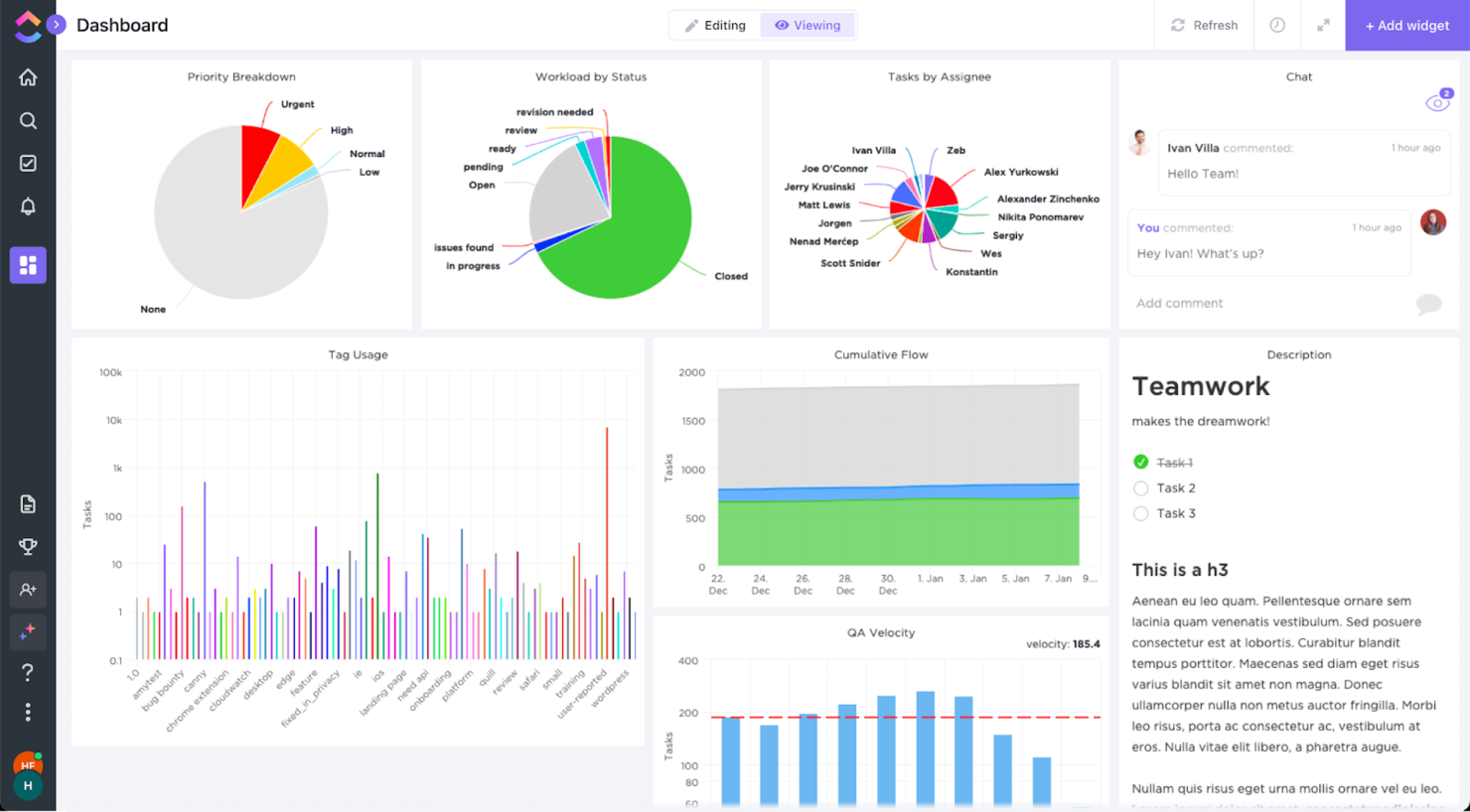
ClickUp is a project management software powerhouse that has the functionality to pull tons of data from within the software and display it in the beautiful graphs you see on the screenshot above. Although not a BI tool by nature, it can definitely inform your decisions.
However, I have to say that ClickUp has recognized that it cannot compete with BI tools with the product as is. For that reason, they have an integration with Tableau. This integration allows Tableau to grab a screenshot of one of your ClickUp spaces and aggregate it on their end with all the rest of your business data.
ClickUp offers native integrations with Tableau, Slack, Google Suite, Dropbox, and many more tools, as well as over 1,000+ integrations through Zapier.
ClickUp is free with limited storage for an unlimited number of users. Paid plans start at $5/user/month and offer a free trial.
New Product Updates from ClickUp
ClickUp Adds Meetings Hub, Super Agent Templates, and ZoomInfo Integration
ClickUp adds a searchable Meetings Hub, new ways to clone and template Super Agents, and a ZoomInfo integration through the App Center. These updates improve meeting retrieval, agent reuse, and access to sales intelligence. For more information, visit ClickUp’s official site.

Tableau
Best enterprise business intelligence tool

Tableau is a robust, scalable analytics platform with desktop, cloud, or on-site options. It boasts an interactive, visual analysis style and allows you to securely consume your data via browser, desktop, mobile, or embedded into any application. They offer over 900 learning resources, including over 100 training videos. For Gianluca Ferruggia, General Manager at DesignRush, Tableau’s impact was immediate: “Tableau transformed our unrefined data into graphic stories, its drag-and-drop dashboards changed the game by enabling us to see trends our spreadsheets were hiding.”
They excel in a specific area of the features and functions evaluations criteria section: flexibility. Tableau is easily scalable; offered by server, desktop and/or cloud; available on all device types, be it PC or smartphone; and they have free analytics resources for students, educators and smaller not-for-profits. Whatever your niche, you are sure to find something that fits.
Tableau can join with data collection systems like ServiceNow, Splunk, and Google Analytics. Other integrations, or “Technology Partners as they call them, include 0xdata, AIMMS, Aircloak, AllSight, Amazon Web Services, Astera, Axiomatics, Birst, Datawatch,
Element Analytics, Google Cloud Platform, IBM, Microsoft, and many, many more.
The pricing is a bit steep to begin with and costs go up at the end of the year long contract. Multi-year contracts are not available, so they got dinged in our value for cost section because of the high and shifting price schema, which can come across as predatory.
Tableau starts at $70/user/month and has a free 14-day trial.

Looker
Best database BI reporting tool

Create easy-to-read reports and visual-oriented interactive dashboards that display data-rich actionable insight for defining business metrics, locating value, and discovering interconnectivity between tables. Resources and features include custom applications, embedded visualizations, data science workflows, the ability to host on Public Clouds (like AWS and GCP), and more. For Amit Chandak, Chief Analytics Officer at Kanerika Inc, Looker proved to be a powerful solution for client data challenges: “We used Looker to deliver real-time, trusted insights for a client struggling with fragmented data—once implemented, reporting speed improved by 50% and decision-making accelerated significantly thanks to clear, actionable dashboards.”
They offer a free interactive training course and many other tutorial-like resources, which is why I was able to score them so highly in the usability section of the evaluation criteria. Beneath the “Getting Started” tab, you’ll notice that they have plenty of self-help resources for viewing raw data, building tools, and developing models.
The downfall of this software is that writing the queries is not incredibly user friendly. On top of that, data analytics tasks take a significant amount of time to render and run queries. When it comes to big data, it may get sluggish.
They connect with databases from Redshift, Snowflake, BigQuery, as well as 50+ supported SQL dialects like Amazon Redshift, Google BigQuery, Snowflake, MySQL, Oracle, Amazon Athena, Amazon Aurora, and more.
Looker starts at $3,000/month for 10 users ($50/additional user) and has a free demo.
Domo
Best for sharing analytics with external vendor portals
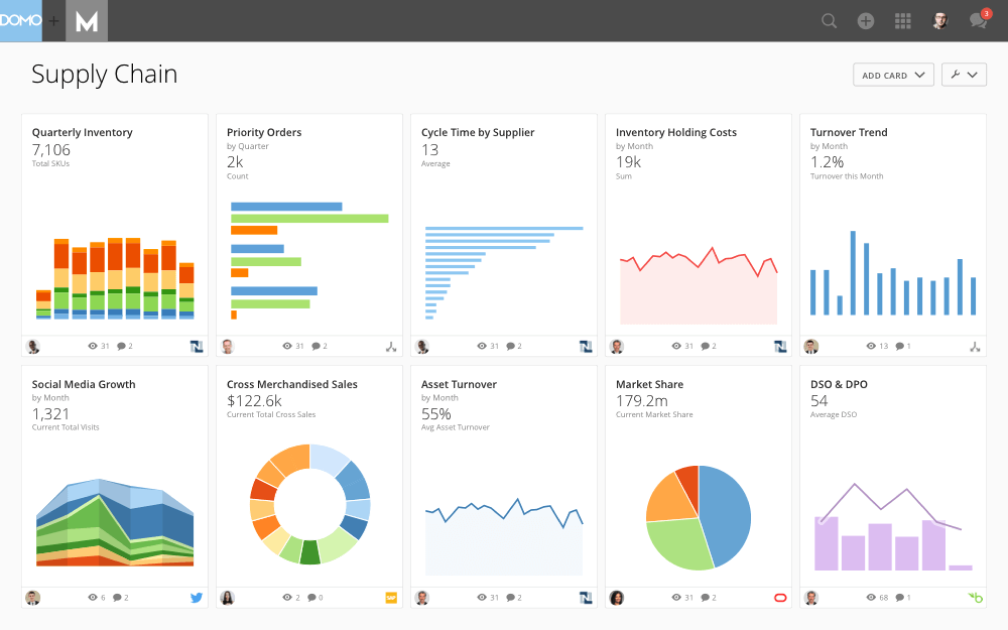
The Domo Business Cloud is a platform that lets you aggregate data from multiple sources and build custom workflow apps. Their features include dashboards and reporting, machine learning, predictive analytics, and external self-service reporting. For many organizations, Domo’s ability to step in when other tools fall short is a major advantage. Nicola Leiper, the Director and Head of Project Management at Espresso Translations, shared her experience: “Excel crashed and Domo rescued our largest customer relationship. Domo not only organized our data but saved our reputation and exposed some of the underperforming parts of our operations that cost us thousands.”
I like the focus that Domo places on your external relationships with vendors and other stakeholders. The name is Domo Everywhere, and it’s a feature that lets you build portals for your external partners. Therefore, they can analyze the data you decide to share with them on their own and draw their own insights.
Further, the data visualization boards are independent widgets that can be edited, filtered, and resized with a couple of clicks. Lastly, the platform allows you to set permissions on both internal and external users, regardless of the account (Domo or not Domo).
Domo integrates with external data sources through their 1000+ pre-built connectors, which include Shopify, Salesforce, Amazon S3, Adobe Analytics, Sharepoint, and Survey Monkey.
Domo has a free trial available, and prices can be quoted upon request.

Sisense
Best business intelligence API for building analytics into your products and tools

A hybrid-cloud platform built to leverage all of your data together and make it available to you through interactive dashboards, self-service analytics, and/or white-labeled BI apps. They offer support, analytics, and reporting for business areas such as customer service measurables, digital marketing, finances, human resources, retail and eCommerce, IT analytics, and more.
As far as our usability and UI evaluation criteria expectations, I found that Sisense is easy to use, easy to instal and setup, and sports an intuitive interface and streamlined UX. The customer service team is responsive and adaptive so this would be a decent choice for companies with lower levels of technology experience who might need some extra assistance.
A few cons include that the marketing connector could be more robust. Also, some functions are so simplified that they get in the way, for example not having to write a query seems like a time saving mechanism until your needs don’t match their pre-existing data and you have to jump through hoops to find a creative solution to get what you need.
Use ODBC to connect directly to Sisense’s powerful back-end from any third party application you like, from Excel to popular data visualization and reporting tools. They also offer a marketplace for extensions and plug-ins that they or their partners provide for use. Some are available free and others are only available with a premium account.
Sisense offers custom pricing and has a free demo as well as a free trial.

Best for integrating over 150 data sources

Supermetrics is a powerful data integration tool that simplifies the collection and analysis of marketing data, making it an essential resource for business intelligence (BI). By enabling users to aggregate data from over 150 different sources, including major platforms like Google Ads, Facebook Ads, and LinkedIn Ads, Supermetrics ensures that businesses can compile comprehensive datasets for more informed decision-making. For example, Baris Zeren, CEO of Bookyourdata, explained how impactful the platform has been for his team: “Supermetrics has made reporting easier because it automatically pulls data on marketing and sales into one dashboard. It is unique in that it saved the team hours per week and provided us with a cohesive and consistent perspective on campaign efficacy.”
One of the standout features of Supermetrics as a BI tool is its automation capabilities. Users can set up automated data transfers, which ensure that their reports are always populated with the latest data without manual intervention. This automation extends to the scheduling of regular data imports,
Supermetrics also offers robust data transformation options. Users can filter, combine, and modify data before it reaches its final destination, allowing for customized reports that meet specific business requirements. These transformation capabilities are critical for BI, as they enable businesses to tailor their data to uncover precise insights and trends. The tool’s compatibility with leading BI platforms such as Google Data Studio and Power BI further enhances its utility, allowing for sophisticated data visualization and analysis.
Additionally, Supermetrics supports a wide array of integrations with various marketing and sales platforms, like Google Analytics, HubSpot, Shopify, and Salesforce, ensuring that all relevant data can be consolidated into a single source of truth.

Best for real-time cross-channel journey mapping
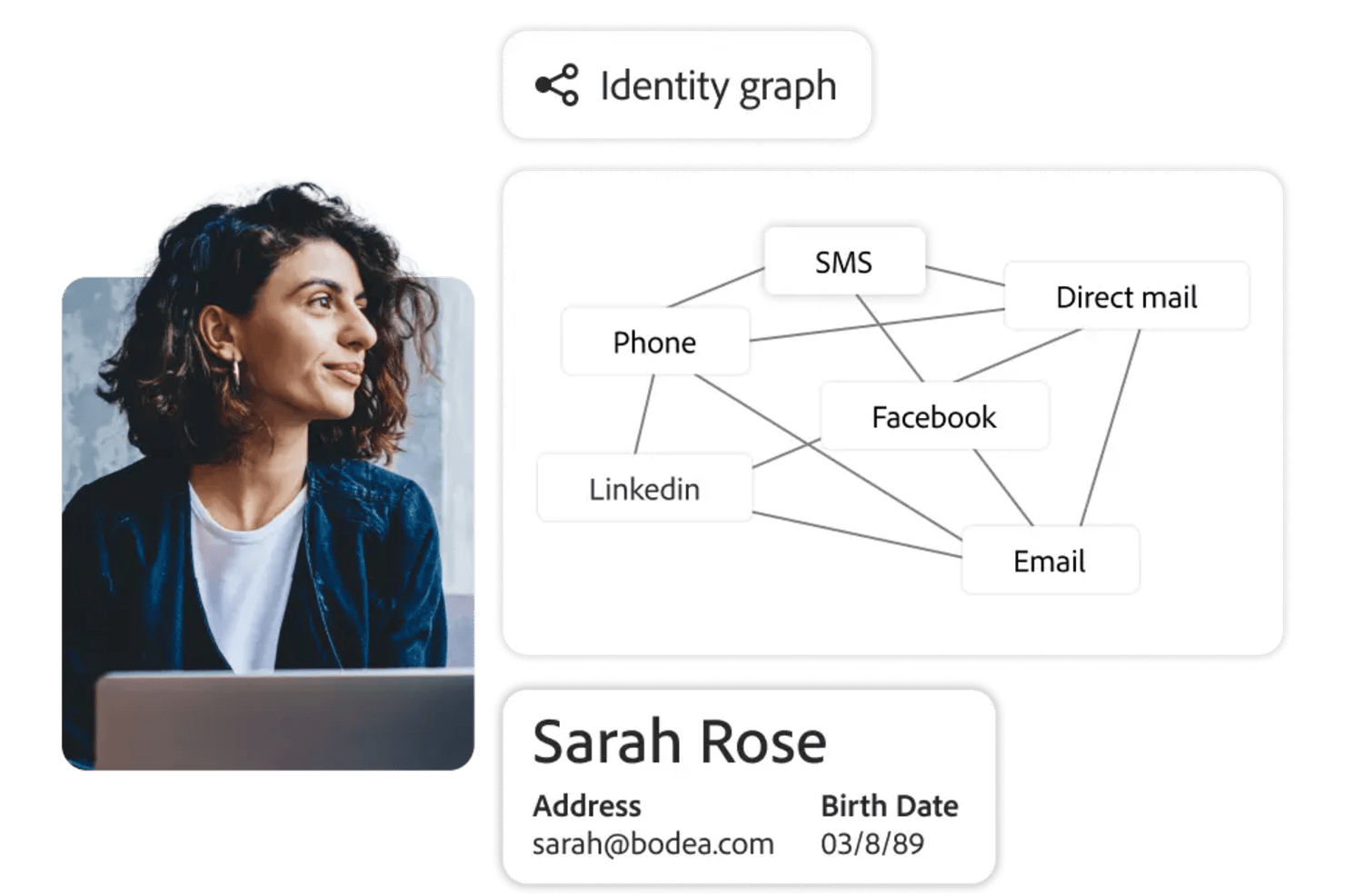
Adobe Customer Journey Analytics is a business intelligence tool that lets you analyze and visualize customer journeys across multiple channels using real-time data, customizable dashboards, and advanced analytics features.
Who Is Adobe Customer Journey Analytics Best For?
Marketing and analytics teams at large enterprises who need to analyze complex, multi-channel customer journeys.
Why I Picked Adobe Customer Journey Analytics
I picked Adobe Customer Journey Analytics as one of the best because I can map customer journeys across web, mobile, and offline channels in real time. I use its visual flow analysis to see how users move between touchpoints and spot drop-off points instantly. My team relies on its unified data model to blend data from multiple sources, so we always have a complete view of the customer experience.
Adobe Customer Journey Analytics Key Features
- Customizable dashboards: Build interactive dashboards to visualize and share key metrics with your team.
- Advanced segmentation: Create granular audience segments based on behavior, demographics, or custom criteria.
- Scheduled reporting: Automate report delivery to stakeholders on a set schedule.
- Data connectors: Import and unify data from CRM, ecommerce, and other external systems.
Adobe Customer Journey Analytics Integrations
Adobe Customer Journey Analytics offers native integrations with Adobe Experience Platform, Adobe Analytics, Adobe Target, Adobe Audience Manager, and Adobe Campaign. It also provides an API for custom integrations and supports connections to external data sources through Adobe Experience Platform connectors.
Pros and Cons
Pros:
- Flexible calculated metrics and custom data views
- Deep integration with Adobe Experience Platform
- AI-powered anomaly detection and root cause analysis
Cons:
- Advanced features may require technical expertise
- Limited native integrations outside Adobe products

ClicData
Best for building and embedding dashboards in your applications

ClicData is a data aggregation platform with over 250 connectors. This allows you to bring data from anywhere in the company. After, a data warehouse stores that information and makes it available for you to design real-time dashboards.
The last step is for you to design your dashboard. ClicData's dashboard designer has a drag-and-drop functionality that makes it easy to build your data visualizations. Add elements like annotations, Gauges, maps, audio, tables, and any graph you can think of. After that, you can embed your charts in a website, portal or ERP using its API.
Although the platform does not offer any out-of-the-box, prebuilt integrations, its API is available for your IT team to do it. The API enables integrated software to send information to ClicData as soon as it’s received, so you can always see real-time updated information.
ClicData paid plans start at $75/month and offer a 15-day free trial.

Visor
Best for Jira integration & custom views
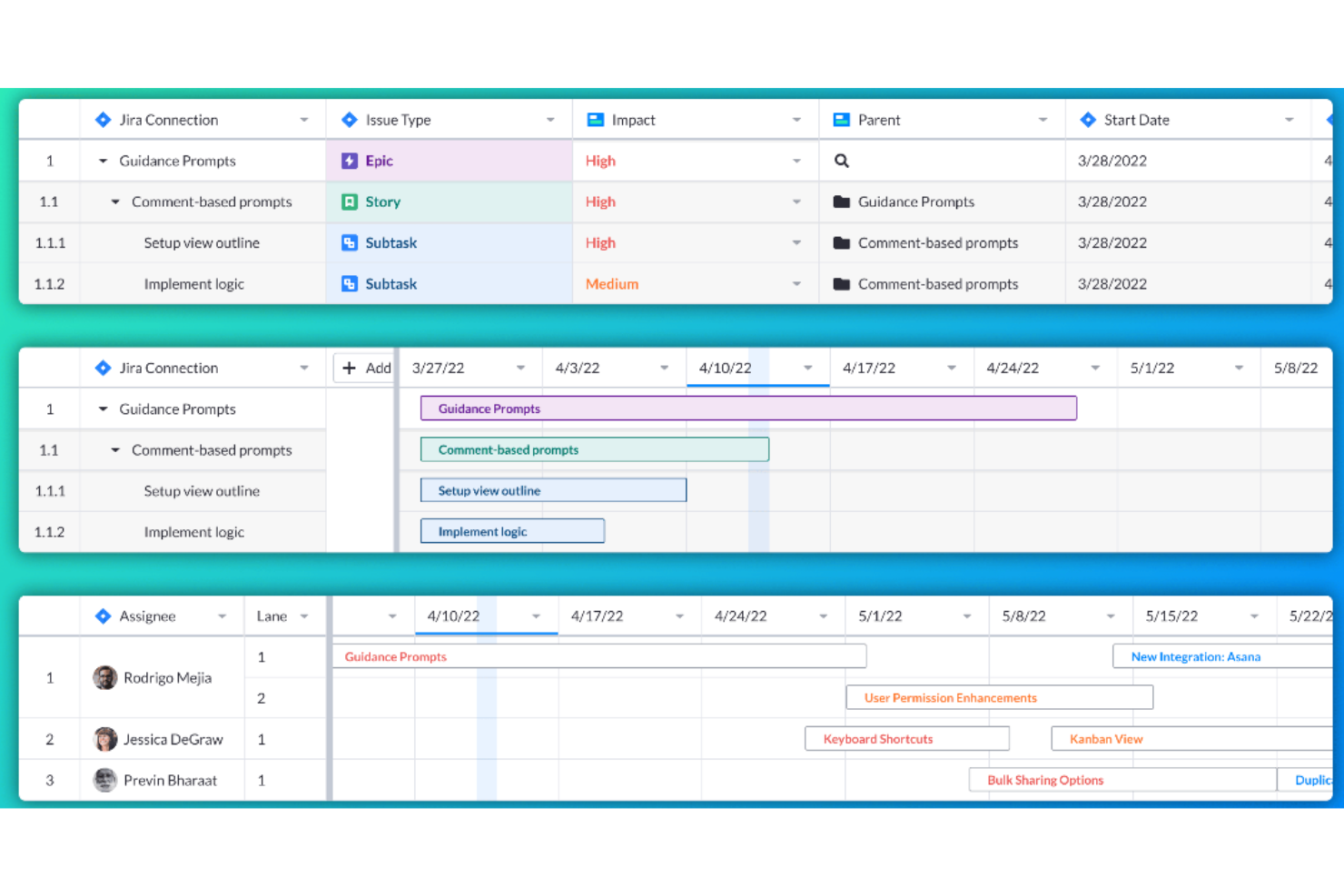
Visor is a workspace tool that connects to various SaaS applications, aiming to bring people together with data for a more collaborative work environment. It allows users to create custom views and visualizations of their nested Jira data, offering bi-directional integration with Jira for accurate and customizable sharing.
Visor operates as a workspace tool that enhances the functionality of SaaS applications by providing users with a unified view of their data. Visor also emphasizes secure sharing, featuring a straightforward drag-and-drop interface for ease of use. It additionally includes an advanced JQL importer and supports over 75 Jira field types, catering to a wide range of data management needs.
Moreover, Visor facilitates collaboration and communication among team members, with features such as Gantt charts, roadmaps, and the ability to customize views with colors and conditional formatting. This can save time and improve the efficiency of project planning and reporting processes.
Visor integrates with Salesforce, Jira, and HubSpot.
Pricing for Visor starts from $9/user/month.
Andre alternativer
I undersøkelsen min fant jeg noen verktøy som ikke helt kom med på listen, men som likevel fortjener en omtale.
- Power BI
Business intelligence solution for Microsoft users
- Logi Analytics
Out-of-the-box embedded business analytics tool for software teams
- Coefficient
For integrating data into spreadsheets
- InetSoft
Data intelligence tool for scalable architecture and advanced modeling
- Metric Insights
Enterprise BI portal builder
- Exago BI
Business intelligence reporting tool for beginners and non-technical folks
- Izenda
Business intelligence software for embedding in web-based applications
- Klipfolio
Intuitive data visualization software for companies of all sizes.
- Funnel
Easy to understand and manipulate marketing and advertising data.
- Improvado
150+ integrations – like Facebook Ads, Google Analytics, YouTube and LinkedIn – to plot all marketing initiatives on one dashboard.
- AgencyAnalytics
SEO, PPC, social, email, review and call tracking dashboards all-in-one system.
- AnswerRocket
A searchable database of statistics and reports that is designed to answer questions of the everyday user.
- Tray
An iPaaS solution with API integration, CSV automation and an easy drag-and-drop workflow.
- ClicData
A business intelligence platform complete with a data warehouse, processing and management, dashboard designer and automation.
- BrightFunnel
Easy to understand and manipulate marketing and advertising data.
- Adaptive Insights
Modernized planning, modeling, budgeting, and forecasting tools.


How I Evaluate Business Intelligence Tools
I look at every BI tool through two lenses: the baseline requirements—connectors, dashboards, self-service reporting—and the differentiators that matter for PMO teams managing portfolio-level data.
Core Functionality (Table Stakes For This List)
When I'm selecting tools for my list, I rank each one on a scale from 0 (does not offer the functionality) to 5 (excels in this area) for each core functionality listed below. Then, I calculate the tool's total score into a percentage. Each tool needs to achieve a minimum total score of 65% to be considered for inclusion.
- Data Connectors & Integrations: I check whether a tool can pull directly from PM platforms like Jira, Asana, or Smartsheet, plus databases and spreadsheets, without manual exports.
- Interactive Dashboards: Each tool should let you build filterable, drill-down dashboards—like clicking a red-flagged project to see which tasks are driving the delay.
- Data Visualization Options: I evaluate the range of chart types available, from Gantt-style timelines and heatmaps to burndown charts that map delivery against sprint targets.
- Ad Hoc Report Building: Project stakeholders constantly need one-off reports. I look for drag-and-drop builders with scheduling, so a PMO lead can set up a weekly status report once.
- Data Modeling & Transformation: Combining data from multiple sources matters. I evaluate whether you can blend, say, Jira velocity data with budget actuals from a spreadsheet into one model.
- Self-Service Analytics: The best BI tools let non-technical project managers explore data on their own. I look for guided exploration, governed datasets, and low-barrier entry points.
Once I have a list of tools that meet the criteria, I consider what sets each platform apart.
Differentiating Factors (What Sets Vendors Apart)
Here's how I compare and contrast different vendors:
Standout Features
AI-powered insights can flag budget overruns or delivery risks before a PMO lead spots them manually, so I evaluate how well each tool surfaces anomalies and forecasts trends. Embedded analytics also matter—being able to view a portfolio health dashboard inside Jira or Confluence keeps teams from context-switching. I look for collaborative annotations too, where stakeholders tag each other on a metric and trigger follow-up tasks directly from the dashboard.
Beyond Features
Total cost of ownership is a big one—I evaluate whether licensing separates viewers from creators, since a PMO with 50 report consumers and 3 builders shouldn't pay the same per-seat rate for everyone. Governance matters just as much, especially row-level security that restricts portfolio data by business unit or client. I also consider time-to-value: tools with pre-built project management dashboard templates get teams reporting weeks faster than platforms that require everything from scratch.
Slik valgte jeg de beste BI-verktøyene
Først valgte jeg en lang liste over populære verktøy basert på anmeldelser og brukervurderinger. Deretter begrenset jeg listen ved å se på de viktigste funksjonene som erfaringen min har vist at et BI-verktøy trenger. Til slutt valgte jeg kriteriene nedenfor som grunnlag for vurderingen min.
Brukergrensesnitt (UI)
BI-plattformen din er et sted der du analyserer forretningsdata, og gjennom datamodellering bruker du dataene i form av grafer og andre visuelle fremstillinger som forbedrer beslutningstakingen. Derfor må grensesnittet være ryddig, intuitivt og utnytte tomrom på en god måte.
Brukervennlighet
Verktøyet må være enkelt å lære og mestre. Verktøy som Microsoft Power BI har for eksempel et dra-og-slipp-grensesnitt som du kan bruke på grafiske elementer for å endre informasjonen som analyseres. BI-verktøyet bør ha funksjoner som dette, i tillegg til god støttedokumentasjon, opplæring og instruksjonsvideoer som hjelper deg med å ta verktøyet i bruk raskere.
Funksjoner og funksjonalitet
Hvor mange av funksjonene og egenskapene til de viktigste rapporteringsverktøyene for ledelse tilbyr det, og hvor kraftige er de? Jeg så spesielt etter:
- Tilpassbare dashbord: De beste BI-løsningene tilbyr visning av flere visualiseringer på én skjerm, samt muligheten til å koble visualiseringene sammen (slik at filtre eller utvalg påvirker alle visualiseringene) eller beholde hver enkelt som uavhengig. Den bør gjenspeile endringer i sanntid og gjøre det mulig å opprette tilpassede visninger av viktige data.
- Detaljvisning og datafiltre: Det er viktig å kunne se detaljert informasjon. Dette omfatter funksjoner som rullegardinmenyer, søkefiltre og utsnitt, samt muligheten til å gå ned i detaljene og tilbake til datasammendrag.
- Nettbasert grensesnitt for kunder: Det er enklest hvis rapporteringsløsninger som er rettet mot kunder, tilbyr nettbaserte kundegrensesnitt, ettersom de er mer effektive og enklere å administrere enn skrivebordsbaserte kundegrensesnitt.
- Planlagte og automatiserte rapporter: Verktøyet bør hjelpe deg med å overvåke fremdriften på en enkel måte. Dette omfatter muligheten til å planlegge automatiske oppdateringer som skal sendes til team, sende automatiske rapporter til kunder og konfigurere automatiske varsler slik at du blir gjort oppmerksom på viktige datoer eller terskelverdier.
- Diagrammer av høy kvalitet: Grunnleggende verktøy omfatter stolpe-, linje-, sektor-, område- og radardiagrammer, mens mer avanserte diagrammer omfatter varmekart, punktdiagrammer, boblediagrammer, histogrammer og geospatiale kart. De beste rapporteringsverktøyene lar deg kombinere ulike typer for å opprette diagrammer som bruker en kombinasjon av disse visualiseringene.
Integrasjoner
Datakoblinger hjelper deg med å få mest mulig ut av en BI-plattform. En måte å oppnå dette på er gjennom dataintegrasjoner med annen skybasert programvare, som SAP eller SAS. Derfor ser jeg etter forhåndsbygde integrasjoner, tredjepartsprogramvare som samler tjenester, for eksempel Zapier, og tilpassede integrasjoner ved hjelp av API-er.
Priser
Priser er en av de viktigste faktorene i forretningsbeslutninger knyttet til verktøy. Derfor ser jeg etter informasjon om bruksområder, prisplaner per måned og annen informasjon som kan være nyttig for deg. For eksempel om det finnes en gratisversjon du kan prøve, en gratis prøveperiode, eller om løsningen er tilgjengelig som en lokal løsning.
Vanlige spørsmål om BI-verktøy
Finn svar på vanlige spørsmål andre stiller om dette emnet.
Hvordan kan verktøy for forretningsinnsikt hjelpe analyseansvarlige med å drive strategiske beslutninger?
Verktøy for forretningsinnsikt hjelper analyseansvarlige ved å automatisere datainnsamling og levere sanntidsinnsikt gjennom instrumentpaneler og visualiseringer. Du kan raskt sammenligne salg på tvers av regioner, følge budsjetter og oppdage driftsproblemer uten manuell rapportering. Mange plattformer tilbyr prediktiv modellering og scenarioplanlegging for å forutsi resultater og veilede strategien. Med datafortelling – der visuelle elementer kombineres med tekst – kan du forme beslutninger på ledernivå og samordne team rundt innsiktsbaserte mål.
Hva er vanlige integrasjonsutfordringer ved implementering av BI-verktøy i etablerte forretningsmiljøer?
Integrasjonsutfordringer skyldes ofte utdaterte IT-systemer, datasiloer og inkonsistente formater. Eldre ERP-systemer eller egenutviklede databaser kan ha problemer med å koble seg til skybaserte BI-verktøy, noe som kan føre til synkroniseringsfeil eller tap av data. Data av dårlig kvalitet kan gi skjeve rapporter, mens strenge sikkerhetsprotokoller kan forsinke tilgangen. For å håndtere dette bør du kontrollere dataene, involvere IT tidlig, standardisere formater og velge BI-plattformer med god samvirkningsevne, for eksempel innebygde koblinger, API-støtte og funksjoner for datatransformasjon.
Hvordan støtter BI-verktøy samarbeid på tvers av avdelinger for virksomhetsledere?
BI-verktøy effektiviserer samarbeid på tvers av team ved å tilby én felles kilde til sannhet som er tilgjengelig for alle. I stedet for å håndtere ulike versjoner av regneark kan ledere bygge interaktive instrumentpaneler som automatisk oppdateres med de nyeste dataene. Økonomi- og salgsavdelingen kan gjennomgå felles inntektsprognoser, mens drift og HR følger med på bemanningsbehov. Funksjoner som merknader i diagrammer, oppgavefordeling og KPI-varsler reduserer misforståelser, gjør møter mer effektive og hjelper avdelingene med å holde fokus på felles mål.
Hvilke resultatmålinger bør virksomhetsledere følge ved hjelp av BI-programvare?
Valget av målinger avhenger av virksomhetens mål, men vanlige målinger omfatter inntektsvekst, netto fortjenestemargin, kostnad per kundeanskaffelse, kundens livstidsverdi, frafallsrate og driftskostnader. For prosjektbaserte team kan det også være aktuelt å følge leveringsgrad innen fristen eller ressursutnyttelse. BI-verktøy gjør det enkelt å opprette automatiserte instrumentpaneler slik at du kan følge disse målingene i sanntid. Angi egendefinerte terskler for å utløse varsler hvis en måling faller utenfor det ønskede området. Over tid hjelper oppfølging av disse KPI-ene deg med raskt å finne områder som trenger oppmerksomhet, og med å måle effekten av nye initiativer.
Hvordan måler du avkastningen på investeringen i en plattform for forretningsinnsikt i en mellomstor eller stor organisasjon?
Begynn med å måle konkrete besparelser, for eksempel redusert arbeidsinnsats ved manuell rapportering. Hvis økonomiavdelingen for eksempel sparer 20 timer i måneden, er det en tydelig reduksjon i indirekte kostnader. Estimer deretter økte inntekter fra raskere og mer presise beslutninger, for eksempel gjennom nye salg eller lavere kostnader som følge av bedre prognoser. Følg med på målinger som færre rapporteringsfeil, raskere innsikt og økt bruk av data. Sammenlign disse fordelene med de totale kostnadene – abonnementer, integrasjon, opplæring og støtte – for å beregne avkastningen på investeringen og begrunne videre investeringer.