

10 migliori software per la gestione dei rischi recensiti per il 2026

10 I migliori strumenti per la gestione dei rischi


Il miglior software per la gestione dei rischi ti aiuta ad analizzare e identificare i rischi, a monitorarli nel tempo e a pianificare strategie per mitigarli e ridurli al minimo. Senza lo strumento giusto per la gestione dei rischi, incontrerai diversi problemi nel tuo progetto che faranno deragliare la tua tabella di marcia, faranno sforare il budget e faranno aumentare a dismisura l'ambito del progetto.
Ho utilizzato i miei 15 anni di esperienza nella gestione dei progetti per valutare oltre 20 strumenti per la gestione dei rischi di progetto, così puoi trovare l'opzione giusta per affrontare i rischi del tuo progetto, indipendentemente dalla loro probabilità o dal livello del loro impatto. Di seguito trovi le mie scelte migliori per il software di gestione dei rischi, insieme alle funzionalità principali e ai casi d'uso che ti aiuteranno a fare la tua scelta.
Perché fidarsi dei nostri consigli sui software
Il nostro team testa e recensisce software dal 2012. In quanto project manager noi stessi, sappiamo quanto sia difficile — e importante — scegliere il software giusto.
Per questa guida, abbiamo valutato gli strumenti attraverso test pratici e ricerche indipendenti, assegnando un punteggio agli strumenti in base ai nostri criteri di selezione. Ci basiamo inoltre sulle competenze di leader di pensiero del settore e di professionisti attivi nella gestione dei progetti.
Le nostre recensioni riflettono il nostro giudizio editoriale umano, non un discorso di vendita.
Revisori esperti:
Tabella comparativa dei software per la gestione dei rischi
Questa tabella comparativa riassume i dettagli dei prezzi delle mie migliori selezioni di software per la gestione dei rischi:
| Tool | Best For | Trial Info | Price | ||
|---|---|---|---|---|---|
| 1 | Ideale per la collaborazione di team | 14 giorni di prova gratuita | Da $9.80/utente/mese | Website | |
| 2 | Ideale per il monitoraggio dei rischi in tempo reale | Demo gratuita disponibile | Prezzi su richiesta | Website | |
| 3 | Ideale per valutazioni e mitigazione dei rischi in tempo reale | Demo gratuita disponibile | Prezzo su richiesta | Website | |
| 4 | Miglior software integrato di gestione dei rischi per le imprese | Demo gratuita disponibile | Prezzi su richiesta | Website | |
| 5 | Ideale per la gestione della sicurezza e della compliance | Demo gratuita disponibile | Prezzo su richiesta | Website | |
| 6 | Ideale per la gestione delle dipendenze tra attività nei progetti | Piano gratuito + demo gratuita disponibile | A partire da $5/utente/mese | Website | |
| 7 | Ideale per pianificare ed eseguire audit sui rischi | Demo gratuita disponibile | Prezzi su richiesta | Website | |
| 8 | Ideale per l'osservabilità intelligente delle transazioni | Piano gratuito disponibile | Da $49/utente/mese | Website | |
| 9 | Ideale per la visualizzazione delle dipendenze | Demo disponibile su richiesta | Prezzi personalizzati | Website | |
| 10 | Ideale per la gestione automatizzata degli incidenti | Demo gratuita | Prezzo su richiesta | Website |


Recensioni dei migliori software per la gestione dei rischi
Ecco una breve descrizione di ciascuno dei migliori sistemi per la gestione dei rischi presenti nella mia lista.

Wrike
Ideale per la collaborazione di team
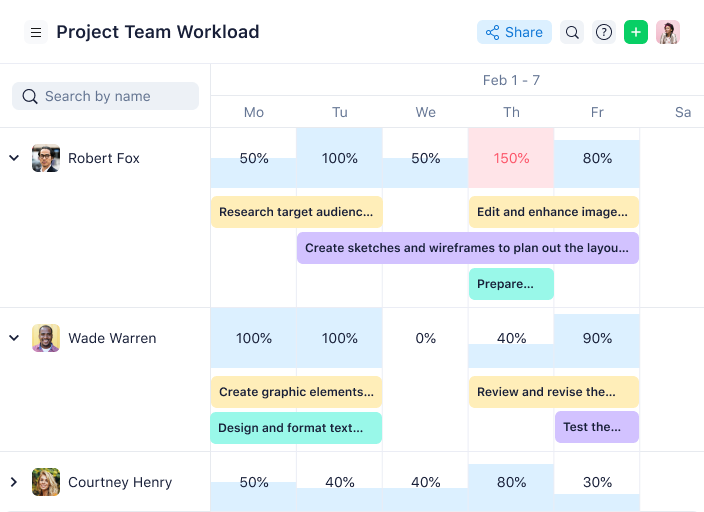
Wrike è uno strumento versatile di gestione dei progetti che aiuta i team a gestire i rischi, ottimizzare i flussi di lavoro e ridurre le attività non necessarie attraverso l'automazione. Offre una gamma di funzionalità che consentono di concentrarsi sui compiti critici gestendo efficacemente i potenziali rischi.
Recentemente ho parlato con Kateryna Boiko, responsabile del marketing digitale presso Mobilunity, su come il suo team utilizza Wrike per gestire i rischi nei progetti di marketing. 'I maggiori rischi per qualsiasi campagna di solito derivano da scadenze mancate o dipendenze da altri team...Wrike mi aiuta a ridurre questi rischi perché tutto è visibile in un unico posto,' afferma. 'Ad esempio, se il design subisce un ritardo, so immediatamente come questo influenzerà la data di lancio e posso riassegnare i compiti,' spiega.
Perché ho scelto Wrike
Ho scelto Wrike per la gestione dei rischi di progetto perché favorisce la collaborazione tra i membri del team, un aspetto fondamentale per gestire efficacemente i rischi. Wrike offre funzionalità come l'automazione e modelli personalizzabili che permettono al tuo team di adattarsi rapidamente ai cambiamenti, garantendo che i progetti rimangano nei tempi previsti.
La sua capacità di integrarsi con oltre 400 applicazioni facilita una comunicazione fluida e una gestione efficiente delle risorse, fondamentali per una tempestiva mitigazione dei rischi. Inoltre, gli strumenti di Wrike per la visualizzazione dei carichi di lavoro e la generazione di report aiutano a tenere informati gli stakeholder, rendendolo un bene prezioso per qualsiasi ambiente di progetto collaborativo.
Funzionalità principali di Wrike
Wrike offre anche altre funzionalità chiave che possono aiutarti nella gestione dei progetti e dei rischi.
- Apprendimento automatico per le previsioni di rischio: Questa funzionalità utilizza l'IA per prevedere i ritardi nei progetti, così il tuo team può rispondere tempestivamente ed evitare interruzioni.
- Reportistica automatizzata: Puoi generare report regolari per tenere informati gli stakeholder e assicurarti che tutti siano aggiornati sullo stato del progetto e dei rischi.
- Gestione visuale del carico di lavoro: Wrike consente di visualizzare il carico di lavoro del team tramite bacheche Kanban e diagrammi di Gantt, aiutando a dare priorità alle attività e a gestire efficacemente le risorse.
- Moduli di richiesta dinamici: Puoi automatizzare il processo di raccolta delle richieste e assicurarti che il team raccolga in modo efficiente tutte le informazioni necessarie dai richiedenti.
Integrazioni di Wrike
Le integrazioni includono Klaxoon, QuickBooks, Google Sheets, Salesforce, Microsoft Teams, Google Drive, Microsoft SharePoint, OneDrive e Jira.
Pros and Cons
Pros:
- Adatta i flussi di lavoro alle tue esigenze specifiche
- Report dettagliati sulle prestazioni dei progetti
- Le funzioni di IA sono incluse in tutti i piani
Cons:
- Le risposte dei moduli possono essere difficili da trovare
- Le funzionalità estese possono essere eccessive per piccoli team
New Product Updates from Wrike

Wrike Adds Quick Search to Table View
Wrike adds Quick Search to Table View with full-table search across titles, descriptions, and fields, plus highlighted matches. This helps users find tasks faster in large tables. For more information, visit Wrike’s official site.

SAI360
Ideale per il monitoraggio dei rischi in tempo reale
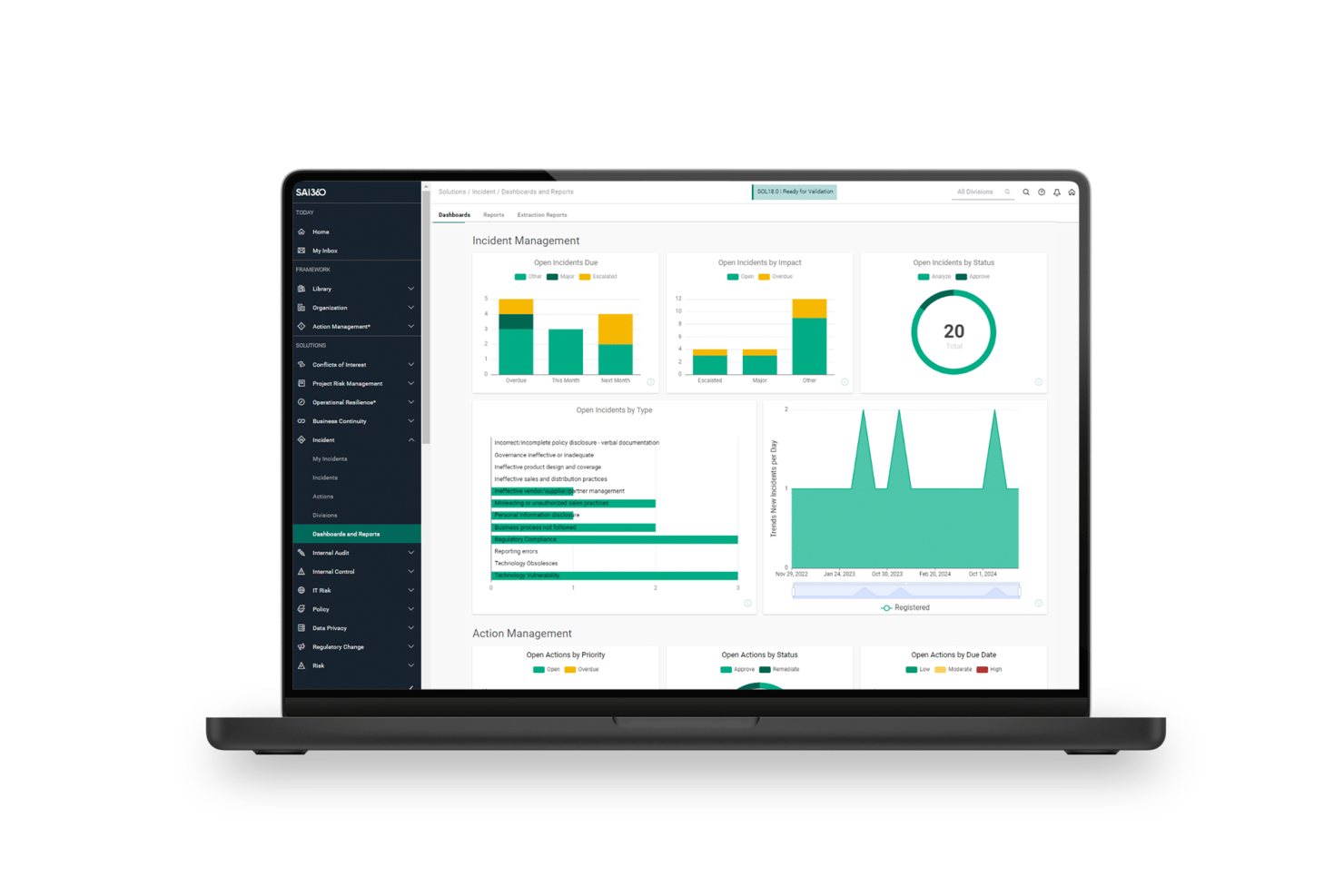
SAI360 è una piattaforma GRC che copre il rischio aziendale, il rischio operativo, il rischio di terze parti, il rischio IT/cibernetico e la gestione della conformità attraverso un registro dei rischi connesso all'IA, il monitoraggio degli indicatori chiave di rischio (KRI) in tempo reale e flussi di lavoro automatizzati per la mitigazione.
Per chi è più adatto SAI360?
SAI360 è particolarmente adatto ai team che si occupano di rischio e conformità in settori regolamentati come quello bancario, sanitario e manifatturiero, che necessitano di una visibilità dei rischi a livello aziendale.
Perché ho scelto SAI360
Ho incluso SAI360 tra le mie scelte principali perché il suo monitoraggio degli indicatori chiave di rischio (KRI) in tempo reale è davvero impressionante: tiene traccia delle soglie di rischio in tutta l'azienda e attiva avvisi automatici nel momento stesso in cui si verifica una violazione. Apprezzo molto anche Horizon Scanning, che attinge da oltre 5 milioni di fonti globali, assegna un punteggio ai segnali in base alla loro rilevanza e inserisce direttamente i rischi emergenti nel registro interno. Per settori regolamentati come quello bancario o sanitario, questo tipo di intelligence esterna continua è difficile da replicare con un semplice registro statico.
Funzionalità principali di SAI360
- Registro dei rischi connesso all'IA: collega rischi, incidenti, controlli e indicatori correlati tra i domini aziendali e operativi in un'unica vista.
- Simulazione Monte Carlo: modella il valore a rischio e l'esposizione finanziaria utilizzando una simulazione probabilistica per supportare le decisioni relative al rischio finanziario aziendale.
- Autovalutazioni dei rischi e dei controlli (RCSAs): valutazioni strutturate che acquisiscono la probabilità, l'impatto e l'efficacia dei controlli nelle diverse unità aziendali.
- Flussi di lavoro automatizzati per la mitigazione: indirizza le risposte ai rischi attraverso catene di approvazione configurabili, assegnazioni ai responsabili e monitoraggio delle azioni correttive fino alla chiusura.
Integrazioni di SAI360
SAI360 elenca oltre 100 integrazioni, tra cui ServiceNow, Jira, SAP, Oracle, Power BI, Microsoft 365, SharePoint e Slack. Le edizioni Professional ed Enterprise supportano le integrazioni tramite API di terze parti e SAI360 è disponibile anche tramite Zapier.
Pros and Cons
Pros:
- Gli avvisi KRI in tempo reale fanno emergere le esposizioni emergenti
- L'IA collega rischi, controlli e incidenti
- L'assistenza reattiva supporta implementazioni complesse
Cons:
- Le dashboard avanzate richiedono una configurazione tecnica
- L'implementazione richiede un notevole impegno amministrativo
Ideale per valutazioni e mitigazione dei rischi in tempo reale
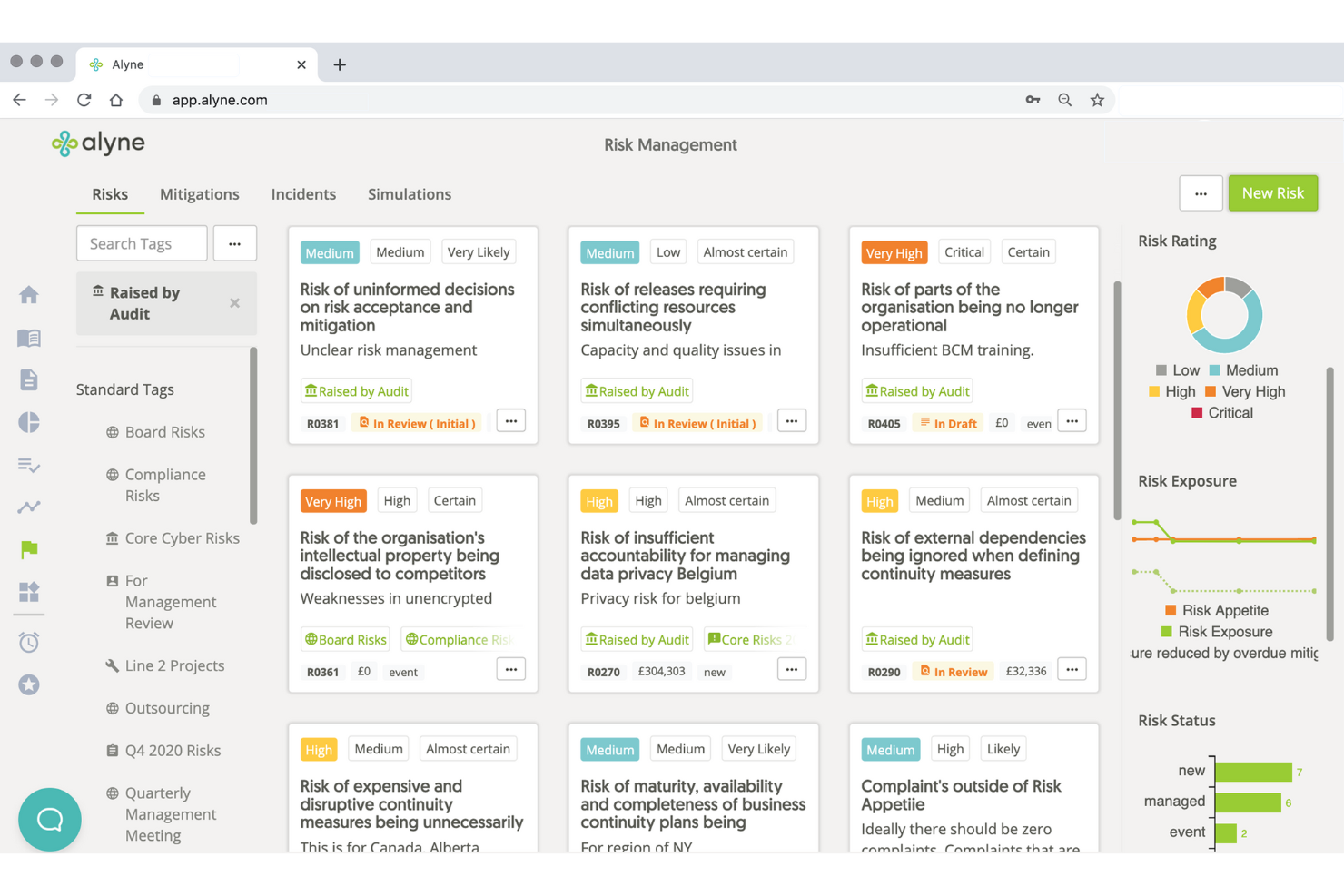
La piattaforma Alyne di Mitratech è una soluzione cloud-based per la governance, il rischio e la conformità (GRC) che può aiutare a migliorare la gestione del rischio della tua organizzazione. Con un focus sull'integrazione delle aree chiave della gestione del rischio, Alyne offre strumenti e funzionalità che aiutano le aziende a valutare e mitigare i rischi in modo efficace.
Perché ho scelto Mitratech
Ho scelto Mitratech per i suoi solidi strumenti di valutazione del rischio che permettono di condurre valutazioni in tempo reale dei potenziali rischi. Questa funzionalità è essenziale per individuare le vulnerabilità all'interno dell'organizzazione e consentire di adottare misure proattive.
Un altro motivo per cui ho scelto Mitratech sono le sue capacità di gestione delle policy, che aiutano a mantenere la conformità con diverse normative e standard. Questa caratteristica è cruciale per le aziende che operano in settori fortemente regolamentati e può aiutare a soddisfare i requisiti necessari. Inoltre, le analisi basate su intelligenza artificiale della piattaforma forniscono insight preziosi per decisioni informate, così puoi dare priorità ai rischi e allocare in modo efficace le risorse.
Caratteristiche principali di Mitratech
Mitratech offre anche una gamma di altre funzionalità che possono aiutare la tua organizzazione nella gestione dei rischi di progetto.
- Flussi di lavoro automatizzati: Puoi semplificare i processi di identificazione e mitigazione dei rischi, ridurre lo sforzo manuale e aumentare l'efficienza.
- Pianificazione della continuità operativa: Con strumenti progettati per sviluppare e mantenere piani di continuità operativa, puoi prepararti e rispondere in modo efficace alle interruzioni, riducendo al minimo i tempi di inattività e le perdite finanziarie.
- Formazione sulla conformità: Mitratech fornisce risorse e moduli per formare il tuo team sui requisiti di conformità, assicurando che tutti i processi rispettino le normative e gli standard rilevanti.
- Gestione del rischio dei fornitori terzi: Questa funzione facilita la valutazione e il monitoraggio dei rischi associati ai fornitori terzi, così che le tue partnership non introducano vulnerabilità nelle tue operazioni.
Integrazioni di Mitratech
Le integrazioni non sono elencate pubblicamente sul sito web di Mitratech.
Pros and Cons
Pros:
- Analisi avanzate alimentate dall'intelligenza artificiale
- Funzionalità di gestione della conformità integrate
- Crea valutazioni personalizzate in base alle esigenze specifiche
Cons:
- Tempi di implementazione e configurazione lunghi
- L'integrazione con i sistemi esistenti può essere impegnativa

Miglior software integrato di gestione dei rischi per le imprese
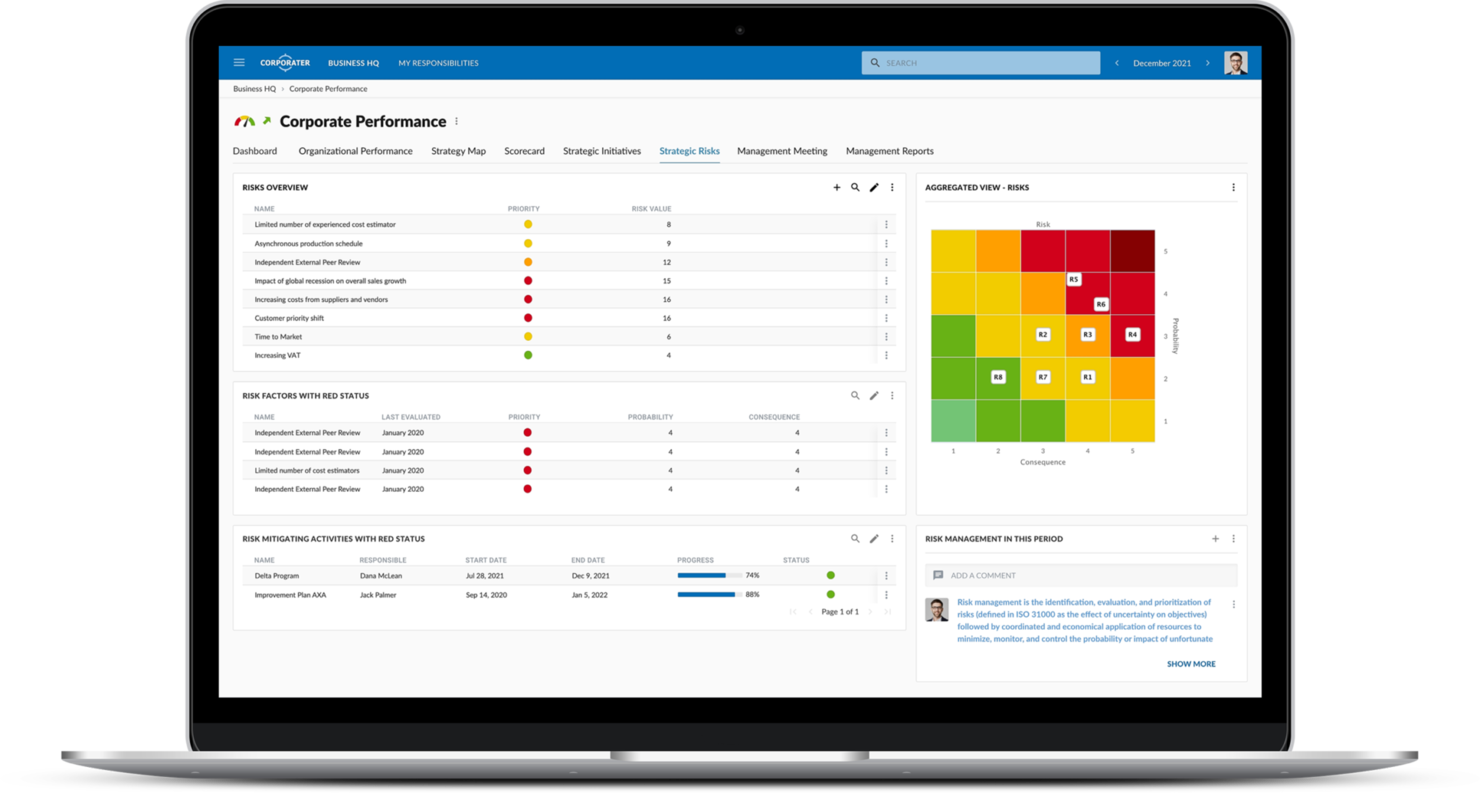
Corporater è un software di gestione dei rischi che integra governance, performance, rischio e conformità in un'unica piattaforma. Offre soluzioni personalizzate per diverse esigenze aziendali e fornisce un approccio completo alla gestione efficace dei rischi.
Perché ho scelto Corporater
Corporater offre soluzioni su misura per il monitoraggio della governance, la gestione dei rischi e la gestione della conformità. Queste soluzioni sono progettate per soddisfare le specifiche esigenze della tua azienda, così che l'organizzazione possa gestire i rischi in modo coerente con i propri obiettivi e requisiti specifici.
Un altro motivo per cui ho scelto Corporater sono le sue capacità di livello enterprise, che includono configurazioni flessibili e implementazione rapida. Questo significa che puoi adattare velocemente il software ai processi della tua organizzazione e iniziare a gestire i rischi senza ritardi significativi. L'adattabilità della piattaforma significa che può evolversi insieme alle esigenze in cambiamento della tua organizzazione, rendendola una scelta sostenibile per la gestione a lungo termine dei rischi.
Funzionalità principali di Corporater
Corporater offre anche altre funzionalità chiave a supporto dei tuoi processi di gestione dei rischi di progetto.
- Dashboard personalizzabili: puoi personalizzare l'interfaccia di gestione dei rischi per mostrare i dati e le informazioni più rilevanti per il tuo team. Questo permette di prendere decisioni più informate.
- Registro dei rischi centralizzato: consente di mantenere un registro completo di tutti i rischi identificati in un archivio centralizzato per garantire facile accesso e gestione attraverso i vari progetti.
- Gestione automatizzata degli incidenti: puoi semplificare le tue risposte ai rischi grazie a flussi di lavoro automatizzati che guidano il tuo team nei processi di risoluzione degli incidenti.
- Strumenti per la pianificazione e il monitoraggio dei rischi: utili per una pianificazione efficace dei rischi, per l'identificazione e il monitoraggio continuo per mantenere i progetti in linea con gli obiettivi strategici.
Integrazioni Corporater
Le integrazioni non sono elencate sul sito web di Corporater.
Pros and Cons
Pros:
- Funzionalità avanzate per trasformare i dati in informazioni utili
- Allinea in modo efficace strategia, operazioni e finanza
- Ampia personalizzazione di dashboard e report
Cons:
- Richiede risorse significative per implementazione e formazione
- Le funzionalità sono eccessive per le piccole imprese
Ideale per la gestione della sicurezza e della compliance

ManageEngine Log360 è una soluzione di security information and event management (SIEM) progettata per aiutarti a contrastare le minacce e gestire gli incidenti di sicurezza. Offre una gamma di strumenti per monitorare, analizzare e rispondere agli eventi di sicurezza, rappresentando una risorsa preziosa per qualsiasi strategia di gestione del rischio aziendale.
Recentemente ho parlato con Mircea Dima, fondatore, CEO e CTO di AlgoCademy, su come il suo team utilizza ManageEngine Log360. 'La capacità dello strumento di centralizzare i dati degli eventi e di effettuare reazioni automatiche è stata una rivoluzione che ha aumentato la visibilità del rischio,' afferma. Questo ha aiutato a 'gestire grandi quantità di dati e diversi tipi di misure di sicurezza,' spiega.
Perché ho scelto ManageEngine Log360
Ho scelto ManageEngine Log360 per le sue funzionalità di monitoraggio in tempo reale. Questa caratteristica ti permette di tracciare e analizzare gli eventi di sicurezza appena si verificano e offre avvisi personalizzabili che aiutano a rispondere rapidamente alle potenziali minacce. Inoltre, il sistema di gestione degli incidenti assicura che tu riceva notifiche immediate per gli incidenti di sicurezza, così il tuo team può agire con prontezza per mitigare i rischi.
Un altro motivo della mia scelta è l’analytics sul comportamento di utenti e entità (UEBA) dello strumento. Questa funzionalità utilizza il machine learning per identificare comportamenti utente insoliti, valutare i potenziali rischi e rilevare minacce interne. Anche la funzione di reportistica per la compliance è degna di nota, in quanto supporta diverse normative come PCI DSS e GDPR, aiutando la tua organizzazione a mantenere la conformità e gestire i rischi normativi.
Funzionalità principali di ManageEngine Log360
Oltre alle potenti capacità di gestione della sicurezza e della compliance, ecco diverse altre funzionalità per la gestione dei rischi offerte da ManageEngine Log360.
- Monitoraggio Shadow IT: Puoi identificare e tracciare applicazioni non autorizzate all’interno della tua rete, aiutandoti a controllare i rischi potenziali legati all’uso di software non approvati.
- Monitoraggio della sicurezza cloud: Protegge i tuoi account cloud da accessi non autorizzati, così i dati sensibili dei progetti restano al sicuro negli ambienti cloud.
- Filtraggio dei contenuti web: Puoi bloccare l’accesso a siti web dannosi, proteggendo la rete da potenziali minacce e offrendo un ambiente di navigazione sicuro per il tuo team.
- Audit in tempo reale di Active Directory: Ti permette di monitorare gli eventi di sicurezza in ambienti Active Directory e di ottenere informazioni su modifiche non autorizzate o attività sospette che potrebbero influire sulla sicurezza.
Integrazioni di ManageEngine Log360
Le integrazioni includono ADManager Plus, ADAudit Plus ed Endpoint Central.
Pros and Cons
Pros:
- Supporta il mantenimento della conformità agli standard di settore
- Aiuta a rilevare e rispondere alle minacce alla sicurezza
- Capacità di registrazione e monitoraggio complete
Cons:
- L’elaborazione di grandi volumi di log può causare un calo di prestazioni
- Personalizzazione limitata di report e avvisi
New Product Updates from ManageEngine Log360
ManageEngine Log360 Adds New Log Source Integrations
ManageEngine Log360 adds new log source integrations for Bitdefender GravityZone, CrowdStrike Falcon Event Streams, Okta, and MikroTik to broaden security and network visibility. For more information, visit ManageEngine Log360's official site.
 .
.
ClickUp
Ideale per la gestione delle dipendenze tra attività nei progetti
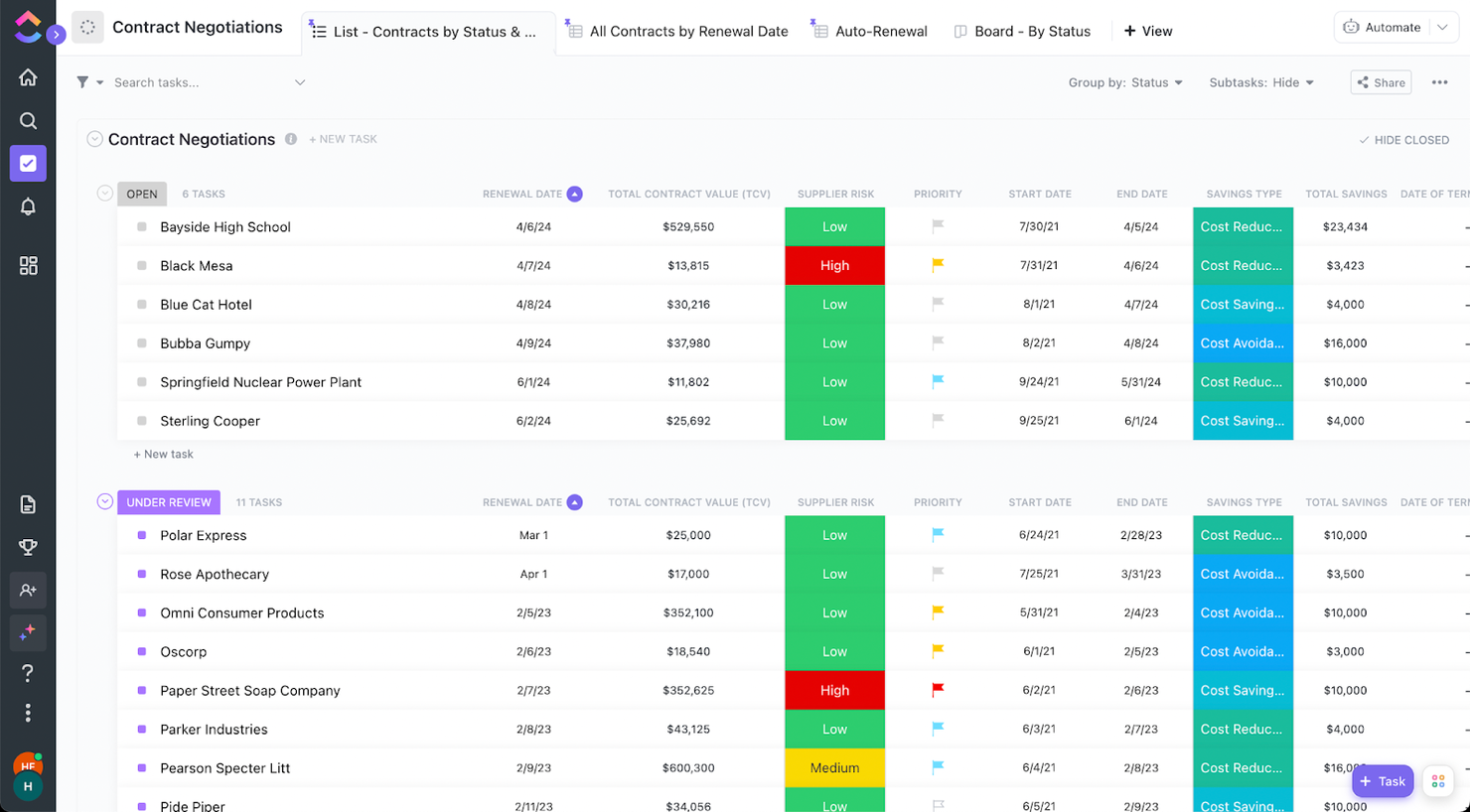
ClickUp è una piattaforma tutto-in-uno per la produttività e la gestione dei progetti, progettata per consolidare diversi strumenti in un'unica interfaccia. Ti aiuta a gestire i rischi nei tuoi progetti, oltre a eliminare la dispersione del lavoro e massimizzare l'efficienza, il che lo rende una risorsa preziosa per team di diversi settori.
Perché ho scelto ClickUp
Ho scelto ClickUp per la sua funzionalità di dipendenze tra attività. Questo consente di stabilire relazioni tra le attività e identificare potenziali colli di bottiglia e rischi nei progetti. È un modo semplice per assicurarsi che il team sia consapevole degli effetti a catena di eventuali ritardi o cambiamenti.
Un altro motivo per cui ClickUp si distingue nella gestione dei rischi è rappresentato dai suoi dashboard di reportistica. Questi dashboard offrono una visione completa dei progetti, così puoi monitorare l'andamento e identificare rapidamente eventuali problemi. Grazie a questi dati, puoi prendere decisioni informate e mitigare i rischi prima che si aggravino.
Funzionalità principali di ClickUp
ClickUp offre anche diverse altre funzionalità per la gestione del rischio nei progetti.
- Registro dei rischi: Questa funzione ti permette di creare un documento centralizzato per tracciare i rischi identificati durante tutto il ciclo di vita del progetto, così da non trascurare nulla.
- Matrice di valutazione dei rischi: Puoi utilizzare questo strumento visivo per dare priorità ai rischi in base al loro impatto e alla probabilità, aiutando il team a concentrarsi sulle questioni più critiche.
- ClickUp Whiteboards: Questa funzione mette a disposizione una tela digitale per il brainstorming e la collaborazione, consentendo al team di raccogliere idee e collegarle ai flussi di lavoro in modo integrato.
- Funzionalità IA: Puoi automatizzare attività come l'inserimento dei dati e la generazione di report, ottimizzare i flussi di lavoro e permettere al team di concentrarsi sulle attività strategiche.
Integrazioni di ClickUp
Le integrazioni includono Microsoft OneDrive, Outlook, Google Calendar, Zoom, Slack, Trello, Asana, Jira, monday.com, Basecamp, GitHub e Discord.
Pros and Cons
Pros:
- Le capacità di automazione semplificano le attività ripetitive
- Molteplici opzioni di visualizzazione delle attività
- Interfaccia altamente personalizzabile
Cons:
- Le numerose funzionalità possono disorientare i team piccoli
- L'elevato livello di personalizzazione richiede più tempo di configurazione
New Product Updates from ClickUp
ClickUp Adds Meetings Hub, Super Agent Templates, and ZoomInfo Integration
ClickUp adds a searchable Meetings Hub, new ways to clone and template Super Agents, and a ZoomInfo integration through the App Center. These updates improve meeting retrieval, agent reuse, and access to sales intelligence. For more information, visit ClickUp’s official site.

Ideale per pianificare ed eseguire audit sui rischi
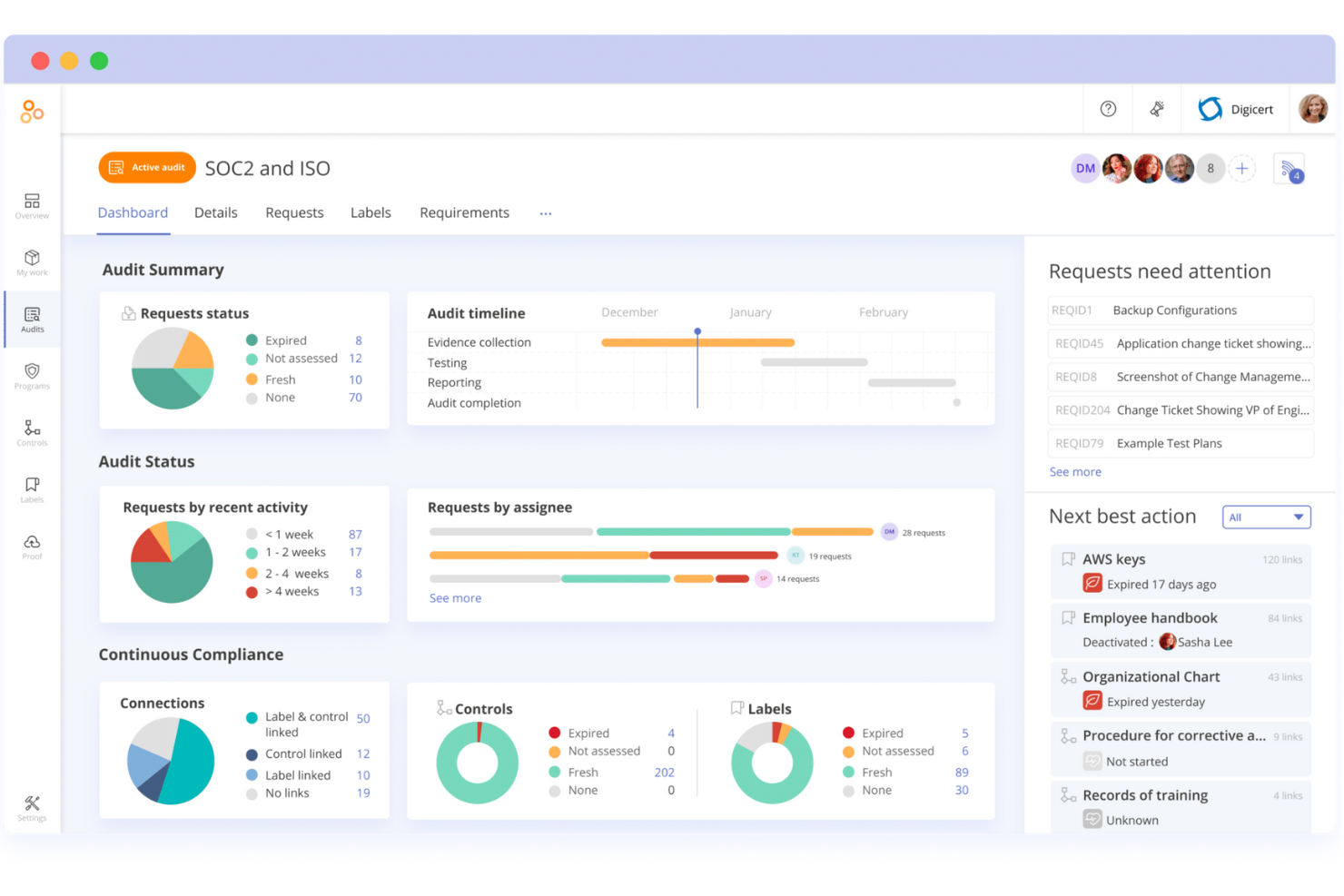
Hyperproof è una piattaforma GRC che può aiutare a migliorare le operazioni di conformità e la gestione del rischio. Sfruttando un sistema centralizzato guidato dall'intelligenza artificiale, supporta un'ampia gamma di framework di conformità ed è versatile per vari settori.
Recentemente ho parlato con Ben Waterman, co-fondatore e CEO della piattaforma di gestione patrimoniale Strabo, su come il suo team utilizza Hyperproof. 'Ciò che ci ha colpiti è stato come collegasse senza soluzione di continuità i compiti di conformità con la gestione del rischio, offrendoci una visione chiara e centralizzata che ha ridotto i punti ciechi durante il nostro audit più recente,' afferma, 'è una parte fondamentale del nostro framework di gestione del rischio.'
Perché ho scelto Hyperproof
Ho scelto Hyperproof per la sua eccezionale capacità di ottimizzare la pianificazione e l'esecuzione degli audit sui rischi, grazie ai suoi framework strutturati e alle funzionalità di automazione. Con funzionalità come l'assegnazione automatica dei compiti e il monitoraggio della conformità in tempo reale, il tuo team può concentrarsi sulla gestione strategica del rischio invece che su compiti manuali.
La piattaforma di Hyperproof supporta una varietà di standard di conformità come NIST e ISO, così puoi facilmente allineare i tuoi processi di gestione del rischio ai requisiti del settore. Questo lo rende una scelta ideale se la tua organizzazione vuole migliorare i processi di audit e mantenere la conformità senza sforzo.
Funzionalità principali di Hyperproof
Hyperproof offre molte altre funzionalità utili per te e il tuo team nella gestione dei rischi di progetto.
- Campi personalizzati: Puoi creare campi personalizzati da applicare a elementi come controlli e compiti, rendendo il software adattabile alle tue specifiche esigenze di gestione del rischio.
- Valutazioni automatizzate del rischio: Puoi utilizzare modelli predefiniti per ottimizzare il processo, permettendo un'identificazione e una priorizzazione rapida dei rischi.
- Framework personalizzabili: Questo ti consente di adattare i controlli di rischio e conformità alle esigenze specifiche della tua organizzazione, così da mantenere l'allineamento con i requisiti aziendali unici.
- Reportistica in tempo reale: Puoi accedere a dashboard che forniscono informazioni immediate su stato di rischio e conformità, aiutandoti a prendere decisioni più informate.
Integrazioni di Hyperproof
Le integrazioni includono Azure, AWS, Asana, ADP, Jira, Google Drive, Confluence, Dropbox e GitHub.
Pros and Cons
Pros:
- Mappatura dei controlli tra diversi framework
- Visibilità in tempo reale sullo stato di conformità
- Strumenti efficaci per la gestione del rischio dei fornitori
Cons:
- Liste di controlli complesse possono rendere difficile la navigazione
- Analisi native limitate

Ideale per l'osservabilità intelligente delle transazioni
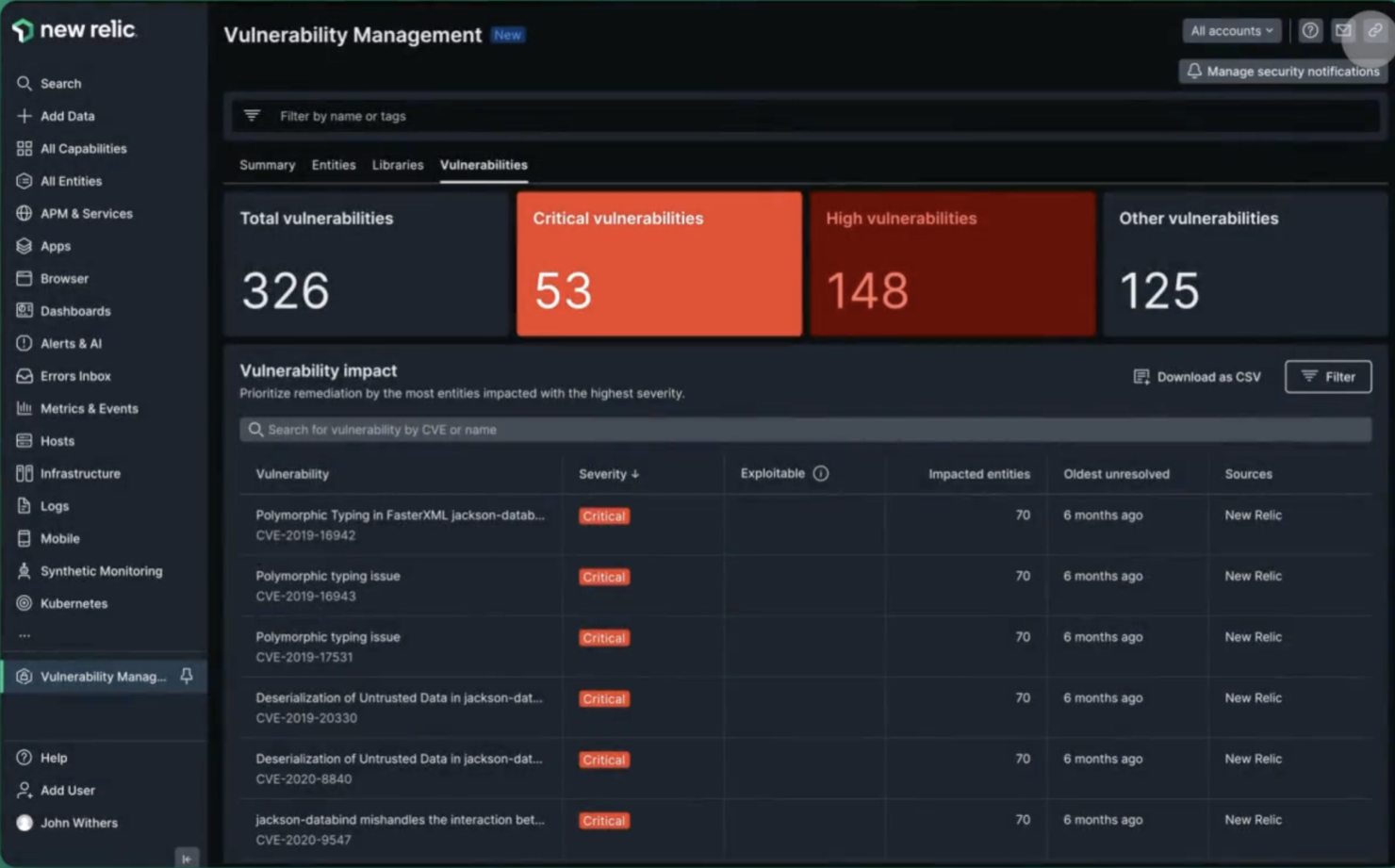
New Relic offre soluzioni di monitoraggio per aiutare le aziende a gestire i rischi e mantenere prestazioni ottimali. Fornisce strumenti per osservare e analizzare l'intero stack, dalle applicazioni front-end fino all'infrastruttura back-end.
Perché ho scelto New Relic
New Relic si concentra sull'osservabilità intelligente delle transazioni, che consente di identificare e risolvere rapidamente i problemi. Questo è fondamentale nella gestione del rischio perché aiuta a mantenere l'operatività e le prestazioni su tutti i sistemi. New Relic offre anche rilevamento delle anomalie e può avvisare il tuo team di cambiamenti imprevisti nel sistema, aiutando a mitigare potenziali rischi prima che si aggravino.
Un altro motivo per cui ho scelto New Relic sono strumenti come cloud cost intelligence e security RX. Questi strumenti forniscono informazioni sulla spesa nel cloud e sulle vulnerabilità di sicurezza. Puoi usarli per prendere decisioni informate, ottimizzare le risorse e mettere in sicurezza le applicazioni.
Funzionalità principali di New Relic
New Relic offre anche diverse altre funzionalità preziose per la gestione dei rischi.
- Monitoraggio Kubernetes: Questa funzionalità facilita la risoluzione dei problemi negli ambienti Kubernetes e offre una vista multidimensionale sulle metriche di prestazione, eventi, log e tracce.
- Avvisi dinamici: Puoi regolare automaticamente gli avvisi in base ai cambiamenti degli host, riducendo la necessità di riconfigurazioni manuali e garantendo risposte tempestive ai potenziali problemi.
- Dashboard personalizzati: Puoi creare dashboard personalizzabili per avere visibilità sull'intero stack e ottenere insight applicabili.
- Inventario in tempo reale e tracciamento delle modifiche: Offre un inventario ricercabile dei componenti dell'infrastruttura e traccia le modifiche in tempo reale, così puoi diagnosticare e risolvere rapidamente i problemi.
Integrazioni di New Relic
Le integrazioni includono Jira Service Management, ServiceNow, GitHub, AWS, Google Cloud, Microsoft Azure e Slack.
Pros and Cons
Pros:
- Le funzionalità AI aiutano nella risoluzione dei problemi e nella previsione di criticità future
- Il sistema di avvisi fornisce notifiche tempestive
- Monitoraggio esteso per applicazioni, infrastruttura e servizi cloud
Cons:
- Gli avvisi non critici complicano l'identificazione dei problemi
- Creare dashboard personalizzati può essere complesso

Ideale per la visualizzazione delle dipendenze
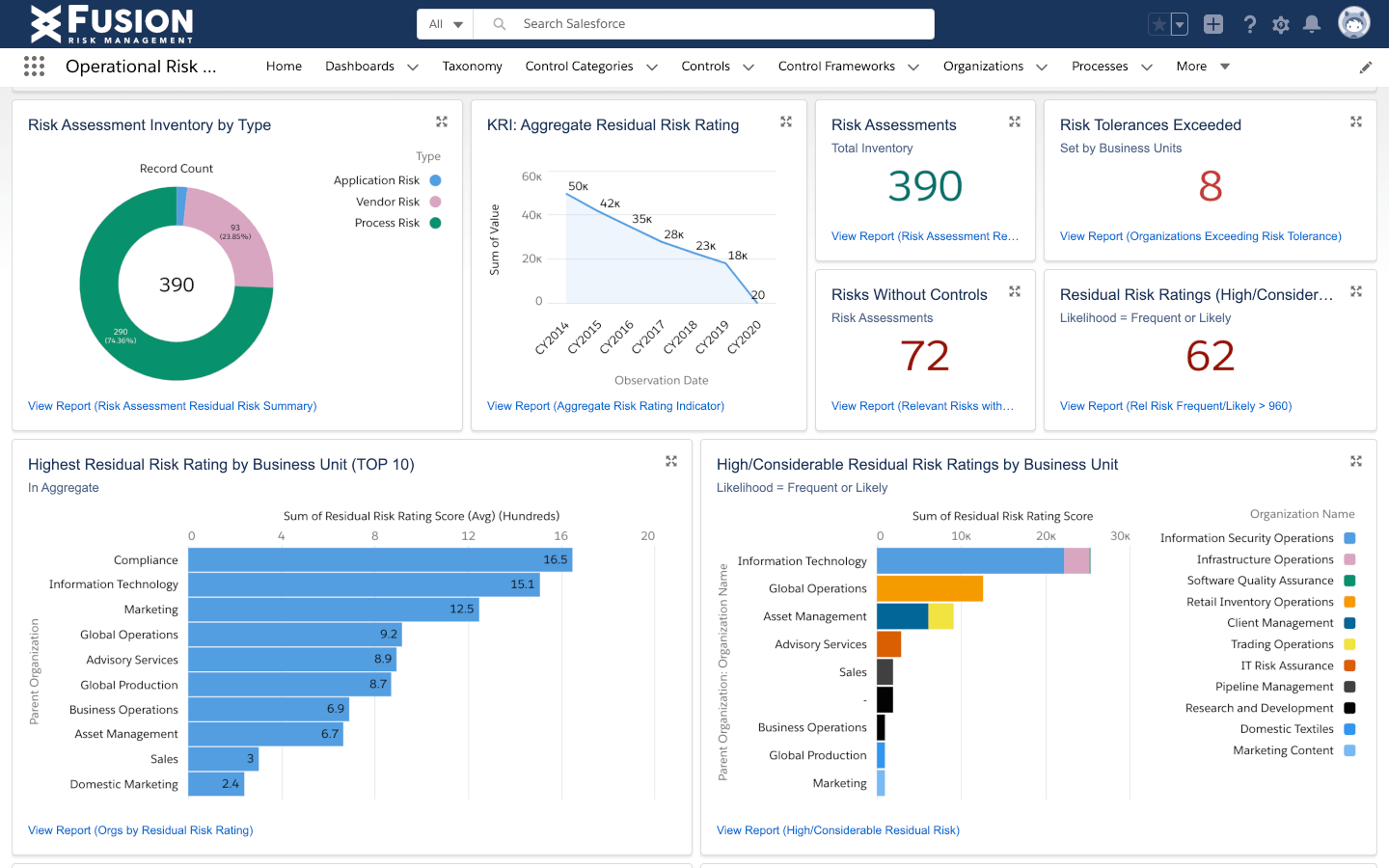
Il Fusion Framework System è una piattaforma progettata per rafforzare la gestione del rischio e la resilienza operativa. Offre una suite di strumenti che aiutano le organizzazioni a mantenere la continuità, gestire crisi e riprendersi dalle interruzioni.
Perché ho scelto Fusion Framework System
Ho scelto il Fusion Framework System per la sua eccezionale capacità di visualizzare le dipendenze, un aspetto cruciale per chiunque sia coinvolto nella gestione dei rischi di progetto. Il sistema consente di mappare le dipendenze a monte e a valle, aiutando a identificare potenziali rischi e a comprenderne gli impatti a cascata. Questa funzionalità fa sì che il tuo team possa individuare punti di vulnerabilità singoli e affrontarli proattivamente, riducendo così anche il rischio di interruzioni.
La piattaforma può offrire una visione unificata di queste dipendenze, aiutandoti a prendere decisioni informate e strategiche che rafforzano la resilienza della tua organizzazione.
Caratteristiche principali di Fusion Framework System
Il Fusion Framework System offre anche diverse altre funzionalità che possono aiutarti nella gestione dei rischi di progetto.
- Visualizzazione Dinamica del Rischio: Ti consente di visualizzare e interagire con i dati di rischio in un formato visivo, facilitando l'identificazione e la valutazione di potenziali problemi.
- Gestione della Continuità Operativa: Lo strumento offre una comprensione completa dei processi aziendali così puoi mantenere le operazioni in corso.
- Recupero da Disastri IT: Aiuta ad affrontare interruzioni legate alla tecnologia e a mantenere una fornitura di servizi costante.
- Gestione di Crisi e Incidenti: Puoi rispondere efficacemente alle crisi con una pianificazione dettagliata e decisioni rapide.
Integrazioni di Fusion Framework System
Le integrazioni includono ServiceNow, xMatters, Everbridge Mass Notification, Argos Risk, MuleSoft, Onsolve, AlertMedia e Salesforce.
Pros and Cons
Pros:
- Stabilità a lungo termine nelle implementazioni enterprise
- Elevata personalizzazione
- Collega dipendenze tra funzioni aziendali
Cons:
- Richiede un intenso lavoro di configurazione
- Limiti su reportistica e analisi

ProcessMAP
Ideale per la gestione automatizzata degli incidenti

ProcessMAP è un software di gestione del rischio che offre soluzioni ambientali, salute e sicurezza (EHS) per migliorare la sicurezza sul lavoro e la conformità normativa. Grazie al suo focus sulla gestione proattiva del rischio e sul rispetto delle normative, aiuta le organizzazioni a passare da misure reattive a strategie di sicurezza orientate alle prestazioni.
Perché ho scelto ProcessMAP
ProcessMAP offre una gestione automatizzata degli incidenti, utilizzando flussi di lavoro guidati dall'IA per semplificare le indagini sugli incidenti e ridurre i tempi di risposta. Questa funzionalità consente al tuo team di affrontare e risolvere rapidamente le problematiche di sicurezza, minimizzando i rischi potenziali. Inoltre, il monitoraggio della conformità del software tiene costantemente traccia dei requisiti normativi, così la tua organizzazione resta in linea con standard come ISO 45001.
Un altro motivo per cui ho selezionato ProcessMAP sono le sue capacità di gestione dei documenti, che permettono una rapida creazione e revisione delle policy. Questa funzione non solo migliora l'efficienza, ma aiuta anche a mantenere la coerenza nei protocolli di sicurezza all'interno dell'organizzazione. Con la gestione predittiva del rischio, il software identifica i potenziali rischi prima che si aggravino, così il tuo team può applicare misure di sicurezza proattive e mantenere un ambiente di lavoro più sicuro.
Caratteristiche principali di ProcessMAP
ProcessMAP offre una gamma di altre funzionalità per una gestione efficace di rischio e incidenti.
- Gestione della Qualità dei Fornitori: Puoi assicurarti che i fornitori soddisfino gli standard di qualità stabiliti, fondamentale per mantenere coerenza e conformità nei tuoi progetti.
- Controllo Qualità: Ti consente di monitorare e mantenere gli standard di qualità durante tutti i processi di progetto, prevenendo deviazioni che potrebbero comportare rischi.
- Gestione delle Ispezioni: Permette di gestire le ispezioni, mantenere la conformità e identificare e affrontare rapidamente eventuali problematiche.
- Analisi Predittiva: Puoi anticipare potenziali rischi, mitigarli prima che si aggravino e utilizzare intuizioni guidate dai dati per informare le decisioni.
Integrazioni ProcessMAP
Le integrazioni non sono elencate sul sito web di ProcessMAP.
Pros and Cons
Pros:
- I registri di audit includono correlazioni di incidenti tra siti
- Visibilità in tempo reale dei KPI
- Funzionalità integrate per la gestione di salute e sicurezza
Cons:
- Gli utenti non-EHS affrontano una curva di apprendimento ripida
- La configurazione richiede molte risorse per i team piccoli
Altri software per la valutazione dei rischi
Ecco alcuni altri strumenti che non sono entrati nella lista principale, ma che meritano la tua attenzione.
- TrackMyRisks
Ideale per le capacità di automazione
- Acumen Risk
Ideale per esperienza utente e facilità d'uso
- @RISK
Ideale per gli utenti di Microsoft Office
- 6clicks
Ideale per la gestione del rischio guidata dall'AI
- IsoMetrix
Ideale per la gestione integrata del rischio
- SoftComply Risk Manager Plus
Ideale per la gestione del rischio in Jira
- RAIDLOG.com
Ideale per categorie e strategie di rischio personalizzate
- Opture
Ideale per le funzionalità di reporting del rischio
- Project Risk Manager
Ideale per la personalizzazione dei parametri di sistema
- Pims Risk
Ideale per la pianificazione delle risposte ai rischi
- Captain Compliance
Ideale per la gestione globale dei rischi legati alla privacy dei dati
- Prevalent
Ideale per la valutazione dei rischi con insight dell’AI
- StandardFusion
Il miglior software di gestione del rischio per il mercato medio
- Jama Software
Migliore per la valutazione dinamica del rischio


Come Valuto il Software di Gestione del Rischio
Divido la mia valutazione in due livelli: criteri di base che ogni strumento deve soddisfare e i fattori differenzianti che rivelano quale piattaforma sia realmente adatta al vostro PMO o al contesto di delivery del progetto.
Funzionalità di Base (Elementi Indispensabili per Questa Lista)
Quando seleziono gli strumenti per la mia lista, ne valuto ciascuno su una scala da 0 (non offre la funzionalità) a 5 (eccelle in quest'area) per ogni funzionalità di base elencata di seguito. Poi calcolo il punteggio totale dello strumento in percentuale. Ogni strumento deve ottenere un punteggio totale minimo del 65% per poter essere considerato per l'inclusione.
- Registro dei Rischi: Valuto se i rischi possono essere registrati con campi personalizzabili come categoria, responsabile e stato—non solo inseriti in una generica lista di attività o visualizzazione da foglio di calcolo.
- Valutazione e Scoring del Rischio: Ogni strumento dovrebbe offrire un sistema di valutazione probabilità-impatto con una matrice visiva o "heat map", non solo note sulla gravità in formato testo libero nascoste in un thread di commenti.
- Pianificazione della Mitigazione e delle Risposte: Controllo che ci sia un tracciamento strutturato delle azioni con responsabili assegnabili e date di scadenza, in modo che i piani di mitigazione non si fermino tra una revisione sprint e l'altra.
- Integrazione con Progetti e Portafoglio: I rischi devono poter essere collegati direttamente a progetti, attività o milestone—strumenti come Primavera Risk Analysis e Resolver gestiscono questa funzionalità in modo diverso e valuto entrambi gli approcci.
- Monitoraggio dei Rischi e Avvisi: Dashboard in tempo reale e notifiche basate su soglie sono fondamentali, specialmente per team che gestiscono progetti concomitanti con dipendenze variabili.
- Reportistica e Audit Trail: Cerco report sui rischi configurabili e uno storico completo delle modifiche, perché gli aggiornamenti agli stakeholder e le revisioni di conformità richiedono ben più di una semplice esportazione PDF statica.
Una volta che ho una lista di strumenti che rispondono ai criteri, considero ciò che differenzia ciascuna piattaforma.
Fattori Differenzianti (Cosa Distingue i Fornitori)
Ecco come confronto e metto in contrasto i diversi fornitori:
Caratteristiche Distintive
La simulazione Monte Carlo è un fattore distintivo importante. Cerco strumenti che modellano l'incertezza di tempi e costi, offrendo livelli di confidenza invece di stime puntuali. Anche le librerie di rischi predefinite fanno risparmiare davvero tempo durante l'impostazione dei progetti, soprattutto se il vostro PMO gestisce ripetutamente tipologie di progetti simili. Anche la mappatura delle interdipendenze dei rischi è fondamentale. Un singolo ritardo di un fornitore può avere effetti a catena su diversi flussi di lavoro in modi che un registro "piatto" non può rivelare.
Oltre le Caratteristiche
Le integrazioni qui contano molto. Verifico se uno strumento si connette nativamente con il vostro stack PM—Jira, MS Project, Primavera P6—così che i dati sui rischi scorrono insieme a pianificazioni e deliverable. Valuto anche l'allineamento con framework. I team che seguono ISO 31000 o PMBOK hanno bisogno di uno strumento i cui flussi di lavoro e terminologia corrispondano ai processi già in uso. Inoltre considero la distribuzione e la sicurezza, specialmente i controlli di accesso basati sui ruoli che limitano i dati sensibili sul rischio solo agli stakeholder approvati.
Come scegliere il software per la gestione dei rischi
È facile perdersi in lunghi elenchi di funzionalità e strutture tariffarie complesse. Per aiutarti a rimanere concentrato mentre affronti il tuo processo specifico di selezione del software, ecco una lista di fattori da tenere a mente:
| Fattore | Cosa considerare |
|---|---|
| Scalabilità | Il software crescerà insieme al tuo team con l'evolversi delle tue esigenze di gestione dei rischi? |
| Integrazioni | Il software si integra con gli strumenti su cui il tuo team fa già affidamento? |
| Personalizzazione | Puoi adattare il software ai processi specifici di gestione dei rischi del tuo team? |
| Facilità d'uso | Il tuo team troverà il software intuitivo e facile da navigare? |
| Budget | Il software rientra nel tuo budget soddisfacendo al contempo le tue esigenze principali? |
| Misure di sicurezza | Le misure di sicurezza del software sono sufficientemente solide da proteggere i dati sensibili? |
| Assistenza | Avrai accesso a un'adeguata assistenza clienti quando necessario? |
| Conformità | Il software contribuisce a garantire il rispetto degli standard di conformità del settore? |
Tendenze nel software per la gestione dei rischi
Durante la mia ricerca, ho consultato innumerevoli aggiornamenti dei prodotti, comunicati stampa e registri delle versioni di diversi fornitori di software per la gestione dei rischi. Ecco alcune delle tendenze emergenti che sto tenendo d'occhio:
- Valutazioni dei rischi basate sull'IA: Un numero sempre maggiore di fornitori utilizza l'IA per migliorare i propri sistemi di analisi dei rischi, offrendo informazioni più rapide e accurate sui rischi potenziali. Ciò consente alle aziende di identificare schemi all'interno di grandi insiemi di dati, migliorando il processo decisionale per la gestione dei rischi aziendali.
- Soluzioni per la gestione dei rischi di cybersicurezza: Con l'aumento delle minacce digitali, il software per la gestione dei rischi informatici sta diventando una priorità. I fornitori stanno integrando funzionalità specializzate per il monitoraggio, il rilevamento e la mitigazione dei rischi di cybersicurezza, rendendo questi strumenti essenziali per la gestione dei rischi IT.
- Analisi predittiva per il rischio degli investimenti: Il software per la gestione dei rischi degli investimenti incorpora ora l'analisi predittiva per aiutare le aziende a prevedere i potenziali rischi finanziari. Questa funzionalità è particolarmente preziosa per banche e società di investimento che utilizzano software per la gestione dei rischi bancari al fine di mitigare le perdite future.
- Gestione avanzata dei rischi di conformità: Anche il software per la valutazione dei rischi di conformità sta diventando più avanzato, con funzionalità che aiutano le aziende a rimanere aggiornate sui requisiti normativi. I fornitori si concentrano sulla creazione di strumenti che monitorano automaticamente le modifiche alle normative, garantendo che le aziende rimangano sempre conformi.
- Monitoraggio dei rischi in tempo reale: Il software integrato per la gestione dei rischi offre ora strumenti per il monitoraggio e il controllo in tempo reale dei rischi tra i vari reparti. Ciò consente alle aziende di reagire immediatamente alle minacce emergenti, rendendolo una funzionalità fondamentale per un solido programma di gestione dei rischi.
Che cos'è il software per la gestione dei rischi?
Il software per la gestione dei rischi è uno strumento che aiuta a identificare, valutare e gestire i potenziali rischi di progetto. È progettato per monitorare e analizzare diversi fattori di rischio che potrebbero influire sulle tempistiche, sull'ambito o sul budget del progetto.
Il software per la gestione dei rischi viene utilizzato anche negli investimenti e nella finanza, ma il software per la gestione dei rischi di progetto viene utilizzato nella pianificazione e nel processo decisionale nelle fasi iniziali del progetto. È possibile utilizzarlo per creare ed eseguire piani di mitigazione per qualsiasi rischio segnalato, contribuendo così a proteggere il progetto e a mantenerlo sulla strada del successo.
Funzionalità del software per la gestione dei rischi
Quando selezioni un software per la gestione dei rischi di progetto, presta attenzione alle seguenti funzionalità chiave:
- Identificazione dei rischi: Include modelli, liste di controllo e flussi di lavoro che consentono di individuare tempestivamente i rischi potenziali, documentare ciò che potrebbe andare storto e riconoscere gli schemi prima che interrompano il progetto.
- Matrici di valutazione dei rischi: Consentono di misurare l'impatto e la probabilità di ciascun rischio, così da poter stabilire quali rischi richiedono prima la tua attenzione.
- Dashboard per i report in tempo reale: Offrono una panoramica visiva chiara e aggiornata del quadro dei rischi. Le dashboard facilitano l'individuazione delle tendenze, il monitoraggio dello stato dei rischi e la condivisione delle informazioni con il team.
- Notifiche automatiche: Consentono di rimanere aggiornati tramite avvisi relativi a nuovi rischi, modifiche allo stato dei rischi o scadenze critiche. In questo modo tutti sono informati e possono reagire rapidamente.
- Funzionalità di collaborazione: I membri del team possono registrare i rischi, aggiornare le informazioni e assegnare le attività in modo collaborativo, promuovendo la responsabilità e mantenendo tutti allineati.
- Categorie di rischio personalizzabili: È possibile adattare il software alle esigenze del progetto o del settore e definire categorie di rischio in linea con il proprio modo di lavorare, per migliorare il monitoraggio e l'analisi.
- Allegati ai documenti: È possibile allegare documenti pertinenti (ad esempio contratti, disegni o corrispondenza) a rischi specifici e centralizzare le informazioni per migliorare il processo decisionale e la conservazione dei documenti.
- Monitoraggio delle azioni di mitigazione: Consente di monitorare le azioni di risposta ai rischi e di assicurarsi che nulla venga trascurato. È possibile assegnare responsabilità, impostare scadenze e monitorare l'efficacia della mitigazione.
- Registri di audit e della cronologia: Forniscono una registrazione delle modifiche apportate ai rischi e alle azioni nel tempo. Offrono trasparenza e consentono di dimostrare chiaramente i processi di gestione dei rischi quando necessario.
Funzionalità comuni dell'IA nei software per la gestione dei rischi di progetto
Oltre alle funzionalità standard dei software per la gestione dei rischi di progetto elencate sopra, molte soluzioni offrono funzionalità di IA come:
- Rilevamento automatizzato dei rischi: puoi utilizzare l'IA per analizzare i dati, i documenti e le comunicazioni del progetto e individuare rischi nuovi o nascosti che potresti aver trascurato.
- Analisi predittiva: puoi utilizzare l'IA per analizzare i dati storici e attuali, prevedere quali rischi hanno maggiori probabilità di verificarsi e prepararti in modo proattivo.
- Elaborazione del linguaggio naturale: consente di estrarre informazioni sui rischi da email, registri delle chat e report, comprendendo ed estraendo automaticamente i contenuti pertinenti.
- Definizione delle priorità dei rischi basata sull'IA: questo strumento di IA può valutare i rischi, ponderarne il potenziale impatto e la probabilità e fornire un elenco prioritario dei problemi.
- Raccomandazioni intelligenti per la mitigazione: questo strumento di IA può suggerire azioni di mitigazione basate sui rischi specifici e sul contesto del progetto, per farti risparmiare tempo e offrirti nuovi modi per gestire efficacemente i rischi.
Vantaggi del software di gestione dei rischi
L'implementazione di un software di gestione dei rischi può offrire diversi vantaggi al tuo team e alla tua azienda. Eccone alcuni che puoi aspettarti:
- Miglioramento del processo decisionale: utilizzando un programma di gestione dei rischi, puoi raccogliere dati migliori per valutare i rischi e prendere decisioni informate.
- Semplificazione della conformità: una soluzione per la conformità e la gestione dei rischi può aiutare il tuo team a rispettare le normative, riducendo il rischio di sanzioni e problemi legali.
- Maggiore sicurezza informatica: la gestione dei rischi informatici può aiutarti nello specifico a identificare e mitigare le minacce alla sicurezza informatica, proteggendo i tuoi sistemi da potenziali violazioni.
- Processi automatizzati: puoi automatizzare attività di gestione dei rischi come la raccolta dei dati e la reportistica, liberando tempo per consentire al tuo team di concentrarsi su strategie di livello superiore.
- Migliore visibilità sui rischi: una soluzione di gestione dei rischi aziendali offre una visione più chiara dei rischi in tutti i reparti, aiutandoti a individuare tempestivamente i problemi.
- Riduzione dei costi: collaborando con aziende specializzate nella mitigazione dei rischi, puoi ridurre i costi associati alla gestione e alla risposta ai rischi.
- Flessibilità e scalabilità: con strumenti open source per la gestione dei rischi, puoi personalizzare la soluzione in base alle esigenze della tua azienda man mano che crescono o cambiano.
Costi e prezzi del software di gestione dei rischi
Il prezzo è sempre un fattore da considerare quando si seleziona uno strumento, soprattutto quando si valutano opzioni aziendali. I costi variano in genere in base alle funzionalità, alle dimensioni del team, ai componenti aggiuntivi e ad altri fattori. La tabella seguente riassume i piani più comuni, i relativi prezzi medi e le funzionalità generalmente incluse nelle soluzioni software per la gestione dei rischi:
Tabella comparativa dei piani per il software di gestione dei rischi
| Tipo di piano | Prezzo medio | Funzionalità comuni |
|---|---|---|
| Piano gratuito | $0 | Reportistica di base sui rischi, numero limitato di utenti, spazio di archiviazione dei dati limitato e strumenti di base per la conformità. |
| Piano personale | $5-$25/user/month | Identificazione dei rischi, monitoraggio dei rischi, gestione di base della conformità e supporto via email. |
| Piano aziendale | $30-$75/user/month | Gestione avanzata della conformità, analisi dei rischi, accesso per più utenti e collaborazione tra team. |
| Piano per grandi aziende | $100-$250/user/month | Pacchetto completo per la conformità e la gestione dei rischi, integrazione con strumenti di terze parti, report personalizzati e supporto dedicato. |
Domande frequenti sul software per la valutazione dei rischi
Trova le risposte alle domande più comuni che altre persone pongono su questo argomento.
Jira è uno strumento per la gestione dei rischi?
No, Jira non è uno strumento dedicato alla gestione dei rischi, ma puoi utilizzarlo per monitorare i rischi personalizzando i tipi di problemi, i flussi di lavoro e i pannelli di controllo. Puoi aggiungere componenti aggiuntivi per la gestione dei rischi o integrare Jira con un software specializzato nella gestione dei rischi per ottenere funzionalità avanzate come il calcolo automatizzato del punteggio di rischio e la reportistica sulla conformità. Tuttavia, se la gestione dei rischi è un’esigenza importante, è meglio trovare uno strumento creato appositamente per questo scopo.
Qual è la differenza tra la gestione dei rischi e il software GRC?
Il software per la gestione dei rischi si concentra sull’identificazione, la valutazione e il monitoraggio dei rischi di progetto, mentre il software GRC (governance, rischio e conformità) include la gestione dei rischi, ma aggiunge la conformità alle politiche e le verifiche. Se la tua esigenza principale è gestire i rischi di progetto, gli strumenti per la gestione dei rischi sono più mirati. Se devi anche gestire la conformità normativa e la reportistica, le piattaforme GRC si adatteranno meglio al tuo caso d’uso.
Come posso utilizzare il software per la gestione dei rischi per migliorare il processo decisionale collaborativo?
Puoi utilizzare il software per la gestione dei rischi per centralizzare i dati sui rischi e renderli visibili a tutto il team. Molti strumenti offrono pannelli di controllo in tempo reale, notifiche e discussioni, così i membri del team possono segnalare rapidamente i problemi, suggerire soluzioni e concordare i passaggi successivi. Questo favorisce la trasparenza e aiuta tutti ad agire più velocemente per ridurre il rischio che un problema faccia deragliare il progetto.
Quali sono i vantaggi dell'automazione nel software per la gestione dei rischi?
L’automazione ti aiuta a identificare e segnalare i rischi più velocemente rispetto al monitoraggio manuale. Puoi automatizzare gli avvisi e il calcolo del punteggio di rischio per ridurre le attività ripetitive e concentrarti sulla risoluzione dei problemi. Questo accelera i tempi di risposta e riduce gli errori nei tuoi progetti.
Come posso personalizzare il software per la gestione dei rischi in modo che corrisponda al flusso di lavoro del mio progetto?
La maggior parte degli strumenti per la gestione dei rischi consente di personalizzare le categorie di rischio, i sistemi di punteggio e i formati dei report. Di solito puoi creare flussi di lavoro personalizzati per approvazioni dei rischi, notifiche e inoltri ai livelli superiori in base alla struttura del tuo team. Cerca un software con modelli flessibili e la possibilità di apportare modifiche tramite trascinamento, in modo che lo strumento si adatti al tuo effettivo modo di lavorare.
Il software per la gestione dei rischi può aiutare nella reportistica sulla conformità normativa?
Sì, molte piattaforme per la gestione dei rischi dispongono di funzionalità di reportistica pensate per la conformità. Possono aiutarti a monitorare gli eventi di rischio, le misure di mitigazione e i risultati, oltre a generare rapidamente report pronti per le verifiche. Questo semplifica le attività necessarie per soddisfare gli standard ISO, GDPR o altri standard specifici del settore nell’ambito del lavoro sul progetto.
Come funziona il monitoraggio dei rischi in tempo reale nelle piattaforme per la gestione dei rischi?
Il monitoraggio dei rischi in tempo reale significa che lo strumento analizza continuamente i dati del progetto e segnala immediatamente i rischi nuovi o in evoluzione. Molte piattaforme utilizzano pannelli di controllo che si aggiornano in tempo reale e inviano subito gli avvisi al team. Questo ti aiuta a individuare i problemi tempestivamente e a intervenire prima che peggiorino.
Quale avvio o supporto dovrei aspettarmi da un fornitore di software per la gestione dei rischi?
Dovresti ricevere un avvio guidato, sessioni di formazione per il tuo team e risorse come tutorial e documentazione di supporto. I fornitori affidabili offrono anche supporto continuo tramite chat, e-mail o telefono. Chiedi informazioni sui responsabili dedicati al successo del cliente e verifica se il fornitore può offrire assistenza nella personalizzazione per configurare agevolmente i tuoi flussi di lavoro.
Altre recensioni di software
Che tu abbia bisogno di gestione dei rischi dei fornitori, gestione dei rischi informatici, gestione dei rischi legali o di uno qualsiasi dei numerosi strumenti per la gestione dei rischi disponibili, sul mercato troverai sicuramente quello che fa per te.
Elenco di strumenti correlati: