

I 10 software di gestione dei progetti con IA più facili da usare, recensiti nel 2026

Il miglior software di gestione dei progetti con IA più semplice da usare


Il software di gestione dei progetti con IA più semplice da usare aiuta i team a gestire attività, tempistiche e priorità in modo più efficiente, automatizzando il lavoro di routine. Se ti senti sopraffatto da fogli di calcolo, email e scadenze che cambiano, gli strumenti basati sull'IA possono dare ordine al caos, permettendoti di concentrarti sul raggiungimento dei risultati.
Ho testato e recensito in modo indipendente le piattaforme considerate gli strumenti di gestione dei progetti con IA più semplici da usare, per individuare quelle che migliorano davvero la produttività del team senza curve di apprendimento ripide. Dalla pianificazione automatizzata delle attività alle analisi intelligenti e alle notifiche intelligenti, ogni strumento di questa guida offre funzionalità uniche progettate per semplificare il flusso di lavoro quotidiano.
Perché fidarsi dei nostri consigli sui software
Il nostro team testa e recensisce software dal 2012. In quanto project manager noi stessi, sappiamo quanto sia difficile — e importante — scegliere il software giusto.
Per questa guida, abbiamo valutato gli strumenti attraverso test pratici e ricerche indipendenti, assegnando un punteggio agli strumenti in base ai nostri criteri di selezione. Ci basiamo inoltre sulle competenze di leader di pensiero del settore e di professionisti attivi nella gestione dei progetti.
Le nostre recensioni riflettono il nostro giudizio editoriale umano, non un discorso di vendita.
Revisori esperti:
Tabella comparativa dei software di gestione dei progetti con IA
Questa tabella comparativa riassume i dettagli dei prezzi dei migliori e più semplici software di gestione dei progetti con IA che ho selezionato:
| Tool | Best For | Trial Info | Price | ||
|---|---|---|---|---|---|
| 1 | Ideale per automazioni di attività intuitive | Prova gratuita di 14 giorni + piano gratis disponibile | Da $9/utente/mese (fatturazione annuale) | Website | |
| 2 | Ideale per strutture di progetto scalabili | Prova gratuita di 14 giorni + piano gratuito disponibile | A partire da $10/utente/mese (fatturato annualmente) | Website | |
| 3 | Ideale per la gestione di progetti GitHub | Piano gratuito disponibile | A partire da $4.99/utente/mese (fatturato annualmente) | Website | |
| 4 | Ideale per la programmazione delle attività guidata dall’IA | Prova gratuita disponibile | A partire da $19/postazione/mese (fatturato annualmente) | Website | |
| 5 | Ideale per viste di attività personalizzabili | Piano gratuito disponibile | Da $7/utente/mese (fatturato annualmente) | Website | |
| 6 | Ideale per la gestione delle attività tramite chatbot AI | Piano gratuito + demo gratuita disponibile | Da $3/utente/mese (fatturazione annuale) | Website | |
| 7 | Ideale per la collaborazione flessibile del team | Piano gratuito + demo gratuita disponibile | Da $10/membro/mese (fatturazione annuale) | Website | |
| 8 | Ideale per suggerimenti sul monitoraggio dei progetti | Piano gratuito disponibile | Da $10.99/utente/mese (fatturato annualmente) | Website | |
| 9 | Ideale per approfondimenti progettuali basati su IA | Piano gratuito e prova gratuita di 30 giorni disponibili | Da $10/utente/mese | Website | |
| 10 | Ideale per ampi spazi di brainstorming | Piano gratuito disponibile | Da $8/membro/mese (fatturazione annuale) | Website |


Recensione del software di gestione dei progetti con IA più semplice da usare
Di seguito trovi i miei riepiloghi dettagliati dei software di gestione dei progetti con IA più semplici da usare inclusi nella mia selezione. Le mie recensioni offrono un’analisi approfondita delle funzionalità principali, dei pro e dei contro, delle integrazioni e degli scenari d’uso ideali di ogni strumento, per aiutarti a trovare quello più adatto a te.

Ideale per automazioni di attività intuitive
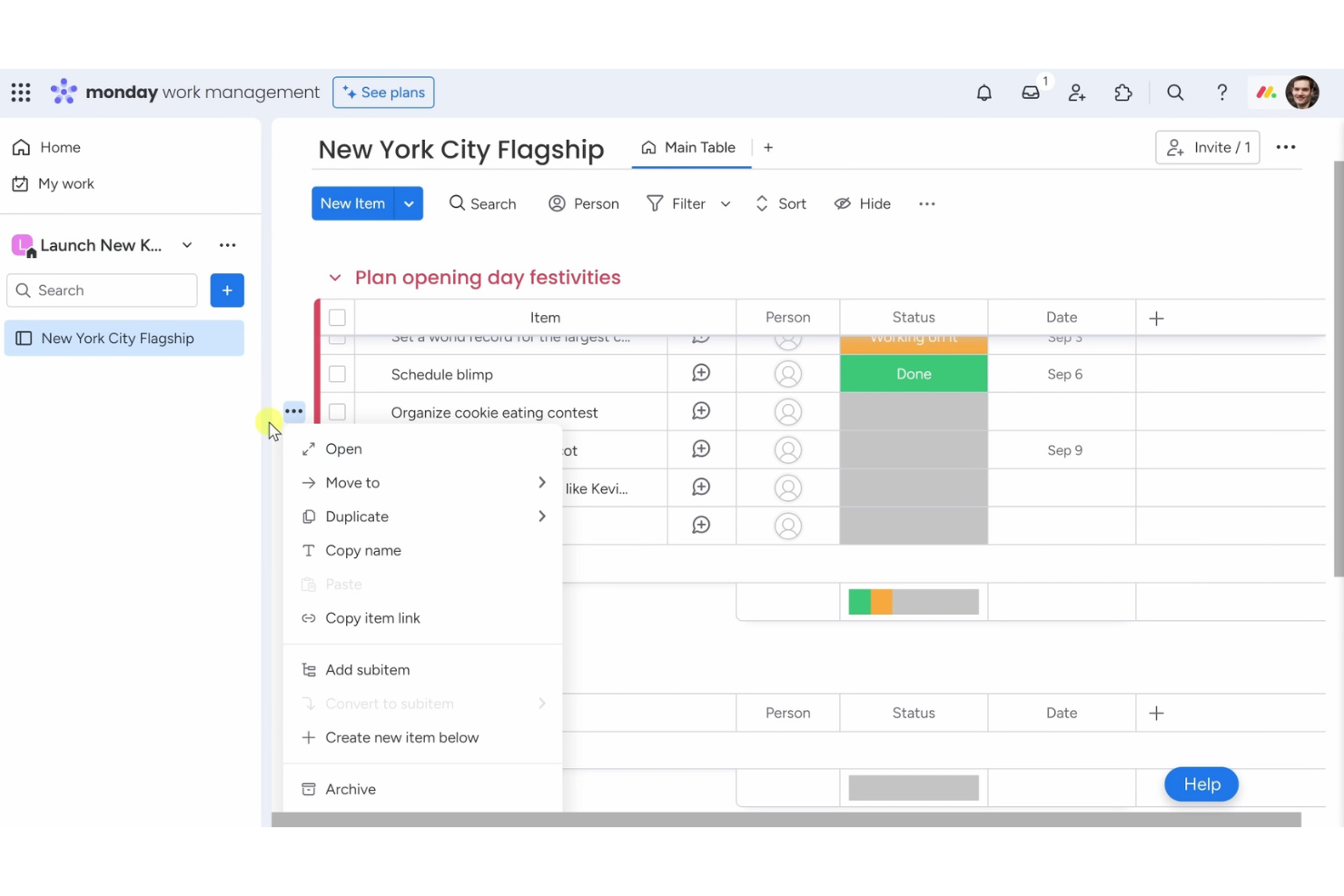
Monday AI Workspace è uno dei software di gestione progetti con intelligenza artificiale più facili da usare per i team che desiderano un modo semplice per organizzare attività e flussi di lavoro. È pensato per le aziende che danno valore alla semplicità d'uso, beneficiando allo stesso tempo di automazioni intelligenti e assistenza AI.
Perché ho scelto Monday AI Workspace: Le sue automazioni senza codice permettono di eliminare attività ripetitive con pochi clic, così il tuo team può concentrarsi sulle attività più importanti. Le funzionalità di intelligenza artificiale aiutano con aggiornamenti delle attività, riepiloghi e aggiustamenti dei flussi di lavoro, rendendo la gestione dei progetti meno manuale. La dashboard visuale mantiene tutto chiaro a colpo d'occhio, e le board personalizzabili consentono di adattare i processi alle esigenze del team senza complessità.
Funzionalità e integrazioni principali:
Funzionalità comprendono una dashboard visuale per monitorare i progressi dei progetti a colpo d'occhio. È possibile creare flussi di lavoro personalizzati adattabili ai processi del team, e le automazioni permettono di impostare facilmente trigger per le attività. La piattaforma offre anche una varietà di modelli per iniziare rapidamente.
Integrazioni includono Slack, Google Drive, Zoom, Microsoft Teams, Dropbox, Trello, Zapier, Jira, Salesforce e Shopify.
Pros and Cons
Pros:
- Ricette di automazione personalizzabili
- Dashboard visive per i progetti
- Creazione di flussi di lavoro flessibili
- Varietà di modelli disponibili
- Automazioni senza necessità di codice
Cons:
- Può essere travolgente per i nuovi utenti
- Funzionalità offline limitate
- Complessità nelle funzionalità avanzate
- A volte i caricamenti sono lenti
- Richiede internet per piena funzionalità
New Product Updates from monday AI Workspace
monday AI Workspace Adds Human Approval Routing
monday AI Workspace adds a human-in-the-loop approval block to AI Workflows, sending approval requests and routing workflow paths based on responses. For more information, visit monday AI Workspace's official site.

Wrike
Ideale per strutture di progetto scalabili

Wrike è uno dei software di gestione progetti con intelligenza artificiale più semplici da utilizzare per i team che desiderano un modo facile per gestire progetti complessi su larga scala. È pensato per mantenere la collaborazione fluida e garantire una chiara visibilità dei progetti, anche con team numerosi.
Perché ho scelto Wrike: Le sue funzionalità AI aiutano a prevedere i rischi, suggerire le priorità delle attività e automatizzare gli aggiornamenti, così la gestione di grandi progetti risulta meno opprimente. Puoi creare flussi di lavoro personalizzati che si adattano ai tuoi processi e impostare automazioni per ridurre le attività ripetitive. I report in tempo reale permettono a tutti di restare allineati con informazioni accurate su avanzamento e performance. La combinazione tra supporto AI e scalabilità rende Wrike una scelta naturale per i team che necessitano sia di semplicità che di potenziale di crescita.
Caratteristiche principali & integrazioni:
Funzionalità: include flussi di lavoro personalizzati che ti permettono di adattare i processi alle esigenze del tuo team. Si possono automatizzare le attività ricorrenti per aumentare l'efficienza e ridurre il lavoro manuale. La piattaforma offre anche funzionalità di collaborazione in tempo reale, consentendo ai membri del team di lavorare insieme senza interruzioni.
Integrazioni: includono Slack, Microsoft Teams, Google Drive, Dropbox, Salesforce, Jira, Trello, Evernote, Box e Adobe Creative Cloud.
Pros and Cons
Pros:
- Strutture di progetto flessibili
- Opzioni di workflow personalizzate
- Collaborazione in tempo reale
- Funzionalità di reportistica dettagliata
Cons:
- Automatizza le attività ripetitive
- Può risultare complesso per i nuovi utenti
- Richiede tempo per una personalizzazione completa
- Curva di apprendimento per le funzionalità avanzate
- Funzionalità offline limitate
- La configurazione iniziale può richiedere tempo
New Product Updates from Wrike

Wrike Adds Quick Search to Table View
Wrike adds Quick Search to Table View with full-table search across titles, descriptions, and fields, plus highlighted matches. This helps users find tasks faster in large tables. For more information, visit Wrike’s official site.

Zenhub
Ideale per la gestione di progetti GitHub
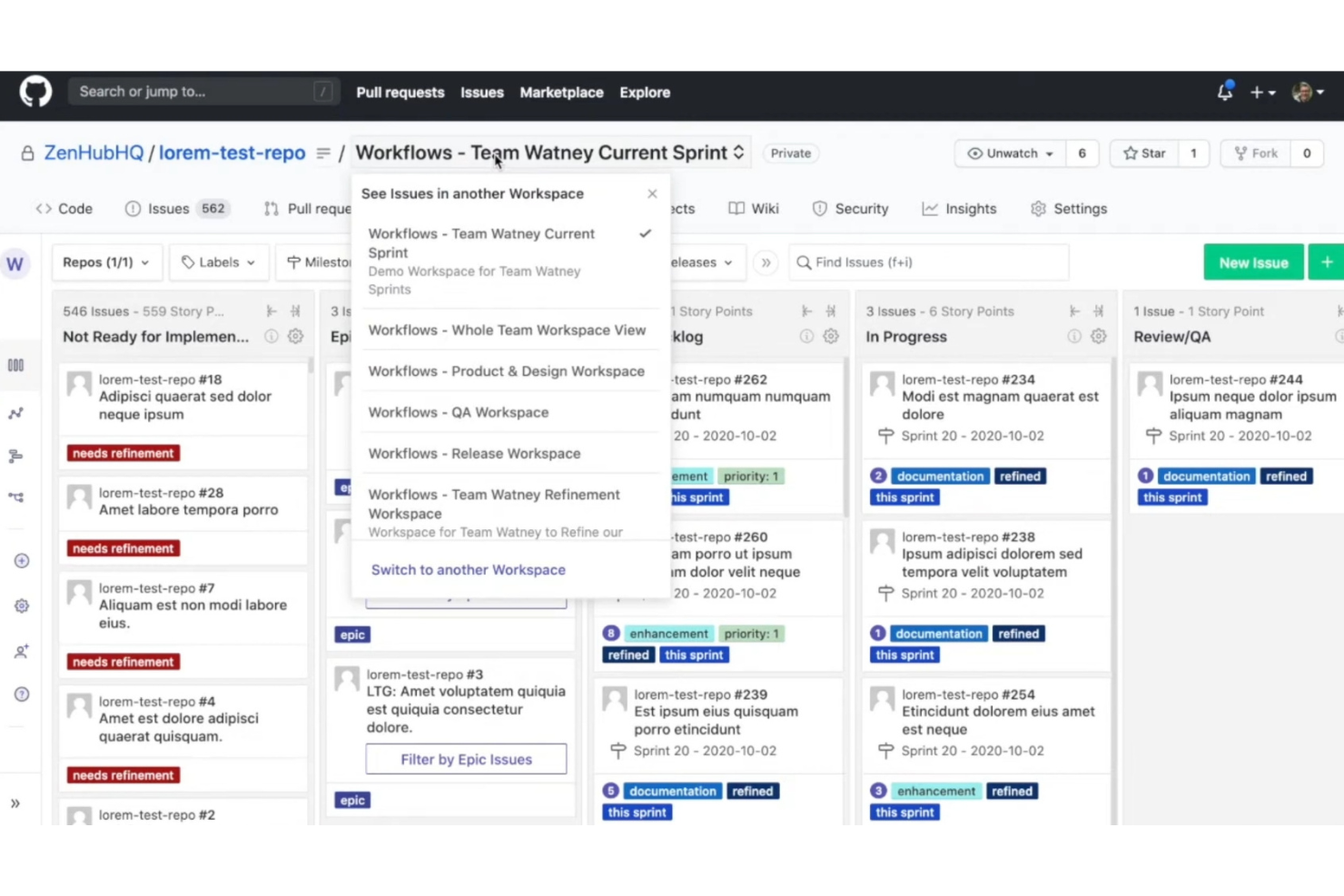
Zenhub è uno dei software di gestione progetti AI più semplici per team di sviluppo che lavorano in GitHub. È progettato per portare la pianificazione dei progetti e il monitoraggio delle attività direttamente nell’ambiente di sviluppo, riducendo la necessità di passare da uno strumento all’altro.
Perché ho scelto Zenhub: Le sue funzionalità AI assistono nell’aggiornamento delle attività, nella prioritizzazione e nella pianificazione degli sprint, aiutando il team a concentrarsi sulla consegna. Le board rendono semplice visualizzare i progressi, mentre i grafici burndown offrono rapidi approfondimenti sulle tempistiche. Combinando l’integrazione con GitHub e il supporto AI per la gestione dei progetti, Zenhub semplifica ed efficienta la gestione dei progetti di sviluppo.
Funzionalità di rilievo e integrazioni:
Funzionalità includono grafici burndown che aiutano a monitorare i progressi del progetto e prevedere le date di completamento. È possibile creare board per organizzare le attività e visualizzare facilmente i flussi di lavoro. Zenhub offre anche strumenti per la pianificazione degli sprint, che permettono al team di concentrarsi su rilasci gestibili.
Le integrazioni includono GitHub, Slack, Microsoft Teams, Google Workspace, Jira, Trello, Asana, Bitbucket, GitLab e Toggl.
Pros and Cons
Pros:
- Integrazione diretta con GitHub
- Supporta flussi di lavoro agili
- Grafici burndown dettagliati
- Pianificazione degli sprint
- Board visive per le attività
Cons:
- Limitato agli utenti GitHub
- Può risultare complesso per i principianti
- Richiede alcune competenze tecniche
- Non ideale per team non tecnici
- La configurazione iniziale può richiedere tempo

Motion
Ideale per la programmazione delle attività guidata dall’IA
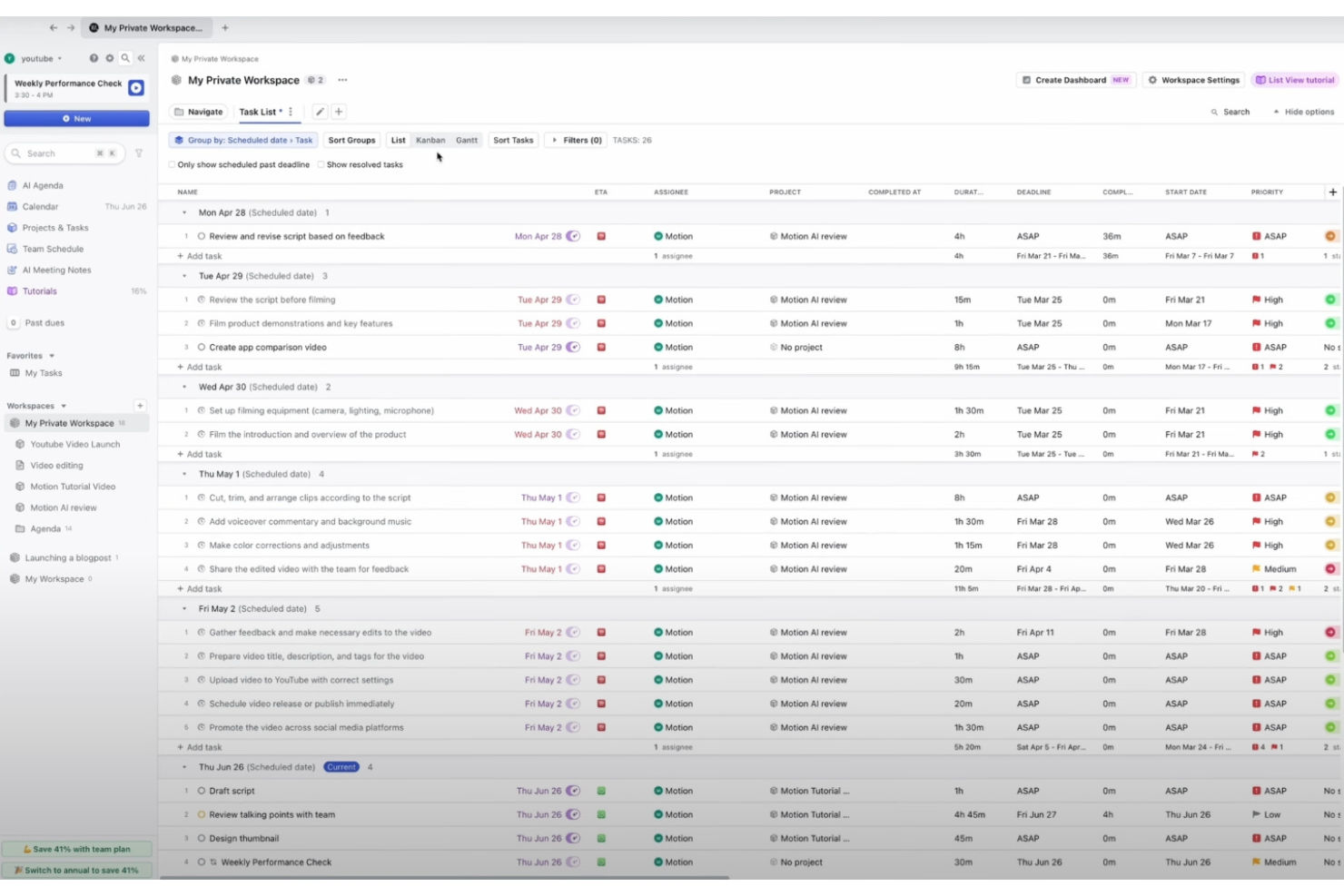
Motion è uno degli strumenti di project management con intelligenza artificiale più semplici da utilizzare per singoli utenti e team che desiderano vedere i propri programmi gestiti automaticamente. Si concentra sull’utilizzo dell’IA per gestire time-blocking, priorità delle attività e pianificazione quotidiana senza sforzo aggiuntivo.
Perché ho scelto Motion: la sua pianificazione basata sull’IA riorganizza automaticamente le attività in base a scadenze, riunioni e priorità che cambiano, così non devi pensarci tu. Puoi impostare le preferenze della tua giornata lavorativa e Motion si adatta in tempo reale man mano che arrivano nuove attività. Questo lo rende particolarmente utile se desideri uno strumento di project management che elimina lo stress della pianificazione mantenendo alta la produttività.
Funzionalità principali e integrazioni:
Le funzionalità includono un calendario intelligente che si adatta ai cambiamenti nel tuo programma, la priorità delle attività per concentrarti su quelle urgenti e il time blocking per allocare con efficacia le ore di lavoro. Puoi personalizzare le notifiche per tenere informato il team senza sovraccaricarlo, e l’interfaccia è progettata per essere intuitiva, riducendo la curva di apprendimento.
Le integrazioni comprendono Google Calendar, Outlook, Slack, Zoom, Microsoft Teams, Trello, Asana, Basecamp, Todoist ed Evernote.
Pros and Cons
Pros:
- Organizzazione delle attività con IA
- Regolazione dinamica dell'agenda
- Notifiche personalizzabili
- Interfaccia utente intuitiva
- Time blocking efficace
Cons:
- Opzioni di personalizzazione limitate
- Può essere inizialmente opprimente
- Richiede connessione internet
- Non ideale per progetti complessi
- Potrebbe mancare di funzionalità avanzate


ClickUp è uno dei software di gestione progetti con intelligenza artificiale più facili da usare per i team che cercano flessibilità senza complessità. È progettato per adattarsi a diversi flussi di lavoro mantenendo la gestione delle attività e dei progetti semplice da configurare e utilizzare.
Perché ho scelto ClickUp: Le sue funzionalità AI aiutano a scrivere, riassumere e generare aggiornamenti sulle attività, rendendo la gestione dei progetti più veloce e meno manuale. Le viste personalizzabili permettono al team di passare da liste, bacheche o cronologie a seconda delle preferenze. Puoi inoltre creare stati e modelli personalizzati per risparmiare tempo su processi ripetitivi. Grazie alla gerarchia adattabile, ClickUp mantiene i progetti organizzati e facili da navigare.
Funzionalità e integrazioni principali:
Funzionalità includono una struttura gerarchica unica che organizza le attività in spazi, cartelle e liste. Puoi utilizzare campi personalizzati per aggiungere informazioni specifiche alle attività, migliorando il monitoraggio e la reportistica. La piattaforma offre anche il monitoraggio del tempo per aiutare il tuo team a rispettare le scadenze.
Integrazioni includono Slack, Google Drive, Dropbox, Zoom, Microsoft Teams, Trello, Todoist, Evernote, Zapier e GitHub.
Pros and Cons
Pros:
- Viste di attività altamente personalizzabili
- Configurazione dello spazio di lavoro flessibile
- Supporta viste multiple di progetto
- Creazione di stati personalizzati
- Modelli di attività dettagliati
Cons:
- Curva di apprendimento più ripida
- Può risultare complesso per i nuovi utenti
- Richiede tempo per una personalizzazione completa
- Funzionalità offline limitata
- Complessità nella gestione di grandi progetti

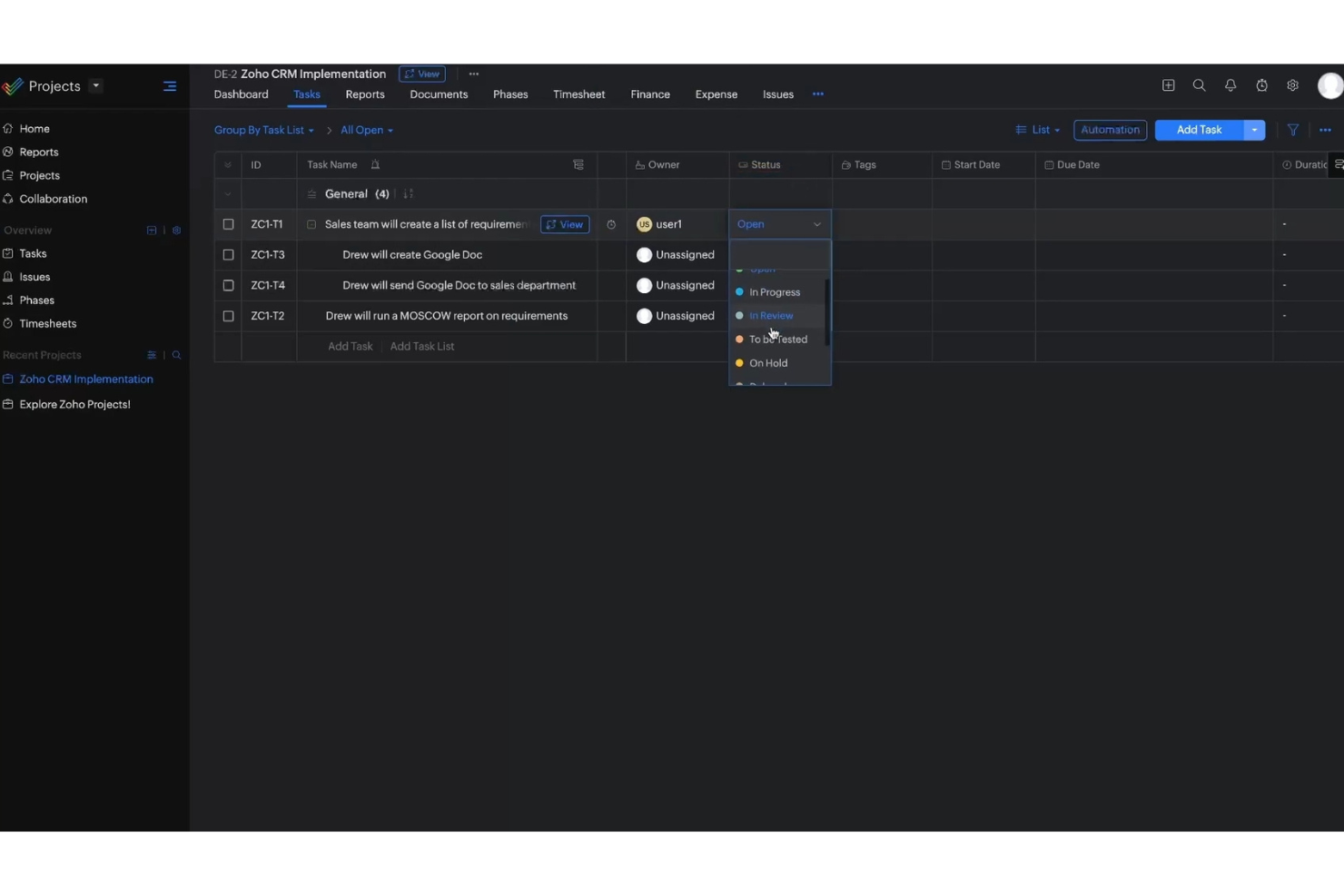
Zoho è uno dei software di project management con intelligenza artificiale più facili da usare per i team che desiderano una piattaforma tutto-in-uno per gestire attività e collaborazione. È pensato per semplificare il lavoro combinando automazione, comunicazione e monitoraggio dei progetti in un unico luogo.
Perché ho scelto Zoho: Il suo assistente AI rende la gestione dei progetti semplice, dall'assegnazione delle attività all'invio di promemoria delle scadenze. Puoi automatizzare i processi ricorrenti e personalizzare le dashboard in base al flusso di lavoro del team. Grazie alle sue interazioni basate sull'intelligenza artificiale, Zoho aiuta a ridurre lo sforzo manuale mantenendo l'organizzazione dei progetti e un'elevata produttività.
Funzionalità principali & integrazioni:
Le funzionalità includono dashboard personalizzabili che ti permettono di visualizzare i progetti secondo le necessità del tuo team. Puoi automatizzare le attività ricorrenti per risparmiare tempo e ridurre il lavoro manuale. Gli strumenti di reportistica forniscono informazioni sulle prestazioni del team, aiutandoti a prendere decisioni informate.
Integrazioni disponibili con Slack, Google Workspace, Microsoft Office 365, Dropbox, Zapier, Trello, Zendesk, Evernote, QuickBooks e Salesforce.
Pros and Cons
Pros:
- Chatbot AI per la gestione delle attività
- Dashboard personalizzabili disponibili
- Automatizza le attività ricorrenti
- Strumenti di reportistica approfonditi
- Si integra con numerosi servizi
Cons:
- Complessità nella configurazione iniziale
- Curva di apprendimento per i nuovi utenti
- Può richiedere competenze tecniche
- Capacità offline limitate
- Può essere impegnativo per i team piccoli

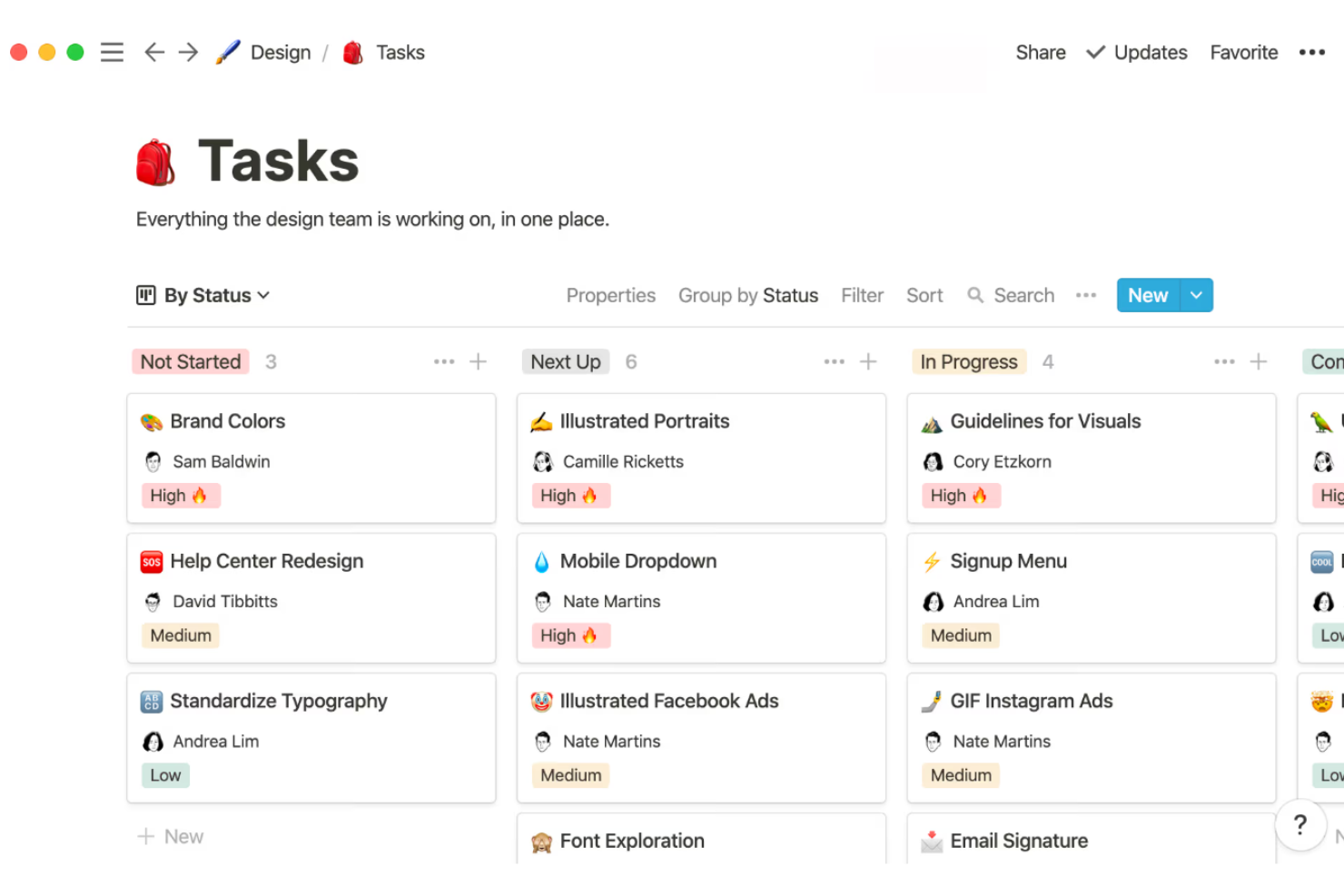
Notion è una delle soluzioni di software di gestione progetti AI più semplici per i team che desiderano un modo facile ma flessibile per rimanere organizzati. Combina monitoraggio dei progetti, gestione delle attività e documentazione in un unico spazio di lavoro senza sopraffare con la complessità.
Perché ho scelto Notion: La sua interfaccia drag-and-drop rende semplice impostare i flussi di lavoro in pochi minuti. Il supporto dell'intelligenza artificiale aiuta nell'organizzazione e nella rifinitura dei contenuti, mantenendo la gestione dei progetti semplice. Questa combinazione di semplicità e adattabilità rende Notion una valida scelta per i team che vogliono un software di gestione progetti semplice e flessibile.
Caratteristiche principali & integrazioni:
Le funzionalità includono un'interfaccia con trascinamento che permette di organizzare facilmente i progetti, modelli personalizzabili per adattarsi alle esigenze specifiche del tuo team e una potente funzione di ricerca per trovare rapidamente ciò che cerchi. Puoi creare pagine interconnesse per costruire una base di conoscenza per il tuo team, e la possibilità di incorporare diversi tipi di contenuto migliora la collaborazione.
Le integrazioni comprendono Slack, Google Drive, Trello, GitHub, Asana, Figma, Zapier, Typeform, Calendly e Jira.
Pros and Cons
Pros:
- Modelli di pagina personalizzabili
- Collegamento tra pagine interconnesse
- Organizzazione drag-and-drop
- Tipi di contenuto incorporabili
- Workspace flessibile
Cons:
- Curva di apprendimento ripida
- Accesso offline limitato
- Nessuna dipendenza tra attività
- Configurazione complessa per principianti
- Richiede connessione internet

Asana è uno dei software di gestione progetti con intelligenza artificiale più semplici per i team che vogliono mantenere il lavoro organizzato senza complessità. È progettato per migliorare la visibilità sui progetti, supportando al contempo collaborazione e responsabilità.
Perché ho scelto Asana: I suoi suggerimenti basati sull’intelligenza artificiale ti aiutano a monitorare attività, scadenze e priorità in modo più efficiente. La visualizzazione a cronologia rende semplice pianificare i progetti, mentre le dipendenze assicurano che le attività avvengano nell’ordine giusto. Con campi personalizzabili e flussi di lavoro adattabili, Asana offre struttura senza rigidità, risultando una scelta facile per i team che hanno bisogno di chiarezza e flessibilità.
Funzionalità e integrazioni principali:
Le funzionalità includono una vista cronologia che ti aiuta a pianificare i progetti in modo visivo. Puoi usare le dipendenze tra attività per assicurarti che tutto avvenga nell’ordine corretto. La funzione dei campi personalizzati permette di aggiungere dati specifici ai tuoi progetti, migliorando il monitoraggio e la reportistica.
Le integrazioni includono Slack, Microsoft Teams, Google Drive, Dropbox, Zoom, Salesforce, Jira, Trello, Evernote e Zapier.
Pros and Cons
Pros:
- Funzione cronologia intuitiva
- Gestione delle dipendenze delle attività
- Campi progetto personalizzabili
- Adattabile a diversi flussi di lavoro
- Aumenta la visibilità sui progetti
Cons:
- Curva di apprendimento per nuovi utenti
- Può risultare opprimente per piccoli team
- Capacità offline limitate
- Richiede internet per piena funzionalità
- Complessità nelle funzioni avanzate


Dart è uno degli strumenti di gestione progetti con intelligenza artificiale più semplici per i team che desiderano una gestione delle attività intelligente senza complessità. È stato creato per supportare aziende nei settori vendite, IT, marketing e startup, sfruttando l'IA per semplificare l'organizzazione e aumentare la produttività.
Perché ho scelto Dart: Le sue analisi basate sull'IA aiutano il tuo team a dare priorità alle attività e a restare concentrato su ciò che conta davvero. Funzionalità come la compilazione automatica delle proprietà e la creazione di sotto-attività riducono il lavoro manuale, mentre viste flessibili come liste e bacheche rendono i progetti facili da visualizzare. Con report generati dall'IA e una gestione intelligente delle attività, Dart consente ai team di ridurre il carico amministrativo e gestire i progetti in modo più efficiente.
Funzionalità principali & integrazioni:
Funzionalità includono gestione attività intelligente che automatizza la compilazione delle proprietà e la generazione di sotto-attività. Puoi creare e gestire sprint con facilità, e l'editor di documenti consente note dettagliate e report generati dall'IA. Le diverse opzioni di layout di Dart, come le viste a bacheca e a calendario, aiutano il team a mantenersi organizzato e rispettare le scadenze.
Integrazioni includono ChatGPT, Slack, Microsoft Teams, Google Calendar, GitHub, Jira, Trello, Asana, Dropbox e Zoom.
Pros and Cons
Pros:
- Approfondimenti sulle attività basati su IA
- Compilazione automatica delle proprietà
- Varie viste di progetto
- Report generati dall'IA
- Workspace personalizzabili
Cons:
- La configurazione iniziale può essere complessa
- Per una funzionalità completa è richiesta la connessione internet
- Curva di apprendimento per i nuovi utenti
- Capacità offline limitate
- Può richiedere conoscenze tecniche

Miro
Ideale per ampi spazi di brainstorming

Miro è uno degli strumenti di project management AI più semplici per i team che preferiscono un approccio visivo e collaborativo alla pianificazione e all'organizzazione del lavoro. Offre uno spazio flessibile per fare brainstorming, mappare le idee e allineare i progetti senza aggiungere complessità.
Perché ho scelto Miro: I suoi strumenti AI aiutano a generare mappe mentali, riassumere contenuti e organizzare i flussi di lavoro rapidamente, così il tuo team può concentrarsi sulle idee anziché sulla configurazione. La tela infinita supporta la collaborazione in tempo reale, permettendo ai membri del team di contribuire da qualsiasi luogo. Unendo creatività e supporto dell’AI, Miro rende la pianificazione dei progetti sia semplice che coinvolgente.
Funzionalità principali e integrazioni:
Funzionalità comprendono una tela infinita che ti permette di mappare progetti e idee senza limiti di spazio. Puoi utilizzare modelli predefiniti per iniziare rapidamente e personalizzarli secondo le tue esigenze. Miro offre anche post-it digitali e strumenti di disegno per sessioni di brainstorming flessibili.
Integrazioni includono Slack, Microsoft Teams, Google Drive, Dropbox, Zoom, Jira, Trello, Asana, Microsoft OneDrive ed Evernote.
Pros and Cons
Pros:
- Tela infinita per brainstorming
- Supporta la collaborazione in tempo reale
- Modelli predefiniti disponibili
- Personalizzabile per esigenze diverse
- Visualizza facilmente idee complesse
Cons:
- La configurazione iniziale può essere complessa
- Richiede internet per collaborare
- Può risultare opprimente per i nuovi utenti
- L’interfaccia può sembrare affollata
- Capacità offline limitate
New Product Updates from Miro
Miro Adds Japan Data Residency for Enterprise Customers
Miro has introduced Japan data residency for enterprise customers, offering in-region storage for production data, backups, and metadata, plus in-region compute infrastructure. For more information, visit Miro's official site.
Altri software di gestione dei progetti con IA semplici da usare
Ecco alcune altre opzioni di software di gestione dei progetti con IA semplici da usare che non sono entrate nella mia selezione, ma che vale comunque la pena valutare:
- Hive
Ideale per convertire messaggi in attività
- Productive
Ideale per il monitoraggio della redditività delle agenzie
- CAFLOU
Ideale per la gestione del flusso di cassa delle piccole imprese


Come valuto il software di project management AI più facile da usare
Ogni strumento in questo elenco deve fare molto più che semplicemente affibbiare un'etichetta AI su semplici automazioni: cerco piattaforme in cui l'intelligenza artificiale ti faccia risparmiare davvero tempo, come generare un piano di progetto da un brief di una sola riga o individuare rischi prima dello standup. Suddivido la mia valutazione tra le funzionalità principali che uno strumento deve avere e i fattori che lo differenziano dagli altri.
Funzionalità di base (requisiti essenziali per questa lista)
Quando seleziono gli strumenti per il mio elenco, valuto ciascuno su una scala da 0 (non offre la funzionalità) a 5 (eccelle in questa area) per ogni funzionalità di base elencata di seguito. Quindi, calcolo il punteggio totale dello strumento in percentuale. Ogni strumento deve ottenere un punteggio totale minimo del 65% per essere preso in considerazione.
- Automazione attività AI: Verifico se l’intelligenza artificiale può generare, assegnare e riprioritizzare attività basandosi sul contesto del progetto, ad esempio creando automaticamente sotto-attività quando cambia la portata di uno sprint.
- Interfaccia in linguaggio naturale: Un buon test consiste nello scrivere qualcosa come "mostrami tutte le attività in ritardo per il redesign del sito web" e ottenere risultati accurati e utili.
- Pianificazione di progetto AI: Valuto se lo strumento può trasformare un breve brief in un piano strutturato con traguardi e scadenze, non solo un modello vuoto.
- Riepiloghi e approfondimenti AI: Cerco strumenti che generino automaticamente aggiornamenti di stato o segnalino aree di lavoro a rischio, così da evitare report manuali prima di ogni standup.
- Funzionalità principali di PM: La base è fondamentale: viste multiple (board, elenco, cronologia), dipendenze tra attività, scadenze e funzionalità di collaborazione devono essere solide.
- Notifiche intelligenti e suggerimenti: Le sollecitazioni proattive dell’AI fanno la differenza, come suggerire di riassegnare un'attività quando il carico di lavoro di qualcuno aumenta o ricordare una dipendenza mancata.
Una volta raccolto un elenco di strumenti che soddisfano questi criteri, considero cosa rende unica ciascuna piattaforma.
Fattori differenzianti (ciò che distingue i fornitori)
Ecco come confronto e metto a confronto i diversi fornitori:
Caratteristiche distintive
Il rilevamento predittivo dei rischi è un differenziatore importante: cerco strumenti che segnalino ritardi potenziali in base a schemi storici, come avvisare che una revisione del design rischia di slittare prima che accada davvero. Anche la sincronizzazione AI tra strumenti è fondamentale, soprattutto per team piccoli che utilizzano Slack, Google Docs e un CRM. Gli strumenti che acquisiscono il contesto dalle app collegate e aggiornano automaticamente lo stato delle attività fanno risparmiare ore di inserimento dati manuale. Valuto inoltre se una piattaforma ti permette di creare agenti AI personalizzati per automatizzare flussi di lavoro specifici del team, come smistare automaticamente le richieste in ingresso dei clienti in un’agenzia.
Oltre le funzionalità
Il tempo necessario per ottenere valore conta molto quando la semplicità è la priorità. Valuto quanto velocemente un PM singolo o un piccolo team può passare dalla registrazione all’esecuzione di un vero progetto—idealmente in una sola sessione, con la configurazione guidata dall’AI che svolge il lavoro principale. La trasparenza dei prezzi è un altro fattore che considero, in particolare se le funzionalità AI sono incluse nelle fasce di prezzo accessibili o bloccate nei piani enterprise. Controllo anche l’approccio di ogni fornitore alla privacy dei dati, incluso se è chiaro su come i dati di progetto vengono gestiti dai modelli AI e se gli utenti possono scegliere di non contribuire al training dei modelli.
Come scegliere il software di gestione dei progetti con IA più semplice da usare
È difficile non perdersi in lunghi elenchi di funzionalità e strutture tariffarie complesse. Per aiutarti a rimanere concentrato mentre affronti il tuo processo di selezione del software, ecco una lista di fattori da tenere a mente:
| Fattore | Cosa considerare |
|---|---|
| Scalabilità | Il software crescerà insieme al tuo team? Valuta se è in grado di gestire più utenti e progetti con l'espansione della tua azienda. Cerca strumenti che offrano piani tariffari flessibili. |
| Integrazioni | Si collega agli strumenti che già utilizzi? Verifica che il software si integri senza problemi con i sistemi attuali, come Slack, Google Workspace o Microsoft Teams. |
| Personalizzazione | Puoi adattarlo ai tuoi processi? Assicurati che il software consenta di personalizzare flussi di lavoro e cruscotti in base alle esigenze specifiche del tuo team. |
| Semplicità d'uso | L'interfaccia è intuitiva? Valuta se il tuo team può navigare facilmente nel software senza una formazione approfondita. Cerca design intuitivi. |
| Implementazione e avviamento | Quanto tempo occorrerà per iniziare? Considera il tempo e le risorse necessari per implementare il software e formare il team. Cerca strumenti con procedure guidate di avviamento. |
| Costo | Rientra nel tuo budget? Confronta i piani tariffari e determina se il costo è in linea con il tuo budget. Fai attenzione a eventuali costi o addebiti nascosti. |
| Misure di sicurezza | Protegge i tuoi dati? Verifica che il software sia conforme agli standard di sicurezza e offra funzionalità come la crittografia dei dati e i controlli di accesso degli utenti. |
Che cos'è il software di gestione dei progetti con IA più semplice da usare?
Il software di gestione dei progetti basato sull'intelligenza artificiale più facile da usare utilizza l'intelligenza artificiale per semplificare la gestione delle attività e aumentare la produttività, senza richiedere agli utenti di trascorrere ore ad apprendere funzionalità complicate. Questi strumenti sono progettati all'insegna della semplicità e combinano un design UX/UI intuitivo con un'automazione intelligente basata sull'intelligenza artificiale, che aiuta i team a rimanere organizzati ed efficienti.
Il software di gestione dei progetti basato sull'intelligenza artificiale più facile da usare include in genere funzionalità come la pianificazione automatizzata, la definizione delle priorità delle attività e l'analisi in tempo reale, per ridurre il lavoro manuale e mantenere i progetti in linea con gli obiettivi. Il risultato è un modo più rapido, intelligente e semplice per gestire i progetti dall'inizio alla fine.
Funzionalità del software di gestione dei progetti basato sull'intelligenza artificiale più facile da usare
Quando selezioni il software di gestione dei progetti basato sull'intelligenza artificiale più facile da usare, presta attenzione alle seguenti funzionalità chiave:
- Pianificazione automatizzata: organizza automaticamente le attività in base alla priorità e alle scadenze, facendo risparmiare tempo e riducendo la pianificazione manuale.
- Definizione delle priorità delle attività: aiuta a identificare e concentrarsi sulle attività più importanti, garantendo che il lavoro critico venga completato per primo.
- Analisi in tempo reale: fornisce informazioni sull'avanzamento dei progetti e sulle prestazioni del team, aiutandoti a prendere rapidamente decisioni consapevoli.
- Flussi di lavoro personalizzabili: consente di adattare i processi alle esigenze specifiche del team, migliorando flessibilità ed efficienza.
- Funzionalità di integrazione: si connette perfettamente agli strumenti esistenti, come Slack e Google Workspace, per semplificare i flussi di lavoro.
- Informazioni basate sull'intelligenza artificiale: offre consigli e previsioni intelligenti per ottimizzare la gestione delle attività e l'allocazione delle risorse.
- Interfaccia intuitiva: garantisce facilità d'uso, consentendo ai membri del team di navigare nel software senza una formazione approfondita.
- Misure di sicurezza: protegge i dati tramite crittografia e controlli degli accessi degli utenti, garantendo la sicurezza delle informazioni.
- Strumenti di collaborazione: facilitano la comunicazione e la collaborazione tra i membri del team, migliorando il lavoro di squadra e la produttività.
Vantaggi del software di gestione dei progetti basato sull'intelligenza artificiale più facile da usare
L'implementazione del software di gestione dei progetti basato sull'intelligenza artificiale più facile da usare offre diversi vantaggi al tuo team e alla tua azienda. Eccone alcuni:
- Maggiore efficienza: la pianificazione automatizzata e la definizione delle priorità delle attività riducono il lavoro manuale, consentendo al team di concentrarsi sulle attività importanti.
- Migliore collaborazione: le funzionalità di integrazione e gli strumenti di collaborazione migliorano la comunicazione, facilitando il lavoro di squadra.
- Migliore capacità decisionale: l'analisi in tempo reale fornisce informazioni sull'avanzamento dei progetti, aiutandoti a prendere rapidamente decisioni consapevoli.
- Maggiore flessibilità: i flussi di lavoro personalizzabili consentono di adattare i processi alle esigenze del team, rispondendo ai diversi requisiti dei progetti.
- Risparmio di tempo: le informazioni basate sull'intelligenza artificiale e le funzionalità di automazione aiutano a semplificare la gestione dei progetti, liberando tempo per altre priorità.
- Sicurezza dei dati: le misure di sicurezza proteggono le tue informazioni, offrendoti la tranquillità di sapere che i tuoi dati sono al sicuro.
- Soddisfazione degli utenti: un'interfaccia intuitiva consente ai membri del team di navigare facilmente nel software, riducendo la curva di apprendimento.
Costi e prezzi del software di gestione dei progetti basato sull'intelligenza artificiale più facile da usare
La scelta del software di gestione dei progetti basato sull'intelligenza artificiale più facile da usare richiede la comprensione dei diversi modelli e piani tariffari disponibili. I costi variano in base alle funzionalità, alle dimensioni del team, ai componenti aggiuntivi e ad altri fattori. La tabella seguente riassume i piani più comuni, i relativi prezzi medi e le funzionalità generalmente incluse nelle soluzioni software di gestione dei progetti basate sull'intelligenza artificiale:
Tabella comparativa dei piani per il software di gestione dei progetti basato sull'intelligenza artificiale più facile da usare
| Tipo di piano | Prezzo medio | Funzionalità comuni |
|---|---|---|
| Piano gratuito | $0 | Gestione di base delle attività, integrazioni limitate e assistenza della comunità. |
| Piano personale | $5-$15/utente/mese | Definizione delle priorità delle attività, flussi di lavoro personalizzabili e analisi di base. |
| Piano aziendale | $20-$40/utente/mese | Reportistica avanzata, integrazioni potenziate e strumenti di collaborazione. |
| Piano aziendale avanzato | $50+/utente/mese | Funzionalità di sicurezza personalizzate, assistenza dedicata e opzioni di personalizzazione illimitate. |
Domande frequenti sul software di gestione dei progetti con intelligenza artificiale
Ecco alcune risposte alle domande comuni sul software di gestione dei progetti più semplice con intelligenza artificiale:
In che modo gli strumenti di gestione dei progetti con intelligenza artificiale gestiscono la sicurezza dei dati?
Gli strumenti di gestione dei progetti con intelligenza artificiale danno priorità alla sicurezza dei dati implementando funzionalità come la crittografia, i controlli degli accessi degli utenti e la conformità agli standard del settore. È essenziale valutare le misure di sicurezza del software per garantire che i dati del team rimangano protetti. Verifica sempre la presenza di certificazioni come la conformità alle norme ISO o al GDPR, se applicabile alle tue esigenze.
Il software di gestione dei progetti con intelligenza artificiale può integrarsi con i sistemi esistenti?
Sì, la maggior parte dei software di gestione dei progetti con intelligenza artificiale offre funzionalità di integrazione con strumenti diffusi come Slack, Google Workspace e Microsoft Teams. Prima di scegliere una soluzione, assicurati che possa connettersi facilmente ai sistemi attuali per mantenere l’efficienza del flusso di lavoro. Controlla la libreria di integrazioni del software per verificare quali applicazioni sono supportate.
In che modo le funzionalità di intelligenza artificiale migliorano la gestione dei progetti?
Le funzionalità di intelligenza artificiale nei software di gestione dei progetti aiutano automatizzando le attività di routine, fornendo analisi basate sui dati e migliorando il processo decisionale. Possono ottimizzare la pianificazione, prevedere i rischi del progetto e consigliare l’allocazione delle risorse. In questo modo il team può concentrarsi sulle attività strategiche e ridurre il carico di lavoro manuale, migliorando la produttività complessiva.
Cosa devo considerare quando valuto i costi del software di gestione dei progetti con intelligenza artificiale?
Quando valuti i costi, considera il modello di prezzo, le funzionalità incluse e i potenziali componenti aggiuntivi. Confronta il valore offerto dal software con il suo prezzo e verifica l’eventuale presenza di costi nascosti. È importante assicurarsi che il software rientri nel budget e soddisfi al contempo le esigenze del team, quindi cerca piani tariffari flessibili.
In che modo gli strumenti di gestione dei progetti con intelligenza artificiale possono migliorare la collaborazione del team?
Gli strumenti di gestione dei progetti con intelligenza artificiale migliorano la collaborazione integrando funzionalità di comunicazione, offrendo aggiornamenti in tempo reale e mettendo a disposizione spazi di lavoro condivisi. Questi strumenti aiutano a mantenere i membri del team allineati e informati, riducendo le incomprensioni e migliorando i risultati dei progetti. Valuta le funzionalità di collaborazione per assicurarti che siano in linea con il flusso di lavoro del team.
Esistono settori specifici che traggono maggiori vantaggi dal software di gestione dei progetti con intelligenza artificiale?
Sebbene il software di gestione dei progetti con intelligenza artificiale possa essere utile in diversi settori, è particolarmente efficace per quelli che richiedono un coordinamento complesso dei progetti, come informatica, marketing ed edilizia. Questi strumenti aiutano a gestire flussi di lavoro articolati, automatizzare le attività ripetitive e fornire informazioni fondamentali per il successo dei progetti in questi ambiti.