

I 10 migliori strumenti di IA per consulenti recensiti nel 2026

10 Elenco dei migliori strumenti di IA per consulenti


In qualità di responsabile di progetto, ti trovi costantemente a gestire molteplici attività e scadenze. La pressione di fornire risultati di qualità nei tempi previsti è incessante. Gli strumenti di IA per consulenti possono alleggerire il tuo carico automatizzando le attività ripetitive e fornendo informazioni utili che ti fanno risparmiare tempo e fatica.
Nella mia esperienza, questi strumenti possono migliorare significativamente la produttività e il processo decisionale del tuo team. Ho testato e recensito in modo indipendente numerose soluzioni software per offrirti un elenco imparziale delle migliori opzioni disponibili.
In questo articolo troverai una recensione accuratamente documentata dei migliori strumenti di IA, pensati per affrontare le sfide specifiche che devi gestire. Che tu voglia migliorare l'analisi dei dati, la comunicazione o le interazioni con i clienti, questa guida fa al caso tuo.
Perché fidarsi dei nostri consigli sui software
Il nostro team testa e recensisce software dal 2012. In quanto project manager noi stessi, sappiamo quanto sia difficile — e importante — scegliere il software giusto.
Per questa guida, abbiamo valutato gli strumenti attraverso test pratici e ricerche indipendenti, assegnando un punteggio agli strumenti in base ai nostri criteri di selezione. Ci basiamo inoltre sulle competenze di leader di pensiero del settore e di professionisti attivi nella gestione dei progetti.
Le nostre recensioni riflettono il nostro giudizio editoriale umano, non un discorso di vendita.
Revisori esperti:
Tabella comparativa: strumenti di IA per consulenti
Questa tabella comparativa riassume i dettagli dei prezzi dei miei principali strumenti di IA selezionati per consulenti.
| Tool | Best For | Trial Info | Price | ||
|---|---|---|---|---|---|
| 1 | Ideale per la collaborazione con i clienti | Piano gratuito + prova gratuita + demo gratuita disponibili | Da $99/mese | Website | |
| 2 | Ideale per strumenti di automazione senza codice | Prova gratuita di 14 giorni + piano gratuito disponibile | Da $10/utente/mese (fatturazione annuale) | Website | |
| 3 | Il migliore per il supporto multilingue degli agenti AI | Piano gratuito disponibile | Da $32/mese (fatturato annualmente) | Website | |
| 4 | Ideale per approfondimenti strategici | Prova gratuita di 14 giorni | Da $69/mese (fatturato mensilmente) | Website | |
| 5 | Ideale per diapositive generate dall'IA | Piano gratuito disponibile | Da $8.33/mese (fatturato annualmente) | Website | |
| 6 | Ideale per assistenza virtuale | Prova gratuita di 7 giorni + demo gratuita disponibile | Da $30/utente/mese (fatturazione annuale) | Website | |
| 7 | Ideale per modelli di presentazione | Prova gratuita di 14 giorni + demo gratuita disponibile | Da $12/mese (fatturato annualmente) | Website | |
| 8 | Ideale per proposte interattive | Prova gratuita di 14 giorni | A partire da $35/utente/mese (fatturazione annuale) | Website | |
| 9 | Ideale per i servizi di trascrizione | Disponibile piano gratuito | Da $8.17/mese (fatturazione annuale) | Website | |
| 10 | Ideale per l'integrazione con CRM | Demo gratuita disponibile | Prezzo su richiesta | Website |


Recensioni dei migliori strumenti di IA per consulenti
Di seguito trovi i miei riepiloghi dettagliati dei migliori strumenti di IA per consulenti inclusi nel mio elenco. Le mie recensioni offrono un’analisi approfondita delle funzionalità principali, dei pro e dei contro, delle integrazioni e dei casi d’uso ideali di ciascuno strumento, per aiutarti a trovare quello più adatto a te.

Moxo
Ideale per la collaborazione con i clienti
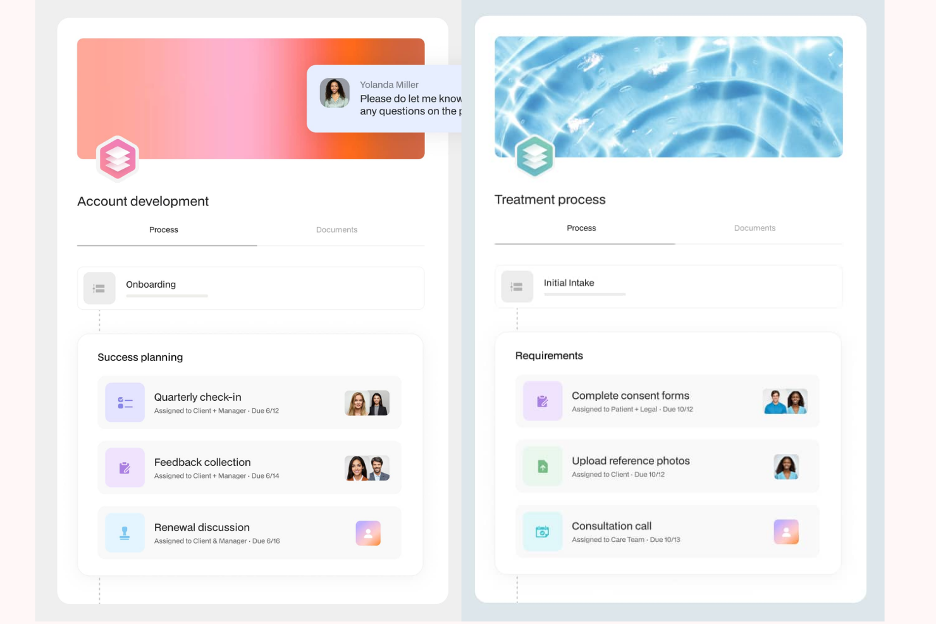
Moxo è una piattaforma collaborativa progettata per consulenti e aziende che necessitano di un coinvolgimento efficiente dei clienti e della gestione dei progetti. Facilita la comunicazione e la condivisione di documenti, aiutando i team a rimanere connessi con i clienti e a gestire efficacemente le attività.
Perché ho scelto Moxo: Eccelle nella collaborazione con i clienti, rendendolo perfetto per i team che devono mantenere relazioni solide con la clientela. Moxo offre funzionalità come messaggistica sicura e videoconferenze, che mantengono la comunicazione aperta e trasparente. Gli strumenti di gestione delle attività della piattaforma ti aiutano a monitorare l'avanzamento dei progetti e a garantire il rispetto delle scadenze. Le sue capacità di condivisione dei documenti consentono di scambiare file facilmente, migliorando la collaborazione con i clienti.
Caratteristiche principali & integrazioni:
Le funzionalità includono messaggistica sicura per comunicazioni confidenziali, videoconferenza per riunioni faccia a faccia e strumenti di gestione delle attività per monitorare l'avanzamento dei progetti. La piattaforma offre anche condivisione di documenti, tracciabilità delle operazioni, portali clienti e automazione dei flussi di lavoro, permettendo di coordinare in modo più efficiente consegne e approvazioni.
Le integrazioni includono Salesforce, Microsoft Teams, Slack, Zoom, Box, Dropbox, Google Drive, OneDrive, Outlook e Gmail.
Pros and Cons
Pros:
- Supporta la comunicazione sicura con i clienti
- Facilita la condivisione di documenti
- Migliora la gestione delle attività
Cons:
- Leggera curva di apprendimento per le funzionalità avanzate
- Dipende da internet per la piena funzionalità

Wrike
Ideale per strumenti di automazione senza codice
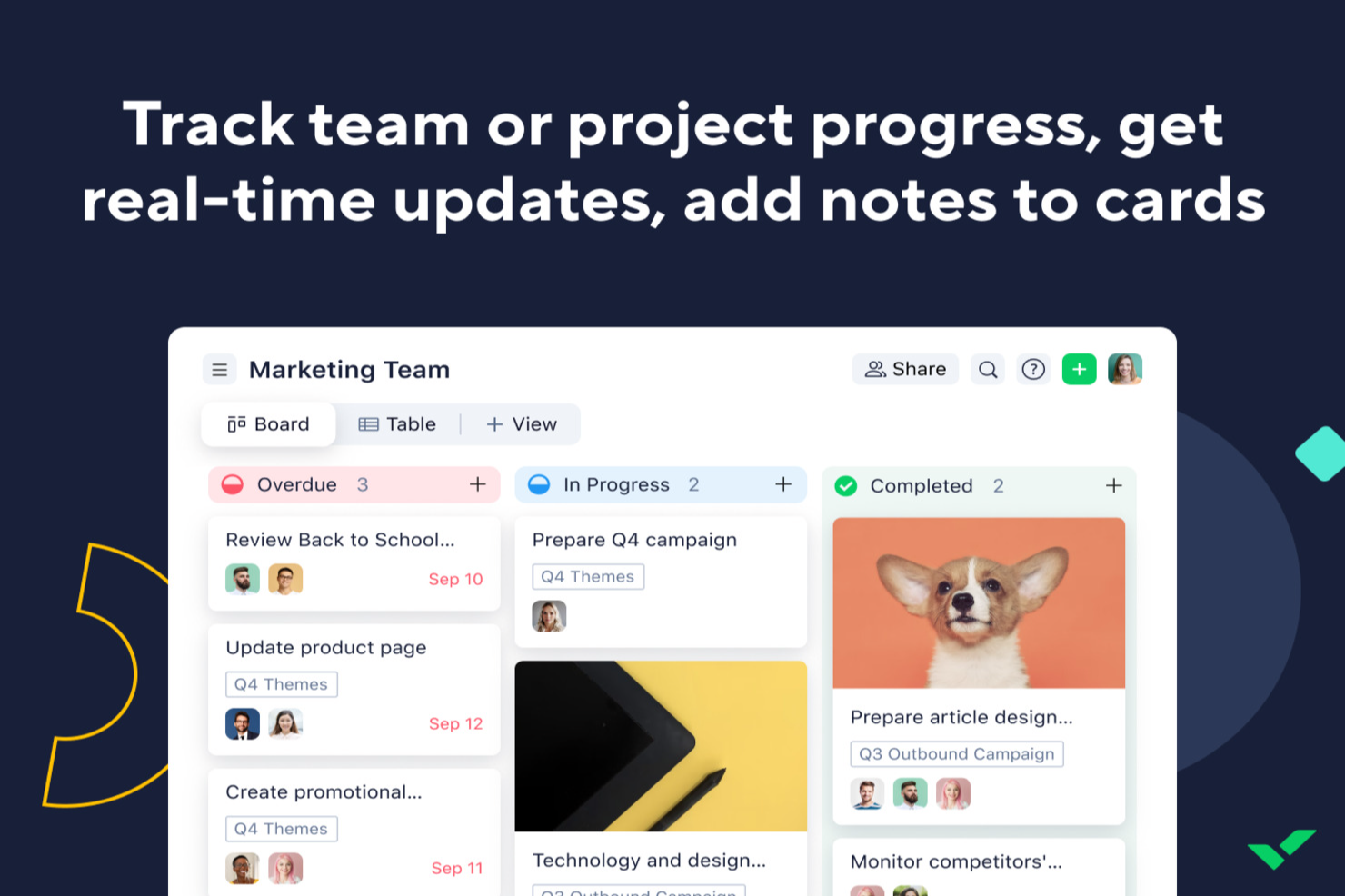
Per i consulenti che cercano uno strumento AI per migliorare la gestione dei progetti, Wrike offre un'opzione pratica. La piattaforma aiuta a semplificare i flussi di lavoro, così puoi dedicare più tempo a fornire valore ai clienti. Che tu stia gestendo incarichi complessi o coordinandoti con stakeholder esterni, le funzionalità di automazione e AI di Wrike supportano la prioritizzazione delle attività e la gestione dei rischi nel lavoro quotidiano sui progetti.
Perché ho scelto Wrike
Ho scelto Wrike per le sue funzionalità basate sull'intelligenza artificiale che si adattano bene alle esigenze della consulenza. Wrike Copilot aiuta nella prioritizzazione dei progetti e nell'identificazione dei rischi, entrambe essenziali per mantenere i progetti in carreggiata. Gli strumenti di automazione senza codice facilitano anche la riduzione delle attività manuali di routine, liberando tempo per pianificazioni e decisioni a livello superiore. Insieme, queste funzionalità affrontano sfide comuni nella consulenza come la gestione del tempo e l'allocazione delle risorse.
Caratteristiche principali di Wrike
Oltre alle sue capacità di AI, ho trovato anche altri diversi strumenti preziosi per i consulenti:
- Mind Mapping: Uno strumento che aiuta a visualizzare i piani e le idee di progetto, facilitando una migliore pianificazione strategica.
- Moduli di richiesta personalizzabili: Ti permette di creare moduli su misura per gli input dei clienti, garantendo una raccolta efficiente di tutte le informazioni necessarie.
- Dashboard in tempo reale: Fornisce una visione immediata dello stato e delle prestazioni del progetto, aiutandoti a prendere decisioni informate.
- Più visualizzazioni di progetto: Offre diagrammi di Gantt e bacheche Kanban per adattarsi a diversi stili e preferenze di gestione del progetto.
Integrazioni di Wrike
Le integrazioni includono Microsoft Teams, Google Workspace, Zoom, Slack, Dropbox, Outlook, Salesforce, Adobe Creative Cloud, Jira e QuickBooks. È disponibile un'API per integrazioni personalizzate.
Pros and Cons
Pros:
- Prioritizzazione delle attività tramite AI
- Strumenti di automazione del flusso di lavoro senza codice
- Dashboard personalizzabili in tempo reale
Cons:
- Le funzioni avanzate richiedono piani di livello superiore
- I prezzi possono essere un problema per i team piccoli
New Product Updates from Wrike
Wrike Adds Klaxoon MCP Integration
Wrike’s Klaxoon MCP integration is now generally available, enabling AI agents to navigate between Wrike tasks and attached whiteboards, read task context, and manage whiteboard attachments via API. For more information, visit Wrike's official site.

Chatbase
Il migliore per il supporto multilingue degli agenti AI

Chatbase è un costruttore di chatbot AI progettato per consulenti che desiderano creare, implementare e gestire chatbot personalizzati in grado di connettersi a molteplici fonti di dati e integrarsi con sistemi esterni.
Per chi è ideale Chatbase?
Chatbase è adatto a consulenti e piccoli team che hanno bisogno di creare chatbot AI personalizzati collegati a fonti di dati e sistemi dei clienti eterogenei.
Perché ho scelto Chatbase
Ho selezionato Chatbase tra i migliori perché posso costruire chatbot AI che gestiscono conversazioni in più lingue senza configurazioni aggiuntive. Il mio team utilizza il supporto multilingue degli agenti per servire clienti in varie regioni. Apprezzo anche la possibilità di caricare documenti in lingue diverse, a cui il chatbot risponde in modo accurato, facilitando così la gestione di progetti di consulenza a livello globale.
Caratteristiche principali di Chatbase
- Costruttore di chatbot personalizzati: Crea chatbot AI su misura per i tuoi flussi di lavoro di consulenza e il tuo branding.
- Integrazione delle fonti dati: Collega i chatbot a siti web, pdf o file di testo per una risposta dinamica e aggiornata.
- Analisi delle conversazioni: Monitora le interazioni degli utenti e le prestazioni del chatbot con strumenti di analisi integrati.
- Accesso API: Integra Chatbase con i tuoi sistemi esistenti tramite API per automazioni avanzate.
Integrazioni di Chatbase
Chatbase offre integrazioni native con Zendesk, Notion, Slack, Stripe, Salesforce, Cal.com, Calendly, WhatsApp, Messenger e Make. Si collega anche a Zapier e mette a disposizione un'API per integrazioni personalizzate.
Pros and Cons
Pros:
- Permette l'addestramento dei chatbot su dati unici
- Offre accesso API per l'automazione dei flussi di lavoro
- Include strumenti di analisi per monitorare le prestazioni del chatbot
Cons:
- Nessun passaggio integrato da chatbot a operatore umano dal vivo
- Personalizzazione limitata del branding per i widget di chat

Ideale per approfondimenti strategici
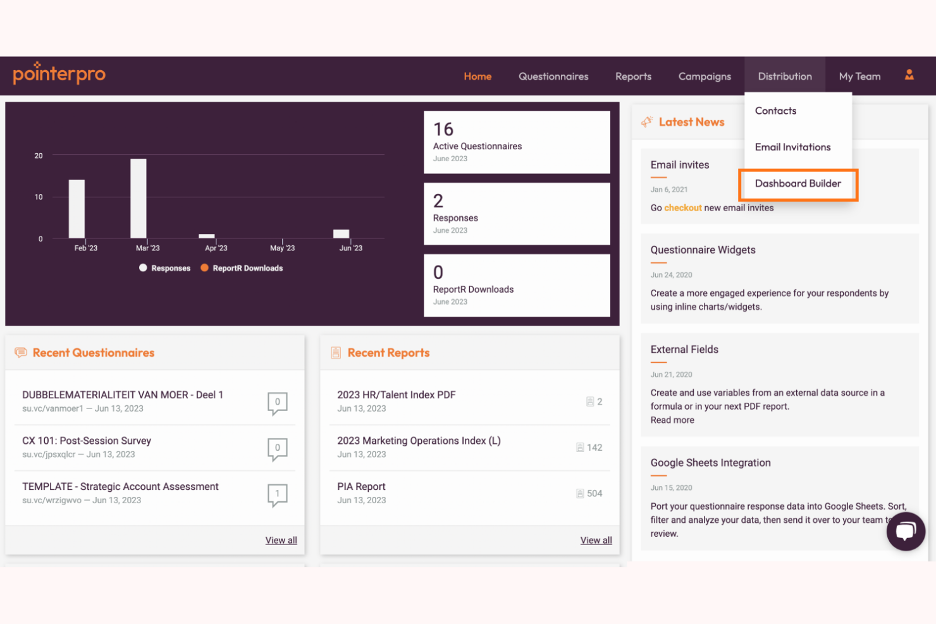
Pointerpro è una piattaforma digitale per la valutazione progettata per consulenti, coach, professionisti delle risorse umane e marketer. Permette agli utenti di creare valutazioni online e generare automaticamente report PDF personalizzati per diverse tipologie di valutazioni, come quelle di clienti e dipendenti.
Perché ho scelto Pointerpro: offre approfondimenti strategici grazie alle sue funzioni di valutazione automatizzate. La piattaforma include un generatore di questionari e di report, consentendo di creare valutazioni interattive e report dettagliati. La funzione di benchmarking aiuta a confrontare i risultati rispetto agli standard del settore. La gestione multiutente consente al tuo team di collaborare in modo efficiente sui progetti.
Funzionalità e integrazioni principali:
Le funzionalità includono logica avanzata per i report (formule, visibilità condizionale), opzioni di distribuzione per condividere le valutazioni e il supporto per oltre 50 lingue. La piattaforma offre anche formazione approfondita e la certificazione ISO 27001:2022 per la sicurezza dei dati.
Le integrazioni includono Zapier, Google Sheets, HubSpot, Salesforce, Mailchimp, Slack, Microsoft Teams, ActiveCampaign, WordPress e Dropbox.
Pros and Cons
Pros:
- Report automatizzati altamente personalizzabili
- Supporta molte lingue
- Benchmarking e logica avanzata
Cons:
- La configurazione avanzata può avere una curva di apprendimento
- Automazione e funzioni di team richiedono piani di livello superiore

SlidesAI
Ideale per diapositive generate dall'IA

SlidesAI è uno strumento di presentazione basato sull'intelligenza artificiale, progettato per insegnanti, professionisti e studenti. Aiuta gli utenti a creare presentazioni coinvolgenti rapidamente in Google Slides e PowerPoint generando strutture di diapositive e temi senza bisogno di competenze di design.
Perché ho scelto SlidesAI: Eccelle nella generazione di soluzioni AI per le tue diapositive, permettendoti di creare velocemente presentazioni. Puoi inserire argomenti o documenti e la piattaforma genera strutture di diapositive in oltre 100 lingue. La modifica dei temi e la riorganizzazione dei contenuti migliorano l'appeal della presentazione. Queste caratteristiche rendono SlidesAI uno strumento di riferimento per creare presentazioni rapide ed efficaci.
Caratteristiche principali & integrazioni:
Le funzionalità includono la possibilità di modificare i temi per un aspetto rinnovato, riorganizzare facilmente i contenuti e integrare immagini da opzioni generate dall'IA o da archivi. La piattaforma offre anche funzioni di sintesi dei contenuti per la concisione e di traduzione per una portata globale. Queste capacità sono potenziate da algoritmi di intelligenza artificiale generativa e apprendimento automatico, aiutandoti a produrre rapidamente presentazioni rifinite.
Le integrazioni comprendono Google Slides e PowerPoint.
Pros and Cons
Pros:
- Supporta oltre 100 lingue
- Generazione rapida di diapositive
- Nessuna competenza di design richiesta
Cons:
- Curva di apprendimento per alcune funzionalità
- Richiede Google Slides o PowerPoint


Fyxer è un assistente email basato sull'IA, progettato su misura per i consulenti che hanno bisogno di gestire la comunicazione in modo efficiente. Si concentra sull'automazione della gestione della casella di posta, consentendo ai consulenti di dare priorità alle interazioni con i clienti e ridurre le attività amministrative.
Perché ho scelto Fyxer: Offre assistenza virtuale (simile a chatbot AI e modelli di intelligenza artificiale) automatizzando le risposte alle email e organizzando la tua casella di posta. Lo strumento redige le risposte utilizzando la cronologia delle tue email precedenti, facendoti risparmiare tempo nella scrittura. Etichetta le email in base alla priorità e filtra le distrazioni, aiutandoti a concentrarti sulle attività importanti. Queste funzionalità lo rendono un assistente AI ideale per i consulenti che vogliono aumentare la produttività.
Funzionalità principali & integrazioni:
Le funzionalità includono la stesura automatica delle email che utilizza il tuo tono e il tuo stile, l'etichettatura delle priorità per una gestione efficiente della casella di posta elettronica e il filtraggio dello spam per eliminare le distrazioni. La piattaforma fornisce inoltre dettagliati riepiloghi delle riunioni e email di follow-up, garantendo che nessun dettaglio importante venga perso.
Le integrazioni includono Outlook e Gmail.
Pros and Cons
Pros:
- Automatizza le risposte alle email
- Organizza la casella di posta per priorità
- Fornisce dettagliati riepiloghi AI delle riunioni
Cons:
- Funzionalità offline limitata
- Dipende dall'integrazione con la piattaforma email


Beautiful.ai è un software per presentazioni progettato per professionisti di diversi settori che hanno bisogno di creare slide visivamente accattivanti. Automatizza il processo di progettazione delle slide, permettendo agli utenti di concentrarsi sul contenuto invece che sulla formattazione.
Perché ho scelto Beautiful.ai: offre modelli di presentazione guidati dall’IA che si adattano automaticamente man mano che aggiungi contenuti, garantendo che le tue slide abbiano sempre un aspetto professionale. Lo strumento propone un’ampia gamma di temi e layout personalizzabili per soddisfare le tue esigenze di presentazione. Include anche una libreria di immagini e icone per arricchire visivamente le tue slide. Puoi integrare ChatGPT per generare istantaneamente contenuti o strutture di presentazione. La funzione DesignerBot può generare contenuti per le slide. Queste caratteristiche semplificano il processo di creazione, rendendolo una scelta preferita per chi desidera presentazioni di livello professionale senza complicazioni.
Funzionalità e integrazioni principali:
Le funzionalità includono un’interfaccia intuitiva drag-and-drop per posizionare facilmente i contenuti, una funzione di collaborazione in tempo reale che consente al tuo team di lavorare insieme sulle presentazioni e aggiornamenti automatici delle slide per mantenere uniforme il design. La piattaforma offre inoltre una libreria di immagini stock e icone per un arricchimento visivo, aiutandoti a creare presentazioni di alta qualità con meno sforzo.
Le integrazioni comprendono Slack, Microsoft Teams, PowerPoint, Keynote, Google Slides, Dropbox, Box, Google Drive e Salesforce.
Pros and Cons
Pros:
- Automatizza la progettazione delle slide
- Ampia libreria di modelli
- Collaborazione in tempo reale tra team
Cons:
- Controllo meno dettagliato del design rispetto a strumenti completi di presentazione
- Funzionalità avanzate di branding e collaborazione richiedono piani di livello superiore


Qwiler è un software per la creazione di preventivi pensato per team di vendita e liberi professionisti che necessitano di creare proposte interattive e visivamente accattivanti. Permette agli utenti di realizzare preventivi dinamici che coinvolgono i clienti e facilitano decisioni più rapide.
Perché ho scelto Qwiler: Eccelle nella creazione di proposte interattive, rendendolo ideale per i team che vogliono impressionare i clienti con contenuti coinvolgenti. La piattaforma offre modelli personalizzabili che ti aiutano a progettare proposte su misura per il tuo brand. Include anche strumenti di analisi che forniscono informazioni su come i clienti interagiscono con le tue proposte. Queste funzionalità danno al tuo team un chiaro vantaggio competitivo, rendendo le proposte sia convincenti che basate sui dati.
Funzionalità e integrazioni principali:
Le funzionalità includono un editor drag-and-drop per una facile creazione dei contenuti, modelli personalizzabili in linea con l'identità del tuo brand e strumenti di analisi che monitorano le interazioni dei clienti. La piattaforma offre inoltre la possibilità di firma elettronica per accelerare il processo di approvazione.
Le integrazioni includono Salesforce, HubSpot, Xero, QuickBooks, Slack, Zapier, Stripe, PayPal, Google Analytics e Microsoft Teams.
Pros and Cons
Pros:
- Sono disponibili modelli personalizzabili
- Fornisce informazioni sulle interazioni dei clienti
- Offre funzionalità di firma elettronica e pagamento
Cons:
- Accesso offline limitato
- Necessita di connessione Internet per tutte le funzionalità

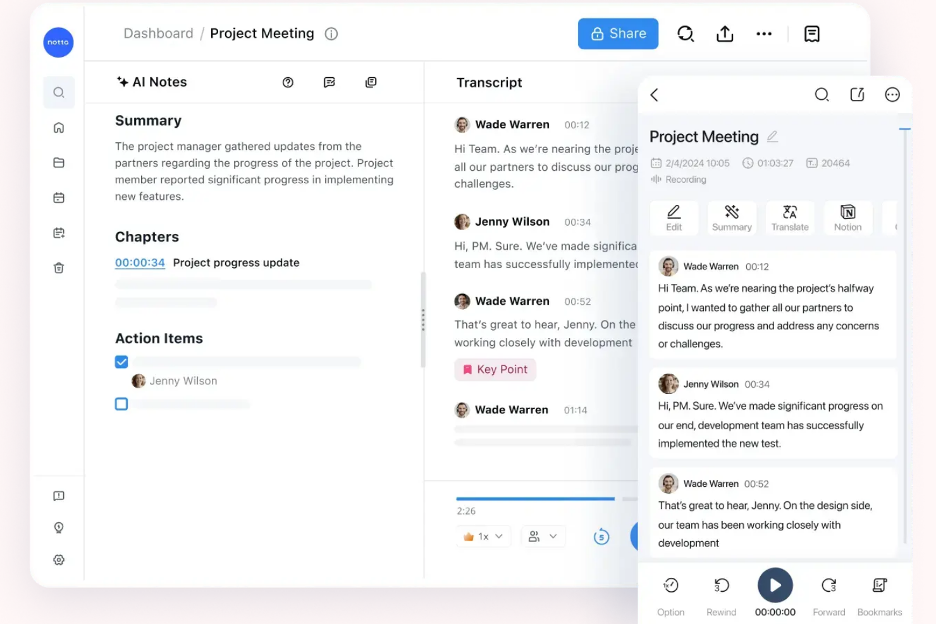
Notta è uno strumento di trascrizione progettato per consulenti, educatori e professionisti aziendali che necessitano di trascrizioni accurate e rapide di riunioni, interviste e lezioni. Converte l'audio in testo in tempo reale, aiutando gli utenti a risparmiare tempo nella presa di appunti manuale e garantendo che nulla venga perso durante le discussioni.
Perché ho scelto Notta: Eccelle nell'offrire servizi di trascrizione affidabili, rendendolo perfetto per chi ha bisogno di una conversione rapida e precisa del testo. La piattaforma supporta oltre 58 lingue, consentendo un'ampia varietà di utilizzi. Offre la trascrizione in tempo reale, il che significa che si può seguire mentre le parole vengono pronunciate, proprio come la GenAI in tempo reale. È inoltre possibile modificare ed esportare le trascrizioni, aggiungendo flessibilità al proprio flusso di lavoro.
Funzionalità e integrazioni principali:
Le funzionalità includono l'identificazione degli oratori per distinguere tra voci diverse, la possibilità di cercare parole chiave specifiche all'interno delle trascrizioni e strumenti di modifica del testo per perfezionare il risultato. La piattaforma consente anche l'esportazione delle trascrizioni in diversi formati, utile per la condivisione. Queste capacità sono alimentate da una tecnologia AI avanzata, che rende lo strumento sia preciso che efficiente.
Le integrazioni includono Zoom, Google Meet, Microsoft Teams, Slack, Dropbox, Google Drive, Evernote, Notion, Trello, Asana e Microsoft OneNote.
Pros and Cons
Pros:
- Supporta oltre 58 lingue
- Trascrizione in tempo reale disponibile
- Offre funzionalità di modifica del testo
Cons:
- La precisione dipende dalla qualità dell'audio
- Può essere intensivo in termini di risorse


Introhive è una piattaforma di intelligence relazionale e accelerazione delle entrate creata per le società di consulenza, con l'obiettivo di migliorare le relazioni con i clienti e favorire la crescita attraverso l'automazione dei dati e le informazioni approfondite. Automatizza l'inserimento dei dati dei clienti e offre una mappatura delle relazioni guidata dall'intelligenza artificiale per aiutarti a identificare opportunità di cross-selling e monitorare il rischio cliente.
Perché ho scelto Introhive: Si integra con i sistemi CRM, rendendolo ideale per le aziende che vogliono ottimizzare le loro strategie di coinvolgimento dei clienti. Le funzionalità alimentate dall'intelligenza artificiale mappano le relazioni per scoprire opportunità nascoste di cross-selling. Inoltre, fornisce informazioni sul rischio cliente e la fidelizzazione, aiutandoti a mantenere forti legami con i clienti, fondamentale per la presenza sui social media. Queste funzionalità contribuiscono all'aumento delle referenze interne e alla crescita dei ricavi.
Funzionalità e integrazioni distintive:
Funzionalità includono la raccolta automatica dei contatti e delle attività dei clienti, che riduce il lavoro manuale, la mappatura delle relazioni tramite IA per individuare opportunità di business e il monitoraggio del rischio cliente per garantire la conservazione. La piattaforma offre anche suggerimenti su come sfruttare le reti estese per nuove opportunità.
Integrazioni includono Salesforce, Microsoft Dynamics 365, HubSpot, LinkedIn, Outlook e Gmail.
Pros and Cons
Pros:
- Migliora le informazioni sulle relazioni con i clienti
- Automatizza i processi di inserimento dati
- Mappa le opportunità di cross-selling
Cons:
- Dettagli sui prezzi non trasparenti
- Richiede integrazione con CRM
Altri strumenti di IA per consulenti
Ecco alcune opzioni aggiuntive di strumenti di IA per consulenti che non sono entrate nel mio elenco, ma che vale comunque la pena valutare:
- Olive
Ideale per la crescita dei servizi
- Sally
Ideale per l'analisi dei dati guidata dall'IA
- cloudsquid
Ideale per la centralizzazione sicura delle conoscenze
- monday AI Workspace
Ideale per flussi di lavoro personalizzabili basati sull'IA


Come valuto gli strumenti AI per consulenti
Ogni strumento in questo elenco deve andare oltre l'etichetta AI sui servizi di base—cerco piattaforme che realmente fanno risparmiare tempo ai consulenti nella realizzazione di deliverable, piani di progetto o report per i clienti. Suddivido la mia valutazione tra funzionalità chiave che ogni strumento deve offrire per essere incluso e fattori differenzianti che distinguono un'opzione valida dalla soluzione che meglio si adatta al tuo workflow.
Funzionalità chiave (Requisiti essenziali per questa lista)
Quando seleziono gli strumenti per la mia lista, valuto ciascuno su una scala da 0 (la funzionalità non è presente) a 5 (eccelle in quest'area) per ogni funzionalità chiave elencata qui sotto. Poi calcolo il punteggio totale dello strumento in percentuale. Ogni strumento deve raggiungere un punteggio totale minimo del 65% per essere considerato nell'elenco.
- Generazione di documenti AI: Cerco strumenti che producano deliverable di livello consulenziale—SoW, project charter, report di stato—a partire da un prompt, non solo blocchi di testo generico.
- Pianificazione di progetto assistita da AI: Lo strumento dovrebbe aiutare a costruire cronoprogrammi, stimare le tempistiche o suddividere i flussi di lavoro, come nella definizione di un incarico di trasformazione digitale di 12 settimane.
- AI per l'intelligenza nelle riunioni: Verifico che lo strumento trascriva le chiamate con i clienti, evidenzi i punti d'azione e li colleghi automaticamente alle attività o ai deliverable di progetto.
- Analisi dei dati guidata da AI: Gli strumenti ottengono punteggi più alti se riescono ad acquisire un dataset del cliente o esportazione di survey e identificare schemi, riassunti o insight visuali presentabili.
- Gestione dell'engagement del cliente: Valuto quanto bene uno strumento separa il lavoro per cliente—spazi di lavoro dedicati, accessi profilati e tracciamento dei deliverable per ogni incarico sono elementi importanti.
- Automazione dei workflow tramite AI: Attività ricorrenti come invio di aggiornamenti settimanali o registrazione delle ore dovrebbero essere automatizzabili con regole o agenti AI.
Una volta raccolta una lista di strumenti che soddisfano questi criteri, considero cosa distingue ogni piattaforma.
Fattori differenzianti (Cosa distingue i fornitori)
Ecco come confronto e differenzio i vari fornitori:
Caratteristiche distintive
Pongo particolare attenzione alla possibilità di addestrare uno strumento con i propri framework e deliverable passati, così che i risultati AI rispecchino la propria metodologia invece di fornire solo contenuti standard. Anche i portali rivolti al cliente sono importanti—poter condividere dashboard personalizzati o aggiornamenti di stato direttamente con gli stakeholder fa risparmiare ore di formattazione. Un altro elemento distintivo è l'intelligenza applicata al tempo fatturabile, soprattutto per i consulenti coinvolti su più progetti ed esigenze di tracciamento automatico in ottica di redditività.
Oltre le funzionalità
La sicurezza dei dati è una priorità assoluta—controllo che il fornitore isoli i dati dei clienti e confermi che non vengano utilizzati per addestrare modelli AI condivisi, dato che i consulenti trattano regolarmente informazioni aziendali sensibili. Anche la struttura di prezzo è importante, in particolare per liberi professionisti o piccoli studi che hanno bisogno di offerte flessibili per utente, adattabili alla crescita degli incarichi. Valuto inoltre la profondità di integrazione con strumenti come Slack, Jira e Google Workspace, perché una soluzione che non si connette agli ambienti tecnologici dei clienti rischia di generare più lavoro manuale di quello che fa risparmiare.
Come scegliere gli strumenti di IA per consulenti
È facile perdersi in lunghi elenchi di funzionalità e strutture di prezzo complesse. Per aiutarti a rimanere concentrato mentre affronti il tuo specifico processo di selezione del software, ecco un elenco dei fattori da tenere presenti:
| Fattore | Cosa considerare |
| Scalabilità | Lo strumento può crescere insieme alla tua attività? Considera le esigenze future e assicurati che lo strumento possa gestire un aumento dei dati e degli utenti senza problemi di prestazioni. |
| Integrazioni | Lo strumento si integra con il software che già utilizzi? Verifica la compatibilità con CRM, posta elettronica e strumenti di gestione dei progetti per evitare silos di dati e interruzioni del flusso di lavoro. |
| Personalizzazione | Puoi adattare lo strumento ai tuoi flussi di lavoro? Cerca pannelli di controllo, flussi di lavoro e opzioni di reportistica personalizzabili per soddisfare le esigenze del tuo team. |
| Facilità d'uso | Lo strumento è intuitivo per il tuo team? Verifica la semplicità dell'interfaccia e assicurati che la curva di apprendimento non sia ripida, poiché ciò può ridurre i tassi di adozione. |
| Implementazione e avviamento | Quanto velocemente può iniziare a lavorare il tuo team? Considera il tempo e le risorse necessari per la configurazione, inclusi materiali di formazione come video e il supporto del fornitore. |
| Costo | Il prezzo rientra nel tuo budget? Confronta i costi con le funzionalità offerte e verifica la presenza di costi nascosti. Considera i costi a lungo termine e il potenziale ROI. |
| Misure di sicurezza | Lo strumento protegge i tuoi dati? Assicurati che sia conforme agli standard del settore, come la crittografia, e che offra funzionalità come l'autenticazione a due fattori. |
| Disponibilità dell'assistenza | Quali opzioni di assistenza sono disponibili? Valuta gli orari e i canali di supporto del fornitore, come chat o telefono, e le recensioni degli utenti sulla qualità dell'assistenza. |
Cosa sono gli strumenti di IA per consulenti?
Gli strumenti di intelligenza artificiale per consulenti sono soluzioni software che utilizzano l'intelligenza artificiale per potenziare i servizi di consulenza automatizzando le attività e fornendo informazioni basate sui dati. Consulenti, analisti aziendali e project manager utilizzano spesso questi strumenti per migliorare l'efficienza e il processo decisionale. Funzionalità come l'analisi dei dati, la generazione automatica di rapporti e il supporto alla comunicazione con i clienti aiutano i consulenti a gestire progetti complessi e a offrire valore ai clienti. In definitiva, questi strumenti aiutano gli utenti a risparmiare tempo, ridurre il lavoro manuale e prendere decisioni informate.
Funzionalità degli strumenti di intelligenza artificiale per consulenti
Quando selezioni strumenti di intelligenza artificiale per consulenti, presta attenzione alle seguenti funzionalità chiave:
- Analisi dei dati: Fornisce informazioni attraverso l'elaborazione automatizzata dei dati, aiutando i consulenti a prendere decisioni informate.
- Generazione automatica di rapporti: Genera rapidamente rapporti dettagliati, facendo risparmiare tempo e garantendo l'accuratezza nelle comunicazioni con i clienti.
- Comunicazione con i clienti: Facilita un'interazione sicura ed efficiente con i clienti, migliorando la gestione delle relazioni.
- Pannelli di controllo personalizzabili: Consentono agli utenti di adattare la propria interfaccia per una migliore visibilità e un maggiore controllo sui progetti.
- Automazione delle attività: Riduce il lavoro manuale automatizzando le attività ripetitive e aumentando la produttività complessiva.
- Supporto multilingue: Consente ai team internazionali di collaborare efficacemente supportando decine di lingue.
- Funzionalità di integrazione: Si connette agli strumenti esistenti, come i software CRM e di gestione dei progetti, garantendo flussi di lavoro fluidi.
- Monitoraggio delle prestazioni: Monitora le prestazioni del team e dei progetti, fornendo informazioni utili per il miglioramento continuo.
- Gestione sicura dei dati: Garantisce la protezione dei dati tramite la crittografia e la conformità agli standard del settore.
- Collaborazione in tempo reale: Supporta il lavoro di squadra consentendo a più utenti di lavorare contemporaneamente sui progetti.
Vantaggi degli strumenti di intelligenza artificiale per consulenti
L'implementazione di strumenti di intelligenza artificiale per consulenti offre diversi vantaggi al tuo team e alla tua azienda. Ecco alcuni dei vantaggi che puoi aspettarti:
- Maggiore efficienza: L'automazione delle attività ripetitive libera tempo, consentendo al tuo team di concentrarsi sulle attività strategiche.
- Migliore processo decisionale: Le funzionalità di analisi dei dati forniscono informazioni che aiutano il tuo team a prendere rapidamente decisioni informate.
- Comunicazione migliorata con i clienti: Gli strumenti di comunicazione sicuri ed efficienti rafforzano le relazioni e la fiducia dei clienti.
- Risparmio di tempo: La generazione automatica di rapporti riduce il tempo dedicato alla creazione manuale dei rapporti, accelerando la consegna dei progetti.
- Collaborazione globale: Il supporto multilingue consente ai team di diverse regioni di lavorare insieme senza barriere linguistiche.
- Migliore gestione dei progetti: I pannelli di controllo personalizzabili e il monitoraggio delle prestazioni offrono un controllo e una supervisione migliori dei progetti.
- Sicurezza dei dati: La gestione sicura dei dati garantisce la protezione delle informazioni sensibili, offrendoti maggiore tranquillità.
Costi e prezzi degli strumenti di intelligenza artificiale per consulenti
La scelta degli strumenti di intelligenza artificiale per consulenti richiede la comprensione dei vari modelli di prezzo e dei piani disponibili. I costi variano in base alle funzionalità, alle dimensioni del team, ai componenti aggiuntivi e ad altri fattori. La tabella seguente riassume i piani più comuni, i relativi prezzi medi e le funzionalità tipicamente incluse nelle soluzioni di strumenti di intelligenza artificiale per consulenti:
Tabella comparativa dei piani per gli strumenti di intelligenza artificiale per consulenti
| Tipo di piano | Prezzo medio | Funzionalità comuni |
| Piano gratuito | $0 | Analisi di base dei dati, automazione limitata e rapporti essenziali. |
| Piano personale | $5-$25/utente/mese | Analisi dei dati, automazione delle attività, pannelli di controllo personalizzabili e supporto via e-mail. |
| Piano aziendale | $30-$70/utente/mese | Rapporti avanzati, strumenti di comunicazione con i clienti, collaborazione del team e supporto. |
| Piano aziendale avanzato | $75-$150/utente/mese | Personalizzazione completa, supporto prioritario, opzioni di integrazione e sicurezza avanzata. |
Domande frequenti sugli strumenti di IA per consulenti
Ecco alcune risposte alle domande comuni sugli strumenti di IA per consulenti:
Come si integrano gli strumenti di IA per consulenti con i software esistenti?
Sì, la maggior parte degli strumenti di IA per consulenti si integra con software diffusi come CRM, strumenti di gestione dei progetti e piattaforme di comunicazione. L’integrazione consente il flusso dei dati, migliorando l’efficienza e la collaborazione. Prima dell’acquisto, verifica la compatibilità dello strumento con i sistemi attuali e se supporta le integrazioni necessarie, come Salesforce, Slack o Google Workspace. Questo garantisce una transizione fluida e massimizza l’utilità dello strumento nel tuo flusso di lavoro.
È possibile personalizzare gli strumenti di IA per consulenti per diversi settori?
Sì, molti strumenti di IA per consulenti offrono opzioni di personalizzazione adatte a vari settori. Spesso è possibile adattare dashboard, report e flussi di lavoro alle esigenze specifiche di un settore, come quello finanziario o sanitario. La personalizzazione aumenta la pertinenza e l’efficacia, quindi valuta strumenti che consentano di adattare le funzionalità ai requisiti specifici del tuo settore.
Quale tipo di assistenza tecnica è disponibile per gli strumenti di IA per consulenti?
L’assistenza tecnica varia a seconda del fornitore, ma spesso include risorse come centri assistenza online, supporto via e-mail e chat dal vivo. Alcuni fornitori offrono assistenza 24 ore su 24, 7 giorni su 7, oppure account manager dedicati per i piani di livello superiore. Verifica le opzioni di assistenza disponibili per assicurarti che il tuo team possa ricevere aiuto quando necessario, soprattutto durante l’implementazione e la configurazione iniziale.
Gli strumenti di IA per consulenti sono sicuri?
Sì, gli strumenti di IA per consulenti affidabili danno priorità alla sicurezza implementando misure come la crittografia dei dati, l’autenticazione a due fattori e audit di sicurezza regolari. È importante valutare le funzionalità di sicurezza dello strumento e assicurarsi che sia conforme agli standard del settore, soprattutto se gestisci dati sensibili dei clienti. Cerca certificazioni come ISO 27001 o la conformità al GDPR, che sono indicatori di buone pratiche di sicurezza.