

I 10 migliori strumenti di brainstorming basati sull’IA recensiti nel 2026

Elenco dei migliori strumenti di brainstorming con IA


La gestione dei progetti richiede idee innovative e un coordinamento efficace, due ambiti in cui gli strumenti di brainstorming con IA possono fare davvero la differenza. Queste piattaforme vanno oltre la semplice raccolta di idee, offrendo funzioni intelligenti come la generazione automatica di concetti, la definizione intelligente delle priorità e spazi integrati per la collaborazione del team.
Secondo la mia esperienza, lo strumento di IA giusto può trasformare il modo in cui i team affrontano le sfide, convertendo idee frammentarie in piani organizzati e attuabili con un'efficienza notevole.
In questa guida ti presenterò le opzioni più interessanti che ho valutato in base alla loro capacità di supportare i flussi di lavoro dei progetti, accelerare il processo decisionale e stimolare il pensiero creativo.
Perché fidarsi dei nostri consigli sui software
Il nostro team testa e recensisce software dal 2012. In quanto project manager noi stessi, sappiamo quanto sia difficile — e importante — scegliere il software giusto.
Per questa guida, abbiamo valutato gli strumenti attraverso test pratici e ricerche indipendenti, assegnando un punteggio agli strumenti in base ai nostri criteri di selezione. Ci basiamo inoltre sulle competenze di leader di pensiero del settore e di professionisti attivi nella gestione dei progetti.
Le nostre recensioni riflettono il nostro giudizio editoriale umano, non un discorso di vendita.
Revisori esperti:
Tabella comparativa degli strumenti di brainstorming con IA
Questa tabella comparativa riassume i dettagli sui prezzi dei miei migliori strumenti di brainstorming con IA selezionati.
| Tool | Best For | Trial Info | Price | ||
|---|---|---|---|---|---|
| 1 | La migliore per la personalizzazione del flusso di lavoro su larga scala | Prova gratuita di 14 giorni | Da $31/utente/mese (fatturazione annuale) | Website | |
| 2 | Ideale per moduli di richiesta dinamici | Prova gratuita di 14 giorni + piano gratuito disponibile | Da $10/utente/mese (fatturato annualmente) | Website | |
| 3 | Ideale per il brainstorming visivo | Piano gratuito + demo gratuita disponibile | Da $6.50/utente/mese | Website | |
| 4 | Ideale per approfondimenti guidati dall'intelligenza artificiale | Piano gratuito disponibile | Da $20/mese | Website | |
| 5 | Ideale per la mappatura mentale gratuita | Piano gratuito disponibile | Da $4.08/mese (fatturato annualmente) | Website | |
| 6 | Ideale per l'assegnazione di compiti tramite AI | Piano gratuito disponibile | A partire da $4.92/mese | Website | |
| 7 | Ideale per mappe mentali semplici | Piano gratuito disponibile | Da $8.30/mese (fatturato annualmente) | Website | |
| 8 | Ideale per la generazione di contenuti con IA | Piano gratuito disponibile | Da $16/mese (fatturato annualmente) | Website | |
| 9 | Ideale per mappe interattive | Piano gratuito disponibile | A partire da $9.99/mese | Website | |
| 10 | Ideale per team di marketing | Piano gratuito disponibile | Da $20/utente/mese (fatturato annualmente) | Website |


Recensioni dei migliori strumenti di brainstorming con IA
Di seguito trovi i miei riepiloghi dettagliati dei migliori strumenti di brainstorming con IA entrati nel mio elenco. Le mie recensioni offrono un’analisi approfondita delle funzionalità principali, dei pro e dei contro, delle integrazioni e dei casi d’uso ideali di ogni strumento, per aiutarti a trovare quello più adatto a te.

La migliore per la personalizzazione del flusso di lavoro su larga scala
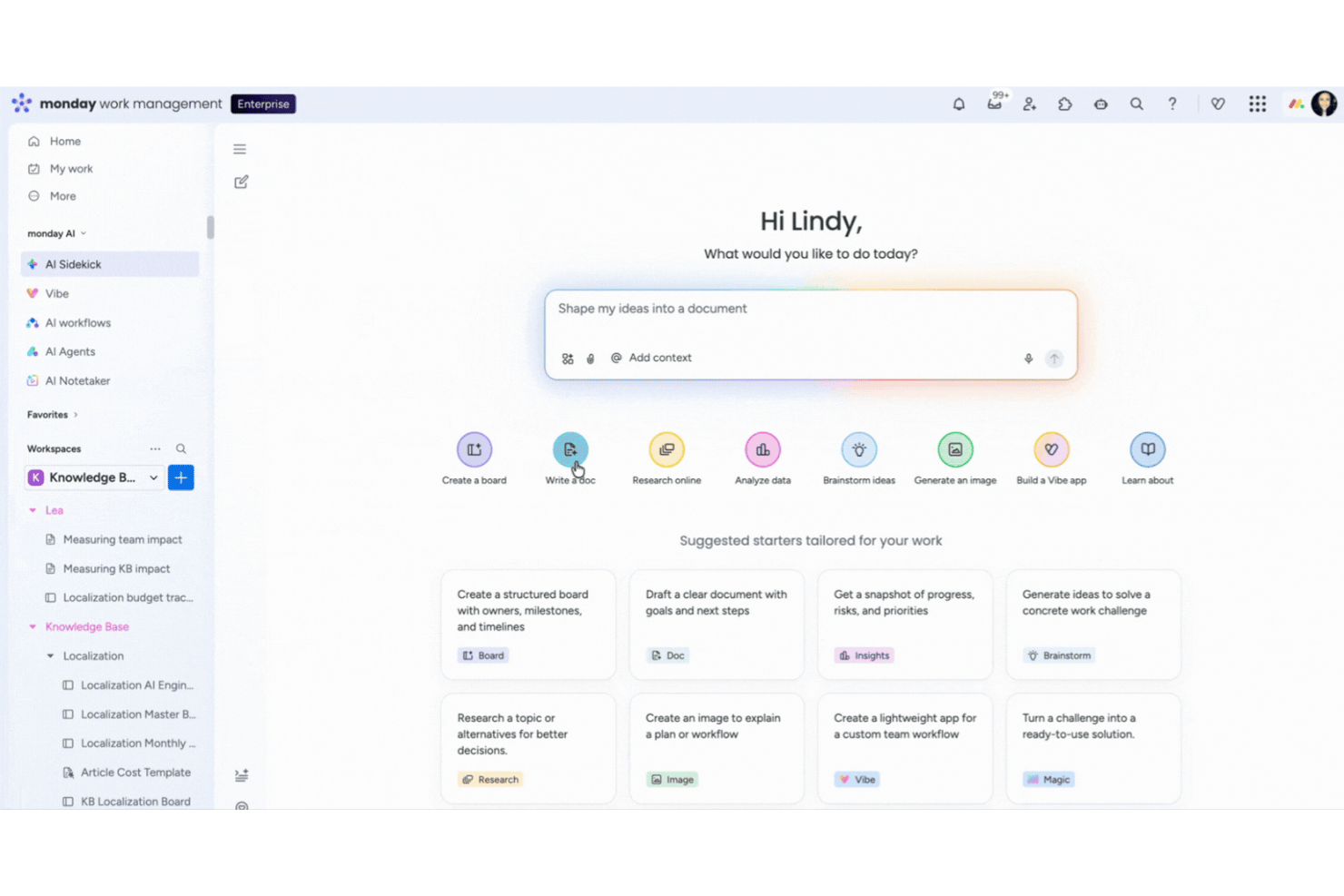
monday AI Workspace è una piattaforma di gestione del lavoro potenziata dall'intelligenza artificiale che trasforma istruzioni in linguaggio naturale in flussi di lavoro strutturati, automatizza la generazione delle attività e collega direttamente le idee emerse dalle sessioni di brainstorming all'esecuzione tra team trasversali.
Per chi è ideale monday AI Workspace?
È particolarmente indicato per team di medie o grandi dimensioni che necessitano che le idee nate dal brainstorming confluiscano direttamente in flussi di lavoro di progetto scalabili e interdipartimentali.
Perché ho scelto monday AI Workspace
Ho inserito monday AI Workspace nella mia shortlist perché nessun altro strumento tra quelli che ho provato trasforma così rapidamente gli output del brainstorming in flussi di lavoro completi ed eseguibili. Utilizzo la funzione monday magic per descrivere un obiettivo di progetto in una frase e ricevo una board completa con attività, dipendenze e stati già strutturati. Il blocco AI Categorize ordina poi automaticamente le idee in arrivo in base alla priorità usando le parole chiave, evitando che grandi sessioni di brainstorming si perdano nel caos.
Funzionalità principali di monday AI Workspace
- Notetaker AI per le riunioni: Riassume gli incontri del team e trasforma automaticamente i punti discussi in spunti concretamente utilizzabili.
- Colonne AI: Integra automazioni e suggerimenti alimentati dall'intelligenza artificiale direttamente nelle board per un brainstorming continuo.
- Potenzia gestione del rischio: Monitora i tempi e le dipendenze dei progetti, segnalando le attività a rischio per un intervento rapido del team.
- Oltre 200 modelli di progetto: Offre una vasta libreria di template pronti per brainstorming di progetto, retrospettive e analisi del rischio.
Integrazioni di monday AI Workspace
monday AI Workspace offre centinaia di integrazioni native tramite l'integrazione integrata e il marketplace, tra cui Slack, Jira, GitHub, Salesforce, HubSpot, Google Workspace, Microsoft Teams, Trello, Dropbox e Zoom. Supporta inoltre Zapier e offre un'API per integrazioni personalizzate.
Pros and Cons
Pros:
- L’IA genera intere board di progetto partendo dai prompt
- Tracciamento integrato del rischio e mappatura delle dipendenze tra le attività
- I riepiloghi automatici delle riunioni si trasformano in attività eseguibili
Cons:
- Nessuna lavagna o canvas di mappe mentali visuale
- Le funzionalità IA avanzate richiedono un piano superiore
New Product Updates from monday AI Workspace
monday AI Workspace Adds Human Approval Routing
monday AI Workspace adds a human-in-the-loop approval block to AI Workflows, sending approval requests and routing workflow paths based on responses. For more information, visit monday AI Workspace's official site.

Wrike
Ideale per moduli di richiesta dinamici

Per i team che cercano uno strumento di brainstorming con AI, Wrike è una piattaforma ideale per trasformare i vostri sforzi collaborativi. Questo software di gestione dei progetti è particolarmente interessante per i team creativi e i project manager che desiderano integrare soluzioni basate sull'intelligenza artificiale nel loro flusso di lavoro. Le funzionalità avanzate di AI di Wrike aiutano a eliminare il caos delle idee disperse e ottimizzano il processo creativo, facilitando la generazione di spunti concreti e promuovendo l'innovazione all'interno del team.
Perché ho scelto Wrike
Ho scelto Wrike per le sue capacità uniche di intelligenza artificiale pensate appositamente per le esigenze di brainstorming. Wrike Whiteboard trasforma le idee libere in compiti strutturati, offrendo uno spazio visivo per collaborare in modo efficace. Inoltre, l'Agent Builder permette di creare agenti AI personalizzati, che possono automatizzare attività routinarie e consentire al team di concentrarsi sul pensiero creativo. Queste funzionalità rispondono direttamente alla necessità di una gestione efficiente delle idee e dell'automazione dei compiti, rendendo Wrike una scelta eccezionale per i team che vogliono migliorare le loro sessioni di brainstorming.
Principali funzionalità di Wrike
Oltre agli innovativi strumenti di AI menzionati, ho trovato particolarmente utili queste funzionalità:
- Moduli di richiesta dinamici: Raccogli e organizza le richieste in arrivo in modo strutturato, rendendo più facile la loro prioritizzazione e gestione.
- Dashboard personalizzabili: Personalizza il tuo spazio di lavoro per visualizzare le informazioni più rilevanti, aiutando il team a rimanere concentrato e informato.
- Diagrammi di Gantt: Visualizza le tempistiche e le dipendenze dei progetti per gestire meglio risorse e scadenze.
- Bacheche Kanban: Ottimizza i flussi di lavoro consentendo ai team di spostare visivamente i compiti tra le varie fasi.
Integrazioni di Wrike
Le integrazioni includono Microsoft Teams, Slack, Google Workspace, Salesforce, Dropbox, GitHub, Jira, Adobe Creative Cloud, Box e HubSpot. È disponibile un'API per integrazioni personalizzate.
Pros and Cons
Pros:
- Propone moduli di richiesta personalizzabili per esigenze di progetto diversificate
- Offre una solida gestione delle attività con commenti e allegati
- Supporta diverse visualizzazioni di progetto come diagrammi di Gantt e bacheche Kanban
Cons:
- Personalizzazione limitata per le fasi e gli stati del flusso di lavoro
- L'app mobile manca di alcune funzioni disponibili su desktop
New Product Updates from Wrike

Wrike Adds Quick Search to Table View
Wrike adds Quick Search to Table View with full-table search across titles, descriptions, and fields, plus highlighted matches. This helps users find tasks faster in large tables. For more information, visit Wrike’s official site.

Ideale per il brainstorming visivo

MindMeister è uno strumento di mind mapping basato su cloud che si rivolge a team e individui che desiderano visualizzare idee e collaborare in tempo reale. È popolare tra educatori, project manager e professionisti creativi che hanno bisogno di organizzare pensieri e pianificare progetti utilizzando funzionalità potenziate dall’intelligenza artificiale.
Perché ho scelto MindMeister: Supporta il brainstorming visivo e permette al tuo team di creare e condividere mappe mentali. Gli strumenti basati sull’IA suggeriscono idee per aiutarti ad ampliare i tuoi pensieri. La collaborazione in tempo reale mantiene tutti sincronizzati. Il layout semplice lo rende facile da usare anche per i principianti.
Funzionalità e integrazioni principali:
Funzionalità includono la funzionalità drag-and-drop che semplifica la creazione delle mappe. La modalità presentazione consente di trasformare le mappe mentali in diapositive dinamiche. È inoltre possibile esportare le mappe in diversi formati, rendendo semplice la condivisione con altri.
Integrazioni includono Google Drive, Dropbox, Microsoft Teams, Evernote, Confluence, Microsoft Word, Microsoft PowerPoint, Trello, Asana e Slack.
Pros and Cons
Pros:
- Collaborazione in tempo reale che stimola la creatività del team
- Design intuitivo per un apprendimento rapido
- Suggerimenti intelligenti basati su IA per ampliare le idee
Cons:
- Accesso offline limitato
- Le funzionalità avanzate richiedono piani di livello superiore

Claude
Ideale per approfondimenti guidati dall'intelligenza artificiale

Claude è una piattaforma di intelligenza artificiale progettata per le aziende di diversi settori, offrendo soluzioni per agenti AI e compiti di programmazione. Si rivolge a settori come l'assistenza clienti, l'istruzione e i servizi finanziari, fornendo strumenti che favoriscono la produttività e l'innovazione grazie a intuizioni guidate dall'intelligenza artificiale.
Perché ho scelto Claude: Fornisce approfondimenti AI per analisi dati avanzate e supporto alle decisioni. Puoi utilizzarlo con strumenti come Slack ed Excel per adattarti a diversi flussi di lavoro. Funzionalità come Claude Code aiutano nella programmazione e nell'aggiornamento di codice obsoleto. Questa gamma di utilizzi offre al tuo team più modi per migliorare il proprio lavoro.
Caratteristiche e integrazioni principali:
Caratteristiche comprendono modelli AI come Opus, Sonnet e Haiku che supportano varie applicazioni aziendali. La capacità della piattaforma di modernizzare il codice aiuta i processi di sviluppo. Puoi anche utilizzare agenti AI per migliorare le operazioni di assistenza clienti.
Integrazioni includono Slack, Excel, Google Workspace, Microsoft Office 365, Salesforce, Zendesk, Trello, Asana, HubSpot e Jira.
Pros and Cons
Pros:
- Versatile in più settori
- Ottime capacità di integrazione
- Supporta approfondimenti avanzati basati sull'intelligenza artificiale
Cons:
- Il prezzo può essere un fattore da considerare
- Richiede competenze tecniche per un uso ottimale

GitMind
Ideale per la mappatura mentale gratuita

GitMind è uno strumento gratuito, basato sul web, per la creazione di mappe mentali, pensato per studenti, insegnanti e professionisti che hanno bisogno di organizzare e visualizzare idee in modo efficiente. Offre una gamma di modelli e funzionalità basate sull'intelligenza artificiale per semplificare brainstorming, pianificazione e collaborazione.
Perché ho scelto GitMind: È gratuito, il che è ideale per singoli utenti o piccoli team senza budget. L'IA suggerisce idee per aiutarti ad arricchire i tuoi pensieri durante il brainstorming. Puoi scegliere tra numerosi modelli per iniziare più velocemente. L'interfaccia pulita mantiene l'attenzione sulla creatività e non sull'aspetto tecnico.
Caratteristiche principali e integrazioni:
Funzionalità che includono una gamma di modelli per soddisfare diverse esigenze di mappatura. L'interfaccia drag-and-drop semplifica la creazione e la modifica delle mappe. Puoi anche collaborare in tempo reale con il tuo team, aumentando la produttività.
Integrazioni includono Google Drive, Dropbox, OneDrive, Evernote, Trello, Asana, Slack, Microsoft Teams, Jira e Confluence.
Pros and Cons
Pros:
- Piano gratuito accessibile a tutti gli utenti
- Ampia varietà di modelli disponibili
- Collaborazione in tempo reale favorisce il lavoro di squadra
Cons:
- Funzionalità limitate nella versione gratuita
- Potrebbe non supportare progetti su larga scala


Xmind è uno strumento di mind mapping ampiamente utilizzato dai professionisti per la pianificazione e l'organizzazione dei progetti. Serve una vasta base di utenti, tra cui team e singoli individui, offrendo funzioni intuitive di creazione di mappe mentali e gestione delle attività.
Perché ho scelto Xmind: È molto valido nella creazione di mappe mentali visive che suddividono chiaramente informazioni complesse. Gli strumenti di intelligenza artificiale aiutano a ordinare e strutturare le idee, cosa utile nella pianificazione. Puoi utilizzare i diagrammi di Gantt integrati e l'assegnazione delle attività per gestire scadenze e lavoro. È inoltre disponibile tramite web, desktop e mobile, così puoi lavorare ovunque tu abbia bisogno.
Funzionalità e integrazioni principali:
Funzionalità includono diagrammi di Gantt che ti aiutano a visualizzare le tempistiche di progetto. La funzionalità di assegnazione delle attività consente una facile delega all'interno del team. Gli strumenti di collaborazione supportano il flusso di lavoro di squadra e aumentano la produttività del gruppo.
Integrazioni includono Google Drive, Dropbox, Evernote, OneDrive, Box, Microsoft Teams, Slack, Jira, Trello e Asana.
Pros and Cons
Pros:
- Efficace per la visualizzazione di progetti complessi
- Interfaccia intuitiva e facile da navigare
- Supporta l'accesso multipiattaforma
Cons:
- Funzioni avanzate limitate per le grandi aziende
- Numero limitato di mappe creabili nei piani gratuito e base


Monica è un creatore di mappe mentali guidato dall'intelligenza artificiale, pensato per individui e piccoli team che devono organizzare e visualizzare le proprie idee. Aiuta a strutturare i pensieri, pianificare progetti e aumentare la produttività grazie alle sue funzionalità AI.
Perché ho scelto Monica: È pensato per creare mappe mentali semplici, il che è utile se desideri un'opzione senza complicazioni. L'AI ti aiuta a generare e organizzare idee rapidamente. Puoi personalizzare ogni mappa in base alle esigenze del tuo progetto. L'interfaccia intuitiva permette al tuo team di utilizzarlo subito senza bisogno di molta formazione.
Funzionalità in evidenza e integrazioni:
Funzionalità includono la possibilità di personalizzare le mappe mentali con vari temi e stili. La funzione di trascinamento permette di organizzare rapidamente le idee. È anche possibile esportare le mappe in diversi formati, facilitando la condivisione.
Integrazioni includono Google Drive, Dropbox, Evernote, OneDrive, Slack, Microsoft Teams, Trello, Asana, Notion e Confluence.
Pros and Cons
Pros:
- Interfaccia semplice e facile da usare
- Temi e stili personalizzabili
- Efficiente per organizzare rapidamente le idee
Cons:
- Funzionalità avanzate limitate per progetti complessi
- Prova limitata per la generazione di immagini e video con il piano gratuito


HyperWrite è un generatore di idee basato sull'intelligenza artificiale progettato per creatori e team che cercano soluzioni e idee per la generazione di contenuti. Sfrutta modelli avanzati di IA come GPT-4 e ChatGPT per aiutare imprenditori, marketer e scrittori a superare i blocchi creativi e generare idee nuove.
Perché ho scelto HyperWrite: È pensato per la creazione di contenuti generati dall'IA, il che aiuta molto durante le sessioni di brainstorming. L'IA esamina il tuo input e produce idee creative per i tuoi contenuti. I risultati vengono personalizzati in base al tuo stile man mano che lo usi. L'estensione Chrome ti consente di portare queste funzionalità su diversi siti, offrendo maggiore flessibilità al tuo team.
Funzionalità principali e integrazioni:
Funzionalità includono un generatore di idee alimentato dall'intelligenza artificiale che ti aiuta a trovare soluzioni creative. Lo strumento si personalizza in base alle tue preferenze, diventando più utile con l'uso continuativo. Puoi anche accedere alle funzionalità di HyperWrite direttamente tramite un'estensione per Chrome.
Integrazioni includono Google Chrome, Google Docs e Gmail.
Pros and Cons
Pros:
- I modelli di IA generano idee creative diverse
- Personalizza i contenuti in base alle tue esigenze
- Accessibile tramite estensione Chrome
Cons:
- Il piano gratuito non offre la stessa ampiezza della versione a pagamento
- Limitato all'accesso via web


Mapify è una piattaforma basata sull'intelligenza artificiale progettata per gli utenti che devono convertire vari formati di contenuto come PDF, video e registrazioni audio in mappe mentali strutturate. Serve studenti e professionisti facilitando la produttività e l'organizzazione delle informazioni grazie alle sue capacità di IA.
Perché ho scelto Mapify: Aiuta a trasformare diversi tipi di contenuti in mappe interattive. Il riassunto tramite IA scompone rapidamente informazioni complesse, favorendo lo studio e la memorizzazione creando informazioni più facilmente assimilabili. È possibile modificare e personalizzare ogni mappa mentale secondo le proprie esigenze. L'interfaccia semplice e gli strumenti che fanno risparmiare tempo rendono più facile gestire le informazioni in modo efficiente.
Caratteristiche distintive & integrazioni:
Caratteristiche includono la modalità presentazione, che consente di mostrare le mappe mentali, oltre a un generatore di immagini per creare contenuti visivi per le proprie mappe. È inoltre possibile utilizzare modelli preimpostati per avviare rapidamente le sessioni di brainstorming.
Le integrazioni includono Google Drive, Dropbox, Evernote, OneDrive, Slack, Microsoft Teams, Trello, Asana, Notion e Confluence.
Pros and Cons
Pros:
- Organizzazione efficiente di informazioni complesse
- Mappe mentali personalizzabili e modificabili
- Interfaccia intuitiva
Cons:
- Può richiedere una connessione internet per tutte le funzionalità
- Funzionalità avanzate limitate per progetti di grande scala

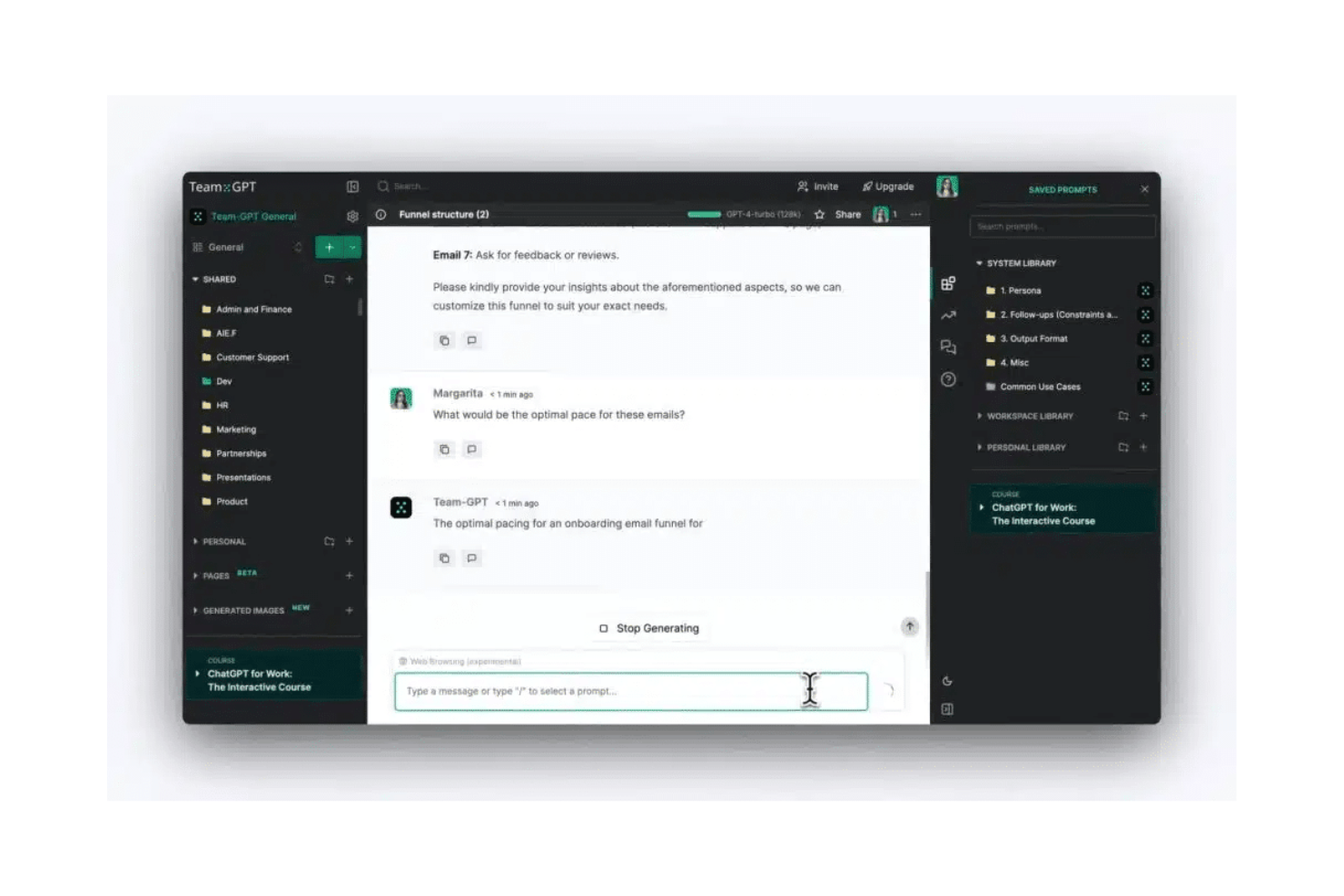
Team GPT è una piattaforma basata sull'intelligenza artificiale progettata per i team di marketing, con l'obiettivo di migliorare la collaborazione e la produttività. Offre strumenti per la creazione di contenuti, l'ottimizzazione SEO e la gestione delle campagne, rivolgendosi a team di marketing, agenzie e grandi aziende.
Perché ho scelto Team GPT: Combina diversi modelli di intelligenza artificiale, come GPT-5 e Claude, per gestire varie attività di marketing. Puoi creare assistenti AI personalizzati utilizzando i dati della tua azienda per ottenere risultati più pertinenti. Offre anche frammenti di contesto riutilizzabili per gestire campagne senza ripetere il lavoro. Questo sistema favorisce una collaborazione di squadra efficiente.
Caratteristiche principali e integrazioni:
Caratteristiche includono un editor di testo nativo AI che supporta la creazione di contenuti. La libreria dei contesti consente al tuo team di conservare e riutilizzare frammenti per garantire la coerenza. Gli assistenti AI sono personalizzabili in base alle specifiche esigenze aziendali.
Le integrazioni includono Google Drive, Notion, SharePoint, Trello, Slack, Asana, Jira, monday.com, Dropbox e Microsoft Teams.
Pros and Cons
Pros:
- Assistenti AI personalizzati per le esigenze aziendali
- Supporta più modelli AI per una maggiore versatilità
- Alta adozione tra i team di marketing
Cons:
- Il piano gratuito è limitato a cinque utenti
- Potrebbe richiedere tempo per addestrare le funzionalità AI
Altri strumenti di brainstorming con IA
Ecco alcune opzioni aggiuntive di strumenti di brainstorming con IA che non sono entrate nel mio elenco, ma che vale comunque la pena prendere in considerazione:


Come valuto gli strumenti di brainstorming AI
Cerco strumenti in cui l’AI fa molto più che completare note adesive: dovrebbe generare idee, raggruppare temi e aiutare i team a passare da un brainstorming disordinato a piani attuabili. Suddivido la mia valutazione tra funzionalità di base imprescindibili e i fattori che distinguono le opzioni buone da quelle eccellenti.
Funzionalità di base (Criteri Sine Qua Non per questa lista)
Quando seleziono gli strumenti per la mia lista, ne valuto ciascuno su una scala da 0 (non offre la funzionalità) a 5 (eccelle in quest’area) per tutte le funzionalità di base elencate sotto. Poi calcolo il punteggio totale in percentuale. Ogni strumento deve raggiungere un punteggio totale minimo del 65% per essere incluso.
- Generazione di idee supportata dall’AI: Verifico se l’AI produce idee realmente utili a partire da un prompt—ad esempio, identificando fattori di rischio per un lancio di prodotto—o se si limita a ripetere ciò che hai scritto.
- Canvas visivo per brainstorming: Un buon canvas ti permette di disporre le idee come mappe mentali, note adesive o bacheche libere, quindi verifico quanto sia flessibile l’organizzazione e l’esplorazione dei concetti da parte dei team.
- Clustering e sintesi tramite AI: Controllo se lo strumento riesce a prendere un brainstorming di 40 elementi e a raggrupparli automaticamente in temi chiari con un riepilogo utilizzabile dai tuoi stakeholder.
- Collaborazione in tempo reale: I team che organizzano sprint planning o retrospettive hanno bisogno della co-modifica dal vivo, quindi valuto come ogni strumento gestisce più partecipanti contemporaneamente sulla stessa bacheca.
- Integrazione con project management: I risultati migliori del brainstorming confluiscono direttamente nel flusso di lavoro operativo, quindi valuto le integrazioni native con strumenti come Jira, Asana e Monday.
- Template e personalizzazione dei prompt: Framework preimpostati per attività tipiche di project management—come analisi SWOT, retrospettive o identificazione dei rischi—fanno risparmiare tempo reale, e prompt personalizzati li rendono riutilizzabili.
Dopo aver selezionato gli strumenti che rispettano questi criteri, considero cosa distingue ciascuna piattaforma.
Fattori differenzianti (Cosa distingue i fornitori)
Ecco come confronto i diversi fornitori:
Funzionalità distintive
Cerco strumenti con una modalità facilitatore AI in grado di guidare un team attraverso una retrospettiva strutturata o un workshop sui rischi senza che qualcuno debba gestire manualmente l’agenda. Anche i piani d’azione generati automaticamente sono un importante elemento distintivo: trasformare il risultato del brainstorming direttamente in backlog di sprint o registri dei rischi fa risparmiare ore di lavoro dopo la sessione. Valuto anche se l’AI mantiene il contesto dei progetti precedenti, così i suggerimenti diventano sempre più precisi man mano che il team usa lo strumento.
Oltre le funzionalità
La sicurezza a livello aziendale è importante perché nelle sessioni di brainstorming emergono spesso strategie sensibili e dettagli sulle roadmap di prodotto. Verifico la conformità SOC 2 e politiche chiare di gestione dei dati AI—soprattutto se i dati dei clienti sono usati per addestrare i modelli. Anche la scalabilità è rilevante: uno strumento adatto per un team di cinque persone deve poter supportare senza rallentamenti anche workshop da cinquanta partecipanti. Considero inoltre il supporto all’onboarding, in particolare playbook specifici per PM che aiutano i team ad adottare lo strumento senza una curva di apprendimento ripida.
Come scegliere uno strumento di brainstorming con IA
È facile perdersi in lunghi elenchi di funzionalità e strutture tariffarie complesse. Per aiutarti a rimanere concentrato mentre affronti il tuo specifico processo di selezione del software, ecco una lista di fattori da tenere a mente:
| Fattore | Cosa considerare |
|---|---|
| Scalabilità | Lo strumento crescerà insieme al tuo team? Verifica se supporta un numero crescente di utenti o progetti senza difficoltà. Pensa alle esigenze future e alla possibile espansione. |
| Integrazioni | Si collega agli strumenti che utilizzi già? Verifica la compatibilità con piattaforme come Slack, Google Workspace o Trello per mantenere un flusso di lavoro fluido. |
| Personalizzazione | Puoi adattarlo ai tuoi processi specifici? Cerca opzioni per modificare modelli o funzionalità in base alle esigenze uniche del tuo team. |
| Facilità d'uso | È semplice da usare per tutti i membri del team? Assicurati che l'interfaccia sia intuitiva e richieda una formazione minima, così non perderai tempo per portare tutti al livello necessario. |
| Implementazione e avvio | Quanto velocemente puoi iniziare? Valuta la disponibilità di materiali formativi, il supporto durante la fase di configurazione e il tempo necessario per ottenere risultati concreti. |
| Costo | Il prezzo rientra nel tuo budget? Considera sia i costi iniziali sia le spese a lungo termine, incluse le quote di abbonamento e gli eventuali componenti aggiuntivi. |
| Misure di sicurezza | Quanto sono sicuri i tuoi dati? Cerca standard di crittografia, conformità alle normative sulla protezione dei dati e solidi metodi di autenticazione degli utenti. |
| Disponibilità dell'assistenza | Quale aiuto puoi aspettarti se qualcosa va storto? Verifica la disponibilità dell'assistenza 24 ore su 24, 7 giorni su 7, della chat dal vivo e di un servizio clienti di qualità, per assicurarti di non rimanere mai senza supporto. |
Cosa sono gli strumenti di brainstorming con IA?
Gli strumenti di brainstorming basati sull'IA sono piattaforme digitali che utilizzano l'intelligenza artificiale per aiutare gli utenti a generare, organizzare e sviluppare idee. Questi strumenti sono comunemente utilizzati da professionisti come project manager, esperti di marketing e creativi che devono migliorare la creatività e la collaborazione.
Funzionalità come la generazione di idee basata sull'IA, la collaborazione in tempo reale e i modelli personalizzabili aiutano i team a pensare fuori dagli schemi e a organizzare i propri pensieri in modo efficiente. Nel complesso, questi strumenti aumentano la produttività e l'innovazione fornendo un supporto intelligente durante le sessioni di brainstorming.
Funzionalità
Quando selezioni strumenti di brainstorming basati sull'IA, presta attenzione alle seguenti funzionalità chiave:
- Generazione di idee basata sull'IA: genera idee creative analizzando gli input e suggerendo nuovi concetti da esplorare.
- Collaborazione in tempo reale: consente a più utenti di lavorare insieme contemporaneamente, migliorando la creatività e la produttività del team.
- Modelli personalizzabili: forniscono layout predefiniti che possono essere adattati alle esigenze specifiche del progetto, risparmiando tempo durante la configurazione.
- Mappe mentali interattive: aiutano a visualizzare e organizzare pensieri complessi attraverso strutture visive dinamiche e coinvolgenti.
- Funzionalità di integrazione: si collegano ad altri strumenti per la produttività come Slack o Trello, mantenendo la continuità del flusso di lavoro.
- Analisi dei dati basata sull'IA: offre informazioni e suggerimenti basati sui modelli presenti nei dati per supportare decisioni informate.
- Funzionalità di gestione delle attività: consentono di monitorare e assegnare attività all'interno della piattaforma per ottimizzare i flussi di lavoro dei progetti.
- Creazione di contenuti visivi: supporta l'inclusione di immagini ed elementi grafici per arricchire le presentazioni e migliorare la comprensione.
- Interfaccia intuitiva: garantisce facilità d'uso grazie a una navigazione intuitiva e a una curva di apprendimento ridotta per i nuovi utenti.
- Misure di sicurezza: protegge i dati degli utenti tramite la crittografia e la conformità alle normative sulla protezione dei dati.
Vantaggi
L'implementazione di strumenti di brainstorming basati sull'IA offre diversi vantaggi al tuo team e alla tua azienda. Ecco alcuni dei vantaggi che puoi aspettarti:
- Maggiore creatività: la generazione di idee basata sull'IA stimola nuovi concetti e prospettive, aumentando la produzione creativa del tuo team.
- Migliore collaborazione: le funzionalità di collaborazione in tempo reale consentono al tuo team di lavorare insieme in modo efficace, indipendentemente dalla posizione.
- Risparmio di tempo: i modelli personalizzabili e le funzionalità di gestione delle attività aiutano a configurare i progetti in modo rapido ed efficiente.
- Organizzazione migliore: le mappe mentali interattive consentono di organizzare e visualizzare idee complesse, rendendole più facili da comprendere.
- Decisioni informate: l'analisi dei dati basata sull'IA fornisce informazioni e suggerimenti, aiutandoti a prendere decisioni aziendali intelligenti.
- Maggiore produttività: automatizzando le attività ripetitive, questi strumenti liberano tempo per consentire al tuo team di concentrarsi sul lavoro più importante.
- Sicurezza dei dati: le misure di sicurezza proteggono le informazioni sensibili, garantendo la conformità alle normative sulla protezione dei dati.
Costi e prezzi
La selezione di strumenti di brainstorming basati sull'IA richiede la comprensione dei vari modelli e piani tariffari disponibili. I costi variano in base alle funzionalità, alle dimensioni del team, ai componenti aggiuntivi e ad altri fattori. La tabella seguente riassume i piani più comuni, i relativi prezzi medi e le funzionalità tipicamente incluse nelle soluzioni di strumenti di brainstorming basati sull'IA:
Tabella comparativa dei piani per gli strumenti di brainstorming basati sull'IA
| Tipo di piano | Prezzo medio | Funzionalità comuni |
|---|---|---|
| Piano gratuito | $0 | Modelli di base, collaborazione limitata e assistenza di base. |
| Piano personale | $5-$25/user/month | Modelli personalizzabili, collaborazione in tempo reale e idee generate dall'IA. |
| Piano aziendale | $30-$60/user/month | Integrazioni avanzate, funzionalità di sicurezza migliorate e assistenza prioritaria. |
| Piano aziendale avanzato | $70-$120/user/month | Soluzioni personalizzate, gestione dedicata dell'account e analisi complete. |
Domande frequenti sugli strumenti di brainstorming con IA
Ecco alcune risposte alle domande comuni sugli strumenti di brainstorming con IA:
Gli strumenti di brainstorming con IA possono integrarsi con i software che già utilizzo?
Sì, la maggior parte degli strumenti di brainstorming con IA si connette facilmente alle app che il tuo team utilizza già, come Slack, Trello e Google Workspace. Alcuni si integrano anche con strumenti per prendere appunti e per la gestione dei progetti, così da mantenere organizzate le tue idee. Prima di sceglierne uno, consulta l’elenco delle integrazioni per assicurarti che supporti le piattaforme che preferisci e contribuisca ad automatizzare il tuo processo di brainstorming.
Gli strumenti di brainstorming con IA supportano la collaborazione da remoto?
Certamente. Questi strumenti sono progettati per il lavoro di squadra da remoto e permettono a tutti di elaborare idee e sviluppare concetti creativi in tempo reale. Grazie a funzionalità come lavagne condivise, chat e integrazioni video, le piattaforme basate sull’IA rendono le sessioni di ideazione collaborative, indipendentemente da dove si trovi il tuo team.
In che modo gli strumenti di brainstorming con IA migliorano la creatività?
Gli strumenti di brainstorming con IA migliorano la creatività grazie all’IA generativa e ai modelli dinamici per il brainstorming. Analizzano i tuoi input e suggeriscono nuove direzioni, aiutandoti ad ampliare le tue idee per progetti come campagne di marketing, sviluppo di prodotti o pianificazione di contenuti creativi. Molte piattaforme utilizzano OpenAI o modelli simili per stimolare idee brillanti e incoraggiare un’ideazione più approfondita.
Gli strumenti di brainstorming con IA sono sicuri per i dati sensibili?
Sì, i principali strumenti di brainstorming con IA proteggono le informazioni sensibili mediante la crittografia e la conformità alle normative sulla protezione dei dati. Quando valuti uno strumento, verifica la presenza dell’autenticazione degli utenti, di aggiornamenti regolari e di informative sulla privacy trasparenti, per assicurarti che le tue sessioni di brainstorming e i tuoi documenti rimangano al sicuro.