

I 10 migliori software di monitoraggio del tempo per i servizi professionali recensiti nel 2026

Elenco dei migliori software di monitoraggio del tempo per servizi professionali


Il tempo è una risorsa preziosa e, in qualità di responsabile di progetto, sai quanto possa sfuggire. Gestire il tempo del tuo team è fondamentale per consegnare i progetti nei tempi previsti e rispettando il budget. È qui che il software di monitoraggio del tempo per servizi professionali può fare la differenza.
Questi strumenti ti aiutano a tenere sotto controllo ogni ora impiegata, fornendo informazioni utili per migliorare la produttività e ridurre gli sprechi. Ho testato e recensito diverse opzioni per offrirti una panoramica imparziale delle migliori soluzioni disponibili.
In questo articolo scoprirai le mie scelte principali, ognuna con funzionalità uniche per soddisfare esigenze diverse. Che tu debba gestire scadenze ravvicinate o progetti complessi, qui troverai uno strumento che può aiutare te e il tuo team ad avere successo.
Perché fidarsi dei nostri consigli sui software
Il nostro team testa e recensisce software dal 2012. In quanto project manager noi stessi, sappiamo quanto sia difficile — e importante — scegliere il software giusto.
Per questa guida, abbiamo valutato gli strumenti attraverso test pratici e ricerche indipendenti, assegnando un punteggio agli strumenti in base ai nostri criteri di selezione. Ci basiamo inoltre sulle competenze di leader di pensiero del settore e di professionisti attivi nella gestione dei progetti.
Le nostre recensioni riflettono il nostro giudizio editoriale umano, non un discorso di vendita.
Riepilogo dei migliori software di monitoraggio del tempo per servizi professionali
Questa tabella comparativa riassume i dettagli sui prezzi delle mie migliori selezioni di software di monitoraggio del tempo per servizi professionali, per aiutarti a trovare quello più adatto al tuo budget e alle esigenze della tua azienda.
| Tool | Best For | Trial Info | Price | ||
|---|---|---|---|---|---|
| 1 | Ideale per approfondimenti sui report basati sull'IA | Prova gratuita di 14 giorni + demo gratuita disponibile | A partire da $10/mese (fatturazione annuale) | Website | |
| 2 | Ideale per un'interfaccia semplice | Piano gratuito + prova gratuita di 30 giorni + demo gratuita disponibile | A partire da $9/utente/mese (fatturato annualmente) | Website | |
| 3 | Ideale per il calcolo automatico delle ore di lavoro | Prova gratuita di 14 giorni + demo gratuita disponibile | Da $6.42/utente/mese (fatturato annualmente) | Website | |
| 4 | Ideale per la definizione del budget dei progetti in tempo reale | Piano gratuito + prova gratuita di 30 giorni + demo gratuita disponibile | A partire da $6/utente/mese (fatturato annualmente) | Website | |
| 5 | Ideale per il tracciamento ore basato su GPS | Prova gratuita di 30 giorni + demo gratuita disponibile | Da $50/mese | Website | |
| 6 | Ideale per le estensioni del browser | Piano gratuito disponibile | A partire da $3.99/postazione/mese (fatturato annualmente) | Website | |
| 7 | Ideale per il monitoraggio automatico del tempo | Prova gratuita di 14 giorni + demo gratuita disponibile | Da $9/utente/mese (fatturato annualmente) | Website | |
| 8 | Ideale per piccoli team | Prova gratuita di 14 giorni + piano gratuito + demo gratuita disponibili | A partire da $8/utente/mese (fatturazione annuale) | Website | |
| 9 | Ideale per la gestione del budget | Prova gratuita di 14 giorni + piano gratuito + demo gratuita disponibile | A partire da $3.99/utente/mese (fatturazione annuale) | Website | |
| 10 | Ideale per il monitoraggio della produttività | Prova gratuita di 14 giorni + demo gratuita disponibile | Da $6,67/utente/mese (fatturato annualmente) | Website |


Recensione dei migliori software di monitoraggio del tempo per servizi professionali
Di seguito trovi i miei riepiloghi dettagliati dei migliori software di monitoraggio del tempo per servizi professionali inclusi nel mio elenco. Le mie recensioni offrono un’analisi approfondita delle funzionalità principali, dei vantaggi & degli svantaggi, delle integrazioni e dei casi d’uso ideali di ogni strumento, aiutandoti a trovare quello più adatto a te.

Ideale per approfondimenti sui report basati sull'IA
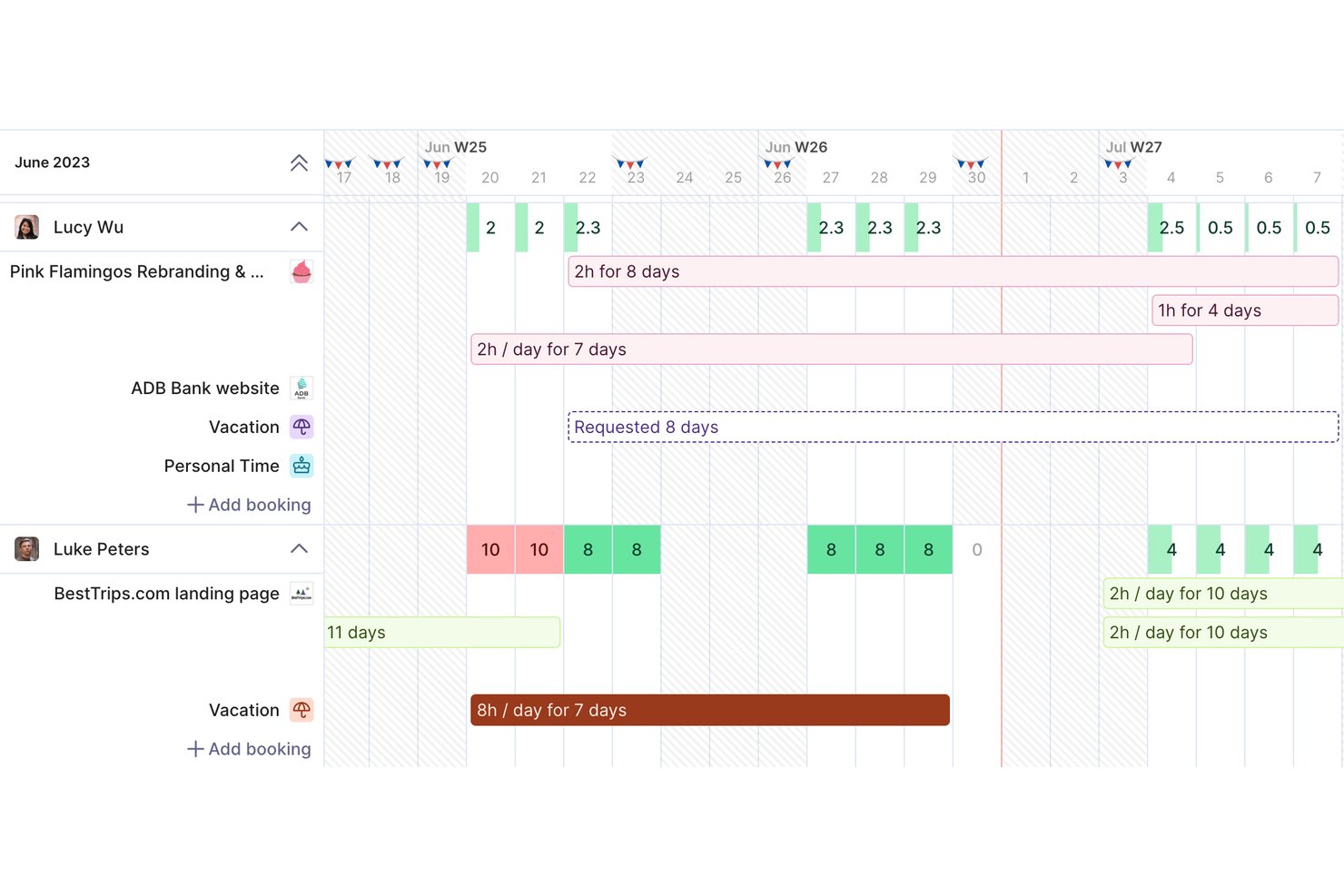
Productive è una piattaforma di gestione per servizi professionali che combina il monitoraggio del tempo, la gestione dei budget di progetto, la pianificazione delle risorse, la fatturazione e i report sulla redditività in un unico strumento pensato per agenzie e società di consulenza.
Per chi è pensato Productive?
Productive è particolarmente adatto per agenzie di piccole e medie dimensioni, società di consulenza e imprese IT che devono collegare il tempo fatturabile direttamente alle finanze di progetto.
Perché ho scelto Productive
Productive si è guadagnato il suo posto nella mia shortlist grazie agli strumenti di reporting basati sull'IA che mettono in evidenza le informazioni finanziarie senza la necessità di analisi manuali. Mi piace il fatto che Report Intelligence analizzi più insiemi di dati e fornisca riepiloghi in linguaggio naturale, così posso vedere subito quali progetti sono a rischio di margine. Il monitoraggio AI del tempo compila automaticamente le timesheet utilizzando eventi del calendario e voci precedenti, mantenendo così i dati sull'utilizzo sufficientemente accurati da essere affidabili.
Caratteristiche principali di Productive
- Pianificatore delle risorse: Pianifica e assegna la capacità dei consulenti utilizzando prenotazioni provvisorie, ricorrenti e suddivise.
- Gestione dei contratti e delle tariffe fisse: Monitora i contratti ricorrenti e le erogazioni di progetti a tariffa fissa insieme al lavoro a tempo e materiale.
- Fatturazione multi-valuta: Genera fatture in valute diverse per supportare clienti globali.
- Permessi basati sui ruoli: Imposta controlli di accesso dettagliati per i ruoli utente, i clienti e i dati finanziari sensibili.
Integrazioni di Productive
Productive offre integrazioni native con Xero, HubSpot, Jira, Slack, Sage, Outlook, Google Calendar e Microsoft 365. Si collega con Zapier e mette a disposizione un'API per integrazioni personalizzate.
Pros and Cons
Pros:
- Monitora insieme il tempo fatturabile e i margini di progetto
- L'IA compila automaticamente le timesheet dai dati del calendario
- Visione in tempo reale di budget e profitti per progetto
Cons:
- L'impostazione iniziale dei progetti richiede tempo considerevole
- L'app mobile ha funzionalità di reportistica limitate
New Product Updates from Productive

Productive Adds Agent Triggers, Teams Integration, and Time Controls
Productive adds automated agent triggers, broader AI file support, Microsoft Teams integration, Resource Planner improvements, and new time entry controls. These updates expand automation while improving scheduling, collaboration, and time tracking. For more information, visit Productive’s official site.

Toggl
Ideale per un'interfaccia semplice
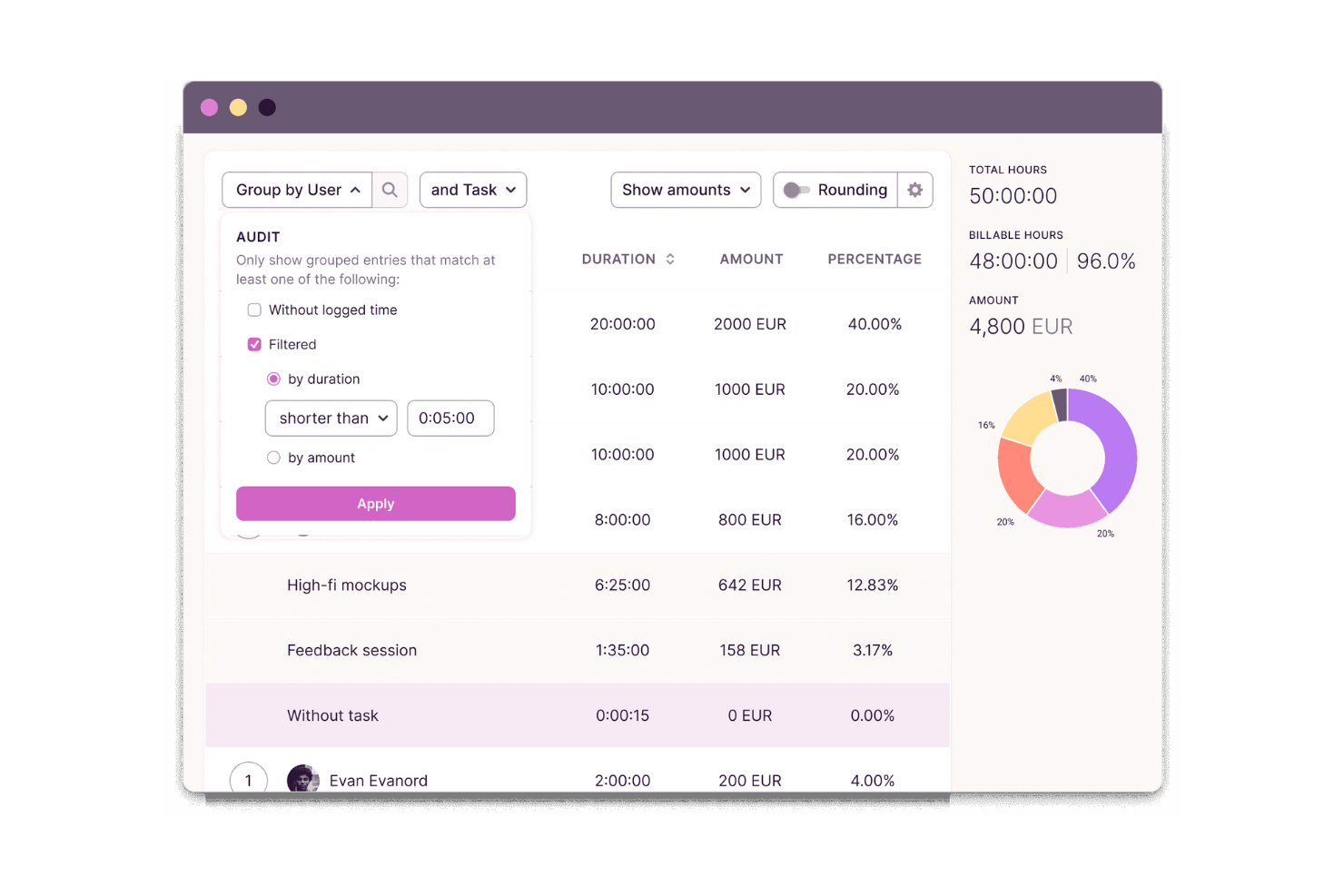
Toggl è uno strumento di monitoraggio del tempo progettato per freelance e team di piccole e medie dimensioni per tenere traccia delle ore di lavoro. Aiuta gli utenti a monitorare la produttività e a gestire il tempo grazie a un'interfaccia facile da usare.
Perché ho scelto Toggl: Ho scelto Toggl per la sua attenzione alla velocità e alla chiarezza. La sua interfaccia elimina gli ostacoli, i timer sono facili da avviare, cambiare e categorizzare, rendendolo ideale per singoli utenti o piccoli team che desiderano una configurazione minima. Il rilevamento dell'inattività e i report visivi aiutano a capire come distribuire il tempo senza sovraccaricare gli utenti con opzioni di configurazione.
Funzionalità principali & integrazioni:
Le funzionalità includono il monitoraggio dei progetti, le tariffe fatturabili e il rilevamento dell'inattività. È possibile distinguere tra ore fatturabili e non fatturabili, il che aiuta a ottenere una fatturazione accurata. La funzione di rilevamento dell'inattività garantisce che venga registrato solo il tempo di lavoro attivo.
Le integrazioni includono Asana, Trello, Slack, Jira, Google Calendar, Zapier, Basecamp, GitHub, Evernote e Todoist.
Pros and Cons
Pros:
- Semplice da usare
- Monitoraggio flessibile dei progetti
- Rilevamento efficace dell'inattività
Cons:
- Gli strumenti per le attività non dispongono di una configurazione avanzata
- Incoerenze periodiche nella sincronizzazione

DeskTime
Ideale per il calcolo automatico delle ore di lavoro

DeskTime è uno strumento automatico di monitoraggio del tempo per team in ufficio, ibridi e remoti che copre il tracciamento dei progetti, il monitoraggio della produttività, la gestione delle assenze, la programmazione dei turni e la registrazione del tempo offline.
Per chi è consigliato DeskTime?
DeskTime è adatto per team di piccole e medie dimensioni che hanno bisogno di un modo semplice per monitorare le ore di lavoro in contesti in ufficio, remoti e ibridi.
Perché ho scelto DeskTime
DeskTime è una delle mie scelte preferite perché adoro come gestisce il calcolo del tempo senza bisogno di input manuali dal team. L'app desktop inizia il monitoraggio nel momento in cui qualcuno accende il computer e si interrompe quando questo viene spento, registrando automaticamente il tempo produttivo, il tempo di inattività e le pause. Mi piace anche la funzione di calcolo della produttività, che assegna a ogni app e URL uno stato di produttività, offrendo così una reale suddivisione di come vengono effettivamente impiegate le ore fatturabili, non solo quanto tempo qualcuno è rimasto connesso.
Funzionalità principali di DeskTime
- Monitoraggio del tempo su progetti e attività: Assegna il tempo monitorato direttamente a progetti e attività specifiche per vedere come vengono distribuite le ore tra i diversi lavori per i clienti.
- Calendario delle assenze: Registra e gestisci le assenze del team, comprese ferie, malattie e tipi di permessi personalizzati, grazie ai flussi di lavoro di approvazione integrati.
- Monitoraggio del tempo offline: Registra manualmente il tempo impiegato per il lavoro svolto lontano dal computer, come riunioni o chiamate con i clienti.
- Report programmati: Imposta la consegna automatica dei report per aggiornare i responsabili sul tempo del team senza esportazioni manuali.
Integrazioni di DeskTime
DeskTime offre un set ridotto di integrazioni nativamente disponibili, tra cui Google Calendar, Outlook Calendar, Trello, GitLab, Asana e Jira, e si collega con Zapier. È anche disponibile un'API per integrazioni personalizzate.
Pros and Cons
Pros:
- Traccia automaticamente l'uso di app e siti web
- Classifica il tempo come produttivo o improduttivo
- Funziona silenziosamente in background
Cons:
- Strumenti limitati per la gestione di progetti e collaborazione
- Mancanza di fatturazione e funzioni avanzate di billing

actiTIME
Ideale per la definizione del budget dei progetti in tempo reale
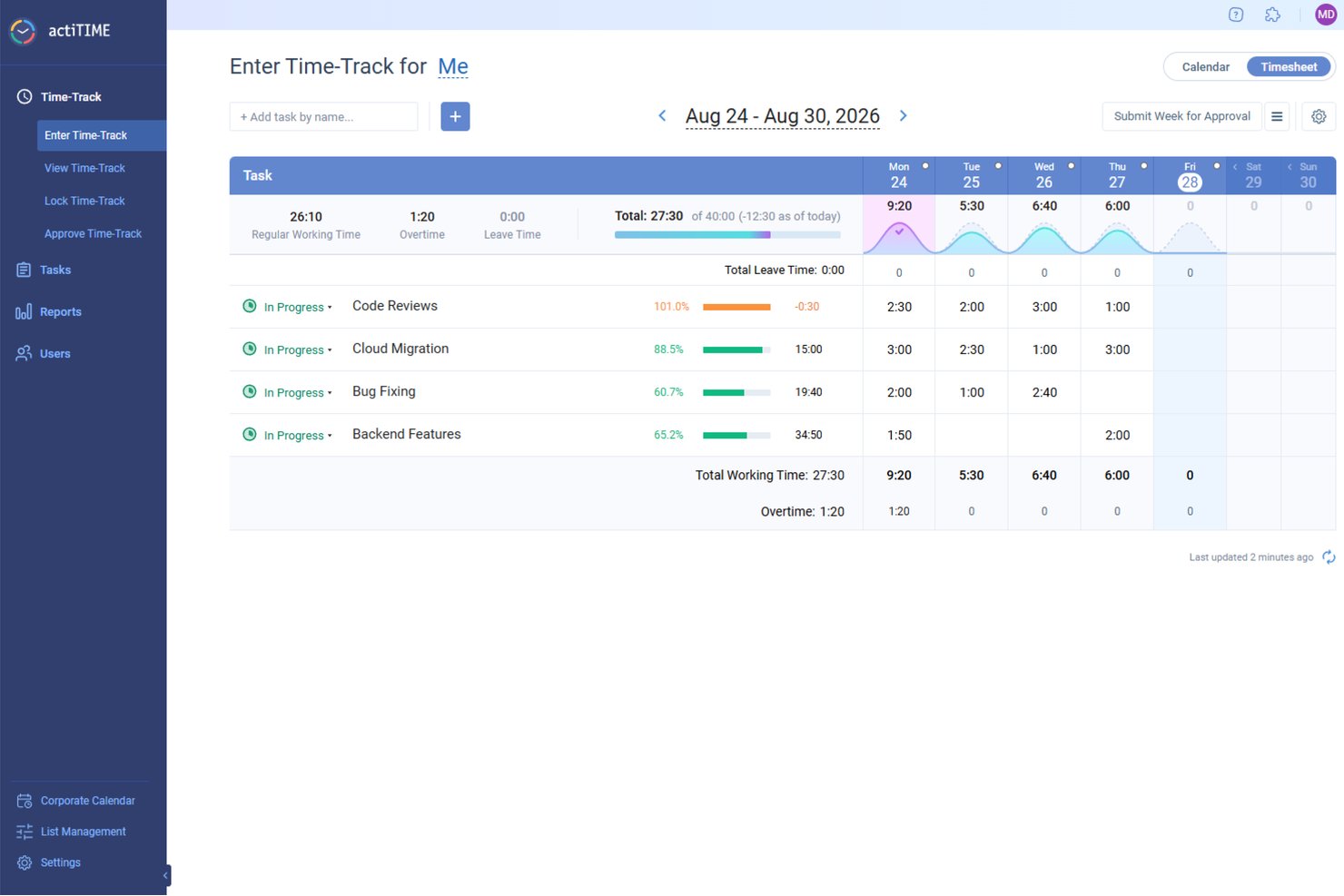
actiTIME offre una soluzione completa per i professionisti che necessitano di una gestione meticolosa del tempo e del monitoraggio dei progetti. Ideale per settori come l'architettura, la consulenza e l'informatica, actiTIME risponde alla necessità di una fatturazione accurata e di un'allocazione efficiente delle risorse. Fornisce strumenti per gestire progetti, budget e attività del team, garantendo che la tua attività funzioni in modo fluido e redditizio.
Perché ho scelto actiTIME
Ho scelto actiTIME perché eccelle nel soddisfare le esigenze specifiche dei servizi professionali grazie alle sue funzionalità dettagliate di monitoraggio del tempo e gestione dei progetti. Puoi monitorare facilmente le ore fatturabili e gestire i budget dei progetti, aspetti fondamentali per mantenere la redditività e la responsabilità nei servizi ai clienti. Lo strumento offre inoltre funzionalità complete di reportistica, che consentono di analizzare le prestazioni dei progetti e prendere decisioni informate.
Funzionalità principali di actiTIME
Oltre alle funzionalità principali, actiTIME offre diverse altre caratteristiche che ne aumentano l'utilità per i servizi professionali:
- Monitoraggio del budget: Monitora i budget dei progetti in tempo reale per evitare spese eccessive.
- Gestione delle ferie: Gestisci la disponibilità del team monitorando permessi e assenze.
- Fatturazione ed emissione di fatture: Genera fatture basate sul tempo monitorato e sul lavoro svolto per i progetti.
- Flussi di lavoro personalizzati: Adatta i flussi di lavoro per integrarli con processi e requisiti aziendali specifici.
Integrazioni di actiTIME
Le integrazioni includono actiPLANS, QuickBooks e Zapier.
Pros and Cons
Pros:
- Monitoraggio accurato delle ore fatturabili
- Strumenti per il monitoraggio in tempo reale del budget dei progetti
- I flussi di lavoro personalizzati supportano i processi aziendali
Cons:
- L'interfaccia può risultare confusa per gli utenti alle prime armi
- Integrazioni limitate rispetto ai concorrenti
New Product Updates from actiTIME

actiTIME Visual Hour Indicator and Time-Track Report Redesign
actiTIME adds a wave-style hour indicator to the Timesheet and Calendar views and refreshes the Time-Track report for smoother navigation and clearer visuals. For more information, visit actiTIME's official site.

TimeTrex
Ideale per il tracciamento ore basato su GPS
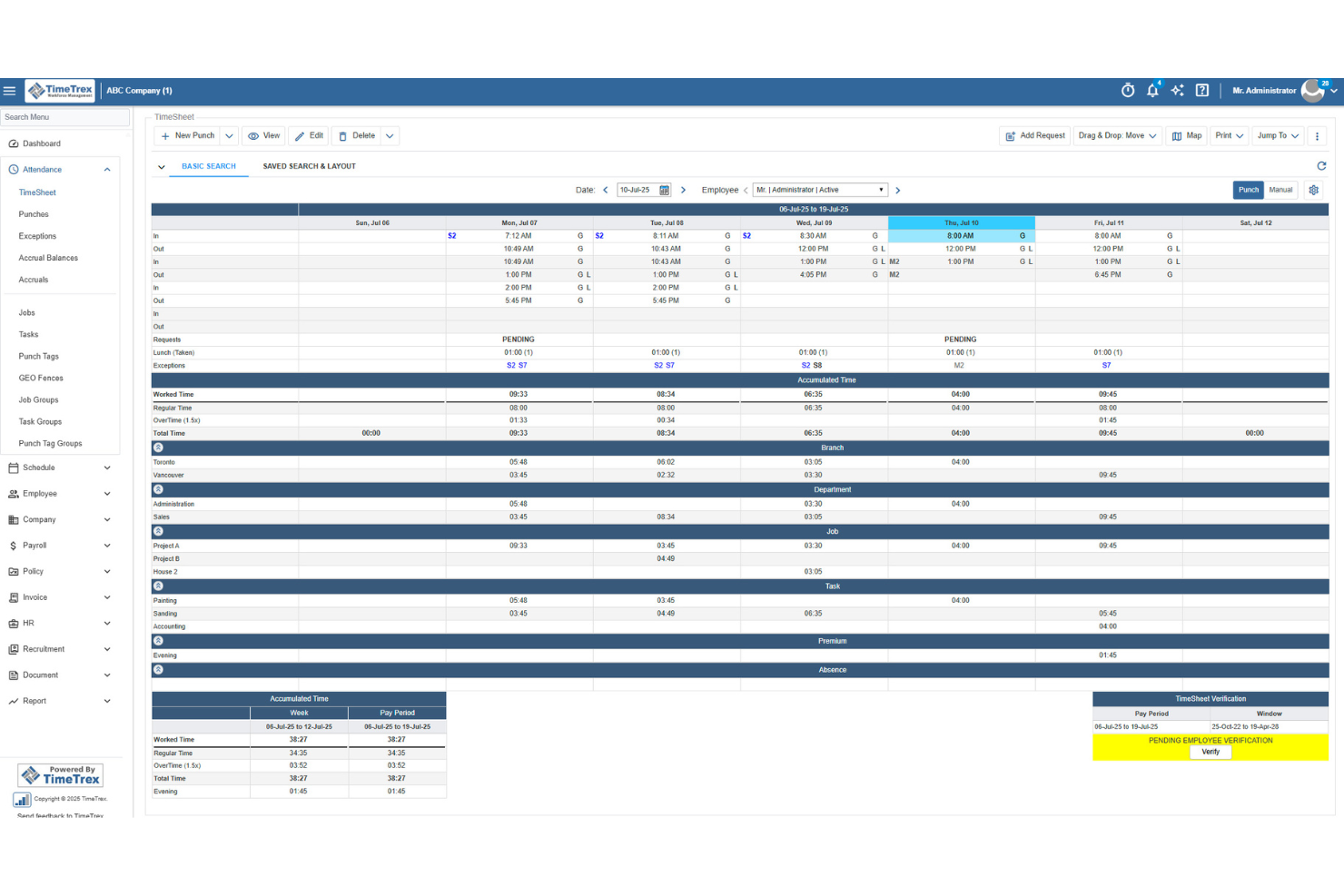
TimeTrex aiuta i team dei servizi professionali a tracciare le ore fatturabili, gestire le spese e trasformare i dati dei fogli presenza in fatture con meno lavoro manuale. I suoi strumenti di timbratura mobile, il tracciamento GPS e le funzionalità di calcolo dei costi di commessa lo rendono adatto alle aziende che gestiscono consulenti, personale sul campo o team basati su progetto.
Per chi è ideale TimeTrex?
TimeTrex Now è particolarmente indicato per aziende di servizi professionali di medie e grandi dimensioni che hanno bisogno di gestire monitoraggio delle ore, paghe e conformità in un'unica piattaforma.
Perché ho scelto TimeTrex
Ho scelto TimeTrex perché permette ai team di servizi professionali di tracciare le ore fatturabili dai dispositivi mobili, verificando dove si svolge il lavoro grazie al tracciamento GPS e alla geofencing. Apprezzo il fatto che i dipendenti possano timbrare dal campo, dai siti dei clienti o da postazioni remote, mentre i manager possono esaminare i dati delle timbrature geolocalizzate prima di approvare i fogli presenza. TimeTrex supporta inoltre il calcolo dei costi, il tracciamento delle spese e la fatturazione, per collegare il tempo tracciato ai costi di progetto e alla fatturazione ai clienti. Le regole per paghe e presenze sono utili per team con orari, regole sugli straordinari o requisiti retributivi differenti.
Funzionalità chiave di TimeTrex
Altre funzionalità di TimeTrex aiutano i team dei servizi professionali a gestire turni, paghe e registri del personale insieme alle ore tracciate:
- Gestione paghe: Elabora le paghe utilizzando dati di presenza e orari approvati, incluse regole per straordinari, detrazioni, buste paga e report fiscali.
- Pianificazione turni dipendenti: Crea i turni, gestisci la disponibilità e le richieste di ferie in un unico sistema.
- Tracciamento spese: Registra spese di progetto, carica ricevute, gestisci approvazioni e collega i costi ai reparti o alle attività.
- Self-service per i dipendenti: Consenti ai dipendenti di visualizzare i turni, richiedere permessi, accedere alle buste paga e gestire le informazioni personali.
Integrazioni TimeTrex
Le integrazioni includono ADP, Intuit QuickBooks, Sage, Paychex, Surepay, Ceridian, Meditech, Insync, Millennium e CompuPay.
Pros and Cons
Pros:
- GPS mobile e geofencing verificano le timbrature dei dipendenti fuori sede
- Il calcolo dei costi consente di ripartire le ore lavorate su diversi centri di costo
- Gli strumenti spese supportano ricevute, approvazioni e reportistica in tempo reale
Cons:
- Le funzionalità di gestione progetti appaiono limitate oltre al calcolo dei costi
- L'interfaccia può risultare meno intuitiva per gli amministratori
New Product Updates from TimeTrex
TimeTrex Adds Quick Punch App With Offline and QR Support
TimeTrex adds a new Quick Punch app, offline punching, QR code scanning, punch images, configurable messages, and punch warnings or lockouts to improve employee clock-ins across browsers and local computers. For more information, visit TimeTrex’s official site.
 .
.
Clockify
Ideale per le estensioni del browser
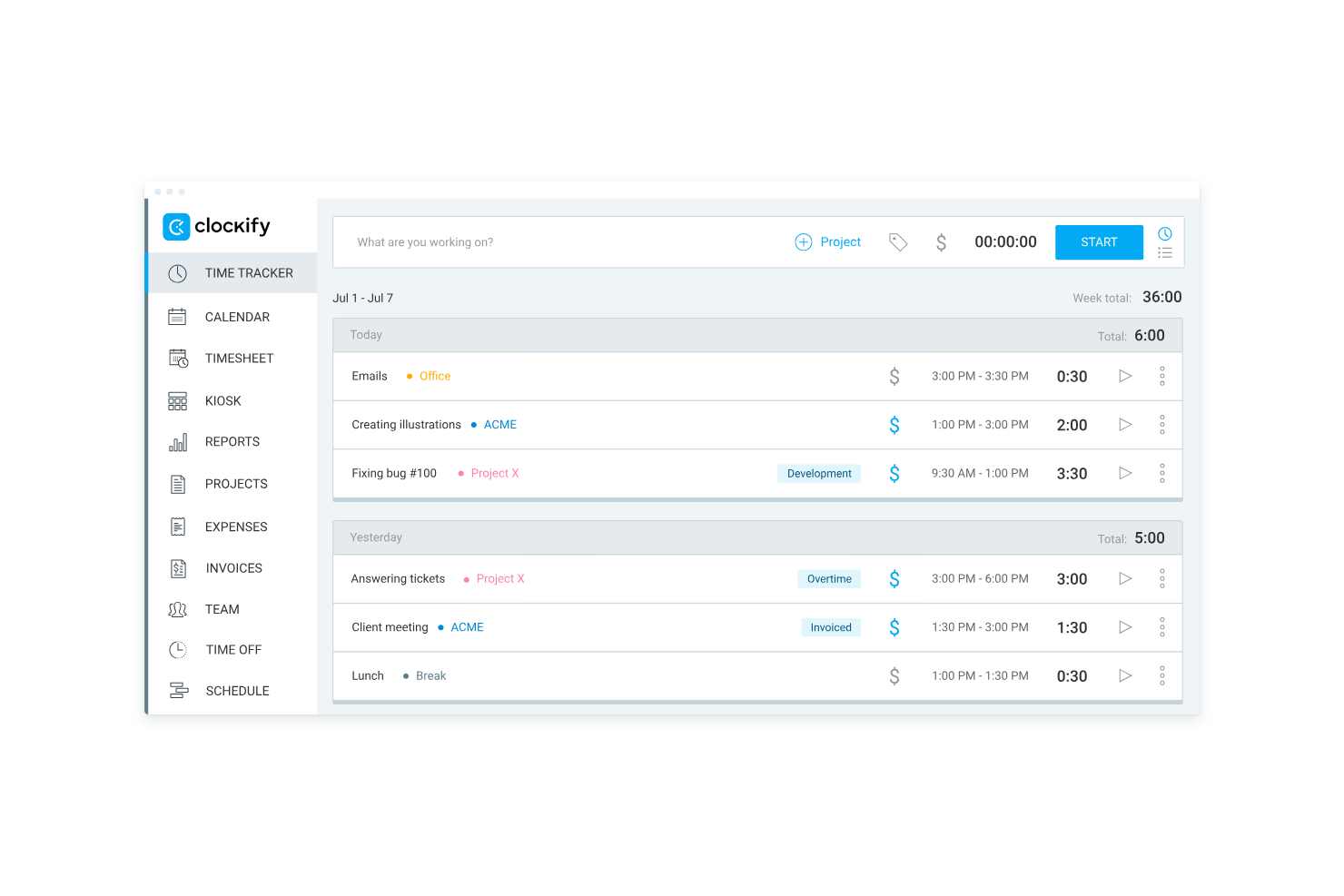
Clockify è un software di monitoraggio del tempo progettato per individui e team che desiderano tenere traccia delle ore di lavoro. Freelancer e piccole imprese lo utilizzano per monitorare la produttività e gestire la fatturazione.
Perché ho scelto Clockify: Le sue estensioni per browser rendono il monitoraggio tramite timer facilmente accessibile. Questo è ideale per team che lavorano su più schede, strumenti o piattaforme cloud. I report semplici e la modalità offline aggiungono affidabilità, offrendo agli utenti un modo flessibile per rilevare il tempo anche quando si passa da un dispositivo all'altro o si lavora con una connessione internet instabile.
Funzionalità principali e integrazioni:
Le funzionalità includono audit del tempo, modelli di progetto e modalità offline. Queste funzioni aiutano ad assicurare precisione nel monitoraggio del tempo e semplificano l'impostazione dei progetti. La modalità offline permette di continuare il monitoraggio anche senza connessione internet.
Le integrazioni includono Asana, Trello, Jira, QuickBooks, Slack, monday.com, Basecamp, Freshdesk, Todoist e GitHub.
Pros and Cons
Pros:
- Configurazione facile dell'estensione per browser
- Approfondimenti utili sull'utilizzo del tempo
- Monitoraggio del tempo offline
Cons:
- Nessuno strumento di fatturazione avanzato
- Controlli di accesso utente di base

Timely
Ideale per il monitoraggio automatico del tempo

Timely è un software di monitoraggio del tempo progettato per team e singoli che desiderano automatizzare la registrazione delle ore. È popolare tra professionisti creativi e consulenti che vogliono gestire il proprio tempo senza inserimenti manuali.
Perché ho scelto Timely: Offre il rilevamento automatico del tempo che registra le attività in background, eliminando la necessità di avviare manualmente i timer. Puoi concentrarti sul lavoro mentre Timely registra il tempo dedicato alle diverse attività. La funzione memoria consente di rivedere e approvare il tempo registrato, garantendo l’accuratezza. Questi aspetti rendono Timely una scelta ideale per chi preferisce un approccio non invasivo al monitoraggio del tempo.
Funzionalità principali e integrazioni:
Le funzionalità includono cronologie di progetto, strumenti di budget e report visivi. Puoi impostare budget per i progetti e monitorare i progressi in modo visivo, aiutandoti a restare nei limiti. I report visivi forniscono informazioni su come vengono allocati tempi e risorse.
Le integrazioni includono Asana, Trello, Slack, QuickBooks, Xero, Salesforce, Zapier, Google Calendar, Outlook e Microsoft Teams.
Pros and Cons
Pros:
- Rilevamento automatico del tempo
- Funzione memoria precisa
- Strumenti di budget semplici
Cons:
- Opzioni limitate di monitoraggio manuale
- Funzionalità di fatturazione di base

My Hours
Ideale per piccoli team
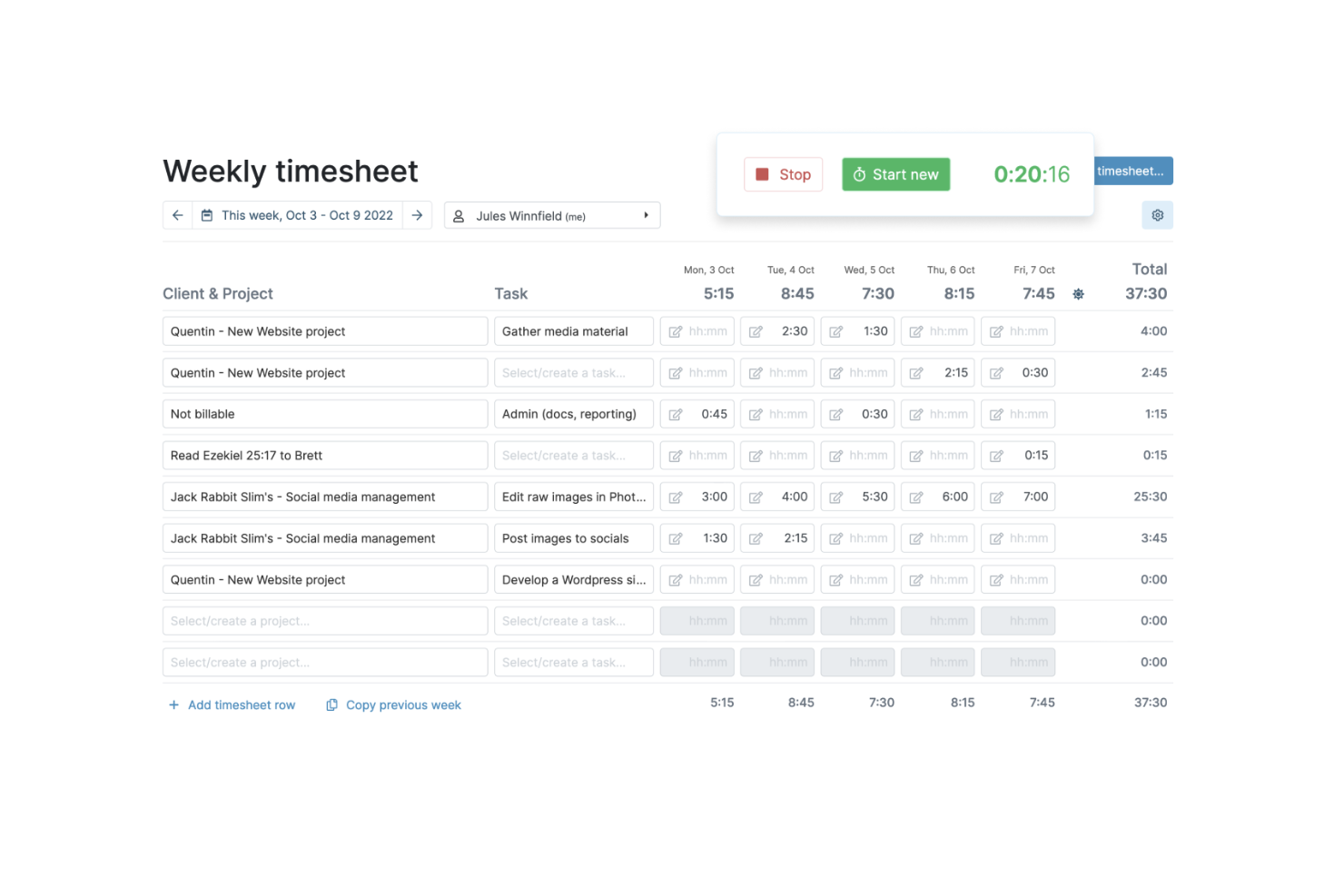
My Hours è un software di monitoraggio del tempo pensato per piccoli team che devono gestire progetti e fatturazione. È progettato per aiutare le aziende a tracciare il tempo, organizzare le attività e controllare i budget di progetto.
Perché ho scelto My Hours: My Hours si adatta perfettamente ai piccoli team perché privilegia la chiarezza e il controllo rispetto alla complessità. Le sue tariffe personalizzabili, il workflow di approvazione e i report intuitivi aiutano i gruppi più piccoli a mantenere il controllo sui budget e sui lavori per i clienti senza dover ricorrere a una suite completa di project management. È ideale per chi desidera una struttura senza configurazioni pesanti.
Funzionalità e integrazioni principali:
Le funzionalità includono tariffe di fatturazione personalizzabili, strumenti di reportistica dettagliata e monitoraggio delle presenze. Si possono impostare tariffe differenti per vari progetti o clienti, facilitando una fatturazione precisa. Gli strumenti di reportistica offrono una visione dettagliata su come viene speso il tempo nei diversi progetti.
Le integrazioni comprendono QuickBooks, Trello, Basecamp, Asana, Google Calendar, Slack, Zapier, Xero, Microsoft Teams e Dropbox.
Pros and Cons
Pros:
- Semplice da utilizzare
- Tariffe di fatturazione personalizzabili
- Adatto a team remoti
Cons:
- Capacità offline limitate
- Ritardi occasionali nei report

TimeCamp
Ideale per la gestione del budget

TimeCamp è un software di monitoraggio del tempo progettato per aiutare le aziende a gestire efficacemente tempi e spese. È comunemente utilizzato da project manager e team finanziari per controllare i budget e migliorare la produttività.
Perché ho scelto TimeCamp: Ho scelto TimeCamp perché collega il monitoraggio del tempo ai budget e alle spese di progetto. I suoi avvisi di budget, i report finanziari e il monitoraggio automatico offrono ai project manager una visione in tempo reale di come il lavoro incida sui costi. Questa attenzione al controllo del budget lo distingue dagli strumenti che si concentrano solo sui fogli di presenza.
Funzionalità e integrazioni principali:
Le funzionalità includono il monitoraggio automatico del tempo, la fatturazione e la gestione delle presenze. Puoi registrare il tempo senza inserimento manuale, risparmiando tempo e riducendo gli errori. La funzione di fatturazione consente di fatturare i clienti in base al tempo tracciato.
Le integrazioni comprendono Trello, Asana, Slack, Jira, monday.com, QuickBooks, Xero, Salesforce, Microsoft Teams e Google Calendar.
Pros and Cons
Pros:
- Rilevamento automatico del tempo
- Report finanziari dettagliati
- Gestione semplice delle presenze
Cons:
- Nessuna personalizzazione avanzata
- Occasionali problemi di sincronizzazione dei dati

Time Doctor
Ideale per il monitoraggio della produttività

Time Doctor è un software di monitoraggio del tempo pensato per team e singoli che desiderano aumentare la produttività e gestire il tempo in modo più efficiente. Team remoti e freelancer lo utilizzano per monitorare le abitudini lavorative e migliorare la gestione del tempo.
Perché ho scelto Time Doctor: Offre approfondimenti dettagliati sulla produttività tracciando il tempo speso su varie attività e siti web. Puoi impostare avvisi per il tempo eccessivo trascorso su attività non lavorative, aiutandoti a rimanere concentrato. Il software offre anche screenshot e livelli di attività per garantire responsabilità. Queste funzionalità lo rendono utile per aumentare la produttività e monitorare team remoti.
Funzionalità principali e integrazioni:
Le funzionalità includono avvisi di distrazione, report sull'utilizzo del tempo e monitoraggio offline. Gli avvisi di distrazione ti aiutano a restare concentrato notificandoti quando passi troppo tempo lontano dal lavoro. I report sull'utilizzo del tempo forniscono una panoramica su come il tempo viene distribuito tra i vari progetti.
Le integrazioni includono Asana, Trello, Slack, Jira, Basecamp, monday.com, Salesforce, QuickBooks, GitHub e Freshdesk.
Pros and Cons
Pros:
- Approfondimenti dettagliati sulla produttività
- Avvisi di distrazione efficaci
- Monitoraggio offline semplice
Cons:
- Nessun strumento avanzato per la fatturazione
- Curva di apprendimento per i nuovi utenti
Altri software di monitoraggio del tempo per servizi professionali
Ecco alcune ulteriori opzioni di software di monitoraggio del tempo per servizi professionali che non sono state incluse nel mio elenco, ma che vale comunque la pena valutare:
- QuickBooks
Ideale per l'integrazione contabile
- Memtime
Ideale per liberi professionisti
- Teamwork
Ideale per fogli di presenza integrati
- Time Champ
Ideale per grandi team
- Deltek Replicon Time
Ideale per il monitoraggio della conformità
- Knack
Ideale per database personalizzati
- Harvest
Ideale per le opzioni di integrazione
- Big Time
Ideale per funzionalità di fatturazione
- TimeRewards
Ideale per il monitoraggio delle spese
- ClickTime
Ottimo per i registri conformi agli standard DCAA
- Scoro
Ideale per il monitoraggio completo della redditività


Come Valuto i Software di Time Tracking per Servizi Professionali
Valuto su due livelli: i requisiti fondamentali che uno strumento deve soddisfare—monitoraggio delle ore fatturabili, approvazione dei timesheet, fatturazione al cliente—e i fattori che distinguono le migliori soluzioni dalla massa.
Funzionalità Fondamentali (Requisiti Minimi per Questa Lista)
Quando seleziono gli strumenti per la mia lista, classifico ciascuno su una scala da 0 (non offre la funzionalità) a 5 (eccelle in quest'area) per ogni funzionalità fondamentale elencata di seguito. Poi calcolo il punteggio totale dello strumento in percentuale. Ogni software deve raggiungere un punteggio minimo totale del 65% per essere preso in considerazione.
- Monitoraggio delle Ore Fatturabili: Verifico che ogni strumento permetta di registrare il tempo per clienti, progetti e attività specifiche con una chiara distinzione tra ore fatturabili e non fatturabili—ad esempio, etichettando le ore di analisi come non fatturabili mentre si traccia il lavoro di implementazione con la tariffa cliente.
- Flussi di Approvazione dei Timesheet: I flussi di revisione e approvazione multi-livello sono importanti, soprattutto per realtà in cui un project manager approva le ore prima che un responsabile finanziario convalidi le voci visibili al cliente.
- Fatturazione e Emissione Fatture al Cliente: Valuto come ogni strumento trasforma le ore registrate in fatture, verificando la flessibilità delle tariffe—per consulente, per ruolo o per incarico—quindi se è possibile gestire sia modelli a tempo e materiali sia tariffazione mista.
- Budget di Progetto e Redditività: Ogni strumento dovrebbe permettere di impostare un budget di progetto, monitorare i costi di lavoro rispetto al budget e visualizzare i margini, in modo da individuare eventuali sforamenti prima che un incarico a tariffa fissa diventi problematico.
- Report sull’Utilizzo delle Risorse: Cerco report che confrontino utilizzo effettivo vs. previsto per persona e progetto, offrendo ai responsabili delle risorse la visibilità su chi è sovraccarico e dove esiste capacità residua.
- Integrazione con Contabilità e Gestione Progetti: Sono fondamentali le connessioni con piattaforme contabili come QuickBooks, Xero o Sage Intacct e strumenti di PM come Jira o Asana—valuto se la sincronizzazione è nativa e bidirezionale o limitata a esportazioni unidirezionali.
Una volta definita la lista degli strumenti che soddisfano questi criteri, considero ciò che rende ogni piattaforma unica.
Fattori Differenzianti (Cosa Distingue i Fornitori)
Ecco come confronto e valuto i diversi fornitori:
Funzionalità Distintive
L’acquisizione automatica delle ore è un grande elemento distintivo—gli strumenti che recuperano ore da calendari, email e app risparmiano ai consulenti la fatica di ricostruire la settimana ogni venerdì. Valuto anche quanto bene una piattaforma gestisce incarichi a forfait e a tariffa fissa insieme alle attività T&M, poiché la maggior parte degli studi gestisce tutte e tre le modalità. I portali dedicati ai clienti offrono un ulteriore vantaggio, permettendo ai clienti di rivedere le ore registrate e approvare le fatture direttamente senza scambi di email.
Oltre le Funzionalità
La dimensione dell’azienda e l’adeguatezza al modello di servizio sono fondamentali—un consulente singolo ha bisogno di uno strumento diverso rispetto a un’agenzia di 200 persone con più divisioni e tariffe miste. Considero anche quanto velocemente una piattaforma rende le squadre operative, visto che configurare listini prezzi, flussi di approvazione e template progetto può rallentare l’adozione se il supporto all’onboarding è insufficiente. La trasparenza dei prezzi è un ulteriore fattore importante, soprattutto se funzionalità essenziali come budgeting e fatturazione cliente sono incluse nei piani base o richiedono costosi upgrade.
Come scegliere un software di monitoraggio del tempo per servizi professionali
È facile perdersi in lunghi elenchi di funzionalità e strutture tariffarie complesse. Per aiutarti a rimanere concentrato mentre affronti il tuo processo di selezione del software, unico per le tue esigenze, ecco una lista di fattori da tenere a mente:
| Fattore | Cosa considerare |
|---|---|
| Scalabilità | Il software può crescere insieme alla tua azienda? Valuta se è in grado di gestire un numero maggiore di utenti o progetti senza costi o complicazioni aggiuntive. |
| Integrazioni | Si integra con gli strumenti che già utilizzi? Verifica la compatibilità con i tuoi sistemi di gestione dei progetti, contabilità e comunicazione. |
| Personalizzazione | Puoi adattare il software ai tuoi flussi di lavoro? Cerca opzioni per modificare i pannelli di controllo, le relazioni e le tariffe di fatturazione in base alle tue esigenze. |
| Facilità d'uso | L'interfaccia è intuitiva? Assicurati che il tuo team possa utilizzarla facilmente senza una formazione approfondita. |
| Implementazione e inserimento | Quanto velocemente puoi iniziare? Cerca un software con procedure di configurazione semplici e risorse formative disponibili, come tutorial o webinar. |
| Costo | Il prezzo rientra nel tuo budget? Considera sia i costi iniziali sia le tariffe ricorrenti e verifica la presenza di costi nascosti o di formule tariffarie a livelli che possono trarre in inganno. |
| Misure di sicurezza | In che modo il software protegge i tuoi dati? Cerca funzionalità come la crittografia, gli aggiornamenti regolari e la conformità agli standard di protezione dei dati. |
| Disponibilità dell'assistenza | Puoi ricevere aiuto quando ne hai bisogno? Valuta gli orari di assistenza del fornitore, i tempi di risposta e i metodi di contatto disponibili, come chat o telefono. |
Che cos'è un software di monitoraggio del tempo per servizi professionali?
Il software per il monitoraggio del tempo per i servizi professionali è uno strumento che aiuta le aziende a monitorare e registrare il tempo dedicato ai progetti dei clienti. Professionisti come consulenti, commercialisti e avvocati utilizzano questi strumenti per gestire la fatturazione e migliorare la produttività. Le funzionalità di monitoraggio del tempo, fatturazione e reportistica aiutano a garantire una fatturazione accurata e una gestione efficiente dei progetti. Nel complesso, questi strumenti offrono trasparenza e aiutano a massimizzare l'utilizzo delle risorse.
Funzionalità
Quando selezioni un software per il monitoraggio del tempo per i servizi professionali, presta attenzione alle seguenti funzionalità di monitoraggio del tempo:
- Monitoraggio del tempo: consente agli utenti di monitorare e registrare le ore lavorate su progetti specifici, garantendo una fatturazione accurata e informazioni utili sulla produttività.
- Fatturazione: genera fatture a partire dal tempo e dalle spese registrati, semplificando la fatturazione dei clienti.
- Monitoraggio delle spese: aiuta a gestire e categorizzare le spese relative ai progetti, favorendo il controllo finanziario e la gestione del budget.
- Reportistica: fornisce report dettagliati sull'utilizzo del tempo e sull'avanzamento dei progetti, aiutando gli utenti a prendere decisioni informate.
- Gestione dei progetti: aiuta a organizzare attività e tempistiche, migliorando la collaborazione del team e la consegna dei progetti.
- Tariffe di fatturazione personalizzabili: consentono di impostare tariffe diverse per vari clienti o progetti, garantendo una fatturazione flessibile e accurata.
- Funzionalità di integrazione: si connette agli strumenti esistenti, come i software di contabilità e gestione dei progetti, migliorando l'efficienza del flusso di lavoro.
- Accesso da dispositivi mobili: consente di monitorare il tempo e gestire le attività ovunque ci si trovi, offrendo flessibilità per il lavoro da remoto.
- Misure di sicurezza: garantisce la protezione dei dati attraverso la crittografia e la conformità agli standard di sicurezza dei dati, salvaguardando le informazioni sensibili.
Vantaggi
L'implementazione di un software per il monitoraggio del tempo per i servizi professionali offre diversi vantaggi al tuo team e alla tua azienda. Ecco alcuni dei vantaggi che puoi aspettarti:
- Fatturazione dei clienti più affidabile: registri chiari del lavoro aiutano a ridurre le controversie e ad accorciare i cicli di fatturazione senza dover ricostruire le ore.
- Produttività migliorata: informazioni dettagliate sul tempo evidenziano i colli di bottiglia e aiutano i team a concentrarsi sul lavoro ad alto valore.
- Maggiore supervisione dei progetti: la visibilità in tempo reale sull'avanzamento e sui carichi di lavoro aiuta i responsabili ad apportare modifiche per mantenere i progetti nei tempi previsti.
- Maggiore consapevolezza finanziaria: i team possono individuare modelli nella spesa e nell'utilizzo delle risorse, favorendo decisioni di budgeting migliori.
- Maggiore trasparenza: una visibilità chiara sui contributi e sui carichi di lavoro favorisce l'allineamento tra team e parti interessate.
- Maggiore supporto per i team distribuiti: il monitoraggio centralizzato aiuta i team remoti o ibridi a rimanere coordinati tra diversi fusi orari.
- Protezione costante dei dati sensibili: le misure di sicurezza integrate aiutano le aziende a mantenere la fiducia e a soddisfare i requisiti di conformità interni.
Costi e prezzi
La scelta di un software per il monitoraggio del tempo per i servizi professionali richiede la comprensione dei vari modelli e piani tariffari disponibili. I costi variano in base alle funzionalità, alle dimensioni del team, agli add-on e ad altri fattori. La tabella seguente riassume i piani comuni, i relativi prezzi medi e le funzionalità tipicamente incluse nelle soluzioni software per il monitoraggio del tempo per i servizi professionali:
Tabella comparativa dei piani per il software di monitoraggio del tempo per i servizi professionali
| Tipo di piano | Prezzo medio | Funzionalità comuni |
|---|---|---|
| PMI/Piccoli team | Gratis-$5/utente/mese | Monitoraggio di base del tempo, progetti limitati, reportistica semplice; spesso timer manuali o funzionalità limitate. |
| Mercato intermedio/Team in crescita | $5-$25/utente/mese | Monitoraggio del tempo + fatturazione, monitoraggio di base dei progetti & delle spese, integrazioni, report standard, accesso da dispositivi mobili. |
| Aziende/Imprese consolidate | $25-$50/utente/mese | Reportistica avanzata, tariffe di fatturazione personalizzabili, integrazioni complete, monitoraggio delle spese, supporto per dispositivi mobili + desktop. |
| Imprese/Grandi organizzazioni | $50+/utente/mese (o prezzi aziendali personalizzati) | Set completo di funzionalità: sicurezza & conformità, integrazioni personalizzate, analisi avanzate, supporto dedicato, strumenti per amministratori/grandi team. |
Domande frequenti sui software per il monitoraggio del tempo nei servizi professionali
Ecco alcune risposte alle domande comuni sui software per il monitoraggio del tempo nei servizi professionali:
In che modo i software per il monitoraggio del tempo nei servizi professionali gestiscono la privacy dei dati?
Sì, la maggior parte dei software per il monitoraggio del tempo dà priorità alla privacy dei dati attraverso la crittografia e la conformità alle normative sulla protezione dei dati, come il GDPR. Quando scegli uno strumento, verifica le certificazioni di sicurezza e le informative sulla privacy, soprattutto se la piattaforma include funzionalità come la reportistica basata sull’intelligenza artificiale o i registri delle ore integrati. Valuta la possibilità di chiedere ai fornitori informazioni sulle loro pratiche di archiviazione dei dati, su come gestiscono le violazioni e sulla capacità delle loro app desktop di supportare un accesso sicuro. Assicurati sempre che il tuo team riceva una formazione sulle migliori pratiche di tutela della privacy dei dati per proteggere le informazioni sensibili.
I software per il monitoraggio del tempo nei servizi professionali possono integrarsi con i sistemi paghe?
Sì, molte delle migliori soluzioni per il monitoraggio del tempo offrono integrazioni con sistemi paghe diffusi come QuickBooks e ADP. Questa integrazione può automatizzare i calcoli delle retribuzioni e ridurre gli errori di inserimento manuale dei dati, anche se il tuo team esporta i dati da Excel o utilizza un’app per il monitoraggio del tempo per registrare entrate e uscite. Quando valuti un software, verifica la presenza di integrazioni compatibili con il sistema paghe esistente, così da ottimizzare i flussi di lavoro e mantenere registri accurati delle retribuzioni per tutti i membri del team.
È difficile passare dal monitoraggio manuale del tempo a un software?
No, passare dal monitoraggio manuale a quello basato su software può essere semplice con una pianificazione adeguata. Inizia selezionando uno strumento intuitivo in linea con le esigenze del tuo team, che si tratti di una piattaforma tutto-in-uno, di un sistema automatizzato per il monitoraggio del tempo o di una soluzione più leggera come ClickUp. Organizza sessioni di formazione e metti a disposizione risorse che aiutino il tuo team ad adattarsi al monitoraggio del tempo fatturabile, all’allocazione e al monitoraggio del tempo sui progetti. Implementa il software gradualmente, lasciando tempo per apportare modifiche. Questo approccio riduce al minimo le interruzioni e aiuta il tuo team ad adottare il nuovo sistema.
I software per il monitoraggio del tempo nei servizi professionali possono essere utilizzati dai team da remoto?
Sì, i software per il monitoraggio del tempo sono utili per i team da remoto. Aiutano a monitorare la produttività e a gestire le attività senza bisogno di una supervisione fisica per il monitoraggio delle ore lavorate dai dipendenti in sedi diverse. Cerca software con accesso da dispositivi mobili, tracciamento GPS o estensioni per Chrome, così da supportare il lavoro da remoto. Questi strumenti possono anche supportare la pianificazione dei progetti, il monitoraggio della redditività dei progetti e l’approvazione dei fogli ore, consentendo al tuo team di monitorare il tempo indipendentemente dalla posizione e rendendo più semplice supervisionare il lavoro in corso e mantenere le migliori pratiche per il monitoraggio del tempo.
Cosa succede ora:
Se stai cercando un software per il monitoraggio del tempo nei servizi professionali, contatta gratuitamente un consulente SoftwareSelect per ricevere consigli.
Compili un modulo e partecipi a una breve conversazione durante la quale il consulente approfondirà le tue esigenze specifiche. Riceverai quindi una selezione ristretta di software da valutare. Ti supporterà anche durante l'intero processo di acquisto, comprese le trattative sul prezzo.