

I 10 migliori software per il monitoraggio del tempo per architetti recensiti nel 2026

Il miglior software di monitoraggio del tempo per architetti: selezione


Gestire progetti architettonici significa tenere in equilibrio contemporaneamente progetti, budget e aspettative dei clienti. Un minuto stai abbozzando dei concept, quello dopo gestisci richieste di modifica, ti coordini con gli ingegneri e cerchi in qualche modo di assicurarti che le ore corrispondano davvero alle buste paga. Il monitoraggio del tempo raramente è la parte più divertente del lavoro, ma è una delle poche cose che mantiene redditizi i progetti e sane le dinamiche del team.
È qui che il software di monitoraggio del tempo diventa più di un semplice extra. Lo strumento giusto ti aiuta a distinguere il lavoro fatturabile da quello non fatturabile, a tenere traccia di tutte quelle revisioni dei progetti che i clienti chiedono “rapidamente” e a mantenere accurate le buste paga senza dover cercare nelle vecchie email o indovinare chi ha fatto cosa e quando.
Ho testato e recensito i principali strumenti progettati per l’architettura e per i team che lavorano su progetti, così non dovrai districarti tra opzioni che non si adattano al tuo flusso di lavoro. Il mio obiettivo è aiutarti a trovare un sistema che supporti il modo in cui lavorano davvero gli architetti, non solo il modo in cui le aziende software pensano che lavorino.
In questo articolo troverai le mie migliori scelte di software di monitoraggio del tempo per architetti, insieme ad approfondimenti sulle funzionalità, sulla facilità d’uso e su come ciascuna opzione possa aiutarti a rispettare le scadenze, rimanere nel budget e risparmiare al tuo team qualche grattacapo lungo il percorso.
Perché fidarsi dei nostri consigli sui software
Il nostro team testa e recensisce software dal 2012. In quanto project manager noi stessi, sappiamo quanto sia difficile — e importante — scegliere il software giusto.
Per questa guida, abbiamo valutato gli strumenti attraverso test pratici e ricerche indipendenti, assegnando un punteggio agli strumenti in base ai nostri criteri di selezione. Ci basiamo inoltre sulle competenze di leader di pensiero del settore e di professionisti attivi nella gestione dei progetti.
Le nostre recensioni riflettono il nostro giudizio editoriale umano, non un discorso di vendita.
Revisori esperti:
Riepilogo del miglior software di monitoraggio del tempo per architetti
Questa tabella comparativa riassume i dettagli sui prezzi delle mie migliori selezioni di software di monitoraggio del tempo per architetti, per aiutarti a trovare quello più adatto al tuo budget e alle esigenze della tua attività.
| Tool | Best For | Trial Info | Price | ||
|---|---|---|---|---|---|
| 1 | Ideale per la pianificazione delle risorse con intelligenza artificiale | Prova gratuita di 14 giorni + demo gratuita disponibile | A partire da $10/utente/mese (fatturazione annuale) | Website | |
| 2 | Ideale con dashboard di report personalizzate | Piano gratuito + prova gratuita di 30 giorni + demo gratuita disponibile | A partire da $9/utente/mese (fatturato annualmente) | Website | |
| 3 | Ideale per il monitoraggio dei progetti e dei budget | Piano gratuito + prova gratuita di 30 giorni + demo gratuita disponibile | A partire da $6/utente/mese (con fatturazione annuale) | Website | |
| 4 | Ideale per la fatturazione degli studi di architettura con più sedi | Prova gratuita di 14 giorni | A partire da $19.90/utente/mese (con fatturazione annuale) | Website | |
| 5 | Ideale con pianificazione integrata delle risorse e delle fasi | Demo gratuita disponibile | Prezzi su richiesta | Website | |
| 6 | Ideale per le ore fatturabili dei progetti degli architetti | Piano gratuito + prova gratuita di 7 giorni disponibile | A partire da $3.99/utente/mese (fatturato annualmente) | Website | |
| 7 | Ideale per team remoti | Prova gratuita di 14 giorni + piano gratuito + demo gratuita disponibile | Da $3.99/utente/mese (fatturazione annuale) | Website | |
| 8 | Ideale per la pianificazione del budget | Demo gratuita disponibile. | Prezzo su richiesta | Website | |
| 9 | Ideale per il lavoro su contratto | Prova gratuita di 7 giorni + demo gratuita disponibile | A partire da $9/utente/mese (fatturazione annuale) | Website | |
| 10 | Ideale per le paghe | Prova gratuita + piano gratuito + demo gratuita disponibili | Da $4.40/utente/mese (fatturato annualmente) | Website |


Recensioni del miglior software di monitoraggio del tempo per architetti
Di seguito trovi i miei riepiloghi dettagliati dei migliori software di monitoraggio del tempo per architetti inclusi nella mia selezione. Le mie recensioni offrono uno sguardo approfondito alle funzionalità principali, ai pro \u0026 contro, alle integrazioni e ai casi d’uso ideali di ciascuno strumento, per aiutarti a trovare quello più adatto alle tue esigenze.

Ideale per la pianificazione delle risorse con intelligenza artificiale
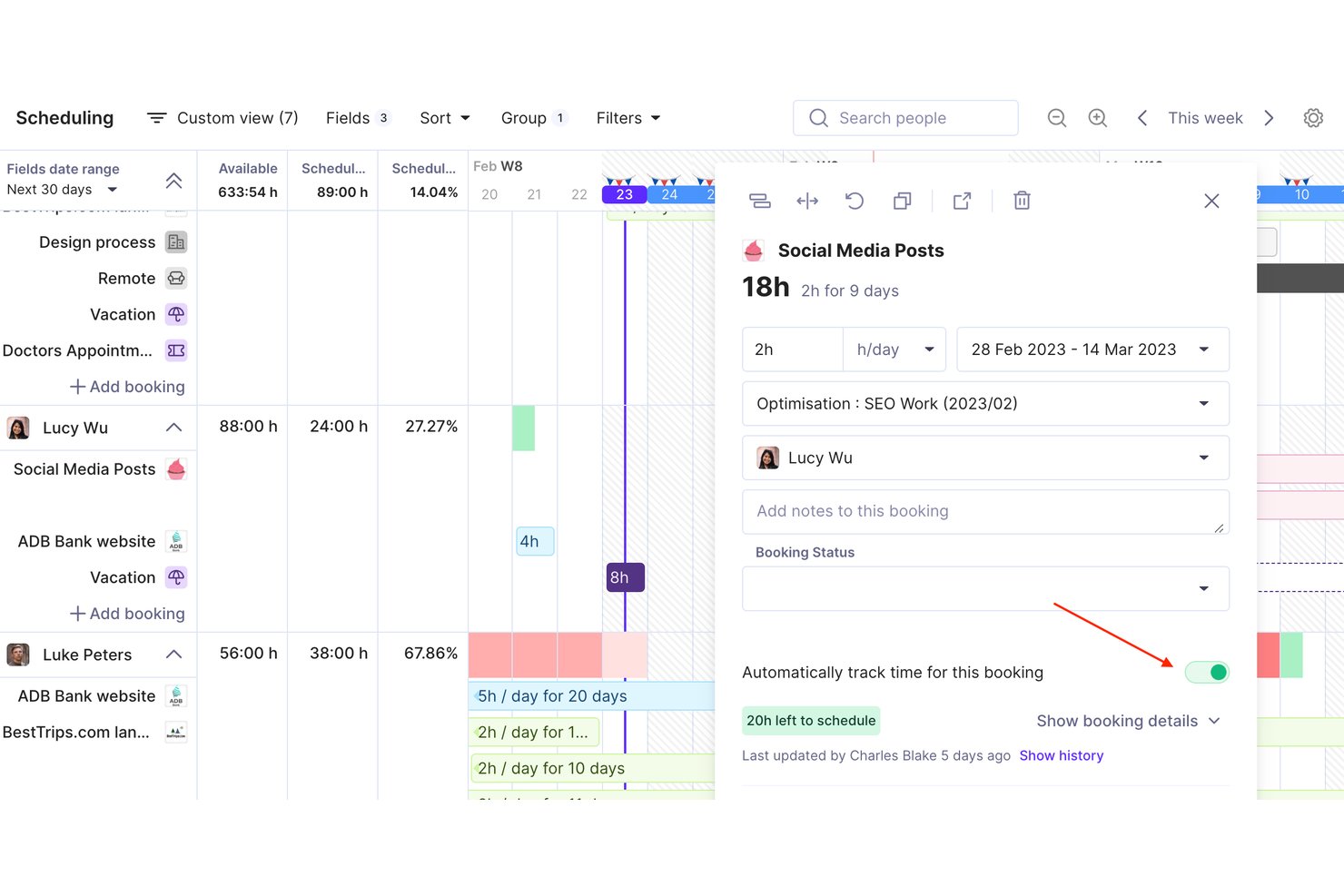
Productive è una piattaforma di gestione per agenzie e servizi professionali che unisce monitoraggio del tempo, pianificazione delle risorse, budget di progetto e fatturazione in un unico strumento pensato per attività a tariffa oraria come gli studi di architettura.
Per chi è ideale Productive?
Productive è adatto a studi di architettura e ingegneria che gestiscono progetti multi-fase con team misti e hanno bisogno di un unico luogo dove collegare tempo, budget e fatturazione.
Perché ho scelto Productive
Ho scelto Productive tra i migliori perché la sua pianificazione delle risorse supportata dall'IA si collega direttamente al monitoraggio del tempo in modo più avanzato rispetto alla maggior parte degli strumenti. La funzione AI Time Tracking suggerisce inserimenti di ore in base alle prenotazioni esistenti delle risorse, così non devo inseguire il mio team a fine settimana per le schede ore mancanti. Inoltre, lo Scenario Builder mi permette di mettere alla prova le decisioni di staffing prima di confermare un piano di progetto, cosa particolarmente utile quando devo bilanciare architetti in fasi SD e CD sovrapposte.
Caratteristiche principali di Productive
- Schede tariffarie: Stabilisci tariffe di fatturazione diverse per progetto, cliente o membro del team per calcolare i compensi in modo preciso.
- Budget di progetto multi-livello: Tieni traccia dei budget a livello di progetto, fase e servizio.
- Gestione delle assenze: Registra assenze pianificate e festività per una pianificazione accurata delle risorse.
- Fatturazione integrata: Genera e invia fatture direttamente dalla piattaforma, collegate alle ore realmente fatturabili.
Integrazioni di Productive
Productive offre integrazioni native con GitHub, Slack, HubSpot, Notion, Amplitude, Stripe, Linear, Xero, Sage, Jira e altri ancora. Si collega anche con Zapier e dispone di un'API per integrazioni personalizzate.
Pros and Cons
Pros:
- Il monitoraggio del tempo con IA suggerisce automaticamente le voci
- Pianificazione visiva delle risorse su progetti e fasi
- Analisi della redditività e dell'utilizzo a livello di progetto
Cons:
- Nessun modello predefinito di fasi AIA
- Formato di fatturazione retainage statunitense non supportato
New Product Updates from Productive

Productive Adds Agent Triggers, Teams Integration, and Time Controls
Productive adds automated agent triggers, broader AI file support, Microsoft Teams integration, Resource Planner improvements, and new time entry controls. These updates expand automation while improving scheduling, collaboration, and time tracking. For more information, visit Productive’s official site.

Toggl
Ideale con dashboard di report personalizzate
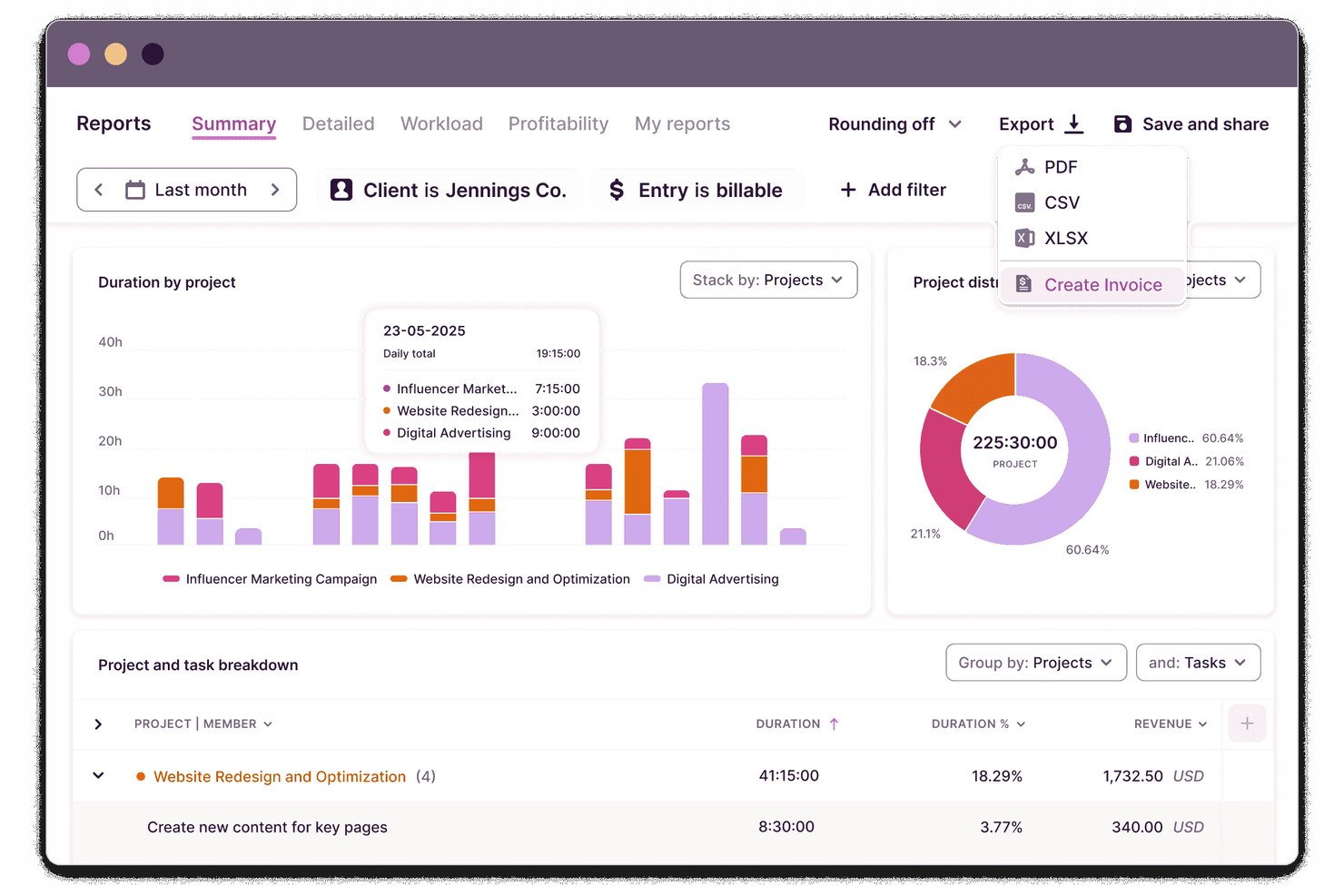
Toggl è una piattaforma di monitoraggio del tempo e pianificazione della capacità per architetti che consente di gestire attività e progetti, registrare ore fatturabili, programmare il lavoro tra i team, monitorare i budget e creare report dettagliati per i flussi di lavoro architettonici.
A chi è più adatto Toggl?
Studi e aziende di architettura che necessitano di uno strumento flessibile e basato sul cloud per monitorare il tempo dedicato ai progetti, i budget e le ore del personale tra più clienti e fasi.
Perché ho scelto Toggl
Ho scelto Toggl come uno dei migliori perché posso creare dashboard di report personalizzate che suddividono il tempo per progetto, fase e membro del team. Utilizzo questa flessibilità per generare report visivi che supportano una fatturazione precisa dei clienti e la pianificazione delle risorse.
Funzionalità principali di Toggl
- Monitoraggio del tempo con timer in tempo reale: Registra il tempo mentre lavori su diversi dispositivi e piattaforme.
- Gestione di più progetti e clienti: Organizza e assegna le ore a progetti e clienti specifici.
- Tariffe fatturabili e soglie dei costi del lavoro: Imposta tariffe specifiche per ruoli, utenti o tipi di progetto.
- Flussi di approvazione per i fogli presenze: I responsabili possono esaminare e approvare i fogli presenze prima dell'invio.
Integrazioni di Toggl
Toggl offre integrazioni native con Asana, Trello, Jira, Basecamp, Notion, Google Calendar e Slack, si connette a Zapier e fornisce un'API per integrazioni personalizzate.
Pros and Cons
Pros:
- Monitoraggio del tempo degli eventi del calendario con trascinamento
- Monitoraggio flessibile del tempo per progetto e fase
- Supporta l'approvazione dei fogli presenze basati sui team
Cons:
- Nessun modello nativo per le fasi di architettura
- Manca il supporto integrato alla fatturazione AIA

actiTIME
Ideale per il monitoraggio dei progetti e dei budget
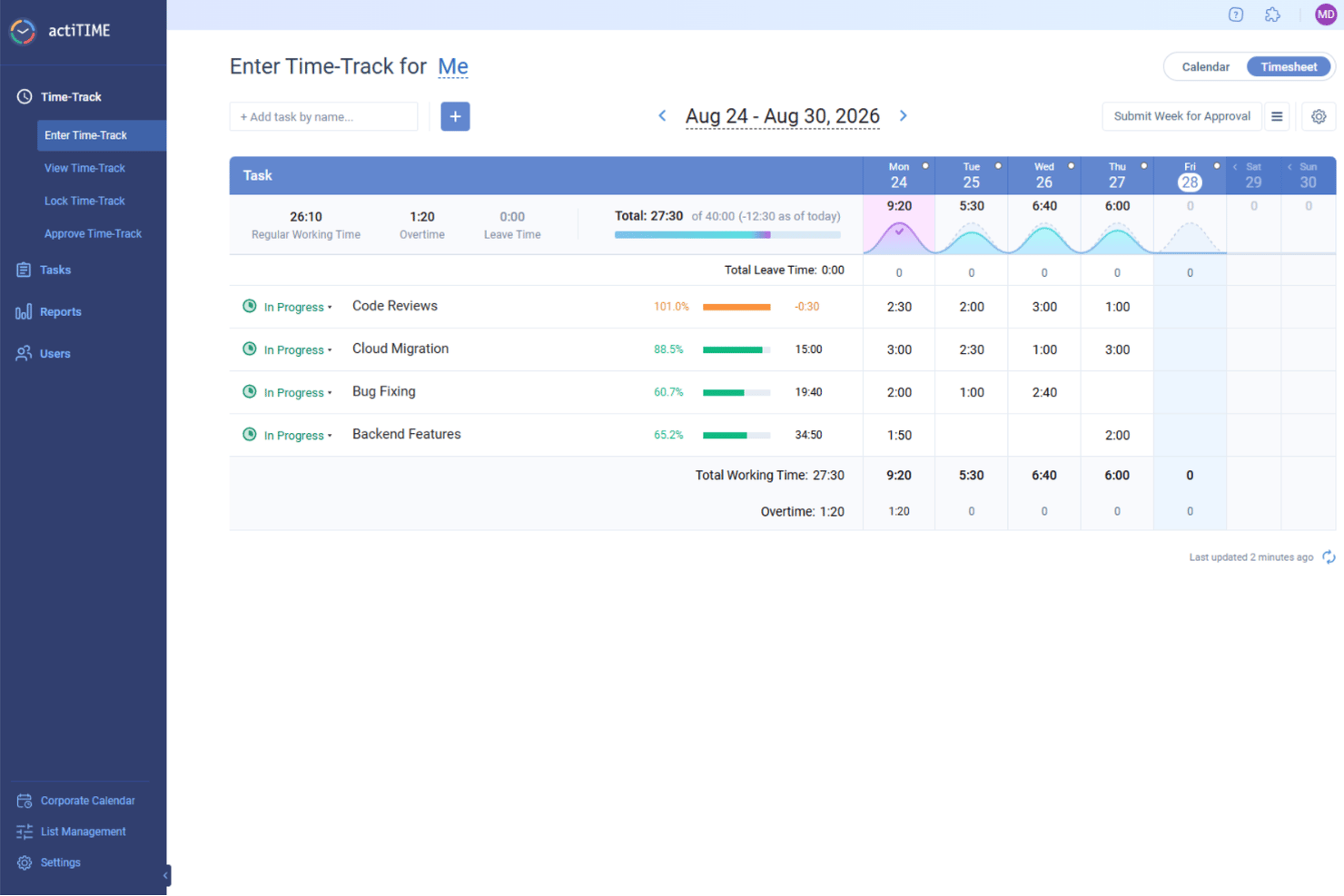
Per gli architetti alla ricerca di una soluzione affidabile per il monitoraggio del tempo, actiTIME si distingue come uno strumento versatile che risponde alle esigenze specifiche della gestione dei progetti nel settore dell’architettura. Offre una serie di funzionalità progettate per ottimizzare i flussi di lavoro, gestire i budget e garantire un’allocazione efficiente del tempo, affrontando le complesse necessità dei progetti architettonici. Architetti e professionisti della progettazione possono trarre vantaggio dalle sue solide funzionalità per monitorare l’avanzamento dei progetti e gestire le risorse, contribuendo a rispettare le tempistiche e a favorire la soddisfazione dei clienti.
Perché ho scelto actiTIME
Ho scelto actiTIME perché eccelle nel fornire un monitoraggio dettagliato dei progetti e dei budget, aspetti fondamentali per gli architetti che gestiscono più progetti e risorse. La funzionalità di monitoraggio del tempo consente di registrare il tempo dedicato alle diverse attività, offrendo informazioni sulle tempistiche dei progetti e sull’allocazione delle risorse. Inoltre, le funzionalità di gestione del budget del software consentono di monitorare le spese dei progetti e confrontarle con le stime iniziali, aiutando a mantenere i progetti in linea dal punto di vista finanziario. Queste funzionalità rispondono alla necessità fondamentale di una supervisione precisa del tempo e del budget nei progetti architettonici.
Funzionalità principali di actiTIME
Oltre alle funzionalità di monitoraggio dei progetti e dei budget, ho trovato utili anche diverse altre funzionalità per gli architetti:
- Report: Genera report completi sull’utilizzo del tempo e sull’avanzamento dei progetti, essenziali per valutare lo stato dei progetti e prendere decisioni informate.
- Fatturazione: Crea report di fatturazione accurati e fatture per i clienti sulla base del tempo e dei servizi monitorati, garantendo trasparenza e responsabilità nei rapporti con i clienti.
- Gestione del team: Assegna attività, monitora le prestazioni del team e coordina gli sforzi per migliorare la collaborazione e l’efficienza all’interno del team di architettura.
- Gestione delle ferie: Automatizza il monitoraggio delle ferie retribuite e gestisci le politiche di assenza, garantendo operazioni fluide del team e disponibilità delle risorse.
Integrazioni di actiTIME
Le integrazioni includono actiPLANS, QuickBooks e Zapier. È inoltre disponibile un’API per integrazioni personalizzate.
Pros and Cons
Pros:
- Il monitoraggio del tempo migliora la precisione delle attività
- La gestione dei progetti organizza attività complesse
- I report forniscono informazioni dettagliate sui progetti
Cons:
- L’app mobile non dispone di funzionalità offline
- Nessuna funzionalità di monitoraggio automatico del tempo
New Product Updates from actiTIME

actiTIME Visual Hour Indicator and Time-Track Report Redesign
actiTIME adds a wave-style hour indicator to the Timesheet and Calendar views and refreshes the Time-Track report for smoother navigation and clearer visuals. For more information, visit actiTIME's official site.

Scoro
Ideale per la fatturazione degli studi di architettura con più sedi
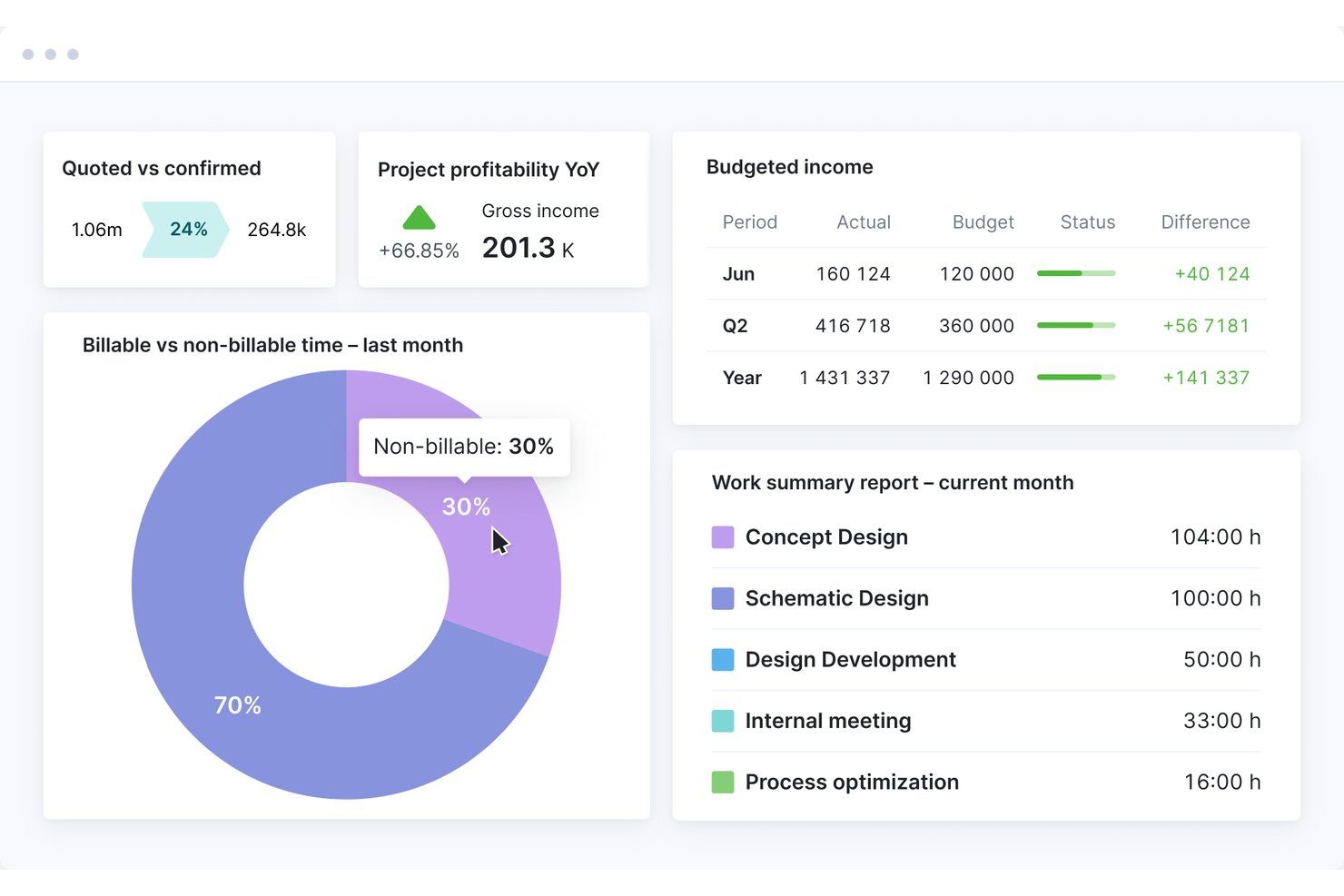
Scoro è una piattaforma di automazione dei servizi professionali (PSA) che combina il monitoraggio del tempo, la gestione dei progetti e delle fasi, la pianificazione delle risorse, il monitoraggio del consumo del budget, i report sul lavoro in corso e la fatturazione in un unico sistema.
Per chi è più adatto Scoro?
Scoro è adatto agli studi di architettura in crescita e di medie dimensioni che gestiscono più sedi, subconsulenti e fatturazioni complesse su progetti simultanei.
Perché ho scelto Scoro
Ho incluso Scoro tra le mie scelte principali perché gestisce la complessità della fatturazione per più sedi meglio della maggior parte degli strumenti di questa categoria. Nei progetti simultanei, monitora in tempo reale i costi preventivati rispetto a quelli effettivi a livello di fase e ruolo, così sai sempre a che punto è il consumo del compenso prima che diventi un problema. Apprezzo anche il monitoraggio degli ordini di acquisto per i subconsulenti, che mantiene visibili le spese esterne all'interno dello stesso cruscotto del budget.
Funzionalità principali di Scoro
- Calcolo dei costi del lavoro basato sui ruoli: assegna tariffe di costo diverse a ogni ruolo del team, così ogni registrazione del tempo include automaticamente il costo del lavoro corretto nei tuoi progetti.
- Assistente IA ELI: interroga i dati di progetto e finanziari in tempo reale utilizzando il linguaggio naturale per ottenere report filtrati, sollecitare i fogli presenze mancanti o visualizzare gli avvisi sul budget.
- Approvazione dei fogli presenze su più livelli: invia i fogli presenze sottoposti a revisione del responsabile prima che venga fatturato qualsiasi tempo, con il blocco del tempo per impedire modifiche dopo l'approvazione.
- Pianificatore visivo della capacità: visualizza le prenotazioni confermate e provvisorie dell'intero team in un'unica schermata, con indicatori di lista d'attesa per il personale prenotato oltre la capacità.
Integrazioni di Scoro
Scoro offre integrazioni documentate con Xero, QuickBooks Online, Sage Intacct, Exact, Expensify, Salesforce, HubSpot, Google Calendar, Microsoft Outlook e Slack. Fornisce inoltre un'API REST aperta e Zapier, ma non dispone di integrazioni native con Revit, AutoCAD o BIM 360.
Pros and Cons
Pros:
- Monitoraggio in tempo reale del consumo del budget a livello di fase
- Pianificazione visiva della capacità per team distribuiti su più sedi
- Assistente IA per i report di progetto in tempo reale
Cons:
- Nessun supporto nativo per il formato di fattura AIA
- L'app mobile è inaffidabile per la registrazione del tempo
New Product Updates from Scoro

Scoro Adds Time Mobile App and ELI Improvements
Scoro adds the Scoro Time mobile app for iOS/Android to track time anywhere and expands ELI with attachments, smarter filtering, and trigger-based actions. For more information, visit Scoro's official site.

Ideale con pianificazione integrata delle risorse e delle fasi
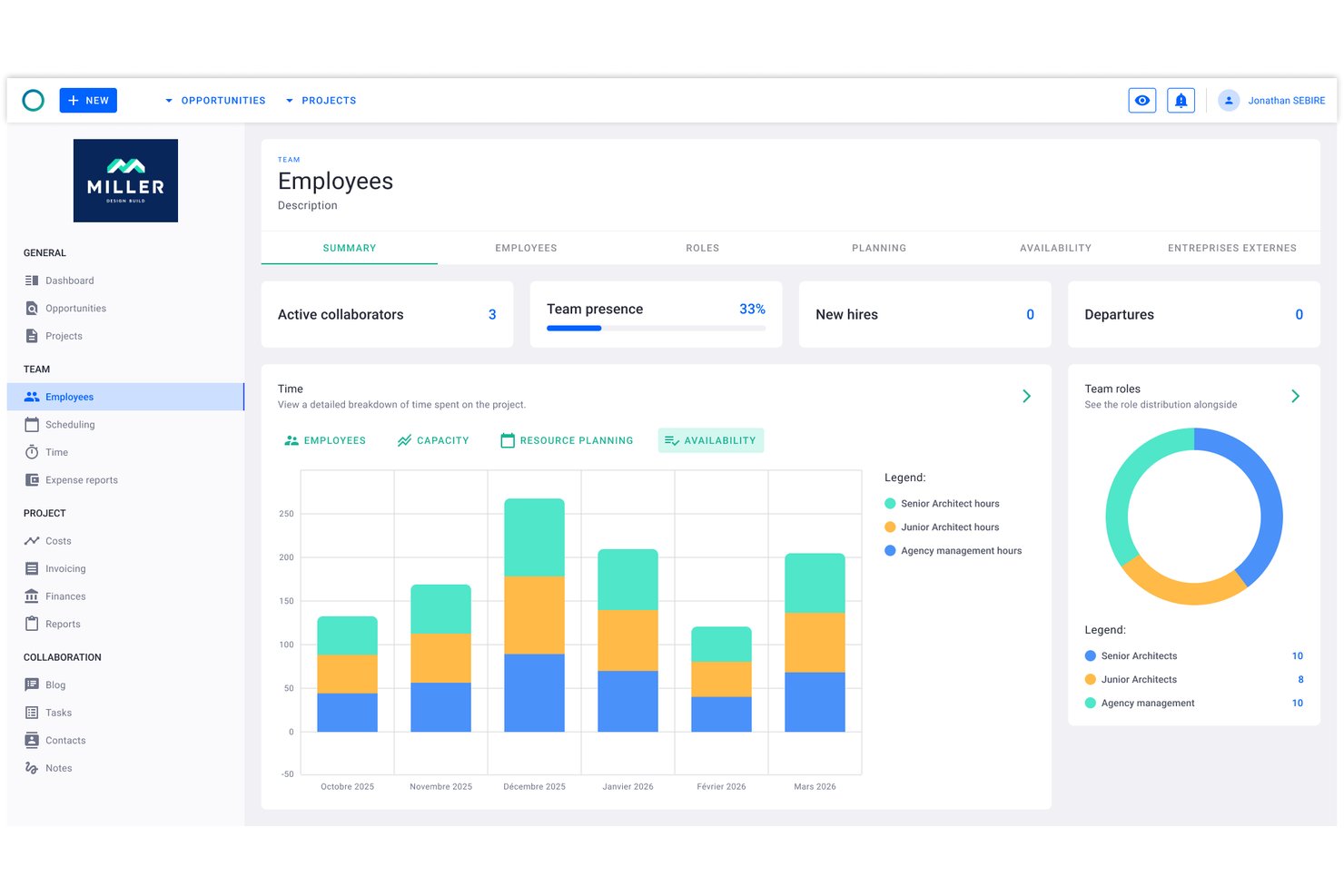
Project Flow by Milient è una piattaforma per la gestione dei progetti e il monitoraggio del tempo, pensata per studi di architettura e ingegneria, che combina in un unico sistema la pianificazione dei progetti basata sulle fasi, la registrazione delle ore, la gestione delle risorse e la fatturazione.
Per chi è più adatto Project Flow by Milient?
Gli studi di architettura e ingegneria di qualsiasi dimensione lo troveranno particolarmente adatto, soprattutto quelli che stanno superando l'utilizzo dei fogli di calcolo e necessitano di monitorare in un unico luogo ore, budget e risorse collegati.
Perché ho scelto Project Flow by Milient
Project Flow by Milient è entrato nella mia selezione ristretta perché collega in modo particolarmente efficace la pianificazione dei progetti a livello di fase con l'allocazione delle risorse e il monitoraggio del tempo. Posso suddividere un progetto in fasi dettagliate, assegnare membri del team a ciascuna di esse e controllare in tempo reale le ore registrate rispetto al tempo preventivato. Il cruscotto aggiornato in tempo reale che confronta budget e dati effettivi significa che non devo aspettare la fine del mese per scoprire che un progetto ha superato il compenso previsto.
Funzionalità principali di Project Flow by Milient
- Pianificazione e gestione delle risorse: Assegna i membri del team ai progetti e visualizza il carico di lavoro tra le fasi simultanee.
- Suite di report personalizzabile: Genera report sulle ore di progetto, sull'utilizzo e sulle previsioni, adattati agli studi di architettura.
- Modulo di fatturazione integrato: Trasforma direttamente il tempo registrato e i dati del progetto in fatture pronte per i clienti.
- App mobile per il monitoraggio del tempo: Registra le ore lavorate e gestisci le attività di progetto da dispositivi iOS e Android.
Integrazioni di Project Flow by Milient
Project Flow by Milient offre integrazioni native con Xero, QuickBooks, Sage, Visma, Fortnox, Tripletex e Microsoft Business Central. È disponibile un'API per le integrazioni personalizzate.
Pros and Cons
Pros:
- Monitoraggio del tempo e del budget combinato a livello di fase
- Fatture generate direttamente dalle ore di progetto registrate
- Pianificazione delle risorse sincronizzata con le tempistiche delle fasi del progetto
Cons:
- Riconoscibilità limitata al di fuori dei mercati scandinavi
- L'app mobile non dispone di tutte le funzionalità della versione desktop

Clockify
Ideale per le ore fatturabili dei progetti degli architetti

Clockify è un software per il monitoraggio del tempo pensato per freelance, piccole imprese e organizzazioni più grandi. Consente agli utenti di monitorare le ore lavorate, gestire i progetti e analizzare la produttività senza barriere di costo.
Perché ho scelto Clockify: Ho scelto Clockify perché offre agli architetti e ai responsabili degli studi un controllo preciso sul monitoraggio dei progetti fase per fase e sulle tariffe orarie fatturabili. I flussi di lavoro degli studi di architettura dipendono fortemente dal monitoraggio delle tappe a tariffa fissa e oraria nelle diverse fasi, come Progettazione preliminare, Documentazione esecutiva e Amministrazione del contratto. Clockify semplifica l'impostazione di tariffe orarie personalizzate per ogni titolare, architetto o disegnatore, il monitoraggio in tempo reale dei tassi di consumo delle fasi rispetto ai limiti complessivi del progetto e l'esportazione di suddivisioni dettagliate del tempo per mantenere margini di profitto sani.
Funzionalità e integrazioni principali
Le funzionalità includono il monitoraggio dei progetti, che consente di categorizzare e gestire il lavoro in modo efficiente. I report personalizzabili permettono di analizzare in dettaglio l'utilizzo del tempo. Lo strumento offre inoltre una funzione di verifica del tempo per garantire l'accuratezza delle ore registrate.
Le integrazioni includono Trello, Asana, Jira, Monday.com, GitHub, Google Calendar e Notion.
Pros and Cons
Pros:
- Consente il monitoraggio gratuito del tempo per un massimo di cinque utenti
- Conveniente
- Funzionalità di report dettagliate
Cons:
- Richiede l'inserimento manuale
- Meno opzioni di personalizzazione

TimeCamp
Ideale per team remoti
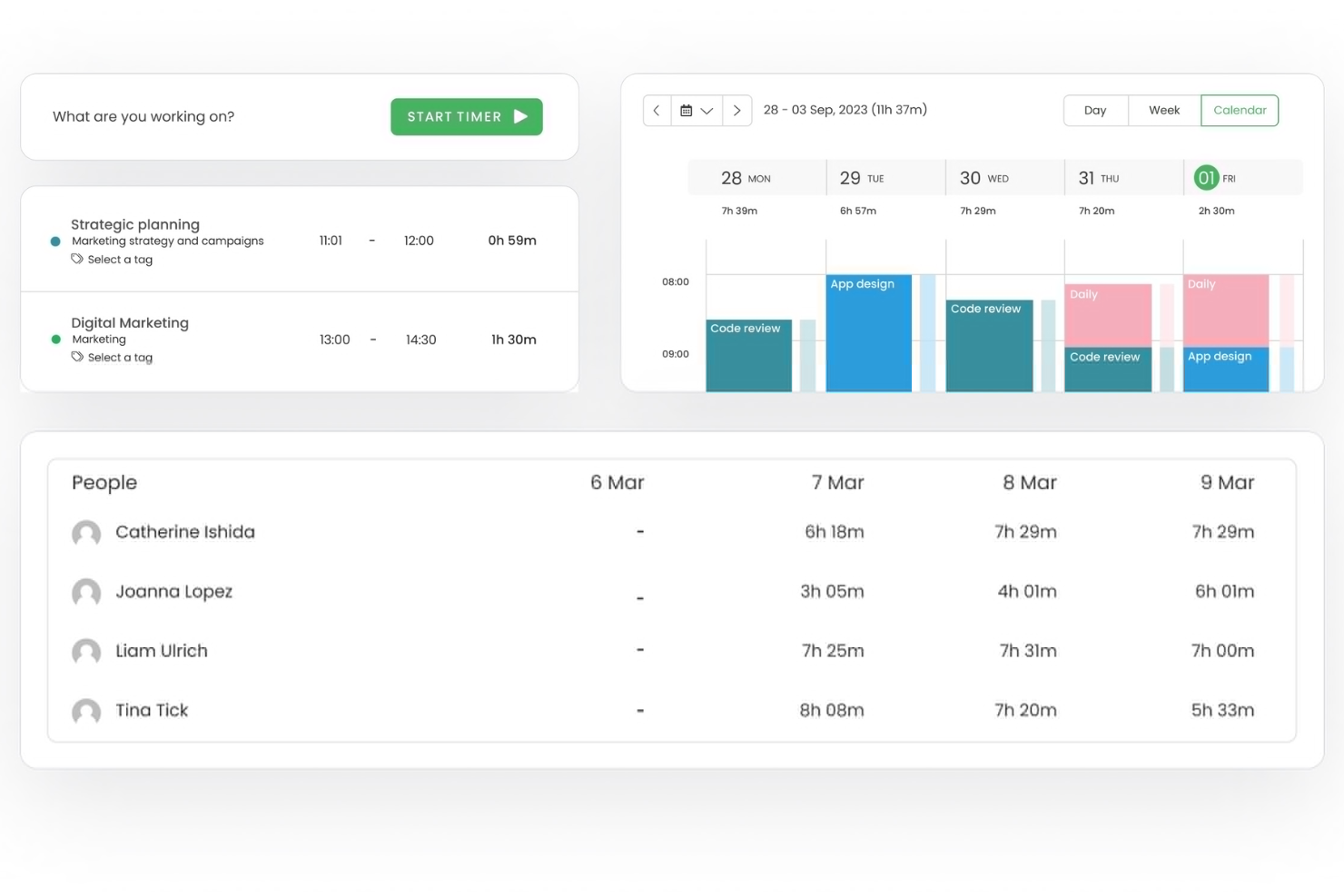
TimeCamp è un software di monitoraggio del tempo progettato per team remoti e freelancer. Fornisce strumenti per tracciare le ore fatturabili, gestire i progetti e generare report per aumentare produttività e responsabilità.
Perché ho scelto TimeCamp: È ideale per team remoti, offrendo funzionalità che facilitano la gestione e la collaborazione nel lavoro a distanza. Il monitoraggio automatico del tempo assicura che il tuo team rimanga produttivo senza supervisione costante. Puoi categorizzare le registrazioni di tempo per tenere traccia in modo efficace delle ore fatturabili e non fatturabili. Le sue capacità di reportistica offrono spunti su come il tuo team gestisce il proprio tempo, aiutandoti a prendere decisioni informate.
Funzionalità principali & integrazioni
Le funzionalità includono il tracciamento GPS per monitorare le postazioni di lavoro remote, il monitoraggio della produttività per valutare le performance del team e la fatturazione per semplificare la gestione dei clienti. Queste funzionalità ti aiutano a gestire i team remoti in modo efficiente e a mantenere l’operatività.
Le integrazioni includono Trello, Asana, Slack, Jira, monday.com, QuickBooks, Xero, Salesforce, Microsoft Teams e Google Calendar.
Pros and Cons
Pros:
- Rilevamento automatico del tempo
- Tracciamento dettagliato della produttività
- Monitoraggio posizione tramite GPS
Cons:
- Opzioni di personalizzazione limitate
- Funzionalità offline limitate

Ideale per la pianificazione del budget
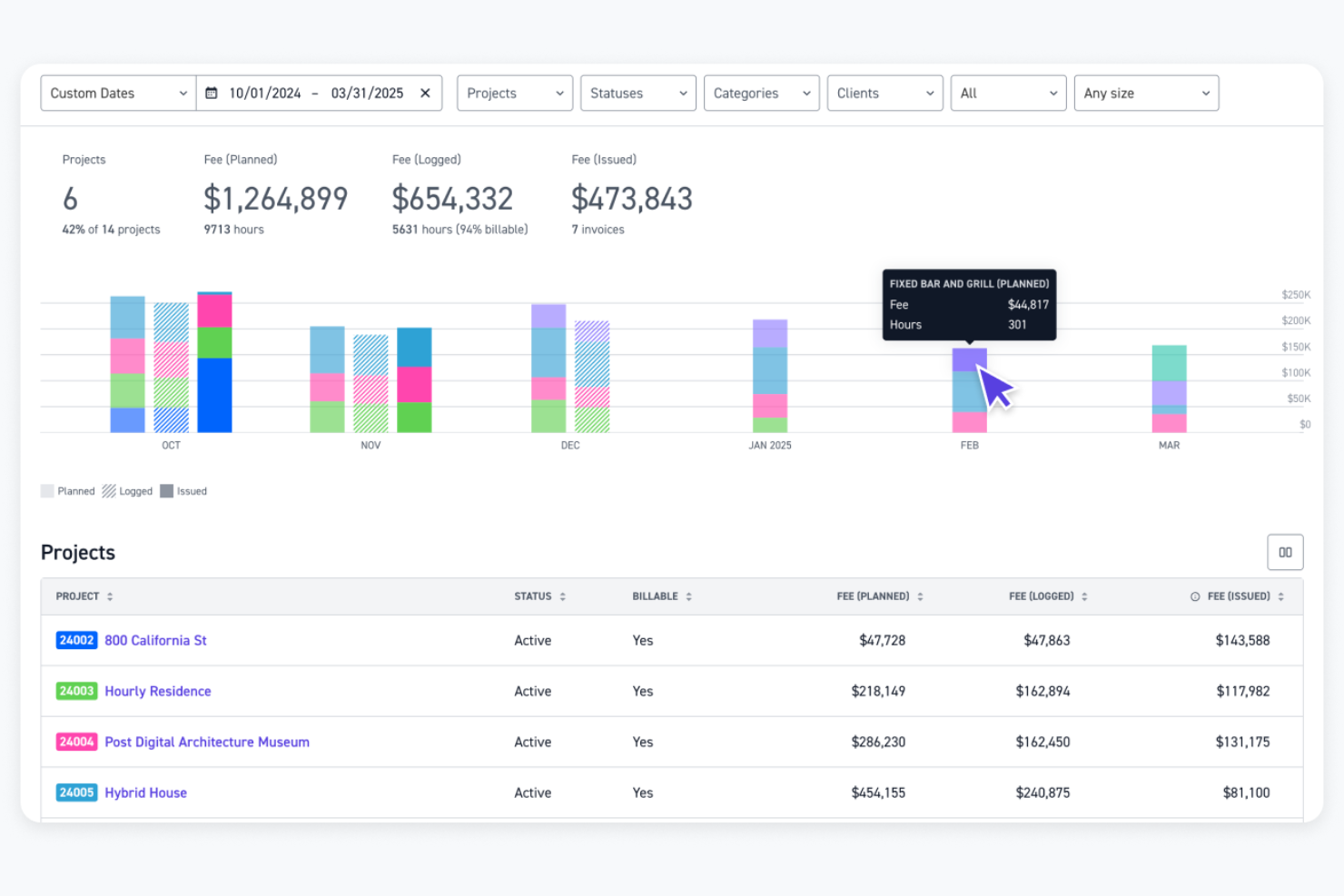
Monograph è un software di gestione progetti progettato specificamente per architetti e ingegneri. Aiuta gli utenti con la pianificazione del budget, l'assegnazione del personale, il monitoraggio dei progetti e la contabilità.
Perché ho scelto Monograph: Si concentra sulle esigenze degli architetti, offrendo funzionalità come budget di fase monitorabili e l'assegnazione automatica del personale ai timesheet. Questa specializzazione garantisce che il tuo team possa gestire i progetti in modo efficiente. La piattaforma offre inoltre previsioni sulle prestazioni e collaborazione con i consulenti, migliorando i risultati dei progetti. I suoi report incentrati sul design aiutano a prendere decisioni informate.
Funzionalità principali e integrazioni
Le funzionalità includono monitoraggio dei progetti per una visibilità immediata, previsioni sulle prestazioni per la pianificazione futura e collaborazione con consulenti per gestire tempistiche e consegne. Questi strumenti ti aiutano a mantenere il controllo dei tuoi progetti e a migliorare l'efficienza complessiva.
Le integrazioni includono QuickBooks Online, Google Workspace e Outlook.
Pros and Cons
Pros:
- Gantt intuitivo e pianificazione visuale
- Facilita la collaborazione con i consulenti
- Include strumenti di previsione delle prestazioni
Cons:
- Le opzioni di piano sembrano costose per studi A&E più piccoli
- Integrazioni limitate

Bonsai
Ideale per il lavoro su contratto

Bonsai è un software di gestione aziendale tutto-in-uno progettato per freelance e piccole agenzie. Offre strumenti per la gestione dei contratti, la fatturazione e il monitoraggio del tempo per aiutare gli utenti a gestire le proprie attività in modo efficiente.
Perché ho scelto Bonsai: È ideale per il lavoro su contratto, offrendo funzionalità come modelli di contratto personalizzabili e firme elettroniche. Questi strumenti rendono semplice la gestione degli accordi e assicurano che tutto sia legalmente valido. Bonsai include anche funzionalità di monitoraggio del tempo e di fatturazione, permettendoti di tenere traccia delle ore fatturabili e inviare fatture professionali. Inoltre, la sua interfaccia intuitiva semplifica il processo di gestione di più progetti.
Funzionalità e integrazioni principali
Le funzionalità includono proposte personalizzabili per adattare la tua offerta ai clienti, promemoria automatici per garantire pagamenti puntuali e un portale clienti per mantenere la comunicazione organizzata. Queste funzionalità ti aiutano a gestire le tue operazioni in modo fluido e a mantenere solide relazioni con i clienti.
Le integrazioni includono QuickBooks, Xero, Zapier, Calendly e HiBob.
Pros and Cons
Pros:
- Potenti strumenti di gestione dei contratti
- Promemoria di pagamento automatici
- Semplifica la gestione dei progetti
Cons:
- Monitoraggio del tempo e report dei progetti di base
- Scalabilità limitata per team numerosi

Ideale per le paghe

Timesheets.com è uno strumento di gestione delle presenze e delle paghe progettato per piccole e medie imprese. Aiuta gli utenti a tenere traccia delle ore dei dipendenti, gestire le presenze e occuparsi delle attività di elaborazione delle paghe in modo efficiente.
Perché ho scelto Timesheets.com: È particolarmente utile per la gestione delle paghe, offrendo funzionalità che semplificano l'elaborazione e garantiscono l'accuratezza. Puoi tracciare le ore dei dipendenti e gestire le presenze senza difficoltà. Lo strumento offre anche funzionalità per gestire il calcolo degli straordinari, rendendo il processo di gestione delle paghe diretto. Inoltre, le sue capacità di reportistica ti aiutano ad avere una visione approfondita sulla gestione della forza lavoro.
Caratteristiche principali e integrazioni
Le funzionalità includono il tracciamento GPS per i dipendenti remoti, il monitoraggio delle spese per controllare i costi dei progetti e report dettagliati per l'analisi della forza lavoro. Queste funzionalità aiutano a gestire efficacemente le attività di rilevazione tempi e paghe.
Le integrazioni includono QuickBooks, Sage, Paychex e SurePayroll.
Pros and Cons
Pros:
- Gestione efficace delle paghe
- Supporta il calcolo degli straordinari
- Opzioni di reportistica dettagliata
Cons:
- L'interfaccia può sembrare datata
- Mancano funzionalità avanzate per flussi di lavoro complessi
Altri software di monitoraggio del tempo per architetti
Ecco alcune ulteriori opzioni di software di monitoraggio del tempo per architetti che non sono entrate nella mia selezione, ma che vale comunque la pena valutare:
- Deltek Replicon Time
Ideale per la conformità
- TimeTracker
Ideale per piccole aziende
- Houzz Pro
Ideale per progetti di design
- Harvest
Ideale per le integrazioni
- Teamhood
Ideale per team Agile
- CMap
Ideale per la previsione dei progetti


Come Valuto i Software di Rilevazione del Tempo per Architetti
Valuto questi strumenti su due livelli: le funzionalità di base come la fatturazione per fase e l’approvazione dei timesheet che ogni strumento deve avere, quindi i fattori distintivi che sono più importanti per gli studi di architettura.
Funzionalità di Base (Requisiti Indispensabili per questa Lista)
Quando seleziono gli strumenti per la mia lista, valuto ciascuno su una scala da 0 (non offre la funzionalità) a 5 (eccelle in quest’area) per ogni funzionalità di base elencata qui sotto. Poi calcolo il punteggio totale dello strumento in percentuale. Ogni strumento deve raggiungere un punteggio totale minimo del 55% per essere preso in considerazione.
- Rilevazione del Tempo per Progetto e Fase: Verifico se le ore possono essere registrate sulle specifiche fasi di progetto come SD, DD, CD e CA, e non solo sui nomi generici dei progetti.
- Configurazione Ore Fatturabili & Tariffe: Ogni strumento dovrebbe permettere di impostare diverse tariffe di fatturazione per ruolo, progetto o cliente, così il tempo di un responsabile viene fatturato diversamente da quello di un progettista junior.
- Invio & Approvazione Timesheet: Cerco flussi strutturati di timesheet dove il personale invia le registrazioni e i manager le esaminano prima che le ore entrino nel processo di fatturazione o payroll.
- Monitoraggio Budget & Parcella: Tracciare il consumo della parcella rispetto a un budget fisso di progetto è importante—valuto quanto chiaramente ogni strumento mostra lo stato di avanzamento rispetto alla parcella contrattata.
- Fatturazione & Esportazione Fatture: Che sia un generatore di fatture integrato o una sincronizzazione con QuickBooks o Xero, lo strumento dovrebbe trasferire le ore fatturabili nelle fatture clienti senza reinserimento manuale.
- Reportistica & Analisi di Utilizzo: Una buona reportistica va oltre il totale delle ore—cerco viste su utilizzo del personale, redditività dei progetti e allocazione sulle commesse attive.
Una volta che ho una lista di strumenti che soddisfano questi criteri, considero cosa distingue ogni piattaforma.
Fattori Distintivi (Cosa Distingue i Fornitori)
Ecco come confronto e metto in risalto i diversi fornitori:
Funzionalità Distintive
La pianificazione delle risorse è fondamentale—cerco una pianificazione della capacità visiva che mostri chi è disponibile nei prossimi progetti così i responsabili possono assegnare nuovo lavoro senza sovraccaricare il team. Anche la rilevazione mobile del tempo è importante perché gli architetti alternano il lavoro tra studio, cantieri e riunioni clienti, e l’inserimento offline mantiene i timesheet accurati. Valuto inoltre se lo strumento fornisce modelli preimpostati di fasi AIA, che fanno risparmiare tempo per ogni nuova commessa.
Oltre le Funzionalità
L’integrazione con piattaforme di contabilità come QuickBooks, Xero o Sage Intacct è una delle prime cose che verifico, perché uno strumento che non può sincronizzare le ore fatturabili nel flusso di fatturazione crea doppia registrazione. Valuto anche l’adattabilità alle dimensioni dello studio—uno studio di cinque persone ha bisogno di qualcosa di snello, mentre una realtà di 200 addetti e più sedi necessita di permessi per ruolo e separazione per centri di costo. La compatibilità con i formati di fatturazione AIA è importante soprattutto per chi gestisce fatture a stati di avanzamento su progetti pubblici o istituzionali.
Come scegliere un software di monitoraggio del tempo per architetti
È facile perdersi in lunghi elenchi di funzionalità e strutture tariffarie complesse. Per aiutarti a rimanere concentrato mentre affronti il tuo specifico processo di selezione del software, ecco un elenco di fattori da tenere a mente:
| Fattore | Cosa considerare |
|---|---|
| Scalabilità | Lo strumento può crescere insieme alla tua azienda? Verifica se supporta utenti e progetti aggiuntivi man mano che la tua attività si espande. Cerca piani flessibili adatti alla crescita. |
| Integrazioni | Si collega agli strumenti che utilizzi attualmente? Controlla se si integra con software come CAD, applicazioni per la gestione dei progetti e applicazioni finanziarie per ridurre l'inserimento manuale dei dati. |
| Personalizzazione | Puoi adattarlo ai tuoi flussi di lavoro? Valuta se lo strumento consente di personalizzare report, dashboard e impostazioni in base alle tue esigenze specifiche. |
| Facilità d'uso | È facile da adottare per il tuo team? Cerca un'interfaccia intuitiva e istruzioni chiare per ridurre i tempi di formazione e migliorare la soddisfazione degli utenti. |
| Implementazione e onboarding | Quanto velocemente puoi iniziare? Valuta la disponibilità di materiali formativi, assistenza per la configurazione e supporto per garantire una transizione senza problemi. |
| Costo | Rientra nel tuo budget? Confronta i piani tariffari e considera i costi nascosti, come aggiornamenti o componenti aggiuntivi, che potrebbero influire sulla spesa complessiva. |
| Misure di sicurezza | I tuoi dati sono protetti? Assicurati che lo strumento disponga di crittografia, backup regolari e controlli degli accessi per proteggere le informazioni sensibili. |
| Requisiti di conformità | Rispetta gli standard del settore? Verifica che il software sia conforme alle normative pertinenti, soprattutto se operi in regioni con leggi rigorose sulla protezione dei dati. |
Che cos'è un software per il monitoraggio del tempo?
Il software per il monitoraggio del tempo è uno strumento che aiuta a gestire e registrare il tempo dedicato a vari progetti. Architetti, designer e project manager utilizzano generalmente questi strumenti per tenere traccia delle ore fatturabili, gestire i budget dei progetti e garantire un'allocazione efficiente delle risorse. Funzionalità come il monitoraggio dei progetti, la generazione dei fogli presenze e il controllo del budget aiutano a registrare con precisione il tempo e a gestire le finanze. Nel complesso, questi strumenti forniscono informazioni preziose che aiutano a migliorare l'efficienza e la redditività dei progetti.
Funzionalità
Quando scegli un software per il monitoraggio del tempo destinato agli architetti, presta attenzione alle seguenti funzionalità principali:
- Monitoraggio dei progetti: Consente di controllare l'avanzamento di ogni progetto, garantendo il rispetto delle scadenze e dei budget.
- Generazione dei fogli presenze: Compila automaticamente le ore lavorate in fogli presenze completi, semplificando le buste paga e la fatturazione.
- Controllo del budget: Aiuta a tenere sotto controllo le spese del progetto e a rispettare il budget, evitando spese eccessive.
- Report personalizzabili: Fornisce informazioni dettagliate sull'utilizzo del tempo e sulla produttività, adattate alle tue esigenze specifiche.
- Funzionalità di integrazione: Si collega ad altri strumenti, come i software CAD e le applicazioni per la gestione dei progetti, per semplificare i flussi di lavoro.
- Monitoraggio GPS: Consente di monitorare i luoghi di lavoro da remoto, garantendo trasparenza e responsabilità.
- Strumenti di comunicazione con i clienti: Facilitano la collaborazione e mantengono i clienti informati sull'avanzamento e sugli aggiornamenti del progetto.
- Monitoraggio delle spese: Tiene sotto controllo i costi relativi al progetto e semplifica il processo di fatturazione.
- Funzionalità di fatturazione: Genera fatture professionali sulla base delle ore e delle spese registrate, accelerando i processi di pagamento.
- Misure di sicurezza: Protegge i dati sensibili mediante crittografia e controlli degli accessi, garantendo la conformità agli standard del settore.
Vantaggi
L'implementazione di un software per il monitoraggio del tempo destinato agli architetti offre numerosi vantaggi al tuo team e alla tua azienda. Eccone alcuni:
- Migliore gestione dei progetti: Monitorando il tempo e i budget, puoi assicurarti che i progetti rispettino le scadenze e i limiti finanziari.
- Aumento della produttività: Grazie a report dettagliati sull'utilizzo del tempo, puoi individuare le inefficienze e ottimizzare il flusso di lavoro del tuo team.
- Fatturazione accurata: Fogli presenze e fatture generati automaticamente garantiscono che ai clienti vengano addebitate correttamente le ore lavorate.
- Migliore comunicazione con i clienti: Gli strumenti che facilitano gli aggiornamenti e la collaborazione mantengono i clienti informati e soddisfatti.
- Controllo dei costi: Il monitoraggio delle spese aiuta a prevenire spese eccessive e mantiene redditizi i tuoi progetti.
- Sicurezza dei dati: Grazie alla crittografia e ai controlli degli accessi, i dati sensibili dei tuoi progetti rimangono protetti e conformi agli standard del settore.
- Facile integrazione: Il collegamento con gli strumenti esistenti semplifica i processi e riduce l'inserimento manuale dei dati.
Costi e prezzi dei software per il monitoraggio del tempo destinati agli architetti
La scelta di un software per il monitoraggio del tempo per architetti richiede la comprensione dei vari modelli di prezzo e dei piani disponibili. I costi variano in base alle funzionalità, alle dimensioni del team, agli strumenti aggiuntivi e ad altri fattori. La tabella seguente riassume i piani più comuni, i relativi prezzi medi e le funzionalità tipicamente incluse nelle soluzioni software per il monitoraggio del tempo per architetti:
Tabella comparativa dei piani per il software di monitoraggio del tempo
| Tipo di piano | Prezzo medio | Funzionalità comuni |
|---|---|---|
| Piano gratuito | $0 | Monitoraggio del tempo di base, report limitati e integrazioni essenziali. |
| Piano personale | $5-$15/utente/mese | Monitoraggio del tempo, gestione dei progetti, fatturazione e report di base. |
| Piano aziendale | $20-$40/utente/mese | Report avanzati, monitoraggio del budget, gestione delle spese e integrazioni potenziate. |
| Piano per grandi aziende | $50-$100/utente/mese | Funzionalità personalizzabili, assistenza dedicata, sicurezza avanzata e analisi complete. |
Ecco cosa succede:
Se stai cercando un software per il monitoraggio del tempo per architetti, contatta gratuitamente un consulente SoftwareSelect per ricevere consigli personalizzati.
Compila un modulo e partecipa a una breve conversazione in cui verranno analizzate nel dettaglio le tue esigenze. Riceverai quindi una selezione ristretta di software da valutare. Ti assisteranno inoltre durante l'intero processo di acquisto, comprese le trattative sul prezzo.