Ho testato 10 strumenti di reportistica: le mie scelte migliori per il 2026

10 Elenco dei migliori strumenti di reporting


Gli strumenti di reporting disponibili sembrano essere innumerevoli, quindi capire quale sia il migliore per te può essere difficile. Vuoi condividere i dati con il tuo team nel modo più accessibile e accurato possibile, ma devi capire quale strumento sia più adatto. Ci penso io!
In questo articolo semplifico le cose e, basandomi sulla mia esperienza nell’utilizzo di diversi strumenti di reporting per la gestione dei progetti, da quelli destinati a grandi progetti fino a quelli per la crescita aziendale, ti propongo questa selezione dei migliori strumenti di reporting.
Perché fidarsi dei nostri consigli sui software
Il nostro team testa e recensisce software dal 2012. In quanto project manager noi stessi, sappiamo quanto sia difficile — e importante — scegliere il software giusto.
Per questa guida, abbiamo valutato gli strumenti attraverso test pratici e ricerche indipendenti, assegnando un punteggio agli strumenti in base ai nostri criteri di selezione. Ci basiamo inoltre sulle competenze di leader di pensiero del settore e di professionisti attivi nella gestione dei progetti.
Le nostre recensioni riflettono il nostro giudizio editoriale umano, non un discorso di vendita.
Revisori esperti:
Tabella comparativa degli strumenti di reporting
Questa tabella comparativa riassume i dettagli sui prezzi degli strumenti di reporting che ho selezionato:
| Tool | Best For | Trial Info | Price | ||
|---|---|---|---|---|---|
| 1 | Miglior strumento di reporting per grafici facili da leggere | Prova gratuita di 15 giorni + piano gratuito + demo gratuita disponibili | Da $24/mese (fatturazione annuale) | Website | |
| 2 | Il miglior software di reportistica per la contabilità delle piccole imprese | Prova gratuita di 30 giorni | Da $19/mese | Website | |
| 3 | Utenti, fonti di dati e integrazioni illimitati in tutti i piani. | Prova gratuita di 15 giorni | $39/mese per utenti illimitati | Website | |
| 4 | Miglior strumento di reportistica per team agili | 30 giorni di prova gratuita | A partire da $8.25/utente/mese | Website | |
| 5 | Le migliori dashboard di reportistica che favoriscono la collaborazione | Piano gratuito + demo gratuita disponibile | A partire da $5/utente/mese | Website | |
| 6 | Il miglior software di reporting per analisi integrate | Prova gratuita di 14 giorni | Da $70/utente/mese | Website | |
| 7 | Ideale per generare rapidamente dashboard e report di marketing digitale | 3 giorni di prova gratuita | Da $14.50/mese | Website | |
| 8 | Ideale per integrazione con strumenti BI | Demo gratuita disponibile | Prezzo su richiesta | Website | |
| 9 | Il miglior strumento di reportistica per agenzie di marketing | 7 giorni di prova gratuita | Da $119/mese | Website | |
| 10 | Ideale per la gestione dei preventivi dei progetti, del tempo e dei dati finanziari | Prova gratuita di 30 giorni disponibile | A partire da 2,50 $ al mese | Website |


Panoramica dei migliori strumenti di reporting
Di seguito trovi una descrizione di ogni strumento, del modo in cui gestisce la generazione dei report e dei motivi per cui è stato scelto per questo elenco. Ho aggiunto schermate dello strumento, così puoi farti un’idea del suo aspetto dal punto di vista dell’utente.

Miglior strumento di reporting per grafici facili da leggere
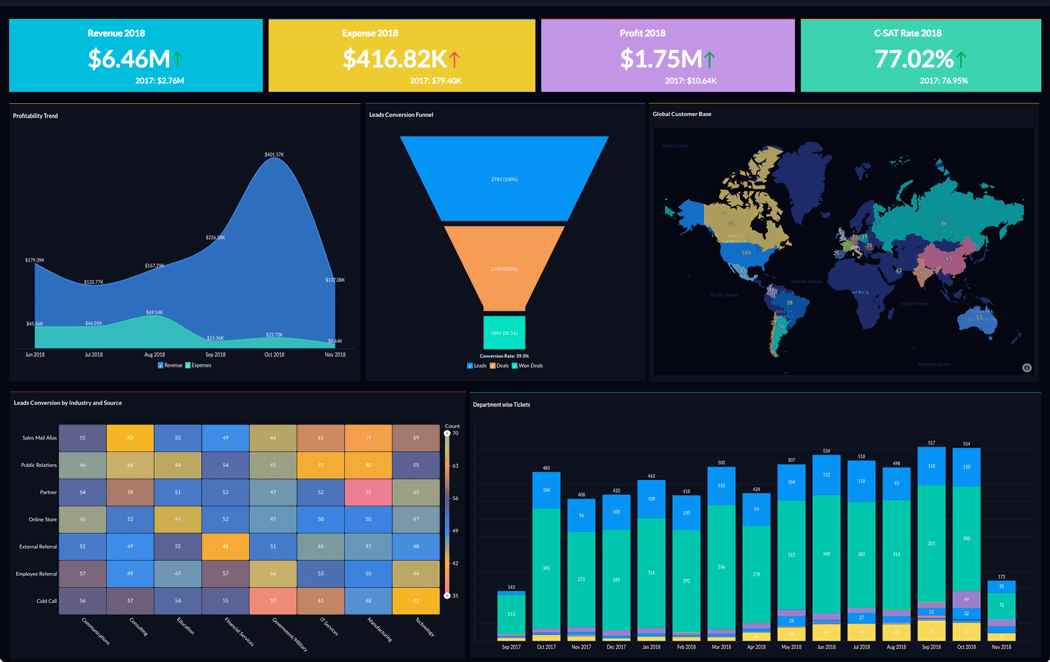
Zoho Analytics è uno strumento di analisi e reporting che ti aiuta a trasformare dati aziendali grezzi in report e dashboard completi. Puoi utilizzarlo per raccogliere, arricchire e filtrare i dati al fine di facilitarne l'analisi. Dispone di una funzione assistente AI per aiutarti a generare informazioni, individuare schemi e prevedere tendenze. Zoho Analytics è disponibile anche come app mobile per iOS e Android.
Zoho Analytics ti permette di utilizzare grafici, widget e tabelle pivot, assicurando che i dati possano essere presentati nel modo migliore possibile. Zoho Analytics consente di collaborare con altri utenti per creare e condividere report e dashboard personalizzati. Le impostazioni dei permessi utente ti consentono di controllare chi può visualizzare e modificare i tuoi dati secondo necessità e/o autorità.
Il costo di Zoho Analytics parte da $24/mese/fino a 2 utenti. È disponibile una prova gratuita di 15 giorni.
New Product Updates from Zoho Analytics

Zoho Analytics Adds Exogenous Variables to Multivariate Forecasting
Zoho Analytics introduces exogenous variables for multivariate forecasting using the VARX model. This helps forecasts account for external drivers such as marketing spend, discounts, and seasonality. For more information, visit Zoho Analytics’ official site.
 .
.
Il miglior software di reportistica per la contabilità delle piccole imprese
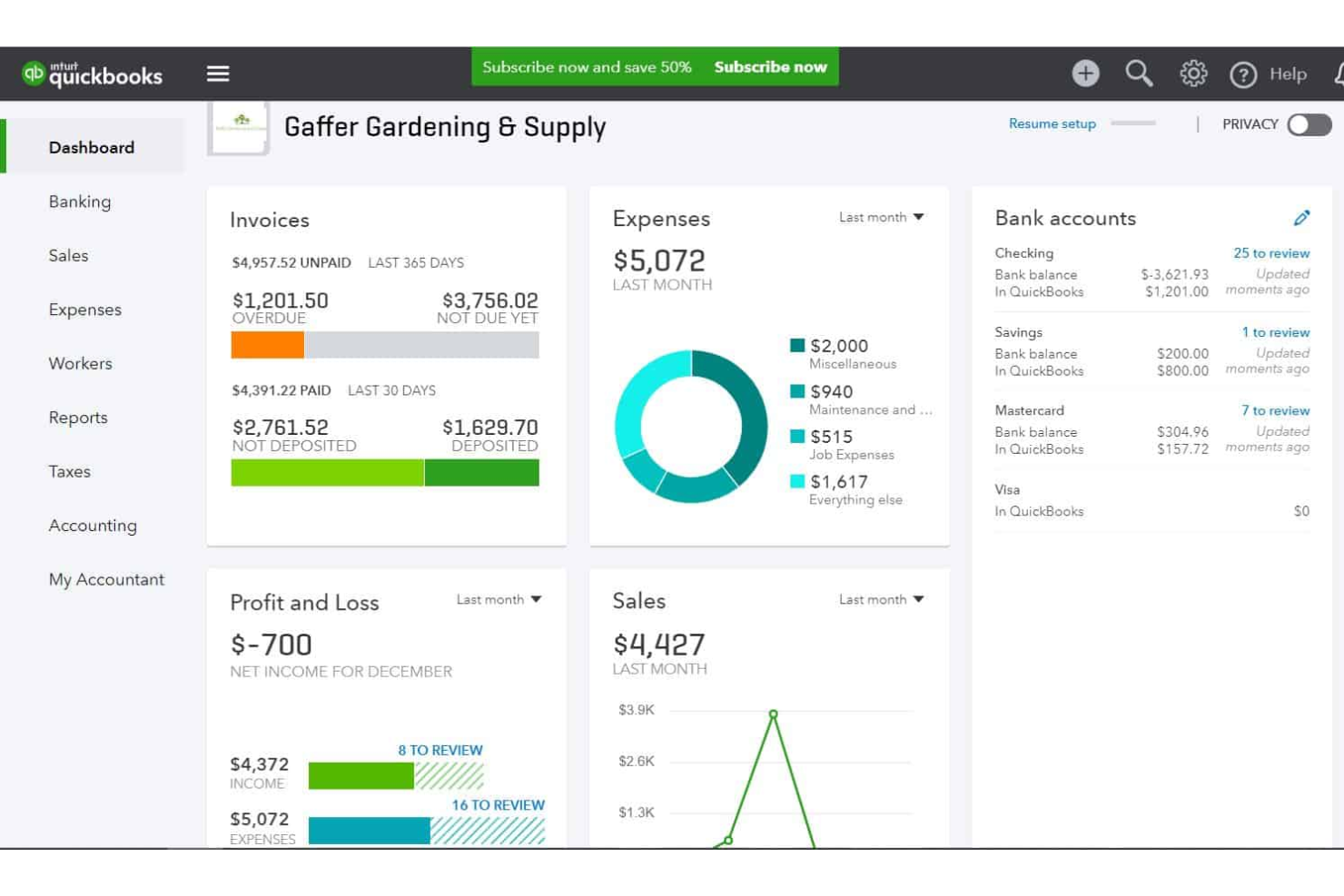
QuickBooks è una soluzione di contabilità che aiuta le piccole imprese a tenere traccia delle spese, gestire la fatturazione e redigere i report finanziari. Il software registra i dettagli delle transazioni, aiutandoti a mantenere registri accurati. In base alle finanze che monitori nel sistema, puoi visualizzare dal pannello di controllo quanto spendi in ciascuna categoria di spesa.
La piattaforma offre una soluzione semplice e a basso costo per la rendicontazione delle spese di piccole e medie imprese. Le ricevute vengono ordinate automaticamente e puoi riclassificare le transazioni in blocco. Puoi anche generare fatture e persino impostare fatture ricorrenti per clienti abituali o ricorrenti.
QuickBooks Online si integra con oltre 450 app aziendali come Square, Stripe, Paychex, Insightly CRM, Mailchimp, Shopify, eBay, BigCommerce, Magento, Squarespace, Etsy, Katana e ProjectWorks. I prezzi partono da $30 al mese ed è disponibile una prova gratuita di 30 giorni.
New Product Updates from QuickBooks Online

QuickBooks Adds Vendor Credits, Payroll Uploads, and Job Costing Controls
QuickBooks adds vendor credits in Bill Pay, spreadsheet payroll uploads, and service-item tracking for employee hours. These updates help teams manage payments, prepare payroll, and allocate labor costs with less manual work. For more information, visit QuickBooks Online’s official site.

DashThis
Utenti, fonti di dati e integrazioni illimitati in tutti i piani.
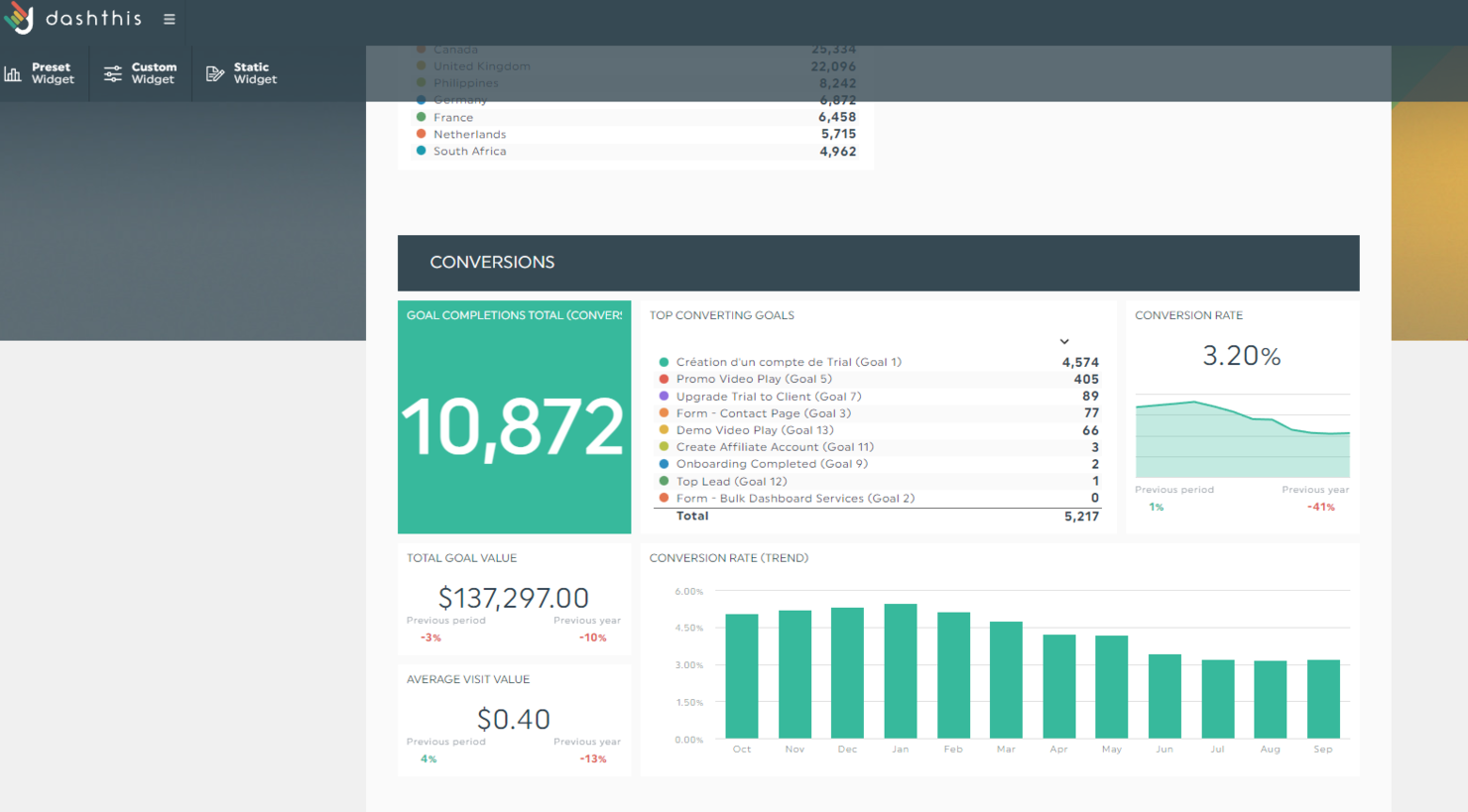
DashThis è uno strumento automatizzato di reportistica di marketing che consente di riunire più piattaforme in un'unica soluzione, co-creare dashboard potenti e automatizzarne la consegna. Le funzionalità incluse nel prodotto possono essere utili a chiunque, dai liberi professionisti alle agenzie di fama mondiale come DDB.
La prima cosa che mi è piaciuta subito di questo prodotto è che tutti i piani prevedono utenti illimitati, fonti di dati illimitate e integrazioni illimitate. La differenza sta nel numero di dashboard che puoi creare e nel livello di personalizzazione dei report con white-label.
Poiché la reportistica può essere una delle nostre attività più dispendiose in termini di tempo, DashThis ha predisposto una serie di modelli che ti aiutano a iniziare immediatamente. Basta selezionare il modello che preferisci, collegare i tuoi dati e generare il report nei periodi di tempo che desideri. Una volta trovato il report ideale, puoi clonarlo, esportarlo o generarlo e condividerlo automaticamente via email ogni mese con i tuoi clienti.
DashThis offre oltre 34 integrazioni utili che ti aiuteranno a portare tutti i dati di marketing in un unico posto ed estrarre report completi. Queste integrazioni includono piattaforme di social media, Google Analytics, SEMrush, Mailchimp, Perfect Audience, TikTok Ads e molte altre.
DashThis parte da $38/mese (pagamento annuale) per 3 dashboard e offre una prova gratuita di 15 giorni (10 dashboard).
New Product Updates from DashThis
DashThis Adds Spotify Ads Integration
DashThis adds a Spotify Ads integration for bringing campaign spend, reach, impressions, clicks, and video views into dashboards. This helps teams report on audio campaigns alongside other advertising channels. For more information, visit DashThis’s official site.
 .
.
Miglior strumento di reportistica per team agili
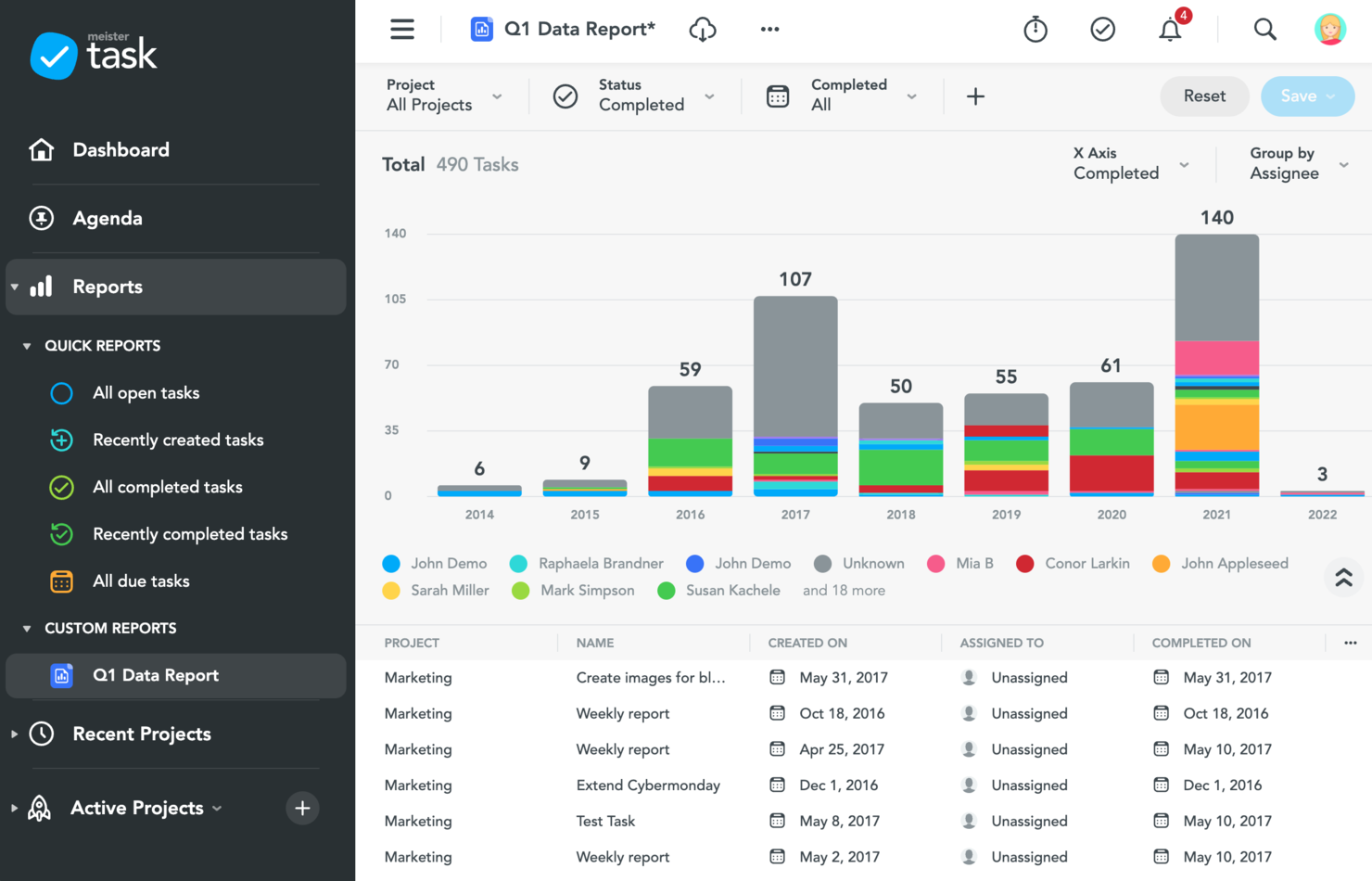
MeisterTask è uno strumento di gestione delle attività e dei progetti progettato principalmente per i team agili. L'applicazione offre una varietà di funzionalità di reportistica per monitorare la produttività del team, oltre a dashboard personalizzate e alla possibilità per i membri del team di creare agende personali organizzate secondo il loro modo di lavorare. MeisterTask è intuitivo e semplice da usare, con un'interfaccia pulita
Gli utenti possono visualizzare report sull'avanzamento, sui tempi e sulla sicurezza. È possibile visualizzare e scaricare report che mostrano le attività completate, in ritardo o in scadenza. I project manager e i team leader possono anche ottenere report su quanto tempo viene tracciato dai membri del team, così come report relativi alla sicurezza dei dati, alla privacy e alla conformità.
MeisterTask si integra con il software gemello MindMeister così come con Gmail, Outlook, Slack, Microsoft Teams, GitHub, Zendesk, Google Drive e altri.
MeisterTask ha un costo a partire da $8.25/utente/mese. Offre anche un piano freemium.

ClickUp
Le migliori dashboard di reportistica che favoriscono la collaborazione
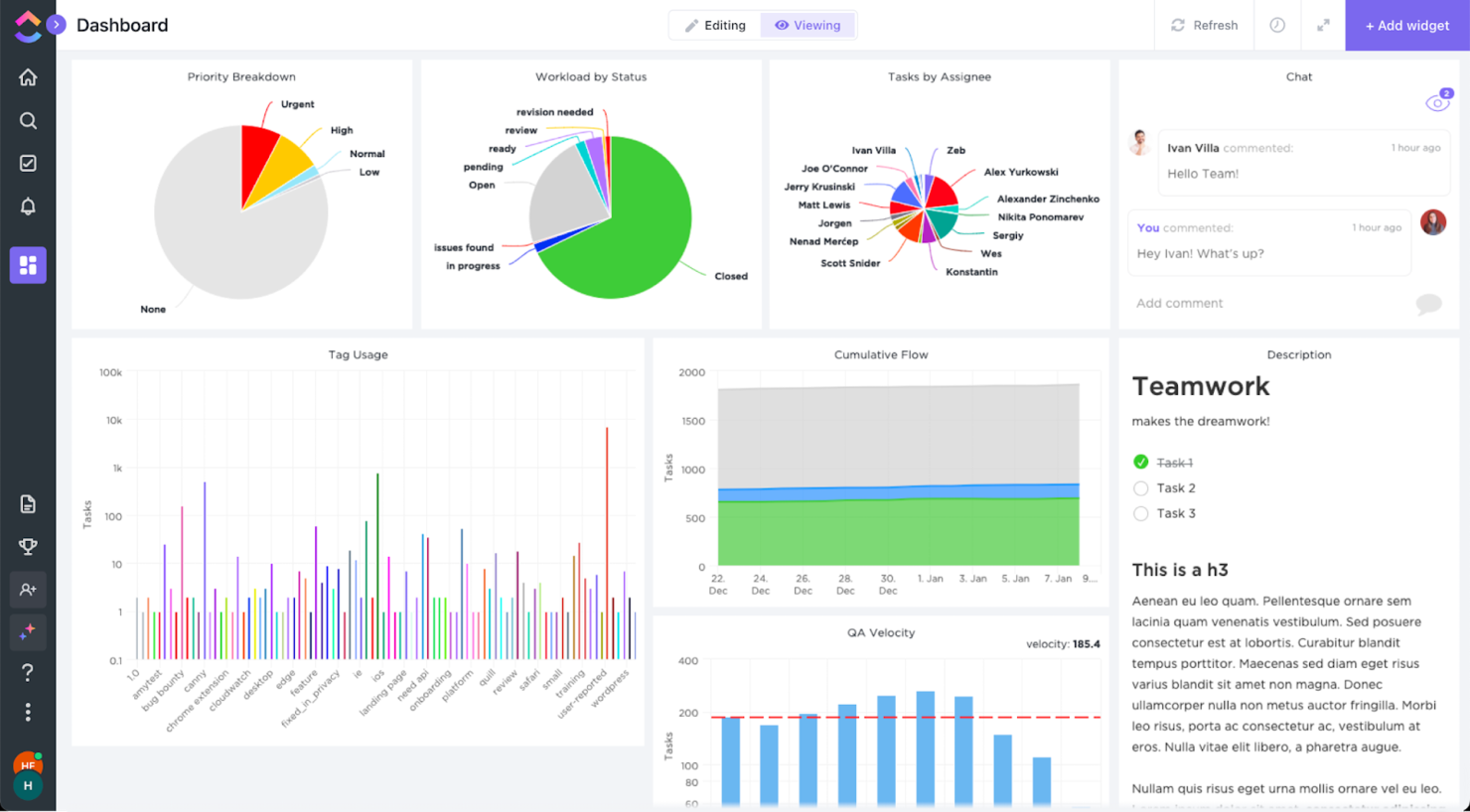
ClickUp è un software di gestione progetti molto apprezzato dai DPM. Perché? Grazie all'ampia gamma di funzionalità che offre in un unico strumento. ClickUp dispone di funzionalità di reportistica che ti stupiranno per il loro livello di personalizzazione e per la ricchezza delle informazioni che possono fornire.
Generalmente, siamo abituati a dashboard che mostrano solo grafici. Tuttavia, le dashboard di ClickUp sono basate su widget e possono recuperare informazioni da qualsiasi area dei tuoi progetti. Ad esempio, puoi aggiungere un blocco di testo per visualizzare elenchi oppure una finestra di chat per avviare una conversazione rispetto a uno specifico grafico.
La parte migliore è che puoi riorganizzare tutti questi elementi secondo le tue necessità con un semplice drag and drop.
ClickUp offre integrazioni native con Slack, G Suite, Dropbox e molti altri strumenti, oltre a più di 1.000 integrazioni tramite Zapier.
ClickUp è gratuito con spazio di archiviazione limitato per un numero illimitato di utenti. I piani a pagamento partono da $5/utente/mese e offrono una prova gratuita.
New Product Updates from ClickUp
ClickUp Adds Meetings Hub, Super Agent Templates, and ZoomInfo Integration
ClickUp adds a searchable Meetings Hub, new ways to clone and template Super Agents, and a ZoomInfo integration through the App Center. These updates improve meeting retrieval, agent reuse, and access to sales intelligence. For more information, visit ClickUp’s official site.

Tableau
Il miglior software di reporting per analisi integrate
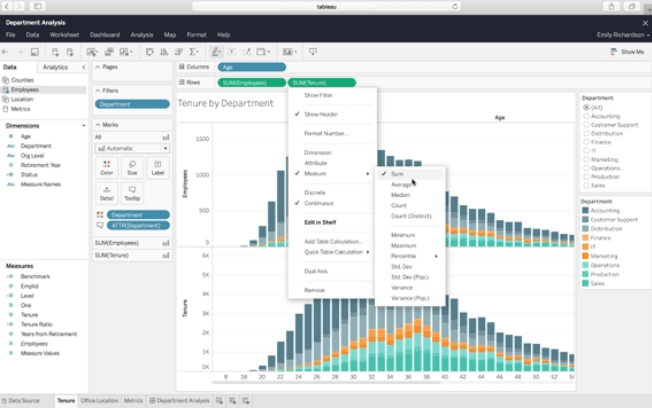
Tableau è una piattaforma di analisi visiva per l'esplorazione, la comprensione e la gestione dei dati aziendali. Utilizza un metodo drag and drop per creare report sfruttando le visualizzazioni dei dati e i widget disponibili. Tableau utilizza visualizzazioni interattive dei dati, consentendo così di creare report visivamente accattivanti che i visualizzatori possono esplorare cliccando sugli elementi.
Se hai bisogno di costruire dashboard potenti in modo rapido, Tableau è il miglior strumento di reporting per te grazie alle sue funzionalità di analytics incorporate. Gli analytics integrati sono personalizzabili tramite API, così puoi inserire funzionalità di raccolta dati e reporting nel tuo flusso di lavoro già esistente. Questo può anche aiutarti a personalizzare l’esperienza dati dei tuoi clienti.
Tableau si integra con altri strumenti aziendali, tra cui Google Cloud, Microsoft SQL Server, Google Sheets, Hive e SAP.
I prezzi di Tableau partono da $70/utente/mese, ed è disponibile una prova gratuita di 14 giorni.

Reportei
Ideale per generare rapidamente dashboard e report di marketing digitale
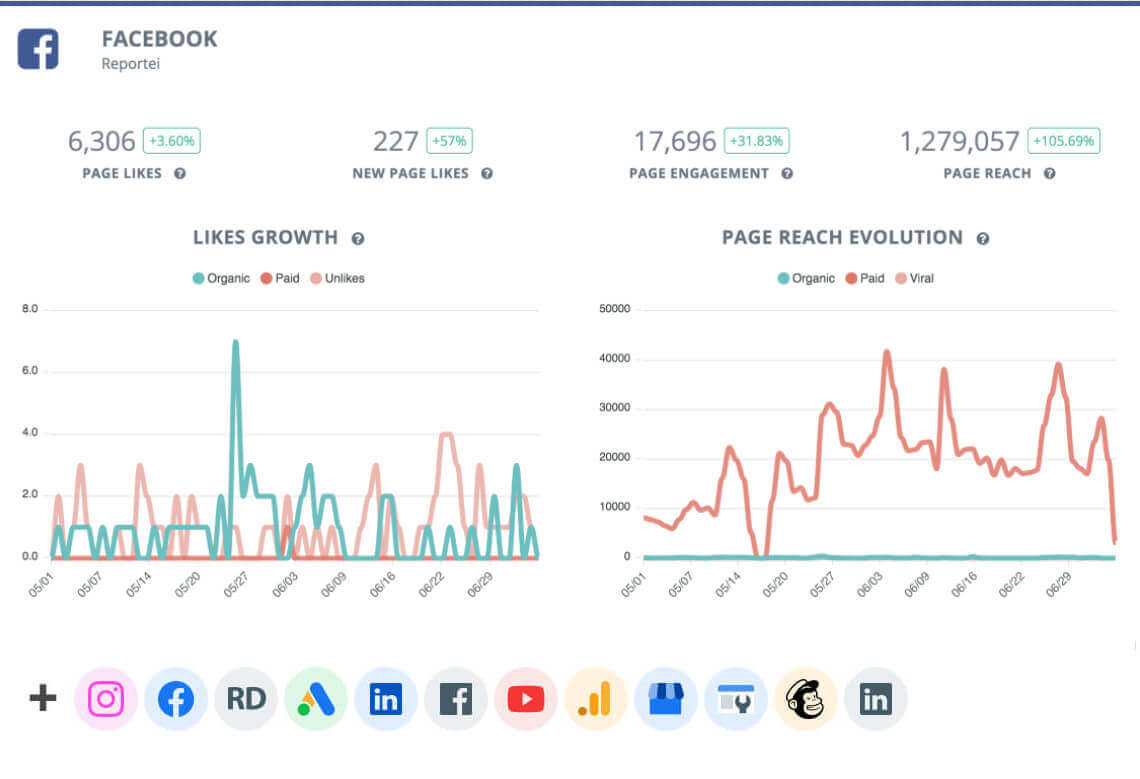
Reportei genera rapidamente report di marketing digitale, concentrandosi su dati e analisi dei social media. Questo strumento è ideale per agenzie, freelance e professionisti del marketing digitale che vogliono risparmiare tempo nella creazione dei report e dedicare più tempo all'analisi.
Reportei offre anche una funzione di timeline di marketing, che permette agli utenti di aggiungere eventi e traguardi alla timeline del progetto e di categorizzarli per monitorare l'avanzamento complessivo del progetto.
Le integrazioni includono Facebook, Instagram, LinkedIn, YouTube, Facebook Ads, Instagram Ads, Google Ads, Google Analytics e altri canali.
I prezzi partono da $14.50/mese.

Adverity
Ideale per integrazione con strumenti BI

Adverity si distingue come una versatile piattaforma di intelligence di marketing progettata per le aziende che desiderano ottimizzare la gestione dei dati e i processi di reportistica. Supporta i team che fanno affidamento sull'integrazione con strumenti BI, aiutando a collegare i flussi di dati di marketing con piattaforme di reporting per l'analisi e la visualizzazione. Se lavori in ambito marketing o analisi dei dati, potresti trovare Adverity particolarmente interessante per la sua capacità di integrare dati da diverse fonti, automatizzare i processi di gestione e offrire insight che facilitano decisioni più informate.
Perché ho scelto Adverity
Ho scelto Adverity per la sua integrazione con gli strumenti BI, che permette ai team di collegare flussi di dati di marketing con piattaforme di reporting e analisi. La sua libreria di connettori consente di raccogliere dati da molteplici fonti di marketing e analytics in un unico ambiente. La piattaforma include anche trasformazioni di dati automatizzate e controlli di qualità che aiutano a mantenere i dataset coerenti per la reportistica e l’analisi.
Funzionalità principali di Adverity
Oltre alle solide capacità di integrazione dei dati, Adverity offre:
- Orchestrazione dei dati: Automatizza il processo di pulizia, armonizzazione e monitoraggio della qualità dei dati.
- Automazione dei flussi di lavoro: Facilita l'automazione delle attività ripetitive, consentendo al team di concentrarsi sulle decisioni strategiche.
- Strumenti di collaborazione: Permette ai membri del team di collaborare efficacemente nell’analisi e nella reportistica dei dati.
Integrazioni di Adverity
Le integrazioni comprendono Google Analytics, Google Ads, Facebook Ads, Instagram Insights, LinkedIn Ads, Mailchimp, Salesforce, HubSpot, Adobe Analytics e Microsoft Excel.
Pros and Cons
Pros:
- I connettori predefiniti semplificano l’integrazione di fonti di dati marketing e analytics
- Trasferimenti di dati affidabili tra piattaforme per grandi set di dati di marketing e pubblicità
- Il team di supporto reattivo aiuta a risolvere problemi di integrazione e configurazione dei flussi di dati
Cons:
- Processo di onboarding complesso per la configurazione dei connettori e dei flussi di dati
- Gestire flussi di dati su larga scala può diventare dispendioso in termini di tempo durante la configurazione
New Product Updates from Adverity
Adverity Enhances Connectors and Adds TikTok GMV Max
Adverity updates connectors for Amazon Ads, SmartNews Ads, Indeed, and monday.com, and introduces the TikTok GMV Max connector. These updates improve data accuracy, control, and performance across integrations. For more information, visit Adverity’s official site.
 .
.
Il miglior strumento di reportistica per agenzie di marketing
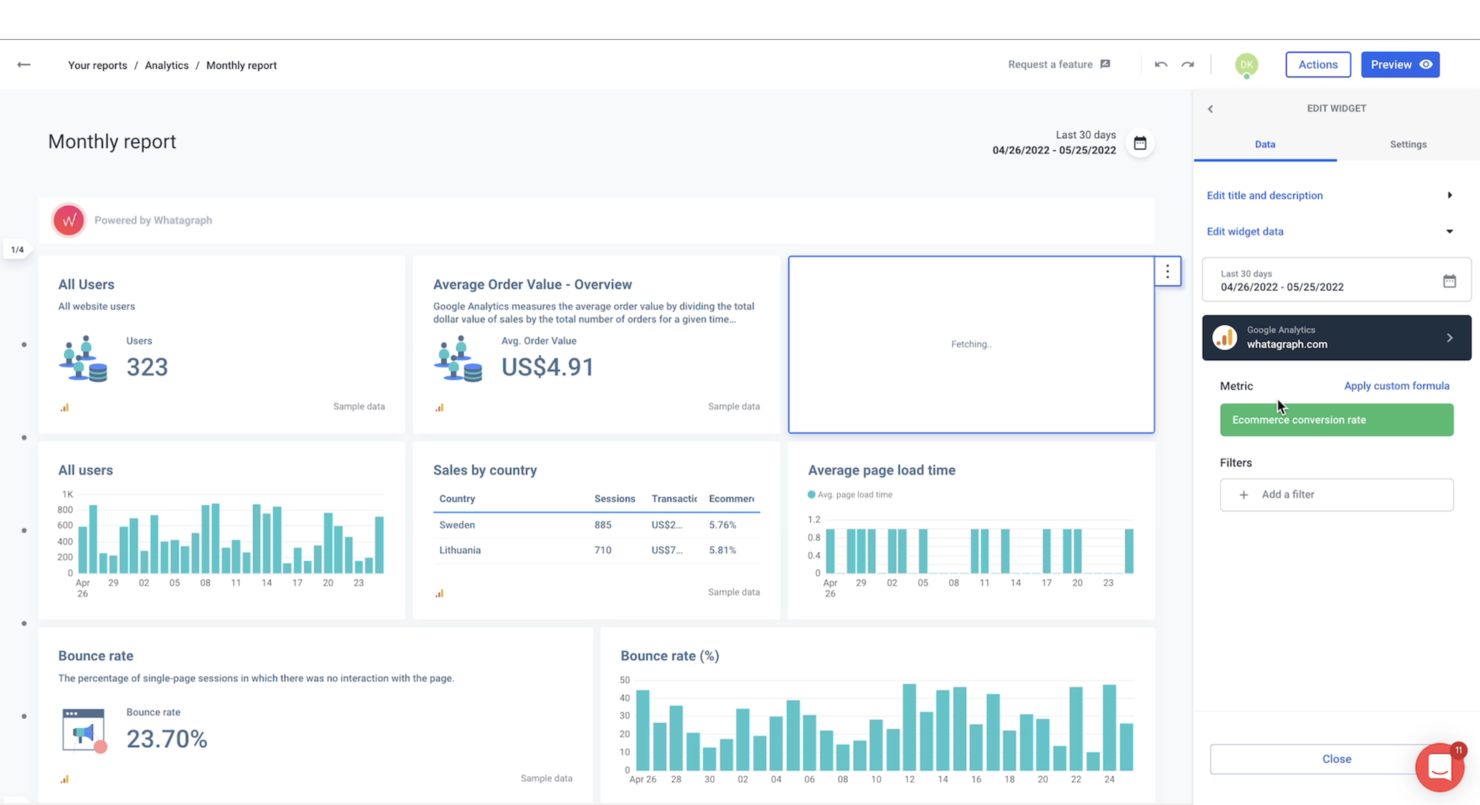
Whatagraph è uno strumento di reportistica per agenzie di marketing e team di marketing interni che ti aiuta a mostrare i dati giusti ai tuoi clienti in un modo che possano comprendere.
Con questo strumento, puoi creare report in pochi minuti grazie ai loro oltre 95 modelli e connettori a molteplici fonti di dati. Inoltre, puoi personalizzare questi report per il tuo cliente cambiando i colori e aggiungendo il loro logo.
Una volta che hai reso il report accattivante, Whatagraph ti permette di automatizzare la consegna dei report così che i tuoi clienti possano ricevere i rapporti settimanali, mensili o trimestrali, e tutto quello che devi fare è impostare l’intervallo di tempo! Niente più momenti del tipo '$!@, mi sono dimenticato di inviare il report'.
Whatagraph si integra con oltre 40 strumenti. Questi includono Facebook, Shopify, Mailchimp, Salesforce e Tik Tok Ads. Tutti possono essere utilizzati come fonti di dati per i tuoi report.
Whatagraph offre una prova gratuita di 7 giorni e i prezzi partono da $199 al mese, il che ti consente di utilizzare 25 fonti di dati e 5 utenti, senza limiti al numero di report.

Xero
Ideale per la gestione dei preventivi dei progetti, del tempo e dei dati finanziari
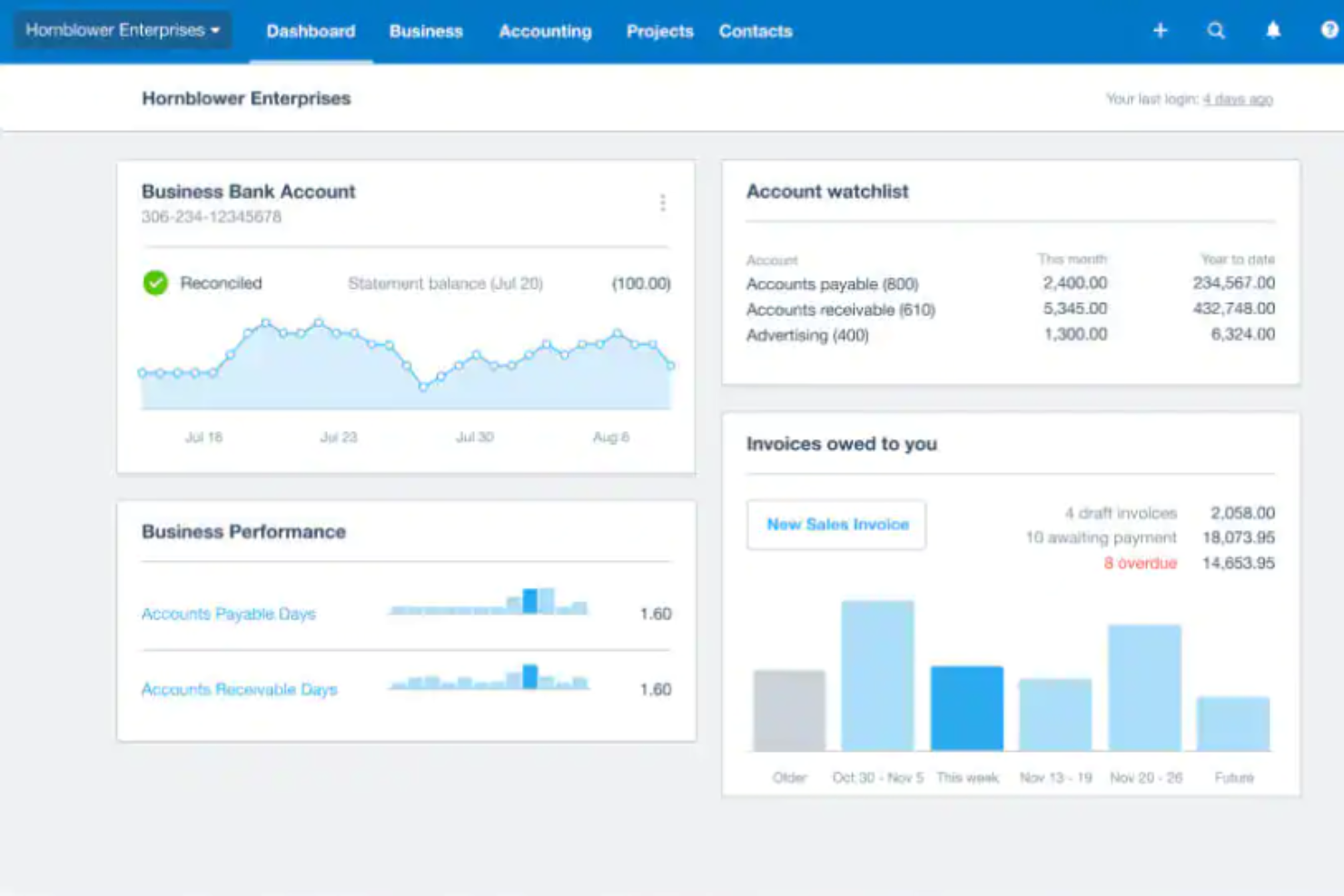
Xero è una piattaforma software di contabilità basata sul cloud, progettata per le piccole e medie imprese. Xero offre un'ampia gamma di funzionalità contabili per aiutare le aziende a gestire efficacemente le proprie finanze, rendendolo perfetto per i piccoli team che devono poter svolgere molte funzioni su un'unica piattaforma. Gli utenti possono automatizzare le attività ricorrenti, generare rendiconti finanziari e ottenere informazioni utili sulla salute finanziaria della propria azienda.
Xero integra inoltre funzionalità di categorizzazione intelligente nella gestione delle spese. Utilizza algoritmi di apprendimento automatico per categorizzare automaticamente le spese in base ai modelli precedenti, riducendo il tempo e l'impegno necessari per la categorizzazione manuale. Questa funzionalità migliora la precisione, fa risparmiare tempo prezioso e semplifica il processo di monitoraggio delle spese, lasciando ai piccoli team più tempo da dedicare a progetti di maggiore portata.
Xero si integra con strumenti come Stripe, Shopify, Square, Trello, HubSpot, Deputy, Float, Unleashed e WorkflowMax.
I prezzi partono da 17 $ al mese. È disponibile una prova gratuita.
Altri strumenti di reporting per dashboard
Ecco altri strumenti di reporting automatico che non sono entrati nella selezione principale. Se hai bisogno di ulteriori suggerimenti per uno strumento pratico per i report ad hoc, dai un’occhiata a questi.
- Jira
Il miglior strumento di reportistica per team agili
- Lucen
Ideale per report facili in PowerPoint
- Bonsai Agency Software
Ideale per la reportistica in tempo reale sulle performance delle agenzie
- Supermetrics
Miglior strumento di reporting per integrare oltre 150 fonti dati
- Adobe Customer Journey Analytics
Ideale per insight unificati e cross-canale sul cliente
- Google Data Studio
Ideale per condivisione e collaborazione
- Power BI for Office 365
La migliore piattaforma di reportistica per organizzazioni in crescita
- ThoughtSpot
Miglior strumento di reportistica per principianti
- Coefficient
Ideale per integrare Google Sheets ed Excel
- SegMetrics
Il miglior strumento di reportistica per team di marketing e vendita
- Octoboard
Miglior software di reportistica per la creazione automatica di report
- FanRuan Software
Miglior software di reportistica per aziende
- Rippling Spend
Ideale per la gestione dei report di spesa
- Celoxis
Miglior strumento di reporting per decisioni PPM basate sui dati
- Hive
Miglior strumento di reportistica con dashboard interattive
- Wrike
Ideale per la collaborazione sui report di progetto
- Signara
Ideale per report automatizzati senza analista


Come Valutiamo gli Strumenti di Reporting
Divido la mia valutazione tra i requisiti di base indispensabili—come l'aggregazione dei portafogli e i report programmati—e i fattori di differenziazione che separano i veri strumenti da PMO dai semplici dashboard.
Funzionalità Principali (Requisiti Fondamentali per Questo Elenco)
Quando seleziono gli strumenti per la mia lista, assegno a ciascuno un punteggio da 0 (non offre la funzionalità) a 5 (eccelle in quest'area) per ognuna delle funzionalità principali elencate di seguito. Poi, calcolo il punteggio totale dello strumento in percentuale. Ogni strumento deve raggiungere un punteggio minimo totale del 65% per essere preso in considerazione per l'inclusione.
- Dashboard di Progetto: Valuto se i dashboard mostrano lo stato di salute dei progetti in tempo reale con widget personalizzabili, come il burn rate, l’avanzamento delle milestone e il carico di lavoro del team in un’unica visuale.
- Modelli di Report Predefiniti: Una buona libreria di modelli fa risparmiare ore di configurazione, quindi cerco formati già pronti come report di stato, diagrammi di Gantt, burndown chart e riepiloghi di budget.
- Report a Livello di Portafoglio: Per i responsabili PMO che gestiscono decine di iniziative, verifico se lo strumento può aggregare i KPI di progetti e programmi in una visualizzazione consolidata per i dirigenti.
- Integrazioni Dati: La maggior parte dei team utilizza strumenti come Jira, Asana o Smartsheet, quindi valuto la presenza di connettori nativi, accesso API e la profondità della sincronizzazione dati supportata da ciascuna piattaforma.
- Programmazione Automatica dei Report: Cerco la possibilità di programmare l’invio ricorrente di report agli stakeholder via email o tramite link condivisibili, con controllo su frequenza e lista dei destinatari.
- Costruttore di Report Personalizzati: Il reporting migliore avviene quando puoi segmentare i dati come desideri, quindi verifico la presenza di filtri personalizzati, campi calcolati e funzionalità di approfondimento oltre alle viste preimpostate.
Una volta raccolto un elenco di strumenti che soddisfano i criteri, considero ciò che distingue ciascuna piattaforma.
Fattori di Differenziazione (Cosa Distingue i Fornitori)
Ecco come confronto e metto in contrasto i diversi fornitori:
Funzionalità Distintive
L’aggregazione dei dati tra strumenti diversi è fondamentale quando il portafoglio copre Jira, Asana e Smartsheet. Cerco strumenti che normalizzano i dati da più piattaforme in un unico report unificato. Le analisi basate su intelligenza artificiale aggiungono un ulteriore livello segnalando rischi o prevedendo ritardi prima che emergano in uno standup. Valuto anche i portali rivolti agli stakeholder dove dirigenti o clienti possono visualizzare report in tempo reale tramite accessi con permessi, invece di aspettare un PDF settimanale.
Oltre le Funzionalità
Verifico quanto velocemente un team può passare dall’attivazione al primo report. Alcuni strumenti offrono template PMO preconfigurati, mentre altri richiedono settimane di configurazione custom. Anche la compatibilità metodologica è importante—un team agile che monitora la velocità e il burndown degli sprint ha bisogno di impostazioni di reporting diverse rispetto a una squadra waterfall che misura il valore acquisito. Per i team che gestiscono dati finanziari o di clienti sensibili, valuto i controlli di accesso basati sui ruoli, il supporto SSO e le certificazioni di conformità come la SOC 2, fattori spesso decisivi per i PMO enterprise.
Come scegliere gli strumenti di reporting
È facile perdersi in lunghi elenchi di funzionalità e strutture tariffarie complesse. Per aiutarti a rimanere concentrato mentre affronti il tuo specifico processo di selezione del software, ecco una checklist dei fattori da tenere a mente:
| Fattore | Cosa considerare |
| Scalabilità | Assicurati che lo strumento possa crescere insieme alla tua attività. Cerca opzioni in grado di gestire volumi di dati e numeri di utenti crescenti senza rallentamenti. |
| Integrazioni | Verifica se lo strumento si integra perfettamente con i sistemi esistenti, come CRM, ERP o software per la gestione dei progetti. |
| Personalizzazione | Valuta quanto puoi adattare report, dashboard e metriche ai flussi di lavoro e ai KPI specifici del tuo team. |
| Semplicità d’uso | Cerca un’interfaccia intuitiva che permetta al tuo team di ottenere rapidamente informazioni utili senza una formazione approfondita o supporto tecnico. |
| Budget | Confronta le strutture tariffarie con il tuo budget. Fai attenzione ai costi nascosti, come gli addebiti aggiuntivi per un maggior numero di utenti, l’archiviazione dei dati o le funzionalità avanzate. |
| Misure di sicurezza | Verifica che lo strumento includa la crittografia, i controlli di accesso degli utenti e la conformità a normative come il GDPR per proteggere i dati sensibili. |
| Supporto | Valuta il livello di assistenza clienti disponibile, ad esempio il supporto 24 ore su 24, 7 giorni su 7, o account manager dedicati per la risoluzione dei problemi e la formazione. |
| Visualizzazione dei dati | Cerca opzioni di visualizzazione come grafici, diagrammi e dashboard che rendano i dati facili da interpretare e utilizzabili dal tuo team. |
Tendenze negli strumenti di reporting per 2026
Durante la mia ricerca, ho raccolto innumerevoli aggiornamenti sui prodotti, comunicati stampa e registri delle versioni di diversi fornitori di strumenti di reporting. Ecco alcune delle tendenze emergenti che sto tenendo d’occhio:
- Approfondimenti basati sull'IA: molte piattaforme ora utilizzano strumenti di reportistica basati sull'IA per analizzare i modelli dei dati e suggerire approfondimenti utili, facendo risparmiare tempo agli utenti e aiutandoli a prendere decisioni migliori. Ad esempio, alcuni strumenti segnalano anomalie nei report finanziari o consigliano quali metriche monitorare sulla base dei dati storici.
- Interrogazione in linguaggio naturale: ora gli utenti possono porre domande in linguaggio semplice per generare report. Questo rende la reportistica accessibile ai membri del team non tecnici. Ad esempio, un utente potrebbe digitare “Quali sono state le vendite dell'ultimo trimestre?” e ottenere immediatamente una risposta sotto forma di grafico.
- Analisi integrate: un numero crescente di strumenti offre analisi integrate, così le aziende possono integrare i report direttamente nel proprio software o nei portali dei clienti. Questa soluzione è utile per le aziende SaaS che forniscono analisi ai propri clienti.
- Funzionalità di narrazione dei dati: gli strumenti aggiungono funzionalità per trasformare i numeri grezzi in narrazioni con didascalie e punti salienti automatizzati. Questo aiuta i team a condividere i risultati in modo più efficace durante presentazioni o aggiornamenti.
- Miglioramenti alla privacy dei dati: i fornitori stanno sviluppando più controlli sulla privacy per rispettare normative più rigorose come il GDPR e il CCPA. Ad esempio, alcuni strumenti offrono ora l'anonimizzazione dei dati o limitano l'accesso alle metriche sensibili in base ai ruoli degli utenti.
Queste tendenze non si limitano alle piattaforme di reportistica indipendenti; molte stanno entrando anche in altre categorie di software. Ad esempio, il software di gestione visiva dei progetti integra sempre più funzionalità avanzate di reportistica, come cruscotti in tempo reale, approfondimenti generati dall'IA e visualizzazioni dei dati personalizzabili, per aiutare i team a monitorare le prestazioni dei progetti in modo più intuitivo.
Cosa sono gli strumenti di reportistica?
Gli strumenti di reportistica sono software che aiutano le aziende a raccogliere, elaborare e presentare i dati in un formato organizzato e comprensibile. Estraggono i dati da varie fonti, come database e fogli di calcolo, e li trasformano in report che mostrano tendenze, modelli e approfondimenti. Questi report possono essere presentati sotto forma di tabelle, grafici e cruscotti, rendendo i dati complessi più facili da comprendere a colpo d'occhio.
Il software di reportistica è prezioso per prendere decisioni, poiché fornisce ai responsabili e alle parti interessate le informazioni necessarie per comprendere le prestazioni, individuare le aree di miglioramento e pianificare le azioni future, favorendo strategie più consapevoli, operazioni più efficienti e risultati economici migliori.
Funzionalità
Quando selezioni gli strumenti di reportistica, presta attenzione alle seguenti funzionalità chiave:
- Cruscotti personalizzabili: consentono di organizzare e visualizzare i dati più pertinenti per il tuo team in un formato adatto al tuo flusso di lavoro. Per una personalizzazione coerente con il tuo marchio e con un ricorso minimo al codice, dai un'occhiata agli strumenti per cruscotti a marchio bianco.
- Reportistica in tempo reale: aggiorna automaticamente i report quando arrivano nuovi dati, aiutandoti a prendere decisioni sulla base delle informazioni più aggiornate.
- Opzioni di visualizzazione dei dati: forniscono grafici, diagrammi e mappe di calore per rendere i dati complessi più facili da interpretare e condividere con le parti interessate.
- Report programmati: consentono di automatizzare la generazione e la distribuzione dei report, facendo risparmiare tempo e garantendo aggiornamenti coerenti per il team.
- Controlli di accesso basati sui ruoli: limitano l'accesso ai report o ai dati sensibili in base ai ruoli degli utenti, migliorando sicurezza e conformità.
- Funzionalità di analisi dettagliata: consentono di fare clic su metriche specifiche per ottenere approfondimenti più dettagliati, aiutandoti a comprendere cosa determina i numeri.
- Integrazione con più fonti: combina i dati provenienti da diverse piattaforme e strumenti in un unico report, offrendo una visione più completa.
- Opzioni di esportazione: consentono di esportare i report in diversi formati, come PDF, Excel o CSV, per facilitarne la condivisione e l'ulteriore analisi.
- Strumenti di analisi delle tendenze: evidenziano i modelli presenti nei dati nel corso del tempo, aiutandoti a prevedere i risultati futuri e a pianificare di conseguenza.
- Strumenti di annotazione: consentono agli utenti di aggiungere commenti o note direttamente sui report per migliorare la collaborazione e la condivisione del contesto.
Vantaggi
L'implementazione di strumenti di reportistica offre diversi vantaggi al tuo team e alla tua azienda. Ecco alcuni dei risultati che puoi aspettarti:
- Miglioramento del processo decisionale: Fornisce al tuo team informazioni in tempo reale e visualizzazioni chiare su cui basare le decisioni utilizzando dati accurati e aggiornati.
- Risparmio di tempo: Automatizza la generazione dei report e gli aggiornamenti dei dati, liberando tempo per altre attività importanti.
- Collaborazione migliore: Consente ai team di condividere dashboard e aggiungere commenti direttamente ai report, facilitando l'allineamento sui dati chiave.
- Maggiore accuratezza dei dati: Riduce gli errori di inserimento e calcolo manuale dei dati recuperando le informazioni direttamente dai sistemi integrati.
- Maggiore responsabilizzazione: Tiene traccia degli indicatori chiave di prestazione e assegna le responsabilità utilizzando metriche facili da monitorare e riportare.
- Identificazione più rapida delle tendenze: Analizza i modelli nei tuoi dati per aiutarti a individuare tempestivamente opportunità e criticità.
- Reportistica scalabile: Si adatta alle tue esigenze in crescita, consentendoti di gestire set di dati più ampi e analisi più complesse nel tempo.
Costi e prezzi
La scelta degli strumenti di reportistica richiede la comprensione dei vari modelli di prezzo e dei piani disponibili. I costi variano in base alle funzionalità, alle dimensioni del team, ai componenti aggiuntivi e ad altri fattori. La tabella seguente riassume i piani comuni, i relativi prezzi medi e le funzionalità tipicamente incluse nelle soluzioni di reportistica:
Tabella di confronto dei piani per gli strumenti di reportistica
| Tipo di piano | Prezzo medio | Funzionalità comuni |
| Piano gratuito | $0 | Reportistica di base, dashboard limitate, esportazione dei dati in CSV e accesso per un singolo utente. |
| Piano personale | $5-$25/utente/mese | Dashboard avanzate, modelli personalizzabili, report via email e assistenza prioritaria. |
| Piano aziendale | $30-$75/utente/mese | Accesso per più utenti, autorizzazioni basate sui ruoli, integrazioni con strumenti diffusi e analisi delle tendenze. |
| Piano per grandi aziende | $100+/utente/mese | Utenti illimitati, analisi avanzate, accesso API, personalizzazione del marchio e assistenza dedicata. |
Domande frequenti
Trova le risposte alle domande più comuni che altre persone pongono su questo argomento.
Quali sono i tipi di strumenti di reporting?
\u003c!– wp:paragraph –\u003e\r\n\r\nEsistono molti tipi di strumenti di reporting, come i \u003ca href=\u0022https://thedigitalprojectmanager.com/tools/project-dashboard-software/\u0022 rel=\u0022nofollow\u0022\u003esoftware per cruscotti\u003c/a\u003e, i software di visualizzazione dei dati, gli strumenti per le schede di valutazione e i generatori di report ad hoc.\r\n\r\n\u003c!– /wp:paragraph –\u003e \u003c!– wp:paragraph –\u003e\r\n\r\nIl software per cruscotti consente di mettere in primo piano i report più importanti per te. Il software di visualizzazione dei dati trasforma i dati in qualcosa di visivo che gli utenti possono leggere facilmente.\r\n\r\n\u003c!– /wp:paragraph –\u003e \u003c!– wp:paragraph –\u003e\r\n\r\nGli strumenti per le schede di valutazione, invece, riguardano soprattutto i dati sulle prestazioni. In questo modo puoi sapere chi sono i tuoi collaboratori con le prestazioni migliori. Infine, i generatori di report ad hoc creano diversi stili di report immediati per le aziende con esigenze in continua evoluzione.\r\n\r\n\u003c!– /wp:paragraph –\u003e
Che cos'è il software di intelligence aziendale?
\u003cp class=\u0022p1\u0022\u003eIl software di BI è uno strumento fondamentale per raccogliere dati grezzi, analizzarli e presentarli in modo intuitivo, così da supportare decisioni informate. Il software di BI aggrega ed elabora i dati provenienti da diverse fonti, offrendo ai responsabili di progetto una visione completa e coerente delle prestazioni dei progetti. Consente loro di identificare le tendenze, monitorare gli indicatori chiave di prestazione (KPI) e prendere decisioni basate sui dati che contribuiscono alla corretta esecuzione dei progetti.\u003c/p\u003e\r\n\u0026nbsp;
Al momento non stai cercando un software per i report?
\u003c!– wp:paragraph –\u003e\r\n\u003cp id=\u0022criteria-reporting-tools\u0022\u003eDai un’occhiata agli altri elenchi di strumenti per la gestione dei progetti che potrebbero esserti utili:\u003c/p\u003e\r\n\u003c!– /wp:paragraph –\u003e\r\n\u003cul\u003e\r\n \t\u003cli\u003eDai un’occhiata agli \u003ca href=\u0022https://thedigitalprojectmanager.com/tools/ppm-tools/\u0022 rel=\u0022nofollow\u0022\u003estrumenti per la gestione del portafoglio progetti\u003c/a\u003e. Possono aiutarti a realizzare e comunicare i tuoi report a un livello superiore e tra più progetti.\u003c/li\u003e\r\n \t\u003cli\u003eComunicazione, comunicazione, comunicazione. Se non hai perfezionato questo aspetto, non puoi davvero iniziare nient’altro. Prova questi \u003ca href=\u0022https://thedigitalprojectmanager.com/best-communication-tools/\u0022 rel=\u0022nofollow\u0022\u003e10 migliori strumenti e software per la comunicazione\u003c/a\u003e.\u003c/li\u003e\r\n \t\u003cli\u003eTrova uno strumento per il reporting dei progetti all’interno di altri software, come nel mio elenco dei migliori software per la gestione dei progetti di marketing.\u003c/li\u003e\r\n\u003c/ul\u003e